EP3425889A1 - Dispositif terminal et procédé de commande correspondant - Google Patents
Dispositif terminal et procédé de commande correspondant Download PDFInfo
- Publication number
- EP3425889A1 EP3425889A1 EP16897224.8A EP16897224A EP3425889A1 EP 3425889 A1 EP3425889 A1 EP 3425889A1 EP 16897224 A EP16897224 A EP 16897224A EP 3425889 A1 EP3425889 A1 EP 3425889A1
- Authority
- EP
- European Patent Office
- Prior art keywords
- user
- input
- command
- terminal apparatus
- display
- Prior art date
- Legal status (The legal status is an assumption and is not a legal conclusion. Google has not performed a legal analysis and makes no representation as to the accuracy of the status listed.)
- Ceased
Links
Images






Classifications
-
- H—ELECTRICITY
- H04—ELECTRIC COMMUNICATION TECHNIQUE
- H04L—TRANSMISSION OF DIGITAL INFORMATION, e.g. TELEGRAPHIC COMMUNICATION
- H04L12/00—Data switching networks
- H04L12/28—Data switching networks characterised by path configuration, e.g. LAN [Local Area Networks] or WAN [Wide Area Networks]
- H04L12/2803—Home automation networks
- H04L12/2816—Controlling appliance services of a home automation network by calling their functionalities
- H04L12/2818—Controlling appliance services of a home automation network by calling their functionalities from a device located outside both the home and the home network
-
- H—ELECTRICITY
- H04—ELECTRIC COMMUNICATION TECHNIQUE
- H04L—TRANSMISSION OF DIGITAL INFORMATION, e.g. TELEGRAPHIC COMMUNICATION
- H04L51/00—User-to-user messaging in packet-switching networks, transmitted according to store-and-forward or real-time protocols, e.g. e-mail
- H04L51/07—User-to-user messaging in packet-switching networks, transmitted according to store-and-forward or real-time protocols, e.g. e-mail characterised by the inclusion of specific contents
- H04L51/18—Commands or executable codes
-
- H—ELECTRICITY
- H04—ELECTRIC COMMUNICATION TECHNIQUE
- H04M—TELEPHONIC COMMUNICATION
- H04M1/00—Substation equipment, e.g. for use by subscribers
- H04M1/72—Mobile telephones; Cordless telephones, i.e. devices for establishing wireless links to base stations without route selection
- H04M1/724—User interfaces specially adapted for cordless or mobile telephones
- H04M1/72403—User interfaces specially adapted for cordless or mobile telephones with means for local support of applications that increase the functionality
- H04M1/72409—User interfaces specially adapted for cordless or mobile telephones with means for local support of applications that increase the functionality by interfacing with external accessories
- H04M1/72415—User interfaces specially adapted for cordless or mobile telephones with means for local support of applications that increase the functionality by interfacing with external accessories for remote control of appliances
-
- G—PHYSICS
- G06—COMPUTING OR CALCULATING; COUNTING
- G06F—ELECTRIC DIGITAL DATA PROCESSING
- G06F3/00—Input arrangements for transferring data to be processed into a form capable of being handled by the computer; Output arrangements for transferring data from processing unit to output unit, e.g. interface arrangements
- G06F3/01—Input arrangements or combined input and output arrangements for interaction between user and computer
- G06F3/048—Interaction techniques based on graphical user interfaces [GUI]
- G06F3/0481—Interaction techniques based on graphical user interfaces [GUI] based on specific properties of the displayed interaction object or a metaphor-based environment, e.g. interaction with desktop elements like windows or icons, or assisted by a cursor's changing behaviour or appearance
-
- G—PHYSICS
- G06—COMPUTING OR CALCULATING; COUNTING
- G06F—ELECTRIC DIGITAL DATA PROCESSING
- G06F3/00—Input arrangements for transferring data to be processed into a form capable of being handled by the computer; Output arrangements for transferring data from processing unit to output unit, e.g. interface arrangements
- G06F3/01—Input arrangements or combined input and output arrangements for interaction between user and computer
- G06F3/048—Interaction techniques based on graphical user interfaces [GUI]
- G06F3/0481—Interaction techniques based on graphical user interfaces [GUI] based on specific properties of the displayed interaction object or a metaphor-based environment, e.g. interaction with desktop elements like windows or icons, or assisted by a cursor's changing behaviour or appearance
- G06F3/04817—Interaction techniques based on graphical user interfaces [GUI] based on specific properties of the displayed interaction object or a metaphor-based environment, e.g. interaction with desktop elements like windows or icons, or assisted by a cursor's changing behaviour or appearance using icons
-
- G—PHYSICS
- G06—COMPUTING OR CALCULATING; COUNTING
- G06F—ELECTRIC DIGITAL DATA PROCESSING
- G06F3/00—Input arrangements for transferring data to be processed into a form capable of being handled by the computer; Output arrangements for transferring data from processing unit to output unit, e.g. interface arrangements
- G06F3/01—Input arrangements or combined input and output arrangements for interaction between user and computer
- G06F3/048—Interaction techniques based on graphical user interfaces [GUI]
- G06F3/0487—Interaction techniques based on graphical user interfaces [GUI] using specific features provided by the input device, e.g. functions controlled by the rotation of a mouse with dual sensing arrangements, or of the nature of the input device, e.g. tap gestures based on pressure sensed by a digitiser
- G06F3/0488—Interaction techniques based on graphical user interfaces [GUI] using specific features provided by the input device, e.g. functions controlled by the rotation of a mouse with dual sensing arrangements, or of the nature of the input device, e.g. tap gestures based on pressure sensed by a digitiser using a touch-screen or digitiser, e.g. input of commands through traced gestures
-
- G—PHYSICS
- G06—COMPUTING OR CALCULATING; COUNTING
- G06F—ELECTRIC DIGITAL DATA PROCESSING
- G06F3/00—Input arrangements for transferring data to be processed into a form capable of being handled by the computer; Output arrangements for transferring data from processing unit to output unit, e.g. interface arrangements
- G06F3/16—Sound input; Sound output
-
- G—PHYSICS
- G08—SIGNALLING
- G08C—TRANSMISSION SYSTEMS FOR MEASURED VALUES, CONTROL OR SIMILAR SIGNALS
- G08C17/00—Arrangements for transmitting signals characterised by the use of a wireless electrical link
- G08C17/02—Arrangements for transmitting signals characterised by the use of a wireless electrical link using a radio link
-
- H—ELECTRICITY
- H04—ELECTRIC COMMUNICATION TECHNIQUE
- H04L—TRANSMISSION OF DIGITAL INFORMATION, e.g. TELEGRAPHIC COMMUNICATION
- H04L12/00—Data switching networks
- H04L12/28—Data switching networks characterised by path configuration, e.g. LAN [Local Area Networks] or WAN [Wide Area Networks]
- H04L12/2803—Home automation networks
- H04L12/283—Processing of data at an internetworking point of a home automation network
- H04L12/2834—Switching of information between an external network and a home network
-
- H—ELECTRICITY
- H04—ELECTRIC COMMUNICATION TECHNIQUE
- H04L—TRANSMISSION OF DIGITAL INFORMATION, e.g. TELEGRAPHIC COMMUNICATION
- H04L41/00—Arrangements for maintenance, administration or management of data switching networks, e.g. of packet switching networks
- H04L41/22—Arrangements for maintenance, administration or management of data switching networks, e.g. of packet switching networks comprising specially adapted graphical user interfaces [GUI]
-
- H—ELECTRICITY
- H04—ELECTRIC COMMUNICATION TECHNIQUE
- H04M—TELEPHONIC COMMUNICATION
- H04M1/00—Substation equipment, e.g. for use by subscribers
- H04M1/72—Mobile telephones; Cordless telephones, i.e. devices for establishing wireless links to base stations without route selection
- H04M1/725—Cordless telephones
-
- G—PHYSICS
- G08—SIGNALLING
- G08C—TRANSMISSION SYSTEMS FOR MEASURED VALUES, CONTROL OR SIMILAR SIGNALS
- G08C2201/00—Transmission systems of control signals via wireless link
- G08C2201/40—Remote control systems using repeaters, converters, gateways
- G08C2201/42—Transmitting or receiving remote control signals via a network
-
- G—PHYSICS
- G08—SIGNALLING
- G08C—TRANSMISSION SYSTEMS FOR MEASURED VALUES, CONTROL OR SIMILAR SIGNALS
- G08C2201/00—Transmission systems of control signals via wireless link
- G08C2201/90—Additional features
- G08C2201/93—Remote control using other portable devices, e.g. mobile phone, PDA, laptop
-
- G—PHYSICS
- G16—INFORMATION AND COMMUNICATION TECHNOLOGY [ICT] SPECIALLY ADAPTED FOR SPECIFIC APPLICATION FIELDS
- G16Y—INFORMATION AND COMMUNICATION TECHNOLOGY SPECIALLY ADAPTED FOR THE INTERNET OF THINGS [IoT]
- G16Y10/00—Economic sectors
- G16Y10/75—Information technology; Communication
-
- G—PHYSICS
- G16—INFORMATION AND COMMUNICATION TECHNOLOGY [ICT] SPECIALLY ADAPTED FOR SPECIFIC APPLICATION FIELDS
- G16Y—INFORMATION AND COMMUNICATION TECHNOLOGY SPECIALLY ADAPTED FOR THE INTERNET OF THINGS [IoT]
- G16Y40/00—IoT characterised by the purpose of the information processing
- G16Y40/30—Control
-
- H—ELECTRICITY
- H04—ELECTRIC COMMUNICATION TECHNIQUE
- H04L—TRANSMISSION OF DIGITAL INFORMATION, e.g. TELEGRAPHIC COMMUNICATION
- H04L51/00—User-to-user messaging in packet-switching networks, transmitted according to store-and-forward or real-time protocols, e.g. e-mail
- H04L51/07—User-to-user messaging in packet-switching networks, transmitted according to store-and-forward or real-time protocols, e.g. e-mail characterised by the inclusion of specific contents
- H04L51/10—Multimedia information
-
- H—ELECTRICITY
- H04—ELECTRIC COMMUNICATION TECHNIQUE
- H04M—TELEPHONIC COMMUNICATION
- H04M2201/00—Electronic components, circuits, software, systems or apparatus used in telephone systems
- H04M2201/34—Microprocessors
-
- H—ELECTRICITY
- H04—ELECTRIC COMMUNICATION TECHNIQUE
- H04M—TELEPHONIC COMMUNICATION
- H04M2201/00—Electronic components, circuits, software, systems or apparatus used in telephone systems
- H04M2201/38—Displays
-
- H—ELECTRICITY
- H04—ELECTRIC COMMUNICATION TECHNIQUE
- H04M—TELEPHONIC COMMUNICATION
- H04M2250/00—Details of telephonic subscriber devices
- H04M2250/06—Details of telephonic subscriber devices including a wireless LAN interface
Definitions
- the present invention relates to a terminal apparatus and a controlling method thereof, and more particularly to a terminal apparatus and a controlling method thereof, which controls an operation of a device in response to a command corresponding to a user's input to the terminal apparatus.
- various terminal apparatuses such as a smart phone, a smart pad (tablet), a personal digital assistant (PDA), etc. has been widely used.
- PDA personal digital assistant
- IoT Internet of things
- devices such as home appliances and electronic devices are connected via a network to share information.
- IoT-based services of controlling operations of devices in home are in demand, and there is a need of a means for helping a user in more easily controlling the devices.
- a terminal apparatus includes a communicator configured to communicate with at least one device through a hub device; a display configured to display an image; a user input receiver configured to receive a user's input; and at least one processor configured to control the display to display a dialog box where the hub device or the at least one device is set as a counterpart in response to execution of a messenger program, control the communicator to transmit a control signal including a command for controlling a predetermined device to the device targeted for control through the hub device so that the device targeted for control operates in response to the command corresponding to a user's input when the user's input corresponding to the command is received in the displayed dialog box through the user input receiver, and control the display to display a message corresponding to the transmitted command in the dialog box.
- the messenger program is used to control an operation of a household device in home, which operates as an IoT device, and it is possible to provide convenience to a user.
- the dialog box may display a plurality of selectable icons corresponding to commands for controlling the at least one device, and the processor may transmit a control signal including a command corresponding to a selected icon in response to a user's input for selecting at least one among the plurality of icons.
- the plurality of icons may be displayed in response to selection of an Internet of things (IoT) tab provided in an input area of the dialog box, and the IoT tab is included in a keypad displayed for a user's input in the input area.
- IoT Internet of things
- the IoT tab may be activated in response to a user's input for registering the hub device or the at least one device as the counterpart.
- user convenience is improved since the IoT service is automatically provided when the device is registered as the counterpart.
- the processor may automatically register the hub device or the at least one device as the counterpart in the messenger program, or control the display to display the hub device or the at least one device in a counterpart recommendation list.
- a user is free from a wasteful process of retrieving the counterpart.
- At least one among the plurality of icons may correspond to a predetermined device targeted for control, and the user input receiver may receive a first input of a user for selecting one among the plurality of icons, and a second input of a user corresponding to a command for controlling a device corresponding to the selected icon.
- the kind of commands to be issued is not limited to the icon, and it is possible to receive various inputs of a user.
- the second input of a user may include at least one of a text, a drawing, and a voice uttered by a user.
- a user can issue a command without restriction through his/her own convenient user input manner.
- the user input receiver may further receive a third input of a user for generating a group including a plurality of devices, and the processor may control the communicator to transmit a control signal including a command to the plurality of devices through the hub device so that the plurality of devices included in the group operates in response to the command input by a user.
- the processor may control the communicator to transmit a control signal including a command to the plurality of devices through the hub device so that the plurality of devices included in the group operates in response to the command input by a user.
- the control signal including the command may be transmitted to the hub device via a communication network or mobile communication network of a service provider of the messenger program.
- a user can easily issue a command at an outside beyond a range of a local area network provided by a home network.
- a terminal apparatus includes a communicator configured to communicate with an outside; a user input receiver configured to receive a user's input; and at least one processor configured to control the communicator to transmit and receive a message to and fro another terminal apparatus of a messenger counterpart in response to a user's input using a first user interface displayed by executing a messenger program, control the display to display a second user interface where a hub device or at least one device is set as a counterpart in response to execution of the messenger program by a user's input, and control the communicator to transmit a command to a device targeted for control through the hub device in response to a user's input using the second user interface.
- the messenger program is used to control an operation of a household device in home, which operates as an IoT device, and it is possible to provide convenience to a user.
- the second user interface may include a dialog box displaying a plurality of selectable icons corresponding to commands for controlling the at least one device, and the processor may transmit a command corresponding to a selected icon in response to a user's input for selecting at least one among the plurality of icons.
- At least one among the plurality of icons may correspond to a predetermined device targeted for control, and the user input receiver may receive a first input of a user for selecting one among the plurality of icons, and a second input of a user corresponding to a command for controlling a device corresponding to the selected icon.
- the kind of commands to be issued is not limited to the icon, and it is possible to receive various inputs of a user.
- a controlling method of a terminal apparatus includes displaying a dialog box where a hub device or at least one device is set as a counterpart in response to execution of a messenger program; receiving a user's input corresponding to a command for controlling a predetermined device in the displayed dialog box; transmitting a control signal including the command to a device targeted for control through the hub device so that the device targeted for control operates in response to the command corresponding to the user's input; and displaying a message corresponding to the transmitted command in the dialog box.
- the messenger program is used to control an operation of a household device in home, which operates as an IoT device, and it is possible to provide convenience to a user.
- the dialog box may display a plurality of selectable icons corresponding to commands for controlling the at least one device, and the receiving of the user's input may include receiving a user's input for selecting one among the plurality of icons, and the transmitting of the control signal may include transmitting a control signal including a command corresponding to the selected icon.
- the method may further include displaying the plurality of icons in response to selection of an IoT tab provided in an input area of the dialog box.
- the keypad including the icon corresponding to the command is provided in itself even though a user does not separately install a separate program.
- the method may further include activating the IoT tab in response to a user's input for registering the hub device or the at least one device as the counterpart.
- the method may further include automatically registering the hub device or the at least one device as the counterpart in the messenger program, or displaying the hub device or the at least one device in a counterpart recommendation list.
- At least one among the plurality of icons may correspond to a predetermined device targeted for control, and the receiving of the user's input may include: receiving a first input of a user for selecting at least one among the plurality of icons; and receiving a second input of a user corresponding to a command for controlling a device corresponding to the selected icon.
- the kind of commands to be issued is not limited to the icon, and it is possible to receive various inputs of a user.
- the second input of a user may include at least one of a text, a drawing, and a voice uttered by a user.
- a user can issue a command without restriction through his/her own convenient user input manner.
- the method may further include receiving a third input of a user for generating a group including a plurality of devices, wherein the transmitting of the control signal includes transmitting a control signal including a command to the plurality of devices through the hub device so that the plurality of devices included in the group operates in response to the command input by a user.
- the transmitting of the control signal includes transmitting a control signal including a command to the plurality of devices through the hub device so that the plurality of devices included in the group operates in response to the command input by a user.
- a program of providing a messenger service is used to issue a command for controlling an operation of a device operating as an IoT device in home, and it is more convenient for a user to use an IoT service.
- dialog box provides icons that make it easy to visually identify the kinds of command, so that a user can readily issue a desired command without making a complicated input for the command.
- a hub device or a device targeted for control is registered as a counterpart, and the IoT service is available by a simple method of inputting a message to the registered counterpart, thereby more easily extending the service.
- a command input is made in units of a group in the dialog box, and it is thus possible to transmit a command to a plurality of devices at a time without individually and repetitively making the command inputs corresponding to the devices.
- a “portion” set forth herein refers to software or hardware such as a field-programmable gate array (FPGA) or an application-specific integrated circuit (ASIC), and performs certain roles. However, the meaning of the "portion” is not limited to software or hardware.
- the "portion” may be configured to be present in a storage medium for addressing or may be configured to reproduce one or more processors.
- the "portion” includes software elements, object-oriented software elements, class elements, task elements and the like elements, and processes, functions, attributes, procedures, subroutines, segments of a program code, drivers, firmware, a microcode, a circuit, data, a database, data structures, tables, arrays and variables.
- the function provided in the elements and the "portions" may be carried out by combining fewer elements and "portions" or may be subdivided by additional elements and "portions”.
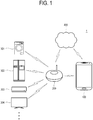
- FIG. 1 illustrates an example of a home network system 1 according to one embodiment of the present invention
- a home network system (or a home automation system) 1 includes a terminal apparatus 100, a hub device 200 and at least one device 301, 302, 303 and 304 targeted for control.
- the home network system 1 may further include a server 400 that provides data related to a messenger service.
- the terminal apparatus 100 communicates with at least one device 301, 302, 303 and 304 through the hub device 200. Specifically, the terminal apparatus 100 transmits a control signal for controlling operations of at least one device 301, 302, 303 and 304 to the hub device 200, and the control signal is transmitted to the device targeted for control through the hub device 200.
- the terminal apparatus 100 may be materialized by various mobile digital apparatuses such as a smart phone shown in FIG. 1 , a tablet computer or the like smart pad, a personal digital assistant (PDA), etc.
- mobile digital apparatuses such as a smart phone shown in FIG. 1 , a tablet computer or the like smart pad, a personal digital assistant (PDA), etc.
- PDA personal digital assistant
- the terminal apparatus 100 may be a smart watch, a smart band or the like wearable apparatus (hereinafter, referred to as a digital accessories, smart accessories, or Appcessory) which can be worn on a user's body part.
- a smart watch a smart band or the like wearable apparatus
- Appcessory a wearable apparatus which can be worn on a user's body part.
- the terminal apparatus 100 is not limited to a mobile portable apparatus. According to one embodiment, the terminal apparatus 100 may be materialized by a laptop or desktop computer, or a smart TV.
- the terminal apparatus 100 is provided with at least one program for providing a messenger service, i.e. a messenger application or a chat application.
- the messenger program includes various programs that are used by many users, for example, Kakao Talk, Line, Google Talk, Skype, WhatsApp, etc.
- a user uses the messenger program installed in the terminal apparatus 100 to have a talk with, i.e. communicate with the other party (or another user) such as a family member, a friend, a colleague, etc., i.e. a user of another terminal apparatus by sending and receiving a message (a message exchange).
- a user may add the other party as a counterpart of a messenger program, based on account information for identifying another user, for example, a phone number, an E-mail address, user identification (ID) used in a predetermined community, etc.
- a user makes an input for transmitting a control signal including a command for controlling an operation of a predetermined device (i.e. at least one of 301, 302, 303 and 304) to a hub device 200 through the installed messenger program, and the transmitted control signal is sent to the device (i.e. at least one of 301, 302, 303 and 304) through the hub device 200.
- a predetermined device i.e. at least one of 301, 302, 303 and 304
- the transmitted control signal is sent to the device (i.e. at least one of 301, 302, 303 and 304) through the hub device 200.
- a dialog box or a dialog window displayed for communication with a user of another terminal apparatus in a state that the messenger program is running in the terminal apparatus 100 will be defined as a first user interface (UI), and a dialog box displayed for inputting a command for controlling a predetermined device 301, 302, 303 or 304 through the hub device 200 will be defined as second UI.
- UI user interface
- the messenger program may be distributed by a messenger service provider such as a manufacturer of the terminal apparatus 100, a telecommunication company, and a portal site, as it is embedded during a manufacturing stage of the terminal apparatus 100, or downloaded from the App store or the like market server to the terminal apparatus 100 and installed.
- a messenger service provider such as a manufacturer of the terminal apparatus 100, a telecommunication company, and a portal site, as it is embedded during a manufacturing stage of the terminal apparatus 100, or downloaded from the App store or the like market server to the terminal apparatus 100 and installed.
- the messenger program may include a program installed in the terminal apparatus 100 during the manufacturing stage and providing a short message service (SMS).
- SMS short message service
- a plurality of messenger programs may be installed in the terminal apparatus 100 according to one embodiment of the present invention.
- the hub device 200 is provided to relay communication between the terminal apparatus 100 and the devices 301, 302, 303 and 304 targeted for control.
- the hub device 200 has an access to a home network and a public communication network, and includes aggregated network equipment serving as a gateway, a router or a sharer, to which an address is assigned. Further, the hub device 200 includes its own processor and memory, and is provided to enable protocol conversion or bandwidth conversion.
- the hub device 200 receives a control signal including a command for controlling at least one device 301, 302, 303 and 304 from the terminal apparatus 100, and transmits the received control signal to the device targeted for control.
- the hub device 200 may download data (e.g. an icon corresponding to the command) for controlling the operations of the devices 301, 302, 303 and 304 from the server 400 provided for a messenger service and provide the data to the terminal apparatus 100.
- data e.g. an icon corresponding to the command
- At least one device 301, 302, 303 or 304 performs a controlling operation corresponding to the command included in the control signal received through the hub device 200.
- the devices 301, 302, 303 and 304 include various electronic devices connectable by the home network system 1, for example, a washing machine, a refrigerator, an air conditioner, a TV, and the like home appliances. Further, the devices 301, 302, 303 and 304 may include various kinds of electronic devices provided as things or smart things, which operate based on IoT technology, such as health care, remote metering, a smart home, a smart car, etc. The devices 301, 302, 303 and 304 may include sensors for sensing surrounding environments to perform their own operations.
- the server 400 may operate by a service provider that provides the messenger program, and include a cloud server. According to one embodiment, the server 400 may provide information about the devices 301, 302, 303 and 304 controllable by the terminal apparatus 100, and information about commands for controlling the device 301, 302, 303 and 304 to the terminal apparatus 100 through the hub device 200.
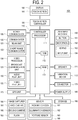
- FIG. 2 is a block diagram of a terminal apparatus 100 according to one embodiment of the present invention.
- the terminal apparatus 100 wirelessly connects with other devices including the hub device 200 through a communicator 130 (to be described later), and transmits/receives a control signal.
- the terminal apparatus 100 is defined as an apparatus having a touch screen 141 and transmitting/receiving data through the communicator 130.
- a user input receiver 150 may be defined to include a physical button 151, a keypad displayed on the touch screen 141, and a separate input device (e.g. a pointing device) in which a user's touch input can be made.
- the user input receiver 150 may receive a touch made by a user's body part (e.g. a finger) onto the touch screen 141.
- the user input receiver 150 transmits various preset control commands or information to the controller 110 in response to a user's input including a touch input.
- the terminal apparatus 100 includes a display 140 including the touch screen 141, and a touch screen controller 145.
- the terminal apparatus 100 includes the controller 110, the communicator 120, an image processor 130, the display 140, the user input receiver 150, a sensor 160, an image capturer 180, a storage 190, and a power supply 195.
- the communicator 120 includes at least one of a wireless local area network (WLAN) unit 121 and a short range communicator 122
- the image processor 130 includes at least one of a broadcast communication unit 131, an audio play unit 132, and a video play unit 133.
- the user input receiver 150 includes at least one of a button 151, a microphone 152, a keypad 153, and an input device 154.
- the sensor 160 includes at least one of a proximity sensor 161, an illumination sensor 162, and a posture sensor 163.
- the image capturer 180 includes at least one of a first camera 181 and the second camera 182.
- the terminal apparatus 100 may further include at least one of a mobile communicator 125, a loudspeaker 171, a vibration motor 172, a GPS unit 173, and a connector 175.
- the controller 110 may include at least one processor 111, a read only memory (ROM) 112 in which a control program for controlling the terminal apparatus 100 is stored, and a random access memory (RAM) 113 in which a signal or data received from the outside of the terminal apparatus 100 is stored or various jobs implemented in the terminal apparatus 100 are stored.
- ROM read only memory
- RAM random access memory
- the controller 110 controls general operations of the terminal apparatus 100 and signal flow between the internal elements 120 to 195 of the terminal apparatus 100, and implements a function of processing data.
- the controller 110 controls the power supply 195 to supply electric power to the internal elements 120 to 190. Further, when a user makes an input or when a previously set and stored condition is satisfied, the controller 110 may execute an operating system (OS) and various programs/applications/software stored in the storage 190.
- OS operating system
- the processor 111 includes at least one general-purpose processor such as a central processing unit (CPU), an application processor (AP), and a microcomputer (MICOM), and loads and executes a program corresponding to a predetermined algorithm from the ROM 112 to the RAM 113, thereby implementing various operations of the terminal apparatus 100.
- general-purpose processor such as a central processing unit (CPU), an application processor (AP), and a microcomputer (MICOM), and loads and executes a program corresponding to a predetermined algorithm from the ROM 112 to the RAM 113, thereby implementing various operations of the terminal apparatus 100.
- the processor 111 may include a single core, a dual core, a triple core, a quad core, or other multiple cores.
- the processor may include a plurality of processors, for example, a main processor and a sub processor.
- the sub processor is provided to operate in a standby mode (or a sleep mode) where the terminal apparatus 100 receives only standby power and remains idle.
- the processor 111, the ROM 112, and the RAM 113 may connect with one another through an internal bus.
- the processor 111 may include a graphic processing unit (GPU, not shown) for processing graphics.
- GPU graphic processing unit
- the processor 111 may be materialized in the form of a system on chip (SoC) where a core (not shown) ad a GPU (not shown) are combined.
- SoC system on chip
- the controller 110 may further include a separate GPU for processing graphics.
- the controller 110 may further include a program for implementing a specific function supported in the terminal apparatus 100, for example, a function for detecting an error in certain elements including the main processor, and a chip provided as a processor dedicated for executing the program, for example, an integrated circuit (IC) chip.
- a program for implementing a specific function supported in the terminal apparatus 100 for example, a function for detecting an error in certain elements including the main processor, and a chip provided as a processor dedicated for executing the program, for example, an integrated circuit (IC) chip.
- IC integrated circuit
- the controller 110 may control the communicator 120, the mobile communicator 125, the image processor 130, the display 140 including the touch screen 141, the touch screen controller 145, the user input receiver 150, the sensor 160, the loudspeaker 171, the vibration motor 172, the GPS unit 173, the image capturer 180, the storage 190, and the power supply 195.
- the terminal apparatus 100 may include only the WLAN unit 121 or both the WLAN unit 121 and the short range communicator 122 as the communicator 120.
- the WLAN unit 121 may have a wireless access to an access point (AP) at a place where the AP is provided.
- the WLAN unit 121 supports WLAN standards (IEEE802.11x) of Institute of Electrical and Electronics Engineers (IEEE).
- the AP may be provided in the hub device 200.
- the terminal apparatus 100 may have an access to a home network, which includes the hub device 200 and at least one device 301, 302, 303 and 304, by the WLAN unit 121.
- the short range communicator 122 may be provided to support near field communication (NFC) with other devices wirelessly without the AP under control of the controller 110.
- NFC near field communication
- the short range communicator 122 may include at least one of modules for Bluetooth, Bluetooth low energy, infrared data association (IrDA), Wi-Fi, Wi-Fi Direct, ZigBee, Ultra-Wideband (UWB), near field communication (NFC), etc.
- IrDA infrared data association
- Wi-Fi Wireless Fidelity
- Wi-Fi Direct Wireless Fidelity
- ZigBee ZigBee
- NFC near field communication
- the mobile communicator 125 may connect with an external device, i.e. other devices through mobile communication by one or at least two antennas (not shown) under control of the controller 110.
- the mobile communicator 125 transmits/receives a wireless signal for data communication, a multimedia message (MMS), a short message service (SMS), a video call and a voice call with a cellular phone, a smart phone, a tablet computer, or other terminal apparatuses (or mobile apparatuses) having a phone number to which the terminal apparatus 100 can have an access.
- the wireless signal transmitted through the mobile communicator 125 is delivered to the other part through a mobile communication network such as long term evolution (LTE), 3G and 4G.
- LTE long term evolution
- the terminal apparatus 100 may include combination of two or more among the mobile communicator 125, the WLAN unit 121, and the short range communicator 122 in accordance with performance.
- the communicator 120 is provided to communicate with the devices 301, 302, 303 and 304 through the hub device 200 under control of the controller 110, and such communication includes transmission and reception of the command for controlling the devices 301, 302, 303 and 304.
- communicator basically denotes the communicator 120, but may be defined to include both the communicator 120 and the mobile communicator 125 as necessary.
- the image processor 130 may include the broadcast communication unit 131, the audio play unit 132 or the video play unit 133.
- the broadcast communication unit 131 may receive a broadcast signal (e.g. a TV broadcast signal, a radio broadcast signal, or a data broadcast signal) and broadcast appended information (e.g. an electric program guide (EPG), or an electric service guide (ESG)) from an external broadcasting station through a broadcasting communication antenna (not shown) under control of the controller 110. Further, the controller 110 may process the received broadcast signal and broadcast appended information to be played in the display 140 and/or the loudspeaker 171 through a video codec unit and/or an audio codec unit.
- a broadcast signal e.g. a TV broadcast signal, a radio broadcast signal, or a data broadcast signal
- broadcast appended information e.g. an electric program guide (EPG), or an electric service guide (ESG)
- EPG electric program guide
- ESG electric service guide
- the audio play unit 132 may process an audio source (e.g. an audio file with an extension of 'mp3', 'wma', 'ogg' or 'wav'), previously stored in the storage 190 of the terminal apparatus 100 or received from the outside, to be reproduced by the loudspeaker 171 under control of the controller 110.
- an audio source e.g. an audio file with an extension of 'mp3', 'wma', 'ogg' or 'wav'
- the audio play unit 132 may reproduce an auditory feedback (e.g. an output of an audio source stored in the storage 190), which corresponds to a touch or consecutive touch motions detected on the touch screen 141, through an audio codec unit under control of the controller 110.
- an auditory feedback e.g. an output of an audio source stored in the storage 190
- the video play unit 133 may process a digital video source (e.g. a file with an extension of 'mpeg', 'mpg', 'mp4', 'avi', 'mov' or 'mkv'), previously stored in the storage 190 of the terminal apparatus 100 or received from the outside, to be reproduced by a video codec unit under control of the controller 110.
- a digital video source e.g. a file with an extension of 'mpeg', 'mpg', 'mp4', 'avi', 'mov' or 'mkv'
- Most of applications installable in the terminal apparatus 100 are capable of reproducing the audio source and/or video file through the audio codec unit and/or video codec unit.
- the video play unit 133 may reproduce a visual feedback (e.g. an output of a video source stored in the storage 190), which corresponds to a touch or consecutive touch motions detected on the touch screen 141, through a video codec unit under control of the controller 110.
- a visual feedback e.g. an output of a video source stored in the storage 190
- the image processor 130 may the audio play unit 132 and the video play unit 133 except the broadcast communication unit 131 in accordance with the performance or structure of the terminal apparatus 100. Further, the audio play unit 132 and/or the video play unit 133 of the image processor 130 may be included in the controller 110.
- the term "video codec unit” may denote one or at least two video codec units. Further, according to one embodiment of the present invention, the term “audio codec unit” may denote one or at least two audio codec units.
- the display 140 displays an image based on an image signal processed by the image processor 130.
- the display 140 may be materialized by various types such as liquid crystal, plasma, a light-emitting diode, an organic light-emitting diode, a surface-conduction electron-emitter, a carbon nano-tube, nano-crystal, etc.
- the display 140 may include an additional element in accordance with the types thereof.
- the display 140 when the display 140 is a liquid crystal type, the display 140 includes a liquid crystal display (LCD) panel (not shown), a backlight unit (not shown) for emitting light to the LCD panel, and a panel driving substrate (not shown) for driving the LCD panel (not shown).
- LCD liquid crystal display
- backlight unit not shown
- panel driving substrate not shown
- the display 140 may include the touch screen 141 to receive an input based on a user's touch.
- the touch screen 141 may be for example achieved by a resistive type, a capacitive type, an infrared type, or an acoustic wave type.
- the touch screen 141 may display an object (e.g. a menu, a text, an image, a moving image, a figure, an icon and a shortcut icon) including a menu item of the display apparatus 100 as the user interface UI.
- object e.g. a menu, a text, an image, a moving image, a figure, an icon and a shortcut icon
- a user may touch an object displayed on the touch screen 141 with his/her body part (e.g. a finger), a stylus, a pointing device, and the like separate input unit 154, thereby making the user's input.
- the touch screen 141 may provide a graphic user interface (GUI) corresponding to various services (e.g. a phone call, data transmission, broadcasting, image capturing, a moving image or an application) to a user.
- GUI graphic user interface
- the touch screen 141 transmits an analog signal corresponding to a single touch or multi-touches received through the GUI to the controller 110.
- the touch may be not limited to a contact touch between the touch screen 141 and a user's body part or a touch pointing device, but may include a contactless touch (e.g. hovering of which a touch detectable distance is shorter than or equal to 30 mm between the touch screen 141 and a user's body part or between the touch screen 121 and the pointing device.
- a contact input includes dragging, flicking, dragging & dropping, tabbing, long tabbing, etc.
- the display 140 may display a dialog box to receive an input of a command for controlling operations of at least one device 301, 302, 303 and 304 in response to execution of a program of providing the messenger service.
- the user input receiver 150 may include at least one among one or at least two buttons 151, a microphone 152, a keypad 153, and an input unit 154.
- the button 151 includes at least one among a menu button, a home button, and a back button provided in a front lower portion.
- the button 151 may include power/lock and/or volume buttons.
- the button 151 of the terminal apparatus 100 may be achieved by a touch button provided on the touch screen 141 as well as a physical button. Further, the button 151 of the terminal apparatus 100 may be displayed as a text or an icon within the touch screen 141.
- the user input receiver 150 of the terminal apparatus 100 may receive a user's input based on interaction with content displayed on the touch screen 141, i.e. a touch or a touch gesture.
- the microphone 152 receives a voice or sound from the outside and generates an electric signal under control of the controller 110.
- the electric signal generated in the microphone 152 may be converted by the audio codec unit and stored in the storage 190, or may be output through the loudspeaker 171.
- One or at least two microphones 152 may be placed at front, lateral and rear sides of the terminal apparatus 100.
- the keypad 153 may receive a key input from a user to control the terminal apparatus 100.
- the keypad 153 may include at least one among a physical keypad (not shown) formed on the front of the terminal apparatus 100, a virtual keypad (see '610' in FIG. 6 ) displayed on the display 140 including the touch screen 141, and an external keypad (e.g. a keyboard dock, not shown) connected by a wire or wirelessly.
- a user's key input signal may be received through the communicator 120 or the connector 175.
- the virtual keypad may be displayed in an input area of the dialog box displayed on the display 140, and include the plurality of icons corresponding to commands for controlling operations of the device 301, 302, 303 and 304.
- a user may make the command corresponding to a selected icon be transmitted to the device targeted for control in response to a user's input for selecting at least one among the plurality of icons.
- terminal apparatus 100 may be excluded in accordance with the performance or structure of the terminal apparatus 100.
- the input unit 154 may be used in touching or selecting an object (e.g. a menu, a text, an image, a moving image, a figure, an icon and a shortcut icon) displayed on a screen displayed on the touch screen 141 in the terminal apparatus 100.
- an object e.g. a menu, a text, an image, a moving image, a figure, an icon and a shortcut icon
- the object may correspond to content.
- the content includes an application installed in the terminal apparatus 100, image data captured through cameras 161 and 162, media data stored in the storage 190, text data of a document, a contact, etc., and the like various pieces of data to be transmitted and received to and from other devices.
- the input unit 154 is used in touching a capacitive, resistive, or electromagnetic induction-type touch screen, or inputting a text, an icon, etc. using a virtual keypad.
- the input unit 154 may for example include a pointing device, a stylus, a haptic pen in which a built-in pen vibration device (e.g. a vibration motor or an actuator) is vibrated using control information received from the communicator 120 of the terminal apparatus 100, etc. Further, the vibration device may vibrate using not the control information received from the terminal apparatus 100 but sensing information from a built-in sensor (e.g. an accelerometer, not shown) of the input unit 154.
- the input unit 154 may be inserted in an insertion hole of the terminal apparatus 100, but it will be understood by a person having an ordinary skill in the art that the input unit 154 may be excluded in accordance with the performance or structure of the terminal apparatus 100.
- the sensor 160 includes at least one sensor for detecting the states of the terminal apparatus 100.
- the sensor 160 includes at least one among the proximity sensor 161 placed in a front top portion of the terminal apparatus 100 of a user and detecting proximity to the terminal apparatus 100, the illumination sensor 162 for detecting the amount of light around the terminal apparatus 100, the posture sensor 163 for detecting the posture and orientation of the terminal apparatus 100, a gravity sensor for detecting a gravitational direction, and an altimeter for measuring atmospheric pressure and detecting an altitude.
- the posture sensor 163 may include a gyroscopic sensor using rotational inertia, an accelerometer for detecting three-axial gradients (e.g. of x-axis, y-axis, and z-axis) of the terminal apparatus 100, etc.
- the sensor 160 is capable of sensing acceleration where movement acceleration and gravitational acceleration of the terminal apparatus 100 are summed up, and sensing only the gravitational acceleration when the terminal apparatus 100 does not move. For example, when the front side of the terminal apparatus 100 faces upward, the gravitational acceleration is in a positive (+) direction. When the rear side of the terminal apparatus 100 faces upward, the gravitational acceleration is in a negative (-) direction.
- At least one sensor included in the sensor 160 detects the state of the terminal apparatus 100, and generates a signal corresponding to the detection and transmits the signal to the controller 110. It will be easily understood by a person having an ordinary skill in the art that the sensors of the sensor 160 may be added or deleted in accordance with the performance of the terminal apparatus 100.
- the loudspeaker 171 may output sound corresponding to various signals (e.g. a wireless signal, a broadcast signal, an audio source, a moving image file, and image capturing) of the communicator 120, the mobile communicator 125, the image processor 130 and the image capturer 180 to the outside through the audio codec unit under control of the controller 110.
- signals e.g. a wireless signal, a broadcast signal, an audio source, a moving image file, and image capturing
- the loudspeaker 171 may output sounds (e.g. a touch control sound corresponding to phone number inputs, an image capturing button control sound, etc.) corresponding to functions to be implemented by the terminal apparatus 100. At least one loudspeaker 171 may be provided in the front, lateral and rear sides of the terminal apparatus 100.
- the loudspeaker 171 may output an auditory feedback corresponding to a touch or consecutive touch motions detected in the touch screen 141 under control of the controller 110.
- the vibration motor 172 converts an electric signal into mechanical vibration under control of the controller 110.
- the vibration motor 172 may include a linear vibration motor, a bar-type vibration motor, a coin-type vibration motor, or a piezoelectric vibration motor.
- the vibration motor 172 operates under control of the controller 110 when the terminal apparatus 100 is in a vibration mode.
- the terminal apparatus 100 may include one or at least two vibration motors 172. Further, the vibration motor 172 may vibrate the whole of the terminal apparatus 100 or only a part of the terminal apparatus 100.
- the GPS unit 173 periodically receives information (e.g. correct location information and time information of a GPS satellite (not shown) receivable in the terminal apparatus 100) from a plurality of GPS satellites (not shown) on an orbit of the earth.
- the terminal apparatus 100 determines its own location, velocity and/or time based on the information received from the plurality of GPS satellites.
- the connector 175 may be used as an interface for connection between the terminal apparatus 100 and an external device (not shown) or a power source (not shown). Under control of the controller 110, the terminal apparatus 100 may transmit data stored in the storage to an external device or receive data from an external device through a cable connected to the connector 175. The terminal apparatus 100 may receive power from a power source or charge a battery provided as the power supply 195 through the wire connected to the connector 175. Further, the terminal apparatus 100 may connect with external accessories (e.g. a photo printer, not shown) through the connector 175.
- external accessories e.g. a photo printer, not shown
- the image capturer 180 may include at least one of a front first camera 181 and a rear second camera 182 to capture a still image or a moving image under control of the controller 110.
- the image capturer 180 may include one or all of the first camera 181 and the second camera 182.
- the image capturer 180 may further include an auxiliary light source (e.g. a flash) 183 to provide light necessary for the image capturing of the first camera 181 or the second camera 182.
- auxiliary light source e.g. a flash
- the storage 190 may be configured to a signal or data input/output corresponding to the operations of the communicator 120, the mobile communicator 125, the image processor 130, the display 140, the user input receiver 150, the sensor 160, the loudspeaker 171, the vibration motor 172, the GPS unit 173, the connector 175, and/or the image capturer 180 under control of the controller 110.
- the storage 190 may be configured to store a control program for controlling the terminal apparatus 100, a graphic user interface (GUI) related to an application provided by a manufacturer or downloaded from the outside, images for providing the GUI, user information, documents, databases, or related data.
- GUI graphic user interface
- the terminal apparatus 100 may store data related to a messenger program (e.g. an icon corresponding to a command) in the storage 190.
- a messenger program e.g. an icon corresponding to a command
- the storage 190 may be configured to store touch information corresponding to a touch and/or consecutive touch motions (e.g. X and Y coordinates of a detected touch position, a touch detection time, etc.).
- the storage 190 may be configured to store the kind of consecutive touch motions (e.g. flicking, dragging, or dragging and dropping), and the controller 110 compares a user's input touch with the information stored in the storage 190, thereby determining the kind of touch.
- the storage 190 may be configured to further store a visual feedback (e.g., a video source, etc.) output to the display 140 and recognizable by a user in response to an input touch or touch gesture, an auditory feedback (e.g. a sound source, etc.) output from the loudspeaker 171 and recognizable by a user, and a tactile feedback (e.g. a haptic pattern, etc.) output from the vibration motor 172 and recognizable by a user.
- a visual feedback e.g., a
- the terminal apparatus 100 is usable with the same user account as the hub device 200 and/or the server 400. That is, a user of the terminal apparatus 100 downloads and installs the messenger program, i.e. the application capable of transmitting a command to the devices 301, 302, 303 and 304 in the terminal apparatus 100, and logs on to the application with his/her own account.
- the messenger program i.e. the application capable of transmitting a command to the devices 301, 302, 303 and 304 in the terminal apparatus 100, and logs on to the application with his/her own account.
- the hub device 200 and/or the server 400 may be accessed by a plurality of terminal apparatuses 100 using different user accounts. For example, in a case of a family of four, some or the entire family of four can log on to the messenger program installed in their own terminal apparatuses 100 with regard to the hub device 200 installed in home, and issue a command to the device 301, 302, 303 or 304 through the hub device 200.
- the hub device 200 may previously store usable information about at least one user account.
- the home network system 1 provides IoT environments of transmitting a control signal to at least one device 301, 302, 303 and 304 through the hub device 200 in response to a user's input using the terminal apparatus 100.
- the terminal apparatus 100 is provided with at least one program for providing the messenger service, issues a command for controlling the operations of the device 301, 302, 303 and 304 (hereinafter, referred to as IoT devices or home devices) through the dialog box (corresponding to the second user interface, and also referred to as a chat channel, a chatting window, or a chatroom) displayed on the display 140 as the installed messenger program runs, and transmits a control signal to at least one device 301, 302, 303 and 304 through the hub device 200. Therefore, the terminal apparatus 100 is used for interaction with the IoT device.
- IoT devices or home devices a command for controlling the operations of the device 301, 302, 303 and 304
- the dialog box corresponding to the second user interface, and also referred to as a chat channel, a chatting window, or a chatroom
- the terminal apparatus 100 is used for interaction with the IoT device.
- the hub device 200 may be added as a counterpart (hereinafter, referred to as a friend or a chat user) in the messenger program executed in the terminal apparatus 100.
- the display 140 of the terminal apparatus 100 displays the dialog box in which the hub device 200 is the counterpart, and a user may selectively input a command to the device 301, 302, 303 and 304 capable of communicating with the hub device 200 in the displayed dialog box.
- the device 301, 302, 303 and 304 included in the home network system 1 may be added as counterparts to the messenger program running in the terminal apparatus 100.
- the display 140 of the terminal apparatus 100 displays the dialog box where a specific device (e.g. 301) is regarded as the counterpart, and a user may make selection to input a command to the corresponding device 301 in the displayed dialog box.
- a specific device e.g. 301
- the messenger program running in the terminal apparatus 100 may set a chatting group including two or more devices (e.g. 301 and 302) added as the counterparts by a user's selection.
- the display 140 of the terminal apparatus 100 displays a chatroom where interaction with the devices 301 and 302 included in the set group is possible, and a user may make an input to the chatroom so that the command can be simultaneously transmitted to two or more devices 301 and 302.
- the hub device 200 or the devices 301, 302, 303 and 304 are identified with addresses assigned thereto in the home network system 1, and the identification information of each device 200, 301, 302, 303, 304 is registered as the counterpart in the messenger program.
- the controller 110 of the terminal apparatus 100 may retrieve the IP address of the hub device 200 from the home network system 1 supporting Wi-Fi, and add the hub device 200 as the counterpart in accordance with retrieving results.
- the dialog box may include an input area 610 (see FIG. 6 ) where a virtual keypad (or a virtual keyboard) for receiving a user's input is displayed, a message input window 620 for showing a user's current input content, and a message display area 630 for displaying a completely input message.
- a virtual keypad or a virtual keyboard
- a message input window 620 for showing a user's current input content
- a message display area 630 for displaying a completely input message.
- the virtual keypad includes an IoT tab (or a standard tab) 611 (see FIG. 6 ) provided as a button selectable based on a touch input, and the IoT tab 611 is activated in response to a user's input for registering the hub device 200 or at least one device 301, 302, 303 and 304 targeted for control as the counterparts.
- IoT tab or a standard tab 611 (see FIG. 6 ) provided as a button selectable based on a touch input
- the IoT tab 611 is activated in response to a user's input for registering the hub device 200 or at least one device 301, 302, 303 and 304 targeted for control as the counterparts.
- the keypad including the IoT tab 611 may be launched as built in the terminal apparatus 100 during the manufacturing stage.
- the terminal apparatus 100 launched by a specific manufacturer supports a keypad including the IoT tab 611 without any separate installation process.
- a user may download and install a keypad program including the IoT tab 611 from the App store.
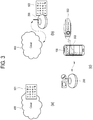
- FIGS. 3 to 5 are views for explaining a process of registering a counterpart in the terminal apparatus 100 according to one embodiment of the present invention.
- the server 400 may be storing data 501 including a command for controlling the devices 301, 302, 303 and 304.
- data 501 including a command for controlling the devices 301, 302, 303 and 304.
- FIG. 3 shows that a plurality of commands for controlling the devices 301, 302, 303 and 304 are defined as icons respectively corresponding to the commands.
- the hub device 200 may download and store data 502 about a command for controlling the devices 301, 302, 303 and 304 from the server 400.
- the command is synchronized between the server 400 and the hub device 200.
- a predetermined messenger program is executed in the terminal apparatus 100 in response to a user's input, and, the executed messenger program registers the hub device 200 as a counterpart 503 shown in (c) of FIG. 3 .
- a user may add the hub device 200 as the counterpart by searching a counterpart list (or a friend list) of the messenger program.
- the identification information of the terminal apparatus 100 or the device 301, 302, 303 and 304 may be used during the searching process.
- the controller 110 of the terminal apparatus 100 may automatically register (or add) the hub device 200 or at least one device 301, 302, 303 and 304 as the counter parts in the running messenger program, or may control the display 140 to display the hub device 200 or at least one device 301, 302, 303 and 304 in a counterpart recommendation list.
- a user may check that the hub device 200 is registered as the counterpart 503 in the friend list shown in (c) of FIG. 3 , and selects the corresponding tab 503 by a touch input, thereby making the display 140 display the dialog box where the hub device 200 is registered as the counterpart.
- the terminal apparatus 100 when the terminal apparatus 100 performs first-time registration for registering the hub device 200 as the counterpart, data about a command for controlling the devices 301, 302, 303 and 304 may be transmitted from the terminal apparatus 100 to the hub device 200.
- the command is synchronized between the terminal apparatus 100 and the hub device 200.
- the hub device 200 operates as an IoT hub in a home network, and the terminal apparatus 100 is set up to transmit various commands to the hub device 200 through the messenger program.
- a messenger service provider may authorize the hub device 200 to directly receive a command from the terminal apparatus 100 and control the devices 301, 302, 303 and 304.
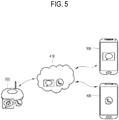
- the terminal apparatus 100 may download data about the command for controlling the device 301, 302, 303 and 304 from the server 400 as shown in FIG. 5 .
- remote control may be performed using a communication network 410 (e.g. a messaging infrastructure or a third party infrastructure) provided by the messenger service provider (e.g. a telecommunication company, a portal site, etc.) operating the server 400.
- a communication network 410 e.g. a messaging infrastructure or a third party infrastructure
- the messenger service provider e.g. a telecommunication company, a portal site, etc.
- a plurality of messenger programs may be installed in the terminal apparatus 100.
- a user may register the hub device 200 as the counterpart by installing and executing each application in the terminal apparatus 100.
- the terminal apparatus 100 may execute one among the plurality of messenger programs installed by a user's selection, and input a command through the dialog box of the executed program, thereby transmitting the command to the hub device 200 via the communication network 410 of the service provider or a mobile communication network of the telecommunication company.
- FIGS. 2 to 5 illustrate examples that the hub device 200 is registered as the counterpart and set to transmit the command to the devices 301, 302, 303 and 304.
- the same manner is applicable even when the device 301, 302, 303 and 304 are individually registered as the counterparts.
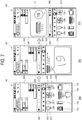
- FIGS. 6 to 10 are views for explaining a process of inputting a command for controlling a device through a dialog box in the terminal apparatus 100 according to one embodiment of the present invention
- the controller 110 of the terminal apparatus 100 controls the display 140 to display a dialog box as shown in (a) of FIG. 6 .
- the dialog box may include the input area 610 where a virtual keypad for receiving a user's input is displayed, the message input window 620 for showing a user's current input content, and the message display area 630 for displaying a completely input message.
- the message display area 630 may display a message 631 that has been received from a counterpart, i.e. the hub device 200 previously (in the past), and/or a message 632 that is transmitted from the terminal apparatus 100 to the counterpart, i.e. the hub device 200, for example, in the form of a word babble.
- the input area 610 displays various icons selectable by a user, and the icons may be classified according to the kinds. Further, a plurality of tabs for selecting the kinds of icon may be displayed above the icons.
- the plurality of tabs includes an IoT tab 611.
- the IoT tab 611 may be activated in response to the counterpart registration (addition) described with reference to FIG. 3 .
- the terminal apparatus 100 is provided to receive a user's input of various types.
- a user's input may include a voice spoken by a user
- the dialog box may further include a voice input icon 640 selectable by a user in a certain area to activate the voice input function.
- the controller 110 may control the display 140 to display a plurality of icons 612, 613, 614 and 615 for controlling the devices 301, 302, 303 and 304 on the input area 610 of the dialog box as shown in (b) of FIG. 6 , in response to a user's input of selecting the IoT tab 611 in the dialog box as shown in (a) of FIG. 6 .
- a user may make a touch input for selecting one among the icons displayed in the dialog box shown in (b) of FIG. 6 , and the controller 110 controls the communicator 120 to transmit a command corresponding to the selected icon to the hub device 200.
- the controller 110 controls the communicator 120 to transmit a command corresponding to the selected icon to the hub device 200.
- a control signal including a command for operating the ventilator is transmitted to the hub device 200 via the communicator 120, and the control signal is transmitted to the corresponding device, i.e. the ventilator through the hub device 200.
- the ventilator operates based on the received control signal.
- the controller 110 may control the display 140 to display a message 633 corresponding to the transmitted command on the message display area 630.
- a user can check that the icon 614 for operating the ventilator is selected and the corresponding command is normally transmitted at 14:12.
- the message display area 630 further displays a message 634 corresponding to device state information received from the devices 301, 302, 303 and 304 through the hub device 200.
- a user can check the current states of the devices 301, 302, 303 and 304 based on the state information message 634
- the message display area 630 may display a message for notifying a user of the failure.
- a user may determine whether or not to retransmit the corresponding command on the basis of the displayed message.
- the user's input received in the dialog box displayed on the terminal apparatus 100 according to the present invention is not limited to the icon described with reference to FIG. 6 , but may include a test, a drawing, a voice input, etc.
- the plurality of icons displayed on the input area 610 of the dialog box may correspond to the plurality of devices 301, 302, 303, and 304, respectively.
- icons 712, 713, 714, and 715 respectively corresponding to a washing machine, a refrigerator, an air conditioner, and a TV operating as the IoT devices are displayed to be selectable by a user.
- the terminal apparatus 100 may further receive a second input of a user as a detailed command for a device 303 (see FIG. 1 ) corresponding to the icon 714 selected in the input area 610 of the dialog box.
- FIG. 8 shows an example that a drawing input is received as the second input of a user.
- the drawing input is defined as included in a gesture input received as a touch input to the touch screen 141, and a drawing object corresponding to a moving path of a gesture input may be displayed within a drawing area 716 of the input area 610.
- the controller 110 may determine the second input of a user based on a pattern of the drawing object corresponding to the received input. For example, as shown in (b) of FIG. 8 , when a drawing input is made having a numeral pattern of '19', the controller 110 determines this drawing input as a numeral of '19' and controls the communicator 120 to transmit a commend for controlling an air conditioner to be kept at a set temperature of 19 degrees to the hub device 200.
- controller 110 controls the display 140 to display a message 731 corresponding to the transmitted command on the message display area 630. Therefore, a user can check the input and transmitted command through the updated message display area 630.
- FIG. 7 illustrates an example that the drawing input is made as the second input of a user on the drawing area 716.
- the terminal apparatus 100 may further receive various kinds of user's inputs.
- the input area 610 may display a keypad (or a keyboard) in which a test, i.e., a letter, a numeral, a character, etc. are selectable as the second input of a user.
- a test i.e., a letter, a numeral, a character, etc.
- a user may for example select a numeral of '1' and a numeral of '9' in sequence, and thus the controller 110 controls the communicator 120 to transmit the command for controlling the air conditioner to be kept at a set temperature of 19 degrees to the hub device 200.
- the controller 110 activates the microphone 152 to sense a voice spoken by a user.
- the controller 110 recognizes the sounds as the numeral of '19' and controls the communicator 120 to transmit the command for controlling the air conditioner to be kept at a set temperature of 19 degrees to the hub device 200.
- the command given in the form of a text, a voice, or the like includes a natural language.
- the controller 110 may use various natural language processing (NLP) algorithms to analyze a command corresponding to a user's input.
- NLP natural language processing
- FIGS. 6 and 7 illustrate the embodiments of selecting the icon to issue the command, but the present invention may include an embodiment of transmitting a command to a predetermined device without selecting an icon.
- the controller 110 parses the text into unit words of 'TURN', 'AIR', and '25', maps the words to those in a previously stored table, and controls the communicator 120 to transmit a command for turning on the air conditioner and keeping the setting temperature at 25 degrees.
- the terminal apparatus 100 sets a group including a plurality of devices, and transmit a command to all or some of the plurality of devices included in the group.
- a user input for setting the group is defined as a third input of a user.
- the group may be classified into regions in a house, for example, a garage, a living room, a front entry, a media room, a kitchen, etc., but not limited thereto.
- a house for example, a garage, a living room, a front entry, a media room, a kitchen, etc.
- lights installed in the living room, the front entry, the kitchen, and one or more bedrooms may be set as one group according to the present invention.
- Information about such as set group is transmitted to the hub device 200 and/or the server 400, and shared, i.e. synchronized.
- the group information may be received from the server 400.
- the hub device 200 receives the group information from the server 400, and the received information is transmitted to the terminal apparatus 100 via the hub device 200.
- the information is shared, i.e. synchronized among the server 400, the hub device 200, and the terminal apparatus 100.
- a grouping icon 810 may be included in the input area 610 of the dialog box displayed in the terminal apparatus 100 according to one embodiment.
- a user may select the grouping icon 810, and set a predetermined group by selecting two or more devices included in the group among the devices capable of communicating with the hub device 200.
- the input area 610 of the dialog box may display a group addition icon 813 as shown in (b) of FIG. 8 in response to selection of the grouping icon 810, and a user may make an input about group setting by selecting the group addition icon 813.
- the terminal apparatus 100 may further receive an input about a group name (e.g. a garage, etc.) including the devices selected by a user.
- a group name e.g. a garage, etc.
- FIG. 8 shows a case that icons 811 and 812 corresponding to completely set groups are displayed on the input area 610.
- the terminal apparatus 100 may use the set group and selectively issue the command to one or at least two devices included in the corresponding group.
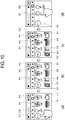
- the terminal apparatus 100 may receive a user's input for selecting a group including devices, to which the command will be transmitted, for example, a garage icon 811 as shown in (a) of FIG. 9 , among the icons 811 and 812 corresponding to the set groups displayed in response to a user's selection of the grouping icon 810 shown in (a) of FIG. 8 .
- the controller 110 may control the input area 610 to display icons 815 and 816 corresponding to the devices included in the corresponding group, for example, a front light installed in the entry of the garage, a garage door, or the like as shown in (b) of FIG. 9 .
- the controller 110 may sense the touch input and control the display 140 to further display icons 817 and 818 for selecting a detailed command with regard to the corresponding device, i.e. the front light in the input area 610 of the dialog box as shown in (d) of FIG. 9 .
- a user may select a power off icon 818, and thus a command for turning off the front light of the garage may be transmitted from the terminal apparatus 100 to a controller for the corresponding device, i.e. the front light of the garage via the hub device 200.
- the terminal apparatus 100 may be configured to simultaneously transmit the command to two or more devices included in a predetermined group.
- the terminal apparatus 100 may receive a user's input for selecting a group including to devices to which the command is issued by the user, for example, a media room icon 812 as shown in (a) of FIG. 10 .
- FIG. 10 shows an embodiment where the icons 613, 614 and 615 corresponding to the command for controlling a predetermined device, the icons 714 and 715 corresponding to the devices targeted for control (i.e. the IoT devices), and the icon 812 corresponding to a preset group are displayed in the input area 610 of the dialog box in response to selection of the IoT tab 611 shown in (a) of FIG. 6 , by way of example.
- icons corresponding to the command frequently used by a user, the devices (e.g. the IoT devices), the group, etc. may be displayed in the form of Favorites or Shortcut on the input area 610 in response to the selection of the IoT tab 611.
- the terminal apparatus 100 may further receive a user's input for selecting the devices included in the media room. For example, as shown in (b) of FIG. 10 , check boxes 911, 912, 913, 914, 915, 916, and 917 for selecting the icons corresponding to the devices may be activated in the input area 610, and thus a user may make an input for selecting the check boxes 912, 916, and 917 about the icons corresponding to the ventilator, the air conditioner and the television as shown in (c) of FIG. 10 .
- the controller 110 may control the display 140 to display the icons 1001 and 1002 corresponding to the command for the operations of the selected devices on the input area 610 as shown in (d) of FIG. 10 .
- a user selects the command 1001 for turning on the operation, and the controller 110 of the terminal apparatus 100 controls the communicator 120 to transmit the command for immediately operating the ventilator, the air conditioner, and the television located within the media room to the controllers of the devices through the hub device 200 in response to a user's selection.
- a user may use the terminal apparatus 100 to further make an input of an additional command, such as an input of a setting temperature for controlling the air conditioner, selection of a channel number, a volume control, etc. of a TV, etc. by the method described in FIG. 7 or another method.
- a user may use the terminal apparatus 100 at the outside to transmit the command to the devices 301, 302, 303 and 304 located in home.
- FIG. 11 illustrates an example of transmitting a command by the terminal apparatus 100 at the outside according to one embodiment of the present invention.
- a user may execute a messenger program (e.g. an application #1), in which the hub device 200 or at least one device 301 and 302 are registered as the counterparts, in the terminal apparatus 100 at the outside, and input a command #1 for controlling an operation of a predetermined device, e.g. a washing machine 301 to the dialog box of the corresponding program, i.e. the application #1.
- the input command #1 is transmitted to the hub device 200 in the home through a communication network 401 of the corresponding application #1. Further, the command #1 is transmitted from the hub device 200 to the corresponding device, i.e. the washing machine 301, and thus the washing machine 301 is controlled to perform the operation corresponding to the command #1.
- a user may use another messenger program (e.g. an application #2), in which the hub device 200 or at least one device 301 and 302 are registered as the counterparts, in the terminal apparatus 100 at the outside, thereby transmitting the command.
- a user may input a command #2 for controlling an operation of a predetermined device, e.g. a refrigerator 302 in the dialog box of the program, i.e. the application #2 executed in the terminal apparatus 100.
- the input command #2 is transmitted to the hub device 200 in home through the communication network 402 of the corresponding application #2.
- the command #2 is transmitted from the hub device 200 to the corresponding device, i.e. the refrigerator 302, and the refrigerator 302 is thus controlled to perform an operation corresponding to the command #2 in response to the command #2.
- FIG. 12 is a flowchart of a controlling method of the terminal apparatus 100 according to one embodiment of the present invention.
- the terminal apparatus 100 may receive a user's input for executing the messenger program through the user input receiver 150 (S1202).
- the messenger program which is provided to support communication between users through different terminal apparatuses, may be downloaded by a user from the App store or may be provided as a built-in program as necessary when the terminal apparatus 100 is launched.
- the terminal apparatus 100 may receive a user's input, which is made to add the hub device 200 or at least one device 301, 302, 303 and 304 as the counterparts in the messenger program executed in the operation S1202, through the user input receiver 150 (S1204).
- the terminal apparatus 100 receives a user's input corresponding to the command for controlling a predetermined device in the dialog box with the counterpart, e.g. the hub device 200 added in the operation S1204 (S1206).
- a user may make an input to transmit the command to one or at least two devices, or make selection to transmit the command to one or at least two devices included in a predetermined group.
- the terminal apparatus 100 may receive a user's input in various ways of an icon selected corresponding to the command, a text, a drawing, or a voice uttered by a user.
- a user's input received in the form of the text, the voice, etc. includes a natural language.
- the terminal apparatus 100 may receive a command for controlling the device by combination of two or more user inputs as described above. For example, when the counterpart is the hub device 200, a user selects an icon corresponding to a specific device, and input a drawing or a text as the command for controlling the selected device.
- the controller 110 of the terminal apparatus 100 controls the communicator 120 to transmit a control signal including the command received in the operation S1206 to the device targeted for control through the hub device 200 (S1208).
- the control signal including the command is transmitted from the terminal apparatus 100 to the hub device 200, and the hub device 200 identifies the device targeted for control with respect to the command and transmits the control signal to at least one device corresponding to the command.
- controller 110 controls the display 140 to display a message corresponding to the transmitted command on the dialog box (S1210).
- the computer readable recording medium includes a storage medium for storing data readable by a transmission medium and a computer system.
- the transmission medium may be achieved by a wired/wireless network through which computer systems are linked to one another.
- the processor 111 may include a nonvolatile memory in which a computer program is stored as the software, a RAM in which the computer program stored in the nonvolatile memory is loaded, and a CPU for executing the computer program loaded in the RAM.
- the nonvolatile memory may include a hard disk drive, a flash memory, a ROM, CD-ROMs, magnetic tapes, a floppy disc, an optical storage, a data transmission device using the Internet, etc., but is not limited thereto.
- the nonvolatile memory is a kind of computer-readable recording medium in which a program readable by a computer of the present invention is recorded.
- the computer program is a code that is read and executed by the CPU, and includes codes for performing the operations of the controller 110 such as the operations S1202 to S1210 as shown in FIG. 12 .
- the computer program may be included in an operating system provided in the terminal apparatus 100 or software including an application and/or software interfacing with an external apparatus.
Landscapes
- Engineering & Computer Science (AREA)
- Theoretical Computer Science (AREA)
- General Engineering & Computer Science (AREA)
- Human Computer Interaction (AREA)
- General Physics & Mathematics (AREA)
- Physics & Mathematics (AREA)
- Computer Networks & Wireless Communication (AREA)
- Signal Processing (AREA)
- Automation & Control Theory (AREA)
- Health & Medical Sciences (AREA)
- General Health & Medical Sciences (AREA)
- Audiology, Speech & Language Pathology (AREA)
- Computing Systems (AREA)
- User Interface Of Digital Computer (AREA)
- Telephone Function (AREA)
- Telephonic Communication Services (AREA)
Applications Claiming Priority (2)
| Application Number | Priority Date | Filing Date | Title |
|---|---|---|---|
| KR1020160039720A KR102522150B1 (ko) | 2016-03-31 | 2016-03-31 | 단말장치 및 그 제어방법 |
| PCT/KR2016/015143 WO2017171204A1 (fr) | 2016-03-31 | 2016-12-23 | Dispositif terminal et procédé de commande correspondant |
Publications (2)
| Publication Number | Publication Date |
|---|---|
| EP3425889A1 true EP3425889A1 (fr) | 2019-01-09 |
| EP3425889A4 EP3425889A4 (fr) | 2019-03-13 |
Family
ID=59964875
Family Applications (1)
| Application Number | Title | Priority Date | Filing Date |
|---|---|---|---|
| EP16897224.8A Ceased EP3425889A4 (fr) | 2016-03-31 | 2016-12-23 | Dispositif terminal et procédé de commande correspondant |
Country Status (4)
| Country | Link |
|---|---|
| US (1) | US11329938B2 (fr) |
| EP (1) | EP3425889A4 (fr) |
| KR (1) | KR102522150B1 (fr) |
| WO (1) | WO2017171204A1 (fr) |
Cited By (9)
| Publication number | Priority date | Publication date | Assignee | Title |
|---|---|---|---|---|
| WO2019121136A1 (fr) * | 2017-12-20 | 2019-06-27 | Dts Iot B.V. | Dispositifs, méthodes et systèmes permettant d'accroître la sécurité des appareils grand public connectés |
| CN110851036A (zh) * | 2019-11-18 | 2020-02-28 | 珠海格力电器股份有限公司 | 电器设备的参数调节方法、装置及存储介质 |
| WO2020113297A1 (fr) * | 2018-12-05 | 2020-06-11 | Electrolux Do Brasil S.A. | Procédé de commande du fonctionnement d'au moins un appareil domotique et système réseau |
| WO2020113299A1 (fr) * | 2018-12-05 | 2020-06-11 | Electrolux Do Brasil S.A. | Procédé de commande du fonctionnement d'au moins un appareil domestique intelligent |
| WO2020113298A1 (fr) * | 2018-12-05 | 2020-06-11 | Electrolux Do Brasil S.A. | Procédé de commande du fonctionnement d'au moins deux appareils électroménagers intelligents |
| US11580988B2 (en) | 2019-01-07 | 2023-02-14 | Samsung Electronics Co., Ltd. | Electronic apparatus and control method thereof |
| US11600126B2 (en) | 2020-05-08 | 2023-03-07 | The Chamberlain Group Llc | Movable barrier operator system and methods of installation and use |
| CN117581559A (zh) * | 2021-09-29 | 2024-02-20 | 三菱电机株式会社 | 设备控制系统、显示器、设备控制方法以及程序 |
| EP4319182A4 (fr) * | 2021-03-31 | 2024-10-09 | Sony Group Corporation | Terminal de traitement d'informations, procédé de traitement d'informations, et programme |
Families Citing this family (22)
| Publication number | Priority date | Publication date | Assignee | Title |
|---|---|---|---|---|
| US10530865B2 (en) * | 2017-04-19 | 2020-01-07 | Vmware, Inc. | Offline sideloading for enrollment of devices in a mobile device management system |
| KR102366699B1 (ko) * | 2018-02-02 | 2022-02-23 | 삼성전자주식회사 | 사용자 단말 장치 및 그를 제어하는 제어 방법 |
| US20190258747A1 (en) * | 2018-02-22 | 2019-08-22 | General Electric Company | Interactive digital twin |
| KR102264797B1 (ko) * | 2018-05-29 | 2021-06-15 | 주식회사 아이오 | 허브 장치, 제어 장치 및 제어 장치의 제어 방법 |
| KR102111787B1 (ko) * | 2018-05-29 | 2020-05-15 | 주식회사 아이오 | 허브 장치 및 허브 장치의 제어 방법 |
| KR102614445B1 (ko) * | 2018-10-04 | 2023-12-15 | 라인플러스 주식회사 | 메신저 봇을 이용하여 IoT 기기를 제어하기 위한 방법, 시스템, 및 비-일시적인 컴퓨터 판독가능한 기록 매체 |
| US11082402B2 (en) | 2019-04-25 | 2021-08-03 | Motorola Mobility Llc | Controlling computing device virtual private network usage with a wearable device |
| US11455411B2 (en) | 2019-04-25 | 2022-09-27 | Motorola Mobility Llc | Controlling content visibility on a computing device based on computing device location |
| US11562051B2 (en) | 2019-04-25 | 2023-01-24 | Motorola Mobility Llc | Varying computing device behavior for different authenticators |
| US11093659B2 (en) * | 2019-04-25 | 2021-08-17 | Motorola Mobility Llc | Controlling content visibility on a computing device based on wearable device proximity |
| KR102295859B1 (ko) * | 2019-09-09 | 2021-08-31 | 주식회사 코맥스 | 5g 또는 lte를 이용하는 전세대의 통신 단말기를 통해 월패드를 제어하는 장치 및 방법 |
| CN111125762B (zh) * | 2019-12-24 | 2023-04-25 | 维沃移动通信有限公司 | 一种共享应用控制方法及电子设备 |
| EP4055593B1 (fr) | 2020-02-10 | 2026-05-06 | Samsung Electronics Co., Ltd. | Procédé et appareil de fourniture d'un service d'assistant vocal |
| US11652891B2 (en) * | 2020-04-22 | 2023-05-16 | At&T Mobility Ii Llc | Dynamic and optimal selection of Internet of things (IoT) hubs in cellular networks |
| US12276427B2 (en) * | 2020-07-10 | 2025-04-15 | Hestan Commercial Corporation | Cooking appliance and control knob with integrated display |
| KR20220049901A (ko) | 2020-10-15 | 2022-04-22 | 삼성전자주식회사 | 패턴을 제공하는 방법 및 이를 지원하는 전자 장치 |
| US11496790B2 (en) * | 2021-02-17 | 2022-11-08 | Meta Platforms Technologies, Llc | Ultra-wideband control of smart streaming devices |
| US11363500B1 (en) | 2021-02-17 | 2022-06-14 | Facebook Technologies | Ultra-wideband control of smart streaming devices |
| EP4321986A4 (fr) | 2021-08-12 | 2024-10-23 | Samsung Electronics Co., Ltd. | Appareil d'affichage et procédé de fonctionnement de celui-ci |
| KR102805599B1 (ko) | 2022-03-15 | 2025-05-09 | 국립한밭대학교 산학협력단 | 전자제품 관리를 위한 통합형 IoT 허브 시스템 |
| KR102924765B1 (ko) * | 2023-04-10 | 2026-02-09 | 엘지전자 주식회사 | 디스플레이 장치 및 디스플레이 시스템 |
| WO2025173283A1 (fr) * | 2024-02-13 | 2025-08-21 | パナソニックIpマネジメント株式会社 | Procédé de traitement d'informations, programme, système de traitement d'informations et terminal de traitement d'informations |
Family Cites Families (28)
| Publication number | Priority date | Publication date | Assignee | Title |
|---|---|---|---|---|
| KR20040079449A (ko) * | 2003-03-07 | 2004-09-16 | 주식회사 알파비전텍 | 메신저를 이용한 원격제어 시스템 및 그 방법 |
| KR20040094244A (ko) * | 2003-05-02 | 2004-11-09 | 위즈정보기술주식회사 | 메신저를 이용한 홈 네트워킹 제어 시스템 |
| US7403838B2 (en) | 2004-12-16 | 2008-07-22 | General Instrument Corporation | Messaging system based building control |
| CN1825233A (zh) | 2005-02-23 | 2006-08-30 | 朗迅科技公司 | 利用即时消息发送监视和控制设备的方法 |
| US9614964B2 (en) * | 2005-08-19 | 2017-04-04 | Nextstep, Inc. | Consumer electronic registration, control and support concierge device and method |
| KR20070075142A (ko) | 2006-01-12 | 2007-07-18 | 주식회사 텔로드 | 휴대폰, 이를 이용한 홈 오토메이션 시스템 및 이의 제어방법 |
| US8447814B2 (en) * | 2006-12-07 | 2013-05-21 | Microsoft Corporation | Remote control using instant messaging |
| EP2148307B1 (fr) | 2008-07-21 | 2011-09-14 | Somfy SAS | Procédé de contrôle d'un groupe d'appareils à commande sans fil |
| US20120096085A1 (en) * | 2010-10-14 | 2012-04-19 | Province of Ontario, Canada) | Communications system including instant message device control and related methods |
| US20140156028A1 (en) * | 2012-11-30 | 2014-06-05 | General Electric Company | Cloud-based bi-directional messaging system for home appliance control |
| KR102084507B1 (ko) * | 2013-09-05 | 2020-03-04 | 삼성전자주식회사 | 홈 네트워크 시스템에서 홈 디바이스를 원격으로 제어하는 방법 및 장치 |
| KR101579367B1 (ko) * | 2014-02-10 | 2015-12-22 | 한국과학기술원 | 공간 기반 서비스 제공 방법 및 시스템 |
| US9876652B2 (en) * | 2014-05-20 | 2018-01-23 | Savant Systems, Llc | Automatic configuration of control device user interface in a home automation system |
| US9696815B2 (en) * | 2014-10-02 | 2017-07-04 | Futureplay Inc. | Method, device, system and non-transitory computer-readable recording medium for providing user interface |
| KR101662396B1 (ko) * | 2014-10-13 | 2016-10-05 | 한국과학기술원 | IoT 장치를 제어하기 위한 방법 및 시스템 |
| US20160162654A1 (en) * | 2014-12-04 | 2016-06-09 | Vinay Dattaprabhakar Gokhale | Systems and methods for ovulation status and pregnancy detection |
| CN107155363A (zh) * | 2015-01-05 | 2017-09-12 | (株)未来机器人 | 利用社交网络服务的机器人服务方法及机器人装置 |
| CA2974968C (fr) * | 2015-01-30 | 2020-04-21 | Arris Enterprises Llc | Gestion consolidee d'elements de reseau domestique |
| US20170024589A1 (en) * | 2015-07-22 | 2017-01-26 | Robert Schumacher | Smart Beauty Delivery System Linking Smart Products |
| US10007710B2 (en) * | 2015-09-21 | 2018-06-26 | Splunk Inc. | Adaptive control of data collection requests sent to external data sources |
| WO2017049439A1 (fr) * | 2015-09-21 | 2017-03-30 | Splunk Inc. | Affichages de cartes de topologies de ressources de cloud computing |
| US10459819B2 (en) * | 2015-09-21 | 2019-10-29 | Splunk Inc. | Circular timeline displays of timestamped event data |
| US10536356B2 (en) * | 2015-09-21 | 2020-01-14 | Splunk Inc. | Generating and displaying topology map time-lapses of cloud computing resources |
| US9917903B2 (en) * | 2015-12-28 | 2018-03-13 | Verizon Patent And Licensing Inc. | Internet of things provisioning |
| US10534791B1 (en) * | 2016-01-31 | 2020-01-14 | Splunk Inc. | Analysis of tokenized HTTP event collector |
| US10394802B1 (en) * | 2016-01-31 | 2019-08-27 | Splunk, Inc. | Interactive location queries for raw machine data |
| US10169434B1 (en) * | 2016-01-31 | 2019-01-01 | Splunk Inc. | Tokenized HTTP event collector |
| TWI631507B (zh) * | 2016-03-04 | 2018-08-01 | 德凡特未來股份有限公司 | 動作判識裝置及其控制方法 |
-
2016
- 2016-03-31 KR KR1020160039720A patent/KR102522150B1/ko active Active
- 2016-12-23 US US16/088,178 patent/US11329938B2/en active Active
- 2016-12-23 WO PCT/KR2016/015143 patent/WO2017171204A1/fr not_active Ceased
- 2016-12-23 EP EP16897224.8A patent/EP3425889A4/fr not_active Ceased
Cited By (10)
| Publication number | Priority date | Publication date | Assignee | Title |
|---|---|---|---|---|
| WO2019121136A1 (fr) * | 2017-12-20 | 2019-06-27 | Dts Iot B.V. | Dispositifs, méthodes et systèmes permettant d'accroître la sécurité des appareils grand public connectés |
| WO2020113297A1 (fr) * | 2018-12-05 | 2020-06-11 | Electrolux Do Brasil S.A. | Procédé de commande du fonctionnement d'au moins un appareil domotique et système réseau |
| WO2020113299A1 (fr) * | 2018-12-05 | 2020-06-11 | Electrolux Do Brasil S.A. | Procédé de commande du fonctionnement d'au moins un appareil domestique intelligent |
| WO2020113298A1 (fr) * | 2018-12-05 | 2020-06-11 | Electrolux Do Brasil S.A. | Procédé de commande du fonctionnement d'au moins deux appareils électroménagers intelligents |
| US11580988B2 (en) | 2019-01-07 | 2023-02-14 | Samsung Electronics Co., Ltd. | Electronic apparatus and control method thereof |
| CN110851036A (zh) * | 2019-11-18 | 2020-02-28 | 珠海格力电器股份有限公司 | 电器设备的参数调节方法、装置及存储介质 |
| US11600126B2 (en) | 2020-05-08 | 2023-03-07 | The Chamberlain Group Llc | Movable barrier operator system and methods of installation and use |
| US12020524B2 (en) | 2020-05-08 | 2024-06-25 | The Chamberlain Group Llc. | Movable barrier operator system and methods of installation and use |
| EP4319182A4 (fr) * | 2021-03-31 | 2024-10-09 | Sony Group Corporation | Terminal de traitement d'informations, procédé de traitement d'informations, et programme |
| CN117581559A (zh) * | 2021-09-29 | 2024-02-20 | 三菱电机株式会社 | 设备控制系统、显示器、设备控制方法以及程序 |
Also Published As
| Publication number | Publication date |
|---|---|
| KR102522150B1 (ko) | 2023-04-14 |
| WO2017171204A1 (fr) | 2017-10-05 |
| US20200304445A1 (en) | 2020-09-24 |
| KR20170112556A (ko) | 2017-10-12 |
| EP3425889A4 (fr) | 2019-03-13 |
| US11329938B2 (en) | 2022-05-10 |
Similar Documents
| Publication | Publication Date | Title |
|---|---|---|
| US11329938B2 (en) | Terminal apparatus and method for controlling internet of things (IoT) devices | |
| US10834237B2 (en) | Method, apparatus, and storage medium for controlling cooperation of multiple intelligent devices with social application platform | |
| CN111602344B (zh) | 一种蓝牙通信的方法及双模蓝牙终端 | |
| CN105634881B (zh) | 应用场景推荐方法及装置 | |
| US10055115B2 (en) | Electronic device and method for controlling multi-windows in the electronic device | |
| JP5916261B2 (ja) | ファイル送信方法、システム、および制御装置 | |
| CN106068525B (zh) | 广告信息更新方法和装置 | |
| US20170024178A1 (en) | Portable apparatus, display apparatus, and method for displaying photo thereof | |
| US11228968B2 (en) | Electronic apparatus and method of setting network of audio device | |
| CN106101736A (zh) | 一种虚拟礼物的展示方法和系统 | |
| AU2014329148A1 (en) | Method for displaying previews in a widget | |
| US20140282204A1 (en) | Key input method and apparatus using random number in virtual keyboard | |
| CN107153537B (zh) | 一种基于多任务界面的信息展现方法、装置及移动终端 | |
| CN109728918B (zh) | 虚拟物品发送方法、虚拟物品接收方法、装置及存储介质 | |
| EP3554186A1 (fr) | Appareil électronique et procédé de réglage de réseau de dispositif audio | |
| CN102595443A (zh) | 显示电场信息的方法和系统以及便携式终端 | |
| KR102004986B1 (ko) | 어플리케이션 실행 방법 및 시스템, 단말과 그 기록 매체 | |
| CN113348657B (zh) | 基于接近度修改设备之间的交互类型的方法、系统 | |
| CN105608095B (zh) | 多媒体播放方法、装置及移动终端 | |
| CN106781402A (zh) | 遥控方法及装置 | |
| CN104137130B (zh) | 任务执行方法、系统和计算机可读记录介质 | |
| US10372895B2 (en) | Apparatus and method for providing a security environment | |
| US9756475B2 (en) | Mobile terminal and method for controlling place recognition | |
| CN108700429B (zh) | 运动记录的方法及电子设备 | |
| CN108012024A (zh) | 一种日程通知的方法及移动终端 |
Legal Events
| Date | Code | Title | Description |
|---|---|---|---|
| STAA | Information on the status of an ep patent application or granted ep patent |
Free format text: STATUS: THE INTERNATIONAL PUBLICATION HAS BEEN MADE |
|
| PUAI | Public reference made under article 153(3) epc to a published international application that has entered the european phase |
Free format text: ORIGINAL CODE: 0009012 |
|
| STAA | Information on the status of an ep patent application or granted ep patent |
Free format text: STATUS: REQUEST FOR EXAMINATION WAS MADE |
|
| 17P | Request for examination filed |
Effective date: 20181001 |
|
| AK | Designated contracting states |
Kind code of ref document: A1 Designated state(s): AL AT BE BG CH CY CZ DE DK EE ES FI FR GB GR HR HU IE IS IT LI LT LU LV MC MK MT NL NO PL PT RO RS SE SI SK SM TR |
|
| AX | Request for extension of the european patent |
Extension state: BA ME |
|
| A4 | Supplementary search report drawn up and despatched |
Effective date: 20190212 |
|
| RIC1 | Information provided on ipc code assigned before grant |
Ipc: G06F 3/0488 20130101ALI20190206BHEP Ipc: G06F 3/0481 20130101ALI20190206BHEP Ipc: H04L 12/28 20060101ALI20190206BHEP Ipc: H04L 12/58 20060101ALI20190206BHEP Ipc: G06F 3/16 20060101ALI20190206BHEP Ipc: H04M 1/725 20060101AFI20190206BHEP |
|
| DAV | Request for validation of the european patent (deleted) | ||
| DAX | Request for extension of the european patent (deleted) | ||
| STAA | Information on the status of an ep patent application or granted ep patent |
Free format text: STATUS: EXAMINATION IS IN PROGRESS |
|
| 17Q | First examination report despatched |
Effective date: 20200703 |
|
| REG | Reference to a national code |
Ref country code: DE Ref legal event code: R003 |
|
| STAA | Information on the status of an ep patent application or granted ep patent |
Free format text: STATUS: THE APPLICATION HAS BEEN REFUSED |
|
| 18R | Application refused |
Effective date: 20220406 |