EP3457255A1 - Verbesserte eingabe - Google Patents
Verbesserte eingabe Download PDFInfo
- Publication number
- EP3457255A1 EP3457255A1 EP18197711.7A EP18197711A EP3457255A1 EP 3457255 A1 EP3457255 A1 EP 3457255A1 EP 18197711 A EP18197711 A EP 18197711A EP 3457255 A1 EP3457255 A1 EP 3457255A1
- Authority
- EP
- European Patent Office
- Prior art keywords
- computing device
- gesture
- command
- visual indication
- camera
- Prior art date
- Legal status (The legal status is an assumption and is not a legal conclusion. Google has not performed a legal analysis and makes no representation as to the accuracy of the status listed.)
- Granted
Links
Images




Classifications
-
- G—PHYSICS
- G06—COMPUTING OR CALCULATING; COUNTING
- G06F—ELECTRIC DIGITAL DATA PROCESSING
- G06F3/00—Input arrangements for transferring data to be processed into a form capable of being handled by the computer; Output arrangements for transferring data from processing unit to output unit, e.g. interface arrangements
- G06F3/01—Input arrangements or combined input and output arrangements for interaction between user and computer
- G06F3/017—Gesture based interaction, e.g. based on a set of recognized hand gestures
-
- G—PHYSICS
- G06—COMPUTING OR CALCULATING; COUNTING
- G06F—ELECTRIC DIGITAL DATA PROCESSING
- G06F21/00—Security arrangements for protecting computers, components thereof, programs or data against unauthorised activity
- G06F21/60—Protecting data
- G06F21/62—Protecting access to data via a platform, e.g. using keys or access control rules
-
- G—PHYSICS
- G06—COMPUTING OR CALCULATING; COUNTING
- G06F—ELECTRIC DIGITAL DATA PROCESSING
- G06F1/00—Details not covered by groups G06F3/00 - G06F13/00 and G06F21/00
- G06F1/16—Constructional details or arrangements
- G06F1/1613—Constructional details or arrangements for portable computers
- G06F1/1633—Constructional details or arrangements of portable computers not specific to the type of enclosures covered by groups G06F1/1615 - G06F1/1626
- G06F1/1684—Constructional details or arrangements related to integrated I/O peripherals not covered by groups G06F1/1635 - G06F1/1675
- G06F1/1686—Constructional details or arrangements related to integrated I/O peripherals not covered by groups G06F1/1635 - G06F1/1675 the I/O peripheral being an integrated camera
-
- G—PHYSICS
- G06—COMPUTING OR CALCULATING; COUNTING
- G06F—ELECTRIC DIGITAL DATA PROCESSING
- G06F1/00—Details not covered by groups G06F3/00 - G06F13/00 and G06F21/00
- G06F1/26—Power supply means, e.g. regulation thereof
- G06F1/32—Means for saving power
- G06F1/3203—Power management, i.e. event-based initiation of a power-saving mode
- G06F1/3206—Monitoring of events, devices or parameters that trigger a change in power modality
- G06F1/3215—Monitoring of peripheral devices
-
- G—PHYSICS
- G06—COMPUTING OR CALCULATING; COUNTING
- G06F—ELECTRIC DIGITAL DATA PROCESSING
- G06F1/00—Details not covered by groups G06F3/00 - G06F13/00 and G06F21/00
- G06F1/26—Power supply means, e.g. regulation thereof
- G06F1/32—Means for saving power
- G06F1/3203—Power management, i.e. event-based initiation of a power-saving mode
- G06F1/3206—Monitoring of events, devices or parameters that trigger a change in power modality
- G06F1/3231—Monitoring the presence, absence or movement of users
-
- G—PHYSICS
- G06—COMPUTING OR CALCULATING; COUNTING
- G06F—ELECTRIC DIGITAL DATA PROCESSING
- G06F1/00—Details not covered by groups G06F3/00 - G06F13/00 and G06F21/00
- G06F1/26—Power supply means, e.g. regulation thereof
- G06F1/32—Means for saving power
- G06F1/3203—Power management, i.e. event-based initiation of a power-saving mode
- G06F1/3234—Power saving characterised by the action undertaken
- G06F1/325—Power saving in peripheral device
-
- G—PHYSICS
- G06—COMPUTING OR CALCULATING; COUNTING
- G06V—IMAGE OR VIDEO RECOGNITION OR UNDERSTANDING
- G06V40/00—Recognition of biometric, human-related or animal-related patterns in image or video data
- G06V40/20—Movements or behaviour, e.g. gesture recognition
- G06V40/28—Recognition of hand or arm movements, e.g. recognition of deaf sign language
-
- G—PHYSICS
- G06—COMPUTING OR CALCULATING; COUNTING
- G06F—ELECTRIC DIGITAL DATA PROCESSING
- G06F2200/00—Indexing scheme relating to G06F1/04 - G06F1/32
- G06F2200/16—Indexing scheme relating to G06F1/16 - G06F1/18
- G06F2200/163—Indexing scheme relating to constructional details of the computer
- G06F2200/1637—Sensing arrangement for detection of housing movement or orientation, e.g. for controlling scrolling or cursor movement on the display of an handheld computer
-
- Y—GENERAL TAGGING OF NEW TECHNOLOGICAL DEVELOPMENTS; GENERAL TAGGING OF CROSS-SECTIONAL TECHNOLOGIES SPANNING OVER SEVERAL SECTIONS OF THE IPC; TECHNICAL SUBJECTS COVERED BY FORMER USPC CROSS-REFERENCE ART COLLECTIONS [XRACs] AND DIGESTS
- Y02—TECHNOLOGIES OR APPLICATIONS FOR MITIGATION OR ADAPTATION AGAINST CLIMATE CHANGE
- Y02D—CLIMATE CHANGE MITIGATION TECHNOLOGIES IN INFORMATION AND COMMUNICATION TECHNOLOGIES [ICT], I.E. INFORMATION AND COMMUNICATION TECHNOLOGIES AIMING AT THE REDUCTION OF THEIR OWN ENERGY USE
- Y02D10/00—Energy efficient computing, e.g. low power processors, power management or thermal management
Definitions
- This application relates to a method, a computer-readable medium and a computing device for providing an improved input manner, and in particular to a method, a computer-readable medium and a computing device for providing an improved manner of inputting a device lock or device unlock command.
- Contemporary computing devices are more and more arranged with a touch interface implemented through a touch display. It is quickly becoming the norm for smartphones and internet tablets but also laptop computers and kiosk computers and also general computers are being arranged with touch displays.
- Touch displays are complex in their structure and often very costly. In fact, the touch display is often the singularly most expensive component in a modern smartphone. The complexity of their structure renders them quite fragile unfortunately and they are therefore sensitive to wear and tear and also to shock and other forms of physical influence.
- the touch displays also bring an inherent flaw, especially when it comes to security. As most touch displays are manipulated with direct contact with a user's finger(s) they are repeatedly subjected to, among other influences, fat. This fat accumulates on the surface of the touch display. This enables dust and other particles to adhere to the touch display potentially increasing the wear of the display, causing it to be scratched.
- the fat also leaves a trace that is clearly visible, both when dust and other particles have adhered to the fat trace and the fat trace on its own.
- the fat trace makes it possible to identify commonly executed commands on a touch display. This makes it possible for fraudulent users to extract or manipulate information from the device without the permission of the rightful owner.
- a computing device arranged for tracking an object in an image stream provided by a camera, said computing device comprising a memory and a controller, wherein said controller is configured to: track at least one object, identify a gesture, wherein said gesture is defined by said tracked at least one object moving in free space in front of said camera, retrieve an associated command, and execute said associated command, wherein said associated command is a command for controlling access to the computing device.
- Such a computing device does not require the proximity of a user as in the prior art. Further it does not require the user to execute the same spatial precision a in the prior art. Nor do such computation devices enable fraudulent users to easily retrieve sensitive information by a visual inspection of the computation device.
- the manner disclosed herein is suite for implementation in almost any contemporary computation device, as such computation devices have been equipped with cameras since 2002, when Nokia ® launched the very first mobile phone with a built in camera, the Nokia 7650®, and since the launch of the Sony Ericsson T610® in 2003 the inclusion of a camera in a mobile phone has become widespread.
- a manner as taught herein can thus beneficially be implemented easily in almost any existing computation device.
- the gesture represents an unlocking gesture and said command is an unlocking command allowing access to the computation device.
- the controller is further configured to activate said camera upon detecting a startup trigger. This allows for reduced power consumption.
- the trigger is a tilting of the computation device and this allows for activating the camera as the computation device is picked up by a user.
- the controller is further configured to display a visual indication according to movements tracked for said at least one object to be tracked. This allows for an intuitive manner of reminding and guiding a user of how to input a (complex) gesture.
- a computing device arranged for tracking an object in an image stream provided by a camera.
- the computing device comprises a memory and a controller, wherein said controller is configured to track at least one object, identify a gesture, wherein said gesture is defined by said tracked at least one object moving in free space in front of said camera, display a visual indication according to movements tracked for said at least one object to be tracked, wherein said visual indication is displayed in a random alignment when the tracking is activated, retrieve an associated command; and execute said associated command, wherein said associated command is a command for controlling access to the computing device.
- a method for use in a computing device arranged for tracking an object in an image stream provided by a camera comprising tracking at least one object, identifying a gesture, wherein said gesture is defined by said tracked at least one object moving in free space in front of said camera, displaying a visual indication according to movements tracked for said at least one object to be tracked, wherein said visual indication is displayed in a random alignment when the tracking is activated, retrieving an associated command, and executing said associated command, wherein said associated command is a command for controlling access to the computation device.
- the inventors of the present invention have realized, after inventive and insightful reasoning, that through cleverly assigning a gesture to an unlocking command, a simple and secure manner of activating a computation device without leaving a trace and that does not require a touch display and furthermore reduces the wear and tear of a touch display, and protects the computation device against fraudulent use is provided.
- the teachings herein find use in control systems for computational devices having user interfaces such as smart phones, internet tablets, computers and gaming consoles.
- Figure 1 generally shows a computing device 100 according to an embodiment herein.
- the computing device 100 is configured for network communication, either wireless or wired.
- Examples of such a computing device 100 are: a personal computer, desktop or laptop, an internet tablet, a mobile communications terminal such as a mobile telephone, a smart phone, a personal digital assistant and a game console.
- Two embodiments will be exemplified and described as being a smartphone in figure 1A and a laptop computer 100 in figure 1B .
- a mobile communications terminal in the form of a smartphone 100 comprises a housing 110 in which a display 120 is arranged.
- the display 120 is a touch display.
- the display 120 is a non-touch display.
- the smartphone 100 comprises two keys 130a, 130b. In this embodiment there are two keys 130, but any number of keys is possible and depends on the design of the smartphone 100.
- the smartphone 100 is configured to display and operate a virtual key 135 on the touch display 120. It should be noted that the number of virtual keys 135 are dependant on the design of the smartphone 100 and an application that is executed on the smartphone 100.
- the smartphone 100 is also equipped with a camera 160.
- the camera 160 is a digital camera that is arranged to take video or still photographs by recording images on an electronic image sensor (not shown).
- the camera 160 is an external camera.
- the camera is alternatively replaced by a source providing an image stream.
- a laptop computer 100 comprises a display 120, which in one embodiment is a touch display, and a housing 110.
- the housing comprises a controller or CPU (not shown) and one or more computer-readable storage mediums (not shown), such as storage units and internal memory. Examples of storage units are disk drives or hard drives.
- the computing device 100 further comprises at least one data port. Data ports can be wired and/or wireless. Examples of data ports are USB (Universal Serial Bus) ports, Ethernet ports or WiFi (according to IEEE standard 802.11) ports. Data ports are configured to enable a computing device 100 to connect with other computing devices or a server.
- USB Universal Serial Bus
- Ethernet ports accordinging to IEEE standard 802.11
- the laptop computer 100 further comprises at least one input unit such as a keyboard 130.
- input units such as a keyboard 130.
- Other examples of input units are computer mouse, touch pads or joysticks to name a few.
- the laptop computer 100 is further equipped with a camera 160.
- the camera 160 is a digital camera that is arranged to take video or still photographs by recording images on an electronic image sensor (not shown).
- the camera 160 is an external camera.
- the camera is alternatively replaced by a source providing an image stream.
- FIG. 2 shows a schematic view of the general structure of a computing device according to figure 1 .
- the computing device 100 comprises a controller 210 which is responsible for the overall operation of the computing device 200 and is preferably implemented by any commercially available CPU ("Central Processing Unit"), DSP ("Digital Signal Processor") or any other electronic programmable logic device.
- the controller 210 may be implemented using instructions that enable hardware functionality, for example, by using executable computer program instructions in a general-purpose or special-purpose processor that may be stored on a computer readable storage medium (disk, memory etc) 240 to be executed by such a processor.
- the controller 210 is configured to read instructions from the memory 240 and execute these instructions to control the operation of the computing device 100.
- the memory 240 may be implemented using any commonly known technology for computer-readable memories such as ROM, RAM, SRAM, DRAM, CMOS, FLASH, DDR, SDRAM or some other memory technology.
- the memory 240 is used for various purposes by the controller 210, one of them being for storing application data and program instructions 250 for various software modules in the computing device 200.
- the software modules include a real-time operating system, drivers for a user interface 220, an application handler as well as various applications 250.
- the applications are sets of instructions that when executed by the controller 210 control the operation of the computing device 200.
- the applications 250 can include a messaging application such as electronic mail, a browsing application, a media player application, as well as various other applications 250, such as applications for voice calling, video calling, document reading and/or document editing, an instant messaging application, a calendar application, a control panel application, one or more video games, a notepad application, voice call applications, Short Message Service applications, location finding applications.
- a messaging application such as electronic mail
- browsing application such as a browsing application
- a media player application such as various other applications 250, such as applications for voice calling, video calling, document reading and/or document editing, an instant messaging application, a calendar application, a control panel application, one or more video games, a notepad application, voice call applications, Short Message Service applications, location finding applications.
- various other applications 250 such as applications for voice calling, video calling, document reading and/or document editing, an instant messaging application, a calendar application, a control panel application, one or more video games, a notepad application, voice call applications, Short Message Service applications, location finding applications.
- the computing device 200 further comprises a user interface 220, which in the computing device of figures 1A and 1B is comprised of the display 120 and the keys 130, 135.
- the computing device 200 further comprises a radio frequency interface 230, which is adapted to allow the computing device to communicate with other devices through a radio frequency band through the use of different radio frequency technologies. Examples of such technologies are IEEE 802.11, IEEE 802.1 Is, and Bluetooth®. Other examples of radio technologies that may be implemented in a computing device 100 are W-CDMA, GSM, UTRAN, LTE, and NMT to name a few.
- the computing device 200 is further equipped with a camera 260.
- the camera 260 is a digital camera that is arranged to take video or still photographs by recording images on an electronic image sensor (not shown).
- the camera 260 is operably connected to the controller 210 to provide the controller with the video stream 265, i.e. the series of images captured, for further processing possibly for use in and/or according to one or several of the applications 250.
- the camera 260 is an external camera or source of an image stream.
- the controller 210 is configured to track an object, such as a hand, in the video or image stream 265 and to identify gestures performed by the tracked object. Details on how the tracking of an object may be implemented and also details on how a gesture may be identified are disclosed in the two Swedish patent applications SE1250910-5 entitled IMPROVED VIDEO TRACKING and SE1250911-3 entitled IMPROVED IDENTIFICATION OF A GESTURE, respectively, and will not be disclosed more in this application. For details on operation, constraints, functionality and implementation reference is given to the two Swedish patent applications as identified above.
- Swedish patent applications referred to above provide ample teaching on how an object may be tracked in three spatial dimensions thereby allowing the computation device 100, 200 to identify three dimensional gestures.
- the two Swedish patent applications further provide ample teaching on how multiple objects may be tracked, both in two spatial dimensions and in three spatial dimensions.
- the computing device 200 (and 100) is thus capable of tracking an object, such as a hand or a finger, and to identify gestures being performed by the tracked object.
- an object such as a hand or a finger
- identify gestures being performed by the tracked object By assigning an action to each identified gesture a user need not touch the touch display and by implementing an object tracking and gesture identification means in a computing device the necessity for a touch display 120 is mitigated as the display will not be touched or used as much as other means for input are available and provides an improved manner of inputting commands. This further reduces the wear and tear of the expensive touch display 120.
- the computing device 200 may further comprise a light sensor 270.
- the light sensor 270 may be paced adjacent or inside an opening for an ear piece or loud speaker (not shown) or a microphone (not shown). Such light sensor 270 can be used to detect whether the computing device is being held against a user's ear for example by detecting that the surrounding light is decreased. This enables the computing device 200 to save power as the display can be turned off during such times.
- references to 'computer-readable storage medium', 'computer program product', 'tangibly embodied computer program' etc. or a 'controller', 'computer', 'processor' etc. should be understood to encompass not only computers having different architectures such as single /multi- processor architectures and sequential (Von Neumann)/parallel architectures but also specialized circuits such as field-programmable gate arrays (FPGA), application specific circuits (ASIC), signal processing devices and other devices.
- References to computer program, instructions, code etc. should be understood to encompass software for a programmable processor or firmware such as, for example, the programmable content of a hardware device whether instructions for a processor, or configuration settings for a fixed-function device, gate array or programmable logic device etc.
- FIG. 3 shows a schematic view of a computer-readable medium as described in the above.
- the computer-readable medium 30 is in this embodiment a memory stick, such as a Universal Serial Bus (USB) stick.
- the USB stick 30 comprises a housing 33 having an interface, such as a connector 34, and a memory chip 32.
- the memory chip 32 is a flash memory, that is, a non-volatile data storage that can be electrically erased and re-programmed.
- the memory chip 32 is programmed with instructions 31 that when loaded (possibly via the interface 34) into a controller, such as a processor, executes a method or procedure according to the embodiments disclosed above.
- the USB stick is arranged to be connected to and read by a reading device, such as a terminal according to figure 1 , for loading the instructions into the controller.
- a reading device such as a terminal according to figure 1
- a computer-readable medium can also be other mediums such as compact discs, digital video discs, hard drives or other memory technologies commonly used.
- the instructions can also be downloaded from the computer-readable medium via a wireless interface to be loaded into the controller.
- Figure 4A shows an illustration of an example prior art computing device 400, in this example a prior art smartphone 400.
- the prior art smartphone 400 is arranged to display a virtual manipulation object 435 on a touch display 420.
- the virtual manipulation object 435 is to be manipulated within a manipulation area 436 to effect a command.
- an associated command is executed.
- Commonly known examples of such manipulations and the associated commands are manipulate from left to right; unlock device and manipulate from right to left; mute/unmute device.
- the manipulation object 435 may be visually designed, for example by carrying an icon, to provide information on the associated command(s).
- the virtual manipulation object 435, the manipulation area 436 and the nature of the manipulation have been carefully designed to require an accurate manipulation to provide input of the command thereby differentiating the manipulation of the virtual manipulation object 435 from unintentional manipulation of the touch display 420.
- Figure 4B shows an illustration of an example prior art computing device 400, in this example a prior art smartphone 400.
- the prior art smartphone 400 is arranged to display an array of virtual manipulation objects 435 on a touch display 420.
- the virtual manipulation objects 435 are to be manipulated by being touched in a sequence to effectuate an associated command of unlocking the smartphone 400.
- the sequence in which the virtual manipulation objects 435 are to be touched replaces the use of a numeric PIN (Personal Identification Number) code.
- the virtual manipulation objects 435 are to be touched in a continuous swipe.
- One example of a sequence and the corresponding swipe is indicated in figure 4B as an arrow referenced 437.
- the spatial arrangement of the virtual manipulation objects 435, the required sequence, the continuous swipe have been carefully designed to require an accurate manipulation of the virtual manipulation objects 435 thereby differentiating the manipulation of the virtual manipulation object 435 from unintentional manipulation of the touch display 420.
- the sequence for touching the virtual manipulation objects 435 provides a further limitation to the security in that as the sequence is to be continuous, may only be affected on the nine virtual manipulation objects 435 the combinations for generating the sequence is limited.
- a limited available set of combinations provide for limited security.
- the length of the sequence can be increased and allowing the sequence trace to cross itself. This increases the number of available combinations.
- increasing the length of the sequence makes the sequence even more intricate to input and to remember thereby increasing the risk of unintentional faulty input and forgetting the sequence thereby possibly rendering the smartphone inoperable (at least temporarily) which is highly inconvenient to a rightful user.
- Such long sequences are also intricate and difficult to input correctly.
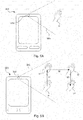
- Figure 5A shows an illustration of an improved computing device 500 according to one embodiment of the teachings herein.
- the computation device 500 is a smartphone as in figure 1A (referenced 100) and figure 2 (referenced 200).
- the smartphone is arranged with a camera 560 configured to provide an image stream of all objects, such as a hand H, appearing within a viewing cone 565, indicated with dashed lines in figure 5A (and figure 5B which will be disclosed below).
- a controller (not shown in figure 5 , but referenced 210 in figure 2 ) is configured to track an object, such as the hand H, and identify a gesture made by the object, in this example the hand H. The details of how the tracking of the object and the identification of the gesture may be implemented are discussed with reference to figure 2 in the above.
- Figure 5B shows an illustration of an improved computing device 500 according to one embodiment of the teachings herein, which is configured to track an object, in this example a hand H, and identify a gesture performed by the hand H.
- the computation device 500 is a smartphone as in figure 1A (referenced 100) and figure 2 (referenced 200).
- the hand H performs a gesture by moving in three directions, referenced 51, 52 and 53 in figure 5B , from a first position of the hand H to a final position of the hand H"'.
- the camera 560 and the controller (210) tracks the hand H through its sequence of movements 51, 52, 53 to the final position of the hand H'" and identifies the gesture and the associated command, which in this case is a command to unlock the computation device 500.
- the controller (210) is further configured to execute the associated command.
- Examples of other associated commands are unlocking the computation device 500 with a coded gesture, locking the computation device 500 and unlocking the computation device 500 activating a coded lock.
- a coded gesture (or code activating gesture) provides security in being of a different gesture that is more complicated than the gesture for simply unlocking the computation device 500.
- the tracking and gesture identification may be performed for three dimensional gestures. This allows for a larger set of available combinations of for a sequence or gesture to represent a coded input, thereby providing the same level of security as the prior art computation devices but in a manner that is easier for a user to remember.
- Another advantage of using a camera to track gestures for locking/unlocking device is that as the display is not touched the wear and tear of the display is significantly reduced.
- a tracking and gesture identification as disclosed in the two Swedish patent applications referred to in the above, which can be used with a low resolution camera, which can be used with a low resolution camera, a cost efficient alternative to a touch display is provided.
- a camera esp. a low resolution camera
- a touch display is cheaper and more robust than a touch display.
- a gesture to be tracked in free space does not require spatial precision as the manipulation of a virtual manipulation object requires. No exact start point or end point is required, nor are exact distances for each partial movement 51, 52, 53 required. It is thus much easier for a user to input a gesture than to manipulate a virtual manipulation object.
- the gesture input is not dependent on making capacitive contact between the touch display and a hand H. This is particularly beneficial in climates where the use of gloves is common. Also, the input of gestures does not require a close proximity to the computation device and can also be effected at a distance.
- a gesture is, by its definition, not bound by starting positions or end positions or exact reciprocal partial movements and distances.
- Performing a gesture as opposed to manipulating a virtual manipulation object, does not require the same level of spatial precision and is much more simple to execute by, for example, a handicapped person.
- a visual indication of the gesture to be input or for providing feedback on the gesture performed so far can be displayed on the display.
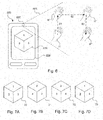
- Figure 6 shows an illustration of an improved computing device 600 according to one embodiment of the teachings herein.
- the computation device 600 is a smartphone as in figure 1A (referenced 100) and figure 2 (referenced 200).
- the computation device 600 is configured to display a visual indication in the form of a virtual object 638.
- the visual indication 638 is a cube having six sides.
- an intuitive visual feedback of the tracked gesture is provided that is easy for a user to understand and thereby correlate his movements to the desired gesture to be made.
- it facilitates remembering the gesture to be made as the gesture will be associated with the visual indication 638.
- the user will thus be able to perform his gesture, by a virtual manipulation of the visual indication 638.
- the virtual manipulation of the visual indication 638 does not require the same spatial precision as the manipulation of a virtual manipulation object as disclosed with reference to figure 4A and figure 4B as it does not require any specific start or end position or any specific reciprocal distances. As long as a movement in one direction is detected, the visual indication will provide feedback on this.
- Figures 7A, 7B, 7C and 7D each show a visual indication 71, 72, 73, 74 corresponding to the movements 61, 62, 63 and the positions of the hand H, H', H", H'" in figure 6 .
- the visual indication 71 of figure 7A is the starting position corresponding to the starting position of the hand H.
- the visual indication 72 of figure 7B is the intermediate position corresponding to the intermediate position of the hand H' after the movement 61.
- the visual indication 73 of figure 7C is the intermediate position corresponding to the intermediate position of the hand H" after the movement 62.
- the visual indication 74 of figure 7D is the final position corresponding to the final position of the hand H' after movement 63.
- the visual indications 71 to 74 all show different sides of the visual indications (indicated by the side numbering).
- the visual indication may be displayed in a random or varying alignment when the tracking is first activated, thereby enabling for having a random gesture to be associated with the unlock or lock command.
- the gesture is then identified by the end result of arranging the visual indication in a pre-specified alignment.
- the visual indication 638 may be provided in the form of arrows following the tracked object, a line being drawn on the display illustrating the movement tracked.
- Figure 8 shows an illustration of an improved computing device 800 according to one embodiment of the teachings herein.
- the computation device 800 is a smartphone as in figure 1A (referenced 100) and figure 2 (referenced 200).
- multiple objects may be tracked for identifying multiple-object gestures.
- two objects in this example two hands HI and H2 are tracked by a camera 860 in cooperation with a controller (not shown but referenced 210 in figure 2 ).
- the left hand is tracked from an initial position HI along a movement 81 to a final position H1'.
- the right hand is tracked from an initial position H2 along a movement 82 to a final position H2'.
- the computation device 800 is configured to display a visual indication 838 in the form of a visual puzzle, which in this example is a complicated multipart cube 838.
- the multipart cube 838 in this example comprises 27 different parts, each part having two or three sides.
- each side may be identified through the use of different coloring, labels, such as numbers or other symbols, or different images, just as for the visual indication of figures 6 and 7A to D .
- three sides are indicated to be numbered, 1 to 3.
- One popular and well-known example of a multipart cube is the Rubik's cube ®.
- a PIN code can be input by arranging the sides in a particular (pre-specified) order.
- Enabling a user to solve a visual puzzle provides an intuitive manner of guiding the user in how to remember the exact order of movements in a complicated gesture, all while not requiring the spatial precision required by prior art solutions.
- the visual indication may be displayed in a random or varying alignment when the tracking is first activated, thereby enabling for having a random gesture to be associated with the unlock or lock command.
- the gesture is then identified by the end result of arranging the visual indication in a pre-specified alignment. This provides a particularly difficult manner of retracing the steps by a fraudulent user as simply repeating a gesture will not provide the same end result.
- the camera of a computation device should be turned off when not needed.
- the computation device will not be able to track any objects when the camera is turned off, it is beneficial to implement a startup trigger for the camera that starts the camera when the need for object tracking is imminent.
- such a startup trigger is implemented through a special key (referred as 130 in figure 1 ) or assigning a startup action to a key in a particular mode or scenario. For example, by pressing an on/off key the computation device can be started and if the computation device is in a locked state, the camera is activated for tracking an object for identifying an unlock gesture.
- a special key referred as 130 in figure 1
- assigning a startup action to a key in a particular mode or scenario For example, by pressing an on/off key the computation device can be started and if the computation device is in a locked state, the camera is activated for tracking an object for identifying an unlock gesture.
- Figure 9 shows an illustration of how a computation device 900, such as the computation device 100 of figure 1 or the computation device 200 of figure 2 is tilted or raised from a lying position (indicated by an L in figure 9 ) to an upright position (indicated by an S as in standing in figure 9 ). This basically represents a user picking up the phone to use it.
- a computation device 900 such as the computation device 100 of figure 1 or the computation device 200 of figure 2 is tilted or raised from a lying position (indicated by an L in figure 9 ) to an upright position (indicated by an S as in standing in figure 9 ). This basically represents a user picking up the phone to use it.
- the controller (not shown in figure 9 , but referenced 210 in figure 2 ) is configured to detect that the computation device 900 is tilted or moved to an upright position and in response thereto activate a camera 960 to initiate tracking of objects, such as a hand, to identify gestures.
- the controller is configured to determine whether an object to be tracked has been identified within a threshold time T1. If no such object has been identified, the camera is switched off again to preserve power.
- the threshold time may be 5 seconds, 10 seconds or 5 to 10 seconds.
- the controller is configured to determine whether there is any light when or before the camera 960 is activated, and if there is no light, or the light is to dim, the camera 960 is deactivated or not activated.
- the computing device is 900 configured to detect the surrounding light level using the camera 960. This requires that the camera is turned on to be able to detect the surrounding light, but it does not require the use of other hardware.
- the computing device is 900 configured to detect the surrounding light level using a light sensor (not shown in figure 9 , but referenced 270 in figure 2 ). This does not require the camera 960 to be turned on to detect the surrounding light as the light sensor is able to detect the surrounding light as the tilting movement is detected.
- the light sensor consumes much less power than a camera and has a shorter startup time than the camera.
- the controller is configured to determine whether there is enough light or not within a time span.
- the time span is for example 1 second or 5 second or in the range of 1 to 5 seconds. This allows for a user to pick up his computation device 900, and have the camera 960 be activated when it is in a position where it is ready to be used even if the user accidentally covered the camera 960 while picking up the computation device 900.
- the controller is configured to sense that there is enough light to track an object and activate the camera in such cases even without a specific movement.
- the triggering action may be detecting a change in the light environment from (darkness to light) by the light sensor. The determination that there is an object to be tracked as described above, may of course also be performed to prevent any longer unnecessary activations of the camera.
- Figure 10 shows a flowchart for a general method to be implemented y a controller of a computation device according to the teachings herein.
- a computation device such as in figures 1, 2 , 4 , 5 , 6 , 8 and 9 , being in a locked state, is arranged to track 1030 an object making movements to identify 1050 a gesture.
- the gesture is associated with a command and a controller retrieves 1060 the associated command and executes it 1070.
- the associated command is an unlock command.
- the controller may further be arranged to display 1040 a visual indication according to the tracked movements of the tracked object.
- the controller may further be arranged to determine that the computation device is being tilted 1010 and in response thereto activate 1020 a camera.
- the controller may be further configured to determine if the camera should be activated 1025 (or remain activate) based on a determination that no object is present to be tracked and/or that the amount of light is not enough to track an object and in response thereto refrain from activating the camera or deactivating the camera if the camera is already active.
- the determination of the tilting and the subsequent determination of available light and objects to be tracked can be replaced by detecting that an assigned key is pressed.
- visual indicators have been described as being cubes, which have been described as having six (main) sides, it should be noted that also other cubes may be used as a visual indicator. Examples of such cubes are: dodecahedrons, icosahedrons, octahedrons and tetrahedrons to name a few. Also, other visual indicators may also be used, such as arrows, lines, balls and triangles to name a few.
- the teachings herein provide the benefit that the simple calculations do not require any vast computational resources to be implemented efficiently.
- the manner taught does not require any scaling, rotation or deformation operations to be made and the determination of the curvatures is indeed simple and elegant.
- the manner taught herein is thus suited for use in low or adverse light conditions which also makes it highly suited for portable devices and entertainment systems.
- the manner of identifying gestures disclosed herein is beneficial in that as it is based on directions instead of absolute positions it is less sensitive to the distance between the object and camera. There is also no need for scaling a tracked object to fit a library or reference object. This is particularly useful as the same gesture setting may be employed for different devices (such as but not limited to TV, mobile phones and stationary computers).
- the gesture library only requires a minimum of data so it is easy to store and fast to manipulate thereby requiring only a minimum of computational resources.
- the manner disclosed herein is also able to handle changes in scale in that it interprets a change in scale as a gesture in a direction parallel with a line of sight or it ignores such movements. This provides for a robust manner of identifying gestures.
- the teachings herein provide the benefit that the simple operations of comparing an angle and possibly a distance do not require any vast computational resources to be implemented efficiently.
- the manner taught does not require any scaling, rotation or deformation operations to be made and the determination of the curvatures is indeed simple and elegant.
- the manner taught herein is thus suited for use in low or adverse light conditions which also makes it highly suited for portable devices and entertainment systems.
- Another benefit lies in that no training of the tracking system or the gesture identification is required.
- the manner taught herein is very easy to integrate in an existing device as the input required is the image stream which can be provided as a video stream from a camera (internal or external) or through another video source, such as a film or streamed video stream.
- the output provided is the coordinates for the relative movement which, in combination with the input, creates a simple interface to the manner taught herein that is easy to integrate into existing devices as well as into designs for devices to be produced.
Landscapes
- Engineering & Computer Science (AREA)
- Theoretical Computer Science (AREA)
- General Engineering & Computer Science (AREA)
- Physics & Mathematics (AREA)
- General Physics & Mathematics (AREA)
- Human Computer Interaction (AREA)
- Computer Hardware Design (AREA)
- General Health & Medical Sciences (AREA)
- Health & Medical Sciences (AREA)
- Computer Vision & Pattern Recognition (AREA)
- Psychiatry (AREA)
- Social Psychology (AREA)
- Multimedia (AREA)
- Bioethics (AREA)
- Computer Security & Cryptography (AREA)
- Software Systems (AREA)
- User Interface Of Digital Computer (AREA)
- Image Analysis (AREA)
- Closed-Circuit Television Systems (AREA)
Applications Claiming Priority (4)
| Application Number | Priority Date | Filing Date | Title |
|---|---|---|---|
| SE1250912A SE537580C2 (sv) | 2012-08-03 | 2012-08-03 | Förbättrad inmatning |
| US201261680092P | 2012-08-06 | 2012-08-06 | |
| EP13825034.5A EP2880509B1 (de) | 2012-08-03 | 2013-07-26 | Verbesserte eingabe durch gestenverfolgung |
| PCT/SE2013/050935 WO2014021769A2 (en) | 2012-08-03 | 2013-07-26 | Improving input by tracking gestures |
Related Parent Applications (2)
| Application Number | Title | Priority Date | Filing Date |
|---|---|---|---|
| EP13825034.5A Division-Into EP2880509B1 (de) | 2012-08-03 | 2013-07-26 | Verbesserte eingabe durch gestenverfolgung |
| EP13825034.5A Division EP2880509B1 (de) | 2012-08-03 | 2013-07-26 | Verbesserte eingabe durch gestenverfolgung |
Publications (2)
| Publication Number | Publication Date |
|---|---|
| EP3457255A1 true EP3457255A1 (de) | 2019-03-20 |
| EP3457255B1 EP3457255B1 (de) | 2022-05-11 |
Family
ID=50028631
Family Applications (2)
| Application Number | Title | Priority Date | Filing Date |
|---|---|---|---|
| EP18197711.7A Active EP3457255B1 (de) | 2012-08-03 | 2013-07-26 | Verbesserte eingabe |
| EP13825034.5A Not-in-force EP2880509B1 (de) | 2012-08-03 | 2013-07-26 | Verbesserte eingabe durch gestenverfolgung |
Family Applications After (1)
| Application Number | Title | Priority Date | Filing Date |
|---|---|---|---|
| EP13825034.5A Not-in-force EP2880509B1 (de) | 2012-08-03 | 2013-07-26 | Verbesserte eingabe durch gestenverfolgung |
Country Status (4)
| Country | Link |
|---|---|
| US (1) | US9355266B2 (de) |
| EP (2) | EP3457255B1 (de) |
| SE (1) | SE537580C2 (de) |
| WO (1) | WO2014021769A2 (de) |
Families Citing this family (11)
| Publication number | Priority date | Publication date | Assignee | Title |
|---|---|---|---|---|
| JP6041604B2 (ja) * | 2012-09-27 | 2016-12-14 | 京セラ株式会社 | 表示装置、制御システムおよび制御プログラム |
| SE537579C2 (sv) * | 2013-04-11 | 2015-06-30 | Crunchfish Ab | Bärbar enhet nyttjandes en passiv sensor för initiering av beröringsfri geststyrning |
| KR101534745B1 (ko) * | 2013-12-31 | 2015-07-07 | 현대자동차 주식회사 | 제스처 인식 장치 |
| US20150205360A1 (en) * | 2014-01-20 | 2015-07-23 | Lenovo (Singapore) Pte. Ltd. | Table top gestures for mimicking mouse control |
| SE539593C2 (en) | 2014-10-08 | 2017-10-17 | Crunchfish Ab | Communication device for improved content sharing |
| CN107111356B (zh) * | 2014-11-27 | 2020-10-20 | 尔吉斯科技公司 | 用于基于手势控制装置的方法和系统 |
| JP6393360B2 (ja) * | 2016-05-11 | 2018-09-19 | パナソニック インテレクチュアル プロパティ コーポレーション オブ アメリカPanasonic Intellectual Property Corporation of America | 撮影制御方法、撮影制御システム及び撮影制御サーバ |
| US10782775B2 (en) * | 2017-01-13 | 2020-09-22 | Atheer, Inc. | Methods and apparatus for providing procedure guidance |
| EP3502937A1 (de) * | 2017-12-20 | 2019-06-26 | Vestel Elektronik Sanayi ve Ticaret A.S. | Verfahren zur visuellen erfassung eines codes zum verschliessen oder entsperren von funktionen |
| CN108469893B (zh) * | 2018-03-09 | 2021-08-27 | 海尔优家智能科技(北京)有限公司 | 显示屏的控制方法、装置、设备及计算机可读存储介质 |
| JP7212862B2 (ja) * | 2019-03-20 | 2023-01-26 | 京セラドキュメントソリューションズ株式会社 | 画像処理装置、画像処理方法、画像提供システム及び画像処理プログラム |
Citations (7)
| Publication number | Priority date | Publication date | Assignee | Title |
|---|---|---|---|---|
| US6434702B1 (en) * | 1998-12-08 | 2002-08-13 | International Business Machines Corporation | Automatic rotation of digit location in devices used in passwords |
| US20060053301A1 (en) * | 2002-12-23 | 2006-03-09 | Hwa-Shik Shin | Device and method for inputting password using random keypad |
| US20100277272A1 (en) * | 2009-04-30 | 2010-11-04 | Hong Fu Jin Precision Industry (Shenzhen) Co., Ltd. | Security system and method for granting access |
| US20110310005A1 (en) * | 2010-06-17 | 2011-12-22 | Qualcomm Incorporated | Methods and apparatus for contactless gesture recognition |
| US20110310100A1 (en) * | 2010-06-21 | 2011-12-22 | Verizon Patent And Licensing, Inc. | Three-dimensional shape user interface for media content delivery systems and methods |
| SE1250910A1 (sv) | 2012-08-03 | 2014-02-04 | Crunchfish Ab | Förbättrad videospårning |
| SE1250911A1 (sv) | 2012-08-03 | 2014-02-04 | Crunchfish Ab | Förbättrad identifiering av en gest |
Family Cites Families (16)
| Publication number | Priority date | Publication date | Assignee | Title |
|---|---|---|---|---|
| DE3824639C2 (de) * | 1988-07-20 | 1993-11-18 | Geutebrueck Videotechnik Gmbh | Optische Überwachungseinrichtung |
| AU6489100A (en) * | 1999-07-29 | 2001-02-19 | Insight Technologies, Inc. Dba Scopus Optoelectronic Systems | A multi-purpose and compact camera system including infrared emitters and cameras |
| CN1898627A (zh) * | 2003-12-23 | 2007-01-17 | 皇家飞利浦电子股份有限公司 | 控制便携式用户设备的方法 |
| US7382353B2 (en) * | 2004-11-18 | 2008-06-03 | International Business Machines Corporation | Changing a function of a device based on tilt of the device for longer than a time period |
| KR100713494B1 (ko) * | 2005-06-20 | 2007-04-30 | 삼성전자주식회사 | 카메라부를 이용한 사용자 인증 방법 및 이를 위한이동통신단말기 |
| US20070130547A1 (en) * | 2005-12-01 | 2007-06-07 | Navisense, Llc | Method and system for touchless user interface control |
| US7657849B2 (en) * | 2005-12-23 | 2010-02-02 | Apple Inc. | Unlocking a device by performing gestures on an unlock image |
| US20100042954A1 (en) * | 2008-08-12 | 2010-02-18 | Apple Inc. | Motion based input selection |
| US20100079508A1 (en) * | 2008-09-30 | 2010-04-01 | Andrew Hodge | Electronic devices with gaze detection capabilities |
| JP5256109B2 (ja) * | 2009-04-23 | 2013-08-07 | 株式会社日立製作所 | 表示装置 |
| US20110074675A1 (en) | 2009-09-29 | 2011-03-31 | Nokia Corporation | Method and apparatus for initiating a feature based at least in part on the tracked movement |
| WO2011038533A1 (en) * | 2009-09-30 | 2011-04-07 | Intel Corporation | Enhancing biometric security of a system |
| KR101688655B1 (ko) * | 2009-12-03 | 2016-12-21 | 엘지전자 주식회사 | 사용자의 프레전스 검출에 의한 제스쳐 인식 장치의 전력 제어 방법 |
| US9952671B2 (en) | 2010-10-12 | 2018-04-24 | Nokia Technologies Oy | Method and apparatus for determining motion |
| US20130198273A1 (en) * | 2010-10-16 | 2013-08-01 | James Charles Vago | Methods, devices, and systems for video gaming |
| US8693726B2 (en) * | 2011-06-29 | 2014-04-08 | Amazon Technologies, Inc. | User identification by gesture recognition |
-
2012
- 2012-08-03 SE SE1250912A patent/SE537580C2/sv unknown
-
2013
- 2013-07-26 EP EP18197711.7A patent/EP3457255B1/de active Active
- 2013-07-26 WO PCT/SE2013/050935 patent/WO2014021769A2/en not_active Ceased
- 2013-07-26 EP EP13825034.5A patent/EP2880509B1/de not_active Not-in-force
- 2013-07-26 US US14/419,089 patent/US9355266B2/en active Active
Patent Citations (7)
| Publication number | Priority date | Publication date | Assignee | Title |
|---|---|---|---|---|
| US6434702B1 (en) * | 1998-12-08 | 2002-08-13 | International Business Machines Corporation | Automatic rotation of digit location in devices used in passwords |
| US20060053301A1 (en) * | 2002-12-23 | 2006-03-09 | Hwa-Shik Shin | Device and method for inputting password using random keypad |
| US20100277272A1 (en) * | 2009-04-30 | 2010-11-04 | Hong Fu Jin Precision Industry (Shenzhen) Co., Ltd. | Security system and method for granting access |
| US20110310005A1 (en) * | 2010-06-17 | 2011-12-22 | Qualcomm Incorporated | Methods and apparatus for contactless gesture recognition |
| US20110310100A1 (en) * | 2010-06-21 | 2011-12-22 | Verizon Patent And Licensing, Inc. | Three-dimensional shape user interface for media content delivery systems and methods |
| SE1250910A1 (sv) | 2012-08-03 | 2014-02-04 | Crunchfish Ab | Förbättrad videospårning |
| SE1250911A1 (sv) | 2012-08-03 | 2014-02-04 | Crunchfish Ab | Förbättrad identifiering av en gest |
Also Published As
| Publication number | Publication date |
|---|---|
| US9355266B2 (en) | 2016-05-31 |
| EP2880509A4 (de) | 2016-01-20 |
| WO2014021769A2 (en) | 2014-02-06 |
| EP2880509B1 (de) | 2018-12-12 |
| SE537580C2 (sv) | 2015-06-30 |
| EP3457255B1 (de) | 2022-05-11 |
| WO2014021769A3 (en) | 2014-04-03 |
| EP2880509A2 (de) | 2015-06-10 |
| WO2014021769A4 (en) | 2014-05-22 |
| SE1250912A1 (sv) | 2014-02-04 |
| US20150220749A1 (en) | 2015-08-06 |
Similar Documents
| Publication | Publication Date | Title |
|---|---|---|
| EP2880509B1 (de) | Verbesserte eingabe durch gestenverfolgung | |
| EP2684115B1 (de) | Verfahren und vorrichtung für schnellen zugang zu medienfunktionen auf einem gesperrten bildschirm | |
| KR101766850B1 (ko) | 비의도적 입력들에 대한 액세스 제한 상태 | |
| US10901462B2 (en) | System and method for touch input | |
| KR102561736B1 (ko) | 터치 디스플레이를 가지는 전자 장치 및 이의 지문을 이용한 기능 실행 방법 | |
| US10198081B2 (en) | Method and device for executing command on basis of context awareness | |
| CN104090708B (zh) | 便携智能终端的控制方法和装置 | |
| US20140169641A1 (en) | Mobile device having face recognition function using additional component and method for controlling the mobile device | |
| CN108920202B (zh) | 应用预加载管理方法、装置、存储介质及智能终端 | |
| KR20120020122A (ko) | 터치 스크린, 관련 동작 방법 및 시스템 | |
| EP2919445A1 (de) | Aktivierung einer elektronischen vorrichtung mit einer kapazitiven tastatur | |
| CN106682468A (zh) | 解锁电子设备的方法以及电子设备 | |
| CN109117619B (zh) | 指纹解锁方法及相关产品 | |
| CN107025049B (zh) | 显示控制设备及其控制方法 | |
| EP2948831A1 (de) | Verbessertes feedback für eine berührungslose benutzerschnittstelle | |
| EP3249878B1 (de) | Systeme und verfahren zur direktionalen messung von objekten auf einer elektronischen vorrichtung | |
| CN108700990B (zh) | 一种锁屏方法、终端及锁屏装置 | |
| CN108520057A (zh) | 终端数据的处理方法、装置、存储介质及移动终端 | |
| CN113419640A (zh) | 压力感应通道开启方法、装置及电子设备 | |
| WO2015149454A1 (zh) | 一种解密的方法和装置 | |
| CN114554069A (zh) | 终端及其任务运行方法和装置、存储介质 | |
| CN118368357A (zh) | 界面控制方法、装置、终端及存储介质 | |
| US20140078042A1 (en) | Electronic device and the controlling method thereof | |
| TW202009687A (zh) | 用於解鎖多顯示屏設備的顯示屏的方法 |
Legal Events
| Date | Code | Title | Description |
|---|---|---|---|
| PUAI | Public reference made under article 153(3) epc to a published international application that has entered the european phase |
Free format text: ORIGINAL CODE: 0009012 |
|
| STAA | Information on the status of an ep patent application or granted ep patent |
Free format text: STATUS: THE APPLICATION HAS BEEN PUBLISHED |
|
| AC | Divisional application: reference to earlier application |
Ref document number: 2880509 Country of ref document: EP Kind code of ref document: P |
|
| AK | Designated contracting states |
Kind code of ref document: A1 Designated state(s): AL AT BE BG CH CY CZ DE DK EE ES FI FR GB GR HR HU IE IS IT LI LT LU LV MC MK MT NL NO PL PT RO RS SE SI SK SM TR |
|
| STAA | Information on the status of an ep patent application or granted ep patent |
Free format text: STATUS: REQUEST FOR EXAMINATION WAS MADE |
|
| 17P | Request for examination filed |
Effective date: 20190827 |
|
| RBV | Designated contracting states (corrected) |
Designated state(s): AL AT BE BG CH CY CZ DE DK EE ES FI FR GB GR HR HU IE IS IT LI LT LU LV MC MK MT NL NO PL PT RO RS SE SI SK SM TR |
|
| RAP1 | Party data changed (applicant data changed or rights of an application transferred) |
Owner name: CRUNCHFISH GESTURE INTERACTION AB |
|
| STAA | Information on the status of an ep patent application or granted ep patent |
Free format text: STATUS: EXAMINATION IS IN PROGRESS |
|
| 17Q | First examination report despatched |
Effective date: 20210324 |
|
| RIC1 | Information provided on ipc code assigned before grant |
Ipc: G06K 9/00 20060101ALI20211122BHEP Ipc: G06F 1/3234 20190101ALI20211122BHEP Ipc: G06F 1/3215 20190101ALI20211122BHEP Ipc: G06F 1/3231 20190101ALI20211122BHEP Ipc: G06F 1/16 20060101ALI20211122BHEP Ipc: G06F 3/01 20060101AFI20211122BHEP |
|
| GRAP | Despatch of communication of intention to grant a patent |
Free format text: ORIGINAL CODE: EPIDOSNIGR1 |
|
| STAA | Information on the status of an ep patent application or granted ep patent |
Free format text: STATUS: GRANT OF PATENT IS INTENDED |
|
| INTG | Intention to grant announced |
Effective date: 20220110 |
|
| GRAS | Grant fee paid |
Free format text: ORIGINAL CODE: EPIDOSNIGR3 |
|
| GRAA | (expected) grant |
Free format text: ORIGINAL CODE: 0009210 |
|
| STAA | Information on the status of an ep patent application or granted ep patent |
Free format text: STATUS: THE PATENT HAS BEEN GRANTED |
|
| AC | Divisional application: reference to earlier application |
Ref document number: 2880509 Country of ref document: EP Kind code of ref document: P |
|
| AK | Designated contracting states |
Kind code of ref document: B1 Designated state(s): AL AT BE BG CH CY CZ DE DK EE ES FI FR GB GR HR HU IE IS IT LI LT LU LV MC MK MT NL NO PL PT RO RS SE SI SK SM TR |
|
| REG | Reference to a national code |
Ref country code: GB Ref legal event code: FG4D |
|
| REG | Reference to a national code |
Ref country code: CH Ref legal event code: EP |
|
| REG | Reference to a national code |
Ref country code: AT Ref legal event code: REF Ref document number: 1491998 Country of ref document: AT Kind code of ref document: T Effective date: 20220515 |
|
| REG | Reference to a national code |
Ref country code: DE Ref legal event code: R096 Ref document number: 602013081680 Country of ref document: DE |
|
| REG | Reference to a national code |
Ref country code: IE Ref legal event code: FG4D |
|
| REG | Reference to a national code |
Ref country code: LT Ref legal event code: MG9D |
|
| REG | Reference to a national code |
Ref country code: NL Ref legal event code: MP Effective date: 20220511 |
|
| REG | Reference to a national code |
Ref country code: AT Ref legal event code: MK05 Ref document number: 1491998 Country of ref document: AT Kind code of ref document: T Effective date: 20220511 |
|
| PG25 | Lapsed in a contracting state [announced via postgrant information from national office to epo] |
Ref country code: SE Free format text: LAPSE BECAUSE OF FAILURE TO SUBMIT A TRANSLATION OF THE DESCRIPTION OR TO PAY THE FEE WITHIN THE PRESCRIBED TIME-LIMIT Effective date: 20220511 Ref country code: PT Free format text: LAPSE BECAUSE OF FAILURE TO SUBMIT A TRANSLATION OF THE DESCRIPTION OR TO PAY THE FEE WITHIN THE PRESCRIBED TIME-LIMIT Effective date: 20220912 Ref country code: NO Free format text: LAPSE BECAUSE OF FAILURE TO SUBMIT A TRANSLATION OF THE DESCRIPTION OR TO PAY THE FEE WITHIN THE PRESCRIBED TIME-LIMIT Effective date: 20220811 Ref country code: NL Free format text: LAPSE BECAUSE OF FAILURE TO SUBMIT A TRANSLATION OF THE DESCRIPTION OR TO PAY THE FEE WITHIN THE PRESCRIBED TIME-LIMIT Effective date: 20220511 Ref country code: LT Free format text: LAPSE BECAUSE OF FAILURE TO SUBMIT A TRANSLATION OF THE DESCRIPTION OR TO PAY THE FEE WITHIN THE PRESCRIBED TIME-LIMIT Effective date: 20220511 Ref country code: HR Free format text: LAPSE BECAUSE OF FAILURE TO SUBMIT A TRANSLATION OF THE DESCRIPTION OR TO PAY THE FEE WITHIN THE PRESCRIBED TIME-LIMIT Effective date: 20220511 Ref country code: GR Free format text: LAPSE BECAUSE OF FAILURE TO SUBMIT A TRANSLATION OF THE DESCRIPTION OR TO PAY THE FEE WITHIN THE PRESCRIBED TIME-LIMIT Effective date: 20220812 Ref country code: FI Free format text: LAPSE BECAUSE OF FAILURE TO SUBMIT A TRANSLATION OF THE DESCRIPTION OR TO PAY THE FEE WITHIN THE PRESCRIBED TIME-LIMIT Effective date: 20220511 Ref country code: ES Free format text: LAPSE BECAUSE OF FAILURE TO SUBMIT A TRANSLATION OF THE DESCRIPTION OR TO PAY THE FEE WITHIN THE PRESCRIBED TIME-LIMIT Effective date: 20220511 Ref country code: BG Free format text: LAPSE BECAUSE OF FAILURE TO SUBMIT A TRANSLATION OF THE DESCRIPTION OR TO PAY THE FEE WITHIN THE PRESCRIBED TIME-LIMIT Effective date: 20220811 Ref country code: AT Free format text: LAPSE BECAUSE OF FAILURE TO SUBMIT A TRANSLATION OF THE DESCRIPTION OR TO PAY THE FEE WITHIN THE PRESCRIBED TIME-LIMIT Effective date: 20220511 |
|
| PG25 | Lapsed in a contracting state [announced via postgrant information from national office to epo] |
Ref country code: RS Free format text: LAPSE BECAUSE OF FAILURE TO SUBMIT A TRANSLATION OF THE DESCRIPTION OR TO PAY THE FEE WITHIN THE PRESCRIBED TIME-LIMIT Effective date: 20220511 Ref country code: PL Free format text: LAPSE BECAUSE OF FAILURE TO SUBMIT A TRANSLATION OF THE DESCRIPTION OR TO PAY THE FEE WITHIN THE PRESCRIBED TIME-LIMIT Effective date: 20220511 Ref country code: LV Free format text: LAPSE BECAUSE OF FAILURE TO SUBMIT A TRANSLATION OF THE DESCRIPTION OR TO PAY THE FEE WITHIN THE PRESCRIBED TIME-LIMIT Effective date: 20220511 Ref country code: IS Free format text: LAPSE BECAUSE OF FAILURE TO SUBMIT A TRANSLATION OF THE DESCRIPTION OR TO PAY THE FEE WITHIN THE PRESCRIBED TIME-LIMIT Effective date: 20220911 |
|
| PG25 | Lapsed in a contracting state [announced via postgrant information from national office to epo] |
Ref country code: SM Free format text: LAPSE BECAUSE OF FAILURE TO SUBMIT A TRANSLATION OF THE DESCRIPTION OR TO PAY THE FEE WITHIN THE PRESCRIBED TIME-LIMIT Effective date: 20220511 Ref country code: SK Free format text: LAPSE BECAUSE OF FAILURE TO SUBMIT A TRANSLATION OF THE DESCRIPTION OR TO PAY THE FEE WITHIN THE PRESCRIBED TIME-LIMIT Effective date: 20220511 Ref country code: RO Free format text: LAPSE BECAUSE OF FAILURE TO SUBMIT A TRANSLATION OF THE DESCRIPTION OR TO PAY THE FEE WITHIN THE PRESCRIBED TIME-LIMIT Effective date: 20220511 Ref country code: EE Free format text: LAPSE BECAUSE OF FAILURE TO SUBMIT A TRANSLATION OF THE DESCRIPTION OR TO PAY THE FEE WITHIN THE PRESCRIBED TIME-LIMIT Effective date: 20220511 Ref country code: DK Free format text: LAPSE BECAUSE OF FAILURE TO SUBMIT A TRANSLATION OF THE DESCRIPTION OR TO PAY THE FEE WITHIN THE PRESCRIBED TIME-LIMIT Effective date: 20220511 Ref country code: CZ Free format text: LAPSE BECAUSE OF FAILURE TO SUBMIT A TRANSLATION OF THE DESCRIPTION OR TO PAY THE FEE WITHIN THE PRESCRIBED TIME-LIMIT Effective date: 20220511 |
|
| REG | Reference to a national code |
Ref country code: DE Ref legal event code: R097 Ref document number: 602013081680 Country of ref document: DE |
|
| PG25 | Lapsed in a contracting state [announced via postgrant information from national office to epo] |
Ref country code: MC Free format text: LAPSE BECAUSE OF FAILURE TO SUBMIT A TRANSLATION OF THE DESCRIPTION OR TO PAY THE FEE WITHIN THE PRESCRIBED TIME-LIMIT Effective date: 20220511 |
|
| REG | Reference to a national code |
Ref country code: CH Ref legal event code: PL |
|
| PLBE | No opposition filed within time limit |
Free format text: ORIGINAL CODE: 0009261 |
|
| STAA | Information on the status of an ep patent application or granted ep patent |
Free format text: STATUS: NO OPPOSITION FILED WITHIN TIME LIMIT |
|
| REG | Reference to a national code |
Ref country code: BE Ref legal event code: MM Effective date: 20220731 |
|
| PG25 | Lapsed in a contracting state [announced via postgrant information from national office to epo] |
Ref country code: AL Free format text: LAPSE BECAUSE OF FAILURE TO SUBMIT A TRANSLATION OF THE DESCRIPTION OR TO PAY THE FEE WITHIN THE PRESCRIBED TIME-LIMIT Effective date: 20220511 |
|
| 26N | No opposition filed |
Effective date: 20230214 |
|
| PG25 | Lapsed in a contracting state [announced via postgrant information from national office to epo] |
Ref country code: LU Free format text: LAPSE BECAUSE OF NON-PAYMENT OF DUE FEES Effective date: 20220726 Ref country code: LI Free format text: LAPSE BECAUSE OF NON-PAYMENT OF DUE FEES Effective date: 20220731 Ref country code: CH Free format text: LAPSE BECAUSE OF NON-PAYMENT OF DUE FEES Effective date: 20220731 |
|
| PG25 | Lapsed in a contracting state [announced via postgrant information from national office to epo] |
Ref country code: SI Free format text: LAPSE BECAUSE OF FAILURE TO SUBMIT A TRANSLATION OF THE DESCRIPTION OR TO PAY THE FEE WITHIN THE PRESCRIBED TIME-LIMIT Effective date: 20220511 Ref country code: BE Free format text: LAPSE BECAUSE OF NON-PAYMENT OF DUE FEES Effective date: 20220731 |
|
| PG25 | Lapsed in a contracting state [announced via postgrant information from national office to epo] |
Ref country code: IE Free format text: LAPSE BECAUSE OF NON-PAYMENT OF DUE FEES Effective date: 20220726 |
|
| PG25 | Lapsed in a contracting state [announced via postgrant information from national office to epo] |
Ref country code: IT Free format text: LAPSE BECAUSE OF FAILURE TO SUBMIT A TRANSLATION OF THE DESCRIPTION OR TO PAY THE FEE WITHIN THE PRESCRIBED TIME-LIMIT Effective date: 20220511 |
|
| PG25 | Lapsed in a contracting state [announced via postgrant information from national office to epo] |
Ref country code: HU Free format text: LAPSE BECAUSE OF FAILURE TO SUBMIT A TRANSLATION OF THE DESCRIPTION OR TO PAY THE FEE WITHIN THE PRESCRIBED TIME-LIMIT; INVALID AB INITIO Effective date: 20130726 |
|
| PG25 | Lapsed in a contracting state [announced via postgrant information from national office to epo] |
Ref country code: MK Free format text: LAPSE BECAUSE OF FAILURE TO SUBMIT A TRANSLATION OF THE DESCRIPTION OR TO PAY THE FEE WITHIN THE PRESCRIBED TIME-LIMIT Effective date: 20220511 Ref country code: CY Free format text: LAPSE BECAUSE OF FAILURE TO SUBMIT A TRANSLATION OF THE DESCRIPTION OR TO PAY THE FEE WITHIN THE PRESCRIBED TIME-LIMIT Effective date: 20220511 |
|
| PG25 | Lapsed in a contracting state [announced via postgrant information from national office to epo] |
Ref country code: TR Free format text: LAPSE BECAUSE OF FAILURE TO SUBMIT A TRANSLATION OF THE DESCRIPTION OR TO PAY THE FEE WITHIN THE PRESCRIBED TIME-LIMIT Effective date: 20220511 |
|
| PG25 | Lapsed in a contracting state [announced via postgrant information from national office to epo] |
Ref country code: MT Free format text: LAPSE BECAUSE OF FAILURE TO SUBMIT A TRANSLATION OF THE DESCRIPTION OR TO PAY THE FEE WITHIN THE PRESCRIBED TIME-LIMIT Effective date: 20220511 |
|
| PG25 | Lapsed in a contracting state [announced via postgrant information from national office to epo] |
Ref country code: BG Free format text: LAPSE BECAUSE OF FAILURE TO SUBMIT A TRANSLATION OF THE DESCRIPTION OR TO PAY THE FEE WITHIN THE PRESCRIBED TIME-LIMIT Effective date: 20220511 |
|
| PG25 | Lapsed in a contracting state [announced via postgrant information from national office to epo] |
Ref country code: BG Free format text: LAPSE BECAUSE OF FAILURE TO SUBMIT A TRANSLATION OF THE DESCRIPTION OR TO PAY THE FEE WITHIN THE PRESCRIBED TIME-LIMIT Effective date: 20220511 |
|
| PGFP | Annual fee paid to national office [announced via postgrant information from national office to epo] |
Ref country code: DE Payment date: 20250731 Year of fee payment: 13 |
|
| PGFP | Annual fee paid to national office [announced via postgrant information from national office to epo] |
Ref country code: GB Payment date: 20250723 Year of fee payment: 13 |
|
| PGFP | Annual fee paid to national office [announced via postgrant information from national office to epo] |
Ref country code: FR Payment date: 20250723 Year of fee payment: 13 |