EP3531249A1 - Systems and methods for multi-output electrostatic haptic effects - Google Patents
Systems and methods for multi-output electrostatic haptic effects Download PDFInfo
- Publication number
- EP3531249A1 EP3531249A1 EP19168807.6A EP19168807A EP3531249A1 EP 3531249 A1 EP3531249 A1 EP 3531249A1 EP 19168807 A EP19168807 A EP 19168807A EP 3531249 A1 EP3531249 A1 EP 3531249A1
- Authority
- EP
- European Patent Office
- Prior art keywords
- esf
- user
- haptic
- output
- haptic effect
- Prior art date
- Legal status (The legal status is an assumption and is not a legal conclusion. Google has not performed a legal analysis and makes no representation as to the accuracy of the status listed.)
- Withdrawn
Links
Images


Classifications
-
- G—PHYSICS
- G06—COMPUTING OR CALCULATING; COUNTING
- G06F—ELECTRIC DIGITAL DATA PROCESSING
- G06F3/00—Input arrangements for transferring data to be processed into a form capable of being handled by the computer; Output arrangements for transferring data from processing unit to output unit, e.g. interface arrangements
- G06F3/01—Input arrangements or combined input and output arrangements for interaction between user and computer
- G06F3/016—Input arrangements with force or tactile feedback as computer generated output to the user
-
- G—PHYSICS
- G06—COMPUTING OR CALCULATING; COUNTING
- G06F—ELECTRIC DIGITAL DATA PROCESSING
- G06F3/00—Input arrangements for transferring data to be processed into a form capable of being handled by the computer; Output arrangements for transferring data from processing unit to output unit, e.g. interface arrangements
- G06F3/01—Input arrangements or combined input and output arrangements for interaction between user and computer
- G06F3/03—Arrangements for converting the position or the displacement of a member into a coded form
- G06F3/041—Digitisers, e.g. for touch screens or touch pads, characterised by the transducing means
- G06F3/0412—Digitisers structurally integrated in a display
-
- G—PHYSICS
- G06—COMPUTING OR CALCULATING; COUNTING
- G06F—ELECTRIC DIGITAL DATA PROCESSING
- G06F3/00—Input arrangements for transferring data to be processed into a form capable of being handled by the computer; Output arrangements for transferring data from processing unit to output unit, e.g. interface arrangements
- G06F3/01—Input arrangements or combined input and output arrangements for interaction between user and computer
- G06F3/048—Interaction techniques based on graphical user interfaces [GUI]
- G06F3/0487—Interaction techniques based on graphical user interfaces [GUI] using specific features provided by the input device, e.g. functions controlled by the rotation of a mouse with dual sensing arrangements, or of the nature of the input device, e.g. tap gestures based on pressure sensed by a digitiser
- G06F3/0488—Interaction techniques based on graphical user interfaces [GUI] using specific features provided by the input device, e.g. functions controlled by the rotation of a mouse with dual sensing arrangements, or of the nature of the input device, e.g. tap gestures based on pressure sensed by a digitiser using a touch-screen or digitiser, e.g. input of commands through traced gestures
- G06F3/04886—Interaction techniques based on graphical user interfaces [GUI] using specific features provided by the input device, e.g. functions controlled by the rotation of a mouse with dual sensing arrangements, or of the nature of the input device, e.g. tap gestures based on pressure sensed by a digitiser using a touch-screen or digitiser, e.g. input of commands through traced gestures by partitioning the display area of the touch-screen or the surface of the digitising tablet into independently controllable areas, e.g. virtual keyboards or menus
-
- G—PHYSICS
- G06—COMPUTING OR CALCULATING; COUNTING
- G06F—ELECTRIC DIGITAL DATA PROCESSING
- G06F2203/00—Indexing scheme relating to G06F3/00 - G06F3/048
- G06F2203/01—Indexing scheme relating to G06F3/01
- G06F2203/013—Force feedback applied to a game
-
- G—PHYSICS
- G06—COMPUTING OR CALCULATING; COUNTING
- G06F—ELECTRIC DIGITAL DATA PROCESSING
- G06F2203/00—Indexing scheme relating to G06F3/00 - G06F3/048
- G06F2203/01—Indexing scheme relating to G06F3/01
- G06F2203/014—Force feedback applied to GUI
-
- G—PHYSICS
- G06—COMPUTING OR CALCULATING; COUNTING
- G06F—ELECTRIC DIGITAL DATA PROCESSING
- G06F2203/00—Indexing scheme relating to G06F3/00 - G06F3/048
- G06F2203/01—Indexing scheme relating to G06F3/01
- G06F2203/015—Force feedback applied to a joystick
-
- G—PHYSICS
- G06—COMPUTING OR CALCULATING; COUNTING
- G06F—ELECTRIC DIGITAL DATA PROCESSING
- G06F2203/00—Indexing scheme relating to G06F3/00 - G06F3/048
- G06F2203/041—Indexing scheme relating to G06F3/041 - G06F3/045
- G06F2203/04106—Multi-sensing digitiser, i.e. digitiser using at least two different sensing technologies simultaneously or alternatively, e.g. for detecting pen and finger, for saving power or for improving position detection
-
- G—PHYSICS
- G06—COMPUTING OR CALCULATING; COUNTING
- G06F—ELECTRIC DIGITAL DATA PROCESSING
- G06F2203/00—Indexing scheme relating to G06F3/00 - G06F3/048
- G06F2203/048—Indexing scheme relating to G06F3/048
- G06F2203/04809—Textured surface identifying touch areas, e.g. overlay structure for a virtual keyboard
Definitions
- the present invention relates to the field of user interface devices. More specifically, the present invention relates to multi-output electrostatic haptic effects.
- One interface that is of growing popularity due to its intuitive and interactive nature is the touchscreen display.
- a user can perform a variety of tasks by contacting a region of the touchscreen with the user's finger.
- designers often leverage user experience with physical interactions. This is generally done by reproducing some aspects of interactions with the physical world through visual, audio, and/or haptic feedback.
- Haptic feedback often takes the form of a mechanical vibration. There is a need for additional systems and methods to generate haptic feedback.
- a system of the present disclosure may comprise a processor configured to determine a haptic effect, wherein the haptic effect comprises a static ESF effect or a confirmation ESF effect; and transmit a haptic signal associated with the haptic effect.
- the system may also comprise an ESF controller in communication with the processor, the ESF controller configured to receive the haptic signal, determine an ESF signal based at least in part on the haptic signal, and transmit the ESF signal.
- the system may further comprise an ESF device in communication with the ESF controller, the ESF device comprising an ESF cell and configured to receive the ESF signal and output the haptic effect.
- a method of the present disclosure may comprise: determining a haptic effect, wherein the haptic effect comprises a static ESF effect or a confirmation ESF effect; transmitting a haptic signal associated with the haptic effect to an ESF controller; and determining an ESF signal based at least in part on the haptic signal.
- the method may further comprise transmitting the ESF signal to an ESF device configured to output the haptic effect, the ESF device comprising an ESF cell; and outputting the haptic effect.
- the disclosure also concerns a computer-readable medium for implementing such a method.
- the gaming system may include a game console in communication with a user interface device, such as a game controller, smart phone, or tablet.
- a user interface device such as a game controller, smart phone, or tablet.
- Such gaming systems may include, for example, gaming systems commonly sold under the trademarks Microsoft Xbox ®, Sony PlayStation ®, Nintendo Wii ®, or the Sega Zone ®.
- the user interface devices may comprise and/or may be in communication with one or more user input elements configured to detect a user input.
- Such user input elements may comprise, for example, a game controller, button, joystick, gyroscope, accelerometer, or touch-sensitive surface, any of which can be alone or in combination with one another.
- the gaming system is in communication with a haptic feedback device.
- the haptic feedback device is configured to receive a signal from the gaming system and provide an electrostatic force feedback (ESF) haptic effect perceivable by a user.
- ESF electrostatic force feedback
- a haptic feedback device configured to output ESF haptic effects will hereinafter be referred to as an "ESF device.”
- the ESF device may comprise a three-by-three matrix of ESF cells, each ESF cell comprising an electrode coupled to an insulator.
- the ESF device may be positioned on the user interface device to directly contact the user's hand. Further, the surface area of the ESF device may be smaller than the contact area between the user's hand and the user interface device.
- the ESF device uses electrostatic attraction to output a haptic effect to the user.
- the gaming system may apply an electric signal to one or more of the electrodes of the ESF cells.
- the electric signal may generate a charge on each electrode.
- This charge may generate capacitive coupling between the electrode and an object (e.g., the user's hand, finger, or other body part) near or touching the surfaces of the ESF cells.
- the capacitive coupling of the object with ESF cells produces a haptic effect.
- the user does not have to move a body part across a surface associated with the ESF device to perceive the haptic effect. Nor does the user have to move a body part in the direction perpendicular to the surface associated with the ESF device to perceive the haptic effect. Rather, the user may maintain continuous contact (e.g., by gripping or holding) with a surface associated with the ESF device and perceive the ESF haptic effect.
- An ESF haptic effect that is perceptible to a user without user movement in the directions tangential or perpendicular to a surface will be referred to hereinafter as a "static ESF effect.”
- a static ESF effect may simulate movement (hereinafter referred to as a "flow sensation") across a surface, such as the surface of the user interface device, even though the user's hand may not move relative to the surface. Applying a sequential signal to the ESF cells may produce such a static ESF effect.
- Other static ESF effects may comprise, for example, a simulated vibration, a change in a perceived coefficient of friction, or a simulated texture.
- the gaming system may output a haptic effect, via the ESF device, in response to an event.
- An event is any interaction, action, collision, or other event which occurs during operation of the device which can potentially comprise an associated haptic effect.
- An event may comprise user input (e.g., a button press, manipulating a joystick, interacting with a touch-sensitive surface, tilting or orienting the user interface device), a system status (e.g., low battery, low memory, or a system notification, such as a notification generated based on the system receiving an incoming call), sending data, receiving data, or a program event (e.g., if the program is a game, a program event may comprise explosions, gunshots, collisions, interactions between game characters, advancing to a new level, or driving over bumpy terrain).
- the gaming system may output a haptic effect (e.g., a simulated vibration) upon the occurrence of a game event (e.g., when the user's virtual character
- FIG. 1 is a block diagram showing a system 100 for providing multi-output electrostatic haptic effects according to one embodiment.
- system 100 comprises a computing device 101 having one or more processors 102 in communication with other hardware via bus 106.
- Computing device 101 may comprise, for example, a smartphone, tablet, e-reader, or portable gaming device. While system 100 is shown as a single device in Figure 1 , in other embodiments, the system 100 may comprise multiple devices as shown in Figure 3 , such as a game console and one or more game controllers.
- a memory 104 which can comprise any suitable tangible (and non-transitory) computer-readable medium such as RAM, ROM, EEPROM, or the like, embodies program components that configure operation of the computing device 101.
- Computing device 101 may further include one or more network interface devices 110, input/output (I/O) interface components 112, and storage 114.
- Network device 110 can represent one or more of any components that facilitate a network connection. Examples include, but are not limited to, wired interfaces such as Ethernet, USB, IEEE 1394, and/or wireless interfaces such as IEEE 802.11, Bluetooth, or radio interfaces for accessing cellular telephone networks (e.g., transceiver/antenna for accessing a CDMA, GSM, UMTS, or other mobile communications network).
- wired interfaces such as Ethernet, USB, IEEE 1394
- wireless interfaces such as IEEE 802.11, Bluetooth
- radio interfaces for accessing cellular telephone networks (e.g., transceiver/antenna for accessing a CDMA, GSM, UMTS, or other mobile communications network).
- I/O components 112 may be used to facilitate wired or wireless connection to devices such as one or more displays 132, game controllers, keyboards, mice, joysticks, buttons, speakers, microphones, and/or other hardware used to input data or output data.
- Storage 114 represents nonvolatile storage such as magnetic, optical, or other storage media included in device 101 or coupled to processor 102.
- System 100 further includes a touch sensitive surface 116, which, in this example, is integrated into computing device 101, although it may also be separate from computing device 101, e.g. connected to it by a wired or wireless connection.
- Touch sensitive surface 116 represents any surface that is configured to sense tactile input of a user.
- One or more sensors 108 are configured to detect a touch in a touch area when an object contacts a touch sensitive surface 116 and provide appropriate data for use by processor 102. Any suitable number, type, or arrangement of sensors can be used.
- resistive and/or capacitive sensors may be embedded in touch sensitive surface 116 and used to determine the location of a touch and other information, such as pressure.
- optical sensors with a view of the touch sensitive surface 116 may be used to determine the touch position.
- the sensor 108 may comprise a LED detector.
- touch sensitive surface 116 may comprise a LED finger detector mounted on the side of a display 132.
- the processor 102 may be in communication with a single sensor 108, or the processor 102 may be in communication with a plurality of sensors 108, for example, a first touch sensitive surface and a second touch sensitive surface.
- the sensor 108 is configured to detect user interaction, and based on the user interaction, transmit signals to processor 102.
- Sensor 108 may be configured to detect multiple aspects of the user interaction. For example, sensor 108 may detect the speed, pressure, or direction of a user interaction, and incorporate this information into the interface signal.
- Touch sensitive surface 116 may or may not comprise (or otherwise correspond to) a display 132, depending on the particular configuration of the system 100.
- a touch enabled display may be included that combines a touch sensitive surface 116 and a display 132 of the device.
- the touch sensitive surface 116 may correspond to the display 132 exterior or one or more layers of material above the actual display 132 components.
- a computing device 101 may comprise a touch-sensitive surface 116 which may be mapped to a graphical user interface provided in a display 132 that is included in system 100 interfaced to computing device 101.
- Computing device 101 may comprise one or more additional sensors 130.
- Sensor 130 is configured to transmit sensor signals to processor 102.
- the sensor 130 may comprise a gyroscope, an accelerometer, a global positioning (GPS) unit, a temperature sensor, a humidity sensor, an ambient light sensor, and/or other sensors for detecting motion, location, and/or environmental characteristics.
- the sensor 130 may comprise a resistive, capacitive, or other sensor configured to detect a contact and/or contact surface area between a user and a surface associated with the computing device 101 and/or the haptic output device 118.
- the processor 102 may be in communication with a single sensor 130, or the processor 102 may be in communication with a plurality of sensors 130, for example, a gyroscope and an accelerometer.
- the senor 130 may be in communication with haptic output device 118.
- Figure 1 depicts the sensor 130 internal to computing device 101, sensor 130 may be external to computing device 101.
- the one or more sensors 130 may be associated with a wearable device (e.g., a ring, bracelet, sleeve, collar, hat, shirt, glove, or glasses) and/or coupled to a user's body.
- a wearable device e.g., a ring, bracelet, sleeve, collar, hat, shirt, glove, or glasses
- ESF controller 120 is configured to receive a haptic signal from processor 102, determine an ESF signal to output to a haptic output device 118, and then transmit the ESF signal.
- the ESF signal comprises a signal configured to cause the haptic output device 118 to output a haptic effect associated with the haptic signal.
- the ESF signal may comprise an AC signal.
- the ESF controller 120 may be external to and in communication with the computing device 101 (see, e.g., Figure 3 ).
- the ESF controller 120 may be in communication with the computing device 101 via wired interfaces such as Ethernet, USB, IEEE 1394, and/or wireless interfaces such as IEEE 802.11, Bluetooth, or radio interfaces.
- the ESF controller 120 may comprise a crystal oscillator, a relay, a multiplexer, an amplifier, a switch, and/or other means for generating an ESF signal.
- the ESF controller 120 may comprise a switch coupling one or more conductors in an ESF device to a high voltage source.
- the haptic signal may cause ESF controller 120 to oscillate the switch, so that an ESF signal comprising high voltage is transmitted to the conductors in a pattern configured to generate the desired ESF haptic effect.
- the ESF controller 120 may comprise a multiplexer coupling one or more conductors in an ESF device to an AC voltage source.
- the ESF controller 120 may control the multiplexer so that an ESF signal comprising AC voltage is transmitted to the conductors in a pattern configured to generate the desired ESF haptic effect.
- the ESF controller 120 may comprise a processor, a microcontroller, memory, a field programmable gate array (FPGA), a transistor, a flip-flop, and/or other digital or analog circuitry.
- the system 100 further includes haptic output device 118 in communication with ESF controller 120.
- Haptic output device 118 is configured to output a haptic effect that can be sensed by a user.
- Haptic output device 118 uses electrostatic attraction to output an ESF haptic effect to a user.
- the ESF haptic effect may comprise a static ESF effect.
- the ESF haptic effect may comprise a "confirmation ESF effect.”
- a confirmation ESF effect comprises an ESF effect perceptible to a user upon the user moving a body part (e.g., a finger) perpendicularly to a surface associated with the haptic output device 118, such that the user contacts the surface for a short duration (e.g., less than 1 s) (e.g., if the user taps the surface).
- a virtual button e.g., a virtual keyboard key
- the haptic output device 118 may output a confirmation ESF effect comprising, for example, a simulated vibration.
- the confirmation ESF effect may provide the user with information, for example, a confirmation that the computing device 101 has received the user's input.
- the ESF haptic effect may comprise a "dynamic ESF effect.”
- a dynamic ESF effect comprises an ESF effect perceptible to a user upon the user sliding a body part tangentially along a surface associated with the haptic output device 118.
- the ESF haptic effect may comprise a simulated vibration, a change in a perceived coefficient of friction, a simulated texture, or a flow sensation in response to an ESF signal.
- Haptic output device 118 may be either rigid or flexible.
- Haptic output device 118 comprises at least one ESF device, which comprises at least one ESF cell.
- An ESF cell comprises a conductor coupled to an insulator.
- One example of an ESF cell is shown in Figure 2 .
- the conductor 204 comprises a semiconductor or conductive material, for example, copper, tin, iron, aluminum, gold, silver, graphene, or carbon nanotubes. Tthe conductor 204 may be flexible and/or may be transparent.
- the insulator 202 comprises an insulating material, for example, glass, porcelain, plastic, polymer, fiberglass, nitrogen, or sulfur hexafluoride.
- the insulator 202 may be flexible.
- the insulator 202 may comprise a dielectric material and/or a transparent material.
- the insulator 202 may comprise a thickness of 15 to 40 microns. As the thickness of the insulator 202 increases in size (e.g., above 40 microns), the strength of a haptic effect perceived by a user may decrease. Further, as the thickness of the insulator 202 decreases in size below a threshold (e.g., 15 microns), the strength or quality of the haptic effect perceived by the user may decrease.
- a threshold e.g. 15 microns
- An appropriate thickness for the insulator 202 may be based on the amount of voltage the computing device may apply to the ESF cell 200. For instance, insulator 202 may be thicker if the computing device may transmit 1,000 V to the ESF cell 200 than if the computing device may transmit 100 V to the ESF cell 200, e.g., to actuate the ESF cell 200.
- the touch sensitive surface 116 may comprise the insulator 202, the conductor 204, or both.
- the insulator 202 may be configured to directly contact the user's skin.
- a material e.g., clothing, a touch sensitive surface, a computing device housing, a fluid or gel, or an adhesive
- the material positioned between the insulator 202 and the user's skin may improve the contact between the ESF cell 200 and the user's skin.
- the computing device controls an ESF cell 200 by applying an electric signal to the conductor 204.
- the electric signal may be an AC signal.
- the AC signal may be generated by a high-voltage amplifier.
- the strength of the haptic effect perceived by the user may be based on the magnitude of the voltage of the electric signal. For example, a user may perceive a haptic effect generated from an electric signal comprising 1000 V as stronger than a haptic effect generated from an electric signal comprising 100 V.
- the computing device may send a haptic signal to an ESF controller, which may output one or more electric signals (i.e., ESF signals) to the conductors 204 of one or more ESF cells 200. Applying an electric signal to the conductor 204 may induce an electric charge on the conductor 204.
- the charge on the conductor 204 may create capacitive coupling between the conductor 204 and an object near or touching the ESF cell 200, for example, a user's palm or other body part.
- a user may perceive the capacitive coupling as a haptic effect.
- the capacitive coupling may produce attractive forces between parts of the body or an object near the surface of one or more ESF cells 200.
- the attractive forces stimulate the nerve endings in the skin of a user's body, for example, the user's palm. This stimulation may allow the user to perceive the ESF haptic effect (e.g., the capacitive coupling) as a vibration or some other sensation. Varying the level of attraction between the object and the conductor 204 may vary the ESF haptic effect felt by the user.
- haptic output device 118 may further comprise additional haptic output devices in addition to one or more ESF devices of the type described above.
- haptic output device 118 may comprise one or more of a piezoelectric actuator, an electric motor, an electro-magnetic actuator, a voice coil, a shape memory alloy, an electro-active polymer, a solenoid, an ERM, or a linear resonant actuator (LRA).
- some haptic effects may utilize an actuator coupled to a housing of the computing device 101, and some haptic effects may use multiple actuators of the same or different types in sequence and/or in concert.
- haptic output device 118 may be used to produce haptic effects.
- multiple vibrating actuators and ESF devices can be used alone or in concert to provide different haptic effects.
- haptic output device 118 is shown internal to computing device 101 in Figure 1
- haptic output devices 118 may be associated with another device that is external to and in communication with the computing device 101 (see, e.g., Figure 3 ).
- the haptic output devices 118 may be in communication with the computing device 101 via wired interfaces such as Ethernet, USB, IEEE 1394, and/or wireless interfaces such as IEEE 802.11, Bluetooth, or radio interfaces.
- a detection module 124 configures processor 102 to monitor touch sensitive surface 116 via sensor 108 to determine a position of a touch.
- module 124 may sample sensor 108 in order to track the presence or absence of a touch and, if a touch is present, to track one or more of the location, path, velocity, acceleration, pressure and/or other characteristics of the touch over time.
- Haptic effect determination module 126 represents a program component that analyzes data to select a haptic effect to generate. Particularly, haptic effect determination module 126 may comprise code that determines a haptic effect to output to the user. Further, haptic effect determination module 126 may comprise code that selects one or more haptic effects to provide, and/or one or more haptic output devices 118 (e.g., one or more ESF devices or cells within ESF devices) to actuate, in order to simulate the haptic effect.
- haptic effect determination module 126 may comprise code that determines a haptic effect to output to the user. Further, haptic effect determination module 126 may comprise code that selects one or more haptic effects to provide, and/or one or more haptic output devices 118 (e.g., one or more ESF devices or cells within ESF devices) to actuate, in order to simulate the haptic effect.
- haptic output devices 118 e.g., one or more ESF devices or cells
- Haptic effect determination module 126 may comprise code that determines, based on an interaction with the touch sensitive surface 116, a haptic effect to output and code that selects one or more haptic effects to provide in order to output the effect. For example, some or all of the area of touch sensitive surface 116 may be mapped to a graphical user interface (GUI), for example, a GUI output on display 132.
- GUI graphical user interface
- haptic effect determination module 126 may select different haptic effects based on the location of the interaction.
- the haptic effects may allow a user to perceive a feature on the GUI, for example, a virtual button.
- haptic effects may additionally or alternatively be provided via haptic output device 118 even if a corresponding feature is not displayed in the GUI (e.g., a haptic effect may be provided if a boundary in the GUI is crossed, even if the boundary is not displayed).
- haptic effect determination module 126 may determine haptic effects based on other kinds of events. For example, haptic effect determination module 126 may determine a haptic effect based on a system status (e.g., a low battery status). The characteristics of the haptic effect may depend on the characteristics of the system status (e.g., the magnitude of the haptic effect may be inversely proportional to the amount of battery life left). Additionally or alternatively, haptic effect determination module 126 may determine a haptic effect based on a program event (e.g., an error notification). The characteristics of the haptic effect may depend on the characteristics of the program event (e.g., the type of haptic effect may be based on the type of error).
- a program event e.g., an error notification
- haptic effect determination module 126 may determine a haptic effect based in part on signals from sensor 130.
- the sensor 130 may comprise a gyroscope and/or accelerometer. If the user tilts or moves the computing device 101, haptic effect determination module 126 may determine a haptic effect (e.g., a simulated vibration) based in part on signals from the gyroscope and/or accelerometer. For example, the magnitude of the haptic effect may be determined such that it is proportional to the amount in degrees that the user tilts the computing device 101 and/or the speed in which the user moves the computing device 101.
- the sensor 130 may comprise a resistive or capacitive sensor.
- the haptic effect determination module 126 may determine a haptic effect based on a contact, or an area of contact, between the user (e.g., the user's finger or other body parts of the user) and a surface associated with the haptic output device 118 (e.g., the touch sensitive surface 116). For example, as the contact area between the user and a surface associated with the haptic output device 118 increases, the user may perceive a stronger haptic effect. In response, the haptic effect determination module 126 may determine a haptic effect comprising a decreased magnitude. The decreased magnitude may offset the effect of the increased contact area between the user and the surface associated with the haptic output device 118, so that the user perceives the overall haptic effect as having a relatively constant strength.
- Haptic effect generation module 128 represents programming that causes processor 102 to generate and transmit a haptic signal to the ESF controller 120 to generate the selected haptic effect.
- the haptic effect generation module 128 may access stored waveforms or commands to send to ESF controller 120.
- haptic effect generation module 128 may comprise algorithms to determine the haptic signal.
- Haptic effect generation module 128 may comprise algorithms to determine target coordinates for the haptic effect. These target coordinates may comprise, for example, a location on the touch sensitive surface 116.
- FIG. 3 is another block diagram showing a system for providing multi-output electrostatic haptic effects.
- system 300 comprises a computing device 301 having a processor 302 in communication with other hardware via bus 306.
- Computing device 301 may comprise, for example, a game console, laptop computer, or desktop computer.
- Computing device 301 also comprises a memory 304, which comprises a detection module 324, haptic effect determination module 326, and haptic effect generation module 328. These components may be configured to function in similar ways as the memory, detection module, haptic effect determination module, and haptic effect generation module depicted in Figure 1 .
- computing device 301 comprises network components 310, I/O components 312, storage 314, and a display 332. These components may be configured to function in similar ways as the network components, I/O components, storage, and display depicted in Figure 1 . Although shown as an integral part of computing device 301, display 332 may comprise a separate component, e.g., a remote monitor, television, or projector coupled to processor 302 via a wired or wireless connection.
- display 332 may comprise a separate component, e.g., a remote monitor, television, or projector coupled to processor 302 via a wired or wireless connection.
- System 300 also includes a controller 336.
- the controller 336 may comprise, for example, a game controller, a mouse, or a gear shifter. Controller 336 may comprise a processor and/or network components, similar to processor 302 and network interface components 310 of computing device 301. In this example, controller 336 is in communication with computing device 301 via a wireless interface, such as IEEE 802.11, Bluetooth, or radio interfaces (e.g., transceiver/antenna for accessing a CDMA, GSM, UMTS, or other mobile communications network). Controller 336 comprises I/O components 334, which may be configured to function in similar ways as the I/O components depicted in Figure 1 .
- Controller 336 also comprises one or more user input device(s) 338.
- the user input device 338 comprises a device for interacting with the controller 336, for example, a joystick, directional pad, button, switch, speaker, microphone, touch sensitive surface, and/or other hardware used to input data or output data.
- Controller 336 further comprises one or more sensors 330.
- the sensor 330 is configured to transmit sensor signals to processor 302.
- the sensor 330 may comprise a gyroscope, an accelerometer, a GPS unit, a temperature sensor, a humidity sensor, an ambient light sensor, and/or other sensors for detecting motion, location, and/or environmental characteristics.
- Sensor 330 may comprise a plurality of sensors 330, for example, a gyroscope and an accelerometer.
- Sensor 330 may be in communication with haptic output device 318.
- the sensor 330 may comprise a resistive, capacitive, or other sensor configured to detect a contact and/or contact area between a user and a surface associated with the haptic output device 318, the computing device 301, and/or the controller 336.
- the controller 336 includes an ESF controller 320, which may be configured to function similarly to the ESF controller shown in Figure 1 .
- the ESF controller 320 is in communication with computing device 301 and configured to receive a haptic signal from processor 302, determine an ESF signal to be output to a haptic output device 318, and then transmit the ESF signal.
- Controller 336 also comprises a haptic output device 318, which may be configured to function similarly to the haptic output device shown in Figure 1 .
- Haptic output device 318 is configured to output a haptic effect that can be sensed by a user.
- Haptic output device 318 comprises at least one ESF device and uses electrostatic attraction to output a haptic effect to a user.
- haptic output device 318 may comprise additional haptic output devices (e.g., a haptic output device configured to output a vibration) of the same or different type.
- Computing device 301 may actuate multiple haptic output devices 318 of the same or different type to produce a haptic effect.
- multiple ESF devices can be used alone or in concert to provide different haptic effects.
- the haptic output device 318 may be configured to output a static ESF effect or a confirmation ESF effect or a dynamic ESF effect.
- FIG. 4 shows an external view of a system for providing multi-output electrostatic haptic effects according to another embodiment.
- a user has pressed a finger 402 against the touch surface 404.
- the touch surface 404 comprises three ESF cells 406a-c positioned linearly along the touch surface 404.
- the combined surface area of the ESF cells 406a-c is smaller than the contact area between the user's finger 402 and the touch surface 404.
- the ESF cells 406a-c are depicted in this example as having roughly equal surface areas, the surface area of each of the ESF cells 406a-c may be different from one another.
- the system 400 may output a static ESF effect or a confirmation ESF effect.
- An ESF controller may individually control each of the ESF cells 406a-c to output the static ESF effect or the confirmation ESF effect.
- the ESF controller may actuate two or more of the ESF cells 406a-c in concert to output the static ESF effect or the confirmation ESF effect.
- the ESF controller may actuate the first ESF cell 406a and the third ESF cell 406c, but not the second ESF cell 406b.
- the ESF controller may actuate the first ESF cell 406a and the second ESF cell 406b, but not the third ESF cell 406c.
- the ESF controller may actuate the ESF cells 406a-c with ESF signals of differing polarities.
- the ESF controller may actuate the first ESF cell 406a with an ESF signal comprising a positive polarity and the third ESF cell 406c with an ESF signal comprising a negative polarity.
- the positive polarity of the ESF cell 406a may generate a negatively charged region in the user's finger 402.
- the negative polarity of the ESF cell 406c may generate a positively charged region in the user's finger 402.
- the negatively charged region in the user's finger 402 may attract the positively charged region in the user's finger 402.
- the attraction of charged regions within the user's finger 402 may generate or enhance the static ESF effect or the confirmation ESF effect perceived by the user.
- the ESF controller may actuate the ESF cells 406a-c in sequence to output a static ESF effect or a confirmation ESF effect. For example, the ESF controller may actuate the first ESF cell 406a, then the second ESF cell 406b, then the third ESF cell 406c.
- the ESF controller may stop actuating an ESF cell (e.g., the first ESF cell 406a) upon actuating a different ESF cell (e.g., the next ESF cell) in the sequence.
- the ESF controller may continue actuating an ESF cell (e.g., the first ESF cell 406a) upon actuating a different ESF cell in the sequence.
- the user may perceive sequentially actuated ESF cells 406a-c as a static ESF effect or a confirmation ESF effect comprising a flow sensation.
- the flow sensation may be faster (e.g., each of the ESF cells 406a-c may be actuated 50 ms apart), while in other instances the flow sensation may be slower (e.g., each of the ESF cells 406a-c may be actuated 125 ms apart).
- the ESF cells 406a-c may be configured in other arrangements, as shown in Figures 5-8 .
- FIG. 5 shows an example of a system for providing multi-output electrostatic haptic effects.
- the ESF device 500 comprises a three-by-three matrix of square ESF cells 502.
- the strength of the ESF haptic effect (e.g., the static ESF effect or the confirmation ESF effect) perceived by the user may depend on the combined surface area of the ESF cells 502.
- the size of the combined surface area of the ESF cells 502 may be smaller than the contact area between a user's finger and a touch surface. As the size of the combined surface area of the ESF cells 502 increases, the strength of the ESF haptic effect perceived by the user may increase, until a threshold size is reached.
- the threshold size may comprise the size of the contact area between the user's finger and the touch surface.
- the configuration and properties of the ESF cells 502 impact how a user perceives the ESF haptic effect.
- the area of each ESF cell 502, the shape of each ESF cell 502, and/or the spacing between the ESF cells 502 impact how the user perceives the haptic effect.
- the ESF cells 506 may comprise rectangular, circular, comb, triangular, hexagonal, or other shapes. Each of the ESF cells 506 may have different areas, thicknesses, and/or shapes.
- the spacing between each ESF cell 502 may be the same or may be different.
- some of the ESF cells 502 may have a 0.7 mm spacing between them, while others may have a 0.25 mm spacing between them. As the size of the spacing between ESF cells 502 increases beyond a threshold (e.g., 0.7 mm), the strength of the ESF haptic effect perceived by the user may decrease. Any number of areas, shapes, spacing, and/or configurations of ESF cells 502 may be possible.
- Figure 6 shows another example of a system for providing multi-output electrostatic haptic effects.
- the ESF device 600 comprises a first ESF cell 602 interlocking with a second ESF cell 604.
- the size of the combined surface area of the interlocking ESF cells 602 and 604 may be smaller than the contact area between a user's finger and a touch surface.
- the configuration and properties of the ESF cells 602, 604 impacts how a user perceives the ESF haptic effect (e.g., the static ESF effect or the confirmation ESF effect).
- the size of the spacing 606 between the first ESF cell 602 and the second ESF cell 604 may affect the haptic effect perceived by the user.
- the lengths, widths, and/or number of interlocking members may affect the haptic effect perceived by the user. For example, as the lengths and/or widths of the interlocking members increase, the user may perceive a stronger haptic effect.
- FIG. 7 shows an example of a system for providing multi-output electrostatic haptic effects.
- ESF device 700 comprises a first ESF cell 702 and a second ESF cell 704, with ESF cells 706, 708, 710 in the middle.
- the size of the combined surface area of the ESF cells 702, 704, 706, 708, 710 may be smaller than the contact area between a user's finger and a touch surface.
- the configuration and properties of the ESF cells 702, 704, 706, 708, 710 impacts how a user perceives the ESF haptic effect (e.g., the static ESF effect or the confirmation ESF effect).
- the ESF cells 706, 708, and 710 may comprise other shapes, for example, circles, triangles, squares, or hexagons. There may be more or fewer ESF cells 706, 708, 710 than are shown in Figure 7 .
- the spacing between the ESF cells 702, 704, 706, 708, 710 may affect how the user perceives the haptic effect.
- the dimensions (e.g., the length and/or width) of the ESF cells 706, 708, 710 may affect the haptic effect perceived by the user. For example, as the length and/or width of the ESF cells 706, 708, 710 increase, the strength of the haptic effect perceived by the user may increase.
- FIG. 8 shows another example of a system for providing multi-output electrostatic haptic effects.
- an ESF device 800 comprises ESF cells 802 that are arranged in a three-by-three matrix.
- the ESF controller outputs ESF haptic effects (e.g., static ESF effects or confirmation ESF effects) by applying one or more ESF signals to one or more ESF cells 802.
- the ESF controller may actuate the ESF cells 802 in series or in concert to output an ESF haptic effect.
- the ESF controller is actuating the ESF cells 802 sequentially in an "S" formation corresponding to the arrows shown in the figure. That is, the ESF controller may start by actuating the ESF cell 802 in the lower left corner of the three-by-three matrix, and continue actuating ESF cells 802 along the path shown by the arrows in Figure 8 , ending with the ESF cell 802 in the upper right corner.
- Sequentially activating the ESF cells 802 in an "S" formation may output a static ESF effect or a confirmation ESF effect comprising a two-dimensional flow sensation.
- the ESF controller may actuate the ESF cells 802 in other patterns or configurations.
- the characteristics of the ESF haptic effect perceived by the user may depend on a characteristic of the ESF signal. For example, the strength of the haptic effect perceived by the user may increase as the magnitude of the ESF signal increases. The strength of the haptic effect perceived by the user may increase as the frequency of the ESF signal increases (e.g., from 50 Hz to 300 Hz). For example, a user may perceive a haptic effect generated by an ESF signal comprising a 300 Hz frequency as stronger than a haptic effect generated by an ESF signal comprising a 50 Hz frequency.
- the ESF signal may have a waveform comprising, for example, a sine wave, a saw tooth wave, a square wave, or a triangle wave.
- a user may perceive a haptic effect as stronger or more pleasant if the ESF controller actuates the one or more ESF cells 802 with an ESF signal comprising a sinusoid or square wave.
- a user may perceive a haptic effect as weaker if the ESF signal comprises a short (e.g., 5 s to 10 s) duration.
- the characteristics of the ESF haptic effect perceived by the user may depend on a plurality of ESF signal characteristics (e.g., the amplitude, frequency, time duration, polarity, and/or waveform).
- the characteristics of the haptic effect perceived by the user may depend on the ESF signal's waveform and voltage.
- the user may perceive an haptic effect as weak or "buzzy" if the ESF signal comprises a high voltage (e.g., 500 V) and a square waveform.
- the ESF controller may actuate one or more of the ESF cells 802 by applying ESF signals of varying amplitudes, frequencies, time durations, polarities, and/or waveforms to the one or more ESF cells 802.
- the ESF controller may output an ESF signal comprising multiple sinusoids.
- the sinusoids may have different frequencies, magnitudes, and/or polarities from one or more of the other sinusoids.
- the ESF controller delivers a sine wave with a 50 Hz frequency to an ESF cell 802, a sine wave with a 100 Hz frequency to another ESF cell 802, and a sine wave with a 150 Hz frequency to still another ESF cell 802.
- a user may perceive an ESF haptic effect as stronger if the ESF controller delivers sinusoids comprising different frequencies to the ESF cells 802 than if the ESF controller delivers sinusoids of the same frequency to the ESF cells 802. There may be a time delay between some or all of the sinusoids. Correspondingly, there may be no time delay between some or all of the sinusoids. ESF signals comprising any number of magnitudes, waveforms, frequencies, durations, polarities, and/or actuation patterns may be possible.
- Figure 9 shows an external view of a system for providing multi-output electrostatic haptic effects.
- system 900 comprises a game controller 902, e.g., a controller for playing a video game on a game system.
- system 900 may comprise any suitable manipulable device.
- a manipulable device is a device configured to be manipulated by a user and may include devices that can be held or grasped.
- a manipulable device may comprise a laptop computer, a desktop computer, a gear shifter, a steering wheel, a mouse, a keyboard, a joystick, a button, a stylus, a tablet, an e-reader, a remote control, a gamepad, a mobile device, or a mobile device holder.
- Such devices may be, for example, standalone devices or may be controls incorporated into mobile devices, automotive dashboards, or other control surfaces.
- the game controller 902 comprises a series of buttons and a housing.
- the housing further comprises contact points 904a-e, through which the user's hand contacts the game controller 902.
- Each of the contact points may comprise an ESF device (not shown), which in turn comprises one or more ESF cells.
- the system 900 may output one or more haptic effects (e.g., static ESF effects or confirmation ESF effects of the types described above) via the one or more ESF devices associated with the contact points 904a-e.
- the system 900 may actuate each of the ESF devices corresponding to contact points 904a-e (and/or the ESF cells inside the ESF devices) sequentially, selectively (either individually or in any combination), or in concert to output one or more haptic effects.
- a user may use the game controller 902 to play a video game, such as a tennis game.
- the system 900 may output haptic effects via ESF devices associated with contact points 904a-e.
- the system 900 may output a haptic effect configured to emulate interacting with a real tennis racket.
- the system 900 may sequentially actuate the ESF devices (and/or the ESF cells inside the ESF devices) associated with the contact points 904a-c to generate a flow sensation.
- This flow sensation may, for example, mimic the slip of a tennis racket or other simulated implement in a user's hand as the user swings the racket/implement.
- the system 900 may actuate the ESF devices associated with contact points 904d-e to generate a simulated vibration.
- This simulated vibration may, for example, mimic the vibration a user feels in the user's hand when the user's tennis racket contacts a ball, or that the user feels in use of another simulated implement.
- the combination of these effects may provide a more realistic gaming or other simulated experience, for example a more realistic virtual tennis experience, to a user.
- the user may be playing a video game in which the user drives a virtual automobile.
- the system 900 may output a haptic effect associated with the automobile.
- the system 900 may output a flow sensation by actuating each of the ESF devices corresponding to contact points 904a-e sequentially.
- the speed of the actuation of the ESF devices associated with contact points 904a-e may be associated with how fast the user is driving the virtual automobile.
- the system 900 may output a haptic effect comprising a texture via one or more ESF devices corresponding to contact points 904a-e.
- the texture may be associated with the texture (e.g., smooth, rough, bumpy) of a virtual object.
- the texture may be associated with the road surface over which the virtual automobile is driving.
- a device in the system may comprise a plurality of sensors (e.g., pressure and/or capacitive sensors).
- the entire surface (or substantially the entire surface) of a device may comprise sensors.
- the system 900 may determine, based on sensor signals from the sensors, that the user may be contacting specific points on the device.
- the system 900 may further determine a characteristic (e.g., the pressure, direction, velocity, or the surface area of the contact between the user and the device) of each contact. Based on the contacts, and/or the determined characteristics of the contacts, the system 900 may determine how the user may be holding the device (e.g., if the user is left-handed or right-handed, or the configuration of the user's fingers).
- the system 900 may determine an ESF haptic effect based on the contacts, and/or the determined characteristics of the contacts.
- the entire surface (or substantially the entire surface) of the game controller 902 or other device may comprise ESF devices.
- the system 900 may determine a haptic effect based on which surfaces of the game controller 902 and/or ESF devices the user may be contacting.
- the system 900 may determine a haptic effect based on the amount of pressure with which the user may be contacting the surface.
- the system 900 may determine a haptic effect based on the size of the contact surface area between the user and the surface.
- system 900 may determine one or more ESF devices through which to output the haptic effect.
- the system 900 may output the haptic effect via ESF devices associated with the user's points of contact (e.g., contact points 904a-e) with the computing device.
- FIG 10 shows another example of a system for providing multi-output electrostatic haptic effects.
- system 1000 comprises a computing device 1002 with a display 1004.
- the computing device 1002 may comprise, for example, a tablet, laptop, or smart phone.
- the display 1004 is outputting a user interface comprising virtual objects 1008, the virtual objects 1008 comprising squares with varying colors and textures.
- a user may interact with the computing device 1002 and/or the virtual objects 1008 by manipulating objects in real space.
- the user may interact with the computing device 1002 and/or the virtual objects 1008 by manipulating a cube 1006.
- the object in real space may comprise one or more ESF devices for outputting a haptic effect to a user.
- the cube 1006 may have one or more ESF devices on each of its sides.
- Each ESF device may comprise a different configuration of ESF cells.
- each ESF device may comprise the same configuration of ESF cells.
- the system 1000 may output a haptic effect, such as simulated textures, flow sensations, and/or simulated vibrations, via one or more of the ESF devices.
- the system 1000 may output the haptic effect upon the occurrence of an event.
- An event may comprise, for example, a user interacting with a virtual object 1008 via an object in real space (e.g., cube 1006).
- the system 1000 may output a haptic effect via one or more of the ESF devices.
- the haptic effect may be associated with the texture of the virtual object 1008.
- the system 1000 may output a haptic effect comprising a bumpy texture.
- the computing device 1002 may comprise (or be in communication with) a user interface in real space, for example, a board game such as Monopoly®.
- a user may interact with the computing device 1002 by manipulating an object in real space, for example, a game piece.
- the system 1000 may output a haptic effect via one or more ESF devices associated with the object in real space.
- the haptic effect may be based on the positioning of the object in real space. For example, upon a user placing a game piece on a Monopoly® board in a location associated with the railroad, the system 1000 may output a haptic effect comprising, for example, a vibration configured to simulate the rumbling of a moving train. Similarly, upon the user placing the game piece on the Monopoly® board in a location associated with jail, the system 1000 may output a haptic effect comprising, for example, a metal texture configured to simulate jail bars.
- Figure 11 shows another example of a system for providing multi-output electrostatic haptic effects.
- the system 1100 comprises a stylus 1102 held by a user.
- Contact points 1104a-c through which a user's fingers contact the stylus 1102, comprise ESF devices (not shown) for outputting haptic effects to the user.
- the system 1100 may output one or more haptic effects (e.g., static ESF effects or confirmation ESF effects) via the one or more ESF devices associated with the contact points 1104a-c.
- the system 1100 may output one or more haptic effects upon the occurrence of an event.
- an event may comprise, for example, holding, moving, tilting, or otherwise manipulating the stylus 1102, or an interaction between the stylus 1102 and an object (e.g., a person or surface).
- an event may comprise positioning the stylus 1102 over a location on a touch sensitive surface associated with a virtual object, tapping the stylus 1102 on the touch sensitive surface, or moving the stylus 1102 along the surface of the touch sensitive surface.
- the system 1100 may output one or more haptic effects (e.g., simulated vibrations) to one or more contact points 1104a-c.
- haptic effects e.g., simulated vibrations
- Such haptic effects may provide confirmation to the user that the tap has been received by the system 1100.
- a user may interact with virtual buttons, keyboard keys, or other virtual objects on a touch sensitive surface (e.g., a touch screen or touch pad on a smart phone, tablet, e-reader, or laptop computer) using the stylus 1102.
- the system 1100 may output haptic effects via one or more ESF devices associated with contact points 1104a-c.
- the one or more haptic effects may be associated with the virtual object.
- the user may slide the stylus 1102 to the left along a touch sensitive surface comprising a virtual keyboard.
- the system 1100 may output haptic effects on the left side of the stylus 1102 as the user transitions from one key to the next key.
- the user may slide the stylus 1102 to the right along the touch sensitive surface.
- the system 1100 may output haptic effects on the right side of the stylus 1102 as the user transitions from one key to the next key.
- the system 1100 may output a haptic effect associated with a texture of the virtual object.
- a doctor may be exploring a virtual X-ray image of a patient's teeth using a stylus 1102.
- the system 1100 may output one or more haptic effects via the one or more ESF devices associated with the contact points 1104a-c.
- the one or more haptic effects may simulate a texture associated with the part of the teeth over which the stylus 1102 is positioned.
- the system 1100 may output haptic effect simulating the bumpy texture.
- the system 1100 may output a haptic effect simulating the smooth texture.
- the system 1100 may output a haptic effect associated with simuated gripping or holding or moving the object in real space.
- a user may be interacting with a virtual brick using stylus 1102.
- the user may press, with the stylus 1102, on a location on a touch sensitive interface (e.g., touch screen or touch pad) associated with the brick in order to "grip" the brick, and may drag the stylus 1102 in order to move the virtual brick in the virtual environment.
- the system 1100 may output one or more haptic effects via one or more ESF devices associated with contact points 1104a-c.
- the haptic effects may simulate the feeling of gripping a brick (e.g., a rough, bumpy texture) and/or moving it (e.g., a low magnitude vibration).
- a user may input and/or determine which haptic effects are associated with particular events. For example, a user may be able to associate a virtual button press with a haptic effect comprising, for example, a simulated vibration, a simulated texture, or a flow sensation. The user may be able to select from a list of available haptic effects and associate the haptic effect with one or more events. Further, the user may be able to input and/or determine which ESF device(s) output the haptic effect. For example, the user may associate a haptic effect comprising a simulated texture with a virtual button press, and assign the ESF device associated with contact point 1104b to output the haptic effect.
- Figure 12 shows an example of a system for providing multi-output electrostatic haptic effects.
- system 1200 comprises a user's hand 1204 holding a mouse 1202.
- Contact points 1206a-c in which the user's hand 1204 contacts the mouse 1202, comprise ESF devices (not shown) for outputting haptic effects to the user.
- Each of the ESF devices comprises one or more ESF cells.
- the system 1200 may output one or more haptic effects via the ESF devices associated with the contact points 1206a-c.
- the system 1200 may output one or more haptic effects via one or more ESF devices upon the occurrence of an event.
- the event may comprise pressing a mouse button, hovering the mouse over a virtual object (e.g., an icon, program, window, or menu), or otherwise interacting with a virtual object.
- the system 1200 may output a haptic effect (e.g., a static ESF effect) via ESF devices associated with one or more contact points 1206a-c.
- This haptic effect may convey information (e.g., priority, importance, guidance information, simulated physical or other properties, or object type) to the user about the virtual object over which the mouse is hovering.
- the system 1200 may output haptic effects to provide guidance information to a user.
- the haptic effects may be based on a user interaction with a virtual object. For example, upon the user hovering the mouse 1202 over a virtual object, one or more haptic effects may be output to one or more contact points 1206a-c. Such haptic effects may inform the user as to which button (e.g., the left mouse button, the right mouse button, or a thumb button) the user should use to select the virtual object. For example, the user may hover the mouse 1202 over a window and, in response, the system 1200 may output a haptic effect comprising a simulated vibration.
- button e.g., the left mouse button, the right mouse button, or a thumb button
- the simulated vibration may be output via an ESF device associated with contact point 1206b, which may be associated with the left mouse button.
- the simulated vibration may indicate that the user should select the window by clicking the left mouse button and/or that other mouse 1202 buttons may be disabled.
- the system 1200 may output haptic effects upon the occurrence of a button press. For example, if the user presses the right mouse button, the system 1200 may output a haptic effect (e.g., a simulated vibration) via an ESF device associated with contact point 1206c, which is associated with the right mouse button.
- the haptic effect may provide a confirmation to the user. For example, a confirmation that the system 1200 has received the input, that an object that the user is trying to select cannot be (or has been) selected, or that the mouse pointer is not located in the correct spot on the virtual object.
- Any number of ESF devices, configured in any number of arrangements, and located on any number of contact points on a device may be used to provide haptic feedback to a user for any number of reasons.
- Figure 13 shows another example of a system for providing multi-output electrostatic haptic effects.
- system 1300 comprises a computing device 1302 with a display 1304.
- the computing device 1302 may comprise, for example, a tablet, laptop, medical device, car computer system, or smart phone.
- the display 1304 is outputting a virtual object 1306.
- the virtual object may comprise, for example, a button, slider, menu, icon, virtual keyboard key, or other virtual interface device.
- a user may interact with the computing device 1302 and/or the virtual object 1306 by interacting with the display 1304 (e.g., via the user's finger 1308).
- the system 1300 may output one or more haptic effects via the one or more ESF devices associated with the computing device 1302.
- one or more ESF devices may be associated with the display 1304.
- the system 1300 may output an ESF haptic effect.
- the computing device 1302 may output a virtual button via the display 1304.
- the computing device 1302 may output haptic effect comprising, for example, a confirmation ESF effect.
- the confirmation ESF effect may comprise, for example, a simulated vibration.
- the confirmation ESF effect may provide information to a user.
- the confirmation ESF effect may confirm that the system 1300 has received the user input, that a virtual object that the user is trying to select cannot be (or has been) selected, or that the user is not interacting with the correct spot on the virtual object.
- Figure 14a shows a system for providing multi-output electrostatic haptic effects.
- the system 1400 may comprise for example a laptop computer, desktop computer tablet, e-reader, smart phone, computing system for a car, and/or any other suitable electronic device.
- system 1400 comprises a user's finger 1402 (or other body part) contacting an ESF device 1404.
- the ESF device 1404 may comprise a single ESF cell, e.g. in an array of cells each configured as described below.
- the system 1400 comprises a sensor 1406 (e.g., a capacitive, pressure, resistive, ambient light, temperature, or infrared sensor).
- the sensor 1406 comprises a smaller surface area than the surface area of the ESF device 1404, as shown in two dimensions in Figure 14b .
- the sensor 1406 may comprise a sensor (e.g., a pressure sensor) configured to detect a contact between the user (e.g., the user's finger 1402) and the surface associated with the ESF device 1404.
- the smaller surface area of the sensor 1406 may allow for more of a user's body (e.g., finger 1402) to contact the surface associated with the ESF device 1404 before the sensor 1406 detects the contact.
- the system 1400 may output a haptic effect (e.g., a dynamic ESF effect).
- the sensor 1406 may comprise a contact sensor with an area that is 75% of the size of the surface area of the ESF device 1404.
- the system 1400 may not output a haptic effect. However, if the user places a finger 1402 over a location that is associated with the contact sensor 1406, the system 1400 may output a haptic effect.
- the pressure necessary for the sensor 1406 to detect a contact between a user (e.g., a finger 1402) and the surface associated with the ESF device 1404 may be based in part on user input, the user's identity (e.g., based on login information), demographic information (e.g., the user's age or gender), an ambient humidity, and/or other information.
- the user may input a gender.
- the system 1400 may determine a pressure threshold that must be exceeded before the system 1400 outputs a haptic effect.
- the user may input a pressure threshold that must be exceeded before system 1400 outputs a haptic effect.
- the sensor 1406 may be configured to measure an area of contact between the user's finger or other body part 1402 and a surface associated with the ESF device 1404.
- the system 1400 may determine a haptic effect based at least in part on the sensor 1406 signal.
- the processor may determine if the contact area between the user's finger etc. 1102 and the surface associated with the ESF device 1104 has exceeded a threshold. If such a threshold has been exceeded, the system 1400 may output a haptic effect to the user.
- the haptic effect may comprise an ESF pulse (e.g., a 5 ms pulse) and/or random noise. Further, the processor may determine if the contact area between the user's finger 1402 etc.
- the system 1400 may stop outputting the haptic effect and/or output a different haptic effect comprising, for example, a pulse. Additionally or alternatively the system 1400 may output the haptic effect (e.g., the pulse) just prior to the contact area between the user's finger 1402 etc. and the surface associated with the ESF device 1404 falling below the threshold.
- the modulation of haptic effects based on a user's contact area exceeding or falling below a threshold may result in the user perceiving sharper haptic effect edges. That is, the boundaries of the haptic effect may be more clearly defined to the user.
- the processor may output a haptic effect comprising, for example, a pulse followed by a simulated texture.
- the processor may stop outputting the haptic effect.
- the user may perceive sharper haptic effect edges as a result of the modulation of haptic effects based the area of contact between the user and the surface associated with the ESF device 1404.
- the system 1400 may determine the contact area threshold based in part on the pressure of the user's body (e.g., the user's finger 1402) against the surface associated with the ESF device 1404, the speed at which the user's body is moving along the surface associated with the ESF device 1404, an ambient humidity, and/or the hydration of the user's skin. Further, the threshold may be user defined. For example, the user may input an amount (e.g., by percentage) of contact area between the user's finger etc. 1402 and the surface associated with the ESF device 1404 that the sensor 1406 should detect before the system 1400 outputs a haptic effect. If the threshold input by the user is surpassed, the system 1400 may output a haptic effect.
- the threshold may be user defined. For example, the user may input an amount (e.g., by percentage) of contact area between the user's finger etc. 1402 and the surface associated with the ESF device 1404 that the sensor 1406 should detect before the system 1400 outputs a haptic effect
- the strength of the haptic effect perceived by a user may decrease as the contact area between the user's finger etc. 1402 and the surface associated with the ESF device 1404 decreases. This perceived decrease in haptic effect strength may result from the capacitive coupling between the user's finger 1402 and the ESF device 1404 decreasing.
- the system 1400 may output haptic effects based in part on the area of contact between a user's finger etc. 1402 and the surface associated with the ESF device 1404.
- the system 1400 may output haptic effects with increasing magnitude as the area of contact between a user's finger 1402 and the surface associated with the ESF device 1404 decreases.
- the system 1400 may output haptic effects with decreasing magnitude as the area of contact between a user's finger etc. 1402 and the surface associated with the ESF device 1404 increases. For example, as a user moves a finger or other body pat from the middle of a surface associated with the ESF device 1404 to its edges, less of the user's finger etc. 1402 may be contacting the surface associated with the ESF device 1404. In response, the system 1400 may output a haptic effect with an increased magnitude, for example, double the magnitude.
- the system 1400 may output haptic effect signals with wave forms (e.g., sine wave, square wave, triangle wave, or saw tooth wave) and/or frequencies modulated based in part on the area of contact between a user's finger 1402 or other body part and the surface associated with the ESF device 1404. For example, as a user's finger etc. approaches the middle of the surface associated with the ESF device 1404, the system 1400 may output an ESF signal comprising a sine wave. Conversely, as the user's finger etc. approaches the edges of the surface associated with the ESF device, in which less of the user's finger etc. 1402 may be contacting the surface associated with the ESF device 1404, the system 1400 may output an ESF signal comprising a square wave.
- wave forms e.g., sine wave, square wave, triangle wave, or saw tooth wave
- a user may perceive a haptic effect generated from an ESF signal comprising a square wave as stronger than a haptic effect generated from an ESF signal comprising a sine wave.
- various different aspects of the haptic effect signal may be modulated to vary the user's perception of the haptic effect based at least in part upon the area of contact between the user's body and the surface associated with the ESF device 1404.
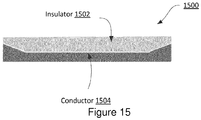
- FIG. 15 shows an example of a system for providing multi-output electrostatic haptic effects.
- ESF cell 1500 comprises an insulator 1502 coupled to a conductor 1504.
- the strength of a haptic effect perceived by a user may depend on the amount of contact area between the user (e.g. via their finger) and a surface associated with an ESF cell 1500. As a user moves a finger or other body part from the middle of the ESF cell 1500 towards the edges of the ESF cell 1500, less of the user's finger etc. may contact the surface associated with the ESF cell 1500. In a traditional ESF cell (e.g., the ESF cell shown in Figure 2 ), in which the conductor and the insulator are planar, this reduced contact area may result in the user perceiving a haptic effect with decreasing strength.
- the embodiment shown Figure 15 may alleviate this problem.
- the thickness of the insulator 1502 tapers towards the edges of the ESF cell 1500.
- the thickness of the conductor 1504 increases towards the edges of the ESF cell 1500; although this is optional.
- the decreased insulator 1502 thickness at the edges of the ESF cell 1500 may allow for stronger capacitive coupling between the user and the conductor 1504. That is, as the thickness of the insulator 1502 decreases, the strength of the capacitive coupling between a user's finger and the ESF cell 1500 may increase.
- the increased strength of the capacitive coupling may combat the effects of the decreasing contact area between the user's finger and the ESF cell 1500 on the perceived haptic effect strength. This may result in the user perceiving pronounced haptic effect edges and/or a more consistent haptic effect.
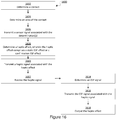
- Figure 16 is a flow chart of steps for performing a method for providing multi-output electrostatic haptic effects.
- the steps in Figure 16 may be implemented in program code that is executed by a processor, for example, the processor in a general purpose computer, a mobile device, or a server. These steps may be implemented by a group of processors. One or more steps shown in Figure 16 may be omitted or performed in a different order. Similarly, additional steps not shown in Figure 16 may also be performed.
- the steps below are described with reference to components described above with regard to system 100 shown in Figure 1 .
- the method 1600 begins at step 1602 when a sensor 108 or 130 determines a contact between a user and a surface associated with an ESF device. For example, a user may contact the touch sensitive surface 116 or the ESF device with a finger.
- the method 1600 continues at step 1604 when the sensor 108 or 130 determines a contact or the area of a contact between a user (e.g., the user's finger) and the surface associated with the ESF device.
- the sensor 130 may comprise capacitive sensor as described above.
- the method 1600 continues at step 1606 when sensor 108 or 130 transmits a sensor signal associated with the contact determination and/or the area determination to processor 102.
- the sensor signal may comprise an analog signal and/or a digital signal.
- the method 1600 continues at step 1608 when processor 102 determines a haptic effect based at least in part on the sensor signal.
- the haptic effect may comprise, for example, a static ESF effect or a confirmation ESF effect.
- the haptic effect may comprise for example a simulated texture, a simulated vibration, a change in a perceived coefficient of friction, or a flow sensation.
- the processor 102 may determine a plurality of haptic effects.
- the processor 102 may determine the haptic effect based in part on a signal from sensor 108 or 130, an event, an algorithm, or a haptic profile. For example, the processor 102 may associate an incoming call notification with a haptic effect comprising a simulated vibration. The processor 102 may rely on programming contained in haptic effect determination module 126 to determine the haptic effect. Haptic effect determination module 126 may comprise a lookup table. Processor 102 may use the lookup table to associate events with particular haptic effects (e.g., textures).
- haptic profiles in which a user can determine and save in memory 104 a "profile" of the haptic effects the user would like associated with particular events.
- a user may be able to select from a list of available haptic effects and associate one of these haptic effects with a real or virtual button on a user interface.
- the list may comprise, for example, haptic effects such as fast flow sensation, slow flow sensation, intense vibration, light vibration, or textures such as bumpy, rubbery, or smooth.
- the processor 102 may consult with the user's haptic profile to determine which haptic effect to generate. For example, if the user's haptic profile associates interaction with the button with a fast flow sensation, in response to the user placing a finger over the button, processor 102 may determine a haptic effect in which the user perceives a fast flow sensation.
- the method 1600 continues at step 1610 when processor 102 transmits a haptic signal associated with the haptic effect to the ESF controller 120.
- the haptic signal is based at least in part on the haptic effect.
- the processor 102 may access drive signals stored in memory 104 and associated with particular haptic effects. Additionally or alternatively, the drive signal may be generated by accessing a stored algorithm and inputting parameters associated with an effect. For example, an algorithm may output data for use in generating a drive signal based on amplitude and frequency parameters.
- a drive signal may comprise data to be decoded by the actuator. For instance, the actuator may itself respond to commands specifying parameters such as amplitude and frequency.
- the method 1600 continues at step 1612 when the ESF controller 120 receives the haptic signal.
- the haptic signal may comprise a digital signal and/or an analog signal.
- the ESF controller 120 may perform analog-to-digital conversion.
- the method 1600 continues at step 1614 when the ESF controller 120 determines an ESF signal.
- the ESF controller 120 may determine an ESF signal based at least in part on the haptic signal, he ESF signal may for example comprise an amplified, inverted, or frequency-shifted version of the haptic signal.
- the ESF controller 120 may determine a plurality of ESF signals. Each of the plurality of ESF signals may be configured to be output to a different ESF device and/or ESF cell.
- the ESF controller 120 may comprise a processor or a microcontroller.
- the processor or microcontroller may rely on programming contained in memory to determine the ESF signal to output to an ESF device and/or ESF cell.
- the programming contained in the memory may comprise a lookup table.
- the processor or microcontroller may use the lookup table to associate a haptic signal with an ESF signal to output.
- the programming contained in the memory may comprise an algorithm.
- the processor or microcontroller may determine the ESF signal by applying data from the haptic signal to the algorithm.
- the method 1600 continues at step 1616 when the ESF controller 120 transmits an ESF signal associated with the haptic signal to haptic output device 118.
- the ESF controller 120 may transmit a plurality of ESF signals to one or more ESF devices and/or one more ESF cells within the one or more ESF devices.
- the ESF controller 120 may access drive signals stored in memory and associated with particular ESF-based haptic effects or haptic signals. Additionally or alternatively, a signal may be generated by accessing a stored algorithm and inputting parameters associated with an effect. For example, an algorithm may output data for use in generating a drive signal based on amplitude and frequency parameters.
- an ESF signal may comprise data to be decoded by the actuator. For instance, the actuator may itself respond to commands specifying parameters such as amplitude and frequency.
- the method 1600 continues at step 1618 when haptic output device 118 outputs the haptic effect.
- Haptic output device 118 receives one or more ESF signals and outputs the haptic effect.
- Multi-output electrostatic haptic effects may allow a user to perceive haptic effects without moving a body part tangentially or perpendicularly to a surface associated with a haptic output device, unlike with traditional ESF-based haptic effects.
- a user could only perceive dynamic ESF effects, in which the user would have to move a finger tangentially across a surface associated with a haptic output device in order to perceive the haptic effect.
- the user may be able to perceive a haptic effect merely by touching (e.g., tapping or grasping) the surface comprising the haptic output device.
- ESF devices may be used in new ways, such as to provide confirmatory haptic feedback (e.g., upon a user interacting with a virtual button), guidance information (e.g., that a user can or cannot press a button), or other information (e.g., about a virtual object) to a user.
- confirmatory haptic feedback e.g., upon a user interacting with a virtual button
- guidance information e.g., that a user can or cannot press a button
- other information e.g., about a virtual object
- multi-output electrostatic haptic effects may allow for isolated ESF-based haptic effects to be output at multiple contact points on a device simultaneously.
- multiple ESF devices may be positioned at various contact points around a device (e.g., a game controller) and configured to output different, isolated haptic effects upon the occurrence of an event (e.g., an explosion in a game).
- the user may be able to perceive each isolated haptic effect independently of, or in combination with, other haptic effects.
- Multi-output electrostatic haptic effects may provide a more realistic and immersive haptic experience for a user.
- manufacturers may be able to omit haptic feedback components from their computing devices, because the computing devices can be communicatively coupled to the haptic output devices.
- manufacturers of mobile phones e.g., smart phones
- tablets, laptop computers, desktop computers, or e-readers may be able to remove haptic feedback components from within the devices, because the devices may be able to interface (e.g., via IEEE 802.11 or Bluetooth) with external haptic output devices.
- manufacturers may be able to produce smaller, lighter, and/or cheaper devices. This may enable legacy devices that do not include haptic functionality to be programed to control haptic output devices of the type described herein.
- multi-output electrostatic haptic effects may provide ESF-based haptic effects with sharper edges.
- ESF haptic effects did not have clearly defined edges because the strength of the ESF haptic effect was dependent on the amount of contact area between a user and a surface associated with an ESF haptic output device.
- the ESF haptic effect perceived by a user started weaker and gradually became stronger.
- a computing device in accordance with this disclosure may be able to modulate the characteristics of the ESF signal associated with ESF haptic effect, or the timing for outputting the ESF haptic effect (e.g., based on whether an area or pressure threshold is exceeded), which may provide more clearly defined haptic effect edges to a user.
- one or more ESF cells may be provided with a tapered insulation layer, which may provide more clearly defined haptic effect edges to a user. Providing more clearly defined haptic effect edges may allow users to more readily locate buttons or other virtual objects, and/or may provide a more realistic haptic experience to a user.
- configurations may be described as a process that is depicted as a flow diagram or block diagram. Although each may describe the operations as a sequential process, many of the operations can be performed in parallel or concurrently. In addition, the order of the operations may be rearranged. A process may have additional steps not included in the figure.
- examples of the methods may be implemented by hardware, software, firmware, middleware, microcode, hardware description languages, or any combination thereof. When implemented in software, firmware, middleware, or microcode, the program code or code segments to perform the necessary tasks may be stored in a non-transitory computer-readable medium such as a storage medium. Processors may perform the described tasks.
- Embodiments in accordance with aspects of the present subject matter can be implemented in digital electronic circuitry, in computer hardware, firmware, software, or in combinations of the preceding.
- Computer implemented embodiments may comprise a processor or processors.
- the processor (or processors) comprises or has access to a computer-readable medium, such as a random access memory (RAM) coupled to the processor.
- the processor executes computer-executable program instructions stored in memory, such as executing one or more computer programs including a sensor sampling routine, selection routines, and other routines to perform the methods described above.
- Such processors may comprise a microprocessor, a digital signal processor (DSP), an application-specific integrated circuit (ASIC), field programmable gate arrays (FPGAs), and state machines.
- Such processors may further comprise programmable electronic devices such as PLCs, programmable interrupt controllers (PICs), programmable logic devices (PLDs), programmable read-only memories (PROMs), electronically programmable read-only memories (EPROMs or EEPROMs), or other similar devices.
- Such processors may comprise, or may be in communication with, media, for example tangible computer-readable media, that may store instructions that, when executed by the processor, can cause the processor to perform the steps described herein as carried out, or assisted, by a processor.
- Embodiments of computer-readable media may comprise, but are not limited to, all electronic, optical, magnetic, or other storage devices capable of providing a processor, such as the processor in a web server, with computer-readable instructions.
- Other examples of media comprise, but are not limited to, a floppy disk, CD-ROM, magnetic disk, memory chip, ROM, RAM, ASIC, configured processor, all optical media, all magnetic tape or other magnetic media, or any other medium from which a computer processor can read.
- various other devices may comprise computer-readable media, such as a router, private or public network, or other transmission device.
- the processor, and the processing, described may be in one or more structures, and may be dispersed through one or more structures.
- the processor may comprise code for carrying out one or more of the methods (or parts of methods) described herein.
Landscapes
- Engineering & Computer Science (AREA)
- General Engineering & Computer Science (AREA)
- Theoretical Computer Science (AREA)
- Human Computer Interaction (AREA)
- Physics & Mathematics (AREA)
- General Physics & Mathematics (AREA)
- User Interface Of Digital Computer (AREA)
Applications Claiming Priority (2)
| Application Number | Priority Date | Filing Date | Title |
|---|---|---|---|
| US14/322,701 US9696806B2 (en) | 2014-07-02 | 2014-07-02 | Systems and methods for multi-output electrostatic haptic effects |
| EP15174407.5A EP2963523B1 (en) | 2014-07-02 | 2015-06-29 | Systems and methods for multi-output electrostatic haptic effects |
Related Parent Applications (1)
| Application Number | Title | Priority Date | Filing Date |
|---|---|---|---|
| EP15174407.5A Division EP2963523B1 (en) | 2014-07-02 | 2015-06-29 | Systems and methods for multi-output electrostatic haptic effects |
Publications (1)
| Publication Number | Publication Date |
|---|---|
| EP3531249A1 true EP3531249A1 (en) | 2019-08-28 |
Family
ID=53502508
Family Applications (2)
| Application Number | Title | Priority Date | Filing Date |
|---|---|---|---|
| EP19168807.6A Withdrawn EP3531249A1 (en) | 2014-07-02 | 2015-06-29 | Systems and methods for multi-output electrostatic haptic effects |
| EP15174407.5A Not-in-force EP2963523B1 (en) | 2014-07-02 | 2015-06-29 | Systems and methods for multi-output electrostatic haptic effects |
Family Applications After (1)
| Application Number | Title | Priority Date | Filing Date |
|---|---|---|---|
| EP15174407.5A Not-in-force EP2963523B1 (en) | 2014-07-02 | 2015-06-29 | Systems and methods for multi-output electrostatic haptic effects |
Country Status (5)
| Country | Link |
|---|---|
| US (2) | US9696806B2 (ko) |
| EP (2) | EP3531249A1 (ko) |
| JP (1) | JP2016015141A (ko) |
| KR (1) | KR20160004202A (ko) |
| CN (1) | CN105320349A (ko) |
Families Citing this family (34)
| Publication number | Priority date | Publication date | Assignee | Title |
|---|---|---|---|---|
| WO2014164274A1 (en) * | 2013-03-10 | 2014-10-09 | The Board Of Trustees Of The Leland Stanford Junior University | Visual and touch interaction display |
| JP6644466B2 (ja) | 2013-12-31 | 2020-02-12 | イマージョン コーポレーションImmersion Corporation | 触覚通知を提供するシステム及び方法 |
| CN105589594B (zh) * | 2014-11-06 | 2019-12-31 | 天马微电子股份有限公司 | 电子装置和电子装置的操作控制方法 |
| EP3035158B1 (en) * | 2014-12-18 | 2020-04-15 | LG Display Co., Ltd. | Touch sensitive device and display device comprising the same |
| US20160213277A1 (en) * | 2014-12-23 | 2016-07-28 | Phoenix Children's Hospital, Inc. | Programmable Multimodal Stimulator for Cortical Mapping |
| KR20170108046A (ko) | 2015-01-30 | 2017-09-26 | 임머숀 코퍼레이션 | 정전 햅틱 액추에이터, 및 정전 햅틱 액추에이터를 갖는 사용자 인터페이스 |
| US10372212B2 (en) * | 2015-05-29 | 2019-08-06 | Google Llc | Techniques for simulated physical interaction between users via their mobile computing devices |
| JP6580904B2 (ja) * | 2015-08-31 | 2019-09-25 | 株式会社デンソーテン | 入力装置、表示装置、及びプログラム |
| US9875625B2 (en) | 2015-12-18 | 2018-01-23 | Immersion Corporation | Systems and methods for multifunction haptic output devices |
| KR102489956B1 (ko) * | 2015-12-30 | 2023-01-17 | 엘지디스플레이 주식회사 | 표시 장치 및 표시 장치의 구동 방법 |
| US10871826B2 (en) | 2016-03-01 | 2020-12-22 | DISH Technologies L.L.C. | Haptic feedback remote control systems and methods |
| US9983675B2 (en) | 2016-06-10 | 2018-05-29 | Immersion Corporation | Systems and methods for monitoring insulation integrity for electrostatic friction |
| US9886829B2 (en) * | 2016-06-20 | 2018-02-06 | Immersion Corporation | Systems and methods for closed-loop control for haptic feedback |
| WO2018017210A1 (en) | 2016-07-22 | 2018-01-25 | Harman International Industries, Incorporated | Haptic guidance system |
| US9898904B1 (en) | 2016-08-17 | 2018-02-20 | Immersion Corporation | Selective control of an electric field to deliver a touchless haptic effect |
| US10234945B2 (en) | 2016-09-09 | 2019-03-19 | Immersion Corporation | Compensated haptic rendering for flexible electronic devices |
| US10261586B2 (en) | 2016-10-11 | 2019-04-16 | Immersion Corporation | Systems and methods for providing electrostatic haptic effects via a wearable or handheld device |
| US20180138831A1 (en) * | 2016-11-17 | 2018-05-17 | Immersion Corporation | Control of Contact Conditions For Static ESF |
| US10534435B2 (en) | 2016-11-18 | 2020-01-14 | Immersion Corporation | Handheld interface device having a plurality of electrostatic friction (ESF) electrodes |
| US20180164885A1 (en) * | 2016-12-09 | 2018-06-14 | Immersion Corporation | Systems and Methods For Compliance Illusions With Haptics |
| US10416768B2 (en) * | 2016-12-28 | 2019-09-17 | Immersion Corporation | Unitary sensor and haptic actuator |
| US9928700B1 (en) | 2017-01-25 | 2018-03-27 | Immersion Corporation | Method and apparatus for controlling generation of electrostatic friction effects for a plurality of electrodes |
| CN107122075B (zh) | 2017-04-27 | 2020-01-07 | 京东方科技集团股份有限公司 | 触控装置驱动方法、触控装置及触控显示装置 |
| US10684734B2 (en) | 2017-09-28 | 2020-06-16 | Apple Inc. | Transparent high-resistivity layer for electrostatic friction modulation over a capacitive input sensor |
| US10866697B2 (en) * | 2017-10-24 | 2020-12-15 | Microchip Technology Incorporated | Touch-sensitive user-interface including configurable virtual widgets |
| US11435829B2 (en) | 2017-10-26 | 2022-09-06 | Weft Co. | Communication device and method using haptic actuator |
| TWI681800B (zh) * | 2018-05-10 | 2020-01-11 | 崑山科技大學 | 一種互感球拍 |
| CN112272814B (zh) * | 2018-06-19 | 2024-09-20 | 索尼公司 | 信息处理设备、信息处理方法及程序 |
| US11652394B2 (en) | 2018-11-22 | 2023-05-16 | Innovobot Inc. | Haptic solenoid assembly with a solenoid vibration-damping system |
| CN111026275B (zh) * | 2019-12-12 | 2021-02-26 | 深圳市华星光电半导体显示技术有限公司 | 静电反馈显示阵列及主动驱动方法、电路 |
| WO2021156143A1 (de) * | 2020-02-03 | 2021-08-12 | Saint-Gobain Glass France | Verbundscheibenanordnung mit touch-bedienelement zur steuerung einer funktion |
| WO2022110237A1 (zh) * | 2020-11-30 | 2022-06-02 | 华为技术有限公司 | 传感装置、电子设备和电子设备的控制方法 |
| CN117178244A (zh) * | 2021-04-22 | 2023-12-05 | 哈曼贝克自动系统股份有限公司 | 基于用户控件的三维表面上的电粘附的触觉反馈 |
| JP7801081B2 (ja) * | 2021-09-14 | 2026-01-16 | 株式会社ソニー・インタラクティブエンタテインメント | 操作デバイス、その制御装置、制御方法、及びプログラム |
Citations (4)
| Publication number | Priority date | Publication date | Assignee | Title |
|---|---|---|---|---|
| WO2009141502A1 (en) * | 2008-05-19 | 2009-11-26 | Senseg Oy | Interface apparatus for touch input and tactile output communication |
| WO2010037894A1 (en) * | 2008-10-03 | 2010-04-08 | Senseg Oy | Techniques for presenting vehicle-related information |
| US20120056825A1 (en) * | 2010-03-16 | 2012-03-08 | Immersion Corporation | Systems And Methods For Pre-Touch And True Touch |
| US20130057509A1 (en) * | 2011-09-06 | 2013-03-07 | Immersion Corporation | Haptic output device and method of generating a haptic effect in a haptic output device |
Family Cites Families (39)
| Publication number | Priority date | Publication date | Assignee | Title |
|---|---|---|---|---|
| JP2000501033A (ja) | 1995-11-30 | 2000-02-02 | ヴァーチャル テクノロジーズ インコーポレイテッド | 触覚をフィードバックする人間/機械インターフェース |
| US6337678B1 (en) | 1999-07-21 | 2002-01-08 | Tactiva Incorporated | Force feedback computer input and output device with coordinated haptic elements |
| JP4312366B2 (ja) * | 2000-10-12 | 2009-08-12 | 日本放送協会 | 指装着型点字情報提示装置 |
| AU2002336708A1 (en) | 2001-11-01 | 2003-05-12 | Immersion Corporation | Method and apparatus for providing tactile sensations |
| AU2003285886A1 (en) | 2002-10-15 | 2004-05-04 | Immersion Corporation | Products and processes for providing force sensations in a user interface |
| US7148789B2 (en) * | 2004-09-09 | 2006-12-12 | Motorola, Inc. | Handheld device having multiple localized force feedback |
| US20080218488A1 (en) | 2006-11-30 | 2008-09-11 | Electronics And Telecommunications Research Institute | Active driving type visual-tactile display device |
| CN101836175B (zh) * | 2007-09-18 | 2013-04-24 | 森赛格公司 | 用于感觉刺激的方法和设备 |
| CA2742289A1 (en) * | 2008-11-04 | 2010-05-14 | Bayer Materialscience Ag | Electroactive polymer transducers for tactile feedback devices |
| US8805517B2 (en) | 2008-12-11 | 2014-08-12 | Nokia Corporation | Apparatus for providing nerve stimulation and related methods |
| US8760413B2 (en) | 2009-01-08 | 2014-06-24 | Synaptics Incorporated | Tactile surface |
| EP2406703B1 (en) * | 2009-03-12 | 2018-11-28 | Immersion Corporation | System and method for friction displays and additional haptic effects |
| US9746923B2 (en) | 2009-03-12 | 2017-08-29 | Immersion Corporation | Systems and methods for providing features in a friction display wherein a haptic effect is configured to vary the coefficient of friction |
| JP5658235B2 (ja) | 2009-05-07 | 2015-01-21 | イマージョン コーポレーションImmersion Corporation | 触覚フィードバックによる形状変化ディスプレイの形成方法及び装置 |
| US20100289740A1 (en) | 2009-05-18 | 2010-11-18 | Bong Soo Kim | Touchless control of an electronic device |
| US8385060B2 (en) * | 2009-08-31 | 2013-02-26 | Apple Inc. | Handheld computing device |
| US8766933B2 (en) | 2009-11-12 | 2014-07-01 | Senseg Ltd. | Tactile stimulation apparatus having a composite section comprising a semiconducting material |
| US20130314303A1 (en) | 2010-02-28 | 2013-11-28 | Osterhout Group, Inc. | Ar glasses with user action control of and between internal and external applications with feedback |
| US8686960B2 (en) * | 2010-04-23 | 2014-04-01 | Lester F. Ludwig | Piecewise-linear and piecewise-affine transformations for high dimensional touchpad (HDTP) output decoupling and corrections |
| US20110285666A1 (en) | 2010-05-21 | 2011-11-24 | Ivan Poupyrev | Electrovibration for touch surfaces |
| US20120327006A1 (en) | 2010-05-21 | 2012-12-27 | Disney Enterprises, Inc. | Using tactile feedback to provide spatial awareness |
| KR101788048B1 (ko) * | 2010-12-02 | 2017-10-19 | 엘지전자 주식회사 | 이동 단말기 및 그 제어방법 |
| US9448713B2 (en) | 2011-04-22 | 2016-09-20 | Immersion Corporation | Electro-vibrotactile display |
| WO2012154960A2 (en) | 2011-05-10 | 2012-11-15 | Northwestern University | A touch interface device and method for applying controllable shear forces to a human appendage |
| KR101238210B1 (ko) * | 2011-06-30 | 2013-03-04 | 엘지전자 주식회사 | 이동 단말기 |
| US20130016042A1 (en) | 2011-07-12 | 2013-01-17 | Ville Makinen | Haptic device with touch gesture interface |
| KR101910380B1 (ko) * | 2011-08-08 | 2018-10-22 | 엘지전자 주식회사 | 이동 단말기 |
| US20130164543A1 (en) | 2011-12-26 | 2013-06-27 | Asahi Glass Company, Limited | Front panel for touch sensor |
| KR101912409B1 (ko) * | 2012-01-06 | 2018-10-26 | 엘지전자 주식회사 | 이동 단말기 및 이동 단말기의 제어 방법 |
| US8711118B2 (en) * | 2012-02-15 | 2014-04-29 | Immersion Corporation | Interactivity model for shared feedback on mobile devices |
| CN103365455B (zh) * | 2012-04-09 | 2016-06-01 | 群康科技(深圳)有限公司 | 曲面触感回馈触控屏幕及其触感回馈驱动方法 |
| US8570296B2 (en) | 2012-05-16 | 2013-10-29 | Immersion Corporation | System and method for display of multiple data channels on a single haptic display |
| US9235265B2 (en) | 2012-05-17 | 2016-01-12 | Sharp Kabushiki Kaisha | Touch-screen device including tactile feedback actuator |
| US9176586B2 (en) * | 2012-06-29 | 2015-11-03 | Panasonic Intellectual Property Management Co., Ltd. | Touch panel device with tactile sense presenting function |
| KR101338232B1 (ko) * | 2012-07-06 | 2013-12-10 | 한국표준과학연구원 | 촉각 생성 장치, 휴대용 기기, 이를 이용한 촉각 생성 방법 및 그 기록매체 |
| JP2014059833A (ja) * | 2012-09-19 | 2014-04-03 | Alps Electric Co Ltd | 触覚刺激発生装置 |
| US9189932B2 (en) | 2013-11-06 | 2015-11-17 | Andrew Kerdemelidis | Haptic notification apparatus and method |
| US9639158B2 (en) * | 2013-11-26 | 2017-05-02 | Immersion Corporation | Systems and methods for generating friction and vibrotactile effects |
| US10031582B2 (en) | 2014-06-05 | 2018-07-24 | Immersion Corporation | Systems and methods for induced electrostatic haptic effects |
-
2014
- 2014-07-02 US US14/322,701 patent/US9696806B2/en not_active Expired - Fee Related
-
2015
- 2015-06-29 KR KR1020150092117A patent/KR20160004202A/ko not_active Withdrawn
- 2015-06-29 EP EP19168807.6A patent/EP3531249A1/en not_active Withdrawn
- 2015-06-29 EP EP15174407.5A patent/EP2963523B1/en not_active Not-in-force
- 2015-07-01 JP JP2015132718A patent/JP2016015141A/ja active Pending
- 2015-07-02 CN CN201510382744.9A patent/CN105320349A/zh active Pending
-
2017
- 2017-06-01 US US15/611,395 patent/US10338681B2/en not_active Expired - Fee Related
Patent Citations (4)
| Publication number | Priority date | Publication date | Assignee | Title |
|---|---|---|---|---|
| WO2009141502A1 (en) * | 2008-05-19 | 2009-11-26 | Senseg Oy | Interface apparatus for touch input and tactile output communication |
| WO2010037894A1 (en) * | 2008-10-03 | 2010-04-08 | Senseg Oy | Techniques for presenting vehicle-related information |
| US20120056825A1 (en) * | 2010-03-16 | 2012-03-08 | Immersion Corporation | Systems And Methods For Pre-Touch And True Touch |
| US20130057509A1 (en) * | 2011-09-06 | 2013-03-07 | Immersion Corporation | Haptic output device and method of generating a haptic effect in a haptic output device |
Non-Patent Citations (2)
| Title |
|---|
| HUI TANG ET AL: "A Microfabricated Electrostatic Haptic Display for Persons with Visual Impairments", IEEE TRANSACTIONS ON REHABILITATION ENGINEERING, IEEE INC. NEW YORK, US, vol. 6, no. 3, 1 September 1998 (1998-09-01), XP011053920, ISSN: 1063-6528 * |
| KAJIMOTO HIROYUKI ED - ANDO N ET AL: "Electro-tactile Display with Real-Time Impedance Feedback", 8 July 2010, IMAGE ANALYSIS AND RECOGNITION : 11TH INTERNATIONAL CONFERENCE, ICIAR 2014, VILAMOURA, PORTUGAL, OCTOBER 22-24, 2014, PROCEEDINGS, PART I; IN: LECTURE NOTES IN COMPUTER SCIENCE , ISSN 1611-3349 ; VOL. 8814; [LECTURE NOTES IN COMPUTER SCIENCE; LECT.NO, ISBN: 978-3-642-17318-9, XP047270036 * |
Also Published As
| Publication number | Publication date |
|---|---|
| JP2016015141A (ja) | 2016-01-28 |
| US10338681B2 (en) | 2019-07-02 |
| CN105320349A (zh) | 2016-02-10 |
| US20170269693A1 (en) | 2017-09-21 |
| KR20160004202A (ko) | 2016-01-12 |
| EP2963523A1 (en) | 2016-01-06 |
| US20160004309A1 (en) | 2016-01-07 |
| US9696806B2 (en) | 2017-07-04 |
| EP2963523B1 (en) | 2019-05-08 |
Similar Documents
| Publication | Publication Date | Title |
|---|---|---|
| US10338681B2 (en) | Systems and methods for multi-output electrostatic haptic effects | |
| US10496174B2 (en) | Systems and methods for surface elements that provide electrostatic haptic effects | |
| US10564730B2 (en) | Non-collocated haptic cues in immersive environments | |
| US20180364807A1 (en) | Systems and Methods for Induced Electrostatic Haptic Effects | |
| US10474238B2 (en) | Systems and methods for virtual affective touch | |
| US10248210B2 (en) | Systems and methods for haptically-enabled conformed and multifaceted displays | |
| CN105556423A (zh) | 用于基于压力的触觉效果的系统和方法 | |
| EP3367216A1 (en) | Systems and methods for virtual affective touch | |
| US10261586B2 (en) | Systems and methods for providing electrostatic haptic effects via a wearable or handheld device | |
| EP3333674A1 (en) | Systems and methods for compliance simulation with haptics | |
| JP2014142869A (ja) | 情報処理装置、情報処理方法、プログラム及び記録媒体 |
Legal Events
| Date | Code | Title | Description |
|---|---|---|---|
| PUAI | Public reference made under article 153(3) epc to a published international application that has entered the european phase |
Free format text: ORIGINAL CODE: 0009012 |
|
| AC | Divisional application: reference to earlier application |
Ref document number: 2963523 Country of ref document: EP Kind code of ref document: P |
|
| AK | Designated contracting states |
Kind code of ref document: A1 Designated state(s): AL AT BE BG CH CY CZ DE DK EE ES FI FR GB GR HR HU IE IS IT LI LT LU LV MC MK MT NL NO PL PT RO RS SE SI SK SM TR |
|
| STAA | Information on the status of an ep patent application or granted ep patent |
Free format text: STATUS: THE APPLICATION IS DEEMED TO BE WITHDRAWN |
|
| 18D | Application deemed to be withdrawn |
Effective date: 20200229 |