EP3564802B1 - Verfahren und vorrichtung zur anzeige einer anwendung und elektronisches endgerät - Google Patents
Verfahren und vorrichtung zur anzeige einer anwendung und elektronisches endgerät Download PDFInfo
- Publication number
- EP3564802B1 EP3564802B1 EP17894125.8A EP17894125A EP3564802B1 EP 3564802 B1 EP3564802 B1 EP 3564802B1 EP 17894125 A EP17894125 A EP 17894125A EP 3564802 B1 EP3564802 B1 EP 3564802B1
- Authority
- EP
- European Patent Office
- Prior art keywords
- application
- display area
- display
- user
- displayed
- Prior art date
- Legal status (The legal status is an assumption and is not a legal conclusion. Google has not performed a legal analysis and makes no representation as to the accuracy of the status listed.)
- Active
Links
Images





Classifications
-
- G—PHYSICS
- G06—COMPUTING OR CALCULATING; COUNTING
- G06F—ELECTRIC DIGITAL DATA PROCESSING
- G06F3/00—Input arrangements for transferring data to be processed into a form capable of being handled by the computer; Output arrangements for transferring data from processing unit to output unit, e.g. interface arrangements
- G06F3/01—Input arrangements or combined input and output arrangements for interaction between user and computer
- G06F3/048—Interaction techniques based on graphical user interfaces [GUI]
- G06F3/0481—Interaction techniques based on graphical user interfaces [GUI] based on specific properties of the displayed interaction object or a metaphor-based environment, e.g. interaction with desktop elements like windows or icons, or assisted by a cursor's changing behaviour or appearance
- G06F3/04817—Interaction techniques based on graphical user interfaces [GUI] based on specific properties of the displayed interaction object or a metaphor-based environment, e.g. interaction with desktop elements like windows or icons, or assisted by a cursor's changing behaviour or appearance using icons
-
- G—PHYSICS
- G06—COMPUTING OR CALCULATING; COUNTING
- G06F—ELECTRIC DIGITAL DATA PROCESSING
- G06F9/00—Arrangements for program control, e.g. control units
- G06F9/06—Arrangements for program control, e.g. control units using stored programs, i.e. using an internal store of processing equipment to receive or retain programs
- G06F9/44—Arrangements for executing specific programs
- G06F9/451—Execution arrangements for user interfaces
-
- G—PHYSICS
- G06—COMPUTING OR CALCULATING; COUNTING
- G06F—ELECTRIC DIGITAL DATA PROCESSING
- G06F3/00—Input arrangements for transferring data to be processed into a form capable of being handled by the computer; Output arrangements for transferring data from processing unit to output unit, e.g. interface arrangements
- G06F3/01—Input arrangements or combined input and output arrangements for interaction between user and computer
- G06F3/048—Interaction techniques based on graphical user interfaces [GUI]
- G06F3/0481—Interaction techniques based on graphical user interfaces [GUI] based on specific properties of the displayed interaction object or a metaphor-based environment, e.g. interaction with desktop elements like windows or icons, or assisted by a cursor's changing behaviour or appearance
- G06F3/0482—Interaction with lists of selectable items, e.g. menus
-
- G—PHYSICS
- G06—COMPUTING OR CALCULATING; COUNTING
- G06F—ELECTRIC DIGITAL DATA PROCESSING
- G06F3/00—Input arrangements for transferring data to be processed into a form capable of being handled by the computer; Output arrangements for transferring data from processing unit to output unit, e.g. interface arrangements
- G06F3/01—Input arrangements or combined input and output arrangements for interaction between user and computer
- G06F3/048—Interaction techniques based on graphical user interfaces [GUI]
- G06F3/0484—Interaction techniques based on graphical user interfaces [GUI] for the control of specific functions or operations, e.g. selecting or manipulating an object, an image or a displayed text element, setting a parameter value or selecting a range
- G06F3/04847—Interaction techniques to control parameter settings, e.g. interaction with sliders or dials
-
- G—PHYSICS
- G06—COMPUTING OR CALCULATING; COUNTING
- G06F—ELECTRIC DIGITAL DATA PROCESSING
- G06F3/00—Input arrangements for transferring data to be processed into a form capable of being handled by the computer; Output arrangements for transferring data from processing unit to output unit, e.g. interface arrangements
- G06F3/01—Input arrangements or combined input and output arrangements for interaction between user and computer
- G06F3/048—Interaction techniques based on graphical user interfaces [GUI]
- G06F3/0481—Interaction techniques based on graphical user interfaces [GUI] based on specific properties of the displayed interaction object or a metaphor-based environment, e.g. interaction with desktop elements like windows or icons, or assisted by a cursor's changing behaviour or appearance
Definitions
- This application relates to the field of communications technologies, and in particular, to an application display method and apparatus, and an electronic terminal.
- terminals can implement increasingly powerful functions, and the terminals also have increasingly diverse types.
- WO 2015/065402 A1 discloses techniques for displaying relevant user interface objects when a device is placed into a viewing position. Upon rotation of an input mechanism, the device may display different user interface screens.
- One user interface screen may include interface objects that have been determined as relevant at the moment.
- Another user interface screen may include a predetermined subset of favorite interface objects.
- Another user interface screen may include icons for all available applications on the device.
- Embodiments of this application provide an application display method and apparatus, and an electronic terminal, so that a user can conveniently and quickly find an application.
- an application display method is provided, and the method is applied to an electronic terminal.
- N application sets are simultaneously displayed on a display screen of the electronic terminal, where N is greater than or equal to 2, an (N-1) th application set in the N application sets is displayed in an (N-1) th application display area on the display screen, an N th application set in the N application sets is displayed in an N th application display area on the display screen, and the (N-1) th application display area surrounds a periphery of the N th application display area.
- the terminal obtains an operation of selecting a non-first application set by a user, and performs at least one time of cyclic switching on the N application sets for display in response to the operation of selecting the non-first application set by the user.
- the performing one time of cyclic switching on the N application sets for display is: displaying a first application set in the N th application display area, displaying a second application set in a first application display area, ..., and displaying the N th application set in the (N-1) th application display area.
- the user can conveniently and quickly find an application.
- the operation of selecting the non-first application set by the user may include one of the following cases: a selection operation performed by the user on an area in the first application display area other than a display area of a first application icon, where the first application icon is an icon corresponding to each application in the first application set; a selection operation performed by the user on a display screen area of another application icon, where the another application icon is an icon corresponding to each application in any one of the N application sets other than the first application set; a selection operation performed by the user on an application display area in N application display areas other than the first application display area; and a selection operation performed by the user on an area on the display screen other than the N application display areas.
- the foregoing operation may be specifically at least one of the following operations: a tap, double-tap, triple-tap, touch and hold, or press operation of a finger on a touchscreen, and a tap or double-tap operation of a knuckle on the touchscreen; a click, double-click, triple-click, or touch and hold operation on a physical button; a slide, tap, double-tap, or press operation on a non-screen operation area on the terminal; and a preset gesture.
- an implementation of the performing at least one time of cyclic switching on the N application sets for display in response to the operation of selecting the non-first application set by the user may include: in response to the operation of selecting the non-first application set by the user, performing one time of cyclic switching on the N application sets for display, and displaying, on the display screen, a result obtained after cyclic switching is performed; or in response to the operation of selecting the non-first application set by the user, within duration of the operation, performing continuous cyclic switching on the N application sets for display until the operation stops, and displaying, on the display screen, a result obtained after cyclic switching is performed; or in response to an operation of selecting an M th application set other than the first application set by the user, performing continuous cyclic switching on the N application sets for display until an icon corresponding to the M th application set is displayed in the first application display area, where N ⁇ M>1.
- the terminal displays all applications installed on the terminal on one display interface, so that all the applications installed on the terminal can be displayed on one display interface of the terminal, and the user can find a to-be-used application without performing a slide operation.
- application sets displayed on the display screen of the electronic terminal include the first application set and the second application set.
- the first application set and the second application set are simultaneously displayed on the display screen of the terminal.
- the first application set is displayed in the first application display area on the display screen
- the second application set is displayed in a second application display area on the display screen
- the first application display area surrounds a periphery of the second application display area.
- the terminal In response to the operation of selecting the non-first application set by the user, the terminal displays the second application set in the first application display area on the display screen; and displays the first application set in the second application display area on the display screen, or displays the first application set in an area on the display screen other than the first application display area and the second application display area, so that the user can select, from the first application display area in which the first application set is originally displayed, an application that is in the second application set and that is to be selected by the user, and the user can conveniently and quickly find the application.
- the operation of selecting the non-first application set by the user may be: a selection operation performed by the user on an area in the first application display area other than a display area of a first application icon; or a selection operation performed by the user on a display screen area of a second application icon; or a selection operation performed by the user on a non-application icon in the second application display area; or a selection operation performed by the user on the area on the display screen other than the first application display area and the second application display area.
- the first application icon is an icon corresponding to each application in the first application set
- the second application icon is an icon corresponding to each application in the second application set.
- the first application set and the second application set may be any two of the N application sets.
- the first application set may be a 1 st application set in the N application sets
- the second application set may be any one of the N application sets other than the 1 st application set. If the operation of selecting the non-first application set by the user is the selection operation performed by the user on the display screen area of the second application icon or the selection operation performed by the user on the non-application icon in the second application display area, the second application set may be displayed in the first application display area in which the first application set is originally displayed, so that the user can quickly select a required application.
- the N application sets displayed on the display screen of the terminal may be displayed in a concentric manner.
- application sets simultaneously displayed on the display screen of the electronic terminal include the first application set, the second application set, and a third application set.
- the first application set is displayed in the first application display area on the display screen
- the second application set is displayed in the second application display area on the display screen
- the third application set is displayed in a third application display area on the display screen.
- the first application display area in which the first application set is displayed surrounds the second application display area in which the second application set is displayed
- the second application display area in which the second application set is displayed surrounds the third application display area in which the third application set is displayed, to finally produce an effect that the first application set, the second application set, and the third application set are simultaneously displayed on the display screen of the terminal in a concentric manner.
- the terminal displays the second application set in the first application display area, displays the third application set in the second application display area, and displays the first application set in the third application display area.
- an application display apparatus has a function of implementing the application display method in the first aspect.
- the function may be implemented by using hardware, or may be implemented by hardware executing corresponding software.
- the hardware or the software includes one or more modules corresponding to the foregoing function.
- the application display apparatus includes a display unit, an interaction unit, and a processing unit, and functions of the display unit, the interaction unit, and the processing unit may be corresponding to the method steps. Details are not described herein again.
- an electronic terminal includes a processor, a memory, a display, and an input/output device.
- the input/output device, the display, and the memory may be connected to the processor by using a bus.
- the display is configured to display an application set.
- the input/output device is configured to obtain a user operation.
- the memory is configured to store program code to be executed by the processor.
- the processor is configured to invoke the program code stored in the memory to perform the process that is in the foregoing embodiment and that is of performing cyclic switching on the application set for display that is displayed on the display screen in response to an operation of selecting a non-first application set by a user.
- a computer readable storage medium stores an instruction.
- the computer is enabled to perform the application display method in any one of the first aspect and the possible designs of the first aspect.
- a computer program product including an instruction is provided.
- the computer program product including the instruction runs on a computer, the computer is enabled to perform the application display method in any one of the first aspect and the possible designs of the first aspect.
- the N application sets are displayed on the display screen of the electronic terminal, where N is greater than or equal to 2.
- the N th application set in the N application sets is displayed in the N th application display area on the display screen, and the (N-1) th application display area surrounds the periphery of the N th application display area.
- the electronic terminal obtains the operation of selecting the non-first application set by the user, and performs the at least one time of cyclic switching on the N application sets for display in response to the operation of selecting the non-first application set by the user.
- Cyclic switching is performed on the N application sets for display, so that an application set in the N application sets other than the first application set can be displayed in the first application display area. Because the first application display area is at an outermost periphery of all application display areas, a display area of the first application display area is largest. Because an icon displayed in the area may occupy more space, the icon is displayed in a larger size, so that when selecting an application in the application set in the N application sets other than the first application set from the first application display area, the user can conveniently and quickly find and operate the application.
- the electronic terminal may also be referred to as a mobile terminal (Mobile Terminal), a mobile station (Mobile Station, MS), user equipment (User Equipment, UE), or the like.
- the electronic terminal may be a device that provides voice and/or data connectivity for a user, a handheld device having a wireless connection function, or another processing device connected to a wireless modem.
- the terminal may be a mobile phone (or referred to as a "cellular" phone) or a computer having a mobile terminal, or may be a portable, pocket-sized, handheld, computer built-in, or in-vehicle mobile apparatus.
- the terminal may be a wearable device (for example, a smartwatch or a smart band), a tablet computer, a personal computer (Personal Computer, PC), a personal digital assistant (Personal Digital Assistant, PDA), or a POS (point of sale, Point of Sale).
- a wearable device for example, a smartwatch or a smart band
- a tablet computer for example, a smartwatch or a smart band
- a personal computer Personal Computer
- PDA Personal Digital Assistant
- POS point of sale, Point of Sale
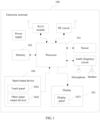
- FIG. 1 is an optional schematic structural diagram of hardware of an electronic terminal 100 according to an embodiment of this application.
- an internal structure of the electronic terminal 100 may include a processor 101, and a memory 102, a display 103, and an input/output device 104 that are separately connected to the processor 101.
- the memory 102 may be configured to store a program and data, including a program of an application displayed on the display screen 103 in this embodiment of this application.
- the processor 101 performs various function applications of the electronic terminal 100 and data processing by running the program stored in the memory 102, for example, performs a function of controlling an application installed on the electronic terminal 100 to be displayed on the display screen 103.
- the processor 101 is a control center of the electronic terminal 100, and is connected to all parts of the entire terminal by using various interfaces and lines, and performs various functions of the electronic terminal 100 and data processing by running or executing the program (or referred to as a "module") stored in the memory 102 and invoking the data stored in the memory 102, so as to perform overall monitoring on the electronic terminal 100.
- the processor 101 may include at least one processing unit.
- the processor 101 may integrate an application processor and a modem processor.
- the application processor mainly processes an operating system, a user interface, an application program, and the like, and the modem processor mainly processes wireless communication. It may be understood that the modem processor may not be integrated into the processor 101.
- the memory 102 mainly includes a program storage area and a data storage area.
- the program storage area may store an operating system (for example, an Android operating system, referred to as an "Android system” for short, an iOS operating system, or another operating system, where the operating system may also be referred to as a "system” for short), an application program required by at least one function (for example, a sound playing function or an image playing function), a program of at least one application in this embodiment of this application, and the like.
- the data storage area may store data created based on use of the electronic terminal 100, including related setting information, use status information, or the like of the application displayed on the display screen 103 in this embodiment of this application.
- the memory 102 may include a high-speed random access memory, and may further include a nonvolatile memory, for example, at least one magnetic disk storage device, a flash device, or another volatile solid-state storage device.
- the input/output device 104 may be configured to: receive input number or character information, and generate an input instruction for key signal input related to user setting and function control of the electronic terminal 100, including an input instruction of selecting an application by a user on the terminal in this embodiment of this application.
- the input/output device 104 may include a touch panel 1041 and other input/output devices 1042.
- the touch panel 1041 also referred to as a touchscreen, may collect a touch operation (for example, an operation performed by the user on the touch panel 1041 or near the touch panel 1041 by using any proper object or accessory, such as a finger or a stylus) performed by the user on or near the touch panel 1041, and drive a corresponding connection apparatus based on a preset program.
- the touch panel 1041 may include two parts: a touch detection apparatus and a touch controller.
- the touch detection apparatus detects a touch orientation of the user, and detects a signal brought by the touch operation, and sends the signal to the touch controller.
- the touch controller receives touch information from the touch detection apparatus, converts the touch information into touch point coordinates, then sends the touch point coordinates to the processor 101, and can receive and execute a command sent by the processor 101.
- the touch panel 1041 may be implemented in a plurality of types, such as a resistive type, a capacitive type, an infrared ray, and a surface acoustic wave.
- the input/output device 104 may include the other input/output devices 1042.
- the other input/output devices 1042 may include but is not limited to one or more of a physical keyboard, a function key (such as a volume control key or an on/off key), a trackball, a mouse, a joystick, and the like.
- the display 103 may be configured to display information entered by the user or information provided for the user, and various applications installed on the electronic terminal 100.
- the display 103 may include a display panel 1031.
- the display panel 1031 may be configured by using a liquid crystal display (Liquid Crystal Display, LCD), an organic light-emitting diode (Organic Light-Emitting Diode, OLED), or the like.
- the touch panel 1041 may cover the display panel 1031. After detecting the touch operation on or near the touch panel 1041, the touch panel 1041 sends the touch operation to the processor 101 to determine a type of a touch event, and then the processor 101 provides corresponding visual output on the display panel 1031 based on the type of the touch event.
- the touch panel 1041 and the display panel 1031 serve as two independent parts to implement input and output functions of the electronic terminal 100.
- the touch panel 1041 and the display panel 1031 may be integrated to implement the input and output functions of the electronic terminal 100.
- the internal structure of the electronic terminal 100 shown in FIG. 1 does not constitute a limitation on the terminal, and may include more or fewer parts than those shown in the figure, or may combine some parts, or have different part arrangements.
- the electronic terminal 100 may further include an audio frequency circuit, a speaker, and a microphone that provide an audio interface between the user and the electronic terminal 100.
- the electronic terminal 100 may further include a radio frequency (Radio Frequency, RF) circuit and a connected antenna, a Wireless Fidelity (Wireless Fidelity, Wi-Fi) module and a connected antenna, and the like.
- the electronic terminal 100 further includes a sensor, a power supply that supplies power to the electronic terminal 100, and the like. Details are not described herein.
- the display 103 displays N application sets, where N is greater than or equal to 2.
- An (N-1) th application set in the N application sets is displayed in an (N-1) th application display area on the display screen
- an N th application set in the N application sets is displayed in an N th application display area on the display screen
- the (N-1) th application display area surrounds a periphery of the N th application display area.
- the input/output device 104 obtains an operation of selecting an object other than a first application set by a user.
- the processor 101 invokes, by running the operating system stored in the memory 102, the program stored in the memory 102, and controls the electronic terminal 100 to perform at least one time of cyclic switching on the N application sets for display in response to the operation of selecting the object other than the first application set by the user.
- the performing one time of cyclic switching on the N application sets for display is: displaying a second application set in a first application display area, displaying a third application set in a second application display area, ..., and displaying the N th application set in the (N-1) th application display area, and displaying the first application set in the N th application display area.
- An application in this embodiment of this application is an application program installed on the terminal, is displayed on a display screen interface (for example, a display) of the terminal, can respond to a user operation, and is identified in an appearance form that can be identified by the user.
- the application includes but is not limited to an application icon, a widget (widget), a running control, and the like, for example, a desktop icon button, a list entry, and an album APP.
- An application set is a set of applications. A quantity of applications in one set needs to be greater than or equal to 1. The user can independently set an application and a quantity of applications in the application set, adjust an order of any application set in all application sets, and determine a display position of any application set on a screen.
- the processor of the terminal may logically divide applications installed on the terminal into the N application sets. All of the N application sets are simultaneously displayed on the display screen, and N application display areas in which the N application sets are displayed may be understood as N non-overlapping application display areas obtained by the processor of the terminal through logical division.
- a value of N may be determined based on a quantity of applications installed on the terminal and a maximum quantity of applications that can be displayed in each application display area. For example, if 24 applications are installed on the terminal, and a maximum of eight applications can be displayed in each application display area, the value of N may be determined as 3. Certainly, quantities of applications displayed in all application display areas may be inconsistent.
- eight applications are displayed in an application display area of an outermost circle, seven or six applications are displayed in an application display area of a second-outermost circle, five or four applications are displayed in an application display area of a third-outermost circle, and so on.
- the user may adjust and set a quantity of applications displayed in each application display area. This is not limited in the present invention.
- the processor of the terminal controls the N application sets including applications installed on the terminal to be displayed in the N application display areas on the display screen.
- the N application sets and the N application display areas are defined by logically dividing applications displayed on the display screen of the terminal and application display areas.
- a specific processing process for example, a process of obtaining the N application sets and the N application display areas through division, or a process of dividing application display areas on the display screen for display, is not limited in a process in which the processor of the terminal controls the applications installed on the terminal to be displayed on the display screen. However, in this application, all applications in the N application sets are simultaneously displayed on the display screen.
- a quantity of screen display interfaces for displaying applications on the terminal is not limited in this embodiment of this application, more than one screen display interface may be set, and the application display method provided in this application may be applied to each display interface.
- a total quantity of applications in the N application sets displayed on one display interface of the display is a quantity of applications installed on the terminal. All the applications installed on the terminal are displayed on one display interface, so that the terminal can display all the applications installed on the terminal on one display interface, and the user can find a to-be-used application without performing a slide operation.
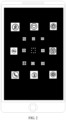
- an arrangement shape obtained after applications in each of the N application sets are displayed on a display screen may be consistent with a shape of the display. For example, if the foregoing method is applied to a smartphone that is currently frequently used and that is used for voice communication, and a shape of a display of the smartphone is a rectangle, an arrangement shape obtained after applications in each of the N application sets are displayed on the display screen may be a rectangle shown in FIG. 2 .
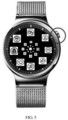
- an arrangement shape obtained after applications in each of the N application sets are displayed on the display screen may be a circle shown in FIG. 3 .
- An arrangement shape obtained after applications in each application set are displayed on a display screen may be another shape or a shape inconsistent with a shape of the display, for example, a rhombus, an ellipse, a pentagon, a hexagon, a heart shape, or a petal shape.
- FIG. 4 shows an application display method according to an embodiment of this application. Referring to FIG. 4 , the method includes the following steps.
- N application sets include the first application set and the second application set.
- the first application set and the second application set are simultaneously displayed on the display screen of the terminal.
- the first application set is displayed in a first application display area on the display screen
- the second application set is displayed in a second application display area on the display screen
- the first application display area surrounds a periphery of the second application display area.
- an application to be selected by the user is an application in the second application set
- the user may perform the operation of selecting the non-first application set.
- a processor of the terminal detects the operation of selecting the non-first application set by the user, and displays the second application set in the first application display area on the display screen or the area on the display screen other than the first application display area and the second application display area in response to the operation of selecting the non-first application set by the user, so that the application to be selected by the user is displayed in the first application display area.
- the user can select, from the first application display area in which the first application set is originally displayed, the application that is in the second application set and that is to be selected by the user.
- the first application display area is at an outermost periphery of all application display areas, a display area of the first application display area is largest. Because an icon displayed in the area may occupy more space, the icon is displayed in a larger size, so that when selecting an application in an application set in the N application sets other than the first application set from the first application display area, the user can conveniently and quickly find and operate the application.
- the operation of selecting the non-first application set by the user may be: a selection operation performed by the user on an area in the first application display area other than a display area of a first application icon; or a selection operation performed by the user on a display screen area of a second application icon; or a selection operation performed by the user on a non-application icon in the second application display area; or a selection operation performed by the user on the area on the display screen other than the first application display area and the second application display area.
- the first application icon is an icon of an application in the first application set
- the second application icon is an icon of an application in the second application set.
- the foregoing operation may be specifically at least one of the following operations: a tap, double-tap, touch and hold, or press operation on a touchscreen; a click, double-click, or touch and hold operation on a physical button; a slide, tap, double-tap, or press operation on a non-screen operation area on the terminal; and another preset gesture.
- the preset gesture may be a continuous or discontinuous specific track preset on the touchscreen, an air gesture, a touch or air gesture on a non-screen surface, or one or a combination of the foregoing gestures.
- the first application set and the second application set may be any two of the N application sets.
- the first application set may be a 1 st application set in the N application sets
- the second application set may be any one of the N application sets other than the 1 st application set. If the operation of selecting the non-first application set by the user is the selection operation performed by the user on the display screen area of the second application icon or the selection operation performed by the user on the non-application icon in the second application display area, the second application set may be displayed in the first application display area in which the first application set is originally displayed, so that the user can quickly select a required application.
- the first application set in response to the operation of selecting the non-first application set by the user, may be displayed in the second application display area on the display screen in addition to displaying the second application set in the first application display area on the display screen, so that when an application in the first application set needs to be subsequently selected, the first application set can be re-displayed in the first application display area on the display screen in the foregoing manner.
- the first application set is an application set that is in FIG. 3 and that is displayed in an outermost circle
- the second application set is an application set that is adjacent to the first application set and that is displayed in a second circle.
- the second application set in response to the operation of selecting the non-first application set by the user, the second application set is displayed in the first application display area on the display screen, the first application set is displayed in the second application display area on the display screen, and a display effect obtained after switching is shown in FIG. 5 .
- the first application set is not limited to the application set displayed in the outermost circle, and the first application set may be an application set displayed in the second circle.
- the second application set may be an application set displayed in a third circle. In this case, if a quantity of applications in an application set is relatively small, applications displayed in the first circle and the second circle on the display screen are allowed to be directly selected.
- the first application set and the second application set may be set in another manner. Details are not described herein.
- a specific switching display operation may be implemented in a plurality of manners.
- FIG. 3 is still used as an example.
- Some display areas corresponding to a user operation are cyclically displayed, and it is specified that a circle remains unchanged or is switched according to a non-cyclic switching rule.
- a third application set is displayed in the first application display area, in other words, content of the third circle is exchanged with content of the first circle in visual.
- content of the fourth circle is exchanged with the content of the first circle, and the content of the third circle returns to an original position, in other words, the third application set is displayed in a third application display area.
- the user repeatedly performs the operation until an application required by the user is displayed in the first application display area.
- the first circle remains unchanged or the first circle and the second circle remain unchanged, and applications are sequentially switched to the second circle and the third circle.
- the first application set is displayed in the second application display area
- the second application set is displayed in a third application display area
- a third application set is displayed in the first application display area
- a display position of a fourth application set remains unchanged.
- an (N-1) th application display area in which an (N-1) th application set is displayed on the display screen of the terminal may surround, in a plurality of display manners, a periphery of an N th application display area in which an N th application set is displayed on the display screen of the terminal.
- FIG. 2 and FIG. 3 are described by using an example in which an arrangement shape obtained after applications in N application sets are displayed on the display screen is a concentric circle. Certainly, the arrangement shape may be not a concentric circle. This is not limited in this application.
- this embodiment of this application is described by using an example in which the application display method provided in this application is applied to a small-sized device such as a smartwatch, and the N application sets are displayed in a concentric manner.
- displaying the N application sets in a concentric manner means that N application display areas in which the N application sets are displayed do not overlap each other in an arrangement form, and the (N-1) th application display area surrounds the periphery of the N th application display area.
- An expressed meaning that the N application display areas are displayed in a concentric manner is consistent with an expressed meaning that the N application sets are displayed in a concentric manner.
- FIG. 6 is another flowchart of implementing an application display method according to an embodiment of this application. Referring to FIG. 6 , the method includes the following steps.
- Display N application sets on a display screen of a terminal.
- N is greater than or equal to 2
- an (N-1) th application set in the N application sets is displayed in an (N-1) th application display area on the display screen
- an N th application set in the N application sets is displayed in an N th application display area on the display screen
- the (N-1) th application display area surrounds a periphery of the N th application display area.
- a size of an icon of an application in the N application sets displayed in N application display areas displayed in a concentric manner may progressively decrease from a first application display area to the N th application display area.
- An application icon displayed in the first application display area in the N application display areas is displayed in a normal icon size, and a size of an application icon displayed in a non-first application display area in the N application display areas is less than the normal icon size.
- An application in an application display area in the N application display areas displayed in a concentric manner other than the first application display area cannot be displayed in a normal display size of an application icon, and therefore it may be inconvenient for a user to perform view and selection operations.
- an application displayed in the first application display area can be set to respond to the selection operation of the user. If an application to be selected by the user is displayed in the first application display area, the user may directly select the required application from the first application set displayed in the first application display area. If an application to be selected by the user is in the non-first application display area, the user may perform an operation of selecting a non-first application set.
- S202 Perform at least one time of cyclic switching on the N application sets for display in response to an operation of selecting a non-first application set by a user.
- a processor of the terminal detects the operation of selecting the non-first application set by the user, and performs the at least one time of cyclic switching on the N application sets for display in response to the operation of selecting the non-first application set by the user.
- the performing one time of cyclic switching on the N application sets for display is: displaying a second application set in the first application display area, displaying a third application set in a second application display area, ..., and displaying the N th application set in the (N-1) th application display area, and displaying a first application set in the N th application display area.
- Cyclic switching is performed on the N application sets for display, so that an application set in the N application sets other than the first application set can be displayed in the first application display area, and the user can select an application in the application set in the N application sets other than the first application set from the first application display area.
- the operation of selecting the non-first application set by the user may include one of the following cases: a selection operation performed by the user on an area in the first application display area other than a display area of a first application icon, where the first application icon is an icon of an application in the first application set; or a selection operation performed by the user on a display screen area of another application icon, where the another application icon is an icon of an application in any one of the N application sets other than the first application set; or a selection operation performed by the user on an application display area in the N application display areas other than the first application display area; or a selection operation performed by the user on an area on the display screen other than the N application display areas.
- the foregoing operation may be specifically at least one of the following operations: a tap, double-tap, touch and hold, or press operation on a touchscreen; a click, double-click, or touch and hold operation on a physical button; a slide, tap, double-tap, or press operation on a non-screen operation area on the terminal; and another preset gesture.
- the processor of the terminal may perform one time of cyclic switching on the N application sets for display, and display, on the display screen, a result obtained after cyclic switching is performed; or in response to the operation of selecting the non-first application set by the user, within duration of the operation, perform continuous cyclic switching on the N application sets for display until the operation stops, and display, on the display screen, a result obtained after cyclic switching is performed; or in response to an operation of selecting an M th application set other than the first application set by the user, perform continuous cyclic switching on the N application sets for display until an icon corresponding to the M th application set is displayed in the first application display area, where N ⁇ M>1.
- the processor of the terminal may perform the at least one time of cycle switching on the N application sets for display in a plurality of implementations. For example, in response to an operation, the processor of the terminal performs one time of cyclic switching on the N application sets for display. Alternatively, within duration of an operation, the processor of the terminal may perform continuous cyclic switching on the N application sets for display until the operation stops.
- the processor of the terminal may perform continuous cyclic switching on the N application sets for display until an application icon selected by the user is displayed in the first application display area.
- the processor of the terminal may perform continuous cyclic switching on the N application sets for display until an application icon that is in the application display area and that is selected by the user is displayed in the first application display area.
- the following uses an example to describe the implementation in which the at least one time of cyclic switching is performed on the N application sets for display in response to the operation of selecting the non-first application set by the user.
- the processor of the terminal performs one time of cyclic switching on the N application sets for display.
- the user can perform a plurality of tap operations until an application icon selected by the user is displayed in the first application display area, and the user selects the required application icon from the first application display area.
- the processor of the terminal may perform continuous cyclic switching on the N application sets for display until an application icon selected by the user is displayed in the first application display area.
- the processor of the terminal may directly display, in the first application display area without performing a plurality of times of cyclic switching for display, an application set in which the application icon selected by the user is located, provided that the application icon selected by the user is displayed in the first application display area, and the user selects the required application icon from the first application display area.
- the processor of the terminal performs continuous cyclic switching on the N application sets for display, and stops performing cyclic switching on the N application sets for display after detecting that the touch and hold operation of the user ends. For example, when selecting an application from the non-first application set, the user may perform a touch and hold operation, and cyclic switching is performed on the N application sets for display. When an application icon selected by the user is displayed in the first application display area, the user stops a press operation.
- the application icon selected by the user is displayed in the first application display area. Because the first application display area is at an outermost periphery of all application display areas, a display area of the first application display area is largest. Because an icon displayed in the area may occupy more space, the icon is displayed in a larger size, so that when selecting an application in an application set in the N application sets other than the first application set from the first application display area, the user can conveniently and quickly find and operate the application. If the user selects an application icon, the application icon may be further displayed in a selected state.
- FIG. 7 is a schematic diagram of a smartwatch.
- a user touches a crown button (a position circled by a circle in FIG. 7 ) on the right of the smartwatch to enter a desktop launcher (launcher), in other words, enter a display interface of the smartwatch.
- a shape of a display of the smartwatch is a circle.
- an arrangement shape obtained after N application sets are displayed on the display screen of the smartwatch is set to be consistent with the shape of the display of the smartwatch, and is also set as a circle.
- applications installed on the smartwatch are in a circular layout, and are displayed in a manner of N concentric circles.
- a value of N is 3.
- Three application sets are simultaneously displayed on the display screen in a concentric manner, and are a first application set, a second application set, and a third application set from the outside to the inside.
- the first application set is displayed in a first application display area on the display screen
- the second application set is displayed in a second application display area on the display screen
- the third application set is displayed in a third application display area on the display screen.
- the first application display area in which the first application set is displayed surrounds the second application display area in which the second application set is displayed, and the second application display area in which the second application set is displayed surrounds the third application display area in which the third application set is displayed, to finally produce an effect that the first application set, the second application set, and the third application set are displayed in a concentric manner.
- a quantity of applications in each application set is set to 8, and eight applications in the first application set all can respond to a selection operation of the user. If the first application set includes an application required by the user, the user may directly select the required application from the first application set. If the first application set does not include the application required by the user, the user may switch, by performing the foregoing operation of selecting a non-first application set, for example, an operation of tapping or touching and holding an area on the display screen of the smartwatch other than a display area of a first application icon, the application to be selected by the user to the first application display area for selection.
- an application in the second application set is displayed in the first application display area in which the first application set is originally displayed
- the third application set is displayed in the second application display area in which the second application set is originally displayed
- the first application set is displayed in the third application display area in which the third application set is originally displayed.
- cyclic switching may be performed on the N application sets on the display screen interface of the smartwatch for display once again in the foregoing manner, and the user stops the tap operation after the user finds, in the first application display area in which the first application set is originally displayed, the application required by the user.
- a process in which the user performs the operation of selecting the non-first application set on the smartwatch, and in response to the operation of selecting the non-first application set, the smartwatch performs at least one time of cyclic switching on the N application sets for display may be implemented in a plurality of manners, and is not limited to the manner described above.
- the user may further perform a touch and hold operation.
- continuous cyclic switching is performed, in the foregoing manner, on the N application sets simultaneously displayed on the display screen interface of the smartwatch for display.
- An application set displayed in the first application display area in which the first application set is originally displayed includes the application required by the user.
- the terminal includes corresponding hardware structures and/or software modules for performing the functions.
- the embodiments of this application can be implemented in a form of hardware or a combination of hardware and computer software. Whether a function is performed by hardware or hardware driven by computer software depends on particular applications and design constraints of the technical solutions. A person skilled in the art may use different methods to implement the described functions for each particular application, but it should not be considered that the implementation goes beyond the scope of the technical solutions of the embodiments of this application.
- function unit division may be performed on the terminal based on the foregoing method examples.
- each function unit may be obtained through division based on a corresponding function, or two or more functions may be integrated into one processing unit.
- the integrated unit may be implemented in a form of hardware, or may be implemented in a form of a software function unit. It should be noted that the unit division in the embodiments of this application is an example and is merely logical function division. There may be another division manner during actual implementation.
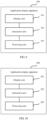
- FIG. 9 is a schematic structural diagram of an application display apparatus.
- an application display apparatus 100 is applied to an electronic terminal, and includes a display unit 101, an interaction unit 102, and a processing unit 103.
- the display unit 101 is configured to display a first application set and a second application set on a display screen of the terminal, where the first application set is displayed in a first application display area on the display screen, the second application set is displayed in a second application display area on the display screen, and the first application display area surrounds a periphery of the second application display area.
- the interaction unit 102 is configured to receive a user operation.
- the processing unit 103 is configured to: in response to an operation of selecting a non-first application set by a user, by using the display unit 101, display the second application set in the first application display area on the display screen; and display the first application set in the second application display area on the display screen, or display the first application set in an area on the display screen other than the first application display area and the second application display area.
- FIG. 10 is a schematic structural diagram of an application display apparatus.
- an application display apparatus 200 is applied to a terminal, and includes a display unit 201, an interaction unit 202, and a processing unit 203.
- the display unit 201 is configured to display N application sets on a display screen of the terminal, where N is greater than or equal to 2, an (N-1) th application set in the N application sets is displayed in an (N-1) th application display area on the display screen, an N th application set in the N application sets is displayed in an N th application display area on the display screen, and the (N-1) th application display area surrounds a periphery of the N th application display area.
- the interaction unit 202 is configured to receive a user operation.
- the processing unit 203 is configured to perform at least one time of cyclic switching on the N application sets for display by using the display unit 201 in response to an operation of selecting a non-first application set by a user.
- the performing one time of cyclic switching on the N application sets for display is specifically: displaying a first application set in the N th application display area, displaying a second application set in a first application display area, ..., and displaying the N th application set in the (N-1) th application display area.
- the N application sets are displayed on the display screen of the terminal in a concentric manner.
- the processing unit 203 performs the at least one time of cyclic switching on the N application sets for display in the following manner: in response to the operation of selecting the non-first application set by the user, performing one time of cyclic switching on the N application sets for display, and displaying, on the display screen, a result obtained after cyclic switching is performed; or in response to the operation of selecting the non-first application set by the user, within duration of the operation, performing continuous cyclic switching on the N application sets for display until the operation stops, and displaying, on the display screen, a result obtained after cyclic switching is performed; or in response to an operation of selecting an M th application set other than the first application set by the user, performing continuous cyclic switching on the N application sets for display until an icon corresponding to the M th application set is displayed in the first application display area, where N ⁇ M>1.
- the application display apparatus 100 and the application display apparatus 200 provided in the embodiments of this application have all functions for implementing the application display method processes in the foregoing method embodiments.
- the display unit may be a display
- the interaction unit may be an input/output device
- the processing unit may be a processor.
- the input/output device may be a touchscreen, a physical button, various sensors such as a pressure sensor, a touch sensor, a range sensor, an infrared sensor, and a light sensor, a sound capture apparatus, or an image capture apparatus such as a microphone or a camera.
- the user may operate the apparatus by using the interaction unit, to control the apparatus to execute a user command and run a specific function. If the display unit is the display, the interaction unit is the input/output device, and the processing unit is the processor, the application display apparatus may be the terminal shown in FIG. 1 .
- the terminal includes a processor, a memory, a display, and an input/output device.
- the display, the input/output device, and the memory all are connected to the processor by using a bus.
- the display is configured to display an application set.
- the input/output device is configured to obtain an operation of selecting a non-first application set by a user.
- the memory is configured to store program code to be executed by the processor.
- the processor is configured to invoke the program code stored in the memory to perform the process that is in the foregoing embodiment and that is of performing switching on the application set for display that is displayed on the display screen in response to the operation of selecting the non-first application set by the user.
- An embodiment of this application further provides a computer readable storage medium, and the computer readable storage medium stores an instruction.
- the instruction runs on a computer, the computer is enabled to perform the application display method in the foregoing embodiment.
- An embodiment of this application further provides a computer program product including an instruction.
- the computer program product including the instruction runs on a computer, the computer is enabled to perform the application display method in the foregoing embodiment.
- the embodiments of this application may be provided as a method, a system, or a computer program product. Therefore, the embodiments of this application may use a form of hardware only embodiments, software only embodiments, or embodiments with a combination of software and hardware. Moreover, the embodiments of this application may use a form of a computer program product that is implemented on one or more computer-usable storage media (including but not limited to a disk memory, a CD-ROM, an optical memory, and the like) that include computer-usable program code.
- computer-usable storage media including but not limited to a disk memory, a CD-ROM, an optical memory, and the like
- These computer program instructions may be provided for a general-purpose computer, a dedicated computer, an embedded processor, or a processor of any other programmable data processing device to generate a machine, so that the instructions executed by a computer or a processor of any other programmable data processing device generate an apparatus for implementing a specific function in one or more processes in the flowcharts and/or in one or more blocks in the block diagrams.
- These computer program instructions may be stored in a computer readable memory that can instruct the computer or any other programmable data processing device to work in a specific manner, so that the instructions stored in the computer readable memory generate an artifact that includes an instruction apparatus.
- the instruction apparatus implements a specific function in one or more processes in the flowcharts and/or in one or more blocks in the block diagrams.
- These computer program instructions may be loaded onto a computer or another programmable data processing device, so that a series of operations and steps are performed on the computer or the another programmable device, thereby generating computer-implemented processing. Therefore, the instructions executed on the computer or the another programmable device provide steps for implementing a specific function in one or more processes in the flowcharts and/or in one or more blocks in the block diagrams.
Landscapes
- Engineering & Computer Science (AREA)
- Theoretical Computer Science (AREA)
- General Engineering & Computer Science (AREA)
- Software Systems (AREA)
- Human Computer Interaction (AREA)
- Physics & Mathematics (AREA)
- General Physics & Mathematics (AREA)
- User Interface Of Digital Computer (AREA)
Claims (12)
- Anwendungsanzeigeverfahren, das auf ein elektronisches Endgerät (100) angewendet wird und umfasst:Anzeigen (S101) eines ersten Anwendungssatzes, eines zweiten Anwendungssatzes und eines dritten Anwendungssatzes auf einem Anzeigebildschirm (1031) des Endgeräts, wobei der erste Anwendungssatz in einem erstenAnwendungsanzeigebereich auf dem Anzeigebildschirm angezeigt wird, der zweite Anwendungssatz in einem zweiten Anwendungsanzeigebereich auf dem Anzeigebildschirm angezeigt wird, der dritte Anwendungssatz in einem dritten Anwendungsanzeigebereich auf dem Anzeigebildschirm angezeigt wird, der erste Anwendungsanzeigebereich einen Umfang des zweiten Anwendungsanzeigebereichs umgibt, der zweite Anwendungsanzeigebereich einen Umfang des dritten Anwendungsanzeigebereichs umgibt und Anwendungssymbole in dem ersten Anwendungsanzeigebereich im Vergleich zu dem zweiten Anwendungsanzeigebereich in einer größeren Abmessung angezeigt werden; undals Reaktion (S102) auf einen Vorgang eines Auswählens eines nicht ersten Anwendungssatzes durch einen Benutzer, Durchführen mindestens eines Mals eines zyklischen Umschaltens an dem ersten, dem zweiten und dem dritten Anwendungssatz für eine Anzeige;wobei das Durchführen eines Mals des zyklischen Umschaltens an dem ersten, dem zweiten und dem dritten Anwendungssatz für die Anzeige speziell ist: Anzeigen (S102) des zweiten Anwendungssatzes in dem ersten Anwendungsanzeigebereich auf dem Anzeigebildschirm; und Anzeigen (S102) des ersten Anwendungssatzes in dem dritten Anwendungsanzeigebereich auf dem Anzeigebildschirm und Anzeigen des dritten Anwendungssatzes in dem zweiten Anwendungsanzeigebereich.
- Verfahren nach Anspruch 1, wobei der Vorgang des Auswählens des nicht ersten Anwendungssatzes durch den Benutzer umfasst:einen Auswahlvorgang, der durch den Benutzer an einem Bereich in dem ersten Anwendungsanzeigebereich außer einem Anzeigebereich eines ersten Anwendungssymbols durchgeführt wird; odereinen Auswahlvorgang, der durch den Benutzer an einem Anzeigebildschirmbereich eines zweiten Anwendungssymbols durchgeführt wird; odereinen Auswahlvorgang, der durch den Benutzer an einem Nichtanwendungssymbol in dem zweiten Anwendungsanzeigebereich durchgeführt wird; odereinen Auswahlvorgang, der durch den Benutzer an dem Bereich auf dem Anzeigebildschirm außer dem ersten Anwendungsanzeigebereich und dem zweiten Anwendungsanzeigebereich durchgeführt wird, wobeidas erste Anwendungssymbol ein Symbol, das jeder Anwendung in dem ersten Anwendungssatz entspricht, ist und das zweite Anwendungssymbol ein Symbol, das jeder Anwendung in dem zweiten Anwendungssatz entspricht, ist.
- Verfahren nach einem der Ansprüche 1 oder 2, wobei der erste, der zweite und der dritte Anwendungssatz auf dem Anzeigebildschirm (1031) des Endgeräts (100) in einer konzentrischen Weise angezeigt werden.
- Verfahren nach einem der Ansprüche 1 bis 3, wobei der Vorgang speziell mindestens einer von den folgenden Vorgängen ist:einem Tipp-, Doppeltipp-, Dreifachtipp-, Berührungs- und Halte-, oder Drückvorgang eines Fingers auf einem Touchscreen und einem Tipp- oder Doppeltippvorgang eines Fingergelenks auf dem Touchscreen;einem Klick-, Doppelklick-, Dreifachklick- oder Berührungs- und Haltevorgang auf einer physischen Schaltfläche;einem Schiebe-, Tipp-, Doppeltipp- oder Drückvorgang auf einem Nichtbildschirmvorgangsbereich auf dem Endgerät (100); undeiner voreingestellten Geste.
- Verfahren nach einem der Ansprüche 1 bis 4, wobei das Durchführen mindestens eines Mals des zyklischen Umschaltens an dem ersten, dem zweiten und dem dritten Anwendungssatz für die Anzeige als Reaktion auf einen Vorgang des Auswählens eines nicht ersten Anwendungssatzes durch einen Benutzer umfasst:als Reaktion auf den Vorgang des Auswählens des nicht ersten Anwendungssatzes durch den Benutzer, Durchführen eines Mals des zyklischen Umschaltens an dem ersten, dem zweiten und dem dritten Anwendungssatz für die Anzeige und Anzeigen,auf dem Anzeigebildschirm (1031), eines Ergebnisses, das erhalten wird, nachdem das zyklische Umschalten durchgeführt wird; oderals Reaktion auf den Vorgang des Auswählens des nicht ersten Anwendungssatzes durch den Benutzer, innerhalb einer Dauer des Vorgangs, Durchführen eines fortlaufenden zyklischen Umschaltens an dem ersten, dem zweiten und dem dritten Anwendungssatz für die Anzeige, bis der Vorgang stoppt, und Anzeigen, auf dem Anzeigebildschirm, eines Ergebnisses, das erhalten wird, nachdem das zyklische Umschalten durchgeführt wird; oderals Reaktion auf einen Vorgang des Auswählen des dritten Anwendungssatzes durch den Benutzer, Anzeigen eines ersten Anwendungssatzes in dem dritten Anwendungsanzeigebereich, Anzeigen eines zweiten Anwendungssatzes in einem ersten Anwendungsanzeigebereich und Anzeigen des dritten Anwendungssatzes in dem zweiten Anwendungsanzeigebereich; und dann Anzeigen eines zweiten Anwendungssatzes in dem dritten Anwendungsanzeigebereich, Anzeigen eines dritten Anwendungssatzes in einem ersten Anwendungsanzeigebereich und Anzeigen des ersten Anwendungssatzes in dem zweiten Anwendungsanzeigebereich.
- Elektronisches Endgerät (100), das einen Prozessor (101), ein Memory (102), eine Anzeige (103) und eine Eingabe-/Ausgabevorrichtung (104) umfasst, wobei die Anzeige (103), die Eingabe-/Ausgabevorrichtung (104) und das Memory (102) alle durch Verwenden eines Busses mit dem Prozessor (101) verbunden sind;die Anzeige konfiguriert ist, um einen ersten Anwendungssatz, einen zweiten Anwendungssatz und einen dritten Anwendungssatz anzuzeigen, wobei der erste Anwendungssatz in einem ersten Anwendungsanzeigebereich auf dem Anzeigebildschirm (1031) angezeigt wird, der zweite Anwendungssatz in einem zweiten Anwendungsanzeigebereich auf dem Anzeigebildschirm angezeigt wird, der dritte Anwendungssatz in einem dritten Anwendungsanzeigebereich auf dem Anzeigebildschirm angezeigt wird, der erste Anwendungsanzeigebereich einen Umfang des zweiten Anwendungsanzeigebereichs umgibt, der zweite Anwendungsanzeigebereich einen Umfang des dritten Anwendungsanzeigebereichs umgibt und Anwendungssymbole in dem ersten Anwendungsanzeigebereich im Vergleich zu dem zweiten Anwendungsanzeigebereich in einer größeren Abmessung angezeigt werden; und die Eingabe-/Ausgabevorrichtung konfiguriert ist, um eine Eingabeanweisung zum Auswählen einer Zahlungsanwendung durch einen Benutzer zu erhalten;die Eingabe-/Ausgabevorrichtung konfiguriert ist, um einen Benutzervorgang zu erhalten;das Memory (102) konfiguriert ist, um Programmcode, der durch den Prozessor (101) auszuführen ist, zu speichern; undder Prozessor (101) konfiguriert ist, um den Programmcode, der in dem Memory (102) gespeichert ist, aufzurufen, um die folgenden Funktionen durchzuführen:
als Reaktion auf einen Vorgang des Auswählens eines nicht ersten Anwendungssatzes durch den Benutzer durch Verwenden der Eingabe-/Ausgabevorrichtung, Durchführen mindestens eines Mals des zyklischen Umschaltens an dem ersten, dem zweiten und dem dritten Anwendungssatz für die Anzeige, wobei das Durchführen eines Mals des zyklischen Umschaltens an dem ersten, dem zweiten und dem dritten Anwendungssatz für die Anzeige speziell ist:Anzeigen des zweiten Anwendungssatzes in dem ersten Anwendungsanzeigebereich auf dem Anzeigebildschirm; undAnzeigen des ersten Anwendungssatzes in dem dritten Anwendungsanzeigebereich auf dem Anzeigebildschirm und Anzeigen des dritten Anwendungssatzes in dem zweiten Anwendungsanzeigebereich. - Elektronisches Endgerät (100) nach Anspruch 6, wobei der Vorgang des Auswählens des nicht ersten Anwendungssatzes durch den Benutzer umfasst:einen Auswahlvorgang, der durch den Benutzer an einem Bereich in dem ersten Anwendungsanzeigebereich außer einem Anzeigebereich eines ersten Anwendungssymbols durchgeführt wird; odereinen Auswahlvorgang, der durch den Benutzer an einem Anzeigebildschirmbereich eines zweiten Anwendungssymbols durchgeführt wird; odereinen Auswahlvorgang, der durch den Benutzer an einem Nichtanwendungssymbol in dem zweiten Anwendungsanzeigebereich durchgeführt wird; odereinen Auswahlvorgang, der durch den Benutzer an dem Bereich auf dem Anzeigebildschirm (1031) außer dem ersten Anwendungsanzeigebereich und dem zweiten Anwendungsanzeigebereich durchgeführt wird, wobei das erste Anwendungssymbol ein Symbol, das jeder Anwendung in dem ersten Anwendungssatz entspricht, ist und das zweite Anwendungssymbol ein Symbol, das jeder Anwendung in dem zweiten Anwendungssatz entspricht, ist.
- Elektronisches Endgerät (100) nach Anspruch 6 oder 7, wobei der erste, der zweite und der dritte Anwendungssatz auf dem Anzeigebildschirm (1031) des Endgeräts in einer konzentrischen Weise angezeigt werden.
- Elektronisches Endgerät (100) nach einem der Ansprüche 6 oder 7, wobei der Vorgang speziell mindestens einer von den folgenden Vorgängen ist:einem Tipp-, Doppeltipp-, Dreifachtipp-, Berührungs- und Halte-, oder Drückvorgang eines Fingers auf einem Touchscreen und einem Tipp- oder Doppeltippvorgang eines Fingergelenks auf dem Touchscreen;einem Klick-, Doppelklick-, Dreifachklick- oder Berührungs- und Haltevorgang auf einer physischen Schaltfläche;einem Schiebe-, Tipp-, Doppeltipp- oder Drückvorgang an einem Nichtbildschirmvorgangsbereich auf dem Endgerät; undeiner voreingestellten Geste.
- Elektronisches Endgerät (100) nach einem der Ansprüche 6 bis 9, wobei, als Reaktion auf den Vorgang des Auswählens des nicht ersten Anwendungssatzes durch den Benutzer, der Prozessor (101) das mindestens eine Mal des zyklischen Umschaltens an dem ersten, dem zweiten und dem dritten Anwendungssatz für die Anzeige in der folgenden Weise durchführt:als Reaktion auf den Vorgang des Auswählens des nicht ersten Anwendungssatzes durch den Benutzer, Durchführen eines Mals des zyklischen Umschaltens an dem ersten, dem zweiten und dem dritten Anwendungssatz für die Anzeige und Anzeigen,auf dem Anzeigebildschirm (1031), eines Ergebnisses, das erhalten wird, nachdem das zyklische Umschalten durchgeführt wird; oderals Reaktion auf den Vorgang des Auswählens des nicht ersten Anwendungssatzes durch den Benutzer, innerhalb einer Dauer des Vorgangs, Durchführen eines fortlaufenden zyklischen Umschaltens an dem ersten, dem zweiten und dem dritten Anwendungssatz für die Anzeige, bis der Vorgang stoppt, und Anzeigen, auf dem Anzeigebildschirm, eines Ergebnisses, das erhalten wird, nachdem das zyklische Umschalten durchgeführt wird; oderals Reaktion auf einen Vorgang des Auswählens der dritten Anwendung durch den Benutzer, Anzeigen eines ersten Anwendungssatzes in dem dritten Anwendungsanzeigebereich, Anzeigen eines zweiten Anwendungssatzes in einem ersten Anwendungsanzeigebereich und Anzeigen des dritten Anwendungssatzes in dem zweiten Anwendungsanzeigebereich; und dann Anzeigen eines zweiten Anwendungssatzes in dem dritten Anwendungsanzeigebereich, Anzeigen eines dritten Anwendungssatzes in einem ersten Anwendungsanzeigebereich und Anzeigen des ersten Anwendungssatzes in dem zweiten Anwendungsanzeigebereich.
- Computerlesbares Speichermedium, wobei das computerlesbare Speichermedium eine Anweisung speichert, und, wenn die Anweisung auf einem Computer läuft, der Computer aktiviert wird, um das Verfahren nach einem der Ansprüche 1 bis 5 durchzuführen.
- Computerprogrammprodukt, das eine Anweisung umfasst, wobei, wenn das Computerprogrammprodukt, das die Anweisung umfasst, auf einem Computer läuft, der Computer aktiviert wird, um das Verfahren nach einem der Ansprüche 1 bis 5 durchzuführen.
Applications Claiming Priority (2)
| Application Number | Priority Date | Filing Date | Title |
|---|---|---|---|
| CN201710061852 | 2017-01-26 | ||
| PCT/CN2017/079133 WO2018137287A1 (zh) | 2017-01-26 | 2017-03-31 | 一种显示应用的方法、装置及电子终端 |
Publications (3)
| Publication Number | Publication Date |
|---|---|
| EP3564802A1 EP3564802A1 (de) | 2019-11-06 |
| EP3564802A4 EP3564802A4 (de) | 2020-01-15 |
| EP3564802B1 true EP3564802B1 (de) | 2023-08-02 |
Family
ID=62977933
Family Applications (1)
| Application Number | Title | Priority Date | Filing Date |
|---|---|---|---|
| EP17894125.8A Active EP3564802B1 (de) | 2017-01-26 | 2017-03-31 | Verfahren und vorrichtung zur anzeige einer anwendung und elektronisches endgerät |
Country Status (4)
| Country | Link |
|---|---|
| US (1) | US10846104B2 (de) |
| EP (1) | EP3564802B1 (de) |
| CN (1) | CN108475205B (de) |
| WO (1) | WO2018137287A1 (de) |
Families Citing this family (11)
| Publication number | Priority date | Publication date | Assignee | Title |
|---|---|---|---|---|
| CN109189317A (zh) * | 2018-09-10 | 2019-01-11 | 奇酷互联网络科技(深圳)有限公司 | 一种可穿戴设备及其界面操作方法 |
| CN109688453A (zh) * | 2018-12-05 | 2019-04-26 | 深圳市子瑜杰恩科技有限公司 | 短视频的道具排列显示方法及相关产品 |
| USD934887S1 (en) * | 2019-08-31 | 2021-11-02 | Huawei Technologies Co., Ltd. | Electronic display for a wearable device presenting a graphical user interface |
| USD930013S1 (en) * | 2019-08-31 | 2021-09-07 | Huawei Technologies Co., Ltd. | Electronic display for a wearable device presenting a graphical user interface |
| USD930667S1 (en) * | 2019-08-31 | 2021-09-14 | Huawei Technologies Co., Ltd. | Electronic display for a wearable device presenting a graphical user interface |
| CN112738580B (zh) * | 2019-10-28 | 2022-11-08 | 海信视像科技股份有限公司 | 双系统应用图标信息的处理、显示方法、装置及显示设备 |
| USD936681S1 (en) * | 2019-11-22 | 2021-11-23 | Honor Device Co., Ltd. | Electronic display for a wearable device presenting a graphical user interface |
| USD936685S1 (en) * | 2019-11-25 | 2021-11-23 | Honor Device Co., Ltd. | Electronic display for a wearable device presenting a graphical user interface |
| USD941859S1 (en) * | 2019-11-25 | 2022-01-25 | Honor Device Co., Ltd. | Electronic display for a wearable device presenting a graphical user interface |
| CN113568534A (zh) * | 2021-07-20 | 2021-10-29 | 维沃移动通信有限公司 | 应用图标的显示方法、装置和电子设备 |
| CN113760141A (zh) * | 2021-09-02 | 2021-12-07 | 维沃移动通信有限公司 | 显示方法、显示装置、电子设备和存储介质 |
Citations (1)
| Publication number | Priority date | Publication date | Assignee | Title |
|---|---|---|---|---|
| US20150331589A1 (en) * | 2014-05-15 | 2015-11-19 | Todd KAWAKITA | Circular interface for navigating applications and an authentication mechanism on a wearable device |
Family Cites Families (24)
| Publication number | Priority date | Publication date | Assignee | Title |
|---|---|---|---|---|
| KR101146042B1 (ko) * | 2006-05-22 | 2012-05-14 | 엘지전자 주식회사 | 회전형 메뉴 기능을 갖는 이동 통신 단말기 및 그 메뉴제어 방법 |
| US20100138784A1 (en) * | 2008-11-28 | 2010-06-03 | Nokia Corporation | Multitasking views for small screen devices |
| US8918739B2 (en) | 2009-08-24 | 2014-12-23 | Kryon Systems Ltd. | Display-independent recognition of graphical user interface control |
| KR20130054071A (ko) | 2011-11-16 | 2013-05-24 | 삼성전자주식회사 | 다중 어플리케이션을 실행하는 모바일 장치 및 그 방법 |
| CN102609210B (zh) * | 2012-02-16 | 2014-09-10 | 上海华勤通讯技术有限公司 | 移动终端的功能图标的配置方法和移动终端 |
| CN102779002B (zh) | 2012-06-19 | 2015-05-20 | 邓朝进 | 一种触摸屏键盘 |
| CN103677498A (zh) | 2012-09-11 | 2014-03-26 | 华为终端有限公司 | 图标排序显示的方法和终端设备 |
| CN102929479A (zh) | 2012-09-27 | 2013-02-13 | 东莞宇龙通信科技有限公司 | 应用图标的显示方法及通信终端 |
| JP5874625B2 (ja) | 2012-12-20 | 2016-03-02 | カシオ計算機株式会社 | 入力装置、入力操作方法及び制御プログラム並びに電子機器 |
| CN103197837A (zh) | 2013-03-18 | 2013-07-10 | 西比(湖州)通信科技有限公司 | 一种用于智能终端的桌面操作系统 |
| JP6153007B2 (ja) * | 2013-07-19 | 2017-06-28 | 株式会社コナミデジタルエンタテインメント | 操作システム、操作制御方法、操作制御プログラム |
| CN104424025B (zh) | 2013-08-20 | 2018-11-06 | 北京三星通信技术研究有限公司 | 一种终端设备及其应用程序的切换方法 |
| CN110687969B (zh) * | 2013-10-30 | 2023-05-02 | 苹果公司 | 显示相关的用户界面对象 |
| CN103777869B (zh) | 2014-01-08 | 2016-10-26 | 宇龙计算机通信科技(深圳)有限公司 | 主菜单应用界面切换的方法及其装置 |
| KR20150127989A (ko) * | 2014-05-08 | 2015-11-18 | 삼성전자주식회사 | 사용자 인터페이스 제공 방법 및 장치 |
| US10521074B2 (en) | 2014-07-31 | 2019-12-31 | Dell Products, Lp | System and method for a back stack in a multi-application environment |
| DE212015000213U1 (de) * | 2014-09-02 | 2017-05-02 | Apple Inc. | Multidimensionale Objektneuordnung |
| WO2016036427A1 (en) * | 2014-09-02 | 2016-03-10 | Apple Inc. | Electronic device with rotatable input mechanism |
| CN104267889B (zh) * | 2014-09-15 | 2019-03-29 | 联想(北京)有限公司 | 一种控制方法和电子设备 |
| US10310704B2 (en) * | 2014-09-18 | 2019-06-04 | Ademco Inc. | System and method to have location based personalized UI updates on mobile app for connected users in security, video and home automation applications |
| JP6466736B2 (ja) | 2015-02-26 | 2019-02-06 | 株式会社コーエーテクモゲームス | 情報処理装置、情報処理方法、ならびに、プログラム |
| US11797172B2 (en) * | 2015-03-06 | 2023-10-24 | Alibaba Group Holding Limited | Method and apparatus for interacting with content through overlays |
| EP3273336A4 (de) * | 2015-04-14 | 2018-03-28 | Huawei Technologies Co., Ltd. | Wearable-vorrichtung und berührungsbildschirm, berührungsbetriebsverfahren und grafische benutzeroberfläche dafür |
| CN104965668B (zh) * | 2015-06-19 | 2018-03-27 | 北京奇虎科技有限公司 | 界面操作的方法和装置 |
-
2017
- 2017-03-31 US US16/480,969 patent/US10846104B2/en active Active
- 2017-03-31 EP EP17894125.8A patent/EP3564802B1/de active Active
- 2017-03-31 CN CN201780005023.3A patent/CN108475205B/zh active Active
- 2017-03-31 WO PCT/CN2017/079133 patent/WO2018137287A1/zh not_active Ceased
Patent Citations (1)
| Publication number | Priority date | Publication date | Assignee | Title |
|---|---|---|---|---|
| US20150331589A1 (en) * | 2014-05-15 | 2015-11-19 | Todd KAWAKITA | Circular interface for navigating applications and an authentication mechanism on a wearable device |
Also Published As
| Publication number | Publication date |
|---|---|
| US20200004562A1 (en) | 2020-01-02 |
| EP3564802A1 (de) | 2019-11-06 |
| CN108475205A (zh) | 2018-08-31 |
| CN108475205B (zh) | 2021-02-09 |
| WO2018137287A1 (zh) | 2018-08-02 |
| US10846104B2 (en) | 2020-11-24 |
| EP3564802A4 (de) | 2020-01-15 |
Similar Documents
| Publication | Publication Date | Title |
|---|---|---|
| US10846104B2 (en) | Application display method and apparatus, and electronic terminal | |
| JP7412572B2 (ja) | ウィジェット処理方法及び関連する機器 | |
| US10908789B2 (en) | Application switching method and apparatus and graphical user interface | |
| US11054988B2 (en) | Graphical user interface display method and electronic device | |
| US9766739B2 (en) | Method and apparatus for constructing a home screen in a terminal having a touch screen | |
| US9035883B2 (en) | Systems and methods for modifying virtual keyboards on a user interface | |
| CN103649895B (zh) | 图标显示的调整方法和终端 | |
| US20150331573A1 (en) | Handheld mobile terminal device and method for controlling windows of same | |
| US10095386B2 (en) | Mobile device for displaying virtually listed pages and displaying method thereof | |
| US10067666B2 (en) | User terminal device and method for controlling the same | |
| JP6157885B2 (ja) | 携帯端末装置の表示制御方法 | |
| US20160026345A1 (en) | Operation panel for electronic device | |
| KR20110041915A (ko) | 데이터 표시 방법 및 그를 수행하는 단말기 | |
| US10481790B2 (en) | Method and apparatus for inputting information by using on-screen keyboard | |
| CN103076980B (zh) | 搜索项显示方法和装置 | |
| US12112016B2 (en) | Icon arranging method and apparatus, and electronic device | |
| EP2615537A1 (de) | Verfahren und Vorrichtung für ein Tastaturlayout durch Verwenden von Berührung | |
| CN106527849A (zh) | 一种调整图标位置的方法及移动终端 | |
| US10691333B2 (en) | Method and apparatus for inputting character | |
| EP2706451B1 (de) | Verfahren zur Verarbeitung von Berührungseingaben für mobile Vorrichtungen | |
| EP3674867B1 (de) | Verfahren zur mensch-computer-interaktion und elektronische vorrichtung | |
| KR20170009688A (ko) | 전자 장치 및 이의 제어 방법 |
Legal Events
| Date | Code | Title | Description |
|---|---|---|---|
| STAA | Information on the status of an ep patent application or granted ep patent |
Free format text: STATUS: THE INTERNATIONAL PUBLICATION HAS BEEN MADE |
|
| PUAI | Public reference made under article 153(3) epc to a published international application that has entered the european phase |
Free format text: ORIGINAL CODE: 0009012 |
|
| STAA | Information on the status of an ep patent application or granted ep patent |
Free format text: STATUS: REQUEST FOR EXAMINATION WAS MADE |
|
| 17P | Request for examination filed |
Effective date: 20190802 |
|
| AK | Designated contracting states |
Kind code of ref document: A1 Designated state(s): AL AT BE BG CH CY CZ DE DK EE ES FI FR GB GR HR HU IE IS IT LI LT LU LV MC MK MT NL NO PL PT RO RS SE SI SK SM TR |
|
| AX | Request for extension of the european patent |
Extension state: BA ME |
|
| REG | Reference to a national code |
Ref country code: DE Ref legal event code: R079 Free format text: PREVIOUS MAIN CLASS: G06F0003048000 Ipc: G06F0003048100 Ref document number: 602017072319 Country of ref document: DE |
|
| A4 | Supplementary search report drawn up and despatched |
Effective date: 20191213 |
|
| RIC1 | Information provided on ipc code assigned before grant |
Ipc: G06F 3/0481 20130101AFI20191209BHEP |
|
| DAV | Request for validation of the european patent (deleted) | ||
| DAX | Request for extension of the european patent (deleted) | ||
| STAA | Information on the status of an ep patent application or granted ep patent |
Free format text: STATUS: EXAMINATION IS IN PROGRESS |
|
| 17Q | First examination report despatched |
Effective date: 20211117 |
|
| GRAP | Despatch of communication of intention to grant a patent |
Free format text: ORIGINAL CODE: EPIDOSNIGR1 |
|
| STAA | Information on the status of an ep patent application or granted ep patent |
Free format text: STATUS: GRANT OF PATENT IS INTENDED |
|
| INTG | Intention to grant announced |
Effective date: 20230330 |
|
| GRAS | Grant fee paid |
Free format text: ORIGINAL CODE: EPIDOSNIGR3 |
|
| GRAA | (expected) grant |
Free format text: ORIGINAL CODE: 0009210 |
|
| STAA | Information on the status of an ep patent application or granted ep patent |
Free format text: STATUS: THE PATENT HAS BEEN GRANTED |
|
| AK | Designated contracting states |
Kind code of ref document: B1 Designated state(s): AL AT BE BG CH CY CZ DE DK EE ES FI FR GB GR HR HU IE IS IT LI LT LU LV MC MK MT NL NO PL PT RO RS SE SI SK SM TR |
|
| REG | Reference to a national code |
Ref country code: GB Ref legal event code: FG4D |
|
| REG | Reference to a national code |
Ref country code: CH Ref legal event code: EP |
|
| REG | Reference to a national code |
Ref country code: DE Ref legal event code: R096 Ref document number: 602017072319 Country of ref document: DE |
|
| REG | Reference to a national code |
Ref country code: IE Ref legal event code: FG4D |
|
| REG | Reference to a national code |
Ref country code: LT Ref legal event code: MG9D |
|
| REG | Reference to a national code |
Ref country code: NL Ref legal event code: MP Effective date: 20230802 |
|
| REG | Reference to a national code |
Ref country code: AT Ref legal event code: MK05 Ref document number: 1595538 Country of ref document: AT Kind code of ref document: T Effective date: 20230802 |
|
| PG25 | Lapsed in a contracting state [announced via postgrant information from national office to epo] |
Ref country code: GR Free format text: LAPSE BECAUSE OF FAILURE TO SUBMIT A TRANSLATION OF THE DESCRIPTION OR TO PAY THE FEE WITHIN THE PRESCRIBED TIME-LIMIT Effective date: 20231103 |
|
| PG25 | Lapsed in a contracting state [announced via postgrant information from national office to epo] |
Ref country code: IS Free format text: LAPSE BECAUSE OF FAILURE TO SUBMIT A TRANSLATION OF THE DESCRIPTION OR TO PAY THE FEE WITHIN THE PRESCRIBED TIME-LIMIT Effective date: 20231202 |
|
| PG25 | Lapsed in a contracting state [announced via postgrant information from national office to epo] |
Ref country code: SE Free format text: LAPSE BECAUSE OF FAILURE TO SUBMIT A TRANSLATION OF THE DESCRIPTION OR TO PAY THE FEE WITHIN THE PRESCRIBED TIME-LIMIT Effective date: 20230802 Ref country code: RS Free format text: LAPSE BECAUSE OF FAILURE TO SUBMIT A TRANSLATION OF THE DESCRIPTION OR TO PAY THE FEE WITHIN THE PRESCRIBED TIME-LIMIT Effective date: 20230802 Ref country code: PT Free format text: LAPSE BECAUSE OF FAILURE TO SUBMIT A TRANSLATION OF THE DESCRIPTION OR TO PAY THE FEE WITHIN THE PRESCRIBED TIME-LIMIT Effective date: 20231204 Ref country code: NO Free format text: LAPSE BECAUSE OF FAILURE TO SUBMIT A TRANSLATION OF THE DESCRIPTION OR TO PAY THE FEE WITHIN THE PRESCRIBED TIME-LIMIT Effective date: 20231102 Ref country code: NL Free format text: LAPSE BECAUSE OF FAILURE TO SUBMIT A TRANSLATION OF THE DESCRIPTION OR TO PAY THE FEE WITHIN THE PRESCRIBED TIME-LIMIT Effective date: 20230802 Ref country code: LV Free format text: LAPSE BECAUSE OF FAILURE TO SUBMIT A TRANSLATION OF THE DESCRIPTION OR TO PAY THE FEE WITHIN THE PRESCRIBED TIME-LIMIT Effective date: 20230802 Ref country code: LT Free format text: LAPSE BECAUSE OF FAILURE TO SUBMIT A TRANSLATION OF THE DESCRIPTION OR TO PAY THE FEE WITHIN THE PRESCRIBED TIME-LIMIT Effective date: 20230802 Ref country code: IS Free format text: LAPSE BECAUSE OF FAILURE TO SUBMIT A TRANSLATION OF THE DESCRIPTION OR TO PAY THE FEE WITHIN THE PRESCRIBED TIME-LIMIT Effective date: 20231202 Ref country code: HR Free format text: LAPSE BECAUSE OF FAILURE TO SUBMIT A TRANSLATION OF THE DESCRIPTION OR TO PAY THE FEE WITHIN THE PRESCRIBED TIME-LIMIT Effective date: 20230802 Ref country code: GR Free format text: LAPSE BECAUSE OF FAILURE TO SUBMIT A TRANSLATION OF THE DESCRIPTION OR TO PAY THE FEE WITHIN THE PRESCRIBED TIME-LIMIT Effective date: 20231103 Ref country code: FI Free format text: LAPSE BECAUSE OF FAILURE TO SUBMIT A TRANSLATION OF THE DESCRIPTION OR TO PAY THE FEE WITHIN THE PRESCRIBED TIME-LIMIT Effective date: 20230802 Ref country code: AT Free format text: LAPSE BECAUSE OF FAILURE TO SUBMIT A TRANSLATION OF THE DESCRIPTION OR TO PAY THE FEE WITHIN THE PRESCRIBED TIME-LIMIT Effective date: 20230802 |
|
| PG25 | Lapsed in a contracting state [announced via postgrant information from national office to epo] |
Ref country code: PL Free format text: LAPSE BECAUSE OF FAILURE TO SUBMIT A TRANSLATION OF THE DESCRIPTION OR TO PAY THE FEE WITHIN THE PRESCRIBED TIME-LIMIT Effective date: 20230802 |
|
| PG25 | Lapsed in a contracting state [announced via postgrant information from national office to epo] |
Ref country code: ES Free format text: LAPSE BECAUSE OF FAILURE TO SUBMIT A TRANSLATION OF THE DESCRIPTION OR TO PAY THE FEE WITHIN THE PRESCRIBED TIME-LIMIT Effective date: 20230802 |
|
| PG25 | Lapsed in a contracting state [announced via postgrant information from national office to epo] |
Ref country code: SM Free format text: LAPSE BECAUSE OF FAILURE TO SUBMIT A TRANSLATION OF THE DESCRIPTION OR TO PAY THE FEE WITHIN THE PRESCRIBED TIME-LIMIT Effective date: 20230802 Ref country code: RO Free format text: LAPSE BECAUSE OF FAILURE TO SUBMIT A TRANSLATION OF THE DESCRIPTION OR TO PAY THE FEE WITHIN THE PRESCRIBED TIME-LIMIT Effective date: 20230802 Ref country code: ES Free format text: LAPSE BECAUSE OF FAILURE TO SUBMIT A TRANSLATION OF THE DESCRIPTION OR TO PAY THE FEE WITHIN THE PRESCRIBED TIME-LIMIT Effective date: 20230802 Ref country code: EE Free format text: LAPSE BECAUSE OF FAILURE TO SUBMIT A TRANSLATION OF THE DESCRIPTION OR TO PAY THE FEE WITHIN THE PRESCRIBED TIME-LIMIT Effective date: 20230802 Ref country code: DK Free format text: LAPSE BECAUSE OF FAILURE TO SUBMIT A TRANSLATION OF THE DESCRIPTION OR TO PAY THE FEE WITHIN THE PRESCRIBED TIME-LIMIT Effective date: 20230802 Ref country code: CZ Free format text: LAPSE BECAUSE OF FAILURE TO SUBMIT A TRANSLATION OF THE DESCRIPTION OR TO PAY THE FEE WITHIN THE PRESCRIBED TIME-LIMIT Effective date: 20230802 Ref country code: SK Free format text: LAPSE BECAUSE OF FAILURE TO SUBMIT A TRANSLATION OF THE DESCRIPTION OR TO PAY THE FEE WITHIN THE PRESCRIBED TIME-LIMIT Effective date: 20230802 |
|
| REG | Reference to a national code |
Ref country code: DE Ref legal event code: R097 Ref document number: 602017072319 Country of ref document: DE |
|
| PG25 | Lapsed in a contracting state [announced via postgrant information from national office to epo] |
Ref country code: IT Free format text: LAPSE BECAUSE OF FAILURE TO SUBMIT A TRANSLATION OF THE DESCRIPTION OR TO PAY THE FEE WITHIN THE PRESCRIBED TIME-LIMIT Effective date: 20230802 |
|
| PLBE | No opposition filed within time limit |
Free format text: ORIGINAL CODE: 0009261 |
|
| STAA | Information on the status of an ep patent application or granted ep patent |
Free format text: STATUS: NO OPPOSITION FILED WITHIN TIME LIMIT |
|
| 26N | No opposition filed |
Effective date: 20240503 |
|
| PG25 | Lapsed in a contracting state [announced via postgrant information from national office to epo] |
Ref country code: SI Free format text: LAPSE BECAUSE OF FAILURE TO SUBMIT A TRANSLATION OF THE DESCRIPTION OR TO PAY THE FEE WITHIN THE PRESCRIBED TIME-LIMIT Effective date: 20230802 |
|
| REG | Reference to a national code |
Ref country code: CH Ref legal event code: PL |
|
| PG25 | Lapsed in a contracting state [announced via postgrant information from national office to epo] |
Ref country code: BG Free format text: LAPSE BECAUSE OF FAILURE TO SUBMIT A TRANSLATION OF THE DESCRIPTION OR TO PAY THE FEE WITHIN THE PRESCRIBED TIME-LIMIT Effective date: 20230802 |
|
| PG25 | Lapsed in a contracting state [announced via postgrant information from national office to epo] |
Ref country code: LU Free format text: LAPSE BECAUSE OF NON-PAYMENT OF DUE FEES Effective date: 20240331 |
|
| PG25 | Lapsed in a contracting state [announced via postgrant information from national office to epo] |
Ref country code: MC Free format text: LAPSE BECAUSE OF FAILURE TO SUBMIT A TRANSLATION OF THE DESCRIPTION OR TO PAY THE FEE WITHIN THE PRESCRIBED TIME-LIMIT Effective date: 20230802 |
|
| PG25 | Lapsed in a contracting state [announced via postgrant information from national office to epo] |
Ref country code: MC Free format text: LAPSE BECAUSE OF FAILURE TO SUBMIT A TRANSLATION OF THE DESCRIPTION OR TO PAY THE FEE WITHIN THE PRESCRIBED TIME-LIMIT Effective date: 20230802 Ref country code: LU Free format text: LAPSE BECAUSE OF NON-PAYMENT OF DUE FEES Effective date: 20240331 Ref country code: BG Free format text: LAPSE BECAUSE OF FAILURE TO SUBMIT A TRANSLATION OF THE DESCRIPTION OR TO PAY THE FEE WITHIN THE PRESCRIBED TIME-LIMIT Effective date: 20230802 |
|
| REG | Reference to a national code |
Ref country code: BE Ref legal event code: MM Effective date: 20240331 |
|
| PG25 | Lapsed in a contracting state [announced via postgrant information from national office to epo] |
Ref country code: BE Free format text: LAPSE BECAUSE OF NON-PAYMENT OF DUE FEES Effective date: 20240331 |
|
| PG25 | Lapsed in a contracting state [announced via postgrant information from national office to epo] |
Ref country code: FR Free format text: LAPSE BECAUSE OF NON-PAYMENT OF DUE FEES Effective date: 20240331 |
|
| PG25 | Lapsed in a contracting state [announced via postgrant information from national office to epo] |
Ref country code: IE Free format text: LAPSE BECAUSE OF NON-PAYMENT OF DUE FEES Effective date: 20240331 |
|
| PG25 | Lapsed in a contracting state [announced via postgrant information from national office to epo] |
Ref country code: IE Free format text: LAPSE BECAUSE OF NON-PAYMENT OF DUE FEES Effective date: 20240331 Ref country code: FR Free format text: LAPSE BECAUSE OF NON-PAYMENT OF DUE FEES Effective date: 20240331 Ref country code: BE Free format text: LAPSE BECAUSE OF NON-PAYMENT OF DUE FEES Effective date: 20240331 Ref country code: CH Free format text: LAPSE BECAUSE OF NON-PAYMENT OF DUE FEES Effective date: 20240331 |
|
| PG25 | Lapsed in a contracting state [announced via postgrant information from national office to epo] |
Ref country code: CY Free format text: LAPSE BECAUSE OF FAILURE TO SUBMIT A TRANSLATION OF THE DESCRIPTION OR TO PAY THE FEE WITHIN THE PRESCRIBED TIME-LIMIT; INVALID AB INITIO Effective date: 20170331 |
|
| PG25 | Lapsed in a contracting state [announced via postgrant information from national office to epo] |
Ref country code: HU Free format text: LAPSE BECAUSE OF FAILURE TO SUBMIT A TRANSLATION OF THE DESCRIPTION OR TO PAY THE FEE WITHIN THE PRESCRIBED TIME-LIMIT; INVALID AB INITIO Effective date: 20170331 |
|
| PG25 | Lapsed in a contracting state [announced via postgrant information from national office to epo] |
Ref country code: TR Free format text: LAPSE BECAUSE OF FAILURE TO SUBMIT A TRANSLATION OF THE DESCRIPTION OR TO PAY THE FEE WITHIN THE PRESCRIBED TIME-LIMIT Effective date: 20230802 |
|
| PGFP | Annual fee paid to national office [announced via postgrant information from national office to epo] |
Ref country code: GB Payment date: 20260209 Year of fee payment: 10 |
|
| PGFP | Annual fee paid to national office [announced via postgrant information from national office to epo] |
Ref country code: DE Payment date: 20260204 Year of fee payment: 10 |