EP3603059B1 - Anzeigediagnose zur verbesserung der leistung von anzeigevorrichtungen - Google Patents
Anzeigediagnose zur verbesserung der leistung von anzeigevorrichtungen Download PDFInfo
- Publication number
- EP3603059B1 EP3603059B1 EP18771630.3A EP18771630A EP3603059B1 EP 3603059 B1 EP3603059 B1 EP 3603059B1 EP 18771630 A EP18771630 A EP 18771630A EP 3603059 B1 EP3603059 B1 EP 3603059B1
- Authority
- EP
- European Patent Office
- Prior art keywords
- hdr
- display
- display device
- capability test
- information
- Prior art date
- Legal status (The legal status is an assumption and is not a legal conclusion. Google has not performed a legal analysis and makes no representation as to the accuracy of the status listed.)
- Active
Links
Images


Classifications
-
- H—ELECTRICITY
- H04—ELECTRIC COMMUNICATION TECHNIQUE
- H04N—PICTORIAL COMMUNICATION, e.g. TELEVISION
- H04N17/00—Diagnosis, testing or measuring for television systems or their details
- H04N17/004—Diagnosis, testing or measuring for television systems or their details for digital television systems
-
- G—PHYSICS
- G06—COMPUTING OR CALCULATING; COUNTING
- G06F—ELECTRIC DIGITAL DATA PROCESSING
- G06F3/00—Input arrangements for transferring data to be processed into a form capable of being handled by the computer; Output arrangements for transferring data from processing unit to output unit, e.g. interface arrangements
- G06F3/01—Input arrangements or combined input and output arrangements for interaction between user and computer
- G06F3/048—Interaction techniques based on graphical user interfaces [GUI]
- G06F3/0481—Interaction techniques based on graphical user interfaces [GUI] based on specific properties of the displayed interaction object or a metaphor-based environment, e.g. interaction with desktop elements like windows or icons, or assisted by a cursor's changing behaviour or appearance
- G06F3/0482—Interaction with lists of selectable items, e.g. menus
-
- G—PHYSICS
- G09—EDUCATION; CRYPTOGRAPHY; DISPLAY; ADVERTISING; SEALS
- G09G—ARRANGEMENTS OR CIRCUITS FOR CONTROL OF INDICATING DEVICES USING STATIC MEANS TO PRESENT VARIABLE INFORMATION
- G09G3/00—Control arrangements or circuits, of interest only in connection with visual indicators other than cathode-ray tubes
- G09G3/006—Electronic inspection or testing of displays and display drivers, e.g. of LED or LCD displays
-
- G—PHYSICS
- G09—EDUCATION; CRYPTOGRAPHY; DISPLAY; ADVERTISING; SEALS
- G09G—ARRANGEMENTS OR CIRCUITS FOR CONTROL OF INDICATING DEVICES USING STATIC MEANS TO PRESENT VARIABLE INFORMATION
- G09G5/00—Control arrangements or circuits for visual indicators common to cathode-ray tube indicators and other visual indicators
- G09G5/003—Details of a display terminal, the details relating to the control arrangement of the display terminal and to the interfaces thereto
- G09G5/006—Details of the interface to the display terminal
-
- H—ELECTRICITY
- H04—ELECTRIC COMMUNICATION TECHNIQUE
- H04N—PICTORIAL COMMUNICATION, e.g. TELEVISION
- H04N21/00—Selective content distribution, e.g. interactive television or video on demand [VOD]
- H04N21/40—Client devices specifically adapted for the reception of or interaction with content, e.g. set-top-box [STB]; Operations thereof
- H04N21/43—Processing of content or additional data, e.g. demultiplexing additional data from a digital video stream; Elementary client operations, e.g. monitoring of home network or synchronising decoder's clock; Client middleware
- H04N21/436—Interfacing a local distribution network, e.g. communicating with another STB or one or more peripheral devices inside the home
- H04N21/4363—Adapting the video stream to a specific local network, e.g. a Bluetooth® network
- H04N21/43632—Adapting the video stream to a specific local network, e.g. a Bluetooth® network involving a wired protocol, e.g. IEEE 1394
- H04N21/43635—HDMI
-
- H—ELECTRICITY
- H04—ELECTRIC COMMUNICATION TECHNIQUE
- H04N—PICTORIAL COMMUNICATION, e.g. TELEVISION
- H04N21/00—Selective content distribution, e.g. interactive television or video on demand [VOD]
- H04N21/40—Client devices specifically adapted for the reception of or interaction with content, e.g. set-top-box [STB]; Operations thereof
- H04N21/43—Processing of content or additional data, e.g. demultiplexing additional data from a digital video stream; Elementary client operations, e.g. monitoring of home network or synchronising decoder's clock; Client middleware
- H04N21/44—Processing of video elementary streams, e.g. splicing a video clip retrieved from local storage with an incoming video stream or rendering scenes according to encoded video stream scene graphs
- H04N21/4402—Processing of video elementary streams, e.g. splicing a video clip retrieved from local storage with an incoming video stream or rendering scenes according to encoded video stream scene graphs involving reformatting operations of video signals for household redistribution, storage or real-time display
- H04N21/440263—Processing of video elementary streams, e.g. splicing a video clip retrieved from local storage with an incoming video stream or rendering scenes according to encoded video stream scene graphs involving reformatting operations of video signals for household redistribution, storage or real-time display by altering the spatial resolution, e.g. for displaying on a connected PDA
-
- H—ELECTRICITY
- H04—ELECTRIC COMMUNICATION TECHNIQUE
- H04N—PICTORIAL COMMUNICATION, e.g. TELEVISION
- H04N21/00—Selective content distribution, e.g. interactive television or video on demand [VOD]
- H04N21/40—Client devices specifically adapted for the reception of or interaction with content, e.g. set-top-box [STB]; Operations thereof
- H04N21/45—Management operations performed by the client for facilitating the reception of or the interaction with the content or administrating data related to the end-user or to the client device itself, e.g. learning user preferences for recommending movies, resolving scheduling conflicts
- H04N21/4508—Management of client data or end-user data
- H04N21/4518—Management of client data or end-user data involving characteristics of one or more peripherals, e.g. peripheral type, software version, amount of memory available or display capabilities
-
- H—ELECTRICITY
- H04—ELECTRIC COMMUNICATION TECHNIQUE
- H04N—PICTORIAL COMMUNICATION, e.g. TELEVISION
- H04N21/00—Selective content distribution, e.g. interactive television or video on demand [VOD]
- H04N21/40—Client devices specifically adapted for the reception of or interaction with content, e.g. set-top-box [STB]; Operations thereof
- H04N21/47—End-user applications
- H04N21/485—End-user interface for client configuration
- H04N21/4854—End-user interface for client configuration for modifying image parameters, e.g. image brightness, contrast
-
- G—PHYSICS
- G09—EDUCATION; CRYPTOGRAPHY; DISPLAY; ADVERTISING; SEALS
- G09G—ARRANGEMENTS OR CIRCUITS FOR CONTROL OF INDICATING DEVICES USING STATIC MEANS TO PRESENT VARIABLE INFORMATION
- G09G2330/00—Aspects of power supply; Aspects of display protection and defect management
- G09G2330/12—Test circuits or failure detection circuits included in a display system, as permanent part thereof
-
- G—PHYSICS
- G09—EDUCATION; CRYPTOGRAPHY; DISPLAY; ADVERTISING; SEALS
- G09G—ARRANGEMENTS OR CIRCUITS FOR CONTROL OF INDICATING DEVICES USING STATIC MEANS TO PRESENT VARIABLE INFORMATION
- G09G2340/00—Aspects of display data processing
- G09G2340/04—Changes in size, position or resolution of an image
- G09G2340/0407—Resolution change, inclusive of the use of different resolutions for different screen areas
-
- G—PHYSICS
- G09—EDUCATION; CRYPTOGRAPHY; DISPLAY; ADVERTISING; SEALS
- G09G—ARRANGEMENTS OR CIRCUITS FOR CONTROL OF INDICATING DEVICES USING STATIC MEANS TO PRESENT VARIABLE INFORMATION
- G09G2358/00—Arrangements for display data security
-
- G—PHYSICS
- G09—EDUCATION; CRYPTOGRAPHY; DISPLAY; ADVERTISING; SEALS
- G09G—ARRANGEMENTS OR CIRCUITS FOR CONTROL OF INDICATING DEVICES USING STATIC MEANS TO PRESENT VARIABLE INFORMATION
- G09G2370/00—Aspects of data communication
- G09G2370/12—Use of DVI or HDMI protocol in interfaces along the display data pipeline
-
- G—PHYSICS
- G09—EDUCATION; CRYPTOGRAPHY; DISPLAY; ADVERTISING; SEALS
- G09G—ARRANGEMENTS OR CIRCUITS FOR CONTROL OF INDICATING DEVICES USING STATIC MEANS TO PRESENT VARIABLE INFORMATION
- G09G5/00—Control arrangements or circuits for visual indicators common to cathode-ray tube indicators and other visual indicators
- G09G5/10—Intensity circuits
-
- H—ELECTRICITY
- H04—ELECTRIC COMMUNICATION TECHNIQUE
- H04N—PICTORIAL COMMUNICATION, e.g. TELEVISION
- H04N5/00—Details of television systems
- H04N5/76—Television signal recording
- H04N5/91—Television signal processing therefor
- H04N5/913—Television signal processing therefor for scrambling ; for copy protection
Definitions
- This disclosure is generally directed to diagnosing display capabilities, such as resolution, frame rate, and content protection, of display devices and enhancing the performance of the display devices by improving the display settings based on the results of the diagnosing.
- HDMI high-definition multimedia interface
- HDMI 2.0 high-definition multimedia interface
- HDMI 2.0 high-definition multimedia interface 2.0
- HDMI 2.0 high-bandwidth digital content protection
- HDCP high-bandwidth digital content protection
- Consumers who purchase the latest devices, such as the latest televisions, to display 4K content may expect the devices to begin displaying 4K or 4K HDR video straight of the box.
- devices do not necessarily have the same inputs and outputs. Some inputs may support 4K video only, others may support both 4K and 4K HDR video, and others may not support either resolution. Other inputs, such as a high-definition multimedia interface (HDMI) port, may have different versions with different capabilities. For example, HDMI 1.4 may support 4K video, but may be limited to displaying such content at 30 frames per second where HDMI 2.0 supports 4K video at 60 frames per second. Other ports may employ different firmware versions of standards, such as high-bandwidth digital content protection (HDCP), which is a protocol for protecting video content. 4K content requires at least a HDCP 2.2 port and is not compatible with an older generation HDCP 1.4 port.
- HDMI high-definition multimedia interface
- HDMI 2.0 may support 4K video at 60 frames per second.
- Other ports may employ different firmware versions of standards, such as high-bandwidth digital content protection (HDCP), which is a protocol for protecting video content. 4K content requires at least a HDCP 2.2 port and is not compatible with an older
- FIG. 1 illustrates a block diagram of a multimedia environment 102, according to some embodiments.
- multimedia environment 102 is directed to streaming media.
- the multimedia environment 102 may include one or more media systems 104 and one or more content servers 114 communicatively coupled via a network 118.
- the network 118 can include, without limitation, wired and/or wireless intranet, extranet, Internet, cellular, Bluetooth and/or any other short range, long range, local, regional, global communications network, as well as any combination thereof.
- media system 104 includes a display device 106, media device 108, remote control 110, and audiovisual (A/V) device 112. Although only one media device is illustrated within media system 104, a person of ordinary skill in the art would understand that media system 104 may comprise more than one media device.
- Display device 106 may be implemented as, for example, a monitor, television, computer, smart phone, tablet, and/or projector.
- Display device 106 may support 4K or 4K HDR, for example.
- Display device 106 may include any number of ports for receiving video content. Depending on the type and/or age of display device 106, these ports may be implemented as different HDMI ports such as an HDMI 1.4 port, an HDMI 2.0 port, HDMI Audio Return Channel (ARC) port, an HDMI Mobile High-Definition Link port, or an HDMI Digital Video In (DVI) port, to name just a few examples.
- Media device 108 may be implemented as, for example, a streaming media device, DVD device, audio/video playback device, cable box, video game consoles, Blu-ray disc players, and/or digital video recording device.
- Media device 108 may include any number of ports for outputting video content. Depending on the type and/or age of media device 108, these ports may also be implemented as different HDMI ports as described above with regard to display device 106. In some embodiments, the media device 108 can be a part of, integrated with, operatively coupled to, and/or connected to display device 106. The media device 108 may be configured to communicate with network 118.
- A/V device 112 may be implemented within media system 104 for connecting display device 106 and media device 108.
- more than one media device may be included in media system 104, and A/V device 112 may serve as a hub for receiving audio and video signals from multiple sources within media system 104.
- A/V device 112 may be connected to display device 106 and the more than one media device within media system 104.
- Remote control 110 can be any component, part, apparatus or method for controlling media device 108, display device 106, and/or A/V device 112, such as a remote control, a tablet, laptop computer, smartphone, on-screen controls, integrated control buttons, or any combination thereof.
- Content servers 114 may each include databases to store content 116.
- Content 114 may include any combination of music, videos, movies, TV programs, multimedia, images, still pictures, text, graphics, gaming applications, advertisements, software, and/or any other content or data objects in electronic form.
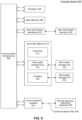
- FIG. 2 illustrates an example block diagram of the media device 108, according to some embodiments.
- Media device 108 may include a streaming module 202, processing module 204, user interface module 206, memory 208, and a display interface module 210.
- a user may use remote control 110 to interact with the user interface module 206 of media device 108 to select content 116, such as a movie, TV show, music, book, application, game, to name just a few examples.
- the streaming module 202 of media device 108 may request the selected content 116 from content server(s) 114 over the network 118.
- Content server(s) 114 may transmit the requested content 116 to the streaming module 202.
- Media device 108 may transmit the received content to display device 106 for presentation to a user.
- the streaming module 202 may transmit the content to display device 106 in real time or near real time as it receives such content 116 from content server(s) 114.
- media device 108 may buffer or store the content 116 received from content server(s) 114 in memory 208 for later playback on display device 106.
- memory 208 also stores code or control logic that, when executed, causes processing module 204 to perform display diagnostics of a display device, and display interface module 210 of media device 108 may provide an interface between media device 108 and display device 106.
- media device 108 may be external to display device 106 and connected to a port of display device 16 through display interface module 210 by, for example, a physical cable or a wireless connection.
- media device 108 may be a component of display device 106 and is connected to other components of display device 106 through display interface module 210 by, for example, a physical bus.
- memory 208 may also store predetermined informational messages that can be retrieved and displayed on the display device based on the results of the display diagnostics.
- content server(s) 114 may also include code for performing display diagnostics remotely from media device 108.
- content server(s) 114 may receive information for performing display diagnostics from media device 108. Upon receiving the information, content server(s) 114 may perform display diagnostics and return the results of the display diagnostics for display on media device 108.
- another external server separate from content server(s) 114 may include code for performing display diagnostics.
- display diagnostics include automatically (with little or no user input) detecting and determining the display capabilities of the display device based on the display device's input ports, processing the detected information from the display device, and providing information and/or a recommendation to the user regarding the display settings of the display device.
- the recommendation specifies the display settings of the media device connected to the display device which determines the quality of the content provided by the media device to the display device. The recommended display settings are intended to improve or even optimize the performance of the display device without requiring the user to conduct a trial-and-error approach to determine what settings are appropriate based on the devices within media system 104.
- the media device may recommend adjusting the displaying settings of the media device to provide such content (and not 720p content) to the display device.
- An example of detecting the display capabilities includes detecting the types of ports of the display device. For example, if the display diagnostics receives an indication from display device that the display device has an HDMI 1.4 port, media device 108 may process the indication by determining that the display device is capable of display 4K video content but only at 30 frames per second and provide this information to the user on the display device.
- code for display diagnostics may be stored in a memory (not shown) of display device 106. Accordingly, in this embodiment, display device 106 may directly execute display diagnostics.
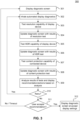
- FIG. 3 illustrates a flowchart for performing automated display diagnostics of a display device, according to some embodiments.
- the steps of method 300 shown in FIG. 3 may be performed by media device 108 to determine the display capabilities of display device 106.
- media device 108 may execute code in memory 208 to perform method 300 of FIG. 3 .
- method 300 of FIG. 3 will be discussed below as being performed by media device 108, other devices including display device 106 may store the display diagnostics code and therefore may execute method 300 by directly executing the code.
- an external server such as content server(s) 114, may store display diagnostics code for executing method 300.
- the following discussion of method 300 will refer to devices of FIG. 1 as an exemplary non-limiting embodiment of method 300.
- display diagnostics includes the display of a graphical user interface (GUI) on a display device, such as display device 106. Accordingly, at step 301, display diagnostics of display device 106 begins by displaying a diagnostic screen on display device 106.
- diagnostic screen conveys actions to be performed by a media device, such as media device 108, that may be initiated by a user such as automated display diagnostics of display device 106.
- media device 108 receives input from the user indicating that automated display diagnostics are to be performed by media device 108.
- media device 108 may execute appropriate code located in memory associated with the automated display diagnostics.
- Automated display diagnostics continue at step 303 by testing the resolution capability of display device 106.
- Resolution refers to the number of pixels that compose the image on display device 106. Examples of resolutions for display devices, such as display device 106, include 720p, 1080p, 4K UHD, and 4K UHD HDR, to name just a few examples.
- the resolution test may include receiving signals from display device 106 that indicate the resolution of the display for display device 106. For example, if display device 106 is capable of displaying 4K UHD or 4K UHD HDR, then display device 106 also provides signals indicating its frame rate capability. For example, as discussed above, display device 106 may provide information indicating that it has an HDMI 1.4 port and an HDMI 2.0 port.
- Media device 108 receives this information, processes the information by determining that the HDMI 1.4 port is only capable of displaying 4K video content at 30 frames per second while the HDMI 2.0 port is capable of displaying such content at 60 frames per second. Accordingly, in some embodiments, the display diagnostics will determine the capabilities of display device 106 by determining the type of HDMI port to which media device 108 is connected.
- media device 108 executing the display diagnostics, updates the diagnostic screen based on the results of the resolution test performed at step 303.
- media device 108 updates the display with an icon informing the user that the resolution test is in progress.
- media device 108 may update the display again with another icon informing the user of the completion and/or results of the resolution test.
- media device 108 may provide a summary of the results.
- updating the diagnostic screen may include determining a recommendation directed to the display settings, such as the resolution, of display device 106 and providing the recommendation on the display of display device 106.
- media device 108 executes the HDR test of display diagnostics, which tests the HDR capability of display device 106.
- HDR refers to a display device's capability of displaying a wider range of colors such as brighter whites and darker blacks. The wider range of colors allows display devices to display details in the darkest and brightest areas of video that are lost in non-HDR display devices.
- the HDR test also determines the frame rate supported by an HDR-capable device. For example, some HDR-capable display devices may only support 4K HDR at 30 frames per second while others support 60 frames per second.
- the display diagnostics may determine the HDR capabilities of display device 106 by determining the type of HDMI port to which media device 108 is connected. Providing this information to the user may be important because some media providers may only stream 4K HDR content if the HDR-capable display device supports 4K HDR at 60 frames per second.
- media device 108 updates the diagnostic screen based on the results of the HDR test performed at step 304.
- media device 108 updates the display with an icon informing the user that the HDR test is in progress.
- media device 108 may update the display again with another icon informing the user of the completion and/or results of the HDR test.
- media device 108 may provide a summary of the results.
- updating the diagnostic screen may include updating the recommendation that was initially determined in step 304 and is directed to the display settings of display device 106. Updating the recommendation may include retrieving a predetermined message or information based on the results of the HDR test and providing the updated recommendation on the display of display device 106.
- media device 108 executes the content protection test of display diagnostics, which tests the content protection capability of display device 106.
- Content protection such as HDCP
- HDCP generally is designed to prevent copying of digital audio and video content as it travels across a connection, such as an HDMI port.
- Certain types of video content require certain versions of content protection. For example, 4K video content may require a display device to support HDCP 2.2. Display devices that only support HDCP 1.4 may not be able to display 4K video content.
- media device 108 updates the diagnostic screen based on the results of the content protection test performed at step 304.
- media device 108 updates the display with an icon informing the user that the test is in progress.
- media device 108 may update the display again with another icon informing the user of the completion and/or results of the test.
- media device 108 may provide a summary of the results.
- updating the diagnostic screen may include updating the recommendation directed to the display settings such as the resolution and/or HDR capability of display device 106. Updating the recommendation may include retrieving a predetermined message or information based on the results of the content protection test and providing the updated recommendation on the display of display device 106.
- display diagnostics may further analyze the information and the results of the tests to provide a summary of the capabilities of display device 106, update a recommendation as to the appropriate display settings for display device 106, and/or an action that the user may perform such as suggestions for changing a configuration of media system 104.
- display device 106 may transmit the information to an external server for further analysis.
- display diagnostics may be installed on the external server and may perform the analysis of the information. After completion of the analysis, the external may provide the summary of the capabilities of display device 106 to display device 106.
- Display diagnostics may display the summary, recommendation, and/or action on display device 106 for viewing by the user.
- the recommendation indicates that media device 108 should provide 4K UHD HDR content to display device 106.
- media device 108 may determine the appropriate recommendation by retrieving predetermined messages either stored locally in media device 108 or retrieved over a network from content server 114. As one non-limiting example, if media device 108 determines that display device 106 is capable of displaying 4K HDR content at 60 frames per second and implements HDCP 2.2, media device 108 may retrieve a predetermined message informing the user that media device 108 and/or display device 106 may be set to a 4K UHD HDR setting. In another embodiment, the message may be generated dynamically based on the information provided to media device 108.
- the user may decide to change a configuration of media system 104. For example, the user may change the input port of display device 106 into which media device 108 is connected.
- media device 108 determines whether the user wishes to retry the automated display diagnostics. If so, media device 108 executes the code for automated display diagnostics and restarts the method 300 at step 302. If not, media device 108 determines whether the user accepts a recommendation provided by display diagnostics at step 311. If not, or if media device 108 does not receive a response from the user within a predetermined time period, media device 108 does not implement the recommended display settings and returns to the diagnostic screen at the original settings at step 301. However, if the user does accept the recommendation, then at step 312, media device 108 implements the recommended display settings and displays the diagnostic screen at the accepted settings.
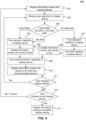
- FIG. 4 illustrates a flowchart for performing display diagnostics of a display device, such as display device 106, based on a user-initiated change to the display settings of a media device, such as media device 108, or display device 106, according to some embodiments.
- the steps of method 400 shown in FIG. 4 may be performed by media device 108 to determine the display capabilities of display device 106.
- media device 108 executes code in memory 208 to perform method 400 of FIG. 4 .
- method 400 of FIG. 4 will be discussed below as being performed by media device 108, other devices including display device 106 may store the display diagnostics code in a memory and therefore also execute method 400.
- an external server such as content server(s) 114, store display diagnostics code for executing method 400.
- the following discussion of method 400 will refer to devices of FIG. 1 as an exemplary embodiment of method 400.
- method 400 illustrates steps performed when a user manually changes a display setting on media device 108 or display device 106.
- media device 108 displays an information screen providing details of the display settings of display device 106.
- the Display Setting screen conveys different settings at which media device 108 may provide video content. Non-limiting examples of settings include 720p, 1080p, 4K UHD, and 4K UHD HDR.
- media device 108 receives the user's manually selected option for the display setting. As discussed above, in some embodiments, this option may include 720p, 1080p, 4K UHD, and 4K UHD HDR. Other options may be possible including future display settings that require determining the resolution, HDR, and content protection capabilities of the display device. At step 403, media device 108 determines the user selected option.
- media device 108 proceeds to step 404 where media device 108 executes display diagnostics code for the resolution test.
- display diagnostics tests the resolution capability of display device 106 to determine whether the user selected option is capable with the actual resolution capability of display device 106.
- the resolution test may include receiving signals from display device 106 that indicate the resolution of display device 106.
- display device 106 may also provide signals indicating the frame rate capability of display device 106. For example, as discussed above, display device 106 may provide information regarding the type of HDMI ports (e.g., HDMI 1.4, HDMI 2.0). Media device 108 collects this information and processes it to determine the capabilities of display device 106.
- media device 108 after processing the information collected from display device 106, updates the information screen to provide to the user an indication of the results of the test performed at step 404.
- media device 108 updates the display with an icon informing the user that the resolution test is in progress.
- media device 108 may update the display again with another icon informing the user of the completion and/or results of the resolution test.
- media device 108 may provide a summary of the results.
- updating the information screen may include determining a recommendation directed to the display settings, such as the resolution, of display device 106 and providing the recommendation on the display of display device 106.
- media device 108 executes display diagnostics code for the content protection test, which tests the content protection capability of display device 106.
- Examples of content protection for video content include HDCP 1.4 and HDCP 2.2 although the disclosure is not limited to these examples.
- media device 108 updates the information screen based on the results of the content protection test performed at step 304. In an embodiment, during execution of the content protection test, media device 108 updates the display with an icon informing the user that the test is in progress. In an embodiment, updating the information screen may include updating the recommendation that was initially determined in step 405 and is directed to the display settings of display device 106.
- Updating the recommendation may include retrieving a predetermined message or information based on the results of the content protection test and providing the updated recommendation on the display of display device 106.
- media device 108 may update the information screen again with another icon informing the user of the completion and/or results of the test.
- media device 108 may provide a summary of the results.
- media device 108 may proceed with analyzing the results of the resolution test and the content protection test in order to provide a recommendation regarding the user's selection. For example, if the user has selected 4K UHD but the display diagnostics have determined that the resolution of display device 106 is 720p or 1080p, the display diagnostics will provide a recommendation that media device 108 or display device 106 should be set accordingly.
- media device 108 provides the results of the resolution test and the content protection test to an external server.
- display diagnostics may be installed on the external server. The display diagnostics on the external server may analyze the results of the resolution test and generate a recommendation. The external server may then provide the recommendation for display on media device 108.
- media device 108 proceeds to step 407 where media device 108 executes display diagnostics code for the resolution test as described above with regard to step 404.
- media device 108 further performs an HDR test to determine the HDR capabilities of display device 106.
- the HDR test also determines the frame rate supported by an HDR-capable device. For example, some HDR-capable display devices may only support 4K HDR at 30 frames per second while others support 60 frames per second.
- the display diagnostics will determine the HDR capabilities of display device 106 by determining the type of HDMI port to which media device 108 is connected.
- media device 108 updates the information screen based on the results of the HDR test.
- media device 108 updates the display with an icon informing the user that the HDR test is in progress.
- media device 108 may update the display again with another icon informing the user of the completion and/or results of the HDR test.
- media device 108 may provide a summary of the results.
- updating the diagnostic screen may include updating the recommendation from previous steps and is directed to the display settings of display device 106. Updating the recommendation may include retrieving a predetermined message or information based on the results of the HDR test and providing the updated recommendation on the display of display device 106.
- Step 410 is similar to the scenario performed when the user selects 720p/1080p or 4K UHD except media device 108 includes the results of the HDR test in its analysis when providing a recommendation to the user.
- media device 108 determines whether the user has changed another display setting or if the user has indicated that he has changed a physical configuration of media system 104 (e.g., changing the HDMI port into which media device 108 is plugged). If the user has changed one or more display settings, then media device 108 repeats method 400 starting at step 402 based on the changed display setting or the updated physical configuration. If not, then in step 412 media device 108 determines whether the user accepts the current display setting. If not or if the user does not respond (i.e., times out), media device 108 returns to step 401 and displays the information screen at the original display setting. If yes, then at step 413, media device 108 displays the information screen at the accepted display setting.
- a physical configuration of media system 104 e.g., changing the HDMI port into which media device 108 is plugged.
- Computer system 500 can be any computer or computing device capable of performing the functions described herein.
- one or more computer systems 500 can be used to implement any embodiments of FIGS. 1-4 , and/or any combination or sub-combination thereof.
- Computer system 500 includes one or more processors (also called central processing units, or CPUs), such as a processor 504.
- processors also called central processing units, or CPUs
- Processor 504 is connected to a communication infrastructure or bus 506.
- One or more processors 504 can each be a graphics processing unit (GPU).
- a GPU is a processor that is a specialized electronic circuit designed to process mathematically intensive applications.
- the GPU can have a parallel structure that is efficient for parallel processing of large blocks of data, such as mathematically intensive data common to computer graphics applications, images, videos, etc.
- Computer system 500 also includes user input/output device(s) 503, such as monitors, keyboards, pointing devices, etc., that communicate with communication infrastructure 506 through user input/output interface(s) 502.
- user input/output device(s) 503 such as monitors, keyboards, pointing devices, etc.
- Computer system 500 also includes a main or primary memory 508, such as random access memory (RAM).
- Main memory 508 can include one or more levels of cache.
- Main memory 508 has stored therein control logic (i.e., computer software) and/or data.
- Computer system 500 can also include one or more secondary storage devices or memory 510.
- Secondary memory 510 can include, for example, a hard disk drive 512 and/or a removable storage device or drive 514.
- Removable storage drive 514 can be a floppy disk drive, a magnetic tape drive, a compact disk drive, an optical storage device, tape backup device, and/or any other storage device/drive.
- Removable storage drive 514 can interact with a removable storage unit 518.
- Removable storage unit 518 includes a computer usable or readable storage device having stored thereon computer software (control logic) and/or data.
- Removable storage unit 518 can be a floppy disk, magnetic tape, compact disk, DVD, optical storage disk, and/ any other computer data storage device.
- Removable storage drive 514 reads from and/or writes to removable storage unit 518 in a well-known manner.
- secondary memory 510 can include other means, instrumentalities or other approaches for allowing computer programs and/or other instructions and/or data to be accessed by computer system 500.
- Such means, instrumentalities or other approaches can include, for example, a removable storage unit 522 and an interface 520.
- the removable storage unit 522 and the interface 520 can include a program cartridge and cartridge interface (such as that found in video game devices), a removable memory chip (such as an EPROM or PROM) and associated socket, a memory stick and USB port, a memory card and associated memory card slot, and/or any other removable storage unit and associated interface.
- Computer system 500 can further include a communication or network interface 524.
- Communication interface 524 enables computer system 500 to communicate and interact with any combination of remote devices, remote networks, remote entities, etc. (individually and collectively referenced by reference number 528).
- communication interface 524 can allow computer system 500 to communicate with remote devices 528 over communications path 526, which can be wired and/or wireless, and which can include any combination of LANs, WANs, the Internet, etc. Control logic and/or data can be transmitted to and from computer system 500 via communication path 526.
- a tangible apparatus or article of manufacture comprising a tangible computer useable or readable medium having control logic (software) stored thereon is also referred to herein as a computer program product or program storage device.
- control logic software stored thereon
- control logic when executed by one or more data processing devices (such as computer system 500), causes such data processing devices to operate as described herein.
- references herein to "one embodiment,” “an embodiment,” “an example embodiment,” or similar phrases, indicate that the embodiment described can include a particular feature, structure, or characteristic, but every embodiment can not necessarily include the particular feature, structure, or characteristic. Moreover, such phrases are not necessarily referring to the same embodiment. Further, when a particular feature, structure, or characteristic is described in connection with an embodiment, it would be within the knowledge of persons skilled in the relevant art(s) to incorporate such feature, structure, or characteristic into other embodiments whether or not explicitly mentioned or described herein. Additionally, some embodiments can be described using the expression “coupled” and “connected” along with their derivatives. These terms are not necessarily intended as synonyms for each other.
- Coupled can also mean that two or more elements are not in direct contact with each other, but yet still co-operate or interact with each other.
Landscapes
- Engineering & Computer Science (AREA)
- Multimedia (AREA)
- Signal Processing (AREA)
- Theoretical Computer Science (AREA)
- Physics & Mathematics (AREA)
- General Physics & Mathematics (AREA)
- General Engineering & Computer Science (AREA)
- Human Computer Interaction (AREA)
- Health & Medical Sciences (AREA)
- General Health & Medical Sciences (AREA)
- Biomedical Technology (AREA)
- Computer Hardware Design (AREA)
- Databases & Information Systems (AREA)
- Computer Networks & Wireless Communication (AREA)
- Two-Way Televisions, Distribution Of Moving Picture Or The Like (AREA)
Claims (15)
- Medienvorrichtung (108), die Folgendes umfasst:eine Anzeigeschnittstelle (210), die konfiguriert ist, um mit einer Anzeigevorrichtung (106) zu kommunizieren;einen Prozessor (204); undeinen Speicher (208), der mit dem Prozessor (204) wirkgekoppelt ist, wobei der Speicher (208) konfiguriert ist, um Programmcode zu speichern, der, wenn er ausgeführt wird, bewirkt, dass der Prozessor (204) Vorgänge durchführt, die folgende umfassen:(i) Empfangen einer Benutzerauswahl, die einer Anzeigeeinstellung der Anzeigevorrichtung (106) zugeordnet ist, wobei die Anzeigeeinstellung eine Auflösung der Anzeigevorrichtung (106) umfasst;(ii) Bestimmen, ob die Benutzerauswahl eine Hoher-Dynamikbereich-, HDR-, Auswahl oder eine Nicht-HDR-Auswahl umfasst;(iii) als Antwort auf die Benutzerauswahl, die die HDR-Auswahl umfasst:Durchführen eines Auflösungsfähigkeitstests und eines HDR-Fähigkeitstests, wobei der Auflösungsfähigkeitstest eine Fähigkeit der Anzeigevorrichtung zum Unterstützen einer Vielzahl von verschiedenen Auflösungen testet und der HDR-Fähigkeitstest eine Fähigkeit der Anzeigevorrichtung zum Unterstützen von HDR testet;als Antwort auf das Durchführen des Auflösungsfähigkeitstests und des HDR-Fähigkeitstests Aktualisieren eines Informationsbildschirms, der auf der Anzeigevorrichtung (106) angezeigt wird, beruhend auf ersten Ergebnissen des Durchführens des Auflösungsfähigkeitstests und des HDR-Fähigkeitstests;nach dem Durchführen des Auflösungsfähigkeitstests und des HDR-Fähigkeitstests Durchführen eines Medieninhaltsschutzfähigkeitstests, wobei der Medieninhaltsschutzfähigkeitstest eine Fähigkeit der Anzeigevorrichtung zum Unterstützen von zumindest einem Medieninhaltsschutzprotokolls testet; undals Antwort auf das Durchführen des Medieninhaltsschutzfähigkeitstests Aktualisieren des Informationsbildschirms beruhend auf zweiten Ergebnissen des Durchführens des Medieninhaltsschutzfähigkeitstests; und(iv) Bestimmen, beruhend auf den ersten und zweiten Ergebnissen, einer Anzeigeeinstellungsempfehlung, wobei die Anzeigeeinstellungsempfehlung eine der Anzeigevorrichtung (106) zugeordnete Anzeigeeinstellung umfasst.
- Medienvorrichtung (108) nach Anspruch 1, wobei das Bestimmen der Anzeigeeinstellungsempfehlung Folgendes umfasst:Abrufen einer vorbestimmten Nachricht, die der Anzeigeempfehlung zugeordnet ist, aus dem Speicher (208) der Medienvorrichtung (108); undAnzeigen der vorbestimmten Nachricht auf der Anzeigevorrichtung.
- Medienvorrichtung (108) nach Anspruch 1, wobei die zweiten Ergebnisse Medieninhaltsschutzinformationen umfassen, die als Antwort auf das Durchführen des Medieninhaltsschutzfähigkeitstests erzeugt wurden, und wobei die Vorgänge ferner das Aktualisieren der Anzeigeeinstellungsempfehlung beruhend auf den Medieninhaltsschutzinformationen umfassen.
- Medienvorrichtung (108) nach Anspruch 1, wobei die ersten Ergebnisse HDR-Informationen umfassen, die als Antwort auf das Durchführen des HDR-Fähigkeitstests erzeugt wurden, und wobei die Vorgänge ferner das Aktualisieren der Anzeigeeinstellungsempfehlung beruhend auf den HDR-Informationen umfassen.
- Medienvorrichtung (108) nach Anspruch 1, wobei die ersten Ergebnisse Auflösungsinformationen umfassen, die als Antwort auf das Durchführen des Auflösungsfähigkeitstests der Anzeigevorrichtung (106) erzeugt wurden, und wobei die Vorgänge ferner das Aktualisieren der Anzeigeeinstellungsempfehlung beruhend auf den Auflösungsinformationen umfassen.
- Medienvorrichtung (108) nach Anspruch 1, wobei die Benutzerauswahl zumindest eines aus einer 4K-UHD- und einer 4K-UHD-HDR-Auswahl umfasst.
- Computerimplementiertes Verfahren, das durch eine Medienvorrichtung (108) durchgeführt wird, wobei das Verfahren Folgendes umfasst:(i) Empfangen einer Benutzerauswahl, die auf eine Anzeigeeinstellung bezogen ist, wobei die Anzeigeeinstellung einer Auflösung einer Anzeigevorrichtung (106) zugeordnet ist;(ii) Bestimmen, ob die Benutzerauswahl eine Hoher-Dynamikbereich-, HDR-, Auswahl oder eine Nicht-HDR-Auswahl umfasst;(iii) als Antwort auf die Benutzerauswahl, die die HDR-Auswahl umfasst:Durchführen eines Auflösungsfähigkeitstests und eines HDR-Fähigkeitstests, wobei der Auflösungsfähigkeitstest eine Fähigkeit der Anzeigevorrichtung zum Unterstützen einer Vielzahl von verschiedenen Auflösungen testet und der HDR-Fähigkeitstest eine Fähigkeit der Anzeigevorrichtung zum Unterstützen von HDR testet;als Antwort auf das Durchführen des Auflösungsfähigkeitstests und des HDR-Fähigkeitstests Sammeln von ersten Ergebnissen von der Anzeigevorrichtung (106);als Antwort auf das Durchführen eines Medieninhaltsschutzfähigkeitstests der Anzeigevorrichtung (106) nach dem Sammeln der ersten Ergebnisse Empfangen von zweiten Ergebnissen, wobei der Medieninhaltsschutzfähigkeitstest eine Fähigkeit der Anzeigevorrichtung zum Unterstützen von zumindest einem Medieninhaltsschutzprotokolls testet; undErzeugen von aktualisierten Testinformationen beruhend auf den gesammelten ersten und zweiten Ergebnissen; und(iv) Bestimmen, beruhend auf den aktualisierten Testinformationen, einer Anzeigeeinstellungsempfehlung, wobei die Anzeigeeinstellungsempfehlung eine der Anzeigevorrichtung (106) zugeordnete zweite Anzeigeeinstellung umfasst; und(v) Anzeigen der Anzeigeeinstellungsempfehlung auf der Anzeigevorrichtung (106).
- Verfahren nach Anspruch 7, wobei das Bestimmen der Anzeigeeinstellungsempfehlung Folgendes umfasst:Abrufen einer vorbestimmten Nachricht, die der Anzeigeempfehlung zugeordnet ist, aus einem Speicher (208) der Medienvorrichtung (108); undAnzeigen der vorbestimmten Nachricht auf der Anzeigevorrichtung.
- Verfahren nach Anspruch 7, wobei die zweiten Ergebnisse Medieninhaltsschutzinformationen als Antwort auf das Durchführen des Medieninhaltsschutzfähigkeitstests umfassen, und wobei das Verfahren ferner das Aktualisieren der Anzeigeeinstellungsempfehlung beruhend auf den Medieninhaltsschutzinformationen umfasst.
- Verfahren nach Anspruch 7, wobei die ersten Ergebnisse HDR-Informationen als Antwort auf das Durchführen des HDR-Fähigkeitstests umfassen, und wobei das Verfahren ferner das Aktualisieren der Anzeigeeinstellungsempfehlung beruhend auf den HDR-Informationen umfasst.
- Verfahren nach Anspruch 7, wobei die ersten Ergebnisse Auflösungsinformationen als Antwort auf das Durchführen des Auflösungsfähigkeitstests umfassen, und wobei das Verfahren ferner das Aktualisieren der Anzeigeeinstellungsempfehlung beruhend auf den Auflösungsinformationen umfasst.
- Verfahren nach Anspruch 7, wobei die Benutzerauswahl zumindest eines aus einer 4K-UHD- und einer 4K-UHD-HDR-Auswahl umfasst.
- Nichtflüchtiges, greifbares computerlesbares Medium, auf dem Befehle gespeichert sind, die, wenn sie von zumindest einer Rechenvorrichtung ausgeführt werden, bewirken, dass die zumindest eine Rechenvorrichtung Vorgänge durchführt, die Folgendes umfassen:(i) Empfangen einer Benutzerauswahl in Bezug auf eine Anzeigeeinstellung, wobei die Anzeigeeinstellung einer Auflösung einer Anzeigevorrichtung (106) zugeordnet ist;(ii) Bestimmen, ob die Benutzerauswahl eine Hoher-Dynamikbereich-, HDR-, Auswahl oder eine Nicht-HDR-Auswahl umfasst;(iii) als Antwort auf die Benutzerauswahl, die die HDR-Auswahl umfasst:Durchführen eines Auflösungsfähigkeitstests und eines HDR-Fähigkeitstests, wobei der Auflösungsfähigkeitstest eine Fähigkeit der Anzeigevorrichtung zum Unterstützen einer Vielzahl von verschiedenen Auflösungen testet und der HDR-Fähigkeitstest eine Fähigkeit der Anzeigevorrichtung zum Unterstützen von HDR testet;als Antwort auf das Durchführen des Auflösungsfähigkeitstests und des HDR-Fähigkeitstests Sammeln von ersten Ergebnissen von der Anzeigevorrichtung (106);als Antwort auf das Durchführen eines Medieninhaltsschutzfähigkeitstests der Anzeigevorrichtung (106) nach dem Sammeln der ersten Ergebnisse Empfangen von zweiten Ergebnissen, wobei der Medieninhaltsschutzfähigkeitstest eine Fähigkeit der Anzeigevorrichtung zum Unterstützen von zumindest einem Medieninhaltsschutzprotokolls testet; undErzeugen von aktualisierten Testinformationen beruhend auf den gesammelten ersten und zweiten Ergebnissen; und(iv) Bestimmen, beruhend auf den aktualisierten Testinformationen, einer Anzeigeeinstellungsempfehlung, wobei die Anzeigeeinstellungsempfehlung eine der Anzeigevorrichtung (106) zugeordnete Anzeigeeinstellung umfasst; und(v) Anzeigen der Anzeigeeinstellungsempfehlung auf der Anzeigevorrichtung (106).
- Nichtflüchtiges, greifbares computerlesbares Medium nach Anspruch 13, wobei die zweiten Ergebnisse Medieninhaltsschutzinformationen als Antwort auf das Durchführen des Medieninhaltsschutzfähigkeitstests umfassen, und wobei das Verfahren ferner das Aktualisieren der Anzeigeeinstellungsempfehlung beruhend auf den Medieninhaltsschutzinformationen umfasst.
- Nichtflüchtiges, greifbares computerlesbares Medium nach Anspruch 13, wobei die ersten Ergebnisse HDR-Informationen als Antwort auf das Durchführen des HDR-Fähigkeitstests der Anzeigevorrichtung (106) umfassen, und wobei das Verfahren ferner das Aktualisieren der Anzeigeeinstellungsempfehlung beruhend auf den HDR-Informationen umfasst.
Applications Claiming Priority (2)
| Application Number | Priority Date | Filing Date | Title |
|---|---|---|---|
| US15/465,147 US10110887B2 (en) | 2017-03-21 | 2017-03-21 | Display diagnostics for enhancing performance of display devices |
| PCT/US2018/023101 WO2018175298A1 (en) | 2017-03-21 | 2018-03-19 | Display diagnostics for enhancing performance of display devices |
Publications (3)
| Publication Number | Publication Date |
|---|---|
| EP3603059A1 EP3603059A1 (de) | 2020-02-05 |
| EP3603059A4 EP3603059A4 (de) | 2020-09-09 |
| EP3603059B1 true EP3603059B1 (de) | 2024-10-09 |
Family
ID=63583147
Family Applications (1)
| Application Number | Title | Priority Date | Filing Date |
|---|---|---|---|
| EP18771630.3A Active EP3603059B1 (de) | 2017-03-21 | 2018-03-19 | Anzeigediagnose zur verbesserung der leistung von anzeigevorrichtungen |
Country Status (3)
| Country | Link |
|---|---|
| US (1) | US10110887B2 (de) |
| EP (1) | EP3603059B1 (de) |
| WO (1) | WO2018175298A1 (de) |
Families Citing this family (7)
| Publication number | Priority date | Publication date | Assignee | Title |
|---|---|---|---|---|
| US10764572B2 (en) * | 2016-10-13 | 2020-09-01 | Hewlett-Packard Development Company, L.P. | Monitor usage information |
| US11012661B2 (en) * | 2017-05-30 | 2021-05-18 | Sharp Nec Display Solutions, Ltd. | Display device, display method, and program |
| CN211830963U (zh) * | 2020-05-08 | 2020-10-30 | 深圳Tcl数字技术有限公司 | 机芯主板及显示装置 |
| WO2022225596A1 (en) * | 2021-04-23 | 2022-10-27 | Arris Enterprises Llc | Uhd hdr ip client device |
| WO2022225595A1 (en) | 2021-04-23 | 2022-10-27 | Arris Enterprises Llc | Uhd hdr ip client device pcb design layout |
| EP4333442A4 (de) * | 2021-09-30 | 2024-10-30 | Samsung Electronics Co., Ltd. | Elektronische vorrichtung und steuerungsverfahren dafür |
| US20260031062A1 (en) * | 2022-07-22 | 2026-01-29 | Sony Interactive Entertainment Inc. | Video display control device, control method therefor, and program |
Family Cites Families (5)
| Publication number | Priority date | Publication date | Assignee | Title |
|---|---|---|---|---|
| KR100759500B1 (ko) * | 2007-04-30 | 2007-09-18 | (주) 마스타 | 화질 검사를 위한 멀티미디어 플레이어 장치 및 그운용방법 |
| US9124853B2 (en) * | 2010-11-30 | 2015-09-01 | Verizon Patent And Licensing Inc. | HDMI device and interoperability testing systems and methods |
| US9344669B2 (en) * | 2011-06-21 | 2016-05-17 | Arris Enterprises, Inc. | HDMI source/sink interoperable configuration determination process |
| EP3163890B1 (de) * | 2014-06-26 | 2020-08-05 | Panasonic Intellectual Property Management Co., Ltd. | Datenausgabevorrichtung, datenausgabeverfahren und datenerzeugungsverfahren |
| CN106095362A (zh) * | 2016-06-02 | 2016-11-09 | 北京金山安全软件有限公司 | 一种设置分辨率的方法、装置及电子设备 |
-
2017
- 2017-03-21 US US15/465,147 patent/US10110887B2/en active Active
-
2018
- 2018-03-19 EP EP18771630.3A patent/EP3603059B1/de active Active
- 2018-03-19 WO PCT/US2018/023101 patent/WO2018175298A1/en not_active Ceased
Also Published As
| Publication number | Publication date |
|---|---|
| US20180278926A1 (en) | 2018-09-27 |
| EP3603059A1 (de) | 2020-02-05 |
| WO2018175298A1 (en) | 2018-09-27 |
| US10110887B2 (en) | 2018-10-23 |
| EP3603059A4 (de) | 2020-09-09 |
Similar Documents
| Publication | Publication Date | Title |
|---|---|---|
| EP3603059B1 (de) | Anzeigediagnose zur verbesserung der leistung von anzeigevorrichtungen | |
| US9041863B2 (en) | Electronic device and method for displaying resources | |
| US20200329213A1 (en) | Image data output device, image data output method, integrated circuit, and image display device | |
| US8615156B2 (en) | Adjusting video processing in a system having a video source device and a video sink device | |
| US9521352B2 (en) | Television set capable of identifying a plurality of peripherals and allowing to select and display the contents of one of the same | |
| US9875522B2 (en) | Display control apparatus | |
| US20180174356A1 (en) | Display apparatus and control method thereof | |
| US11665401B2 (en) | Media device upgrading system with a native user interface | |
| US20180152664A1 (en) | Display apparatus, control method therefor, and storage medium | |
| US10863215B2 (en) | Content providing apparatus, method of controlling the same, and recording medium thereof | |
| US10080014B2 (en) | Apparatus for displaying image, driving method thereof, and method for displaying image that allows a screen to be naturally changed in response to displaying an image by changing a two-dimensional image method to a three-dimensional image method | |
| US9813658B2 (en) | Acquiring and displaying information to improve selection and switching to an input interface of an electronic device | |
| US20180167577A1 (en) | Display apparatus presenting status of external electronic apparatus and controlling method thereof | |
| KR20170035495A (ko) | 방송 수신 장치 및 방송 수신 장치의 정보 제공 방법 | |
| US10706238B2 (en) | Language setting apparatus, language setting method, and display apparatus | |
| EP3526969B1 (de) | Elektronische vorrichtung zum abspielen von substitutioneller werbung und verfahren zur steuerung davon | |
| US20180103198A1 (en) | Display apparatus and method for generating capture image | |
| KR102118523B1 (ko) | 전자 장치 및 그 제어 방법 | |
| EP4694108A1 (de) | Projektionsvorrichtung und betriebsverfahren dafür | |
| KR101468122B1 (ko) | 영상 신호 제어 시스템 및 방법 | |
| KR20260017841A (ko) | 전자 장치 및 그 동작 방법 | |
| JP2014204389A (ja) | 電子機器 |
Legal Events
| Date | Code | Title | Description |
|---|---|---|---|
| STAA | Information on the status of an ep patent application or granted ep patent |
Free format text: STATUS: THE INTERNATIONAL PUBLICATION HAS BEEN MADE |
|
| PUAI | Public reference made under article 153(3) epc to a published international application that has entered the european phase |
Free format text: ORIGINAL CODE: 0009012 |
|
| STAA | Information on the status of an ep patent application or granted ep patent |
Free format text: STATUS: REQUEST FOR EXAMINATION WAS MADE |
|
| 17P | Request for examination filed |
Effective date: 20190917 |
|
| AK | Designated contracting states |
Kind code of ref document: A1 Designated state(s): AL AT BE BG CH CY CZ DE DK EE ES FI FR GB GR HR HU IE IS IT LI LT LU LV MC MK MT NL NO PL PT RO RS SE SI SK SM TR |
|
| AX | Request for extension of the european patent |
Extension state: BA ME |
|
| RAP1 | Party data changed (applicant data changed or rights of an application transferred) |
Owner name: ROKU, INC. |
|
| DAV | Request for validation of the european patent (deleted) | ||
| DAX | Request for extension of the european patent (deleted) | ||
| A4 | Supplementary search report drawn up and despatched |
Effective date: 20200810 |
|
| RIC1 | Information provided on ipc code assigned before grant |
Ipc: H04N 21/414 20110101ALI20200804BHEP Ipc: H04W 12/08 20090101ALI20200804BHEP Ipc: H04N 21/485 20110101ALI20200804BHEP Ipc: G06F 3/0482 20130101ALI20200804BHEP Ipc: H04N 5/913 20060101ALI20200804BHEP Ipc: G09G 5/00 20060101ALI20200804BHEP Ipc: H04N 21/45 20110101ALI20200804BHEP Ipc: H04N 17/00 20060101AFI20200804BHEP Ipc: G09G 3/00 20060101ALI20200804BHEP |
|
| STAA | Information on the status of an ep patent application or granted ep patent |
Free format text: STATUS: EXAMINATION IS IN PROGRESS |
|
| 17Q | First examination report despatched |
Effective date: 20210713 |
|
| REG | Reference to a national code |
Ref country code: DE Ref legal event code: R079 Free format text: PREVIOUS MAIN CLASS: H04N0017000000 Ipc: G09G0005100000 Ref country code: DE Ref legal event code: R079 Ref document number: 602018075225 Country of ref document: DE Free format text: PREVIOUS MAIN CLASS: H04N0017000000 Ipc: G09G0005100000 |
|
| GRAP | Despatch of communication of intention to grant a patent |
Free format text: ORIGINAL CODE: EPIDOSNIGR1 |
|
| STAA | Information on the status of an ep patent application or granted ep patent |
Free format text: STATUS: GRANT OF PATENT IS INTENDED |
|
| INTG | Intention to grant announced |
Effective date: 20240507 |
|
| RIC1 | Information provided on ipc code assigned before grant |
Ipc: H04N 5/913 20060101ALI20240422BHEP Ipc: H04N 21/485 20110101ALI20240422BHEP Ipc: H04N 21/45 20110101ALI20240422BHEP Ipc: H04N 17/00 20060101ALI20240422BHEP Ipc: G09G 5/00 20060101ALI20240422BHEP Ipc: G09G 3/00 20060101ALI20240422BHEP Ipc: H04N 21/4402 20110101ALI20240422BHEP Ipc: H04N 21/4363 20110101ALI20240422BHEP Ipc: G09G 5/10 20060101AFI20240422BHEP |
|
| GRAS | Grant fee paid |
Free format text: ORIGINAL CODE: EPIDOSNIGR3 |
|
| GRAA | (expected) grant |
Free format text: ORIGINAL CODE: 0009210 |
|
| STAA | Information on the status of an ep patent application or granted ep patent |
Free format text: STATUS: THE PATENT HAS BEEN GRANTED |
|
| AK | Designated contracting states |
Kind code of ref document: B1 Designated state(s): AL AT BE BG CH CY CZ DE DK EE ES FI FR GB GR HR HU IE IS IT LI LT LU LV MC MK MT NL NO PL PT RO RS SE SI SK SM TR |
|
| REG | Reference to a national code |
Ref country code: CH Ref legal event code: EP |
|
| REG | Reference to a national code |
Ref country code: DE Ref legal event code: R096 Ref document number: 602018075225 Country of ref document: DE |
|
| REG | Reference to a national code |
Ref country code: IE Ref legal event code: FG4D |
|
| REG | Reference to a national code |
Ref country code: NL Ref legal event code: FP |
|
| REG | Reference to a national code |
Ref country code: LT Ref legal event code: MG9D |
|
| REG | Reference to a national code |
Ref country code: AT Ref legal event code: MK05 Ref document number: 1731463 Country of ref document: AT Kind code of ref document: T Effective date: 20241009 |
|
| PG25 | Lapsed in a contracting state [announced via postgrant information from national office to epo] |
Ref country code: PT Free format text: LAPSE BECAUSE OF FAILURE TO SUBMIT A TRANSLATION OF THE DESCRIPTION OR TO PAY THE FEE WITHIN THE PRESCRIBED TIME-LIMIT Effective date: 20250210 Ref country code: IS Free format text: LAPSE BECAUSE OF FAILURE TO SUBMIT A TRANSLATION OF THE DESCRIPTION OR TO PAY THE FEE WITHIN THE PRESCRIBED TIME-LIMIT Effective date: 20250209 Ref country code: HR Free format text: LAPSE BECAUSE OF FAILURE TO SUBMIT A TRANSLATION OF THE DESCRIPTION OR TO PAY THE FEE WITHIN THE PRESCRIBED TIME-LIMIT Effective date: 20241009 |
|
| PG25 | Lapsed in a contracting state [announced via postgrant information from national office to epo] |
Ref country code: FI Free format text: LAPSE BECAUSE OF FAILURE TO SUBMIT A TRANSLATION OF THE DESCRIPTION OR TO PAY THE FEE WITHIN THE PRESCRIBED TIME-LIMIT Effective date: 20241009 |
|
| PG25 | Lapsed in a contracting state [announced via postgrant information from national office to epo] |
Ref country code: BG Free format text: LAPSE BECAUSE OF FAILURE TO SUBMIT A TRANSLATION OF THE DESCRIPTION OR TO PAY THE FEE WITHIN THE PRESCRIBED TIME-LIMIT Effective date: 20241009 |
|
| PG25 | Lapsed in a contracting state [announced via postgrant information from national office to epo] |
Ref country code: ES Free format text: LAPSE BECAUSE OF FAILURE TO SUBMIT A TRANSLATION OF THE DESCRIPTION OR TO PAY THE FEE WITHIN THE PRESCRIBED TIME-LIMIT Effective date: 20241009 |
|
| PG25 | Lapsed in a contracting state [announced via postgrant information from national office to epo] |
Ref country code: NO Free format text: LAPSE BECAUSE OF FAILURE TO SUBMIT A TRANSLATION OF THE DESCRIPTION OR TO PAY THE FEE WITHIN THE PRESCRIBED TIME-LIMIT Effective date: 20250109 |
|
| PG25 | Lapsed in a contracting state [announced via postgrant information from national office to epo] |
Ref country code: LV Free format text: LAPSE BECAUSE OF FAILURE TO SUBMIT A TRANSLATION OF THE DESCRIPTION OR TO PAY THE FEE WITHIN THE PRESCRIBED TIME-LIMIT Effective date: 20241009 Ref country code: GR Free format text: LAPSE BECAUSE OF FAILURE TO SUBMIT A TRANSLATION OF THE DESCRIPTION OR TO PAY THE FEE WITHIN THE PRESCRIBED TIME-LIMIT Effective date: 20250110 Ref country code: AT Free format text: LAPSE BECAUSE OF FAILURE TO SUBMIT A TRANSLATION OF THE DESCRIPTION OR TO PAY THE FEE WITHIN THE PRESCRIBED TIME-LIMIT Effective date: 20241009 |
|
| PG25 | Lapsed in a contracting state [announced via postgrant information from national office to epo] |
Ref country code: PL Free format text: LAPSE BECAUSE OF FAILURE TO SUBMIT A TRANSLATION OF THE DESCRIPTION OR TO PAY THE FEE WITHIN THE PRESCRIBED TIME-LIMIT Effective date: 20241009 |
|
| PG25 | Lapsed in a contracting state [announced via postgrant information from national office to epo] |
Ref country code: RS Free format text: LAPSE BECAUSE OF FAILURE TO SUBMIT A TRANSLATION OF THE DESCRIPTION OR TO PAY THE FEE WITHIN THE PRESCRIBED TIME-LIMIT Effective date: 20250109 |
|
| PG25 | Lapsed in a contracting state [announced via postgrant information from national office to epo] |
Ref country code: SM Free format text: LAPSE BECAUSE OF FAILURE TO SUBMIT A TRANSLATION OF THE DESCRIPTION OR TO PAY THE FEE WITHIN THE PRESCRIBED TIME-LIMIT Effective date: 20241009 |
|
| PG25 | Lapsed in a contracting state [announced via postgrant information from national office to epo] |
Ref country code: DK Free format text: LAPSE BECAUSE OF FAILURE TO SUBMIT A TRANSLATION OF THE DESCRIPTION OR TO PAY THE FEE WITHIN THE PRESCRIBED TIME-LIMIT Effective date: 20241009 |
|
| REG | Reference to a national code |
Ref country code: DE Ref legal event code: R097 Ref document number: 602018075225 Country of ref document: DE |
|
| PG25 | Lapsed in a contracting state [announced via postgrant information from national office to epo] |
Ref country code: EE Free format text: LAPSE BECAUSE OF FAILURE TO SUBMIT A TRANSLATION OF THE DESCRIPTION OR TO PAY THE FEE WITHIN THE PRESCRIBED TIME-LIMIT Effective date: 20241009 |
|
| PG25 | Lapsed in a contracting state [announced via postgrant information from national office to epo] |
Ref country code: RO Free format text: LAPSE BECAUSE OF FAILURE TO SUBMIT A TRANSLATION OF THE DESCRIPTION OR TO PAY THE FEE WITHIN THE PRESCRIBED TIME-LIMIT Effective date: 20241009 |
|
| PG25 | Lapsed in a contracting state [announced via postgrant information from national office to epo] |
Ref country code: SK Free format text: LAPSE BECAUSE OF FAILURE TO SUBMIT A TRANSLATION OF THE DESCRIPTION OR TO PAY THE FEE WITHIN THE PRESCRIBED TIME-LIMIT Effective date: 20241009 |
|
| PG25 | Lapsed in a contracting state [announced via postgrant information from national office to epo] |
Ref country code: CZ Free format text: LAPSE BECAUSE OF FAILURE TO SUBMIT A TRANSLATION OF THE DESCRIPTION OR TO PAY THE FEE WITHIN THE PRESCRIBED TIME-LIMIT Effective date: 20241009 |
|
| PG25 | Lapsed in a contracting state [announced via postgrant information from national office to epo] |
Ref country code: IT Free format text: LAPSE BECAUSE OF FAILURE TO SUBMIT A TRANSLATION OF THE DESCRIPTION OR TO PAY THE FEE WITHIN THE PRESCRIBED TIME-LIMIT Effective date: 20241009 |
|
| PLBE | No opposition filed within time limit |
Free format text: ORIGINAL CODE: 0009261 |
|
| STAA | Information on the status of an ep patent application or granted ep patent |
Free format text: STATUS: NO OPPOSITION FILED WITHIN TIME LIMIT |
|
| PG25 | Lapsed in a contracting state [announced via postgrant information from national office to epo] |
Ref country code: SE Free format text: LAPSE BECAUSE OF FAILURE TO SUBMIT A TRANSLATION OF THE DESCRIPTION OR TO PAY THE FEE WITHIN THE PRESCRIBED TIME-LIMIT Effective date: 20241009 |
|
| P01 | Opt-out of the competence of the unified patent court (upc) registered |
Free format text: CASE NUMBER: UPC_APP_2544_3603059/2025 Effective date: 20250806 |
|
| 26N | No opposition filed |
Effective date: 20250710 |
|
| PG25 | Lapsed in a contracting state [announced via postgrant information from national office to epo] |
Ref country code: MC Free format text: LAPSE BECAUSE OF FAILURE TO SUBMIT A TRANSLATION OF THE DESCRIPTION OR TO PAY THE FEE WITHIN THE PRESCRIBED TIME-LIMIT Effective date: 20241009 |
|
| REG | Reference to a national code |
Ref country code: CH Ref legal event code: H13 Free format text: ST27 STATUS EVENT CODE: U-0-0-H10-H13 (AS PROVIDED BY THE NATIONAL OFFICE) Effective date: 20251023 |
|
| PG25 | Lapsed in a contracting state [announced via postgrant information from national office to epo] |
Ref country code: LU Free format text: LAPSE BECAUSE OF NON-PAYMENT OF DUE FEES Effective date: 20250319 |
|
| REG | Reference to a national code |
Ref country code: BE Ref legal event code: MM Effective date: 20250331 |
|
| PG25 | Lapsed in a contracting state [announced via postgrant information from national office to epo] |
Ref country code: BE Free format text: LAPSE BECAUSE OF NON-PAYMENT OF DUE FEES Effective date: 20250331 |
|
| PG25 | Lapsed in a contracting state [announced via postgrant information from national office to epo] |
Ref country code: CH Free format text: LAPSE BECAUSE OF NON-PAYMENT OF DUE FEES Effective date: 20250331 |
|
| PGFP | Annual fee paid to national office [announced via postgrant information from national office to epo] |
Ref country code: NL Payment date: 20260217 Year of fee payment: 9 |
|
| PGFP | Annual fee paid to national office [announced via postgrant information from national office to epo] |
Ref country code: GB Payment date: 20260323 Year of fee payment: 9 |
|
| PGFP | Annual fee paid to national office [announced via postgrant information from national office to epo] |
Ref country code: DE Payment date: 20260217 Year of fee payment: 9 Ref country code: IE Payment date: 20260309 Year of fee payment: 9 |
|
| PGFP | Annual fee paid to national office [announced via postgrant information from national office to epo] |
Ref country code: FR Payment date: 20260313 Year of fee payment: 9 |