EP3633963A1 - Affichage et sélection des informations de la carte de paiement pour le paiement nfc par un terminal mobile - Google Patents
Affichage et sélection des informations de la carte de paiement pour le paiement nfc par un terminal mobile Download PDFInfo
- Publication number
- EP3633963A1 EP3633963A1 EP19211557.4A EP19211557A EP3633963A1 EP 3633963 A1 EP3633963 A1 EP 3633963A1 EP 19211557 A EP19211557 A EP 19211557A EP 3633963 A1 EP3633963 A1 EP 3633963A1
- Authority
- EP
- European Patent Office
- Prior art keywords
- mobile terminal
- payment
- touchscreen
- terminal
- touch
- Prior art date
- Legal status (The legal status is an assumption and is not a legal conclusion. Google has not performed a legal analysis and makes no representation as to the accuracy of the status listed.)
- Ceased
Links
Images








Classifications
-
- G—PHYSICS
- G06—COMPUTING OR CALCULATING; COUNTING
- G06Q—INFORMATION AND COMMUNICATION TECHNOLOGY [ICT] SPECIALLY ADAPTED FOR ADMINISTRATIVE, COMMERCIAL, FINANCIAL, MANAGERIAL OR SUPERVISORY PURPOSES; SYSTEMS OR METHODS SPECIALLY ADAPTED FOR ADMINISTRATIVE, COMMERCIAL, FINANCIAL, MANAGERIAL OR SUPERVISORY PURPOSES, NOT OTHERWISE PROVIDED FOR
- G06Q20/00—Payment architectures, schemes or protocols
- G06Q20/30—Payment architectures, schemes or protocols characterised by the use of specific devices or networks
- G06Q20/32—Payment architectures, schemes or protocols characterised by the use of specific devices or networks using wireless devices
- G06Q20/322—Aspects of commerce using mobile devices [M-devices]
- G06Q20/3224—Transactions dependent on location of M-devices
-
- H—ELECTRICITY
- H04—ELECTRIC COMMUNICATION TECHNIQUE
- H04W—WIRELESS COMMUNICATION NETWORKS
- H04W88/00—Devices specially adapted for wireless communication networks, e.g. terminals, base stations or access point devices
- H04W88/02—Terminal devices
-
- G—PHYSICS
- G06—COMPUTING OR CALCULATING; COUNTING
- G06F—ELECTRIC DIGITAL DATA PROCESSING
- G06F3/00—Input arrangements for transferring data to be processed into a form capable of being handled by the computer; Output arrangements for transferring data from processing unit to output unit, e.g. interface arrangements
- G06F3/01—Input arrangements or combined input and output arrangements for interaction between user and computer
- G06F3/03—Arrangements for converting the position or the displacement of a member into a coded form
-
- G—PHYSICS
- G06—COMPUTING OR CALCULATING; COUNTING
- G06F—ELECTRIC DIGITAL DATA PROCESSING
- G06F3/00—Input arrangements for transferring data to be processed into a form capable of being handled by the computer; Output arrangements for transferring data from processing unit to output unit, e.g. interface arrangements
- G06F3/01—Input arrangements or combined input and output arrangements for interaction between user and computer
- G06F3/048—Interaction techniques based on graphical user interfaces [GUI]
- G06F3/0487—Interaction techniques based on graphical user interfaces [GUI] using specific features provided by the input device, e.g. functions controlled by the rotation of a mouse with dual sensing arrangements, or of the nature of the input device, e.g. tap gestures based on pressure sensed by a digitiser
- G06F3/0488—Interaction techniques based on graphical user interfaces [GUI] using specific features provided by the input device, e.g. functions controlled by the rotation of a mouse with dual sensing arrangements, or of the nature of the input device, e.g. tap gestures based on pressure sensed by a digitiser using a touch-screen or digitiser, e.g. input of commands through traced gestures
- G06F3/04883—Interaction techniques based on graphical user interfaces [GUI] using specific features provided by the input device, e.g. functions controlled by the rotation of a mouse with dual sensing arrangements, or of the nature of the input device, e.g. tap gestures based on pressure sensed by a digitiser using a touch-screen or digitiser, e.g. input of commands through traced gestures for inputting data by handwriting, e.g. gesture or text
-
- G—PHYSICS
- G06—COMPUTING OR CALCULATING; COUNTING
- G06Q—INFORMATION AND COMMUNICATION TECHNOLOGY [ICT] SPECIALLY ADAPTED FOR ADMINISTRATIVE, COMMERCIAL, FINANCIAL, MANAGERIAL OR SUPERVISORY PURPOSES; SYSTEMS OR METHODS SPECIALLY ADAPTED FOR ADMINISTRATIVE, COMMERCIAL, FINANCIAL, MANAGERIAL OR SUPERVISORY PURPOSES, NOT OTHERWISE PROVIDED FOR
- G06Q20/00—Payment architectures, schemes or protocols
- G06Q20/08—Payment architectures
- G06Q20/20—Point-of-sale [POS] network systems
-
- G—PHYSICS
- G06—COMPUTING OR CALCULATING; COUNTING
- G06Q—INFORMATION AND COMMUNICATION TECHNOLOGY [ICT] SPECIALLY ADAPTED FOR ADMINISTRATIVE, COMMERCIAL, FINANCIAL, MANAGERIAL OR SUPERVISORY PURPOSES; SYSTEMS OR METHODS SPECIALLY ADAPTED FOR ADMINISTRATIVE, COMMERCIAL, FINANCIAL, MANAGERIAL OR SUPERVISORY PURPOSES, NOT OTHERWISE PROVIDED FOR
- G06Q20/00—Payment architectures, schemes or protocols
- G06Q20/30—Payment architectures, schemes or protocols characterised by the use of specific devices or networks
- G06Q20/306—Payment architectures, schemes or protocols characterised by the use of specific devices or networks using TV related infrastructures
-
- G—PHYSICS
- G06—COMPUTING OR CALCULATING; COUNTING
- G06Q—INFORMATION AND COMMUNICATION TECHNOLOGY [ICT] SPECIALLY ADAPTED FOR ADMINISTRATIVE, COMMERCIAL, FINANCIAL, MANAGERIAL OR SUPERVISORY PURPOSES; SYSTEMS OR METHODS SPECIALLY ADAPTED FOR ADMINISTRATIVE, COMMERCIAL, FINANCIAL, MANAGERIAL OR SUPERVISORY PURPOSES, NOT OTHERWISE PROVIDED FOR
- G06Q20/00—Payment architectures, schemes or protocols
- G06Q20/30—Payment architectures, schemes or protocols characterised by the use of specific devices or networks
- G06Q20/32—Payment architectures, schemes or protocols characterised by the use of specific devices or networks using wireless devices
- G06Q20/322—Aspects of commerce using mobile devices [M-devices]
- G06Q20/3227—Aspects of commerce using mobile devices [M-devices] using secure elements embedded in M-devices
-
- G—PHYSICS
- G06—COMPUTING OR CALCULATING; COUNTING
- G06Q—INFORMATION AND COMMUNICATION TECHNOLOGY [ICT] SPECIALLY ADAPTED FOR ADMINISTRATIVE, COMMERCIAL, FINANCIAL, MANAGERIAL OR SUPERVISORY PURPOSES; SYSTEMS OR METHODS SPECIALLY ADAPTED FOR ADMINISTRATIVE, COMMERCIAL, FINANCIAL, MANAGERIAL OR SUPERVISORY PURPOSES, NOT OTHERWISE PROVIDED FOR
- G06Q20/00—Payment architectures, schemes or protocols
- G06Q20/30—Payment architectures, schemes or protocols characterised by the use of specific devices or networks
- G06Q20/32—Payment architectures, schemes or protocols characterised by the use of specific devices or networks using wireless devices
- G06Q20/322—Aspects of commerce using mobile devices [M-devices]
- G06Q20/3229—Use of the SIM of a M-device as secure element
-
- G—PHYSICS
- G06—COMPUTING OR CALCULATING; COUNTING
- G06Q—INFORMATION AND COMMUNICATION TECHNOLOGY [ICT] SPECIALLY ADAPTED FOR ADMINISTRATIVE, COMMERCIAL, FINANCIAL, MANAGERIAL OR SUPERVISORY PURPOSES; SYSTEMS OR METHODS SPECIALLY ADAPTED FOR ADMINISTRATIVE, COMMERCIAL, FINANCIAL, MANAGERIAL OR SUPERVISORY PURPOSES, NOT OTHERWISE PROVIDED FOR
- G06Q20/00—Payment architectures, schemes or protocols
- G06Q20/30—Payment architectures, schemes or protocols characterised by the use of specific devices or networks
- G06Q20/32—Payment architectures, schemes or protocols characterised by the use of specific devices or networks using wireless devices
- G06Q20/327—Short range or proximity payments by means of M-devices
- G06Q20/3278—RFID or NFC payments by means of M-devices
-
- G—PHYSICS
- G06—COMPUTING OR CALCULATING; COUNTING
- G06Q—INFORMATION AND COMMUNICATION TECHNOLOGY [ICT] SPECIALLY ADAPTED FOR ADMINISTRATIVE, COMMERCIAL, FINANCIAL, MANAGERIAL OR SUPERVISORY PURPOSES; SYSTEMS OR METHODS SPECIALLY ADAPTED FOR ADMINISTRATIVE, COMMERCIAL, FINANCIAL, MANAGERIAL OR SUPERVISORY PURPOSES, NOT OTHERWISE PROVIDED FOR
- G06Q20/00—Payment architectures, schemes or protocols
- G06Q20/30—Payment architectures, schemes or protocols characterised by the use of specific devices or networks
- G06Q20/34—Payment architectures, schemes or protocols characterised by the use of specific devices or networks using cards, e.g. integrated circuit [IC] cards or magnetic cards
- G06Q20/357—Cards having a plurality of specified features
- G06Q20/3572—Multiple accounts on card
-
- G—PHYSICS
- G06—COMPUTING OR CALCULATING; COUNTING
- G06Q—INFORMATION AND COMMUNICATION TECHNOLOGY [ICT] SPECIALLY ADAPTED FOR ADMINISTRATIVE, COMMERCIAL, FINANCIAL, MANAGERIAL OR SUPERVISORY PURPOSES; SYSTEMS OR METHODS SPECIALLY ADAPTED FOR ADMINISTRATIVE, COMMERCIAL, FINANCIAL, MANAGERIAL OR SUPERVISORY PURPOSES, NOT OTHERWISE PROVIDED FOR
- G06Q20/00—Payment architectures, schemes or protocols
- G06Q20/38—Payment protocols; Details thereof
- G06Q20/40—Authorisation, e.g. identification of payer or payee, verification of customer or shop credentials; Review and approval of payers, e.g. check credit lines or negative lists
-
- G—PHYSICS
- G06—COMPUTING OR CALCULATING; COUNTING
- G06Q—INFORMATION AND COMMUNICATION TECHNOLOGY [ICT] SPECIALLY ADAPTED FOR ADMINISTRATIVE, COMMERCIAL, FINANCIAL, MANAGERIAL OR SUPERVISORY PURPOSES; SYSTEMS OR METHODS SPECIALLY ADAPTED FOR ADMINISTRATIVE, COMMERCIAL, FINANCIAL, MANAGERIAL OR SUPERVISORY PURPOSES, NOT OTHERWISE PROVIDED FOR
- G06Q20/00—Payment architectures, schemes or protocols
- G06Q20/38—Payment protocols; Details thereof
- G06Q20/40—Authorisation, e.g. identification of payer or payee, verification of customer or shop credentials; Review and approval of payers, e.g. check credit lines or negative lists
- G06Q20/401—Transaction verification
- G06Q20/4012—Verifying personal identification numbers [PIN]
-
- G—PHYSICS
- G06—COMPUTING OR CALCULATING; COUNTING
- G06Q—INFORMATION AND COMMUNICATION TECHNOLOGY [ICT] SPECIALLY ADAPTED FOR ADMINISTRATIVE, COMMERCIAL, FINANCIAL, MANAGERIAL OR SUPERVISORY PURPOSES; SYSTEMS OR METHODS SPECIALLY ADAPTED FOR ADMINISTRATIVE, COMMERCIAL, FINANCIAL, MANAGERIAL OR SUPERVISORY PURPOSES, NOT OTHERWISE PROVIDED FOR
- G06Q20/00—Payment architectures, schemes or protocols
- G06Q20/38—Payment protocols; Details thereof
- G06Q20/40—Authorisation, e.g. identification of payer or payee, verification of customer or shop credentials; Review and approval of payers, e.g. check credit lines or negative lists
- G06Q20/405—Establishing or using transaction specific rules
-
- G—PHYSICS
- G06—COMPUTING OR CALCULATING; COUNTING
- G06Q—INFORMATION AND COMMUNICATION TECHNOLOGY [ICT] SPECIALLY ADAPTED FOR ADMINISTRATIVE, COMMERCIAL, FINANCIAL, MANAGERIAL OR SUPERVISORY PURPOSES; SYSTEMS OR METHODS SPECIALLY ADAPTED FOR ADMINISTRATIVE, COMMERCIAL, FINANCIAL, MANAGERIAL OR SUPERVISORY PURPOSES, NOT OTHERWISE PROVIDED FOR
- G06Q40/00—Finance; Insurance; Tax strategies; Processing of corporate or income taxes
- G06Q40/02—Banking, e.g. interest calculation or account maintenance
-
- H—ELECTRICITY
- H04—ELECTRIC COMMUNICATION TECHNIQUE
- H04M—TELEPHONIC COMMUNICATION
- H04M1/00—Substation equipment, e.g. for use by subscribers
- H04M1/66—Substation equipment, e.g. for use by subscribers with means for preventing unauthorised or fraudulent calling
- H04M1/667—Preventing unauthorised calls from a telephone set
- H04M1/67—Preventing unauthorised calls from a telephone set by electronic means
-
- H—ELECTRICITY
- H04—ELECTRIC COMMUNICATION TECHNIQUE
- H04M—TELEPHONIC COMMUNICATION
- H04M1/00—Substation equipment, e.g. for use by subscribers
- H04M1/72—Mobile telephones; Cordless telephones, i.e. devices for establishing wireless links to base stations without route selection
- H04M1/724—User interfaces specially adapted for cordless or mobile telephones
- H04M1/72403—User interfaces specially adapted for cordless or mobile telephones with means for local support of applications that increase the functionality
- H04M1/72409—User interfaces specially adapted for cordless or mobile telephones with means for local support of applications that increase the functionality by interfacing with external accessories
- H04M1/72412—User interfaces specially adapted for cordless or mobile telephones with means for local support of applications that increase the functionality by interfacing with external accessories using two-way short-range wireless interfaces
-
- H—ELECTRICITY
- H04—ELECTRIC COMMUNICATION TECHNIQUE
- H04M—TELEPHONIC COMMUNICATION
- H04M1/00—Substation equipment, e.g. for use by subscribers
- H04M1/72—Mobile telephones; Cordless telephones, i.e. devices for establishing wireless links to base stations without route selection
- H04M1/724—User interfaces specially adapted for cordless or mobile telephones
- H04M1/72448—User interfaces specially adapted for cordless or mobile telephones with means for adapting the functionality of the device according to specific conditions
- H04M1/72463—User interfaces specially adapted for cordless or mobile telephones with means for adapting the functionality of the device according to specific conditions to restrict the functionality of the device
- H04M1/724631—User interfaces specially adapted for cordless or mobile telephones with means for adapting the functionality of the device according to specific conditions to restrict the functionality of the device by limiting the access to the user interface, e.g. locking a touch-screen or a keypad
-
- G—PHYSICS
- G06—COMPUTING OR CALCULATING; COUNTING
- G06Q—INFORMATION AND COMMUNICATION TECHNOLOGY [ICT] SPECIALLY ADAPTED FOR ADMINISTRATIVE, COMMERCIAL, FINANCIAL, MANAGERIAL OR SUPERVISORY PURPOSES; SYSTEMS OR METHODS SPECIALLY ADAPTED FOR ADMINISTRATIVE, COMMERCIAL, FINANCIAL, MANAGERIAL OR SUPERVISORY PURPOSES, NOT OTHERWISE PROVIDED FOR
- G06Q2220/00—Business processing using cryptography
-
- H—ELECTRICITY
- H04—ELECTRIC COMMUNICATION TECHNIQUE
- H04M—TELEPHONIC COMMUNICATION
- H04M2250/00—Details of telephonic subscriber devices
- H04M2250/04—Details of telephonic subscriber devices including near field communication means, e.g. RFID
-
- H—ELECTRICITY
- H04—ELECTRIC COMMUNICATION TECHNIQUE
- H04M—TELEPHONIC COMMUNICATION
- H04M2250/00—Details of telephonic subscriber devices
- H04M2250/12—Details of telephonic subscriber devices including a sensor for measuring a physical value, e.g. temperature or motion
-
- H—ELECTRICITY
- H04—ELECTRIC COMMUNICATION TECHNIQUE
- H04M—TELEPHONIC COMMUNICATION
- H04M2250/00—Details of telephonic subscriber devices
- H04M2250/22—Details of telephonic subscriber devices including a touch pad, a touch sensor or a touch detector
Definitions
- Embodiments of the present invention are related to a mobile terminal, and more particularly, to a mobile terminal and a method of controlling a mobile terminal. Although features disclosed herein are suitable for a wide scope of applications, they are particularly suitable for configuring a terminal in view of enhancing user convenience.
- a mobile terminal is a device which may be configured to perform various functions. Examples of such functions include facilitating data and voice communications, capturing images and video via a camera, recording audio, playing music files and outputting music via a speaker system, and displaying images and video on a display. Some terminals include additional functionality which supports game playing, while other terminals are also configured as multimedia players. More recently, mobile terminals have been configured to receive broadcast and multicast signals which permit viewing of contents, such as videos and television programs.
- terminals can be classified into mobile terminals and stationary terminals according to their degree (e.g., ease) of mobility. Further, the mobile terminals can be further classified into handheld terminals and vehicle mount terminals according to the manner of portability.
- At least one of a bank (or credit card) payment chip of a hardware type and a bank (or credit card) payment application of a software type may be loaded as the payment means on the mobile terminal.
- a short range communication may be performed between the payment means and the external payment terminal.
- the external payment terminal receives bank account information (or credit card information) of a terminal user via the short range communication from the payment means storing the corresponding information and then performs a process for the payment of the expense supposed to be paid by the terminal user.
- the payment means may raise the possibility of being copied and used by an unauthorized 3 rd party. To solve the problem of the unauthorized copy and use, it may be necessary to perform a procedure for authentication of a terminal user more strictly when the payment means is used.
- the present invention is directed to a mobile terminal and controlling method thereof that substantially obviate one or more problems due to limitations and disadvantages of the related art.
- Particular embodiments of the present invention are directed towards a mobile terminal and controlling method thereof, by which a strict authentication procedure for making payment can be performed via a simple and convenient user interface between the mobile terminal and a terminal user.
- a mobile terminal includes a wireless communication unit configured to perform short range communication with an external terminal, a touchscreen configured to receive user inputs, a sensing unit configured to sense at least a touch gesture or a motion gesture that is received via the touchscreen, and a controller configured to control the wireless communication unit to initiate the short range communication with the external terminal when the mobile terminal is within a predetermined distance of the external terminal, and maintain the initiated short range communication when the at least touch gesture or motion gesture is sensed.
- a mobile terminal in another aspect of the present invention, includes a wireless communication unit configured to perform short range communication with an external terminal, a touchscreen configured to receive user inputs, a position location module configured to obtain at least a current location of the mobile terminal or a current time, a sensing unit configured to sense at least a touch gesture or a motion gesture that is received via the touchscreen, sense an amount of ambient light received by the mobile terminal, and sense a direction of alignment of the mobile terminal, and a controller configured to at least automatically activate a different application of the mobile terminal, automatically change a setting of an application of the mobile terminal or automatically change a setting of the mobile terminal, the activation or change performed according to at least the sensed direction of alignment, the obtained current location, the obtained current time or the sensed amount of ambient light.
- the external short range communication tag may be built into the external terminal, and the controller may be further configured to control the wireless communication unit to initiate a second short range communication with the external short range communication tag when the at least touch gesture or motion gesture is sensed during a first short range communication with the external terminal, and control the wireless communication unit to cancel the first short range communication when the second short range communication does not connect with the external short range communication tag.
- a method of controlling a mobile terminal includes sensing at least a touch gesture or a motion gesture that is input via a touchscreen of the mobile terminal, initiating short range communication with an external terminal via a wireless communication unit when the mobile terminal is within a predetermined distance of the external terminal, and maintaining the initiated short range communication when the at least touch gesture or motion gesture is sensed.
- a method of controlling a mobile terminal includes determining a terminal state based on at least a direction of alignment of the mobile terminal, a current location of the mobile terminal, a current time or an amount of ambient light received by the mobile terminal, and at least automatically activating a different application of the mobile terminal, automatically changing a setting of a specific application of the mobile terminal, or automatically changing a setting of the mobile terminal, the activation or change performed according to the determined terminal state.
- an electronic recording medium includes 1 st to 3 rd commands encoded therein to be executed in a mobile terminal, wherein the 1 st command is encoded to sense at least a touch gesture or a motion gesture that is input via a touchscreen of the mobile terminal, wherein the 2 nd command is encoded to initiate short range communication with an external terminal via a wireless communication unit when the mobile terminal is within a predetermined distance of the external terminal, and wherein the 3 rd command is encoded to maintain the initiated short range communication when the at least touch gesture or motion gesture is sensed.
- an electronic recording medium includes 1 st and 2 nd commands encoded therein to be executed in a mobile terminal, wherein the 1 st command is encoded to determine a terminal state based on at least a direction of alignment of the mobile terminal, a current location of the mobile terminal, a current time or an amount of ambient light received by the mobile terminal, and wherein the 2 nd command is encoded to at least automatically activate a different application of the mobile terminal, automatically change a setting of a specific application of the mobile terminal, or automatically change a setting of the mobile terminal, the activation or change performed according to the determined terminal state.
- suffixes 'module', 'unit' and 'part' are used to denote elements in order to facilitate the disclosure only. Therefore, significant meanings or roles are not given to the suffixes themselves, and it is understood that the suffixes 'module', 'unit' and 'part' can be used together or interchangeably.
- terminals examples include mobile terminals, such as mobile phones, user equipment, smart phones, mobile computers, digital broadcast terminals, personal digital assistants, portable multimedia players (PMP) and navigators.
- PMP portable multimedia players
- navigators such as mobile phones, user equipment, smart phones, mobile computers, digital broadcast terminals, personal digital assistants, portable multimedia players (PMP) and navigators.
- PMP portable multimedia players
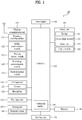
- FIG. 1 is a block diagram of a mobile terminal 100 in accordance with an embodiment of the present invention.
- the mobile terminal 100 includes a wireless communication unit 110, an A/V (audio/video) input unit 120, a user input unit 130, a sensing unit 140, an output unit 150, a memory 160, an interface unit 170, a controller 180, and a power supply unit 190.
- FIG. 1 shows the mobile terminal 100 having various components, but it is understood that implementing all of the illustrated components is not a requirement. More or fewer components may be implemented according to various embodiments.
- the wireless communication unit 110 typically includes one or more components which permit wireless communication between the mobile terminal 100 and a wireless communication system or network within which the mobile terminal 100 is located.
- the wireless communication unit 110 can include a broadcast receiving module 111, a mobile communication module 112, a wireless Internet module 113, a short-range communication module 114, and a position-location module 115.
- the broadcast receiving module 111 receives a broadcast signal and/or broadcast associated information from an external broadcast managing server via a broadcast channel.
- the broadcast channel may include a satellite channel and a terrestrial channel.
- At least two broadcast receiving modules 111 can be provided in the mobile terminal 100 to facilitate simultaneous reception of at least two broadcast channels or broadcast channel switching.
- the broadcast managing server is generally a server which generates and transmits a broadcast signal and/or broadcast associated information or a server which is provided with a previously generated broadcast signal and/or broadcast associated information and then transmits the provided signal or information to a terminal.
- the broadcast signal may be implemented as a TV broadcast signal, a radio broadcast signal, and/or a data broadcast signal, among other signals. If desired, the broadcast signal may further include a broadcast signal combined with a TV or radio broadcast signal.
- the broadcast associated information includes information associated with a broadcast channel, a broadcast program, or a broadcast service provider. Furthermore, the broadcast associated information can be provided via a mobile communication network. In this case, the broadcast associated information can be received by the mobile communication module 112.
- broadcast associated information can be implemented in various forms.
- broadcast associated information may include an electronic program guide (EPG) of digital multimedia broadcasting (DMB) and an electronic service guide (ESG) of digital video broadcast-handheld (DVB-H).
- EPG electronic program guide
- ESG electronic service guide
- DMB digital multimedia broadcasting
- DVB-H digital video broadcast-handheld
- the broadcast receiving module 111 may be configured to receive broadcast signals transmitted from various types of broadcast systems.
- broadcasting systems may include digital multimedia broadcasting-terrestrial (DMB-T), digital multimedia broadcasting-satellite (DMB-S), digital video broadcast-handheld (DVB-H), digital video broadcast-convergence of broadcasting and mobile services (DVB-CBMS), Open Mobile Alliance Broadcast (OMA-BCAST), the data broadcasting system known as media forward link only (MediaFLOTM) and integrated services digital broadcast-terrestrial (ISDB-T).
- OMA-BCAST Open Mobile Alliance Broadcast
- MediaFLOTM media forward link only
- ISDB-T integrated services digital broadcast-terrestrial
- the broadcast receiving module 111 can be configured to be suitable for other broadcasting systems as well as the above-noted digital broadcasting systems.
- the broadcast signal and/or broadcast associated information received by the broadcast receiving module 111 may be stored in a suitable device, such as the memory 160.
- the mobile communication module 112 transmits/receives wireless signals to/from one or more network entities (e.g., a base station, an external terminal, and/or a server) via a mobile network such as GSM (Global System for Mobile communications), CDMA (Code Division Multiple Access), or WCDMA (Wideband CDMA).
- a mobile network such as GSM (Global System for Mobile communications), CDMA (Code Division Multiple Access), or WCDMA (Wideband CDMA).
- GSM Global System for Mobile communications
- CDMA Code Division Multiple Access
- WCDMA Wideband CDMA
- the wireless Internet module 113 supports Internet access for the mobile terminal 100. This module may be internally or externally coupled to the mobile terminal 100.
- the wireless Internet technology can include WLAN (Wireless LAN), Wi-Fi, WibroTM (Wireless broadband), WimaxTM (World Interoperability for Microwave Access), HSDPA (High Speed Downlink Packet Access), GSM, CDMA, WCDMA, or LTE (Long Term Evolution).
- Wireless Internet access by WibroTM, HSPDA, GSM, CDMA, WCDMA, or LTE is achieved via a mobile communication network.
- the wireless Internet module 113 may be considered as being a kind of the mobile communication module 112 to perform the wireless Internet access via the mobile communication network.
- the short-range communication module 114 facilitates relatively short-range communications. Suitable technologies for implementing this module include NFC(Near Field Communication), radio frequency identification (RFID), infrared data association (IrDA), ultra-wideband (UWB), as well as the networking technologies commonly referred to as BluetoothTM and ZigBeeTM, to name a few.
- NFC Near Field Communication
- RFID radio frequency identification
- IrDA infrared data association
- UWB ultra-wideband
- BluetoothTM and ZigBeeTM the networking technologies commonly referred to as BluetoothTM and ZigBeeTM, to name a few.
- the position-location module 115 identifies or otherwise obtains the location of the mobile terminal 100.
- this module may be implemented with a global positioning system (GPS) module.
- GPS global positioning system
- the GPS module 115 is able to precisely calculate current 3-dimensional position information based on at least longitude, latitude or altitude and direction (or orientation) by calculating distance information and precise time information from at least three satellites and then applying triangulation to the calculated information. Location information and time information are calculated using three satellites, and errors of the calculated location position and time informations are then amended (or corrected) using another satellite.
- the GPS module 115 is able to calculate speed information by continuously calculating a real-time current location.
- the audio/video (A/V) input unit 120 is configured to provide audio or video signal input to the mobile terminal 100.
- the A/V input unit 120 includes a camera 121 and a microphone 122.
- the camera 121 receives and processes image frames of still pictures or video, which are obtained by an image sensor in a video call mode or a photographing mode. Furthermore, the processed image frames can be displayed on the display 151.
- the image frames processed by the camera 121 can be stored in the memory 160 or can be transmitted to an external recipient via the wireless communication unit 110.
- at least two cameras 121 can be provided in the mobile terminal 100 according to the environment of usage.
- the microphone 122 receives an external audio signal while the portable device is in a particular mode, such as phone call mode, recording mode and voice recognition. This audio signal is processed and converted into electronic audio data. The processed audio data is transformed into a format transmittable to a mobile communication base station via the mobile communication module 112 in a call mode.
- the microphone 122 typically includes assorted noise removing algorithms to remove noise generated in the course of receiving the external audio signal.
- the user input unit 130 generates input data responsive to user manipulation of an associated input device or devices.
- Examples of such devices include a keypad, a dome switch, a touchpad (e.g., static pressure/capacitance), a jog wheel, and a jog switch.
- the sensing unit 140 provides sensing signals for controlling operations of the mobile terminal 100 using status measurements of various aspects of the mobile terminal. For instance, the sensing unit 140 may detect at least one of an ambient light around the mobile terminal 100, an open/closed status of the mobile terminal 100, the relative positioning of components (e.g., a display and keypad) of the mobile terminal 100, a change of position (or location) of the mobile terminal 100 or a component of the mobile terminal 100, a presence or absence of user contact with the mobile terminal 100, and an orientation or acceleration/deceleration of the mobile terminal 100. As an example, a mobile terminal 100 configured as a slide-type mobile terminal is considered. In this configuration, the sensing unit 140 may sense whether a sliding portion of the mobile terminal is open or closed.
- the sensing unit 140 may sense whether a sliding portion of the mobile terminal is open or closed.
- the sensing unit 140 senses the presence or absence of power provided by the power supply unit 190, and the presence or absence of a coupling or other connection between the interface unit 170 and an external device.
- the sensing unit 140 can include a proximity sensor 141.
- the output unit 150 generates output relevant to the senses of sight, hearing, and touch. Furthermore, the output unit 150 includes the display 151, an audio output module 152, an alarm unit 153, a haptic module 154, and a projector module 155.
- the display 151 is typically implemented to visually display (output) information associated with the mobile terminal 100. For instance, if the mobile terminal is operating in a phone call mode, the display will generally provide a user interface (Ul) or graphical user interface (GUI) which includes information associated with placing, conducting, and terminating a phone call. As another example, if the mobile terminal 100 is in a video call mode or a photographing mode, the display 151 may additionally or alternatively display images which are associated with these modes, the UI or the GUI.
- Ul user interface
- GUI graphical user interface
- the display module 151 may be implemented using known display technologies. These technologies include, for example, a liquid crystal display (LCD), a thin film transistor-liquid crystal display (TFT-LCD), an organic light-emitting diode display (OLED), a flexible display and a three-dimensional display.
- LCD liquid crystal display
- TFT-LCD thin film transistor-liquid crystal display
- OLED organic light-emitting diode display
- the mobile terminal 100 may include one or more of such displays.
- Some of the displays can be implemented in a transparent or optical transmittive type, i.e., a transparent display.
- a transparent display is the TOLED (transparent OLED).
- a rear configuration of the display 151 can be implemented as the optical transmittive type as well. In this configuration, a user may be able to see an object located at the rear of a terminal body on a portion of the display 151 of the terminal body.
- At least two displays 151 can be provided in the mobile terminal 100 in accordance with one embodiment of the mobile terminal 100.
- a plurality of displays can be arranged to be spaced apart from each other or to form a single body on a single face of the mobile terminal 100.
- a plurality of displays can be arranged on different faces of the mobile terminal 100.
- the display 151 and a sensor for detecting a touch action are configured as a mutual layer structure (hereinafter called 'touchscreen')
- the display 151 is usable as an input device as well as an output device.
- the touch sensor can be configured as a touch film, a touch sheet, or a touchpad.
- the touch sensor can be configured to convert pressure applied to a specific portion of the display 151 or a variation of capacitance generated from a specific portion of the display 151 to an electronic input signal. Moreover, the touch sensor is configurable to detect pressure of a touch as well as a touched position or size.
- a touch input is made to the touch sensor, a signal(s) corresponding to the touch input is transferred to a touch controller.
- the touch controller processes the signal(s) and then transfers the processed signal(s) to the controller 180. Therefore, the controller 180 is made aware when a prescribed portion of the display 151 is touched.
- a proximity sensor 141 can be provided at an internal area of the mobile terminal 100 enclosed by the touchscreen or around the touchscreen.
- the proximity sensor is a sensor that detects a presence or non-presence of an object approaching a prescribed detecting surface or an object existing (or located) around the proximity sensor using an electromagnetic field strength or infrared ray without mechanical contact.
- the proximity sensor 141 is more durable than a contact type sensor and also has utility broader than the contact type sensor.
- the proximity sensor 141 can include one of a transmittive photoelectric sensor, a direct reflective photoelectric sensor, a mirror reflective photoelectric sensor, a radio frequency oscillation proximity sensor, an electrostatic capacity proximity sensor, a magnetic proximity sensor, and an infrared proximity sensor. If the touchscreen includes the electrostatic capacity proximity sensor, it is configured to detect the proximity of a pointer using a variation of an electric field according to the proximity of the pointer. In this configuration, the touchscreen (touch sensor) can be considered as the proximity sensor.
- an action for enabling the pointer approaching the touchscreen to be recognized as placed on the touchscreen may be named 'proximity touch' and an action of enabling the pointer to actually come into contact with the touchscreen may named 'contact touch'.
- a position, at which the proximity touch is made to the touchscreen using the pointer may mean a position of the pointer vertically corresponding to the touchscreen when the pointer makes the proximity touch.
- the proximity sensor detects a proximity touch and a proximity touch pattern (e.g., a proximity touch distance, a proximity touch duration, a proximity touch position, a proximity touch shift state).
- a proximity touch pattern e.g., a proximity touch distance, a proximity touch duration, a proximity touch position, a proximity touch shift state.
- Information corresponding to the detected proximity touch action and the detected proximity touch pattern can be output to the touchscreen.
- the audio output module 152 functions in various modes including a call-receiving mode, a call-placing mode, a recording mode, a voice recognition mode, and a broadcast reception mode to output audio data which is received from the wireless communication unit 110 or is stored in the memory 160. During operation, the audio output module 152 outputs audio relating to a particular function (e.g., call received, message received).
- the audio output module 152 may be implemented using one or more speakers, buzzers, other audio producing devices, and combinations of these devices.
- the alarm unit 153 outputs a signal for announcing the occurrence of a particular event associated with the mobile terminal 100.
- Typical events include a call received, a message received and a touch input received.
- the alarm unit 153 is able to output a signal for announcing the event occurrence by way of vibration as well as video or audio signal.
- the video or audio signal can be output via the display 151 or the audio output module 152.
- the display 151 or the audio output module 152 can be regarded as a part of the alarm unit 153.
- the haptic module 154 generates various tactile effects that can be sensed by a user. Vibration is a representative one of the tactile effects generated by the haptic module 154.
- the strength and pattern of the vibration generated by the haptic module 154 are controllable. For instance, different vibrations can be output in a manner of being synthesized together or can be output in sequence.
- the haptic module 154 is able to generate various tactile effects as well as the vibration.
- the haptic module 154 may generate an effect attributed to the arrangement of pins vertically moving against a contact skin surface, an effect attributed to the injection/suction power of air though an injection/suction hole, an effect attributed to the skim over a skin surface, an effect attributed to a contact with an electrode, an effect attributed to an electrostatic force, and an effect attributed to the representation of a hot/cold sense using an endothermic or exothermic device.
- the haptic module 154 can be implemented to enable a user to sense the tactile effect through a muscle sense of a finger or an arm as well as to transfer the tactile effect through direct contact.
- at least two haptic modules 154 can be provided in the mobile terminal 100 in accordance with an embodiment of the mobile terminal 100.
- the memory 160 is generally used to store various types of data to support the processing, control, and storage requirements of the mobile terminal 100. Examples of such data include program instructions for applications operating on the mobile terminal 100, contact data, phonebook data, messages, audio, still pictures (or photo), and moving pictures. Furthermore, a recent use history or a cumulative use frequency of each data (e.g., use frequency for each phonebook, each message or each multimedia file) can be stored in the memory 160.
- data for various patterns of vibration and/or sound output in response to a touch input to the touchscreen can be stored in the memory 160.
- the memory 160 may be implemented using any type or combination of suitable volatile and non-volatile memory or storage devices including hard disk, random access memory (RAM), static random access memory (SRAM), electrically erasable programmable read-only memory (EEPROM), erasable programmable read-only memory (EPROM), programmable read-only memory (PROM), read-only memory (ROM), magnetic memory, flash memory, magnetic or optical disk, multimedia card micro type memory, card-type memory (e.g., SD memory or XD memory), or other similar memory or data storage device. Furthermore, the mobile terminal 100 is able to operate in association with a web storage for performing a storage function of the memory 160 on the Internet.
- RAM random access memory
- SRAM static random access memory
- EEPROM electrically erasable programmable read-only memory
- EPROM erasable programmable read-only memory
- PROM programmable read-only memory
- ROM read-only memory
- magnetic memory flash memory
- flash memory magnetic or optical disk
- the interface unit 170 may be implemented to couple the mobile terminal 100 with external devices.
- the interface unit 170 receives data from the external devices or is supplied with power and then transfers the data or power to the respective elements of the mobile terminal 100 or enables data within the mobile terminal 100 to be transferred to the external devices.
- the interface unit 170 may be configured using a wired/wireless headset port, an external charger port, a wired/wireless data port, a memory card port, a port for coupling to a device having an identity module, audio input/output ports, video input/output ports, and/or an earphone port.
- the identity module is a chip for storing various kinds of information for authenticating a usage authority of the mobile terminal 100 and can include a Near Field Communication (NFC) Chip, a User Identify Module (UIM), a Subscriber Identity Module (SIM), and/or a Universal Subscriber Identity Module (USIM).
- NFC Near Field Communication
- UAM User Identify Module
- SIM Subscriber Identity Module
- USIM Universal Subscriber Identity Module
- a device having the identity module hereinafter called 'identity device'
- the identity device is connectible to the mobile terminal 100 via the corresponding port.
- the identity module may be detachably attached to the mobile terminal via the interface unit 170.
- the identity module may be permanently built as a sort of the memory unit 160 in the mobile terminal 100.
- the interface unit 170 When the mobile terminal 100 is connected to an external cradle, the interface unit 170 becomes a passage for supplying the mobile terminal 100 with a power from the cradle or a passage for delivering various command signals input from the cradle by a user to the mobile terminal 100.
- Each of the various command signals input from the cradle or the power can operate as a signal enabling the mobile terminal 100 to recognize that it is correctly loaded in the cradle.
- the controller 180 typically controls the overall operations of the mobile terminal 100. For example, the controller 180 performs the control and processing associated with voice calls, data communications, and video calls.
- the controller 180 may include a multimedia module 181 that provides multimedia playback.
- the multimedia module 181 may be configured as part of the controller 180, or implemented as a separate component.
- the multimedia module 181 may be implemented with a single module or at least two or more modules.
- controller 180 is able to perform a pattern (or image) recognizing process for recognizing a writing input and a picture drawing input carried out on the touchscreen as characters or images, respectively.
- the power supply unit 190 provides power required by various components of the mobile terminal 100.
- the power may be internal power, external power, or combinations of internal and external power.
- Various embodiments described herein may be implemented in a computer-readable medium using, for example, computer software, hardware, or some combination of computer software and hardware.
- the embodiments described herein may be implemented within one or more application specific integrated circuits (ASICs), digital signal processors (DSPs), digital signal processing devices (DSPDs), programmable logic devices (PLDs), field programmable gate arrays (FPGAs), processors, controllers, micro-controllers, microprocessors, other electronic units designed to perform the functions described herein, or a selective combination thereof.
- ASICs application specific integrated circuits
- DSPs digital signal processors
- DSPDs digital signal processing devices
- PLDs programmable logic devices
- FPGAs field programmable gate arrays
- processors controllers, micro-controllers, microprocessors, other electronic units designed to perform the functions described herein, or a selective combination thereof.
- controller 180 may also be implemented by the controller 180.
- the embodiments described herein may be implemented with separate software modules, such as procedures and functions, each of which performs one or more of the functions and operations described herein.
- the software codes can be implemented with a software application written in any suitable programming language and may be stored in memory such as the memory 160, and executed by a controller or processor, such as the controller 180.
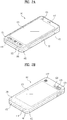
- FIG. 2A is a front perspective view of a mobile terminal according to one embodiment of the present invention.
- the mobile terminal 100 illustrated in FIG. 2A has a bar type terminal body.
- the mobile terminal 100 may be implemented in a variety of different configurations. Examples of such configurations include folder-type, slide-type, rotational-type, swing-type and combinations thereof.
- the following disclosure will primarily relate to a bar-type mobile terminal 100. However, it is understood that such disclosure may apply equally to other types of mobile terminals.
- the mobile terminal 100 includes a case (a casing, housing, or cover) constituting an exterior of the mobile terminal.
- the case can be divided into a front case 101 and a rear case 102.
- Various electric/electronic parts are loaded in a space (volume) provided between the front and rear cases 101 and 102.
- at least one middle case can be further provided between the front and rear cases 101 and 102 in addition.
- the cases 101 and 102 are formed by injection molding of synthetic resin or can be formed of metal substance such as stainless steel (STS), titanium (Ti) or the like for example.
- STS stainless steel
- Ti titanium
- a display 151, an audio output module 152, a camera 121, manipulating units 131 and 132, a microphone 122, and an interface unit 170 can be provided at the terminal body, and more particularly, at the front case 101.
- Manipulating units 131 and 132 are part of the user input unit 130 (see FIG. 1 ).
- the display 151 occupies most of a main face of the front case 101.
- the audio output module 152 and the camera 121 are provided at an area adjacent to an end portion of the display 151, while the manipulating unit 131 and the microphone 122 are provided at an area adjacent to the other end portion of the display 151.
- the manipulating unit 132 and the interface unit 170 can be provided at lateral sides of the front and rear cases 101 and 102.
- the user input unit 130 is manipulated (operated) to receive a command for controlling an operation of the terminal 100. Furthermore, the user input unit 130 may include a plurality of manipulating units 131 and 132.
- the manipulating units 131 and 132 can be referred to as a manipulating portion and may adopt any tactile mechanism that enables a user to perform a manipulation action by touch.
- Content input by manipulating units 131 and 132 can be divided between the two. For instance, a command such as start, end, and scroll is input to first manipulating unit 131. Furthermore, a command for a volume adjustment of sound output from the audio output module 152, or a command for a switching to a touch recognizing mode of the display 151 can be input to second manipulating unit 132.
- FIG. 2B is a rear perspective view of the terminal of FIG. 2A .
- a camera 121' can be additionally provided at a rear of the terminal body, and more particularly, at the rear case 102.
- the camera 121' captures images along a direction that is substantially opposite to that of the camera 121 (see FIG. 2A ) and may have a pixel resolution different from that of the camera 121.
- the camera 121 has a relatively low number of pixels sufficient to capture and transmit a picture of a user's face for a video call, while the camera 121' has a relatively high number of pixels for capturing a photograph (e.g., a finer detail photograph) of a general subject.
- each of the cameras 121 and 121' can be installed on the terminal body to be rotated or popped up.
- a flash 123 and a mirror 124 are additionally provided adjacent to the camera 121'.
- the flash 123 projects light toward a subject for photographing the subject using the camera 121'.
- the mirror 124 enables the user to view the user's face as reflected by the mirror 124.
- An additional audio output module 152' can be provided at the rear of the terminal body.
- the additional audio output module 152' is for implementing a stereo function together with the audio output module 152 (see FIG. 2A ) and may be used for implementation of a speakerphone mode when speaking over the terminal.
- a broadcast signal receiving antenna 116 can be additionally provided at the lateral side of the terminal body as well as an antenna for communication.
- the broadcast signal receiving antenna may constitute a portion of the broadcast receiving module 111 (see FIG. 1 ) and be retractable into the terminal body.
- a power supply unit 190 for supplying a power to the terminal 100 is provided at the terminal body. Furthermore, the power supply unit 190 can be configured to be built within the terminal body. Alternatively, the power supply unit 190 can be configured to be detachably connected to the terminal body.
- a touchpad 135 for detecting a touch can be additionally provided at the rear case 102.
- the touchpad 135 can be configured as a light transmittive type similar to the display 151.
- the display 151 is configured to output visual information from both of its faces, the visual information is viewable via the touchpad 135 as well.
- the information output from both of the faces can be entirely controlled by the touchpad 135.
- a display is further provided for the touchpad 135 so that a touchscreen can be provided at the rear case 102 as well.
- the touchpad 135 is activated by interconnecting with the display 151 of the front case 101.
- the touchpad 135 can be provided at the rear of the display 151 to extend parallel to the display 151.
- the touchpad 135 can have a size equal to or smaller than the size of the display 151.
- the display module 151 includes a touchscreen
- implementation of the following embodiment is further facilitated. Therefore, the following description is made on the assumption that the display module 151 includes a touchscreen.
- a display screen of the touchscreen 151 shall be indicated by a reference number 400 in the following description.
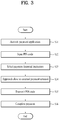
- FIG. 3 is a flowchart for a method of controlling a mobile terminal according to one embodiment of the present invention.
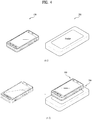
- FIG. 4 is a diagram of a mobile terminal and an external payment terminal for expense payment according to the present invention.
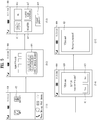
- FIG. 5 is a diagram of display screen configurations to implement a method of controlling a mobile terminal according to one embodiment of the present invention.
- the mobile terminal 100 is placed in a manner of being spaced apart from the external payment terminal 200 in a distance over a predetermined interval.
- the external payment terminal 200 is connected to a payment server (not shown in the drawing) by wire or wireless.
- a home screen is displayed on the touchscreen 400 while the mobile terminal 100 is in a home screen mode. For instance, when the mobile terminal 100 is in a locked mode, if the locked mode is canceled, the home screen mode can be entered.
- the locked mode and the cancellation of the locked mode shall be described later.
- An expense payment icon 402 for activating an expense payment application may be displayed on the home screen.
- the application may mean an execution program or software installed on the mobile terminal as a default or by a user.
- the controller 180 may control the expense payment application to be activated [S31].
- the controller 180 may control a password input screen, which is provided to input a password for the expense payment, to be displayed on the touchscreen 400.
- the password is a PIN (personal identification number) code, by which the present invention is non-limited.
- the controller 180 may control a software keypad 403, which is provided for the PIN code input, to be displayed on the touchscreen 400.
- the terminal user may input a prescribed PIN code using the software keypad 403 [S32].
- the controller 180 may be then able to control the inputted prescribed PIN code to be temporarily saved in the mobile terminal 100.
- the prescribed PIN code may include a PIN code previously registered with the payment server for the expense payment via the mobile terminal 100.
- the inputted prescribed PIN code is temporarily saved to be automatically deleted after completion of one expense payment. Hence, the prescribed PIN code should be inputted each time an expense payment is made.
- the controller 180 may control a financial institution list containing at least one financial institution to be displayed for the expense payment on the touchscreen 400.
- FIG. 5 (5-3) shows that credit card companies are listed on the financial institution list displayed on the touchscreen 400, by which the present embodiment may be non-limited.
- banks may be listed on the financial institution list displayed on the touchscreen 400.
- credit card companies and banks may be simultaneously listed on the financial institution list displayed on the touchscreen 400.
- the terminal user may be able to touch and select a desired financial institution from the displayed financial institution list [S33].
- a desired financial institution from the displayed financial institution list [S33].
- Fig. 5 (5-3), assume that 'VISA' is selected from the financial institution list. If the desired financial institution does not exist in the financial institution list for the expense payment, the terminal user may be able to stop the present expense payment procedure by touching and selecting a payment cancellation icon 419 displayed on the touchscreen 400.
- the PIN code inputting step S32 and the financial institution selecting step S33 may be switched to each other in order.
- the terminal user may be able to move the mobile terminal 100 to approach the external payment terminal 200, to which an expense to be paid has been inputted, to be situated within the prescribed interval therefrom [S34].
- the mobile terminal 100 is able to establish a short range communication with the external payment terminal 200 for the expense payment by a preset short range communication system.
- the established short range communication for the expense payment may include a near field communication (hereinafter abbreviated "NFC").
- the mobile terminal 100 may be able to receive an amount of the expense to be paid from the external payment terminal 200.
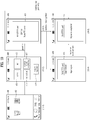
- the controller 180 may control a PIN code transmit screen 420 to be displayed on the touchscreen 400.
- the PIN code transmit screen 420 displays the selected financial institution and the amount of the expense to be paid and is provided to confirm whether the temporarily saved PIN code for the expense payment will be transmitted to the external payment terminal 200.
- the terminal user may touch and select an icon 'yes' 421 or an icon 'no' 423 displayed on the PIN code transmit screen 420 to determine whether to transmit the temporarily saved PIN code [S35].
- the controller 180 may control a payment completion screen 425 to be displayed on the touchscreen 400 to indicate that the expense payment has been completed [S36].
- the prescribed PIN code since the inputted prescribed PIN code is temporarily saved to be automatically deleted after completion of one expense payment, the prescribed PIN code needs to be inputted for each expense payment, by which the embodiment of the present invention may be non-limited.
- the prescribed PIN code is inputted once to the mobile terminal, the inputted prescribed PIN code is non-temporarily saved.
- the saved PIN code may continue to be used for expense payments unless changed. This is described with reference to FIGs. 6 to 10 as follows.
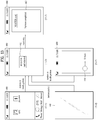
- FIG. 6 is a diagram of display screen configurations to implement a method of controlling a mobile terminal according to one embodiment of the present invention.
- a universal PIN code setting icon 427 for setting the same universal PIN code for all financial institutions contained in the financial institution list and an individual PIN code setting icon 429 for setting an individual PINC code for each of the financial institutions contained in the financial institution list may be displayed.
- the terminal user may touch and select the universal PIN code setting icon 427.
- the controller 180 may be able to control a screen having a soft keypad 403 to be displayed on the touchscreen 400.
- the screen having the soft keypad 403 is provided to input the universal PIN code.
- the terminal user may be able to input the previously registered universal PIN code using the soft keypad 403.
- the controller 180 may control an indication 430 to be displayed on the touchscreen 400.
- the indication 430 is provided to indicate that the PIN code setting has been completed.
- the controller 180 may control the mobile terminal 100 to enter the home screen mode automatically within a prescribed time.
- the terminal user may be able to touch and select the individual PIN code setting icon 429.
- the controller 180 may control a screen for inputting a 1 st PIN code for a 1 st financial institution 'VISA' contained in the financial institution list to be displayed.
- the soft keypad 403 can be displayed on the screen.
- the controller 180 may control screens for inputting 2 nd to 4 th PIN codes for the rest of the financial institutions (i.e., 2 nd financial institution 'BC' to 4 th financial institution 'AMERICAN EXPRESS') contained in the financial institution list to be sequentially displayed, respectively.
- One of the universal PIN code and the 1 st to 4 th PIN codes may be equal to one of the rest of the PIN codes or may be different from the rest of the PIN codes.
- the controller 180 may control the indication 430 about the completion of the PIN code settings to be displayed on the touchscreen 400.
- FIG. 7 is a diagram of display screen configurations to implement a method of controlling a mobile terminal according to one embodiment of the present invention.
- the motion gesture may mean the gesture performed by a terminal user to move the mobile terminal intentionally in a space in order to achieve at least one of aligning the mobile terminal in specific direction, moving the mobile terminal in specific direction and moving the mobile terminal along a specific track. And, the motion gesture may be detected by the sensing unit 140 and the detected motion gesture may be then delivered to the controller 180.
- a universal motion gesture setting icon 431 for setting a same universal motion gesture for all financial institutions contained in the finance institution list and an individual motion gesture setting icon 433 for setting an individual motion gesture for each of the financial institutions contained in the financial institution list may be displayed.
- the controller 180 may control a screen for inputting a desired universal motion gesture to be displayed on the touchscreen 400.
- the terminal user performs the desired universal motion gesture by moving the mobile terminal 100 in a space and may then touch to select a save icon 435.
- the desired universal motion can be arbitrarily assigned by the user as he/she likes. If so, the controller 180 controls the universal motion gesture sensed by the sensing unit 140 to be saved.
- the controller 180 may control an indication 437 to be displayed on the touchscreen 400 to indicate that the motion gesture setting has been completed.
- the controller 180 may control the mobile terminal 100 to automatically enter the home screen mode within prescribed duration.
- a case for the terminal user to touch and select the individual motion gesture setting icon 433 is described as follows.
- the controller 180 may control a screen for saving a 1 st individual motion gesture for a 1 st financial institution 'VISA' contained in the financial institution list to be displayed.
- the terminal used performs a desired 1 st individual motion gesture by moving the mobile terminal 100 in a space and may be then able to touch and select a save icon 435.
- the desired 1 st individual motion can be arbitrarily assigned by the user as he/she likes. If so, the controller 180 controls the 1 st individual motion gesture sensed by the sensing unit 140 to be saved.
- the controller 180 may control screens for saving 2 nd to 4 th individual motion gestures for the rest of the financial institutions (i.e., 2 nd financial institution 'BC' to 4 th financial institution 'AMERICAN EXPRESS') contained in the financial institution list to be sequentially displayed, respectively.
- the controller 180 may control the indication 437 about the completion of the motion gesture settings to be displayed on the touchscreen 400.
- One of the universal motion gesture and the 1 st to 4 th individual motion gestures may be equal to one of the rest of the motion gestures or may be different from the rest of the motion gestures.
- the set PIN code it is not mandatory for the set PIN code to be accepted via the motion gesture only.
- the set PIN code may be accepted via a touch gesture performed on the touchscreen 400.
- FIG. 8 is a diagram of display screen configurations to implement a method of controlling a mobile terminal according to one embodiment of the present invention.
- the motion gesture may mean one of a simple touch to the touchscreen, a long touch to the touchscreen, a multi-touch (e.g., a double touch, a triple touch, etc.) to the touchscreen, a touch flick or drag on the touchscreen in specific direction, and a touch drag on the touchscreen according to a specific track.
- a process for setting the touch gesture in the mobile terminal is described in detail as follows.
- a universal touch gesture setting icon 441 for setting a same universal touch gesture for all financial institutions contained in the finance institution list and an individual touch gesture setting icon 443 for setting an individual touch gesture for each of the financial institutions contained in the financial institution list may be displayed.
- the controller 180 may control a screen for inputting a desired universal touch gesture to be displayed on the touchscreen 400.
- the terminal user performs the desired universal touch gesture on the touchscreen 400 and may then touch to select a save icon 435.
- the desired universal touch gesture can be arbitrarily assigned by the user as he/she likes. If so, the controller 180 controls the universal touch gesture performed on the touchscreen 400 to be saved.
- the controller 180 may control an indication 437 to be displayed on the touchscreen 400 to indicate that the touch gesture setting has been completed.
- the controller 180 may control the mobile terminal 100 to automatically enter the home screen mode within prescribed duration.
- a case for the terminal user to touch and select the individual touch gesture setting icon 443 is described as follows.
- the controller 180 may control a screen for saving a 1 st individual touch gesture for a 1 st financial institution 'VISA' contained in the financial institution list to be displayed.
- the terminal used performs a desired 1 st individual touch gesture on the touchscreen 400 and may be then able to touch and select the save icon 435.
- the desired 1 st individual touch gesture can be arbitrarily assigned by the user as he/she likes. If so, the controller 180 controls the 1 st individual touch gesture performed on the touchscreen 400 to be saved.
- the controller 180 may control screens for saving 2 nd to 4 th individual touch gestures for the rest of the financial institutions (i.e., 2 nd financial institution 'BC' to 4 th financial institution 'AMERICAN EXPRESS') contained in the financial institution list to be sequentially displayed, respectively.
- the controller 180 may control the indication 437 about the completion of the touch gesture settings to be displayed on the touchscreen 400.
- One of the universal touch gesture and the 1 st to 4 th individual touch gestures may be equal to one of the rest of the touch gestures or may be different from the rest of the touch gestures.
- one or both of the motion gesture and the touch gesture may be necessary.
- FIG. 9 is a flowchart for a method of controlling a mobile terminal according to another embodiment of the present invention.
- FIG. 10 is a diagram of display screen configurations to implement a method of controlling a mobile terminal according to another embodiment of the present invention.
- the mobile terminal 100 is placed in a manner of being spaced apart from the external payment terminal 200 in a distance over a predetermined interval and that the external payment terminal 200 is connected to a payment server (not shown in the drawing) by wire or wireless.
- a home screen is displayed on the touchscreen 400 while the mobile terminal 100 is in a home screen mode.
- the expense payment icon 402 may be displayed on the home screen.
- the controller 180 may control the expense payment application to be activated [S91].
- the controller 180 may control the financial institution list to be displayed on the touchscreen 400.
- the process for displaying the financial institution is already mentioned in the foregoing description, its details shall be omitted from the following description.
- the terminal user may be able to touch and select a desired financial institution from the displayed financial institution list [S92].
- the terminal user may move the mobile terminal 100 to approach the external payment terminal 200, to which an expense to be paid is inputted, within the prescribed interval [S93].
- the mobile terminal 100 may be able to establish a short range communication for the expense payment with the external payment terminal 200 by a previously set short range communication system.
- the mobile terminal 100 may be able to receive an amount of the expense to be paid from the external payment terminal 200.
- the controller 180 may be able to control a PIN code transmit grant screen 451, which is provided for displaying the selected financial institution and the amount of the expense to be paid and granting the previously set PIN code to be transmitted to the external payment terminal 200 in association with the selected financial institution for the expense payment, to be displayed on the touchscreen 400. If it is unnecessary to check the expense as the expense to be paid is a constant or fixed amount (e.g., subway fee, etc.), the reception of the amount of the expense to be paid and the display of the amount of the expense may be omitted.
- a PIN code transmit grant screen 451 is provided for displaying the selected financial institution and the amount of the expense to be paid and granting the previously set PIN code to be transmitted to the external payment terminal 200 in association with the selected financial institution for the expense payment, to be displayed on the touchscreen 400. If it is unnecessary to check the expense as the expense to be paid is a constant or fixed amount (e.g., subway fee, etc.), the reception of the amount of the expense to be paid and the display of the amount of
- the terminal user may be able to perform a gesture (e.g., motion gesture, touch gesture, etc.) for the transmission grant of the same PIN code previously set in association with the selected financial institution [S94]. If both a motion gesture and a touch gesture are previously set for the PIN code transmit grant, any one of the motion gesture and the touch gesture may be performed without restrictions.
- a gesture e.g., motion gesture, touch gesture, etc.
- the gesture for the PIN code transmit grant can be performed before or as soon as the mobile terminal approaches the external payment terminal proximately.
- the controller 180 determines whether the gesture sensed by the sensing unit 140 is identical to the previously set gesture.
- the controller 180 may be able to control the previously set (universal or individual) PIN code corresponding to the selected financial institution to be transmitted to the external payment terminal 200.
- the controller 180 may control a payment completion screen 453, which indicates that the expense payment has been completed, to be displayed on the touchscreen 400 [S95].
- the controller 180 may control a screen 455, which is provided to indicate that error exists in the PIN code transmit grant and to make a request for granting the PIN code transmission again, to be displayed on the touchscreen 400.
- the present embodiment it may not be mandatory for one of the motion gesture and the touch gesture to be performed for the PIN code transmission.
- the terminal user enables the mobile terminal 100 to approach the external payment terminal 200 within the prescribed interval in-between while pressing the preset hard key (e.g., the manipulation unit 131 or 132) (or within a prescribed time after pressing the hard key, which is applicable to the following).
- the reason why the hard key is pressed is to prevent the terminal user from unintentionally making the expense payment by moving the mobile terminal close to the external payment terminal unconsciously irrespective of user's intention. If the possibility of making the expense payment unintentionally is low, the terminal user may move the mobile terminal close to the external payment terminal 200 without pressing the hard key.
- the controller 180 does not wait for inputting the motion gesture or the touch gesture but may control the previously set PIN code to be directly transmitted to the external payment terminal 200. This is advantageous in quickly making the expense payment if it is unnecessary to check the expense to be paid, which is a constant or fixed amount (e.g., subway fee, etc.).
- the desired financial institution is touched and selected from the financial institution list displayed on the touchscreen 400, by which the embodiment of the present invention may be non-limited.
- the desired financial institution may be selected using the motion gesture of the mobile terminal. This is described in detail with reference to FIG. 11 as follows.
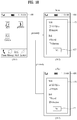
- FIG. 11 is a diagram of display screen configurations to implement a method of controlling a mobile terminal according to another embodiment of the present invention.
- the financial institution list may be displayed on the touchscreen 400.
- the 2 nd financial institution (BC card) 413 in the financial institution list may be read in correct direction by a terminal user.
- the terminal user may be able to move the mobile terminal 100 close to the external payment terminal 200 by aligning the mobile terminal 100 in portrait direction.
- the mobile terminal 100 may be able to establish a short range communication for the expense payment with the external payment terminal by the previously set short range communication system.
- the controller 180 may control a PIN code transmit grant screen 457, which is provided for granting the expense payment via the 2 nd financial institution, to be displayed.
- the 1 st financial institution (VISA card) 411 in the financial institution list may be read in correct direction by a terminal user.
- the terminal user may be able to move the mobile terminal 100 close to the external payment terminal 200 by aligning the mobile terminal 100 in landscape direction.
- the mobile terminal 100 may be able to establish a short range communication for the expense payment with the external payment terminal by the previously set short range communication system.
- the controller 180 may control a PIN code transmit grant screen 459, which is provided for granting the expense payment via the 1 st financial institution, to be displayed.
- one of the 1 st financial institution and the 2 nd financial institution is selected for the expense payment in accordance with whether the aligned direction of the mobile terminal 100 is the portrait direction or the landscape direction, by which the embodiment of the present invention may be non-limited.
- the aligned direction of the mobile terminal 100 is a top-up portrait direction, a top-down portrait direction, a top-left landscape direction or a top-right landscape direction
- one of the 1 st to 4 th financial institutions may be configured to be selected for the expense payment.
- the corresponding terminal user may be able to select a desired financial institution from the financial institution list in accordance with the aligned direction of the mobile terminal without referring to the financial institution list. This is described in detail with reference to FIG. 12 as follows.
- FIG. 12 is a diagram of display screen configurations to implement a method of controlling a mobile terminal according to another embodiment of the present invention.
- the mobile terminal 100 while the mobile terminal 100 is in a home screen mode, assume that a home screen is displayed on the touchscreen 400. Alternatively, the mobile terminal 100 may be in the locked mode or the touchscreen-off mode.
- a terminal user moves the mobile terminal 100 close to the external payment terminal 200 by aligning the mobile terminal 100 in portrait direction while pressing the hard key.
- the reason why the hard key is pressed is to prevent the terminal user from unintentionally making the expense payment by moving the mobile terminal close to the external payment terminal unconsciously irrespective of user's intention. If the possibility of making the expense payment unintentionally is low, the terminal user may move the mobile terminal close to the external payment terminal 200 by aligning the mobile terminal 100 in the portrait direction without pressing the hard key.
- the controller 180 activates the expense payment application and may control the mobile terminal 100 to establish a short range communication for the expense payment with the external payment terminal 200 by a previously set short range communication system.
- the controller 180 may control a PIN code transmit grant screen 457, which is provided for granting the expense payment via the 2 nd financial institution, to be displayed on the touchscreen 400.
- a terminal user moves the mobile terminal 100 close to the external payment terminal 200 by aligning the mobile terminal 100 in landscape direction while pressing the hard key.
- the action of pressing the hard key may be omitted.
- the controller 180 activates the expense payment application and may control the mobile terminal 100 to establish a short range communication for the expense payment with the external payment terminal 200 by a previously set short range communication system.
- the controller 180 may control a PIN code transmit grant screen 459, which is provided for granting the expense payment via the 1 st financial institution, to be displayed on the touchscreen 400.
- the step of selecting the desired financial institution for the expense payment and the PIN code transmission granting step are performed as separate procedures in a manner of being discriminated from each other, by which the present embodiment may be non-limited.
- the desired financial institution selecting step and the PIN code transmission granting step may be performed as a single procedure in a manner of merging together. This is described inn detail with reference to FIG. 13 as follows.
- FIG. 13 is a diagram of display screen configurations to implement a method of controlling a mobile terminal according to another embodiment of the present invention.
- a previously set individual gesture may be performed for a desired financial institution.
- the touch gesture may be performed on the touchscreen 400 on which the home screen image is displayed.
- the gesture e.g., the motion gesture, the touch gesture, etc.
- the gesture may be performed together with an action of pressing the hard key.
- the above individual gesture may be performed to perform both of the selection of the desired financial institution and the PIN code transmit grant related to the selected financial institution simultaneously.
- the controller 180 may control an indication 461, which indicates the desired financial institution corresponding to the gesture has been selected, to be displayed while activating the expense payment application in response to the gesture.
- the terminal user moves the mobile terminal 100 close to the external payment terminal 200.
- the mobile terminal 100 may be able to establish a short range communication with the external payment terminal 200 for the expense payment by a previously set short range communication system.
- the controller 180 determines whether the short range communication is established within a prescribed time after performing the individual gesture.
- the controller 180 may control the expense payment to be completed without a separate user command after the establishment of the short range communication by transmitting information on the selected financial institution and the corresponding PIN code to the external payment terminal 200.
- the controller 180 stops activating the expense payment application and may control the mobile terminal 100 to go back to the home screen mode.
- the desired financial institution selecting step and the PIN code transmit granting step are performed, they may not be performed as one procedure by merging together only if the mobile terminal is in the home screen mode.
- an individual motion gesture corresponding to the desired financial institution may be performed.
- the motion gesture may be performed while the hard key is pressed.
- an individual motion or touch gesture corresponding to the desired financial institution may be performed.
- the corresponding gesture may be performed while the hard key is pressed.
- the controller 180 activates the expense payment application in response to the gesture and may also control an indication 461, which indicates that the desired financial institution has been selected, to be displayed.
- the controller 180 may control the screen displayed on the touchscreen 400 to be directly switched in a manner of switching the screen shown in FIG. 13 (13-1) to the screen shown in FIG. 13 (13-3), switching the screen shown in FIG. 13 (13-4) to the screen shown in FIG. 13 (13-3), or switching the screen shown in FIG. 13 (13-5) to the screen shown in FIG. 13 (13-3).
- the selection of the financial institution may be configured to be performed when the mobile terminal is in the locked mode. This is described in detail with reference to FIG. 14 as follows.
- FIG. 14 is a diagram of display screen configurations to implement a method of controlling a mobile terminal according to another embodiment of the present invention.
- the controller 180 may control a lock screen to be displayed on the touchscreen 400.
- an unlock icon 464 On the lock screen, an unlock icon 464 and at least two or more drag direction indicators 465-1 to 465-5 for the unlock icon 464.
- a terminal user may touch and drag the unlock icon 464 toward the 1 st drag direction indicator 465-1 for the unlocking only.
- the controller 180 may control the mobile terminal 100 to enter the home screen mode by canceling the locked mode.
- the terminal user may touch and drag the unlock icon 464 toward the 2 nd drag direction indicator 465-3 for the unlocking and the selection of a desired financial institution (e.g., MASTER card).
- a desired financial institution e.g., MASTER card
- the controller 180 controls the mobile terminal 100 to be released from the locked mode, controls the expense payment application to be activated, and controls a PIN code transmit grant screen 461 for making the expense payment via the desired financial institution corresponding to the 2 nd drag direction indicatore 465-3 to be displayed on the touchscreen 400.
- FIG. 15 is a diagram of display screen configurations to implement a method of controlling a mobile terminal according to another embodiment of the present invention.
- a PIN code transmit grant screen 462 when a PIN code transmit grant screen 462 is displayed on the touchscreen 400, assume that a terminal user has granted the PIN code transmission. As mentioned in the foregoing description, it may not be mandatory for the grant of the PIN code transmission to be performed only if the PIN code transmit grant screen 462 is displayed. Since the grant of the PIN code transmission is already mentioned several times in the foregoing description, its details shall be omitted from the following description.
- the terminal user may be able to move the mobile terminal 100 close to the external payment terminal 200 by aligning the mobile terminal 100 in portrait direction.
- the mobile terminal 100 may be able to establish a short range communication for the expense payment with the external payment terminal by the previously set short range communication system.
- the controller 180 may control the expense payment to be made in a lump sum for example.
- the terminal user may be able to move the mobile terminal 100 close to the external payment terminal 200 by aligning the mobile terminal 100 in landscape direction.
- the mobile terminal 100 may be able to establish a short range communication for the expense payment with the external payment terminal by the previously set short range communication system.
- the controller 180 may control at least two options 466, 467 and 468 for selecting the number of months of the payment by the installment to be displayed for the expense payment.
- the controller 180 may control the expense payment to be completed in accordance with the option of the selected number of the months of the payment by installment.
- the controller 180 does not display the installment month number options but may control the expense payment to be completed in accordance with the single installment month number option.
- FIG. 16 is a diagram of display screen configurations to implement a method of controlling a mobile terminal according to another embodiment of the present invention.
- the controller 180 may control a remaining payment limit amount of each of the financial institutions to be displayed as well.
- the remaining payment limit amount is deducted by a corresponding amount each time the expense payment is made and is then saved in the memory 160.
- the controller 180 may control the financial institutions in the financial institution list to be displayed in a manner of being divided into at least two categories.
- the financial institutions may be displayed in a manner of discriminated from each other by a category of a financial institution having a gasoline discount benefit, a category of a financial institution having a shopping discount benefit and a category of a financial institution having a restaurant discount benefit.
- the remaining payment limit amount may be displayable for each of the financial institutions discriminately displayed by categories.
- the short range communication of the mobile terminal is used for the expense payment, by which the embodiment of the present invention may be non-limited.
- the short range communication of the mobile terminal may be usable to activate or setting a specific function of the mobile terminal. This is described in detail with reference to FIG. 17 as follows.
- FIG. 17 is a diagram of display screen configurations to implement a method of controlling a mobile terminal according to another embodiment of the present invention.
- a terminal user may move the mobile terminal 100 close to a short range communication tag (e.g., RFID tag, NFC tag, etc.) (Not shown in the drawing) by aligning the mobile terminal 100 in portrait direction.
- a short range communication tag e.g., RFID tag, NFC tag, etc.
- an application activation command for activating a specific application of the mobile terminal 100 may be inputted to the short range communication tag in advance.
- the specific application may include at least one of a multimedia play application, a communication connection application, an internet connection application, a broadcast reception application, a message application, a terminal setting application, an email application and the like, on which no limitation is put. Yet, for clarity and convenience of the following description, assume that the specific application is a camera application.
- the controller 180 may control the mobile terminal 100 to establish a short range communication with the short range communication tag by the previously set short range communication system and may control the mobile terminal 100 to receive the camera application activating command from the short range communication tag.
- the controller 180 may control the camera function according to the 1 st function to be activated in the mobile terminal 100.
- the 1 st function of the camera application may include at least one of a flash turn-on function, a flash turn-off function, an exposure adjustment function, a focus adjustment function, a white balance function and the like (i.e., one of sub-functions (or settings) of the camera application), on which no limitation is put.
- FIG. 17 (17-2) shows one example that the 1 st function of the camera application is the flash turn-on function.
- the terminal user may move the mobile terminal 100 close to a short range communication tag (e.g., RFID tag, NFC tag, etc.) (Not shown in the drawing) by aligning the mobile terminal 100 in landscape direction.
- a short range communication tag e.g., RFID tag, NFC tag, etc.
- the controller 180 may control the mobile terminal 100 to establish a short range communication with the short range communication tag by the previously set short range communication system and may control the mobile terminal 100 to receive the camera application activating command from the short range communication tag.
- the controller 180 may control the camera function according to the 2 nd function to be activated in the mobile terminal 100.
- the 2 nd function of the camera application may include the flash turn-off function for example.
- the specific application of the 1 st function or the 2 nd function is activated, by which the embodiment of the present invention may be non-limited.
- the specific application of the 1 st or 2 nd function may be activated in accordance with the corresponding aligned direction of the mobile terminal 100.
- the specific application of the 1 st or 2 nd function may be activated in accordance with the corresponding aligned direction of the mobile terminal 100 only if the terminal user moves the mobile terminal 100 close to the short range communication tag by pressing the hard key of the mobile terminal 100.
- the specific application of the 1 st or 2 nd function is activated in accordance with the aligned direction of the mobile terminal, by which the embodiment of the present invention may be non-limited.
- a 1 st or 2 nd specific application may be activated in accordance with the aligned direction of the mobile terminal
- the 1 st or 2 nd function (or setting) of the specific application is activated in accordance with the aligned direction of the mobile terminal, by which the embodiment of the present invention may be non-limited.
- the 1 st or 2 nd function (or setting) of the specific application may be activated in accordance with a current location of the mobile terminal when the mobile terminal approaches close to the short range communication tag. This is described in detail with reference to FIG. 18 and FIG. 19 as follows.
- FIG. 18 and FIG. 19 are diagrams of display screen configurations to implement a method of controlling a mobile terminal according to another embodiment of the present invention.
- a terminal user may move the mobile terminal 100 close to the short range communication tag (not shown in the drawing) at a 1 st location (e.g., home). In doing so, assume that the mobile terminal 100 approaches close to the short range communication tag at the 1 st location for the first time.
- a command for activating a terminal setting application for a user environment setting of the mobile terminal 100 may be inputted to the short range communication tag in advance.
- the controller 180 may control the mobile terminal 100 to establish a short range communication with the short range communication tag by the previously set short range communication system and may control the mobile terminal 100 to receive the command for activating the terminal setting application from the short range communication tag.
- the controller 180 may control a screen 475, which is provided to set a user environment (hereinafter named a 1 st use environment) at the 1 st location of the mobile terminal 100, to be displayed on the touchscreen 400.
- the terminal user may be able to set up the 1 st use environment in a manner of touching & selecting a desired setting item from the setting screen 475 and then touching a setting icon 477.
- the setting-completed 1 st use environment information may be saved in at least one of the mobile terminal and the short range communication tag.
- the terminal user may move the mobile terminal 100 close to the short range communication tag (not shown in the drawing) at a 2 nd location (e.g., office). In doing so, assume that the mobile terminal 100 approaches close to the short range communication tag at the 2 nd location for the first time.
- a 2 nd location e.g., office
- the controller 180 may control the mobile terminal 100 to establish a short range communication with the short range communication tag by the previously set short range communication system and may control the mobile terminal 100 to receive the command for activating the terminal setting application from the short range communication tag.
- the controller 180 may control a screen 475, which is provided to set a user environment (hereinafter named a 2 nd use environment) at the 1 st location of the mobile terminal 100, to be displayed on the touchscreen 400.
- the terminal user may be able to set up the 2 nd use environment in a manner of touching & selecting a desired setting item from the setting screen 475 and then touching a setting icon 477.
- the setting-completed 2 nd use environment information may be saved in at least one of the mobile terminal and the short range communication tag.
- the mobile terminal 100 while the mobile terminal 100 is in a home screen mode, assume that a home screen is displayed on the touchscreen 400.
- the mobile terminal 100 may be in the locked mode or the touchscreen-off mode.
- a terminal user may move the mobile terminal 100 close to the short range communication tag at a 1 st location.
- the controller 180 may control the mobile terminal 100 to establish a short range communication with the short range communication tag by the previously set short range communication system and may control the mobile terminal 100 to receive the command for activating the terminal setting application from the short range communication tag.
- the controller 180 may control the mobile terminal 100 to be automatically set according to the 1 st use environment. If the terminal user attempts to change the 1 st use environment, the terminal user may be able to change the 1 st use environment in a manner of touching and selecting a 'change' icon 479 of a 1 st use environment guide screen 476. If the 'change' icon 479 is touched, the setup screen shown in FIG. 18 (18-2) may be displayed on the touchscreen 400.
- the terminal user may move the mobile terminal 100 close to the short range communication tag at a 2 nd location.
- the controller 180 may control the mobile terminal 100 to establish a short range communication with the short range communication tag by the previously set short range communication system and may control the mobile terminal 100 to receive the command for activating the terminal setting application from the short range communication tag.
- the controller 180 may control the mobile terminal 100 to be automatically set according to the 2 nd use environment. If the terminal user attempts to change the 2 nd use environment, the terminal user may be able to change the 2 nd use environment in a manner of touching and selecting a 'change' icon 479 of a 2 nd use environment guide screen 476. If the 'change' icon 479 is touched, the setup screen shown in FIG. 18 (18-3) may be displayed on the touchscreen 400.
- the setup of the mobile terminal is changed in accordance with a current location of the mobile terminal, by which the present invention may be non-limited.
- the setup of the mobile terminal may be changed in accordance with at least one of a current location of the mobile terminal and a current time.
- a different application may be activated in the mobile terminal in accordance with at least one of a current location of the mobile terminal and a current time.
- FIG. 20 is a diagram of display screen configurations to implement a method of controlling a mobile terminal according to another embodiment of the present invention.
- a multimedia play screen 481 may be displayed on the touchscreen 400.
- a terminal user may move the mobile terminal close to the short range communication tag by aligning the mobile terminal 100 in landscape direction.
- the short range communication tag may be built in a holder of the mobile terminal within a vehicle.
- the controller 180 may control the mobile terminal 100 to establish a short range communication with the short range communication tag by the previously set short range communication system.
- the controller 180 controls the navigation application to be activated in the mobile terminal 100 and also controls a navigation screen 483 to be displayed on the touchscreen 400 [ FIG. 20 (20-2)].
- the terminal user may move the mobile terminal close to the short range communication tag by aligning the mobile terminal 100 in portrait direction.
- the controller 180 may control the mobile terminal 100 to establish a short range communication with the short range communication tag by the previously set short range communication system.
- the controller 180 controls the multimedia play application to be activated in the mobile terminal 100 and also controls a multimedia play screen 481 to be displayed again on the touchscreen 400 [ FIG. 20 (20-1)].
- the mobile terminal 100 approaches close to the short range communication tag built in a business card of a third party in portrait direction.
- personal information e.g., contact information included
- the 3 rd party may be contained in the short range communication tag.
- the controller 180 may control the mobile terminal 100 to establish a short range communication with the short range communication tag by the previously set short range communication system.
- the controller 180 receives the contact information from the short range communication tag and controls a screen 485, which is provided to make a phone call to the 3 rd party in accordance with the received contact information, to be displayed on the touchscreen 400.
- the controller 180 may control the mobile terminal 100 to establish a short range communication with the short range communication tag by the previously set short range communication system.
- the controller 180 receives the personal information from the short range communication tag and controls the received personal information to be displayed on the touchscreen 400.
- FIG. 21 is a diagram of display screen configurations to implement a method of controlling a mobile terminal according to another embodiment of the present invention.
- the mobile terminal 100 while the mobile terminal 100 is in a home screen mode, assume that a home screen is displayed on the touchscreen 400.
- the mobile terminal 100 may be in the locked mode or the touchscreen-off mode.
- a terminal user may move the mobile terminal 100 close to the short range communication tag.
- the controller 180 may control the mobile terminal 100 to establish a short range communication with the short range communication tag by the previously set short range communication system and may control the mobile terminal 100 to receive a command for activating the voice recording application from the short range communication tag.
- the controller 180 controls the voice recording application to be automatically activated in the mobile terminal 100 and controls a voice recording application screen 488 to be displayed on the touchscreen 400.
- the controller 180 may control the voice recording application not to be automatically activated in the mobile terminal 100.
- the ambient light of the mobile terminal is lower than the predetermined level. Hence, it may be able to take care of the case that the mobile terminal unintentionally approaches close to the short range communication tag.
- the controller 180 controls the voice recording application to be automatically activated in the mobile terminal 100 and also controls a voice recording sensitivity to be raised.
- a recording sensitivity icon 489 is automatically shifted to have a recording sensitivity better than that shown in FIG. 21 (21-2).
- FIG. 22 is a diagram for an environment of a short range communication between a mobile terminal and a peripheral communication device according to the present invention.
- the peripheral communication device may include a notebook computer for example and that an NFC chip (not shown in the drawing) is built in the notebook computer.
- the mobile terminal 100 and the notebook computer 300 are connected with each other via Bluetooth communication.
- the mobile terminal 100 may move away from the notebook computer 300.
- the controller 180 controls the short range communication module 114 to attempt NFC communication with the NFC chip in the notebook computer 300.
- the controller 180 may control the Bluetooth paring between the mobile terminal 100 and the notebook computer 300 to be maintained as it is.
- the controller 180 may control the Bluetooth paring between the mobile terminal 100 and the notebook computer 300 to be canceled.
- embodiments of the present invention provide various effects and/or features as follows.
- a strict authentication procedure for expense payment can be performed via a simple and convenient user interface between a mobile terminal and a terminal user.
- at least one of a selection and authentication of a payment means of the mobile terminal can be performed via at least one of an aligned direction, a moving direction and a moving track of the mobile terminal, the user interface between the mobile terminal and the terminal user for the expense payment can be further simplified.
- At least one of an aligned direction, a moving direction and a moving track of the mobile terminal is not usable for at least one of a selection and authentication of a payment means of the mobile terminal only but may be usable for at least one of a selection, activation and manipulation of an application for another usage as well as the payment of the mobile terminal.
- a back account or a credit card may be easily and conveniently selected by a terminal user.
- the computer-readable media include all kinds of recording devices in which data readable by a computer system are stored.
- the computer-readable media include ROM, RAM, CD-ROM, magnetic tapes, floppy discs, optical data storage devices, and the like for example and also include carrier-wave type implementations (e.g., transmission via Internet).
- the computer can include the controller 180 of the terminal.
Landscapes
- Engineering & Computer Science (AREA)
- Business, Economics & Management (AREA)
- Accounting & Taxation (AREA)
- Theoretical Computer Science (AREA)
- General Physics & Mathematics (AREA)
- Physics & Mathematics (AREA)
- Strategic Management (AREA)
- General Business, Economics & Management (AREA)
- Computer Networks & Wireless Communication (AREA)
- Finance (AREA)
- Human Computer Interaction (AREA)
- Computer Security & Cryptography (AREA)
- Signal Processing (AREA)
- General Engineering & Computer Science (AREA)
- Development Economics (AREA)
- Economics (AREA)
- Microelectronics & Electronic Packaging (AREA)
- Marketing (AREA)
- Technology Law (AREA)
- Telephone Function (AREA)
- Financial Or Insurance-Related Operations Such As Payment And Settlement (AREA)
Priority Applications (1)
| Application Number | Priority Date | Filing Date | Title |
|---|---|---|---|
| EP22216711.6A EP4199490B1 (fr) | 2011-09-07 | 2012-09-04 | Sélection des informations de la carte de paiement pour le règlement automatique par des gestes tactiles sur un terminal mobile |
Applications Claiming Priority (2)
| Application Number | Priority Date | Filing Date | Title |
|---|---|---|---|
| KR1020110090847A KR101719994B1 (ko) | 2011-09-07 | 2011-09-07 | 이동단말기 및 그 제어방법 |
| EP12182966.7A EP2568693B1 (fr) | 2011-09-07 | 2012-09-04 | Terminal mobile pour le paiment par NFC |
Related Parent Applications (1)
| Application Number | Title | Priority Date | Filing Date |
|---|---|---|---|
| EP12182966.7A Division EP2568693B1 (fr) | 2011-09-07 | 2012-09-04 | Terminal mobile pour le paiment par NFC |
Related Child Applications (1)
| Application Number | Title | Priority Date | Filing Date |
|---|---|---|---|
| EP22216711.6A Division EP4199490B1 (fr) | 2011-09-07 | 2012-09-04 | Sélection des informations de la carte de paiement pour le règlement automatique par des gestes tactiles sur un terminal mobile |
Publications (1)
| Publication Number | Publication Date |
|---|---|
| EP3633963A1 true EP3633963A1 (fr) | 2020-04-08 |
Family
ID=46888913
Family Applications (3)
| Application Number | Title | Priority Date | Filing Date |
|---|---|---|---|
| EP19211557.4A Ceased EP3633963A1 (fr) | 2011-09-07 | 2012-09-04 | Affichage et sélection des informations de la carte de paiement pour le paiement nfc par un terminal mobile |
| EP12182966.7A Active EP2568693B1 (fr) | 2011-09-07 | 2012-09-04 | Terminal mobile pour le paiment par NFC |
| EP22216711.6A Active EP4199490B1 (fr) | 2011-09-07 | 2012-09-04 | Sélection des informations de la carte de paiement pour le règlement automatique par des gestes tactiles sur un terminal mobile |
Family Applications After (2)
| Application Number | Title | Priority Date | Filing Date |
|---|---|---|---|
| EP12182966.7A Active EP2568693B1 (fr) | 2011-09-07 | 2012-09-04 | Terminal mobile pour le paiment par NFC |
| EP22216711.6A Active EP4199490B1 (fr) | 2011-09-07 | 2012-09-04 | Sélection des informations de la carte de paiement pour le règlement automatique par des gestes tactiles sur un terminal mobile |
Country Status (3)
| Country | Link |
|---|---|
| US (4) | US20130060687A1 (fr) |
| EP (3) | EP3633963A1 (fr) |
| KR (1) | KR101719994B1 (fr) |
Cited By (23)
| Publication number | Priority date | Publication date | Assignee | Title |
|---|---|---|---|---|
| US11316966B2 (en) | 2017-05-16 | 2022-04-26 | Apple Inc. | Methods and interfaces for detecting a proximity between devices and initiating playback of media |
| US11392291B2 (en) | 2020-09-25 | 2022-07-19 | Apple Inc. | Methods and interfaces for media control with dynamic feedback |
| US11412081B2 (en) | 2017-05-16 | 2022-08-09 | Apple Inc. | Methods and interfaces for configuring an electronic device to initiate playback of media |
| US11431836B2 (en) | 2017-05-02 | 2022-08-30 | Apple Inc. | Methods and interfaces for initiating media playback |
| US11539831B2 (en) | 2013-03-15 | 2022-12-27 | Apple Inc. | Providing remote interactions with host device using a wireless device |
| US11620103B2 (en) | 2019-05-31 | 2023-04-04 | Apple Inc. | User interfaces for audio media control |
| US11636192B2 (en) | 2018-01-22 | 2023-04-25 | Apple Inc. | Secure login with authentication based on a visual representation of data |
| US11683408B2 (en) | 2017-05-16 | 2023-06-20 | Apple Inc. | Methods and interfaces for home media control |
| US11750734B2 (en) | 2017-05-16 | 2023-09-05 | Apple Inc. | Methods for initiating output of at least a component of a signal representative of media currently being played back by another device |
| US11755273B2 (en) | 2019-05-31 | 2023-09-12 | Apple Inc. | User interfaces for audio media control |
| US11755712B2 (en) | 2011-09-29 | 2023-09-12 | Apple Inc. | Authentication with secondary approver |
| US11847378B2 (en) | 2021-06-06 | 2023-12-19 | Apple Inc. | User interfaces for audio routing |
| US11900372B2 (en) | 2016-06-12 | 2024-02-13 | Apple Inc. | User interfaces for transactions |
| US11907013B2 (en) | 2014-05-30 | 2024-02-20 | Apple Inc. | Continuity of applications across devices |
| US12099586B2 (en) | 2021-01-25 | 2024-09-24 | Apple Inc. | Implementation of biometric authentication |
| US12210603B2 (en) | 2021-03-04 | 2025-01-28 | Apple Inc. | User interface for enrolling a biometric feature |
| US12216754B2 (en) | 2021-05-10 | 2025-02-04 | Apple Inc. | User interfaces for authenticating to perform secure operations |
| US12277205B2 (en) | 2021-09-20 | 2025-04-15 | Apple Inc. | User interfaces for digital identification |
| US12423052B2 (en) | 2021-06-06 | 2025-09-23 | Apple Inc. | User interfaces for audio routing |
| US12563299B2 (en) | 2022-04-04 | 2026-02-24 | Apple Inc. | User interfaces for camera sharing |
| US12608079B2 (en) | 2023-04-20 | 2026-04-21 | Apple Inc. | Devices, methods, and graphical user interfaces for user enrollment and authentication |
| US12615491B2 (en) | 2022-09-06 | 2026-04-28 | Apple Inc. | Interfaces for device interactions |
| US12619701B2 (en) | 2024-09-26 | 2026-05-05 | Apple Inc. | User interfaces for authenticating to perform secure operations |
Families Citing this family (62)
| Publication number | Priority date | Publication date | Assignee | Title |
|---|---|---|---|---|
| KR20250099420A (ko) | 2007-09-24 | 2025-07-01 | 애플 인크. | 전자 장치 내의 내장형 인증 시스템들 |
| US8600120B2 (en) | 2008-01-03 | 2013-12-03 | Apple Inc. | Personal computing device control using face detection and recognition |
| US8638385B2 (en) | 2011-06-05 | 2014-01-28 | Apple Inc. | Device, method, and graphical user interface for accessing an application in a locked device |
| KR101719994B1 (ko) | 2011-09-07 | 2017-03-27 | 엘지전자 주식회사 | 이동단말기 및 그 제어방법 |
| US8769624B2 (en) | 2011-09-29 | 2014-07-01 | Apple Inc. | Access control utilizing indirect authentication |
| KR101315452B1 (ko) * | 2013-01-21 | 2013-10-14 | (주)브라이니클 | 이동 단말기를 이용한 쇼핑정보 제공방법 및 이동 단말기를 이용하여 쇼핑정보를 제공하는 사용자 인터페이스 |
| US20140325371A1 (en) * | 2013-04-26 | 2014-10-30 | Research In Motion Limited | Media hand-off with graphical device selection |
| US20140365379A1 (en) * | 2013-06-10 | 2014-12-11 | Ho Keung Tse | Sales services system |
| EP2821948A1 (fr) * | 2013-07-03 | 2015-01-07 | BlackBerry Limited | Dispositif mobile pour gérer des billets électroniques et des transactions de paiement |
| US9898642B2 (en) | 2013-09-09 | 2018-02-20 | Apple Inc. | Device, method, and graphical user interface for manipulating user interfaces based on fingerprint sensor inputs |
| US20150097029A1 (en) * | 2013-10-09 | 2015-04-09 | Castles Technology Co., Ltd. | Transactional Device Having Element for Identifying Wireless Sensing |
| US20150127505A1 (en) * | 2013-10-11 | 2015-05-07 | Capital One Financial Corporation | System and method for generating and transforming data presentation |
| EP3063608B1 (fr) | 2013-10-30 | 2020-02-12 | Apple Inc. | Affichage d'objets d'interface utilisateur pertinents |
| CN105579934A (zh) * | 2013-11-15 | 2016-05-11 | 联发科技股份有限公司 | 执行电子装置的触控通信控制的方法及其装置 |
| CN206193905U (zh) * | 2014-05-29 | 2017-05-24 | 苹果公司 | 电子设备 |
| US9324067B2 (en) | 2014-05-29 | 2016-04-26 | Apple Inc. | User interface for payments |
| US9747558B2 (en) * | 2014-06-04 | 2017-08-29 | W-Zup Communication Oy | Method and system for using and inspecting e-tickets on a user terminal |
| US10339293B2 (en) | 2014-08-15 | 2019-07-02 | Apple Inc. | Authenticated device used to unlock another device |
| JP6574476B2 (ja) * | 2014-08-15 | 2019-09-11 | アップル インコーポレイテッドApple Inc. | 別デバイスのロック解除に使用される認証済みデバイス |
| WO2016036552A1 (fr) | 2014-09-02 | 2016-03-10 | Apple Inc. | Interactions utilisateur pour une application de cartographie |
| US9547419B2 (en) | 2014-09-02 | 2017-01-17 | Apple Inc. | Reduced size configuration interface |
| CN105634525A (zh) * | 2014-10-13 | 2016-06-01 | 美新纳瑞私人有限公司 | 小规格无线通信设备和方法 |
| CN105988691B (zh) * | 2015-01-27 | 2019-12-13 | 阿里巴巴集团控股有限公司 | 基于手势实现业务的方法及装置 |
| US20160224973A1 (en) | 2015-02-01 | 2016-08-04 | Apple Inc. | User interface for payments |
| KR20160099397A (ko) | 2015-02-12 | 2016-08-22 | 삼성전자주식회사 | 제한된 실행 환경에서 결제 기능을 수행하기 위한 방법 및 장치 |
| US10216351B2 (en) | 2015-03-08 | 2019-02-26 | Apple Inc. | Device configuration user interface |
| US20160358133A1 (en) | 2015-06-05 | 2016-12-08 | Apple Inc. | User interface for loyalty accounts and private label accounts for a wearable device |
| US9940637B2 (en) | 2015-06-05 | 2018-04-10 | Apple Inc. | User interface for loyalty accounts and private label accounts |
| KR20170011920A (ko) * | 2015-07-25 | 2017-02-02 | 엘지전자 주식회사 | 이동단말기 및 그 제어방법 |
| KR101747529B1 (ko) * | 2015-09-02 | 2017-06-27 | 주식회사 엘지씨엔에스 | 금융 기기 및 그 제어 방법 |
| WO2017094960A1 (fr) * | 2015-11-30 | 2017-06-08 | (주)에어포스 | Procédé de paiement et de pavé de facture intelligent pour effectuer un paiement par samsung pay à l'aide de ce dernier |
| KR102605470B1 (ko) | 2016-01-06 | 2023-11-23 | 엘지전자 주식회사 | 이동 단말기 및 그 제어방법 |
| KR102196897B1 (ko) * | 2016-04-04 | 2020-12-31 | 애플 인크. | 유도 전력 송신기 |
| US10540645B2 (en) * | 2016-05-05 | 2020-01-21 | Mastercard International Incorporated | Method and system for facilitating installments in an electronic transaction |
| DK179186B1 (en) | 2016-05-19 | 2018-01-15 | Apple Inc | REMOTE AUTHORIZATION TO CONTINUE WITH AN ACTION |
| US10621581B2 (en) | 2016-06-11 | 2020-04-14 | Apple Inc. | User interface for transactions |
| CN114693289A (zh) | 2016-06-11 | 2022-07-01 | 苹果公司 | 用于交易的用户界面 |
| WO2017219271A1 (fr) * | 2016-06-22 | 2017-12-28 | 北京小米移动软件有限公司 | Procédé et dispositif de commutation de paiement |
| US9842330B1 (en) | 2016-09-06 | 2017-12-12 | Apple Inc. | User interfaces for stored-value accounts |
| US10860199B2 (en) | 2016-09-23 | 2020-12-08 | Apple Inc. | Dynamically adjusting touch hysteresis based on contextual data |
| DK179471B1 (en) | 2016-09-23 | 2018-11-26 | Apple Inc. | IMAGE DATA FOR ENHANCED USER INTERACTIONS |
| CN106331376A (zh) * | 2016-09-30 | 2017-01-11 | 维沃移动通信有限公司 | 一种省电方法及移动终端 |
| US10496808B2 (en) | 2016-10-25 | 2019-12-03 | Apple Inc. | User interface for managing access to credentials for use in an operation |
| KR102711594B1 (ko) * | 2017-02-17 | 2024-09-30 | 엘지전자 주식회사 | 이동단말기 및 그 제어방법 |
| CN107122976A (zh) * | 2017-05-04 | 2017-09-01 | 陕西舜洋电子科技有限公司 | 实现安全支付的存储介质和移动终端 |
| KR102389678B1 (ko) | 2017-09-09 | 2022-04-21 | 애플 인크. | 생체측정 인증의 구현 |
| KR102185854B1 (ko) | 2017-09-09 | 2020-12-02 | 애플 인크. | 생체측정 인증의 구현 |
| US11170085B2 (en) | 2018-06-03 | 2021-11-09 | Apple Inc. | Implementation of biometric authentication |
| US11100349B2 (en) | 2018-09-28 | 2021-08-24 | Apple Inc. | Audio assisted enrollment |
| US10860096B2 (en) | 2018-09-28 | 2020-12-08 | Apple Inc. | Device control using gaze information |
| CN109587329A (zh) * | 2018-11-21 | 2019-04-05 | 努比亚技术有限公司 | 屏幕点亮方法、移动终端及计算机可读存储介质 |
| US11328352B2 (en) | 2019-03-24 | 2022-05-10 | Apple Inc. | User interfaces for managing an account |
| US11481094B2 (en) | 2019-06-01 | 2022-10-25 | Apple Inc. | User interfaces for location-related communications |
| US11477609B2 (en) | 2019-06-01 | 2022-10-18 | Apple Inc. | User interfaces for location-related communications |
| CN110262868B (zh) * | 2019-06-27 | 2022-04-22 | Oppo广东移动通信有限公司 | 通知消息显示方法及相关设备 |
| CN112184936B (zh) * | 2019-07-02 | 2023-08-29 | 鸿富锦精密电子(郑州)有限公司 | 电子装置及刷卡侦测方法 |
| US11169830B2 (en) | 2019-09-29 | 2021-11-09 | Apple Inc. | Account management user interfaces |
| EP4034979B1 (fr) * | 2019-09-29 | 2024-01-03 | Apple Inc. | Interfaces utilisateur de gestion de compte |
| JP7234981B2 (ja) * | 2020-03-13 | 2023-03-08 | トヨタ自動車株式会社 | システム、車載装置、および情報処理装置 |
| DK180985B1 (da) | 2020-04-10 | 2022-09-02 | Apple Inc | Brugergrænseflader for muliggørelse af en aktivitet |
| US11816194B2 (en) | 2020-06-21 | 2023-11-14 | Apple Inc. | User interfaces for managing secure operations |
| KR102757040B1 (ko) * | 2022-12-02 | 2025-01-21 | 김민영 | 1회의 pos결재로 신용카드 결제금액의 자동 분할 결재 시스템 및 부가 기능 |
Citations (3)
| Publication number | Priority date | Publication date | Assignee | Title |
|---|---|---|---|---|
| US20070278290A1 (en) * | 2006-06-06 | 2007-12-06 | Messerges Thomas S | User-configurable priority list for mobile device electronic payment applications |
| WO2009018255A2 (fr) * | 2007-07-30 | 2009-02-05 | Motorola, Inc. | Sélecteur de carte virtuelle pour un dispositif électronique portable |
| US20100217707A1 (en) * | 2009-02-25 | 2010-08-26 | Simon Phillips | Automated opening of electronic wallet function in mobile device |
Family Cites Families (26)
| Publication number | Priority date | Publication date | Assignee | Title |
|---|---|---|---|---|
| US5583946A (en) * | 1993-09-30 | 1996-12-10 | Apple Computer, Inc. | Method and apparatus for recognizing gestures on a computer system |
| US5434403A (en) | 1994-03-23 | 1995-07-18 | At&T Bell Laboratories | Method and apparatus for reading bar codes with a television camera |
| US20070177804A1 (en) * | 2006-01-30 | 2007-08-02 | Apple Computer, Inc. | Multi-touch gesture dictionary |
| US6305603B1 (en) * | 1999-01-29 | 2001-10-23 | International Business Machines Corporation | Personal digital assistant based financial transaction method and system |
| US6434403B1 (en) * | 1999-02-19 | 2002-08-13 | Bodycom, Inc. | Personal digital assistant with wireless telephone |
| US20020051200A1 (en) * | 2000-11-01 | 2002-05-02 | Chang William Ho | Controller for device-to-device pervasive digital output |
| KR100475654B1 (ko) * | 2002-03-15 | 2005-03-15 | 주식회사 하렉스인포텍 | 휴대단말기를 이용한 금융결제의 사용자 인터페이스 방법 |
| US8428261B2 (en) * | 2003-06-20 | 2013-04-23 | Symbol Technologies, Inc. | System and method for establishing authenticated wireless connection between mobile unit and host |
| US7360161B2 (en) * | 2003-12-12 | 2008-04-15 | Sap Aktiengesellschaft | Refreshing a transaction screen |
| US7515135B2 (en) * | 2004-06-15 | 2009-04-07 | Research In Motion Limited | Virtual keypad for touchscreen display |
| US7657849B2 (en) * | 2005-12-23 | 2010-02-02 | Apple Inc. | Unlocking a device by performing gestures on an unlock image |
| US7562813B2 (en) * | 2006-05-10 | 2009-07-21 | First Data Corporation | System and method for activating telephone-based payment instrument |
| US9947002B2 (en) * | 2008-02-15 | 2018-04-17 | First Data Corporation | Secure authorization of contactless transaction |
| US8174503B2 (en) * | 2008-05-17 | 2012-05-08 | David H. Cain | Touch-based authentication of a mobile device through user generated pattern creation |
| US9082117B2 (en) * | 2008-05-17 | 2015-07-14 | David H. Chin | Gesture based authentication for wireless payment by a mobile electronic device |
| KR101737829B1 (ko) | 2008-11-10 | 2017-05-22 | 삼성전자주식회사 | 휴대 단말기의 모션 입력 장치 및 그의 운용 방법 |
| KR101565768B1 (ko) * | 2008-12-23 | 2015-11-06 | 삼성전자주식회사 | 휴대단말의 잠금 모드 해제 방법 및 장치 |
| KR101593598B1 (ko) * | 2009-04-03 | 2016-02-12 | 삼성전자주식회사 | 휴대단말에서 제스처를 이용한 기능 실행 방법 |
| US20110010283A1 (en) * | 2009-07-09 | 2011-01-13 | Eddie Williams | E-card |
| US8340577B2 (en) * | 2009-09-24 | 2012-12-25 | Research In Motion Limited | Communications device using electromagnet and activated communications circuit |
| WO2011043422A1 (fr) * | 2009-10-09 | 2011-04-14 | 日本電気株式会社 | Dispositif mobile, et procédé et programme de commande de verrouillage de sécurité associés |
| US8907768B2 (en) * | 2009-11-25 | 2014-12-09 | Visa International Service Association | Access using a mobile device with an accelerometer |
| US20110161136A1 (en) * | 2009-11-25 | 2011-06-30 | Patrick Faith | Customer mapping using mobile device with an accelerometer |
| US20110195748A1 (en) * | 2010-02-09 | 2011-08-11 | Jonathan Main | Enhanced security feature for payment-enabled mobile telephone |
| KR20110084865A (ko) * | 2011-06-30 | 2011-07-26 | 정영선 | 모바일 아이디와 접촉/비접촉식 통신을 이용한 모바일 신용카드 결제방법 및 장치 |
| KR101719994B1 (ko) | 2011-09-07 | 2017-03-27 | 엘지전자 주식회사 | 이동단말기 및 그 제어방법 |
-
2011
- 2011-09-07 KR KR1020110090847A patent/KR101719994B1/ko active Active
-
2012
- 2012-09-04 EP EP19211557.4A patent/EP3633963A1/fr not_active Ceased
- 2012-09-04 EP EP12182966.7A patent/EP2568693B1/fr active Active
- 2012-09-04 EP EP22216711.6A patent/EP4199490B1/fr active Active
- 2012-09-06 US US13/605,777 patent/US20130060687A1/en not_active Abandoned
-
2017
- 2017-01-13 US US15/406,533 patent/US9922317B2/en active Active
- 2017-11-15 US US15/813,976 patent/US10096015B2/en active Active
-
2018
- 2018-08-21 US US16/107,916 patent/US11836700B2/en active Active
Patent Citations (3)
| Publication number | Priority date | Publication date | Assignee | Title |
|---|---|---|---|---|
| US20070278290A1 (en) * | 2006-06-06 | 2007-12-06 | Messerges Thomas S | User-configurable priority list for mobile device electronic payment applications |
| WO2009018255A2 (fr) * | 2007-07-30 | 2009-02-05 | Motorola, Inc. | Sélecteur de carte virtuelle pour un dispositif électronique portable |
| US20100217707A1 (en) * | 2009-02-25 | 2010-08-26 | Simon Phillips | Automated opening of electronic wallet function in mobile device |
Cited By (31)
| Publication number | Priority date | Publication date | Assignee | Title |
|---|---|---|---|---|
| US11755712B2 (en) | 2011-09-29 | 2023-09-12 | Apple Inc. | Authentication with secondary approver |
| US11539831B2 (en) | 2013-03-15 | 2022-12-27 | Apple Inc. | Providing remote interactions with host device using a wireless device |
| US12578757B2 (en) | 2014-05-30 | 2026-03-17 | Apple Inc. | Continuity of applications across devices |
| US11907013B2 (en) | 2014-05-30 | 2024-02-20 | Apple Inc. | Continuity of applications across devices |
| US11900372B2 (en) | 2016-06-12 | 2024-02-13 | Apple Inc. | User interfaces for transactions |
| US11431836B2 (en) | 2017-05-02 | 2022-08-30 | Apple Inc. | Methods and interfaces for initiating media playback |
| US11683408B2 (en) | 2017-05-16 | 2023-06-20 | Apple Inc. | Methods and interfaces for home media control |
| US11412081B2 (en) | 2017-05-16 | 2022-08-09 | Apple Inc. | Methods and interfaces for configuring an electronic device to initiate playback of media |
| US11750734B2 (en) | 2017-05-16 | 2023-09-05 | Apple Inc. | Methods for initiating output of at least a component of a signal representative of media currently being played back by another device |
| US12526361B2 (en) | 2017-05-16 | 2026-01-13 | Apple Inc. | Methods for outputting an audio output in accordance with a user being within a range of a device |
| US12244755B2 (en) | 2017-05-16 | 2025-03-04 | Apple Inc. | Methods and interfaces for configuring a device in accordance with an audio tone signal |
| US12107985B2 (en) | 2017-05-16 | 2024-10-01 | Apple Inc. | Methods and interfaces for home media control |
| US11316966B2 (en) | 2017-05-16 | 2022-04-26 | Apple Inc. | Methods and interfaces for detecting a proximity between devices and initiating playback of media |
| US11636192B2 (en) | 2018-01-22 | 2023-04-25 | Apple Inc. | Secure login with authentication based on a visual representation of data |
| US11853646B2 (en) | 2019-05-31 | 2023-12-26 | Apple Inc. | User interfaces for audio media control |
| US11620103B2 (en) | 2019-05-31 | 2023-04-04 | Apple Inc. | User interfaces for audio media control |
| US11755273B2 (en) | 2019-05-31 | 2023-09-12 | Apple Inc. | User interfaces for audio media control |
| US12223228B2 (en) | 2019-05-31 | 2025-02-11 | Apple Inc. | User interfaces for audio media control |
| US11782598B2 (en) | 2020-09-25 | 2023-10-10 | Apple Inc. | Methods and interfaces for media control with dynamic feedback |
| US11392291B2 (en) | 2020-09-25 | 2022-07-19 | Apple Inc. | Methods and interfaces for media control with dynamic feedback |
| US12112037B2 (en) | 2020-09-25 | 2024-10-08 | Apple Inc. | Methods and interfaces for media control with dynamic feedback |
| US12099586B2 (en) | 2021-01-25 | 2024-09-24 | Apple Inc. | Implementation of biometric authentication |
| US12210603B2 (en) | 2021-03-04 | 2025-01-28 | Apple Inc. | User interface for enrolling a biometric feature |
| US12216754B2 (en) | 2021-05-10 | 2025-02-04 | Apple Inc. | User interfaces for authenticating to perform secure operations |
| US12423052B2 (en) | 2021-06-06 | 2025-09-23 | Apple Inc. | User interfaces for audio routing |
| US11847378B2 (en) | 2021-06-06 | 2023-12-19 | Apple Inc. | User interfaces for audio routing |
| US12277205B2 (en) | 2021-09-20 | 2025-04-15 | Apple Inc. | User interfaces for digital identification |
| US12563299B2 (en) | 2022-04-04 | 2026-02-24 | Apple Inc. | User interfaces for camera sharing |
| US12615491B2 (en) | 2022-09-06 | 2026-04-28 | Apple Inc. | Interfaces for device interactions |
| US12608079B2 (en) | 2023-04-20 | 2026-04-21 | Apple Inc. | Devices, methods, and graphical user interfaces for user enrollment and authentication |
| US12619701B2 (en) | 2024-09-26 | 2026-05-05 | Apple Inc. | User interfaces for authenticating to perform secure operations |
Also Published As
| Publication number | Publication date |
|---|---|
| US10096015B2 (en) | 2018-10-09 |
| EP4199490A1 (fr) | 2023-06-21 |
| US20130060687A1 (en) | 2013-03-07 |
| KR20130027326A (ko) | 2013-03-15 |
| US20180075439A1 (en) | 2018-03-15 |
| US11836700B2 (en) | 2023-12-05 |
| US20170148010A1 (en) | 2017-05-25 |
| EP2568693A2 (fr) | 2013-03-13 |
| US20180357631A1 (en) | 2018-12-13 |
| KR101719994B1 (ko) | 2017-03-27 |
| EP2568693A3 (fr) | 2016-07-20 |
| EP4199490B1 (fr) | 2025-11-26 |
| US9922317B2 (en) | 2018-03-20 |
| EP2568693B1 (fr) | 2019-12-25 |
Similar Documents
| Publication | Publication Date | Title |
|---|---|---|
| US11836700B2 (en) | Mobile terminal and controlling method thereof | |
| US8913954B2 (en) | Mobile terminal and method of transmitting information using the same | |
| US8478349B2 (en) | Method for executing menu in mobile terminal and mobile terminal using the same | |
| US9176660B2 (en) | Mobile terminal and method of controlling application execution in a mobile terminal | |
| US10678405B2 (en) | Mobile terminal and controlling method thereof | |
| US8843854B2 (en) | Method for executing menu in mobile terminal and mobile terminal using the same | |
| US9176664B2 (en) | Mobile terminal and controlling method thereof | |
| US9285986B2 (en) | Method for controlling icon display in mobile terminal and mobile terminal thereof | |
| US9298349B2 (en) | Method for releasing a locking in mobile terminal and mobile terminal using the same | |
| EP2680204A2 (fr) | Terminal mobile et son procédé de contrôle | |
| US20120306927A1 (en) | Mobile terminal and display controlling method thereof | |
| US10001905B2 (en) | Method for executing menu in mobile terminal and mobile terminal using the same | |
| US20130014035A1 (en) | Mobile terminal and controlling method thereof | |
| KR20110131895A (ko) | 이동 단말기 및 그 제어방법 | |
| KR101823484B1 (ko) | 이동단말기 및 그 제어방법 | |
| KR101783620B1 (ko) | 이동단말기 및 그 제어방법 | |
| US8295760B2 (en) | Mobile terminal and method of controlling broadcast therein |
Legal Events
| Date | Code | Title | Description |
|---|---|---|---|
| PUAI | Public reference made under article 153(3) epc to a published international application that has entered the european phase |
Free format text: ORIGINAL CODE: 0009012 |
|
| STAA | Information on the status of an ep patent application or granted ep patent |
Free format text: STATUS: REQUEST FOR EXAMINATION WAS MADE |
|
| 17P | Request for examination filed |
Effective date: 20191126 |
|
| AC | Divisional application: reference to earlier application |
Ref document number: 2568693 Country of ref document: EP Kind code of ref document: P |
|
| AK | Designated contracting states |
Kind code of ref document: A1 Designated state(s): AL AT BE BG CH CY CZ DE DK EE ES FI FR GB GR HR HU IE IS IT LI LT LU LV MC MK MT NL NO PL PT RO RS SE SI SK SM TR |
|
| STAA | Information on the status of an ep patent application or granted ep patent |
Free format text: STATUS: EXAMINATION IS IN PROGRESS |
|
| 17Q | First examination report despatched |
Effective date: 20210407 |
|
| STAA | Information on the status of an ep patent application or granted ep patent |
Free format text: STATUS: THE APPLICATION HAS BEEN REFUSED |
|
| 18R | Application refused |
Effective date: 20220621 |