EP3633986A1 - Dispositif de gestion de dénombrement de personnes et procédé et programme de gestion de dénombrement de personnes - Google Patents
Dispositif de gestion de dénombrement de personnes et procédé et programme de gestion de dénombrement de personnes Download PDFInfo
- Publication number
- EP3633986A1 EP3633986A1 EP18809856.0A EP18809856A EP3633986A1 EP 3633986 A1 EP3633986 A1 EP 3633986A1 EP 18809856 A EP18809856 A EP 18809856A EP 3633986 A1 EP3633986 A1 EP 3633986A1
- Authority
- EP
- European Patent Office
- Prior art keywords
- person count
- person
- region
- image
- image data
- Prior art date
- Legal status (The legal status is an assumption and is not a legal conclusion. Google has not performed a legal analysis and makes no representation as to the accuracy of the status listed.)
- Granted
Links
Images




Classifications
-
- H—ELECTRICITY
- H04—ELECTRIC COMMUNICATION TECHNIQUE
- H04N—PICTORIAL COMMUNICATION, e.g. TELEVISION
- H04N7/00—Television systems
- H04N7/18—Closed-circuit television [CCTV] systems, i.e. systems in which the video signal is not broadcast
- H04N7/183—Closed-circuit television [CCTV] systems, i.e. systems in which the video signal is not broadcast for receiving images from a single remote source
-
- G—PHYSICS
- G06—COMPUTING OR CALCULATING; COUNTING
- G06T—IMAGE DATA PROCESSING OR GENERATION, IN GENERAL
- G06T7/00—Image analysis
- G06T7/20—Analysis of motion
- G06T7/215—Motion-based segmentation
-
- G—PHYSICS
- G06—COMPUTING OR CALCULATING; COUNTING
- G06V—IMAGE OR VIDEO RECOGNITION OR UNDERSTANDING
- G06V20/00—Scenes; Scene-specific elements
- G06V20/50—Context or environment of the image
- G06V20/52—Surveillance or monitoring of activities, e.g. for recognising suspicious objects
- G06V20/53—Recognition of crowd images, e.g. recognition of crowd congestion
-
- G—PHYSICS
- G06—COMPUTING OR CALCULATING; COUNTING
- G06V—IMAGE OR VIDEO RECOGNITION OR UNDERSTANDING
- G06V40/00—Recognition of biometric, human-related or animal-related patterns in image or video data
- G06V40/10—Human or animal bodies, e.g. vehicle occupants or pedestrians; Body parts, e.g. hands
- G06V40/103—Static body considered as a whole, e.g. static pedestrian or occupant recognition
-
- G—PHYSICS
- G06—COMPUTING OR CALCULATING; COUNTING
- G06T—IMAGE DATA PROCESSING OR GENERATION, IN GENERAL
- G06T2207/00—Indexing scheme for image analysis or image enhancement
- G06T2207/30—Subject of image; Context of image processing
- G06T2207/30242—Counting objects in image
Definitions
- the present invention relates to a person count management apparatus, a person count management method, and a program.
- surveillance cameras have increasingly been installed in various places.
- a technique of performing analysis for the purpose of security and sales promotion by installing surveillance cameras in a building and reproducing and browsing images captured by the surveillance cameras by the manager of the building or the like has recently been developed.
- PTL 1 describes a technique of detecting the number of specific objects such as persons from an image captured by an image capturing apparatus and outputting information corresponding to the number.
- PTL 2 describes a technique of displaying a detected result to be readily understood by a manager or the like. More specifically, PTL 2 discloses a system for displaying the histogram of the numbers of persons entering a predetermined area for each time period, and displaying, in response to selection of a graph of an arbitrary time period of the histogram, an image captured by an image capturing apparatus during the selected time period
- the present invention provides a technique of detecting the number of persons existing in a predetermined region and the number of persons passing a predetermined position in the predetermined region and performing display in accordance with each detection method in consideration of the above-described problem.
- a person count management apparatus of the present invention has the following arrangement. That is, there is provided a person count management apparatus for managing a person count for each time period based on image data obtained by image capturing means, comprising setting means for setting one of a region person count that counts the number of persons existing in a predetermined region of the image data and a passing person count that counts the number of persons passing a predetermined line set in the image data, and display control means for displaying a person count result from the image data on a display unit in accordance with the setting by the setting means, wherein if the setting means sets the region person count, the display control means displays a still image captured by the image capturing means in a time period corresponding to a selected person count result, and if the setting means sets the passing person count, the display control means reproduces a moving image captured by the image capturing means in a time period corresponding to a selected person count result.
- the present invention it is possible to detect the number of persons existing in a predetermined region and the number of persons passing a predetermined position in the predetermined region, and perform display in accordance with each detection method.
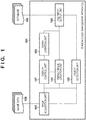
- Fig. 1 shows an example of the functional arrangement of a person count management apparatus 101 according to an embodiment of the present invention.
- the person count management apparatus 101 includes, as functional components, an object detection unit 102, a graph creation unit 103, a result image creation unit 104, an image acquisition unit 105, a file input/output unit 106, and a display control unit 107.
- Image data 108 is image data generated by performing image capturing by a camera (not shown) as an image capturing means connected to the person count management apparatus 101.
- the image data 108 is saved in an HDD (Hard Disc Drive) 204 ( Fig. 2 ) as a recording means of the person count management apparatus 101.
- the image data 108 can be a moving image or a still image.
- the image acquisition unit 105 can acquire the image data 108, and output it to the display control unit 107, the result image creation unit 104, and the object detection unit 102.
- the object detection unit 102 measures the number of persons in the image data 108.
- the object detection unit 102 can measure a person count by, for example, specifying and detecting persons using a well-known image processing technique and measuring the number of detected persons.
- the result image creation unit 104 creates, from the image data received from the image acquisition unit 105 or data received from a database 109 via the file input/output unit 106, a result image (person count result image) to be presented to the user.
- the result image creation unit 104 is configured to create a result image but can create a result other than an image.
- the graph creation unit 103 receives, via the display control unit 107, information set in a display unit 208 ( Fig. 2 ) by the user via an operation unit 207 ( Fig. 2 ), and creates a graph based on the information.
- the display control unit 107 executes display control for the display unit 208 ( Fig. 2 ).
- the display control unit 107 displays, on the display unit 208, the information received from the image acquisition unit 105, the graph creation unit 103, the result image creation unit 104, or the like, and transmits the information displayed on the display unit 208 to the graph creation unit 103, the result image creation unit 104, or the like.
- the file input/output unit 106 inputs/outputs data to/from the database 109.
- Fig. 2 shows an example of the hardware arrangement of the person count management apparatus 101 according to the embodiment of the present invention.
- the person count management apparatus 101 includes, as hardware components, a CPU (Central Processing Unit) 201, a ROM (Read Only Memory) 202, a RAM (Read Only Memory) 203, the HDD 204, a network interface 205, the operation unit 207, and the display unit 208.
- a CPU Central Processing Unit
- ROM Read Only Memory
- RAM Read Only Memory
- the CPU 201 comprehensively controls the person count management apparatus 101.
- the ROM 202 stores a program and the like to be used by the CPU 201 to control the person count management apparatus 101. Note that a secondary storage device may be used instead of the ROM 202.
- the RAM 203 is a memory for deploying a program read out from the ROM 202 and executing processing.
- the RAM 203 serves as a temporary storage memory, and is also used as a storage area to temporarily store data to undergo various processes.
- the HDD 204 stores the database 109.
- the network interface 205 serves as an interface for performing communication via a network 206 to acquire the image data 108 of a connection destination.
- the display unit 208 is a device including a screen such as a display for displaying the information received from the image acquisition unit 105, the graph creation unit 103, the result image creation unit 104, or the like.
- the operation unit 207 is used by an input operation performed by the user, and includes, for example, a mouse and a touch panel.
- the hardware arrangement of the person count management apparatus 101 includes the same hardware components as those mounted on a general PC (Personal Computer). Therefore, various functions implemented by the person count management apparatus 101 can be implemented as software operating on a general PC.
- PC Personal Computer
- a main window 301 includes an image display area 302, a region person count button 303, a passing person count button 304, and a graph setting dialog activation button 305.
- the image of the image data 108 acquired by the image acquisition unit 105 via the network interface 205 is displayed.
- the region person count button 303 is a button for instructing to count the number of persons existing in a predetermined region for each time period.
- the passing person count button 304 is a button for instructing to count the number of persons passing a predetermined position in the predetermined region for each time period.
- the graph setting dialog activation button 305 is a button for instructing to display, on the display unit 208, a graph setting dialog to be used to make settings for creating/displaying a graph.
- the operation of the person count management apparatus 101 when the user selects each of the region person count button 303, the passing person count button 304, and the graph setting dialog activation button 305 via the operation unit 207 will be described below.
- the image data 108 for which the object detection unit 102 measures the number of persons when the region person count button 303 is selected is a moving image or a still image.
- the object detection unit 102 measures the number (person count) of persons in the image data 108.
- the object detection unit 102 continuously acquires the image data 108, and continuously measures the person count.
- the object detection unit 102 outputs, as measurement data, pieces of information of the image capturing time of the image data 108 as a person count measurement target, the measured person count, the coordinates and size of each detected person in the image, and the image data 108 to the file input/output unit 106 in association with each other.
- the file input/output unit 106 saves the measurement data received from the object detection unit 102 in the database 109. Note that the saving destination of the data is not limited to the database 109.
- Fig. 4 shows an example of an image of the main window of the screen of the display unit 208 during person count measurement performed by the object detection unit 102 when the region person count button 303 is selected.
- the display control unit 107 displays the image data 108 in a main window 401 of the screen of the display unit 208.
- the display control unit 107 displays information of the person count measured by the object detection unit 102 in the main window 401 like a number 402.
- the object detection unit 102 measures the numbers of persons passing a detection line (passage line) set in the image of the image data 108 both in the same direction (positive direction) as a set direction and in a direction (opposite direction) opposite to the set direction.
- the detection line and the direction may be set by the user, as will be described later with reference to Fig. 6B , or may be set by the CPU 201 by giving a predetermined condition to the person count management apparatus 101.
- the object detection unit 102 measures the number of persons passing in the positive direction as an In person count, and measures the number of persons passing in the opposite direction as an Out person count.
- the object detection unit 102 continuously acquires the image data 108, and continuously measures the person count.
- the object detection unit 102 outputs, as measurement data, pieces of information of the image capturing time of the image data 108 as a person count measurement target, the measured person count, the coordinates and size of each detected person in the image, the set detection line, the set direction (positive direction), and the image data 108 to the file input/output unit 106 in association with each other.
- the file input/output unit 106 saves the measurement data received from the object detection unit 102 in the database 109. Note that the saving destination of the data is not limited to the database 109.
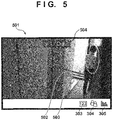
- Fig. 5 shows an example of an image of the main window of the screen of the display unit 208 during person count measurement performed by the object detection unit 102 when the passing person count button 304 is selected.
- the display control unit 107 displays the image data 108 in a main window 501 of the screen of the display unit 208.
- the display control unit 107 also displays a detection line 502 and an arrow 503 of the positive direction in the main window 501.
- the display control unit 107 displays the information of the In person count and the Out person count measured by the object detection unit 102 in the main window 501 like numbers 504.
- the display control unit 107 displays, on the screen of the display unit 208, the graph setting dialog to be used to make settings for creating/displaying a graph.
- Figs. 6A and 6B each show an example of the graph setting dialog.
- Fig. 6A shows a graph setting dialog 601 when the user selects a "region person count" in a type setting region 603 (to be described later).
- Fig. 6B shows a graph setting dialog 611 when the user selects a "passing person count” in a type setting region 603.
- the graph creation unit 103 performs plotting processing.
- the graph setting dialog 601 shown in Fig. 6A includes a start date and time/end date and time setting region 602, the type setting region 603, a search button 604, a detection region setting region 605, a totalization unit setting region 606, and display/cancel buttons 607. An operation for each button/region is performed via the operation unit 207.
- the start date and time/end date and time setting region 602 is a region where a graph creating target period is set, and the user sets the target period by specifying a start date and time and an end date and time.
- the user can select one of the "region person count” and the "passing person count” from, for example, a pull-down list. If the "region person count” is selected, the graph creation unit 103 creates a graph corresponding to the person count measured in response to selection of the region person count button 303. If the "passing person count” is selected, the graph creation unit 103 creates a graph corresponding to the person count measured in response to selection of the passing person count button 304.
- the detection region setting region 605 is a region where an image capturing target region is set, and the user can select the region from, for example, a pull-down list. Note that it may be configured to designate, as the detection region setting region 605, the image capturing means used to generate the image data 108.
- the totalization unit setting region 606 is a region where the totalization unit time of graph creation is set, and the user can select the region from, for example, a pull-down list.
- the graph creation unit 103 creates a graph based on the set information. After the graph is created, the display control unit 107 displays a screen shown in Fig. 7 (to be described later) on the display unit 208. If the settings are modified, the user selects the cancel button of the display/cancel buttons 607, and makes settings again.
- the graph setting dialog 611 shown in Fig. 6B includes a start date and time/end date and time setting region 612, a type setting region 613, a search button 614, a detection line setting region 615, a totalization unit setting region 616, and display/cancel buttons 617.
- An operation for each button/region is performed via the operation unit 207.
- the start date and time/end date and time setting region 612, the type setting region 613, the search button 614, the totalization unit setting region 616, and the display/cancel buttons 617 are similar to the start date and time/end date and time setting region 602, the type setting region 603, the search button 604, the totalization unit setting region 606, and the display/cancel buttons 607 in Fig. 6A , respectively, and a description thereof will be omitted.
- the detection line setting region 615 is a region where the detection line 502 shown in Fig. 5 and a direction as a positive direction are selected from, for example, a pull-down list.
- the graph creation unit 103 creates a graph based on the set information. After the graph is created, the display control unit 107 displays a screen shown in Fig. 9 (to be described later) on the display unit 208. If the settings are modified, the user selects the cancel button of the display/cancel buttons 607, and makes settings again.
- Fig. 7 shows an example of a region person count graph 701 created by the graph creation unit 103 in accordance with the user settings in the graph setting dialog 601 shown in Fig. 6A and displayed on the screen of the display unit 208 by the display control unit 107.
- the ordinate represents the person count
- the abscissa represents the time.
- the time of the abscissa includes at least a period from the start date and time to the end date and time which have been set in the start date and time/end date and time setting region 602 shown in Fig. 6A .
- a bar 702 as one of graph elements indicates the average of the numbers of persons counted when measurement processing is performed a plurality of times during a period of 09:08 to 09:12 along the totalization unit time (the totalization unit time is 4 min in the example of Fig. 7 ) set in the totalization unit setting region 606 shown in Fig. 6A .
- each bar as each graph element indicates the average of the numbers of persons counted in each totalization unit time, a maximum person count, a minimum person count, or a combination thereof, which is measured in each totalization unit time may be indicated instead. If measurement is performed only once in each totalization unit time, the person count is displayed intact as a measurement result.
- the result image creation unit 104 selects measurement data whose image capturing time is earliest among the measurement data which are measured in a time period of a totalization time unit in which the selected bar 702 exists and saved in the database 109. Then, the result image creation unit 104 acquires, from the database 109 via the file input/output unit 106, the measured person count, the coordinates and size of each detected person in the image, and the image data, all of which are included in the selected measurement data. If it is impossible to acquire the image data from the measurement data, the result image creation unit 104 may acquire the image data 108 from the image acquisition unit 105. Subsequently, the result image creation unit 104 creates a result from the acquired data. In this embodiment, the result image creation unit 104 creates a region person count result image to be displayed as a result on the display unit 208.
- Fig. 8A shows a region person count result image 801 thus created by the result image creation unit 104.
- the region person count result image 801 is a still image, and is, for example, an image obtained by superimposing, on the measurement target image data, an ellipse 802 obtained from the coordinates and size of the detected person and a measured person count 803.
- the region person count result image 801 is displayed in the image display area 302. Note that another graphic pointing the detected person may be used instead of the ellipse 802.
- Fig. 8A shows an example in which the region person count result image 801 for one measurement data is created from one bar as one graph element and displayed
- the present invention is not limited to this.
- the result image creation unit 104 may create a plurality of region person count result images in correspondence with all the measurement data which have been measured in the time period of the totalization unit time in which one bar exists and saved in the database, and the display control unit 107 may display these images in time series or simultaneously.
- the result image creation unit 104 can create, as a plurality of region person count result images 801, images respectively representing a plurality of detected persons, and the display control unit 107 can display the images in time series or simultaneously ( Fig. 8B ).
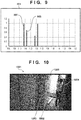
- Fig. 9 shows an example of a passing person count graph 901 created by the graph creation unit 103 in accordance with the user settings in the graph setting dialog 611 shown in Fig. 6B and displayed on the screen of the display unit 208 by the display control unit 107.
- the ordinate represents the person count
- the abscissa represents the time.
- the time of the abscissa includes at least a period from the start date and time to the end date and time which have been set in the start date and time/end date and time setting region 612 shown in Fig. 6B .
- Bars 902 and 903 respectively indicate the In person count and the Out person count obtained during a period of 11:10 to 11:20 along the totalization unit time (the totalization unit time is 10 min in the example of Fig. 7 ) set in the totalization unit setting region 616 shown in Fig. 6B .
- the result image creation unit 104 operates, as follows.
- measured results can be saved, the saved results can be called later, the results during a specific period can be plotted and displayed, and a measurement result image as a graph element can be displayed from the displayed graph. It is possible to present, to the user, display to be analyzed more easily, by changing the display form in accordance with the type of a person count to be measured.
- the present invention can be implemented by processing of supplying a program for implementing one or more functions of the above-described embodiment to a system or apparatus via a network or storage medium, and causing one or more processors in the computer of the system or apparatus to read out and execute the program.
- the present invention can also be implemented by a circuit (for example, an ASIC) for implementing one or more functions.
Landscapes
- Engineering & Computer Science (AREA)
- Multimedia (AREA)
- Physics & Mathematics (AREA)
- General Physics & Mathematics (AREA)
- Theoretical Computer Science (AREA)
- Human Computer Interaction (AREA)
- Computer Vision & Pattern Recognition (AREA)
- Signal Processing (AREA)
- Image Processing (AREA)
- Image Analysis (AREA)
- Closed-Circuit Television Systems (AREA)
Applications Claiming Priority (2)
| Application Number | Priority Date | Filing Date | Title |
|---|---|---|---|
| JP2017107067A JP6910208B2 (ja) | 2017-05-30 | 2017-05-30 | 情報処理装置、情報処理方法およびプログラム |
| PCT/JP2018/015324 WO2018221030A1 (fr) | 2017-05-30 | 2018-04-12 | Dispositif de gestion de dénombrement de personnes et procédé et programme de gestion de dénombrement de personnes |
Publications (3)
| Publication Number | Publication Date |
|---|---|
| EP3633986A1 true EP3633986A1 (fr) | 2020-04-08 |
| EP3633986A4 EP3633986A4 (fr) | 2020-10-14 |
| EP3633986B1 EP3633986B1 (fr) | 2025-11-05 |
Family
ID=64454703
Family Applications (1)
| Application Number | Title | Priority Date | Filing Date |
|---|---|---|---|
| EP18809856.0A Active EP3633986B1 (fr) | 2017-05-30 | 2018-04-12 | Dispositif de gestion de dénombrement de personnes et procédé et programme de gestion de dénombrement de personnes |
Country Status (5)
| Country | Link |
|---|---|
| US (1) | US11250273B2 (fr) |
| EP (1) | EP3633986B1 (fr) |
| JP (1) | JP6910208B2 (fr) |
| CN (1) | CN110709857B (fr) |
| WO (1) | WO2018221030A1 (fr) |
Families Citing this family (6)
| Publication number | Priority date | Publication date | Assignee | Title |
|---|---|---|---|---|
| JP6910208B2 (ja) | 2017-05-30 | 2021-07-28 | キヤノン株式会社 | 情報処理装置、情報処理方法およびプログラム |
| JP7313850B2 (ja) * | 2019-03-15 | 2023-07-25 | キヤノン株式会社 | 情報処理装置、情報処理方法、およびプログラム |
| JP7308089B2 (ja) * | 2019-07-18 | 2023-07-13 | 株式会社小松製作所 | 作業車両の表示システムおよび作業車両の表示方法 |
| JP2022011927A (ja) | 2020-06-30 | 2022-01-17 | キヤノン株式会社 | 情報処理装置、情報処理方法、およびプログラム |
| JP2023066182A (ja) * | 2021-10-28 | 2023-05-15 | アイタックソリューションズ株式会社 | 情報処理システム、情報処理方法及び情報処理プログラム |
| CN116843514B (zh) * | 2023-08-29 | 2023-11-21 | 北京城建置业有限公司 | 一种基于数据识别的物业综合管理系统及方法 |
Family Cites Families (29)
| Publication number | Priority date | Publication date | Assignee | Title |
|---|---|---|---|---|
| JP2005135188A (ja) * | 2003-10-30 | 2005-05-26 | Konica Minolta Holdings Inc | 監視方法、監視システム、およびコンピュータプログラム |
| JP2005143016A (ja) * | 2003-11-10 | 2005-06-02 | Hitachi Kokusai Electric Inc | 監視システムおよび監視方法 |
| JP2005148863A (ja) * | 2003-11-11 | 2005-06-09 | Konica Minolta Holdings Inc | 人数計数システム |
| US7692684B2 (en) * | 2004-09-27 | 2010-04-06 | Point Grey Research Inc. | People counting systems and methods |
| US8228382B2 (en) * | 2005-11-05 | 2012-07-24 | Ram Pattikonda | System and method for counting people |
| JP4541316B2 (ja) * | 2006-04-06 | 2010-09-08 | 三菱電機株式会社 | 映像監視検索システム |
| JP4363421B2 (ja) | 2006-06-30 | 2009-11-11 | ソニー株式会社 | 監視システム、監視システム用サーバ及び監視方法 |
| US7787656B2 (en) * | 2007-03-01 | 2010-08-31 | Huper Laboratories Co., Ltd. | Method for counting people passing through a gate |
| JP2010181920A (ja) * | 2009-02-03 | 2010-08-19 | Optex Co Ltd | エリア管理システム |
| WO2010098024A1 (fr) * | 2009-02-24 | 2010-09-02 | 三菱電機株式会社 | Dispositif de suivi d'humain et programme de suivi d'humain |
| GB2476500B (en) * | 2009-12-24 | 2012-06-20 | Infrared Integrated Syst Ltd | Activity mapping system |
| JP5868164B2 (ja) * | 2011-12-21 | 2016-02-24 | キヤノン株式会社 | 撮像装置、情報処理システム、制御方法、及びプログラム |
| JP2014006586A (ja) | 2012-06-21 | 2014-01-16 | Canon Inc | 情報処理装置及びその制御方法、コンピュータプログラム |
| US20140059134A1 (en) * | 2012-08-24 | 2014-02-27 | Realtek Semiconductor Corp. | Multimedia delivery system and related computer program product for providing statistical graph related to auxiliary multimedia data |
| KR101776706B1 (ko) * | 2012-11-30 | 2017-09-08 | 한화테크윈 주식회사 | 복수의 카메라 기반 사람계수장치 및 방법 |
| KR101480348B1 (ko) * | 2013-05-31 | 2015-01-09 | 삼성에스디에스 주식회사 | 사람 검출 장치 및 방법과 사람 계수 장치 및 방법 |
| JP5834249B2 (ja) * | 2013-11-20 | 2015-12-16 | パナソニックIpマネジメント株式会社 | 人物移動分析装置、人物移動分析システムおよび人物移動分析方法 |
| KR101557376B1 (ko) * | 2014-02-24 | 2015-10-05 | 에스케이 텔레콤주식회사 | 사람 계수 방법 및 그를 위한 장치 |
| JP5853141B2 (ja) * | 2014-03-26 | 2016-02-09 | パナソニックIpマネジメント株式会社 | 人数計測装置、人数計測システムおよび人数計測方法 |
| JP5834254B2 (ja) * | 2014-04-11 | 2015-12-16 | パナソニックIpマネジメント株式会社 | 人数計測装置、人数計測システムおよび人数計測方法 |
| JP6074395B2 (ja) * | 2014-09-12 | 2017-02-01 | 富士フイルム株式会社 | コンテンツ管理システム、管理コンテンツ生成方法、管理コンテンツ再生方法、プログラムおよび記録媒体 |
| JP5866542B1 (ja) * | 2014-10-28 | 2016-02-17 | パナソニックIpマネジメント株式会社 | 施設管理支援装置、施設管理支援システムおよび施設管理支援方法 |
| CN105844328B (zh) * | 2015-01-15 | 2021-03-02 | 开利公司 | 用于自动试运行人员计数系统的方法和系统 |
| JP5915960B1 (ja) * | 2015-04-17 | 2016-05-11 | パナソニックIpマネジメント株式会社 | 動線分析システム及び動線分析方法 |
| JP6532398B2 (ja) * | 2015-08-07 | 2019-06-19 | キヤノン株式会社 | 画像処理装置、画像処理方法およびプログラム |
| JP6938841B2 (ja) | 2015-12-09 | 2021-09-22 | 株式会社ニコン | ズームレンズ及び光学機器 |
| WO2017123920A1 (fr) * | 2016-01-14 | 2017-07-20 | RetailNext, Inc. | Détection, suivi et comptage d'objets dans des vidéos |
| US10497130B2 (en) * | 2016-05-10 | 2019-12-03 | Panasonic Intellectual Property Management Co., Ltd. | Moving information analyzing system and moving information analyzing method |
| JP6910208B2 (ja) | 2017-05-30 | 2021-07-28 | キヤノン株式会社 | 情報処理装置、情報処理方法およびプログラム |
-
2017
- 2017-05-30 JP JP2017107067A patent/JP6910208B2/ja active Active
-
2018
- 2018-04-12 CN CN201880035612.0A patent/CN110709857B/zh active Active
- 2018-04-12 EP EP18809856.0A patent/EP3633986B1/fr active Active
- 2018-04-12 WO PCT/JP2018/015324 patent/WO2018221030A1/fr not_active Ceased
-
2019
- 2019-11-27 US US16/697,425 patent/US11250273B2/en active Active
Also Published As
| Publication number | Publication date |
|---|---|
| US11250273B2 (en) | 2022-02-15 |
| EP3633986A4 (fr) | 2020-10-14 |
| WO2018221030A1 (fr) | 2018-12-06 |
| JP6910208B2 (ja) | 2021-07-28 |
| US20200097736A1 (en) | 2020-03-26 |
| CN110709857A (zh) | 2020-01-17 |
| CN110709857B (zh) | 2023-11-28 |
| JP2018207175A (ja) | 2018-12-27 |
| EP3633986B1 (fr) | 2025-11-05 |
Similar Documents
| Publication | Publication Date | Title |
|---|---|---|
| EP3633986A1 (fr) | Dispositif de gestion de dénombrement de personnes et procédé et programme de gestion de dénombrement de personnes | |
| US10241640B2 (en) | System and method for visualization of history of events using BIM model | |
| US10602080B2 (en) | Flow line analysis system and flow line analysis method | |
| US10607240B2 (en) | Activity situation analysis apparatus, activity situation analysis system, and activity situation analysis method | |
| US10965913B2 (en) | Monitoring apparatus, monitoring system and monitoring method | |
| US20160275534A1 (en) | Person movement analysis device, person movement analysis system, and person movement analysis method | |
| US10474972B2 (en) | Facility management assistance device, facility management assistance system, and facility management assistance method for performance analysis based on review of captured images | |
| JP6241666B2 (ja) | 利用者管理装置、利用者管理システムおよび利用者管理方法 | |
| US12046078B2 (en) | Accident detection device and accident detection method | |
| JP6024933B2 (ja) | 店員作業管理装置、店員作業管理システムおよび店員作業管理方法 | |
| US12260647B2 (en) | Measurement method | |
| JP2015141563A (ja) | 店員作業管理装置、店員作業管理システムおよび店員作業管理方法 | |
| US12100219B2 (en) | Generating images or timelines based on user-configured thresholds for number of people and staying time in target area | |
| JP2016015579A (ja) | 情報処理装置、情報処理方法及びプログラム | |
| JP6602067B2 (ja) | 表示制御装置、表示制御方法、プログラム | |
| CN108804281A (zh) | 设施监视装置 | |
| US10783365B2 (en) | Image processing device and image processing system | |
| JP2020178149A (ja) | 監視装置及び監視方法 | |
| JP2020123845A (ja) | 監視装置及び監視方法 | |
| CN115937730A (zh) | 推测装置、推测方法以及存储介质 | |
| JP7775913B2 (ja) | 画像分析装置、画像分析方法及びプログラム | |
| JP7091199B2 (ja) | 画像処理装置、方法及びプログラム | |
| JP6268496B2 (ja) | 警備システム及び画像表示方法 |
Legal Events
| Date | Code | Title | Description |
|---|---|---|---|
| STAA | Information on the status of an ep patent application or granted ep patent |
Free format text: STATUS: THE INTERNATIONAL PUBLICATION HAS BEEN MADE |
|
| PUAI | Public reference made under article 153(3) epc to a published international application that has entered the european phase |
Free format text: ORIGINAL CODE: 0009012 |
|
| STAA | Information on the status of an ep patent application or granted ep patent |
Free format text: STATUS: REQUEST FOR EXAMINATION WAS MADE |
|
| 17P | Request for examination filed |
Effective date: 20200102 |
|
| AK | Designated contracting states |
Kind code of ref document: A1 Designated state(s): AL AT BE BG CH CY CZ DE DK EE ES FI FR GB GR HR HU IE IS IT LI LT LU LV MC MK MT NL NO PL PT RO RS SE SI SK SM TR |
|
| AX | Request for extension of the european patent |
Extension state: BA ME |
|
| DAV | Request for validation of the european patent (deleted) | ||
| DAX | Request for extension of the european patent (deleted) | ||
| A4 | Supplementary search report drawn up and despatched |
Effective date: 20200916 |
|
| RIC1 | Information provided on ipc code assigned before grant |
Ipc: G06M 7/00 20060101ALI20200910BHEP Ipc: H04N 7/18 20060101AFI20200910BHEP Ipc: G06T 7/60 20170101ALI20200910BHEP |
|
| STAA | Information on the status of an ep patent application or granted ep patent |
Free format text: STATUS: EXAMINATION IS IN PROGRESS |
|
| 17Q | First examination report despatched |
Effective date: 20210413 |
|
| GRAP | Despatch of communication of intention to grant a patent |
Free format text: ORIGINAL CODE: EPIDOSNIGR1 |
|
| STAA | Information on the status of an ep patent application or granted ep patent |
Free format text: STATUS: GRANT OF PATENT IS INTENDED |
|
| INTG | Intention to grant announced |
Effective date: 20250611 |
|
| GRAS | Grant fee paid |
Free format text: ORIGINAL CODE: EPIDOSNIGR3 |
|
| GRAA | (expected) grant |
Free format text: ORIGINAL CODE: 0009210 |
|
| STAA | Information on the status of an ep patent application or granted ep patent |
Free format text: STATUS: THE PATENT HAS BEEN GRANTED |
|
| AK | Designated contracting states |
Kind code of ref document: B1 Designated state(s): AL AT BE BG CH CY CZ DE DK EE ES FI FR GB GR HR HU IE IS IT LI LT LU LV MC MK MT NL NO PL PT RO RS SE SI SK SM TR |
|
| REG | Reference to a national code |
Ref country code: CH Ref legal event code: F10 Free format text: ST27 STATUS EVENT CODE: U-0-0-F10-F00 (AS PROVIDED BY THE NATIONAL OFFICE) Effective date: 20251105 Ref country code: GB Ref legal event code: FG4D |
|
| REG | Reference to a national code |
Ref country code: DE Ref legal event code: R096 Ref document number: 602018086954 Country of ref document: DE |
|
| REG | Reference to a national code |
Ref country code: IE Ref legal event code: FG4D |
|
| REG | Reference to a national code |
Ref country code: NL Ref legal event code: MP Effective date: 20251105 |
|
| PG25 | Lapsed in a contracting state [announced via postgrant information from national office to epo] |
Ref country code: ES Free format text: LAPSE BECAUSE OF FAILURE TO SUBMIT A TRANSLATION OF THE DESCRIPTION OR TO PAY THE FEE WITHIN THE PRESCRIBED TIME-LIMIT Effective date: 20251105 |
|
| REG | Reference to a national code |
Ref country code: LT Ref legal event code: MG9D |
|
| PG25 | Lapsed in a contracting state [announced via postgrant information from national office to epo] |
Ref country code: NO Free format text: LAPSE BECAUSE OF FAILURE TO SUBMIT A TRANSLATION OF THE DESCRIPTION OR TO PAY THE FEE WITHIN THE PRESCRIBED TIME-LIMIT Effective date: 20260205 |
|
| PG25 | Lapsed in a contracting state [announced via postgrant information from national office to epo] |
Ref country code: HR Free format text: LAPSE BECAUSE OF FAILURE TO SUBMIT A TRANSLATION OF THE DESCRIPTION OR TO PAY THE FEE WITHIN THE PRESCRIBED TIME-LIMIT Effective date: 20251105 Ref country code: AT Free format text: LAPSE BECAUSE OF FAILURE TO SUBMIT A TRANSLATION OF THE DESCRIPTION OR TO PAY THE FEE WITHIN THE PRESCRIBED TIME-LIMIT Effective date: 20251105 Ref country code: FI Free format text: LAPSE BECAUSE OF FAILURE TO SUBMIT A TRANSLATION OF THE DESCRIPTION OR TO PAY THE FEE WITHIN THE PRESCRIBED TIME-LIMIT Effective date: 20251105 |
|
| REG | Reference to a national code |
Ref country code: AT Ref legal event code: MK05 Ref document number: 1855681 Country of ref document: AT Kind code of ref document: T Effective date: 20251105 |
|
| PG25 | Lapsed in a contracting state [announced via postgrant information from national office to epo] |
Ref country code: NL Free format text: LAPSE BECAUSE OF FAILURE TO SUBMIT A TRANSLATION OF THE DESCRIPTION OR TO PAY THE FEE WITHIN THE PRESCRIBED TIME-LIMIT Effective date: 20251105 |
|
| PG25 | Lapsed in a contracting state [announced via postgrant information from national office to epo] |
Ref country code: RS Free format text: LAPSE BECAUSE OF FAILURE TO SUBMIT A TRANSLATION OF THE DESCRIPTION OR TO PAY THE FEE WITHIN THE PRESCRIBED TIME-LIMIT Effective date: 20260205 |
|
| PG25 | Lapsed in a contracting state [announced via postgrant information from national office to epo] |
Ref country code: IS Free format text: LAPSE BECAUSE OF FAILURE TO SUBMIT A TRANSLATION OF THE DESCRIPTION OR TO PAY THE FEE WITHIN THE PRESCRIBED TIME-LIMIT Effective date: 20260305 |
|
| PG25 | Lapsed in a contracting state [announced via postgrant information from national office to epo] |
Ref country code: PT Free format text: LAPSE BECAUSE OF FAILURE TO SUBMIT A TRANSLATION OF THE DESCRIPTION OR TO PAY THE FEE WITHIN THE PRESCRIBED TIME-LIMIT Effective date: 20260305 |
|
| PG25 | Lapsed in a contracting state [announced via postgrant information from national office to epo] |
Ref country code: PL Free format text: LAPSE BECAUSE OF FAILURE TO SUBMIT A TRANSLATION OF THE DESCRIPTION OR TO PAY THE FEE WITHIN THE PRESCRIBED TIME-LIMIT Effective date: 20251105 |
|
| PG25 | Lapsed in a contracting state [announced via postgrant information from national office to epo] |
Ref country code: LV Free format text: LAPSE BECAUSE OF FAILURE TO SUBMIT A TRANSLATION OF THE DESCRIPTION OR TO PAY THE FEE WITHIN THE PRESCRIBED TIME-LIMIT Effective date: 20251105 |