EP3637257A1 - Ansichtswechsel - Google Patents
Ansichtswechsel Download PDFInfo
- Publication number
- EP3637257A1 EP3637257A1 EP17925826.4A EP17925826A EP3637257A1 EP 3637257 A1 EP3637257 A1 EP 3637257A1 EP 17925826 A EP17925826 A EP 17925826A EP 3637257 A1 EP3637257 A1 EP 3637257A1
- Authority
- EP
- European Patent Office
- Prior art keywords
- view
- screenshot
- switching
- module
- display
- Prior art date
- Legal status (The legal status is an assumption and is not a legal conclusion. Google has not performed a legal analysis and makes no representation as to the accuracy of the status listed.)
- Withdrawn
Links
Images




Classifications
-
- G—PHYSICS
- G06—COMPUTING OR CALCULATING; COUNTING
- G06F—ELECTRIC DIGITAL DATA PROCESSING
- G06F9/00—Arrangements for program control, e.g. control units
- G06F9/06—Arrangements for program control, e.g. control units using stored programs, i.e. using an internal store of processing equipment to receive or retain programs
- G06F9/46—Multiprogramming arrangements
- G06F9/48—Program initiating; Program switching, e.g. by interrupt
- G06F9/4806—Task transfer initiation or dispatching
- G06F9/4843—Task transfer initiation or dispatching by program, e.g. task dispatcher, supervisor, operating system
-
- G—PHYSICS
- G06—COMPUTING OR CALCULATING; COUNTING
- G06F—ELECTRIC DIGITAL DATA PROCESSING
- G06F9/00—Arrangements for program control, e.g. control units
- G06F9/06—Arrangements for program control, e.g. control units using stored programs, i.e. using an internal store of processing equipment to receive or retain programs
- G06F9/46—Multiprogramming arrangements
- G06F9/54—Interprogram communication
- G06F9/543—User-generated data transfer, e.g. clipboards, dynamic data exchange [DDE], object linking and embedding [OLE]
-
- G—PHYSICS
- G06—COMPUTING OR CALCULATING; COUNTING
- G06F—ELECTRIC DIGITAL DATA PROCESSING
- G06F16/00—Information retrieval; Database structures therefor; File system structures therefor
- G06F16/90—Details of database functions independent of the retrieved data types
- G06F16/95—Retrieval from the web
- G06F16/958—Organisation or management of web site content, e.g. publishing, maintaining pages or automatic linking
-
- G—PHYSICS
- G06—COMPUTING OR CALCULATING; COUNTING
- G06F—ELECTRIC DIGITAL DATA PROCESSING
- G06F3/00—Input arrangements for transferring data to be processed into a form capable of being handled by the computer; Output arrangements for transferring data from processing unit to output unit, e.g. interface arrangements
- G06F3/01—Input arrangements or combined input and output arrangements for interaction between user and computer
- G06F3/048—Interaction techniques based on graphical user interfaces [GUI]
- G06F3/0481—Interaction techniques based on graphical user interfaces [GUI] based on specific properties of the displayed interaction object or a metaphor-based environment, e.g. interaction with desktop elements like windows or icons, or assisted by a cursor's changing behaviour or appearance
- G06F3/04812—Interaction techniques based on cursor appearance or behaviour, e.g. being affected by the presence of displayed objects
-
- G—PHYSICS
- G06—COMPUTING OR CALCULATING; COUNTING
- G06F—ELECTRIC DIGITAL DATA PROCESSING
- G06F3/00—Input arrangements for transferring data to be processed into a form capable of being handled by the computer; Output arrangements for transferring data from processing unit to output unit, e.g. interface arrangements
- G06F3/01—Input arrangements or combined input and output arrangements for interaction between user and computer
- G06F3/048—Interaction techniques based on graphical user interfaces [GUI]
- G06F3/0481—Interaction techniques based on graphical user interfaces [GUI] based on specific properties of the displayed interaction object or a metaphor-based environment, e.g. interaction with desktop elements like windows or icons, or assisted by a cursor's changing behaviour or appearance
- G06F3/0483—Interaction with page-structured environments, e.g. book metaphor
-
- G—PHYSICS
- G06—COMPUTING OR CALCULATING; COUNTING
- G06F—ELECTRIC DIGITAL DATA PROCESSING
- G06F9/00—Arrangements for program control, e.g. control units
- G06F9/06—Arrangements for program control, e.g. control units using stored programs, i.e. using an internal store of processing equipment to receive or retain programs
- G06F9/46—Multiprogramming arrangements
- G06F9/54—Interprogram communication
-
- G—PHYSICS
- G06—COMPUTING OR CALCULATING; COUNTING
- G06F—ELECTRIC DIGITAL DATA PROCESSING
- G06F3/00—Input arrangements for transferring data to be processed into a form capable of being handled by the computer; Output arrangements for transferring data from processing unit to output unit, e.g. interface arrangements
- G06F3/01—Input arrangements or combined input and output arrangements for interaction between user and computer
- G06F3/048—Interaction techniques based on graphical user interfaces [GUI]
- G06F3/0484—Interaction techniques based on graphical user interfaces [GUI] for the control of specific functions or operations, e.g. selecting or manipulating an object, an image or a displayed text element, setting a parameter value or selecting a range
- G06F3/04845—Interaction techniques based on graphical user interfaces [GUI] for the control of specific functions or operations, e.g. selecting or manipulating an object, an image or a displayed text element, setting a parameter value or selecting a range for image manipulation, e.g. dragging, rotation, expansion or change of colour
Definitions
- the present disclosure relates to view switching.
- apps applications
- development modes of apps may include a native mode, a web mode, and a hybrid mode.
- the objective of the present disclosure is to provide a view switching method and apparatus and a computing device, so as to at least partially overcome one or more problems that result from restrictions and disadvantages in the prior art.
- a view switching method including: capturing a currently displayed first view based on a received view switching request to obtain a first screenshot; displaying the first screenshot, and switching from the first view to a second view; and switching from display of the first screenshot to display of the second view.
- another view switching method is provided, applied to a hybrid app including a web view module and a native module, and including: instructing, by the web view module, the native module based on a received view switching request to capture a currently displayed first view to obtain a first screenshot; displaying, by the native module, the first screenshot, and instructing the web view module to switch from the first view to a second view; and instructing, by the web view module after the switching is completed, the native module to switch from display of the first screenshot to display of the second view.
- a view switching apparatus including: a screenshot module, configured to capture a currently displayed first view according to a received view switching request to obtain a first screenshot; a view switching module, configured to switch from the first view to a second view; and a display module, configured to: display the first screenshot, and switch from display of the first screenshot to display of the second view after the switching by the view switching module is completed.
- another view switching apparatus including a web view module and a native module, where the web view module is configured to instruct the native module according to a received view switching request to capture a currently displayed first view to obtain a first screenshot; and the native module is configured to: display the first screenshot, and instruct the web view module to switch from the first view to a second view, and is configured to switch from display of the first screenshot to display of the second view according to an instruction sent by the web view module after the switching is completed.
- a storage medium storing a computer program is provided, where the computer program is executed by a processor of a computer to enable the computer to perform the method in any foregoing embodiment.
- a computing device including: a processor; and a memory, storing instructions executable by the processor, where the processor is configured to perform the method in any foregoing embodiment.
- the technical solutions provided in the embodiments of the present disclosure may have the following beneficial effects:
- display and switching of screenshots are introduced in a view switching process, so that the implementation is simpler than an existing switching solution using a transition animation, thereby saving local computing resources.
- a better switching effect can be achieved, thereby improving user experience.
- a native app may also be referred to as a native development mode, directly relies on an operating system, and is the most interactive and functional mode.
- native apps require relatively high development costs, need to be independently developed on different platforms (for example, an Android platform and an iOS platform), and further incur high update and maintenance costs.
- a web app may deploy pages on a server. A user may use a browser to access the web app. A web app requires low development costs and is applicable to different platforms.
- the user's local resources are saved since it is not necessary to install an app on a client.
- web apps depend greatly on networks and need to consume traffic. Web apps also cannot invoke a native application programming interface (API) of the user's local system. As a result, web apps may have restricted functions.
- API application programming interface
- a hybrid app may also be referred to as a hybrid development mode, and uses both a native element and a web element in the development of an app, so that some advantages of a native app and a web app are combined.
- a hybrid app can be debugged across different platforms, requires low update and maintenance costs.
- hybrid apps can invoke a native API to implement more complete functions, and therefore have found increasingly wide application.
- FIG. 1 is a schematic diagram of an MPA according to an embodiment of the present application.
- FIG. 2 is a schematic diagram of an SPA according to an embodiment of the present application. Referring to FIG. 1 and FIG. 2 , a plurality of pages 11 to 13 are used in the MPA to provide a user with an interaction interface, whereas only a single page 20 is loaded in the SPA and views 201 to 203 in the page 20 are used for dynamic update during the interaction between the user and the app, so that the user can use the web app or hybrid app nearly as fast and smoothly as the user uses the native app.
- a view switching process of an SPA in a hybrid app may be implemented in the following two manners.
- no transition animation is set between two successive views, and a view jump may take place in an instant, and the user experience may be relatively poor.
- a web element is used to simulate a transition animation.
- a native element such as a navigation bar is further included in an interface.
- an interface element other than a web element cannot be controlled.
- a switching effect may be relatively poor during a view jump.
- the implementations of the present invention may be implemented as a system, an apparatus, a device, a method or a computer program product. Therefore, the present disclosure may be specifically implemented in the following forms, that is, complete hardware, complete software (including firmware, resident software, microcode, and the like), or a combination of hardware and software.
- a view switching method and apparatus a medium, and a computing device are provided.
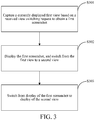
- FIG. 3 is a flowchart of a view switching method according to an embodiment of the present disclosure. As shown in the figure, the method in this embodiment includes the following steps S301 to S303. In an embodiment, the method in this embodiment may be performed by a user terminal (for example, a mobile phone) that runs a hybrid app.
- a user terminal for example, a mobile phone
- Step S301 Capture a currently displayed first view based on a received view switching request to obtain a first screenshot.
- the view switching request may be triggered based on a switching operation of a user.
- the switching operation of user may be, for example, performed based on various manners such as different physical or virtual keys or a touch operation on a touchscreen. This is not limited in the present disclosure.
- Step S302. Display the first screenshot, and switch from the first view to a second view.
- a first screenshot 41 may be placed on top to cover a first view 421 to implement display of the first screenshot 41.
- content of the first view 421 is updated with a second view 422 (a target view) to implement content switching from the first view 421 to the second view 422.
- Step S303 Switch from display of the first screenshot to display of the second view.
- the second view is in a displayable state.
- the switching from display of the first screenshot to display of the second view is completed in this step.
- Switching of view content in step S302 and switching of display in step 303 are separately performed, and therefore may be implemented in different manners.
- a hybrid app using an SPA technology is used as an example.
- the switching from the first view to the second view in step S302 may be implemented by using a web view technology.
- the switching from display of the first screenshot to display of the second view in step 303 may be implemented by using a native technology. In this way, a better switching effect is achieved without a transition animation.
- the screenshot in step S301 may be implemented by using a native technology.
- different native APIs are invoked to separately capture the screenshot in step S301 and implement the switching of display in step S303.
- this embodiment of the present disclosure is not limited to application to an SPA, and is also applicable to an MPA.
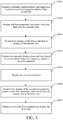
- FIG. 5 is a flowchart of a view switching method according to another embodiment of the present disclosure.
- the method in this embodiment may be performed by a user terminal (for example, a mobile phone) that runs a hybrid app.
- the method in this embodiment includes the following steps S501 to S507.
- Step S501 Capture a currently displayed first view based on a received next-view request to obtain a first screenshot.
- the next-view request may be triggered based on a specific operation of a user. If a physical or virtual key is used as an example, the specific operation may be, for example, pressing a page down key (for example, a right arrow key). If a touchscreen is used as an example, the specific operation may be, for example, swiping left on the touchscreen.
- a specific operation of a user may be, for example, pressing a page down key (for example, a right arrow key).
- a touchscreen for example, the specific operation may be, for example, swiping left on the touchscreen.
- Step S502 Display the first screenshot, and switch from the first view to a second view.
- Step S503. Switch from display of the first screenshot to display of the second view.
- Steps S501to S503 respectively correspond to steps S301 to S303 in the previous embodiment. Details are not described herein again.
- Step S504. Capture the currently displayed second view based on a received previous-view request to obtain a second screenshot.
- the previous-view request may be similarly triggered based on another specific operation of the user.
- the specific operation may be, for example, pressing a page up key (for example, a left arrow key).
- a touchscreen is used as an example, the specific operation may be, for example, swiping right on the touchscreen. This embodiment of the present disclosure is not limited thereto. Details are not described herein again.
- Step S505. Display the second screenshot.
- a second screenshot 612 may be placed on top to cover a second view 622 to implement display of the second screenshot 612.
- Step S506. Switch from display of the second screenshot to display of the first screenshot, and switch from the second view to the first view.
- step S503 content of the second view needs to be completely loaded before switching of display can be performed.
- the first screenshot obtained and stored in previous step S501 may be combined with the second screenshot to perform switching of display.
- content of second view 622 may be updated with the first view 621 (a target view) to implement content switching from the second view 622 to the first view 621.
- Step S507. Remove or hide the first screenshot to display the first view.
- the covering first screenshot on the top layer may be removed or hidden to display the first view.
- the first view 621 is displayed after the first screenshot 611 in FIG. 6b is deleted, so as to complete an entire view switching process.
- step S506 The switching of view content (from the second view to the first view) in step S506 and the switching of display (from the second screenshot to the first screenshot) are separately performed, and therefore may be implemented in different manners.
- a hybrid app using an SPA technology is still used as an example.
- the switching from display of the second screenshot to display of the first screenshot may be implemented by using a native technology, and the switching from the second view to the first view may be implemented by using a web view, so that a better switching effect is achieved without a transition animation.
- display and switching of screenshots are introduced in both processes of switching to a next view and to a previous view.
- the implementation is simpler than a switching solution using a transition animation, thereby saving local computing resources.
- a better switching effect can be achieved, thereby improving user experience.
- a view switching operation may be directly performed based on step S301 to S303 when either the next-view request in step S501 is received or the previous-view request in step S504 is received, which also falls within the protection scope of the embodiment in FIG. 3 . Details are not described herein again.
- a page view provided based on a web view technology usually includes a native element such as a navigation bar.
- a native element such as a navigation bar.
- an operation key such as a previous-page key may be provided in the navigation bar.
- a switch-back operation for the native element when a switch-back operation for the native element is received, it is triggered to generate the previous-view request, so that the process turns to step S504 in FIG. 5 or the previous-view request is directly processed as the view switching request based on step S301 in FIG. 3 . Details are not described herein again.
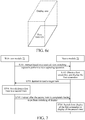
- FIG. 7 is a flowchart of a view switching method according to still another embodiment of the present disclosure.
- the view switching method may be applied to a hybrid app including a web view module and a native module.
- the method in this embodiment includes the following steps S701 to S706.
- Step S701. A web view module 71 instructs a native module 72 based on a received view switching request to perform a view capturing operation.
- Step S702 The native module 72 captures a first view to obtain a first screenshot, and displays the first screenshot.
- Step S703. The native module 72 instructs the web view module 71 to load a target view (a second view).
- Step S704. The web view module 71 switches view content from the first view to the second view.
- Step S705. The web view module 71 instructs the native module 72 after the second view is completely loaded to perform switching of display.
- Step S706 The native module 72 switches from display of the first screenshot to display of the second view.
- the hybrid app may include a page based on an SPA.
- the page may include the first view and the second view.
- FIG. 8 is a flowchart of a view switching method according to yet another embodiment of the present disclosure. This embodiment may be performed following the foregoing embodiment in FIG. 7 . As shown in FIG. 8 , the method in this embodiment includes the following steps S801 to S806.
- Step S801. The web view module 71 instructs the native module 72 based on a received previous-view request to perform a view capturing operation.
- Step S802 The native module 72 captures the currently displayed second view to obtain a second screenshot, and displays the second screenshot.
- Step S803 The native module 72 switches from display of the second screenshot to display of the first screenshot, and instructs the web view module 71 to load a target view (the first view).
- Step S804. The web view module 71 switches the view content from the second view to the first view.
- Step S805. The web view module 71 instructs the native module 72 after the first view is completely loaded to perform a removal or hide operation.
- Step S805. The native module 72 removes or hides the first screenshot to display the first view.
- display and switching of screenshots are introduced in a process of switching to a previous view, so that the implementation is simpler than a switching solution using a transition animation, thereby saving local computing resources.
- a better switching effect can be achieved, thereby improving user experience.
- An implementation of the present application further provides a view switching apparatus.
- FIG. 9 is a structural diagram of a view switching apparatus according to an embodiment of the present disclosure.
- the view switching apparatus in this embodiment includes a screenshot module 91, a view switching module 92, and a display module 93.
- the screenshot module 91 may be configured to capture a currently displayed first view based on a received view switching request to obtain a first screenshot.
- the view switching module 92 may be configured to switch from the first view to a second view.
- the display module 93 may be configured to: display the first screenshot, and switch from display of the first screenshot to display of the second view after the switching by the view switching module is completed.
- display and switching of screenshots are introduced in a view switching process, so that the implementation is simpler than a switching solution using a transition animation, thereby saving local computing resources.
- a better switching effect can be achieved, thereby improving user experience.
- the screenshot module 91 may further be configured to capture the currently displayed second view based on a received previous-view request to obtain a second screenshot.
- the display module 93 may further be configured to display the second screenshot, and switch from display of the second screenshot to display of the first screenshot.
- the view switching module 92 may further be configured to switch from the second view to the first view.
- the screenshot module 91 may further be configured to remove or hide the first screenshot to enable the display module 93 to display the first view.
- the switching of view content (from the second view to the first view) performed by the view switching module 92 and the switching of display (from the second screenshot to the first screenshot) by the display module 93 are separately performed, and therefore may be implemented in different manners.
- a hybrid app using an SPA technology is used as an example.
- the display module 93 may switch from display of the second screenshot to display of the first screenshot by using a native technology, and the view switching module 92 may switch from the second view to the first view by using a web view technology, so that a better switching effect is achieved without a transition animation.
- display and switching of screenshots are introduced in both processes of switching to a next view and to a previous view, so that the implementation is simpler than a switching solution using a transition animation, thereby saving local computing resources.
- a better switching effect can be achieved, thereby improving user experience.
- both the next-view request and the previous-view request in the foregoing embodiment may be considered as the view switching request in the embodiment in FIG. 9 . Therefore, in another embodiment, a view switching operation may be directly performed based on the embodiment in FIG. 9 when either the next-view request is received or the previous-view request is received. Details are not described herein again.
- a page view provided based on a web view technology usually includes a native element such as a navigation bar.
- a native element such as a navigation bar.
- an operation key such as a previous-page key may be provided in the navigation bar.
- the switch-back operation for the native element when a switch-back operation for the native element is received, it is triggered to generate the previous-view request, so that the screenshot module 91, the view switching module 92, and the display module 93 may perform processing according to the view switching request. Details are not described herein again.
- FIG. 10 is a structural diagram of a view switching apparatus according to another embodiment of the present disclosure.
- the view switching apparatus in this embodiment includes a web view module 101 and a native module 102.
- the web view module 101 may be configured to instruct the native module 102 according to a received view switching request to capture a currently displayed first view to obtain a first screenshot.
- the native module 102 may be configured to: display the first screenshot, and instruct the web view module 101 to load the second view, and configured to switch from display of the first screenshot to display of the second view according to an instruction sent by the web view module 101 to the native module after the second view is completely loaded.
- display and switching of screenshots are introduced in a view switching process, so that the implementation is simpler than a switching solution using a transition animation, thereby saving local computing resources.
- a better switching effect can be achieved, thereby improving user experience.
- the web view module 101 may further be configured to instruct the native module 102 based on a received previous-view request to capture the currently displayed second view to obtain a second screenshot.
- the native module 102 may further be configured to: display the second screenshot, continue to switch from display of the second screenshot to display of the first screenshot, and instruct the web view module 101 to load the first view.
- the web view module 101 may further be configured to instruct the native module 101 after the first view is completely loaded to remove or hide the first screenshot to display the first view.
- display and switching of screenshots are introduced in a process of switching to a previous view, so that the implementation is simpler than a switching solution using a transition animation, thereby saving local computing resources.
- a better switching effect can be achieved, thereby improving user experience.
- modules or units of the device configured to perform actions are discussed in the foregoing detailed description, such division is not mandatory.
- the features and functions of two or more modules or units described above may be embodied in one module or unit.
- the features and functions of one module or unit described above may further be embodied by using a plurality of modules or units.
- Members shown as modules or units may be or may not be physical units, that is, may be integrated or distributed to a plurality of network units.
- Some or all of the modules may be selected according to actual requirements to achieve the objective of the solution of the present disclosure. A person of ordinary skill in the art can understand and implement the present disclosure without creative efforts.
- a computer readable storage medium is further provided.
- the computer readable storage medium stores a computer program.
- the program is executed by a processor to implement the steps of the method in any foregoing embodiment. Refer to the detailed description of the foregoing embodiments for specific steps of the method. Details are not described herein again.
- the computer readable storage medium may be a read-only memory (ROM), a random access memory (RAM), a compact disc (CD)-ROM, a magnetic tape, a floppy disk, an optical data storage device or the like.
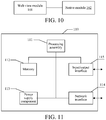
- FIG. 11 is a schematic diagram of a computing device 110 according to an exemplary implementation of the present disclosure.
- the device 110 may be provided as a mobile terminal.
- the device 110 includes a processing assembly 111 that further includes one or more processors and a memory resource represented by a memory 112.
- the memory 112 is configured to store instructions, for example, an application, executable by the processing assembly 111.
- the application stored in the memory 112 may include one or more modules, each of which corresponds to a group of instructions.
- the processing assembly 111 is configured to execute the instructions to perform the foregoing view switching method. Refer to the detailed description of the foregoing method embodiments for the steps of the method. Details are not described herein again.
- the apparatus 110 may further include a power supply component 113 configured to perform power management of the apparatus 110, a wired or wireless network interface 114 configured to connect the apparatus 110 to a network, and an input/output (I/O) interface 115.
- the apparatus 110 may run an operating system such as Android, iOS or similar stored in the memory 112.
Landscapes
- Engineering & Computer Science (AREA)
- Theoretical Computer Science (AREA)
- General Engineering & Computer Science (AREA)
- Software Systems (AREA)
- Physics & Mathematics (AREA)
- General Physics & Mathematics (AREA)
- Human Computer Interaction (AREA)
- Databases & Information Systems (AREA)
- Data Mining & Analysis (AREA)
- User Interface Of Digital Computer (AREA)
- Digital Computer Display Output (AREA)
- Controls And Circuits For Display Device (AREA)
Applications Claiming Priority (2)
| Application Number | Priority Date | Filing Date | Title |
|---|---|---|---|
| CN201710862028.XA CN107678817A (zh) | 2017-09-21 | 2017-09-21 | 视图切换方法和装置以及计算设备 |
| PCT/CN2017/119742 WO2019056645A1 (zh) | 2017-09-21 | 2017-12-29 | 视图切换 |
Publications (2)
| Publication Number | Publication Date |
|---|---|
| EP3637257A1 true EP3637257A1 (de) | 2020-04-15 |
| EP3637257A4 EP3637257A4 (de) | 2020-06-10 |
Family
ID=61137736
Family Applications (1)
| Application Number | Title | Priority Date | Filing Date |
|---|---|---|---|
| EP17925826.4A Withdrawn EP3637257A4 (de) | 2017-09-21 | 2017-12-29 | Ansichtswechsel |
Country Status (7)
| Country | Link |
|---|---|
| US (1) | US20200201673A1 (de) |
| EP (1) | EP3637257A4 (de) |
| JP (1) | JP7093798B2 (de) |
| KR (1) | KR20200058328A (de) |
| CN (1) | CN107678817A (de) |
| TW (1) | TWI719323B (de) |
| WO (1) | WO2019056645A1 (de) |
Families Citing this family (4)
| Publication number | Priority date | Publication date | Assignee | Title |
|---|---|---|---|---|
| CN109828982A (zh) * | 2018-12-15 | 2019-05-31 | 中国平安人寿保险股份有限公司 | 值班表显示方法、装置、计算机装置及存储介质 |
| CN110162265B (zh) * | 2019-05-27 | 2020-09-25 | 北京字节跳动网络技术有限公司 | 一种视图控件的滑动控制方法、装置、设备和存储介质 |
| CN110308961B (zh) * | 2019-07-02 | 2023-03-31 | 广州小鹏汽车科技有限公司 | 一种车载终端的主题场景切换方法及装置 |
| CN118055272A (zh) * | 2024-02-29 | 2024-05-17 | 北京七维视觉传媒科技有限公司 | 一种单服务器三维实时渲染系统动态图像备份方法 |
Family Cites Families (17)
| Publication number | Priority date | Publication date | Assignee | Title |
|---|---|---|---|---|
| US9213538B1 (en) * | 2004-02-06 | 2015-12-15 | Time Warner Cable Enterprises Llc | Methods and apparatus for display element management in an information network |
| US10631246B2 (en) * | 2011-02-14 | 2020-04-21 | Microsoft Technology Licensing, Llc | Task switching on mobile devices |
| US9582598B2 (en) * | 2011-07-05 | 2017-02-28 | Visa International Service Association | Hybrid applications utilizing distributed models and views apparatuses, methods and systems |
| CN103176689B (zh) * | 2011-12-26 | 2016-01-27 | 腾讯科技(深圳)有限公司 | 界面切换方法及系统 |
| US20130212559A1 (en) | 2012-02-14 | 2013-08-15 | Appgyver Oy | Method and System for Developing Applications for Portable Communication Devices |
| CN104111944B (zh) * | 2013-04-19 | 2018-09-18 | 阿里巴巴集团控股有限公司 | 页面处理方法和装置以及页面生成方法和装置 |
| US9307342B2 (en) * | 2013-05-13 | 2016-04-05 | Pivotal Software, Inc. | Dynamic rendering for software applications |
| US9639263B2 (en) * | 2014-08-05 | 2017-05-02 | Weebly, Inc. | Native overlay for rapid editing of web content |
| US9830167B2 (en) * | 2014-08-12 | 2017-11-28 | Linkedin Corporation | Enhancing a multitasking user interface of an operating system |
| US20160132219A1 (en) | 2014-11-06 | 2016-05-12 | Microsoft Technology Licensing, Llc | Enhanced view transitions |
| CN106155454B (zh) * | 2015-03-30 | 2020-06-16 | 阿里巴巴集团控股有限公司 | 一种界面显示方法、装置及电子设备 |
| CN106209925B (zh) * | 2015-04-29 | 2019-07-26 | 阿里巴巴集团控股有限公司 | 页面加载方法、客户端及系统 |
| CN106354355A (zh) * | 2015-07-13 | 2017-01-25 | 华为软件技术有限公司 | 用户界面布局方法、装置及系统 |
| CN106708498A (zh) * | 2015-11-18 | 2017-05-24 | 中兴通讯股份有限公司 | 一种实现多模式应用页面的终端、方法及系统 |
| CN106775795A (zh) * | 2015-11-25 | 2017-05-31 | 阿里巴巴集团控股有限公司 | 一种针对hypbrid app提供服务的方法和装置 |
| CN106681917B (zh) * | 2016-12-21 | 2019-06-18 | 南京大学 | 一种基于神经网络的前端自动化评估方法 |
| CN107122192B (zh) * | 2017-04-27 | 2019-04-26 | 北京三快在线科技有限公司 | 网页视图展示方法、装置、计算设备及存储介质 |
-
2017
- 2017-09-21 CN CN201710862028.XA patent/CN107678817A/zh active Pending
- 2017-12-29 KR KR1020197036601A patent/KR20200058328A/ko not_active Ceased
- 2017-12-29 WO PCT/CN2017/119742 patent/WO2019056645A1/zh not_active Ceased
- 2017-12-29 EP EP17925826.4A patent/EP3637257A4/de not_active Withdrawn
- 2017-12-29 JP JP2019571318A patent/JP7093798B2/ja not_active Expired - Fee Related
-
2018
- 2018-06-26 TW TW107121921A patent/TWI719323B/zh not_active IP Right Cessation
-
2020
- 2020-03-04 US US16/809,409 patent/US20200201673A1/en not_active Abandoned
Also Published As
| Publication number | Publication date |
|---|---|
| JP2020534588A (ja) | 2020-11-26 |
| EP3637257A4 (de) | 2020-06-10 |
| TWI719323B (zh) | 2021-02-21 |
| CA3069374A1 (en) | 2019-03-28 |
| KR20200058328A (ko) | 2020-05-27 |
| TW201921243A (zh) | 2019-06-01 |
| JP7093798B2 (ja) | 2022-06-30 |
| CN107678817A (zh) | 2018-02-09 |
| US20200201673A1 (en) | 2020-06-25 |
| WO2019056645A1 (zh) | 2019-03-28 |
Similar Documents
| Publication | Publication Date | Title |
|---|---|---|
| US10201750B2 (en) | Method and apparatus of preloading browser game on client | |
| US10303491B2 (en) | Method and device of running application program across systems | |
| JP6226394B2 (ja) | インスタンス化可能なジェスチャオブジェクト | |
| US20200201673A1 (en) | View switching | |
| CN107479957A (zh) | 一种多系统应用的切换方法、装置、设备和存储介质 | |
| EP2840802A1 (de) | Verfahren und Vorrichtung zum Teilen von Mediainhalten und Verfahren und Vorrichtung zum Anzeigen von Mediainhalten | |
| CN103870123B (zh) | 一种信息处理方法及电子设备 | |
| CN108762870A (zh) | 一种页面展示方法及装置 | |
| CN113391856B (zh) | 跨任务栈的页面处理方法、装置、设备及介质 | |
| WO2022121790A1 (zh) | 分屏显示方法、装置、电子设备和可读存储介质 | |
| WO2016197590A1 (zh) | 用于在终端设备上提供截屏服务的方法、装置、存储介质及设备 | |
| CN105324753A (zh) | 调用来自web页面或其他应用的应用 | |
| WO2017049731A1 (zh) | 一种多系统间的应用安全保护方法及终端 | |
| US20230276079A1 (en) | Live streaming room page jump method and apparatus, live streaming room page return method and apparatus, and electronic device | |
| CN109144447B (zh) | 分屏窗口调节方法、装置、存储介质及电子设备 | |
| CN104239011B (zh) | 一种终端应用的生成方法、装置、终端及系统 | |
| CN113194200B (zh) | 消息显示方法、装置及电子设备 | |
| CN117289918A (zh) | 界面样式编辑方法、装置、介质及设备 | |
| CN114895824A (zh) | 应用窗口的处理方法、终端设备、服务器和存储介质 | |
| CN112612531B (zh) | 应用程序启动方法、装置、电子设备及存储介质 | |
| CN110908711A (zh) | 应用程序的控件开发方法、装置及电子设备 | |
| US8793342B2 (en) | Interpreting web application content | |
| CN112905072B (zh) | 应用程序的处理方法、装置及电子设备 | |
| CN111949322B (zh) | 信息显示方法和装置 | |
| CA3069374C (en) | View switching |
Legal Events
| Date | Code | Title | Description |
|---|---|---|---|
| STAA | Information on the status of an ep patent application or granted ep patent |
Free format text: STATUS: THE INTERNATIONAL PUBLICATION HAS BEEN MADE |
|
| PUAI | Public reference made under article 153(3) epc to a published international application that has entered the european phase |
Free format text: ORIGINAL CODE: 0009012 |
|
| STAA | Information on the status of an ep patent application or granted ep patent |
Free format text: STATUS: REQUEST FOR EXAMINATION WAS MADE |
|
| 17P | Request for examination filed |
Effective date: 20200110 |
|
| AK | Designated contracting states |
Kind code of ref document: A1 Designated state(s): AL AT BE BG CH CY CZ DE DK EE ES FI FR GB GR HR HU IE IS IT LI LT LU LV MC MK MT NL NO PL PT RO RS SE SI SK SM TR |
|
| AX | Request for extension of the european patent |
Extension state: BA ME |
|
| A4 | Supplementary search report drawn up and despatched |
Effective date: 20200513 |
|
| RIC1 | Information provided on ipc code assigned before grant |
Ipc: G06F 9/54 20060101ALI20200507BHEP Ipc: G06F 9/48 20060101AFI20200507BHEP Ipc: G06F 3/0481 20130101ALI20200507BHEP |
|
| DAV | Request for validation of the european patent (deleted) | ||
| DAX | Request for extension of the european patent (deleted) | ||
| STAA | Information on the status of an ep patent application or granted ep patent |
Free format text: STATUS: EXAMINATION IS IN PROGRESS |
|
| 17Q | First examination report despatched |
Effective date: 20220712 |
|
| STAA | Information on the status of an ep patent application or granted ep patent |
Free format text: STATUS: THE APPLICATION HAS BEEN WITHDRAWN |
|
| 18W | Application withdrawn |
Effective date: 20220825 |