EP3654148B1 - Verbesserte zugänglichkeit von computervorrichtungen durch augenverfolgung - Google Patents
Verbesserte zugänglichkeit von computervorrichtungen durch augenverfolgung Download PDFInfo
- Publication number
- EP3654148B1 EP3654148B1 EP19219431.4A EP19219431A EP3654148B1 EP 3654148 B1 EP3654148 B1 EP 3654148B1 EP 19219431 A EP19219431 A EP 19219431A EP 3654148 B1 EP3654148 B1 EP 3654148B1
- Authority
- EP
- European Patent Office
- Prior art keywords
- gaze
- user
- indicator
- shape
- interactable
- Prior art date
- Legal status (The legal status is an assumption and is not a legal conclusion. Google has not performed a legal analysis and makes no representation as to the accuracy of the status listed.)
- Active
Links
Images


Classifications
-
- G—PHYSICS
- G06—COMPUTING OR CALCULATING; COUNTING
- G06F—ELECTRIC DIGITAL DATA PROCESSING
- G06F3/00—Input arrangements for transferring data to be processed into a form capable of being handled by the computer; Output arrangements for transferring data from processing unit to output unit, e.g. interface arrangements
- G06F3/01—Input arrangements or combined input and output arrangements for interaction between user and computer
- G06F3/011—Arrangements for interaction with the human body, e.g. for user immersion in virtual reality
- G06F3/013—Eye tracking input arrangements
-
- G—PHYSICS
- G06—COMPUTING OR CALCULATING; COUNTING
- G06F—ELECTRIC DIGITAL DATA PROCESSING
- G06F16/00—Information retrieval; Database structures therefor; File system structures therefor
- G06F16/30—Information retrieval; Database structures therefor; File system structures therefor of unstructured textual data
- G06F16/34—Browsing; Visualisation therefor
-
- G—PHYSICS
- G06—COMPUTING OR CALCULATING; COUNTING
- G06F—ELECTRIC DIGITAL DATA PROCESSING
- G06F3/00—Input arrangements for transferring data to be processed into a form capable of being handled by the computer; Output arrangements for transferring data from processing unit to output unit, e.g. interface arrangements
- G06F3/01—Input arrangements or combined input and output arrangements for interaction between user and computer
-
- G—PHYSICS
- G06—COMPUTING OR CALCULATING; COUNTING
- G06F—ELECTRIC DIGITAL DATA PROCESSING
- G06F3/00—Input arrangements for transferring data to be processed into a form capable of being handled by the computer; Output arrangements for transferring data from processing unit to output unit, e.g. interface arrangements
- G06F3/01—Input arrangements or combined input and output arrangements for interaction between user and computer
- G06F3/048—Interaction techniques based on graphical user interfaces [GUI]
- G06F3/0481—Interaction techniques based on graphical user interfaces [GUI] based on specific properties of the displayed interaction object or a metaphor-based environment, e.g. interaction with desktop elements like windows or icons, or assisted by a cursor's changing behaviour or appearance
-
- G—PHYSICS
- G06—COMPUTING OR CALCULATING; COUNTING
- G06F—ELECTRIC DIGITAL DATA PROCESSING
- G06F3/00—Input arrangements for transferring data to be processed into a form capable of being handled by the computer; Output arrangements for transferring data from processing unit to output unit, e.g. interface arrangements
- G06F3/01—Input arrangements or combined input and output arrangements for interaction between user and computer
- G06F3/048—Interaction techniques based on graphical user interfaces [GUI]
- G06F3/0481—Interaction techniques based on graphical user interfaces [GUI] based on specific properties of the displayed interaction object or a metaphor-based environment, e.g. interaction with desktop elements like windows or icons, or assisted by a cursor's changing behaviour or appearance
- G06F3/0482—Interaction with lists of selectable items, e.g. menus
-
- G—PHYSICS
- G06—COMPUTING OR CALCULATING; COUNTING
- G06F—ELECTRIC DIGITAL DATA PROCESSING
- G06F3/00—Input arrangements for transferring data to be processed into a form capable of being handled by the computer; Output arrangements for transferring data from processing unit to output unit, e.g. interface arrangements
- G06F3/01—Input arrangements or combined input and output arrangements for interaction between user and computer
- G06F3/048—Interaction techniques based on graphical user interfaces [GUI]
- G06F3/0484—Interaction techniques based on graphical user interfaces [GUI] for the control of specific functions or operations, e.g. selecting or manipulating an object, an image or a displayed text element, setting a parameter value or selecting a range
-
- G—PHYSICS
- G06—COMPUTING OR CALCULATING; COUNTING
- G06F—ELECTRIC DIGITAL DATA PROCESSING
- G06F3/00—Input arrangements for transferring data to be processed into a form capable of being handled by the computer; Output arrangements for transferring data from processing unit to output unit, e.g. interface arrangements
- G06F3/01—Input arrangements or combined input and output arrangements for interaction between user and computer
- G06F3/048—Interaction techniques based on graphical user interfaces [GUI]
- G06F3/0484—Interaction techniques based on graphical user interfaces [GUI] for the control of specific functions or operations, e.g. selecting or manipulating an object, an image or a displayed text element, setting a parameter value or selecting a range
- G06F3/04842—Selection of displayed objects or displayed text elements
-
- G—PHYSICS
- G06—COMPUTING OR CALCULATING; COUNTING
- G06F—ELECTRIC DIGITAL DATA PROCESSING
- G06F3/00—Input arrangements for transferring data to be processed into a form capable of being handled by the computer; Output arrangements for transferring data from processing unit to output unit, e.g. interface arrangements
- G06F3/01—Input arrangements or combined input and output arrangements for interaction between user and computer
- G06F3/048—Interaction techniques based on graphical user interfaces [GUI]
- G06F3/0487—Interaction techniques based on graphical user interfaces [GUI] using specific features provided by the input device, e.g. functions controlled by the rotation of a mouse with dual sensing arrangements, or of the nature of the input device, e.g. tap gestures based on pressure sensed by a digitiser
-
- G—PHYSICS
- G06—COMPUTING OR CALCULATING; COUNTING
- G06F—ELECTRIC DIGITAL DATA PROCESSING
- G06F2203/00—Indexing scheme relating to G06F3/00 - G06F3/048
- G06F2203/048—Indexing scheme relating to G06F3/048
- G06F2203/04806—Zoom, i.e. interaction techniques or interactors for controlling the zooming operation
Definitions
- the present invention relates to the field of user interaction with a computing device and more specifically to a method of use of gaze input to select interactable elements on a display of a computing device.
- the invention also relates to a system for providing this input and a non-transitory machine readable medium having instructions for carrying out the method.
- US 2016/195924 A1 discloses a gaze-controlled interface system.
- a display presents visual work, whilst a gaze tracker senses the user's gaze position on the display.
- a visual identifier may be positioned on activatable elements over which the user gaze is positioned.
- US 2015/193018 A1 discloses a system whereby gaze is tracked and a target indicator is visualised on a display, the target indicator being controlled by movement of the user gaze.
- WO 2010/141403 A1 discloses a device for implementing eye gaze control of a speech generation device. Selection of objects on a display can be triggered by way of measuring and recording a "dwell time" of the user gaze on an object.
- US 2005/047629 A1 discloses a system whereby a user gaze tracker and a manual operator input are used in order to amplify a target region on a display.
- US 2015/309570 A1 discloses a system whereby a user gaze is tracked in order to determine whether to initiate the display of a zoom window on a user interface.
- US 2015/089381 A1 discloses a system whereby user eye movements are tracked in order to allow a remote desktop client to scroll a remote display to show another part of a remote desktop.
- a method for providing increased accessibility for users of interactive displayed content on a computing device and executing commands from these users on the computing device.
- the method may include analyzing, with one or more processors, content displayed on a display device to identify a plurality of interactive elements most likely to be interacted with by a user.
- the method may also include causing, with the one or more processors, each of the plurality of interactive elements to be highlighted in a different manner.
- the method may additionally include causing, with the one or more processors, a plurality of graphical elements to be displayed on the display device.
- Each of the plurality of graphical elements may be associated with a different interactive element.
- Each of the plurality of graphical elements may visually correspond with highlighting of its associated interactive element.
- the method may moreover include determining, with at least an eye tracking device, a location of the user's gaze on the display device.
- the method may furthermore include causing, with the one or more processors, a particular interactive element to be activated, based at least in part on the user gazing at its associated graphical element, where activation of the particular interactive element causes the display device to display new content.
- a system for providing increased accessibility for users of interactive displayed content on a computing device and executing commands from these users on the computing device.
- the system may include a display device, an eye tracking device, and one or more processors.
- the display device may be configured to display content to a user.
- the eye tracking device may be configured to determine a location of a user's gaze on a display device.
- the one or more processors may be configured to perform a method. The method may include analyzing content displayed on the display device to identify a plurality of interactive elements most likely to be interacted with by the user.
- the method may also include causing each of the plurality of interactive elements to be highlighted in a different manner.
- the method may further include causing a plurality of graphical elements to be displayed on the display device. Each of the plurality of graphical elements may be associated with a different interactive element. Each of the plurality of graphical elements may visually correspond with highlighting of its associated interactive element.
- the method may additionally include causing a particular interactive element to be activated, based at least in part on the user gazing at its associated graphical element, where activation of the particular interactive element causes the display device to display new content.
- a non-transitory machine readable medium having instructions stored thereon for providing increased accessibility for users of interactive displayed content on a computing device and executing commands from these users on the computing device.
- the instructions may be executable by one or more processors to perform a method.
- the method may include analyzing content displayed on a display device to identify a plurality of interactive elements most likely to be interacted with by a user.
- the method may also include causing each of the plurality of interactive elements to be highlighted in a different manner.
- the method may further include causing a plurality of graphical elements to be displayed on the display device.
- Each of the plurality of graphical elements may be associated with a different interactive element.
- Each of the plurality of graphical elements may visually correspond with highlighting of its associated interactive element.
- the method may additionally include determining, using an eye tracking device, a location of the user's gaze on the display device.
- the method may moreover include causing a particular interactive element to be activated, based at least in part on the user gazing at its associated graphical element, where activation of the particular interactive element causes the display device to display new content.
- a method for providing the ability via gaze input to snap-to and then activate interactable elements on a display of a computing device comprising: determining, with at least an eye tracking device, a location of the user's gaze on the display; causing, with the one or more processors, a gaze indicator shape to be displayed at the location of the user's gaze; causing, with the one or more processors, a primary indicator to be displayed on the display upon the user nearing an interactable element with the gaze indicator shape, and locating the gaze indicator shape at least partially over the interactable element, whereby the primary indicator indicates that the interactable element intends to activate should the user's gaze remain in that location; and causing, with the one or more processors, a secondary indicator to appear on the interactable element, wherein the secondary indicator informs the user that the interactable element will be activated if the location of the gaze indicator shape remains on the interactable element.
- a system for providing the ability via gaze input to snap-to and then activate interactable elements on a display of a computing device comprising: a display configured to display content to a user; an eye tracking device configured to determine a location of a user's gaze on the display; and one or more processors configured to: cause a gaze indicator shape to be displayed at the location of the user's gaze; cause a primary indicator to be displayed on the display upon the user nearing an interactable element with the gaze indicator shape, and locating the gaze indicator shape at least partially over the interactable element, whereby the primary indicator indicates that the interactable element intends to activate should the user's gaze remain in that location; and cause a secondary indicator to appear on the interactable element, wherein the secondary indicator informs the user that the interactable element will be activated if the location of the gaze indicator shape remains on the interactable element.
- a non-transitory machine readable medium having instructions stored thereon for providing the ability via gaze input to snap-to and then activate interactable elements on a display of a computing device, wherein the instructions are executable by one or more processors to perform operations comprising: determining a location of the user's gaze on the display; and characterised by causing a gaze indicator shape to be displayed at the location of the user's gaze; causing a primary indicator to be displayed on the display upon the user nearing an interactable element with the gaze indicator shape, and locating the gaze indicator shape at least partially over the interactable element, whereby the primary indicator indicates that the interactable element intends to activate should the user's gaze remain in that location; and causing a secondary indicator to appear on the interactable element, wherein the secondary indicator informs the user that the interactable element will be activated if the location of the gaze indicator shape remains on the interactable element.
- any detail discussed with regard to one embodiment may or may not be present in all contemplated versions of that embodiment.
- any detail discussed with regard to one embodiment may or may not be present in all contemplated versions of other embodiments discussed herein.
- the absence of discussion of any detail with regard to embodiment herein shall be an implicit recognition that such detail may or may not be present in any version of any embodiment discussed herein. The scope of the invention is provided solely by the appended claims.
- a process may correspond to a method, a function, a procedure, a subroutine, a subprogram, etc. When a process corresponds to a function, its termination corresponds to a return of the function to the calling function or the main function.
- machine-readable medium includes, but is not limited to transitory and non-transitory, portable or fixed storage devices, optical storage devices, wireless channels and various other mediums capable of storing, containing or carrying instruction(s) and/or data.
- a code segment or machine-executable instructions may represent a procedure, a function, a subprogram, a program, a routine, a subroutine, a module, a software package, a class, or any combination of instructions, data structures, or program statements.
- a code segment may be coupled to another code segment or a hardware circuit by passing and/or receiving information, data, arguments, parameters, or memory contents. Information, arguments, parameters, data, etc. may be passed, forwarded, or transmitted via any suitable means including memory sharing, message passing, token passing, network transmission, etc.
- embodiments of the invention may be implemented, at least in part, either manually or automatically.
- Manual or automatic implementations may be executed, or at least assisted, through the use of machines, hardware, software, firmware, middleware, microcode, hardware description languages, or any combination thereof.
- the program code or code segments to perform the necessary tasks may be stored in a machine readable medium.
- a processor(s) may perform the necessary tasks.
- Embodiments of the present invention relate to systems, methods, and computer readable mediums having instructions thereon, for providing increased and/or enhanced ease of accessibility to users of a web browser or other software on a computing device.
- Some systems and methods for providing accessibility to users of web browsers are disclosed in " Eyes Only: Navigating Hypertext with Gaze” by Penkar, Abdul Moiz, Department of Computer Science, University of Auckland, first presented at INTERACT, 2-6 September 2013 (available at www.interact2013.org/programme/pre-publication-versions-of-all-contributions as of at least December 26, 2013 ).
- the improved systems, methods, and computer readable mediums disclosed herein should be understood to include any software, similar and un-similar to web browsers, which display interactive content on a display device to the user, and allow the user to interact with such content.
- the content may include interactive hyperlinks and other interactive elements associated with, and located in, the content.
- some content presented by web browsers or other software may provide for callable and dismissible pop-up windows which display additional information about certain particular content within the content displayed by the web browser.
- the methods and systems discussed herein may work with any software that displays interactive content, web browsers will be referred to in an exemplary manner herein to discuss the various embodiments.
- a user While normally or often a user may use a conventional non-gaze-directed input device such as a keyboard, a mouse, a microphone, or a touch pad/screen to interact with the web browser, in embodiments of the present invention, a user instead uses their gaze, alone or complimented by a non-gaze input, to manipulate their viewing of, and interaction with, content within the web browser.
- a user uses their gaze, alone or complimented by a non-gaze input, to manipulate their viewing of, and interaction with, content within the web browser.
- This may allow a person with physical and/or mental limitations and/or disabilities to more easily control their interaction with the content provided by the web browser and the like, where otherwise control via a conventional non-gaze-directed input device may be less efficient for the user, particularly challenging for the user, or impossible for the user to employ, for whatever reason or preference particular to the user.
- a display is provided which is in communication with a processor such as a personal computer, a laptop computer, a notebook computer, a tablet computer, a mobile device, or other computing device.
- the computing device may direct the display to show content to the user based on the user's interactions with the computing device, and/or as the computing device has been otherwise configured to display content.
- An eye tracking device is also provided. This may include any device which is able to at least assist a computing device in determining a gaze direction of user with respect to the display. In some embodiments, the eye tracking device may be able to independently determine the gaze direction of the user, and simply inform the computing device of the gaze direction thereupon or thereafter.
- a web page may be presented in a web browser on the display by the computing device.
- An example web page i.e., Wikipedia TM
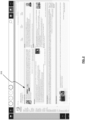
- Content called by the web browser may be presented to the device, and that content may include interactable elements 110 (i.e., in this case, hyperlink interactable elements).
- the computing device and/or other components of the system described or not described in detail herein) may identify a number of interactive elements within the displayed content and modify the display/presentation of such elements to stand out from the content displayed. Which interactive elements are identified/selected for modified display will be discussed below.
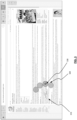
- FIG. 2 shows another example where the interactable elements 210 (in this case textual hyperlinks) are located more in-line within text.
- one, two, three, four, or any particular number more of interactive elements may be displayed differently as described, depending on the embodiment (also referred to herein as "highlighted”). See FIG. 1 , highlighted interactable elements 110.
- a particular number of interactive elements i.e., four
- Four interactive elements may be selected as the number of elements to adjust or highlight the display thereof because it balances increased chance of reducing efficiency due to increased visual clutter, while still providing effective increased ease of accessibility.
- the number of elements highlighted may vary by embodiment, and the number of elements selected may be either static or dynamic depending on the particular embodiment.
- the number of elements highlighted may be fewer when a particular display of information is less dense or more dense with interactive elements.
- the number of elements highlighted may also be more when a particular display of information is less dense or more dense with interactive elements.
- underlining, color, and or other visual change/highlighting may depend on the particular embodiment, and in some embodiments the particular visual change/highlighting employed may be determined based on the content an interactive element is displaying, or will display upon activation thereof. While in some embodiments, all interactive elements to be displayed with a visual change thereto in a particular single document/source will be similarly changed, in other embodiments, different interactive elements within the same document/source.
- the color chosen for a particular highlighting may be dependent on the default or normal color of the interactable element prior to highlighting. For example, if a background highlighting is to be used for a textual or graphical interactable element, the primary color of the element may be determined by the system/method, and then an appropriately contrasting color may be chosen based thereon.
- the interactable elements which have been highlighted have had their text color inverted to white from blue, and had a block of a background color applied to such elements.
- a circle, box, other geometric shape, or other non-geometric shape may also be displayed surrounding elements so highlighted or nearby elements so highlighted, where each highlighted element corresponds or is associated with one of the geometric/non-geometric shapes.
- such shapes may also or alternatively appear at the top or side of the web page (thereby interfering less with presentation of the original content as-is) or be displayed near the interactable elements, and may correlate to different color/underline highlighting in the body of the content of the web browser (by displaying the shape (i.e., graphical element) in the same shape or color as the interactive element with which it is coordinated). As shown in FIG.
- the circles 120 i.e., graphical element
- the graphical elements may visually correspond in any number of manners with their associated interactive elements.
- Displaying the shapes at the top or bottom of the display or web browser may be preferable to displaying the shapes on the side of the display or web browser as gaze interactions at the top and the bottom of the screen are more ascertainable than on the left and right side of a display.
- left to right and top to bottom highlighted elements appear with red, green, blue, and orange highlighting
- the shapes displayed to top, bottom, or side of the content will be presented in the order of red, green, blue, and orange.
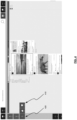
- the shapes may appear more in proximity to the highlighted content, and be, or not be, connected visually to the highlighted content by a dashed line, a solid line, or some other visual element. See FIG. 3 for a demonstration of this concept, where interactable elements 310 are underlined, and circle-shapes 320 (i.e., graphical elements) are displayed for each interactable element connected by a line leading to the interactable element.
- An indicator 330 indicates when the user is gazing at a circle-shape 320, and also be dynamic, and change from large to small, vice versa, or some other animation, thereby signaling the user how long their gaze must dwell on the shape 320 before the associated highlighted interactable element 310 is activated (i.e., activation may occur when indicator 330 disappears, when it becomes the same size as shape 320, or upon some other occurrence).
- indicator 330 within a circle-shape 320 may originally be the same or nearly the same size as the circle-shape 320 where it is located, and get smaller continually or in steps until it disappears and the associated interactive element is activated.
- circle-shape 320 itself may be dynamic, and upon being continually gaze at, become smaller and smaller in the same manner as described above until activation of the interactive element occurs when circle-shape 320 disappears. If a user averts their gaze from circle-shape 320 during the dynamic period of change of circle-shape 320, circle-shape 320 may revert to its original size/shape to signal to the user that the associated interactive element will not be activated unless re-gazed at by the user for the requisite predefined time.
- the reversion of circle-shape 320 to its original size may occur at a specified rate, indicating that if the user returns their gaze to circle-shape 320 prior to circle-shape 320 returning to its original size, a gaze will only have to rest on circle-shape 320 for a remaining portion of the predefined length of time that is proportional to the ratio of the then current size of circle-shape 320 relative to circle shape's 320 original size.
- the location of the graphical elements on the side or top of the display or web browser may be presented in the order of presentation of the interactable elements naturally within the content, or any other relative locational manner that corresponds with the locational manner in which the interactive elements are displayed.
- the most upper left highlighted interactable element in the displayed content will be highlighted in a manner that correlates to the left-most and upper-most shape in a series/listing of coordinated matching related shapes located at the top, bottom, left, or right side of the display to the content.
- the most lower right highlighted interactable element in the displayed content will be highlighted in a manner that correlates to the right-most and lower-most shape in a series/listing of coordinated matching related shapes.
- Other corresponding locational manners of presentation of associated/corresponding graphical elements/interactive elements-pairs are also possible.
- the user may use the dwell of their gaze (occurring for at least a predetermined/predefined time), with or without an additional gaze or non-gaze input, to activate the highlighted interactable element.
- Gaze location on the display device is determined by employing an eye tracking device known in the art.
- the gaze interaction may occur with the highlighted content (i.e., interactive element), the shape (i.e., graphical element) associated with the highlighted content, and/or any visual element connecting the highlighted content with the shape.
- the shape associated with the highlighted content may be especially easy for a user to activate, as the size and shape of the associated shape may be designed to enhance the ability of the user to select it because it is larger and easier to visually acquire than the highlighted content itself.
- a logical algorithm may be employed to ensure lines or other visual elements coupling highlighted content to shapes do not cross each other and/or cause visual clutter or misunderstanding of available gaze interactable highlight-able elements.
- Which elements are highlighted at the original presentation of content in a web browser may be determined based on a number of possible algorithms known in the art for determining the most likely content within a group of content that the user will desire to interact with.
- the systems and methods of the invention may determine what are the four interactable elements that the particular user is most likely to interact with based on past usage and/or interest history (note that more or fewer interactive elements may be identified depending on the embodiment).
- the systems and methods of the invention may also take into account past usage or interest history for a larger group of users where more specific data is not available for the particular user at the display.
- a log in or registration procedure may allow the systems and methods here to identify and track/determine past usage and/or interest history for a user.
- the four (or other number) of interactive elements chosen for highlighting will depend solely or primarily on proximity to the user's present gaze point.
- the four closest interactable elements to the user's gaze point may be highlighted (including presentation of visually coupled or uncoupled shapes associated, potentially by color, etc., to the content).
- the background and foreground of highlighted text may be altered from the normal/default colors in such cases.
- particular colors receptive to users with such conditions may be used instead of colors employed for users without color blindness.
- a 'color-blind' mode may be selectable by a user in these embodiments.
- the colors used may also depend on the location of the highlighted content within the display or web browser. For example, a first set of colors or other mode of highlighting may be used for interactive content in one quadrant of the display, while a second set of colors or other mode of highlighting may be used for interactive content in another quadrant or portion of the display.
- graphical elements associated with each interactive element may be presented in corresponding locations (i.e., within on any given edge of the quadrant/location).
- the quadrant or location which dictates the color or manner of highlighting will not affect the location of presentation of the graphical elements.
- a first set of color or other mode of highlighting may be used for interactive content densely surrounded by other displayed content, while a second set of color or other mode of highlighting may be used for interactive content less densely surrounded by other displayed content.
- Systems and methods of the invention may also be employed in particular or custom web pages viewed by the web browser, and/or other applications directly opened by the computing device for showing on the associated display, where interactable elements and controls are presented in similar, but slightly or greatly unusual or different manners compared to web browser.
- interactable elements and controls are presented in similar, but slightly or greatly unusual or different manners compared to web browser.
- FIG. 4 shows a web browser having an interface where common Facebook TM commands 410 are accessible by a gaze-activated Facebook TM command button 420. Upon the user dwelling on the command button 420, commands 410 may appear in proximity thereto.
- the command buttons 420 may correlate to often used commands/action when browsing the particular application or page involved (here, Facebook TM .
- YouTube TM is another web location in which such systems and methods may also be employed to select a large or small interactive element such as a video playback element, while also providing the ability to quickly access interactable elements which are controls or peripheral to the large interactive elements. For example, pause, play, skip, volume, display mode, and commenting controls can be accessed using the systems and methods described herein.
- pause, play, skip, volume, display mode, and commenting controls can be accessed using the systems and methods described herein.
- the shapes discussed herein which may be displayed on the top, bottom, sides, or central portion of the display in tandem with the main content, such shapes may also be provided here, as well as additional gaze-dwell activated buttons which are provided to replicate the functions of interactable elements in the content which may be too small to effectively or conveniently activate using a gaze dwell.
- a small play or pause button may be replicated as a larger gazeinteractable "button" (i.e., graphical element) or the like on the top, bottom, or side of the display.
- commands or controls associated with these elements may or may not be displayed alongside the content normally, the systems and methods of the invention may provide for matching gaze-activated control on the left, right, top, or bottom of the display. Additionally, they may be presented in order of importance or probable employment by the user, and/or in order of the improved ease at which such controls/commands assist over default command presented by Facebook TM , or other similar page/application.
- Individual interactable elements within the content may also or alternatively be colored or otherwise highlighted to coordinate with the provided commands/controls. In some embodiments, only the control/command may be provided, while in other elements, only in-content highlighting may be provided. In other embodiments, which is provided may depend on user preferences and or the content of the object, or the linked content associated with the object.
- systems and methods for providing the ability via gaze input to snap-to, and then activate, interactable elements are provided.
- the determined location of the user's gaze direction of the display is determined, and then an indicator is provided at the location thereof.
- the indicator may be of significant size to include an area about the determined gaze point.
- the indicator may be a geometric or non-geometric shape, such as a square, rectangle, triangle, circle, oval, polygon, or other shape having lines and curves associated therewith.
- the area within the shape thus includes enough error from an estimated gaze point to account for some great percentage of likely determined gaze points about the user's true gaze point on the display.
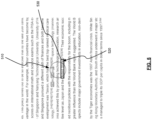
- the shape Upon providing the shape which approximates the user's gaze point on the display, as the user moves their gaze about the display, the shape will continue to follow and approximate their gaze position. See FIG. 5 showing a portion of text displayed by a web browser where the gaze indicator shape 510 is overlaying an interactive element 520 (i.e., "United States," a hyperlink).
- an interactive element 520 i.e., "United States," a hyperlink.
- a box or other primary indicator 530 shows which element the system/method intends to activate should the user continue dwelling at that location. A secondary indicator is then caused to appear on the interactable element.
- This secondary indicator informs the user that the interactive element will be activated if their gaze position (i.e., the shape approximating their gaze position) remains on the interactive element.
- the secondary indicator may change in size, for example, get smaller until it disappears, signaling to the user how much time is available to decide not to activate the interactable element by moving their gaze away from the interactable element.
- the interactable element is activated.
- the secondary indicator may be a dot which starts large, and then becomes small as the dwell time needed to active the interactable element is reached.
- the snap-to indicator shape which follows/reflects the user's gaze may also be zoom-able so that the size of the content within the snap-to indicator shape is more easily viewable to the user.
- the size of the snap-to indicator shape may be made larger to allow for the zoomed-in content to be displayed more completely (i.e., the zoomed in content will require more room to display the same amount of information relative to the un-zoomed content).
- a user may select a particular zoom mode (i.e., out, in, %, etc.) via a gaze-dwell activated button on the top, bottom, or side of the screen to activate, select, and/or adjust zoom mode, as discussed herein for other functions.
- another type of secondary indicator may be a dynamic graphical bar which displays the total dwell time required upon a user's gaze first lying on an interactable element (or some time period thereafter), and then slowly changes color from left to right based on the amount of elapsed dwell time necessary for the interactable element to be activated.
- the interactable element Upon the bar fully transitioning from one color to the next from left to right on the bar, the interactable element will be activated. In other words, the user may move their gaze away from the interactable element while the bar is changing colors, thereby preventing activation of the interactable element. However, once the bar has fully changed colors, the interactable element may be activated.
- the time provided to a user to abort activation of the interactable element may depend on any number of factors, including based on the characteristics of the interactable element, the activated action/content of the interactive element, the history of the user, etc. For example, interactable elements which execute complex or un-routine actions, or call/display at least certain amounts of data for display, may have longer dwell-required periods than other interactable elements which execute simple or routine actions, or call/display less than certain amounts of date for display.
- the abort time period may be automatically lengthened compared to other users seeking to interact with similar interactable elements, based on the user's history of gaze-activated commands.
- FIG. 6 is a block diagram illustrating a specialized computer system 600 in which embodiments of the present invention may be implemented.
- This example illustrates specialized computer system 600 such as may be used, in whole, in part, or with various modifications, to provide the functions of the eye tracking device, the computing system, and/or other components of the invention such as those discussed above.
- Specialized computer system 600 is shown including hardware elements that may be electrically coupled via a bus 690.
- the hardware elements may include one or more central processing units 610, one or more input devices 620 (e.g., a mouse, a keyboard, an eye tracking device, etc.), and one or more output devices 630 (e.g., a display device, a printer, etc.).
- Specialized computer system 600 may also include one or more storage device 640.
- storage device(s) 640 may be disk drives, optical storage devices, solid-state storage device such as a random access memory (“RAM”) and/or a read-only memory (“ROM”), which can be programmable, flashupdateable and/or the like.
- RAM random access memory
- ROM read-only memory
- Specialized computer system 600 may additionally include a computer-readable storage media reader 650, a communications system 660 (e.g., a modem, a network card (wireless or wired), an infra-red communication device, Bluetooth TM device, cellular communication device, etc.), and working memory 680, which may include RAM and ROM devices as described above.
- specialized computer system 600 may also include a processing acceleration unit 670, which can include a digital signal processor, a special-purpose processor and/or the like.
- Computer-readable storage media reader 650 can further be connected to a computer-readable storage medium, together (and, optionally, in combination with storage device(s) 640) comprehensively representing remote, local, fixed, and/or removable storage devices plus storage media for temporarily and/or more permanently containing computer-readable information.
- Communications system 660 may permit data to be exchanged with a network, system, computer and/or other component described above.
- Specialized computer system 600 may also include software elements, shown as being currently located within a working memory 680, including an operating system 684 and/or other code 688. It should be appreciated that alternate embodiments of specialized computer system 600 may have numerous variations from that described above. For example, customized hardware might also be used and/or particular elements might be implemented in hardware, software (including portable software, such as applets), or both. Furthermore, connection to other computing devices such as network input/output and data acquisition devices may also occur.
- Software of specialized computer system 600 may include code 688 for implementing any or all of the function of the various elements of the architecture as described herein.
- software stored on and/or executed by a specialized computer system such as specialized computer system 600, can provide the functions of the eye tracking device, the computing system, and/or other components of the invention such as those discussed above. Methods implementable by software on some of these components have been discussed above in more detail.
Landscapes
- Engineering & Computer Science (AREA)
- Theoretical Computer Science (AREA)
- General Engineering & Computer Science (AREA)
- Physics & Mathematics (AREA)
- General Physics & Mathematics (AREA)
- Human Computer Interaction (AREA)
- Data Mining & Analysis (AREA)
- Databases & Information Systems (AREA)
- User Interface Of Digital Computer (AREA)
- Eye Examination Apparatus (AREA)
Claims (15)
- Verfahren zum Bereitstellen der Fähigkeit, über Blickeingabe an interaktionsfähigen Elementen auf einer Anzeige einer Computing-Vorrichtung anzudocken und diese dann zu aktivieren, wobei das Verfahren Folgendes umfasst:Bestimmen mit mindestens einer Augenverfolgungsvorrichtung, einer Lage des Blicks des Benutzers auf der Anzeige;Veranlassen mit dem einen oder den mehreren Prozessoren, dass eine Blickindikatorform (510) an der Lage des Blicks des Benutzers angezeigt wird;Veranlassen mit dem einen oder den mehreren Prozessoren, dass ein primärer Indikator (530) auf der Anzeige angezeigt wird, wenn sich der Benutzer einem interaktionsfähigen Element (520) mit der Blickindikatorform (510) nähert, undLokalisieren der Blickindikatorform (510) mindestens teilweise über dem interaktionsfähigen Element (520), wodurch der primäre Indikator angibt, dass das interaktionsfähige Element beabsichtigt, sich zu aktivieren, falls der Blick des Benutzers an dieser Lage bleiben sollte; undVeranlassen mit dem einen oder den mehreren Prozessoren eines sekundären Indikators, auf dem interaktionsfähigen Element (520) zu erscheinen, wobei der sekundäre Indikator den Benutzer informiert, dass das interaktionsfähige Element (520) aktiviert wird, falls die Lage der Blickindikatorform (510) auf dem interaktionsfähigen Element (520) bleibt.
- Verfahren nach Anspruch 1, wobei der primäre Indikator (530) als (i) eine Hervorhebung des interaktionsfähigen Elements (520) angezeigt wird, und/oder (ii) als geometrische oder nicht geometrische Form, die das interaktionsfähige Element (520) umgibt.
- Verfahren nach Anspruch 1 oder 2, wobei der sekundäre Indikator die Größe wechselt, indem dem Benutzer gemeldet wird, wieviel Zeit verfügbar ist, um zu entscheiden, das interaktionsfähige Element (520) durch Bewegen seines Blicks von dem interaktionsfähigen Element (520) weg nicht zu aktivieren, bevorzugt bei Ablaufen der gegebenen Zeit, zu der das interaktionsfähige Element (520) aktiviert wird.
- Verfahren nach einem der Ansprüche 1 bis 3, wobei der sekundäre Indikator eine dynamische grafische Leiste ist, die die Gesamtverweilzeit anzeigt, die erforderlich ist, nachdem der Blick eines Benutzers zuerst auf dem interaktionsfähigen Element (520) liegt, und dann langsam die Farbe von links nach rechts basierend auf der Menge an verstrichener Verweilzeit wechselt, die erforderlich ist, damit das interaktionsfähige Element (520) aktiviert wird, wobei die Leiste bevorzugt vollständig von einer Farbe zu der nächsten von links nach rechts auf der Leiste übergeht, damit das interaktionsfähige Element (520) aktiviert wird.
- Verfahren nach einem der Ansprüche 1 bis 4, wobei die Blickindikatorform (510) eine geometrische oder nicht geometrische Form ist, bevorzugt ein Quadrat, Rechteck, Dreieck, Kreis, Oval, Vieleck oder eine andere Form, welche damit assoziierte Linien und Kurven aufweist.
- Verfahren nach einem der Ansprüche 1 bis 5, wobei die Blickindikatorform (510) eine signifikante Größe aufweist, um eine Fläche um die bestimmte Lage des Blicks des Benutzers herum zu beinhalten, wobei die Fläche innerhalb der Blickindikatorform (510) bevorzugt ausreichend Fehler von einer geschätzten Lage des Blicks des Benutzers beinhaltet, um einen großen Prozentsatz wahrscheinlich bestimmter Lagen des Blicks des Benutzers um die tatsächliche Lage des Blicks des Benutzers auf der Anzeige zu belegen.
- Verfahren nach einem der Ansprüche 1 bis 6, wobei die Blickindikatorform (510) zoomfähig ist, so dass die Größe des Inhalts innerhalb der Blickindikatorform (510) für den Benutzer leichter sichtbar ist, wobei die Größe der Blickindikatorform (510) bevorzugt größer gemacht wird, um zu erlauben, dass der gezoomte Inhalt vollständiger angezeigt wird, und wobei ein bestimmter Zoommodus bevorzugt über einen durch Blickverweilen aktivierten Knopf oben, unten oder an der Seite des Bildschirms ausgewählt wird, um den Zoommodus zu aktivieren, auszuwählen und/oder einzustellen.
- System zum Bereitstellen der Fähigkeit, über Blickeingabe an interaktionsfähigen Elementen auf einer Anzeige einer Computing-Vorrichtung anzudocken und diese dann zu aktivieren, wobei das System umfasst:eine Anzeige, die zum Anzeigen von Inhalt für einen Benutzer konfiguriert ist;eine Augenverfolgungsvorrichtung, die dazu konfiguriert ist, eine Lage des Blicks eines Benutzers auf der Anzeige zu bestimmen;einen oder mehrere Prozessoren, die konfiguriert sind, um:zu veranlassen, dass eine Blickindikatorform (510) an der Lage des Blicks des Benutzers angezeigt wird;zu veranlassen, dass ein primärer Indikator (530) auf der Anzeige angezeigt wird, wenn sich der Benutzer einem interaktionsfähigen Element (520) mit der Blickindikatorform (510) nähert, und Lokalisieren der Blickindikatorform (510) mindestens teilweise über dem interaktionsfähigen Element (520), wobei der primäre Indikator angibt, dass das interaktionsfähige Element beabsichtigt, sich zu aktivieren, falls der Blick des Benutzers an dieser Lage bleiben sollte; undeinen sekundären Indikator zu veranlassen, auf dem interaktionsfähigen Element (520) zu erscheinen, wobei der sekundäre Indikator den Benutzer informiert, dass das interaktionsfähige Element (520) aktiviert wird, falls die Lage der Blickindikatorform (510) auf dem interaktionsfähigen Element (520) bleibt.
- System nach Anspruch 8, wobei der primäre Indikator (530) dazu konfiguriert ist, als (i) eine Hervorhebung des interaktionsfähigen Elements (520) und/oder (ii) als geometrische oder nicht geometrische Form, die das interaktionsfähige Element (520) umgibt, angezeigt zu werden.
- System nach Anspruch 8 oder 9, wobei eine Änderung der Größe des sekundären Indikators dazu konfiguriert ist, dem Benutzer zu melden, wieviel Zeit verfügbar ist, um zu entscheiden, das interaktionsfähige Element (520) nicht zu aktivieren, indem sein Blick von dem interaktionsfähigen Element (520) weg bewegt wird, wobei bevorzugt bei Ablaufen der gegebenen Zeit das interaktionsfähige Element (520) aktiviert wird.
- System nach einem der Ansprüche 8 bis 10, wobei der sekundäre Indikator dazu konfiguriert ist, eine dynamische grafische Leiste zu sein, die die Gesamtverweilzeit anzeigt, die erforderlich ist, nachdem ein Blick des Benutzers zuerst auf einem interaktionsfähigen Element (520) liegt, und dann langsam die Farbe von links nach rechts basierend auf der Menge an verstrichener Verweilzeit wechselt, die erforderlich ist, damit das interaktionsfähige Element (520) aktiviert wird, wobei die Leiste bevorzugt vollständig von einer Farbe zu der nächsten von links nach rechts auf der Leiste übergeht, damit das interaktionsfähige Element (520) aktiviert wird.
- System nach einem der Ansprüche 8 bis 11, wobei die Blickindikatorform (510) dazu konfiguriert ist, eine geometrische oder nicht geometrische Form zu sein, bevorzugt ein Quadrat, Rechteck, Dreieck, Kreis, Oval, Vieleck oder eine andere Form, welche damit assoziierte Linien und Kurven aufweist.
- System nach einem der Ansprüche 8 bis 12, wobei die Blickindikatorform (510) dazu konfiguriert ist, eine signifikante Größe aufzuweisen, um eine Fläche um die bestimmte Lage des Blicks des Benutzers zu beinhalten, wobei die Fläche innerhalb der Blickindikatorform (510) bevorzugt ausreichend Fehler von einer geschätzten Lage des Blicks des Benutzers beinhaltet, um einen großen Prozentsatz wahrscheinlich bestimmter Lagen des Blicks des Benutzers um die tatsächliche Lage des Blicks des Benutzers auf der Anzeige zu belegen.
- System nach einem der Ansprüche 8 bis 13, wobei die Blickindikatorform (510) dazu konfiguriert ist, zoomfähig zu sein, so dass die Größe des Inhalts innerhalb der Blickindikatorform (510) für den Benutzer leichter sichtbar ist, wobei die Größe der Blickindikatorform (510) bevorzugt größer gemacht wird, um zu erlauben, dass der gezoomte Inhalt vollständiger angezeigt wird, dass bevorzugter ein bestimmter Zoommodus dazu konfiguriert ist, über einen durch Blickverweilen aktivierten Knopf oben, unten oder an der Seite des Bildschirms ausgewählt zu werden, um den Zoommodus zu aktivieren, auszuwählen und/oder einzustellen.
- Nicht übergangsweise maschinenlesbares Medium, auf dem Anweisungen zum Bereitstellen der Fähigkeit gespeichert sind, über Blickeingabe an interaktionsfähigen Elementen auf einer Anzeige einer Computing-Vorrichtung anzudocken und die Anweisungen mit einem oder mehreren dann zu aktivieren, wobei, das System umfasst:Bestimmen einer Lage des Blicks des Benutzers auf der Anzeige; undgekennzeichnet durchVeranlassen, dass eine Blickindikatorform (510) an der Lage des Blicks des Benutzers angezeigt wird;Veranlassen, dass ein primärer Indikator (530) auf der Anzeige angezeigt wird, wenn sich der Benutzer einem interaktionsfähigen Element (520) mit der Blickindikatorform (510) nähert, und Lokalisieren der Blickindikatorform (510) mindestens teilweise über dem interaktionsfähigen Element (520), wodurch der primäre Indikator angibt, dass das interaktionsfähige Element beabsichtigt, sich zu aktivieren, falls der Blick des Benutzers in dieser Lage bleiben sollte; undVeranlassen, dass ein sekundärer Indikator auf dem interaktionsfähigen Element (520) erscheint, wobei der sekundäre Indikator den Benutzer informiert, dass das interaktionsfähige Element (520) aktiviert wird, falls die Lage der Blickindikatorform (510) auf dem interaktionsfähigen Element (520) bleibt.
Applications Claiming Priority (2)
| Application Number | Priority Date | Filing Date | Title |
|---|---|---|---|
| US201762572905P | 2017-10-16 | 2017-10-16 | |
| EP18200667.6A EP3470962A3 (de) | 2017-10-16 | 2018-10-16 | Verbesserte zugänglichkeit von computervorrichtungen durch augenverfolgung |
Related Parent Applications (1)
| Application Number | Title | Priority Date | Filing Date |
|---|---|---|---|
| EP18200667.6A Division EP3470962A3 (de) | 2017-10-16 | 2018-10-16 | Verbesserte zugänglichkeit von computervorrichtungen durch augenverfolgung |
Publications (3)
| Publication Number | Publication Date |
|---|---|
| EP3654148A1 EP3654148A1 (de) | 2020-05-20 |
| EP3654148C0 EP3654148C0 (de) | 2023-06-14 |
| EP3654148B1 true EP3654148B1 (de) | 2023-06-14 |
Family
ID=63878384
Family Applications (2)
| Application Number | Title | Priority Date | Filing Date |
|---|---|---|---|
| EP18200667.6A Withdrawn EP3470962A3 (de) | 2017-10-16 | 2018-10-16 | Verbesserte zugänglichkeit von computervorrichtungen durch augenverfolgung |
| EP19219431.4A Active EP3654148B1 (de) | 2017-10-16 | 2018-10-16 | Verbesserte zugänglichkeit von computervorrichtungen durch augenverfolgung |
Family Applications Before (1)
| Application Number | Title | Priority Date | Filing Date |
|---|---|---|---|
| EP18200667.6A Withdrawn EP3470962A3 (de) | 2017-10-16 | 2018-10-16 | Verbesserte zugänglichkeit von computervorrichtungen durch augenverfolgung |
Country Status (5)
| Country | Link |
|---|---|
| US (1) | US10761603B2 (de) |
| EP (2) | EP3470962A3 (de) |
| CN (2) | CN109669531A (de) |
| ES (1) | ES2953562T3 (de) |
| PL (1) | PL3654148T3 (de) |
Families Citing this family (6)
| Publication number | Priority date | Publication date | Assignee | Title |
|---|---|---|---|---|
| ES2953562T3 (es) | 2017-10-16 | 2023-11-14 | Tobii Dynavox Ab | Accesibilidad mejorada del dispositivo informático a través del rastreo ocular |
| US11726559B2 (en) * | 2018-04-24 | 2023-08-15 | Intuitive Surgical Operations, Inc. | Gaze-initiated communications |
| US10983591B1 (en) * | 2019-02-25 | 2021-04-20 | Facebook Technologies, Llc | Eye rank |
| US11503998B1 (en) | 2021-05-05 | 2022-11-22 | Innodem Neurosciences | Method and a system for detection of eye gaze-pattern abnormalities and related neurological diseases |
| US12554373B2 (en) | 2022-09-23 | 2026-02-17 | Apple Inc. | Devices, methods, and graphical user interfaces for interacting with window controls in three-dimensional environments |
| CN117369641A (zh) * | 2023-10-24 | 2024-01-09 | 北京诺瞳奕目医疗科技有限公司 | 眼动追踪方法和系统 |
Family Cites Families (16)
| Publication number | Priority date | Publication date | Assignee | Title |
|---|---|---|---|---|
| US20050047629A1 (en) * | 2003-08-25 | 2005-03-03 | International Business Machines Corporation | System and method for selectively expanding or contracting a portion of a display using eye-gaze tracking |
| US8166412B2 (en) * | 2006-01-13 | 2012-04-24 | Adobe Systems Incorporated | Visual cue discernment on scattered data |
| US20080155037A1 (en) * | 2006-12-20 | 2008-06-26 | Yahoo! Inc. | Providing real time information in a visual information unit |
| US20120105486A1 (en) * | 2009-04-09 | 2012-05-03 | Dynavox Systems Llc | Calibration free, motion tolerent eye-gaze direction detector with contextually aware computer interaction and communication methods |
| US20100295799A1 (en) * | 2009-05-21 | 2010-11-25 | Sony Computer Entertainment America Inc. | Touch screen disambiguation based on prior ancillary touch input |
| WO2010141403A1 (en) * | 2009-06-01 | 2010-12-09 | Dynavox Systems, Llc | Separately portable device for implementing eye gaze control of a speech generation device |
| US10013053B2 (en) * | 2012-01-04 | 2018-07-03 | Tobii Ab | System for gaze interaction |
| US20170235360A1 (en) | 2012-01-04 | 2017-08-17 | Tobii Ab | System for gaze interaction |
| WO2015030607A1 (en) * | 2013-08-27 | 2015-03-05 | Auckland Uniservices Limited | Gaze-controlled interface method and system |
| US9483112B2 (en) * | 2013-09-26 | 2016-11-01 | Vmware, Inc. | Eye tracking in remote desktop client |
| US20150113454A1 (en) * | 2013-10-21 | 2015-04-23 | Motorola Mobility Llc | Delivery of Contextual Data to a Computing Device Using Eye Tracking Technology |
| US9244539B2 (en) * | 2014-01-07 | 2016-01-26 | Microsoft Technology Licensing, Llc | Target positioning with gaze tracking |
| CN106462231A (zh) * | 2014-03-17 | 2017-02-22 | Itu 商业发展公司 | 计算机实现的视线交互方法和装置 |
| US10248192B2 (en) * | 2014-12-03 | 2019-04-02 | Microsoft Technology Licensing, Llc | Gaze target application launcher |
| US20170293402A1 (en) | 2016-04-12 | 2017-10-12 | Microsoft Technology Licensing, Llc | Variable dwell time keyboard |
| ES2953562T3 (es) | 2017-10-16 | 2023-11-14 | Tobii Dynavox Ab | Accesibilidad mejorada del dispositivo informático a través del rastreo ocular |
-
2018
- 2018-10-16 ES ES19219431T patent/ES2953562T3/es active Active
- 2018-10-16 US US16/161,755 patent/US10761603B2/en active Active
- 2018-10-16 EP EP18200667.6A patent/EP3470962A3/de not_active Withdrawn
- 2018-10-16 CN CN201811204987.3A patent/CN109669531A/zh active Pending
- 2018-10-16 EP EP19219431.4A patent/EP3654148B1/de active Active
- 2018-10-16 PL PL19219431.4T patent/PL3654148T3/pl unknown
- 2018-10-16 CN CN202210122869.8A patent/CN114461071B/zh active Active
Also Published As
| Publication number | Publication date |
|---|---|
| EP3654148C0 (de) | 2023-06-14 |
| EP3654148A1 (de) | 2020-05-20 |
| CN114461071B (zh) | 2024-04-05 |
| US10761603B2 (en) | 2020-09-01 |
| PL3654148T3 (pl) | 2023-11-06 |
| CN114461071A (zh) | 2022-05-10 |
| CN109669531A (zh) | 2019-04-23 |
| ES2953562T3 (es) | 2023-11-14 |
| EP3470962A2 (de) | 2019-04-17 |
| US20190113969A1 (en) | 2019-04-18 |
| EP3470962A3 (de) | 2019-06-26 |
Similar Documents
| Publication | Publication Date | Title |
|---|---|---|
| US10761603B2 (en) | Computing device accessibility via eye tracking | |
| CN107077274B (zh) | 用于移动条带中的上下文标签的方法和装置 | |
| US10120529B2 (en) | Touch-activated and expandable visual navigation of a mobile device via a graphic selection element | |
| KR102197538B1 (ko) | 사용자 인터페이스를 위한 입력 모드 간의 자동 스위칭 | |
| US9588661B1 (en) | Graphical user interface widget to select multiple items from a fixed domain | |
| US20150138079A1 (en) | Component determination and gaze provoked interaction | |
| US10317995B2 (en) | Component determination and gaze provoked interaction | |
| US10878175B2 (en) | Portlet display on portable computing devices | |
| US10599214B2 (en) | Systems and methods for gaze input based dismissal of information on a display | |
| US8386927B1 (en) | Gravity-based link assist | |
| US8407608B1 (en) | Touch input assist | |
| RU2014136806A (ru) | Иерархически организованные галереи управляющих элементов | |
| US20150138244A1 (en) | Component determination and gaze provoked interaction | |
| KR20150001596A (ko) | 웹 브라우저를 위한 몰입 모드 | |
| US11061541B2 (en) | Apparatus, method, and computer-readable recording medium for compactedly displaying popup content | |
| WO2018119254A1 (en) | Method and apparatus for facilitating user chat interactions | |
| JP2019537118A (ja) | ページを表示するための方法および装置、グラフィカルユーザインターフェース、ならびにモバイル端末 | |
| JP5599959B1 (ja) | 情報処理装置 | |
| KR20220045121A (ko) | 현재 게시글의 다른 reader들에 대한 정보의 표시 및 상호 인터랙션 방법 및 장치 | |
| Plabst et al. | Exploring unimodal notification interaction and display methods in augmented reality | |
| US20140195900A1 (en) | Computer readable medium for enhanced display of digital text | |
| KR20220045122A (ko) | 팔로잉 사용자의 실시간 읽기 행위 관련 정보의 표시 및 상호 인터랙션 지원 방법 | |
| CN113330407A (zh) | 交互方法、柔性电子装置及可读存储介质 | |
| US10303346B2 (en) | Information processing apparatus, non-transitory computer readable storage medium, and information display method | |
| JP6979817B2 (ja) | グラフィック・ユーザー・インターフェースのコンポーネントのビューポート配列 |
Legal Events
| Date | Code | Title | Description |
|---|---|---|---|
| PUAI | Public reference made under article 153(3) epc to a published international application that has entered the european phase |
Free format text: ORIGINAL CODE: 0009012 |
|
| STAA | Information on the status of an ep patent application or granted ep patent |
Free format text: STATUS: REQUEST FOR EXAMINATION WAS MADE |
|
| 17P | Request for examination filed |
Effective date: 20191223 |
|
| AC | Divisional application: reference to earlier application |
Ref document number: 3470962 Country of ref document: EP Kind code of ref document: P |
|
| AK | Designated contracting states |
Kind code of ref document: A1 Designated state(s): AL AT BE BG CH CY CZ DE DK EE ES FI FR GB GR HR HU IE IS IT LI LT LU LV MC MK MT NL NO PL PT RO RS SE SI SK SM TR |
|
| AX | Request for extension of the european patent |
Extension state: BA ME |
|
| STAA | Information on the status of an ep patent application or granted ep patent |
Free format text: STATUS: EXAMINATION IS IN PROGRESS |
|
| 17Q | First examination report despatched |
Effective date: 20210510 |
|
| RAP3 | Party data changed (applicant data changed or rights of an application transferred) |
Owner name: TOBII AB |
|
| RAP3 | Party data changed (applicant data changed or rights of an application transferred) |
Owner name: TOBII AB |
|
| REG | Reference to a national code |
Ref country code: DE Ref legal event code: R079 Ref document number: 602018052010 Country of ref document: DE Free format text: PREVIOUS MAIN CLASS: G06F0003010000 Ipc: G06F0003048200 |
|
| RIC1 | Information provided on ipc code assigned before grant |
Ipc: G06F 3/01 20060101ALI20221027BHEP Ipc: G06F 3/04842 20220101ALI20221027BHEP Ipc: G06F 3/0482 20130101AFI20221027BHEP |
|
| GRAP | Despatch of communication of intention to grant a patent |
Free format text: ORIGINAL CODE: EPIDOSNIGR1 |
|
| STAA | Information on the status of an ep patent application or granted ep patent |
Free format text: STATUS: GRANT OF PATENT IS INTENDED |
|
| RAP1 | Party data changed (applicant data changed or rights of an application transferred) |
Owner name: TOBII DYNAVOX AB |
|
| INTG | Intention to grant announced |
Effective date: 20221220 |
|
| GRAS | Grant fee paid |
Free format text: ORIGINAL CODE: EPIDOSNIGR3 |
|
| GRAA | (expected) grant |
Free format text: ORIGINAL CODE: 0009210 |
|
| STAA | Information on the status of an ep patent application or granted ep patent |
Free format text: STATUS: THE PATENT HAS BEEN GRANTED |
|
| AC | Divisional application: reference to earlier application |
Ref document number: 3470962 Country of ref document: EP Kind code of ref document: P |
|
| AK | Designated contracting states |
Kind code of ref document: B1 Designated state(s): AL AT BE BG CH CY CZ DE DK EE ES FI FR GB GR HR HU IE IS IT LI LT LU LV MC MK MT NL NO PL PT RO RS SE SI SK SM TR |
|
| REG | Reference to a national code |
Ref country code: CH Ref legal event code: EP |
|
| REG | Reference to a national code |
Ref country code: DE Ref legal event code: R096 Ref document number: 602018052010 Country of ref document: DE |
|
| REG | Reference to a national code |
Ref country code: AT Ref legal event code: REF Ref document number: 1579706 Country of ref document: AT Kind code of ref document: T Effective date: 20230715 |
|
| U01 | Request for unitary effect filed |
Effective date: 20230712 |
|
| U07 | Unitary effect registered |
Designated state(s): AT BE BG DE DK EE FI FR IT LT LU LV MT NL PT SE SI Effective date: 20230720 |
|
| REG | Reference to a national code |
Ref country code: NO Ref legal event code: T2 Effective date: 20230614 |
|
| REG | Reference to a national code |
Ref country code: LT Ref legal event code: MG9D |
|
| REG | Reference to a national code |
Ref country code: ES Ref legal event code: FG2A Ref document number: 2953562 Country of ref document: ES Kind code of ref document: T3 Effective date: 20231114 |
|
| U20 | Renewal fee for the european patent with unitary effect paid |
Year of fee payment: 6 Effective date: 20231024 |
|
| PG25 | Lapsed in a contracting state [announced via postgrant information from national office to epo] |
Ref country code: RS Free format text: LAPSE BECAUSE OF FAILURE TO SUBMIT A TRANSLATION OF THE DESCRIPTION OR TO PAY THE FEE WITHIN THE PRESCRIBED TIME-LIMIT Effective date: 20230614 Ref country code: HR Free format text: LAPSE BECAUSE OF FAILURE TO SUBMIT A TRANSLATION OF THE DESCRIPTION OR TO PAY THE FEE WITHIN THE PRESCRIBED TIME-LIMIT Effective date: 20230614 Ref country code: GR Free format text: LAPSE BECAUSE OF FAILURE TO SUBMIT A TRANSLATION OF THE DESCRIPTION OR TO PAY THE FEE WITHIN THE PRESCRIBED TIME-LIMIT Effective date: 20230915 |
|
| PG25 | Lapsed in a contracting state [announced via postgrant information from national office to epo] |
Ref country code: SK Free format text: LAPSE BECAUSE OF FAILURE TO SUBMIT A TRANSLATION OF THE DESCRIPTION OR TO PAY THE FEE WITHIN THE PRESCRIBED TIME-LIMIT Effective date: 20230614 |
|
| PG25 | Lapsed in a contracting state [announced via postgrant information from national office to epo] |
Ref country code: SM Free format text: LAPSE BECAUSE OF FAILURE TO SUBMIT A TRANSLATION OF THE DESCRIPTION OR TO PAY THE FEE WITHIN THE PRESCRIBED TIME-LIMIT Effective date: 20230614 Ref country code: SK Free format text: LAPSE BECAUSE OF FAILURE TO SUBMIT A TRANSLATION OF THE DESCRIPTION OR TO PAY THE FEE WITHIN THE PRESCRIBED TIME-LIMIT Effective date: 20230614 Ref country code: RO Free format text: LAPSE BECAUSE OF FAILURE TO SUBMIT A TRANSLATION OF THE DESCRIPTION OR TO PAY THE FEE WITHIN THE PRESCRIBED TIME-LIMIT Effective date: 20230614 |
|
| REG | Reference to a national code |
Ref country code: DE Ref legal event code: R097 Ref document number: 602018052010 Country of ref document: DE |
|
| PLBE | No opposition filed within time limit |
Free format text: ORIGINAL CODE: 0009261 |
|
| STAA | Information on the status of an ep patent application or granted ep patent |
Free format text: STATUS: NO OPPOSITION FILED WITHIN TIME LIMIT |
|
| 26N | No opposition filed |
Effective date: 20240315 |
|
| PG25 | Lapsed in a contracting state [announced via postgrant information from national office to epo] |
Ref country code: MC Free format text: LAPSE BECAUSE OF FAILURE TO SUBMIT A TRANSLATION OF THE DESCRIPTION OR TO PAY THE FEE WITHIN THE PRESCRIBED TIME-LIMIT Effective date: 20230614 |
|
| U20 | Renewal fee for the european patent with unitary effect paid |
Year of fee payment: 7 Effective date: 20240906 |
|
| PG25 | Lapsed in a contracting state [announced via postgrant information from national office to epo] |
Ref country code: CY Free format text: LAPSE BECAUSE OF FAILURE TO SUBMIT A TRANSLATION OF THE DESCRIPTION OR TO PAY THE FEE WITHIN THE PRESCRIBED TIME-LIMIT; INVALID AB INITIO Effective date: 20181016 |
|
| PG25 | Lapsed in a contracting state [announced via postgrant information from national office to epo] |
Ref country code: HU Free format text: LAPSE BECAUSE OF FAILURE TO SUBMIT A TRANSLATION OF THE DESCRIPTION OR TO PAY THE FEE WITHIN THE PRESCRIBED TIME-LIMIT; INVALID AB INITIO Effective date: 20181016 |
|
| PGFP | Annual fee paid to national office [announced via postgrant information from national office to epo] |
Ref country code: PL Payment date: 20250729 Year of fee payment: 8 |
|
| U20 | Renewal fee for the european patent with unitary effect paid |
Year of fee payment: 8 Effective date: 20250909 |
|
| PGFP | Annual fee paid to national office [announced via postgrant information from national office to epo] |
Ref country code: GB Payment date: 20250828 Year of fee payment: 8 |
|
| PGFP | Annual fee paid to national office [announced via postgrant information from national office to epo] |
Ref country code: IE Payment date: 20250812 Year of fee payment: 8 |
|
| REG | Reference to a national code |
Ref country code: CH Ref legal event code: U11 Free format text: ST27 STATUS EVENT CODE: U-0-0-U10-U11 (AS PROVIDED BY THE NATIONAL OFFICE) Effective date: 20251101 |
|
| PG25 | Lapsed in a contracting state [announced via postgrant information from national office to epo] |
Ref country code: TR Free format text: LAPSE BECAUSE OF FAILURE TO SUBMIT A TRANSLATION OF THE DESCRIPTION OR TO PAY THE FEE WITHIN THE PRESCRIBED TIME-LIMIT Effective date: 20230614 |
|
| PGFP | Annual fee paid to national office [announced via postgrant information from national office to epo] |
Ref country code: IS Payment date: 20251008 Year of fee payment: 8 |
|
| PGFP | Annual fee paid to national office [announced via postgrant information from national office to epo] |
Ref country code: NO Payment date: 20251009 Year of fee payment: 8 |
|
| PGFP | Annual fee paid to national office [announced via postgrant information from national office to epo] |
Ref country code: CH Payment date: 20251101 Year of fee payment: 8 |
|
| PGFP | Annual fee paid to national office [announced via postgrant information from national office to epo] |
Ref country code: CZ Payment date: 20251002 Year of fee payment: 8 |
|
| PGFP | Annual fee paid to national office [announced via postgrant information from national office to epo] |
Ref country code: ES Payment date: 20251104 Year of fee payment: 8 |