EP3671406B1 - Procédé, appareil et support d'enregistrement pour afficher un panneau de commande de raccourci - Google Patents
Procédé, appareil et support d'enregistrement pour afficher un panneau de commande de raccourci Download PDFInfo
- Publication number
- EP3671406B1 EP3671406B1 EP19200508.0A EP19200508A EP3671406B1 EP 3671406 B1 EP3671406 B1 EP 3671406B1 EP 19200508 A EP19200508 A EP 19200508A EP 3671406 B1 EP3671406 B1 EP 3671406B1
- Authority
- EP
- European Patent Office
- Prior art keywords
- shortcut operation
- screen
- displaying
- operation function
- operation panel
- Prior art date
- Legal status (The legal status is an assumption and is not a legal conclusion. Google has not performed a legal analysis and makes no representation as to the accuracy of the status listed.)
- Active
Links
Images





Classifications
-
- G—PHYSICS
- G06—COMPUTING OR CALCULATING; COUNTING
- G06F—ELECTRIC DIGITAL DATA PROCESSING
- G06F1/00—Details not covered by groups G06F3/00 - G06F13/00 and G06F21/00
- G06F1/16—Constructional details or arrangements
- G06F1/1613—Constructional details or arrangements for portable computers
- G06F1/1633—Constructional details or arrangements of portable computers not specific to the type of enclosures covered by groups G06F1/1615 - G06F1/1626
- G06F1/1637—Details related to the display arrangement, including those related to the mounting of the display in the housing
- G06F1/1641—Details related to the display arrangement, including those related to the mounting of the display in the housing the display being formed by a plurality of foldable display components
-
- G—PHYSICS
- G06—COMPUTING OR CALCULATING; COUNTING
- G06F—ELECTRIC DIGITAL DATA PROCESSING
- G06F3/00—Input arrangements for transferring data to be processed into a form capable of being handled by the computer; Output arrangements for transferring data from processing unit to output unit, e.g. interface arrangements
- G06F3/01—Input arrangements or combined input and output arrangements for interaction between user and computer
- G06F3/03—Arrangements for converting the position or the displacement of a member into a coded form
- G06F3/041—Digitisers, e.g. for touch screens or touch pads, characterised by the transducing means
-
- G—PHYSICS
- G06—COMPUTING OR CALCULATING; COUNTING
- G06F—ELECTRIC DIGITAL DATA PROCESSING
- G06F3/00—Input arrangements for transferring data to be processed into a form capable of being handled by the computer; Output arrangements for transferring data from processing unit to output unit, e.g. interface arrangements
- G06F3/01—Input arrangements or combined input and output arrangements for interaction between user and computer
- G06F3/048—Interaction techniques based on graphical user interfaces [GUI]
- G06F3/0481—Interaction techniques based on graphical user interfaces [GUI] based on specific properties of the displayed interaction object or a metaphor-based environment, e.g. interaction with desktop elements like windows or icons, or assisted by a cursor's changing behaviour or appearance
- G06F3/04817—Interaction techniques based on graphical user interfaces [GUI] based on specific properties of the displayed interaction object or a metaphor-based environment, e.g. interaction with desktop elements like windows or icons, or assisted by a cursor's changing behaviour or appearance using icons
-
- G—PHYSICS
- G06—COMPUTING OR CALCULATING; COUNTING
- G06F—ELECTRIC DIGITAL DATA PROCESSING
- G06F3/00—Input arrangements for transferring data to be processed into a form capable of being handled by the computer; Output arrangements for transferring data from processing unit to output unit, e.g. interface arrangements
- G06F3/01—Input arrangements or combined input and output arrangements for interaction between user and computer
- G06F3/048—Interaction techniques based on graphical user interfaces [GUI]
- G06F3/0481—Interaction techniques based on graphical user interfaces [GUI] based on specific properties of the displayed interaction object or a metaphor-based environment, e.g. interaction with desktop elements like windows or icons, or assisted by a cursor's changing behaviour or appearance
- G06F3/0482—Interaction with lists of selectable items, e.g. menus
-
- G—PHYSICS
- G06—COMPUTING OR CALCULATING; COUNTING
- G06F—ELECTRIC DIGITAL DATA PROCESSING
- G06F3/00—Input arrangements for transferring data to be processed into a form capable of being handled by the computer; Output arrangements for transferring data from processing unit to output unit, e.g. interface arrangements
- G06F3/01—Input arrangements or combined input and output arrangements for interaction between user and computer
- G06F3/048—Interaction techniques based on graphical user interfaces [GUI]
- G06F3/0484—Interaction techniques based on graphical user interfaces [GUI] for the control of specific functions or operations, e.g. selecting or manipulating an object, an image or a displayed text element, setting a parameter value or selecting a range
- G06F3/0486—Drag-and-drop
-
- G—PHYSICS
- G06—COMPUTING OR CALCULATING; COUNTING
- G06F—ELECTRIC DIGITAL DATA PROCESSING
- G06F3/00—Input arrangements for transferring data to be processed into a form capable of being handled by the computer; Output arrangements for transferring data from processing unit to output unit, e.g. interface arrangements
- G06F3/01—Input arrangements or combined input and output arrangements for interaction between user and computer
- G06F3/048—Interaction techniques based on graphical user interfaces [GUI]
- G06F3/0487—Interaction techniques based on graphical user interfaces [GUI] using specific features provided by the input device, e.g. functions controlled by the rotation of a mouse with dual sensing arrangements, or of the nature of the input device, e.g. tap gestures based on pressure sensed by a digitiser
- G06F3/0488—Interaction techniques based on graphical user interfaces [GUI] using specific features provided by the input device, e.g. functions controlled by the rotation of a mouse with dual sensing arrangements, or of the nature of the input device, e.g. tap gestures based on pressure sensed by a digitiser using a touch-screen or digitiser, e.g. input of commands through traced gestures
- G06F3/04886—Interaction techniques based on graphical user interfaces [GUI] using specific features provided by the input device, e.g. functions controlled by the rotation of a mouse with dual sensing arrangements, or of the nature of the input device, e.g. tap gestures based on pressure sensed by a digitiser using a touch-screen or digitiser, e.g. input of commands through traced gestures by partitioning the display area of the touch-screen or the surface of the digitising tablet into independently controllable areas, e.g. virtual keyboards or menus
-
- G—PHYSICS
- G06—COMPUTING OR CALCULATING; COUNTING
- G06F—ELECTRIC DIGITAL DATA PROCESSING
- G06F1/00—Details not covered by groups G06F3/00 - G06F13/00 and G06F21/00
- G06F1/16—Constructional details or arrangements
- G06F1/1613—Constructional details or arrangements for portable computers
- G06F1/1633—Constructional details or arrangements of portable computers not specific to the type of enclosures covered by groups G06F1/1615 - G06F1/1626
- G06F1/1637—Details related to the display arrangement, including those related to the mounting of the display in the housing
- G06F1/1652—Details related to the display arrangement, including those related to the mounting of the display in the housing the display being flexible, e.g. mimicking a sheet of paper, or rollable
-
- G—PHYSICS
- G06—COMPUTING OR CALCULATING; COUNTING
- G06F—ELECTRIC DIGITAL DATA PROCESSING
- G06F2203/00—Indexing scheme relating to G06F3/00 - G06F3/048
- G06F2203/041—Indexing scheme relating to G06F3/041 - G06F3/045
- G06F2203/04102—Flexible digitiser, i.e. constructional details for allowing the whole digitising part of a device to be flexed or rolled like a sheet of paper
Definitions
- the embodiments of the present disclosure relate to the field of terminal technologies, and in particular, to a method, apparatus, and storage medium for displaying a shortcut operation panel.
- the user may slide down from the top of the screen of a mobile phone, and then a shortcut operation panel appears on the screen. Icons of a plurality of shortcut operations functions are displayed on the shortcut operation panel.
- the shortcut operation function may be used to enable a wireless connection, enable mobile data, turn on positioning, turn on Bluetooth, set silent mode, turn on the flashlight, etc.
- WO 2018/034555 discloses a flexible electronic device, and a method for controlling.
- the electronic device for controlling a display can comprise: a display configured to display a first application on a first area; and a processor, which detects a change in the form of the display, and is set to display, in response to the detection and on a second area of the display, a second application paired with the first application displayed on the first area.
- US 2016/378270 discloses an electronic device comprising: a display in a flexible form expandable according to an expansion operation, a processor electrically connected to the display, and a memory electrically connected to the processor, wherein the memory stores instructions for outputting a notification object indicating that information to be output on at least a part of the extended area of the display exists in response to occurrence of a specified event in a predetermined area of the display area before expansion of the display.
- US2013321340A1 discloses a method of controlling a portable device including at least one foldable panel and first and second touch screens. The method includes displaying, on the first touch screen, a first page designated as a home screen and an icon related to at least one application, and a dock area, and displaying, on the second touch screen, first information in a state where the foldable panel is unfolded.
- Embodiments of the present disclosure provide a method, apparatus, and storage medium for displaying a shortcut operation panel.
- a method for displaying a shortcut operation panel according to claim 1, applied to a terminal having a folding display screen, the folding display screen including a home screen and n auxiliary screen, the home screen and the auxiliary screen being foldable with respect to each other, and n being a positive integer is provided.
- the method includes: displaying a user interface of a target application on the home screen; and when the auxiliary screen is in an expanded state, displaying the shortcut operation panel on the auxiliary screen, the shortcut operation panel comprising an icon of at least one shortcut operation function related to the target application.
- an apparatus for displaying a shortcut operation panel according to claim 8, applied to a terminal having a folding display screen, the folding display screen including a home screen and n auxiliary screen, the home screen and the auxiliary screen being foldable with respect to each other, and n being a positive integer is provided.
- the apparatus includes: a processor; and a memory for storing executable instructions of the processor; wherein the processor is configured to: display a user interface of a target application on the home screen; and when the auxiliary screen is in an expanded state, display a shortcut operation panel on the auxiliary screen, the shortcut operation panel including an icon of at least one shortcut operation function related to the target application.
- a non-transitory computer-readable storage medium having stored therein a computer program, wherein the computer program, when executed by a processor, implements the steps of the method according to the first aspect is provided.
- first, second, third, etc. may be used herein to describe various information, the information should not be limited by these terms. These terms are only used to distinguish one category of information from another. For example, without departing from the scope of the present disclosure, first information may be termed as second information; and similarly, second information may also be termed as first information.
- first information may be termed as second information; and similarly, second information may also be termed as first information.
- second information may also be termed as first information.
- the term “if” may be understood to mean “when” or “upon” or “in response to a judgment” depending on the context.
- a terminal may be used to execute each step.
- the above terminal may be an electronic device, such as a mobile phone, a tablet computer, an e-book reader, a multimedia playback device, a wearable device, a portable laptop computer.
- the terminal has a folding display screen.
- the folding display screen is physically foldable.
- the folding display screen has a foldable feature.
- the folding display screen may include both a folded state and an expanded state. When the folding display screen is in the folded state, the space occupied by the terminal can be reduced. This results in a smaller screen for the user to interact with the terminal and a smaller device for the user to carry.
- the folding display screen is in the expanded state, a relatively large display screen use area can be provided to the user. This results a realtively larger screen that the user can use to interact with the terminal and a larger device. For example, in the folded state, the screen that user has to interact with the terminal can be half the size compared to if the display screen is in the expanded state.
- the folding display screen includes a home screen and at least one auxiliary screen, and the home screen and the auxiliary screen are foldable with respect to each other.
- the folding display screen may be designed as a display screen foldable along a left-right direction or a display screen foldable along a top-bottom direction, or the folding display screen may be designed as a display screen foldable outward or a display screen foldable inward, or the folding display screen may be designed as a display screen foldable outward and inward, which is not limited by the embodiments of the present disclosure.
- the folding display screen includes a home screen and one auxiliary screen, and the folding display screen is designed as a display screen foldable along a left-right direction.
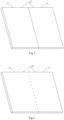
- the folding display screen 10 includes a home screen 11 and an auxiliary screen 12, and the two screens are connected by a connecting mechanism.
- the connecting mechanism may be a hinge, a rotating shaft, or other components that can connect the two screens and allow the two screens to be folded with respect to each other, or even a flexible screen, which is not limited by the embodiments of the present disclosure.
- the attributes, such as the material, the size, and the shape of the two screens, may be the same or different, which is not limited by the embodiments of the present disclosure.
- both screens may be a rigid screen, or both may be a flexible screen or one screen may be a rigid screen, and the other may be a flexible screen.
- one of the two screens is larger, which may be used as the home screen, and the other screen is smaller, which may be used as an auxiliary screen.
- one of the two screens is thicker, and the other is thinner than the other.
- the folding display screen 10 includes a one-piece screen, which may be a whole piece of a flexible screen or a screen formed by a seamless combination of a flexible screen and a rigid screen through a related manufacturing process. As shown in Fig. 2 , when the folding display screen 10 is a one-piece flexible screen, the folding display screen 10 may be divided into a home screen 11 and an auxiliary screen 12, and the sizes of the home screen 11 and the auxiliary screen 12 may be the same or different.
- the screen state of the folding display screen refers to a folding condition of the folding display screen.
- the screen state of the folding display screen includes a folded state and an expanded state.
- the folded state refers to a state in which the home screen 11 and the auxiliary screen 12 of the folding display screen 10 are parallel, and front sides of the two screens face in opposite directions, the front side of the screen referring to a screen side for displaying the user interface.
- the expanded state refers to a state in which the home screen 11 and the auxiliary screen 12 of the folding display screen are expanded into the same plane, and the front sides of the two screens face the same direction.
- the folding display screen includes a home screen and two auxiliary screens, that is, the folding display screen includes three screens, and the folding display screen is designed as a display screen foldable in a left-right direction.
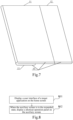
- the number of the auxiliary screens of the folding display screen is two, that is, the folding display screen 10 includes a home screen 11, a first auxiliary screen 12 and a second auxiliary screen 13, and the home screen 11 is connected to the first auxiliary screen 12 and the second auxiliary screen 13 respectively by a connection mechanism.
- the explanations are given by using an example in which the first auxiliary screen 12 and the second auxiliary screen 13 are mutually symmetrical. In other embodiments, the first auxiliary screen 12 and the second auxiliary screen 13 may also be asymmetric.
- the embodiments of the present disclosure are not limited to any one particular condition or condition.
- the folding display screen 10 is a whole screen.
- the folding display screen 10 may be divided into three screens, that is, a home screen 11, a first auxiliary screen 12 and a second auxiliary screen 13.
- the folding display screen 10 may also be divided into more pieces of screens.
- the folding display screen 10 is a seamless combination of a flexible screen and a rigid screen.
- the home screen 11 is a flexible screen
- at least one of the first auxiliary screen 12 and the second auxiliary screen 13 is a rigid screen.
- the home screen 11 is a rigid screen
- the first auxiliary screen 12 and the second auxiliary screen 13 are flexible screens.
- the screen states of the folding display screen include a folded state, an expanded state, and a semi-expanded state.
- the screen state of the folding display screen may be any one of the folded state, the expanded state, and the semi-expanded state.
- the folded state refers to a state in which the home screen 11, the first auxiliary screen 12, and the second auxiliary screen 13 of the folding display screen 10 are all parallel, and front sides of the first auxiliary screen 12 and the second auxiliary screen 13 are opposite to a front side of the home screen 11.
- Fig. 6 the folded state refers to a state in which the home screen 11, the first auxiliary screen 12, and the second auxiliary screen 13 of the folding display screen 10 are all parallel, and front sides of the first auxiliary screen 12 and the second auxiliary screen 13 are opposite to a front side of the home screen 11.
- the expanded state refers to a state in which the home screen 11, the first auxiliary screen 12, and the second auxiliary screen 13 of the folding display screen 10 are in the same plane, and the front sides of the first auxiliary screen 12 and the second sub-screen 13 are the same as the front side of the home screen 11.
- the semi-expanded state refers to a state between the folded state and the expanded state; that is, one of the two auxiliary screens is in the expanded state, and the other is in the folded state.
- the home screen 11 of the folding display screen 10 is in the same plane as one of the auxiliary screens (such as the first auxiliary screen 12 or the second auxiliary screen 13) and the front side of the home screen 11 faces the same direction as the front side of the auxiliary screen, and the front side of the home screen 11 is oriented in the opposite direction to the front side of the other auxiliary screen.
- the auxiliary screens such as the first auxiliary screen 12 or the second auxiliary screen 13
- Fig. 8 is a flowchart of a method for displaying a shortcut operation panel according to an exemplary embodiment.
- the present embodiment is exemplified by applying the method to a terminal having a folding display screen, the folding display screen includes a home screen and n auxiliary screen, and the home screen and the auxiliary screen are collapsible with respect to each other, n being a positive integer.
- the method may include the following steps (801-802).
- step 801 a user interface of a target application is displayed on the home screen.
- the target application may be any one of the applications installed in the terminal.
- the user interface of the target application refers to a display interface of the target application, and the user interface may include content for the user to view, and may also include an operation control for the user to interact with the computer.
- the above target application may be a system application pre-installed before the terminal is shipped from the factory, or a third-party application installed by the user after the terminal is shipped from the factory.
- the above system application includes, but is not limited to: applications of desktop, photo album, calendar, weather, clock, application management, and the like.
- the above third-party application includes, but is not limited to: a news reading application, a social-like application, an instant messaging application, a note application, a language translation application, a video-like application, a shopping-like application, etc.
- the embodiments of the present disclosure do not limit the applications.
- the screen state of the folding display screen includes a folded state, and an expanded state.
- the folded state refers to a state in which the home screen and the auxiliary screen are parallel and the front sides of the two screens face in opposite directions.
- the expanded state refers to a state in which the home screen and the auxiliary screen are expanded to the same plane, and the front sides of the two screens are oriented in the same direction.
- the screen state of the folding display screen includes a folded state, an expanded state, and a semi-expanded state.
- the folded state refers to a state in which the home screen is parallel to the n auxiliary screens, and the front sides of the n auxiliary screens face the opposite direction to the front side of the home screen.
- the expanded state refers to a state in which the home screen and the n auxiliary screens are in the same plane, and the front sides of the n auxiliary screens face the same direction as the front side of the home screen.
- the semi-expanded state refers to a state in which some of the n auxiliary screen(s) are in the expanded state, and the other auxiliary screen(s) are in the folded state.
- the user interface of the target application is displayed on the home screen.
- the user interface of the target application is displayed on the home screen.
- the user interface of the target application is displayed on the expanded home screen and auxiliary screen.
- step 802 when the auxiliary screen is in the expanded state, a shortcut operation panel is displayed on the auxiliary screen.
- auxiliary screen in step 802 may be any one of the n auxiliary screen(s).
- the display of the shortcut operation panel is triggered in such a manner that when the terminal detects the expansion operation corresponding to the auxiliary screen, the shortcut operation panel is displayed on the auxiliary screen.
- the terminal has a function of detecting the expansion operation.
- the terminal may include a Hall sensor through which the user's operation of expanding the auxiliary screen can be detected.
- the terminal detects the expansion operation corresponding to any of the auxiliary screens, the terminal is triggered to display the shortcut operation panel on the auxiliary screen, and the user may perform corresponding operations on the shortcut operation panel.
- the display shortcut panel may also be triggered by other means, for example, the display of the shortcut operation panel is triggered by a touch operation, a voice, a gesture, etc.
- the shortcut operation panel includes an icon for at least one shortcut operation function associated with the target application.
- the shortcut operation function is a function for a quick opening.
- the related shortcut operation functions may be different.
- the above "related" may refer to the function of the target application. For example, if the target application has the function of scanning a graphic code, an icon of the scanning graphic code function may be provided in the shortcut operation panel.
- the shortcut operation function related to the target application includes, but is not limited to, at least one of: displaying a social status publishing interface, displaying a graphic code, displaying a graphic code scanning interface, displaying a favorite interface, and displaying a contact list.
- the shortcut operation function related to the target application includes, but is not limited to, at least one of the following: displaying an album, adjusting a shutter, adjusting a resolution, adjusting an aperture, adjusting a sensitivity, turning on a panoramic shooting, and turning on a filter.
- the shortcut operation function related to the target application includes, but is not limited to, at least one of the following: turning on a screen capture, turning on a brightness adjustment, turning on a volume adjustment, opening a picture-in-picture portal, and displaying a related video recommendation interface.
- the shortcut operation function related to the target application includes, but is not limited to, at least one of the following: turning on a volume adjustment, turning on a scene sound adjustment, and displaying a song listening and identifying interface.
- the shortcut operation function related to the target application includes, but is not limited to, at least one of the following: displaying a shopping cart interface, displaying a to-be-received interface, displaying a coupon interface, displaying an order interface, and displaying a favorite interface.
- the at least one shortcut operation function provided by the shortcut operation panel includes: at least one first type of shortcut operation function; and/or at least one-second type of shortcut operation function; and/or at least one-third type of shortcut operation.
- the first type of shortcut operation function refers to a preset shortcut operation function provided in the shortcut operation panel, which may be set by the user in advance, or may be set by the terminal and is not limited by the embodiments of the present disclosure.
- the user may find a corresponding setting option in the system settings provided by the operating system of the terminal, and set in the setting option which shortcut operation function(s) needs to be displayed in the shortcut operation panel.
- By setting some commonly used shortcut operation functions in the shortcut operation panel it is more convenient for the user to choose.
- the second type of shortcut operation function refers to a shortcut operation function corresponding to an interface opened by the target application in the most recent time period.
- a certain interface may be reopened and displayed through the shortcut operation function corresponding to the interface.
- the most recent time period may be a preset duration before the current moment, and the preset duration may be preset, such as 15 minutes, 30 minutes, or 1 hour.
- the third type of shortcut operation function refers to a shortcut operation function recommended by the terminal and related to the user interface currently displayed by the target application.
- the third type of shortcut operation function may include functions of displaying a contact list, displaying a favorite interface, and the like.
- the shortcut operation function related to the user interface currently displayed by the target application is recommended for the user intelligently, which can better meet the actual needs of the user, provide the user with the required shortcut operation function, and improve the user experience.
- the icon of the shortcut operation function is used to identify the shortcut operation function, and different shortcut operation functions have different icons.
- the icon of the shortcut operation function is an operable control, such as a button, and the user may click on an icon of a certain shortcut operation function to trigger the terminal to perform the shortcut operation function.
- the method further includes the following steps:
- the icon of the target shortcut operation function may be an icon of any shortcut operation function in the shortcut panel.
- the selection signal is triggered by the user and is used to select an operation signal of the shortcut operation function to be executed from the shortcut operation panel.
- the user may trigger to generate the selection signal of the icon corresponding to the target shortcut operation function by clicking the icon of the target shortcut operation function or long pressing the icon of the target shortcut operation function.
- the content contained in the corresponding user interface is also different.
- a corresponding graphic code such as a two-dimensional code or a barcode
- the graphic code may be used for performing a receipt and payment operation or other operation.
- a corresponding album list may be displayed in the corresponding user interface, and the album list includes several photos taken by the user.
- the content included in the user interface corresponding to the target shortcut operation function is not specifically limited.
- Fig. 9 illustrates a dialog interface of a social-like application is displayed on the home screen 11 when the folding display screen is in the folded state.
- Fig. 10 illustrates a terminal displaying the shortcut operation panel 90 on the auxiliary screen 12 when the terminal detects the expansion operation corresponding to the auxiliary screen 12.
- the user interface corresponding to the target shortcut operation function is displayed on the auxiliary screen as an example.
- the user interface corresponding to the target shortcut operation function may also be displayed on the home screen, and the shortcut operation panel is kept displayed on the auxiliary screen.
- the following example is used for explanation: when the folding display screen is in the folded state, the auxiliary screen is expanded, and the shortcut operation panel is called in the expanded auxiliary screen.
- the folding display screen when the folding display screen is in the semi-expanded state, it is also supportable to expand the auxiliary screen and call the shortcut operation panel in the expanded auxiliary screen, the process is similar to the above embodiment, and is not elaborated here.
- a display scheme of a shortcut operation panel is provided.
- the user interface of the target application is displayed on the home screen, and the shortcut operation panel is displayed on the auxiliary screen. Since the shortcut operation panel is displayed on the auxiliary screen, the display content on the home screen is not blocked, and it is avoided the impact on the user to view and operate the display content on the home screen.
- the user may also add an icon of the shortcut operation function in the shortcut panel, which includes the following two steps: 1.
- a drag operation signal with a starting position located at a target object in the user interface of the target application and an ending position located in the shortcut operation panel is received.
- the target object may be a certain content in the user interface of the target application, such as an operation control or an icon, or it may be the user interface itself.
- the user may trigger the above drag operation signal by a finger or a stylus.
- an icon of a shortcut operation function corresponding to the target object is added to the shortcut operation panel.
- the shortcut operation function corresponding to the target object is used to quickly trigger the user interface displaying the target object. For example, the user clicks on the icon of the shortcut operation function corresponding to the target object, then the display of the user interface of the target object may be triggered.
- a buddy list interface 14 of a social-like application is displayed on the home screen 11, and a shortcut operation panel 90 is displayed on the auxiliary screen 12.
- the user wants to provide the shortcut operation function of displaying the buddy list interface 14 in the shortcut operation panel 90, the user may perform a drag operation from the buddy list interface 14 to the shortcut operation panel 90; correspondingly, after receiving the above-mentioned drag operation signal, the terminal adds an icon 91 for displaying the shortcut operation function of the buddy list interface 14 in the shortcut operation panel 90.
- the user can add the icon of the shortcut operation function to meet different needs of the user, so that the shortcut operation functions provided in the shortcut operation panel are relatively rich; and, the icon of the shortcut operation function may be added in the shortcut operation panel by only dragging, which is easy and convenient to operate.
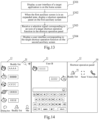
- Fig. 13 is a flowchart of a method for displaying a shortcut operation panel according to an embodiment of the present invention.
- the method is mainly applied to a terminal having a folding display screen.
- the folding display screen includes a home screen and two auxiliary screens, the two auxiliary screens are respectively a first auxiliary screen and a second auxiliary screen, the home screen is connected to the first auxiliary screen and the second auxiliary screen respectively, and the home screen and the auxiliary screens are foldable with respect to each other.
- the method includes the following steps (1301 ⁇ 1304).
- step 1301 a user interface of a target application is displayed on the home screen.
- step 1302 when the first auxiliary screen is in an expanded state, a shortcut operation panel is displayed on the first auxiliary screen.
- the terminal is provided with a function of detecting an expanding operation corresponding to each of the auxiliary screens.
- steps 1301 to 1302 are the same as or similar to the steps 801 to 802 in Fig. 8 described in the foregoing embodiment of the present disclosure, and the description in the embodiment of Fig. 8 may be referred to, which are not described herein again.
- step 1303 a selection signal corresponding to an icon of a target shortcut operation function in the shortcut operation panel is received.
- step 1304 a user interface corresponding to the target shortcut operation function is displayed on the second auxiliary screen.
- a dialog interface of a social-like application is displayed on the home screen 11, and a shortcut operation panel 90 is displayed on the first auxiliary screen 12.
- the terminal receives the selection signal corresponding to the icon 91 for displaying the shortcut operation function of the buddy list interface 14 in the shortcut operation panel 90, the buddy list interface 14 is displayed on the second auxiliary screen 13.
- the terminal detects an expansion operation corresponding to the second auxiliary screen after displaying the shortcut operation panel on the first auxiliary screen, the shortcut operation panel is cancelled to be displayed on the first auxiliary screen, and the user interface of the target application is displayed in a full-screen mode in the folding display screen.
- the terminal When the terminal detects the expansion operation corresponding to the second auxiliary screen, the terminal considers that the user needs a larger display screen to display the user interface of the target application currently displayed on the home screen, at this time, the shortcut operation panel is no longer displayed on the first auxiliary screen. At the same time, the terminal displays the user interface of the target application in a full-screen mode in the folding display screen.
- the terminal displays the shortcut operation panel in one auxiliary screen and display the user interface corresponding to the shortcut operation function selected by the user in another auxiliary screen, in this way, individual screens of the folding display screen are fully and reasonably applied.
- the terminal when the terminal detects the expansion operation corresponding to the second auxiliary screen, the terminal may display the user interface of the application in a full-screen manner in the folding display screen according to the user's requirement of large-screen display, thereby improving the display flexibility of the folding display screen.
- Fig. 15 is a block diagram of an apparatus for displaying a shortcut operation panel according to an exemplary embodiment, the apparatus is applied to a terminal having a folding display screen including a home screen and n auxiliary screen(s), and the home screen and the auxiliary screen are foldable with respect to each other, n being a positive integer.
- the apparatus has the functions of implementing the foregoing method embodiments, and the functions may be implemented by hardware or may be implemented by software performed by hardware.
- the apparatus 1500 may include a first display module 1510 and a second display module 1520.
- the first display module 1510 is configured to display a user interface of a target application on the home screen.
- the second display module 1520 is configured to display a shortcut operation panel on the auxiliary screen when the auxiliary screen is in an expanded state, where the shortcut operation panel includes an icon of at least one shortcut operation function related to the target application.
- a display scheme of a shortcut operation panel is provided.
- the user interface of the target application is displayed on the home screen, and the shortcut operation panel is displayed on the auxiliary screen. Since the shortcut operation panel is displayed on the auxiliary screen, the display content on the home screen is not blocked, and it is avoided an impact on the user for viewing and operating the display content on the home screen.
- At least one shortcut operation function provided by the shortcut operation panel includes: at least one first type of shortcut operation function, the first type of shortcut operation function referring to a shortcut operation function provided in the shortcut operation panel in advance; and/or, at least one-second type of shortcut operation function, the second type of shortcut operation function referring to a shortcut operation function corresponding to the interface opened by the target application in the most recent time period; and/or, at least one-third type of shortcut operation function, the third type of shortcut operation function referring to a shortcut operation function recommended by the terminal and related to the target application.
- the apparatus 1500 further includes a first receiving module 1530 and a third display module 1540.
- the first receiving module 1530 is configured to receive a selection signal corresponding to an icon of a target shortcut operation function in the shortcut operation panel on the auxiliary screen.
- the third display module 1540 is configured to display a user interface corresponding to the target shortcut operation function on the home screen or the auxiliary screen according to the selection signal.
- the shortcut operation function related to the target application includes at least one of displaying a social status publishing interface, displaying a graphic code, displaying a graphic code scanning interface, displaying a favorite interface and displaying a contact list;
- the apparatus 1500 further includes: a second receiving module 1550 and an icon adding module 1560.
- the second receiving module 1550 is configured to a drag operation signal with a starting position located at an icon of the target shortcut operation function in the user interface of the target application and an ending position located in the shortcut operation panel.
- the icon adding module 1560 is configured to add an icon of a target shortcut operation function to the shortcut operation panel according to the drag operation signal.
- the number of the auxiliary screens is two, which are respectively a first auxiliary screen and a second auxiliary screen, and the home screen is connected to the first auxiliary screen and the second auxiliary screen, respectively.
- the apparatus 1500 further includes: a fourth display module 1570.
- the fourth display module 1570 is configured to, when a selection signal corresponding to an icon of the target shortcut operation function in the shortcut operation panel is received after the shortcut operation panel is displayed on the first auxiliary screen, display a user interface corresponding to the target shortcut operation function on the second auxiliary screen.
- the apparatus 1500 further includes: a fifth display module 1580.
- the fifth display module 1580 is configured to, when an expansion operation corresponding to the second auxiliary screen is detected after the shortcut operation panel is displayed on the first auxiliary screen, cancel to display the shortcut operation panel, and display the user interface of the target application in a full screen mode in the folding display screen.
- An exemplary embodiment of the present disclosure further provides an apparatus for displaying a shortcut operation panel, which is applied to a terminal having a folding display screen, the folding display screen including a home screen and n auxiliary screen(s), the home screen and the auxiliary screen(s) being foldable with respect to each other, and n being a positive integer.
- the above apparatus may implement the method for displaying the shortcut operation panel provided by the present disclosure.
- the apparatus includes a processor and a memory for storing executable instructions of the processor.
- the processor is configured to:
- the at least one shortcut operation function provided by the shortcut operation panel includes: at least one first type of shortcut operation function, the first type of shortcut operation function referring to a shortcut operation function provided in the shortcut operation panel in advance; and/or, at least one-second type of shortcut operation function, the second type of shortcut operation function referring to a shortcut operation function corresponding to an interface opened by the target application in the most recent time period; and/or, at least one-third type of shortcut operation function, the third type of shortcut operation function referring to a shortcut operation function recommended by the terminal and related to the target application.
- the processor is further configured to: receive a selection signal corresponding to an icon of a target shortcut operation function in the shortcut operation panel; and display a user interface corresponding to the target shortcut operation function on the auxiliary screen according to the selection signal.
- the shortcut operation function related to the target application includes at least one of: displaying a social status publishing interface, displaying a graphic code, displaying a graphic code scanning interface, displaying a favorite interface and displaying a contact list.
- the shortcut operation function related to the target application includes at least one of the following: displaying an album, adjusting a shutter, adjusting a resolution, adjusting an aperture, adjusting a sensitivity, turning on a panoramic shooting, and turning on a filter.
- the shortcut operation function related to the target application includes at least one of the following: turning on a screen capture, turning on a brightness adjustment, turning on a volume adjustment, opening a picture-in-picture portal, and displaying a related video recommendation interface.
- the shortcut operation function related to the target application includes at least one of the following: turning on a volume adjustment, turning on a scene sound adjustment, and displaying a song listening and identifying interface.
- the shortcut operation function related to the target application includes at least one of the following: displaying a shopping cart interface, displaying a to-be-received interface, displaying a coupon interface, displaying an order interface, and displaying a favorite interface.
- the processor is further configured to: receive a drag operation signal with a start position located at the target object in the user interface of the target application and an ending position located in the shortcut operation panel; and add an icon of a shortcut operation function corresponding to the target object into the shortcut operation panel according to the drag operation signal.
- the number of the auxiliary screens is two, which are respectively a first auxiliary screen and a second auxiliary screen, and the home screen is connected to the first auxiliary screen and the second auxiliary screen respectively.
- the processor is further configured to: when receiving the selection signal corresponding to the icon of the target shortcut operation function in the shortcut operation panel after the shortcut operation panel is displayed on the first auxiliary screen, display a user interface corresponding to the target shortcut function on the second auxiliary screen.
- the processor is further configured to: when an expansion operation corresponding to the second auxiliary screen is detected after the shortcut operation panel is displayed on the first auxiliary screen, cancel to display the shortcut operation panel on the first auxiliary screen, and display the user interface of the target application in a full screen mode in the folding display screen.
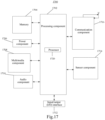
- Fig. 17 is a block diagram of an apparatus 1700 for displaying a shortcut operation panel according to an exemplary embodiment of the present disclosure.
- the apparatus 1700 is a terminal having a folding display screen; the folding display screen includes a home screen and n auxiliary screen(s), the home screen and the auxiliary screen(s) are foldable with respect to each other, and n is a positive integer.
- the apparatus 1700 may be a mobile phone, a computer, a digital broadcast terminal, a messaging device, a gaming console, a tablet, a medical device, exercise equipment, a personal digital assistant, and the like.
- the apparatus 1700 may include one or more of the following components: a processing component 1702, a memory 1704, a power component 1706, a multimedia component 1708, an audio component 1710, an input/output (I/O) interface 1712, a sensor component 1714, and a communication component 1716.
- the processing component 1702 typically controls overall operations of the apparatus 1700, such as the operations associated with a display, telephone calls, data communications, camera operations, and recording operations.
- the processing component 1702 may include one or more processors 1720 to execute instructions to perform all or part of the steps in the above-described methods.
- the processing component 1702 may include one or more modules that facilitate the interaction between the processing component 1702 and other components.
- the processing component 1702 may include a multimedia module to facilitate the interaction between the multimedia component 1708 and the processing component 1702.
- the memory 1704 is configured to store various types of data to support the operation of the apparatus 1700. Examples of such data include instructions for any applications or methods operated on the apparatus 1700, contact data, phonebook data, messages, pictures, video, etc.
- the memory 1704 may be implemented using any type of volatile or non-volatile memory devices, or a combination thereof, such as a static random access memory (SRAM), an electrically erasable programmable read-only memory (EEPROM), an erasable programmable read-only memory (EPROM), a programmable read-only memory (PROM), a read-only memory (ROM), a magnetic memory, a flash memory, a magnetic or optical disk.
- SRAM static random access memory
- EEPROM electrically erasable programmable read-only memory
- EPROM erasable programmable read-only memory
- PROM programmable read-only memory
- ROM read-only memory
- magnetic memory a magnetic memory
- flash memory a flash memory
- magnetic or optical disk a magnetic
- the power component 1706 provides power to various components of the apparatus 1700.
- the power component 1706 may include a power management system, one or more power sources, and any other components associated with the generation, management, and distribution of power in the apparatus 1700.
- the multimedia component 1708 includes a screen providing an output interface between the apparatus 1700 and the user.
- the screen may include a liquid crystal display (LCD) and a touch panel (TP). If the screen includes the touch panel, the screen may be implemented as a touch screen to receive input signals from the user.
- the touch panel includes one or more touch sensors to sense touches, swipes, and gestures on the touch panel. The touch sensors may not only sense a boundary of a touch or swipe action but also sense a period of time and a pressure associated with the touch or swipe action.
- the multimedia component 1708 includes a front camera and/or a rear camera. The front camera and the rear camera may receive an external multimedia datum while the apparatus 1700 is in an operation mode, such as a photographing mode or a video mode. Each of the front camera and the rear camera may be a fixed optical lens system or have focus and optical zoom capability.
- the audio component 1710 is configured to output and/or input audio signals.
- the audio component 1710 includes a microphone (MIC) configured to receive an external audio signal when the apparatus 1700 is in an operation mode, such as a call mode, a recording mode, and a voice recognition mode.
- the received audio signal may be further stored in the memory 1704 or transmitted via the communication component 1716.
- the audio component 1710 further includes a speaker to output audio signals.
- the I/O interface 1702 provides an interface between the processing component 1702 and peripheral interface modules, such as a keyboard, a click wheel, buttons, and the like.
- the buttons may include, but are not limited to, a home button, a volume button, a starting button, and a locking button.
- the sensor component 1714 includes one or more sensors to provide status assessments of various aspects of the apparatus 1700. For instance, the sensor component 1714 may detect an open/closed status of the apparatus 1700, relative positioning of components, e.g., the display and the keypad, of the apparatus 1700, a change in position of the apparatus 1700 or a component of the apparatus 1700, a presence or absence of user contact with the apparatus 1700, an orientation or an acceleration/deceleration of the apparatus 1700, and a change in temperature of the apparatus 1700.
- the sensor component 1714 may include a proximity sensor configured to detect the presence of nearby objects without any physical contact.
- the sensor component 1714 may also include a photosensitive sensor, such as a CMOS or CCD image sensor, for use in imaging applications.
- the sensor component 1714 may also include an accelerometer sensor, a gyroscope sensor, a magnetic sensor, a pressure sensor, a temperature sensor, a photoelectric sensor or a GPS sensor.
- the communication component 1716 is configured to facilitate communication, wired or wirelessly, between the apparatus 1700 and other devices.
- the apparatus 1700 may access a wireless network based on a communication standard, such as WiFi, 2G, 3G, 4G, 5G, or subsequent evolution system, or a combination thereof.
- the communication component 1716 receives a broadcast signal or broadcast associated information from an external broadcast management system via a broadcast channel.
- the communication component 1716 further includes a near field communication (NFC) module to facilitate short-range communications.
- NFC near field communication
- the apparatus 1700 may be implemented with one or more application-specific integrated circuits (ASICs), digital signal processors (DSPs), digital signal processing devices (DSPDs), programmable logic devices (PLDs), field-programmable gate arrays (FPGAs), controllers, microcontrollers, microprocessors, or other electronic components, for performing the above described methods.
- ASICs application-specific integrated circuits
- DSPs digital signal processors
- DSPDs digital signal processing devices
- PLDs programmable logic devices
- FPGAs field-programmable gate arrays
- controllers microcontrollers, microprocessors, or other electronic components, for performing the above described methods.
- a non-transitory computer-readable storage medium storing thereon computer program
- the computer program may be executable by the processor 1720 of the apparatus 1720, for performing the above-described methods for displaying a shortcut operation panel.
- the non-transitory computer-readable storage medium may be a ROM, a random access memory (RAM), a CD-ROM, a magnetic tape, a floppy disc, an optical data storage device, and the like.
Landscapes
- Engineering & Computer Science (AREA)
- Theoretical Computer Science (AREA)
- General Engineering & Computer Science (AREA)
- Human Computer Interaction (AREA)
- Physics & Mathematics (AREA)
- General Physics & Mathematics (AREA)
- Computer Hardware Design (AREA)
- User Interface Of Digital Computer (AREA)
Claims (7)
- Procédé permettant d'afficher un panneau d'opération de raccourci, comprenant :l'affichage (801, 1301), par un terminal présentant un écran d'affichage pliable (10), d'une interface utilisateur d'une application cible sur un écran d'accueil (11), dans lequel l'écran d'accueil (11) fait partie de l'écran d'affichage pliable (10) ; etlorsqu'un écran auxiliaire (12, 13) est dans un état d'expansion, l'affichage (802, 1302) d'un panneau d'opération de raccourci (90) sur l'écran auxiliaire (12, 13), dans lequel l'écran auxiliaire (12, 13) fait partie de l'écran d'affichage pliable (10), dans lequel le panneau d'opération de raccourci (90) comprend une icône (91) d'au moins une fonction d'opération de raccourci liée à l'application ciblecaractérisé en ce quel'écran d'affichage pliable (10) présente deux écrans auxiliaires, un premier écran auxiliaire (12) et un second écran auxiliaire (13), et l'écran d'accueil (11) est connecté au premier écran auxiliaire (12) et au second écran auxiliaire (13) respectivement,le procédé comprend en outre :
lors de la réception d'un signal de sélection correspondant à une icône (91) d'une fonction d'opération de raccourci cible dans le panneau d'opération de raccourci (90) après l'affichage du panneau d'opération de raccourci (90) sur le premier écran auxiliaire (12), l'affichage d'une interface utilisateur correspondant à la fonction d'opération de raccourci cible dans le second écran auxiliaire (13). - Procédé selon la revendication 1, dans lequel l'au moins une fonction d'opération de raccourci fournie par le panneau d'opération de raccourci (90) comprend au moins l'une des fonctions d'opération de raccourci suivantes :un premier type de fonction d'opération de raccourci qui désigne une fonction d'opération de raccourci prédéfinie fournie dans le panneau d'opération de raccourci ;un deuxième type de fonction d'opération de raccourci qui désigne une fonction d'opération de raccourci correspondant à une interface ouverte par l'application cible dans une période de temps récente ; etun troisième type de fonction d'opération de raccourci qui désigne une fonction d'opération de raccourci recommandée par le terminal et liée à l'interface utilisateur actuellement affichée par l'application cible.
- Procédé selon la revendication 1, comprenant en outre :la réception (1303) d'un signal de sélection correspondant à une icône d'une fonction d'opération de raccourci cible dans le panneau d'opération de raccourci (90) ; etl'affichage (1304) d'une interface utilisateur correspondant à la fonction d'opération de raccourci cible sur l'écran auxiliaire (12, 13) selon le signal de sélection.
- Procédé selon la revendication 1, dans lequel :lorsque l'application cible est une application de type social, la fonction d'opération de raccourci liée à l'application cible comprend au moins l'un parmi : l'affichage d'une interface de publication d'état social, l'affichage d'un code graphique, l'affichage d'une interface de balayage de code graphique, l'affichage d'une interface de favoris, et l'affichage d'une liste de contacts ;lorsque l'application cible est une application de type caméra, la fonction d'opération de raccourci liée à l'application cible comprend au moins l'un parmi : l'affichage d'un album, le réglage d'un obturateur, le réglage d'une résolution, le réglage d'une ouverture, le réglage d'une sensibilité, l'activation d'une prise de vue panoramique, et l'activation d'un filtre ;lorsque l'application cible est une application de type vidéo, la fonction d'opération de raccourci liée à l'application cible comprend au moins l'un parmi : l'activation d'une capture d'écran, l'activation d'un réglage de luminosité, l'activation d'un réglage de volume, l'ouverture d'un portail image sur image et l'affichage d'une interface de recommandation de vidéo associée ;lorsque l'application cible est une application de type musique, la fonction d'opération de raccourci liée à l'application cible comprend au moins l'un parmi : l'activation du réglage de volume, l'activation d'un réglage de son de scène, et l'affichage d'une interface d'écoute et d'identification de chansons ; etlorsque l'application cible est une application de type achat, la fonction d'opération de raccourci liée à l'application cible comprend au moins l'un parmi : l'affichage d'une interface de panier d'achat, l'affichage d'une interface à recevoir, l'affichage d'une interface de coupon, l'affichage d'une interface de commande, et l'affichage d'une interface de favoris.
- Procédé selon la revendication 1, comprenant en outre :lorsqu'une opération d'expansion correspondant au second écran auxiliaire (13) est détectée après l'affichage du panneau d'opération de raccourci (90) sur le premier écran auxiliaire (12),l'annulation de l'affichage du panneau d'opération de raccourci (90) sur le premier écran auxiliaire (12), etl'affichage de l'interface utilisateur de l'application cible en mode plein écran sur l'écran d'affichage pliable (10).
- Appareil permettant d'afficher un panneau d'opération de raccourci comprenant :un processeur (1720) ; etune mémoire (1704) configurée pour stocker des instructions exécutables par le processeur (1720) ;dans lequel le processeur (1720) est configuré pour réaliser le procédé permettant d'afficher un panneau d'opération de raccourci (90) selon l'une quelconque des revendications 1 à 5.
- Support de stockage non transitoire lisible par ordinateur dans lequel sont stockées des instructions qui, lorsqu'elles sont exécutées par un processeur, amènent le processeur à réaliser le procédé permettant d'afficher un panneau d'opération de raccourci (90) selon l'une quelconque des revendications 1 à 5.
Applications Claiming Priority (1)
| Application Number | Priority Date | Filing Date | Title |
|---|---|---|---|
| CN201811544061.9A CN109656439B (zh) | 2018-12-17 | 2018-12-17 | 快捷操作面板的显示方法、装置及存储介质 |
Publications (2)
| Publication Number | Publication Date |
|---|---|
| EP3671406A1 EP3671406A1 (fr) | 2020-06-24 |
| EP3671406B1 true EP3671406B1 (fr) | 2024-07-31 |
Family
ID=66113268
Family Applications (1)
| Application Number | Title | Priority Date | Filing Date |
|---|---|---|---|
| EP19200508.0A Active EP3671406B1 (fr) | 2018-12-17 | 2019-09-30 | Procédé, appareil et support d'enregistrement pour afficher un panneau de commande de raccourci |
Country Status (3)
| Country | Link |
|---|---|
| US (1) | US11010020B2 (fr) |
| EP (1) | EP3671406B1 (fr) |
| CN (1) | CN109656439B (fr) |
Families Citing this family (29)
| Publication number | Priority date | Publication date | Assignee | Title |
|---|---|---|---|---|
| WO2019047147A1 (fr) * | 2017-09-08 | 2019-03-14 | 广东欧珀移动通信有限公司 | Procédé et dispositif de déplacement d'icône |
| USD929987S1 (en) * | 2018-06-01 | 2021-09-07 | Compal Electronics, Inc. | Notebook computer with multiple displays |
| CN109656439B (zh) * | 2018-12-17 | 2025-05-23 | 北京小米移动软件有限公司 | 快捷操作面板的显示方法、装置及存储介质 |
| KR102680299B1 (ko) * | 2019-01-17 | 2024-07-01 | 삼성디스플레이 주식회사 | 표시 장치 |
| USD925525S1 (en) * | 2019-02-22 | 2021-07-20 | Samsung Display Co., Ltd. | Display device |
| USD1020731S1 (en) * | 2019-06-27 | 2024-04-02 | Intel Corporation | Computer with a wrap around display |
| CN110502291B (zh) * | 2019-07-01 | 2026-04-28 | 维沃移动通信有限公司 | 一种显示控制方法及终端 |
| CN112433790B (zh) * | 2019-08-26 | 2022-06-10 | 珠海金山办公软件有限公司 | 一种终端显示调节方法、装置和终端 |
| CN110531908A (zh) * | 2019-08-30 | 2019-12-03 | 维沃移动通信有限公司 | 一种快捷操作方法及移动终端 |
| CN115951808A (zh) * | 2019-08-31 | 2023-04-11 | 华为技术有限公司 | 一种应用图标的显示方法及电子设备 |
| CN112543246A (zh) * | 2019-09-04 | 2021-03-23 | 珠海金山办公软件有限公司 | 一种终端显示调节方法、装置和终端 |
| CN112445399A (zh) * | 2019-09-04 | 2021-03-05 | 珠海金山办公软件有限公司 | 一种终端显示调节方法、装置和终端 |
| CN112615947B (zh) * | 2019-09-18 | 2022-03-25 | 华为技术有限公司 | 快速进入应用的方法与折叠屏电子设备 |
| CN112671969B (zh) * | 2019-10-16 | 2022-06-10 | 珠海金山办公软件有限公司 | 一种终端显示调节方法、装置和终端 |
| CN112667186A (zh) * | 2019-10-16 | 2021-04-16 | 珠海金山办公软件有限公司 | 一种终端显示调节方法、装置和终端 |
| CN112671957B (zh) * | 2019-10-16 | 2022-05-06 | 珠海金山办公软件有限公司 | 一种终端显示调节方法、装置和终端 |
| KR102695029B1 (ko) * | 2019-10-17 | 2024-08-13 | 삼성전자 주식회사 | 전자 펜을 포함하는 멀티 폴더블 전자 장치 |
| CN110825474B (zh) * | 2019-10-31 | 2023-03-31 | 维沃移动通信有限公司 | 界面显示方法、装置和电子设备 |
| CN111221453A (zh) * | 2019-10-31 | 2020-06-02 | 华为技术有限公司 | 启动功能的方法及电子设备 |
| CN112230793B (zh) * | 2019-11-15 | 2025-12-12 | 华为技术有限公司 | 一种具有柔性屏幕的电子设备的显示方法及电子设备 |
| CN111016651A (zh) * | 2019-12-10 | 2020-04-17 | 上海博泰悦臻电子设备制造有限公司 | 车辆、车机设备、可扩展式车机显示屏幕及控制方法 |
| CN111124246B (zh) * | 2019-12-25 | 2022-03-08 | 上海传英信息技术有限公司 | 界面交互方法、设备及存储介质 |
| CN111309209B (zh) * | 2020-02-06 | 2021-08-31 | 华为技术有限公司 | 快速打开应用或应用功能的方法、装置及终端设备 |
| CN118631930A (zh) * | 2020-08-20 | 2024-09-10 | 华为技术有限公司 | 一种功能切换入口的确定方法与电子设备 |
| WO2022114848A1 (fr) | 2020-11-30 | 2022-06-02 | 삼성전자 주식회사 | Dispositif électronique souple et procédé de fonctionnement d'un écran de visualisation de caméra |
| CN112684959A (zh) * | 2020-12-24 | 2021-04-20 | 维沃移动通信(杭州)有限公司 | 控制方法、装置及电子设备 |
| CN115562548A (zh) * | 2021-06-30 | 2023-01-03 | 上海擎感智能科技有限公司 | 常用功能设置方法、电子装置、电子设备及存储介质 |
| CN113703896B (zh) * | 2021-08-30 | 2024-11-12 | 维沃移动通信(杭州)有限公司 | 事件触发控制方法、装置、电子设备及介质 |
| US12321765B2 (en) * | 2021-11-04 | 2025-06-03 | Oracle International Corporation | System and method for providing on-demand localization in a microservice application environment |
Citations (1)
| Publication number | Priority date | Publication date | Assignee | Title |
|---|---|---|---|---|
| US20130321340A1 (en) * | 2011-02-10 | 2013-12-05 | Samsung Electronics Co., Ltd. | Portable device comprising a touch-screen display, and method for controlling same |
Family Cites Families (37)
| Publication number | Priority date | Publication date | Assignee | Title |
|---|---|---|---|---|
| US20110090155A1 (en) * | 2009-10-15 | 2011-04-21 | Qualcomm Incorporated | Method, system, and computer program product combining gestural input from multiple touch screens into one gestural input |
| JP5782810B2 (ja) * | 2011-04-22 | 2015-09-24 | ソニー株式会社 | 情報処理装置、情報処理方法およびプログラム |
| US9417754B2 (en) * | 2011-08-05 | 2016-08-16 | P4tents1, LLC | User interface system, method, and computer program product |
| US10776103B2 (en) * | 2011-12-19 | 2020-09-15 | Majen Tech, LLC | System, method, and computer program product for coordination among multiple devices |
| CN104508618B (zh) * | 2012-05-09 | 2018-01-05 | 苹果公司 | 用于针对在用户界面中执行的操作提供触觉反馈的设备、方法和图形用户界面 |
| KR20140046327A (ko) * | 2012-10-10 | 2014-04-18 | 삼성전자주식회사 | 멀티 디스플레이 장치, 입력 펜, 멀티 디스플레이 장치의 제어 방법 및 멀티 디스플레이 시스템 |
| KR102097361B1 (ko) * | 2013-02-01 | 2020-04-07 | 삼성디스플레이 주식회사 | 가요성 디스플레이 장치를 구비한 모바일 기기 및 이의 동작 방법 |
| JP6097835B2 (ja) * | 2013-06-09 | 2017-03-15 | アップル インコーポレイテッド | 複数のページを有するフォルダを管理するためのデバイス、方法、及びグラフィカルユーザインタフェース |
| KR102092332B1 (ko) * | 2013-07-01 | 2020-04-14 | 삼성전자주식회사 | 휴대 장치 및 휴대 장치의 화면 표시 방법 |
| CN106134190A (zh) * | 2013-12-27 | 2016-11-16 | 索尼公司 | 显示控制装置、显示控制方法和程序 |
| KR102377785B1 (ko) * | 2014-02-10 | 2022-03-23 | 삼성전자주식회사 | 사용자 단말 장치 및 이의 디스플레이 방법 |
| EP3979048A1 (fr) * | 2014-02-10 | 2022-04-06 | Samsung Electronics Co., Ltd. | Dispositif de terminal d'utilisateur et son procédé d'affichage |
| KR102119843B1 (ko) * | 2014-02-10 | 2020-06-05 | 삼성전자주식회사 | 사용자 단말 장치 및 이의 디스플레이 방법 |
| WO2015119485A1 (fr) * | 2014-02-10 | 2015-08-13 | Samsung Electronics Co., Ltd. | Dispositif de terminal utilisateur et son procédé d'affichage |
| US20150331551A1 (en) * | 2014-05-14 | 2015-11-19 | Samsung Electronics Co., Ltd. | Image display apparatus, image display method, and computer-readable recording medium |
| KR20150135038A (ko) * | 2014-05-23 | 2015-12-02 | 삼성전자주식회사 | 폴더블 전자 장치 및 그 제어 방법 |
| US10289258B2 (en) * | 2014-10-01 | 2019-05-14 | Lg Electronics Inc. | Foldable portable device including different folded states |
| KR20210068638A (ko) * | 2014-10-28 | 2021-06-09 | 가부시키가이샤 한도오따이 에네루기 켄큐쇼 | 발광 장치 |
| KR102308645B1 (ko) * | 2014-12-29 | 2021-10-05 | 삼성전자주식회사 | 사용자 단말 장치 및 그의 제어 방법 |
| US9632664B2 (en) * | 2015-03-08 | 2017-04-25 | Apple Inc. | Devices, methods, and graphical user interfaces for manipulating user interface objects with visual and/or haptic feedback |
| KR102462856B1 (ko) | 2015-06-24 | 2022-11-03 | 삼성전자주식회사 | 디스플레이의 확장 영역에 대한 사용 알림 제공 방법 및 이를 지원하는 전자 장치 |
| CN106325374B (zh) * | 2015-06-30 | 2024-06-18 | 联想(北京)有限公司 | 电子设备和显示处理方法 |
| KR102488461B1 (ko) * | 2015-11-24 | 2023-01-13 | 엘지전자 주식회사 | 플렉서블 디스플레이 장치 및 그의 동작 방법 |
| KR20170077670A (ko) * | 2015-12-28 | 2017-07-06 | 삼성전자주식회사 | 컨텐츠를 제어하기 위한 방법 및 그 전자 장치 |
| KR102480462B1 (ko) * | 2016-02-05 | 2022-12-23 | 삼성전자주식회사 | 복수의 디스플레이들을 포함하는 전자 장치 및 그 동작 방법 |
| KR102571369B1 (ko) * | 2016-08-03 | 2023-08-29 | 삼성전자주식회사 | 디스플레이 제어 방법, 저장 매체 및 전자 장치 |
| KR102574183B1 (ko) * | 2016-08-19 | 2023-09-05 | 삼성전자주식회사 | 디스플레이를 제어하는 전자 장치 및 방법 |
| JP6347286B2 (ja) * | 2016-11-21 | 2018-06-27 | 株式会社コナミデジタルエンタテインメント | ゲーム制御装置、ゲームシステム、及びプログラム |
| JP2018084908A (ja) * | 2016-11-22 | 2018-05-31 | 富士ゼロックス株式会社 | 端末装置およびプログラム |
| WO2019014859A1 (fr) * | 2017-07-18 | 2019-01-24 | 华为技术有限公司 | Procédé d'opération multitâche et dispositif électronique |
| US10230826B1 (en) * | 2017-08-22 | 2019-03-12 | Futurewei Technologies, Inc. | Foldable mobile device |
| CN107678656B (zh) * | 2017-10-19 | 2020-05-19 | Oppo广东移动通信有限公司 | 开启快捷功能的方法、装置、移动终端及存储介质 |
| CN107704177B (zh) * | 2017-11-07 | 2020-04-21 | Oppo广东移动通信有限公司 | 界面显示方法、装置及终端 |
| CN108319436A (zh) * | 2018-01-18 | 2018-07-24 | 努比亚技术有限公司 | 双屏移动终端屏幕显示方法、移动终端及存储介质 |
| US10635134B2 (en) * | 2018-05-11 | 2020-04-28 | Apple Inc. | Systems and methods for customizing display modes for a touch-sensitive secondary display |
| CN109005286B (zh) * | 2018-07-13 | 2021-06-04 | 维沃移动通信有限公司 | 一种显示控制方法及折叠屏终端 |
| CN109656439B (zh) * | 2018-12-17 | 2025-05-23 | 北京小米移动软件有限公司 | 快捷操作面板的显示方法、装置及存储介质 |
-
2018
- 2018-12-17 CN CN201811544061.9A patent/CN109656439B/zh active Active
-
2019
- 2019-09-30 EP EP19200508.0A patent/EP3671406B1/fr active Active
- 2019-09-30 US US16/587,498 patent/US11010020B2/en active Active
Patent Citations (1)
| Publication number | Priority date | Publication date | Assignee | Title |
|---|---|---|---|---|
| US20130321340A1 (en) * | 2011-02-10 | 2013-12-05 | Samsung Electronics Co., Ltd. | Portable device comprising a touch-screen display, and method for controlling same |
Also Published As
| Publication number | Publication date |
|---|---|
| CN109656439B (zh) | 2025-05-23 |
| US11010020B2 (en) | 2021-05-18 |
| US20200192529A1 (en) | 2020-06-18 |
| CN109656439A (zh) | 2019-04-19 |
| EP3671406A1 (fr) | 2020-06-24 |
Similar Documents
| Publication | Publication Date | Title |
|---|---|---|
| EP3671406B1 (fr) | Procédé, appareil et support d'enregistrement pour afficher un panneau de commande de raccourci | |
| EP3786778B1 (fr) | Procédé et dispositif de projection sur écran, terminal et support d'enregistrement | |
| CN109683837B (zh) | 分屏显示方法、装置和存储介质 | |
| EP3382520B1 (fr) | Procédé et appareil permettant de faire fonctionner un écran d'un terminal mobile | |
| EP3660650B1 (fr) | Procédé permettant de faire fonctionner un écran d'affichage pliable, terminal et support d'informations | |
| CN105955607B (zh) | 内容分享方法和装置 | |
| CN109683761B (zh) | 内容收藏方法、装置及存储介质 | |
| EP3672262A1 (fr) | Procédé de fonctionnement, dispositif, appareil et support d'enregistrement de lecture de vidéo | |
| CN109582207B (zh) | 多任务管理界面的显示方法、装置、终端和存储介质 | |
| EP3337146B1 (fr) | Procédé et appareil pour afficher un message de notification | |
| US20160210726A1 (en) | Method and device for adjusting page display | |
| CN110968364B (zh) | 添加快捷插件的方法、装置及智能设备 | |
| EP3147802B1 (fr) | Procédé et appareil de traitement d'informations | |
| EP2990905B1 (fr) | Dispositif et procede d'affichage d'images | |
| US20150116368A1 (en) | Method and device for adjusting characters of application | |
| CN112383808A (zh) | 视频播放方法、装置、终端及存储介质 | |
| US11783525B2 (en) | Method, device and storage medium form playing animation of a captured image | |
| CN106201189A (zh) | 微件显示方法、装置和电子设备 | |
| EP4053675A1 (fr) | Procédé et appareil de commande de terminal mobile et support d'enregistrement | |
| EP3731078B1 (fr) | Procédé et appareil permettant de répondre à une opération gestuelle et support d'enregistrement | |
| CN105975188B (zh) | 图片位置调整方法及装置 | |
| CN106919309A (zh) | 电子设备的操作控制方法及装置 | |
| EP4020247B1 (fr) | Procédé et dispositif de traitement d'informations et support de stockage | |
| CN120066630A (zh) | 显示处理方法及装置、电子设备及存储介质 | |
| WO2025072767A1 (fr) | Rétroaction dynamique d'écran arrière |
Legal Events
| Date | Code | Title | Description |
|---|---|---|---|
| PUAI | Public reference made under article 153(3) epc to a published international application that has entered the european phase |
Free format text: ORIGINAL CODE: 0009012 |
|
| STAA | Information on the status of an ep patent application or granted ep patent |
Free format text: STATUS: THE APPLICATION HAS BEEN PUBLISHED |
|
| AK | Designated contracting states |
Kind code of ref document: A1 Designated state(s): AL AT BE BG CH CY CZ DE DK EE ES FI FR GB GR HR HU IE IS IT LI LT LU LV MC MK MT NL NO PL PT RO RS SE SI SK SM TR |
|
| AX | Request for extension of the european patent |
Extension state: BA ME |
|
| STAA | Information on the status of an ep patent application or granted ep patent |
Free format text: STATUS: REQUEST FOR EXAMINATION WAS MADE |
|
| 17P | Request for examination filed |
Effective date: 20201215 |
|
| RBV | Designated contracting states (corrected) |
Designated state(s): AL AT BE BG CH CY CZ DE DK EE ES FI FR GB GR HR HU IE IS IT LI LT LU LV MC MK MT NL NO PL PT RO RS SE SI SK SM TR |
|
| STAA | Information on the status of an ep patent application or granted ep patent |
Free format text: STATUS: EXAMINATION IS IN PROGRESS |
|
| 17Q | First examination report despatched |
Effective date: 20220315 |
|
| REG | Reference to a national code |
Ref country code: DE Ref legal event code: R079 Free format text: PREVIOUS MAIN CLASS: G06F0001160000 Ipc: G06F0003048860 Ref country code: DE Ref legal event code: R079 Ref document number: 602019056025 Country of ref document: DE Free format text: PREVIOUS MAIN CLASS: G06F0001160000 Ipc: G06F0003048860 |
|
| GRAP | Despatch of communication of intention to grant a patent |
Free format text: ORIGINAL CODE: EPIDOSNIGR1 |
|
| STAA | Information on the status of an ep patent application or granted ep patent |
Free format text: STATUS: GRANT OF PATENT IS INTENDED |
|
| RIC1 | Information provided on ipc code assigned before grant |
Ipc: G06F 3/0486 20130101ALN20240207BHEP Ipc: G06F 1/16 20060101ALI20240207BHEP Ipc: G06F 3/0482 20130101ALI20240207BHEP Ipc: G06F 3/04886 20220101AFI20240207BHEP |
|
| INTG | Intention to grant announced |
Effective date: 20240226 |
|
| P01 | Opt-out of the competence of the unified patent court (upc) registered |
Effective date: 20240321 |
|
| GRAS | Grant fee paid |
Free format text: ORIGINAL CODE: EPIDOSNIGR3 |
|
| GRAA | (expected) grant |
Free format text: ORIGINAL CODE: 0009210 |
|
| STAA | Information on the status of an ep patent application or granted ep patent |
Free format text: STATUS: THE PATENT HAS BEEN GRANTED |
|
| AK | Designated contracting states |
Kind code of ref document: B1 Designated state(s): AL AT BE BG CH CY CZ DE DK EE ES FI FR GB GR HR HU IE IS IT LI LT LU LV MC MK MT NL NO PL PT RO RS SE SI SK SM TR |
|
| REG | Reference to a national code |
Ref country code: CH Ref legal event code: EP Ref country code: GB Ref legal event code: FG4D |
|
| REG | Reference to a national code |
Ref country code: DE Ref legal event code: R096 Ref document number: 602019056025 Country of ref document: DE |
|
| REG | Reference to a national code |
Ref country code: IE Ref legal event code: FG4D |
|
| REG | Reference to a national code |
Ref country code: LT Ref legal event code: MG9D |
|
| REG | Reference to a national code |
Ref country code: NL Ref legal event code: MP Effective date: 20240731 |
|
| PG25 | Lapsed in a contracting state [announced via postgrant information from national office to epo] |
Ref country code: PT Free format text: LAPSE BECAUSE OF FAILURE TO SUBMIT A TRANSLATION OF THE DESCRIPTION OR TO PAY THE FEE WITHIN THE PRESCRIBED TIME-LIMIT Effective date: 20241202 |
|
| REG | Reference to a national code |
Ref country code: AT Ref legal event code: MK05 Ref document number: 1709097 Country of ref document: AT Kind code of ref document: T Effective date: 20240731 |
|
| PG25 | Lapsed in a contracting state [announced via postgrant information from national office to epo] |
Ref country code: PT Free format text: LAPSE BECAUSE OF FAILURE TO SUBMIT A TRANSLATION OF THE DESCRIPTION OR TO PAY THE FEE WITHIN THE PRESCRIBED TIME-LIMIT Effective date: 20241202 |
|
| PG25 | Lapsed in a contracting state [announced via postgrant information from national office to epo] |
Ref country code: NO Free format text: LAPSE BECAUSE OF FAILURE TO SUBMIT A TRANSLATION OF THE DESCRIPTION OR TO PAY THE FEE WITHIN THE PRESCRIBED TIME-LIMIT Effective date: 20241031 |
|
| PG25 | Lapsed in a contracting state [announced via postgrant information from national office to epo] |
Ref country code: FI Free format text: LAPSE BECAUSE OF FAILURE TO SUBMIT A TRANSLATION OF THE DESCRIPTION OR TO PAY THE FEE WITHIN THE PRESCRIBED TIME-LIMIT Effective date: 20240731 Ref country code: GR Free format text: LAPSE BECAUSE OF FAILURE TO SUBMIT A TRANSLATION OF THE DESCRIPTION OR TO PAY THE FEE WITHIN THE PRESCRIBED TIME-LIMIT Effective date: 20241101 Ref country code: NL Free format text: LAPSE BECAUSE OF FAILURE TO SUBMIT A TRANSLATION OF THE DESCRIPTION OR TO PAY THE FEE WITHIN THE PRESCRIBED TIME-LIMIT Effective date: 20240731 Ref country code: PL Free format text: LAPSE BECAUSE OF FAILURE TO SUBMIT A TRANSLATION OF THE DESCRIPTION OR TO PAY THE FEE WITHIN THE PRESCRIBED TIME-LIMIT Effective date: 20240731 |
|
| PG25 | Lapsed in a contracting state [announced via postgrant information from national office to epo] |
Ref country code: BG Free format text: LAPSE BECAUSE OF FAILURE TO SUBMIT A TRANSLATION OF THE DESCRIPTION OR TO PAY THE FEE WITHIN THE PRESCRIBED TIME-LIMIT Effective date: 20240731 |
|
| PG25 | Lapsed in a contracting state [announced via postgrant information from national office to epo] |
Ref country code: LV Free format text: LAPSE BECAUSE OF FAILURE TO SUBMIT A TRANSLATION OF THE DESCRIPTION OR TO PAY THE FEE WITHIN THE PRESCRIBED TIME-LIMIT Effective date: 20240731 |
|
| PG25 | Lapsed in a contracting state [announced via postgrant information from national office to epo] |
Ref country code: IS Free format text: LAPSE BECAUSE OF FAILURE TO SUBMIT A TRANSLATION OF THE DESCRIPTION OR TO PAY THE FEE WITHIN THE PRESCRIBED TIME-LIMIT Effective date: 20241130 Ref country code: AT Free format text: LAPSE BECAUSE OF FAILURE TO SUBMIT A TRANSLATION OF THE DESCRIPTION OR TO PAY THE FEE WITHIN THE PRESCRIBED TIME-LIMIT Effective date: 20240731 |
|
| PG25 | Lapsed in a contracting state [announced via postgrant information from national office to epo] |
Ref country code: HR Free format text: LAPSE BECAUSE OF FAILURE TO SUBMIT A TRANSLATION OF THE DESCRIPTION OR TO PAY THE FEE WITHIN THE PRESCRIBED TIME-LIMIT Effective date: 20240731 |
|
| PG25 | Lapsed in a contracting state [announced via postgrant information from national office to epo] |
Ref country code: ES Free format text: LAPSE BECAUSE OF FAILURE TO SUBMIT A TRANSLATION OF THE DESCRIPTION OR TO PAY THE FEE WITHIN THE PRESCRIBED TIME-LIMIT Effective date: 20240731 Ref country code: RS Free format text: LAPSE BECAUSE OF FAILURE TO SUBMIT A TRANSLATION OF THE DESCRIPTION OR TO PAY THE FEE WITHIN THE PRESCRIBED TIME-LIMIT Effective date: 20241031 |
|
| PG25 | Lapsed in a contracting state [announced via postgrant information from national office to epo] |
Ref country code: RS Free format text: LAPSE BECAUSE OF FAILURE TO SUBMIT A TRANSLATION OF THE DESCRIPTION OR TO PAY THE FEE WITHIN THE PRESCRIBED TIME-LIMIT Effective date: 20241031 Ref country code: PL Free format text: LAPSE BECAUSE OF FAILURE TO SUBMIT A TRANSLATION OF THE DESCRIPTION OR TO PAY THE FEE WITHIN THE PRESCRIBED TIME-LIMIT Effective date: 20240731 Ref country code: NO Free format text: LAPSE BECAUSE OF FAILURE TO SUBMIT A TRANSLATION OF THE DESCRIPTION OR TO PAY THE FEE WITHIN THE PRESCRIBED TIME-LIMIT Effective date: 20241031 Ref country code: NL Free format text: LAPSE BECAUSE OF FAILURE TO SUBMIT A TRANSLATION OF THE DESCRIPTION OR TO PAY THE FEE WITHIN THE PRESCRIBED TIME-LIMIT Effective date: 20240731 Ref country code: LV Free format text: LAPSE BECAUSE OF FAILURE TO SUBMIT A TRANSLATION OF THE DESCRIPTION OR TO PAY THE FEE WITHIN THE PRESCRIBED TIME-LIMIT Effective date: 20240731 Ref country code: IS Free format text: LAPSE BECAUSE OF FAILURE TO SUBMIT A TRANSLATION OF THE DESCRIPTION OR TO PAY THE FEE WITHIN THE PRESCRIBED TIME-LIMIT Effective date: 20241130 Ref country code: HR Free format text: LAPSE BECAUSE OF FAILURE TO SUBMIT A TRANSLATION OF THE DESCRIPTION OR TO PAY THE FEE WITHIN THE PRESCRIBED TIME-LIMIT Effective date: 20240731 Ref country code: GR Free format text: LAPSE BECAUSE OF FAILURE TO SUBMIT A TRANSLATION OF THE DESCRIPTION OR TO PAY THE FEE WITHIN THE PRESCRIBED TIME-LIMIT Effective date: 20241101 Ref country code: FI Free format text: LAPSE BECAUSE OF FAILURE TO SUBMIT A TRANSLATION OF THE DESCRIPTION OR TO PAY THE FEE WITHIN THE PRESCRIBED TIME-LIMIT Effective date: 20240731 Ref country code: ES Free format text: LAPSE BECAUSE OF FAILURE TO SUBMIT A TRANSLATION OF THE DESCRIPTION OR TO PAY THE FEE WITHIN THE PRESCRIBED TIME-LIMIT Effective date: 20240731 Ref country code: BG Free format text: LAPSE BECAUSE OF FAILURE TO SUBMIT A TRANSLATION OF THE DESCRIPTION OR TO PAY THE FEE WITHIN THE PRESCRIBED TIME-LIMIT Effective date: 20240731 Ref country code: AT Free format text: LAPSE BECAUSE OF FAILURE TO SUBMIT A TRANSLATION OF THE DESCRIPTION OR TO PAY THE FEE WITHIN THE PRESCRIBED TIME-LIMIT Effective date: 20240731 |
|
| PG25 | Lapsed in a contracting state [announced via postgrant information from national office to epo] |
Ref country code: SM Free format text: LAPSE BECAUSE OF FAILURE TO SUBMIT A TRANSLATION OF THE DESCRIPTION OR TO PAY THE FEE WITHIN THE PRESCRIBED TIME-LIMIT Effective date: 20240731 Ref country code: DK Free format text: LAPSE BECAUSE OF FAILURE TO SUBMIT A TRANSLATION OF THE DESCRIPTION OR TO PAY THE FEE WITHIN THE PRESCRIBED TIME-LIMIT Effective date: 20240731 Ref country code: RO Free format text: LAPSE BECAUSE OF FAILURE TO SUBMIT A TRANSLATION OF THE DESCRIPTION OR TO PAY THE FEE WITHIN THE PRESCRIBED TIME-LIMIT Effective date: 20240731 |
|
| PG25 | Lapsed in a contracting state [announced via postgrant information from national office to epo] |
Ref country code: EE Free format text: LAPSE BECAUSE OF FAILURE TO SUBMIT A TRANSLATION OF THE DESCRIPTION OR TO PAY THE FEE WITHIN THE PRESCRIBED TIME-LIMIT Effective date: 20240731 Ref country code: MC Free format text: LAPSE BECAUSE OF FAILURE TO SUBMIT A TRANSLATION OF THE DESCRIPTION OR TO PAY THE FEE WITHIN THE PRESCRIBED TIME-LIMIT Effective date: 20240731 |
|
| PG25 | Lapsed in a contracting state [announced via postgrant information from national office to epo] |
Ref country code: CZ Free format text: LAPSE BECAUSE OF FAILURE TO SUBMIT A TRANSLATION OF THE DESCRIPTION OR TO PAY THE FEE WITHIN THE PRESCRIBED TIME-LIMIT Effective date: 20240731 |
|
| PG25 | Lapsed in a contracting state [announced via postgrant information from national office to epo] |
Ref country code: SK Free format text: LAPSE BECAUSE OF FAILURE TO SUBMIT A TRANSLATION OF THE DESCRIPTION OR TO PAY THE FEE WITHIN THE PRESCRIBED TIME-LIMIT Effective date: 20240731 Ref country code: IT Free format text: LAPSE BECAUSE OF FAILURE TO SUBMIT A TRANSLATION OF THE DESCRIPTION OR TO PAY THE FEE WITHIN THE PRESCRIBED TIME-LIMIT Effective date: 20240731 |
|
| REG | Reference to a national code |
Ref country code: CH Ref legal event code: PL |
|
| REG | Reference to a national code |
Ref country code: DE Ref legal event code: R097 Ref document number: 602019056025 Country of ref document: DE |
|
| PG25 | Lapsed in a contracting state [announced via postgrant information from national office to epo] |
Ref country code: LU Free format text: LAPSE BECAUSE OF NON-PAYMENT OF DUE FEES Effective date: 20240930 |
|
| PLBE | No opposition filed within time limit |
Free format text: ORIGINAL CODE: 0009261 |
|
| STAA | Information on the status of an ep patent application or granted ep patent |
Free format text: STATUS: NO OPPOSITION FILED WITHIN TIME LIMIT |
|
| 26N | No opposition filed |
Effective date: 20250501 |
|
| REG | Reference to a national code |
Ref country code: BE Ref legal event code: MM Effective date: 20240930 |
|
| PG25 | Lapsed in a contracting state [announced via postgrant information from national office to epo] |
Ref country code: BE Free format text: LAPSE BECAUSE OF NON-PAYMENT OF DUE FEES Effective date: 20240930 |
|
| PG25 | Lapsed in a contracting state [announced via postgrant information from national office to epo] |
Ref country code: CH Free format text: LAPSE BECAUSE OF NON-PAYMENT OF DUE FEES Effective date: 20240930 |
|
| PG25 | Lapsed in a contracting state [announced via postgrant information from national office to epo] |
Ref country code: IE Free format text: LAPSE BECAUSE OF NON-PAYMENT OF DUE FEES Effective date: 20240930 |
|
| PG25 | Lapsed in a contracting state [announced via postgrant information from national office to epo] |
Ref country code: SE Free format text: LAPSE BECAUSE OF FAILURE TO SUBMIT A TRANSLATION OF THE DESCRIPTION OR TO PAY THE FEE WITHIN THE PRESCRIBED TIME-LIMIT Effective date: 20240731 |
|
| PGFP | Annual fee paid to national office [announced via postgrant information from national office to epo] |
Ref country code: DE Payment date: 20250919 Year of fee payment: 7 |
|
| PGFP | Annual fee paid to national office [announced via postgrant information from national office to epo] |
Ref country code: GB Payment date: 20250919 Year of fee payment: 7 |
|
| PGFP | Annual fee paid to national office [announced via postgrant information from national office to epo] |
Ref country code: FR Payment date: 20250922 Year of fee payment: 7 |
|
| PG25 | Lapsed in a contracting state [announced via postgrant information from national office to epo] |
Ref country code: CY Free format text: LAPSE BECAUSE OF FAILURE TO SUBMIT A TRANSLATION OF THE DESCRIPTION OR TO PAY THE FEE WITHIN THE PRESCRIBED TIME-LIMIT; INVALID AB INITIO Effective date: 20190930 |
|
| PG25 | Lapsed in a contracting state [announced via postgrant information from national office to epo] |
Ref country code: HU Free format text: LAPSE BECAUSE OF FAILURE TO SUBMIT A TRANSLATION OF THE DESCRIPTION OR TO PAY THE FEE WITHIN THE PRESCRIBED TIME-LIMIT; INVALID AB INITIO Effective date: 20190930 |