EP3674872A1 - Aufgabenumschaltverfahren und endgerät - Google Patents
Aufgabenumschaltverfahren und endgerät Download PDFInfo
- Publication number
- EP3674872A1 EP3674872A1 EP17926387.6A EP17926387A EP3674872A1 EP 3674872 A1 EP3674872 A1 EP 3674872A1 EP 17926387 A EP17926387 A EP 17926387A EP 3674872 A1 EP3674872 A1 EP 3674872A1
- Authority
- EP
- European Patent Office
- Prior art keywords
- application
- interface
- task
- terminal
- side edge
- Prior art date
- Legal status (The legal status is an assumption and is not a legal conclusion. Google has not performed a legal analysis and makes no representation as to the accuracy of the status listed.)
- Granted
Links
Images













Classifications
-
- G—PHYSICS
- G06—COMPUTING OR CALCULATING; COUNTING
- G06F—ELECTRIC DIGITAL DATA PROCESSING
- G06F3/00—Input arrangements for transferring data to be processed into a form capable of being handled by the computer; Output arrangements for transferring data from processing unit to output unit, e.g. interface arrangements
- G06F3/01—Input arrangements or combined input and output arrangements for interaction between user and computer
- G06F3/048—Interaction techniques based on graphical user interfaces [GUI]
- G06F3/0484—Interaction techniques based on graphical user interfaces [GUI] for the control of specific functions or operations, e.g. selecting or manipulating an object, an image or a displayed text element, setting a parameter value or selecting a range
-
- G—PHYSICS
- G06—COMPUTING OR CALCULATING; COUNTING
- G06F—ELECTRIC DIGITAL DATA PROCESSING
- G06F1/00—Details not covered by groups G06F3/00 - G06F13/00 and G06F21/00
- G06F1/16—Constructional details or arrangements
- G06F1/1613—Constructional details or arrangements for portable computers
- G06F1/1633—Constructional details or arrangements of portable computers not specific to the type of enclosures covered by groups G06F1/1615 - G06F1/1626
- G06F1/1684—Constructional details or arrangements related to integrated I/O peripherals not covered by groups G06F1/1635 - G06F1/1675
- G06F1/169—Constructional details or arrangements related to integrated I/O peripherals not covered by groups G06F1/1635 - G06F1/1675 the I/O peripheral being an integrated pointing device, e.g. trackball in the palm rest area, mini-joystick integrated between keyboard keys, touch pads or touch stripes
-
- G—PHYSICS
- G06—COMPUTING OR CALCULATING; COUNTING
- G06F—ELECTRIC DIGITAL DATA PROCESSING
- G06F3/00—Input arrangements for transferring data to be processed into a form capable of being handled by the computer; Output arrangements for transferring data from processing unit to output unit, e.g. interface arrangements
- G06F3/01—Input arrangements or combined input and output arrangements for interaction between user and computer
- G06F3/048—Interaction techniques based on graphical user interfaces [GUI]
- G06F3/0487—Interaction techniques based on graphical user interfaces [GUI] using specific features provided by the input device, e.g. functions controlled by the rotation of a mouse with dual sensing arrangements, or of the nature of the input device, e.g. tap gestures based on pressure sensed by a digitiser
-
- G—PHYSICS
- G06—COMPUTING OR CALCULATING; COUNTING
- G06F—ELECTRIC DIGITAL DATA PROCESSING
- G06F3/00—Input arrangements for transferring data to be processed into a form capable of being handled by the computer; Output arrangements for transferring data from processing unit to output unit, e.g. interface arrangements
- G06F3/01—Input arrangements or combined input and output arrangements for interaction between user and computer
- G06F3/048—Interaction techniques based on graphical user interfaces [GUI]
- G06F3/0481—Interaction techniques based on graphical user interfaces [GUI] based on specific properties of the displayed interaction object or a metaphor-based environment, e.g. interaction with desktop elements like windows or icons, or assisted by a cursor's changing behaviour or appearance
-
- G—PHYSICS
- G06—COMPUTING OR CALCULATING; COUNTING
- G06F—ELECTRIC DIGITAL DATA PROCESSING
- G06F3/00—Input arrangements for transferring data to be processed into a form capable of being handled by the computer; Output arrangements for transferring data from processing unit to output unit, e.g. interface arrangements
- G06F3/01—Input arrangements or combined input and output arrangements for interaction between user and computer
- G06F3/048—Interaction techniques based on graphical user interfaces [GUI]
- G06F3/0484—Interaction techniques based on graphical user interfaces [GUI] for the control of specific functions or operations, e.g. selecting or manipulating an object, an image or a displayed text element, setting a parameter value or selecting a range
- G06F3/04842—Selection of displayed objects or displayed text elements
-
- G—PHYSICS
- G06—COMPUTING OR CALCULATING; COUNTING
- G06F—ELECTRIC DIGITAL DATA PROCESSING
- G06F3/00—Input arrangements for transferring data to be processed into a form capable of being handled by the computer; Output arrangements for transferring data from processing unit to output unit, e.g. interface arrangements
- G06F3/01—Input arrangements or combined input and output arrangements for interaction between user and computer
- G06F3/048—Interaction techniques based on graphical user interfaces [GUI]
- G06F3/0484—Interaction techniques based on graphical user interfaces [GUI] for the control of specific functions or operations, e.g. selecting or manipulating an object, an image or a displayed text element, setting a parameter value or selecting a range
- G06F3/0485—Scrolling or panning
-
- G—PHYSICS
- G06—COMPUTING OR CALCULATING; COUNTING
- G06F—ELECTRIC DIGITAL DATA PROCESSING
- G06F3/00—Input arrangements for transferring data to be processed into a form capable of being handled by the computer; Output arrangements for transferring data from processing unit to output unit, e.g. interface arrangements
- G06F3/01—Input arrangements or combined input and output arrangements for interaction between user and computer
- G06F3/048—Interaction techniques based on graphical user interfaces [GUI]
- G06F3/0487—Interaction techniques based on graphical user interfaces [GUI] using specific features provided by the input device, e.g. functions controlled by the rotation of a mouse with dual sensing arrangements, or of the nature of the input device, e.g. tap gestures based on pressure sensed by a digitiser
- G06F3/0488—Interaction techniques based on graphical user interfaces [GUI] using specific features provided by the input device, e.g. functions controlled by the rotation of a mouse with dual sensing arrangements, or of the nature of the input device, e.g. tap gestures based on pressure sensed by a digitiser using a touch-screen or digitiser, e.g. input of commands through traced gestures
-
- G—PHYSICS
- G06—COMPUTING OR CALCULATING; COUNTING
- G06F—ELECTRIC DIGITAL DATA PROCESSING
- G06F3/00—Input arrangements for transferring data to be processed into a form capable of being handled by the computer; Output arrangements for transferring data from processing unit to output unit, e.g. interface arrangements
- G06F3/01—Input arrangements or combined input and output arrangements for interaction between user and computer
- G06F3/048—Interaction techniques based on graphical user interfaces [GUI]
- G06F3/0487—Interaction techniques based on graphical user interfaces [GUI] using specific features provided by the input device, e.g. functions controlled by the rotation of a mouse with dual sensing arrangements, or of the nature of the input device, e.g. tap gestures based on pressure sensed by a digitiser
- G06F3/0488—Interaction techniques based on graphical user interfaces [GUI] using specific features provided by the input device, e.g. functions controlled by the rotation of a mouse with dual sensing arrangements, or of the nature of the input device, e.g. tap gestures based on pressure sensed by a digitiser using a touch-screen or digitiser, e.g. input of commands through traced gestures
- G06F3/04883—Interaction techniques based on graphical user interfaces [GUI] using specific features provided by the input device, e.g. functions controlled by the rotation of a mouse with dual sensing arrangements, or of the nature of the input device, e.g. tap gestures based on pressure sensed by a digitiser using a touch-screen or digitiser, e.g. input of commands through traced gestures for inputting data by handwriting, e.g. gesture or text
-
- G—PHYSICS
- G06—COMPUTING OR CALCULATING; COUNTING
- G06F—ELECTRIC DIGITAL DATA PROCESSING
- G06F3/00—Input arrangements for transferring data to be processed into a form capable of being handled by the computer; Output arrangements for transferring data from processing unit to output unit, e.g. interface arrangements
- G06F3/01—Input arrangements or combined input and output arrangements for interaction between user and computer
- G06F3/048—Interaction techniques based on graphical user interfaces [GUI]
- G06F3/0487—Interaction techniques based on graphical user interfaces [GUI] using specific features provided by the input device, e.g. functions controlled by the rotation of a mouse with dual sensing arrangements, or of the nature of the input device, e.g. tap gestures based on pressure sensed by a digitiser
- G06F3/0488—Interaction techniques based on graphical user interfaces [GUI] using specific features provided by the input device, e.g. functions controlled by the rotation of a mouse with dual sensing arrangements, or of the nature of the input device, e.g. tap gestures based on pressure sensed by a digitiser using a touch-screen or digitiser, e.g. input of commands through traced gestures
- G06F3/04886—Interaction techniques based on graphical user interfaces [GUI] using specific features provided by the input device, e.g. functions controlled by the rotation of a mouse with dual sensing arrangements, or of the nature of the input device, e.g. tap gestures based on pressure sensed by a digitiser using a touch-screen or digitiser, e.g. input of commands through traced gestures by partitioning the display area of the touch-screen or the surface of the digitising tablet into independently controllable areas, e.g. virtual keyboards or menus
-
- H—ELECTRICITY
- H04—ELECTRIC COMMUNICATION TECHNIQUE
- H04M—TELEPHONIC COMMUNICATION
- H04M1/00—Substation equipment, e.g. for use by subscribers
- H04M1/02—Constructional features of telephone sets
- H04M1/23—Construction or mounting of dials or of equivalent devices; Means for facilitating the use thereof
- H04M1/236—Construction or mounting of dials or of equivalent devices; Means for facilitating the use thereof including keys on side or rear faces
-
- H—ELECTRICITY
- H04—ELECTRIC COMMUNICATION TECHNIQUE
- H04M—TELEPHONIC COMMUNICATION
- H04M1/00—Substation equipment, e.g. for use by subscribers
- H04M1/72—Mobile telephones; Cordless telephones, i.e. devices for establishing wireless links to base stations without route selection
- H04M1/724—User interfaces specially adapted for cordless or mobile telephones
- H04M1/72403—User interfaces specially adapted for cordless or mobile telephones with means for local support of applications that increase the functionality
-
- G—PHYSICS
- G06—COMPUTING OR CALCULATING; COUNTING
- G06F—ELECTRIC DIGITAL DATA PROCESSING
- G06F2203/00—Indexing scheme relating to G06F3/00 - G06F3/048
- G06F2203/033—Indexing scheme relating to G06F3/033
- G06F2203/0339—Touch strips, e.g. orthogonal touch strips to control cursor movement or scrolling; single touch strip to adjust parameter or to implement a row of soft keys
-
- G—PHYSICS
- G06—COMPUTING OR CALCULATING; COUNTING
- G06F—ELECTRIC DIGITAL DATA PROCESSING
- G06F2203/00—Indexing scheme relating to G06F3/00 - G06F3/048
- G06F2203/048—Indexing scheme relating to G06F3/048
- G06F2203/04803—Split screen, i.e. subdividing the display area or the window area into separate subareas
Definitions
- This application relates to the field of electronic technologies, and in particular, to a task switching method and a terminal.
- a mobile terminal may start a plurality of applications simultaneously.
- the mobile terminal currently displays an interface of one application (application a) in the plurality of applications, other applications in the plurality of applications may run on a background of the mobile terminal.
- a user may control the mobile terminal to switch between interfaces of the plurality of applications.
- the mobile terminal may exit the interface of the application a, and return to a home interface of the mobile terminal; and then in response to a tapping operation of the user on an icon of another application that is displayed on the main desktop, displayan interface of an application (that is, a target application) selected by the user, to implement application switching.
- a target application that is, a target application
- This application provides a task switching method and a terminal to reduce user operations in application switching, improve human-machine interaction performance, and improve user experience.
- the terminal may implement functions of "displaying a multi-task interface” and “selecting a task window from the multi-task interface for performing application switching" in response to the pressing operation and the sliding operation that are continuous operations of the finger without leaving the side edge, and the user does not need to perform operations at least twice in different positions of a mobile phone.
- user operations in application switching can be reduced, human-machine interaction performance can be improved, and user experience can be improved.
- the at least one task recently run by the terminal and not closed includes at least one application recently run by the terminal and not closed; correspondingly, the first task window is a task window of one of the at least one application recently run by the terminal and not closed; and the second interface is an interface of an application corresponding to the first task window displayed by the terminal in the preset manner when the sliding operation is ended and the finger of the user leaves the side edge.
- the terminal may display, in response to the pressing operation, the first interface including a task window of the at least one application recently run by the terminal and not closed.
- the terminal may implement switching between applications in response to the pressing operation and the sliding operation that are continuous operations of the finger without leaving the side edge. This can reduce user operations in application switching, improve human-machine interaction performance, and improve user experience.
- the at least one task window in the first interface is task windows of the at least two applications; or when an application recently run by the terminal and not closed includes only a first application, the at least one task window in the first interface is a task window of an application task in the first application, where the first application in this application is an application that is being run by the terminal when the terminal responds to the pressing operation.
- the displaying, by the terminal, a first interface in response to a pressing operation of the user on the side edge may include: when there are at least two applications recently run by the terminal and not closed, displaying, by the terminal in response to the pressing operation of the user on the side edge, the first interface including task windows of the at least two applications, where correspondingly, the first task window is a task window of one of the at least two applications; and the second interface is an interface of an application corresponding to the first task window displayed by the terminal in the preset manner when the sliding operation is ended and the finger of the user leaves the side edge.
- the displaying, by the terminal, a first interface in response to a pressing operation of the user on the side edge may further include: when an application recently run by the terminal and not closed includes only a first application, displaying, by the terminal in response to the pressing operation of the user on the side edge, the first interface including a task window of one or more application tasks in the first application, where the first application is any application in the terminal, where correspondingly, the first task window is a task window of an application task in the first application; and the second interface is an interface of an application task corresponding to the first task window displayed by the terminal in the preset manner when the sliding operation is ended and the finger of the user leaves the side edge.
- the terminal may not only implement switching between applications in response to the pressing operation and the sliding operation that are continuous operations of the finger without leaving the side edge, but also implement switching between a plurality of application tasks in one application.
- user operations in switching between application tasks of one application can also be reduced, human-machine interaction performance can be improved, and user experience can be improved.
- the terminal may determine, by using an interface currently displayed by the terminal, whether to display task windows of a plurality of applications in the first interface or display task windows of a plurality of application tasks in a first application. For example, when the terminal currently displays a desktop of the terminal, the terminal displays task windows of a plurality of applications in the first interface.
- the displaying, by the terminal, a first interface in response to a pressing operation of the user on the side edge may include: when the terminal currently displays a desktop of the terminal, displaying, by the terminal in response to the pressing operation of the user on the side edge, the first interface including a task window of the at least one application recently run by the terminal and not closed, where the first task window is the task window of the one of the at least one application recently run by the terminal and not closed; and the second interface is the interface of the application corresponding to the first task window displayed by the terminal in the preset manner when the sliding operation is ended and the finger of the user leaves the side edge.
- the terminal when the terminal currently displays the desktop of the terminal, the terminal may display, in response to the pressing operation of the user on the side edge, the first interface including a task window of one or more applications; and then the terminal may implement switching between applications in response to the sliding operation, where the pressing operation and the sliding operation are continuous operations of the finger without leaving the side edge.
- the terminal may display, in response to the pressing operation of the user on the side edge, the first interface including a task window of one or more applications; and then the terminal may implement switching between applications in response to the sliding operation, where the pressing operation and the sliding operation are continuous operations of the finger without leaving the side edge.
- user operations in application switching can be reduced, human-machine interaction performance can be improved, and user experience can be improved.
- the terminal may determine, based on a position of the pressing operation on the side edge of the terminal, whether to display task windows of a plurality of applications in the first interface or display task windows of a plurality of application tasks in a first application.
- the at least one task window in the first interface is a task window of one or more applications recently run by the terminal and not closed; or when the pressing operation is a pressing operation of the user in a second position on the side edge, the at least one task window in the first interface is a task window of one or more application tasks of the first application.
- the first position and the second position in this application may be two different positions on a same side edge of the terminal. Alternatively, the first position and the second position may be located on two different side edges of the terminal.
- the displaying, by the terminal, a first interface in response to a pressing operation of the user on the side edge may include: when the pressing operation is a pressing operation of the user in the first position on the side edge, displaying, by the terminal in response to the pressing operation of the user on the side edge, the first interface including the task window of the at least one application recently run by the terminal and not closed; or when the pressing operation is a pressing operation of the user in the second position on the side edge, displaying, by the terminal in response to the pressing operation of the user on the side edge, the first interface including a task window of an application task in a second application, where the second application is a last application after the at least one application recently run by the terminal and not closed is arranged in ascending order of runtime, where correspondingly, the first task window is a task window of an application task in the second application; and the second interface is an interface of an application task corresponding to the first task window displayed by the terminal in the preset manner when the sliding operation is ended and the finger of the user leaves the side edge.
- the terminal may determine, based on the position of the pressing operation, whether the pressing operation is used to instruct the terminal to display a multi-task interface of a plurality of applications or display a multi-task interface of a plurality of application tasks of one application. In this way, the terminal can not only implement switching between applications in response to the pressing operation and the sliding operation that are continuous operations of the finger without leaving the side edge, but also implement switching between a plurality of application tasks in one application.
- user operations in switching between application tasks of one application can also be reduced, human-machine interaction performance can be improved, and user experience can be improved.
- the side edge includes a left side edge of the terminal and/or a right side edge of the terminal.
- the sensor may be disposed in a position that is on the side edge of the terminal and facilitates a user operation when the user holds the terminal.
- a specific position of the sensor on the side edge of the terminal is not limited in this application.
- the side edge in this application may be not only the left side edge and/or the right side edge of the terminal, but also an upper side edge and/or a lower side edge of the terminal. This is not limited in this application.
- the pressing operation may be a pressing operation of the user on at least two points of the side edge.
- the displaying, by the terminal, a first interface in response to a pressing operation of the user on the side edge may include: displaying, by the terminal, the first interface in response to a pressing operation of the user on at least two points of the side edge.
- the pressing operation of the user on at least two points of the side edge may be a pressing operation of the user on at least two fixed points of a same side edge of the terminal.
- the pressing operation of the user on at least two points of the side edge may be a pressing operation of the user on at least two points of different side edges of the terminal.
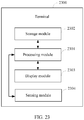
- this application provides a terminal, where a sensor is installed on a side edge of the terminal, and the terminal includes: a detection unit, a processing unit, and a display unit, where the detection unit is configured to detect an operation of a user on the side edge of the terminal by using the sensor; the processing unit is configured to run at least one task in the terminal; the display unit is configured to display a first interface in response to a pressing operation that is of the user on the side edge and is detected by the detection unit, where the first interface includes at least one task window, and the at least one task window corresponds to at least one task recently run by the processing unit and not closed; the detection unit is further configured to detect a sliding operation of the user on the side edge, where the sliding operation and the pressing operation are continuous operations of a finger of the user without leaving the side edge; the display unit is further configured to display a first task window in a preset manner in response to the sliding operation detected by the detection unit, where the first task window is one of the at least one task window, and as a
- the at least one task recently run by the processing unit and not closed includes at least one application recently run by the terminal and not closed;
- the first task window displayed by the display unit is a task window of one of the at least one application recently run by the processing unit and not closed;
- the second interface displayed by the display unit is an interface of an application corresponding to the first task window displayed in the preset manner when the sliding operation is ended and the finger of the user leaves the side edge.
- the display unit is specifically configured to: when there are at least two applications recently run by the processing unit and not closed, display, in response to the pressing operation of the user on the side edge, the first interface including task windows of the at least two applications, where the first task window is a task window of one of the at least two applications; and the second interface is an interface of an application corresponding to the first task window displayed by the display unit in the preset manner when the sliding operation is ended and the finger of the user leaves the side edge.
- the display unit is specifically configured to: when an application recently run by the processing unit and not closed includes only a first application, display, in response to the pressing operation of the user on the side edge, the first interface including a task window of one or more application tasks in the first application, where the first application is any application in the terminal, where the first task window is a task window of an application task in the first application; and the second interface is an interface of an application task corresponding to the first task window displayed by the display unit in the preset manner when the sliding operation is ended and the finger of the user leaves the side edge.
- the display unit is specifically configured to: when the display unit currently displays a desktop of the terminal, display, in response to the pressing operation of the user on the side edge, the first interface including a task window of the at least one application recently run by the processing unit and not closed, where the first task window is the task window of the one of the at least one application recently run by the terminal and not closed; and the second interface is the interface of the application corresponding to the first task window displayed by the display unit in the preset manner when the sliding operation is ended and the finger of the user leaves the side edge.
- the pressing operation is a pressing operation of the user in a first position on the side edge.
- the display unit is specifically configured to: when the pressing operation is a pressing operation of the user in a second position on the side edge, display, in response to the pressing operation of the user on the side edge, the first interface including a task window of an application task in a second application, where the second application is a last application after the at least one application recently run by the processing unit and not closed is arranged in ascending order of runtime, where the first task window is a task window of an application task in the second application; and the second interface is an interface of an application task corresponding to the first task window displayed by the display unit in the preset manner when the sliding operation is ended and the finger of the user leaves the side edge.
- the side edge includes a left side edge of the terminal and/or a right side edge of the terminal.
- the display unit is specifically configured to display the first interface in response to a pressing operation of the user on at least two points of the side edge.
- this application provides a terminal, where the terminal includes a processor, a memory, a touchscreen, and a sensor installed on a side edge of the terminal, the memory, the touchscreen, and the sensor are coupled to the processor, the memory is configured to store computer program code, the computer program code includes a computer instruction, and when the processor executes the computer instruction, the sensor is configured to detect a pressing operation of a user on the side edge; the processor is further configured to run at least one task in the terminal, where data of the at least one task is stored in the memory; the touchscreen is configured to display a first interface in response to the pressing operation detected by the sensor, where the first interface includes at least one task window, and the at least one task window corresponds to at least one task recently run by the processor and not closed; the sensor is further configured to detect a sliding operation of the user on the side edge, where the sliding operation and the pressing operation are continuous operations of a finger of the user without leaving the side edge; the touchscreen is further configured to display a first task window in a preset manner in response
- the at least one task recently run by the processor and not closed includes at least one application recently run by the processor and not closed;
- the first task window displayed by the touchscreen is a task window of one of the at least one application recently run by the processor and not closed;
- the second interface displayed by the touchscreen is an interface of an application corresponding to the first task window displayed by the touchscreen in the preset manner when the sensor detects that the sliding operation is ended and that the finger of the user leaves the side edge.
- the touchscreen is specifically configured to: when there are at least two applications recently run by the processor and not closed, display, in response to the pressing operation detected by the sensor, the first interface including task windows of the at least two applications, where the first task window displayed by the touchscreen is a task window of one of the at least two applications; and the second interface displayed by the touchscreen is an interface of an application corresponding to the first task window displayed by the touchscreen in the preset manner when the sensor detects that the sliding operation is ended and that the finger of the user leaves the side edge.
- the touchscreen is specifically configured to: when an application recently run by the processor and not closed includes only a first application, display, in response to the pressing operation detected by the sensor, the first interface including a task window of one or more application tasks in the first application, where the first application is any application in the terminal, where the first task window displayed by the touchscreen is a task window of an application task in the first application; and the second interface displayed by the touchscreen is an interface of an application task corresponding to the first task window displayed by the touchscreen in the preset manner when the sliding operation is ended and the finger of the user leaves the side edge.
- the touchscreen is specifically configured to: when the touchscreen currently displays a desktop of the terminal, display, in response to the pressing operation detected by the sensor, the first interface including a task window of the at least one application recently run by the processor and not closed, where the first task window displayed by the touchscreen is the task window of the one of the at least one application recently run by the terminal and not closed; and the second interface displayed by the touchscreen is the interface of the application corresponding to the first task window displayed by the touchscreen in the preset manner when the sliding operation is ended and the finger of the user leaves the side edge.
- the pressing operation detected by the sensor is a pressing operation of the user in a first position on the side edge.
- the touchscreen is specifically configured to: when the pressing operation is a pressing operation of the user in a second position on the side edge, display, in response to the pressing operation detected by the sensor, the first interface including a task window of an application task in a second application, where the second application is a last application after the at least one application recently run by the processor and not closed is arranged in ascending order of runtime, where the first task window displayed by the touchscreen is a task window of an application task in the second application; and the second interface displayed by the touchscreen is an interface of an application task corresponding to the first task window displayed by the touchscreen in the preset manner when the sliding operation is ended and the finger of the user leaves the side edge.
- the side edge includes a left side edge of the terminal and/or a right side edge of the terminal.
- the touchscreen is specifically configured to display the first interface in response to a pressing operation that is of the user on at least two points of the side edge and is detected by the sensor.
- this application provides a graphical user interface (Graphical User Interface, GUI), where the graphical user interface is stored in a terminal, the terminal includes a touchscreen, a memory, a processor, and a sensor installed on a side edge of the terminal, the sensor is configured to detect an operation of a user on the side edge, and the processor is configured to execute one or more computer programs stored in the memory, where the graphical user interface includes: a first GUI displayed on the touchscreen in response to a pressing operation on the side edge, where the first GUI includes a first interface, the first interface includes at least one task window, and the at least one task window corresponds to at least one task recently run by the processor and not closed; a second GUI displayed on the touchscreen in response to a sliding operation on the side edge, where the sliding operation and the pressing operation are continuous operations of a finger of the user without leaving the side edge, a first task window is displayed in the second GUI in a preset manner, the first task window is one of the at least one task window, and as a sliding position of the
- the first task window in the second GUI is a task window of one of at least one application recently run by the processor and not closed; and the second interface in the third GUI is an interface of an application corresponding to the first task window displayed in the second GUI in the preset manner when the sliding operation is ended and the finger of the user leaves the side edge.
- the first interface in the first GUI specifically includes task windows of at least two applications recently run by the processor and not closed; the first task window in the second GUI is a task window of one of the at least two applications; and the second interface in the third GUI is an interface of an application corresponding to the first task window displayed in the second GUI in the preset manner when the sliding operation is ended and the finger of the user leaves the side edge.
- the first interface in the first GUI is specifically the first interface including a task window of one or more application tasks in the first application, and the first application is any application in the terminal, where the first task window in the second GUI is a task window of an application task in the first application; and the second interface in the third GUI is an interface of an application task corresponding to the first task window displayed in the second GUI in the preset manner when the sliding operation is ended and the finger of the user leaves the side edge.
- the first interface in the first GUI displayed on the touchscreen in response to the pressing operation on the side edge includes a task window of the at least one application recently run by the processor and not closed, where the first task window in the second GUI is the task window of the one of the at least one application recently run by the terminal and not closed; and the second interface in the third GUI is the interface of the application corresponding to the first task window displayed in the second GUI in the preset manner when the sliding operation is ended and the finger of the user leaves the side edge.
- the pressing operation is a pressing operation of the user in a first position on the side edge.
- the first interface in the first GUI displayed on the touchscreen in response to a pressing operation in a second position on the side edge includes a task window of an application task in a second application, where the second application is a last application after the at least one application recently run by the touchscreen and not closed is arranged in ascending order of runtime, where the first task window in the second GUI is a task window of an application task in the second application; and the second interface in the third GUI is an interface of an application task corresponding to the first task window displayed in the second GUI in the preset manner when the sliding operation is ended and the finger of the user leaves the side edge.
- this application provides a computer storage medium, where the computer storage medium includes a computer instruction, and when the computer instruction is run on a terminal, the terminal is enabled to perform the task switching method according to the first aspect or any possible design method of the first aspect.
- this application provides a computer program product, where when the computer program product is run on a computer, the computer is enabled to perform the task switching method according to the first aspect and any possible design method of the first aspect.
- the terminals in the second aspect, or the third aspect, or the possible design methods thereof, the GUI in the fourth aspect, the computer storage medium in the fifth aspect, and the computer program product in the sixth aspect provided above are all configured to perform the corresponding methods provided above. Therefore, for beneficial effects that the terminals, the GUI, the computer storage medium, and the computer program product can achieve, refer to beneficial effects in the corresponding methods provided above. Details are not described again herein.
- first and second mentioned below are merely intended for description, and shall not be understood as an indication or implication of relative importance or an implicit indication of a quantity of indicated technical features. Therefore, a feature defined by “first” or “second” may explicitly or implicitly include one or more features. In the description of this application, unless otherwise stated, "a plurality of" means two or more than two.
- a user may control, in the following manner, the mobile phone 100 to implement application switching:
- the mobile phone 100 currently displays an interface 101 of a "Settings” application shown in (a) in FIG. 1 , and that the mobile phone 100 recently run three application programs: the “Settings” application, a "Dial-Up” application, and a "WeChat” application.
- the mobile phone 100 may display, in response to the tapping operation of the user on the Recent key 102, a multi-task interface including a plurality of task windows.
- the mobile phone 100 displays a multi-task interface 106 shown in (b) in FIG. 1 .
- the multi-task interface 106 includes a "Dial-Up” task window 107, a "Settings” task window 108, and a "WeChat” task window 109.
- the user may control, by double-tapping a Home key of the mobile phone, the multi-task interface shown in (b) in FIG. 1 . Then, as shown in (b) in FIG.
- the mobile phone 100 may display, in response to the selection operation of the user on the "WeChat” task window 109, an interface of the "WeChat” application corresponding to the "WeChat” task window 109, for example, a WeChat interface 110 shown in (c) in FIG. 1 .
- the Recent key 102 is located on a navigation bar 103 of the mobile phone 100.
- the navigation bar (Navigation Bar) is a shortcut button bar at a bottom of a screen of the mobile phone, and generally appears at a bottom end of the screen of the mobile phone in a form of virtual keys.
- the navigation bar includes three buttons by default: a Back key, the Home key, and the Recent key, where the Back key is used to return to a previous interface, the Home key is used to return to a desktop, and the Recent key is used to display a recently used application program.
- the navigation bar 103 includes the Back key 104, the Home key 105, and the Recent key 102.
- This application provides a task switching method and a terminal, where the method may be applied to a process in which the terminal switches between a plurality of tasks recently run by the terminal.
- the terminal may implement, in response to one continuous operation of a user on a side edge of the terminal, switching between the tasks recently run by the terminal, to reduce user operations in the task switching process, and improve human-machine interaction performance.
- the terminal may switch displaying of interfaces of the plurality of tasks recently run by the terminal.
- the plurality of tasks recently run by the terminal are a plurality of applications recently run by the terminal; or the plurality of tasks may be a plurality of application tasks in a first application currently run by the terminal.
- the terminal in this application may be an electronic device with a sensor disposed on its side edge.
- the terminal may be a mobile phone (such as the mobile phone 100 shown in FIG. 1 ), a tablet computer, a personal computer (Personal Computer, PC), a personal digital assistant (personal digital assistant, PDA), a smartwatch, a netbook, a wearable electronic device, or the like.
- a specific form of the terminal is not specifically limited in this application.
- the task switching method provided in this application may be performed by a task switching apparatus, where the task switching apparatus may be the terminal shown in FIG. 1 or FIG. 2 .
- the task switching apparatus may also be a central processing unit (Central Processing Unit, CPU for short), or a control module that is in the terminal and is configured to perform task switching.
- the task switching method provided by this embodiment of the present invention is described by using an example in which the terminal performs the task switching method in this embodiment of the present invention.
- the mobile phone 100 is used as an example of the terminal.
- the mobile phone 100 may specifically include components such as a processor 201, a radio frequency (Radio Frequency, RF) circuit 202, a memory 203, a touchscreen 204, a Bluetooth apparatus 205, one or more sensors 206, a Wi-Fi apparatus 207, a positioning apparatus 208, an audio circuit 209, a peripheral interface 210, and a power source 211.
- the components may perform communication by using one or more communications buses or signal cables (not shown in FIG. 2 ).
- a person skilled in the art may understand that, a hardware structure shown in FIG. 2 does not constitute a limitation on the mobile phone.
- a quantity of components included in the mobile phone 100 may be greater or less than that shown in the figure, or some components are combined, or component arrangements are different.
- the processor 201 is a control center of the mobile phone 100.
- the processor 201 is connected to all parts of the mobile phone 100 by using various interfaces and lines, and executes various functions and data processing of the mobile phone 100 by running or executing an application program stored in the memory 203 and invoking data stored in the memory 203.
- the processor 201 may include one or more processing units.
- the processor 201 may further include a fingerprint verification chip, configured to verify a captured fingerprint.
- the radio frequency circuit 202 may be configured to receive and send radio signals. Particularly, after receiving downlink data from a base station, the radio frequency circuit 202 may send the downlink data to the processor 201 for processing, and send uplink data to the base station.
- the radio frequency circuit includes but is not limited to an antenna, at least one amplifier, a transceiver, a coupler, a low noise amplifier, a duplexer, or the like.
- the radio frequency circuit 202 may further communicate with another device through wireless communication.
- the wireless communication may be based on any communication standard or protocol, including but not limited to the global system for mobile communications, general packet radio service, code division multiple access, wideband code division multiple access, long term evolution, or the like.
- the memory 203 is configured to store the application program and data.
- the processor 201 executes various functions and data processing of the mobile phone 100 by running the application program and data stored in the memory 203.
- the memory 203 mainly includes a program storage area and a data storage area.
- the program storage area may store an operating system, an application program required by at least one function (such as an audio playing function or an image viewing function).
- the data storage area may store data (such as audio data or a phone book) that is created according to usage of the mobile phone 100.
- the memory 203 may include a high-speed random access memory (Random Access Memory, RAM), and may further include a non-volatile memory, for example, a magnetic disk storage device, a flash memory, or another non-volatile solid-state storage device.
- the memory 203 may store various operating systems.
- the memory 203 may be independent, and is connected to the processor 201 by using the communications bus; or the memory 203 may be integrated with the processor 201.
- the touchscreen 204 may specifically include a touchpad 204-1 and a display 204-2.
- the touchpad 204-1 may capture a touch event of a user of the mobile phone 100 on or near the touchpad (for example, an operation performed by the user by using any appropriate object such as a finger or a stylus on the touchpad 204-1 or near the touchpad 204-1), and send captured touch information to another component (for example, the processor 201).
- the touch event near the touchpad 204-1 may be referred to as a floating touch.
- the floating touch may be that the user does not need to directly touch the touchpad for selecting, moving, or dragging an object (for example, an icon), and that the user only needs to be located near the device for ease of performing a required function.
- the touchpad 204-1 may be implemented by using a plurality of types such as resistive, capacitive, infrared, and surface acoustic wave.
- the display (also referred to as a display screen) 204-2 may be configured to display information input by the user or information provided for the user and various menus of the mobile phone 100.
- the display 204-2 may be configured in a form of a liquid crystal display, an organic light-emitting diode, or the like.
- the touchpad 204-1 may cover the display 204-2. After detecting the touch event on or near the touchpad 204-1, the touchpad 204-1 transmits the touch event to the processor 201 to determine a type of the touch event. Then the processor 201 may provide a corresponding visual output on the display 204-2 based on the type of the touch event.
- the touchpad 204-1 and the display panel 204-2 are used as two independent components to implement input and output functions of the mobile phone 100 in FIG. 2
- the touchpad 204-1 and the display screen 204-2 may be integrated to implement the input and output functions of the mobile phone 100 in some embodiments.
- the touchscreen 204 may be formed by a plurality of stacked layers of materials. Only the touchpad (layer) and the display screen (layer) are presented in this embodiment of this application. Other layers are not described in this embodiment of this application.
- the touchpad 204-1 may be configured on a front side of the mobile phone 100 in a form of a complete panel
- the display screen 204-2 may also be configured on the front side of the mobile phone 100 in a form of a complete panel. Therefore, a bezel-less structure can be implemented for the front side of the mobile phone.
- the mobile phone 100 may further have a fingerprint recognition function.
- a fingerprint recognizer 212 may be configured on a rear side (for example, below a rear camera) of the mobile phone 100, or a fingerprint recognizer 212 is configured on a front side (for example, below the touchscreen 204) of the mobile phone 100.
- a fingerprint recognizer 212 may be configured in the touchscreen 204 to implement the fingerprint recognition function.
- the fingerprint recognizer 212 may be integrated with the touchscreen 204 to implement the fingerprint recognition function of the mobile phone 100.
- the fingerprint recognizer 212 is configured in the touchscreen 204, and may be a part of the touchscreen 204, or may be configured in the touchscreen 204 in another manner.
- a main component of the fingerprint recognizer 212 in this embodiment of this application is a fingerprint sensor.
- the fingerprint sensor may use any type of sensing technology, including but not limited to an optical, capacitive, piezoelectric, or ultrasonic sensing technology, or the like.
- the mobile phone 100 may further include the Bluetooth apparatus 205, configured to implement data exchange between the mobile phone 100 and another short-range device (for example, a mobile phone or a smartwatch).
- the Bluetooth apparatus in this embodiment of this application may be an integrated circuit, a Bluetooth chip, or the like.
- the one or more sensors 206 include a sensor that is disposed on a side edge of the mobile phone and may be configured to detect a pressing operation of the user on the side edge and a sliding operation of the user on the side edge.
- the side edge in this application includes a left side edge of the terminal and/or a right side edge of the terminal.
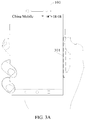
- the senor may be disposed on the right side edge of the mobile phone 100.
- the sensor is specifically located on the right side edge of the mobile phone 100, that is, in a position corresponding to a dashed-line block 301 shown in FIG. 3A .
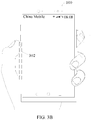
- the sensor may be disposed on the left side edge of the mobile phone 100.
- the sensor is specifically located on the left side edge of the mobile phone 100, that is, in a position corresponding to a dashed-line block 302 shown in FIG. 3B .
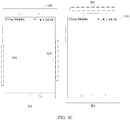
- the sensors may be disposed on both the left side edge and the right side edge of the mobile phone 100. For example, as shown in (a) in FIG.
- the senor may be disposed in a position corresponding to a dashed-line block 303 on the right side edge of the mobile phone 100; and the sensor may be disposed in a position corresponding to a dashed-line block 304 on the left side edge of the mobile phone 100.
- the senor may be disposed in a position that is on the side edge of the terminal and facilitates a user operation when the user holds the terminal.
- a specific position of the sensor on the side edge of the terminal is not limited in this application.
- the side edge in this application may be not only the left side edge and/or the right side edge of the terminal, but also an upper side edge and/or a lower side edge of the terminal. This is not limited in this application.
- the sensor may be disposed in a position corresponding to a dashed-line block 305 on the upper side edge of the mobile phone 100.
- the one or more sensors 206 include but are not limited to the foregoing sensor.
- the one or more sensors 206 may further include a light sensor, a motion sensor, and another sensor.
- the light sensor may include an ambient light sensor and a proximity sensor.
- the ambient light sensor may adjust luminance of the touchscreen 204 based on brightness of ambient light.
- the proximity sensor may turn off the display when the mobile phone 100 moves to an ear.
- an accelerometer sensor may detect acceleration magnitudes in all directions (generally tri-axis), and when the accelerometer sensor is stationary, may detect a magnitude and a direction of gravity, and may be used in a posture recognition application of the mobile phone (for example, switching between landscape orientation and portrait orientation, a related game, or magnetometer posture calibration), a function related to vibration recognition (for example, a pedometer or a stroke), or the like.
- a posture recognition application of the mobile phone for example, switching between landscape orientation and portrait orientation, a related game, or magnetometer posture calibration
- a function related to vibration recognition for example, a pedometer or a stroke
- sensors that may be configured for the mobile phone 100, such as a gyroscope, a barometer, a hygrometer, a thermometer, and an infrared sensor, details are not described herein.
- the Wi-Fi apparatus 207 is configured to provide network access complying with a Wi-Fi related standard for the mobile phone 100. By using the Wi-Fi apparatus 207, the mobile phone 100 may access a Wi-Fi hotspot, and further help the user send and receive e-mails, browse web pages, access streaming media, and the like.
- the Wi-Fi apparatus 207 provides wireless broadband Internet access for the user. In other embodiments, the Wi-Fi apparatus 207 may also be used as a Wi-Fi wireless access point, and may provide Wi-Fi network access for another device.
- the positioning apparatus 208 is configured to provide a geographic location for the mobile phone 100. It may be understood that, the positioning apparatus 208 may be specifically a receiver of a positioning system such as a global positioning system (Global Positioning System, GPS), a BeiDou navigation satellite system, or Russian GLONASS.
- a positioning system such as a global positioning system (Global Positioning System, GPS), a BeiDou navigation satellite system, or Russian GLONASS.
- the positioning apparatus 208 After receiving the geographic location information sent by the positioning system, the positioning apparatus 208 sends the information to the processor 201 for processing, or sends the information to the memory 203 for storage.
- the positioning apparatus 208 may be a receiver of an assisted global positioning system (Assisted Global Positioning System, AGPS).
- AGPS assisted Global Positioning System
- the AGPS assists the positioning apparatus 208 in completing ranging and positioning services.
- the positioning assistance server communicates with the positioning apparatus 208 (that is, a GPS receiver) of a device such as the mobile phone 100 to provide positioning assistance.
- the positioning apparatus 208 may be a positioning technology based on a Wi-Fi hotspot. Because each Wi-Fi hotspot has a globally unique media access control (Media Access Control, MAC) address, the device may scan and capture broadcast signals of nearby Wi-Fi hotspots when Wi-Fi is enabled, and therefore can obtain MAC addresses broadcast by the Wi-Fi hotspots; the device sends, to a location server by using a wireless communications network, data (for example, the MAC addresses) that can identify the Wi-Fi hotspots; and the location server retrieves a geographic location of each Wi-Fi hotspot, calculates the geographic location of the device with reference to strength of the Wi-Fi broadcast signals, and sends the geographic location to the positioning apparatus 208 of the device.
- Media Access Control Media Access Control
- the audio circuit 209, a speaker 213, and a microphone 214 may provide an audio interface between the user and the mobile phone 100.
- the audio circuit 209 may convert received audio data into an electrical signal and then transmit the electrical signal to the speaker 213, and the speaker 213 converts the electrical signal into an audio signal for outputting.
- the microphone 214 converts a captured audio signal into an electrical signal
- the audio circuit 209 converts the received electrical signal into audio data and then outputs the audio data to the RF circuit 202; and then the audio data is transmitted to another mobile phone, or the audio data is output to the memory 203 for further processing.
- the peripheral interface 210 is configured to provide various interfaces for external input/output devices (for example, a keyboard, a mouse, an external display, an external memory, and a subscriber identity module card).
- the peripheral interface is connected to the mouse by using a universal serial bus (Universal Serial Bus, USB) interface, or connected, by using a metal contact in a subscriber identity module card slot, to a subscriber identity module (Subscriber Identification Module, SIM) card provided by a telecommunications operator.
- the peripheral interface 210 may be configured to couple the external input/output peripheral device to the processor 201 and the memory 203.
- the mobile phone 100 may communicate with another device in a device group by using the peripheral interface 210, for example, may receive, by using the peripheral interface 210, displayed data sent by another device and display the data. This is not limited in this embodiment of the present invention.
- the mobile phone 100 may further include the power source apparatus 211 (such as a battery and a power management chip) supplying power to each component.
- the battery may be logically connected to the processor 201 by using the power management chip, so that functions such as charge and discharge management and power consumption management are implemented by using the power source apparatus 211.
- the mobile phone 100 may further include a camera (a front camera and/or a rear camera), a flash, a micro projection apparatus, a near field communications (Near Field Communications, NFC) apparatus, and the like. Details are not described herein.
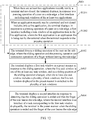
- the task switching method may be applied to a terminal, where a sensor is installed on a side edge of the terminal, and the sensor is configured to detect an operation of a user on the side edge. As shown in FIG. 4 , the task switching method includes S401 to S404.
- a terminal displays a first interface in response to a pressing operation of a user on a side edge, where the first interface includes at least one task window, and the at least one task window corresponds to at least one task recently run by the terminal and not closed.
- a sensor is installed on the side edge of the terminal, and the sensor may detect a tapping operation, a pressing operation, a sliding operation, and the like of the user on the side edge. For example, when the user presses the side edge, the sensor may detect a pressure value of pressing the side edge by the user, and transmit the detected pressure value to a processor of the terminal. When determining that the pressure value is greater than a preset pressure threshold, the processor may determine that the operation of the user on the side edge is a pressing operation, and may instruct a touchscreen of the terminal to display the first interface.
- the at least one task recently run by the terminal includes at least one application recently run by the terminal and not closed.
- a first task window is a task window of one of the at least one application recently run by the terminal and not closed.
- the at least one task recently run by the terminal and not closed is a task that is started and not closed in the terminal after the terminal is powered on recently, and the terminal may be in a running state or may be in a sleep or idle state, or the like.
- the terminal may display, in response to the pressing operation of the user on the side edge, the first interface including a task window of the at least one application recently run by the terminal and not closed.
- the terminal is the mobile phone 100, and the sensor is installed on the right side edge of the mobile phone 100.
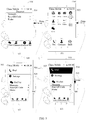
- the mobile phone 100 currently displays the interface 501 of the "WeChat” application; and as shown in (b) in FIG. 5 , the mobile phone currently displays the desktop 502 of the terminal.
- the at least one application recently run by the mobile phone 100 and not closed includes a "Dial-Up” application, a "Settings” application, and the "WeChat” application. In this case, after the user presses the mobile phone 100 shown in (a) in FIG. 5 or (b) in FIG.
- the mobile phone 100 may display, in response to the pressing operation of the user on the mobile phone 100, a first interface 503 shown in (c) in FIG. 5 .
- the first interface 503 shown in (c) in FIG. 5 includes the task window of the at least one application recently run by the mobile phone 100 and not closed, for example, a task window 504 of the "Dial-Up” application, a task window 505 of the "Settings” application, and a task window 506 of the "WeChat” application.
- task windows of applications included in the first interface may be arranged in ascending order of time of running the applications by the terminal, or task windows of applications included in the first interface may be arranged randomly.
- the order of the arranged task windows of the applications included in the first interface is not limited in this application.
- the pressing operation may be a pressing operation of the user on at least two points of the side edge.
- S401 may be replaced with S401a.
- the terminal displays the first interface in response to a pressing operation of the user on at least two points of the side edge.
- the pressing operation of the user on at least two points of the side edge may be a pressing operation of the user on at least two fixed positions of a same side edge of the terminal, for example, a pressing operation of the user on at least two fixed positions on the dashed-line block 303 shown in FIG. 3A .
- the pressing operation of the user on at least two points of the side edge may be a pressing operation of the user on at least two points of different side edges of the terminal.
- the pressing operation may include a pressing operation of the user on the right side edge of the mobile phone 100 and a pressing operation of the user on the upper side edge of the mobile phone 100.
- the terminal detects a sliding operation of the user on the side edge, where the sliding operation and the pressing operation are continuous operations of a finger without leaving the side edge.
- the sliding operation and the pressing operation are continuous operations of a finger without leaving the side edge
- the finger of the user does not leave the side edge in a process from detecting the sliding operation of the user on the side edge by the terminal to detecting the sliding operation of the user on the side edge by the terminal.
- the sliding operation in this application may be a sliding operation immediately input on the side edge after the user inputs the pressing operation on the side edge.
- the sliding operation in this application may be a sliding operation input on the side edge N seconds after the user inputs the pressing operation on the side edge and the finger of the user does not leave the side edge of the terminal (that is, the finger of the user touches the side edge and stays on the side edge all the time).
- N may be any one of numbers such as 3, 5, or 10. In this application, a value range of N is not limited.
- the terminal displays a first task window in a preset manner in response to the sliding operation, where the first task window is one of the at least one task window, and as a sliding position of the sliding operation changes, when the at least one task window includes a plurality of task windows, the first task window displayed in the preset manner is switched in the plurality of task windows.
- the mobile phone 100 displays, in response to the pressing operation of the user on the side edge, the first interface 503 shown in (c) in FIG. 5 , the finger of the user does not leave the side edge of the mobile phone 100.
- the mobile phone 100 may display the task window 504 (that is, the first task window) of the "Dial-Up" application in black (that is, in the preset manner).
- the first task window displayed by the terminal in the preset manner in response to the sliding operation may be any task window in the at least one task window.
- the task window displayed in black by the mobile phone 100 in response to the sliding operation of the user on the side edge for example, the task window 504 of the "Dial-Up” application shown in (d) in FIG. 5 , may be replaced with the task window 506 of the "WeChat” application (not shown in FIG. 5 ). This is not limited in this application.
- the sliding operation received by the terminal is a touch operation that is input by the user on the side edge and whose sliding position changes.
- the sliding position of the sliding operation changes, when the at least one task window includes the plurality of task windows, the first task window displayed in the preset manner is switched in the plurality of task windows.
- the first interface displayed by the mobile phone 100 may be switched from a first interface 506 shown in (a) in FIG. 6 to a first interface 602 shown in (b) in FIG. 6 .
- the mobile phone 100 displays a task window 504 of the "Settings" application in black (that is, in the preset manner).
- the first task window displayed by the terminal in the preset manner continues to be switched in the plurality of task windows.
- the mobile phone 100 may display the task window 505 (not shown in the figure) of the "WeChat" application in black (that is, in the preset manner).
- the terminal does not display the task window in the preset manner.
- the terminal displays a second interface in response to detecting that the sliding operation is ended and that the finger of the user leaves the side edge, where the second interface is an interface of a task corresponding to the first task window displayed by the terminal in the preset manner when the sliding operation is ended and the finger of the user leaves the side edge.
- the second interface is an interface of an application corresponding to the first task window displayed by the terminal in the preset manner when the sliding operation is ended and the finger of the user leaves the side edge.
- the terminal may display the interface (that is, the second interface) of the task corresponding to the first task window displayed by the terminal in the preset manner when the sliding operation is ended and the finger of the user leaves the side edge.
- the mobile phone 100 displays the task window 504 of the "Settings" application in black (that is, in the preset manner).
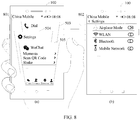
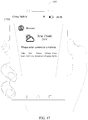
- the mobile phone 100 may display a second interface 701 shown in (b) in FIG. 7 , where the second interface 701 is an interface of the "Settings" application.
- the preset manner in this application includes but is not limited to the foregoing "in black", as long as the display manner can visually distinguish the first task window displayed in the preset manner from other task windows in the first interface.
- the mobile phone 100 may display the task window 504 of the "Settings” application in a manner of left protruding, so that the task window 504 of the "Settings” application is different from a task window 505 of the "WeChat” application and a task window 503 of the "Dial-Up” application.
- the mobile phone 100 may display a second interface 802 shown in (b) in FIG. 8 , where the second interface 802 is an interface of the "Settings" application.
- the manner of displaying the at least one task window by the terminal in the first interface includes but is not limited to the display manner of vertical arrangement shown in FIG. 5 to FIG. 8 .
- the terminal may further display the at least one task window in the first interface in a display manner of horizontal arrangement.
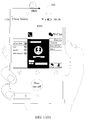
- the mobile phone 100 may display, in response to the pressing operation of the user on the mobile phone 100, a first interface 901 shown in FIG. 9 .
- 9 includes the task window of the at least one application recently run by the mobile phone 100 and not closed, for example, a task window 902 of the "Dial-Up” application, a task window 903 of the "Settings” application, and a task window 904 of the "WeChat” application.
- the mobile phone 100 may display, in response to the pressing operation of the user on the mobile phone 100, a first interface 1001 shown in FIG. 10 .
- the first interface 1001 shown in FIG. 10 includes the task window of the at least one application recently run by the mobile phone 100 and not closed, for example, a task window 1002 of the "Settings” application, a task window 1003 of the "Dial-Up” application, and a task window 1004 of the "WeChat” application.
- the first interface in this application may further include a close button for closing each task window.
- the first interface 1001 may further include a close button 1005, a close button 1006, a close button 1007, and a one-key close button 1008.
- the close button 1005 is used to close the task window 1002 of the "Settings” application
- the close button 1006 is used to close the task window 1003 of the "Dial-Up” application
- the close button 1007 is used to close the task window 1004 of the "WeChat” application.
- an application corresponding to the task window is also closed.
- the mobile phone 100 when the mobile phone 100 closes the task window 1004 of the "WeChat” application in response to a tapping operation of the user on the close button 1007, the mobile phone 100 also closes the "WeChat” application.
- the one-key close button 1008 is used to close all task windows in the first interface 1001 and applications corresponding to all the task windows.
- the mobile phone 100 may close the task window 1002 of the "Settings” application and the "Settings” application, the task window 1003 of the "Dial-Up” application and the "Dial-Up” application, and the task window 1004 of the "WeChat” application and the "WeChat” application in response to a tapping operation of the user on the one-key close button 1008.
- the terminal may further distinguish, based on a position of the pressing operation, the display manner of displaying the at least one task window by the terminal in the first interface.
- the terminal may display the at least one task window in the first interface in the display manner of vertical arrangement as shown in FIG. 5 to FIG. 8 .
- the pressing operation is an operation of the user on the right side edge of the terminal
- the sliding operation is also an operation of the user on the right side edge of the terminal.
- the task windows are displayed in the display manner of vertical arrangement.
- a switching direction of the task window is consistent with a sliding direction of the finger of the user. This is more compliant with the user's usage habit.
- the terminal may display the at least one task window in the first interface in the display manner of horizontal arrangement shown in FIG. 11(a) and FIG. 11(b) .
- the sliding operation is also an operation of the user on the upper side edge of the terminal.
- the task windows are displayed in the display manner of horizontal arrangement. As the sliding position of the sliding operation changes, in a process in which the first task window displayed in the preset manner is switched in the plurality of task windows, a switching direction of the task window is consistent with a sliding direction of the finger of the user. This is more compliant with the user's usage habit.
- the pressing operation and the sliding operation may also be operations of the user on different side edges on which the sensors are disposed.
- the pressing operation may be an operation of the user on the right side edge
- the sliding operation may be an operation of the user on the upper side edge.
- the terminal may display a multi-task interface (that is, the first interface) in response to the pressing operation of the user on the side edge, and then display the first task window in the multi-task interface in the preset manner in response to the sliding operation, where the sliding operation and the pressing operation are continuous operations of the finger without leaving the side edge.
- the first task window displayed in the preset manner is switched in the plurality of task windows.
- the terminal may display the interface (that is, the second interface) including the task corresponding to the first task window displayed by the terminal in the preset manner when the sliding operation is ended and the finger of the user leaves the side edge.
- the terminal may implement functions of "displaying the multi-task interface” and “selecting a task window from the multi-task interface for performing application switching" in response to the pressing operation and the sliding operation that are continuous operations of the finger without leaving the side edge, and the user does not need to perform operations at least twice in different positions of the mobile phone.
- user operations in application switching can be reduced, human-machine interaction performance can be improved, and user experience can be improved.
- the at least one task window in the first interface is task windows of the at least two applications; or when an application recently run by the terminal and not closed includes only a first application, the at least one task window in the first interface is a task window of an application task in the first application, where the first application in this application is an application that is being run by the terminal when the terminal responds to the pressing operation.
- the at least one task window in the first interface is task windows of the at least two applications.
- S401 shown in FIG. 4 may include S1201.
- the terminal displays, in response to the pressing operation of the user on the side edge, the first interface including task windows of the at least two applications.
- the task windows included in the first interface are the task windows of the at least two applications.
- the first interface includes the task window of the "WeChat” application, the task window of the "Dial-Up” application, and the task window of the "Settings” application recently run by the mobile phone 100 and not closed.
- the first task window is a task window of one of the at least two applications.
- the second interface is an interface of an application corresponding to the first task window displayed by the terminal in the preset manner when the sliding operation is ended and the finger of the user leaves the side edge.
- the second interface is the interface of the "Settings" application.
- S401 shown in FIG. 4 may further include S1202.
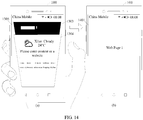
- the terminal displays, in response to the pressing operation of the user on the side edge, the first interface including a task window of an application task in the first application, where the first application is an application that is being run by the terminal when the terminal responds to the pressing operation.
- the first application in this application may be an embedded application program in the terminal (that is, a system application in the terminal), or an application program that may be downloaded.
- the embedded application program is an application program provided as a part of the implementation of the terminal (such as the mobile phone 100), for example, the "Settings” application or the "Browser” application.
- the application program that may be downloaded is an application program that may provide an Internet Protocol multimedia subsystem (Internet Protocol Multimedia Subsystem, IMS) connection of the application program.
- IMS Internet Protocol Multimedia Subsystem
- the application program that may be downloaded may be an application preinstalled in the terminal or may be a third-party application downloaded and installed by the user in the terminal, for example, the "WeChat” application, and an "Alipay” application.
- the task window included in the first interface is a task window of at least one application task in the first application.
- an application recently run by the mobile phone 100 and not closed includes only the "Browser" application (that is, the first application).
- the mobile phone may display, in response to the pressing operation of the user on the side edge of the mobile phone 100 shown in (a) in FIG. 13 or (b) in FIG. 13 , a first interface 1303 shown in (c) in FIG. 13 .
- the mobile phone 100 opens two web page windows (that is, application task windows) of the "Browser" application when running the "Browser” application.
- the first interface 1303 includes a web page window 1304 of a web page 1 and a web page window 1305 of a home page.
- the first task window is a task window of an application task in the first application.
- the mobile phone 100 performs S403, and the first task window displayed in the preset manner (for example, in black) in response to the sliding operation is a web page window 1303 of a web page 1 in the "Browser" application shown in (d) in FIG. 13 .
- the second interface is an interface of an application task corresponding to the first task window displayed by the terminal in the preset manner when the sliding operation is ended and the finger of the user leaves the side edge. For example, as shown in (b) in FIG.
- a second interface 1401 displayed by the mobile phone 100 in response to detecting that the sliding operation is ended and that the finger of the user leaves the side edge is an interface of the web page window 1303 of the web page 1 displayed by the mobile phone in black when the sliding operation shown in (a) in FIG. 14 is ended and the finger of the user leaves the side edge.
- the terminal may display, in response to the pressing operation of the user on the side edge, the first interface (such as the first interface 1303 shown in (c) in FIG. 13 ) including the task window of the application task in the first application.
- the first application in this application includes but is not limited to the "Browser” application.
- the first application may be any application in the terminal.
- the first application may be a "Contact” application in the terminal.
- the mobile phone may display, in response to the pressing operation of the user on the side edge of the mobile phone 100 shown in (a) in FIG. 15 or (b) in FIG. 15 , a first interface 1503 shown in (c) in FIG. 15 .
- recent contacts include Aaron, Zhang San, and Ben.
- the first interface 1503 includes a contact window 1504 of Aaron, a contact window 1505 of Zhang San, and a contact window 1506 of Ben.
- the terminal may display, in response to the pressing operation of the user on the side edge, the first interface including the task window of the application task in the first application.
- the terminal may display, in response to the pressing operation of the user on the side edge, the first interface (such as the first interface 1503 shown in (c) in FIG. 15 ) including a contact window in the "Contact” application.
- a displayed first contact window (that is, the contact window 1506 of Ben) may be different from other contact windows (the contact window 1504 of Aaron and the contact window 1505 of Zhang San).
- the terminal may not only implement switching between applications in response to the pressing operation and the sliding operation that are continuous operations of the finger without leaving the side edge, but also implement switching between a plurality of application tasks in one application.
- user operations in switching between application tasks of one application can also be reduced, human-machine interaction performance can be improved, and user experience can be improved.
- the terminal may determine, by using an interface currently displayed by the terminal, whether to display task windows of a plurality of applications in the first interface or display task windows of a plurality of application tasks in a first application. Specifically, when the terminal currently displays a desktop of the terminal, the terminal displays task windows of a plurality of applications in the first interface. Specifically, as shown in FIG. 16 , S401 may be replaced with S1601.
- the terminal When the terminal currently displays a desktop of the terminal, the terminal displays, in response to the pressing operation of the user on the side edge, the first interface including a task window of at least one application recently run by the terminal and not closed.
- task windows included in the first interface are task windows of at least two applications.
- the first interface includes the task window of the "WeChat” application, the task window of the "Dial-Up” application, and the task window of the "Settings” application recently run by the mobile phone 100 and not closed.
- the first task window is a task window of one of the at least two applications.
- the second interface is an interface of an application corresponding to the first task window displayed by the terminal in the preset manner when the sliding operation is ended and the finger of the user leaves the side edge.
- the second interface is the interface of the "Settings" application.
- the terminal can only display, in response to the pressing operation of the user on the side edge, the first interface including a task window of the first application.
- the mobile phone 100 may display, in response to the pressing operation of the user on the side edge, the first interface 503 shown in (c) in FIG. 5 , but cannot display the first interface including a task window of an application task in the first application.
- the terminal can only display, in response to the pressing operation of the user on the side edge, the first interface including a task window of an application task in the first application.
- the mobile phone 100 when the mobile phone 100 currently displays the desktop 1302 of the terminal, the mobile phone 100 cannot display, in response to the pressing operation of the user on the side edge, the first interface 503 shown in (c) in FIG. 13 , and can only display a first interface 1701 shown in FIG. 17 .
- the terminal may perform S1201 or S1202 in the second application scenario of this application, and display the corresponding first interface.
- the terminal when the terminal currently displays the desktop of the terminal, the terminal may display, in response to the pressing operation of the user on the side edge, the first interface including a task window of one or more applications; and then the terminal may implement switching between applications in response to the sliding operation, where the pressing operation and the sliding operation are continuous operations of the finger without leaving the side edge.
- the terminal may display, in response to the pressing operation of the user on the side edge, the first interface including a task window of one or more applications; and then the terminal may implement switching between applications in response to the sliding operation, where the pressing operation and the sliding operation are continuous operations of the finger without leaving the side edge.
- user operations in application switching can be reduced, human-machine interaction performance can be improved, and user experience can be improved.
- the terminal may determine, based on a position of the pressing operation on the side edge of the terminal, whether to display task windows of a plurality of applications in the first interface or display task windows of a plurality of application tasks in a first application.
- the at least one task window in the first interface is a task window of one or more applications recently run by the terminal and not closed; or when the pressing operation is a pressing operation of the user in a second position on the side edge, the at least one task window in the first interface is a task window of one or more application tasks of the first application.
- first position and the second position in this application may be two different positions on a same side edge of the terminal.
- a first position 1801 and a second position 1802 may be two different positions on the right side edge of the mobile phone 100.
- first position and the second position may be located on two different side edges of the terminal.
- a first position 1901 may be located on the right side edge of the mobile phone 100, and a second position may be located on the upper side edge of the mobile phone 100.
- S401 shown in FIG. 4 may include S2001.
- the terminal displays, in response to the pressing operation of the user on the side edge, the first interface including a task window of at least one application recently run by the terminal and not closed.
- the terminal may display, in response to the pressing operation of the user on the side edge, the first interface (for example, the first interface 503 shown in (c) in FIG. 5 ) including the task window of the at least one application recently run by the terminal and not closed.
- S401 shown in FIG. 4 may further include S2002.
- the terminal displays, in response to the pressing operation of the user on the side edge, the first interface including a task window of an application task in a second application, where the second application is a last application after the at least one application recently run by the terminal and not closed is arranged in ascending order of runtime.
- the terminal may display, in response to the pressing operation of the user on the side edge, the first interface (for example, a first interface 2103 shown in (c) in FIG. 21 ) including the task window of the application task in the second application.
- the first interface for example, a first interface 2103 shown in (c) in FIG. 21
- the terminal is currently displaying an interface of an application, for example, the interface 2101 of the "Browser” application shown in (a) in FIG. 21 , the application (such as the "Browser” application) currently being run by the terminal is the second application.
- an application for example, the interface 2101 of the "Browser” application shown in (a) in FIG. 21
- the application (such as the "Browser” application) currently being run by the terminal is the second application.
- the second application is the last application after the at least one application recently run by the terminal and not closed is arranged in ascending order of runtime.
- the at least one application recently run by the mobile phone 100 and not closed includes the "Browser” application, the "WeChat” application, and the "Settings” application, where recent runtime of the "Browser” application is 14:20 on September 28, 2017, recent runtime of the "WeChat” application is 10:25 on September 28, 2017, and recent runtime of the "Settings” application is 12:36 on September 28, 2017.
- the second application is the "Browser” application.
- the terminal may distinguish, based on the position of the pressing operation, whether the pressing operation is used to instruct the terminal to display a multi-task interface of a plurality of applications or display a multi-task interface of a plurality of application tasks of one application.
- the terminal can not only implement switching between applications in response to the pressing operation and the sliding operation that are continuous operations of the finger without leaving the side edge, but also implement switching between a plurality of application tasks in one application.
- user operations in switching between application tasks of one application can also be reduced, human-machine interaction performance can be improved, and user experience can be improved.
- the terminal includes corresponding hardware structures and/or software modules for performing the functions.
- a person skilled in the art should easily be aware that, in combination with the examples described in the embodiments disclosed in this specification, units and algorithm steps may be implemented by hardware or a combination of hardware and computer software. Whether a function is performed by hardware or hardware driven by computer software depends on particular applications and design constraints of the technical solutions. A person skilled in the art may use different methods to implement the described functions for each particular application, but it should not be considered that the implementation goes beyond the scope of the embodiments of the present invention.
- each functional module may be defined in a correspondence to each function, or two or more functions may be integrated in one processing module.
- the integrated module may be implemented in a form of hardware, or may be implemented in a form of a software functional module.
- module division is an example, and is merely logical function division. In actual implementation, another division manner may be used.
- this application provides a task switching apparatus, where the task switching apparatus is included in a terminal provided in this application, and the task switching apparatus includes a detection unit 2201, a processing unit 2202, and a display unit 2203.
- the detection unit 2201 is configured to support the task switching apparatus in performing "detecting the pressing operation of the user on the side edge" in S401 and S401a, "detecting that the sliding operation is ended and that the finger of the user leaves the side edge” in S402 and S404, "detecting the pressing operation of the user in the first position on the side edge” in S2201, and “detecting the pressing operation of the user in the second position on the side edge” in S2202 in the foregoing method embodiments, and/or is used in other processes of the technology described in this specification.
- the processing unit 2202 is configured to support the task switching apparatus in running at least one task, where the at least one task may be at last one application recently run and not closed, or at least one application task in the first application or the second application.
- the display unit 2203 is configured to support the task switching apparatus in performing S401, S401a, S403, S404, S1201, S1202, S1601, S2001, and S2002 in the foregoing method embodiments, and/or is used in other processes of the technology described in this specification.
- the task switching apparatus may further include a storage unit.
- the storage unit is configured to support the task switching apparatus in storing data related to the first interface and the second interface in the method embodiments, and/or is used in other processes of the technology described in this specification.
- the task switching apparatus may be included in a terminal provided in this application.
- this application provides a terminal.
- FIG. 22 is a possible schematic structural diagram of a terminal in the foregoing embodiment.
- the terminal 2200 includes a detection unit 2201, a processing unit 2202, and a display unit 2203.
- the terminal 2200 may further include a storage unit.
- a storage unit For the method steps performed by the terminal with the support of the storage unit, refer to the detailed descriptions about the method steps performed by the task switching apparatus with the support of the storage unit in the task switching apparatus in this application. Details are not described again herein in this application.
- the task switching apparatus and the terminal 2200 include but are not limited to the units and modules illustrated above.
- the terminal 2200 may further include a communications unit, where the communications unit is configured to communicate with another terminal.
- functions that the functional units can specifically implement include but are not limited to the functions corresponding to the method steps in the foregoing examples.
- the terminal 2200 refer to the detailed descriptions about the method steps corresponding to the units. Details are not described again herein in this embodiment of this application.
- the detection unit 2201, the processing unit 2202, and the like may be integrated in a processing module for implementation; the communications unit may be an RF circuit, a Wi-Fi module, or a Bluetooth module of the terminal; the storage unit may be a storage module of the terminal; and the display unit 2203 may be a display module, for example, a touchscreen.
- FIG. 23 is a possible schematic structural diagram of a terminal in the foregoing embodiment.
- the terminal 2300 includes a processing module 2301, a storage module 2302, a display module 2303, and a sensing module 2304.
- the sensing module 2304 is configured to detect a pressing operation and a sliding operation of a user on a side edge of the terminal.
- the processing module 2301 is configured to control and manage a user operation detected by the sensing module 2304.
- the display module 2303 is configured to display an image generated by the processing module 2301.
- the storage module 2302 is configured to store program code and data of the terminal.
- the terminal 2300 may further include a communications module.
- the communications module is configured to communicate with another terminal.
- the communications module is configured to perform voice communication with another terminal, and receive a profile picture from or send a profile picture to the another terminal.
- the processing module 2301 may be a processor or a controller, for example, may be a central processing unit (Central Processing Unit, CPU), a general-purpose processor, a digital signal processor (Digital Signal Processor, DSP), an application-specific integrated circuit (Application-Specific Integrated Circuit, ASIC), a field programmable gate array (Field Programmable Gate Array, FPGA) or another programmable logic device, a transistor logic device, a hardware component, or any combination thereof.
- the controller/processor may implement or execute various example logical blocks, modules, and circuits described with reference to content disclosed in the present invention.
- the processor may be a combination of processors implementing a computing function, for example, a combination of one or more microprocessors, or a combination of the DSP and a microprocessor.
- the communications module may be a transceiver, a transceiver circuit, a communications interface, or the like.
- the storage module 2302 may be a memory.
- the sensing module 2304 may be a sensor.
- the processing module 2301 is a processor (such as the processor 201 shown in FIG. 2 ), and the communications module is an RF circuit (such as the radio frequency circuit 202 shown in FIG. 2 ), and the storage module 2302 is a memory (such as the memory 203 shown in FIG. 2 ), and the display module 2303 is a touchscreen (including the touchpad 204-1 and the display 204-2 shown in FIG. 2 ), and the sensing module 2304 is a sensor (such as the sensor 206 shown in FIG. 2 ), the terminal provided in this application may be the mobile phone 100 shown in FIG. 2 .
- the communications modules may include not only the RF circuit, but also the Wi-Fi module and the Bluetooth module.
- the communications modules such as the RF circuit, the Wi-Fi module, and the Bluetooth module may be collectively referred to as a communications interface.
- the processor, the communications interface, the touchscreen, and the memory may be coupled together by using a bus.
- an embodiment of this application further provides a graphical user interface (GUI), where the graphical user interface is stored in a terminal.
- GUI graphical user interface
- the terminal includes a touchscreen, a memory, a processor, and a sensor installed on a side edge of the terminal, where the sensor is configured to detect an operation of a user on the side edge, and the processor is configured to execute one or more computer programs stored in the memory.
- the graphical user interface includes:
- the first task window in the second GUI is a task window of one of at least one application recently run by the processor and not closed; and the second interface in the third GUI is an interface of an application corresponding to the first task window displayed in the second GUI in the preset manner when the sliding operation is ended and the finger of the user leaves the side edge.
- the first interface in the first GUI specifically includes task windows of at least two applications recently run by the processor and not closed.
- the first task window in the second GUI is a task window of one of the at least two applications.
- the second interface in the third GUI is an interface of an application corresponding to the first task window displayed in the second GUI in the preset manner when the sliding operation is ended and the finger of the user leaves the side edge.
- the first interface in the first GUI specifically includes the task windows of the at least two applications recently run by the processor and not closed.
- the first task window in the second GUI is a task window of one of the at least two applications.
- the second interface in the third GUI is the interface of the application corresponding to the first task window displayed in the second GUI in the preset manner as shown in (a) in a corresponding drawing of FIG. 7 or FIG. 8 when the sliding operation is ended and the finger of the user leaves the side edge.
- the first interface in the first GUI is specifically the first interface including a task window of one or more application tasks in the first application, and the first application is any application in the terminal, where the first task window in the second GUI is a task window of an application task in the first application; and the second interface in the third GUI is an interface of an application task corresponding to the first task window displayed in the second GUI in the preset manner when the sliding operation is ended and the finger of the user leaves the side edge.
- the first interface in the first GUI is specifically the first interface including a task window of one or more application tasks in the first application, and the first application is any application in the terminal.
- the first task window in the second GUI is a task window of an application task in the first application.
- the second interface in the third GUI is an interface of an application task corresponding to the first task window displayed in the second GUI in the preset manner as shown in (a) in FIG. 14 when the sliding operation is ended and the finger of the user leaves the side edge.
- the first interface in the first GUI displayed on the touchscreen in response to the pressing operation on the side edge includes a task window of the at least one application recently run by the processor and not closed, where the first task window in the second GUI is the task window of the one of the at least one application recently run by the terminal and not closed; and the second interface in the third GUI is the interface of the application corresponding to the first task window displayed in the second GUI in the preset manner when the sliding operation is ended and the finger of the user leaves the side edge.
- the first GUI when the mobile phone 100 currently displays the desktop 502 of the terminal, the first GUI includes the first interface including the task window of the at least one application recently run by the processor and not closed as shown in (c) in FIG. 5 .
- the second interface in the third GUI is the interface of the application corresponding to the first task window displayed in the second GUI in the preset manner as shown in (a) in a corresponding drawing of FIG. 7 or FIG. 8 when the sliding operation is ended and the finger of the user leaves the side edge.
- the first interface in the first GUI displayed on the touchscreen in response to a pressing operation in a first position on the side edge includes the task window of the at least one application recently run by the terminal and not closed.
- the first GUI includes the first interface of the task window of the at least one application recently run by the processor and not closed as shown in (c) in FIG. 5 .
- the second interface in the third GUI is the interface of the application corresponding to the first task window displayed in the second GUI in the preset manner as shown in (a) in a corresponding drawing of FIG. 7 or FIG. 8 when the sliding operation is ended and the finger of the user leaves the side edge.
- the first interface in the first GUI displayed on the touchscreen in response to a pressing operation in a second position on the side edge includes a task window of an application task in a second application, where the second application is a last application after the at least one application recently run by the touchscreen and not closed is arranged in ascending order of runtime, where the first task window in the second GUI is a task window of an application task in the second application; and the second interface in the third GUI is an interface of an application task corresponding to the first task window displayed in the second GUI in the preset manner when the sliding operation is ended and the finger of the user leaves the side edge.
- the first interface in the first GUI is specifically the first interface including a task window of one or more application tasks in the first application, and the first application is any application in the terminal.
- the first task window in the second GUI is a task window of an application task in the first application.
- the second interface in the third GUI is an interface of an application task corresponding to the first task window displayed in the second GUI in the preset manner as shown in (a) in FIG. 14 when the sliding operation is ended and the finger of the user leaves the side edge.
- This application further provides a computer storage medium, where the computer storage medium stores computer program code, and when the foregoing processor executes the computer program code, the terminal performs related method steps in any one of FIG. 4 , FIG. 12 , FIG. 16 , and FIG. 20 to implement the task switching method in the foregoing embodiment.
- This application further provides a computer program product, where when the computer program product is run on a computer, the computer is enabled to perform related method steps in any one of FIG. 4 , FIG. 12 , FIG. 16 , and FIG. 20 to implement the task switching method in the foregoing embodiment.
- the terminal 2200, the terminal 2300, the computer storage medium, and the computer program product provided in this application are all configured to perform the corresponding methods provided above. Therefore, for beneficial effects that the terminals, the computer storage medium, and the computer program product can achieve, refer to beneficial effects in the corresponding methods provided above. Details are not described again herein.
- the disclosed system, apparatus, and method may be implemented in other manners.
- the described apparatus embodiment is merely an example.
- the module or unit division is merely logical function division and may be other division in actual implementation.
- a plurality of units or components may be combined or integrated into another system, or some features may be ignored or may not be performed.
- the displayed or discussed mutual couplings or direct couplings or communication connections may be implemented by using some interfaces.
- the indirect couplings or communication connections between the apparatuses or units may be implemented in electronic, mechanical, or other forms.
- the units described as separate parts may or may not be physically separate, and parts displayed as units may or may not be physical units, may be located in one position, or may be distributed on a plurality of network units. Some or all of the units may be selected based on actual requirements to achieve the objectives of the solutions of the embodiments.
- functional units in the embodiments of this application may be integrated into one processing unit, or each of the units may exist alone physically, or two or more units may be integrated into one unit.
- the integrated unit may be implemented in a form of hardware, or may be implemented in a form of a software functional unit.
- the integrated unit When the integrated unit is implemented in the form of a software functional unit and sold or used as an independent product, the integrated unit may be stored in a computer-readable storage medium.
- the computer software product is stored in a storage medium and includes several instructions for instructing a computer device (which may be a personal computer, a server, a network device, or the like) to perform all or some of the steps of the methods described in the embodiments of this application.
- the storage medium includes any medium that can store program code, such as a flash memory, a removable hard disk, a read-only memory, a random access memory, a magnetic disk, or an optical disc.
Landscapes
- Engineering & Computer Science (AREA)
- Theoretical Computer Science (AREA)
- General Engineering & Computer Science (AREA)
- Human Computer Interaction (AREA)
- Physics & Mathematics (AREA)
- General Physics & Mathematics (AREA)
- Signal Processing (AREA)
- Computer Hardware Design (AREA)
- Computer Networks & Wireless Communication (AREA)
- User Interface Of Digital Computer (AREA)
- Telephone Function (AREA)
- Mobile Radio Communication Systems (AREA)
Applications Claiming Priority (1)
| Application Number | Priority Date | Filing Date | Title |
|---|---|---|---|
| PCT/CN2017/105064 WO2019061512A1 (zh) | 2017-09-30 | 2017-09-30 | 一种任务切换方法及终端 |
Publications (3)
| Publication Number | Publication Date |
|---|---|
| EP3674872A1 true EP3674872A1 (de) | 2020-07-01 |
| EP3674872A4 EP3674872A4 (de) | 2020-09-16 |
| EP3674872B1 EP3674872B1 (de) | 2024-06-19 |
Family
ID=65902347
Family Applications (1)
| Application Number | Title | Priority Date | Filing Date |
|---|---|---|---|
| EP17926387.6A Active EP3674872B1 (de) | 2017-09-30 | 2017-09-30 | Aufgabenumschaltverfahren und endgerät |
Country Status (7)
| Country | Link |
|---|---|
| US (1) | US10838596B2 (de) |
| EP (1) | EP3674872B1 (de) |
| JP (1) | JP2020536307A (de) |
| KR (1) | KR102446587B1 (de) |
| CN (1) | CN110741335A (de) |
| AU (1) | AU2017433305B2 (de) |
| WO (1) | WO2019061512A1 (de) |
Families Citing this family (11)
| Publication number | Priority date | Publication date | Assignee | Title |
|---|---|---|---|---|
| USD916718S1 (en) * | 2017-10-30 | 2021-04-20 | Siemens Healthcare Gmbh | Display screen or portion thereof with a graphical user interface |
| USD880384S1 (en) * | 2018-01-12 | 2020-04-07 | Jaguar Land Rover Limited | Vehicle front fender |
| US10838614B2 (en) * | 2018-04-03 | 2020-11-17 | Palantir Technologies Inc. | Graphical user interface system |
| CN109032734B (zh) * | 2018-07-13 | 2020-09-01 | 维沃移动通信有限公司 | 一种后台应用程序显示方法和移动终端 |
| US11610459B2 (en) * | 2020-04-13 | 2023-03-21 | Google Llc | Factory and user calibration of haptic systems |
| CN111897479A (zh) * | 2020-08-11 | 2020-11-06 | 网易(杭州)网络有限公司 | 界面切换显示方法、装置、终端及存储介质 |
| KR102881681B1 (ko) | 2020-09-09 | 2025-11-05 | 삼성전자주식회사 | 멀티 윈도우 레이아웃을 제공하는 전자 장치 및 그 운용 방법 |
| CN114327105A (zh) * | 2020-09-29 | 2022-04-12 | 华为技术有限公司 | 分屏显示控制方法及装置、电子设备、存储介质 |
| KR20230050768A (ko) * | 2021-10-08 | 2023-04-17 | 삼성전자주식회사 | 플렉서블 전자 장치 및 어플리케이션 실행 화면의 표시를 제어하는 방법 |
| USD1087138S1 (en) * | 2023-07-21 | 2025-08-05 | Samsung Electronics Co., Ltd. | Display screen or portion thereof with transitional graphical user interface |
| USD1086182S1 (en) * | 2023-07-21 | 2025-07-29 | Samsung Electronics Co., Ltd. | Display screen or portion thereof with transitional graphical user interface |
Family Cites Families (33)
| Publication number | Priority date | Publication date | Assignee | Title |
|---|---|---|---|---|
| US8373660B2 (en) * | 2003-07-14 | 2013-02-12 | Matt Pallakoff | System and method for a portable multimedia client |
| US8564543B2 (en) * | 2006-09-11 | 2013-10-22 | Apple Inc. | Media player with imaged based browsing |
| JP4632102B2 (ja) * | 2008-07-17 | 2011-02-16 | ソニー株式会社 | 情報処理装置、情報処理方法及び情報処理プログラム |
| TWI456434B (zh) * | 2011-05-31 | 2014-10-11 | Compal Electronics Inc | 具有觸控輸入系統之電子裝置 |
| JPWO2013175798A1 (ja) * | 2012-05-25 | 2016-01-12 | パナソニック インテレクチュアル プロパティ コーポレーション オブアメリカPanasonic Intellectual Property Corporation of America | 情報処理装置、情報処理方法、および情報処理プログラム |
| TWI484405B (zh) * | 2012-08-23 | 2015-05-11 | 禾瑞亞科技股份有限公司 | 圖形使用者界面的顯示方法及使用該方法的電子裝置 |
| CN103809891B (zh) * | 2012-11-13 | 2016-04-13 | 腾讯科技(深圳)有限公司 | 页面切换方法和装置 |
| CN103106039B (zh) * | 2013-02-19 | 2018-04-20 | 广东欧珀移动通信有限公司 | 一种移动终端的页面切换方法及装置 |
| DE112014001380T5 (de) * | 2013-03-15 | 2015-12-03 | Tk Holdings Inc. | Adaptive Mensch-Maschine-Schnittstellen für druckempfindliche Steuerung in einer abgelenkten Betriebsumgebung und Verfahren zur Anwendung derselben |
| KR20260055514A (ko) * | 2013-03-15 | 2026-04-23 | 애플 인크. | 동시에 열린 소프트웨어 애플리케이션들을 관리하기 위한 디바이스, 방법, 및 그래픽 사용자 인터페이스 |
| US20140304646A1 (en) * | 2013-04-04 | 2014-10-09 | Klip, Inc. | Sliding side menu gui with menu items displaying indicia of updated content |
| CN103543948A (zh) | 2013-10-30 | 2014-01-29 | 西安乾易企业管理咨询有限公司 | 移动终端及其人机交互方法 |
| KR20150082032A (ko) * | 2014-01-07 | 2015-07-15 | 삼성전자주식회사 | 전자 장치 및 전자 장치의 제어 방법 |
| US20150192989A1 (en) * | 2014-01-07 | 2015-07-09 | Samsung Electronics Co., Ltd. | Electronic device and method of controlling electronic device |
| US10067648B2 (en) * | 2014-02-13 | 2018-09-04 | Samsung Electronics Co., Ltd. | User terminal device and method for displaying thereof |
| US20150248545A1 (en) * | 2014-03-03 | 2015-09-03 | Samer Al-Jamal | Sign shortcut |
| CN104267902B (zh) | 2014-09-22 | 2017-03-08 | 努比亚技术有限公司 | 一种应用程序交互控制方法、装置及终端 |
| JP2016115208A (ja) * | 2014-12-16 | 2016-06-23 | シャープ株式会社 | 入力装置、ウェアラブル端末、携帯端末、入力装置の制御方法、および入力装置の動作を制御するための制御プログラム |
| KR102308645B1 (ko) * | 2014-12-29 | 2021-10-05 | 삼성전자주식회사 | 사용자 단말 장치 및 그의 제어 방법 |
| KR20160085125A (ko) * | 2015-01-07 | 2016-07-15 | 엘지전자 주식회사 | 이동단말기 및 그 제어방법 |
| WO2016125215A1 (ja) * | 2015-02-06 | 2016-08-11 | ソニー株式会社 | 情報処理装置、入力装置、情報処理装置の制御方法、入力装置の制御方法及びプログラム |
| CN104731499A (zh) * | 2015-03-13 | 2015-06-24 | 深圳市中兴移动通信有限公司 | 启动后台应用的方法、装置及移动终端 |
| US20160294750A1 (en) * | 2015-04-03 | 2016-10-06 | Vaporstream, Inc. | Electronic Message Slide Reveal System and Method |
| CN104991819B (zh) * | 2015-05-27 | 2019-03-15 | 努比亚技术有限公司 | 终端应用切换方法及装置 |
| US9891811B2 (en) * | 2015-06-07 | 2018-02-13 | Apple Inc. | Devices and methods for navigating between user interfaces |
| CN106708399A (zh) * | 2015-11-17 | 2017-05-24 | 天津三星通信技术研究有限公司 | 用于具有双侧边曲面屏幕的电子终端的触控方法和设备 |
| KR102475336B1 (ko) * | 2015-12-29 | 2022-12-08 | 에스케이플래닛 주식회사 | 사용자 장치, 그의 제어 방법 및 컴퓨터 프로그램이 기록된 기록매체 |
| EP3208733B1 (de) * | 2016-02-19 | 2020-07-01 | Sony Corporation | Endgerätevorrichtung, verfahren und programm |
| CN106020796A (zh) * | 2016-05-09 | 2016-10-12 | 北京小米移动软件有限公司 | 界面显示方法及装置 |
| CN107193436A (zh) * | 2017-04-25 | 2017-09-22 | 努比亚技术有限公司 | 一种多任务切换的方法及终端 |
| CN107045420B (zh) * | 2017-04-27 | 2021-01-05 | 南通易通网络科技有限公司 | 应用程序的切换方法及移动终端、存储介质 |
| DK180127B1 (en) * | 2017-05-16 | 2020-05-26 | Apple Inc. | DEVICES, METHODS, AND GRAPHICAL USER INTERFACES FOR MOVING USER INTERFACE OBJECTS |
| GB2563062A (en) * | 2017-06-02 | 2018-12-05 | Spectrum Medical Ltd | Oxygenation system |
-
2017
- 2017-09-30 AU AU2017433305A patent/AU2017433305B2/en active Active
- 2017-09-30 CN CN201780091583.5A patent/CN110741335A/zh active Pending
- 2017-09-30 KR KR1020207010337A patent/KR102446587B1/ko active Active
- 2017-09-30 WO PCT/CN2017/105064 patent/WO2019061512A1/zh not_active Ceased
- 2017-09-30 US US16/651,644 patent/US10838596B2/en active Active
- 2017-09-30 JP JP2020517817A patent/JP2020536307A/ja active Pending
- 2017-09-30 EP EP17926387.6A patent/EP3674872B1/de active Active
Also Published As
| Publication number | Publication date |
|---|---|
| EP3674872B1 (de) | 2024-06-19 |
| JP2020536307A (ja) | 2020-12-10 |
| CN110741335A (zh) | 2020-01-31 |
| EP3674872A4 (de) | 2020-09-16 |
| KR20200051768A (ko) | 2020-05-13 |
| AU2017433305B2 (en) | 2021-02-25 |
| US10838596B2 (en) | 2020-11-17 |
| AU2017433305A1 (en) | 2020-04-09 |
| US20200233551A1 (en) | 2020-07-23 |
| KR102446587B1 (ko) | 2022-09-22 |
| WO2019061512A1 (zh) | 2019-04-04 |
Similar Documents
| Publication | Publication Date | Title |
|---|---|---|
| EP3674872B1 (de) | Aufgabenumschaltverfahren und endgerät | |
| US11307760B2 (en) | Terminal interface display method and terminal | |
| EP3637225B1 (de) | Anzeigeverarbeitungsverfahren und vorrichtung | |
| EP3617869B1 (de) | Anzeigeverfahren und vorrichtung | |
| US11243657B2 (en) | Icon display method, and apparatus | |
| AU2017440899B2 (en) | Photographing method and terminal | |
| CN109375890B (zh) | 一种屏幕显示方法和多屏电子设备 | |
| US20200183574A1 (en) | Multi-Task Operation Method and Electronic Device | |
| EP3525075B1 (de) | Verfahren zur beleuchtung des bildschirms eines doppelbildschirmendgeräts sowie endgerät | |
| CN108984067B (zh) | 一种显示控制方法及终端 | |
| EP3136214A1 (de) | Berührungsbedienungsverfahren und -vorrichtung für endgerät | |
| US20180150211A1 (en) | Method for adjusting photographing focal length of mobile terminal by using touchpad, and mobile terminal | |
| CN105975190B (zh) | 一种图形界面的处理方法、装置及系统 | |
| KR102535334B1 (ko) | 이미지 표시 방법 및 이동 단말 | |
| CN108491130A (zh) | 一种应用程序切换方法及移动终端 | |
| CN106371749A (zh) | 一种终端控制的方法和装置 | |
| CN106445340A (zh) | 一种双屏终端显示立体图像的方法和装置 | |
| US20210042403A1 (en) | Fingerprint unlocking method and terminal | |
| WO2017035818A1 (zh) | 控制电子设备的方法、装置及电子设备 | |
| WO2019047129A1 (zh) | 一种移动应用图标的方法及终端 | |
| CN111190517B (zh) | 分屏显示方法及电子设备 | |
| CN109819102A (zh) | 一种导航栏控制方法及移动终端、计算机可读存储介质 | |
| EP3674867B1 (de) | Verfahren zur mensch-computer-interaktion und elektronische vorrichtung | |
| CN109857536B (zh) | 多任务显示方法、系统、移动终端及存储介质 | |
| CN110413385B (zh) | 任务管理方法、终端设备及介质 |
Legal Events
| Date | Code | Title | Description |
|---|---|---|---|
| STAA | Information on the status of an ep patent application or granted ep patent |
Free format text: STATUS: THE INTERNATIONAL PUBLICATION HAS BEEN MADE |
|
| PUAI | Public reference made under article 153(3) epc to a published international application that has entered the european phase |
Free format text: ORIGINAL CODE: 0009012 |
|
| STAA | Information on the status of an ep patent application or granted ep patent |
Free format text: STATUS: REQUEST FOR EXAMINATION WAS MADE |
|
| 17P | Request for examination filed |
Effective date: 20200319 |
|
| AK | Designated contracting states |
Kind code of ref document: A1 Designated state(s): AL AT BE BG CH CY CZ DE DK EE ES FI FR GB GR HR HU IE IS IT LI LT LU LV MC MK MT NL NO PL PT RO RS SE SI SK SM TR |
|
| AX | Request for extension of the european patent |
Extension state: BA ME |
|
| A4 | Supplementary search report drawn up and despatched |
Effective date: 20200814 |
|
| RIC1 | Information provided on ipc code assigned before grant |
Ipc: G06F 1/16 20060101ALI20200810BHEP Ipc: G06F 3/0481 20130101ALI20200810BHEP Ipc: H04M 1/725 20060101ALI20200810BHEP Ipc: G06F 3/0488 20130101ALI20200810BHEP Ipc: G06F 3/0485 20130101ALI20200810BHEP Ipc: G06F 3/0487 20130101AFI20200810BHEP |
|
| DAV | Request for validation of the european patent (deleted) | ||
| DAX | Request for extension of the european patent (deleted) | ||
| STAA | Information on the status of an ep patent application or granted ep patent |
Free format text: STATUS: EXAMINATION IS IN PROGRESS |
|
| 17Q | First examination report despatched |
Effective date: 20220310 |
|
| GRAP | Despatch of communication of intention to grant a patent |
Free format text: ORIGINAL CODE: EPIDOSNIGR1 |
|
| STAA | Information on the status of an ep patent application or granted ep patent |
Free format text: STATUS: GRANT OF PATENT IS INTENDED |
|
| INTG | Intention to grant announced |
Effective date: 20240201 |
|
| GRAS | Grant fee paid |
Free format text: ORIGINAL CODE: EPIDOSNIGR3 |
|
| GRAA | (expected) grant |
Free format text: ORIGINAL CODE: 0009210 |
|
| STAA | Information on the status of an ep patent application or granted ep patent |
Free format text: STATUS: THE PATENT HAS BEEN GRANTED |
|
| AK | Designated contracting states |
Kind code of ref document: B1 Designated state(s): AL AT BE BG CH CY CZ DE DK EE ES FI FR GB GR HR HU IE IS IT LI LT LU LV MC MK MT NL NO PL PT RO RS SE SI SK SM TR |
|
| REG | Reference to a national code |
Ref country code: GB Ref legal event code: FG4D |
|
| REG | Reference to a national code |
Ref country code: CH Ref legal event code: EP |
|
| REG | Reference to a national code |
Ref country code: DE Ref legal event code: R096 Ref document number: 602017082759 Country of ref document: DE |
|
| PG25 | Lapsed in a contracting state [announced via postgrant information from national office to epo] |
Ref country code: BG Free format text: LAPSE BECAUSE OF FAILURE TO SUBMIT A TRANSLATION OF THE DESCRIPTION OR TO PAY THE FEE WITHIN THE PRESCRIBED TIME-LIMIT Effective date: 20240619 |
|
| PG25 | Lapsed in a contracting state [announced via postgrant information from national office to epo] |
Ref country code: HR Free format text: LAPSE BECAUSE OF FAILURE TO SUBMIT A TRANSLATION OF THE DESCRIPTION OR TO PAY THE FEE WITHIN THE PRESCRIBED TIME-LIMIT Effective date: 20240619 Ref country code: FI Free format text: LAPSE BECAUSE OF FAILURE TO SUBMIT A TRANSLATION OF THE DESCRIPTION OR TO PAY THE FEE WITHIN THE PRESCRIBED TIME-LIMIT Effective date: 20240619 |
|
| REG | Reference to a national code |
Ref country code: LT Ref legal event code: MG9D |
|
| PG25 | Lapsed in a contracting state [announced via postgrant information from national office to epo] |
Ref country code: GR Free format text: LAPSE BECAUSE OF FAILURE TO SUBMIT A TRANSLATION OF THE DESCRIPTION OR TO PAY THE FEE WITHIN THE PRESCRIBED TIME-LIMIT Effective date: 20240920 |
|
| REG | Reference to a national code |
Ref country code: NL Ref legal event code: MP Effective date: 20240619 |
|
| PG25 | Lapsed in a contracting state [announced via postgrant information from national office to epo] |
Ref country code: LV Free format text: LAPSE BECAUSE OF FAILURE TO SUBMIT A TRANSLATION OF THE DESCRIPTION OR TO PAY THE FEE WITHIN THE PRESCRIBED TIME-LIMIT Effective date: 20240619 |
|
| PG25 | Lapsed in a contracting state [announced via postgrant information from national office to epo] |
Ref country code: NO Free format text: LAPSE BECAUSE OF FAILURE TO SUBMIT A TRANSLATION OF THE DESCRIPTION OR TO PAY THE FEE WITHIN THE PRESCRIBED TIME-LIMIT Effective date: 20240919 Ref country code: LV Free format text: LAPSE BECAUSE OF FAILURE TO SUBMIT A TRANSLATION OF THE DESCRIPTION OR TO PAY THE FEE WITHIN THE PRESCRIBED TIME-LIMIT Effective date: 20240619 Ref country code: HR Free format text: LAPSE BECAUSE OF FAILURE TO SUBMIT A TRANSLATION OF THE DESCRIPTION OR TO PAY THE FEE WITHIN THE PRESCRIBED TIME-LIMIT Effective date: 20240619 Ref country code: GR Free format text: LAPSE BECAUSE OF FAILURE TO SUBMIT A TRANSLATION OF THE DESCRIPTION OR TO PAY THE FEE WITHIN THE PRESCRIBED TIME-LIMIT Effective date: 20240920 Ref country code: FI Free format text: LAPSE BECAUSE OF FAILURE TO SUBMIT A TRANSLATION OF THE DESCRIPTION OR TO PAY THE FEE WITHIN THE PRESCRIBED TIME-LIMIT Effective date: 20240619 Ref country code: BG Free format text: LAPSE BECAUSE OF FAILURE TO SUBMIT A TRANSLATION OF THE DESCRIPTION OR TO PAY THE FEE WITHIN THE PRESCRIBED TIME-LIMIT Effective date: 20240619 Ref country code: RS Free format text: LAPSE BECAUSE OF FAILURE TO SUBMIT A TRANSLATION OF THE DESCRIPTION OR TO PAY THE FEE WITHIN THE PRESCRIBED TIME-LIMIT Effective date: 20240919 |
|
| PG25 | Lapsed in a contracting state [announced via postgrant information from national office to epo] |
Ref country code: NL Free format text: LAPSE BECAUSE OF FAILURE TO SUBMIT A TRANSLATION OF THE DESCRIPTION OR TO PAY THE FEE WITHIN THE PRESCRIBED TIME-LIMIT Effective date: 20240619 |
|
| REG | Reference to a national code |
Ref country code: AT Ref legal event code: MK05 Ref document number: 1696330 Country of ref document: AT Kind code of ref document: T Effective date: 20240619 |
|
| PG25 | Lapsed in a contracting state [announced via postgrant information from national office to epo] |
Ref country code: NL Free format text: LAPSE BECAUSE OF FAILURE TO SUBMIT A TRANSLATION OF THE DESCRIPTION OR TO PAY THE FEE WITHIN THE PRESCRIBED TIME-LIMIT Effective date: 20240619 |
|
| PG25 | Lapsed in a contracting state [announced via postgrant information from national office to epo] |
Ref country code: PT Free format text: LAPSE BECAUSE OF FAILURE TO SUBMIT A TRANSLATION OF THE DESCRIPTION OR TO PAY THE FEE WITHIN THE PRESCRIBED TIME-LIMIT Effective date: 20241021 |
|
| PG25 | Lapsed in a contracting state [announced via postgrant information from national office to epo] |
Ref country code: PT Free format text: LAPSE BECAUSE OF FAILURE TO SUBMIT A TRANSLATION OF THE DESCRIPTION OR TO PAY THE FEE WITHIN THE PRESCRIBED TIME-LIMIT Effective date: 20241021 |
|
| PG25 | Lapsed in a contracting state [announced via postgrant information from national office to epo] |
Ref country code: PL Free format text: LAPSE BECAUSE OF FAILURE TO SUBMIT A TRANSLATION OF THE DESCRIPTION OR TO PAY THE FEE WITHIN THE PRESCRIBED TIME-LIMIT Effective date: 20240619 |
|
| PG25 | Lapsed in a contracting state [announced via postgrant information from national office to epo] |
Ref country code: EE Free format text: LAPSE BECAUSE OF FAILURE TO SUBMIT A TRANSLATION OF THE DESCRIPTION OR TO PAY THE FEE WITHIN THE PRESCRIBED TIME-LIMIT Effective date: 20240619 |
|
| PG25 | Lapsed in a contracting state [announced via postgrant information from national office to epo] |
Ref country code: AT Free format text: LAPSE BECAUSE OF FAILURE TO SUBMIT A TRANSLATION OF THE DESCRIPTION OR TO PAY THE FEE WITHIN THE PRESCRIBED TIME-LIMIT Effective date: 20240619 Ref country code: IS Free format text: LAPSE BECAUSE OF FAILURE TO SUBMIT A TRANSLATION OF THE DESCRIPTION OR TO PAY THE FEE WITHIN THE PRESCRIBED TIME-LIMIT Effective date: 20241019 |
|
| PG25 | Lapsed in a contracting state [announced via postgrant information from national office to epo] |
Ref country code: CZ Free format text: LAPSE BECAUSE OF FAILURE TO SUBMIT A TRANSLATION OF THE DESCRIPTION OR TO PAY THE FEE WITHIN THE PRESCRIBED TIME-LIMIT Effective date: 20240619 |
|
| PG25 | Lapsed in a contracting state [announced via postgrant information from national office to epo] |
Ref country code: RO Free format text: LAPSE BECAUSE OF FAILURE TO SUBMIT A TRANSLATION OF THE DESCRIPTION OR TO PAY THE FEE WITHIN THE PRESCRIBED TIME-LIMIT Effective date: 20240619 Ref country code: SK Free format text: LAPSE BECAUSE OF FAILURE TO SUBMIT A TRANSLATION OF THE DESCRIPTION OR TO PAY THE FEE WITHIN THE PRESCRIBED TIME-LIMIT Effective date: 20240619 |
|
| PG25 | Lapsed in a contracting state [announced via postgrant information from national office to epo] |
Ref country code: ES Free format text: LAPSE BECAUSE OF FAILURE TO SUBMIT A TRANSLATION OF THE DESCRIPTION OR TO PAY THE FEE WITHIN THE PRESCRIBED TIME-LIMIT Effective date: 20240619 Ref country code: SM Free format text: LAPSE BECAUSE OF FAILURE TO SUBMIT A TRANSLATION OF THE DESCRIPTION OR TO PAY THE FEE WITHIN THE PRESCRIBED TIME-LIMIT Effective date: 20240619 |
|
| PG25 | Lapsed in a contracting state [announced via postgrant information from national office to epo] |
Ref country code: SM Free format text: LAPSE BECAUSE OF FAILURE TO SUBMIT A TRANSLATION OF THE DESCRIPTION OR TO PAY THE FEE WITHIN THE PRESCRIBED TIME-LIMIT Effective date: 20240619 Ref country code: SK Free format text: LAPSE BECAUSE OF FAILURE TO SUBMIT A TRANSLATION OF THE DESCRIPTION OR TO PAY THE FEE WITHIN THE PRESCRIBED TIME-LIMIT Effective date: 20240619 Ref country code: RO Free format text: LAPSE BECAUSE OF FAILURE TO SUBMIT A TRANSLATION OF THE DESCRIPTION OR TO PAY THE FEE WITHIN THE PRESCRIBED TIME-LIMIT Effective date: 20240619 Ref country code: PL Free format text: LAPSE BECAUSE OF FAILURE TO SUBMIT A TRANSLATION OF THE DESCRIPTION OR TO PAY THE FEE WITHIN THE PRESCRIBED TIME-LIMIT Effective date: 20240619 Ref country code: IS Free format text: LAPSE BECAUSE OF FAILURE TO SUBMIT A TRANSLATION OF THE DESCRIPTION OR TO PAY THE FEE WITHIN THE PRESCRIBED TIME-LIMIT Effective date: 20241019 Ref country code: ES Free format text: LAPSE BECAUSE OF FAILURE TO SUBMIT A TRANSLATION OF THE DESCRIPTION OR TO PAY THE FEE WITHIN THE PRESCRIBED TIME-LIMIT Effective date: 20240619 Ref country code: EE Free format text: LAPSE BECAUSE OF FAILURE TO SUBMIT A TRANSLATION OF THE DESCRIPTION OR TO PAY THE FEE WITHIN THE PRESCRIBED TIME-LIMIT Effective date: 20240619 Ref country code: CZ Free format text: LAPSE BECAUSE OF FAILURE TO SUBMIT A TRANSLATION OF THE DESCRIPTION OR TO PAY THE FEE WITHIN THE PRESCRIBED TIME-LIMIT Effective date: 20240619 Ref country code: AT Free format text: LAPSE BECAUSE OF FAILURE TO SUBMIT A TRANSLATION OF THE DESCRIPTION OR TO PAY THE FEE WITHIN THE PRESCRIBED TIME-LIMIT Effective date: 20240619 |
|
| PG25 | Lapsed in a contracting state [announced via postgrant information from national office to epo] |
Ref country code: IT Free format text: LAPSE BECAUSE OF FAILURE TO SUBMIT A TRANSLATION OF THE DESCRIPTION OR TO PAY THE FEE WITHIN THE PRESCRIBED TIME-LIMIT Effective date: 20240619 |
|
| REG | Reference to a national code |
Ref country code: DE Ref legal event code: R097 Ref document number: 602017082759 Country of ref document: DE |
|
| PG25 | Lapsed in a contracting state [announced via postgrant information from national office to epo] |
Ref country code: DK Free format text: LAPSE BECAUSE OF FAILURE TO SUBMIT A TRANSLATION OF THE DESCRIPTION OR TO PAY THE FEE WITHIN THE PRESCRIBED TIME-LIMIT Effective date: 20240619 |
|
| PG25 | Lapsed in a contracting state [announced via postgrant information from national office to epo] |
Ref country code: MC Free format text: LAPSE BECAUSE OF FAILURE TO SUBMIT A TRANSLATION OF THE DESCRIPTION OR TO PAY THE FEE WITHIN THE PRESCRIBED TIME-LIMIT Effective date: 20240619 |
|
| PLBE | No opposition filed within time limit |
Free format text: ORIGINAL CODE: 0009261 |
|
| STAA | Information on the status of an ep patent application or granted ep patent |
Free format text: STATUS: NO OPPOSITION FILED WITHIN TIME LIMIT |
|
| REG | Reference to a national code |
Ref country code: CH Ref legal event code: PL |
|
| PG25 | Lapsed in a contracting state [announced via postgrant information from national office to epo] |
Ref country code: LU Free format text: LAPSE BECAUSE OF NON-PAYMENT OF DUE FEES Effective date: 20240930 |
|
| 26N | No opposition filed |
Effective date: 20250320 |
|
| REG | Reference to a national code |
Ref country code: BE Ref legal event code: MM Effective date: 20240930 |
|
| PG25 | Lapsed in a contracting state [announced via postgrant information from national office to epo] |
Ref country code: BE Free format text: LAPSE BECAUSE OF NON-PAYMENT OF DUE FEES Effective date: 20240930 |
|
| PG25 | Lapsed in a contracting state [announced via postgrant information from national office to epo] |
Ref country code: FR Free format text: LAPSE BECAUSE OF NON-PAYMENT OF DUE FEES Effective date: 20240930 |
|
| PG25 | Lapsed in a contracting state [announced via postgrant information from national office to epo] |
Ref country code: CH Free format text: LAPSE BECAUSE OF NON-PAYMENT OF DUE FEES Effective date: 20240930 |
|
| PG25 | Lapsed in a contracting state [announced via postgrant information from national office to epo] |
Ref country code: IE Free format text: LAPSE BECAUSE OF NON-PAYMENT OF DUE FEES Effective date: 20240930 |
|
| PG25 | Lapsed in a contracting state [announced via postgrant information from national office to epo] |
Ref country code: SE Free format text: LAPSE BECAUSE OF FAILURE TO SUBMIT A TRANSLATION OF THE DESCRIPTION OR TO PAY THE FEE WITHIN THE PRESCRIBED TIME-LIMIT Effective date: 20240619 |
|
| PGFP | Annual fee paid to national office [announced via postgrant information from national office to epo] |
Ref country code: DE Payment date: 20250805 Year of fee payment: 9 |
|
| PGFP | Annual fee paid to national office [announced via postgrant information from national office to epo] |
Ref country code: GB Payment date: 20250807 Year of fee payment: 9 |
|
| PG25 | Lapsed in a contracting state [announced via postgrant information from national office to epo] |
Ref country code: CY Free format text: LAPSE BECAUSE OF FAILURE TO SUBMIT A TRANSLATION OF THE DESCRIPTION OR TO PAY THE FEE WITHIN THE PRESCRIBED TIME-LIMIT; INVALID AB INITIO Effective date: 20170930 |
|
| PG25 | Lapsed in a contracting state [announced via postgrant information from national office to epo] |
Ref country code: HU Free format text: LAPSE BECAUSE OF FAILURE TO SUBMIT A TRANSLATION OF THE DESCRIPTION OR TO PAY THE FEE WITHIN THE PRESCRIBED TIME-LIMIT; INVALID AB INITIO Effective date: 20170930 |