EP3674887B1 - Dispositif d'aide au développement d'interface utilisateur, procédé d'aide au développement d'interface utilisateur et programme d'aide au développement d'interface utilisateur - Google Patents
Dispositif d'aide au développement d'interface utilisateur, procédé d'aide au développement d'interface utilisateur et programme d'aide au développement d'interface utilisateur Download PDFInfo
- Publication number
- EP3674887B1 EP3674887B1 EP18848052.9A EP18848052A EP3674887B1 EP 3674887 B1 EP3674887 B1 EP 3674887B1 EP 18848052 A EP18848052 A EP 18848052A EP 3674887 B1 EP3674887 B1 EP 3674887B1
- Authority
- EP
- European Patent Office
- Prior art keywords
- user interface
- editing
- list
- objects
- editing screen
- Prior art date
- Legal status (The legal status is an assumption and is not a legal conclusion. Google has not performed a legal analysis and makes no representation as to the accuracy of the status listed.)
- Active
Links
Images






Classifications
-
- G—PHYSICS
- G06—COMPUTING OR CALCULATING; COUNTING
- G06F—ELECTRIC DIGITAL DATA PROCESSING
- G06F9/00—Arrangements for program control, e.g. control units
- G06F9/06—Arrangements for program control, e.g. control units using stored programs, i.e. using an internal store of processing equipment to receive or retain programs
- G06F9/44—Arrangements for executing specific programs
- G06F9/451—Execution arrangements for user interfaces
- G06F9/453—Help systems
-
- G—PHYSICS
- G06—COMPUTING OR CALCULATING; COUNTING
- G06F—ELECTRIC DIGITAL DATA PROCESSING
- G06F3/00—Input arrangements for transferring data to be processed into a form capable of being handled by the computer; Output arrangements for transferring data from processing unit to output unit, e.g. interface arrangements
- G06F3/01—Input arrangements or combined input and output arrangements for interaction between user and computer
- G06F3/048—Interaction techniques based on graphical user interfaces [GUI]
- G06F3/0484—Interaction techniques based on graphical user interfaces [GUI] for the control of specific functions or operations, e.g. selecting or manipulating an object, an image or a displayed text element, setting a parameter value or selecting a range
-
- G—PHYSICS
- G06—COMPUTING OR CALCULATING; COUNTING
- G06F—ELECTRIC DIGITAL DATA PROCESSING
- G06F3/00—Input arrangements for transferring data to be processed into a form capable of being handled by the computer; Output arrangements for transferring data from processing unit to output unit, e.g. interface arrangements
- G06F3/01—Input arrangements or combined input and output arrangements for interaction between user and computer
- G06F3/048—Interaction techniques based on graphical user interfaces [GUI]
- G06F3/0481—Interaction techniques based on graphical user interfaces [GUI] based on specific properties of the displayed interaction object or a metaphor-based environment, e.g. interaction with desktop elements like windows or icons, or assisted by a cursor's changing behaviour or appearance
-
- G—PHYSICS
- G06—COMPUTING OR CALCULATING; COUNTING
- G06F—ELECTRIC DIGITAL DATA PROCESSING
- G06F3/00—Input arrangements for transferring data to be processed into a form capable of being handled by the computer; Output arrangements for transferring data from processing unit to output unit, e.g. interface arrangements
- G06F3/01—Input arrangements or combined input and output arrangements for interaction between user and computer
- G06F3/048—Interaction techniques based on graphical user interfaces [GUI]
- G06F3/0481—Interaction techniques based on graphical user interfaces [GUI] based on specific properties of the displayed interaction object or a metaphor-based environment, e.g. interaction with desktop elements like windows or icons, or assisted by a cursor's changing behaviour or appearance
- G06F3/0482—Interaction with lists of selectable items, e.g. menus
-
- G—PHYSICS
- G06—COMPUTING OR CALCULATING; COUNTING
- G06F—ELECTRIC DIGITAL DATA PROCESSING
- G06F8/00—Arrangements for software engineering
- G06F8/30—Creation or generation of source code
- G06F8/38—Creation or generation of source code for implementing user interfaces
-
- G—PHYSICS
- G06—COMPUTING OR CALCULATING; COUNTING
- G06F—ELECTRIC DIGITAL DATA PROCESSING
- G06F9/00—Arrangements for program control, e.g. control units
- G06F9/06—Arrangements for program control, e.g. control units using stored programs, i.e. using an internal store of processing equipment to receive or retain programs
- G06F9/44—Arrangements for executing specific programs
- G06F9/451—Execution arrangements for user interfaces
Definitions
- the invention relates to a technique of assisting in programmer's development of a user interface.
- a display having a user interface is generally used in a factory automation (FA) system.
- the display has a function of displaying the state of each device in the FA system, and a function of receiving an operation input such as setting data and command data for each device.
- UI objects such as a button for receiving an operation input, a lamp for indicating the state of the device, and a display frame for displaying a measured value, etc., as shown in Japanese Laid-Open No. 2015-153073 , for example, are displayed.
- These UI objects are set with properties such as arrangement position, size, and color on the UI screen.
- the programmer arranges the UI objects on the UI editing screen and sets properties for the UI objects.
- JP 2012014560 A proposes a method to easily select a component displayed in a superimposed state by displaying in the list the parts superimposed to each other and updating the layout information and the parts when the arbitrary part is selected from the list.
- US 20090138810 A1 proposes a web page editor displaying a web page including web page elements. At least some of the elements at least partially overlap other elements.
- the web page editor includes an element selection mechanism. The element selection mechanism allows a user to unambiguously select between the web page elements.
- US 6542172 B1 discloses a data generating method for aggregating a plurality of edit objects as an aggregate object in a visual programming operation so as to improve editing efficiency. If edit objects overlap each other at the same position, they can be created one after the other and placed in an aggregate object. When a plurality of objects are placed in an aggregate object, by validating the objects one after the other, different layouts can be easily created and compared.
- a plurality of UI objects may overlap.
- the overlapping of a plurality of UI objects occurs in the following case, for example.
- one of the overlapping UI objects may be hidden by another UI object on the UI editing screen. For this reason, the programmer cannot visually recognize other UI objects.
- the UI object of each production line may have different properties.
- the UI objects of different production lines may have different colors and the control set thereto may be different.
- an editing error may occur.
- the programmer may forget to edit the properties of the hidden UI object, resulting in that a desired UI cannot be created.
- the invention is to provide a UI development assistance technique that prevents editing errors for a plurality of overlapping UI objects.
- a user interface development assistance device is defined in claim 1
- a corresponding user interface development assistance method is defined in claim 6.
- a corresponding user interface development assistance program is defined in claim 7.
- Dependent claims 2-5 define preferred embodiments of the user interface development assistance device.
- editing errors can be prevented even when a plurality of UI objects overlap.
- FIG. 1 is a functional block diagram of a user interface development assistance device according to an embodiment of the invention.
- the UI (user interface) development assistance device 10 includes a UI (user interface) editing unit 11, an operation input unit 12, a communication control unit 13, and a display unit 14.
- the UI development assistance device 10 is realized by an information processing device such as a personal computer.
- the UI editing unit 11 includes a computation unit 111 and a storage unit 112.
- the computation unit 111 is realized by a CPU or the like
- the storage unit 112 is realized by a storage medium such as a hard disk, a semiconductor memory or the like.
- the storage unit 112 stores a UI (user interface) editing program 210.
- the UI editing program 210 is a program that generates and edits a UI screen by creating a UI (user interface) object, performing arrangement in the screen, and setting attributes according to an operation input from the operation input unit 12.
- the computation unit 111 reads and executes the UI editing program 210 to generate and edit the UI screen.
- the UI editing unit 11 enables the display unit 14 to display the UI screen being edited, that is, the UI editing screen 140.
- the operation input unit 12 includes, for example, a mouse and a keyboard and receives an operation input from an operator of the UI development assistance device 10, such as a programmer.
- the operation input unit 12 outputs the received operation content to the computation unit 111.
- the communication control unit 13 executes communication control with a control device such as a PLC (programmable logic controller).
- a control device such as a PLC (programmable logic controller).
- the display unit 14 is, for example, a liquid crystal display and displays the UI editing screen 140 edited by the UI editing unit 11.
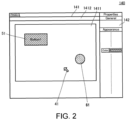
- FIG. 2 is a diagram showing an example of the UI editing screen.
- the UI editing screen 140 includes a main window 141, an attribute display window 142, and a pointer 41.
- the main window 141 and the attribute display window 142 are displayed side by side.
- the main window 141 has a screen editing area 1411 and a toolbar 1412.
- the screen editing area 1411 occupies substantially the entire area of the center of the main window 141.
- the created UI objects such as UI objects 51 and 61 are arranged in the screen editing area 1411.
- the UI object is a figure representing a button, a lamp or the like, a frame for displaying a numerical value or the like.
- the toolbar 1412 is arranged with tools to be used for creating these UI objects. For example, the programmer selects a tool on the toolbar 1412 and executes a prescribed process on the screen editing area 1411 to realize creation of the UI object.
- the attributes include the name and type of the UI object, variables set to the UI object, shape, color, size, arrangement position or the like of the figure.
- FIG. 3 is a flowchart showing a method of generating a list of a plurality of UI objects.
- FIG. 4 is a diagram showing a first display mode of a list of a plurality of UI objects.
- FIG. 5 is a diagram showing a second display mode of a list of a plurality of UI obj ects.
- the UI editing unit 11 When a plurality of UI objects overlap in the screen editing area 1411 of the UI editing screen 140, the UI editing unit 11 generates a list of a plurality of UI objects as shown in FIG. 4 or FIG. 5 and arranges it in the UI editing screen 140 by executing the processing shown in FIG. 3 .
- the UI editing unit 11 detects the position (coordinates) of the pointer 41 on the UI editing screen 140 (S101).
- the UI editing unit 11 detects whether the position of the pointer 41 on the screen editing area 1411 overlaps the UI object (S102). This is because the area of the UI object in the screen editing area 1411 is stored in two-dimensional coordinates, for example. If the position coordinates of the pointer 41 are in the area of the UI object defined by the two-dimensional coordinates, the UI editing unit 11 determines that the pointer and the UI object overlap. The operation of overlapping the pointer 41 on the UI object corresponds to the operation for list display.
- the UI editing unit 11 stands by until the next operation input is made to the pointer 41.
- the UI editing unit 11 detects whether another UI object overlaps the UI object (S103). For example, the UI editing unit 11 detects an overlap with the existing UI object when editing and registering a new UI object. Then, the UI editing unit 11 stores a plurality of overlapping UI objects together with their positional relationship in the Z direction. Thereby, in the subsequent editing, the UI editing unit 11 can detect the overlapping of the UI objects and the positional relationship in the Z direction, that is, the positional relationship between the UI objects sequentially arranged from the topmost UI object to the back side.
- the UI editing unit 11 If a plurality of UI objects overlap the UI object on which the pointer 41 overlaps in the screen editing area 1411 (S103: YES), the UI editing unit 11 generates a list 500 of the overlapping UI objects (S104) and arranges it in the UI editing screen 140 as shown in FIG. 4 .
- the list 500 includes the UI object 51 on which the pointer 41 overlaps, and the UI object 52 and the UI object 53 which overlap the UI object 51.
- the UI object 51, the UI object 52, and the UI object 53 are arranged in order from the top layer side as set by the UI editing program 210.
- the programmer can visually recognize other UI objects hidden by the UI object on the UI editing screen 140 easily. Thereby, the programmer can prevent editing errors such as forgetting to edit the hidden UI objects. Further, the programmer can grasp the arrangement order of a plurality of UI objects from the top layer.
- the UI editing unit 11 partially overlaps the UI object 52 with the UI object 51 on the top layer side and arranges the UI object 52 so that a part of the UI object 52 cannot be visually recognized.
- the UI editing unit 11 partially overlaps the UI object 53 with the UI object 52 on the top layer side and arranges the UI object 53 so that a part of the UI object 53 cannot be visually recognized.
- the UI editing unit 11 sets to display the UI objects to be gradually smaller from the top layer side toward the back side. Thereby, the programmer can more intuitively understand the order of the UI objects 51, 52, and 53 from the top layer.
- the UI editing unit 11 arranges the list 500 close to the UI object 51 on which the pointer 41 is overlapped. Thereby, it is easy for the programmer to visually recognize which UI object in the UI editing screen 140 hides other UI objects.
- the UI editing unit 11 can also set a list as shown in FIG. 5.
- FIG. 5 is a diagram showing a second display mode of a list of a plurality of UI objects.
- the UI editing unit 11 In the display mode shown in FIG. 5 , the UI editing unit 11 generates a list 500 in which the UI objects 51, 52, and 53 are sequentially arranged in the vertical direction of the UI editing screen 140, and arranges the list 500 in the UI editing screen 140.
- the programmer can also visually recognize other UI objects hidden by the UI object on the UI editing screen 140 easily. Further, the programmer can grasp the arrangement order of a plurality of UI objects from the top layer.
- the arrangement from the top layer side can be displayed to be easily understandable without changing the sizes of a plurality of overlapping UI objects.
- the above illustrates a mode of detecting the pointer 41 overlapping the UI object 51 to arrange the list 500.
- the prescribed key input or the like is the operation for list display.
- the UI editing unit 11 cancels display of the list 500 as follows.
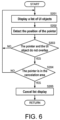
- FIG. 6 is a flowchart showing a method of canceling list display of a plurality of UI objects.
- FIG. 7 is a diagram showing a state of the UI editing screen when the list display of a plurality of UI objects is canceled.
- the UI editing unit 11 displays the list 500 of the UI objects in the above-described state (S201). In the meantime, the UI editing unit 11 detects the position of the pointer 41 (S202). The UI editing unit 11 detects whether the pointer 41 overlaps the UI object 51 (S203). This can be realized by the method of the flowchart shown in FIG. 3 described above.
- the UI editing unit 11 continues to arrange the list 500 (S201).
- the UI editing unit 11 detects whether the pointer 41 is in a cancelation area (S204).
- the cancelation area is an area outside the area ZC which is widened by a prescribed distance from the area of the UI object 51 as shown in FIG. 7 .
- the UI editing unit 11 continues to arrange the list 500 (S201).
- the UI editing unit 11 deletes the list 500 from the UI editing screen 140 and cancels the list display (S205).
- the programmer can cancel the display of the list 500 and return to the normal editing of the UI editing screen 140 simply by moving the pointer 41.
- the display of the list 500 is canceled on condition that the pointer 41 enters the cancelation area.
- a delay time may also be set for cancelation of the display of the list 500.
- the UI editing unit 11 detects that the pointer 41 enters the cancelation area, and cancels the display of the list 500 when the pointer 41 remains in the cancelation area for a time corresponding to the delay time.
- the UI editing unit 11 switches the UI object to be edited as follows.
- FIG. 8 is a flowchart showing a method of switching the UI object to be edited.
- FIG. 9 is a diagram showing a state of the UI editing screen at the time of the process of switching the UI object to be edited.
- the UI editing unit 11 displays the list 500 of the UI objects in the above-described state (S301). In the meantime, the UI editing unit 11 detects the position of the pointer 41 (S302).
- the UI editing unit 11 detects whether the pointer 41 overlaps the UI object in the list 500 (S303). If the pointer 41 does not overlap the UI object in the list 500 (S303: NO), the UI editing unit 11 continues to display the list 500 of the UI objects.
- the UI editing unit 11 updates the UI editing screen 140 according to the UI object on which the pointer 41 overlaps (S304).
- the UI editing unit 11 switches the UI object on which the pointer 41 overlaps to the topmost UI object on the UI editing screen 140. Along with this, the display of the attribute display window 142 is also switched to the content corresponding to the topmost UI object after the switching. For example, in the example of FIG. 9 , if the pointer 41 overlaps the UI object 52 in the list 500, the UI editing unit 11 switches the UI object 51 displayed on the topmost layer of the UI editing screen 140 to the UI object 52. Along with this, the UI editing unit 11 switches the display of the attribute display window 142 from the content corresponding to the UI object 51 to the content corresponding to the UI object 52. Then, the UI editing unit 11 enables editing of the UI object 52 in place of the UI object 51.
- the programmer can easily switch the UI object to be edited among a plurality of overlapping UI objects.
- the UI editing unit 11 unifies attributes of a plurality of overlapping UI objects as follows.
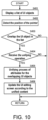
- FIG. 10 is a flowchart showing a method of unifying attributes of a plurality of overlapping UI objects.
- FIG. 11 is a diagram showing a state of the UI editing screen at the time of the process of unifying the attributes of a plurality of overlapping UI objects.
- the UI editing unit 11 displays the list 500 of the UI objects in the above-described state (S401). In the meantime, the UI editing unit 11 detects the position of the pointer 41 (S402).
- the UI editing unit 11 detects whether the pointer 41 overlaps the UI object in the list 500 (S403). If the pointer 41 does not overlap the UI object in the list 500 (S403: NO), the UI editing unit 11 continues to display the list 500 of the UI objects.
- the UI editing unit 11 detects whether a unifying operation has been received from the operation input unit 12 (S404). If the unifying operation has not been received (S404: NO), the UI editing unit 11 continues to display the list 500 of the UI objects.
- the UI editing unit 11 If the unifying operation is received (S404: YES), the UI editing unit 11 unifies the attributes of the plurality of UI objects included in the list 500, that is, the attributes of the plurality of UI objects overlapping on the UI editing screen 140, according to the operation content (S405). Then, the UI editing unit 11 updates the configuration of the UI editing screen 140 according to the unified content (S406).
- the UI object 51, the UI object 52, and the UI object 53 included in the list 500 are different in size and center position.
- the UI editing unit 11 arranges a context menu 70, in which items to be unified are described, according to the unifying operation (for example, right click of the mouse which is the operation input unit 12).
- the UI editing unit 11 unifies the sizes and positions of the plurality of UI objects 52 and 53 included in the list 500 together with the UI object 51 to the size and position of the UI object 51. Thereby, the sizes and center positions of the UI object 51, the UI object 52, and the UI object 53 are unified to the size and center position of the UI object 51.
- the UI editing unit 11 unifies changeable attributes of the UI object 51, the UI object 52, and the UI object 53.
- the UI editing unit 11 changes not only the main window 141 but also the content of the attribute display window 142.
- the programmer can easily unify the attributes of a plurality of overlapping UI objects.
- the UI editing unit 11 changes the order of a plurality of overlapping UI objects as follows.
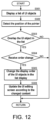
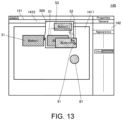
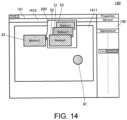
- FIG. 12 is a flowchart showing a method of changing the order of a plurality of overlapping UI objects.
- FIG. 13 is a diagram showing a state of the UI editing screen at the time of the process of changing the order of a plurality of overlapping UI objects.
- FIG. 14 is a diagram showing a state of the UI editing screen after the order of the plurality of overlapping UI objects is changed.
- the UI editing unit 11 displays the list 500 of the UI objects in the above-described state (S501). In the meantime, the UI editing unit 11 detects the position of the pointer 41 (S502).
- the UI editing unit 11 detects whether the pointer 41 overlaps the UI object in the list 500 (S503). If the pointer 41 does not overlap the UI object in the list 500 (S503: NO), the UI editing unit 11 continues to display the list 500 of the UI objects.
- the UI editing unit 11 detects whether an operation of changing the order of the UI objects has been received from the operation input unit 12 (S504). If the order changing operation has not been received (S504: NO), the UI editing unit 11 continues to display the list 500 of the UI objects.
- the UI editing unit 11 changes the display order of the plurality of UI objects included in the list 500, that is, the plurality of UI objects overlapping on the UI editing screen 140, according to the operation content (S505). Then, the UI editing unit 11 updates the configuration of the UI editing screen 140 according to the changed content (S506).
- the UI object 51, the UI object 52, and the UI object 53 are arranged in this order.
- the UI editing unit 11 receives an order changing operation of moving the UI object 52 to the top layer side of the UI object 51 (for example, drag and drop of the mouse which is the operation input unit 12).
- the UI editing unit 11 changes the order of the UI objects in the list 500 so that the UI object 52, the UI object 51, and the UI object 53 are arranged in this order from the top layer side.
- the UI editing unit 11 changes the configuration in the screen editing area 1411 from the configuration, in which the UI object 51 shown in FIG. 13 is arranged, to the configuration, in which the UI object 52 shown in FIG. 14 is arranged.
- the UI editing unit 11 changes not only the main window 141 but also the content of the attribute display window 142 from the content of the UI object 51 to the content of the UI object 52.
- the programmer can easily change the order of a plurality of overlapping UI objects.
- the above processing can be applied even when a plurality of overlapping UI objects are grouped. That is, it is possible to perform list display, cancelation of list display, and change of the target to be edited in the same manner as the above-described processing when grouped UI objects at least partially overlap each other.
- UI objects are not limited to those that receive operation inputs, and also include those that are simply displayed.
Landscapes
- Engineering & Computer Science (AREA)
- Theoretical Computer Science (AREA)
- General Engineering & Computer Science (AREA)
- Software Systems (AREA)
- Human Computer Interaction (AREA)
- Physics & Mathematics (AREA)
- General Physics & Mathematics (AREA)
- User Interface Of Digital Computer (AREA)
- Stored Programmes (AREA)
Claims (7)
- Un dispositif (10) d'aide au développement d'une interface utilisateur, comprenantune unité d'édition d'interface utilisateur (11) qui exécute un processus d'édition d'une interface utilisateur et affiche un écran d'édition généré (140) sur un affichage ; etune unité d'entrée d'opération (12) qui reçoit une instruction pour éditer l'interface utilisateur, l'unité d'entrée d'opération (12) recevant une opération d'un pointeur (41) qui indique une position sur l'écran d'édition (140),dans lequel, lorsque la position du pointeur (41) est déplacée sur un objet d'interface utilisateur supérieur (51) où une pluralité d'objets d'interface utilisateur (51, 52, 53) se chevauchent sur l'écran d'édition (140), l'unité d'édition d'interface utilisateur (11) affiche (S104 ; S201) une liste (500) de la pluralité d'objets d'interface utilisateur (51, 52, 53) qui chevauchent l'écran d'édition (140) conformément à l'opération d'affichage de la liste (500) depuis l'unité d'entrée d'opération (12), et dans lequelaprès que la liste (500) de la pluralité d'objets d'interface utilisateur (51, 52, 53) est affichée sur l'écran d'édition (140), lorsque la position du pointeur (41) ne chevauche pas (S203 : OUI) l'objet d'interface utilisateur le plus haut (51) et se déplace vers une zone de suppression (S204 : OUI) est déplacée à l'extérieur d'une zone (ZC) étendue d'une distance prescrite par rapport à l'objet d'interface utilisateur le plus haut (51), l'unité d'édition d'interface utilisateur (11) efface (S205) la liste (500) affichée sur l'écran d'édition (140).
- Dispositif (10) d'aide au développement d'une interface utilisateur selon la revendication 1, dans lequel l'unité d'édition d'interface utilisateur (11) affiche l'objet d'interface utilisateur sélectionné en tant qu'objet d'interface utilisateur supérieur à éditer lorsqu'une entrée d'opération pour sélectionner l'un de la pluralité d'objets d'interface utilisateur (51, 52, 53) dans la liste (500) est reçue de l'unité d'entrée d'opération (12).
- Dispositif (10) d'aide au développement d'une interface utilisateur selon l'une quelconque des revendications 1 à 2, dans lequel l'unité d'édition d'interface utilisateur (11) unifie les positions ou les formes de la pluralité d'objets d'interface utilisateur (51, 52, 53) dans la liste (500) en une position ou une forme d'un objet d'interface utilisateur sélectionné lorsqu'une entrée d'opération pour unifier les positions ou les formes pour la pluralité d'objets d'interface utilisateur (51, 52, 53) dans la liste (500) est reçue de l'unité d'entrée d'opération (12).
- Dispositif (10) d'aide au développement d'une interface utilisateur selon l'une quelconque des revendications 1 à 3, dans lequel l'unité d'édition d'interface utilisateur (11) unifie les attributs de la pluralité d'objets d'interface utilisateur (51, 52, 53) dans la liste (500) en attributs d'un objet d'interface utilisateur sélectionné, lorsqu'une entrée d'opération pour unifier les attributs est reçue de l'unité d'entrée d'opération (12), 52, 53) dans la liste (500) avec des attributs d'un objet d'interface utilisateur sélectionné, les attributs de la pluralité d'objets d'interface utilisateur (51, 52, 53) comprenant des noms, des types, des variables, des formes, des couleurs, des tailles et des positions de la pluralité d'objets d'interface utilisateur (51, 52, 53).
- Dispositif (10) d'aide au développement d'une interface utilisateur selon l'une quelconque des revendications 1 à 4, dans lequel, lorsqu'une entrée d'opération pour modifier une relation de position entre la pluralité d'objets d'interface utilisateur (51, 52, 53) dans la liste (500) est reçue par l'unité d'entrée d'opération (12), l'unité d'édition d'interface utilisateur (11) modifie la relation de position entre la pluralité d'objets d'interface utilisateur (51, 52, 53) dans la liste (500) et ajuste l'objet d'interface utilisateur supérieur de la pluralité d'objets d'interface utilisateur (51, 52, 53) qui se chevauchent sur l'écran d'édition (140) en fonction de la modification.
- Méthode d'aide au développement d'une interface utilisateur, comprenant :un processus d'édition d'interface utilisateur pour exécuter un processus d'édition d'une interface utilisateur et pour générer un écran d'édition (140) ;un processus d'affichage pour afficher l'écran de traitement (140) ; etun processus d'entrée d'opération pour recevoir une opération pour éditer l'interface utilisateur, dans lequel, dans le processus d'entrée d'opération, une opération d'un pointeur (41) indiquant une position dans l'écran d'édition (140) est reçue,où dans le processus d'édition de l'interface utilisateur,lorsque la position du pointeur (41) est déplacée sur un objet d'interface utilisateur supérieur (51) dans lequel une pluralité d'objets d'interface utilisateur (51, 52, 53) se chevauchent sur l'écran d'édition (140), une liste (500) de la pluralité d'objets d'interface utilisateur (51, 52, 53) qui se chevauchent est affichée (S104 ; S201) sur l'écran d'édition (140) conformément à l'opération prescrite du processus d'entrée d'opération, etaprès que la liste (500) de la pluralité d'objets d'interface utilisateur (51, 52, 53) est affichée sur l'écran de traitement (140), lorsque la position du pointeur (41) ne chevauche pas (S203 : OUI) l'objet d'interface utilisateur le plus haut (51) et se déplace vers une zone d'abandon (S204 : OUI) qui se trouve en dehors d'une zone (ZC) étendue d'une distance prescrite par rapport à l'objet d'interface utilisateur le plus haut (51), la liste (500) affichée sur l'écran d'édition (140) est effacée (S205).
- Un programme d'aide à l'élaboration d'une interface utilisateur permettant à un dispositif de traitement de l'information de l'exécuterun processus d'édition d'interface utilisateur pour exécuter un processus d'édition d'une interface utilisateur et pour générer un écran d'édition (140) ;un processus d'affichage pour afficher l'écran de traitement (140) ; etun processus d'entrée d'opération pour recevoir une opération pour éditer l'interface utilisateur, dans lequel, dans le processus d'entrée d'opération, le dispositif de traitement d'informations est rendu capable d'exécuter une opération pour recevoir une opération d'un pointeur (41) qui indique une position sur l'écran d'édition (140),où dans le processus d'édition de l'interface utilisateur,lorsque la position du pointeur (41) est déplacée sur un objet d'interface utilisateur supérieur (51) dans lequel une pluralité d'objets d'interface utilisateur (51, 52, 53) se chevauchent sur l'écran d'édition (140), le dispositif de traitement d'informations est rendu capable d'exécuter un processus d'affichage (S104 ; S201) d'une liste (500) de la pluralité d'objets d'interface utilisateur (51, 52, 53) se chevauchant sur l'écran d'édition (140) conformément à l'opération prescrite du processus d'entrée d'opération, etaprès que la liste (500) de la pluralité d'objets d'interface utilisateur (51, 52, 53) est affichée sur l'écran de traitement (140), lorsque la position du pointeur (41) ne chevauche pas (S203 : YES) l'objet d'interface utilisateur le plus haut (51) et est déplacée vers une zone de suppression (S204 : OUI) qui se trouve à l'extérieur d'une zone (ZC) élargie d'une distance prescrite par rapport à l'objet d'interface utilisateur le plus haut (51), le dispositif de traitement d'informations est rendu capable d'exécuter un processus pour effacer (S205) la liste (500) affichée sur l'écran de traitement (140).
Applications Claiming Priority (2)
| Application Number | Priority Date | Filing Date | Title |
|---|---|---|---|
| JP2017161708A JP6766779B2 (ja) | 2017-08-25 | 2017-08-25 | ユーザインタフェース開発支援装置、ユーザインタフェース開発支援方法、および、ユーザインタフェース開発支援プログラム |
| PCT/JP2018/028378 WO2019039197A1 (fr) | 2017-08-25 | 2018-07-30 | Dispositif d'aide au développement d'interface utilisateur, procédé d'aide au développement d'interface utilisateur et programme d'aide au développement d'interface utilisateur |
Publications (3)
| Publication Number | Publication Date |
|---|---|
| EP3674887A1 EP3674887A1 (fr) | 2020-07-01 |
| EP3674887A4 EP3674887A4 (fr) | 2021-04-28 |
| EP3674887B1 true EP3674887B1 (fr) | 2023-04-26 |
Family
ID=65438765
Family Applications (1)
| Application Number | Title | Priority Date | Filing Date |
|---|---|---|---|
| EP18848052.9A Active EP3674887B1 (fr) | 2017-08-25 | 2018-07-30 | Dispositif d'aide au développement d'interface utilisateur, procédé d'aide au développement d'interface utilisateur et programme d'aide au développement d'interface utilisateur |
Country Status (5)
| Country | Link |
|---|---|
| US (1) | US11709584B2 (fr) |
| EP (1) | EP3674887B1 (fr) |
| JP (1) | JP6766779B2 (fr) |
| CN (1) | CN111052070B (fr) |
| WO (1) | WO2019039197A1 (fr) |
Families Citing this family (3)
| Publication number | Priority date | Publication date | Assignee | Title |
|---|---|---|---|---|
| JP7505307B2 (ja) * | 2020-07-16 | 2024-06-25 | 富士フイルムビジネスイノベーション株式会社 | 情報処理装置およびプログラム |
| JP7687155B2 (ja) * | 2021-09-09 | 2025-06-03 | 富士フイルムビジネスイノベーション株式会社 | 情報処理装置およびプログラム |
| JP2025187222A (ja) | 2024-06-13 | 2025-12-25 | 横河電機株式会社 | プラント図面統一システム、プラント図面統一方法、およびプラント図面統一プログラム |
Family Cites Families (23)
| Publication number | Priority date | Publication date | Assignee | Title |
|---|---|---|---|---|
| US5339392A (en) * | 1989-07-27 | 1994-08-16 | Risberg Jeffrey S | Apparatus and method for creation of a user definable video displayed document showing changes in real time data |
| US5845299A (en) * | 1996-07-29 | 1998-12-01 | Rae Technology Llc | Draw-based editor for web pages |
| JPH11259278A (ja) * | 1998-03-09 | 1999-09-24 | Sony Corp | データ生成方法および記録媒体 |
| US6915489B2 (en) * | 2001-03-28 | 2005-07-05 | Hewlett-Packard Development Company, L.P. | Image browsing using cursor positioning |
| US20130104062A1 (en) * | 2011-09-27 | 2013-04-25 | Z124 | Unified desktop input segregation in an application manager |
| US20040004632A1 (en) * | 2002-06-28 | 2004-01-08 | International Business Machines Corporation | Tooltip hyperlinks |
| US7644373B2 (en) * | 2006-01-23 | 2010-01-05 | Microsoft Corporation | User interface for viewing clusters of images |
| US8745141B2 (en) * | 2006-08-07 | 2014-06-03 | Yahoo! Inc. | Calendar event, notification and alert bar embedded within mail |
| US8078979B2 (en) * | 2007-11-27 | 2011-12-13 | Microsoft Corporation | Web page editor with element selection mechanism |
| JP5500855B2 (ja) * | 2008-07-11 | 2014-05-21 | キヤノン株式会社 | 情報処理装置及びその制御方法 |
| JP2012014560A (ja) * | 2010-07-02 | 2012-01-19 | Fujitsu Ltd | 図形編集プログラム,図形編集方法及び図形編集装置 |
| US8773468B1 (en) * | 2010-08-27 | 2014-07-08 | Disney Enterprises, Inc. | System and method for intuitive manipulation of the layering order of graphics objects |
| US9658732B2 (en) * | 2010-10-19 | 2017-05-23 | Apple Inc. | Changing a virtual workspace based on user interaction with an application window in a user interface |
| AU2012101185B4 (en) * | 2011-08-19 | 2013-05-02 | Apple Inc. | Creating and viewing digital note cards |
| KR102006470B1 (ko) * | 2011-12-28 | 2019-08-02 | 삼성전자 주식회사 | 사용자 디바이스에서 멀티태스킹 운용 방법 및 장치 |
| JPWO2014061093A1 (ja) | 2012-10-16 | 2016-09-05 | 三菱電機株式会社 | 画面作成装置および画面作成方法 |
| US9158834B2 (en) * | 2013-01-21 | 2015-10-13 | Snap-On Incorporated | Methods and systems for mapping repair orders within a database |
| CA2842975C (fr) * | 2013-02-14 | 2021-10-19 | TeamUp Technologies, Inc. | Systeme collaboratif multiutilisateur servant a visualiser, rendre et modifier des elements 3d |
| TWI651640B (zh) * | 2013-10-16 | 2019-02-21 | 3M新設資產公司 | 在使用者介面上組織數位便箋 |
| JP6343953B2 (ja) | 2014-02-13 | 2018-06-20 | オムロン株式会社 | プログラマブル表示器、携帯端末装置、データ処理方法、およびプログラム |
| CN106648338B (zh) | 2015-10-30 | 2020-10-09 | 北京国双科技有限公司 | 编辑数据的方法和装置 |
| CN107045447A (zh) | 2016-02-05 | 2017-08-15 | 阿里巴巴集团控股有限公司 | 一种数据对象的标签显示方法和装置 |
| CN106422329A (zh) | 2016-11-01 | 2017-02-22 | 网易(杭州)网络有限公司 | 游戏操控方法和装置 |
-
2017
- 2017-08-25 JP JP2017161708A patent/JP6766779B2/ja active Active
-
2018
- 2018-07-30 CN CN201880053518.8A patent/CN111052070B/zh active Active
- 2018-07-30 EP EP18848052.9A patent/EP3674887B1/fr active Active
- 2018-07-30 WO PCT/JP2018/028378 patent/WO2019039197A1/fr not_active Ceased
- 2018-07-30 US US16/639,559 patent/US11709584B2/en active Active
Also Published As
| Publication number | Publication date |
|---|---|
| US20210132755A1 (en) | 2021-05-06 |
| EP3674887A1 (fr) | 2020-07-01 |
| JP2019040380A (ja) | 2019-03-14 |
| CN111052070A (zh) | 2020-04-21 |
| EP3674887A4 (fr) | 2021-04-28 |
| US11709584B2 (en) | 2023-07-25 |
| JP6766779B2 (ja) | 2020-10-14 |
| WO2019039197A1 (fr) | 2019-02-28 |
| CN111052070B (zh) | 2023-09-15 |
Similar Documents
| Publication | Publication Date | Title |
|---|---|---|
| CN112579226B (zh) | 用户界面逻辑视图和执行视图导航和转换 | |
| CN110506243B (zh) | 人机接口开发支持装置、方法以及计算机可读记录介质 | |
| EP3179324B1 (fr) | Infobulle interactive pour afficher et naviguer vers différentes positions d'un point de données | |
| US12025973B2 (en) | Industrial automation controller project online/offline state separation | |
| EP3674887B1 (fr) | Dispositif d'aide au développement d'interface utilisateur, procédé d'aide au développement d'interface utilisateur et programme d'aide au développement d'interface utilisateur | |
| US11425579B2 (en) | Signal distribution interface | |
| EP3798759B1 (fr) | Conservation de vue d'automatisation préférentielle | |
| US12253843B2 (en) | Offline programming device and offline programming method | |
| US20130082969A1 (en) | Electronic device using touch panel input and method for receiving operation thereby | |
| TWI569118B (zh) | 畫面作成軟體 | |
| US20150032419A1 (en) | Plc designing apparatus | |
| WO2023033095A1 (fr) | Appareil de commande d'affichage | |
| JP4791569B2 (ja) | 作図支援方法及びcadプログラムを記憶してなる媒体 | |
| JP2020095363A (ja) | 作画システムおよびプログラム | |
| JP4350256B2 (ja) | プロパティ設定方法及びプロパティ設定処理を含むcadプログラムを記憶してなる媒体 | |
| JP2009104434A (ja) | モニタ画面上へのラダー図表示方式 | |
| JP2020106959A (ja) | レイアウト処理装置 | |
| JP2023038154A (ja) | 表示制御装置 | |
| JP2014119775A (ja) | プログラミング方法および装置 | |
| JP2020106960A (ja) | レイアウト処理装置 | |
| KR20140124154A (ko) | 선박 강재 취재 데이터 수정 방법 및 상기 방법을 수행하는 erp 시스템 | |
| JP2018101196A (ja) | 情報処理装置、情報処理方法及びプログラム |
Legal Events
| Date | Code | Title | Description |
|---|---|---|---|
| STAA | Information on the status of an ep patent application or granted ep patent |
Free format text: STATUS: THE INTERNATIONAL PUBLICATION HAS BEEN MADE |
|
| PUAI | Public reference made under article 153(3) epc to a published international application that has entered the european phase |
Free format text: ORIGINAL CODE: 0009012 |
|
| STAA | Information on the status of an ep patent application or granted ep patent |
Free format text: STATUS: REQUEST FOR EXAMINATION WAS MADE |
|
| 17P | Request for examination filed |
Effective date: 20200217 |
|
| AK | Designated contracting states |
Kind code of ref document: A1 Designated state(s): AL AT BE BG CH CY CZ DE DK EE ES FI FR GB GR HR HU IE IS IT LI LT LU LV MC MK MT NL NO PL PT RO RS SE SI SK SM TR |
|
| AX | Request for extension of the european patent |
Extension state: BA ME |
|
| DAV | Request for validation of the european patent (deleted) | ||
| DAX | Request for extension of the european patent (deleted) | ||
| A4 | Supplementary search report drawn up and despatched |
Effective date: 20210325 |
|
| RIC1 | Information provided on ipc code assigned before grant |
Ipc: G06F 8/38 20180101AFI20210319BHEP Ipc: G06F 3/0481 20130101ALI20210319BHEP Ipc: G06F 9/451 20180101ALI20210319BHEP |
|
| REG | Reference to a national code |
Ref country code: DE Ref legal event code: R079 Ref country code: DE Ref legal event code: R079 Ref document number: 602018048982 Country of ref document: DE Free format text: PREVIOUS MAIN CLASS: G06F0008380000 Ipc: G06F0009451000 |
|
| GRAP | Despatch of communication of intention to grant a patent |
Free format text: ORIGINAL CODE: EPIDOSNIGR1 |
|
| STAA | Information on the status of an ep patent application or granted ep patent |
Free format text: STATUS: GRANT OF PATENT IS INTENDED |
|
| RIC1 | Information provided on ipc code assigned before grant |
Ipc: G06F 3/0481 20130101ALI20221216BHEP Ipc: G06F 8/38 20180101ALI20221216BHEP Ipc: G06F 9/451 20180101AFI20221216BHEP |
|
| INTG | Intention to grant announced |
Effective date: 20230116 |
|
| GRAS | Grant fee paid |
Free format text: ORIGINAL CODE: EPIDOSNIGR3 |
|
| GRAA | (expected) grant |
Free format text: ORIGINAL CODE: 0009210 |
|
| STAA | Information on the status of an ep patent application or granted ep patent |
Free format text: STATUS: THE PATENT HAS BEEN GRANTED |
|
| AK | Designated contracting states |
Kind code of ref document: B1 Designated state(s): AL AT BE BG CH CY CZ DE DK EE ES FI FR GB GR HR HU IE IS IT LI LT LU LV MC MK MT NL NO PL PT RO RS SE SI SK SM TR |
|
| REG | Reference to a national code |
Ref country code: GB Ref legal event code: FG4D |
|
| REG | Reference to a national code |
Ref country code: CH Ref legal event code: EP |
|
| REG | Reference to a national code |
Ref country code: DE Ref legal event code: R096 Ref document number: 602018048982 Country of ref document: DE |
|
| REG | Reference to a national code |
Ref country code: AT Ref legal event code: REF Ref document number: 1563344 Country of ref document: AT Kind code of ref document: T Effective date: 20230515 |
|
| REG | Reference to a national code |
Ref country code: IE Ref legal event code: FG4D |
|
| REG | Reference to a national code |
Ref country code: LT Ref legal event code: MG9D |
|
| REG | Reference to a national code |
Ref country code: NL Ref legal event code: MP Effective date: 20230426 |
|
| REG | Reference to a national code |
Ref country code: AT Ref legal event code: MK05 Ref document number: 1563344 Country of ref document: AT Kind code of ref document: T Effective date: 20230426 |
|
| PG25 | Lapsed in a contracting state [announced via postgrant information from national office to epo] |
Ref country code: NL Free format text: LAPSE BECAUSE OF FAILURE TO SUBMIT A TRANSLATION OF THE DESCRIPTION OR TO PAY THE FEE WITHIN THE PRESCRIBED TIME-LIMIT Effective date: 20230426 |
|
| PG25 | Lapsed in a contracting state [announced via postgrant information from national office to epo] |
Ref country code: SE Free format text: LAPSE BECAUSE OF FAILURE TO SUBMIT A TRANSLATION OF THE DESCRIPTION OR TO PAY THE FEE WITHIN THE PRESCRIBED TIME-LIMIT Effective date: 20230426 Ref country code: PT Free format text: LAPSE BECAUSE OF FAILURE TO SUBMIT A TRANSLATION OF THE DESCRIPTION OR TO PAY THE FEE WITHIN THE PRESCRIBED TIME-LIMIT Effective date: 20230828 Ref country code: NO Free format text: LAPSE BECAUSE OF FAILURE TO SUBMIT A TRANSLATION OF THE DESCRIPTION OR TO PAY THE FEE WITHIN THE PRESCRIBED TIME-LIMIT Effective date: 20230726 Ref country code: ES Free format text: LAPSE BECAUSE OF FAILURE TO SUBMIT A TRANSLATION OF THE DESCRIPTION OR TO PAY THE FEE WITHIN THE PRESCRIBED TIME-LIMIT Effective date: 20230426 Ref country code: AT Free format text: LAPSE BECAUSE OF FAILURE TO SUBMIT A TRANSLATION OF THE DESCRIPTION OR TO PAY THE FEE WITHIN THE PRESCRIBED TIME-LIMIT Effective date: 20230426 |
|
| PG25 | Lapsed in a contracting state [announced via postgrant information from national office to epo] |
Ref country code: RS Free format text: LAPSE BECAUSE OF FAILURE TO SUBMIT A TRANSLATION OF THE DESCRIPTION OR TO PAY THE FEE WITHIN THE PRESCRIBED TIME-LIMIT Effective date: 20230426 Ref country code: PL Free format text: LAPSE BECAUSE OF FAILURE TO SUBMIT A TRANSLATION OF THE DESCRIPTION OR TO PAY THE FEE WITHIN THE PRESCRIBED TIME-LIMIT Effective date: 20230426 Ref country code: LV Free format text: LAPSE BECAUSE OF FAILURE TO SUBMIT A TRANSLATION OF THE DESCRIPTION OR TO PAY THE FEE WITHIN THE PRESCRIBED TIME-LIMIT Effective date: 20230426 Ref country code: LT Free format text: LAPSE BECAUSE OF FAILURE TO SUBMIT A TRANSLATION OF THE DESCRIPTION OR TO PAY THE FEE WITHIN THE PRESCRIBED TIME-LIMIT Effective date: 20230426 Ref country code: IS Free format text: LAPSE BECAUSE OF FAILURE TO SUBMIT A TRANSLATION OF THE DESCRIPTION OR TO PAY THE FEE WITHIN THE PRESCRIBED TIME-LIMIT Effective date: 20230826 Ref country code: HR Free format text: LAPSE BECAUSE OF FAILURE TO SUBMIT A TRANSLATION OF THE DESCRIPTION OR TO PAY THE FEE WITHIN THE PRESCRIBED TIME-LIMIT Effective date: 20230426 Ref country code: GR Free format text: LAPSE BECAUSE OF FAILURE TO SUBMIT A TRANSLATION OF THE DESCRIPTION OR TO PAY THE FEE WITHIN THE PRESCRIBED TIME-LIMIT Effective date: 20230727 |
|
| PG25 | Lapsed in a contracting state [announced via postgrant information from national office to epo] |
Ref country code: FI Free format text: LAPSE BECAUSE OF FAILURE TO SUBMIT A TRANSLATION OF THE DESCRIPTION OR TO PAY THE FEE WITHIN THE PRESCRIBED TIME-LIMIT Effective date: 20230426 |
|
| PG25 | Lapsed in a contracting state [announced via postgrant information from national office to epo] |
Ref country code: SK Free format text: LAPSE BECAUSE OF FAILURE TO SUBMIT A TRANSLATION OF THE DESCRIPTION OR TO PAY THE FEE WITHIN THE PRESCRIBED TIME-LIMIT Effective date: 20230426 |
|
| REG | Reference to a national code |
Ref country code: DE Ref legal event code: R097 Ref document number: 602018048982 Country of ref document: DE |
|
| PG25 | Lapsed in a contracting state [announced via postgrant information from national office to epo] |
Ref country code: SM Free format text: LAPSE BECAUSE OF FAILURE TO SUBMIT A TRANSLATION OF THE DESCRIPTION OR TO PAY THE FEE WITHIN THE PRESCRIBED TIME-LIMIT Effective date: 20230426 Ref country code: SK Free format text: LAPSE BECAUSE OF FAILURE TO SUBMIT A TRANSLATION OF THE DESCRIPTION OR TO PAY THE FEE WITHIN THE PRESCRIBED TIME-LIMIT Effective date: 20230426 Ref country code: RO Free format text: LAPSE BECAUSE OF FAILURE TO SUBMIT A TRANSLATION OF THE DESCRIPTION OR TO PAY THE FEE WITHIN THE PRESCRIBED TIME-LIMIT Effective date: 20230426 Ref country code: EE Free format text: LAPSE BECAUSE OF FAILURE TO SUBMIT A TRANSLATION OF THE DESCRIPTION OR TO PAY THE FEE WITHIN THE PRESCRIBED TIME-LIMIT Effective date: 20230426 Ref country code: DK Free format text: LAPSE BECAUSE OF FAILURE TO SUBMIT A TRANSLATION OF THE DESCRIPTION OR TO PAY THE FEE WITHIN THE PRESCRIBED TIME-LIMIT Effective date: 20230426 Ref country code: CZ Free format text: LAPSE BECAUSE OF FAILURE TO SUBMIT A TRANSLATION OF THE DESCRIPTION OR TO PAY THE FEE WITHIN THE PRESCRIBED TIME-LIMIT Effective date: 20230426 |
|
| PG25 | Lapsed in a contracting state [announced via postgrant information from national office to epo] |
Ref country code: MC Free format text: LAPSE BECAUSE OF FAILURE TO SUBMIT A TRANSLATION OF THE DESCRIPTION OR TO PAY THE FEE WITHIN THE PRESCRIBED TIME-LIMIT Effective date: 20230426 |
|
| PG25 | Lapsed in a contracting state [announced via postgrant information from national office to epo] |
Ref country code: MC Free format text: LAPSE BECAUSE OF FAILURE TO SUBMIT A TRANSLATION OF THE DESCRIPTION OR TO PAY THE FEE WITHIN THE PRESCRIBED TIME-LIMIT Effective date: 20230426 |
|
| REG | Reference to a national code |
Ref country code: CH Ref legal event code: PL |
|
| PLBE | No opposition filed within time limit |
Free format text: ORIGINAL CODE: 0009261 |
|
| STAA | Information on the status of an ep patent application or granted ep patent |
Free format text: STATUS: NO OPPOSITION FILED WITHIN TIME LIMIT |
|
| REG | Reference to a national code |
Ref country code: BE Ref legal event code: MM Effective date: 20230731 |
|
| PG25 | Lapsed in a contracting state [announced via postgrant information from national office to epo] |
Ref country code: LU Free format text: LAPSE BECAUSE OF NON-PAYMENT OF DUE FEES Effective date: 20230730 |
|
| GBPC | Gb: european patent ceased through non-payment of renewal fee |
Effective date: 20230730 |
|
| PG25 | Lapsed in a contracting state [announced via postgrant information from national office to epo] |
Ref country code: LU Free format text: LAPSE BECAUSE OF NON-PAYMENT OF DUE FEES Effective date: 20230730 |
|
| 26N | No opposition filed |
Effective date: 20240129 |
|
| REG | Reference to a national code |
Ref country code: IE Ref legal event code: MM4A |
|
| PG25 | Lapsed in a contracting state [announced via postgrant information from national office to epo] |
Ref country code: CH Free format text: LAPSE BECAUSE OF NON-PAYMENT OF DUE FEES Effective date: 20230731 Ref country code: GB Free format text: LAPSE BECAUSE OF NON-PAYMENT OF DUE FEES Effective date: 20230730 |
|
| PG25 | Lapsed in a contracting state [announced via postgrant information from national office to epo] |
Ref country code: SI Free format text: LAPSE BECAUSE OF FAILURE TO SUBMIT A TRANSLATION OF THE DESCRIPTION OR TO PAY THE FEE WITHIN THE PRESCRIBED TIME-LIMIT Effective date: 20230426 |
|
| PG25 | Lapsed in a contracting state [announced via postgrant information from national office to epo] |
Ref country code: SI Free format text: LAPSE BECAUSE OF FAILURE TO SUBMIT A TRANSLATION OF THE DESCRIPTION OR TO PAY THE FEE WITHIN THE PRESCRIBED TIME-LIMIT Effective date: 20230426 Ref country code: IT Free format text: LAPSE BECAUSE OF FAILURE TO SUBMIT A TRANSLATION OF THE DESCRIPTION OR TO PAY THE FEE WITHIN THE PRESCRIBED TIME-LIMIT Effective date: 20230426 Ref country code: FR Free format text: LAPSE BECAUSE OF NON-PAYMENT OF DUE FEES Effective date: 20230731 Ref country code: BE Free format text: LAPSE BECAUSE OF NON-PAYMENT OF DUE FEES Effective date: 20230731 |
|
| PG25 | Lapsed in a contracting state [announced via postgrant information from national office to epo] |
Ref country code: IE Free format text: LAPSE BECAUSE OF NON-PAYMENT OF DUE FEES Effective date: 20230730 |
|
| PG25 | Lapsed in a contracting state [announced via postgrant information from national office to epo] |
Ref country code: IE Free format text: LAPSE BECAUSE OF NON-PAYMENT OF DUE FEES Effective date: 20230730 |
|
| PG25 | Lapsed in a contracting state [announced via postgrant information from national office to epo] |
Ref country code: BG Free format text: LAPSE BECAUSE OF FAILURE TO SUBMIT A TRANSLATION OF THE DESCRIPTION OR TO PAY THE FEE WITHIN THE PRESCRIBED TIME-LIMIT Effective date: 20230426 |
|
| PG25 | Lapsed in a contracting state [announced via postgrant information from national office to epo] |
Ref country code: BG Free format text: LAPSE BECAUSE OF FAILURE TO SUBMIT A TRANSLATION OF THE DESCRIPTION OR TO PAY THE FEE WITHIN THE PRESCRIBED TIME-LIMIT Effective date: 20230426 |
|
| PG25 | Lapsed in a contracting state [announced via postgrant information from national office to epo] |
Ref country code: CY Free format text: LAPSE BECAUSE OF FAILURE TO SUBMIT A TRANSLATION OF THE DESCRIPTION OR TO PAY THE FEE WITHIN THE PRESCRIBED TIME-LIMIT; INVALID AB INITIO Effective date: 20180730 |
|
| PG25 | Lapsed in a contracting state [announced via postgrant information from national office to epo] |
Ref country code: HU Free format text: LAPSE BECAUSE OF FAILURE TO SUBMIT A TRANSLATION OF THE DESCRIPTION OR TO PAY THE FEE WITHIN THE PRESCRIBED TIME-LIMIT; INVALID AB INITIO Effective date: 20180730 |
|
| PGFP | Annual fee paid to national office [announced via postgrant information from national office to epo] |
Ref country code: DE Payment date: 20250722 Year of fee payment: 8 |
|
| PG25 | Lapsed in a contracting state [announced via postgrant information from national office to epo] |
Ref country code: TR Free format text: LAPSE BECAUSE OF FAILURE TO SUBMIT A TRANSLATION OF THE DESCRIPTION OR TO PAY THE FEE WITHIN THE PRESCRIBED TIME-LIMIT Effective date: 20230426 |