EP3680764B1 - Verfahren und vorrichtung zur bewegung von symbolen - Google Patents
Verfahren und vorrichtung zur bewegung von symbolen Download PDFInfo
- Publication number
- EP3680764B1 EP3680764B1 EP17924382.9A EP17924382A EP3680764B1 EP 3680764 B1 EP3680764 B1 EP 3680764B1 EP 17924382 A EP17924382 A EP 17924382A EP 3680764 B1 EP3680764 B1 EP 3680764B1
- Authority
- EP
- European Patent Office
- Prior art keywords
- icon
- display area
- page
- subsidiary
- displaying
- Prior art date
- Legal status (The legal status is an assumption and is not a legal conclusion. Google has not performed a legal analysis and makes no representation as to the accuracy of the status listed.)
- Active
Links
Images








Classifications
-
- G—PHYSICS
- G06—COMPUTING OR CALCULATING; COUNTING
- G06F—ELECTRIC DIGITAL DATA PROCESSING
- G06F3/00—Input arrangements for transferring data to be processed into a form capable of being handled by the computer; Output arrangements for transferring data from processing unit to output unit, e.g. interface arrangements
- G06F3/01—Input arrangements or combined input and output arrangements for interaction between user and computer
- G06F3/048—Interaction techniques based on graphical user interfaces [GUI]
- G06F3/0481—Interaction techniques based on graphical user interfaces [GUI] based on specific properties of the displayed interaction object or a metaphor-based environment, e.g. interaction with desktop elements like windows or icons, or assisted by a cursor's changing behaviour or appearance
- G06F3/04817—Interaction techniques based on graphical user interfaces [GUI] based on specific properties of the displayed interaction object or a metaphor-based environment, e.g. interaction with desktop elements like windows or icons, or assisted by a cursor's changing behaviour or appearance using icons
-
- G—PHYSICS
- G06—COMPUTING OR CALCULATING; COUNTING
- G06F—ELECTRIC DIGITAL DATA PROCESSING
- G06F1/00—Details not covered by groups G06F3/00 - G06F13/00 and G06F21/00
- G06F1/16—Constructional details or arrangements
- G06F1/1613—Constructional details or arrangements for portable computers
- G06F1/1633—Constructional details or arrangements of portable computers not specific to the type of enclosures covered by groups G06F1/1615 - G06F1/1626
- G06F1/1637—Details related to the display arrangement, including those related to the mounting of the display in the housing
- G06F1/1652—Details related to the display arrangement, including those related to the mounting of the display in the housing the display being flexible, e.g. mimicking a sheet of paper, or rollable
-
- G—PHYSICS
- G06—COMPUTING OR CALCULATING; COUNTING
- G06F—ELECTRIC DIGITAL DATA PROCESSING
- G06F3/00—Input arrangements for transferring data to be processed into a form capable of being handled by the computer; Output arrangements for transferring data from processing unit to output unit, e.g. interface arrangements
- G06F3/01—Input arrangements or combined input and output arrangements for interaction between user and computer
- G06F3/048—Interaction techniques based on graphical user interfaces [GUI]
- G06F3/0484—Interaction techniques based on graphical user interfaces [GUI] for the control of specific functions or operations, e.g. selecting or manipulating an object, an image or a displayed text element, setting a parameter value or selecting a range
- G06F3/04842—Selection of displayed objects or displayed text elements
-
- G—PHYSICS
- G06—COMPUTING OR CALCULATING; COUNTING
- G06F—ELECTRIC DIGITAL DATA PROCESSING
- G06F3/00—Input arrangements for transferring data to be processed into a form capable of being handled by the computer; Output arrangements for transferring data from processing unit to output unit, e.g. interface arrangements
- G06F3/01—Input arrangements or combined input and output arrangements for interaction between user and computer
- G06F3/048—Interaction techniques based on graphical user interfaces [GUI]
- G06F3/0484—Interaction techniques based on graphical user interfaces [GUI] for the control of specific functions or operations, e.g. selecting or manipulating an object, an image or a displayed text element, setting a parameter value or selecting a range
- G06F3/04845—Interaction techniques based on graphical user interfaces [GUI] for the control of specific functions or operations, e.g. selecting or manipulating an object, an image or a displayed text element, setting a parameter value or selecting a range for image manipulation, e.g. dragging, rotation, expansion or change of colour
-
- G—PHYSICS
- G06—COMPUTING OR CALCULATING; COUNTING
- G06F—ELECTRIC DIGITAL DATA PROCESSING
- G06F3/00—Input arrangements for transferring data to be processed into a form capable of being handled by the computer; Output arrangements for transferring data from processing unit to output unit, e.g. interface arrangements
- G06F3/01—Input arrangements or combined input and output arrangements for interaction between user and computer
- G06F3/048—Interaction techniques based on graphical user interfaces [GUI]
- G06F3/0484—Interaction techniques based on graphical user interfaces [GUI] for the control of specific functions or operations, e.g. selecting or manipulating an object, an image or a displayed text element, setting a parameter value or selecting a range
- G06F3/0486—Drag-and-drop
-
- G—PHYSICS
- G06—COMPUTING OR CALCULATING; COUNTING
- G06F—ELECTRIC DIGITAL DATA PROCESSING
- G06F3/00—Input arrangements for transferring data to be processed into a form capable of being handled by the computer; Output arrangements for transferring data from processing unit to output unit, e.g. interface arrangements
- G06F3/01—Input arrangements or combined input and output arrangements for interaction between user and computer
- G06F3/048—Interaction techniques based on graphical user interfaces [GUI]
- G06F3/0487—Interaction techniques based on graphical user interfaces [GUI] using specific features provided by the input device, e.g. functions controlled by the rotation of a mouse with dual sensing arrangements, or of the nature of the input device, e.g. tap gestures based on pressure sensed by a digitiser
- G06F3/0488—Interaction techniques based on graphical user interfaces [GUI] using specific features provided by the input device, e.g. functions controlled by the rotation of a mouse with dual sensing arrangements, or of the nature of the input device, e.g. tap gestures based on pressure sensed by a digitiser using a touch-screen or digitiser, e.g. input of commands through traced gestures
- G06F3/04886—Interaction techniques based on graphical user interfaces [GUI] using specific features provided by the input device, e.g. functions controlled by the rotation of a mouse with dual sensing arrangements, or of the nature of the input device, e.g. tap gestures based on pressure sensed by a digitiser using a touch-screen or digitiser, e.g. input of commands through traced gestures by partitioning the display area of the touch-screen or the surface of the digitising tablet into independently controllable areas, e.g. virtual keyboards or menus
-
- H—ELECTRICITY
- H04—ELECTRIC COMMUNICATION TECHNIQUE
- H04M—TELEPHONIC COMMUNICATION
- H04M1/00—Substation equipment, e.g. for use by subscribers
- H04M1/72—Mobile telephones; Cordless telephones, i.e. devices for establishing wireless links to base stations without route selection
- H04M1/724—User interfaces specially adapted for cordless or mobile telephones
- H04M1/72403—User interfaces specially adapted for cordless or mobile telephones with means for local support of applications that increase the functionality
-
- H—ELECTRICITY
- H04—ELECTRIC COMMUNICATION TECHNIQUE
- H04M—TELEPHONIC COMMUNICATION
- H04M1/00—Substation equipment, e.g. for use by subscribers
- H04M1/72—Mobile telephones; Cordless telephones, i.e. devices for establishing wireless links to base stations without route selection
- H04M1/724—User interfaces specially adapted for cordless or mobile telephones
- H04M1/72469—User interfaces specially adapted for cordless or mobile telephones for operating the device by selecting functions from two or more displayed items, e.g. menus or icons
Definitions
- the present disclosure relates to human-computer interaction technical field, and particularly to an icon moving method and device.
- the invention is set out in the appended set of claims.
- the mobile terminal can install more and more applications.
- the icons of the applications to be displayed on multiple screen pages, and many icons are displayed on each screen page.
- the user In use, the user needs to press the icon to set it into a movable state, and then drag the icon to the target screen page when an icon in the current screen page needs to be moved to a target screen page. During the dragging, the user needs to press the icon all the time and drag the icon to the edge of the screen, so that the mobile terminal switches to display the next screen page.
- CN 105843481A provides an application icon moving and arranging method and apparatus, and belong to the field of portable devices.
- the method comprises the steps of according to a received first user instruction, selecting an icon of an application in a display desktop page or a menu page; according to a received second user instruction, moving the selected icon of the application to a temporary storage region; and according to a received third user instruction, moving the icon of the application in the temporary storage region to a target position of the display desktop page or the menu page.
- the invention particularly relates to an application icon moving and arranging method and system. According to the embodiments of the invention, a user can quickly and conveniently move application icons in batches.
- US 2016/266774A1 discloses a mobile terminal, which can provide various user interfaces for editing an image itself displayed on a front surface display area, an editing function for items displayed on the front surface display area, and so on by using the front surface display area and a side surface display area.
- CN 106775425A provides a terminal and a function key display method thereof.
- the terminal comprises a first touch control display screen arranged on the front side of the terminal and a second touch control display screen arranged on at least one lateral side of the terminal.
- the function key display method includes: detecting the interface type of the current display interface of the first touch control display screen; according to the interface type, controlling the second touch control display screen to display a preset function key set corresponding to the interface type, wherein the preset function key set comprises at least one function key.
- the terminal and the function key display method thereof have the advantages that by detecting the interface type of the current display interface of the main screen of the terminal, the function keys corresponding to the interface type are displayed on the lateral side of the terminal, and the flexibility and convenience of the fast control function of the terminal are increased effectively.
- the present disclosure provides an icon moving method and device, which can solve the problem of high operation difficulty and low operation efficiency when moving the icon.
- the method is as follows. The invention is set out in the appended set of claims.
- an icon moving method applied to a terminal has a main display area and a subsidiary display area, the method includes: displaying a first page of a home screen in the main display area, under an icon management mode;
- the icon has a first size in the first page and the operation of displaying the icon in the subsidiary display area, includes: displaying the icon with a second size in the subsidiary display area, and the second size being smaller than the first size.
- the method further including: displaying a prompt of the icon in the main display area when receiving a selection operation on the icon displayed in the subsidiary display area, and the prompt comprises an application name corresponding to the icon and/or an enlarged icon.
- the icon has the second size in the subsidiary display area and the operation of displaying the icon in the second page, includes: displaying the icon with the first size in the second page, and the first size being larger than the second size.
- the operation of switching the first page to a second page of the home screen and displaying the second page of the home screen includes:
- the method further including:
- the method further including: when leaving the icon management mode and there are unmoved icons remained in the subsidiary area, moving the unmoved icons to their respective initial pages or to the current page.
- the main display area is a front display area of the curved surface screen
- the subsidiary display area is a side display area of the curved surface screen
- an icon moving device applied to a terminal has a main display area and a subsidiary display area, the device includes:
- the icon has a first size in the first page and the second displaying module is configured to perform the operations of: displaying the icon with a second size in the subsidiary display area, and the second size being smaller than the first size.
- the device further including: a fourth displaying module, configured to display a prompt of the icon in the main display area, when receiving a selection operation on the icon displayed in the subsidiary display area, and the prompt comprises an application name corresponding to the icon and/or an enlarged icon.
- a fourth displaying module configured to display a prompt of the icon in the main display area, when receiving a selection operation on the icon displayed in the subsidiary display area, and the prompt comprises an application name corresponding to the icon and/or an enlarged icon.
- the icon has the second size in the subsidiary display area and the third displaying module is configured to perform the operations of: displaying the icon with the first size in the second page, and the first size being larger than the second size.
- the switching module is configured to perform the operations of: determining an associated icon corresponding to the icon when receiving the selection operation on the icon in the subsidiary display area, the type of the application indicated by the associated icon being the same as that indicated by the icon; switching the first page to the second page, and the second page comprises the associated icon.
- the device further including:
- the device further including: a moving module, configured to when leaving the icon management mode and there are unmoved icons remained in the subsidiary area, move the unmoved icons to their respective initial pages or to the current page.
- a moving module configured to when leaving the icon management mode and there are unmoved icons remained in the subsidiary area, move the unmoved icons to their respective initial pages or to the current page.
- the main display area is a front display area of the curved surface screen
- the subsidiary display area is a side display area of the curved surface screen
- the terminal with a main display area and a subsidiary display area
- the terminal comprises a processor, a memory connected to the processor, and a computer program stored in the memory and executable by the processor, the method for moving an icon is implemented when executing the computer program.
- a fourth aspect of the embodiments of the present disclosure provides a computer-readable storage medium, having a computer program stored therein, the method for moving an icon is implemented when the computer program is executed by a processor.
- the icon waited to be moved can be displayed in the subsidiary display area, thereby ensuring that the switching of the pages would not affect the subsidiary display area.
- the icon displayed in the subsidiary display area is displayed in the current display page of the main display area, so the icons are moved across the screen.
- the subsidiary display area can accommodate multiple icons, so that the user can move the multiple icons at the same time to improve the efficiency of the operation of moving the icons.
- module generally refers to a program or instructions stored in memory capable of implementing certain functions; the "unit” mentioned herein generally refers to a functional structure divided logically, and the “unit” Can be implemented by pure hardware, or a combination of software and hardware.
- plural refers to two or more.
- “And / or” describes the association relationship between related objects and indicates that there can be three types of relationships. For example, A and / or B can indicate that there are three cases in which A exists alone, A and B exist, and B exists alone.
- the character “/” generally indicates that the related objects are an "or" relationship.
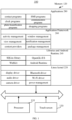
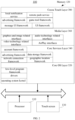
- FIG. 1 and FIG. 2 are structural block diagrams of a terminal 100 according to an embodiment of the present disclosure.
- the terminal 100 may be a mobile phone, a tablet computer, a notebook computer, an e-book or the like.
- the terminal 100 of the present disclosure may include one or more of the following components: a processor 110, a memory 120, and a touch screen 130
- the processor 110 may include one or more processing cores.
- the processor 110 uses various interfaces and lines to connect various parts of the entire terminal 100, and executes the various functions and data processing of the terminal 100 by running or executing instructions, programs, code sets or instruction sets stored in the memory 120 and by calling data stored in the memory 120.
- the processor 110 may use at least one hardware form of Digital Signal Processing (DSP), Field-Programmable Gate Array (FPGA), and Programmable Logic Array (PLA) to implement the executions.
- DSP Digital Signal Processing
- FPGA Field-Programmable Gate Array
- PDA Programmable Logic Array
- the processor 110 may integrate one or more of a Central Processing Unit (CPU), a Graphics Processing Unit (GPU), and a modem.
- the CPU mainly handles the operating system, user interfaces, and application programs; the GPU is responsible for rendering and drawing of the content required to be displayed by the touch screen 130; and the modem is used for processing wireless communication. It can be understood that the modem may not be integrated into the processor 110, and may be implemented by a single chip.
- the memory 120 may include Random Access Memory (RAM), and may also just include Read-Only Memory.
- the memory 120 includes a non-transitory computer-readable storage medium.
- the memory 120 may be used to store instructions, programs, codes, code sets, or instruction sets.
- the memory 120 may include a storage program area and a storage data area, where the storage program area may store instructions for implementing an operating system, instructions for at least one function such as a touch function, a sound playback function, an image playback function, etc., the instructions for implementing the following method embodiments; the storage data area may store data such as audio data, phone book and the like created according to the use of the terminal 100.
- the memory 120 stores the Linux kernel 220, the Libraries and Android Runtime 240, the Application Framework 260 and Applications 280.
- the Linux kernel 220 provides low-level drivers for various hardware of the terminal 100, such as a display driver, an audio driver, a camera driver, a Bluetooth driver, a Wi-Fi driver, and power management.
- the Libraries and Android Runtime 240 provides main feature support for the android system through some C / C ++ libraries.
- the SQLite library provides the support of database
- the OpenGL / ES library provides the support of 3D drawing
- the Webkit library provides the support of browser kernel.
- the Libraries and Android Runtime 240 also provides the Android Runtime 242, which mainly provides some core libraries, which can allow developers to write Android applications using the Java language.
- the Application Framework 260 provides various APIs that may be used when building applications. Developers can also use these APIs to build their own applications, such as activity management, window management, view management, notification management, content providers, Package management, call management, resource management, location management.
- At least one application program is running in the Applications 280, and these application programs may be native to the operating system such as contact programs, SMS programs, clock programs, camera applications, or the applications developed by third-party developers, such as communication programs, photo beautification programs, etc.
- the IOS system includes a Core OS Layer 320, a Core Services Layer 340, a Media Layer 360 and a Cocoa Touch Layer 380.
- the Core OS Layer 320 includes an operating system kernel, drivers, and a low-level program framework. These low-level program frameworks provide functions closer to hardware for use by the program framework located in the Core Services Layer 340.
- the Core Services Layer 340 provides system services and / or program frameworks required by an application program, such as a foundation framework, an account framework, an advertising framework, a data storage framework, a network connection framework, a geographic location framework, a motion framework, and the like.
- the Media Layer 360 provides audio-visual-related interfaces for applications, such as graphics and image related interfaces, audio technology related interfaces, video technology related interfaces, and audio and video transmission technologies such as AirPlay interfaces.
- the Cocoa Touch Layer 380 provides various commonly-used interface-related frameworks for application development. The Cocoa Touch Layer 380 is responsible for user touch interaction operations on the terminal 100. For example, local notification service, remote push service, advertising framework, game tool framework, message user interface (UI) framework, user interface UIKit framework, map framework, etc.
- the FIG. 2 illustrates the frameworks, the frameworks related to most applications include but are not limited to, a basic framework of the Core Services Layer 340 and a UIKit framework of the Cocoa Touch Layer 380.
- the basic framework provides many basic object classes and data types, and provides the most basic system services for all applications, regardless of the UI.
- the classes provided by the UIKit framework are basic UI class libraries for creating touch-based user interfaces.
- IOS applications can provide UI based on the UIKit framework, so it provides basic framework of the application for building user interfaces, drawing, handling the events of the user interaction, responding to gestures etc.
- the touch screen 130 is configured to receive touch operations on or near it by the user using a finger, a touch pen, or any suitable object, and to display respective user interfaces of applications.
- the touch screen 130 is generally disposed on a front panel of the terminal 130.
- the touch screen 130 may be designed as a full screen, a curved surface screen or a special-shaped screen.
- the touch screen 130 can also be designed as a combination of the full screen and the curved surface screen, and a combination of the special-shaped screen and the curved surface screen, which is not limited in this embodiment.
- the full screen may refer to a screen design in which the touch screen 130 occupies the front panel of the terminal 100 with a screen ratio exceeding a threshold such as 80% or 90% or 95%.
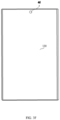
- a calculation method of the screen ratio is: (the area of the touch screen 130 / the area of the front panel of the terminal 100) * 100%; another calculation method of the screen ratio is: (the area of the actual display area in the touch screen 130 / the area of front panel of terminal 100) * 100%; another calculation method of the screen ratio is: (diagonal line of the touch screen 130 / diagonal line on the front panel of terminal 100) * 100%. For example, as shown in FIG.
- touch screen 130 almost all areas on the front panel of the terminal 100 are touch screen 130, on the front panel 40 of the terminal 100, except the edge generated by the middle frame 41, all other areas are touch screen 130.
- the four corners of the touch screen 130 may be right-angled or rounded.
- the full screen may also be a screen design in which at least one front panel component is integrated inside or below the touch screen 130.
- the at least one front panel component includes a camera, a fingerprint sensor, a proximity light sensor, a distance sensor, and the like.
- other components on the front panel of the terminal are integrated in all or part of the touch screen 130. For example, after dividing the photosensitive element in the camera into multiple photosensitive pixels, integrate the photosensitive pixels in a black area in each display pixel in the touch screen 130. Due to the at least one component on the front panel is integrated inside the touch screen 130, the full screen has a higher screen ratio.
- the front panel components on the front panel of the conventional terminal can also be set on the side or back of the terminal 100.
- set an ultrasonic fingerprint sensor under the touch screen 130, and set a bone-conduction receiver inside the touch screen 130, and the camera is disposed on the side of the terminal and with a pluggable structure.
- a single side of the middle frame of the terminal 100 or two sides such as left side and right side, or four sides such as upper side, lower side, left side and right side are set edge touch sensors.
- the edge touch sensor is configured to detect at least one of the operations on the middle frame of the user such as the touch operation, click operation, press operation and slide operation.
- the edge touch sensor may be any one of the touch sensors, the thermal sensors and the pressure sensors. The user can operate on the edge touch sensor to control the applications in the terminal 100.
- the curved surface screen refers to a screen design in which the cross section of the touch screen 130 has a curved shape and the projection is a plane along a direction parallel to the cross section, and the curved shape may be U-shaped.
- the curved surface screen refers to a screen design manner that at least one side is curved shape.
- the curved surface screen refers to that at least one side of the touch screen 130 extends to cover the middle frame of the terminal 100. Since the side of the touch screen 130 extends to the middle frame of the terminal 100 to cover the middle frame without the display function and the touch function as a displayable area and/or operable area, so that the curved surface screen has a higher screen ratio.
- the curved surface screen refers to a screen design that the two sides of the left side and the right side 42 are curved, or the two sides of the upper side and the lower side are curved, or the four sides of the upper side, lower side, left side and right side are curved.
- the curved surface screen is made of a touch screen material with flexibility.
- the special-shaped screen is a touch display screen with an irregular shape, the irregular shape is not a rectangle or a rounded rectangle.
- the special-shaped screen refers to a screen design that has protrusions, notches, and / or holes on the rectangular or rounded rectangular touch screen 130.
- the protrusions, notches, and / or holes can be located at the edge of the touch screen 130, the center of the touch screen 130, or both the edge and the center of the touch screen 130.
- the protrusions, notches and / or holes When the protrusions, notches and / or holes is set on one edge, it can be set at the middle position or both ends of the edge; when the protrusions, notches and / or holes is set on the center of the screen, it can be set on the one or more of the region, the upper left region, the left region, the lower left region, the lower region, the lower right region, the right region, and the upper right region.
- the protrusions, notches and holes When arranged in multiple areas, the protrusions, notches and holes can be distributed in a centralized or distributed manner; they can be distributed symmetrically or asymmetrically.
- the number of the protrusions, notches and / or holes is not limited.
- the special-shaped screen covers the upper and / or lower forehead area of the touch screen as a displayable area and / or an operable area, so that the touch screen takes up more space on the front panel of the terminal, so the special-shaped screen also has larger screen ratio.
- the notches and / or holes are used to accommodate at least one front panel component.
- the front panel component includes at least one of the cameras, fingerprint sensors, proximity light sensors, distance sensors, handsets, ambient light sensors and physical buttons.
- the notch may be defined at one or more edges of the special-shaped screen, and the notch may be a semi-circular notch, a right-angled rectangular notch, a rounded rectangular notch, or an irregularly-shaped notch.
- the special-shaped screen may be a screen is designed with a semi-circular notch 43 at the center of the upper edge of the touch screen 130.
- the area of the semi-circular notch is used to accommodate at least one of the front panel components such as the camera, the distance sensor (also known as the proximity sensor), the handset, and the ambient light brightness sensor. As shown in FIG.
- the special-shaped screen may be a screen is designed with a semi-circular notch 44 at the center of the lower edge of the touch screen 130.
- the area of the semi-circular notch is used to accommodate at least one of the physical buttons, fingerprint sensors and microphones.
- the special-shaped screen may be a screen is designed with a semi-elliptical notch 45 at the center of the lower edge of the touch screen 130, and the semi-elliptical notch is formed on the front panel of the terminal 100, and two semi-elliptical notches enclose an elliptical area.
- the elliptical area is used to accommodate the physical button or the fingerprint recognition modules. As shown in FIG.
- the special-shaped screen may be a screen is designed with at least one small hole 45 in the upper half of the touch screen 130.
- the area of the small hole is used to accommodate at least one of the front panel components such as the camera, the distance sensor, the handset, and the ambient light brightness sensor.
- the structure of the terminal 100 shown in the above drawings does not constitute a limitation on the terminal 100.
- the terminal may include more or fewer components than shown in the figure, or combine some components, or different component arrangements.
- the terminal 100 further includes components such as a radio frequency circuit, an input unit, a sensor, an audio circuit, a wireless fidelity (WiFi) module, a power supply, and a bluetooth module, which are not described herein again.
- WiFi wireless fidelity
- the disclosure provides an icon moving method, which is applied to a terminal having a main display area and a subsidiary display area, and the terminal may be a smart phone, a tablet computer, or an e-book reader.
- Terminals with different types of screens have different manners of dividing the main display area and the subsidiary display area.
- the subsidiary display area is an area of a predetermined width on both sides of the full screen
- the main display area is an area except the subsidiary display area of the full screen.
- the subsidiary display area is a side display area corresponding to the left side and the right side 42, and the main display area is a front display area expect the subsidiary display area of the curved surface screen.
- the subsidiary display area is a screen display area on both sides of the notch, and the main display area is a screen display area expect the subsidiary display area of the special-shaped screen.
- the description of the method for moving an icon of each embodiment of the present disclosure is applied the terminal with a curved surface screen as shown in FIG. 3B as an example, and does not limit the present disclosure.
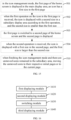
- FIG. 4 is a schematic flowchart of an icon moving method according to an example not falling under the scope of the claimed invention of the present disclosure.
- the method of moving an icon is applied to the terminal as shown in FIG. 3B as an example.
- the method includes the follows.
- a first page of a home screen is displayed in the main display area.
- the terminal enters the icon management mode when receiving a long-press operation on any icon in pages of the home screen; in another possible embodiment, the terminal enters the icon management mode when a click operation on a predetermined function button such as a button for triggering the icon management mode is received.
- a predetermined function button such as a button for triggering the icon management mode
- all the display areas of the display screen of the terminal are used to display the pages of the home screen.
- the terminal reduces the original pages of the home screen proportionately according to the size of the main display area, and displays the reduced pages of the home screen in the main display area. For example, when the display screen of the terminal is a curved surface screen, the pages of the home screen is displayed in the flat display area of the curved surface screen under the icon management mode.
- the first operation refers to an operation of dragging the icon from the main display area to the subsidiary display area.
- the terminal prestores the coordinates of the main display area and the subsidiary display area. Then terminal can detect the coordinates of the icon is changed (that is, the icon is moved), and the coordinates of the icon intersect with the coordinates of the subsidiary display area, the terminal determines that the first operation on the icon has been received. Then the terminal can display the icon in the subsidiary display area, and the icon will not display in the first page any more.
- the user selects an icon in the main display area and drags the icon to the subsidiary display area.
- the first operation may also refer to a sweep operation on the icon in the main display area.
- the terminal displays the icon in the subsidiary display area.
- the terminal adjusts the display order of the icons in the subsidiary display area according to the receiving of the adjustment signal.
- the adjustment signal is triggered when the users moves the icons in the subsidiary display area.
- the icon waited to be moved is fixedly displayed in the subsidiary display area, and the user does not need to keep a long press operation, so that reducing the difficulty of the operation for moving the icon.
- the first page is switched to a second page of the home screen and the second page is displayed.
- the terminal After moving the icon waited to be moved to the subsidiary display area, the terminal further switches the page of the home screen displayed in the main display area until a target page of the home screen (i.e., the second page of the home screen). During the process of switching the page in the main display area, the content displayed in the subsidiary display area is not affected.
- the terminal may switch the first page to the second page and displays the second page when a sliding operation on the main display area is received.
- the second operation refers to an operation of dragging the icon from the subsidiary display area to the main display area.
- the terminal may store the coordinates of the main display area and the subsidiary display area in advance.
- the terminal can detect the coordinates of the icon is changed (that is, the icon is moved), and the coordinates of the icon intersect with the coordinates of the main display area, the terminal determines that the second operation on the icon has been received. Then the terminal can display the icon in the second page that currently displayed of the main display area.
- the second operation may also refer to a sweep operation on the icon in the subsidiary display area.
- the terminal displays the icon in the main display area.
- the second operation may also refer to a click operation on a designated button or a free area in the subsidiary display area, which is not limited in the embodiment of the present disclosure.
- the user may switch a home page of the home screen displayed in the main display area, and then move the icon to different home page of the home screen.
- the icon located in the first page is moved to the second page.
- the user does not need to keep a long press operation, so that reducing the difficulty of the operation for moving the icon.
- the subsidiary display area can accommodate multiple icons, it is convenient for user to move multiple icons to the pages of the home screen, and improves the efficiency of the operation.
- the icon waited to be moved can be displayed in the subsidiary display area, thereby ensuring that the switching of the pages would not affect the subsidiary display area.
- the icon displayed in the subsidiary display area is displayed in the current display page of the main display area, so the icons are moved across the screen.
- the subsidiary display area can accommodate multiple icons, so that the user can move the multiple icons at the same time to improve the efficiency of the operation of moving the icons.
- the width of the subsidiary display area is usually small, in actual implementation, in order to avoid the icon displayed in the subsidiary display area has the affection to the main display area, the terminal displays the icon in the subsidiary display area need to be reduced. Correspondingly, when display the moved icon in the pages of the screen, the icon needs to be restored.
- FIG. 5 is a schematic flowchart of an icon moving method according to another example not falling under the scope of the claimed invention of the present disclosure.
- the method of moving an icon is applied to a terminal as shown in FIG. 3B as an example, the method includes:
- the icon management mode in the icon management mode, the first page of the home screen is displayed in the main display area, the icon has a first size in the first page.
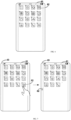
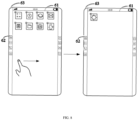
- the first page is displayed in the front display area 61 of the curved surface screen, and each icon 62 in the first page is in a movable state.
- the terminal when detecting the icon in the first page is moved to the subsidiary display area, the terminal reduces the size of the icon from the first size to the second size and simplifies the details included in the icon.
- the first size of the icon on the first page is 50px ⁇ 50px
- the second size of the icon is 20px ⁇ 20px.
- the terminal prestores the icon with the first size and the icon with the second size.
- the terminal displays the icon with the second size on the subsidiary display area, and stop displaying the icon with the first size in the first page.
- the terminal displays the icon that shank in the middle or lower part of the subsidiary display area.
- each icon can not only be moved, but also can be deleted (usually, a " ⁇ " corner mark is displayed on the periphery of the icon). Therefore, in order to avoid deleting the icon with smaller size on the subsidiary display area by mistake, in one possible embodiment, the terminal stops responding the deleting operation on the icon displayed in the subsidiary display area, or does not display the deleting control on the peripheral side of the icons in the subsidiary display area, so as to avoid the user deletes the icon on the subsidiary display area by mistake.
- the terminal displays the reduced icon 62 in the middle of the subsidiary display area 63, and not display the corner mark " ⁇ " on the peripheral side of the icon 62.
- the first page is switched to a second page of the home screen and the second page is displayed.
- the terminal switches the first page displayed in the main display area to the second page of the home screen according to the sliding operation on the main display area.
- the icon displayed in the subsidiary display area remains unchanged.
- the icon is displayed with a first size in the second page, and the first size is larger than the second size.
- the terminal when detecting the icon displayed in the subsidiary display area is moved to the main display area, the terminal restores the icon to restore the size of the icon from the second size to the first size.
- the size of the icon in the subsidiary display area is 20px ⁇ 20px (the second size)
- the size of the icon is 50px ⁇ 50px (the first size).
- the terminal prestores the icon with the first size and the icon with the second size.
- the terminal displays the icon with the first size on the main display area, and stop displaying the icon with the second size in the subsidiary display area.
- the terminal displays the restore icon in the second page, so that the user can deletes the icon.
- the terminal displays the restored icon 62 in the main display area 61 according to the final position directed by the moving operation, and display the corner mark " ⁇ " on the peripheral side of the icon 62.
- the terminal when the terminal receives the first operation on the icon with the first size displayed in the first page, displays the icon with the second size in the subsidiary display area.
- the terminal displays the icon with the first size in the second page to ensure the size of the icons displayed in the pages of the home screen to be the same.
- the terminal under the icon management mode, the terminal stops responding the deleting operation of the icon in the subsidiary display area, or does not display the deleting control on the peripheral side of the icons in the subsidiary display area, so as to avoid the user deletes the icon on the subsidiary display area by mistake.
- the terminal displays the reduced icons in the subsidiary display area.
- the subsidiary display area includes multiple similar icons (for example, the colors or the patterns of the icon are similar), and the target pages of the similar icons are different (that is, the icons moved to different pages), it is easy to make misoperation for the user moves the icon in the subsidiary display area to the pages directly.
- the method further includes the following operations.
- an operation 505 when a selection operation on the icon displayed in the subsidiary display area is received, display a prompt of the icon in the main display area and the prompt includes an application name corresponding to the icon and/or an enlarged icon.
- the terminal displays the prompt corresponding to the selected icon in the main display area.
- the terminal stores a corresponding relationship between an icon and an application name in advance.
- the terminal searches the corresponding application name according to the icon identifier in the corresponding relationship and displays the application name.
- the terminal initiates the zoom function of the icon to enlarge the selected icon and display the enlarged icon in the main display area.
- the terminal when detecting a click on the icon 62, the terminal displays the prompt 64 including the application name "contacts" and the enlarged icon in the main display area.
- the terminal stops displaying the prompt, for example, the threshold is set to 2s. In other possible embodiments, when the movement on the selected icon is received, the terminal stops displaying the prompt.
- the terminal displays the prompt corresponding to the selected icon in the main display area, so that the user knows the application indicated by the selected icon clearly, and avoid the misoperation caused by the icon displayed with the small size.
- the user usually needs to place the same type of the applications on the same screen page, or place them in the same application folder.
- the user needs to switch the pages of the home screen by sliding operation.
- the number of the pages of the home screen is large and each pages includes the number of icons, the user cost a lot of time to determine move the icon to the page of the home screen, the page where the same type of the application is located, so that the operation is low efficiency.
- the operation 503 can be replaced with the following operations.
- the user needs to select the icon first when moving the icon displayed in the subsidiary display area to the main display area. So, when the terminal detects the selection operation on the icon, obtains the type of the application corresponding to the selected icon, and determines the associated application according to the type of the application, and then determines the associated icon according to the associated application.
- the terminal prestores the types of the applications corresponding to the installed applications.
- the terminal determines the application has the same type with the selected application as the associated application.
- the terminal determines the type of the installed applications is instant messaging as the associated application.
- the terminal determines the type of the installed application is shopping as the associated application.
- the terminal may also determine the associated application and the associated icon according to the application name corresponding to the icon, the developer information or the color of the icon, which is not limited in the embodiments of the present disclosure.
- the first page is switched to the second page where the associated icon is located.
- the terminal stores the positions of each icon, the positions includes an identifier of the page of the home screen and the row and column coordinates on the page of the home screen.
- the terminal obtains the position corresponding to the associated icon and determines the second page where the associated icon is located according to the position, and then control the main display area to switch to the second page and display the second page.
- the terminal when it is determined that the selected icon corresponding to at least two associated icons, and the at least two associated icons located in different pages of the home screen, the terminal counts the number of the associated icons in each page of the home screen, and determines the page includes the largest number of the associated icons as the second page.
- the terminal can determine the second page by a using frequency of the associated application corresponding to the associated icon, the second page is the page of the home screen includes the associated application with the highest using frequency. It is not limited in the embodiment of the present disclosure.
- the terminal receives a selection operation on the icon displayed in the subsidiary display area, and determines the type of the application corresponding to the selected icon is social application, and obtains the page A of the home screen includes one social application, the page B of the home screen includes 0 social application, the page C of the home screen includes 3 social applications. So that the terminal determines the page C of the home screen is the target page of the home screen, and controls the main display area switch to the page C of the home screen, and displays the page C of the home screen.
- the terminal can switch the page of the home screen according to the sliding operation on the flat display area by the user. It is not limited in the embodiment of the present disclosure.
- the terminal determines the associated icon related to the selected icon according to the type of the application corresponding to the selected icon, and then switch the page of the home screen to the page where the associated icon is located. It is convenient for the user to place the application of the same type in the same page of the home screen quickly and improve the efficiency of moving icons.
- the operation 504 can be replaced with the following operations.
- the terminal when the third operation on the subsidiary display area is received, the terminal generates an application folder and adds the icons displayed in the subsidiary display area to the application folder.
- the user places the multiple icons that need to added to the same application folder in the same subsidiary display area.
- the terminal When the third operation on the subsidiary display area is received, the terminal generates an application folder automatically, and adds the icons displayed in the side of the subsidiary display area where the third operation is located to the application folder.
- the third operation refers to an operation of long press on an idle area (the area that the icon is displayed), and moving to the main display area.
- the user places the 4 icons 62 that need to added to the same application folder on the left of the subsidiary display area 63.
- the terminal When it is detected the long press of the user on the idle area of the subsidiary display area 33, and move to the main display area 61, the terminal generates the application folder.
- the terminal obtains the type of the application corresponding to each icon in the application folder, and determines the name of the application folder is the type of the highest proportion.
- the application folder is displayed in the second page.
- the terminal displays the generated application folder in the second page according to the position indicated by the third operation.
- the application folder 65 is displayed in the second page that currently displayed in the main display area 61, and the application folder 65 includes 4 icons 62 in the left of the subsidiary display area 63.
- the terminal needs to restore the icons in the curved display screen to their respective initial pages.
- the method further includes the following operations.
- the terminal for moving each icon displayed in the subsidiary display area, stores the initial position information of the icon, the initial position information includes an identifier of an initial page where the icon is located and the coordinates in the initial page.
- the terminal obtains the initial position information corresponding to each unmoved icon and moving the unmoved icons to the initial pages according to the initial position information.
- icon A and the icon B are displayed in the subsidiary display area.
- the initial position information of the icon A is: home screen page A, (3,3);
- the initial position information of the icon B is: home screen page C, (4,1), the terminal restores the icon A to the icon position in row 3 and column 3 of home screen page A and restores the icon B to the icon position in row 4 and column 1 of home screen page C.
- the terminal when detecting leave the icon management mode and there are unmoved icons remained in the subsidiary area, the terminal, moves the unmoved icons to the current page of the home screen (that is the second page).
- the terminal when detecting leave the icon management mode and there are unmoved icons remained in the subsidiary area, the terminal, the terminal display the prompt message in the main display area to prompt the user whether to end the icon management, and when an ending instruction is received, restores the icons displayed in the subsidiary display area.
- the terminal restores the icons according to the initial position information of the icons recorded in advance, to reduce the effect by the misoperation of the user.
- FIG. 16 is a schematic structural diagram of an icon moving device according to an embodiment of the present disclosure.
- the icon moving device can be implemented as all or part of a terminal through software, hardware, and a combination of both.
- the icon moving device includes a first displaying module 1610, a second displaying module 1620, a switching module 1630 and a third displaying module 1640.
- the first displaying module 1610 is configured to display a first page of a home screen in the main display area under the icon management mode;
- the size of the icon in the first page is the first size
- the second displaying module 1620 is configured to display the icon with a second size in the subsidiary display area, and the second size is smaller than the first size
- the device further includes: the fourth displaying module is configured to display a prompt of the icon in the main display area, when a selection operation on the icon is received in the subsidiary display area, and the prompt comprises an application name corresponding to the icon and/or an enlarged icon.
- the fourth displaying module is configured to display a prompt of the icon in the main display area, when a selection operation on the icon is received in the subsidiary display area, and the prompt comprises an application name corresponding to the icon and/or an enlarged icon.
- the size of the icon in the subsidiary display area is the second size
- the third displaying module 1640 is configured to: display the icon with the first size in the second page, and the first size being larger than the second size.
- the switching module 1620 is further configured to:
- the device further includes:
- the device further includes: a moving module is configured to when leaving the icon management mode and there are unmoved icons remained in the subsidiary area, move the unmoved icons to their respective initial pages or to the current page.
- a moving module is configured to when leaving the icon management mode and there are unmoved icons remained in the subsidiary area, move the unmoved icons to their respective initial pages or to the current page.
- the terminal is provided with a curved surface screen
- the main display area is a front display area of the curved surface screen
- the subsidiary display area is a side area of the curved surface screen.
- the icon waited to be moved can be displayed in the subsidiary display area, thereby ensuring that the switching of the pages would not affect the subsidiary display area.
- the icon displayed in the subsidiary display area is displayed in the current display page of the main display area, so the icons are moved across the screen.
- the subsidiary display area can accommodate multiple icons, so that the user can move the multiple icons at the same time to improve the efficiency of the operation of moving the icons.
- the terminal when the terminal receives the first operation on the icon with the first size displayed in the first page, displays the icon with the second size in the subsidiary display area.
- the terminal displays the icon with the first size in the second page to ensure the size of the icons displayed in the pages of the home screen to be the same.
- the terminal when the selection operation on the icon is received, the terminal displays the prompt corresponding to the selected icon in the main display area, so that the user knows the application indicated by the selected icon clearly, and avoid the misoperation caused by the icon displayed with the small size.
- the terminal determines the associated icon related to the selected icon according to the type of the application corresponding to the selected icon, and then switch the page of the home screen to the page where the associated icon is located. It is convenient for the user to place the application of the same type in the same page of the home screen quickly and improve the efficiency of moving icons.
- the terminal restores the icons according to the initial position information of the icons recorded in advance, to reduce the effect by the misoperation of the user.
- Computer-readable media includes computer storage media and communication media including any medium that facilitates transfer of a computer program from one place to another.
- a storage media may be any available media that can be accessed by a general purpose or special purpose computer.
Landscapes
- Engineering & Computer Science (AREA)
- Theoretical Computer Science (AREA)
- General Engineering & Computer Science (AREA)
- Human Computer Interaction (AREA)
- Physics & Mathematics (AREA)
- General Physics & Mathematics (AREA)
- Computer Hardware Design (AREA)
- Computer Networks & Wireless Communication (AREA)
- Signal Processing (AREA)
- User Interface Of Digital Computer (AREA)
Claims (15)
- Computerimplementiertes Verfahren zum Bewegen von Icons, umfassend:Anzeigen (401) einer ersten Seite eines Startbildschirms in einem Anzeigehauptbereich (61) eines Endgeräts unter einem Icon-Verwaltungsmodus,Empfangen eines ersten Vorgangs an einem Icon (62) auf der ersten Seite und Anzeigen (402) des Icons (62) in einem Anzeigenebenbereich (63) des Endgeräts in Reaktion auf den ersten Vorgang,dadurch gekennzeichnet, dass es ferner Folgendes umfasst:Empfangen eines Auswahlvorgangs an dem Icon (62) in dem Anzeigenebenbereich (63) und Bestimmen (506) eines zugeordneten Icons, das dem Icon (62) entspricht, wobei die Art der Anwendung, die durch das zugeordnete Icon angegeben wird, die gleiche ist wie die, die durch das Icon (62) angegeben wird,Bestimmen einer zweiten Seite des Startbildschirms, wo sich das zugeordnete Icon befindet,Umschalten (403) der ersten Seite zu der zweiten Seite des Startbildschirms und Anzeigen der zweiten Seite, undEmpfangen eines zweiten Vorgangs und Anzeigen (404) des Icons (62) auf der zweiten Seite in Reaktion auf den zweiten Vorgang.
- Verfahren nach Anspruch 1, wobei das Icon (62) auf der ersten Seite eine erste Größe aufweist, wobei der Vorgang des Anzeigens (402) des Icons (62) in dem Anzeigenebenbereich (63) Folgendes umfasst:
Anzeigen (502) des Icons (62) mit einer zweiten Größe in dem Anzeigenebenbereich (63), wobei die zweite Größe kleiner als die erste Größe ist. - Verfahren nach Anspruch 1 oder 2, wobei das Endgerät die Koordinaten des Anzeigehauptbereichs (61) und des Anzeigenebenbereichs (63) vor dem Vorgang des Anzeigens (402) eines Icons (62) in dem Anzeigenebenbereich (63) in Reaktion auf den ersten Vorgang vorab speichert, wobei das Verfahren ferner Folgendes umfasst:Erkennen, ob sich die Koordinaten des Icons (62), das in dem Anzeigehauptbereich (61) angezeigt wird, geändert haben,Erkennen, ob die Koordinaten des Icons (62) die Koordinaten in dem Anzeigenebenbereich (63) schneiden, undBestimmen, dass der erste Vorgang empfangen wird, wenn sich die Koordinaten des Icons (62), das in dem Anzeigehauptbereich (61) angezeigt wird, geändert haben und die Koordinaten des Icons (62) die Koordinaten des Anzeigenebenbereichs (63) schneiden.
- Verfahren nach Anspruch 3, wobei das Verfahren vor dem Vorgang des Anzeigens (404) des Icons (62) auf der zweiten Seite in Reaktion auf den zweiten Vorgang ferner Folgendes umfasst:Erkennen, ob sich die Koordinaten des Icons (62), das in dem Anzeigenebenbereich (63) angezeigt wird, geändert haben,Erkennen, ob die Koordinaten des Icons (62) die Koordinaten in dem Anzeigehauptbereich (61) schneiden, undBestimmen, dass der zweite Vorgang empfangen wird, wenn sich die Koordinaten des Icons (62), das in dem Anzeigenebenbereich (63) angezeigt wird, geändert haben und die Koordinaten des Icons (62) die Koordinaten des Anzeigehauptbereichs (61) schneiden.
- Verfahren nach einem der Ansprüche 1 bis 4, wobei das Verfahren nach dem Vorgang des Anzeigens (402) des Icons (62) in dem Anzeigenebenbereich (63) ferner Folgendes umfasst:
Empfangen eines Auswahlvorgangs an dem Icon (62) in dem Anzeigenebenbereich (61) und Anzeigen (505) einer Eingabeaufforderung des Icons (62) in dem Anzeigehauptbereich (61), wobei die Eingabeaufforderung ein vergrößertes Icon oder einen Anwendungsnamen, der dem Icon (62) entspricht, umfasst. - Verfahren nach einem der Ansprüche 1 bis 5, wobei es mindestens zwei zugeordnete Icons gibt, die dem Icon (62) entsprechen, und sich die mindestens zwei zugeordneten Icons auf unterschiedlichen Seiten des Startbildschirms befinden, wobei der Vorgang des Bestimmens einer zweiten Seite des Startbildschirms, wo sich das zugeordnete Icon befindet, Folgendes umfasst:Zählen der Anzahl der zugeordneten Icons auf jeder Seite des Startbildschirms undBestimmen der Seite mit der größten Anzahl der zugeordneten Icons als die zweite Seite.
- Verfahren nach Anspruch 5, wobei das Verfahren nach dem Vorgang des Anzeigens (402) einer Eingabeaufforderung des Icons (62) in dem Anzeigehauptbereich (61) ferner Folgendes umfasst:Beziehen der Zeit des Anzeigens der Eingabeaufforderung undStoppen des Anzeigens der Eingabeaufforderung, wenn die Zeit des Anzeigens der Eingabeaufforderung einen Schwellenwert erreicht.
- Verfahren nach einem der Ansprüche 1 bis 7, wobei das Icon (62) in dem Anzeigehauptbereich (63) eine zweite Größe aufweist, wobei der Vorgang des Anzeigens (404) des Icons (62) auf der zweiten Seite Folgendes umfasst:
Anzeigen (504) des Icons (62) mit einer ersten Größe auf der zweiten Seite, wobei die erste Größe größer als die zweite Größe ist. - Verfahren nach einem der Ansprüche 1 bis 8, wobei der Vorgang des Empfangens eines Auswahlvorgangs an dem Icon (62) in dem Anzeigenebenbereich (63) und des Bestimmens (506) eines zugeordneten Icons, das dem Icon (62) entspricht, Folgendes umfasst:Erkennen des Auswahlvorgangs an dem Icon (62),Beziehen der Art der Anwendung, die dem ausgewählten Icon (62) entspricht,Bestimmen, gemäß der Art der Anwendung, einer zugeordneten Anwendung der gleichen Art undBestimmen des zugeordneten Icons gemäß der zugeordneten Anwendung.
- Verfahren nach einem der Ansprüche 1 bis 8, wobei das Verfahren nach dem Vorgang des Umschaltens (403) der ersten Seite zu der zweiten Seite des Startbildschirms und des Anzeigens der zweiten Seite des Startbildschirms ferner Folgendes umfasst:Empfangen eines dritten Vorgangs in dem Anzeigenebenbereich (63), Erzeugen (508) eines Anwendungsordners (65), Hinzufügen des Icons (62) in dem Anzeigenebenbereich (63) zu dem Anwendungsordner (65) undAnzeigen (509) des Anwendungsordners (65) auf der zweiten Seite.
- Verfahren nach einem der Ansprüche 1 bis 8, ferner Folgendes umfassend:
wenn der Icon-Verwaltungsmodus verlassen wird und nicht bewegte Icons in dem Anzeigenebenbereich (63) verbleiben, Bewegen (510) der nicht bewegten Icons zu ihren jeweiligen Ausgangsseiten oder zu der aktuellen Seite. - Verfahren nach einem der Ansprüche 1 bis 11, wobei das Endgerät mit einem Bildschirm mit gekrümmter Oberfläche versehen ist, der Anzeigehauptbereich (61) ein vorderseitiger Anzeigebereich des Bildschirms mit gekrümmter Oberfläche ist und der Anzeigenebenbereich (63) ein seitlicher Anzeigebereich des Bildschirms mit gekrümmter Oberfläche ist.
- Vorrichtung zum Bewegen von Icons für ein Endgerät mit einem Anzeigehauptbereich (61) und einem Anzeigenebenbereich (63), wobei die Vorrichtung Folgendes umfasst:ein erstes Anzeigemodul (1610), das zum Anzeigen einer ersten Seite eines Startbildschirms in dem Anzeigehauptbereich unter einem Icon-Verwaltungsmodus konfiguriert ist,ein zweites Anzeigemodul (1620), das zum Empfangen eines ersten Vorgangs an einem Icon (62) auf der ersten Seite und zum Anzeigen des Icons (62) in dem Anzeigenebenbereich (63) in Reaktion auf den ersten Vorgang konfiguriert ist,dadurch gekennzeichnet, dass sie ferner Folgendes umfasst:ein Umschaltmodul (1630), das zum Empfangen eines Auswahlvorgangs an dem Icon (62) in dem Anzeigenebenbereich (63), zum Bestimmen eines zugeordneten Icons, das dem Icon (62) entspricht, zum Bestimmen einer zweiten Seite des Startbildschirms, wo sich das zugeordnete Icon befindet, zum Umschalten der ersten Seite zu der zweiten Seite des Startbildschirms und zum Anzeigen der zweiten Seite des Startbildschirms konfiguriert ist, wobei die Art der Anwendung, die durch das zugeordnete Icon angegeben wird, die gleiche ist wie die, die durch das Icon (62) angegeben wird, undein drittes Anzeigemodul (1640), das zum Empfangen eines zweiten Vorgangs und zum Anzeigen des Icons (62) auf der zweiten Seite in Reaktion auf den zweiten Vorgang konfiguriert ist.
- Endgerät (100), das eine Vorrichtung zum Bewegen von Icons nach Anspruch 13 beinhaltet.
- Computerlesbares Speichermedium mit einem darauf gespeicherten Computerprogramm, das bei Ausführung durch einen Prozessor (110) den Prozessor (110) veranlasst, das Verfahren zum Bewegen von Icons nach einem der Ansprüche 1 bis 12 zu implementieren.
Applications Claiming Priority (1)
| Application Number | Priority Date | Filing Date | Title |
|---|---|---|---|
| PCT/CN2017/101003 WO2019047147A1 (zh) | 2017-09-08 | 2017-09-08 | 图标移动方法及装置 |
Publications (3)
| Publication Number | Publication Date |
|---|---|
| EP3680764A1 EP3680764A1 (de) | 2020-07-15 |
| EP3680764A4 EP3680764A4 (de) | 2020-09-23 |
| EP3680764B1 true EP3680764B1 (de) | 2023-06-28 |
Family
ID=65634712
Family Applications (1)
| Application Number | Title | Priority Date | Filing Date |
|---|---|---|---|
| EP17924382.9A Active EP3680764B1 (de) | 2017-09-08 | 2017-09-08 | Verfahren und vorrichtung zur bewegung von symbolen |
Country Status (3)
| Country | Link |
|---|---|
| US (1) | US11132101B2 (de) |
| EP (1) | EP3680764B1 (de) |
| WO (1) | WO2019047147A1 (de) |
Families Citing this family (17)
| Publication number | Priority date | Publication date | Assignee | Title |
|---|---|---|---|---|
| WO2019047147A1 (zh) * | 2017-09-08 | 2019-03-14 | 广东欧珀移动通信有限公司 | 图标移动方法及装置 |
| EP3690625B1 (de) | 2017-11-20 | 2023-05-17 | Huawei Technologies Co., Ltd. | Verfahren und vorrichtung zur dynamischen anzeige eines symbols gemäss hintergrundbild |
| WO2019183779A1 (zh) * | 2018-03-26 | 2019-10-03 | 华为技术有限公司 | 一种控制方法及电子设备 |
| KR102690272B1 (ko) * | 2019-02-19 | 2024-08-01 | 삼성전자 주식회사 | 듀얼 디스플레이를 포함하는 전자 장치 |
| CN110007835B (zh) * | 2019-03-27 | 2022-02-15 | 维沃移动通信有限公司 | 一种对象管理方法及移动终端 |
| CN110221741B (zh) * | 2019-05-31 | 2021-01-08 | 维沃移动通信有限公司 | 图标管理方法及终端设备 |
| CN110839096B (zh) * | 2019-08-30 | 2022-06-28 | 华为技术有限公司 | 一种具有折叠屏的设备的触控方法与折叠屏设备 |
| USD976225S1 (en) * | 2019-09-24 | 2023-01-24 | Beijing Xiaomi Mobile Software Co., Ltd. | Mobile phone with graphical user interface |
| USD945390S1 (en) * | 2019-09-24 | 2022-03-08 | Beijing Xiaomi Mobile Software Co., Ltd. | Mobile phone with animated graphical user interface |
| USD947805S1 (en) * | 2019-09-24 | 2022-04-05 | Beijing Xiaomi Mobile Software Co., Ltd. | Mobile phone with graphical user interface |
| US11372520B2 (en) * | 2020-04-06 | 2022-06-28 | Kyocera Document Solutions Inc. | Display input apparatus and image forming apparatus capable of moving plurality of icons from one page to another on display device and displaying moved icons thereon |
| CN111596815B (zh) * | 2020-04-16 | 2021-07-23 | 维沃移动通信有限公司 | 应用图标显示方法及电子设备 |
| KR20220017075A (ko) * | 2020-08-04 | 2022-02-11 | 삼성전자주식회사 | 홈 화면을 복원하는 방법 및 이를 적용한 전자 장치 |
| CN112099686B (zh) * | 2020-09-04 | 2022-03-08 | 维沃移动通信有限公司 | 图标显示控制方法、装置和电子设备 |
| CN113938510A (zh) * | 2021-09-29 | 2022-01-14 | 青岛海信移动通信技术股份有限公司 | 一种终端设备和终端控制方法 |
| CN115097979A (zh) * | 2022-06-28 | 2022-09-23 | 维沃移动通信有限公司 | 图标管理方法和图标管理装置 |
| US12298515B2 (en) * | 2022-07-20 | 2025-05-13 | Htc Corporation | Head-mounted display, content loading method, and non-transitory computer readable storage medium thereof |
Family Cites Families (36)
| Publication number | Priority date | Publication date | Assignee | Title |
|---|---|---|---|---|
| US20040006765A1 (en) * | 2002-04-16 | 2004-01-08 | Goldman Kenneth J. | Live software construction with dynamic classes |
| KR101517082B1 (ko) * | 2008-11-10 | 2015-04-30 | 엘지전자 주식회사 | 플렉서블 디스플레이를 이용하는 휴대 단말기 및 그 제어방법 |
| KR101613838B1 (ko) * | 2009-05-19 | 2016-05-02 | 삼성전자주식회사 | 휴대 단말기의 홈 스크린 지원 방법 및 이를 지원하는 휴대 단말기 |
| US8881060B2 (en) * | 2010-04-07 | 2014-11-04 | Apple Inc. | Device, method, and graphical user interface for managing folders |
| US10788976B2 (en) * | 2010-04-07 | 2020-09-29 | Apple Inc. | Device, method, and graphical user interface for managing folders with multiple pages |
| CN103186311A (zh) | 2011-12-27 | 2013-07-03 | 深圳富泰宏精密工业有限公司 | 电子装置的主屏幕图标管理系统及方法 |
| KR102003742B1 (ko) * | 2012-03-26 | 2019-07-25 | 삼성전자주식회사 | 휴대단말기의 스크린 관리 방법 및 장치 |
| KR101515623B1 (ko) * | 2012-05-14 | 2015-04-28 | 삼성전자주식회사 | 벤디드 디스플레이를 갖는 휴대단말의 기능 운용 방법 및 장치 |
| KR20140036499A (ko) * | 2012-09-17 | 2014-03-26 | 삼성전자주식회사 | 플렉서블 디스플레이 장치 및 그의 디스플레이 방법 |
| US9916072B2 (en) * | 2013-02-20 | 2018-03-13 | Lg Electronics Inc. | Application and notification window display management in a mobile terminal |
| KR20150007910A (ko) * | 2013-07-11 | 2015-01-21 | 삼성전자주식회사 | 사용자 인터렉션을 제공하는 사용자 단말 장치 및 그 방법 |
| KR101588294B1 (ko) * | 2013-12-30 | 2016-01-28 | 삼성전자주식회사 | 사용자 인터렉션을 제공하는 사용자 단말 장치 및 그 방법 |
| CN103955329A (zh) * | 2014-01-28 | 2014-07-30 | 深圳市中兴移动通信有限公司 | 智能终端、移动终端及其操作方法 |
| CN103809848B (zh) | 2014-01-28 | 2015-12-09 | 努比亚技术有限公司 | 图标移动方法、移动终端和智能终端 |
| US9766743B2 (en) * | 2014-05-30 | 2017-09-19 | Lg Electronics Inc. | Mobile terminal and control method thereof |
| KR102218041B1 (ko) | 2014-06-17 | 2021-02-19 | 엘지전자 주식회사 | 이동 단말기 |
| CN104102427B (zh) | 2014-07-10 | 2017-06-09 | 努比亚技术有限公司 | 一种移动终端及其多图标的移动方法和装置 |
| KR101659032B1 (ko) * | 2014-07-25 | 2016-09-23 | 엘지전자 주식회사 | 이동 단말기 및 그것의 제어방법 |
| TWI681330B (zh) * | 2014-09-02 | 2020-01-01 | 南韓商三星電子股份有限公司 | 用以執行可攜式終端的應用程式的方法和可攜式終端裝置 |
| KR20160027775A (ko) * | 2014-09-02 | 2016-03-10 | 삼성전자주식회사 | 터치 입력 처리 방법 및 그 장치 |
| CN104238877B (zh) * | 2014-09-04 | 2018-03-13 | 华为技术有限公司 | 控制图标的方法和终端 |
| US10649652B2 (en) * | 2014-11-12 | 2020-05-12 | Samsung Electronics Co., Ltd. | Method of displaying interface of mobile device and mobile device |
| US10481759B2 (en) * | 2014-12-29 | 2019-11-19 | Lg Electronics Inc. | Bended display device for controlling function of application through image displayed on sub-region, and control method therefor |
| KR102308645B1 (ko) * | 2014-12-29 | 2021-10-05 | 삼성전자주식회사 | 사용자 단말 장치 및 그의 제어 방법 |
| KR102488461B1 (ko) * | 2015-11-24 | 2023-01-13 | 엘지전자 주식회사 | 플렉서블 디스플레이 장치 및 그의 동작 방법 |
| KR102429740B1 (ko) * | 2015-12-24 | 2022-08-05 | 삼성전자 주식회사 | 터치 이벤트 처리 방법 및 그 장치 |
| CN105739887A (zh) | 2016-01-25 | 2016-07-06 | 珠海市魅族科技有限公司 | 一种图标移动的方法及装置 |
| CN105843481A (zh) | 2016-03-29 | 2016-08-10 | 乐视控股(北京)有限公司 | 一种应用程序的图标移动整理方法及其装置 |
| KR20180076862A (ko) * | 2016-12-28 | 2018-07-06 | 삼성전자주식회사 | 디스플레이를 가지는 전자 장치 |
| CN106775425B (zh) * | 2017-01-13 | 2019-08-09 | 深圳市金立通信设备有限公司 | 一种终端及其功能按键显示方法 |
| WO2019047147A1 (zh) * | 2017-09-08 | 2019-03-14 | 广东欧珀移动通信有限公司 | 图标移动方法及装置 |
| EP3680770B1 (de) * | 2017-09-30 | 2024-03-20 | Huawei Technologies Co., Ltd. | Verfahren zur bearbeitung eines hauptbildschirms, grafische benutzeroberfläche und elektronische vorrichtung |
| CN109981878B (zh) * | 2017-12-28 | 2021-09-14 | 华为终端有限公司 | 一种图标管理的方法及装置 |
| KR102513752B1 (ko) * | 2018-04-11 | 2023-03-24 | 삼성전자 주식회사 | 전자 장치 및 전자 장치의 제어 방법 |
| CN109656439B (zh) * | 2018-12-17 | 2025-05-23 | 北京小米移动软件有限公司 | 快捷操作面板的显示方法、装置及存储介质 |
| KR102674753B1 (ko) * | 2019-08-28 | 2024-06-13 | 엘지전자 주식회사 | 이동 단말기 및 이동 단말기를 구비한 전자장치 |
-
2017
- 2017-09-08 WO PCT/CN2017/101003 patent/WO2019047147A1/zh not_active Ceased
- 2017-09-08 US US16/643,649 patent/US11132101B2/en active Active
- 2017-09-08 EP EP17924382.9A patent/EP3680764B1/de active Active
Also Published As
| Publication number | Publication date |
|---|---|
| US11132101B2 (en) | 2021-09-28 |
| EP3680764A1 (de) | 2020-07-15 |
| EP3680764A4 (de) | 2020-09-23 |
| WO2019047147A1 (zh) | 2019-03-14 |
| US20200241732A1 (en) | 2020-07-30 |
Similar Documents
| Publication | Publication Date | Title |
|---|---|---|
| EP3680764B1 (de) | Verfahren und vorrichtung zur bewegung von symbolen | |
| US11644943B2 (en) | Method for icon display, terminal, and storage medium | |
| EP3761161B1 (de) | Verfahren und vorrichtung zur anzeige eines eingabeverfahrens sowie endgerät und speichermedium | |
| CN109164964B (zh) | 内容分享方法、装置、终端及存储介质 | |
| CN109101157B (zh) | 侧边栏图标设置方法、装置、终端及存储介质 | |
| CN107688422B (zh) | 通知消息显示方法及装置 | |
| CN112817684B (zh) | 用户界面显示方法、装置、终端及存储介质 | |
| CN107562323A (zh) | 图标移动方法、装置及终端 | |
| CN108540647A (zh) | 用户界面显示方法、装置、终端及存储介质 | |
| CN107547750A (zh) | 终端的控制方法、装置和存储介质 | |
| CN114779987B (zh) | 显示内容的方法、装置、终端及存储介质 | |
| CN107590006A (zh) | 文件处理方法、装置及移动终端 | |
| CN109656445B (zh) | 内容处理方法、装置、终端及存储介质 | |
| CN107589900A (zh) | 分屏显示方法、装置、终端及存储介质 | |
| CN107613118A (zh) | 一种开启快捷功能的方法、装置、移动终端及存储介质 | |
| CN107688430B (zh) | 更换壁纸的方法、装置、终端及存储介质 | |
| US11086442B2 (en) | Method for responding to touch operation, mobile terminal, and storage medium | |
| CN107506086A (zh) | 触摸屏控制方法、装置、移动终端及存储介质 | |
| US11314391B2 (en) | Navigation bar controlling method and terminal | |
| CN107608551B (zh) | 触摸操作响应方法及装置 | |
| CN107526477A (zh) | 屏幕解锁方法、装置及终端 | |
| WO2019047183A1 (zh) | 按键显示方法、装置及终端 | |
| US11194425B2 (en) | Method for responding to touch operation, mobile terminal, and storage medium | |
| EP3680769B1 (de) | Informationsanzeigeverfahren, vorrichtung und endgerät | |
| CN109714474B (zh) | 内容复制方法、装置、终端及存储介质 |
Legal Events
| Date | Code | Title | Description |
|---|---|---|---|
| STAA | Information on the status of an ep patent application or granted ep patent |
Free format text: STATUS: THE INTERNATIONAL PUBLICATION HAS BEEN MADE |
|
| PUAI | Public reference made under article 153(3) epc to a published international application that has entered the european phase |
Free format text: ORIGINAL CODE: 0009012 |
|
| STAA | Information on the status of an ep patent application or granted ep patent |
Free format text: STATUS: REQUEST FOR EXAMINATION WAS MADE |
|
| 17P | Request for examination filed |
Effective date: 20200407 |
|
| AK | Designated contracting states |
Kind code of ref document: A1 Designated state(s): AL AT BE BG CH CY CZ DE DK EE ES FI FR GB GR HR HU IE IS IT LI LT LU LV MC MK MT NL NO PL PT RO RS SE SI SK SM TR |
|
| AX | Request for extension of the european patent |
Extension state: BA ME |
|
| A4 | Supplementary search report drawn up and despatched |
Effective date: 20200825 |
|
| RIC1 | Information provided on ipc code assigned before grant |
Ipc: G06F 3/0486 20130101ALI20200819BHEP Ipc: G06F 3/0488 20130101ALI20200819BHEP Ipc: G06F 3/0481 20130101ALI20200819BHEP Ipc: H04M 1/725 20060101ALI20200819BHEP Ipc: G06F 3/0484 20130101AFI20200819BHEP |
|
| DAV | Request for validation of the european patent (deleted) | ||
| DAX | Request for extension of the european patent (deleted) | ||
| STAA | Information on the status of an ep patent application or granted ep patent |
Free format text: STATUS: EXAMINATION IS IN PROGRESS |
|
| 17Q | First examination report despatched |
Effective date: 20220310 |
|
| GRAP | Despatch of communication of intention to grant a patent |
Free format text: ORIGINAL CODE: EPIDOSNIGR1 |
|
| STAA | Information on the status of an ep patent application or granted ep patent |
Free format text: STATUS: GRANT OF PATENT IS INTENDED |
|
| INTG | Intention to grant announced |
Effective date: 20230314 |
|
| GRAS | Grant fee paid |
Free format text: ORIGINAL CODE: EPIDOSNIGR3 |
|
| GRAA | (expected) grant |
Free format text: ORIGINAL CODE: 0009210 |
|
| STAA | Information on the status of an ep patent application or granted ep patent |
Free format text: STATUS: THE PATENT HAS BEEN GRANTED |
|
| AK | Designated contracting states |
Kind code of ref document: B1 Designated state(s): AL AT BE BG CH CY CZ DE DK EE ES FI FR GB GR HR HU IE IS IT LI LT LU LV MC MK MT NL NO PL PT RO RS SE SI SK SM TR |
|
| REG | Reference to a national code |
Ref country code: CH Ref legal event code: EP |
|
| REG | Reference to a national code |
Ref country code: AT Ref legal event code: REF Ref document number: 1583289 Country of ref document: AT Kind code of ref document: T Effective date: 20230715 |
|
| REG | Reference to a national code |
Ref country code: IE Ref legal event code: FG4D |
|
| REG | Reference to a national code |
Ref country code: DE Ref legal event code: R096 Ref document number: 602017070832 Country of ref document: DE |
|
| REG | Reference to a national code |
Ref country code: LT Ref legal event code: MG9D |
|
| PG25 | Lapsed in a contracting state [announced via postgrant information from national office to epo] |
Ref country code: SE Free format text: LAPSE BECAUSE OF FAILURE TO SUBMIT A TRANSLATION OF THE DESCRIPTION OR TO PAY THE FEE WITHIN THE PRESCRIBED TIME-LIMIT Effective date: 20230628 Ref country code: NO Free format text: LAPSE BECAUSE OF FAILURE TO SUBMIT A TRANSLATION OF THE DESCRIPTION OR TO PAY THE FEE WITHIN THE PRESCRIBED TIME-LIMIT Effective date: 20230928 |
|
| REG | Reference to a national code |
Ref country code: NL Ref legal event code: MP Effective date: 20230628 |
|
| REG | Reference to a national code |
Ref country code: AT Ref legal event code: MK05 Ref document number: 1583289 Country of ref document: AT Kind code of ref document: T Effective date: 20230628 |
|
| P01 | Opt-out of the competence of the unified patent court (upc) registered |
Effective date: 20231016 |
|
| PG25 | Lapsed in a contracting state [announced via postgrant information from national office to epo] |
Ref country code: RS Free format text: LAPSE BECAUSE OF FAILURE TO SUBMIT A TRANSLATION OF THE DESCRIPTION OR TO PAY THE FEE WITHIN THE PRESCRIBED TIME-LIMIT Effective date: 20230628 Ref country code: NL Free format text: LAPSE BECAUSE OF FAILURE TO SUBMIT A TRANSLATION OF THE DESCRIPTION OR TO PAY THE FEE WITHIN THE PRESCRIBED TIME-LIMIT Effective date: 20230628 Ref country code: LV Free format text: LAPSE BECAUSE OF FAILURE TO SUBMIT A TRANSLATION OF THE DESCRIPTION OR TO PAY THE FEE WITHIN THE PRESCRIBED TIME-LIMIT Effective date: 20230628 Ref country code: LT Free format text: LAPSE BECAUSE OF FAILURE TO SUBMIT A TRANSLATION OF THE DESCRIPTION OR TO PAY THE FEE WITHIN THE PRESCRIBED TIME-LIMIT Effective date: 20230628 Ref country code: HR Free format text: LAPSE BECAUSE OF FAILURE TO SUBMIT A TRANSLATION OF THE DESCRIPTION OR TO PAY THE FEE WITHIN THE PRESCRIBED TIME-LIMIT Effective date: 20230628 Ref country code: GR Free format text: LAPSE BECAUSE OF FAILURE TO SUBMIT A TRANSLATION OF THE DESCRIPTION OR TO PAY THE FEE WITHIN THE PRESCRIBED TIME-LIMIT Effective date: 20230929 |
|
| PG25 | Lapsed in a contracting state [announced via postgrant information from national office to epo] |
Ref country code: FI Free format text: LAPSE BECAUSE OF FAILURE TO SUBMIT A TRANSLATION OF THE DESCRIPTION OR TO PAY THE FEE WITHIN THE PRESCRIBED TIME-LIMIT Effective date: 20230628 |
|
| PG25 | Lapsed in a contracting state [announced via postgrant information from national office to epo] |
Ref country code: SK Free format text: LAPSE BECAUSE OF FAILURE TO SUBMIT A TRANSLATION OF THE DESCRIPTION OR TO PAY THE FEE WITHIN THE PRESCRIBED TIME-LIMIT Effective date: 20230628 |
|
| PG25 | Lapsed in a contracting state [announced via postgrant information from national office to epo] |
Ref country code: ES Free format text: LAPSE BECAUSE OF FAILURE TO SUBMIT A TRANSLATION OF THE DESCRIPTION OR TO PAY THE FEE WITHIN THE PRESCRIBED TIME-LIMIT Effective date: 20230628 |
|
| PG25 | Lapsed in a contracting state [announced via postgrant information from national office to epo] |
Ref country code: IS Free format text: LAPSE BECAUSE OF FAILURE TO SUBMIT A TRANSLATION OF THE DESCRIPTION OR TO PAY THE FEE WITHIN THE PRESCRIBED TIME-LIMIT Effective date: 20231028 |
|
| PG25 | Lapsed in a contracting state [announced via postgrant information from national office to epo] |
Ref country code: SM Free format text: LAPSE BECAUSE OF FAILURE TO SUBMIT A TRANSLATION OF THE DESCRIPTION OR TO PAY THE FEE WITHIN THE PRESCRIBED TIME-LIMIT Effective date: 20230628 Ref country code: SK Free format text: LAPSE BECAUSE OF FAILURE TO SUBMIT A TRANSLATION OF THE DESCRIPTION OR TO PAY THE FEE WITHIN THE PRESCRIBED TIME-LIMIT Effective date: 20230628 Ref country code: RO Free format text: LAPSE BECAUSE OF FAILURE TO SUBMIT A TRANSLATION OF THE DESCRIPTION OR TO PAY THE FEE WITHIN THE PRESCRIBED TIME-LIMIT Effective date: 20230628 Ref country code: PT Free format text: LAPSE BECAUSE OF FAILURE TO SUBMIT A TRANSLATION OF THE DESCRIPTION OR TO PAY THE FEE WITHIN THE PRESCRIBED TIME-LIMIT Effective date: 20231030 Ref country code: IS Free format text: LAPSE BECAUSE OF FAILURE TO SUBMIT A TRANSLATION OF THE DESCRIPTION OR TO PAY THE FEE WITHIN THE PRESCRIBED TIME-LIMIT Effective date: 20231028 Ref country code: ES Free format text: LAPSE BECAUSE OF FAILURE TO SUBMIT A TRANSLATION OF THE DESCRIPTION OR TO PAY THE FEE WITHIN THE PRESCRIBED TIME-LIMIT Effective date: 20230628 Ref country code: EE Free format text: LAPSE BECAUSE OF FAILURE TO SUBMIT A TRANSLATION OF THE DESCRIPTION OR TO PAY THE FEE WITHIN THE PRESCRIBED TIME-LIMIT Effective date: 20230628 Ref country code: CZ Free format text: LAPSE BECAUSE OF FAILURE TO SUBMIT A TRANSLATION OF THE DESCRIPTION OR TO PAY THE FEE WITHIN THE PRESCRIBED TIME-LIMIT Effective date: 20230628 Ref country code: AT Free format text: LAPSE BECAUSE OF FAILURE TO SUBMIT A TRANSLATION OF THE DESCRIPTION OR TO PAY THE FEE WITHIN THE PRESCRIBED TIME-LIMIT Effective date: 20230628 |
|
| PG25 | Lapsed in a contracting state [announced via postgrant information from national office to epo] |
Ref country code: PL Free format text: LAPSE BECAUSE OF FAILURE TO SUBMIT A TRANSLATION OF THE DESCRIPTION OR TO PAY THE FEE WITHIN THE PRESCRIBED TIME-LIMIT Effective date: 20230628 |
|
| REG | Reference to a national code |
Ref country code: DE Ref legal event code: R097 Ref document number: 602017070832 Country of ref document: DE |
|
| PG25 | Lapsed in a contracting state [announced via postgrant information from national office to epo] |
Ref country code: DK Free format text: LAPSE BECAUSE OF FAILURE TO SUBMIT A TRANSLATION OF THE DESCRIPTION OR TO PAY THE FEE WITHIN THE PRESCRIBED TIME-LIMIT Effective date: 20230628 |
|
| REG | Reference to a national code |
Ref country code: CH Ref legal event code: PL |
|
| PLBE | No opposition filed within time limit |
Free format text: ORIGINAL CODE: 0009261 |
|
| STAA | Information on the status of an ep patent application or granted ep patent |
Free format text: STATUS: NO OPPOSITION FILED WITHIN TIME LIMIT |
|
| PG25 | Lapsed in a contracting state [announced via postgrant information from national office to epo] |
Ref country code: LU Free format text: LAPSE BECAUSE OF NON-PAYMENT OF DUE FEES Effective date: 20230908 |
|
| REG | Reference to a national code |
Ref country code: BE Ref legal event code: MM Effective date: 20230930 |
|
| GBPC | Gb: european patent ceased through non-payment of renewal fee |
Effective date: 20230928 |
|
| PG25 | Lapsed in a contracting state [announced via postgrant information from national office to epo] |
Ref country code: LU Free format text: LAPSE BECAUSE OF NON-PAYMENT OF DUE FEES Effective date: 20230908 Ref country code: IT Free format text: LAPSE BECAUSE OF FAILURE TO SUBMIT A TRANSLATION OF THE DESCRIPTION OR TO PAY THE FEE WITHIN THE PRESCRIBED TIME-LIMIT Effective date: 20230628 Ref country code: MC Free format text: LAPSE BECAUSE OF FAILURE TO SUBMIT A TRANSLATION OF THE DESCRIPTION OR TO PAY THE FEE WITHIN THE PRESCRIBED TIME-LIMIT Effective date: 20230628 |
|
| 26N | No opposition filed |
Effective date: 20240402 |
|
| REG | Reference to a national code |
Ref country code: IE Ref legal event code: MM4A |
|
| PG25 | Lapsed in a contracting state [announced via postgrant information from national office to epo] |
Ref country code: IE Free format text: LAPSE BECAUSE OF NON-PAYMENT OF DUE FEES Effective date: 20230908 |
|
| PG25 | Lapsed in a contracting state [announced via postgrant information from national office to epo] |
Ref country code: GB Free format text: LAPSE BECAUSE OF NON-PAYMENT OF DUE FEES Effective date: 20230928 |
|
| PG25 | Lapsed in a contracting state [announced via postgrant information from national office to epo] |
Ref country code: CH Free format text: LAPSE BECAUSE OF NON-PAYMENT OF DUE FEES Effective date: 20230930 |
|
| PG25 | Lapsed in a contracting state [announced via postgrant information from national office to epo] |
Ref country code: IE Free format text: LAPSE BECAUSE OF NON-PAYMENT OF DUE FEES Effective date: 20230908 Ref country code: GB Free format text: LAPSE BECAUSE OF NON-PAYMENT OF DUE FEES Effective date: 20230928 Ref country code: CH Free format text: LAPSE BECAUSE OF NON-PAYMENT OF DUE FEES Effective date: 20230930 Ref country code: SI Free format text: LAPSE BECAUSE OF FAILURE TO SUBMIT A TRANSLATION OF THE DESCRIPTION OR TO PAY THE FEE WITHIN THE PRESCRIBED TIME-LIMIT Effective date: 20230628 |
|
| PG25 | Lapsed in a contracting state [announced via postgrant information from national office to epo] |
Ref country code: BE Free format text: LAPSE BECAUSE OF NON-PAYMENT OF DUE FEES Effective date: 20230930 |
|
| PG25 | Lapsed in a contracting state [announced via postgrant information from national office to epo] |
Ref country code: BG Free format text: LAPSE BECAUSE OF FAILURE TO SUBMIT A TRANSLATION OF THE DESCRIPTION OR TO PAY THE FEE WITHIN THE PRESCRIBED TIME-LIMIT Effective date: 20230628 |
|
| PG25 | Lapsed in a contracting state [announced via postgrant information from national office to epo] |
Ref country code: BG Free format text: LAPSE BECAUSE OF FAILURE TO SUBMIT A TRANSLATION OF THE DESCRIPTION OR TO PAY THE FEE WITHIN THE PRESCRIBED TIME-LIMIT Effective date: 20230628 |
|
| PG25 | Lapsed in a contracting state [announced via postgrant information from national office to epo] |
Ref country code: CY Free format text: LAPSE BECAUSE OF FAILURE TO SUBMIT A TRANSLATION OF THE DESCRIPTION OR TO PAY THE FEE WITHIN THE PRESCRIBED TIME-LIMIT; INVALID AB INITIO Effective date: 20170908 |
|
| PG25 | Lapsed in a contracting state [announced via postgrant information from national office to epo] |
Ref country code: HU Free format text: LAPSE BECAUSE OF FAILURE TO SUBMIT A TRANSLATION OF THE DESCRIPTION OR TO PAY THE FEE WITHIN THE PRESCRIBED TIME-LIMIT; INVALID AB INITIO Effective date: 20170908 |
|
| PGFP | Annual fee paid to national office [announced via postgrant information from national office to epo] |
Ref country code: DE Payment date: 20250919 Year of fee payment: 9 |
|
| PGFP | Annual fee paid to national office [announced via postgrant information from national office to epo] |
Ref country code: FR Payment date: 20250924 Year of fee payment: 9 |
|
| PG25 | Lapsed in a contracting state [announced via postgrant information from national office to epo] |
Ref country code: TR Free format text: LAPSE BECAUSE OF FAILURE TO SUBMIT A TRANSLATION OF THE DESCRIPTION OR TO PAY THE FEE WITHIN THE PRESCRIBED TIME-LIMIT Effective date: 20230628 |