EP3711286B1 - Standortbasierte steuerung für konferenzsysteme, vorrichtungen und verfahren - Google Patents
Standortbasierte steuerung für konferenzsysteme, vorrichtungen und verfahren Download PDFInfo
- Publication number
- EP3711286B1 EP3711286B1 EP18879004.2A EP18879004A EP3711286B1 EP 3711286 B1 EP3711286 B1 EP 3711286B1 EP 18879004 A EP18879004 A EP 18879004A EP 3711286 B1 EP3711286 B1 EP 3711286B1
- Authority
- EP
- European Patent Office
- Prior art keywords
- videoconferencing
- mobile computing
- computing device
- room
- system controller
- Prior art date
- Legal status (The legal status is an assumption and is not a legal conclusion. Google has not performed a legal analysis and makes no representation as to the accuracy of the status listed.)
- Active
Links
Images


Classifications
-
- H—ELECTRICITY
- H04—ELECTRIC COMMUNICATION TECHNIQUE
- H04N—PICTORIAL COMMUNICATION, e.g. TELEVISION
- H04N7/00—Television systems
- H04N7/14—Systems for two-way working
- H04N7/141—Systems for two-way working between two video terminals, e.g. videophone
- H04N7/147—Communication arrangements, e.g. identifying the communication as a video-communication, intermediate storage of the signals
-
- H—ELECTRICITY
- H04—ELECTRIC COMMUNICATION TECHNIQUE
- H04L—TRANSMISSION OF DIGITAL INFORMATION, e.g. TELEGRAPHIC COMMUNICATION
- H04L12/00—Data switching networks
- H04L12/02—Details
- H04L12/16—Arrangements for providing special services to substations
- H04L12/18—Arrangements for providing special services to substations for broadcast or conference, e.g. multicast
-
- H—ELECTRICITY
- H04—ELECTRIC COMMUNICATION TECHNIQUE
- H04L—TRANSMISSION OF DIGITAL INFORMATION, e.g. TELEGRAPHIC COMMUNICATION
- H04L12/00—Data switching networks
- H04L12/02—Details
- H04L12/16—Arrangements for providing special services to substations
- H04L12/18—Arrangements for providing special services to substations for broadcast or conference, e.g. multicast
- H04L12/1813—Arrangements for providing special services to substations for broadcast or conference, e.g. multicast for computer conferences, e.g. chat rooms
- H04L12/1822—Conducting the conference, e.g. admission, detection, selection or grouping of participants, correlating users to one or more conference sessions, prioritising transmission
-
- H—ELECTRICITY
- H04—ELECTRIC COMMUNICATION TECHNIQUE
- H04L—TRANSMISSION OF DIGITAL INFORMATION, e.g. TELEGRAPHIC COMMUNICATION
- H04L65/00—Network arrangements, protocols or services for supporting real-time applications in data packet communication
- H04L65/1066—Session management
- H04L65/1073—Registration or de-registration
-
- H—ELECTRICITY
- H04—ELECTRIC COMMUNICATION TECHNIQUE
- H04L—TRANSMISSION OF DIGITAL INFORMATION, e.g. TELEGRAPHIC COMMUNICATION
- H04L65/00—Network arrangements, protocols or services for supporting real-time applications in data packet communication
- H04L65/1066—Session management
- H04L65/1083—In-session procedures
-
- H—ELECTRICITY
- H04—ELECTRIC COMMUNICATION TECHNIQUE
- H04L—TRANSMISSION OF DIGITAL INFORMATION, e.g. TELEGRAPHIC COMMUNICATION
- H04L65/00—Network arrangements, protocols or services for supporting real-time applications in data packet communication
- H04L65/40—Support for services or applications
- H04L65/403—Arrangements for multi-party communication, e.g. for conferences
-
- H—ELECTRICITY
- H04—ELECTRIC COMMUNICATION TECHNIQUE
- H04L—TRANSMISSION OF DIGITAL INFORMATION, e.g. TELEGRAPHIC COMMUNICATION
- H04L65/00—Network arrangements, protocols or services for supporting real-time applications in data packet communication
- H04L65/60—Network streaming of media packets
- H04L65/70—Media network packetisation
-
- H—ELECTRICITY
- H04—ELECTRIC COMMUNICATION TECHNIQUE
- H04N—PICTORIAL COMMUNICATION, e.g. TELEVISION
- H04N7/00—Television systems
- H04N7/14—Systems for two-way working
- H04N7/141—Systems for two-way working between two video terminals, e.g. videophone
- H04N7/148—Interfacing a video terminal to a particular transmission medium, e.g. ISDN
-
- H—ELECTRICITY
- H04—ELECTRIC COMMUNICATION TECHNIQUE
- H04N—PICTORIAL COMMUNICATION, e.g. TELEVISION
- H04N7/00—Television systems
- H04N7/14—Systems for two-way working
- H04N7/15—Conference systems
- H04N7/152—Multipoint control units therefor
-
- H—ELECTRICITY
- H04—ELECTRIC COMMUNICATION TECHNIQUE
- H04W—WIRELESS COMMUNICATION NETWORKS
- H04W12/00—Security arrangements; Authentication; Protecting privacy or anonymity
- H04W12/60—Context-dependent security
- H04W12/63—Location-dependent; Proximity-dependent
- H04W12/64—Location-dependent; Proximity-dependent using geofenced areas
-
- H—ELECTRICITY
- H04—ELECTRIC COMMUNICATION TECHNIQUE
- H04W—WIRELESS COMMUNICATION NETWORKS
- H04W12/00—Security arrangements; Authentication; Protecting privacy or anonymity
- H04W12/60—Context-dependent security
- H04W12/69—Identity-dependent
- H04W12/79—Radio fingerprint
-
- H—ELECTRICITY
- H04—ELECTRIC COMMUNICATION TECHNIQUE
- H04W—WIRELESS COMMUNICATION NETWORKS
- H04W4/00—Services specially adapted for wireless communication networks; Facilities therefor
- H04W4/80—Services using short range communication, e.g. near-field communication [NFC], radio-frequency identification [RFID] or low energy communication
-
- H—ELECTRICITY
- H04—ELECTRIC COMMUNICATION TECHNIQUE
- H04W—WIRELESS COMMUNICATION NETWORKS
- H04W64/00—Locating users or terminals or network equipment for network management purposes, e.g. mobility management
- H04W64/003—Locating users or terminals or network equipment for network management purposes, e.g. mobility management locating network equipment
-
- H—ELECTRICITY
- H04—ELECTRIC COMMUNICATION TECHNIQUE
- H04W—WIRELESS COMMUNICATION NETWORKS
- H04W12/00—Security arrangements; Authentication; Protecting privacy or anonymity
- H04W12/06—Authentication
-
- H—ELECTRICITY
- H04—ELECTRIC COMMUNICATION TECHNIQUE
- H04W—WIRELESS COMMUNICATION NETWORKS
- H04W12/00—Security arrangements; Authentication; Protecting privacy or anonymity
- H04W12/60—Context-dependent security
-
- H—ELECTRICITY
- H04—ELECTRIC COMMUNICATION TECHNIQUE
- H04W—WIRELESS COMMUNICATION NETWORKS
- H04W4/00—Services specially adapted for wireless communication networks; Facilities therefor
- H04W4/02—Services making use of location information
-
- H—ELECTRICITY
- H04—ELECTRIC COMMUNICATION TECHNIQUE
- H04W—WIRELESS COMMUNICATION NETWORKS
- H04W4/00—Services specially adapted for wireless communication networks; Facilities therefor
- H04W4/02—Services making use of location information
- H04W4/023—Services making use of location information using mutual or relative location information between multiple location based services [LBS] targets or of distance thresholds
Definitions
- a videoconferencing room typically includes a system controller connected to a codec and other components in the room.
- the system controller includes a user interface such as a keypad, touchscreen and/or handheld remote to control the codec and other components in the room.
- Some videoconferencing systems require that a mobile phone application and a codec are registered to a same proprietary cloud-based service (e.g., CISCO SPARK).
- a server in the cloud may store scheduled conference call information for the registered codec, and transmit information regarding the scheduled conference call to the registered mobile phone application to allow a user of the mobile phone application to initiate the scheduled conference call stored on the server.
- This approach is limited to specific videoconferencing components and videoconferencing service providers that are registered with the proprietary cloud-based service.
- US 2014/313282 A1 discloses methods and systems for joining a video conference endpoint to a video conference.
- a user may use a mobile device to take a picture of a Quick Response (QR) code or may place the mobile device in close proximity to a Near Field Communication (NFC) tag.
- QR code or NFC tag may be associated with a video conference endpoint.
- the user may then transmit the information encoded by the QR code or NFC tag, along with a meeting identifier, to a server.
- the server may instruct a video conference endpoint identified by the QR code or NFC tag to join a video conference identified by the meeting identifier.
- US 2016/165056 A1 discloses systems, methods, and modes for initiating a conference call on a conferencing endpoint from a portable electronic device.
- the system comprises a conferencing endpoint associated with a network address and configured for receiving conferencing information and using said conferencing information to dial a conference call.
- the system also comprises a portable electronic device comprising a network interface configured for enabling communication between the portable electronic device and the conferencing endpoint. The portable electronic device pairs with the conferencing endpoint using the conferencing endpoint network address.
- the portable electronic device transmits dialing or conferencing information to the conferencing endpoint by accessing a calendar application, accessing a scheduled meeting event associated with the calendar application, retrieving conferencing information associated with the scheduled meeting event, and transmitting the conferencing information to the conferencing endpoint.
- an example videoconferencing system includes multiple videoconferencing rooms, and a server adapted to store information regarding each videoconferencing room.
- Each videoconferencing room includes a videoconferencing codec and a system controller in communication with the videoconferencing codec via one or more wired and/or wireless communication networks to control the videoconferencing codec, and the system controller is in communication with the server via the one or more wired and/or wireless communication networks.
- the system also includes a mobile computing device including a user interface. The mobile computing device configured to communicate with the server via the one or more wired and/or wireless communication networks to exchange data with the server to determine whether at least one of the videoconferencing rooms is within a defined proximity of the mobile computing device.
- the mobile communication device is further configured to, in response to determining that at least one of the videoconferencing rooms is within the defined proximity, and in response to the user selecting said at least one of the videoconferencing rooms, transmit one or more commands to the server.
- the server is configured to transmit the one or more commands to the system controller located in the at least one of the videoconferencing rooms.
- the system controller is configured to control the videoconferencing codec located in the at least one of the videoconferencing rooms according to the one or more commands to establish or control a videoconference in said at least one of the videoconferencing rooms.
- Example embodiments are provided so that this disclosure will be thorough, and will fully convey the scope to those who are skilled in the art. Numerous specific details are set forth such as examples of specific components, devices, and methods, to provide a thorough understanding of embodiments of the present disclosure. It will be apparent to those skilled in the art that specific details need not be employed, that example embodiments may be embodied in many different forms and that neither should be construed to limit the scope of the disclosure. In some example embodiments, well-known processes, well-known device structures, and well-known technologies are not described in detail.
- first, second, third, etc. may be used herein to describe various elements, components, regions, layers and/or sections, these elements, components, regions, layers and/or sections should not be limited by these terms. These terms may be only used to distinguish one element, component, region, layer or section from another region, layer or section. Terms such as “first,” “second,” and other numerical terms when used herein do not imply a sequence or order unless clearly indicated by the context. Thus, a first element, component, region, layer or section discussed below could be termed a second element, component, region, layer or section without departing from the teachings of the example embodiments.
- spatially relative terms such as “inner,” “outer,” “beneath,” “below,” “lower,” “above,” “upper,” and the like, may be used herein for ease of description to describe one element or feature's relationship to another element(s) or feature(s) as illustrated in the figures.
- Spatially relative terms may be intended to encompass different orientations of the device in use or operation in addition to the orientation depicted in the figures. For example, if the device in the figures is turned over, elements described as “below” or “beneath” other elements or features would then be oriented “above” the other elements or features.
- the example term “below” can encompass both an orientation of above and below.
- the device may be otherwise oriented (rotated 90 degrees or at other orientations) and the spatially relative descriptors used herein interpreted accordingly.
- FIG. 1 A videoconferencing system according to one example embodiment of the present disclosure is illustrated in Fig. 1 , and indicated generally by reference number 100.
- the system 100 includes multiple videoconferencing rooms 104A and 104B, and a server 102 adapted to store information regarding each videoconferencing room 104A and 104B.
- the videoconferencing room 104A includes a videoconferencing codec 106A and a system controller 108A in communication with the videoconferencing codec 106A via one or more wired and/or wireless communication networks 110 to control the videoconferencing codec 106A.
- the system controller 108A is in communication with the server 102 via the one or more wired and/or wireless communication networks 110.
- the videoconferencing room 104B includes a videoconferencing codec 106B and a system controller 108B in communication with the videoconferencing codec 106B via one or more wired and/or wireless communication networks 110 to control the videoconferencing codec 106B.
- the system controller 108B is in communication with the server 102 via the one or more wired and/or wireless communication networks 110.
- the system 100 further includes a mobile computing device 112, such as a smartphone, a tablet computer, a laptop computer, etc.
- a mobile computing device 112 such as a smartphone, a tablet computer, a laptop computer, etc.
- Fig. 1 illustrates the mobile computing device 112 as a smartphone, other mobile computing devices can be used similarly.
- the mobile computing device 112 includes a user interface (e.g., a keypad, a touchscreen, etc.) to receive input from a user 113, and the mobile computing device 112 is adapted to communicate with the server 102 via the one or more wired/and or wireless communication networks 110.
- the communication network(s) 110 may include a WiFi network, a cellular network, a public communications network such as the Internet, a private proprietary network, network cables, etc.
- the mobile computing device 112 is configured to exchange data with the server 102 to determine whether at least one of the videoconferencing rooms 104A and 104B is within a defined proximity 114 of the mobile computing device 112.
- Fig. 1 illustrates the defined proximity 114 as a physical distance
- the defined proximity may include any suitable proximity, such as a wireless signal strength, a physical distance threshold, etc.
- the mobile computing device 112 is further configured to, in response to determining that at least one of the videoconferencing rooms 104A and 104B is within the defined proximity 114, and in response to the user selecting said at least one of the videoconferencing rooms 104A and 104B, transmit one or more commands to the server 102.
- the server 102 is configured to transmit the one or more commands to the system controller 108A or 108B located in said at least one of the videoconferencing rooms 104A or 104B.
- the system controller 108A or 108B is configured to control the videoconferencing codec 106A or 106B located in said at least one of the videoconferencing rooms 104A or 104B according to the one or more commands to establish or control a videoconference in said at least one of the videoconferencing rooms 104A or 104B.
- the smartphone 112 may exchange data with the server 102 to determine whether at least one of the videoconferencing rooms 104A and 104B is within the defined proximity 114 of the smartphone 112 according to one or more wireless signals received by the smartphone 112. For example, as described further below, the smartphone 112 may exchange data with the server 102 to determine that the videoconferencing room 104A is within the defined proximity 114 of the smartphone 112 according to one or more received wireless beacon signals, a global positioning (GPS) signal, one or more received wireless access point channel signals, etc.
- GPS global positioning
- the server 102 may be a remote server based in a cloud (e.g., an AMAZON Web Services (AWS) cloud, etc.) at a separate location from the system controller 108A or 108B, such as a corporate data center server.
- a server 102 may be located on the same premises (e.g., on-site) as the system controller 108A or 108B, etc.
- the server 102 could be a gateway server that acts as a proxy to direct the scheduled conference call information to the correct system controller 108A or 108B.
- the server 102 may store information regarding the videoconferencing rooms 104A and 104B, such as locations of the rooms, etc.
- FIG. 2 A videoconferencing system according to another example embodiment of the present disclosure is illustrated in Fig. 2 , and indicated generally by reference number 200.
- the system 200 is similar to the system 100 of Fig. 1 , but further includes two wireless beacons 216A and 216B.
- the wireless beacon 216A is located in the videoconferencing room 104A and the wireless beacon 216B is located in the videoconferencing room 104B.
- Each wireless beacon 216A and 216B includes a unique universal identifier (UUID), and the UUID of each wireless beacon 216A and 216B corresponds to a different one of the videoconferencing rooms 104A and 104B. Specifically, the UUID of wireless beacon 216A corresponds to the videoconferencing room 104A and the UUID of wireless beacon 216B corresponds to the videoconferencing room 104B.
- UUID unique universal identifier
- the smartphone 112 may exchange data with the server 102 to determine whether at least one of the videoconferencing rooms 104A and 104B is within the defined proximity 114 of the smartphone 112 by identifying the UUID of one or both of the wireless beacons 216A and 216B, determining whether a signal strength from one or both of the wireless beacons 216A and 216B exceeds a threshold corresponding to the defined proximity 114, and if so, determining the videoconferencing room 104A or 104B corresponding to the identified UUID having a signal strength exceeding the threshold.
- the smartphone 212 may identify the UUID of a nearest one of the wireless beacons 216A and 216B according to signal strengths from the wireless beacons 216A and 216B, may identify the UUID of only the wireless beacons 216A and 216B having the strongest signal strength (e.g., a strongest relative signal strength indicator (RSSI)), etc.
- RSSI relative signal strength indicator
- the smartphone may determine whether an RSSI value from each of the wireless beacons 216A and 316B is above a specified threshold, may determine whether an estimated distance according to the RSSI value is within a physical distance threshold such as about ten feet, about fifty feet, about ten meters, etc.
- a physical distance threshold such as about ten feet, about fifty feet, about ten meters, etc.
- the beacons 216A and 216B each broadcast their UUID into the local environment (e.g., the videoconferencing rooms 104A or 104B, etc.).
- the smartphone 112 may scan for the UUIDs and associate a proximity of the smartphone 112 to the beacons 216A and 216B based on a relative signal strength indicator (RSSI) algorithm, which may be stored in the smartphone 112.
- RSSI relative signal strength indicator
- the RSSI allows for approximation of distance between the smartphone 112 and the source of the signal (e.g., one of the wireless beacons 216A and 216B).
- the smartphone 112 may resolve the address of the UUID received from the wireless beacon to a corresponding videoconferencing room 104A or 104B through a secure sockets layer (SSL) transport layer security (TLS) connection to the server 102 and then to the corresponding system controller 108A or 108B.
- SSL secure sockets layer
- TLS transport layer security
- the secure SSL TLS connection may be established through AMAZON web services (AWS), etc.
- the wireless beacons 216A and 216B may include any suitable wireless beacon devices, such as a short-range wireless communication (e.g., BLUETOOTH) beacon, a WiFi beacon, a radio-frequency identification (RFID) beacon, a near-field communication (NFC) beacon, etc.
- the UUID may include one or more of a major UUID, a minor UUID, an iBeacon identifier, an Eddystone (e.g., a UID, a uniform resource locator (URL), a TLM), an encrypted Eddystone (e.g., an EID, an ETLM), etc.
- each wireless beacon 216A and 216B may be associated with its corresponding system controller 108A and 108B by having a same Eddystone URL address.
- each system controller 108A and 108B may use a different Eddystone URL, which may be configured and loaded on the system controllers 108A and 108B during setup of the system controllers 108A and 108B, etc.
- a unique Eddystone URL address may be assigned and paired to a media access control (MAC) address of one of the system controllers 108A and 108B, which may be the same as the Eddystone URL of the corresponding wireless beacon 216A or 216B.
- MAC media access control
- the smartphone 112 may check whether the user 113 has appropriate privileges to access the videoconferencing rooms 104A or 104B corresponding to the recognized beacons 216A or 216B.
- Each videoconferencing room 104A and 104B may allow access to anyone with a login credential (e.g., a login credential of a control application on the smartphone 112), to only users that have an authenticated email address from a specific domain (e.g., john.doe@nike.com where nike.com is the specific domain), to only a predefined list of users, to only a single user for a private office, etc.
- the smartphone 112 may also check (e.g., with the server 102) whether a GPS location of the smartphone 112 is within a specific geographic location (e.g., a GPS location) where the wireless beacon 216A or 216B is located to inhibit "spoofing" or unauthorized location access.
- FIG. 3 A videoconferencing system according to another example embodiment of the present disclosure is illustrated in Fig. 3 , and indicated generally by reference number 300.
- the system 300 is similar to the system 100 of Fig. 1 , but further includes two wireless access points 318 and 320, such as WiFi routers, etc.
- the wireless access point 318 and 320 may be separate from the videoconferencing rooms 104A and 104B as shown in Fig. 3 , although the wireless access points 318 and 320 could be located in the videoconferencing rooms 104A and 104B in another embodiment.
- Each wireless access point 318 and 320 may include one or more wireless signal channels, and the smartphone 112 may receive different signal strengths of the one or more wireless signal channels of each access point 318 and 320 depending on a position and/or distance of the smartphone 112 relative to each wireless access point 318 and 320.
- each videoconferencing room 104A and 104B may be associated with a defined wireless signal strength signature corresponding to received signal strengths from each of the multiple wireless access points 318 and 320 at the locations of the videoconferencing rooms 104A and 104B.
- the videoconferencing room 104B may receive a strong wireless signal strength from the wireless access point 318 because the videoconferencing room 104B is close to the wireless access point 318, and may receive a weak wireless signal strength from the wireless access point 318 because the videoconferencing room 104B is far from the wireless access point 318.
- the videoconferencing room 104A may receive medium wireless signal strengths from the wireless access points 318 and 320 because the videoconferencing room 104A is located at a medium distance from both wireless access points 318 and 320.
- a correspondence relationship table (e.g., a heat map, etc.) may be generated that includes a defined wireless signal strength signature for each videoconferencing room 104A and 104B according to the received signal strengths from each of the wireless access points 318 and 320 at the locations of the videoconferencing rooms 104A and 104B.
- the correspondence relationship table may be stored at the server 102, the smartphone 112, etc., and can be used to identify a location of smartphone 112.
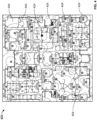
- Fig. 4 illustrates an example heat map 422 including multiple wireless access points 424 and multiple videoconferencing rooms 404.
- the heat map 422 illustrates strength of WiFi signals from the wireless access points at different locations among the multiple video conferencing rooms 404.
- the smartphone 112 can use its wireless card (e.g., WiFi antenna, etc.) to take a local measurement of received WiFi signal strengths, and then compare the local measurement values to the heat map 422 to determine a location of the smartphone 112 relative to the multiple videoconferencing rooms 404.
- wireless card e.g., WiFi antenna, etc.
- the smartphone 112 can obtain a received signal strength for each of the wireless access points 318 and 320, and transmit data (e.g., the received signal strengths) with the server 102 to determine whether at least one of the videoconferencing rooms 104A and 104B is within the defined proximity 114 of the smartphone 112 by identifying the videoconferencing room 104A or 104B having a defined wireless signal strength signature corresponding to the received signal strengths obtained by the smartphone 112.
- data e.g., the received signal strengths
- the smartphone 112 and/or server 102 may determine the smartphone 112 is located at or within the defined proximity 114 of the videoconferencing room 104A. Similarly, if the smartphone 112 receives a strong signal strength from the wireless access point 318 and a strong signal strength from the wireless access point 320, the smartphone 112 and/or server 102 may determine the smartphone 212 is located at or within the defined proximity 114 of the videoconferencing room 104B.
- Fig. 3 illustrates two wireless access points 318 and 320
- other embodiments may include more or less access points, having more or less wireless signal channels (e.g., at least five wireless signal channels in total, at least twenty wireless signal channels in total, etc.).
- the correspondence relationship table can specify signal strengths all wireless signal channels for each videoconferencing room, and the smartphone 112 and/or server 102 may determine the smartphone 112 is located within a defined proximity distance of a specific videoconferencing room 104A or 104B when the obtained signal strengths of the smartphone are within a tolerance threshold of the specified signal strengths of one or more (or all) wireless signal channels for one of the videoconferencing rooms 104A or 104B.
- the tolerance threshold may be within five percent of the specified signal strength for each wireless signal channel, within ten percent, etc.
- each of the videoconferencing rooms 104A and 104B is associated with a global positioning system (GPS) location corresponding to a location of the videoconferencing room 104A or 104B.
- GPS global positioning system
- the smartphone 112 may obtain a GPS location of the smartphone, and exchange data with the server 102 to determine whether at least one of the videoconferencing rooms 104A and 104B is within the defined proximity of the smartphone 112 by determining whether one of the videoconferencing rooms 104A or 104B has an associated GPS location within the defined proximity of the GPS location of the smartphone 112.
- the smartphone 112 and/or the server 102 may compare the GPS location of the smartphone 112 to the GPS locations of the videoconferencing rooms 104A and 104B to determine the nearest one of the videoconferencing rooms 104A and 104B, to determine whether one of the videoconferencing rooms 104A and 104B is within a defined proximity distance (e.g., about ten feet, about fifty feet, about ten meters, etc.) of the smartphone 112, etc.
- a defined proximity distance e.g., about ten feet, about fifty feet, about ten meters, etc.
- the example approaches described above for determining whether at least one of the videoconferencing rooms 104A and 104B is within a defined proximity of the smartphone 112 may be used individually or in combination with one another.
- the smartphone 112 and/or server 102 could determine whether at least one of the videoconferencing rooms 104A and 104B within a defined proximity distance of the smartphone 112 using both GPS location and wireless beacons, both GPS location and wireless access point signal strengths, both wireless beacons and wireless access point signal strengths, etc.
- the smartphone 112 and/or server 102 could determine whether at least one of the videoconferencing rooms 104A and 104B is within a defined proximity distance of the smartphone 112 using all three of GPS location, wireless beacons and wireless access point signal strengths.
- the GPS location of the smartphone 112 can be used to confirm the smartphone 112 is actually located near the wireless beacon, and is not instead providing a UUID that came from a source other than the wireless beacon. Therefore, the GPS location of the smartphone 112 can add an additional layer of security to the videoconferencing systems 100, 200 or 300.
- control applications exist for videoconferencing components from different manufacturers, but these control applications are often fragmented and not part of a complete system. In those cases, the user must operate multiple different applications to control different videoconferencing components in the videoconferencing system. In an environment having multiple conferencing systems, a user typically must instruct an application to control a specific one of multiple systems. This can lead to problems where the user may accidentally control a system that the user does not intend to control.
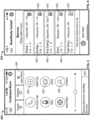
- the smartphone 112 may include a control application such as a smartphone app, which presents a user interface (PUI) 526 to the user 113.
- the user interface 526 can allow the user 113 to transmit one or more commands to the system controllers 108A or 108B via the server 102, in order to control the videoconferencing codecs 106A or 106B.
- the user 113 may only be able to transmit commands to a system controller that has been identified within a defined proximity of the smartphone 112.
- the system controller and the smartphone app may not need to be on the same production network (e.g., inside of a business firewall, etc.) to pass commands from the smartphone app to the system controller via a server. Therefore, there may be no need for a custom user interface for every videoconferencing system, or custom source code written for every videoconferencing system based on different application programming interfaces (APIs) and videoconferencing components for different videoconferencing rooms (e.g., no need for a different dedicated room interface for each different videoconferencing room, etc.).
- APIs application programming interfaces
- the user interface 526 may display a name of the identified videoconferencing room 604, an occupancy status of the videoconferencing rooms 604 (e.g., occupied, vacant, etc.), available technologies in the videoconferencing rooms 604 (e.g., video enabled, audio enabled, presentation enabled, etc.), a number of seats available in the videoconferencing room 604, the signal strength 630, etc.
- an occupancy status of the videoconferencing rooms 604 e.g., occupied, vacant, etc.
- available technologies in the videoconferencing rooms 604 e.g., video enabled, audio enabled, presentation enabled, etc.
- a number of seats available in the videoconferencing room 604 e.g., the number of seats available in the videoconferencing room 604, the signal strength 630, etc.
- the system controller 108A or 108B can store a local room calendar that includes a reservation schedule for the videoconferencing room 104A or 104B in which the system controller 108A or 108B is located.
- the system controller 108A or 108B may authenticate to a resource calendar (e.g., an OFFICE 365 calendar, a GOOGLE calendar, etc.).
- the authentication credentials can be stored locally with the system controller 108A or 108B.
- the system controller 108A or 108B may synchronize its local room calendar with the resource calendar at periodic intervals (e.g., every three minutes, etc.), in response to a schedule update event (e.g., a new room reservation request), etc., to maintain substantially real-time updates.
- the resource calendar may be considered as a "source-of-truth" (SOT).
- the smartphone 112 can poll available system controllers system controller 108A or 108B (e.g., though a secure and encrypted channel) for local conferencing room information.
- the local room information may only be available while the smartphone 112 is within a defined proximity (e.g., about fifty feet, etc.) of the videoconferencing room.
- the smartphone 112 can prompt a user to reserve the room for a desired duration 632, as shown in Fig. 7 .
- the user may be able to reserve the room in increments (e.g., fifteen minute increments, etc.) up to a threshold (e.g., up to an hour, etc.).
- the system controller 108A or 108B can update the resource calendar with a new reservation.
- the new reservation may round the desired increment up to the next closet interval. For example, if a conferencing room is booked for a fifteen minute meeting at 10:05, the calendar may be updated to include a reservation from 10:05 to 10:30.
- an optional visual indicator may be associated with (e.g., in connection with, attached to, mounted on, etc.) the system controller 108A or 108B.
- the visual indicator may include a multi-color light emitting diode (LED).
- the indicator can illuminate a discrete color that is reported back to the smartphone 112 to provide wayfinding to the correct system controller 108A or 108B and associated videoconferencing room 104A or 104B, to confirm the intended videoconferencing room was correctly reserved, etc.
- the visual indicator may stay on for a specified time period (e.g., one minute, etc.) before turning off.
- the smartphone 112 may automatically connect to the server 102 to begin controlling the system controller 108A or 108B once the reservation is completed.
- the smartphone 112 may wait for activation of a button on a user interface, etc. before connecting to the server 102 to begin controlling the system controller 108A or 108B, etc.
- the controls may include any suitable room functions such as, initiating a video and/or audio conferencing call, ending a call, sharing a presentation, muting and/or unmuting a microphone, controlling volume, reporting a problem, accessing contacts, accessing a calendar, locking a room, etc.
- the videoconferencing system can also include a conferencing component coupled to the conferencing system controller.
- the system controller can control the videoconferencing component according to the one or more commands transmitted by the smartphone.
- a conferencing system controller e.g., a ROOMREADY GO controller distributed by Zdi, Inc.
- IL Normal, IL
- a videoconference component such as a television, a monitor, an integrated computer display, a camera, an audio digital signal processor (DSP), a speaker, an audio-visual (AV) switch, and a cable box, etc.
- API application programming interface
- example commands may include turning the conferencing system on, adjusting a volume of the conferencing system up and down, initiating an audio and/or video conference call, ending a call, presenting content, sharing a presentation, reporting a problem, accessing contacts, accessing a calendar, locking a room, etc.
- the personal user interface can provide a consistent user interface across multiple conferencing systems, such that a user may download the consistent user interface to multiple mobile computing devices, multiple conferencing system controllers, etc. This may allow for consistent updates of application programming interfaces for compatible conferencing systems.
- the videoconferencing codecs 106A and 106B may include a room-based videoconferencing codec, a mobile cart-based videoconferencing codec, a mobile phone-based videoconferencing codec, a mobile tablet-based videoconferencing codec, etc.
- the videoconferencing codec includes a coder/decoder for audio and for video, and may be used for a conference call including both audio and video, for a call involving only audio if desired, etc.
- the smartphone 112 may be configured to parse information (e.g., calendar events, emails, etc.) stored on the mobile smartphone 108 according to a parsing protocol to obtain information regarding a scheduled conference call, and to transmit at least a portion of the information regarding the scheduled conference call to the server 102 in response to user input.
- the server 102 is configured to transmit the information regarding the scheduled conference call to the system controller 108A or 108B, and the system controller 108A or 108B is configured to initiate the scheduled conference call via the videoconferencing codec 106A or 106B.
- the smartphone app may use one or more libraries to pull information (e.g., calendar event data, emails, etc.) from the smartphone 112, and parse the information to obtain details regarding a scheduled conference call.
- information e.g., calendar event data, emails, etc.
- calendar invites, email invites, etc. from videoconferencing services typically have a standardized format that may easily be gathered and processed by the smartphone app.
- calendar events, emails, etc., stored on the smartphone 112 may be parsed by the smartphone app to search for indicators of a scheduled conference call.
- the smartphone app may search multiple stored calendar events for one or more text and/or numeric strings indicative of the scheduled conference call.
- a calendar event that includes a session initiation protocol (SIP) uniform resource identifier (URI), a videoconferencing phone number, a videoconferencing meeting number, a personal identification (PIN) number, a passcode, etc., may be indicative of a scheduled conference call.
- SIP session initiation protocol
- URI uniform resource identifier
- PIN personal identification
- passcode a passcode
- the smartphone app may search multiple stored calendar events, emails, etc. to identify text and/or numeric strings including a SIP URI, videoconferencing phone number, meeting number, PIN number, passcode, etc., to identify an upcoming scheduled conference call.
- videoconferencing providers may use a standard textual format for invites to conference calls, and the smartphone app may search the multiple calendar events to identify formatted text that corresponds to a specific videoconferencing provider invite, which indicates an upcoming scheduled conference call.
- the smartphone app may parse calendar events within a defined time period to search for scheduled conference calls. For example, the smartphone app could search calendar events within an hour from a current time, within a day, within a week, etc.
- the control application can then pass the gathered information through a secure sockets layer (SSL) connection over the Internet, using any suitable Internet communication interface (e.g., WiFi, cellular, etc.).
- SSL secure sockets layer
- the gathered information may be transmitted to a gateway server based in a cloud (e.g., an AMAZON Web Services (AWS) cloud, etc.).
- AWS AMAZON Web Services
- the server acts as a proxy to direct the application content to the correct conferencing system controller, which contains the appropriate APIs to control a connected codec (e.g., a video codec, an audio codec, etc.), other conferencing components, etc.
- a connected codec e.g., a video codec, an audio codec, etc.
- the conferencing system controller translates the information received from the application into the correct API to communicate with the codec to make a conferencing call.
- the information received from the application may include an SIP URI, a phone number, a meeting number, a PIN number, etc.
- the system may not be proprietary to any specific code or service, such that the system can use any codec, any web based conferencing application, etc.
- Call control features can be performed local to the controller, such the call control features are handled inside of a customer's network instead of in a cloud. Therefore, the Internet may be used as a common network instead of a proprietary cloud.
- the smartphone 112 may transmit the information to the server 102 using a secure encrypted transport layer security (TLS) channel.
- TLS transport layer security
- the smartphone app may organize the information into a specified format (e.g., JavaScript Object Notation (JSON) format, etc.) for transmission to the server 102.
- JSON JavaScript Object Notation
- the smartphone app can transmit normalized data to the server in a standard format (e.g., in a format documented in the Cisco CE9.0 API, etc.).
- a standard format e.g., in a format documented in the Cisco CE9.0 API, etc.
- This may provide a standard format in which the system controller can add any conferencing room or site-specific information to the dial string (e.g., prepending "9", a country code, etc.) to the normalized number.
- the system controller may only have access to the string that is presented, and may not have access to the entirety of the personal contacts on the smartphone.
- the mobile application may optionally use calendar invites stored locally on the smartphone and parse the data to search for indicators of a conference call from a supported provider.
- the smartphone app can organize the data into a format for transmission to the server to automate the conference call process with all associated conferencing components in the conferencing room.
- the transmitted information may not include personal data of the smartphone 112, so personal data of the smartphone 112 may not be stored on the server 102 or the system controller 108A or 108B to provide privacy to a user of the smartphone 112. Similarly, local videoconferencing room data of the system controller 108A or 108B may not be stored on the smartphone 112, to protect privacy of local videoconferencing room data.
- Controls for the system controller can be stored in the presentation layer of the smartphone app.
- This presentation layer can emulate controls, APIs, etc. of a videoconferencing codec (e.g., a CISCO conferencing codec, etc.) to provide a consistent set of external facing protocols regardless of the conferencing equipment that is actually installed in the room.
- Example features include making and ending conferencing calls, muting and unmuting microphones, sharing content, volume control, etc.
- commands that can be sent from the smartphone to the server, to the system controller, and then to conferencing equipment connected with the system controller. States of these functions can be reported from the connected conferencing equipment back to the system controller though acknowledgement signals transmitted by APIs of the connected conferencing equipment, and the system controller can send the information back to the smartphone.
- the smartphone may optionally be configured to report problems with the videoconferencing system through email, through CISCO SPARK, etc.
- a user may be presented with a text box and a camera icon that allows the user to take a picture of a current conferencing room issue with a camera of the smartphone.
- the smartphone is connected directly to an individual videoconferencing room (e.g., to the system controller in a videoconferencing room, etc.), information associated with the conferencing room can be transmitted to a recipient of a problem support request. If the smartphone is not connected directly with an individual conferencing room, a closest conferencing room may be reported without capturing individual room data.
- the smartphone may include a toggle switch, button, etc. in the smartphone app that allows a user to lock others from controlling a conferencing room (e.g., when conducting an important meeting, a secure meeting, etc.). This may prevent others from being able to connect to the conferencing system controller in the conferencing room, may prevent others from controlling the conferencing system controller, etc.
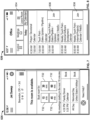
- the smartphone 112 may display a join button 834 on the user interface 526 according to the obtained information regarding the scheduled conference call, as shown in Fig. 8 .
- the smartphone 108 may then transmit at least a portion of the obtained information regarding the scheduled conference call to the server 102 in response to activation of the join button 836 by the user 113.
- the smartphone app determines a start time of the scheduled conference call according to the obtained information, and displays, highlights, etc. the join button 836 on the user interface 526 a defined time period before the determined start time of the scheduled conference call.
- the join button 836 may be highlighted five minutes prior to the scheduled conference call associated with the join button 836, while another join button 838 is not highlighted because a current time is more than five minutes prior to the scheduled conference call associated with the join button 836.
- the smartphone app could display the join button 836 on the user interface 526 at least one minute before the scheduled conference call, at least five minutes before the scheduled conference call, at least one hour before the scheduled conference call, etc.
- the smartphone app may display the join button 836 on the user interface 526 a defined time period after the determined start time of the scheduled conference call. For example, the smartphone app could display the join button 836 on the user interface 526 at least one minute after the scheduled conference call, at least five minutes after the scheduled conference call, at least one hour after the scheduled conference call, etc.
- the join button 838 may include any suitable icon, toggle, switch, field, etc., such as the highlighted green square on the user interface 526 in Fig. 8 .
- the join button 836 may be displayed on a touchscreen of the smartphone 112, etc. In other embodiments, the smartphone 112 may not display a join button and the user may initiate the scheduled conference call by providing input other than activation of a join button.
- the system 100 may allow for joining a conference call using a simple (e.g., one-button) connection from the smartphone 112.
- a simple (e.g., one-button) connection from the smartphone 112.
- the user 113 may simply enter a videoconferencing room and the smartphone app on the smartphone 112, then press the join button 836 on the user interface 526 of the smartphone 112 to start a scheduled conference call.
- Videoconferencing call control, information, etc. may be handled in the background with respect to the user 113.
- a user may not have to locate a dialer for a meeting, may not have to dial a phone number for the conferencing service (e.g., using WEBEX, GOTOMEETING, ZOOM, BLUE JEAN NETWORKS, SKYPE, CISCO, etc.), may not have to input an ID or PIN for the meeting, etc.
- a phone number for the conferencing service e.g., using WEBEX, GOTOMEETING, ZOOM, BLUE JEAN NETWORKS, SKYPE, CISCO, etc.
- a "Leave Room" button 834 displayed on user interface 526 of the smartphone 112 may automatically disconnect the initiated conference call when the smartphone 112 leaves the physical proximity of the conferencing room (e.g., leaves a proximity distance threshold of a beacon associated with the system controller 108A or 108B, etc.), as shown in Fig. 8 .
- the system controller 108A or 108B may disconnect communication with the smartphone 112 via the server 102 and shut down when the conferencing room is determined to be vacant.
- the conferencing system controllers, mobile computing devices, etc. described herein may be configured to perform operations using any suitable combination of hardware and software.
- the system controller may include any suitable circuitry, logic gates, microprocessor(s), computer-executable instructions stored in memory, etc. operable to cause the system controller to perform actions described herein.
- a user may be able to walk into a conferencing room with a mobile computing device, and a conferencing system controller can send a schedule for the conferencing room to the mobile computing device (e.g., instead of having a touch screen outside of the room, etc.).
- the mobile communication device may be able to control the conferencing room though the connection with the conferencing system controller, may be able to manage reservations for the conferencing room though the connection with the conferencing system controller, etc.
- Current occupancy of conferencing rooms in proximity to the mobile computing device may be displayed on the mobile computing device.
- location-based control approaches may allow for room booking (e.g., reservations, etc.) as described above.
- room booking e.g., reservations, etc.
- a user may reserve a room by physically entering a room before generating the reservation, to confirm that the user is reserving the correct room.
- Location-based control approaches may be used for attendance, by confirming the conference call members that are present during a conference call based on proximity detection. Emergency notification can be provided to alert all user(s) within a certain proximity of a conferencing system, etc.
- training videos can be implemented based on location, so that users attend the correct training video, an appropriate training video for a specific conference room/system is provided to a user, etc.
- a videoconferencing system includes multiple videoconferencing rooms, and a server adapted to store information regarding each videoconferencing room.
- Each videoconferencing room includes a videoconferencing codec and a system controller in communication with the videoconferencing codec via one or more wired and/or wireless communication networks to control the videoconferencing codec, the system controller in communication with the server via the one or more wired and/or wireless communication networks.
- the system also includes a mobile computing device including a user interface. The mobile computing device configured to communicate with the server via the one or more wired and/or wireless communication networks to exchange data with the server to determine whether at least one of the videoconferencing rooms is within a defined proximity of the mobile computing device.
- the mobile computing device is further configured to obtain information regarding a scheduled conference call from calendar information stored on the mobile computing device.
- a mobile computing device is configured to exchange data with a server to determine whether at least one of multiple videoconferencing rooms is within a defined proximity of the mobile computing device, and in response to determining that at least one of the videoconferencing rooms is within the defined proximity, and in response to the user selecting said at least one of the videoconferencing rooms, transmit one or more commands to a server to transmit the one or more commands to a system controller located in said at least one of the videoconferencing rooms.
- a method of controlling a conference call includes determining whether at least one of multiple videoconferencing rooms is within a defined proximity of a mobile computing device, and in response to determining that at least one of the videoconferencing rooms is within the defined proximity, and in response to the user selecting said at least one of the videoconferencing rooms, transmitting one or more commands to a server to transmit the one or more commands to a system controller located in said at least one of the videoconferencing rooms.
- a system controller is configured to receive one or more commands from a server, the one or more commands transmitted to the server by a mobile computing device in response to determining whether a videoconferencing room in which the system controller is located is within a defined proximity of a mobile computing device.
- Example embodiments described herein may provide one or more (or none) of the following advantages: location-based connection between a mobile computing device and a conferencing system controller, use of the Internet as a common network between the mobile computing device and the conferencing system controller, maintenance of a consistent downloadable user interface across multiple different conferencing systems, and consistent updates of application programming interfaces for compatible conferencing system equipment.
Landscapes
- Engineering & Computer Science (AREA)
- Signal Processing (AREA)
- Computer Networks & Wireless Communication (AREA)
- Multimedia (AREA)
- Computer Security & Cryptography (AREA)
- Business, Economics & Management (AREA)
- General Business, Economics & Management (AREA)
- General Engineering & Computer Science (AREA)
- Telephonic Communication Services (AREA)
Claims (15)
- Videokonferenzsystem, umfassend:mehrere Videokonferenzräume (104A, 104B, 404);einen Server (102), der ausgelegt ist, um Informationen bezüglich jedes Videokonferenzraums zu speichern, wobei jeder Videokonferenzraum einen Videokonferenz-Codec (106A, 106B) und eine Systemsteuerung (108A, 108B) in Kommunikation mit dem Videokonferenz-Codec über ein oder mehrere drahtgebundene und/oder drahtlose Kommunikationsnetzwerke (110) beinhaltet, um den Videokonferenz-Codec zu steuern, wobei die Systemsteuerung in Kommunikation mit dem Server über das eine oder die mehreren drahtgebundenen und/oder drahtlosen Kommunikationsnetzwerke ist; undeine mobile Rechenvorrichtung (112), die eine Benutzerschnittstelle (526) beinhaltet, wobei die mobile Rechenvorrichtung konfiguriert ist, um mit dem Server über das eine oder die mehreren drahtgebundenen und/oder drahtlosen Kommunikationsnetzwerke zu kommunizieren, um Daten mit dem Server auszutauschen, um zu bestimmen, ob zumindest einer der Videokonferenzräume innerhalb einer definierten Nähe der mobilen Rechenvorrichtung ist;wobei die mobile Rechenvorrichtung ferner konfiguriert ist, um als Reaktion auf das Bestimmen, dass zumindest einer der Videokonferenzräume innerhalb der definierten Nähe ist, und als Reaktion darauf, dass der Benutzer den zumindest einen der Videokonferenzräume auswählt, einen oder mehrere Befehle an den Server zu übertragen;der Server konfiguriert ist, um den einen oder die mehreren Befehle an die Systemsteuerung zu übertragen, die sich in dem zumindest einen der Videokonferenzräume befindet;die Systemsteuerung konfiguriert ist, um den Videokonferenz-Codec, der sich in dem zumindest einen der Videokonferenzräume befindet, gemäß dem einen oder den mehreren Befehlen zu steuern, um eine Videokonferenz in dem zumindest einen der Videokonferenzräume einzurichten oder zu steuern.
- System nach Anspruch 1, wobei die mobile Rechenvorrichtung konfiguriert ist, um Daten mit dem Server auszutauschen, um gemäß einem oder mehreren drahtlosen Signalen, die durch die mobile Rechenvorrichtung empfangen werden, zu bestimmen, ob zumindest einer der Videokonferenzräume innerhalb der definierten Nähe der mobilen Rechenvorrichtung ist.
- System nach Anspruch 1 oder 2, ferner umfassend eine oder mehrere drahtlose Baken (216A, 216B), wobei:jede Bake eine eindeutige universelle Kennung (UUID) beinhaltet;die UUID jeder Bake einem anderen der mehreren Videokonferenzräume entspricht; unddie mobile Rechenvorrichtung konfiguriert ist, um Daten mit dem Server auszutauschen, um zu bestimmen, ob zumindest einer der Videokonferenzräume innerhalb der definierten Nähe der mobilen Rechenvorrichtung ist, indem die UUID von zumindest einem von der einen oder den mehreren drahtlosen Baken identifiziert und der Videokonferenzraum entsprechend der UUID bestimmt wird.
- System nach Anspruch 2 oder 3, wobei die eine oder mehreren drahtlosen Baken zumindest eines von einer drahtlosen Nahbereichskommunikations-BLUETOOTH-Bake, einer WiFi-Bake, einer Funkfrequenzidentifikations(RFID-)Bake und einer Nahfeldkommunikations(NFC-)Bake beinhalten.
- System nach einem der Ansprüche 2-4, wobei die mobile Rechenvorrichtung konfiguriert ist, um einen Näherungsabstand der mobilen Rechenvorrichtung von jeder drahtlosen Bake gemäß einem relativen Signalstärkeindikator (RSSI) für jede drahtlose Bake zu bestimmen.
- System nach einem vorhergehenden Anspruch, wobei:jeder der mehreren Videokonferenzräume mit einem Standort eines globalen Positionierungssystems (GPS) assoziiert ist, der einem Standort des Videokonferenzraums entspricht; unddie mobile Rechenvorrichtung konfiguriert ist, um einen Standort des globalen Positionierungssystems (GPS) der mobilen Rechenvorrichtung zu erhalten und Daten mit dem Server auszutauschen, um zu bestimmen, ob zumindest einer der Videokonferenzräume innerhalb der definierten Nähe der mobilen Rechenvorrichtung ist, indem der Videokonferenzraum mit einem assoziierten GPS-Standort innerhalb des definierten Näherungsabstands des GPS-Standorts der mobilen Rechenvorrichtung identifiziert wird.
- Verfahren nach einem vorhergehenden Anspruch, ferner umfassend mehrere drahtlose Zugangspunkte, wobei:
jeder der mehreren Videokonferenzräume mit einer definierten drahtlosen Signalstärkesignatur assoziiert ist, die empfangenen Signalstärken von jedem der mehreren drahtlosen Zugangspunkte an einem Standort des Videokonferenzraums entspricht; und wobei die mobile Rechenvorrichtung konfiguriert ist, um eine empfangene Signalstärke für jeden von dem einen oder den mehreren drahtlosen Zugangspunkten zu empfangen und konfiguriert ist, um Daten mit dem Server auszutauschen, um zu bestimmen, ob zumindest einer der Videokonferenzräume innerhalb der definierten Nähe der mobilen Rechenvorrichtung ist, indem der Videokonferenzraum mit der definierten drahtlosen Signalstärkesignatur identifiziert wird, die den empfangenen Signalstärken entspricht, die durch die mobile Rechenvorrichtung erhalten werden. - System nach einem vorhergehenden Anspruch, wobei die mobile Rechenvorrichtung konfiguriert ist, um zumindest eines von einem Namen des identifizierten Videokonferenzraums innerhalb der definierten Nähe der mobilen Rechenvorrichtung, einem Belegungsstatus des identifizierten Videokonferenzraums, einer Liste von verfügbaren Technologien in dem identifizierten Videokonferenzraum, einer Anzahl an verfügbaren Sitzen in dem identifizierten Videokonferenzraum und einer Signalstärke in dem identifizierten Videokonferenzraum anzuzeigen.
- System nach einem vorhergehenden Anspruch, wobei:jede Systemsteuerung konfiguriert ist, um einen lokalen Videokonferenzraumkalender zu speichern, den lokalen Videokonferenzraumkalender in periodischen Intervallen und/oder als Reaktion auf Planungsereignisse mit einem Fernressourcenkalender zu synchronisieren und den lokalen Videokonferenzraumkalender als Reaktion auf das Empfangen einer Videokonferenzraumreservierungsanfrage von der mobilen Rechenvorrichtung zu aktualisieren; und/oderdie mobile Rechenvorrichtung konfiguriert ist, um zu bestimmen, ob der identifizierte Videokonferenzraum innerhalb der definierten Nähe der mobilen Rechenvorrichtung gemäß dem lokalen Videokonferenzraumkalender, der von der Systemsteuerung in dem identifizierten Videokonferenzraum empfangen wird, verfügbar ist, und eine Reservierungsanfrage an die Systemsteuerung zu übertragen, um eine Reservierung in dem lokalen Videokonferenzraumkalender der Systemsteuerung zu speichern.
- System nach einem vorhergehenden Anspruch, wobei:
jede der Systemsteuerungen einen visuellen Indikator beinhaltet, um die Konferenzsystemsteuerung zu identifizieren, wenn die mobile Rechenvorrichtung Daten mit dem Server austauscht, um den einen oder die mehreren Befehle an die Systemsteuerung zu übertragen; und/oder der eine oder die mehreren Befehle zumindest eines von einem Systemeinschaltbefehl, einem Lautstärkesteuerbefehl, einem Audio- und/oder Videoanrufbefehl, einem Endanrufbefehl, einem Stummschalt- und/oder Stummschaltaufhebungsmikrofonbefehl, einem Präsentationsteilbefehl, einem Präsentierinhaltsbefehl, einem Berichtsproblembefehl, einem Zugangskontaktbefehl, einem Zugangskalenderbefehl und einem Sperrraumbefehl beinhalten. - System nach einem vorhergehenden Anspruch, wobei die mobile Rechenvorrichtung konfiguriert ist, um den einen oder die mehreren Befehle an den Server über das Kommunikationsnetzwerk unter Verwendung eines sicheren verschlüsselten Transportschichtsicherheits(TLS-)Kanals zu übertragen, wobei persönliche Daten der mobilen Rechenvorrichtung nicht auf der Systemsteuerung des identifizierten Videokonferenzraums innerhalb des definierten Näherungsabstands der mobilen Rechenvorrichtung gespeichert sind und lokale Raumdaten der Systemsteuerung nicht auf der mobilen Rechenvorrichtung gespeichert sind.
- System nach einem vorhergehenden Anspruch, wobei das mobile Rechnen ein Smartphone beinhaltet, das eine Kamera umfasst, und das mobile Rechnen konfiguriert ist, um einem Benutzer zu ermöglichen, die Kamera der mobilen Rechenvorrichtung zu bedienen, um ein Bild aufzunehmen, das auf eine Konferenzraumangelegenheit hinweist, als Reaktion auf eine Berichtsproblemanfrage, die durch den Benutzer über die Benutzerschnittstelle der mobilen Rechenvorrichtung eingegeben wird, und die mobile Rechenvorrichtung konfiguriert ist, um das Bild, das auf die Konferenzraumangelegenheit hinweist, an den Server zu übertragen.
- System nach einem vorhergehenden Anspruch, wobei:
die mobile Rechenvorrichtung konfiguriert ist, um einen Sperrraumknopf auf der Benutzerschnittstelle der mobilen Rechenvorrichtung anzuzeigen und als Reaktion auf Aktivierung des Sperrraumknopfes durch den Benutzer eine Sperranfrage an den Server zu übertragen, um die Sperranfrage an die Konferenzsystemsteuerung des identifizierten Videokonferenzraums innerhalb des definierten Näherungsabstands der mobilen Rechenvorrichtung weiterzuleiten, um andere mobile Rechenvorrichtungen daran zu hindern, die Systemsteuerung zu steuern; und/oder die mobile Rechenvorrichtung konfiguriert ist, um einen Videokonferenzraumplan von der Konferenzsystemsteuerung des identifizierten Videokonferenzraums innerhalb des definierten Näherungsabstands der mobilen Rechenvorrichtung zu erhalten und den erhaltenen Konferenzraumplan auf der Benutzerschnittstelle der mobilen Rechenvorrichtung anzuzeigen, eine Reservierungsanfrage an den Server zu übertragen, um die Reservierungsanfrage an die Systemsteuerung weiterzuleiten, um eine Reservierung eines Videokonferenzraums zu buchen, und/oder eine aktuelle Belegung von mehreren Systemsteuerungen innerhalb des definierten Näherungsabstands der mobilen Rechenvorrichtung zu erhalten und die erhaltenen aktuellen Belegungen anzuzeigen. - System nach einem vorhergehenden Anspruch, wobei:jeder Videokonferenzraum eine Videokonferenzkomponente beinhaltet;die Systemsteuerung, die sich in dem Videokonferenzraum befindet, in Kommunikation mit der Videokonferenzkomponente über das drahtgebundene und/oder drahtlose Kommunikationsnetzwerk ist, um die Videokonferenzkomponente zu steuern; unddie Videokonferenzkomponente zumindest eines von einem Fernseher, einem Monitor, einer integrierten Computeranzeige, einer Kamera, einem Audiodigitalsignalprozessor (DSP), einem Lautsprecher, einem audiovisuellen (AV) Schalter und einer Kabelbox beinhaltet.
- System nach einem vorhergehenden Anspruch, wobei:jede Systemsteuerung einen visuellen Indikator beinhaltet und die Systemsteuerung konfiguriert ist, um den visuellen Indikator zu steuern, um zumindest eines von einer Bestätigung einer Reservierung des Videokonferenzkonferenzraums anzuzeigen, in dem sich die Systemsteuerung befindet, oder um dem Videokonferenzraum, in dem sich die Systemsteuerung befindet, Wegfindung bereitzustellen; und/oderdie mobile Rechenvorrichtung konfiguriert ist, um einen oder mehrere Befehle auf der Benutzerschnittstelle anzuzeigen, um an den Server zu übertragen, um den Videokonferenz-Codec zu steuern, und der eine oder die mehreren Befehle auf der Benutzerschnittstelle als ein konsistenter Satz von nach außen gerichteten Protokollen unabhängig von einem Typ des Videokonferenz-Codecs angezeigt werden.
Applications Claiming Priority (5)
| Application Number | Priority Date | Filing Date | Title |
|---|---|---|---|
| US201762586426P | 2017-11-15 | 2017-11-15 | |
| US201762586420P | 2017-11-15 | 2017-11-15 | |
| US201862641848P | 2018-03-12 | 2018-03-12 | |
| US201862641860P | 2018-03-12 | 2018-03-12 | |
| PCT/US2018/061363 WO2019099724A1 (en) | 2017-11-15 | 2018-11-15 | Location-based control for conferencing systems, devices and methods |
Publications (5)
| Publication Number | Publication Date |
|---|---|
| EP3711286A1 EP3711286A1 (de) | 2020-09-23 |
| EP3711286A4 EP3711286A4 (de) | 2021-09-08 |
| EP3711286B1 true EP3711286B1 (de) | 2025-04-23 |
| EP3711286C0 EP3711286C0 (de) | 2025-04-23 |
| EP3711286B8 EP3711286B8 (de) | 2025-06-04 |
Family
ID=66433760
Family Applications (1)
| Application Number | Title | Priority Date | Filing Date |
|---|---|---|---|
| EP18879004.2A Active EP3711286B8 (de) | 2017-11-15 | 2018-11-15 | Standortbasierte steuerung für konferenzsysteme, vorrichtungen und verfahren |
Country Status (3)
| Country | Link |
|---|---|
| US (3) | US10469801B2 (de) |
| EP (1) | EP3711286B8 (de) |
| WO (1) | WO2019099724A1 (de) |
Families Citing this family (29)
| Publication number | Priority date | Publication date | Assignee | Title |
|---|---|---|---|---|
| US8502856B2 (en) | 2010-04-07 | 2013-08-06 | Apple Inc. | In conference display adjustments |
| DK180130B1 (da) | 2018-05-07 | 2020-06-02 | Apple Inc. | Multi-participant live communication user interface |
| US10484114B1 (en) * | 2018-06-19 | 2019-11-19 | Cox Communicaions, Inc. | Automated wireless local area networking topology mapping |
| EP3984169A4 (de) | 2019-06-13 | 2023-07-05 | Mersive Technologies, Inc. | Überbrückungssystem für videokonferenzräume und zugehörige verfahren |
| GB2585859A (en) * | 2019-07-17 | 2021-01-27 | Ashton Bentley Group Ltd | Automated call launching |
| TWI809269B (zh) * | 2020-04-29 | 2023-07-21 | 兆豐國際商業銀行股份有限公司 | 會議管理系統和會議管理方法 |
| US11079913B1 (en) | 2020-05-11 | 2021-08-03 | Apple Inc. | User interface for status indicators |
| CN112311753A (zh) * | 2020-05-15 | 2021-02-02 | 北京字节跳动网络技术有限公司 | 信息交互方法、装置和电子设备 |
| US10999555B1 (en) * | 2020-06-01 | 2021-05-04 | Fuze, Inc. | Meeting room control via mobile device |
| CN112184941A (zh) * | 2020-09-28 | 2021-01-05 | 深圳技术大学 | 一种基于WiFi信号强度数据的考勤的方法及系统 |
| EP4002389A1 (de) * | 2020-11-17 | 2022-05-25 | TRUMPF Medizin Systeme GmbH + Co. KG | Operationssaalsteuerungs- und kommunikationssystem |
| US12301979B2 (en) | 2021-01-31 | 2025-05-13 | Apple Inc. | User interfaces for wide angle video conference |
| JP7354165B2 (ja) | 2021-02-19 | 2023-10-02 | ヤフー株式会社 | 情報処理装置、情報処理方法及び情報処理プログラム |
| JP7354166B2 (ja) | 2021-02-19 | 2023-10-02 | ヤフー株式会社 | 情報処理装置、情報処理方法及び情報処理プログラム |
| US12170579B2 (en) | 2021-03-05 | 2024-12-17 | Apple Inc. | User interfaces for multi-participant live communication |
| US11843647B2 (en) | 2021-04-30 | 2023-12-12 | Zoom Video Communications, Inc. | Control of dedicated meeting room devices for video communications |
| US11907605B2 (en) | 2021-05-15 | 2024-02-20 | Apple Inc. | Shared-content session user interfaces |
| CN120881039A (zh) * | 2021-05-15 | 2025-10-31 | 苹果公司 | 实时通信用户界面 |
| US11822761B2 (en) | 2021-05-15 | 2023-11-21 | Apple Inc. | Shared-content session user interfaces |
| US12449961B2 (en) | 2021-05-18 | 2025-10-21 | Apple Inc. | Adaptive video conference user interfaces |
| KR102766994B1 (ko) * | 2021-07-30 | 2025-02-11 | 주식회사 카카오 | 구독 서비스 제공 방법, 이를 구현한 구독 시스템, 사용자 단말 및 어플리케이션 |
| US12368946B2 (en) | 2021-09-24 | 2025-07-22 | Apple Inc. | Wide angle video conference |
| US12267622B2 (en) | 2021-09-24 | 2025-04-01 | Apple Inc. | Wide angle video conference |
| CN113993115B (zh) * | 2021-12-27 | 2022-04-01 | 飞天诚信科技股份有限公司 | 自动解锁屏幕方法、装置、电子设备及可读存储介质 |
| US12563299B2 (en) | 2022-04-04 | 2026-02-24 | Apple Inc. | User interfaces for camera sharing |
| US12578837B2 (en) | 2022-09-23 | 2026-03-17 | Apple Inc. | User interfaces for managing sharing of content in three-dimensional environments |
| CN115643542B (zh) * | 2022-11-29 | 2023-05-16 | 荣耀终端有限公司 | 一种无线投屏方法、电子设备及计算机可读存储介质 |
| US12149567B1 (en) * | 2023-02-02 | 2024-11-19 | Benjamin Slotznick | Interpersonal networking in virtual space pre-meeting waiting rooms and post-meeting exit queues for participants of a videoconferencing session |
| US12244655B1 (en) | 2023-02-02 | 2025-03-04 | Benjamin Slotznick | Interpersonal networking in virtual space pre-meeting waiting rooms and post-meeting sessions for participants of a videoconferencing session |
Family Cites Families (12)
| Publication number | Priority date | Publication date | Assignee | Title |
|---|---|---|---|---|
| US9741020B2 (en) * | 2010-01-27 | 2017-08-22 | Google Inc. | Conference room scheduling based on attendee locations |
| US20140108084A1 (en) * | 2012-10-12 | 2014-04-17 | Crestron Electronics, Inc. | Initiating Schedule Management Via Radio Frequency Beacons |
| US10692020B2 (en) * | 2011-04-29 | 2020-06-23 | Crestron Electronics, Inc. | Real-time automatic meeting room reservation based on the number of actual participants |
| US9369673B2 (en) | 2011-05-11 | 2016-06-14 | Blue Jeans Network | Methods and systems for using a mobile device to join a video conference endpoint into a video conference |
| US8854418B2 (en) * | 2011-05-23 | 2014-10-07 | Broadcom Corporation | Integrated media gateway processing and control to reduce latency for 2-way video conference applications |
| US8896651B2 (en) * | 2011-10-27 | 2014-11-25 | Polycom, Inc. | Portable devices as videoconferencing peripherals |
| CN103580879A (zh) | 2012-08-02 | 2014-02-12 | 华为技术有限公司 | 一种会议资源分配方法及装置 |
| US9667915B2 (en) * | 2012-12-11 | 2017-05-30 | Avaya Inc. | Method and system for video conference and PC user experience integration |
| US9462225B2 (en) | 2013-03-15 | 2016-10-04 | Zeller Digital Innovations, Inc. | Presentation systems and related methods |
| CN104268669B (zh) | 2014-09-09 | 2021-01-08 | 惠州Tcl移动通信有限公司 | 一种利用ibeacons技术的会议管理方法及终端 |
| JP6625807B2 (ja) | 2015-03-25 | 2019-12-25 | 株式会社富士通エフサス | 会議室予約システム、会議室予約方法および会議室予約プログラム |
| US10447795B2 (en) * | 2015-10-05 | 2019-10-15 | Polycom, Inc. | System and method for collaborative telepresence amongst non-homogeneous endpoints |
-
2018
- 2018-11-15 WO PCT/US2018/061363 patent/WO2019099724A1/en not_active Ceased
- 2018-11-15 EP EP18879004.2A patent/EP3711286B8/de active Active
- 2018-11-15 US US16/192,604 patent/US10469801B2/en active Active
-
2019
- 2019-10-23 US US16/661,552 patent/US10721438B2/en active Active
-
2020
- 2020-06-23 US US16/909,030 patent/US11076126B2/en active Active
Also Published As
| Publication number | Publication date |
|---|---|
| US20190149768A1 (en) | 2019-05-16 |
| US20200059629A1 (en) | 2020-02-20 |
| US20200322573A1 (en) | 2020-10-08 |
| EP3711286B8 (de) | 2025-06-04 |
| EP3711286A4 (de) | 2021-09-08 |
| US10721438B2 (en) | 2020-07-21 |
| US11076126B2 (en) | 2021-07-27 |
| US10469801B2 (en) | 2019-11-05 |
| EP3711286A1 (de) | 2020-09-23 |
| WO2019099724A1 (en) | 2019-05-23 |
| EP3711286C0 (de) | 2025-04-23 |
Similar Documents
| Publication | Publication Date | Title |
|---|---|---|
| US11076126B2 (en) | Location-based control for conferencing systems | |
| US10521992B2 (en) | Method for providing a visitor controlled access into a building | |
| US11943071B2 (en) | Automated videoconference systems, controllers and methods | |
| US11539916B2 (en) | Location-based control for conferencing systems | |
| US9894689B2 (en) | System, method, and logic for identifying devices for a virtual meeting session | |
| US20080004038A1 (en) | Push-to-talk proximity-based configuration | |
| US20170026621A1 (en) | System and method for communications | |
| US9723140B2 (en) | Communication system and information processing device | |
| US11849073B2 (en) | Location-based control for conferencing systems | |
| EP2552089B1 (de) | Vorrichtung und Verfahren für elektronische Kurzstreckenkommunikation | |
| US11503440B2 (en) | Methods and systems for providing enterprise services to wearable and mobile devices | |
| US20210329524A1 (en) | Methods and systems for enabling user mobility in an enterprise serviced by multiple distributed communication controllers | |
| JP2018535620A (ja) | セキュアポリシーマネージャ | |
| JP6145844B2 (ja) | 住宅情報盤、インターホンシステム及び携帯無線端末機用プログラム | |
| HK1235531A1 (en) | Method for providing a visitor controlled access into a building |
Legal Events
| Date | Code | Title | Description |
|---|---|---|---|
| STAA | Information on the status of an ep patent application or granted ep patent |
Free format text: STATUS: THE INTERNATIONAL PUBLICATION HAS BEEN MADE |
|
| PUAI | Public reference made under article 153(3) epc to a published international application that has entered the european phase |
Free format text: ORIGINAL CODE: 0009012 |
|
| STAA | Information on the status of an ep patent application or granted ep patent |
Free format text: STATUS: REQUEST FOR EXAMINATION WAS MADE |
|
| 17P | Request for examination filed |
Effective date: 20200612 |
|
| AK | Designated contracting states |
Kind code of ref document: A1 Designated state(s): AL AT BE BG CH CY CZ DE DK EE ES FI FR GB GR HR HU IE IS IT LI LT LU LV MC MK MT NL NO PL PT RO RS SE SI SK SM TR |
|
| AX | Request for extension of the european patent |
Extension state: BA ME |
|
| DAV | Request for validation of the european patent (deleted) | ||
| DAX | Request for extension of the european patent (deleted) | ||
| A4 | Supplementary search report drawn up and despatched |
Effective date: 20210810 |
|
| RIC1 | Information provided on ipc code assigned before grant |
Ipc: H04W 4/02 20180101ALN20210804BHEP Ipc: H04W 12/79 20210101ALI20210804BHEP Ipc: H04W 12/63 20210101ALI20210804BHEP Ipc: H04L 29/06 20060101ALI20210804BHEP Ipc: H04L 12/18 20060101ALI20210804BHEP Ipc: H04N 7/14 20060101ALI20210804BHEP Ipc: H04N 7/15 20060101AFI20210804BHEP |
|
| REG | Reference to a national code |
Ref country code: DE Ref legal event code: R079 Free format text: PREVIOUS MAIN CLASS: H04N0007150000 Ipc: H04N0007140000 Ref country code: DE Ref legal event code: R079 Ref document number: 602018081401 Country of ref document: DE Free format text: PREVIOUS MAIN CLASS: H04N0007150000 Ipc: H04N0007140000 |
|
| GRAP | Despatch of communication of intention to grant a patent |
Free format text: ORIGINAL CODE: EPIDOSNIGR1 |
|
| STAA | Information on the status of an ep patent application or granted ep patent |
Free format text: STATUS: GRANT OF PATENT IS INTENDED |
|
| RIC1 | Information provided on ipc code assigned before grant |
Ipc: H04W 4/80 20180101ALN20241025BHEP Ipc: H04W 4/02 20180101ALN20241025BHEP Ipc: H04W 12/79 20210101ALI20241025BHEP Ipc: H04W 12/64 20210101ALI20241025BHEP Ipc: H04L 65/70 20220101ALI20241025BHEP Ipc: H04L 65/403 20220101ALI20241025BHEP Ipc: H04L 12/18 20060101ALI20241025BHEP Ipc: H04L 65/1083 20220101ALI20241025BHEP Ipc: H04N 7/15 20060101ALI20241025BHEP Ipc: H04N 7/14 20060101AFI20241025BHEP |
|
| INTG | Intention to grant announced |
Effective date: 20241115 |
|
| RIC1 | Information provided on ipc code assigned before grant |
Ipc: H04W 4/80 20180101ALN20241108BHEP Ipc: H04W 4/02 20180101ALN20241108BHEP Ipc: H04W 12/79 20210101ALI20241108BHEP Ipc: H04W 12/64 20210101ALI20241108BHEP Ipc: H04L 65/70 20220101ALI20241108BHEP Ipc: H04L 65/403 20220101ALI20241108BHEP Ipc: H04L 12/18 20060101ALI20241108BHEP Ipc: H04L 65/1083 20220101ALI20241108BHEP Ipc: H04N 7/15 20060101ALI20241108BHEP Ipc: H04N 7/14 20060101AFI20241108BHEP |
|
| GRAS | Grant fee paid |
Free format text: ORIGINAL CODE: EPIDOSNIGR3 |
|
| GRAA | (expected) grant |
Free format text: ORIGINAL CODE: 0009210 |
|
| STAA | Information on the status of an ep patent application or granted ep patent |
Free format text: STATUS: THE PATENT HAS BEEN GRANTED |
|
| REG | Reference to a national code |
Ref country code: DE Ref legal event code: R081 Ref document number: 602018081401 Country of ref document: DE Owner name: ZELLER DIGITAL INNOVATIONS, INC., BLOOMINGTON, US Free format text: FORMER OWNER: ZELLER DIGITAL INNOVATIONS, INC., NORMAL, IL, US |
|
| AK | Designated contracting states |
Kind code of ref document: B1 Designated state(s): AL AT BE BG CH CY CZ DE DK EE ES FI FR GB GR HR HU IE IS IT LI LT LU LV MC MK MT NL NO PL PT RO RS SE SI SK SM TR |
|
| REG | Reference to a national code |
Ref country code: GB Ref legal event code: FG4D |
|
| REG | Reference to a national code |
Ref country code: CH Ref legal event code: EP |
|
| RAP4 | Party data changed (patent owner data changed or rights of a patent transferred) |
Owner name: ZELLER DIGITAL INNOVATIONS, INC. |
|
| REG | Reference to a national code |
Ref country code: DE Ref legal event code: R096 Ref document number: 602018081401 Country of ref document: DE |
|
| REG | Reference to a national code |
Ref country code: CH Ref legal event code: PK Free format text: BERICHTIGUNG B8 |
|
| REG | Reference to a national code |
Ref country code: IE Ref legal event code: FG4D |
|
| U01 | Request for unitary effect filed |
Effective date: 20250508 |
|
| U07 | Unitary effect registered |
Designated state(s): AT BE BG DE DK EE FI FR IT LT LU LV MT NL PT RO SE SI Effective date: 20250515 |
|
| PG25 | Lapsed in a contracting state [announced via postgrant information from national office to epo] |
Ref country code: ES Free format text: LAPSE BECAUSE OF FAILURE TO SUBMIT A TRANSLATION OF THE DESCRIPTION OR TO PAY THE FEE WITHIN THE PRESCRIBED TIME-LIMIT Effective date: 20250423 |
|
| PG25 | Lapsed in a contracting state [announced via postgrant information from national office to epo] |
Ref country code: NO Free format text: LAPSE BECAUSE OF FAILURE TO SUBMIT A TRANSLATION OF THE DESCRIPTION OR TO PAY THE FEE WITHIN THE PRESCRIBED TIME-LIMIT Effective date: 20250723 Ref country code: GR Free format text: LAPSE BECAUSE OF FAILURE TO SUBMIT A TRANSLATION OF THE DESCRIPTION OR TO PAY THE FEE WITHIN THE PRESCRIBED TIME-LIMIT Effective date: 20250724 |
|
| PG25 | Lapsed in a contracting state [announced via postgrant information from national office to epo] |
Ref country code: PL Free format text: LAPSE BECAUSE OF FAILURE TO SUBMIT A TRANSLATION OF THE DESCRIPTION OR TO PAY THE FEE WITHIN THE PRESCRIBED TIME-LIMIT Effective date: 20250423 |
|
| PG25 | Lapsed in a contracting state [announced via postgrant information from national office to epo] |
Ref country code: HR Free format text: LAPSE BECAUSE OF FAILURE TO SUBMIT A TRANSLATION OF THE DESCRIPTION OR TO PAY THE FEE WITHIN THE PRESCRIBED TIME-LIMIT Effective date: 20250423 |
|
| PG25 | Lapsed in a contracting state [announced via postgrant information from national office to epo] |
Ref country code: RS Free format text: LAPSE BECAUSE OF FAILURE TO SUBMIT A TRANSLATION OF THE DESCRIPTION OR TO PAY THE FEE WITHIN THE PRESCRIBED TIME-LIMIT Effective date: 20250723 |
|
| PG25 | Lapsed in a contracting state [announced via postgrant information from national office to epo] |
Ref country code: IS Free format text: LAPSE BECAUSE OF FAILURE TO SUBMIT A TRANSLATION OF THE DESCRIPTION OR TO PAY THE FEE WITHIN THE PRESCRIBED TIME-LIMIT Effective date: 20250823 |
|
| U20 | Renewal fee for the european patent with unitary effect paid |
Year of fee payment: 8 Effective date: 20251126 |
|
| PG25 | Lapsed in a contracting state [announced via postgrant information from national office to epo] |
Ref country code: SM Free format text: LAPSE BECAUSE OF FAILURE TO SUBMIT A TRANSLATION OF THE DESCRIPTION OR TO PAY THE FEE WITHIN THE PRESCRIBED TIME-LIMIT Effective date: 20250423 |
|
| PG25 | Lapsed in a contracting state [announced via postgrant information from national office to epo] |
Ref country code: CZ Free format text: LAPSE BECAUSE OF FAILURE TO SUBMIT A TRANSLATION OF THE DESCRIPTION OR TO PAY THE FEE WITHIN THE PRESCRIBED TIME-LIMIT Effective date: 20250423 |
|
| PG25 | Lapsed in a contracting state [announced via postgrant information from national office to epo] |
Ref country code: SK Free format text: LAPSE BECAUSE OF FAILURE TO SUBMIT A TRANSLATION OF THE DESCRIPTION OR TO PAY THE FEE WITHIN THE PRESCRIBED TIME-LIMIT Effective date: 20250423 |
|
| PLBE | No opposition filed within time limit |
Free format text: ORIGINAL CODE: 0009261 |
|
| STAA | Information on the status of an ep patent application or granted ep patent |
Free format text: STATUS: NO OPPOSITION FILED WITHIN TIME LIMIT |
|
| REG | Reference to a national code |
Ref country code: CH Ref legal event code: L10 Free format text: ST27 STATUS EVENT CODE: U-0-0-L10-L00 (AS PROVIDED BY THE NATIONAL OFFICE) Effective date: 20260304 |
|
| 26N | No opposition filed |
Effective date: 20260126 |