EP3764209A1 - Procédé de prévisualisation de vidéo et dispositif électronique - Google Patents
Procédé de prévisualisation de vidéo et dispositif électronique Download PDFInfo
- Publication number
- EP3764209A1 EP3764209A1 EP18912137.9A EP18912137A EP3764209A1 EP 3764209 A1 EP3764209 A1 EP 3764209A1 EP 18912137 A EP18912137 A EP 18912137A EP 3764209 A1 EP3764209 A1 EP 3764209A1
- Authority
- EP
- European Patent Office
- Prior art keywords
- video
- preview
- application
- electronic device
- screen
- Prior art date
- Legal status (The legal status is an assumption and is not a legal conclusion. Google has not performed a legal analysis and makes no representation as to the accuracy of the status listed.)
- Pending
Links
Images














Classifications
-
- G—PHYSICS
- G06—COMPUTING OR CALCULATING; COUNTING
- G06F—ELECTRIC DIGITAL DATA PROCESSING
- G06F3/00—Input arrangements for transferring data to be processed into a form capable of being handled by the computer; Output arrangements for transferring data from processing unit to output unit, e.g. interface arrangements
- G06F3/01—Input arrangements or combined input and output arrangements for interaction between user and computer
- G06F3/048—Interaction techniques based on graphical user interfaces [GUI]
- G06F3/0481—Interaction techniques based on graphical user interfaces [GUI] based on specific properties of the displayed interaction object or a metaphor-based environment, e.g. interaction with desktop elements like windows or icons, or assisted by a cursor's changing behaviour or appearance
- G06F3/0483—Interaction with page-structured environments, e.g. book metaphor
-
- G—PHYSICS
- G06—COMPUTING OR CALCULATING; COUNTING
- G06F—ELECTRIC DIGITAL DATA PROCESSING
- G06F3/00—Input arrangements for transferring data to be processed into a form capable of being handled by the computer; Output arrangements for transferring data from processing unit to output unit, e.g. interface arrangements
- G06F3/01—Input arrangements or combined input and output arrangements for interaction between user and computer
- G06F3/048—Interaction techniques based on graphical user interfaces [GUI]
- G06F3/0481—Interaction techniques based on graphical user interfaces [GUI] based on specific properties of the displayed interaction object or a metaphor-based environment, e.g. interaction with desktop elements like windows or icons, or assisted by a cursor's changing behaviour or appearance
- G06F3/04817—Interaction techniques based on graphical user interfaces [GUI] based on specific properties of the displayed interaction object or a metaphor-based environment, e.g. interaction with desktop elements like windows or icons, or assisted by a cursor's changing behaviour or appearance using icons
-
- H—ELECTRICITY
- H04—ELECTRIC COMMUNICATION TECHNIQUE
- H04N—PICTORIAL COMMUNICATION, e.g. TELEVISION
- H04N21/00—Selective content distribution, e.g. interactive television or video on demand [VOD]
- H04N21/40—Client devices specifically adapted for the reception of or interaction with content, e.g. set-top-box [STB]; Operations thereof
- H04N21/47—End-user applications
- H04N21/472—End-user interface for requesting content, additional data or services; End-user interface for interacting with content, e.g. for content reservation or setting reminders, for requesting event notification, for manipulating displayed content
-
- H—ELECTRICITY
- H04—ELECTRIC COMMUNICATION TECHNIQUE
- H04N—PICTORIAL COMMUNICATION, e.g. TELEVISION
- H04N21/00—Selective content distribution, e.g. interactive television or video on demand [VOD]
- H04N21/40—Client devices specifically adapted for the reception of or interaction with content, e.g. set-top-box [STB]; Operations thereof
- H04N21/47—End-user applications
- H04N21/472—End-user interface for requesting content, additional data or services; End-user interface for interacting with content, e.g. for content reservation or setting reminders, for requesting event notification, for manipulating displayed content
- H04N21/47202—End-user interface for requesting content, additional data or services; End-user interface for interacting with content, e.g. for content reservation or setting reminders, for requesting event notification, for manipulating displayed content for requesting content on demand, e.g. video on demand
-
- G—PHYSICS
- G06—COMPUTING OR CALCULATING; COUNTING
- G06F—ELECTRIC DIGITAL DATA PROCESSING
- G06F16/00—Information retrieval; Database structures therefor; File system structures therefor
- G06F16/70—Information retrieval; Database structures therefor; File system structures therefor of video data
- G06F16/78—Retrieval characterised by using metadata, e.g. metadata not derived from the content or metadata generated manually
- G06F16/783—Retrieval characterised by using metadata, e.g. metadata not derived from the content or metadata generated manually using metadata automatically derived from the content
-
- G—PHYSICS
- G06—COMPUTING OR CALCULATING; COUNTING
- G06F—ELECTRIC DIGITAL DATA PROCESSING
- G06F3/00—Input arrangements for transferring data to be processed into a form capable of being handled by the computer; Output arrangements for transferring data from processing unit to output unit, e.g. interface arrangements
- G06F3/01—Input arrangements or combined input and output arrangements for interaction between user and computer
- G06F3/048—Interaction techniques based on graphical user interfaces [GUI]
- G06F3/0481—Interaction techniques based on graphical user interfaces [GUI] based on specific properties of the displayed interaction object or a metaphor-based environment, e.g. interaction with desktop elements like windows or icons, or assisted by a cursor's changing behaviour or appearance
-
- G—PHYSICS
- G06—COMPUTING OR CALCULATING; COUNTING
- G06F—ELECTRIC DIGITAL DATA PROCESSING
- G06F3/00—Input arrangements for transferring data to be processed into a form capable of being handled by the computer; Output arrangements for transferring data from processing unit to output unit, e.g. interface arrangements
- G06F3/01—Input arrangements or combined input and output arrangements for interaction between user and computer
- G06F3/048—Interaction techniques based on graphical user interfaces [GUI]
- G06F3/0484—Interaction techniques based on graphical user interfaces [GUI] for the control of specific functions or operations, e.g. selecting or manipulating an object, an image or a displayed text element, setting a parameter value or selecting a range
-
- G—PHYSICS
- G06—COMPUTING OR CALCULATING; COUNTING
- G06F—ELECTRIC DIGITAL DATA PROCESSING
- G06F3/00—Input arrangements for transferring data to be processed into a form capable of being handled by the computer; Output arrangements for transferring data from processing unit to output unit, e.g. interface arrangements
- G06F3/01—Input arrangements or combined input and output arrangements for interaction between user and computer
- G06F3/048—Interaction techniques based on graphical user interfaces [GUI]
- G06F3/0487—Interaction techniques based on graphical user interfaces [GUI] using specific features provided by the input device, e.g. functions controlled by the rotation of a mouse with dual sensing arrangements, or of the nature of the input device, e.g. tap gestures based on pressure sensed by a digitiser
- G06F3/0488—Interaction techniques based on graphical user interfaces [GUI] using specific features provided by the input device, e.g. functions controlled by the rotation of a mouse with dual sensing arrangements, or of the nature of the input device, e.g. tap gestures based on pressure sensed by a digitiser using a touch-screen or digitiser, e.g. input of commands through traced gestures
-
- G—PHYSICS
- G06—COMPUTING OR CALCULATING; COUNTING
- G06F—ELECTRIC DIGITAL DATA PROCESSING
- G06F3/00—Input arrangements for transferring data to be processed into a form capable of being handled by the computer; Output arrangements for transferring data from processing unit to output unit, e.g. interface arrangements
- G06F3/01—Input arrangements or combined input and output arrangements for interaction between user and computer
- G06F3/048—Interaction techniques based on graphical user interfaces [GUI]
- G06F3/0487—Interaction techniques based on graphical user interfaces [GUI] using specific features provided by the input device, e.g. functions controlled by the rotation of a mouse with dual sensing arrangements, or of the nature of the input device, e.g. tap gestures based on pressure sensed by a digitiser
- G06F3/0488—Interaction techniques based on graphical user interfaces [GUI] using specific features provided by the input device, e.g. functions controlled by the rotation of a mouse with dual sensing arrangements, or of the nature of the input device, e.g. tap gestures based on pressure sensed by a digitiser using a touch-screen or digitiser, e.g. input of commands through traced gestures
- G06F3/04883—Interaction techniques based on graphical user interfaces [GUI] using specific features provided by the input device, e.g. functions controlled by the rotation of a mouse with dual sensing arrangements, or of the nature of the input device, e.g. tap gestures based on pressure sensed by a digitiser using a touch-screen or digitiser, e.g. input of commands through traced gestures for inputting data by handwriting, e.g. gesture or text
-
- H—ELECTRICITY
- H04—ELECTRIC COMMUNICATION TECHNIQUE
- H04M—TELEPHONIC COMMUNICATION
- H04M1/00—Substation equipment, e.g. for use by subscribers
- H04M1/72—Mobile telephones; Cordless telephones, i.e. devices for establishing wireless links to base stations without route selection
- H04M1/724—User interfaces specially adapted for cordless or mobile telephones
- H04M1/72403—User interfaces specially adapted for cordless or mobile telephones with means for local support of applications that increase the functionality
-
- H—ELECTRICITY
- H04—ELECTRIC COMMUNICATION TECHNIQUE
- H04M—TELEPHONIC COMMUNICATION
- H04M1/00—Substation equipment, e.g. for use by subscribers
- H04M1/72—Mobile telephones; Cordless telephones, i.e. devices for establishing wireless links to base stations without route selection
- H04M1/724—User interfaces specially adapted for cordless or mobile telephones
- H04M1/72403—User interfaces specially adapted for cordless or mobile telephones with means for local support of applications that increase the functionality
- H04M1/7243—User interfaces specially adapted for cordless or mobile telephones with means for local support of applications that increase the functionality with interactive means for internal management of messages
- H04M1/72439—User interfaces specially adapted for cordless or mobile telephones with means for local support of applications that increase the functionality with interactive means for internal management of messages for image or video messaging
-
- H—ELECTRICITY
- H04—ELECTRIC COMMUNICATION TECHNIQUE
- H04M—TELEPHONIC COMMUNICATION
- H04M1/00—Substation equipment, e.g. for use by subscribers
- H04M1/72—Mobile telephones; Cordless telephones, i.e. devices for establishing wireless links to base stations without route selection
- H04M1/724—User interfaces specially adapted for cordless or mobile telephones
- H04M1/72469—User interfaces specially adapted for cordless or mobile telephones for operating the device by selecting functions from two or more displayed items, e.g. menus or icons
-
- H—ELECTRICITY
- H04—ELECTRIC COMMUNICATION TECHNIQUE
- H04M—TELEPHONIC COMMUNICATION
- H04M1/00—Substation equipment, e.g. for use by subscribers
- H04M1/72—Mobile telephones; Cordless telephones, i.e. devices for establishing wireless links to base stations without route selection
- H04M1/725—Cordless telephones
-
- H—ELECTRICITY
- H04—ELECTRIC COMMUNICATION TECHNIQUE
- H04N—PICTORIAL COMMUNICATION, e.g. TELEVISION
- H04N21/00—Selective content distribution, e.g. interactive television or video on demand [VOD]
- H04N21/40—Client devices specifically adapted for the reception of or interaction with content, e.g. set-top-box [STB]; Operations thereof
- H04N21/41—Structure of client; Structure of client peripherals
- H04N21/4104—Peripherals receiving signals from specially adapted client devices
- H04N21/4126—The peripheral being portable, e.g. PDAs or mobile phones
-
- H—ELECTRICITY
- H04—ELECTRIC COMMUNICATION TECHNIQUE
- H04N—PICTORIAL COMMUNICATION, e.g. TELEVISION
- H04N21/00—Selective content distribution, e.g. interactive television or video on demand [VOD]
- H04N21/80—Generation or processing of content or additional data by content creator independently of the distribution process; Content per se
- H04N21/81—Monomedia components thereof
- H04N21/8166—Monomedia components thereof involving executable data, e.g. software
- H04N21/8173—End-user applications, e.g. Web browser, game
-
- H—ELECTRICITY
- H04—ELECTRIC COMMUNICATION TECHNIQUE
- H04N—PICTORIAL COMMUNICATION, e.g. TELEVISION
- H04N21/00—Selective content distribution, e.g. interactive television or video on demand [VOD]
- H04N21/80—Generation or processing of content or additional data by content creator independently of the distribution process; Content per se
- H04N21/85—Assembly of content; Generation of multimedia applications
- H04N21/854—Content authoring
- H04N21/8549—Creating video summaries, e.g. movie trailer
Definitions
- Embodiments of this application relate to the field of electronic devices, and in particular, to a video preview method and an electronic device.
- a preview of video-related content is presented to a user after the user opens a video application.
- a user opens a desktop of a mobile phone, and taps an icon of a video application displayed on the desktop, to open the video application.
- the video application may present a preview of recommended video-related content on a homepage. It can be learned that the preview of the video-related content can be viewed only after the user performs a series of operations on the electronic device. Consequently, the foregoing operations greatly reduce using efficiency of the electronic device.
- This application provides a video preview method and an electronic device, to resolve a problem that using efficiency of the electronic device is low because video-related content can be previewed only after a user performs a series of operations on the electronic device.
- a video preview method may be implemented in an electronic device having a touchscreen.
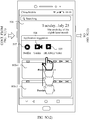
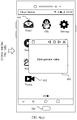
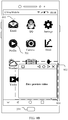
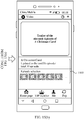
- the method may include: receiving, by the electronic device, a first operation; displaying a leftmost screen on the touchscreen of the electronic device in response to the received first operation; determining, by the electronic device, that a first video application has a target permission, when an application suggestion window of the leftmost screen includes an icon of the first video application, where the target permission is a permission for playing a video preview corresponding to a video application, when the video application is not displayed in a foreground; obtaining, by the electronic device, a first preview video corresponding to the first video application; adding a first video preview window to the leftmost screen, and playing the obtained first preview video in the added first video preview window; receiving, by the electronic device, a second operation; in response to the second operation, closing, by the electronic device, the first video preview window in the leftmost screen, and displaying a page of a home screen on the touchscreen of the electronic device; and redisplaying
- the application suggestion window includes an icon of a video application
- the icon included in the application suggestion window usually belongs to the application frequently used by the user
- the electronic device may play, in the leftmost screen, the preview video corresponding to the video application.
- the user can watch the preview video corresponding to the video application without opening the video application, thereby reducing complexity of a user operation, improving the using efficiency of the electronic device, and implementing efficient interaction between the electronic device and the user.
- the page of the home screen includes an icon of a video application in the leftmost screen
- the preview video played in the leftmost screen continues to be played, to attract the user to pay attention to and use the video application.
- the method may further include: determining, by the electronic device, whether the second video application has the target permission, when the page that is of the home screen and that is displayed on the touchscreen of the electronic device includes the icon of the first video application having the target permission and the icon of the second video application; redisplaying the first video preview window in the blank area of the page of the home screen when determining that the second video application does not have the target permission; and continuing playing the first preview video.
- a size of the touchscreen of the electronic device is limited, when an interface displayed on the touchscreen of the electronic device includes icons of a plurality of video applications, if preview videos corresponding to all video applications are displayed, an original control in the interface may be blocked, and user experience is poor. Therefore, in this application, a preview video corresponding to a video application with a target permission is selected for playing, to improve user experience.
- the method may further include: determining, by the electronic device, whether the second video application has the target permission, when the page that is of the home screen and that is displayed on the touchscreen of the electronic device includes the icon of the first video application having the target permission and the icon of the second video application; and if determining that the second video application also has the target permission, redisplaying, by the electronic device, the first video preview window in a blank area of a page of the home screen when determining that use frequency of the first video application is greater than use frequency of the second video application, a priority of the first video application is higher than a priority of the second video application, or a last use time of the first video application is later than a last use time of the second video application, and continuing playing the first preview video; or if determining that use frequency of the first video application is less than use frequency of the second video application, a priority of the first video application is less than a priority of the second video application, or a last use time of the first video application is earlier than a last use time of the second video
- the interface displayed on the touchscreen of the electronic device includes the icons of the plurality of video applications with the target permission, a preview video corresponding to a video application that meets a specific condition is selected to be played, so that the played preview video can better meet a using requirement of the user, thereby improving user experience.
- the method may further include: obtaining, by the electronic device, a second preview video corresponding to the second video application, when the page that is of the home screen and that is displayed on the touchscreen of the electronic device includes the icon of the first video application and an icon of the second video application; and playing the second preview video in the first video preview window, or displaying a second video preview window in the blank area of the page of the home screen, and playing the second preview video in the second video preview window.
- the electronic device may play a preview video corresponding to each video application.
- the first video preview window added to the leftmost screen is adjacent to the application suggestion window. In this way, it is convenient for the user to view.
- the electronic device if the electronic device does not receive an operation in a process of playing the first preview video, the electronic device closes the first video preview window in the leftmost screen after playing of the first preview video is completed, and displays an original window in the leftmost screen at an original display position.
- the electronic device may close the video preview window, thereby further improving an intelligent interaction capability of the electronic device with the user.
- a video preview method may be implemented in an electronic device having a touchscreen, and the method may include: receiving, by an electronic device, a first operation; displaying a first screen on the touchscreen of the electronic device in response to the first operation, where the first screen may be a page of a home screen or a leftmost screen; obtaining, by the electronic device, a first preview video corresponding to a first video application, when the first screen includes an identifier of the first video application; and displaying a first video preview window in the first screen, and playing the obtained first preview video in the first video preview window.
- the electronic device may play, in the home screen or the leftmost screen, a preview video corresponding to the video application, and the user does not need to open the video application.
- complexity of a user operation is reduced, using efficiency of the electronic device is improved, and efficient interaction between the electronic device and the user is implemented.
- the obtaining, by the electronic device, a first preview video corresponding to a first video application, when the first screen includes the identifier of the first video application may specifically include: obtaining, by the electronic device, a user profile, where the user profile may include at least one of a time and a place at which a user uses a video application; determining, by the electronic device, that the user profile indicates that the user opens the first screen to use the video application; and obtaining, by the electronic device, the first preview video when the first screen includes the identifier of the first video application.
- the user profile is obtained to determine the using intention of opening the first screen by the user.
- the electronic device plays, on the first screen, the preview video corresponding to the video application only when the using intention of opening the first screen by the user is to use the video application and it is determined that the first screen includes the identifier of the first video application, so that an operation of playing the preview video by the electronic device is closer to a using requirement of the user, and user experience is improved.
- the obtaining, by the electronic device, a first preview video corresponding to a first video application when the first screen includes the identifier of the first video application may specifically include:: obtaining, by the electronic device, the first preview video when an application suggestion window of the leftmost screen includes the identifier of the first video application. Because the application suggestion window of the leftmost screen includes an icon of an application frequently used by the user, when the user opens the leftmost screen, and the application suggestion window of the leftmost screen includes the identifier of the first video application, the electronic device plays the preview video in the leftmost screen. In this way, the operation of playing the preview video by the electronic device is closer to a using requirement of the user, and user experience is improved.
- the method may further include: when the first screen further includes an identifier of a second video application, and before the obtaining, by the electronic device, a first preview video corresponding to the first video application, determining, by the electronic device, that the first video application has a target permission and the second video application does not have the target permission, where the target permission is a permission for playing a video preview corresponding to a video application, when the video application is not displayed in a foreground.
- the interface displayed on the touchscreen of the electronic device includes icons of a plurality of video applications, a preview video corresponding to a video application with the target permission is selected to be played. Therefore, when a size of the touchscreen is limited, a case in which an original control in the interface is blocked because too many preview videos are played is effectively avoided, thereby improving user experience.
- the method may further include: when the first screen further includes an identifier of the second video application, and before the obtaining, by the electronic device, a first preview video corresponding to the first video application, determining, by the electronic device, that both the first video application and the second video application have the target permission, and determining that use frequency of the first video application is greater than use frequency of the second video application, a priority of the first video application is higher than a priority of the second video application, or a last use time of the first video application is later than a last use time of the second video application, where the target permission is a permission for playing a video preview corresponding to a video application, when the video application is not displayed in a foreground.
- the interface displayed on the touchscreen of the electronic device includes the icons of the plurality of video applications with the target permission, a preview video corresponding to a video application that meets a specific condition is selected to be played, so that the played preview video can better meet a using requirement of the user, thereby improving user experience.
- the method may further include: obtaining, by the electronic device, a second preview video corresponding to a second video application, when the first screen further includes an identifier of the second video application; and playing the second preview video in the first video preview window, or displaying a second video preview window in the first screen, and playing the second preview video in the second video preview window.
- the electronic device may play a preview video corresponding to each video application.
- the method may further include: obtaining, by the electronic device, a second preview video corresponding to a second video application and a third preview video corresponding to a third video application, when the application suggestion window of the leftmost screen further includes an identifier of the second video application and an identifier of the third video application, adding a second video preview window to the leftmost screen, and playing the second preview video in the second video preview window; receiving, by the electronic device, a sliding operation; and in response to the sliding operation, adding, by the electronic device, a third video preview window to the leftmost screen, and playing the third preview video in the third video preview window.
- the electronic device may play a preview video corresponding to each video application. It is convenient for a user to select, based on the played preview video, a video application that the user likes, thereby improving user experience.
- the identifier may be an icon of an application or a widget (widget) of an application.
- the first video preview window includes one or more of the following controls: a pause/play button, a previous button, a next button, a close button, and a maximize button.
- a pause/play button a previous button
- a next button a next button
- a close button a maximize button.
- the first video preview window is displayed in a blank area of the first screen, where the blank area is an area in which the first screen does not include a control. In this way, another control displayed in the first screen is not blocked, and it is convenient for the user to perform an operation on the another control.
- the method may further include: if the electronic device does not receive an operation in a process of playing the first preview video, closing, by the electronic device, the first video preview window after playing of the first preview video is completed.
- the electronic device may close the video preview window, thereby further improving an intelligent interaction capability of the electronic device with the user.
- the method may further include: receiving, by the electronic device, a second operation, in response to the second operation, closing the first video preview window, and displaying a second screen on the touchscreen of the electronic device; and receiving, by the electronic device, a third operation, and in response to the third operation, redisplaying the first screen, and redisplaying the first video preview window in the first screen.
- the electronic device continues playing the first preview video in the redisplayed first video preview window, or replays the first preview video in the redisplayed first video preview window.
- the first preview video is a preview of related content of a video recommended by the first video application to the user, or the first preview video is a preview of related content of a video subscribed by the user in the first video application. In this way, it may be convenient for the user to know a video subscribed by the user or a currently popular video.
- the method may further include: receiving, by the electronic device, a first switching operation, and, obtaining, by the electronic device, a fourth preview video in response to the first switching operation, where the fourth preview video is a preview video that corresponds to the first video application and that is different from the first preview video, or the fourth preview video is a preview video corresponding to the second video application, and playing, by the electronic device, the fourth preview video in the first preview video window.
- the electronic device plays another preview video based on the user operation, so that the user can watch more preview videos when the video application is not displayed in the foreground, thereby further improving user experience.
- the method may further include: receiving, by the electronic device, a second switching operation, and, closing, by the electronic device, the first video preview window in response to the second switching operation. In this way, when the user does not want to watch a preview video, the user may close the video preview window displayed in the interface at any time by performing the second switching operation.
- the method may further include: receiving, by the electronic device, a third switching operation, and in response to the third switching operation, opening, by the electronic device, the first video application, and continuing playing the first preview video by using the first video application.
- the user may open, by performing the third switching operation, a video application corresponding to a current preview video. This is convenient to continue browsing related content of the preview video, thereby improving user experience.
- the method may further include: sending, by the electronic device, a request message to a video server, where the request message is used to request, from the video server, a preview video corresponding to the first video application, and receiving, by the electronic device, the preview video that corresponds to the first video application and that is from the video application server.
- the electronic device sends the request message to the video server to obtain the preview video corresponding to the video application, to prepare for displaying, to the user, the preview video corresponding to the video application.
- an electronic device may include: an input unit, configured to receive a first operation; a display unit, configured to: display a leftmost screen in response to the first operation obtained by the input unit; a determining unit, configured to determine that a first video application has a target permission when an application suggestion window of the leftmost screen displayed by the display unit includes an icon of the first video application, where the target permission is a permission for playing a video preview corresponding to a video application, when the video application is not displayed in a foreground; and an obtaining unit, configured to obtain a first preview video corresponding to the first video application, where the display unit is further configured to: add a first video preview window to the leftmost screen, and play, in the first video preview window, the first preview video obtained by the obtaining unit; the input unit is further configured to receive a second operation; the display unit is further configured to: in response to the second operation received by the input unit, close the first video preview window in the leftmost screen, display a page of
- the determining unit is further configured to determine that the second video application does not have the target permission.
- the determining unit is further configured to: determine that the second video application has the target permission, and determine that use frequency of the first video application is greater than use frequency of the second video application, a priority of the first video application is higher than a priority of the second video application, or a last use time of the first video application is later than a last use time of the second video application.
- the obtaining unit is further configured to obtain a second preview video corresponding to the second video application; the display unit is further configured to play, in the first video preview window, the second preview video obtained by the obtaining unit, or display a second video preview window in the blank area of the page of the home screen, and play, in the second video preview window, the second preview video obtained by the obtaining unit.
- the first video preview window added to the leftmost screen is adjacent to the application suggestion window.
- an electronic device may include: an input unit, configured to receive a first operation; a display unit, configured to: display a first screen in response to the first operation obtained by the input unit, where the first screen is a page of a home screen or a leftmost screen; and an obtaining unit, configured to obtain a first preview video corresponding to a first video application when the first screen displayed by the display unit includes an identifier of the first video application, where the display unit is further configured to display a first video preview window in the first screen, and play, in the first video preview window, the first preview video obtained by the obtaining unit.
- the obtaining unit is specifically configured to: obtain a user profile, where the user profile includes at least one of a time and a place at which a user uses a video application, determine that the user profile indicates that the user opens the first screen to use the video application, and obtain the first preview video when the first screen includes the identifier of the first video application.
- the obtaining unit is specifically configured to obtain the first preview video when an application suggestion window of the leftmost screen includes the identifier of the first video application.
- the electronic device further includes a determining unit, configured to: when the first screen further includes an identifier of the second video application, determine that the first video application has a target permission and a second video application does not have the target permission.
- the target permission is a permission for playing a video preview corresponding to a video application, when the video application is not displayed in a foreground.
- the electronic device further includes the determining unit, configured to: determine that both the first video application and the second video application have the target permission when the first screen further includes the identifier of the second video application, and determine that use frequency of the first video application is greater than use frequency of the second video application, a priority of the first video application is higher than a priority of the second video application, or a last use time of the first video application is later than a last use time of the second video application, where the target permission is a permission for playing a video preview corresponding to a video application, when the video application is not displayed in a foreground.
- the obtaining unit is further configured to: obtain a second preview video corresponding to a second video application, when the first screen further includes an identifier of the second video application; and the display unit is further configured to play, in the first video preview window, the second preview video obtained by the obtaining unit, or display a second video preview window in the first screen, and play, in the second video preview window, the second preview video obtained by the obtaining unit.
- the obtaining unit is further configured to obtain a second preview video corresponding to a second video application and a third preview video corresponding to a third video application, when the application suggestion window of the leftmost screen further includes an identifier of the second video application and an identifier of the third video application;
- the display unit is further configured to: add a second video preview window to the leftmost screen, and play the second preview video in the second video preview window;
- the input unit is further configured to receive a sliding operation; and the display unit is further configured to: in response to the sliding operation obtained by the input unit, add a third video preview window to the leftmost screen, and play the third preview video in the third video preview window.
- the identifier may be an icon of an application or a widget of an application; or the first video preview window includes one or more of the following controls: a pause/play button, a previous button, a next button, a close button, and a maximize button; or the first video preview window is displayed in a blank area of the first screen, where the blank area is an area in which the first screen does not include a control.
- an electronic device may include one or more processors, a memory, a touchscreen, and one or more computer programs.
- the foregoing components may be connected by using one or more communications buses.
- the touchscreen may include a touch-sensitive surface and a display.
- the one or more computer programs are stored in the memory, and are configured to be executed by the one or more processors.
- the one or more computer programs include an instruction. When the one or more processors execute the instruction, the touchscreen is configured to: receive a first operation, and display a leftmost screen according to an instruction of the processor in response to the first operation.
- the processor is configured to: determine that a first video application has a target permission when an application suggestion window of the leftmost screen includes an icon of the first video application, where the target permission is a permission for playing a video preview corresponding to a video application, when the video application is not displayed in a foreground, and obtain a first preview video corresponding to the first video application.
- the touchscreen is further configured to: add to display a first video preview window in the leftmost screen according to the instruction of the processor, and play the first preview video in the first video preview window.
- the touchscreen is further configured to: receive a second operation, in response to the second operation, close the first video preview window in the leftmost screen according to the instruction of the processor, display a page of a home screen, and redisplay the first video preview window in a blank area of the page of the home screen according to the instruction of the processor when the page of the home screen includes an icon of the first video application and an icon of a second video application, and continue playing the first preview video, where the blank area is an area in which the page of the home screen does not include a control.
- the processor is further configured to determine that the second video application does not have the target permission.
- the processor is further configured to: determine that the second video application has the target permission, and determine that use frequency of the first video application is greater than use frequency of the second video application, a priority of the first video application is higher than a priority of the second video application, or a last use time of the first video application is later than a last use time of the second video application.
- the processor is further configured to obtain a second preview video corresponding to the second video application; and the touchscreen is further configured to: play the second preview video in the first video preview window according to the instruction of the processor, or display a second video preview window in the blank area of the page of the home screen according to the instruction of the processor, and play the second preview video in the second video preview window.
- the first video preview window added to the leftmost screen is adjacent to the application suggestion window.
- an electronic device may include one or more processors, a memory, a touchscreen, and one or more computer programs.
- the foregoing components may be connected by using one or more communications buses.
- the touchscreen may include a touch-sensitive surface and a display.
- the one or more computer programs are stored in the memory, and are configured to be executed by the one or more processors.
- the one or more computer programs include an instruction. When the one or more processors execute the instruction, the touchscreen is configured to: receive a first operation, and display a first screen according to an instruction of the processor in response to the first operation, where the first screen is a page of a home screen or a leftmost screen.
- the processor is configured to obtain a first preview video corresponding to a first video application when the first screen includes an identifier of the first video application.
- the touchscreen is further configured to display a first video preview window in the first screen according to the instruction of the processor, and play the obtained first preview video in the first video preview window.
- the processor is specifically configured to: obtain a user profile, where the user profile includes at least one of a time and a place at which a user uses a video application, determine that the user profile indicates that the user opens the first screen to use the video application, and obtain the first preview video when the first screen includes the identifier of the first video application.
- the processor when the first screen is the leftmost screen, is specifically configured to obtain the first preview video when an application suggestion window of the leftmost screen includes the identifier of the first video application.
- the processor is further configured to: when the first screen further includes an identifier of the second video application, determine that the first video application has a target permission and a second video application does not have the target permission, where the target permission is a permission for playing a video preview corresponding to a video application, when the video application is not displayed in a foreground.
- the processor is further configured to: determine that both the first video application and the second video application have the target permission when the first screen further includes the identifier of the second video application, and determine that use frequency of the first video application is greater than use frequency of the second video application, a priority of the first video application is higher than a priority of the second video application, or a last use time of the first video application is later than a last use time of the second video application, where the target permission is a permission for playing a video preview corresponding to a video application, when the video application is not displayed in a foreground.
- the processor is further configured to obtain a second preview video corresponding to a second video application, when the first screen further includes an identifier of the second video application; and the touchscreen is further configured to: play the second preview video in the first video preview window according to an instruction of the processor, or display a second video preview window in the first screen according to the instruction of the processor, and play the second preview video in the second video preview window.
- the processor is further configured to obtain a second preview video corresponding to a second video application and a third preview video corresponding to a third video application, when an application suggestion window of the leftmost screen further includes an identifier of the second video application and an identifier of the third video application; and the touchscreen is further configured to: add a second video preview window to the leftmost screen according to the instruction of the processor, and play the second preview video in the second video preview window.
- the touchscreen is further configured to: receive a sliding operation; and in response to the sliding operation, add a third video preview window to the leftmost screen according to the instruction of the processor, and play the third preview video in the third video preview window.
- the identifier may be an icon of an application or a widget of an application; or the first video preview window includes one or more of the following controls: a pause/play button, a previous button, a next button, a close button, and a maximize button; or the first video preview window is displayed in a blank area of the first screen, and the blank area is an area in which the first screen does not include a control.
- a computer storage medium including a computer instruction.
- the computer instruction When the computer instruction is run on an electronic device, the electronic device is enabled to perform the video preview method according to any one of the first aspect or the possible implementations of the first aspect.
- a computer storage medium including a computer instruction.
- the computer instruction When the computer instruction is run on an electronic device, the electronic device is enabled to perform the video preview method according to any one of the second aspect or the possible implementations of the second aspect.
- a computer program product is provided.
- the computer program product is run on a computer, the computer is enabled to perform the video preview method according to any one of the first aspect or the possible implementations of the first aspect.
- a computer program product is provided.
- the computer program product is run on a computer, the computer is enabled to perform the video preview method according to any one of the second aspect or the possible implementations of the second aspect.
- a video preview apparatus has functions of implementing behavior of the electronic device in the implementations of the foregoing method.
- the functions may be implemented by hardware, or may be implemented by hardware executing corresponding software.
- the hardware or the software includes one or more modules corresponding to the foregoing functions.
- first and second are merely used for a purpose of description, and shall not be understood as an indication or implication of relative importance or implicit indication of the number of indicated technical features. Therefore, a feature limited by “first” or “second” may explicitly or implicitly include one or more features. In the description of the embodiments of this application, unless otherwise stated, "a plurality of' means two or more than two.
- An embodiment of this application provides a video preview method.
- the method may be applied to an electronic device on which a video application is installed.
- the video preview method can implement preview of related content in the video application when a user does not open the video application, thereby reducing complexity of a user operation, improving using efficiency of the electronic device, and implementing efficient interaction between the electronic device and the user.
- FIG. 1 is a simplified schematic diagram of a system architecture according to an embodiment of this application.
- the system architecture may include an electronic device 101 and a video server 102.
- FIG. 3 A specific structure of the electronic device 101 is shown in FIG. 3 , and is specifically described in the following embodiments.
- the video server 102 may be a server of a content provider that provides services such as video on demand and live broadcast.
- the electronic device 101 and the video server 102 may exchange data by using a mobile internet.
- the electronic device 101 may send a request message to the video server 102 by using the mobile internet, to request video content of one or more videos, and the video server 102 returns corresponding video content and the like to the electronic device 101 by using the mobile internet.
- Video applications such as Netflix, Youku, YouTube, and Huawei Video
- Video applications are installed in the electronic device 101.
- the electronic device 101 may display a preview video on the desktop or the leftmost screen. Therefore, it is convenient for the user to view, and the user does not need to tap the icon of the video application to open a home screen of the video application to view the preview video.
- the leftmost screen may be an interface entered by the user by sliding rightward from the desktop (or referred to as the home screen) or a lock screen.
- the interface may display an application and a function that are frequently used by the user, a subscribed service and information, and the like, thereby facilitating quick browsing and use of the user.
- “leftmost screen” is merely a term used in the embodiments of this application, a meaning indicated by the "leftmost screen” has been recorded in the embodiments of this application, and a name of the "leftmost screen” does not constitute any limitation on the embodiments of this application.
- the "leftmost screen” may also be referred to as another name such as a "desktop assistant", a "shortcut menu", or a "widget set interface”.
- the video server 102 is mainly configured to: determine a preview video corresponding to a video application, and provide the preview video corresponding to the video application to the electronic device 101.
- the video application in this embodiment of this application may be an application program that can provide functions such as video browsing, playing, and downloading to the user.
- the electronic device 101 may be a portable electronic device that further includes other functions such as personal digital assistant and/or music player functions, for example, a mobile phone, a tablet, or a wearable device (for example, a smartwatch) having a wireless communications function.
- An example embodiment of the portable electronic device includes but is not limited to a portable electronic device using iOS®, Android®, Microsoft®, or another operating system.
- the portable electronic device may alternatively be another portable electronic device such as a laptop computer (Laptop) having a touch-sensitive surface (for example, a touch panel).
- the electronic device 101 may alternatively be a desktop computer having a touch-sensitive surface (for example, a touch panel) other than a portable electronic device.
- One or more video applications may be installed in the electronic device 101 in this embodiment of this application, and an icon of a video application installed in the electronic device 101 is displayed on a desktop displayed on a touchscreen of the electronic device 101.
- one or more other applications such as a calculator, a browser, an email client, and a weather application may further be installed in the electronic device 101 in this embodiment of this application, and icons of these applications may also be displayed on the desktop displayed on the touchscreen of the electronic device 101.
- the application (for example, the video application) in this embodiment of this application may be an embedded application (that is, a system application of the electronic device 101), or may be a downloadable application.
- the embedded application is an application program provided as a part of implementation of the electronic device 101.
- the downloadable application is an application program that may provide an internet protocol multimedia subsystem (Internet Protocol Multimedia Subsystem, IMS) connection of the downloadable application.
- the downloadable application may be an application installed in the electronic device 101 in advance, or may be a third-party application downloaded by a user and installed in the electronic device 101.
- the desktop displayed on the touchscreen of the electronic device 101 may also be referred to as a home screen (home screen), and may include one or more pages (page).
- the one or more pages may be used to display a control (control element).
- the one or more pages display an icon of an application installed in the electronic device 101, for example, an icon of the video application or an icon of the browser.
- the one or more pages display a widget or an icon of a folder.
- the electronic device 101 stores a correspondence between an icon of an application and a page, and the electronic device 101 may determine, based on the correspondence, a page in which the icon of the application is specifically displayed.
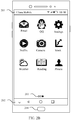
- FIG. 2A and FIG. 2B show a series of graphical user interfaces (graphical user interface, GUI) displayed on the touchscreen of the electronic device 101.
- the GUIs are home screens of the electronic device 101.
- a size of the touchscreen of the electronic device 101 is usually fixed, and only a limited quantity of controls can be displayed on the touchscreen of the electronic device 101.
- a control is a GUI element, is a software component, is included in an application program, and controls all data processed by the application program and interaction operations of the data.
- a user may interact with the control through direct manipulation (direct manipulation), to read or edit information about the application program.
- controls may include visual interface elements such as an icon, a button, a menu, a tab, a text box, a dialog box, a status bar, a navigation bar, and a widget.
- the home screen of the electronic device 101 may be divided into a plurality of pages.
- a GUI displayed in FIG. 2A may be referred to as a first page (the first page) of the home screen
- a GUI displayed in FIG. 2B may be referred to as a second page (the second page) of the home screen.
- Each page may include different controls.
- the GUI may be the first page in the home screen of the electronic device 101.
- the first page is displayed on the touchscreen of the electronic device 101, and specifically includes a status bar 201, a hideable navigation bar 202, a home screen indicator 203, and various icons.
- the electronic device 101 For example, applications such as WeChat®, a browser, a calculator, Netflix®, an email, and weather are installed in the electronic device 101, and the first page includes two rows and three columns of icons, that is, six icons: an icon of WeChat®, an icon of the browser, an icon of a microblog, an icon of the calculator, an icon of Taobao®, and an icon of a store.
- the electronic device 101 may open a graphical user interface of an application corresponding to an icon in response to the touch event.
- the home screen indicator 203 is used to prompt the user a specific page that is currently displayed. It may be understood that in some other embodiments, the home screen may further include a dock bar.
- the dock bar may include icons of applications that are commonly used, and the like.
- the leftmost screen displayed on the touchscreen of the electronic device 101 may also be configured to display a control, for example, display an icon of an application installed in the electronic device 101.
- the leftmost screen may display an icon of an application commonly used by the user.
- the leftmost screen may be an interface entered by the user by sliding rightward from the home screen or may be an interface entered by the user by sliding rightward from a lock screen.
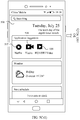
- FIG. 2C shows an example GUI displayed on the touchscreen of the electronic device 101.
- the GUI is the leftmost screen of the electronic device 101, and may be configured to display the icon of the application commonly used by the user, and a subscribed service and subscribed information.
- applications commonly used by the user include Netflix and WeChat.
- a GUI displayed in FIG. 2C may be referred to as the leftmost screen of the electronic device 101.
- the leftmost screen is displayed on the touchscreen of the electronic device 101, and specifically includes a status bar 201, a hideable navigation bar 202, and various widgets, for example, an application suggestion widget including the icon of WeChat and the icon of Netflix, a widget including a weather reminder subscribed by the user, and a widget including a schedule reminder.
- the electronic device 101 may further include a home button 204.
- the home button 204 may be a physical key or a virtual key.
- the home button 204 is configured to receive an instruction of the user, and return a currently displayed GUI to the home screen, thereby displaying a specific page in the home screen. In this way, it may be convenient for the user to view the home screen at any time.
- the instruction may be specifically an operation instruction of pressing the home button 204 once by the user, or may be an operation instruction of successively pressing the home button 204 twice within a short time by the user, or may be an operation instruction of pressing and holding the home button 204 within a predetermined time by the user.
- the home button 204 may further be integrated with a fingerprint reader, so that when the user presses the home button 204, the fingerprint reader subsequently performs fingerprint collection and recognition.
- the electronic device 101 provided in this embodiment of this application is described by using an example in which the electronic device 101 is a mobile phone.
- the mobile phone shown in FIG. 3 is merely an example, and does not constitute any limitation on the mobile phone.
- the mobile phone may include more or fewer components than those shown in the figure, or two or more components may be combined, or a different component deployment may be used.
- the components shown in FIG. 3 may be implemented in hardware that includes one or more signal processing and/or application-specific integrated circuits, in software, or in a combination of hardware and software.
- a mobile phone may specifically include components such as a processor 301, a radio frequency (Radio Frequency, RF) circuit 302, a memory 303, a touchscreen 304, a Bluetooth apparatus 305, one or more sensors 306, a wireless fidelity (Wireless Fidelity, Wi-Fi) apparatus 307, a positioning apparatus 308, an audio circuit 309, a peripheral interface 310, and a power system 311.
- the components may perform communication by using one or more communications buses or signal lines (not shown in FIG. 3 ).
- the processor 301 is a control center of the mobile phone, and is connected to various parts of the mobile phone by using various interfaces and lines. By running or executing an application program (Application, APP) stored in the memory 303, and invoking data and an instruction that are stored in the memory 303, the processor 301 performs various functions and data processing of the mobile phone.
- the processor 301 may include one or more processing units.
- the processor 301 may further be integrated with an application processor and a modem processor.
- the application processor mainly processes an operating system, a user interface, an application program, and the like.
- the modem processor mainly processes wireless communication. It may be understood that the foregoing modem processor may alternatively not be integrated into the processor 301.
- the processor 301 may be a Kirin 960 chip manufactured by Huawei Technologies Co., Ltd.
- the radio frequency circuit 302 may be configured to receive and send a radio signal during information receiving and sending or a call. Specifically, the radio frequency circuit 302 may receive downlink data of a base station and then send the downlink data to the processor 301 for processing. In addition, the radio frequency circuit 302 sends uplink-related data to the base station. Usually, the radio frequency circuit 302 includes but is not limited to an antenna, at least one amplifier, a transceiver, a coupler, a low noise amplifier, a duplexer, and the like. In addition, the radio frequency circuit 302 may further communicate with another device through wireless communication. The wireless communication may use any communications standard or protocol, including but not limited to a global system for mobile communications, a general packet radio service, code division multiple access, wideband code division multiple access, long term evolution, an email, a short messaging service, and the like.
- the memory 303 is configured to store an application program and data.
- the processor 301 runs the application program and the data that are stored in the memory 303, to implement various functions and data processing of the mobile phone.
- the memory 303 mainly includes a program storage area and a data storage area.
- the program storage area may store an operating system, an application program required by at least one function (such as a sound playback function or an image playing function).
- the data storage area may store data (such as audio data and an address book) created based on use of the mobile phone.
- the memory 303 may include a high-speed random access memory, and may further include a non-volatile memory such as a magnetic disk storage device, a flash memory device, another volatile solid storage device, or the like.
- the memory 303 may store various operating systems, for example, an iOS® operating system developed by Apple Inc. and an ANDROID® operating system developed by Google Inc.
- the touchscreen 304 may include a touch-sensitive surface 304-1 and a display 304-2.
- the touch-sensitive surface 304-1 (for example, a touch panel) may collect a touch event of a user of the mobile phone on or near the mobile phone (for example, an operation of the user on or near the touch-sensitive surface 304-1 by using any suitable object such as a finger or a stylus), and send collected touch information to another device such as the processor 301.
- the touch event of the user near the touch-sensitive surface 304-1 may be referred to as a floating touch.
- the floating touch may indicate that the user does not need directly touch the touch panel, to select, move, or drag a target (such as an icon), and the user only needs be located near the electronic device, to perform wanted functions.
- the touch-sensitive surface 304-1 that can perform floating touch may be implemented by using a capacitive touch-sensitive surface, an infrared sensing touch-sensitive surface, an ultrasonic touch-sensitive surface, and the like.
- the touch-sensitive surface 304-1 may include two parts: a touch detection apparatus and a touch controller.
- the touch detection apparatus detects a touch position of the user, detects a signal generated by the touch operation, and transfers the signal to the touch controller.
- the touch controller receives touch information from the touch detection apparatus, converts the touch information into touch point coordinates, and sends the touch point coordinates to the processor 301.
- the touch controller may further receive and execute an instruction sent by the processor 301.
- the touch-sensitive surface 304-1 may be implemented by using various types, such as a resistive type, a capacitance type, an infrared type, and a surface acoustic wave type.
- the display (also referred to as a display) 304-2 may be configured to display information input by the user or information provided to the user, and various menus of the mobile phone.
- the display 304-2 may be configured by using a liquid crystal display, an organic light-emitting diode, or the like.
- the touch-sensitive surface 304-1 may cover the display 304-2.
- the touch-sensitive surface 304-1 After detecting a touch event on or near the touch-sensitive surface 304-1, the touch-sensitive surface 304-1 transfers the touch event to the processor 301, to determine a type of the touch event. Then, the processor 301 may provide a corresponding visual output on the display 304-2 based on the type of the touch event.
- the touch-sensitive surface 304-1 and the display 304-2 are used as two separate components to implement input and output functions of the mobile phone, in some embodiments, the touch-sensitive surface 304-1 and the display 304-2 may be integrated to implement the input and output functions of the mobile phone. It may be understood that the touchscreen 304 is formed by stacking a plurality of layers of materials.
- the touch-sensitive surface 304-1 may cover the display 304-2, and a size of the touch-sensitive surface 304-1 is greater than a size of the display 304-2, so that the touch-sensitive surface 304-1 covers the entire display 304-2.
- the touch-sensitive surface 304-1 may be configured at a front facet of the mobile phone in a form of a full panel. To be specific, touch of the user on the front facet of the mobile phone may be sensed by the mobile phone. In this way, full touch experience of the front facet of the mobile phone may be implemented.
- the touch-sensitive surface 304-1 is configured at the front facet of the mobile phone in the form of the full panel
- the display 304-2 may also be configured at the front facet of the mobile phone in the form of the full panel. In this way, a bezel-less structure may be implemented at the front facet of the mobile phone.
- the mobile phone may further include a Bluetooth apparatus 305.
- the Bluetooth apparatus 305 is configured to implement data exchange between the mobile phone and another short distance electronic device (for example, a mobile phone or a smartwatch).
- the Bluetooth apparatus may be an integrated circuit, a Bluetooth chip, or the like.
- the mobile phone may further include at least one sensor 306 such as an optical sensor, a motion sensor, and another sensor.
- the optical sensor may include an ambient light sensor and a proximity sensor.
- the ambient light sensor may adjust luminance of the display of the touchscreen 304 based on brightness of ambient light.
- the proximity sensor may switch off a power supply of the display when the mobile phone is moved to an ear.
- an acceleration sensor may detect magnitudes of accelerations in various directions (usually on three axes), may detect a magnitude and a direction of gravity when static, and may be applied to an application that recognizes an attitude of the mobile phone (for example, switching between landscape orientation and portrait orientation, a related game, and magnetometer posture calibration), and functions related to vibration recognition (such as a pedometer and a knock), and the like.
- an attitude of the mobile phone for example, switching between landscape orientation and portrait orientation, a related game, and magnetometer posture calibration
- functions related to vibration recognition such as a pedometer and a knock
- sensors such as a gyroscope, a barometer, a hygrometer, a thermometer, and an infrared sensor that may be further configured in the mobile phone, details are not described herein.
- the mobile phone may further have a fingerprint recognition function.
- a fingerprint reader is configured at a back facet of the mobile phone (for example, below a rear-facing camera), or a fingerprint reader is configured at a front facet of the mobile phone (for example, below the touchscreen 304).
- the fingerprint recognition function may also be implemented by configuring the fingerprint reader in the touchscreen 304.
- the fingerprint reader may be integrated with the touchscreen 304 to implement the fingerprint recognition function of the mobile phone.
- the fingerprint reader may be configured in the touchscreen 304, and may be a part of the touchscreen 304, or may be configured in the touchscreen 304 in another manner.
- the fingerprint reader may further be implemented as a full panel fingerprint reader.
- the touchscreen 304 may be considered as a panel that may perform fingerprint collection at any position.
- the fingerprint reader may send the collected fingerprint to the processor 301, so that the processor 301 performs processing (for example, fingerprint verification) on the fingerprint.
- a main component of the fingerprint reader is a fingerprint sensor.
- the fingerprint sensor may use any type of sensing technologies, including but not limited to an optical sensing technology, a capacitive sensing technology, a piezoelectric sensing technology, an ultrasonic wave sensing technology, and the like.
- the Wi-Fi apparatus 307 is configured to provide network access that complies with a Wi-Fi related standard protocol, to the mobile phone.
- the mobile phone may access a Wi-Fi access point by using the Wi-Fi apparatus 307, to help the user receive and send an email, browse a web page, access streaming media, and so on.
- the Wi-Fi apparatus 307 provides wireless broadband internet access to the user.
- the Wi-Fi apparatus 307 may also be used as a Wi-Fi wireless access point, and may provide Wi-Fi network access to another electronic device.
- the positioning apparatus 308 is configured to provide a geographical location to the mobile phone. It may be understood that the positioning apparatus 308 may be specifically a receiver of a positioning system such as a global positioning system (Global Positioning System, GPS) or a BeiDou Navigation Satellite System. After receiving the geographical location sent by the positioning system, the positioning apparatus 308 sends the information to the processor 301 for processing, or sends the information to the memory 303 for storage. In some other embodiments, the positioning apparatus 308 may be a receiver of an assisted global positioning system (Assisted Global Positioning System, AGPS).
- AGPS is a running manner in which GPS positioning is performed with assistance and cooperation. The AGPS may accelerate a positioning speed of the mobile phone by using a signal of a base station in cooperation with a signal of a GPS satellite.
- the positioning apparatus 308 may obtain positioning assistance by communicating with an assisted positioning server (for example, a positioning server of the mobile phone).
- the AGPS system is used as an assisted server, to assist the positioning apparatus 308 in completing ranging and positioning services.
- the assisted positioning server communicates with the electronic device, for example, the positioning apparatus 308 (namely, the GPS receiver) of the mobile phone, by using a wireless communications network, to provide positioning assistance.
- the audio circuit 309, a speaker 312, and a microphone 313 may provide an audio interface between the user and the mobile phone.
- the audio circuit 309 may convert received audio data into an electrical signal and transmit the electrical signal to the speaker 312.
- the speaker 312 converts the electrical signal into a sound signal for output.
- the microphone 313 converts a collected sound signal into an electrical signal.
- the audio circuit 309 receives the electrical signal, converts the electrical signal into audio data, and outputs the audio data to the RF circuit 302 to send the audio data to, for example, another mobile phone, or outputs the audio data to the memory 303 for further processing.
- the peripheral interface 310 is configured to provide various interfaces to external input/output devices (for example, a keyboard, a mouse, an external display, an external memory, and a subscriber identity module card).
- external input/output devices for example, a keyboard, a mouse, an external display, an external memory, and a subscriber identity module card.
- the peripheral interface 310 is connected to the mouse by using a universal serial bus interface, and is connected, by using a metal contact on a card slot of a subscriber identity module (SIM) card, to the subscriber identity module (Subscriber Identity Module, SIM) card provided by a telecommunications operator.
- SIM subscriber identity module
- the peripheral interface 310 may be configured to couple the external input/output peripheral devices to the processor 301 and the memory 303.
- the mobile phone may further include a power supply apparatus 311 (such as a battery and a power management chip) for supplying power to the components.
- a power supply apparatus 311 such as a battery and a power management chip
- the battery may be logically connected to the processor 301 by using the power management chip, thereby implementing functions such as charging, discharging, and power consumption management by using the power supply apparatus 311.
- the mobile phone may further include a camera (a front-facing camera and/or a rear-facing camera), a flash, a mini-sized projector, a near field communication (Near Field Communication, NFC) apparatus, and the like. Details are not described herein.
- the following embodiments may be implemented in the electronic device (for example, the mobile phone) having the foregoing hardware.
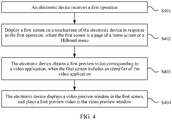
- FIG. 4 is a schematic flowchart of a video preview method according to an embodiment of this application. As shown in FIG. 4 , the method may include S401 to S405.
- An electronic device receives a first operation.
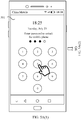
- the first operation may be specifically an unlocking operation performed by a user on the electronic device, a sliding operation performed by the user on a home screen of the electronic device, a trigger operation performed by the user on an interface of an application to return to the home screen, a trigger operation performed by the user on a home button, a trigger operation performed by the user on a home (Home) key included in a navigation bar, and the like.
- the first operation may be an operation automatically performed by the electronic device when a specific condition is satisfied, instead of an operation performed by the user on the electronic device.
- the electronic device obtains a first preview video corresponding to a video application, when the first screen includes an identifier of the video application.
- the identifier of the video application may be an icon or a widget.
- an example in which the identifier of the video application is an icon is used for description.
- the electronic device displays a video preview window in the first screen, and plays the first preview video in the video preview window.
- the electronic device may determine whether the first screen includes the identifier of the video application. When determining that the first screen includes the identifier of the video application, the electronic device may obtain the first preview video corresponding to the video application. For example, the electronic device may select a preview video from a pre-stored video preview set as the first preview video, or may further send a request message to a video server, so that the video server returns the preview video to the electronic device in response to the request message. After obtaining the first preview video, the electronic device may display the first preview video in the first screen for the user to view. For example, the electronic device may generate and display the video preview window in the first screen, and play the first preview video in the video preview window.
- the electronic device may play the preview video in the first screen, and the user does not need to open the video application.
- the user can be attracted to focus on the video application and use the video application, and an intelligent interaction capability of the electronic device with the user is also improved.
- the first preview video may be one preview video in a preview video set corresponding to the video application.
- the electronic device may store a preview video set corresponding to one or more video applications.
- the preview video set may include one or more preview videos.
- the preview video may be a preview of related content of a video recommended by the video server to the user, or may be a preview of related content of a video subscribed by the user, for example, a trailer of a video.
- the format of the preview video may be a graphics interchange format (Graphics Interchange Format, GIF), an MOV format, an MP4 format, or the like. This is not specifically limited in this embodiment of this application.
- FIG. 5 to FIG. 7(a) and FIG. 7(b) show a series of example GUIs displayed on the touchscreen of the electronic device.
- the GUIs are examples of interfaces for playing the preview video in the first screen displayed on the touchscreen of the electronic device in different scenarios.
- a GUI shown in FIG. 5A(1) to FIG. 5A(3) is an example of an interface for playing the preview video in a page that is of the home screen and that is displayed on the touchscreen of the electronic device, when any preview video in a video preview set is selected as a to-be-played preview video.
- FIG. 5B(3) is an example of an interface for playing the preview video in the leftmost screen displayed on the touchscreen of the electronic device, when a preview video in the video preview set is selected as a to-be-played preview video based on a rule.
- a GUI shown in FIG. 5C(1) to FIG. 5C(3) is an example of an interface for playing, in the leftmost screen displayed on the touchscreen of the electronic device, preview videos corresponding to a plurality of video applications, when the interface includes icons of the plurality of video applications.
- a GUI shown in FIG. 6(a) to FIG. 6(c) is an example of an interface for playing the preview video in a page that is of the home screen and that is displayed on the touchscreen of the electronic device, when the interface includes icons of a plurality of video applications.
- a GUI shown in FIG. 7(a) and FIG. 7(b) is an example of an interface for playing the preview video in the interface displayed on the touchscreen of the electronic device, when an icon of a video application is included in a folder.
- a video application A for example, Netflix
- a video application B for example, Youku
- Preview video sets that correspond to Netflix and Youku and that are stored in the electronic device may be shown in Table 1.
- Table 1 Netflix Trailer of the first Episode of the fourth Season of Peppa Pig Trailer of the eleventh Episode of A Christmas Carol Trailer of A Better tomorrow Trailer of Rise of the Planet of Apes Youku Trailer of the first phase of The Voice of China Trailer of Thor 3 Trailer of the fifth Episode of the third Season of The Blacklist
- a preview video set corresponding to Netflix includes a trailer of the first episode of the fourth season of Peppa Pig, a trailer of the eleventh episode of A Christmas Carol, a trailer of A Better tomorrow, and a trailer of Rise of the Planet of Apes.
- a preview video set corresponding to Youku includes a trailer of the first phase of The Voice of China, a trailer of Thor 3, and a trailer of the fifth episode of the third season of The Blacklist.
- the preview video set may be a preview of related content of a video in a watching history of a corresponding video application used by the user, or a preview of related content of a video recommended by the video server to the user. In this way, it can be convenient for the user to follow a program or learn of a currently popular movie and television program.
- the electronic device may select any preview video that is in the preview video set and that corresponds to the video application, as the first preview video.
- the first operation is an unlocking operation performed by the user on the electronic device
- the first screen is a page of the home screen of the electronic device
- the user enters an unlocking password in an unlocking interface 501 of the electronic device.
- the electronic device displays a first screen 502 shown in FIG. 5A(2) .
- the first screen 502 may be a second page of the home screen, and the second page includes an icon 503 of Netflix.
- the electronic device determines the icon 503 of Netflix in the second page currently displayed on the touchscreen.
- the electronic device displays a video preview window 800 in the second page in response to the foregoing determining operation.
- the video preview window 800 is specifically shown in FIG. 8 , and is described in detail in the following embodiments.
- the video preview window 800 corresponds to Netflix, and may be considered as a dynamic widget of Netflix.
- the dynamic widget is displayed on the touchscreen only in a specific situation. For example, the dynamic widget is displayed on the touchscreen when the user heavily presses a blank area of the touchscreen or in a specific time period (for example, 19:00 to 23:30), or the dynamic widget may be not displayed on the touchscreen after a specific action is performed.
- the electronic device may display, on the touchscreen, a relationship between the video application such as Netflix and the video preview window, for example, prompt, in a gradient animation manner, the user that the video preview window corresponds to Netflix.
- the user may easily know a video application from which the preview video displayed in the video preview window comes, thereby further improving user experience.
- the electronic device may select any preview video that is in the preview video set and that corresponds to Netflix, as the first preview video.
- the first preview video selected by the electronic device may be the trailer of the eleventh episode of A Christmas Carol.
- the electronic device may play the trailer in the video preview window 800.
- the electronic device may alternatively select the first preview video from the video preview set according to a set rule. For example, when preview videos that are in the preview video set and that correspond to the video application have different priorities, the electronic device may select a preview video that has a highest priority in the preview video set and that corresponds to the video application, as the first preview video.
- the first operation is a sliding operation performed by the user on the home screen displayed on the touchscreen of the electronic device and the first screen is the leftmost screen of the electronic device is used for specific description.
- the user slides rightward on the first page of the home screen displayed on the touchscreen of the electronic device.
- the electronic device displays a first screen 504 shown in FIG. 5B(2) , in response to the sliding operation of the user.
- the first screen 504 may be the leftmost screen, and the leftmost screen includes an icon 505 of Netflix.
- the electronic device determines the icon 505 of Netflix in the leftmost screen currently displayed on the touchscreen, as shown in FIG. 5B(3) , the electronic device adds the video preview window 800 to the leftmost screen in response to the foregoing determining operation.
- the video preview window 800 is specifically shown in FIG. 8 , and is specifically described in the following embodiments.
- the video preview window 800 corresponds to Netflix, and may be considered as a dynamic widget of Netflix.
- the electronic device displays the video preview window 800 in the leftmost screen in response to the determining operation only when determining that an application suggestion widget of the leftmost screen includes the icon 505 of Netflix.
- the video preview window 800 may be displayed at a position close to a widget including the icon 505 of Netflix, for example, a position of the application suggestion widget. For example, as shown in FIG. 5B(3) , the video preview window 800 is displayed at a location adjacent to the application suggestion widget including the icon 505 of Netflix. In this way, it may be convenient for the user to view.
- An original widget in the leftmost screen for example, a widget including a weather reminder subscribed by a user and a widget including a schedule reminder, may be displayed below the video preview window 800 in an original display sequence. In some other embodiments, after the video preview window 800 is closed, the original widget in the leftmost screen may be displayed at an original display position.
- priorities of preview videos that are in the preview video set and that correspond to Netflix are as follows: A priority of the trailer of the first episode of the fourth season of Peppa Pig is higher than a priority of the trailer of the eleventh episode of A Christmas Carol; the priority of the trailer of the eleventh episode of A Christmas Carol is higher than that a priority of the trailer of A Better tomorrow ; and the priority of the trailer of A Better tomorrow is higher than a priority of the trailer of Rise of the Planet of the Apes.
- the electronic device may select a preview video that has a highest priority in the preview video set and that corresponds to Netflix, as the first preview video.
- the first preview video is the trailer of the first episode of the fourth season of Peppa Pig.
- the electronic device may display the trailer in the video preview window 800.
- the priority of the preview video that is in the preview video set and that corresponds to the video application may be determined by sorting the preview videos.
- the electronic device if determining that the first screen includes an identifier of a video application, the electronic device only needs to obtain the first preview video corresponding to the video application. In some other embodiments of this application, if determining that the first screen includes identifiers of a plurality of (two or more) video applications, the electronic device may obtain a preview video corresponding to each video application. In addition, the electronic device may play, in a same video preview window, the obtained preview video corresponding to each video application. In some other embodiments, the electronic device may alternatively generate a video preview window for each video application, and play a preview video corresponding to the video application.
- a first video preview window corresponding to Netflix is displayed in the first screen
- a second video preview window corresponding to Youku is also displayed in the first screen.
- the electronic device respectively plays, in the two windows, preview videos corresponding to the two video applications.
- the electronic device may first determine video applications, in the plurality of video applications, that have a target permission.
- the target permission may be a permission for playing the video preview corresponding to the video application, when the video application is not displayed in a foreground, and then a first preview video corresponding to one of the video applications is obtained, according to a set rule, from one or more of the plurality of video applications that have the target permission.
- the video application may be a video application with the highest priority in the foregoing video applications with the target permission.
- the video application may be a video application that is most frequently used in the foregoing video applications with the target permission.
- the video application may be a video application, in the foregoing video applications with the target permission, whose last use time is closest to a current moment.
- the electronic device may configure, as a permission of the Android system, a function of playing the video preview by a video application that is not displayed in the foreground, and the video application may apply for the permission, to implement the function of playing the video preview by the video application that is not displayed in the foreground.
- the first screen includes identifiers of three video applications and the electronic device plays preview videos corresponding to the three video applications is used.
- Netflix, Youku, and Huawei Video are installed in the electronic device.
- An example in which the first operation is a sliding operation performed by the user on a home screen displayed on the touchscreen of the electronic device and the first screen is the leftmost screen of the electronic device is used for detailed description. The user slides rightward on the first page of the home screen displayed on the touchscreen of the electronic device.
- the electronic device displays a first screen 506 shown in FIG. 5C(1) , in response to the sliding operation of the user.
- the first screen 506 may be the leftmost screen, the application suggestion window of the leftmost screen includes an icon 507 ofNetflix, an icon 508 of Youku, and an icon 509 of Huawei Video. If determining the icon 507 of Netflix, the icon 508 of Youku, and the icon 509 of Huawei Video in the application suggestion window of the leftmost screen currently displayed on the touchscreen, the electronic device may display, in the leftmost screen, video preview windows corresponding to the three video applications, in response to the foregoing determining operation. However, because the size of the touchscreen is fixed, and only a limited quantity of controls can be displayed, as shown in FIG. 5C(2) , the electronic device may first add a video preview window 800-1 and a video preview window 800-2 to the leftmost screen.
- the video preview window 800-1 and the video preview window 800-2 are specifically the video preview window 800 shown in FIG. 8 , and are specifically described in the following embodiments.
- the video preview window 800-1 corresponds to Netflix, and may be considered as a dynamic widget of Netflix.
- the video preview window 800-2 corresponds to Youku, and may be considered as a dynamic widget of Youku.
- the electronic device plays, in the video preview window 800-1, an obtained preview video 1 corresponding to Netflix, and plays, in the video preview window 800-2, an obtained preview video 2 corresponding to Youku. In this case, the user may perform an upward sliding operation on the leftmost screen. As shown in FIG.
- the electronic device adds a video preview window 800-3 to the leftmost screen in response to the sliding operation of the user, the video preview window 800-3 is specifically the video preview window 800 shown in FIG. 8 , and is specifically described in the following embodiments.
- the video preview window 800-3 corresponds to Huawei Video, and may be considered as a dynamic widget of Huawei Video.
- the electronic device plays, in the video preview window 800-3, an obtained preview video 3 corresponding to Huawei Video.
- FIG. 6(a) to FIG. 6(c) an example in which a video application with a highest priority is selected from video applications with the target permission is used.
- Netflix and Youku are installed in the electronic device.
- the first operation is a trigger operation performed by the user on the home button 204
- the first screen is a page of the home screen of the electronic device, and the page includes an icon 601 of Netflix and an icon 602 of Youku is used for detailed description.
- an interface currently displayed on the touchscreen of the electronic device is a home screen 603 of WeChat. If the user wants to return to the home screen, the user presses the home button 204.
- the electronic device displays a first screen 604 shown in FIG. 6(b) , in response to the pressing operation of the user.
- the first screen 604 may be a second page of the home screen, and the second page includes the icon 601 of Netflix and the icon 602 of Youku.
- the electronic device determines the icon 601 of Netflix and the icon 602 of Youku in the second page currently displayed on the touchscreen.
- the electronic device may first determine whether Netflix and Youku and that have the target permission. For example, if both Netflix and Youku have the target permission, the electronic device may further determine whether Netflix or Youku has a higher priority, and obtain a first preview video corresponding to a video application with a higher priority.
- the electronic device may obtain a first preview video corresponding to Youku, and as shown in FIG. 6(c) , the electronic device displays the video preview window 800 in the second page in response to the foregoing determining operation.
- the video preview window 800 is specifically shown in FIG. 8 , and is specifically described in the following embodiments.
- the video preview window 800 corresponds to Youku, and may be considered as a dynamic widget of Youku in this case.
- the obtained first preview video corresponding to Youku is played in the video preview window 800.
- the electronic device may obtain the first preview video corresponding to the video application, and display the first preview video.
- the electronic device may obtain and display the first preview video corresponding to the video application.
- the first operation is an unlocking operation performed by the user on the electronic device and the first screen is a page of the home screen of the electronic device is used for detailed description.
- the user enters an unlocking password in an unlocking interface of the electronic device.
- the electronic device displays a first screen 701 shown in FIG. 7(a) .
- the first screen 701 may be a page of the home screen, the page includes a folder 702, and the folder 702 includes an icon 703 of Netflix.
- the electronic device determines the icon 703 of Netflix in the folder 702 of the page currently displayed on the touchscreen.
- the electronic device displays the video preview window 800 in the first screen 701 in response to the foregoing determining operation.
- the video preview window 800 is specifically shown in FIG. 8 , and is specifically described in the following embodiments.
- the video preview window 800 corresponds to Netflix, and may be considered as a dynamic widget of Netflix.
- the electronic device may play, in the video preview window 800, the obtained first preview video corresponding to Netflix.
- the electronic device may alternatively not display the video preview window 800 when determining the icon 703 of Netflix in the folder 702 of the page currently displayed on the touchscreen, but displays the video preview window 800 when determining that the user opens the folder 702 in which the icon 703 of Netflix is located, in other words, the folder 702 is expanded.
- that the electronic device obtains the first preview video corresponding to the video application, and displays the first preview video in the first screen may be specifically:
- the home screen (or the leftmost screen) of the electronic device may invoke a first interface, to request a preview video from the video application.
- a definition of the first interface may be etpreviewvideo (width, height, type, videoid, serial number), where width indicates the width of a display position, height indicates the height of the display position, type indicates a type of the requested preview video, for example, a preview of a recommended video or a preview of a video subscribed by a user, videoid indicates an identifier of the preview video, and serial number indicates that a previous or next preview video of the preview video identified by videoid is requested.
- two parameters: videoid and serial number in the first interface may be empty. After receiving the request, the video application screens out the first preview video from a stored preview video set corresponding to the video application.
- the video application transfers the first preview video to the home screen (or the leftmost screen) of the electronic device.
- the home screen (or the leftmost screen) may generate a video preview window by using a view (view) mechanism of Android, and play the first preview video in the video preview window.
- the electronic device may further obtain a user profile (User Profile), to determine a using intention of opening the first screen by the user at different time, at different places, or in different scenarios, for example, whether to use the video application.
- a user profile User Profile
- the electronic device obtains the first preview video corresponding to the video application, when the first screen includes an identifier of the video application, and displays the video preview window in the first screen, to play the first preview video.
- the user profile may usually include one or more tags of the user, for example, at least one of a time, a place, or the like of using the video application by the user.
- the user profile may reflect a full picture of information about the user.
- the electronic device may predict current possible behavior or preference of the user by using the user profile.
- the user profile of the user indicates that the user uses the video application from 19:00 to 23:30.
- the electronic device may obtain the user profile, and may determine, based on the user profile, that the using intention when the user opens the first screen at any time from 19:00 to 23:30 is to use the video application.
- the electronic device obtains the first preview video corresponding to the video application, and displays the first preview video in the first screen.
- the electronic device When the user opens the first screen at a time beyond 19:00 to 23:30, even if the first screen includes the identifier of the video application, the electronic device performs regular display. To be specific, the electronic device does not obtain the first preview video corresponding to the video application or display the first preview video in the first screen.
- the electronic device may further display an operation button, so that the user may switch, play, pause, stop, or maximize a played preview video as required.
- the electronic device may automatically play a next preview video of the first preview video, or may automatically close the video preview window configured to play the preview video.
- the electronic device may further automatically play a preview video corresponding to the another video application.
- the electronic device in the process of playing the first preview video, if receiving a notification message, the electronic device may display the notification message, and automatically close the video preview window configured to play the preview video, or the electronic device may continue playing the first preview video while displaying the notification message. In some other embodiments, the electronic device may further choose, based on whether the notification message is related to the played preview video or whether the video preview window configured to play the preview video is stick, whether to continue playing the preview video or close the video preview window configured to play the preview video. For example, in the process of playing the first preview video, the electronic device receives a notification message. If the video preview window configured to play the preview video is stick, the electronic device may continue playing the first preview video while displaying the received notification message. If the video preview window configured to play the preview video is not stick, the electronic device may display the received notification message, and close the video preview window configured to play the preview video.
- the video preview window 800 generated by the electronic device may include a preview video playback area 801 and an operation area 802.
- the preview video playback area 801 is configured to play the preview video.
- the operation area 802 may include at least one of the following buttons: a "pause/play” button 802-1 configured to pause/play a preview video displayed in the preview video playback area 801, a "previous” button 802-2 configured to switch to a previous preview video of a current preview video, a "next” button 802-3 configured to switch to a next preview video of the current preview video, a "close” button 802-4 configured to close the video preview window 800, and a "maximize” button 802-5 configured to maximize the preview video displayed in the preview video playback area 801.
- the video preview window 800 corresponds to the video application, and may be considered as a dynamic widget of the video application.
- the dynamic widget may present a dynamic effect, and is displayed on the touchscreen only in a specific case, or may not be displayed on the touchscreen after a specific action is performed.
- the video preview window 800 may be displayed at any position of the first screen.
- a display position of the video preview window 800 in the first screen is not specifically limited in this embodiment of this application.
- the video preview window 800 may be displayed in a blank area 901 of the first screen.
- the blank area 901 may be an area in which the first screen does not include any control. In this way, another control displayed in the first screen is not blocked, and it is convenient for the user to operate another control.
- the video preview window 800 may be displayed in a lower right corner area 902 of the first screen. In this way, it may be convenient for the user to perform an operation such as switching, playing, or pausing the video preview, on the video preview window 800.
- a second operation may be performed in a process in which the user watches the preview video displayed in the first screen.
- the second operation may be a sliding operation in the first screen or a pressing operation on the home button.
- the electronic device receives the second operation, closes the video preview window in response to the second operation, and displays a second screen on the touchscreen of the electronic device.
- the user is watching a preview video displayed in the leftmost screen.
- the user performs a leftward sliding operation in the leftmost screen.
- the electronic device closes the video preview window displayed in the leftmost screen, and displays the first page of the home screen on the touchscreen of the electronic device.
- the electronic device may further display the video preview window in the first page of the home screen, and play, in the video preview window, the preview video corresponding to the video application included in the first page of the home screen.
- the electronic device may play, in the video preview window of the first page, a preview video of a video application whose icon is the same as that in the leftmost screen.
- the electronic device may further select, based on whether the plurality of video applications have the target permission and/or according to a set rule, a preview video of a video application for playing.
- the electronic device may alternatively play preview videos corresponding to the plurality of video applications.
- the preview videos corresponding to the plurality of video applications may be played in a same video preview window, or may be played in different video preview windows.
- the user may further perform a third operation, to trigger the electronic device to return to the first screen.
- the first screen redisplayed by the electronic device may include the video preview window.
- the video preview window included in the first screen redisplayed by the electronic device may be configured to continue playing a preview video that is previously played, or may be configured to replay the preview video that is previously played.
- the video preview method may further include the following steps: S405 and S406.
- the electronic device receives a first switching operation.
- the first switching operation may be an operation performed by the user on the "last" button 802-2 configured to switch to the previous preview video of the current preview video, or may be an operation performed by the user on the "next" button 802-3 configured to switch to the next preview video of the current preview video.
- the electronic device obtains another preview video corresponding to the video application, and plays the another preview video in the video preview window displayed on the touchscreen.
- the electronic device may obtain the another preview video corresponding to the video application, and play the obtained another preview video in the video preview window displayed in the first screen.
- the first preview video and the another preview video are played in a same dynamic widget.
- the electronic device may obtain the previous preview video or the next preview video of the first preview video based on the first switching operation, and play the obtained preview video in the generated video preview window.
- the second preview video may alternatively be a preview video of another video application installed in the electronic device.
- an interface invoked when the electronic device obtains the second preview video may be the first interface, and two parameters, videoid and serial number, are configured to request the previous preview video or the next preview video of the first preview video.
- the electronic device plays the trailer of the eleventh episode of A Christmas Carol in a preview video playback area 1101 in the video preview window of the first screen 502.
- the user may tap a "next" button 1102-1 in an operation area 1102 in the video preview window.
- the electronic device may obtain, from a preview video set corresponding to Netflix, a next preview video of the trailer of the eleventh episode of A Christmas Carol in response to the tap operation performed by the user on the "next" button 1102-1.
- the preview video obtained by the electronic device is the trailer of A Better Tomorrow.
- the electronic device may play the trailer of A Better Tomorrow in the preview video playback area 1101 in the video preview window of the first screen 502.
- the electronic device may alternatively obtain a next preview video from a preview video set corresponding to Youku, in response to the tap operation performed by the user on the "next" button 1102-1.
- the next preview video obtained by the electronic device is the trailer of the first phase of The Voice of China.
- the user may perform a trigger operation on the "previous" button used to switch to the previous preview video of the current preview video, so that the electronic device plays the previous preview video of the current preview video.
- a specific implementation thereof is similar to a specific implementation of the example shown in FIG. 11(a) and FIG. 11(b) , and details are not described herein again in this embodiment of this application.
- the video preview method may further include the following steps: S407 and S408.
- the electronic device receives a second switching operation.
- the second switching operation may be an operation performed by the user on a "close" button 802-4 used to close the video preview window, or the second switching operation may be a touch operation performed by the user on a position other than a display position of the video preview window in the first screen.
- the electronic device closes the video preview window in response to the second switching operation.
- the electronic device may close the video preview window in response to the second switching operation.
- the electronic device plays the trailer of the eleventh episode of A Christmas Carol in a preview video playback area 1301 in the video preview window of the first screen 502.
- the user may tap a "close" button 1302-1 in an operation area 1302 in the video preview window.
- the electronic device closes the video preview window in response to the tap operation performed by the user on the "close" button 1302-1.
- the video preview method may further include the following steps: S409 and S410.
- the electronic device receives a third switching operation.
- the third switching operation may be an operation performed by the user on a "maximize" button 802-5 used to maximize the preview video displayed in the preview video playback area 801.
- the electronic device opens the video application, and continues displaying the first preview video in the video application.
- the electronic device may open the video application in response to the third switching operation, and continue displaying the first preview video in the video application.
- the electronic device plays the trailer of the eleventh episode of A Christmas Carol in a preview video playback area 1501 in the video preview window of the first screen 502.
- the user may tap a "maximize" button 1502-1 in an operation area 1502 in the video preview window.
- the electronic device in response to the tap operation performed by the user on the "maximize” button 1502-1, the electronic device opens the video application, and continues playing the trailer of the eleventh episode of A Christmas Carol in the video application.
- the electronic device may further display related content 1503 of a video corresponding to the trailer of the eleventh episode of A Christmas Carol, for example, introduction to the video, a quantity of episodes, and an option button for jumping to each episode of the video, to facilitate the user to continue to browse.
- related content 1503 of a video corresponding to the trailer of the eleventh episode of A Christmas Carol for example, introduction to the video, a quantity of episodes, and an option button for jumping to each episode of the video, to facilitate the user to continue to browse.
- the preview video is obtained by the electronic device from a video server.
- the electronic device may obtain, from the video server in advance, a preview video set corresponding to each video application included in the electronic device, and cache the preview video set, or may obtain, from the video server, the preview video set corresponding to the video application and cache the preview video set, when determining, by performing S403, that the first screen includes the identifier of the video application. This is not specifically limited in this embodiment of this application.
- a specific process in which the electronic device obtains, from the video server, the preview video set corresponding to the video application may include S1601 to S1603.
- An electronic device sends a request message to the video server, where the request message is used to request, from the video server, the preview video corresponding to the video application.
- a network protocol used by the electronic device to send the request message may be various network protocols, such as a hypertext transfer protocol (Hyper Text Transfer Protocol, HTTP), a hypertext transfer protocol secure (Hypertext Transfer Protocol Secure, HTTPS), a file transfer protocol (File Transfer Protocol, FTP), and a secure file transfer protocol (Secure File Transfer Protocol, SFTP).
- HTTP Hyper Text Transfer Protocol
- HTTPS hypertext Transfer Protocol Secure
- FTP File Transfer Protocol
- SFTP Secure File Transfer Protocol
- the request message may be expressed in a Jason format.
- the request message may include field information shown in Table 2.
- type Integer M type indicates a type of a requested preview video.
- a value of type is 0, it indicates that a preview of a recommended video is requested; or if a value of type is 1, it indicates that a preview of a video subscribed by the user is requested.
- pkgname indicates a package name of a video application. For example, pkgname is com. ****. music.
- Field Type Whether optional Field description devicetype Integer O devicetype indicates a type of an electronic device sending a request message.
- a value of devicetype 4
- it indicates that the type of the electronic device sending the request message is a mobile phone
- a value of devicetype is 5, it indicates that the type of the electronic device sending the request message is a tablet
- a value of devicetype is 7, it indicates that the type of the electronic device sending the request message is a smartwatch.
- O version indicates a version number of an operating system of the electronic device, for example, Android 4.4.2 maker
- String O maker indicates a manufacturer of the electronic device, for example, a manufacturer
- a model indicates a model of the electronic device, for example, *** MT2-C00 language
- String O language indicates a language of the operating system of the electronic device, for example, zh, using an alpha-2/ISO 639-1 language table imei
- String O imei indicates one of an international mobile equipment identity (International Mobile Equipment Identity), a mobile equipment identifier (Mobile Equipment Identifier, MEID), or an electronic serial number (Electronic Serial Number, ESN) of the electronic device.
- One of imei and androidid needs to exist.
- androidid String O androidid indicates an Android ID of the electronic device.
- One of androidid and imei needs to exist.
- mac String O mac indicates a media access control (Media Access Control, MAC) address of the electronic device.
- Integer indicates an integer
- String indicates a character string.
- O indicates optional (Optional)
- M indicates mandatory (Mandatory).
- the request message includes one of the type (type), the package name (pkgname), imei, and the Android identifier (androidid).
- the request message may further include at least one of the following: the width (width), the height (height), the device type (devicetype), the version (version), the maker (maker), the model (model), the language (language), and mac.
- the video server determines, based on the received request message, the preview video set corresponding to the video application.
- the video server may perform matching on the request message and a to-be-delivered preview video based on the request message, to determine the preview video set corresponding to the video application.
- the to-be-delivered preview video may be a preview of the video subscribed by the user and/or a preview of the recommended video.
- the video server may determine a preview video set corresponding to Netflix.
- the obtained preview video set corresponding to Netflix includes the trailer of the first episode of the fourth season of Peppa Pig, the trailer of the eleventh episode of A Christmas Carol, the trailer of A Better Tomorrow, and the trailer of Rise of the Planet of Apes.
- a specific determining process of previewing the video subscribed by the user may be:
- the video server may parse out information carried in the request message, for example, information such as type, pkgname, model, and androidid included in the request message; and may obtain subscription behavior of the user on the electronic device based on androidid.
- the electronic device sifts out, based on the subscription behavior of the user and a parameter included in the parsed request message, the preview of the video subscribed by the user, for example, a trailer of a subsequent episode of a TV series recently watched by the user or a latest preview of a video added to favorites by the user.
- a specific determining process of previewing the recommended video may be: The video server randomly selects a preview of a video that is most likely to be displayed, that is, a preview of the recommended video, or the video server may obtain the preview of the recommended video from a prediction system.
- the prediction system may or may not be integrated into the video server.
- a process in which the prediction system obtains the preview of the recommended video is: A prediction model is established based on related data of a video server in an earlier stage and a big data mining tool, and a prediction computing server is established on a big data computing platform by using the established prediction model. After receiving the request message, the video server may forward the request message to the prediction computing server.
- the prediction computing server parses the information carried in the request message, for example, type, pkgname, model, and androidid, and then predicts, from the preview video by using the established prediction model, a preview video that is most likely to be displayed in the future, to obtain a prediction result, and returns the prediction result to the video server.
- the video application server sends the preview video set corresponding to the video application, to the electronic device.
- the video server may send the preview video set corresponding to the video application, to the electronic device.
- the electronic device may locally store the received preview video set and the video application in an associated manner (as shown in Table 1), to facilitate subsequent obtaining of a preview video corresponding to the video application and displaying of the preview video to the user.
- the electronic device may play, in the home screen or the leftmost screen, a preview video corresponding to the video application, and the user does not need to open the video application.
- complexity of a user operation is reduced, using efficiency of the electronic device is improved, and efficient interaction between the electronic device and the user is implemented.
- the electronic device includes corresponding hardware structures and/or software modules for performing the functions.
- a person skilled in the art should easily be aware that, in combination with the examples described in the embodiments disclosed in this specification, units and algorithm steps in the embodiments of this application may be implemented by hardware or a combination of hardware and computer software. Whether a function is performed by hardware or hardware driven by computer software depends on particular applications and design constraints of the technical solutions. A person skilled in the art may use different methods to implement the described functions for each particular application, but it should not be considered that the implementation goes beyond the scope of the embodiments of this application.
- an embodiment of this application further provides an electronic device for implementing the foregoing method embodiments.
- the electronic device may be divided into functional modules.
- the functional modules may be obtained through division based on corresponding functions, or two or more functions may be integrated into one processing module.
- the integrated module may be implemented in a form of hardware, or may be implemented in a form of a software functional module. It should be noted that, in this embodiment of this application, module division is an example, and is merely a logical function division. In actual implementation, another division manner may be used.
- FIG. 17 is a possible schematic structural diagram of an electronic device 1700 according to the foregoing embodiments.
- the electronic device 1700 may include an input unit 1701, a display unit 1702, and an obtaining unit 1703.
- the input unit 1701 is configured to receive input of a user on a display interface of an electronic device, for example, touch input, voice input, gesture input, or a floating operation.
- the input unit 1701 is configured to support the electronic device in performing S401, S405, S407, and S409 in the foregoing method embodiments, and/or is configured to perform another process of the technology described in this specification.
- the input unit may be a touchscreen, another hardware, or a combination of hardware and software.
- the display unit 1702 is configured to support the electronic device in performing S402, S404, S406, and S410 in the foregoing method embodiments, and/or another process of the technology described in this specification.
- the input unit may be a touchscreen, another hardware, or a combination of hardware and software.
- the obtaining unit 1703 is configured to support the electronic device in performing S403 in the foregoing method embodiments, and/or another process of the technology described in this specification.
- the electronic device 1700 may further include a determining unit 1704.
- the determining unit 1704 is configured to support the electronic device in performing the determining operation in the foregoing method embodiments, and/or another process of the technology described in this specification.
- the electronic device 1700 includes but is not limited to the unit and modules listed above.
- the electronic device 1700 may further include a sending unit configured to send data or a signal to another device, a receiving unit configured to receive data or a signal sent by another device, or the like.
- specific functions that can be implemented by the foregoing functional units also include but are not limited to the functions corresponding to the method steps described in the foregoing examples.
- another unit of the electronic device 1700 refer to detailed descriptions of method steps corresponding to the units, and details are not described again in this embodiment of this application.
- FIG. 18 is a possible schematic structural diagram of an electronic device 1800 according to the foregoing embodiments.
- the electronic device 1800 includes a processing module 1801, a storage module 1802, and a display module 1803.
- the processing module 1801 is configured to control and manage an action of the electronic device 1800.
- the display module 1803 is configured to display content according to an instruction of the processing module 1801.
- the storage module 1802 is configured to store program code and data of the electronic device 1800.
- the electronic device 1800 may further include an input module and a communications module.
- the communications module is configured to support the electronic device 1800 in communicating with another network entity, to implement functions such as communication, data exchange, and internet access of the electronic device.
- the processing module 1801 may be a processor or a controller.
- the communications module may be a transceiver, an RF circuit, a communications interface, or the like.
- the storage module 1802 may be a memory.
- the display module may be a screen or a display.
- the input module may be a touchscreen, a voice input apparatus, a fingerprint sensor, or the like.
- the processing module 1801 is the processor
- the communications module is the RF circuit
- the storage module 1802 is the memory
- the display module 1803 is the touchscreen
- the electronic device 1800 provided in this embodiment of this application may be the mobile phone shown in FIG. 3 .
- the communications module may include the RF circuit, and may further include a Wi-Fi module, an NFC module, and a Bluetooth module.
- the communications modules such as the RF circuit, the NFC module, the Wi-Fi module, and the Bluetooth module may be collectively referred to as the communications interface.
- the processor, the RF circuit, the touchscreen, and the memory may be coupled together by using a bus.
- the electronic device 1900 may include one or more processors 1901, a memory 1902, a touchscreen 1903, and one or more computer programs 1904.
- the foregoing components may be connected by using one or more communications buses 1905.
- the touchscreen 1903 may include a touch-sensitive surface 1906 and a display 1907.
- the one or more computer programs 1904 are stored in the memory 1902, and are configured to be executed by the one or more processors 1901.
- the one or more computer programs 1904 may include an instruction, and the instruction may be used to perform the steps in FIG. 4 and the corresponding embodiments. In some other embodiments of this application, the instruction may further be used to perform the steps in FIG. 10 and the corresponding embodiments.
- the instruction may further be used to perform the steps in FIG. 12 and the corresponding embodiments. In some other embodiments of this application, the instruction may further be used to perform the steps in FIG. 14 and the corresponding embodiments. In some other embodiments of this application, the instruction may further be used to perform the steps in FIG. 16 and the corresponding embodiments.
- the electronic device 1900 includes but is not limited to the components listed above.
- the electronic device 1900 may further include a radio frequency circuit, a positioning apparatus, a sensor, and the like.
- the electronic device 1900 may be the mobile phone shown in FIG. 3 .
- Some other embodiments of this application further provides a computer storage medium.
- the computer storage medium stores computer program code.
- the processor executes the computer program code, the electronic device performs related method steps in any one of FIG. 4 , FIG. 10 , FIG. 12 , FIG. 14 , and FIG. 16 , to implement the video preview method in the foregoing embodiments.
- Some other embodiments of this application further provide a computer program product.
- the computer program product When the computer program product is run on a computer, the computer is enabled to perform related method steps in any one of FIG. 4 , FIG. 10 , FIG. 12 , FIG. 14 , and FIG. 16 , to implement the video preview method in the foregoing embodiments.
- the control device includes a processor and a memory.
- the memory is configured to store computer program code.
- the computer program code includes a computer instruction.
- the control device executes the computer instruction, the control device performs related method steps in any one of FIG. 4 , FIG. 10 , FIG. 12 , FIG. 14 , and FIG. 16 , to implement the video preview method in the foregoing embodiments.
- the control device may be an integrated circuit IC or a system on chip SOC.
- the integrated circuit may be a universal integrated circuit, may be a field programmable gate array FPGA, or may be an application-specific integrated circuit ASIC.
- Some other embodiments of this application further provide a video preview apparatus.
- the apparatus has functions of implementing behavior of the electronic device in the implementations of the foregoing method.
- the functions may be implemented by hardware, or may be implemented by hardware executing corresponding software.
- the hardware or the software includes one or more modules corresponding to the foregoing functions.
- the electronic device, the computer storage medium, the computer program product, or the control device that is provided in this embodiment of this application is configured to perform the corresponding method provided above. Therefore, for beneficial effects that can be achieved by the electronic device, the computer storage medium, the computer program product, or the control device, refer to beneficial effects in the corresponding method provided above. Details are not described herein again.
- the foregoing descriptions about implementations allow a person skilled in the art to clearly understand that, for the purpose of convenient and brief description, division of the foregoing functional modules is taken as an example for description. In actual application, the foregoing functions may be allocated to different modules and implemented based on a requirement, that is, an inner structure of an apparatus is divided into different functional modules to implement all or some of the functions described above. For a detailed working process of the foregoing system, apparatus, and unit, refer to a corresponding process in the foregoing method embodiments. Details are not described herein again.
- the disclosed system, apparatus, and method may be implemented in other manners.
- the described apparatus embodiment is merely an example.
- the module or unit division is merely logical function division and may be other division in actual implementation.
- a plurality of units or components may be combined or integrated into another system, or some features may be ignored or not performed.
- the displayed or discussed mutual couplings or direct couplings or communication connections may be implemented by using some interfaces.
- the indirect couplings or communication connections between the apparatuses or units may be implemented in electronic, mechanical, or other forms.
- the units described as separate parts may or may not be physically separate, and parts displayed as units may or may not be physical units, may be located in one position, or may be distributed on a plurality of network units. Some or all of the units may be selected based on actual requirements to achieve the objectives of the solutions of the embodiments.
- functional units in the embodiments of this application may be integrated into one processing unit, or each of the units may exist alone physically, or two or more units may be integrated into one unit.
- the integrated unit may be implemented in a form of hardware, or may be implemented in a form of a software functional unit.
- the integrated unit When the integrated unit is implemented in the form of the software functional unit and sold or used as an independent product, the integrated unit may be stored in a computer-readable storage medium.
- the computer software product is stored in a storage medium and includes several instructions for instructing a computer device (which may be a personal computer, a server, or a network device) to perform all or some of the steps of the method described in the embodiments of this application.
- the foregoing storage medium includes: any medium that can store program code, such as a USB flash drive, a removable hard disk, a read-only memory, a random access memory, a magnetic disk, or an optical disc.
Landscapes
- Engineering & Computer Science (AREA)
- General Engineering & Computer Science (AREA)
- Theoretical Computer Science (AREA)
- Human Computer Interaction (AREA)
- Physics & Mathematics (AREA)
- General Physics & Mathematics (AREA)
- Signal Processing (AREA)
- Multimedia (AREA)
- Databases & Information Systems (AREA)
- Computer Networks & Wireless Communication (AREA)
- Computer Security & Cryptography (AREA)
- Library & Information Science (AREA)
- Software Systems (AREA)
- Data Mining & Analysis (AREA)
- Business, Economics & Management (AREA)
- General Business, Economics & Management (AREA)
- User Interface Of Digital Computer (AREA)
- Digital Computer Display Output (AREA)
Applications Claiming Priority (2)
| Application Number | Priority Date | Filing Date | Title |
|---|---|---|---|
| CN201810265839 | 2018-03-28 | ||
| PCT/CN2018/081786 WO2019183997A1 (fr) | 2018-03-28 | 2018-04-03 | Procédé de prévisualisation de vidéo et dispositif électronique |
Publications (2)
| Publication Number | Publication Date |
|---|---|
| EP3764209A1 true EP3764209A1 (fr) | 2021-01-13 |
| EP3764209A4 EP3764209A4 (fr) | 2021-04-28 |
Family
ID=68059188
Family Applications (1)
| Application Number | Title | Priority Date | Filing Date |
|---|---|---|---|
| EP18912137.9A Pending EP3764209A4 (fr) | 2018-03-28 | 2018-04-03 | Procédé de prévisualisation de vidéo et dispositif électronique |
Country Status (7)
| Country | Link |
|---|---|
| US (1) | US11785304B2 (fr) |
| EP (1) | EP3764209A4 (fr) |
| JP (1) | JP6997338B2 (fr) |
| KR (1) | KR102491005B1 (fr) |
| CN (2) | CN111989645B (fr) |
| AU (1) | AU2018415397B2 (fr) |
| WO (1) | WO2019183997A1 (fr) |
Families Citing this family (13)
| Publication number | Priority date | Publication date | Assignee | Title |
|---|---|---|---|---|
| WO2019183997A1 (fr) * | 2018-03-28 | 2019-10-03 | 华为技术有限公司 | Procédé de prévisualisation de vidéo et dispositif électronique |
| CN112383663B (zh) * | 2019-05-08 | 2022-03-04 | 华为技术有限公司 | 一种显示的方法及设备 |
| CN112004125A (zh) * | 2020-08-20 | 2020-11-27 | 海信视像科技股份有限公司 | 媒体资源播放方法及显示设备 |
| CN114257852A (zh) * | 2020-09-25 | 2022-03-29 | 华为技术有限公司 | 基于vr场景的视频预览方法、电子设备和存储介质 |
| CN112188255A (zh) * | 2020-09-30 | 2021-01-05 | 北京字跳网络技术有限公司 | 基于视频的交互、视频处理方法、装置、设备及存储介质 |
| CN112423122B (zh) * | 2020-11-11 | 2022-06-24 | 北京字跳网络技术有限公司 | 热点榜单的显示方法、装置、电子设备和存储介质 |
| CN112954440B (zh) * | 2021-02-09 | 2023-09-26 | 北京字节跳动网络技术有限公司 | 一种视频处理方法、装置、设备及存储介质 |
| EP4303709A4 (fr) * | 2021-03-23 | 2024-08-28 | Samsung Electronics Co., Ltd. | Dispositif électronique pour fournir une prévisualisation de contenu, procédé de fonctionnement de celui-ci et support de stockage |
| CN115705120A (zh) * | 2021-08-10 | 2023-02-17 | 荣耀终端有限公司 | 应用程序的切换方法、图形界面及相关装置 |
| CN113721816B (zh) * | 2021-08-31 | 2024-10-29 | 维沃移动通信有限公司 | 视频处理方法及装置 |
| US20230136004A1 (en) * | 2021-10-30 | 2023-05-04 | Quoori Inc. | System and method of quoori filmstrip feature |
| CN115269105A (zh) * | 2022-08-19 | 2022-11-01 | 北京字跳网络技术有限公司 | 内容展示方法、装置、设备及存储介质 |
| CN118260473A (zh) * | 2022-12-27 | 2024-06-28 | 北京字跳网络技术有限公司 | 用于内容推荐的方法、装置、设备和存储介质 |
Family Cites Families (57)
| Publication number | Priority date | Publication date | Assignee | Title |
|---|---|---|---|---|
| US3732579A (en) | 1971-06-22 | 1973-05-15 | Gustabsbergs Fab Ab | Vacuum water-closet |
| US20050210145A1 (en) * | 2000-07-24 | 2005-09-22 | Vivcom, Inc. | Delivering and processing multimedia bookmark |
| US20050193341A1 (en) * | 2004-02-27 | 2005-09-01 | Hayward Anthony D. | System for aggregating, processing and delivering video footage, documents, audio files and graphics |
| US9396212B2 (en) * | 2004-04-07 | 2016-07-19 | Visible World, Inc. | System and method for enhanced video selection |
| US7853895B2 (en) * | 2004-05-11 | 2010-12-14 | Sony Computer Entertainment Inc. | Control of background media when foreground graphical user interface is invoked |
| US20070048714A1 (en) * | 2005-08-12 | 2007-03-01 | Microsoft Corporation | Media player service library |
| US8769408B2 (en) * | 2005-10-07 | 2014-07-01 | Apple Inc. | Intelligent media navigation |
| US20070136750A1 (en) * | 2005-12-13 | 2007-06-14 | Microsoft Corporation | Active preview for media items |
| KR101474417B1 (ko) | 2007-11-07 | 2014-12-19 | 엘지전자 주식회사 | 이동 단말기의 표시 방법 및 그 장치 |
| US8631436B2 (en) * | 2009-11-25 | 2014-01-14 | Nokia Corporation | Method and apparatus for presenting media segments |
| US20120216146A1 (en) * | 2011-02-17 | 2012-08-23 | Nokia Corporation | Method, apparatus and computer program product for integrated application and task manager display |
| BR112014002039B1 (pt) * | 2011-08-05 | 2022-02-01 | Interdigital Ce Patent Holdings | Interface de usuário para um exibidor de vídeo, e método para controlar um exibidor de vídeo que tem uma tela ativável por toque |
| US8732579B2 (en) * | 2011-09-23 | 2014-05-20 | Klip, Inc. | Rapid preview of remote video content |
| KR20130083201A (ko) * | 2012-01-12 | 2013-07-22 | 엘지전자 주식회사 | 이동 단말기 및 그 제어방법, 이를 위한 기록매체 |
| WO2013169846A1 (fr) * | 2012-05-09 | 2013-11-14 | Yknots Industries Llc | Dispositif, procédé et interface graphique utilisateur pour afficher des informations supplémentaires en réponse à un contact d'utilisateur |
| WO2014028074A1 (fr) * | 2012-08-17 | 2014-02-20 | Flextronics Ap, Llc | Téléviseur intelligent |
| KR20140045060A (ko) * | 2012-10-08 | 2014-04-16 | 엘지전자 주식회사 | 이동 단말기 및 이동 단말기의 제어 방법 |
| US9530452B2 (en) * | 2013-02-05 | 2016-12-27 | Alc Holdings, Inc. | Video preview creation with link |
| US9565226B2 (en) * | 2013-02-13 | 2017-02-07 | Guy Ravine | Message capturing and seamless message sharing and navigation |
| KR102113683B1 (ko) * | 2013-03-06 | 2020-06-03 | 삼성전자주식회사 | 문지르기 제스처를 검출하여 미리보기를 제공하는 모바일 장치 및 그 제어 방법 |
| EP2992409A4 (fr) * | 2013-04-30 | 2016-11-30 | Hewlett Packard Development Co | Production d'une prévisualisation de contenu |
| US20150020011A1 (en) * | 2013-07-15 | 2015-01-15 | Verizon and Redbox Digital Entertainment Services, LLC | Media program discovery assistance user interface systems and methods |
| US9984270B2 (en) | 2013-08-05 | 2018-05-29 | Apple Inc. | Fingerprint sensor in an electronic device |
| US20150046816A1 (en) * | 2013-08-06 | 2015-02-12 | International Business Machines Corporation | Display of video content based on a context of user interface |
| KR20150037209A (ko) * | 2013-09-30 | 2015-04-08 | 삼성전자주식회사 | 위젯을 표시하는 방법, 전자 장치 저장 매체 및 전자 장치 |
| US9681086B2 (en) * | 2014-03-12 | 2017-06-13 | Google Inc. | System and method for continuing playback in widget after app is backgrounded |
| US10506279B2 (en) * | 2014-03-27 | 2019-12-10 | Rovi Guides, Inc. | Systems and methods for providing a sequence of video-clips in a picture-in-guide |
| WO2015183366A1 (fr) * | 2014-05-30 | 2015-12-03 | Apple, Inc. | Continuité |
| US9535986B2 (en) * | 2014-06-27 | 2017-01-03 | Sonos, Inc. | Application launch |
| WO2016023186A1 (fr) | 2014-08-13 | 2016-02-18 | 华为技术有限公司 | Procédé de synthèse de données multimédias, et dispositif associé |
| US10685471B2 (en) * | 2015-05-11 | 2020-06-16 | Facebook, Inc. | Methods and systems for playing video while transitioning from a content-item preview to the content item |
| CN104869429A (zh) * | 2015-05-19 | 2015-08-26 | 乐视致新电子科技(天津)有限公司 | 视频预览的方法和装置 |
| US9361011B1 (en) * | 2015-06-14 | 2016-06-07 | Google Inc. | Methods and systems for presenting multiple live video feeds in a user interface |
| US9767078B2 (en) * | 2015-08-06 | 2017-09-19 | Dropbox, Inc. | Embedding dynamic content item preview |
| KR101777242B1 (ko) * | 2015-09-08 | 2017-09-11 | 네이버 주식회사 | 동영상 컨텐츠의 하이라이트 영상을 추출하여 제공하는 방법과 시스템 및 기록 매체 |
| KR102355624B1 (ko) * | 2015-09-11 | 2022-01-26 | 엘지전자 주식회사 | 이동단말기 및 그 제어방법 |
| US10845949B2 (en) * | 2015-09-28 | 2020-11-24 | Oath Inc. | Continuity of experience card for index |
| US10521070B2 (en) * | 2015-10-23 | 2019-12-31 | Oath Inc. | Method to automatically update a homescreen |
| US10356456B2 (en) * | 2015-11-05 | 2019-07-16 | Adobe Inc. | Generating customized video previews |
| CN105589691A (zh) | 2015-12-17 | 2016-05-18 | 上海聚力传媒技术有限公司 | 一种进入设定应用程序的方法和装置 |
| US10368133B1 (en) * | 2016-04-05 | 2019-07-30 | FlikFlix, LLC | Media recommendation system and method |
| US11386457B2 (en) * | 2016-04-14 | 2022-07-12 | Pinterest, Inc. | Informed opt-in previews for video advertisements |
| CN105915979A (zh) * | 2016-04-19 | 2016-08-31 | 乐视控股(北京)有限公司 | 视频播放方法及装置 |
| CN105955618B (zh) * | 2016-04-29 | 2019-07-05 | 北京小米移动软件有限公司 | 信息显示方法及装置 |
| CN105847996A (zh) * | 2016-05-25 | 2016-08-10 | 腾讯科技(深圳)有限公司 | 一种视频播放方法及装置 |
| CN106155478A (zh) * | 2016-06-24 | 2016-11-23 | 联想(北京)有限公司 | 一种应用图标显示方法及装置 |
| CN106547533A (zh) * | 2016-07-15 | 2017-03-29 | 乐视控股(北京)有限公司 | 一种显示方法和装置 |
| US11966560B2 (en) * | 2016-10-26 | 2024-04-23 | Apple Inc. | User interfaces for browsing content from multiple content applications on an electronic device |
| CN107102807A (zh) * | 2017-03-31 | 2017-08-29 | 努比亚技术有限公司 | 一种信息显示方法及电子设备 |
| US20190121628A1 (en) * | 2017-10-19 | 2019-04-25 | Ford Global Technologies, Llc | Previewing applications based on user context |
| WO2019183997A1 (fr) * | 2018-03-28 | 2019-10-03 | 华为技术有限公司 | Procédé de prévisualisation de vidéo et dispositif électronique |
| WO2019200588A1 (fr) * | 2018-04-19 | 2019-10-24 | 华为技术有限公司 | Procédé d'affichage lors de la sortie d'une application, et terminal |
| CN110286978B (zh) * | 2019-06-13 | 2021-08-10 | 广州视源电子科技股份有限公司 | 窗口层级切换的方法、装置、设备和存储介质 |
| US10917704B1 (en) * | 2019-11-12 | 2021-02-09 | Amazon Technologies, Inc. | Automated video preview generation |
| US11381874B2 (en) * | 2020-01-27 | 2022-07-05 | Sony Corporation | Personalization of curated offerings of media applications |
| KR102753097B1 (ko) * | 2020-06-19 | 2025-01-14 | 삼성전자주식회사 | 아이콘을 통해 정보 및/또는 기능을 제공하는 전자 장치 및 그 제어 방법 |
| US11445257B1 (en) * | 2021-10-20 | 2022-09-13 | Dish Network Technologies India Private Limited | Managing and delivering user-provided content that is linked to on-demand media content |
-
2018
- 2018-04-03 WO PCT/CN2018/081786 patent/WO2019183997A1/fr not_active Ceased
- 2018-04-03 CN CN201880089961.0A patent/CN111989645B/zh active Active
- 2018-04-03 AU AU2018415397A patent/AU2018415397B2/en active Active
- 2018-04-03 US US17/041,898 patent/US11785304B2/en active Active
- 2018-04-03 CN CN202210273444.7A patent/CN114911386A/zh active Pending
- 2018-04-03 EP EP18912137.9A patent/EP3764209A4/fr active Pending
- 2018-04-03 KR KR1020207030408A patent/KR102491005B1/ko active Active
- 2018-04-03 JP JP2020551903A patent/JP6997338B2/ja active Active
Also Published As
| Publication number | Publication date |
|---|---|
| WO2019183997A1 (fr) | 2019-10-03 |
| KR20200128579A (ko) | 2020-11-13 |
| AU2018415397A1 (en) | 2020-10-22 |
| JP6997338B2 (ja) | 2022-01-17 |
| CA3095325A1 (fr) | 2019-10-03 |
| US20210014570A1 (en) | 2021-01-14 |
| AU2018415397B2 (en) | 2022-04-21 |
| EP3764209A4 (fr) | 2021-04-28 |
| US11785304B2 (en) | 2023-10-10 |
| JP2021517319A (ja) | 2021-07-15 |
| CN114911386A (zh) | 2022-08-16 |
| CN111989645B (zh) | 2022-03-29 |
| KR102491005B1 (ko) | 2023-01-19 |
| CN111989645A (zh) | 2020-11-24 |
Similar Documents
| Publication | Publication Date | Title |
|---|---|---|
| AU2018415397B2 (en) | Video preview method and electronic device | |
| US11861161B2 (en) | Display method and apparatus | |
| US20250013348A1 (en) | Multi-Window Interface with Historical Task Bar | |
| EP3345401B1 (fr) | Dispositif de visualisation de contenu et procédé d'affichage d'options de visualisation de contenu sur ce dispositif | |
| US11115518B2 (en) | Display method and terminal | |
| US10643666B2 (en) | Video play method and device, and computer storage medium | |
| CN111247510B (zh) | 一种应用窗口的显示方法及终端 | |
| CN110168487B (zh) | 一种触摸控制方法及装置 | |
| US11068226B2 (en) | Display method and apparatus | |
| EP3699744B1 (fr) | Procédé de non-interruption et terminal | |
| WO2018157812A1 (fr) | Procédé et appareil pour mettre en œuvre une sélection et une lecture de branche vidéo | |
| WO2015180652A1 (fr) | Procédé pour acquérir des informations interactives, terminal, serveur et système | |
| CN103458286A (zh) | 一种进行电视频道切换的方法和装置 | |
| CN104991699A (zh) | 一种视频显示控制的方法和装置 | |
| US20180260847A1 (en) | Information display method, apparatus, and system | |
| US10277961B2 (en) | Electronic device, companion device, and method of operating the electronic device | |
| US20240370157A1 (en) | Interaction method, interaction apparatus, electronic device, and computer-readable storage medium | |
| CA3095325C (fr) | Procede de previsualisation de video et dispositif electronique | |
| HK40028644B (en) | Video preview method and electronic device | |
| HK40028644A (en) | Video preview method and electronic device | |
| EP3852382A1 (fr) | Procédé de lecture des canal et équipement connexe |
Legal Events
| Date | Code | Title | Description |
|---|---|---|---|
| STAA | Information on the status of an ep patent application or granted ep patent |
Free format text: STATUS: THE INTERNATIONAL PUBLICATION HAS BEEN MADE |
|
| PUAI | Public reference made under article 153(3) epc to a published international application that has entered the european phase |
Free format text: ORIGINAL CODE: 0009012 |
|
| STAA | Information on the status of an ep patent application or granted ep patent |
Free format text: STATUS: REQUEST FOR EXAMINATION WAS MADE |
|
| 17P | Request for examination filed |
Effective date: 20201005 |
|
| AK | Designated contracting states |
Kind code of ref document: A1 Designated state(s): AL AT BE BG CH CY CZ DE DK EE ES FI FR GB GR HR HU IE IS IT LI LT LU LV MC MK MT NL NO PL PT RO RS SE SI SK SM TR |
|
| AX | Request for extension of the european patent |
Extension state: BA ME |
|
| A4 | Supplementary search report drawn up and despatched |
Effective date: 20210331 |
|
| RIC1 | Information provided on ipc code assigned before grant |
Ipc: G06F 3/0481 20130101AFI20210325BHEP Ipc: H04M 1/725 20210101ALI20210325BHEP Ipc: G06F 3/0483 20130101ALI20210325BHEP Ipc: G06F 3/0488 20130101ALI20210325BHEP Ipc: G11B 27/34 20060101ALI20210325BHEP |
|
| DAV | Request for validation of the european patent (deleted) | ||
| DAX | Request for extension of the european patent (deleted) | ||
| STAA | Information on the status of an ep patent application or granted ep patent |
Free format text: STATUS: EXAMINATION IS IN PROGRESS |
|
| 17Q | First examination report despatched |
Effective date: 20230223 |