EP3779657A1 - Procédé de traitement de données, terminal et support de stockage - Google Patents
Procédé de traitement de données, terminal et support de stockage Download PDFInfo
- Publication number
- EP3779657A1 EP3779657A1 EP19784853.4A EP19784853A EP3779657A1 EP 3779657 A1 EP3779657 A1 EP 3779657A1 EP 19784853 A EP19784853 A EP 19784853A EP 3779657 A1 EP3779657 A1 EP 3779657A1
- Authority
- EP
- European Patent Office
- Prior art keywords
- task
- area
- task object
- processed
- function
- Prior art date
- Legal status (The legal status is an assumption and is not a legal conclusion. Google has not performed a legal analysis and makes no representation as to the accuracy of the status listed.)
- Pending
Links
Images





Classifications
-
- G—PHYSICS
- G06—COMPUTING OR CALCULATING; COUNTING
- G06F—ELECTRIC DIGITAL DATA PROCESSING
- G06F9/00—Arrangements for program control, e.g. control units
- G06F9/06—Arrangements for program control, e.g. control units using stored programs, i.e. using an internal store of processing equipment to receive or retain programs
- G06F9/46—Multiprogramming arrangements
- G06F9/48—Program initiating; Program switching, e.g. by interrupt
- G06F9/4806—Task transfer initiation or dispatching
- G06F9/4843—Task transfer initiation or dispatching by program, e.g. task dispatcher, supervisor, operating system
-
- G—PHYSICS
- G06—COMPUTING OR CALCULATING; COUNTING
- G06F—ELECTRIC DIGITAL DATA PROCESSING
- G06F3/00—Input arrangements for transferring data to be processed into a form capable of being handled by the computer; Output arrangements for transferring data from processing unit to output unit, e.g. interface arrangements
- G06F3/01—Input arrangements or combined input and output arrangements for interaction between user and computer
- G06F3/048—Interaction techniques based on graphical user interfaces [GUI]
- G06F3/0481—Interaction techniques based on graphical user interfaces [GUI] based on specific properties of the displayed interaction object or a metaphor-based environment, e.g. interaction with desktop elements like windows or icons, or assisted by a cursor's changing behaviour or appearance
- G06F3/04817—Interaction techniques based on graphical user interfaces [GUI] based on specific properties of the displayed interaction object or a metaphor-based environment, e.g. interaction with desktop elements like windows or icons, or assisted by a cursor's changing behaviour or appearance using icons
-
- G—PHYSICS
- G06—COMPUTING OR CALCULATING; COUNTING
- G06F—ELECTRIC DIGITAL DATA PROCESSING
- G06F3/00—Input arrangements for transferring data to be processed into a form capable of being handled by the computer; Output arrangements for transferring data from processing unit to output unit, e.g. interface arrangements
- G06F3/01—Input arrangements or combined input and output arrangements for interaction between user and computer
- G06F3/048—Interaction techniques based on graphical user interfaces [GUI]
- G06F3/0481—Interaction techniques based on graphical user interfaces [GUI] based on specific properties of the displayed interaction object or a metaphor-based environment, e.g. interaction with desktop elements like windows or icons, or assisted by a cursor's changing behaviour or appearance
- G06F3/0482—Interaction with lists of selectable items, e.g. menus
-
- G—PHYSICS
- G06—COMPUTING OR CALCULATING; COUNTING
- G06F—ELECTRIC DIGITAL DATA PROCESSING
- G06F3/00—Input arrangements for transferring data to be processed into a form capable of being handled by the computer; Output arrangements for transferring data from processing unit to output unit, e.g. interface arrangements
- G06F3/01—Input arrangements or combined input and output arrangements for interaction between user and computer
- G06F3/048—Interaction techniques based on graphical user interfaces [GUI]
- G06F3/0481—Interaction techniques based on graphical user interfaces [GUI] based on specific properties of the displayed interaction object or a metaphor-based environment, e.g. interaction with desktop elements like windows or icons, or assisted by a cursor's changing behaviour or appearance
- G06F3/0483—Interaction with page-structured environments, e.g. book metaphor
-
- G—PHYSICS
- G06—COMPUTING OR CALCULATING; COUNTING
- G06F—ELECTRIC DIGITAL DATA PROCESSING
- G06F3/00—Input arrangements for transferring data to be processed into a form capable of being handled by the computer; Output arrangements for transferring data from processing unit to output unit, e.g. interface arrangements
- G06F3/01—Input arrangements or combined input and output arrangements for interaction between user and computer
- G06F3/048—Interaction techniques based on graphical user interfaces [GUI]
- G06F3/0484—Interaction techniques based on graphical user interfaces [GUI] for the control of specific functions or operations, e.g. selecting or manipulating an object, an image or a displayed text element, setting a parameter value or selecting a range
- G06F3/0486—Drag-and-drop
-
- G—PHYSICS
- G06—COMPUTING OR CALCULATING; COUNTING
- G06F—ELECTRIC DIGITAL DATA PROCESSING
- G06F3/00—Input arrangements for transferring data to be processed into a form capable of being handled by the computer; Output arrangements for transferring data from processing unit to output unit, e.g. interface arrangements
- G06F3/01—Input arrangements or combined input and output arrangements for interaction between user and computer
- G06F3/048—Interaction techniques based on graphical user interfaces [GUI]
- G06F3/0487—Interaction techniques based on graphical user interfaces [GUI] using specific features provided by the input device, e.g. functions controlled by the rotation of a mouse with dual sensing arrangements, or of the nature of the input device, e.g. tap gestures based on pressure sensed by a digitiser
- G06F3/0488—Interaction techniques based on graphical user interfaces [GUI] using specific features provided by the input device, e.g. functions controlled by the rotation of a mouse with dual sensing arrangements, or of the nature of the input device, e.g. tap gestures based on pressure sensed by a digitiser using a touch-screen or digitiser, e.g. input of commands through traced gestures
- G06F3/04883—Interaction techniques based on graphical user interfaces [GUI] using specific features provided by the input device, e.g. functions controlled by the rotation of a mouse with dual sensing arrangements, or of the nature of the input device, e.g. tap gestures based on pressure sensed by a digitiser using a touch-screen or digitiser, e.g. input of commands through traced gestures for inputting data by handwriting, e.g. gesture or text
-
- G—PHYSICS
- G06—COMPUTING OR CALCULATING; COUNTING
- G06F—ELECTRIC DIGITAL DATA PROCESSING
- G06F3/00—Input arrangements for transferring data to be processed into a form capable of being handled by the computer; Output arrangements for transferring data from processing unit to output unit, e.g. interface arrangements
- G06F3/01—Input arrangements or combined input and output arrangements for interaction between user and computer
- G06F3/048—Interaction techniques based on graphical user interfaces [GUI]
- G06F3/0487—Interaction techniques based on graphical user interfaces [GUI] using specific features provided by the input device, e.g. functions controlled by the rotation of a mouse with dual sensing arrangements, or of the nature of the input device, e.g. tap gestures based on pressure sensed by a digitiser
- G06F3/0488—Interaction techniques based on graphical user interfaces [GUI] using specific features provided by the input device, e.g. functions controlled by the rotation of a mouse with dual sensing arrangements, or of the nature of the input device, e.g. tap gestures based on pressure sensed by a digitiser using a touch-screen or digitiser, e.g. input of commands through traced gestures
- G06F3/04886—Interaction techniques based on graphical user interfaces [GUI] using specific features provided by the input device, e.g. functions controlled by the rotation of a mouse with dual sensing arrangements, or of the nature of the input device, e.g. tap gestures based on pressure sensed by a digitiser using a touch-screen or digitiser, e.g. input of commands through traced gestures by partitioning the display area of the touch-screen or the surface of the digitising tablet into independently controllable areas, e.g. virtual keyboards or menus
-
- H—ELECTRICITY
- H04—ELECTRIC COMMUNICATION TECHNIQUE
- H04M—TELEPHONIC COMMUNICATION
- H04M1/00—Substation equipment, e.g. for use by subscribers
- H04M1/72—Mobile telephones; Cordless telephones, i.e. devices for establishing wireless links to base stations without route selection
- H04M1/724—User interfaces specially adapted for cordless or mobile telephones
- H04M1/72403—User interfaces specially adapted for cordless or mobile telephones with means for local support of applications that increase the functionality
- H04M1/72409—User interfaces specially adapted for cordless or mobile telephones with means for local support of applications that increase the functionality by interfacing with external accessories
-
- H—ELECTRICITY
- H04—ELECTRIC COMMUNICATION TECHNIQUE
- H04M—TELEPHONIC COMMUNICATION
- H04M1/00—Substation equipment, e.g. for use by subscribers
- H04M1/72—Mobile telephones; Cordless telephones, i.e. devices for establishing wireless links to base stations without route selection
- H04M1/724—User interfaces specially adapted for cordless or mobile telephones
- H04M1/72469—User interfaces specially adapted for cordless or mobile telephones for operating the device by selecting functions from two or more displayed items, e.g. menus or icons
- H04M1/72472—User interfaces specially adapted for cordless or mobile telephones for operating the device by selecting functions from two or more displayed items, e.g. menus or icons wherein the items are sorted according to specific criteria, e.g. frequency of use
Definitions
- the present disclosure relates to the field of display technique in the field of electronic technologies, and in particular to a data processing method, a terminal and a storage medium.
- a recent task management function is used to implement the management of recent tasks.
- a main screen is long-pressed to call a graphical interface of recent task management, the recent tasks are listed on the graphical interface, a task icon that needs to be switched is found from the recent tasks, and a position of the task icon is clicked to switch or other task management works need to be performed.
- the graphical interface for task management includes two presentation modes: fold mode and unfold mode.
- the main objectives of the present disclosure is to provide a data processing method, a terminal and a storage medium, so as to simplify the task management process and improve work efficiency.
- a data processing method including: receiving a task management function instruction; calling a task management interface according to the task management function instruction, wherein the task management interface includes a task object area comprised of a chain of task objects and a function area; determining a task object to be processed in the task object area; and performing functional processing on the task object to be processed through the function area.
- the task management interface further includes: a representation area; after the task object to be processed is determined in the task object area, the method further includes: displaying a first representation corresponding to the task object to be processed through the representation area.
- the step of determining the task object to be processed in the task object area includes: determining the task object to be processed from the chain of task objects currently displayed in the task object area.
- the step of determining the task object to be processed in the task object area includes: receiving a movement instruction for the chain of task objects; updating the chain of task objects currently displayed according to the movement instruction; and determining the task object to be processed from the updated chain of task object.
- the step of determining the task object to be processed in the task object area includes: receiving a selection instruction for the chain of task objects in the task object area; and selecting at least one task object from the chain of task objects as the task object to be processed according to the selection instruction.
- the step of performing functional processing on the task object to be processed through the function area includes: receiving a first drag instruction for the task object to be processed in the function area; dragging the task object to be processed to a first function area in the function area according to the first drag instruction; and performing the functional processing on the task object to be processed according to a function type corresponding to the first function area.
- the step of performing the functional processing on the task object to be processed through the function area includes: receiving a second drag instruction for the task object to be processed in the function area; and when the task object to be processed is dragged in a first direction by a preset threshold according to the second drag instruction, performing functional processing on the task object to be processed according to the function type corresponding to the first direction.
- the method before the step of receiving the task management function instruction, the method further includes: setting the task object area.
- the step of setting the task object area includes: dividing a current display area into N areas on basis of two-dimensional coordinates, wherein N is an integer greater than or equal to 2; receiving a connection instruction for the N areas; connecting consecutive M areas in the N areas into a chain area according to the connection instruction, wherein the chain area is an area where the task object is placed, and M is an integer greater than or equal to 2 and less than or equal to N; and using the chain area as the task object area.
- the step of calling a task management interface according to the task management function instruction includes: arranging the task objects running in background in accordance with a use frequency in response to the task management function instruction; and placing M task objects having the highest use frequency in the M areas to form the chain of task objects, and calling the task management interface to display the M areas.
- the step of updating the chain of task objects currently displayed according to the movement instruction includes: acquiring a first moving speed corresponding to the movement instruction; determining a first sliding speed of the chain of task objects according to the first moving speed and a correspondence relationship between a preset moving speed and a sliding speed of the task object; and moving a position of the chain of task objects currently displayed in the task object area according to the first sliding speed.
- the method further includes: clearing the task object to be processed in the task object area and the first representation in the representation area; and moving a position of a first task object in the task object area in sequence according to a preset sequence to fill in the position of the task object to be processed, wherein the first task object is another task object except for the task object to be processed among the task objects running in the background.
- a terminal including: a reception unit configured to receive a task management function instruction; a display unit configured to call a task management interface according to the task management function instruction, wherein the task management interface includes a task object area comprised of a chain of task objects and a function area; a determination unit configured to determine a task object to be processed in the task object area; and a processing unit configured to perform functional processing on the task object to be processed through the function area.
- the task management interface further includes: a representation area; wherein the display unit is further configured to display a first representation corresponding to the task object to be processed through the representation area after the task object to be processed is determined in the task object area.
- a terminal including: a processor, a receiver, a display, and a memory that stores instructions executable by the processor, wherein the memory, the receiver, and the display rely on the processor to implement operations through a communication bus, when the executable instructions are executed by the processor, the aforementioned data processing method is executed.
- a computer-readable storage medium that stores executable instructions, when the executable instructions are executed by at least one processor, the aforementioned data processing method is executed.
- a data processing method a terminal and a storage medium, wherein the terminal receives a task management function instruction; calls a task management interface according to the task management function instruction, wherein the task management interface includes a task object area comprised of a chain of task objects and a function area; determines the task object to be processed in the task object area; performs a functional processing on the task object to be processed through the function area.
- the terminal can display the task object area comprises of chain tasks on the task management interface, the selection range of task objects can be expanded.
- the terminal can possibly select the task object to be processed from the chain of task objects and perform the functional processing on the task object to be processed in the function area. As such, it is possible to avoid the conversion of a plurality of operation interfaces, simplify the task management process and improve work efficiency.
- terminal refers to a mobile electronic equipment, also known as a mobile device, a portable device, a handheld device, a wearable device and a vehicle terminal, etc., which is a computing device based on an embedded chip, usually having a small display screen, a touch input, or a small keyboard, and which is not limited by the embodiments of the present disclosure.
- a device used for a data processing method that is, a data processing device.
- each of functional modules in the data processing device may be implemented in collaboration by hardware resources of the device (such as a terminal equipment, a server or a server cluster), and computing resources (such as a processor) and communication resources (for example, used to support communication in various ways such as optical cables and cellular).
- embodiments of the present disclosure are not limited to be provided as a method and hardware, and may be embodied in various implementations, for example, a storage medium (that stores data processing instructions provided for implementing the embodiments of the present disclosure). Implementations will be illustrated by way of examples.
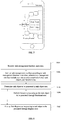
- the method may include: S101: receiving a task management function instruction.
- the terminal supports a recent task management function, that is, a task management function.
- the task management function refers to a function of managing recently run background applications, for example, performing functional operations such as clear, lock, and entry of recent background applications, which are not limited in the embodiment of the present disclosure.
- tasks may include running tasks of different applications installed on the terminal, and may also include running tasks of a plurality of objects for a single application, such as a plurality of picture processing tasks of a gallery application.
- Types of tasks are not limited in the embodiment of the present disclosure.
- the data processing method according to the embodiment of the present disclosure may be used to manage applications installed on the terminal via a task management application on the terminal, or may also be applied to the task management mode of existing applications on the terminal, which is not limited by the embodiment of the present disclosure.
- the user activates the task management function through an operation.
- a task management function instruction is received.
- the terminal may perform data processing in the task management.
- the task management function may be activated by triggering a HOME key, or triggering a predefined task management button, or triggering a predefined task management gesture.
- the trigger mode may be implemented in various ways such as a double-click, a click, a slideclick, or a long-press, which is not limited in the embodiment of the present disclosure.
- the terminal before the terminal performs the task management function, task management settings are required on a task management application or an application for performing the task management.
- the task management function in the embodiment of the present disclosure includes a task object area and a function area. Therefore, the task object area and the function area are required to be set in the terminal in advance.
- the terminal may display a frame for performing task management functions through the task management interface in the task management application. In other words, the task object area and the function area may be displayed when the task management interface is opened.
- distribution positions, sizes and shapes of the two areas on the task management interface are not limited when the terminal sets the task object area and the function area.
- a number, an arrangement and a position of the task object are required to be set when the terminal sets the task object area, and a function implementation mode, a function key or a function trigger mode (for example, the terminal may also implement different processing functions through a directional sliding operation) in the function area may be set when the terminal sets the function area, which is not limited in the embodiment of the present disclosure.
- the terminal may set a correspondence relationship between an area position and a function type of the function key.
- the functional processing for the task object may include: deletion (clear), enter, lock, etc.
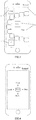
- the processing function may be implemented by setting function keys such as Delete (Clear), Enter, Lock, etc., in a function area 1 (as shown in FIG. 2 ).
- the task objects in the task object area may be set to be chained, i.e., a chain of task objects.
- the setting of task objects in chain may display a plurality of task objects, which increases the number of task objects available for processing.
- the shape and position layout of the chain of task objects are not limited in the embodiment of the present disclosure.
- the distribution and number of function areas are not limited.
- the position distribution of the function keys in the function area may be concentrated in a position area, or may be set separately in different position areas, which is not limited in the embodiment of the present disclosure.
- function keys such as Delete (Clear), Enter, Lock and Other, etc.
- the terminal may be disposed in area 1 of the task management interface.
- the function keys such as Delete (Clear), Enter, Lock and Other, etc., in the terminal may be disposed in an area 2, an area 3, and an area 4 in the task management interface.
- the terminal may directionalize the function operations, and implement the processing functions through the combination of directions and gestures. Therefore, the terminal may set the correspondence relationship between the direction and the function type according to directional ity.
- the terminal may directionalize the function area such that the four most commonly used function keys are directionalized. After the user selects the task object, different processing functions may be triggered by gesture operations in different directions.
- the terminal directionalizes four functions, i.e., Delete (Clear), Enter, Lock and Other around an application A (task object) to complete setting the correspondence relationship between the direction and the function type.
- Delete Create
- Enter Lock
- Other an application A (task object)
- an upward represents a clear operation
- a downward represents an enter operation
- a leftward represents a lock operation
- a rightward can enter other functions of the menu for more operations.
- the function area is editable, and the user may edit the area position of the function buttons through the terminal according to his or her own use habits, so as to adapt to the user's operation habits.
- a left-handed user may dispose the function buttons on a left side of the task management interface of the terminal (for example, the Clear button as shown in FIG. 3 )
- a right-handed user may dispose the function buttons on a right side of the task management interface of the terminal (for example, the Enter and Other buttons as shown in FIG. 3 )
- the function buttons may be disposed under the task management interface of the terminal (for example, the Lock button as shown in FIG. 3 ), which is not limited in the embodiment of the present disclosure.
- the Other button in the embodiment of the present disclosure is used to instruct to enter an interface with more functions, and the Other button may be triggered to implement more function selections and functional processing.
- the function area may be disposed around the task object area.
- the terminal may set the function types (i.e., processing functions) in the function area according to different task objects.
- the processing functions of the function area may include: clear, enter and lock.
- the processing functions of the function area may include: delete, share and edit.
- the processing functions of the function area may include: delete, share, download and edit.
- the specific processing functions in the function area may be set as actually required, which are not limited in the embodiment of the present disclosure.
- the task management interface includes a task object area comprised of a chain of task objects and a function area.
- the terminal may call up the predefined task management interface according to the task management function instruction. Since the terminal may set the task object area and function area in the task management interface in advance, after the terminal receives the task management function instruction, the terminal may place the predefined function area and the task objects to be managed in the task object area to display on the task management interface, i.e., call the task management interface.
- the task management interface includes a task object area comprised of a chain of task objects and a function area.
- the chain of task objects may be displayed on the task management interface as a task object identifier
- the task object identifier may be a text, and an identifier such as an object icon and a symbol, which is not limited in the embodiment of the present disclosure.
- the task management function may be used to manage recently used applications, and may also be used to manage different processing objects of an application.
- the type of the above-mentioned application as long as it is an application comprising a plurality of processing objects with the same attribute, is not limited in the embodiment of the present disclosure.
- the terminal When managing recently used applications, the terminal will call the task management interface according to the task management function instruction.
- the task object area on the task management interface displays the recently running background applications.
- the applications may be presented in the form of a text and an application identifier such as an object icon and a symbol, which is not limited in the embodiment of the present disclosure.
- the terminal calls the task management interface according to the task management function instruction.
- the task object area on the task management interface displays the processing objects of an application, and the processing objects may be presented in the form of a text and an application identifier such as an object icon and a symbol, which is not limited in the embodiment of the present disclosure.
- each picture may be a processing object, such that the processing object is presented as a thumbnail, a text or other image identifiers.
- the processing functions in the function area may be functions such as sharing, deleting and editing.
- the processing functions of a specific function area may be set differently in accordance with the applications, which is not limited in the embodiment of the present disclosure.
- the terminal calls the task management interface according to the task management function instruction
- the task management interface since the task management interface includes the task object area and the task objects are displayed in the task object area, the user may select, through the task object area in the task management interface, the task object to be processed. Therefore, the task object to be processed is determined in the task object area.
- the user may select the task object to be processed by triggering the chain of task object in the task object area of the task management interface.
- the terminal may receive a selection instruction for the chain of task objects in the task object area; and according to the selection instruction, select at least one task object from the task objects in chain as the task object to be processed.
- the user may perform a trigger operation on the chain of task objects through the task object area of the terminal, and select at least one task object from the task objects in chain as the task object to be processed.
- the user selects one or more task object as the task object to be processed through the terminal.
- the trigger operation may be a click operation or a long-press operation.
- the terminal displays the chain of task objects in the task object area of the task management interface and selects at least one task object identifier on the chain of task object upon the receipt of a selection instruction triggered by the user.
- the selection may be performed by a click or long-press.
- the selection instruction is triggered by an operation of clicking the task object identifier, a task object is selected as the task object to be processed, and then the function area button is clicked to respond to the processing function of the task object to be processed, such as clear, lock, and enter.
- the terminal may also click a plurality of task object identifiers for selection, and then perform subsequent functional processing operations.
- the terminal selects at least one task object identifier according to the selection instruction, i.e., by long-pressing at least one task object identifier, and through a drag operation, the terminal performs the corresponding functional processing upon the receipt of the movement instruction.
- the terminal may implement the functional processing on the task object to be processed through the function area by operating the selected task object to be processed.
- the terminal may implement the functional processing on the task object to be processed through the function button or drag operation in the function area after making the selection.
- the function button in the function area is triggered to implement the corresponding processing function.
- the step of triggering the function button may include a click or a drag operation, which is not limited in the embodiment of the present disclosure.
- the terminal may receive a first drag instruction of the task object to be processed in the function area; the terminal drags the task object to be processed to a first function area in the function area according to the first drag instruction;
- the terminal performs the functional processing on the task object to be processed according to a function type corresponding to the first function area.
- the terminal may select the task object to be processed according to the function type (that is, the processing function) corresponding to the drag position (that is, the position of the function button area) indicated by the first drag instruction to implement the processing function.
- the function type that is, the processing function
- the drag position that is, the position of the function button area
- the terminal receives a drag operation on application A (the task object identifier of the task object to be processed) to implement the drag of the task object to be processed, by dragging the task object to be processed to a corresponding function area.
- the terminal may perform the corresponding function of the application A in response to the drag operation to implement the processing function.
- the task object to be processed is dragged to a clear area 1 so that the terminal implements the clear function.
- the terminal may also implement the processing function of the selected task object to be processed according to the function type (that is, the processing function) indicated by the click instruction.
- the function type that is, the processing function
- the terminal may trigger a certain processing function according to the function instruction generated when the user clicks the function button in the function area 1. For example, the terminal receives a click on the Clear button to clear the application A, so as to shut down the background operation of the application A.
- the terminal receives a second drag instruction for the task object to be processed in the function area; when the terminal drags the task object to be processed in a first direction by a preset threshold according to a second drag instruction, the terminal performs functional processing on the task object to be processed according to the function type corresponding to the first direction.
- the terminal may further implement the processing function of the selected task object to be processed according to the function type (that is, the processing function) corresponding to the drag direction (that is, the first direction) indicated by the second drag instruction.
- the preset threshold may be a preset distance threshold or a preset time threshold.
- the type of the preset threshold is not limited in the embodiment of the present disclosure.
- the preset distance threshold may be 1cm.
- the specific value of the preset distance threshold is not limited in the embodiment of the present disclosure.
- the preset time threshold may be 10 seconds.
- the specific value of the preset time threshold is not limited in the embodiment of the present disclosure.
- the terminal receives a drag operation on the application A (the task object identifier of the task object to be processed) to implement the drag operation on the task object to be processed in a specific direction (the first direction) by 1 cm (the preset distance threshold), the terminal responds to the trigger operation of dragging the task object to be processed in the specific direction.
- the operation of a certain processing function may be triggered to respond to the corresponding function of the application A to implement the processing function. For example, s an upward represents Clear operation, a downward represents an Enter operation, a leftward represents a Lock operation, and a rightward can enter other functions of the menu for more operations.
- the terminal when the terminal implements the processing function (or performs a processing function) to respond to an operation (such as the drag operation and the click operation), the terminal can schedule and respond to the corresponding operation by a background program.
- various task objects having geographic and time indicators i.e., information with privacy or privacy characteristics
- the server side may provide authorization to the task objects. For example, a task object is managed and presented based on the authorization to the user providing the task object.
- the terminal has set various functions of the function area before performing the task management function, for example, the correspondence relationship between the position and the function type, the correspondence relationship between the direction and the function type, and the function type of the function button area. Therefore, having determined the task object to be processed, the terminal may respond to the operations generated by the user to implement different processing functions, thereby reflecting the diversity and flexibility of the task management.
- the task management interface further includes: a representation area.
- the method may further include S105: S105: displaying a first representation corresponding to the task object to be processed through the representation area.
- the task management interface of the terminal may also include a representation area for displaying content corresponding to the selected task object to be processed.
- the representation area displays a representation of a recently used run-interface corresponding to the application (that is, a screen shot when the application exited the last time), i.e., the first representation.
- the representation area displays a representation of a specific content of the object corresponding to the application, such as picture content or document content, i.e., the first representation. In this way, after determining the task object to be processed in the task object area, the terminal may trigger the displaying of the first representation in the representation area at the time of determining the task object to be processed.
- the terminal determines that the application A is the task to be processed. Then, the terminal responds to the selection instruction at the same time, and displays a screen shot of the task object to be processed in the representation area 1, that is, a representation of the interface when the application A recently exited, i.e., the first representation.
- the task object area and the representation area in the task management interface of the terminal are not overlapped.
- the task object area and the function area are not overlapped.
- the representation area and the function area may or may not be overlapped.
- the function area may be suspended over the representation area with the function buttons arranged in sequence.
- the order, position and shape of the arrangement of the function buttons are not limited in the embodiment of the present disclosure.
- the function area may be semi-transparent. In this way, the display of the representation area is not affected, and the space utilization rate can be improved.
- S103 may include Steps S1031-S1034, which will be described hereinafter.
- S1031 determining the task object to be processed from the task objects in chain currently displayed in the task object area.
- the task objects in the task object area are a chained form, that is, a chain of task objects.
- the display area of the current display interface of the terminal may be limited. Then when the user uses more applications or more objects in an application recently, there will be a lot of task objects that are required to be displayed in the task object area.
- the number of task objects currently displayed in the task object area of the terminal will be limited, and only a part of the chain of task objects may be displayed.
- the user will select the task object to be processed by a click or other operations, that is, the terminal receives the selection instruction, so that the terminal can determine the task object to be processed according to the selection instruction.
- the order of the chain of task objects currently displayed in the task object area on the task management interface of the terminal is arranged in advance by the terminal.
- the terminal may arrange the task objects based on the use frequency, use time or use habit data of the task objects displayed in an area corresponding to the chain of task objects when the task management interface is called.
- the terminal may arrange and display task object identifiers corresponding to the frequently used task objects at a top position on the home page.
- the terminal may arrange and display task object identifiers corresponding to frequently used task objects in the middle position of the home page, and extend the task object identifiers in sequence from the middle position towards both ends.
- the specific arrangement manner is not limited in the embodiment of the present disclosure.
- the home page refers to a page in the task object area initially displayed when the terminal responds to the task management function instruction and the task management interface pops out.
- the terminal counts, according to the use frequency, the applications with the use frequencies from high to low, which are: Application A (the task object identifier corresponding to the task object), Contacts and WeChat. Then the terminal may display, when responding to the task management function instruction and calling the task management interface, the task objects in a chain according to a layout from the middle (Application A) to both sides (Contacts and WeChat).
- Application A the task object identifier corresponding to the task object
- Contacts and WeChat the terminal may display, when responding to the task management function instruction and calling the task management interface, the task objects in a chain according to a layout from the middle (Application A) to both sides (Contacts and WeChat).
- the terminal may arrange the display positions of the task objects based on the statistics of the use habits of the task objects. In this way, the display of the task objects can become more reasonable and user-friendly, and can facilitate the user's quickly locating the required task objects for operation.
- the task objects in the task object area are in a chained form, that is, a chain of task objects.
- the display area of the current display interface of the terminal may be limited. Then when the user uses more applications or more objects in an application recently, there will be a lot of task objects that are required to be displayed in the task object area.
- the number of task objects currently displayed in the task object area of the terminal will be limited, and only a part of the chain of task objects may be displayed while the other part of the chain of task objects are hidden behind the interface.
- the user may make the movement operation for displaying more task objects in the task object area, such that and the hidden task objects can be displayed on the current interface.
- the terminal may select the task object to be processed in the updated task objects, that is, the terminal receives the selection instruction, so that the terminal can determine the task object to be processed according to the selection instruction.
- the user performs a movement operation on the task object area on the task management interface, that is, the terminal receives a movement instruction for the chain of task objects in the task object area.
- the terminal may execute the movement instruction to realize the movement updating of the display position of the entire chain of task objects to display the hidden task object.
- the movement instruction may be generated by sliding, or may be generated by triggering a specific gesture.
- the specific manner of the movement instruction generated by the trigger operation is not limited in the embodiment of the present disclosure.
- the movement instruction generated by sliding may be specifically generated by the user sliding along a tangent direction of the task object area.
- the terminal may move or update the position of the chain of task objects according to the movement instruction, thereby displaying the hidden task object identifier corresponding to the task object.
- a part of the chain of task objects currently displayed in the task object area in the task management interface of the terminal include: WeChat, Application A, Contacts, B, C, D and E.
- the terminal updates, upon the receipt of a movement instruction to slide the task object area in a left tangential direction, the position of the task object in the chain of task objects according to the movement instruction, i.e., moving, so that a display position of each of chain objects is changed counterclockwise in the task object area.
- the updated the chain of task objects are listed as: WeChat, Application A, Contacts, B, C, D, E and F.
- the terminal may also update, upon the receipt of a movement instruction to slide in a right tangential direction in the task object area, the position of the task object in the chain of task objects according to the movement instruction, i.e., moving, so that a display position of each of task objects in the chain is changed clockwise in the task object area.
- S1031 and S1032-S1034 are two parallel branches which can be implemented in S103 to determine the task object to be processed in the task object area.
- the specific branch which is executed in S103 will depend on whether there is a selected task object in the task object currently displayed on the task management interface of the terminal, i.e., on an actual operation received from the user by the terminal, which is not limited in the embodiment of the present disclosure.
- S1033 may specifically include Steps S10331-S10333, which will be described hereinafter.
- S10332 determining a first sliding speed of the chain of task objects according to the first moving speed and a correspondence relationship between a preset moving speed and a sliding speed of the task object.
- the chain of task objects currently displayed may also be updated according to the moving speed of the movement instruction.
- the moving speed corresponding to the movement instruction received by the terminal may correspond to a speed of controlling the update of the chain of task objects, which is a speed of controlling the chain of task objects to move the position of the chain of task objects currently displayed in the task object area, i.e., the first sliding speed.
- the terminal may determine the first sliding speed according to the first moving speed and the correspondence relationship between the preset moving speed and the sliding speed of the task object.
- the correspondence relationship between the preset moving speed and the sliding speed of the task object may be a positive relationship or an inverse relationship, which is not limited in the embodiment of the present disclosure.
- the method may further include Steps S106-S107, which will be described hereinafter.
- S107 moving a position of a first task object in the task object area in sequence according to a preset order to fill in the position of the task object to be processed, wherein the first task object is another task object except for the task object to be processed among the task objects running in the background.
- the terminal may automatically fill in the blank position to form a new chain of task objects, which reflects the flexibility and automation of the task object arrangement in the task management.
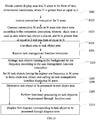
- the method may include Steps S201-S210, which will be described hereinafter.
- S201 dividing the current display area into N areas in a form of two- dimensional coordinates, where N is an integer greater than or equal to 2.
- S203 connecting consecutive M areas in the N areas into a chain area according to the connection instruction, wherein the chain area is used as an area where the task object is placed, and M is an integer greater than or equal to 2 and less than or equal to N.
- the task management function in the embodiment of the present disclosure includes a task object area, a representation area and a function area. Therefore, the terminal is required to set the task object area, the representation area and the function area in advance.
- the terminal may display a screen for task management functions through the task management interface in the task management application. In other words, the task object area, the representation area and the function area may be displayed when the task management interface is opened.
- the number, layout and position of the task objects are required to be set when the terminal sets the task object area.
- the terminal may set the function implementation mode, function keys or a function trigger mode (for example, the terminal may also implement different processing functions through a direction sliding operation) in the function area, which is not limited in the embodiment of the present disclosure.
- the task object area and the representation area in the task management interface of the terminal are not overlapped.
- the task object area and the function area are not overlapped.
- the representation area and the function area may or may not be overlapped.
- the function area may be suspended over the representation area with the function buttons arranged in sequence.
- the order, position and shape of the arrangement of the function buttons are not limited in the embodiment of the present disclosure.
- the function area may be semi-transparent. In this way, the display of the representation area is not affected, and the space utilization rate can be improved.
- the setting may be performed in the task settings corresponding to the task management function
- the display area of the terminal (for example, the displayable area of the screen) may be used as the current display area.
- the terminal may divide the current display area into N areas in the form of two-dimensional coordinates, where N is an integer greater than or equal to 2. That is, the entire screen of the terminal is divided into a plurality of points in the form of x and y two-dimensional coordinates (a point is considered as a small area).
- the N areas may comprise n*m areas, where n is the number of rows, m is the number of columns, and m and n are both integers greater than or equal to 1. In this way, the current display area is divided regularly.
- the method of dividing the N areas is not limited in the embodiment of the present disclosure. Therefore, the user may determine the shape and position of the task object area where the task objects in the chain are located by connecting the N areas.
- the terminal receives the connection instruction generated by a connection operation on N areas in the current display area. According to the connection instruction, the terminal connects consecutive M areas in the N areas into a chain area, and the chain area is used as an area where the task objects are placed, where M is an integer greater than or equal to 2 and less than or equal to N.
- the chain area is used as the task object area.
- the task object area is editable, that is, it may be set.
- the user may set the chain area according to his/her preference and demands.
- the terminal divides the entire screen into a plurality of point areas in the form of x and y two-dimensional coordinates.
- the user may connect arbitrary numbers of dot areas.
- the terminal may reconstruct the chain area, i.e., the task object area, according to a connection order indicated by the user operation.
- the chain area may be in a arc shape or polyline shape, which is not limited in the embodiment of the present disclosure, as long as it is in a chain shape.
- the number of M is the same as the number of task objects that may be displayed on the current page.
- the positions of the M areas are the same as the positions of the task objects. Therefore, M may be set to a value as desirable but at least set to 2.
- the terminal divides an entire screen area 1 (the current display area) into 6*4 point areas in the form of x and y two-dimensional coordinates.
- the terminal receives the connection instruction indicating the user performed the connection operation in the 24 point areas, and reconstructs the chain area by a connection line 2 according to the indication order of the connection instruction to form a task target area 3.
- the implementation of the task management function may be initiated.
- S207 placing M task objects having the highest use frequency in the M areas to form the task objects in the chain, and calling the task management interface to display the M areas.
- the terminal may call the preset task management interface according to the task management function instruction. Since the terminal may set the task object area, a representation area and function area in the task management interface in advance, after the terminal receives the task management function instruction, the terminal may place the preset function area, the representation area and the task object to be managed in the task object area to display on the task management interface, (i.e., calling the task management interface).
- the task management interface includes the task object area, the representation area comprised of the chain of task objects and the function area.
- an order of the task objects in the chain currently displayed in the task object area on the task management interface of the terminal is set in advance by the terminal.
- the terminal may arrange the task objects based on the use frequency, use time or use habit data of the task objects in an area corresponding to the chain task object area and displayed when the task management interface is called. Since the positions of the M areas determine the display positions of the task object, the terminal may set the M task objects having the highest use frequency in M areas to form the task objects in the chain. Thereby, the specific terminal can call the task management interface displaying the M areas.
- the terminal may arrange and display the task object identifiers corresponding to the frequently used task objects at a top position on the home page.
- the terminal may arrange and display the task object identifiers corresponding to the frequently used task objects in the middle position of the home page, and extend the task object identifiers in sequence from the middle position towards both ends.
- the specific arrangement is not limited in the embodiment of the present disclosure.
- the terminal counts, according to the use frequency, the applications with the use frequencies from high to low, which are: Application A (the task object identifier corresponding to the task object), Contacts and WeChat. Then the terminal may display, when responding to the task management function instruction and calling the task management interface, the task objects in a chain according to a layout from the middle to both sides.
- the applications with the use frequencies from high to low which are: Application A (the task object identifier corresponding to the task object), Contacts and WeChat.
- the terminal may arrange the display positions of the task objects based on the statistics of the use habits of the task objects. In this way, the display of the task objects can become more reasonable and user-friendly, and can facilitate the user's quickly locating the required task objects for operation.
- S210 displaying a first representation corresponding to the task object to be processed through the representation area.
- the one application is a gallery application
- the plurality of objects are picture objects.
- the picture browsing scenario of the gallery application may employ the data processing method according to the embodiments of the present disclosure.
- the display area in the gallery application is divided into three areas, which are: I. a picture thumbnail area (a task object area); II. a large picture area (a representation area); and III. a function area, which provides commonly-used functions of the picture object such as deletion, share and edit.
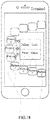
- the terminal may support simultaneous operations of a plurality of picture objects in the gallery application. As shown in FIG. 18 , the terminal may select pictures E, G and F in the gallery application according to the received selection instruction. The user drags selected pictures to generate a first drag instruction. Upon the receipt of the first drag instruction, the terminal implements a delete function of the dragged pictures E, G and F according to the first drag instruction.
- the terminal may support an enlargement display operation of the picture object in the gallery application to display a large picture.
- the terminal may select a picture object according to the received selection instruction, and display a large picture corresponding to the picture object in the large picture area at the same time of selecting the picture object.
- the gallery application in the terminal may display a plurality of thumbnails on a single page at the same time of displaying the large picture, and provide fast functional operation modes. As such, it is possible to greatly improve the efficiency of routine operation of gallery pictures and enhance user experience, thereby reflecting the intelligence of the picture processing.
- various task objects having geographic and time indicators i.e., information with privacy or privacy characteristics
- the server side may provide authorization to the task objects. For example, a task object is managed and presented based on the authorization to the user providing the task object.
- the task objects in the data processing method according to the embodiment of the present disclosure may also be the management of all the applications on the terminal.
- icons on the desktop may be arranged according to the position of the chain of task object, and function processing such as unin-stalling may be provided in the function area.
- the application scenarios of the data processing method according to the embodiment of the present disclosure are not limited in the present disclosure.
- the terminal may display the task object area comprised of chain tasks on the task management interface
- the selection range of task objects can be expanded.
- the terminal can possibly select the task object to be processed from the task objects in chain.
- the functional processing can be implemented on the task object to be processed in the function area. In this way, it is possible to avoid the conversion of the plurality of operation interfaces, simplify the task management process and improve work efficiency.
- a terminal 1 including:
- the task management interface further includes: a representation area.
- the display unit 11 is further configured to display a first representation corresponding to the task object to be processed through the representation area, after the task object to be processed is determined in the task object area.
- the determination unit 12 is specifically configured to determine the task object to be processed from task objects in chain currently displayed in the task object area.
- the terminal 1 further includes: an update unit 14.
- the reception unit 10 is further configured to receive a movement instruction for the chain of task objects
- the update unit 14 is configured to update the chain of task objects currently displayed according to the movement instruction
- the determination unit 12 is specifically configured to determine the task object to be processed from the updated chain of task objects.
- the reception unit 10 is further configured to receive a selection instruction for the chain of task objects in the task object area;
- the determination unit 12 is specifically configured to select at least one task object from the task objects in chain as the task object to be processed according to the selection instruction.
- the reception unit 10 is further configured to receive a first drag instruction for the task object to be processed in the function area;
- the reception unit 10 is further configured to receive a second drag instruction for the task object to be processed in the function area;
- the processing unit 13 is specifically configured to perform the functional processing on the task object to be processed according to the function type corresponding to a first direction, when the task object to be processed is dragged by a preset threshold in the first direction according to the second drag instruction.
- the terminal 1 further includes: a setting unit 15.
- the setting unit 15 is configured to set the task object area before receiving the task management function instruction.
- the setting unit 15 is configured to divide the current display area into N areas in the form of two-dimensional coordinates, where N is an integer greater than or equal to 2;
- the reception unit 10 is further configured to receive a connection instruction for the N areas;
- the setting unit 15 is further configured to connect consecutive M areas in the N areas into a chain area according to the connection instruction, wherein the chain area is an area where the task object is placed, and M is an integer greater than or equal to 2 and less than or equal to N; and use the chain area as the task object area.
- the processing unit 13 is further configured to arrange the task objects running in the background in accordance with a use frequency in response to the task management function instruction; and place M task objects having the highest use frequency in the M areas to form the task objects in chain.
- the display unit 11 is specifically configured to call the task management interface to display the M areas.
- the update unit 14 is configured to acquire a first moving speed corresponding to the movement instruction; determine a first sliding speed of the chain of task objects according to the first moving speed and a correspondence relationship between a preset moving speed and a sliding speed of the task object; and move a position of the chain of task objects currently displayed in the task object area according to the first sliding speed.
- the terminal 1 further includes a deletion unit 16.
- the deletion unit 16 is configured to, when the functional processing is a deletion function, clear the task object to be processed in the task object area and the first representation in the representation area after the functional processing is performed on the task object to be processed through the function area;
- the update unit 14 is further configured to move a position of a first task object in the task object area in sequence according to a preset order to fill in the position of the task object to be processed, wherein the first task object is another task object except for the task object to be processed among task objects running in the background.
- the aforementioned determination unit 12, processing unit 13, update unit 14, setting unit 15 and deletion unit 16 may be implemented by the processor 17 provided in the terminal 1, specifically by a Central Processing Unit (CPU), a Microprocessor Unit (MPU), a d Digital Signal Processor (DSP) or a Field Programmable Gate Array (FPGA); the reception unit 10 may be implemented by a receiver 18, and the display unit 11 may be implemented by a display 19, which are not limited in the embodiment of the present disclosure.
- CPU Central Processing Unit
- MPU Microprocessor Unit
- DSP Digital Signal Processor
- FPGA Field Programmable Gate Array
- a terminal including: a processor 17, a receiver 18, a display 19 and a memory 110 that stores instructions executable by the processor 17, wherein the memory 110, the receiver 18 and the display 19 rely on the processor 17 to implement operations through a communication bus 111, and when the executable instructions are executed by the processor 17, the aforementioned data processing method is executed.
- the terminal may display the task object area comprised of chain tasks on the task management interface
- the selection range of task objects can be expanded.
- the terminal can possibly select the task object to be processed from the chain of task objects.
- the functional processing can be implemented on the task object to be processed in the function area. In this way, it is possible to avoid the conversion of the plurality of operation interfaces, simplify the task management process and improve work efficiency.
- a computer-readable storage medium that stores executable instructions.
- the processor implements the data processing method according to any one of Embodiments 1 to 4.
- the computer-readable storage medium may be a memory such as a ferromagnetic random access memory (FRAM), a Read Only Memory (ROM), a Programmable Read-Only Memory, (PROM), an Erasable Programmable Read-Only Memory (EPROM), an Electrically Erasable Programmable Read-Only Memory (EEPROM), a Flash Memory, a Magnetic Surface Memory, an optical disc, or a Compact Disc Read-Only Memory (CD-ROM).
- FRAM ferromagnetic random access memory
- ROM Read Only Memory
- PROM Programmable Read-Only Memory
- EPROM Erasable Programmable Read-Only Memory
- EEPROM Electrically Erasable Programmable Read-Only Memory
- Flash Memory a Flash Memory
- CD-ROM Compact Disc Read-Only Memory
Landscapes
- Engineering & Computer Science (AREA)
- Theoretical Computer Science (AREA)
- General Engineering & Computer Science (AREA)
- Human Computer Interaction (AREA)
- Physics & Mathematics (AREA)
- General Physics & Mathematics (AREA)
- Computer Networks & Wireless Communication (AREA)
- Signal Processing (AREA)
- Software Systems (AREA)
- User Interface Of Digital Computer (AREA)
Applications Claiming Priority (2)
| Application Number | Priority Date | Filing Date | Title |
|---|---|---|---|
| CN201810306565.0A CN110347315A (zh) | 2018-04-08 | 2018-04-08 | 一种数据处理方法、终端及存储介质 |
| PCT/CN2019/076493 WO2019196567A1 (fr) | 2018-04-08 | 2019-02-28 | Procédé de traitement de données, terminal et support de stockage |
Publications (2)
| Publication Number | Publication Date |
|---|---|
| EP3779657A1 true EP3779657A1 (fr) | 2021-02-17 |
| EP3779657A4 EP3779657A4 (fr) | 2022-01-05 |
Family
ID=68163035
Family Applications (1)
| Application Number | Title | Priority Date | Filing Date |
|---|---|---|---|
| EP19784853.4A Pending EP3779657A4 (fr) | 2018-04-08 | 2019-02-28 | Procédé de traitement de données, terminal et support de stockage |
Country Status (4)
| Country | Link |
|---|---|
| US (1) | US11461129B2 (fr) |
| EP (1) | EP3779657A4 (fr) |
| CN (1) | CN110347315A (fr) |
| WO (1) | WO2019196567A1 (fr) |
Families Citing this family (1)
| Publication number | Priority date | Publication date | Assignee | Title |
|---|---|---|---|---|
| CN117043735A (zh) * | 2021-05-19 | 2023-11-10 | 深圳传音控股股份有限公司 | 处理方法、移动终端及存储介质 |
Family Cites Families (35)
| Publication number | Priority date | Publication date | Assignee | Title |
|---|---|---|---|---|
| US5801699A (en) * | 1996-01-26 | 1998-09-01 | International Business Machines Corporation | Icon aggregation on a graphical user interface |
| TWI238348B (en) * | 2002-05-13 | 2005-08-21 | Kyocera Corp | Portable information terminal, display control device, display control method, and recording media |
| US9207717B2 (en) * | 2010-10-01 | 2015-12-08 | Z124 | Dragging an application to a screen using the application manager |
| US8351989B2 (en) * | 2007-02-23 | 2013-01-08 | Lg Electronics Inc. | Method of displaying menu in a mobile communication terminal |
| JP4858313B2 (ja) * | 2007-06-01 | 2012-01-18 | 富士ゼロックス株式会社 | ワークスペース管理方式 |
| JP2009163369A (ja) * | 2007-12-28 | 2009-07-23 | Canon Inc | 画像処理装置及び画像処理装置の制御装置 |
| US20090247112A1 (en) * | 2008-03-28 | 2009-10-01 | Sprint Communications Company L.P. | Event disposition control for mobile communications device |
| US8127240B2 (en) * | 2008-04-09 | 2012-02-28 | International Business Machines Corporation | Seamless drag and drop operation with multiple event handlers |
| US8276093B2 (en) * | 2008-04-24 | 2012-09-25 | Nintendo Co., Ltd. | Computer-readable storage medium having object display order changing program stored therein and apparatus |
| US8266550B1 (en) * | 2008-05-28 | 2012-09-11 | Google Inc. | Parallax panning of mobile device desktop |
| JP4632102B2 (ja) * | 2008-07-17 | 2011-02-16 | ソニー株式会社 | 情報処理装置、情報処理方法及び情報処理プログラム |
| KR101597553B1 (ko) * | 2009-05-25 | 2016-02-25 | 엘지전자 주식회사 | 기능 실행 방법 및 그 장치 |
| WO2010147611A1 (fr) * | 2009-06-16 | 2010-12-23 | Intel Corporation | Clavier virtuel adaptatif pour dispositif portatif |
| KR101646254B1 (ko) * | 2009-10-09 | 2016-08-05 | 엘지전자 주식회사 | 이동 통신 단말기에서의 아이콘 삭제 방법 및 이를 적용한 이동 통신 단말기 |
| US8799816B2 (en) * | 2009-12-07 | 2014-08-05 | Motorola Mobility Llc | Display interface and method for displaying multiple items arranged in a sequence |
| US9823831B2 (en) * | 2010-04-07 | 2017-11-21 | Apple Inc. | Device, method, and graphical user interface for managing concurrently open software applications |
| US20120216146A1 (en) * | 2011-02-17 | 2012-08-23 | Nokia Corporation | Method, apparatus and computer program product for integrated application and task manager display |
| EP2676183B1 (fr) * | 2011-02-18 | 2019-04-10 | BlackBerry Limited | Procédés et appareil permettant de fournir un contenu mis à jour dans une interface utilisateur |
| KR101860342B1 (ko) * | 2011-09-15 | 2018-05-23 | 엘지전자 주식회사 | 이동 단말기 및 그 제어방법 |
| US9342235B2 (en) * | 2011-10-03 | 2016-05-17 | Kyocera Corporation | Device, method, and storage medium storing program |
| JP5805588B2 (ja) * | 2012-06-28 | 2015-11-04 | 京セラ株式会社 | 電子機器、制御方法及び制御プログラム |
| EP2767896B1 (fr) * | 2013-02-14 | 2019-01-16 | LG Electronics Inc. | Terminal mobile et son procédé de commande |
| US8769431B1 (en) * | 2013-02-28 | 2014-07-01 | Roy Varada Prasad | Method of single-handed software operation of large form factor mobile electronic devices |
| KR20140139647A (ko) * | 2013-05-27 | 2014-12-08 | 삼성전자주식회사 | 휴대단말기에서 아이콘을 재배열하는 방법 및 장치 |
| US9851883B2 (en) * | 2014-02-17 | 2017-12-26 | Xerox Corporation | Method and apparatus for adjusting and moving a user interface for single handed use on an endpoint device |
| CN105335216A (zh) * | 2014-06-12 | 2016-02-17 | 乐蛙科技(上海)有限公司 | 通信终端的应用管理方法及系统 |
| US10261672B1 (en) * | 2014-09-16 | 2019-04-16 | Amazon Technologies, Inc. | Contextual launch interfaces |
| CN105487743A (zh) * | 2014-09-19 | 2016-04-13 | 阿里巴巴集团控股有限公司 | 应用程序的配置方法、装置及移动终端 |
| CN105786473A (zh) * | 2014-12-25 | 2016-07-20 | 阿里巴巴集团控股有限公司 | 多任务界面的任务管理方法、装置及终端设备 |
| WO2016165284A1 (fr) * | 2015-04-13 | 2016-10-20 | 华为技术有限公司 | Procédé, appareil et dispositif destinés à activer une interface de gestion de tâches |
| US10102824B2 (en) * | 2015-05-19 | 2018-10-16 | Microsoft Technology Licensing, Llc | Gesture for task transfer |
| KR20170017280A (ko) * | 2015-08-06 | 2017-02-15 | 엘지전자 주식회사 | 이동단말기 및 그 제어방법 |
| KR20170076489A (ko) * | 2015-12-24 | 2017-07-04 | 삼성전자주식회사 | 전자장치 및 그의 어플리케이션 프로그램 운용 방법 |
| CN105975201B (zh) | 2016-04-27 | 2019-02-15 | 努比亚技术有限公司 | 移动终端及其分屏处理方法 |
| US20180329605A1 (en) * | 2017-05-15 | 2018-11-15 | Salesforce.Com, Inc. | Arranging graphic elements within a user interface for single handed user touch selections |
-
2018
- 2018-04-08 CN CN201810306565.0A patent/CN110347315A/zh active Pending
-
2019
- 2019-02-28 EP EP19784853.4A patent/EP3779657A4/fr active Pending
- 2019-02-28 US US17/044,440 patent/US11461129B2/en active Active
- 2019-02-28 WO PCT/CN2019/076493 patent/WO2019196567A1/fr not_active Ceased
Also Published As
| Publication number | Publication date |
|---|---|
| US11461129B2 (en) | 2022-10-04 |
| CN110347315A (zh) | 2019-10-18 |
| US20210096907A1 (en) | 2021-04-01 |
| EP3779657A4 (fr) | 2022-01-05 |
| WO2019196567A1 (fr) | 2019-10-17 |
Similar Documents
| Publication | Publication Date | Title |
|---|---|---|
| JP6012859B2 (ja) | 分割画面表示の方法および装置、ならびにその電子デバイス | |
| US11604580B2 (en) | Configuration of application execution spaces and sub-spaces for sharing data on a mobile touch screen device | |
| CN107422934B (zh) | 一种图标的设置方法及电子设备 | |
| CN107861784B (zh) | 一种桌面图标的整理方法、装置及移动终端 | |
| CN112214142B (zh) | 应用程序信息显示方法、装置、电子设备及存储介质 | |
| WO2022068773A1 (fr) | Procédé et appareil de réglage d'élément de bureau, et dispositif électronique | |
| CN105068721B (zh) | 一种操作菜单显示方法及终端 | |
| EP2557490A1 (fr) | Procédé et dispositif d'ajout d'icône dans une interface d'un système androïde et terminal mobile | |
| WO2014000445A1 (fr) | Procédé de réglage de composant d'interface graphique et dispositif terminal | |
| CN103370684A (zh) | 电子设备、显示方法以及程序 | |
| US20190220170A1 (en) | Method and apparatus for creating group | |
| CN112148170A (zh) | 桌面元素调整方法、装置和电子设备 | |
| CN107329645B (zh) | 一种图像显示方法及移动终端 | |
| CN108829314A (zh) | 截图选区界面选择方法、装置、设备及存储介质 | |
| CN109388468A (zh) | 多程序窗口管理方法及装置 | |
| CN107704157A (zh) | 一种多屏界面操作方法、装置及存储介质 | |
| CN105094528A (zh) | 一种信息处理方法及电子设备 | |
| CN112214144A (zh) | 生成移动终端桌面的方法、装置及电子装置 | |
| EP4261666A1 (fr) | Procédé et appareil de traitement d'interface, ainsi que dispositif électronique et support de stockage lisible par ordinateur | |
| CN114089885A (zh) | 应用图标管理方法、装置、电子设备及可读存储介质 | |
| CN112698762A (zh) | 图标显示方法、装置及电子设备 | |
| US11847294B2 (en) | Method for generating desktop of mobile terminal, device and electronic device | |
| US11461129B2 (en) | Data processing method, terminal and storage medium | |
| CN114116087B (zh) | 双系统间的界面操作方法、装置、电子设备及介质 | |
| CN115202772B (zh) | 应用界面的显示方法、装置、终端及存储介质 |
Legal Events
| Date | Code | Title | Description |
|---|---|---|---|
| STAA | Information on the status of an ep patent application or granted ep patent |
Free format text: STATUS: THE INTERNATIONAL PUBLICATION HAS BEEN MADE |
|
| PUAI | Public reference made under article 153(3) epc to a published international application that has entered the european phase |
Free format text: ORIGINAL CODE: 0009012 |
|
| STAA | Information on the status of an ep patent application or granted ep patent |
Free format text: STATUS: REQUEST FOR EXAMINATION WAS MADE |
|
| 17P | Request for examination filed |
Effective date: 20201030 |
|
| AK | Designated contracting states |
Kind code of ref document: A1 Designated state(s): AL AT BE BG CH CY CZ DE DK EE ES FI FR GB GR HR HU IE IS IT LI LT LU LV MC MK MT NL NO PL PT RO RS SE SI SK SM TR |
|
| AX | Request for extension of the european patent |
Extension state: BA ME |
|
| DAV | Request for validation of the european patent (deleted) | ||
| DAX | Request for extension of the european patent (deleted) | ||
| A4 | Supplementary search report drawn up and despatched |
Effective date: 20211208 |
|
| RIC1 | Information provided on ipc code assigned before grant |
Ipc: H04M 1/72409 20210101ALI20211202BHEP Ipc: G06F 3/0488 20130101ALI20211202BHEP Ipc: G06F 3/0486 20130101ALI20211202BHEP Ipc: G06F 3/0483 20130101AFI20211202BHEP |
|
| STAA | Information on the status of an ep patent application or granted ep patent |
Free format text: STATUS: EXAMINATION IS IN PROGRESS |
|
| 17Q | First examination report despatched |
Effective date: 20240419 |