EP3920059B1 - Dispositif matériel permettant de saisir un code pin en tapant sur un affichage d'écran tactile - Google Patents
Dispositif matériel permettant de saisir un code pin en tapant sur un affichage d'écran tactile Download PDFInfo
- Publication number
- EP3920059B1 EP3920059B1 EP21176377.6A EP21176377A EP3920059B1 EP 3920059 B1 EP3920059 B1 EP 3920059B1 EP 21176377 A EP21176377 A EP 21176377A EP 3920059 B1 EP3920059 B1 EP 3920059B1
- Authority
- EP
- European Patent Office
- Prior art keywords
- pin
- touch
- processor
- secure
- taps
- Prior art date
- Legal status (The legal status is an assumption and is not a legal conclusion. Google has not performed a legal analysis and makes no representation as to the accuracy of the status listed.)
- Active
Links
Images




Classifications
-
- G—PHYSICS
- G06—COMPUTING OR CALCULATING; COUNTING
- G06Q—INFORMATION AND COMMUNICATION TECHNOLOGY [ICT] SPECIALLY ADAPTED FOR ADMINISTRATIVE, COMMERCIAL, FINANCIAL, MANAGERIAL OR SUPERVISORY PURPOSES; SYSTEMS OR METHODS SPECIALLY ADAPTED FOR ADMINISTRATIVE, COMMERCIAL, FINANCIAL, MANAGERIAL OR SUPERVISORY PURPOSES, NOT OTHERWISE PROVIDED FOR
- G06Q20/00—Payment architectures, schemes or protocols
- G06Q20/38—Payment protocols; Details thereof
- G06Q20/40—Authorisation, e.g. identification of payer or payee, verification of customer or shop credentials; Review and approval of payers, e.g. check credit lines or negative lists
- G06Q20/401—Transaction verification
- G06Q20/4012—Verifying personal identification numbers [PIN]
-
- G—PHYSICS
- G06—COMPUTING OR CALCULATING; COUNTING
- G06F—ELECTRIC DIGITAL DATA PROCESSING
- G06F21/00—Security arrangements for protecting computers, components thereof, programs or data against unauthorised activity
- G06F21/30—Authentication, i.e. establishing the identity or authorisation of security principals
- G06F21/31—User authentication
-
- G—PHYSICS
- G06—COMPUTING OR CALCULATING; COUNTING
- G06F—ELECTRIC DIGITAL DATA PROCESSING
- G06F21/00—Security arrangements for protecting computers, components thereof, programs or data against unauthorised activity
- G06F21/70—Protecting specific internal or peripheral components, in which the protection of a component leads to protection of the entire computer
- G06F21/82—Protecting input, output or interconnection devices
- G06F21/83—Protecting input, output or interconnection devices input devices, e.g. keyboards, mice or controllers thereof
-
- G—PHYSICS
- G06—COMPUTING OR CALCULATING; COUNTING
- G06F—ELECTRIC DIGITAL DATA PROCESSING
- G06F3/00—Input arrangements for transferring data to be processed into a form capable of being handled by the computer; Output arrangements for transferring data from processing unit to output unit, e.g. interface arrangements
- G06F3/01—Input arrangements or combined input and output arrangements for interaction between user and computer
- G06F3/016—Input arrangements with force or tactile feedback as computer generated output to the user
-
- G—PHYSICS
- G06—COMPUTING OR CALCULATING; COUNTING
- G06F—ELECTRIC DIGITAL DATA PROCESSING
- G06F3/00—Input arrangements for transferring data to be processed into a form capable of being handled by the computer; Output arrangements for transferring data from processing unit to output unit, e.g. interface arrangements
- G06F3/01—Input arrangements or combined input and output arrangements for interaction between user and computer
- G06F3/048—Interaction techniques based on graphical user interfaces [GUI]
- G06F3/0484—Interaction techniques based on graphical user interfaces [GUI] for the control of specific functions or operations, e.g. selecting or manipulating an object, an image or a displayed text element, setting a parameter value or selecting a range
-
- G—PHYSICS
- G06—COMPUTING OR CALCULATING; COUNTING
- G06F—ELECTRIC DIGITAL DATA PROCESSING
- G06F3/00—Input arrangements for transferring data to be processed into a form capable of being handled by the computer; Output arrangements for transferring data from processing unit to output unit, e.g. interface arrangements
- G06F3/01—Input arrangements or combined input and output arrangements for interaction between user and computer
- G06F3/048—Interaction techniques based on graphical user interfaces [GUI]
- G06F3/0487—Interaction techniques based on graphical user interfaces [GUI] using specific features provided by the input device, e.g. functions controlled by the rotation of a mouse with dual sensing arrangements, or of the nature of the input device, e.g. tap gestures based on pressure sensed by a digitiser
- G06F3/0488—Interaction techniques based on graphical user interfaces [GUI] using specific features provided by the input device, e.g. functions controlled by the rotation of a mouse with dual sensing arrangements, or of the nature of the input device, e.g. tap gestures based on pressure sensed by a digitiser using a touch-screen or digitiser, e.g. input of commands through traced gestures
-
- G—PHYSICS
- G06—COMPUTING OR CALCULATING; COUNTING
- G06F—ELECTRIC DIGITAL DATA PROCESSING
- G06F3/00—Input arrangements for transferring data to be processed into a form capable of being handled by the computer; Output arrangements for transferring data from processing unit to output unit, e.g. interface arrangements
- G06F3/01—Input arrangements or combined input and output arrangements for interaction between user and computer
- G06F3/048—Interaction techniques based on graphical user interfaces [GUI]
- G06F3/0487—Interaction techniques based on graphical user interfaces [GUI] using specific features provided by the input device, e.g. functions controlled by the rotation of a mouse with dual sensing arrangements, or of the nature of the input device, e.g. tap gestures based on pressure sensed by a digitiser
- G06F3/0488—Interaction techniques based on graphical user interfaces [GUI] using specific features provided by the input device, e.g. functions controlled by the rotation of a mouse with dual sensing arrangements, or of the nature of the input device, e.g. tap gestures based on pressure sensed by a digitiser using a touch-screen or digitiser, e.g. input of commands through traced gestures
- G06F3/04883—Interaction techniques based on graphical user interfaces [GUI] using specific features provided by the input device, e.g. functions controlled by the rotation of a mouse with dual sensing arrangements, or of the nature of the input device, e.g. tap gestures based on pressure sensed by a digitiser using a touch-screen or digitiser, e.g. input of commands through traced gestures for inputting data by handwriting, e.g. gesture or text
-
- G—PHYSICS
- G06—COMPUTING OR CALCULATING; COUNTING
- G06Q—INFORMATION AND COMMUNICATION TECHNOLOGY [ICT] SPECIALLY ADAPTED FOR ADMINISTRATIVE, COMMERCIAL, FINANCIAL, MANAGERIAL OR SUPERVISORY PURPOSES; SYSTEMS OR METHODS SPECIALLY ADAPTED FOR ADMINISTRATIVE, COMMERCIAL, FINANCIAL, MANAGERIAL OR SUPERVISORY PURPOSES, NOT OTHERWISE PROVIDED FOR
- G06Q20/00—Payment architectures, schemes or protocols
- G06Q20/08—Payment architectures
- G06Q20/20—Point-of-sale [POS] network systems
- G06Q20/206—Point-of-sale [POS] network systems comprising security or operator identification provisions, e.g. password entry
-
- G—PHYSICS
- G06—COMPUTING OR CALCULATING; COUNTING
- G06Q—INFORMATION AND COMMUNICATION TECHNOLOGY [ICT] SPECIALLY ADAPTED FOR ADMINISTRATIVE, COMMERCIAL, FINANCIAL, MANAGERIAL OR SUPERVISORY PURPOSES; SYSTEMS OR METHODS SPECIALLY ADAPTED FOR ADMINISTRATIVE, COMMERCIAL, FINANCIAL, MANAGERIAL OR SUPERVISORY PURPOSES, NOT OTHERWISE PROVIDED FOR
- G06Q20/00—Payment architectures, schemes or protocols
- G06Q20/30—Payment architectures, schemes or protocols characterised by the use of specific devices or networks
- G06Q20/32—Payment architectures, schemes or protocols characterised by the use of specific devices or networks using wireless devices
- G06Q20/327—Short range or proximity payments by means of M-devices
- G06Q20/3272—Short range or proximity payments by means of M-devices using an audio code
-
- G—PHYSICS
- G06—COMPUTING OR CALCULATING; COUNTING
- G06Q—INFORMATION AND COMMUNICATION TECHNOLOGY [ICT] SPECIALLY ADAPTED FOR ADMINISTRATIVE, COMMERCIAL, FINANCIAL, MANAGERIAL OR SUPERVISORY PURPOSES; SYSTEMS OR METHODS SPECIALLY ADAPTED FOR ADMINISTRATIVE, COMMERCIAL, FINANCIAL, MANAGERIAL OR SUPERVISORY PURPOSES, NOT OTHERWISE PROVIDED FOR
- G06Q20/00—Payment architectures, schemes or protocols
- G06Q20/38—Payment protocols; Details thereof
- G06Q20/40—Authorisation, e.g. identification of payer or payee, verification of customer or shop credentials; Review and approval of payers, e.g. check credit lines or negative lists
- G06Q20/401—Transaction verification
- G06Q20/4014—Identity check for transactions
-
- G—PHYSICS
- G07—CHECKING-DEVICES
- G07F—COIN-FREED OR LIKE APPARATUS
- G07F19/00—Complete banking systems; Coded card-freed arrangements adapted for dispensing or receiving monies or the like and posting such transactions to existing accounts, e.g. automatic teller machines
- G07F19/20—Automatic teller machines [ATMs]
- G07F19/201—Accessories of ATMs
-
- G—PHYSICS
- G07—CHECKING-DEVICES
- G07F—COIN-FREED OR LIKE APPARATUS
- G07F7/00—Mechanisms actuated by objects other than coins to free or to actuate vending, hiring, coin or paper currency dispensing or refunding apparatus
- G07F7/08—Mechanisms actuated by objects other than coins to free or to actuate vending, hiring, coin or paper currency dispensing or refunding apparatus by coded identity card or credit card or other personal identification means
- G07F7/10—Mechanisms actuated by objects other than coins to free or to actuate vending, hiring, coin or paper currency dispensing or refunding apparatus by coded identity card or credit card or other personal identification means together with a coded signal, e.g. in the form of personal identification information, like personal identification number [PIN] or biometric data
- G07F7/1025—Identification of user by a PIN code
-
- G—PHYSICS
- G07—CHECKING-DEVICES
- G07F—COIN-FREED OR LIKE APPARATUS
- G07F7/00—Mechanisms actuated by objects other than coins to free or to actuate vending, hiring, coin or paper currency dispensing or refunding apparatus
- G07F7/08—Mechanisms actuated by objects other than coins to free or to actuate vending, hiring, coin or paper currency dispensing or refunding apparatus by coded identity card or credit card or other personal identification means
- G07F7/10—Mechanisms actuated by objects other than coins to free or to actuate vending, hiring, coin or paper currency dispensing or refunding apparatus by coded identity card or credit card or other personal identification means together with a coded signal, e.g. in the form of personal identification information, like personal identification number [PIN] or biometric data
- G07F7/1025—Identification of user by a PIN code
- G07F7/1033—Details of the PIN pad
-
- G—PHYSICS
- G09—EDUCATION; CRYPTOGRAPHY; DISPLAY; ADVERTISING; SEALS
- G09B—EDUCATIONAL OR DEMONSTRATION APPLIANCES; APPLIANCES FOR TEACHING, OR COMMUNICATING WITH, THE BLIND, DEAF OR MUTE; MODELS; PLANETARIA; GLOBES; MAPS; DIAGRAMS
- G09B21/00—Teaching, or communicating with, the blind, deaf or mute
- G09B21/001—Teaching or communicating with blind persons
- G09B21/003—Teaching or communicating with blind persons using tactile presentation of the information, e.g. Braille displays
-
- G—PHYSICS
- G09—EDUCATION; CRYPTOGRAPHY; DISPLAY; ADVERTISING; SEALS
- G09B—EDUCATIONAL OR DEMONSTRATION APPLIANCES; APPLIANCES FOR TEACHING, OR COMMUNICATING WITH, THE BLIND, DEAF OR MUTE; MODELS; PLANETARIA; GLOBES; MAPS; DIAGRAMS
- G09B21/00—Teaching, or communicating with, the blind, deaf or mute
- G09B21/001—Teaching or communicating with blind persons
- G09B21/006—Teaching or communicating with blind persons using audible presentation of the information
-
- G—PHYSICS
- G06—COMPUTING OR CALCULATING; COUNTING
- G06F—ELECTRIC DIGITAL DATA PROCESSING
- G06F2221/00—Indexing scheme relating to security arrangements for protecting computers, components thereof, programs or data against unauthorised activity
- G06F2221/03—Indexing scheme relating to G06F21/50, monitoring users, programs or devices to maintain the integrity of platforms
- G06F2221/031—Protect user input by software means
Definitions
- PIN Personal Identification Numbers
- touch surfaces such as touch screen displays
- Visually impaired users usually rely on tactile and auditory sensing abilities to discern the information being presented. For example, a visually impaired user can identify the locations of keys on a keyboard and interpret the characters or commands of those keys if the keyboard configuration is taught, or previously known. This is not possible with a touch screen display that has a smooth contact surface.
- tactile guides to a touch screen display surface is one solution. However, that approach does not resolve the plurality of issues that visually impaired users face. For example, inadvertent and undesired touch inputs can be registered on the touch screen display as the tactile guides are used to find the touch points of interest.
- the format of the touch data can be vendor specific and can depend on the vendor of the touch controller.
- RPC messages can be encoded in tag-length-value format (TLV), however TLV could be replaced with any other message encoding such as XML, JSON, etc.
- buttons such as cancel and/or delete may be displayed.
- the screen can be observed by low-sight individuals or assistants to confirm the state of the payment and PIN entry process.
- Fig. 7A illustrates an example of a tally tap PIN entry screen layout 700 that includes a tally tap area 701, which can be the surface associated with the touch sensor, and other buttons such as a delete 702 and a cancel 703 button.
- the delete and cancel buttons may be moved to different locations or removed completely and replaced with gestures. Other buttons could be also provided if necessary.
- Fig. 7B illustrates a representation 750 of a display, such as display 130 of Fig. 1A and 1B , that includes a beveled edge 755 which can help a visually impaired person locate the touch surface.
- the tally tap area 701 can be located within the beveled edge 755 such that it can be easily identified.
- buttons and other touch indications that link touches on specific locations on the screen to specific actions to be taken by the device can be disabled.
- a regular user interface during a PIN entry process could provide various actions buttons, which are buttons that will cause the device to carry out specific actions when the user touches on that specific touch coordinate, such as the numbers on an on-screen PIN pad, and buttons for additional actions such as backspace, cancel or enter.
- Such action buttons may not be helpful for a visually impaired user and may interfere when such user is interacting with the device, unintentionally taking the process in an undesired direction.
- a different interface can be provided, where a visually impaired PIN holder can interact with a large portion of the display with no risk of mistakenly touching action buttons and unintentionally interfering in the overall process.
- This different interface may be different in that any action buttons on the screen can be disabled so that the screen is only responsive to the user gestures, such as taps or swipes, regardless of the exact position where the gesture took place on the screen.
- buttons may still be necessary on the display while the PIN holder is interacting. Those action buttons may be necessary for a device administrator to exit the PIN entry mode or take any other action to move the process forward. In the embodiments where such action buttons exist, they can be provided in a non-trivial pattern so that a visually impaired PIN holder does not accidentally trigger an undesired action when attempting to enter the PIN via tapping. For example, such action buttons may be activated by pressing two marked specific locations at once. As another example, an additional confirmation can be requested when a user attempts to press an action button on the screen, and the confirmation button can be located at a random and not-conventional position on the screen.
- the content on the screen can be helpful for other purposes.
- messages can be displayed throughout the process so that a third party, such as a device administrator, can assist the PIN holder and monitor progress.
- a third party such as a device administrator
- the indications for interaction described above with reference to step S202 of flow chart 200 in Fig. 2 can be projected on the screen for assistance, individually or in combination with auditory cues.
- Relevant instructions for a device administrator such as, for example, how to exit the PIN entry mode, can also be displayed on the screen while the PIN holder is interacting.
- the display can show an indication of progress for the PIN entry process, for example by incrementing a star or filling a status bar every time the PIN holder successfully enters a PIN digit.
- the indication of progress can be provided in a different device administrator display.
- Flow chart 200 continues with step S204 of holding, after providing an indication for interaction, such as an auditory cue, for a hold period.
- the device then initiates, after providing the auditory cue, a hold period of a predetermined duration.
- the hold period can be intended for the PIN holder to take action after having received instructions though the indication for interaction.
- the hold period could be long enough to ensure that the PIN holder had sufficient time to interact with the device, for example, to provide the necessary number of taps for entering a PIN digit.
- the hold period could be short enough to ensure that the overall time for completing the process does not take longer than necessary.
- the hold period may be set by the PIN holder at the beginning of the operation through gestures or voice commands. Instructions for setting such hold period could be provided as part of the indication for interaction, such as the initial auditory cue.
- the hold period could be a preset time determined by the device manufacturer or a device administrator. For example, the hold period could be set so that an average visually impaired PIN holder is able to tap 10 times on the screen, which can be the worst-case scenario given that 9 is the biggest possible digit of a PIN and 10 taps can be used to enter "0" or other commands. In specific embodiments of the invention, the hold period can be 7 seconds.
- the end of the hold period can be determined by the PIN holder's inputs.
- the device can provide options to indicate that the PIN holder has finished entering a PIN digit.
- the PIN holder may be able to interact with the device by performing an action or gesture that indicates a digit was entered which defines the end of the hold period and triggers the next step on the process.
- a timer can be set to keep track of the hold period.
- the timer can be a local timer on the device.
- the timer can be a hardware timer embedded in the device and controlled by the applications processor.
- the timer can be a software module instantiated on the applications processor or the secure processor.
- the hold period will be a predetermined period of time (t) fixed for all users and for all instances of the process where the PIN holder is to enter a digit of a PIN.
- a timer can be set to start running after step S202 of flow chart 200 is completed and stop after a time (t) has elapsed.
- Part of the instructions provided in the indication for interaction could be dedicated to explain the time limits the PIN holder has to complete the operation. For example, an auditory cue could indicate PIN holders they have a time (t) to complete each entry.
- the timer will start running only after detecting that the PIN holder has stopped tapping.
- the hold period could end after a time (t) of inactivity.
- the PIN holder may be instructed to take an action other than not tapping if the PIN digit is "0" to avoid triggering the timer at the wrong time.
- the PIN holder may be instructed to press on the screen for a longer period of time or 10 times, and the device may be programmed to detect that the PIN holder intends to enter a "0".
- the hold period could reset after every detected lift of the finger (or touch up).
- a timer can start running right after the indication for interaction is provided and be re-started every time a PIN holder interaction is detected.
- a shorted hold period may be set.
- the device could measure the cadence of a PIN holder's taps and set the timer based on the PIN holder cadence. For example, a touch up and a touch down action, within a duration of time after detecting the touch up action, could be detected; and the hold period could be set based on that duration of time. In that way, the hold period could be adjusted dynamically, and made shorter if the user taps faster, and longer if the user taps slower.
- the timer can be set for a predetermined hold period, but the hold period can be extended if taping is still happening.
- the device will monitor the PIN holder behavior to determine if the PIN holder has finished interacting. For example, the device could monitor the PIN holder through a camera or gesture detector to determine a period of inactivity.
- the hold period can be defined by the time set in the timer of the device or by the user indication that the PIN digit entry is complete, whichever occurs first.
- Flow chart 200 includes a step S205 of receiving a user interaction.
- the user interactions can be received during the hold period.
- the user interaction can be taps on the touch sensor, gestures performed by the user, voice commands given by the user, or any other interaction of the user with the device.
- the user interactions can be performed following the indications for interaction provided in step S202.
- Flow chart 200 continues with step S206 of processing the PIN holder interactions that occurred during the hold period, received in step S205. Although these steps are shown as occurring sequentially, the processing can also commence during the hold period and/or while the user interaction is being received in step S205.
- This processing can include determining a number of taps provided on a touch sensor, such as touch sensor 155 on display 130 in the device 100 of Fig. 1A and 1B .
- the device can be configured to determine the number of taps by counting touches (touch down) on the screen that are followed by a release (touch up) occurring in a predetermined period of time after the touch.
- a touch event is produced when a touch down action is followed up with a touch up action.
- the length of time between the touch down action and touch up action determines whether a touch is considered a tap or a long press.
- the threshold may be adjusted depending on the system, or at the discretion of the device manufacturer or device administrator. In specific embodiments of the invention, the default threshold can be 1 second. If the touch down action is followed by a touch up action within that threshold then it can be considered a tap, otherwise the event can be considered a long press. Subject to this differentiation between a tap and a long press, the change in touch coordinates between the touch down action and up action determines whether a touch is considered a tap or a swipe action.
- the action can be considered a tap. If the touch coordinates on the touch sensor change during the predetermined period of time, then the action can be considered a swipe.
- a significant change in touch sensor coordinates could be less than that associated with detecting a swipe gesture but more than a heuristic hysteresis associated with detecting a double tap on a single location.
- the device can alternatively be configured to determine the number of taps by counting touches or presses regardless of whether they are followed by a release or not.
- This approach can be advantageous because it allows the PIN holder to rest the finger or hand on the screen after a tap, for example between PIN digits entries, while still counting all the interactions, including the final touch and rest, as a tap.
- touches touch down
- taps touch down followed by touch up
- the action of continuously pressing a point on the screen can advantageously not be mapped to any other command such as erase or cancel.
- the action of a hold following a touch could still be mapped to a digit entry confirmation command.
- the processing can also include determining if a different action was received from the user, such as a gesture on the screen other than tapping or a voice command. If an action other than tapping was detected, and the device has mapped that action to a command as explained before in this disclosure, the device can execute the command associated with the action, in step S214. For example, a swipe up may have been detected in step S206. The device may be configured to map a "swipe up" action to a "delete" command, and a digit of the PIN will be deleted accordingly in step S214. In this example, a PIN holder may have been indicated, through the indication for interaction, to swipe up to delete the last digit entered.
- the action "swipe up" associated to a command to delete a digit was provided for explanatory purposes only. Any kind of user action or gesture can be mapped to any kind of commands to be executed by the device, at the discretion of the device manufacturer or device administrator.
- an unknown action is entered, such as a gesture that is not mapped to any specific command, an error massage can be provided.
- an auditory cue may be provided indicating that the action was not recognized by the device and asking the PIN holder to try again. In this case, the process can go back to step S202 or the hold period can be re-started, so that the user has a second chance to provide the correct gesture or action.
- the device may be configured to disregard the first interaction of the user with the touch surface.
- the user may be allowed to touch the screen or other touch surface before beginning to enter the PIN in order to locate the surface to be touched.
- the device may be configured to ignore those location touches and start the process once the user is familiar with the position of the touch surface.
- Specific instructions can be provided in that regard. Users may be instructed at the beginning of the process to identify a screen in front of them. Once the user has located the screen, the PIN entry process can begin.
- the screen or other touch surface could be big enough and be located in a convenient position so as to facilitate a visually impaired PIN holder to interact with it.
- the device administrator will indicate the position of the screen or touch surface, for example, by placing the user finger directly on the surface, or by placing the surface where the PIN holder can easily reach it.
- the secure processor may be programmed to receive information on the number of taps from the touch controller and translate such information into a representation of a digit of the PIN entered by the PIN holder.
- the number of taps can be stored as a digit in a sequence.
- the number of taps can be stored in the secure memory of the secure processor.
- the number of taps can be stored in a buffer of the secure processor.
- the number of taps can be stored in a trust zone of a memory of the applications processor. In any case, since the number of taps ultimately represent the digits of a PIN, it is desirable that the associated information is stored securely.
- the total number (n) of digits of a PIN is known prior to the execution of the method.
- steps S202, S204, S205, S206, S208, and S214 can be repeated in a cycle as necessary until the sequence of digits created in step S208 has reached the same number of digits (n), which means the PIN entry was completed.
- the method can end in step S212 of finishing the process.
- an auditory cue can also be provided to the PIN holder indicating the PIN entry process is complete. Additionally or in combination, the auditory cue could inform the user if the PIN entry was successful or if the PIN is incorrect.
- the user may be provided with the option of starting the process over from step S202, or any other option such as cancelling or exiting the PIN entry mode. The user may be able to select among those options though gestures or other action as disclosed before in this disclosure.
- the method can repeat in a loop or cycle from step S208 to step S202 directly until an indication from the user to cancel or finish is provided.
- an specific PIN holder's sequence complete input such as an specific gesture or voice commands, could be mapped to the "finish command", and thus the device will only finish the process after receiving such sequence complete input from the user.
- the device could provide auditory cues asking the user if the PIN has more digits and repeat the steps of the method when the user answer is a positive.
- the process can start all over until the PIN entry is complete, which means the PIN holder has entered all the digits of the PIN. Every time the method re-starts the PIN holder can be provided with new indications for interaction. For example, the PIN holder may be given instruction on how to delete the last digit entered. Alternatively, or in combination, the same instructions provided at the beginning of the process when entering the first digit can be repeated. In specific embodiments of the invention, the PIN holder can be provided with all the necessary instructions at the beginning of the first interaction with the device and breaks between PIN digits entries are indicated by other signs, such as an indicative sound.
- no other instructions are given during the process unless specifically requested by the PIN holder.
- breaks between each PIN digit can be established by the PIN holder, for example by long presses or pauses between series of taps.
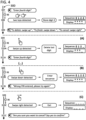
- Fig. 3 illustrates an example of a basic PIN entry procedure along process arrow 300.
- an auditory cue is provided in line 301.
- the auditory cue is shown as a simple "Enter First digit" message for illustrative purposes only.
- An auditory cue providing all the necessary instructions to interact with the device may be provided at this stage.
- the auditory cue can instruct the PIN holder about the requirements for tapping to enter the PIN digit and all the possible gestures to trigger commands such as delete, cancel, or finish.
- the applications processor such as applications processor 120 of Fig. 1A and 1B , can be responsible for providing the auditory cue or any kind of indication for interaction.
- the number of taps provided by the PIN holder is determined in line 302.
- the first digit of the PIN to be entered is "0", and the user may have been instructed not to tap to enter such digit. Since no tap was determined, a corresponding digit "0" can be stored in a sequence.
- an indication of progress can be shown in a display, such as a star for a digit successfully entered.
- the secure processor such as secure processor 110 of Fig. 1A and 1B , can be responsible for setting the hold period and determining and storing the number of taps.
- the secure processor can update the applications processor periodically so that the applications processor can provide the progress indication on the screen or any other indication necessary to continue with the process.
- a new auditory cue is provided in line 303.
- the auditory cue is shown as a simple "Enter Second digit" message for illustrative purposes only.
- An auditory cue providing all the necessary instructions to interact with the device may be provided at this stage.
- a simple click or chime can be played at this stage to confirm entry of the first digit.
- the number of taps provided by the PIN holder is determined in line 304. In this case, one tap was necessary, because the second digit of the PIN to be entered is "1". Since one tap was determined, a corresponding digit "1" can be stored in the sequence, which now comprises digits "0" and "1".
- an indication of progress can be shown in a display, such as a second star for the second digit successfully entered.
- a new auditory cue is provided in line 305.
- the auditory cue is shown as a simple "Enter Third digit" message for illustrative purposes only.
- An auditory cue providing all the necessary instructions to interact with the device may be provided at this stage.
- a simple click or chime can be played at this stage to confirm entry of the second digit.
- the number of taps provided by the PIN holder is determined in line 306. In this case, two taps were necessary, because the third digit of the PIN to be entered is "2". Since two taps were determined, a corresponding digit "2" can be stored in the sequence, that now comprises digits "0", "1” and "2".
- an indication of progress can be shown in a display, such as a third star for the third digit successfully entered.
- a new auditory cue is provided in line 307.
- the auditory cue is shown as a simple "Enter Fourth digit" message for illustrative purposes only.
- An auditory cue providing all the necessary instructions to interact with the device may be provided at this stage.
- a simple click or chime can be played at this stage to confirm entry of the third digit.
- the number of taps provided by the PIN holder is determined in line 308. In this case, three taps were necessary, because the fourth digit of the PIN to be entered is "3". Since three taps were determined, a corresponding digit "3" can be stored in the sequence, that now comprises digits "0", "1", "2” and "3".
- an indication of progress can be shown in a display, such as a fourth star for the fourth digit successfully entered.
- a new auditory cue is provided in line 309 to finish the process.
- This auditory cue is optional and may only be intended to provide a user-friendly experience to the PIN holder. Additionally, this last auditory cue may inform the user about the result of the PIN process entry, for example, whether the PIN was entered correctly or incorrectly.
- the hold period was set as a predetermined time (t) running from after the auditory cue to before the determination of the PIN holder's taps.
- the hold period may be set differently for each user or for each specific digit entered or instance of the process.
- this approach is particularly relevant because by providing a fixed time for entering each number other people not involved in the process are not able to listen in and determine which how many times the user tapped, because the same waiting time will be necessary for 1 tap than for 9 successive taps.
- an auditory cue is provided.
- This auditory cue can be the same auditory cue provided in lines 301, 303, 305 and 309 of Fig. 3 .
- the auditory cue can provide instructions for the PIN holder to take certain actions if desired.
- the auditory cue is provided as a simple "To delete: swipe up”; “To finish: swipe down “; “To cancel: swipe right” message for illustrative purposes only.
- An auditory cue providing all the necessary instructions to interact with the device may be provided at this stage. Additionally, the association of the actions swipe up, down or right with the commands to delete, finish and cancel was provided for illustrative proposes only. As explained above, user actions or gestures can be mapped to commands for the device in numerous different ways.
- the device can offer different experiences to its users depending on various factors.
- the device could provide a visual experience (for sighted and low vision users without speakers/headphones or auditory cues).
- the user can receive indications for example via a display, to enter their PIN.
- These embodiments can include the use of a standard PIN pad for entering a PIN, either on screen or as a physical device.
- the user can interact with the device such as by pressing "enter" to complete the process.
- the device could provide various feedbacks or just present the next screen for the process.
- the user may be provided with options to take actions such as skip, cancel, clear, etc.
- a feedback can be provided as indication of progress such as an asterisk on the screen.
- the device could provide an on-screen experience including auditory cues, for example when speakers or headphones are connected.
- the user can receive an indication to enter the PIN and to listen for instructions. The user can complete the process by following the instructions and a feedback can be provided as indication of progress such as an asterisk on the screen.
- the different resources such as the different means for outputting/ inputting information, can be used to guide the user throughout the process.
- the device could provide an audio experience (for low vision and blind users using auditory cues, for example via speaker or headphones).
- the whole process can be performed by giving auditory cues to the user.
- the user could be guided by a process as described in the examples of Fig. 3 and 4 .
- Other auditory cues can be provided so that the process can be carried out.
- a non-limiting list of examples of auditory cues and associated user actions includes: "Next, you'll enter your PIN by tapping it on the screen"; "For the number one, tap once. For two, tap twice, and so on.
- a cue can also be provided such as indication about a possible wrong digit entered. For example, if the number of taps is fewer than 1 or more 10, a cue could be "You entered an invalid digit. Please tap your (third) digit again.” Additionally, when the PIN is complete, a feedback can also be provided to indicate that the task is complete, for example "Processing... Your PIN was accepted” or "Processing... Invalid PIN. Please try again”. Then the process can continue with announcing the first header of the next screen.
- the secure microcontroller After the secure microcontroller receives the accessibility sequence entry commencement command, all data from the touch sensor can be routed directly to the secure microcontroller.
- the accessible PIN entry user interface can be presented on the display as indicated in step 507, and the process for entering the PIN digits can be performed.
- steps 508, 509, and 510 as taps are being detected the secure microcontroller can increment a digit being entered.
- the secure processor can perform these actions by incrementing a counter. In step 511 the timer expires. Since three taps were detected, and the digit was incremented to 3, the first digit can be recorded as 3. In this way, the secure processor stores the value for the digit in a sequence.
- the applications processor indicate that the PIN entry process continues by sending a command to the secure processor.
- the secure processor could transmit a value accepted signal to the applications processor after determining the number of taps, as illustrated in step 513 "first digit accepted".
- a digit received symbol can be generated for a display of the device using the applications processor after receiving the value accepted signal on the applications processor.
- the digit received symbol can be the indication of progress described before in this disclosure, such as an asterisk as indicated in step 514.
- An auditory (or other) cue can be provided after receiving the value accepted signal on the applications processor.
- the sue can indicate that the device is ready for receiving the next PIN digit, as illustrated in step 515. This loop can be repeated until the device is no longer in PIN entry mode.
- an auditory cue can be provided announcing that the PIN entry is complete, as indicated in step 516.
- steps related to the PIN processing process or to a payment processing can be performed as necessary as indicated in step 517.
- the applications processor could send a command to the secure processor in a step 518 to continue payment.
- the secure processor can encrypt payment details and the PIN entry in step 519 for transmission to the applications processor in a step 520. In this way, the sequence of digits recorded in steps 508-511 can be encrypted and securely transmitted outside the secure processor.
- the PIN entry process can be administrated by firmware on a secure processor, such as secure processor 110.
- the instructions of the process can be permanently stored on a secure memory, such as secure memory 115, on the secure processor.
- the secure processor can be in operative communication with an applications processor, such as applications processor 120, and the applications processor may also have access to stored instructions to carry out the steps of the process.
- the instructions can be encoded using any general purposes computer program language, such as C.
- the language used can depend on where the code will be running.
- Code running on the application processor can be written in a language that can be compiled into JVM bytecode (java class files), which can then be further transformed into a form that can processed by an interpreter of JIT engine supported by the operating system, such as the Dalvik VM or ART (Android Runtime).
- JVM bytecode java class files
- an interpreter of JIT engine supported by the operating system such as the Dalvik VM or ART (Android Runtime).
- Specific embodiments of the invention use Java and Kotlin.
- the applications processor supports running code that has been compiled natively for the particular target CPU architecture, for example it could run C++ or Rust compiled into a native ARM64 binary.
- the secure processor runs native code only (no interpreter or JIT engine).
- all relevant code for the secure processor can be written in pure C. In specific embodiments of the invention, other languages could be used to write code for the secure processor such as C++ or Rust. In specific embodiments of the invention, the code can only be run on the processor for which it was specifically intended, either the application processor or the secure processor.
- the secure processor will be responsible for collecting all sensitive touch data as provided, for example, by touch controller 140.
- the secure processor can update the applications processor periodically so that the applications processor can control the different means for outputting or inputting information accordingly, such as speaker 125, microphone 135 and display 130.
- the secure processor may notify the applications processor when the secure processor is ready to start a PIN entry procedure.
- the applications processor can then control the means for outputting information to issue the initial instructions for the user, such as the indications for interaction in the form of an auditory cue or a display message.
- the applications processor can also be notified when a new PIN digit has been entered or deleted, and then control the display so that an indication of progress displayed is updated.
- the secure processor (also referred to as secure board or secure microcontroller) can be a chip in the device that is separate from the applications processor.
- the applications processor can be a main applications processor running an operating system for the device, such as Android.
- the secure processor can handle sensitive information in an isolated environment to mitigate hardware and software attacks which might compromise sensitive data, such as card data or customer PIN in the case of devices that are use to process payment information.
- the primary reason a separate chip may be required is to pass Payment Card Industry (PCI) PIN Transaction Security (PTS) Point of Interaction (POI) device requirements. This is a security standard that payment devices which optionally accept PINs and process sensitive cardholder account data must adhere to.
- PCI Payment Card Industry
- PTS PIN Transaction Security
- POI Point of Interaction
- Communication between the secure processor and the application processor can occur in various ways. For example, communication between an operating system (such as Android), or the applications processor running such operating system, and the secure processor may occur via remote procedure calls (RPCs). As another example, communication between an operating system (such as Android), or the applications processor running such operating system, and the secure processor may occur via asynchronous signals. RPCs can provide the bulk of the functionality and can be served, for example, over USB. The operating system, or the applications processor running such operating system, can be the USB host and the secure processor can be a USB device providing a bulk in and bulk out interface. The operating system can "wake up" the secure processor if it is “sleeping" using a signal.
- RPCs remote procedure calls
- RPCs can provide the bulk of the functionality and can be served, for example, over USB.
- the operating system, or the applications processor running such operating system can be the USB host and the secure processor can be a USB device providing a bulk in and bulk out interface. The operating system can "wake up" the secure
- the operating system can invoke a USB bulk out method to send the RPC command and associated parameter data. It can invoke the USB bulk in method and block until the secure processor responds to the RPC with response data. In specific embodiments of the invention, only one RPC may be invoked at a time. Signals can be implemented via GPIOs to provide a mechanism to send notifications between the two processors. Specific embodiments of the invention provide a STOP signal to notify the secure processor to stop what it is doing in certain situations. Specific embodiments of the invention provide a NFC signal, for example for Mini/Mobile, to signal that the operating system should play a NFC tap success tone. This can be necessary due to strict performance requirements imposed on contactless payments, that the secure micro can emit the beep itself. Specific embodiments of the invention provide a secure micro event signal that can be used to notify the operating system that something interesting/relevant just happened on the secure processor, such as a card insert or swipe or chip card inserted.
- the operating system can serve as gatekeeper to the secure processor by managing communication to the secure processor.
- a privileged application included in the Android platform can serve as gatekeeper to the secure processor by supplying a ContentProvider that can manage all communication to the secure processor.
- the ContentProvider implemented is fulfilled by the SecureBoardConnectionProvider.
- Proprietary applications of the device manufacturer can use the provider through call methods, for example in an RPC model.
- the SecureBoardConnectionProvider can provide an interface to open and close a session with secure processor, which can ensure that multi-step RPC operations such as taking a payment are not interrupted by other operations such as updating a real time clock or injecting keys.
- a token can be returned and the UID of the caller can be recorded. From then on only the caller holding the token may invoke an RPC until the session is closed. There can be time limits on RPCs and sessions. Attempts to open a session when an existing session is already open can block in a fair queue for a given amount time until the session is available or time out. Specific embodiments of the invention involve devices including more than one secure processor. On devices where there are multiple secure processors, when a session is opened all secure processors can be reserved for the session owner. In this situation the RPC call can include the intended secure processor and RPCs can be invoked on secure processors simultaneously if desired.
- a secure payment app can be one of the users of the secure processor.
- Fig. 6 includes an example sequence diagram 600 of communication between an SPA 601, a content provider 602 and a secure processor, such as secure processor 110, in accordance with the process describe above.
- the exchange of calls to open and close session, wake up and sleep secure processor, bulk in and bulk out transfers, etc. are provided as exemplary ways in which an SPA and secure processor can initiate a session and exchange information.
- the SPA 601 can send a call open session function call to the content provider 602 which can then send a GPIO wakeup signal to the secure processor 110.
- This signal could be received via a GPIO connection between the secure processor and the applications processor.
- the content provider can then send a response to the call open session function call to the secure application.
- the SPA 601 can then send a call transfer RPC to the content provider 602 which can, in turn, initiate a USB bulk transfer of data out to the secure processor using another function call to the content provider 602.
- the USB bulk transfer of data out can pass the secure processor all the information needed to conduct the session (e.g., the amount being charged in the transaction that the SPA is processing, a transaction identifier for the transaction, etc.).
- the secure processor 110 can invoke a remote procedure call which leads to a USB bulk transfer of data in.
- the USB bulk transfer in or data can involve the secure processor transferring the data required for the process to continue (e.g., encrypted payment information, a transaction authorization confirmation, etc.).
- the content provider can utilize other means for passing the information back and forth with the secure processor.
- the content provider 602 serves to return the information requested by the initial transfer RPC. As such, the process can then continue with the content provider 602 returning the data from the session in a call transfer RPC return signal.
- the SPA 601 can then close the session by sending a calling a close session function of the content provider 602.
- the content provider 602 can then return a close session call response to the SPA 601 to confirm the session is complete and send a GPIO or remote procedure call signal to secure processor 110 to put the secure processor 110 in a sleep state.
- the processors mentioned herein can individually include computer readable media accessible to those processors.
- the computer readable media can store instructions that are executable by the processors to cause the devices to execute the methods disclosed herein.
- examples in the disclosure were broadly directed to a dedicated device for entering a PIN, it can be understood that such device can be any device capable of executing the methods disclosed herein, such as POS devices, personal mobile devices, ATMs or any other device that benefits from the approaches disclosed.
Landscapes
- Engineering & Computer Science (AREA)
- Theoretical Computer Science (AREA)
- Physics & Mathematics (AREA)
- General Physics & Mathematics (AREA)
- Business, Economics & Management (AREA)
- General Engineering & Computer Science (AREA)
- Accounting & Taxation (AREA)
- Computer Security & Cryptography (AREA)
- Human Computer Interaction (AREA)
- Strategic Management (AREA)
- Finance (AREA)
- General Business, Economics & Management (AREA)
- Computer Hardware Design (AREA)
- Educational Administration (AREA)
- Educational Technology (AREA)
- General Health & Medical Sciences (AREA)
- Audiology, Speech & Language Pathology (AREA)
- Health & Medical Sciences (AREA)
- Software Systems (AREA)
- Computer Networks & Wireless Communication (AREA)
- User Interface Of Digital Computer (AREA)
Claims (15)
- Un ou plusieurs supports non transitoires lisibles par ordinateur stockant des instructions qui, lorsqu'elles sont exécutées par un ou plusieurs processeurs dans un dispositif (100), amènent le dispositif à :fournir, à l'aide d'un haut-parleur (125) sur le dispositif, un signal auditif ;initier, après la fourniture du signal auditif, une période de maintien d'une durée prédéterminée ;recevoir un ensemble de zéro tape ou plus fourni sur un capteur tactile (155) sur le dispositif (100) pendant la période de maintien ;déterminer un nombre de tapes dans l'ensemble de zéro tape ou plus par un microcontrôleur sécurisé ;stocker, après la fin de la période de maintien, une valeur dans une séquence sur la base du nombre de tapes effectuées par le microcontrôleur sécurisé ;transmettre un signal de valeur acceptée du microcontrôleur sécurisé à un processeur d'applications après le stockage du nombre de tapes ; etgénérer un symbole de chiffre reçu pour un dispositif d'affichage du dispositif à l'aide du processeur d'applications après la réception du signal de valeur acceptée sur le processeur d'applications.
- Supports non transitoires lisibles par ordinateur selon la revendication 1, stockant également des instructions qui, lorsqu'elles sont exécutées par un ou plusieurs processeurs dans le dispositif, amènent le dispositif à :
fournir, à l'aide du haut-parleur (125) sur le dispositif et après la période de maintien, un second signal auditif. - Supports non transitoires lisibles par ordinateur selon la revendication 1 ou 2, stockant également des instructions qui, lorsqu'elles sont exécutées par un ou plusieurs processeurs dans le dispositif, amènent le dispositif à :
répéter les étapes de fourniture, d'initiation, de réception, de détermination et de stockage dans un cycle jusqu'à ce que la séquence comporte N chiffres. - Supports non transitoires lisibles par ordinateur selon l'une quelconque des revendications 1 à 3, stockant également des instructions qui, lorsqu'elles sont exécutées par un ou plusieurs processeurs dans le dispositif, amènent le dispositif à :
répéter les étapes de fourniture, d'initiation, de réception, de détermination et de stockage dans un cycle jusqu'à la réception d'une entrée de séquence complète d'un utilisateur. - Supports non transitoires lisibles par ordinateur selon l'une quelconque des revendications 1 à 4, stockant également des instructions qui, lorsqu'elles sont exécutées par un ou plusieurs processeurs dans le dispositif, amènent le dispositif à :détecter une action de toucher vers le haut sur le capteur tactile (155) ; etdétecter une action de toucher vers le bas sur le capteur tactile (155) dans une durée de temps après la détection de l'action de toucher vers le haut ;dans lesquels la période de maintien est définie en fonction de la durée de temps.
- Supports non transitoires lisibles par ordinateur selon l'une quelconque des revendications 1 à 5, dans lesquels le capteur tactile (155) est un dispositif d'affichage tactile (130).
- Supports non transitoires lisibles par ordinateur selon la revendication 6, dans lesquels le dispositif d'affichage tactile comporte un ou plusieurs éléments tactiles (755) entourant le dispositif d'affichage tactile (130) pour distinguer un bord du dispositif d'affichage tactile d'une surface du dispositif.
- Supports non transitoires lisibles par ordinateur selon l'une quelconque des revendications 1 à 7, stockant également des instructions qui, lorsqu'elles sont exécutées par un ou plusieurs processeurs dans le dispositif, amènent le dispositif à :transmettre une commande de début d'entrée de séquence d'accessibilité à partir d'une application sécurisée sur le processeur d'applications (120) dans le dispositif (100) au microcontrôleur sécurisé (110) ; etacheminer toutes les données du capteur tactile (155) directement vers le microcontrôleur sécurisé (110), à l'aide d'un multiplexeur (150) sous le contrôle du microcontrôleur sécurisé (110), après la réception de la commande de début d'entrée de séquence d'accessibilité au niveau du microcontrôleur sécurisé (110).
- Supports non transitoires lisibles par ordinateur selon la revendication 8, stockant également des instructions qui, lorsqu'elles sont exécutées par un ou plusieurs processeurs dans le dispositif, amènent le dispositif à :
crypter la séquence sur le microcontrôleur sécurisé (110) après le stockage de la valeur dans la séquence. - Supports non transitoires lisibles par ordinateur selon la revendication 8 ou 9, stockant également des instructions qui, lorsqu'elles sont exécutées par un ou plusieurs processeurs dans le dispositif, amènent le dispositif à :
fournir, à l'aide du haut-parleur (125) sur le dispositif (100) et du processeur d'applications (120), un second signal auditif après la réception du signal de valeur acceptée sur le processeur d'applications (120). - Supports non transitoires lisibles par ordinateur selon l'une quelconque des revendications 1 à 10, dans lesquels :une tape est définie par une action de toucher vers le bas sur une coordonnée tactile associée au capteur tactile (155) suivie d'une action de toucher vers le haut dans une période prédéterminée ; etla coordonnée tactile associée au capteur tactile (155) ne change pas pendant la période prédéterminée.
- Dispositif (100), comprenant :un haut-parleur (125) ;un capteur tactile (155) ;au moins un processeur ; etdes supports non transitoires lisibles par ordinateur accessibles à l'au moins un processeur et stockant des instructions qui, lorsqu'elles sont exécutées par l'au moins un processeur, amènent le dispositif à :fournir, à l'aide du haut-parleur (125), un signal auditif ;initier, après la fourniture du signal auditif, une période de maintien de durée prédéterminée ;recevoir un ensemble de zéro tape ou plus fourni sur le capteur tactile (155) sur le dispositif (100) pendant la période de maintien ;déterminer un nombre de tapes dans l'ensemble de zéro tape ou plus par un microcontrôleur sécurisé ;stocker, après la fin de la période de maintien, une valeur dans une séquence sur la base du nombre de tapes effectuées par le microcontrôleur sécurisé ;transmettre un signal de valeur acceptée du microcontrôleur sécurisé à un processeur d'applications après le stockage du nombre de tapes ; etgénérer un symbole de chiffre reçu pour un dispositif d'affichage du dispositif à l'aide du processeur d'applications après la réception du signal de valeur acceptée sur le processeur d'applications.
- Dispositif (100) selon la revendication 12, comprenant également :un multiplexeur (150) ;dans lequel le processeur d'applications (120) exécute des instructions pour transmettre une commande de début d'entrée de séquence d'accessibilité d'une application sécurisée sur le processeur d'applications au microcontrôleur sécurisé (110) ; etdans lequel le microcontrôleur sécurisé (110) exécute des instructions pour modifier un état du multiplexeur (150) et acheminer toutes les données du capteur tactile (155) directement vers le microcontrôleur sécurisé (110) après la réception, par le microcontrôleur (110), de la commande de début d'entrée de séquence d'accessibilité.
- Dispositif (100) selon la revendication 12, dans lequel le capteur tactile (155) est un dispositif d'affichage tactile (130).
- Dispositif (100) selon la revendication 14, dans lequel le dispositif d'affichage tactile (130) comporte un ou plusieurs éléments tactiles (755) entourant le dispositif d'affichage tactile (130) pour distinguer un bord du dispositif d'affichage tactile d'une surface du dispositif (100).
Priority Applications (1)
| Application Number | Priority Date | Filing Date | Title |
|---|---|---|---|
| EP24221947.5A EP4510065A3 (fr) | 2020-06-03 | 2021-05-27 | Dispositif matériel pour entrer une broche par l'intermédiaire d'un tapotement sur un écran tactile |
Applications Claiming Priority (2)
| Application Number | Priority Date | Filing Date | Title |
|---|---|---|---|
| US202063034276P | 2020-06-03 | 2020-06-03 | |
| US17/330,287 US11341496B2 (en) | 2020-06-03 | 2021-05-25 | Hardware device for entering a PIN via tapping on a touch screen display |
Related Child Applications (2)
| Application Number | Title | Priority Date | Filing Date |
|---|---|---|---|
| EP24221947.5A Division EP4510065A3 (fr) | 2020-06-03 | 2021-05-27 | Dispositif matériel pour entrer une broche par l'intermédiaire d'un tapotement sur un écran tactile |
| EP24221947.5A Division-Into EP4510065A3 (fr) | 2020-06-03 | 2021-05-27 | Dispositif matériel pour entrer une broche par l'intermédiaire d'un tapotement sur un écran tactile |
Publications (2)
| Publication Number | Publication Date |
|---|---|
| EP3920059A1 EP3920059A1 (fr) | 2021-12-08 |
| EP3920059B1 true EP3920059B1 (fr) | 2025-03-12 |
Family
ID=76180868
Family Applications (2)
| Application Number | Title | Priority Date | Filing Date |
|---|---|---|---|
| EP21176377.6A Active EP3920059B1 (fr) | 2020-06-03 | 2021-05-27 | Dispositif matériel permettant de saisir un code pin en tapant sur un affichage d'écran tactile |
| EP24221947.5A Pending EP4510065A3 (fr) | 2020-06-03 | 2021-05-27 | Dispositif matériel pour entrer une broche par l'intermédiaire d'un tapotement sur un écran tactile |
Family Applications After (1)
| Application Number | Title | Priority Date | Filing Date |
|---|---|---|---|
| EP24221947.5A Pending EP4510065A3 (fr) | 2020-06-03 | 2021-05-27 | Dispositif matériel pour entrer une broche par l'intermédiaire d'un tapotement sur un écran tactile |
Country Status (5)
| Country | Link |
|---|---|
| US (2) | US11341496B2 (fr) |
| EP (2) | EP3920059B1 (fr) |
| AU (2) | AU2021203509B2 (fr) |
| CA (2) | CA3191205A1 (fr) |
| PL (1) | PL3920059T3 (fr) |
Families Citing this family (9)
| Publication number | Priority date | Publication date | Assignee | Title |
|---|---|---|---|---|
| US11170085B2 (en) | 2018-06-03 | 2021-11-09 | Apple Inc. | Implementation of biometric authentication |
| US11341496B2 (en) | 2020-06-03 | 2022-05-24 | Fiserv, Inc. | Hardware device for entering a PIN via tapping on a touch screen display |
| US20230169481A1 (en) * | 2021-11-30 | 2023-06-01 | Clover Network, Llc | Touch screen device for entering data using auditory signals |
| US20230185522A1 (en) * | 2021-12-10 | 2023-06-15 | Shopify Inc. | Systems, apparatus, and methods for data entry at electronic user devices |
| US12307431B2 (en) | 2021-12-22 | 2025-05-20 | Shopify Inc. | Systems, apparatus, and methods for providing data entry feedback at electronic user devices |
| US12118548B2 (en) * | 2022-01-25 | 2024-10-15 | Apple Inc. | Managing information on a computer system |
| CN119493509A (zh) | 2022-01-25 | 2025-02-21 | 苹果公司 | 管理计算机系统上的信息 |
| US12407517B2 (en) * | 2023-09-28 | 2025-09-02 | Apple Inc. | Secure pin entry using a virtual terminal |
| CN117519566A (zh) * | 2023-11-28 | 2024-02-06 | 银捷尼科(福建)科技有限公司 | 电子设备的触屏信息输入方法以及电子设备 |
Family Cites Families (56)
| Publication number | Priority date | Publication date | Assignee | Title |
|---|---|---|---|---|
| US3540573A (en) | 1968-05-15 | 1970-11-17 | John K Keim | Belt cleaner |
| JPS60115609A (ja) | 1983-11-28 | 1985-06-22 | Hitachi Chem Co Ltd | 重合体の製造法 |
| JPS6328921A (ja) | 1986-07-18 | 1988-02-06 | Nippon Spindle Mfg Co Ltd | 紡績用リング |
| JPH0631065Y2 (ja) | 1988-07-06 | 1994-08-22 | サン仮設株式会社 | トッププレート |
| JP2857777B2 (ja) | 1989-10-26 | 1999-02-17 | 株式会社日立製作所 | 現金自動取引装置 |
| US5589855A (en) | 1992-08-14 | 1996-12-31 | Transaction Technology, Inc. | Visually impaired customer activated terminal method and system |
| EP0994570A1 (fr) * | 1998-10-12 | 2000-04-19 | Sony International (Europe) GmbH | Estimateur de canal à spectre étalé avec suppression d'interférence entre voie |
| US7146577B2 (en) | 2001-03-27 | 2006-12-05 | Ncr Corporation | Signature capture terminal |
| US7341180B2 (en) * | 2004-01-29 | 2008-03-11 | Alpha Network Co., Ltd. | Card settlement system |
| US9082253B1 (en) | 2005-12-20 | 2015-07-14 | Diebold Self-Service Systems Division Of Diebold, Incorporated | Banking system controlled responsive to data bearing records |
| US20120066650A1 (en) * | 2010-09-10 | 2012-03-15 | Motorola, Inc. | Electronic Device and Method for Evaluating the Strength of a Gestural Password |
| US10620794B2 (en) * | 2010-12-23 | 2020-04-14 | Apple Inc. | Device, method, and graphical user interface for switching between two user interfaces |
| US20120319956A1 (en) | 2011-06-16 | 2012-12-20 | Verifone, Inc. | Eavesdropping resistant touchscreen system |
| US8978975B2 (en) | 2011-07-18 | 2015-03-17 | Accullink, Inc. | Systems and methods for authenticating near field communcation financial transactions |
| US8874912B2 (en) | 2011-10-04 | 2014-10-28 | Accullink, Inc. | Systems and methods for securely transferring personal identifiers |
| EP2584485A1 (fr) | 2011-10-21 | 2013-04-24 | Gemalto SA | Procédé, dispositif et système pour entrer des données |
| US8686947B2 (en) * | 2011-11-04 | 2014-04-01 | Kyocera Corporation | Finger keypad system and method |
| DE102012100717A1 (de) | 2012-01-30 | 2013-08-01 | Wincor Nixdorf International Gmbh | Hilfsvorrichtung für sehbehinderte Personen zur Bedienung eines Touchscreens insbesondere eines Geldautomaten |
| JP5783610B2 (ja) * | 2012-08-31 | 2015-09-24 | Necソリューションイノベータ株式会社 | 入力表示制御装置、シンクライアントシステム、入力表示制御方法およびプログラム |
| JP5924203B2 (ja) * | 2012-09-12 | 2016-05-25 | ブラザー工業株式会社 | 画像表示制御装置、画像表示制御方法およびプログラム |
| US9495524B2 (en) | 2012-10-01 | 2016-11-15 | Nxp B.V. | Secure user authentication using a master secure element |
| KR102007651B1 (ko) | 2012-12-21 | 2019-08-07 | 삼성전자주식회사 | 터치스크린 키보드를 구성하는 방법, 장치 및 이를 수행하는 프로그램을 저장하는 컴퓨터로 읽을 수 있는 저장 매체 |
| US8875279B2 (en) * | 2013-02-07 | 2014-10-28 | Dell Products L.P. | Passwords for touch-based platforms using time-based finger taps |
| US9760278B2 (en) * | 2013-03-01 | 2017-09-12 | Altaba INC. | Finger expressions for touch screens |
| US10255038B2 (en) | 2013-04-26 | 2019-04-09 | Microsoft Technology Licensing, Llc | Techniques to present a user interface for the visually impaired |
| KR102179056B1 (ko) * | 2013-07-19 | 2020-11-16 | 엘지전자 주식회사 | 이동 단말기 및 그것의 제어방법 |
| US20190213306A1 (en) * | 2013-11-15 | 2019-07-11 | AuthenWare Corp. | System and method for identity authentication |
| KR102091161B1 (ko) * | 2013-12-05 | 2020-03-19 | 엘지전자 주식회사 | 이동 단말기 및 그것의 제어방법 |
| JP2015122023A (ja) * | 2013-12-25 | 2015-07-02 | セイコーエプソン株式会社 | ウェアラブル機器及びウェアラブル機器の制御方法 |
| US20150205379A1 (en) * | 2014-01-20 | 2015-07-23 | Apple Inc. | Motion-Detected Tap Input |
| DE102014224674A1 (de) * | 2014-12-02 | 2016-06-02 | Siemens Aktiengesellschaft | Benutzerschnittstelle und Verfahren zur Bedienung eines Systems |
| DE102014224676B4 (de) | 2014-12-02 | 2022-03-03 | Aevi International Gmbh | Benutzerschnittstelle und Verfahren zur geschützten Eingabe von Zeichen |
| US10429930B2 (en) | 2015-01-30 | 2019-10-01 | Ncr Corporation | Accessible tactile features for blind and partially sighted PIN entry and touchscreen usage |
| US10705723B2 (en) * | 2015-11-23 | 2020-07-07 | Verifone, Inc. | Systems and methods for authentication code entry in touch-sensitive screen enabled devices |
| AU2016359591A1 (en) | 2015-11-23 | 2018-04-26 | Verifone, Inc. | Systems and methods for authentication code entry in touch-sensitive screen enabled devices |
| DK201670580A1 (en) * | 2016-06-12 | 2018-01-02 | Apple Inc | Wrist-based tactile time feedback for non-sighted users |
| US10795573B2 (en) | 2016-08-03 | 2020-10-06 | International Business Machines Corporation | Method and apparatus for virtual braille keyboard |
| EP3520054A4 (fr) | 2016-10-03 | 2020-05-27 | Poynt Co. | Système et procédé d'assistance d'utilisateur handicapé |
| US10735225B2 (en) * | 2017-05-04 | 2020-08-04 | Samsung Electronics Co., Ltd. | Method and apparatus for transmitting and receiving signal for low peak-to-average power ratio in wireless communication system |
| US10489567B2 (en) | 2017-05-26 | 2019-11-26 | Visa International Service Association | Accessible secure data entry |
| FR3070519B1 (fr) * | 2017-08-31 | 2022-02-18 | Ingenico Group | Dispositif de saisie sur une surface tactile et procede correspondant |
| WO2019116233A1 (fr) * | 2017-12-12 | 2019-06-20 | Idex Asa | Source d'alimentation pour enregistrement biométrique avec indicateurs d'état |
| KR102108972B1 (ko) | 2017-12-27 | 2020-05-12 | 부산대학교 산학협력단 | 시각장애인을 위한 보안 키패드 및 보안 키패드에서의 입력 방법 |
| AU2019201546A1 (en) | 2018-03-12 | 2019-09-26 | Verifone, Inc. | Systems and methods for authentication code entry in touch-sensitive screen enabled devices |
| US10921891B2 (en) | 2018-03-23 | 2021-02-16 | Verifone, Inc. | Systems and methods for authentication code entry in touch-sensitive screen enabled devices |
| US10776006B2 (en) * | 2018-06-03 | 2020-09-15 | Apple Inc. | Systems and methods for activating and using a trackpad at an electronic device with a touch-sensitive display and no force sensors |
| FR3082641B1 (fr) | 2018-06-15 | 2021-11-05 | Ingenico Group | Dispositif de saisie de donnees destine a etre appose sur une dalle tactile d’un terminal, procede et systeme de saisie correspondants. |
| US11822780B2 (en) * | 2019-04-15 | 2023-11-21 | Apple Inc. | Devices, methods, and systems for performing content manipulation operations |
| US11010044B2 (en) * | 2019-05-28 | 2021-05-18 | Shopify Inc. | Swipe-based PIN entry |
| FR3097350B1 (fr) | 2019-06-14 | 2021-10-29 | Ingenico Group | Procédé d’assistance à l’utilisation d’un dispositif de transaction électronique. |
| GB201910621D0 (en) | 2019-07-25 | 2019-09-11 | Licentia Group Ltd | Computer-implemented system and method |
| CN111127780B (zh) | 2019-12-25 | 2022-04-26 | 福建新大陆支付技术有限公司 | 一种全触屏pos终端的pin输入检测方法 |
| GB2592201B (en) | 2020-02-18 | 2023-03-29 | Miura Systems Ltd | Touchscreen Interface |
| CN111580737A (zh) | 2020-04-26 | 2020-08-25 | 百富计算机技术(深圳)有限公司 | 一种密码输入方法及终端设备 |
| US11341496B2 (en) | 2020-06-03 | 2022-05-24 | Fiserv, Inc. | Hardware device for entering a PIN via tapping on a touch screen display |
| CN112000273A (zh) | 2020-08-26 | 2020-11-27 | 深圳前海微众银行股份有限公司 | 输入方法、装置、设备及计算机可读存储介质 |
-
2021
- 2021-05-25 US US17/330,287 patent/US11341496B2/en active Active
- 2021-05-26 CA CA3191205A patent/CA3191205A1/fr active Pending
- 2021-05-26 CA CA3119607A patent/CA3119607C/fr active Active
- 2021-05-27 PL PL21176377.6T patent/PL3920059T3/pl unknown
- 2021-05-27 EP EP21176377.6A patent/EP3920059B1/fr active Active
- 2021-05-27 EP EP24221947.5A patent/EP4510065A3/fr active Pending
- 2021-05-28 AU AU2021203509A patent/AU2021203509B2/en active Active
-
2022
- 2022-04-25 US US17/728,569 patent/US11710126B2/en active Active
-
2024
- 2024-01-05 AU AU2024200087A patent/AU2024200087B2/en active Active
Also Published As
| Publication number | Publication date |
|---|---|
| US20210383386A1 (en) | 2021-12-09 |
| US11710126B2 (en) | 2023-07-25 |
| EP4510065A2 (fr) | 2025-02-19 |
| PL3920059T3 (pl) | 2025-07-28 |
| CA3119607C (fr) | 2023-04-25 |
| US20220253850A1 (en) | 2022-08-11 |
| AU2024200087A1 (en) | 2024-01-25 |
| AU2021203509B2 (en) | 2023-10-19 |
| AU2021203509A1 (en) | 2021-12-23 |
| US11341496B2 (en) | 2022-05-24 |
| AU2024200087B2 (en) | 2025-02-27 |
| CA3119607A1 (fr) | 2021-12-03 |
| EP3920059A1 (fr) | 2021-12-08 |
| EP4510065A3 (fr) | 2025-03-19 |
| CA3191205A1 (fr) | 2021-12-03 |
Similar Documents
| Publication | Publication Date | Title |
|---|---|---|
| EP3920059B1 (fr) | Dispositif matériel permettant de saisir un code pin en tapant sur un affichage d'écran tactile | |
| US12481368B2 (en) | Gesture-based user interface | |
| CN107257952B (zh) | 用于以受保护的方式输入字符的用户接口和方法 | |
| EP2958011B1 (fr) | Appareil et procédé pour commander un appareil par un utilisateur | |
| EP4187410A1 (fr) | Dispositif à écran tactile pour la saisie de données à l'aide de signaux auditifs | |
| US11551217B2 (en) | Multi-touch key entry interface | |
| JPH1185438A (ja) | 自動取引操作装置 | |
| JP4500414B2 (ja) | 相談端末とそれを用いた相談システムの表示方法、並びにサーバシステム | |
| US20230297986A1 (en) | Self-Service Terminal and Method | |
| KR101456786B1 (ko) | 금융기기 및 그 제어 방법 | |
| US11054983B2 (en) | Gestural touch interface | |
| JP5706644B2 (ja) | 自動取引装置及び自動取引プログラム | |
| EP4093068A1 (fr) | Procédé de commande d'un appareil | |
| HK1216791B (en) | Apparatus and method for controlling the apparatus by a user |
Legal Events
| Date | Code | Title | Description |
|---|---|---|---|
| PUAI | Public reference made under article 153(3) epc to a published international application that has entered the european phase |
Free format text: ORIGINAL CODE: 0009012 |
|
| STAA | Information on the status of an ep patent application or granted ep patent |
Free format text: STATUS: THE APPLICATION HAS BEEN PUBLISHED |
|
| AK | Designated contracting states |
Kind code of ref document: A1 Designated state(s): AL AT BE BG CH CY CZ DE DK EE ES FI FR GB GR HR HU IE IS IT LI LT LU LV MC MK MT NL NO PL PT RO RS SE SI SK SM TR |
|
| B565 | Issuance of search results under rule 164(2) epc |
Effective date: 20211012 |
|
| STAA | Information on the status of an ep patent application or granted ep patent |
Free format text: STATUS: REQUEST FOR EXAMINATION WAS MADE |
|
| 17P | Request for examination filed |
Effective date: 20220608 |
|
| RBV | Designated contracting states (corrected) |
Designated state(s): AL AT BE BG CH CY CZ DE DK EE ES FI FR GB GR HR HU IE IS IT LI LT LU LV MC MK MT NL NO PL PT RO RS SE SI SK SM TR |
|
| STAA | Information on the status of an ep patent application or granted ep patent |
Free format text: STATUS: EXAMINATION IS IN PROGRESS |
|
| 17Q | First examination report despatched |
Effective date: 20230531 |
|
| GRAP | Despatch of communication of intention to grant a patent |
Free format text: ORIGINAL CODE: EPIDOSNIGR1 |
|
| STAA | Information on the status of an ep patent application or granted ep patent |
Free format text: STATUS: GRANT OF PATENT IS INTENDED |
|
| RIC1 | Information provided on ipc code assigned before grant |
Ipc: G06Q 20/40 20120101ALI20240920BHEP Ipc: G06Q 20/32 20120101ALI20240920BHEP Ipc: G06Q 20/20 20120101ALI20240920BHEP Ipc: G07F 19/00 20060101ALI20240920BHEP Ipc: G07F 7/10 20060101ALI20240920BHEP Ipc: G06F 3/0484 20130101ALI20240920BHEP Ipc: G06F 3/04883 20220101ALI20240920BHEP Ipc: G06F 21/83 20130101ALI20240920BHEP Ipc: G06F 21/31 20130101AFI20240920BHEP |
|
| INTG | Intention to grant announced |
Effective date: 20241015 |
|
| GRAS | Grant fee paid |
Free format text: ORIGINAL CODE: EPIDOSNIGR3 |
|
| GRAA | (expected) grant |
Free format text: ORIGINAL CODE: 0009210 |
|
| STAA | Information on the status of an ep patent application or granted ep patent |
Free format text: STATUS: THE PATENT HAS BEEN GRANTED |
|
| RAP3 | Party data changed (applicant data changed or rights of an application transferred) |
Owner name: FISERV, INC. |
|
| P01 | Opt-out of the competence of the unified patent court (upc) registered |
Free format text: CASE NUMBER: APP_4603/2025 Effective date: 20250128 |
|
| AK | Designated contracting states |
Kind code of ref document: B1 Designated state(s): AL AT BE BG CH CY CZ DE DK EE ES FI FR GB GR HR HU IE IS IT LI LT LU LV MC MK MT NL NO PL PT RO RS SE SI SK SM TR |
|
| REG | Reference to a national code |
Ref country code: GB Ref legal event code: FG4D |
|
| REG | Reference to a national code |
Ref country code: CH Ref legal event code: EP |
|
| REG | Reference to a national code |
Ref country code: DE Ref legal event code: R096 Ref document number: 602021027393 Country of ref document: DE |
|
| REG | Reference to a national code |
Ref country code: IE Ref legal event code: FG4D |
|
| REG | Reference to a national code |
Ref country code: NL Ref legal event code: FP |
|
| PGFP | Annual fee paid to national office [announced via postgrant information from national office to epo] |
Ref country code: NL Payment date: 20250425 Year of fee payment: 5 |
|
| PG25 | Lapsed in a contracting state [announced via postgrant information from national office to epo] |
Ref country code: RS Free format text: LAPSE BECAUSE OF FAILURE TO SUBMIT A TRANSLATION OF THE DESCRIPTION OR TO PAY THE FEE WITHIN THE PRESCRIBED TIME-LIMIT Effective date: 20250612 |
|
| PG25 | Lapsed in a contracting state [announced via postgrant information from national office to epo] |
Ref country code: FI Free format text: LAPSE BECAUSE OF FAILURE TO SUBMIT A TRANSLATION OF THE DESCRIPTION OR TO PAY THE FEE WITHIN THE PRESCRIBED TIME-LIMIT Effective date: 20250312 |
|
| PGFP | Annual fee paid to national office [announced via postgrant information from national office to epo] |
Ref country code: DE Payment date: 20250416 Year of fee payment: 5 |
|
| PG25 | Lapsed in a contracting state [announced via postgrant information from national office to epo] |
Ref country code: ES Free format text: LAPSE BECAUSE OF FAILURE TO SUBMIT A TRANSLATION OF THE DESCRIPTION OR TO PAY THE FEE WITHIN THE PRESCRIBED TIME-LIMIT Effective date: 20250312 |
|
| REG | Reference to a national code |
Ref country code: LT Ref legal event code: MG9D |
|
| PG25 | Lapsed in a contracting state [announced via postgrant information from national office to epo] |
Ref country code: NO Free format text: LAPSE BECAUSE OF FAILURE TO SUBMIT A TRANSLATION OF THE DESCRIPTION OR TO PAY THE FEE WITHIN THE PRESCRIBED TIME-LIMIT Effective date: 20250612 |
|
| PGFP | Annual fee paid to national office [announced via postgrant information from national office to epo] |
Ref country code: BE Payment date: 20250422 Year of fee payment: 5 |
|
| PG25 | Lapsed in a contracting state [announced via postgrant information from national office to epo] |
Ref country code: HR Free format text: LAPSE BECAUSE OF FAILURE TO SUBMIT A TRANSLATION OF THE DESCRIPTION OR TO PAY THE FEE WITHIN THE PRESCRIBED TIME-LIMIT Effective date: 20250312 |
|
| PG25 | Lapsed in a contracting state [announced via postgrant information from national office to epo] |
Ref country code: LV Free format text: LAPSE BECAUSE OF FAILURE TO SUBMIT A TRANSLATION OF THE DESCRIPTION OR TO PAY THE FEE WITHIN THE PRESCRIBED TIME-LIMIT Effective date: 20250312 |
|
| PG25 | Lapsed in a contracting state [announced via postgrant information from national office to epo] |
Ref country code: GR Free format text: LAPSE BECAUSE OF FAILURE TO SUBMIT A TRANSLATION OF THE DESCRIPTION OR TO PAY THE FEE WITHIN THE PRESCRIBED TIME-LIMIT Effective date: 20250613 Ref country code: BG Free format text: LAPSE BECAUSE OF FAILURE TO SUBMIT A TRANSLATION OF THE DESCRIPTION OR TO PAY THE FEE WITHIN THE PRESCRIBED TIME-LIMIT Effective date: 20250312 |
|
| PGFP | Annual fee paid to national office [announced via postgrant information from national office to epo] |
Ref country code: AT Payment date: 20250721 Year of fee payment: 5 |
|
| PG25 | Lapsed in a contracting state [announced via postgrant information from national office to epo] |
Ref country code: SE Free format text: LAPSE BECAUSE OF FAILURE TO SUBMIT A TRANSLATION OF THE DESCRIPTION OR TO PAY THE FEE WITHIN THE PRESCRIBED TIME-LIMIT Effective date: 20250312 |
|
| PG25 | Lapsed in a contracting state [announced via postgrant information from national office to epo] |
Ref country code: SM Free format text: LAPSE BECAUSE OF FAILURE TO SUBMIT A TRANSLATION OF THE DESCRIPTION OR TO PAY THE FEE WITHIN THE PRESCRIBED TIME-LIMIT Effective date: 20250312 |
|
| PG25 | Lapsed in a contracting state [announced via postgrant information from national office to epo] |
Ref country code: PT Free format text: LAPSE BECAUSE OF FAILURE TO SUBMIT A TRANSLATION OF THE DESCRIPTION OR TO PAY THE FEE WITHIN THE PRESCRIBED TIME-LIMIT Effective date: 20250714 |
|
| PG25 | Lapsed in a contracting state [announced via postgrant information from national office to epo] |
Ref country code: IT Free format text: LAPSE BECAUSE OF FAILURE TO SUBMIT A TRANSLATION OF THE DESCRIPTION OR TO PAY THE FEE WITHIN THE PRESCRIBED TIME-LIMIT Effective date: 20250312 |
|
| PG25 | Lapsed in a contracting state [announced via postgrant information from national office to epo] |
Ref country code: CZ Free format text: LAPSE BECAUSE OF FAILURE TO SUBMIT A TRANSLATION OF THE DESCRIPTION OR TO PAY THE FEE WITHIN THE PRESCRIBED TIME-LIMIT Effective date: 20250312 Ref country code: EE Free format text: LAPSE BECAUSE OF FAILURE TO SUBMIT A TRANSLATION OF THE DESCRIPTION OR TO PAY THE FEE WITHIN THE PRESCRIBED TIME-LIMIT Effective date: 20250312 |
|
| PG25 | Lapsed in a contracting state [announced via postgrant information from national office to epo] |
Ref country code: RO Free format text: LAPSE BECAUSE OF FAILURE TO SUBMIT A TRANSLATION OF THE DESCRIPTION OR TO PAY THE FEE WITHIN THE PRESCRIBED TIME-LIMIT Effective date: 20250312 |
|
| PG25 | Lapsed in a contracting state [announced via postgrant information from national office to epo] |
Ref country code: SK Free format text: LAPSE BECAUSE OF FAILURE TO SUBMIT A TRANSLATION OF THE DESCRIPTION OR TO PAY THE FEE WITHIN THE PRESCRIBED TIME-LIMIT Effective date: 20250312 |
|
| PG25 | Lapsed in a contracting state [announced via postgrant information from national office to epo] |
Ref country code: IS Free format text: LAPSE BECAUSE OF FAILURE TO SUBMIT A TRANSLATION OF THE DESCRIPTION OR TO PAY THE FEE WITHIN THE PRESCRIBED TIME-LIMIT Effective date: 20250712 |
|
| REG | Reference to a national code |
Ref country code: DE Ref legal event code: R097 Ref document number: 602021027393 Country of ref document: DE |
|
| REG | Reference to a national code |
Ref country code: CH Ref legal event code: H13 Free format text: ST27 STATUS EVENT CODE: U-0-0-H10-H13 (AS PROVIDED BY THE NATIONAL OFFICE) Effective date: 20251223 |
|
| PG25 | Lapsed in a contracting state [announced via postgrant information from national office to epo] |
Ref country code: DK Free format text: LAPSE BECAUSE OF FAILURE TO SUBMIT A TRANSLATION OF THE DESCRIPTION OR TO PAY THE FEE WITHIN THE PRESCRIBED TIME-LIMIT Effective date: 20250312 |
|
| PG25 | Lapsed in a contracting state [announced via postgrant information from national office to epo] |
Ref country code: LU Free format text: LAPSE BECAUSE OF NON-PAYMENT OF DUE FEES Effective date: 20250527 |
|
| PLBE | No opposition filed within time limit |
Free format text: ORIGINAL CODE: 0009261 |
|
| STAA | Information on the status of an ep patent application or granted ep patent |
Free format text: STATUS: NO OPPOSITION FILED WITHIN TIME LIMIT |
|
| PG25 | Lapsed in a contracting state [announced via postgrant information from national office to epo] |
Ref country code: CH Free format text: LAPSE BECAUSE OF NON-PAYMENT OF DUE FEES Effective date: 20250531 |
|
| REG | Reference to a national code |
Ref country code: CH Ref legal event code: L10 Free format text: ST27 STATUS EVENT CODE: U-0-0-L10-L00 (AS PROVIDED BY THE NATIONAL OFFICE) Effective date: 20260121 |
|
| PG25 | Lapsed in a contracting state [announced via postgrant information from national office to epo] |
Ref country code: MC Free format text: LAPSE BECAUSE OF FAILURE TO SUBMIT A TRANSLATION OF THE DESCRIPTION OR TO PAY THE FEE WITHIN THE PRESCRIBED TIME-LIMIT Effective date: 20250312 |
|
| 26N | No opposition filed |
Effective date: 20251215 |
|
| PGFP | Annual fee paid to national office [announced via postgrant information from national office to epo] |
Ref country code: GB Payment date: 20260325 Year of fee payment: 6 |
|
| PGFP | Annual fee paid to national office [announced via postgrant information from national office to epo] |
Ref country code: IE Payment date: 20260324 Year of fee payment: 6 |
|
| PG25 | Lapsed in a contracting state [announced via postgrant information from national office to epo] |
Ref country code: FR Free format text: LAPSE BECAUSE OF NON-PAYMENT OF DUE FEES Effective date: 20250531 |
|
| PGFP | Annual fee paid to national office [announced via postgrant information from national office to epo] |
Ref country code: PL Payment date: 20260327 Year of fee payment: 6 |