EP3929706B1 - Vorrichtung zur steuerung einer benutzeroberfläche und verfahren zur steuerung einer benutzeroberfläche - Google Patents
Vorrichtung zur steuerung einer benutzeroberfläche und verfahren zur steuerung einer benutzeroberfläche Download PDFInfo
- Publication number
- EP3929706B1 EP3929706B1 EP21158564.1A EP21158564A EP3929706B1 EP 3929706 B1 EP3929706 B1 EP 3929706B1 EP 21158564 A EP21158564 A EP 21158564A EP 3929706 B1 EP3929706 B1 EP 3929706B1
- Authority
- EP
- European Patent Office
- Prior art keywords
- key
- input key
- measurement device
- electronic measurement
- function
- Prior art date
- Legal status (The legal status is an assumption and is not a legal conclusion. Google has not performed a legal analysis and makes no representation as to the accuracy of the status listed.)
- Active
Links
Images

Classifications
-
- G—PHYSICS
- G06—COMPUTING OR CALCULATING; COUNTING
- G06F—ELECTRIC DIGITAL DATA PROCESSING
- G06F3/00—Input arrangements for transferring data to be processed into a form capable of being handled by the computer; Output arrangements for transferring data from processing unit to output unit, e.g. interface arrangements
- G06F3/01—Input arrangements or combined input and output arrangements for interaction between user and computer
- G06F3/048—Interaction techniques based on graphical user interfaces [GUI]
- G06F3/0487—Interaction techniques based on graphical user interfaces [GUI] using specific features provided by the input device, e.g. functions controlled by the rotation of a mouse with dual sensing arrangements, or of the nature of the input device, e.g. tap gestures based on pressure sensed by a digitiser
- G06F3/0489—Interaction techniques based on graphical user interfaces [GUI] using specific features provided by the input device, e.g. functions controlled by the rotation of a mouse with dual sensing arrangements, or of the nature of the input device, e.g. tap gestures based on pressure sensed by a digitiser using dedicated keyboard keys or combinations thereof
- G06F3/04897—Special input arrangements or commands for improving display capability
-
- G—PHYSICS
- G01—MEASURING; TESTING
- G01R—MEASURING ELECTRIC VARIABLES; MEASURING MAGNETIC VARIABLES
- G01R1/00—Details of instruments or arrangements of the types included in groups G01R5/00 - G01R13/00 and G01R31/00
- G01R1/02—General constructional details
- G01R1/025—General constructional details concerning dedicated user interfaces, e.g. GUI, or dedicated keyboards
-
- G—PHYSICS
- G06—COMPUTING OR CALCULATING; COUNTING
- G06F—ELECTRIC DIGITAL DATA PROCESSING
- G06F3/00—Input arrangements for transferring data to be processed into a form capable of being handled by the computer; Output arrangements for transferring data from processing unit to output unit, e.g. interface arrangements
- G06F3/01—Input arrangements or combined input and output arrangements for interaction between user and computer
- G06F3/02—Input arrangements using manually operated switches, e.g. using keyboards or dials
- G06F3/023—Arrangements for converting discrete items of information into a coded form, e.g. arrangements for interpreting keyboard generated codes as alphanumeric codes, operand codes or instruction codes
-
- G—PHYSICS
- G06—COMPUTING OR CALCULATING; COUNTING
- G06F—ELECTRIC DIGITAL DATA PROCESSING
- G06F3/00—Input arrangements for transferring data to be processed into a form capable of being handled by the computer; Output arrangements for transferring data from processing unit to output unit, e.g. interface arrangements
- G06F3/01—Input arrangements or combined input and output arrangements for interaction between user and computer
- G06F3/048—Interaction techniques based on graphical user interfaces [GUI]
- G06F3/0481—Interaction techniques based on graphical user interfaces [GUI] based on specific properties of the displayed interaction object or a metaphor-based environment, e.g. interaction with desktop elements like windows or icons, or assisted by a cursor's changing behaviour or appearance
-
- G—PHYSICS
- G06—COMPUTING OR CALCULATING; COUNTING
- G06F—ELECTRIC DIGITAL DATA PROCESSING
- G06F3/00—Input arrangements for transferring data to be processed into a form capable of being handled by the computer; Output arrangements for transferring data from processing unit to output unit, e.g. interface arrangements
- G06F3/01—Input arrangements or combined input and output arrangements for interaction between user and computer
- G06F3/048—Interaction techniques based on graphical user interfaces [GUI]
- G06F3/0484—Interaction techniques based on graphical user interfaces [GUI] for the control of specific functions or operations, e.g. selecting or manipulating an object, an image or a displayed text element, setting a parameter value or selecting a range
- G06F3/04847—Interaction techniques to control parameter settings, e.g. interaction with sliders or dials
-
- G—PHYSICS
- G06—COMPUTING OR CALCULATING; COUNTING
- G06F—ELECTRIC DIGITAL DATA PROCESSING
- G06F3/00—Input arrangements for transferring data to be processed into a form capable of being handled by the computer; Output arrangements for transferring data from processing unit to output unit, e.g. interface arrangements
- G06F3/01—Input arrangements or combined input and output arrangements for interaction between user and computer
- G06F3/048—Interaction techniques based on graphical user interfaces [GUI]
- G06F3/0487—Interaction techniques based on graphical user interfaces [GUI] using specific features provided by the input device, e.g. functions controlled by the rotation of a mouse with dual sensing arrangements, or of the nature of the input device, e.g. tap gestures based on pressure sensed by a digitiser
-
- G—PHYSICS
- G06—COMPUTING OR CALCULATING; COUNTING
- G06F—ELECTRIC DIGITAL DATA PROCESSING
- G06F3/00—Input arrangements for transferring data to be processed into a form capable of being handled by the computer; Output arrangements for transferring data from processing unit to output unit, e.g. interface arrangements
- G06F3/01—Input arrangements or combined input and output arrangements for interaction between user and computer
- G06F3/048—Interaction techniques based on graphical user interfaces [GUI]
- G06F3/0487—Interaction techniques based on graphical user interfaces [GUI] using specific features provided by the input device, e.g. functions controlled by the rotation of a mouse with dual sensing arrangements, or of the nature of the input device, e.g. tap gestures based on pressure sensed by a digitiser
- G06F3/0488—Interaction techniques based on graphical user interfaces [GUI] using specific features provided by the input device, e.g. functions controlled by the rotation of a mouse with dual sensing arrangements, or of the nature of the input device, e.g. tap gestures based on pressure sensed by a digitiser using a touch-screen or digitiser, e.g. input of commands through traced gestures
- G06F3/04886—Interaction techniques based on graphical user interfaces [GUI] using specific features provided by the input device, e.g. functions controlled by the rotation of a mouse with dual sensing arrangements, or of the nature of the input device, e.g. tap gestures based on pressure sensed by a digitiser using a touch-screen or digitiser, e.g. input of commands through traced gestures by partitioning the display area of the touch-screen or the surface of the digitising tablet into independently controllable areas, e.g. virtual keyboards or menus
-
- G—PHYSICS
- G06—COMPUTING OR CALCULATING; COUNTING
- G06F—ELECTRIC DIGITAL DATA PROCESSING
- G06F3/00—Input arrangements for transferring data to be processed into a form capable of being handled by the computer; Output arrangements for transferring data from processing unit to output unit, e.g. interface arrangements
- G06F3/01—Input arrangements or combined input and output arrangements for interaction between user and computer
- G06F3/048—Interaction techniques based on graphical user interfaces [GUI]
- G06F3/0487—Interaction techniques based on graphical user interfaces [GUI] using specific features provided by the input device, e.g. functions controlled by the rotation of a mouse with dual sensing arrangements, or of the nature of the input device, e.g. tap gestures based on pressure sensed by a digitiser
- G06F3/0489—Interaction techniques based on graphical user interfaces [GUI] using specific features provided by the input device, e.g. functions controlled by the rotation of a mouse with dual sensing arrangements, or of the nature of the input device, e.g. tap gestures based on pressure sensed by a digitiser using dedicated keyboard keys or combinations thereof
- G06F3/04895—Guidance during keyboard input operation, e.g. prompting
Definitions
- the invention relates to a user interface control device and to an electronic instrument comprising such a device.
- the invention further relates to a method for controlling a user interface.
- Many electronic measurement devices such as spectrum analyzers, are adapted to receive and analyze electronic signals.
- Such devices typically have a user interface, which allows a user to make settings or select modes of the device.
- user interfaces comprise several buttons on a front panel of the device.
- Each button of the user interface can be a single-function button that is assigned to a specific setting or mode of the device.
- buttons increases the complexity and overall cost of the measurement device.
- a large number of buttons can make it difficult to intuitively operate the device and can lead to wrong user input.
- the document EP 2 837 992 A1 discloses a user interface interaction method and apparatus applied in a touch screen device. Thereby, at least two single-function buttons on a user interface of the touchscreen device are combined into a multi-function button.
- a type of touch operation on the multi-function button is, for instance, determined according to a time of the touch operation.
- an inexperienced user of such an interface might not know for how long the multi-function button needs to be touched to initiate the different types of touch operations. This could lead to wrong user input, for example, if the button is unintentionally touched for too long.
- the document WO 03/041371 A1 discloses a method and an apparatus for a name search from a personal information database.
- various methods to input letters on a keypad are disclosed, for example a selection of letters based on a length of a keystroke. While the key is pressed, a temporary bar can be displayed showing the letters that are selectable with that key.
- the user does not intuitively know for how long he has to press the key to switch through the letters, such that a wrong input can be given if the key is pressed for too long.
- the document US 2015/0193585 A1 discloses a system including a breathing apparatus, a touch screen unit and a processing unit. Thereby, a first content is displayed at a first screen location of the touch screen. Upon a user input, comprising a gesture of one or more gestures, at the first screen location, a second content related to the first content is selected and displayed in dependence of the gesture and the first content.
- the document KR 2014 0093390 A discloses a method for inputting a command by long press using a touch screen in a user interface of a multifunctional apparatus.
- the object is solved by the features of the first independent claim for the user interface control device frontend and by the features of the second independent claim for the method.
- the invention relates to an electronic intrument according to claim 1.
- the user interface control device can be integrated in or connected to the electronic instrument.
- the user interface control device can be configured to provide a user interface for the electronic instrument or can be connected to an interface of the electronic instrument.
- the first function of the input key comprises activating a first mode of the electronic instrument
- the second function of the input key comprises activating a second mode of the electronic instrument.
- the graphical element indicates how long it takes to reach the threshold time value.
- the display of the graphical element can be triggered by the key press.
- the input key can be a physical key, for example a push-button or a switch.
- the input key is adapted to change its position and/or its state if it is pressed, and to return to its initial position and/or its initial state after it is released.
- the input key is arranged on a front panel of an electronic instrument in which the user interface control device is integrated.
- the processor can be a microprocessor, in particular of the electronic instrument.
- the processor is configured to initiate a timer after registering the starting time of the key press, wherein the timer registers the duration until the key is released.
- the processor can stop the timer when the input key is released.
- the processor can be configured to detect a short press if the timer was stopped before reaching the threshold value, and to detect a long press if the timer was stopped after reaching the threshold value. For example, to register if the input key is pressed, the processor can receive a signal from the input key for as long as the key is pressed.
- the graphical element comprises a progress bar, a countdown, and/or a timer display.
- the progress bar, the countdown, and/or the timer display can be designed to indicate for how much longer the input key needs to be pressed to reach the threshold time value.
- the display is configured to display, at any time during a key press, a graphical or textual representation of the respective first or second function that is assigned to the input key if the input key is released at that time.
- the display upon releasing the input key, is configured to indicate the respective function that is assigned to the input key by the processor.
- the user interface control device is configured to receive a configuration input, in particular via a dedicated interface of the user interface control device.
- the interface can comprise an input element, e.g. a touch-screen or a keyboard, on which the user can enter the configuration input.
- the user interface can further be configured to connect to an external electronic device, e.g. a laptop, for receiving the configuration input.
- the processor is configured to adjust the threshold time value based on the configuration input.
- the processor is configured to define the first and/or second function of the input key based on the configuration input.
- the processor can define which modes of an electronic instrument are activated by the first and/or second function of the key.
- the input key is a hard key or a soft key.
- the hard key is a key that has a dedicated function
- the soft key is a programmable key that can invoke different functions according to its programming.
- a soft key can be a blank key in the vicinity of the display, wherein the display indicates the current function of the soft key.
- the input key comprises a user interface control element.
- the interface control element is a software button.
- the display is a touch display, and the input key is displayed in the touch display.
- pressing the input key refers to touching the graphical button on the screen.
- the electronic instruments comprises channels for receiving and/or forwarding signals, wherein the first function of the input key comprises activating a channel preset mode of the electronic instrument, and wherein the second function of the input key comprises activating a device preset mode of the electronic instrument.
- the signals are electrical signals, optical signals or acoustic signals.
- the signals can be a radio frequency (RF) signals.
- the first and second mode can refer to first and second settings or parameters of the electronic instrument for analyzing or generating signals. In particular, both modes are frequently used, so it is advantageous that they can be activated quickly and intuitively.
- the electronic instrument can comprise a connector, e.g. a plug, to which another device, which generates or receives the signal, can be connected.
- a connector e.g. a plug
- the electronic instrument is a spectrum analyzer.
- the electronic instrument is a measurement device which can be configured to analyze the measurement signal based on the activated first or second mode. This may refer to analyzing the signal based on conditions, functions or settings of the electronic measurement device that are associated with the first or second mode, for example predefined or default measurement parameters.
- the electronic instrument is a spectrum analyzer, which is configured to analyze various properties of a signal, such as a spectrum, in particular spectral components, a power, a bandwidth and/or harmonics of the signal.
- a signal such as a spectrum, in particular spectral components, a power, a bandwidth and/or harmonics of the signal.
- the measurement signal is an RF signal.
- the spectrum analyzer can comprise one or several measurement channels. For example, each measurement port of the spectrum analyzer can be associated with a measurement channel of the spectrum analyzer.
- the spectrum analyzer is set to predefined or default settings.
- These predefined or default settings can be stored in a memory of the device.
- a currently selected measurement channel of the spectrum analyzer is preset to a default configuration, e.g. default measurement parameters or a default resolution.
- a default configuration e.g. default measurement parameters or a default resolution.
- all channels of the spectrum analyzer are preset to a default configuration.
- the electronic instrument can be configured to process the signal, e.g. to amplify the signal, and/or to display the signal in a display element of the device, e.g. the same display that is used to display the graphical element.
- the invention relates to method for controlling a user interface of an electronic instrument, wherein the electronic instrument is a spectrum analyzer which comprises channels for receiving and/or forwarding RF signals, the method comprising:
- the method may comprise the further step:
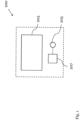
- Fig. 1 shows a schematic diagram of a user interface control device 200 according to an embodiment.
- the user interface control device 200 comprising: a display 203; an input key 205 that can be pressed by a user, and a processor 207 configured to register a starting time and a duration of a key press on the input key 205.
- the processor 207 is configured to assign a first function to the input key if the duration of the key press is shorter or equal to a threshold time value, and to assign a second function to the input key if the duration of the key press exceeds the threshold time value.
- the display 203 is configured to display a graphical element, which indicates a duration of the key press at least until the threshold time value is reached.
- the user interface control device 200 can be a component of an electronic instrument, for example a measurement device or a signal generator.
- the user interface control device 200 can be configured to provide a user interface for controlling the instrument or can be connected to a user interface of the electronic instrument.
- the first function of the input key corresponds to activating a first mode of the electronic instrument and the second function of the input key corresponds to activating a second mode of the electronic instrument.
- the input key 205 can be a physical key, for example a push-button or a switch.
- the input key can be a hard key or a soft key.
- the display 203 can be a touch display.
- the input key 205 can be a user interface control element that is displayed in the touch display.
- the processor 207 can be a microprocessor.
- the processor 207 is configured to initiate a timer after registering the starting time of the key press, wherein the timer registers the duration until the key 205 is released.
- the user interface control device 200 can be configurable. For example, the threshold time value, and/or the first and second functions themselves can be configured. Preferably, the user interface control device 200 comprises a dedicated interface (not shown in Fig. 1 ) for receiving such configuration input.
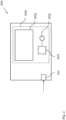
- Fig. 2 shows a schematic diagram of an electronic instrument 100 comprising the user interface control device 200 according to an embodiment.
- the first function of the input key 205 comprises activating a first mode of the electronic instrument 100 and the second function of the input key 205 comprises activating a second mode of the electronic instrument 100.
- the electronic instrument 100 can be a measurement device that comprises at least one measurement port 101 configured to receive a measurement signal to be analyzed by the electronic instrument.
- the electronic instrument 100 can be configured to analyze the measurement signal based on a first or second mode of the instrument activated via the input key.
- the electronic instrument 100 shown in Fig. 2 is a spectrum analyzer.
- the spectrum analyzer 100 can be configured to analyze various properties of the measurement signal, such as a spectrum, in particular spectral components, a power, a bandwidth and/or harmonics of the signal.
- the measurement signal is an electrical signal and/or an RF signal.
- the spectrum analyzer 100 can comprise one or several measurement channels.
- each measurement port 101 of the spectrum analyzer can be associated with a measurement channel of the spectrum analyzer.
- a different source for a measurement signal to be analyzed by the measurement device 100 can be connected to each measurement port 101.
- the first mode can be a channel preset mode of the spectrum analyzer 100
- the second mode can be a device preset mode of the spectrum analyzer 100.
- a channel preset mode a currently selected measurement channel of spectrum analyzer 100 is preset to a default configuration, e.g. default measurement parameters or a default resolution.
- the device preset mode all channels of the spectrum analyzer 100 can be preset to a default configuration.
- the electronic instrument 100 can be a signal generator that is configured to generate a signal, e.g. an electronic signal, based on the set mode.
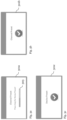
- Fig. 3a-c show schematic diagrams of three display screens 301a-c according to a further embodiment.
- the display screens 301a-c in Figs. 3a-c are, for instance, displayed in the display 203 of the user interface control device 200 and/or the electronic instrument 100 during or after a key press on the respective input key 205.
- Fig. 3a shows a display screens 301a during the key press before the threshold time value is reached.
- the display screen 301a shows a graphical element 303 in the form of a progress bar which indicates how long the input key 205 has been pressed and when the threshold time value will be reached.
- the graphical element 303 can be a countdown or a timer display. In this way, the user knows for how long he has to press the input key 205 to assign different functions to the key 205.
- the processor 207 can be configured to control the display 203 to display the graphical element 303, as soon as the processor 207 registers that the input key 205, 205 was pressed.
- the threshold time value is 3, 5, or 10 seconds.
- the display screen 301 also indicates, for instance via a textual representation, which mode of an electronic instrument 100 will be activated if the input key 205 is released prior to reaching the threshold time value, and which mode of the instrument 100 will be activated if the input key 205 is released after reaching the threshold time value. In this way, the user knows at any time which mode will be activated if he releases the key.
- Fig. 3b shows a display screen 301b after releasing the input key 205 prior to reaching the threshold time value
- Fig. 3c shows a display screen 301c after releasing the input key 205 after reaching the threshold time value.
- the display 203 indicates which mode of the electronic instrument 100 is selected, for instance a device preset mode or a channel preset mode.
- Fig. 4 shows a schematic diagram of a method 400 for controlling a user interface according to an embodiment.
- the method 400 can be used to control a user interface control device, such as the device 100 shown in Fig. 1 .
- the method 400 comprises the following steps:
- the user interface can be that of an electronic instrument, for example the electronic instrument 100 shown in Fig. 2 .
- the first function of the input key can comprise activating a first mode of the electronic instrument 100
- the second function of the input key can comprise activating a second mode of the electronic instrument 100.
- the method 400 can be a method for controlling the electronic instrument 100.
- the method 400 further comprises the steps:
- the method can further comprise the step:
Landscapes
- Engineering & Computer Science (AREA)
- General Engineering & Computer Science (AREA)
- Theoretical Computer Science (AREA)
- Human Computer Interaction (AREA)
- Physics & Mathematics (AREA)
- General Physics & Mathematics (AREA)
- Input From Keyboards Or The Like (AREA)
- User Interface Of Digital Computer (AREA)
Claims (11)
- Elektronische Messvorrichtung (100), wobei die elektronische Messvorrichtung (100) ein Spektrumanalysator ist, umfassend:Kanäle zum Empfangen und/oder Weiterleiten von HF-Signalen;eine Benutzerschnittstellensteuervorrichtung (200), die Benutzerschnittstellensteuervorrichtung (200) umfassend:eine Anzeige (203);eine Eingabetaste (205), die durch einen Benutzer gedrückt werden kann, undeinen Prozessor (207), der konfiguriert ist, um einen Startzeitpunkt und eine Dauer eines Tastendrucks auf der Eingabetaste (205) zu registrieren,wobei der Prozessor (207) konfiguriert ist, um der Eingabetaste eine erste Funktion zuzuweisen, falls die Dauer des Tastendrucks kürzer als oder gleich einem Schwellenzeitwert ist, und wobei der Prozessor (207) konfiguriert ist, um der Eingabetaste (205) eine zweite Funktion zuzuweisen, falls die Dauer des Tastendrucks den Schwellenzeitwert überschreitet,wobei die Anzeige (203) konfiguriert ist, um ein grafisches Element (303) anzuzeigen, das eine Dauer des Tastendrucks mindestens angibt, bis der Schwellenzeitwert erreicht ist, undwobei die erste Funktion der Eingabetaste (205) ein Aktivieren eines Kanalvoreinstellungsmodus der elektronischen Messvorrichtung (100) umfasst und wobei die zweite Funktion der Eingabetaste (205) das Aktivieren eines Vorrichtungsvoreinstellungsmodus der elektronischen Messvorrichtung (100) umfasst,wobei, in dem Kanalvoreinstellungsmodus, ein aktuell ausgewählter Kanal der elektronischen Messvorrichtung (100) auf eine Standardkonfiguration voreingestellt ist und in dem Vorrichtungsvoreinstellungsmodus alle Kanäle der elektronischen Messvorrichtung (100) auf eine Standardkonfiguration voreingestellt sind.
- Elektronische Messvorrichtung (100) nach Anspruch 1, wobei das grafische Element (303) einen Fortschrittsbalken, einen Countdown und/oder eine Timeranzeige umfasst.
- Elektronische Messvorrichtung (100) nach Anspruch 1 oder 2, wobei die Anzeige (203) konfiguriert ist, um, zu einem beliebigen Zeitpunkt während eines Tastendrucks, eine grafische oder textliche Darstellung der jeweiligen ersten oder zweiten Funktion anzuzeigen, die der Eingabetaste (205) zugewiesen ist, falls die Eingabetaste (205) zu diesem Zeitpunkt losgelassen wird.
- Elektronische Messvorrichtung (100) nach einem der Ansprüche 1 bis 3, wobei bei dem Loslassen der Eingabetaste (205) die Anzeige (203) konfiguriert ist, um die jeweilige Funktion anzugeben, die der Eingabetaste (205) durch den Prozessor (207) zugewiesen wurde.
- Elektronische Messvorrichtung (100) nach einem der Ansprüche 1 bis 4, wobei die Benutzerschnittstellensteuervorrichtung (200) konfiguriert ist, um eine Konfigurationseingabe zu empfangen.
- Elektronische Messvorrichtung (100) nach Anspruch 5, wobei der Prozessor (207) konfiguriert ist, um den Schwellenzeitwert basierend auf der Konfigurationseingabe anzupassen.
- Elektronische Messvorrichtung (100) nach Anspruch 5 oder 6, wobei der Prozessor (207) konfiguriert ist, um die erste und/oder die zweite Funktion der Eingabetaste (205) basierend auf der Konfigurationseingabe zu definieren.
- Elektronische Messvorrichtung (100) nach einem der Ansprüche 1 bis 7, wobei die Eingabetaste (205) eine Hard- oder eine Soft-Taste ist.
- Elektronische Messvorrichtung (100) nach einem der Ansprüche 1 bis 8, wobei die Eingabetaste (205) ein Benutzerschnittstellensteuerelement umfasst.
- Elektronische Messvorrichtung (100) nach einem der Ansprüche 1 bis 9, wobei die Anzeige (203) eine Berührungsanzeige ist und wobei die Eingabetaste (205) in der Berührungsanzeige angezeigt wird.
- Verfahren (400) zum Steuern einer Benutzerschnittstelle einer elektronischen Messvorrichtung (100), wobei die elektronische Messvorrichtung (100) ein Spektrumanalysator ist, der Kanäle zum Empfangen und/oder Weiterleiten von HF-Signalen umfasst, das Verfahren umfassend:- Drücken (401) einer Eingabetaste (205);- Registrieren (403) eines Startzeitpunkts und einer Dauer des Tastendrucks auf der Eingabetaste (205);- Zuweisen (405) einer ersten Funktion zu der Eingabetaste (205), falls die Dauer des Tastendrucks kürzer als oder gleich einem Schwellenzeitwert ist;- Zuweisen (407) einer zweiten Funktion zu der Eingabetaste (205), falls die Dauer des Tastendrucks den Schwellenzeitwert überschreitet; und- Anzeigen (409) eines grafischen Elements (303), das eine Dauer des Tastendrucks mindestens angibt, bis der Schwellenzeitwert erreicht ist;wobei die erste Funktion der Eingabetaste (205) ein Aktivieren eines Kanalvoreinstellungsmodus der elektronischen Messvorrichtung (100) umfasst und wobei die zweite Funktion der Eingabetaste (205) das Aktivieren eines Vorrichtungsvoreinstellungsmodus der elektronischen Messvorrichtung (100) umfasst,wobei, in dem Kanalvoreinstellungsmodus, ein aktuell ausgewählter Kanal der elektronischen Messvorrichtung (100) auf eine Standardkonfiguration voreingestellt ist und in dem Vorrichtungsvoreinstellungsmodus alle Kanäle der elektronischen Messvorrichtung (100) auf eine Standardkonfiguration voreingestellt sind.
Applications Claiming Priority (1)
| Application Number | Priority Date | Filing Date | Title |
|---|---|---|---|
| US16/913,894 US20210405871A1 (en) | 2020-06-26 | 2020-06-26 | User interface control device and method for controlling a user interface |
Publications (2)
| Publication Number | Publication Date |
|---|---|
| EP3929706A1 EP3929706A1 (de) | 2021-12-29 |
| EP3929706B1 true EP3929706B1 (de) | 2025-05-14 |
Family
ID=74701390
Family Applications (1)
| Application Number | Title | Priority Date | Filing Date |
|---|---|---|---|
| EP21158564.1A Active EP3929706B1 (de) | 2020-06-26 | 2021-02-23 | Vorrichtung zur steuerung einer benutzeroberfläche und verfahren zur steuerung einer benutzeroberfläche |
Country Status (3)
| Country | Link |
|---|---|
| US (1) | US20210405871A1 (de) |
| EP (1) | EP3929706B1 (de) |
| CN (1) | CN113849089B (de) |
Families Citing this family (3)
| Publication number | Priority date | Publication date | Assignee | Title |
|---|---|---|---|---|
| JP7605185B2 (ja) * | 2022-06-17 | 2024-12-24 | カシオ計算機株式会社 | 電子楽器、電子楽器の操作状況報知方法及びプログラム |
| CN120335665A (zh) * | 2023-11-03 | 2025-07-18 | 荣耀终端股份有限公司 | 内容处理方法、图形界面及电子设备 |
| CN120870785B (zh) * | 2025-09-25 | 2025-12-23 | 四川省绵竹西南电工设备有限责任公司 | 一种套管电气试验自动转换装置及方法 |
Family Cites Families (16)
| Publication number | Priority date | Publication date | Assignee | Title |
|---|---|---|---|---|
| JPH11183525A (ja) * | 1997-12-22 | 1999-07-09 | Hioki Ee Corp | 測定装置 |
| CN1486564A (zh) | 2001-11-08 | 2004-03-31 | ���Ͽع�����˾ | 用于从个人信息数据库中查询姓名的方法和装置 |
| US20070067119A1 (en) * | 2005-09-16 | 2007-03-22 | Power Measurement Ltd. | Rack-mounted power meter having removable metering options module |
| US7979805B2 (en) * | 2007-05-21 | 2011-07-12 | Microsoft Corporation | Button discoverability |
| US9784765B2 (en) * | 2009-03-13 | 2017-10-10 | Tektronix, Inc. | Graphic actuation of test and measurement triggers |
| US9262065B2 (en) * | 2011-02-24 | 2016-02-16 | Red Hat, Inc. | Time based touch screen input recognition |
| US20130239709A1 (en) * | 2012-03-19 | 2013-09-19 | Dolleris Scientific Corp. | Multi-function measurement and signal generation device with application selector |
| WO2013182326A1 (en) * | 2012-06-03 | 2013-12-12 | Maquet Critical Care Ab | System with breathing apparatus and touch screen |
| CN102799347B (zh) * | 2012-06-05 | 2017-01-04 | 北京小米科技有限责任公司 | 应用于触屏设备的用户界面交互方法、装置及触屏设备 |
| KR101463086B1 (ko) * | 2013-01-18 | 2014-11-21 | 에스피테크놀러지 주식회사 | 다기능 장치에 명령을 입력하는 방법 |
| CN104050422B (zh) * | 2014-06-10 | 2018-01-05 | 腾讯科技(深圳)有限公司 | 展示信息内容的方法及装置 |
| KR102318266B1 (ko) * | 2014-07-23 | 2021-10-27 | 삼성디스플레이 주식회사 | 유기 발광 표시 장치 및 그 제조 방법 |
| KR102310870B1 (ko) * | 2015-01-12 | 2021-10-12 | 삼성전자주식회사 | 디스플레이 장치 및 그 제어 방법 |
| US10534019B2 (en) * | 2016-08-30 | 2020-01-14 | Teledyne Lecroy, Inc. | Variable resolution oscilloscope |
| US10955956B2 (en) * | 2018-05-07 | 2021-03-23 | Apple Inc. | Devices, methods, and graphical user interfaces for interaction with an intensity-sensitive input region |
| US10613678B1 (en) * | 2018-09-17 | 2020-04-07 | Apple Inc. | Input device with haptic feedback |
-
2020
- 2020-06-26 US US16/913,894 patent/US20210405871A1/en not_active Abandoned
-
2021
- 2021-02-23 EP EP21158564.1A patent/EP3929706B1/de active Active
- 2021-03-22 CN CN202110301712.7A patent/CN113849089B/zh active Active
Also Published As
| Publication number | Publication date |
|---|---|
| CN113849089B (zh) | 2026-04-24 |
| US20210405871A1 (en) | 2021-12-30 |
| CN113849089A (zh) | 2021-12-28 |
| EP3929706A1 (de) | 2021-12-29 |
Similar Documents
| Publication | Publication Date | Title |
|---|---|---|
| US8442662B2 (en) | Measurement parameter input control device and measurement parameter input control method | |
| JP3630153B2 (ja) | 情報表示入力装置及び情報表示入力方法、並びに情報処理装置 | |
| EP3929706A1 (de) | Vorrichtung zur steuerung einer benutzeroberfläche und verfahren zur steuerung einer benutzeroberfläche | |
| US20160018903A1 (en) | Input device for operating graphical user interface | |
| EP2646893A2 (de) | Multiplex-nummernblock und touchpad | |
| EP3667473B1 (de) | System und verfahren für befehlseingaben in mehreren modi | |
| EP1630989B1 (de) | Steuerung für einen Audiomischer | |
| US20120084728A1 (en) | Button control system for medical touch screen and method thereof | |
| CN111601127B (zh) | 显示装置及其控制方法 | |
| US20120075193A1 (en) | Multiplexed numeric keypad and touchpad | |
| CN104102449A (zh) | 触摸板输入方法和输入装置 | |
| KR20130126067A (ko) | 원격제어장치를 이용한 디스플레이 디바이스의 기능 제어 방법 및 시스템 | |
| WO2010005153A1 (en) | Display apparatus and control method of the same | |
| US20040125152A1 (en) | User customizable, locale dependent, variant character entry method and apparatus | |
| US11054934B2 (en) | Electronic device | |
| US9182880B2 (en) | Method of displaying images via touching and electronic apparatus thereof | |
| EP3382405B1 (de) | Verfahren zur durchführung einer bus-autoset-funktion und messvorrichtung | |
| EP2538316A2 (de) | Parametersteuerungsvorrichtung | |
| EP2315436A1 (de) | Bildverarbeitungsvorrichtung und Eingabesteuerverfahren dafür | |
| US20070247394A1 (en) | Display menu allowing better accessibility in a limited space | |
| JP2017033067A (ja) | 表示装置 | |
| KR100402600B1 (ko) | 전자레인지의 표시 제어 방법 | |
| KR102775905B1 (ko) | 복수의 전자장치, 복수의 채널 및 복수의 프로그램을 제어할 수 있는 디스플레이형 리모컨 | |
| KR100541441B1 (ko) | 터치패드 및 그 호스트 시스템 | |
| KR20120043476A (ko) | 휴대용 단말기 및 그를 이용한 멀티키 조작 방법 |
Legal Events
| Date | Code | Title | Description |
|---|---|---|---|
| PUAI | Public reference made under article 153(3) epc to a published international application that has entered the european phase |
Free format text: ORIGINAL CODE: 0009012 |
|
| STAA | Information on the status of an ep patent application or granted ep patent |
Free format text: STATUS: THE APPLICATION HAS BEEN PUBLISHED |
|
| AK | Designated contracting states |
Kind code of ref document: A1 Designated state(s): AL AT BE BG CH CY CZ DE DK EE ES FI FR GB GR HR HU IE IS IT LI LT LU LV MC MK MT NL NO PL PT RO RS SE SI SK SM TR |
|
| B565 | Issuance of search results under rule 164(2) epc |
Effective date: 20210812 |
|
| STAA | Information on the status of an ep patent application or granted ep patent |
Free format text: STATUS: REQUEST FOR EXAMINATION WAS MADE |
|
| 17P | Request for examination filed |
Effective date: 20220615 |
|
| RBV | Designated contracting states (corrected) |
Designated state(s): AL AT BE BG CH CY CZ DE DK EE ES FI FR GB GR HR HU IE IS IT LI LT LU LV MC MK MT NL NO PL PT RO RS SE SI SK SM TR |
|
| P01 | Opt-out of the competence of the unified patent court (upc) registered |
Effective date: 20230525 |
|
| STAA | Information on the status of an ep patent application or granted ep patent |
Free format text: STATUS: EXAMINATION IS IN PROGRESS |
|
| 17Q | First examination report despatched |
Effective date: 20240507 |
|
| REG | Reference to a national code |
Ref country code: DE Free format text: PREVIOUS MAIN CLASS: G06F0003023000 Ref country code: DE Ref legal event code: R079 Ref document number: 602021030665 Country of ref document: DE Free format text: PREVIOUS MAIN CLASS: G06F0003023000 Ipc: G06F0003048470 |
|
| GRAP | Despatch of communication of intention to grant a patent |
Free format text: ORIGINAL CODE: EPIDOSNIGR1 |
|
| STAA | Information on the status of an ep patent application or granted ep patent |
Free format text: STATUS: GRANT OF PATENT IS INTENDED |
|
| INTG | Intention to grant announced |
Effective date: 20250221 |
|
| RIC1 | Information provided on ipc code assigned before grant |
Ipc: G01R 13/00 20060101ALI20250214BHEP Ipc: G06F 3/04895 20220101ALI20250214BHEP Ipc: G06F 3/023 20060101ALI20250214BHEP Ipc: G06F 3/0481 20130101ALI20250214BHEP Ipc: G06F 3/04847 20220101AFI20250214BHEP |
|
| GRAS | Grant fee paid |
Free format text: ORIGINAL CODE: EPIDOSNIGR3 |
|
| GRAA | (expected) grant |
Free format text: ORIGINAL CODE: 0009210 |
|
| STAA | Information on the status of an ep patent application or granted ep patent |
Free format text: STATUS: THE PATENT HAS BEEN GRANTED |
|
| AK | Designated contracting states |
Kind code of ref document: B1 Designated state(s): AL AT BE BG CY CZ DE DK EE ES FI FR GB GR HR HU IS IT LT LU LV MC MK MT NL NO PL PT RO RS SE SI SK SM TR |
|
| RBV | Designated contracting states (corrected) |
Designated state(s): AL AT BE BG CY CZ DE DK EE ES FI FR GB GR HR HU IS IT LT LU LV MC MK MT NL NO PL PT RO RS SE SI SK SM TR |
|
| REG | Reference to a national code |
Ref country code: GB Ref legal event code: FG4D |
|
| REG | Reference to a national code |
Ref country code: DE Ref legal event code: R096 Ref document number: 602021030665 Country of ref document: DE |
|
| REG | Reference to a national code |
Ref country code: NL Ref legal event code: MP Effective date: 20250514 |
|
| PG25 | Lapsed in a contracting state [announced via postgrant information from national office to epo] |
Ref country code: PT Free format text: LAPSE BECAUSE OF FAILURE TO SUBMIT A TRANSLATION OF THE DESCRIPTION OR TO PAY THE FEE WITHIN THE PRESCRIBED TIME-LIMIT Effective date: 20250915 Ref country code: ES Free format text: LAPSE BECAUSE OF FAILURE TO SUBMIT A TRANSLATION OF THE DESCRIPTION OR TO PAY THE FEE WITHIN THE PRESCRIBED TIME-LIMIT Effective date: 20250514 Ref country code: FI Free format text: LAPSE BECAUSE OF FAILURE TO SUBMIT A TRANSLATION OF THE DESCRIPTION OR TO PAY THE FEE WITHIN THE PRESCRIBED TIME-LIMIT Effective date: 20250514 |
|
| REG | Reference to a national code |
Ref country code: LT Ref legal event code: MG9D |
|
| PG25 | Lapsed in a contracting state [announced via postgrant information from national office to epo] |
Ref country code: GR Free format text: LAPSE BECAUSE OF FAILURE TO SUBMIT A TRANSLATION OF THE DESCRIPTION OR TO PAY THE FEE WITHIN THE PRESCRIBED TIME-LIMIT Effective date: 20250815 Ref country code: NO Free format text: LAPSE BECAUSE OF FAILURE TO SUBMIT A TRANSLATION OF THE DESCRIPTION OR TO PAY THE FEE WITHIN THE PRESCRIBED TIME-LIMIT Effective date: 20250814 |
|
| PG25 | Lapsed in a contracting state [announced via postgrant information from national office to epo] |
Ref country code: NL Free format text: LAPSE BECAUSE OF FAILURE TO SUBMIT A TRANSLATION OF THE DESCRIPTION OR TO PAY THE FEE WITHIN THE PRESCRIBED TIME-LIMIT Effective date: 20250514 Ref country code: PL Free format text: LAPSE BECAUSE OF FAILURE TO SUBMIT A TRANSLATION OF THE DESCRIPTION OR TO PAY THE FEE WITHIN THE PRESCRIBED TIME-LIMIT Effective date: 20250514 |
|
| REG | Reference to a national code |
Ref country code: AT Ref legal event code: MK05 Ref document number: 1795350 Country of ref document: AT Kind code of ref document: T Effective date: 20250514 |
|
| PG25 | Lapsed in a contracting state [announced via postgrant information from national office to epo] |
Ref country code: BG Free format text: LAPSE BECAUSE OF FAILURE TO SUBMIT A TRANSLATION OF THE DESCRIPTION OR TO PAY THE FEE WITHIN THE PRESCRIBED TIME-LIMIT Effective date: 20250514 |
|
| PG25 | Lapsed in a contracting state [announced via postgrant information from national office to epo] |
Ref country code: HR Free format text: LAPSE BECAUSE OF FAILURE TO SUBMIT A TRANSLATION OF THE DESCRIPTION OR TO PAY THE FEE WITHIN THE PRESCRIBED TIME-LIMIT Effective date: 20250514 |
|
| PG25 | Lapsed in a contracting state [announced via postgrant information from national office to epo] |
Ref country code: AT Free format text: LAPSE BECAUSE OF FAILURE TO SUBMIT A TRANSLATION OF THE DESCRIPTION OR TO PAY THE FEE WITHIN THE PRESCRIBED TIME-LIMIT Effective date: 20250514 |
|
| PG25 | Lapsed in a contracting state [announced via postgrant information from national office to epo] |
Ref country code: RS Free format text: LAPSE BECAUSE OF FAILURE TO SUBMIT A TRANSLATION OF THE DESCRIPTION OR TO PAY THE FEE WITHIN THE PRESCRIBED TIME-LIMIT Effective date: 20250814 |
|
| PG25 | Lapsed in a contracting state [announced via postgrant information from national office to epo] |
Ref country code: IS Free format text: LAPSE BECAUSE OF FAILURE TO SUBMIT A TRANSLATION OF THE DESCRIPTION OR TO PAY THE FEE WITHIN THE PRESCRIBED TIME-LIMIT Effective date: 20250914 |
|
| PG25 | Lapsed in a contracting state [announced via postgrant information from national office to epo] |
Ref country code: LV Free format text: LAPSE BECAUSE OF FAILURE TO SUBMIT A TRANSLATION OF THE DESCRIPTION OR TO PAY THE FEE WITHIN THE PRESCRIBED TIME-LIMIT Effective date: 20250514 |
|
| PG25 | Lapsed in a contracting state [announced via postgrant information from national office to epo] |
Ref country code: SM Free format text: LAPSE BECAUSE OF FAILURE TO SUBMIT A TRANSLATION OF THE DESCRIPTION OR TO PAY THE FEE WITHIN THE PRESCRIBED TIME-LIMIT Effective date: 20250514 Ref country code: DK Free format text: LAPSE BECAUSE OF FAILURE TO SUBMIT A TRANSLATION OF THE DESCRIPTION OR TO PAY THE FEE WITHIN THE PRESCRIBED TIME-LIMIT Effective date: 20250514 |
|
| PG25 | Lapsed in a contracting state [announced via postgrant information from national office to epo] |
Ref country code: CZ Free format text: LAPSE BECAUSE OF FAILURE TO SUBMIT A TRANSLATION OF THE DESCRIPTION OR TO PAY THE FEE WITHIN THE PRESCRIBED TIME-LIMIT Effective date: 20250514 |
|
| PG25 | Lapsed in a contracting state [announced via postgrant information from national office to epo] |
Ref country code: EE Free format text: LAPSE BECAUSE OF FAILURE TO SUBMIT A TRANSLATION OF THE DESCRIPTION OR TO PAY THE FEE WITHIN THE PRESCRIBED TIME-LIMIT Effective date: 20250514 |
|
| PG25 | Lapsed in a contracting state [announced via postgrant information from national office to epo] |
Ref country code: RO Free format text: LAPSE BECAUSE OF FAILURE TO SUBMIT A TRANSLATION OF THE DESCRIPTION OR TO PAY THE FEE WITHIN THE PRESCRIBED TIME-LIMIT Effective date: 20250514 Ref country code: SK Free format text: LAPSE BECAUSE OF FAILURE TO SUBMIT A TRANSLATION OF THE DESCRIPTION OR TO PAY THE FEE WITHIN THE PRESCRIBED TIME-LIMIT Effective date: 20250514 |
|
| PG25 | Lapsed in a contracting state [announced via postgrant information from national office to epo] |
Ref country code: IT Free format text: LAPSE BECAUSE OF FAILURE TO SUBMIT A TRANSLATION OF THE DESCRIPTION OR TO PAY THE FEE WITHIN THE PRESCRIBED TIME-LIMIT Effective date: 20250514 |
|
| REG | Reference to a national code |
Ref country code: DE Ref legal event code: R097 Ref document number: 602021030665 Country of ref document: DE |
|
| PLBE | No opposition filed within time limit |
Free format text: ORIGINAL CODE: 0009261 |
|
| STAA | Information on the status of an ep patent application or granted ep patent |
Free format text: STATUS: NO OPPOSITION FILED WITHIN TIME LIMIT |
|
| PGFP | Annual fee paid to national office [announced via postgrant information from national office to epo] |
Ref country code: GB Payment date: 20260219 Year of fee payment: 6 |
|
| PGFP | Annual fee paid to national office [announced via postgrant information from national office to epo] |
Ref country code: DE Payment date: 20260217 Year of fee payment: 6 |
|
| PGFP | Annual fee paid to national office [announced via postgrant information from national office to epo] |
Ref country code: FR Payment date: 20260219 Year of fee payment: 6 |
|
| 26N | No opposition filed |
Effective date: 20260217 |