EP3940687A1 - Informationsverarbeitungsvorrichtung, informationsverarbeitungsverfahren und programm - Google Patents
Informationsverarbeitungsvorrichtung, informationsverarbeitungsverfahren und programm Download PDFInfo
- Publication number
- EP3940687A1 EP3940687A1 EP20770776.1A EP20770776A EP3940687A1 EP 3940687 A1 EP3940687 A1 EP 3940687A1 EP 20770776 A EP20770776 A EP 20770776A EP 3940687 A1 EP3940687 A1 EP 3940687A1
- Authority
- EP
- European Patent Office
- Prior art keywords
- image
- user
- real
- display
- wide
- Prior art date
- Legal status (The legal status is an assumption and is not a legal conclusion. Google has not performed a legal analysis and makes no representation as to the accuracy of the status listed.)
- Pending
Links
Images






Classifications
-
- G—PHYSICS
- G02—OPTICS
- G02B—OPTICAL ELEMENTS, SYSTEMS OR APPARATUS
- G02B27/00—Optical systems or apparatus not provided for by any of the groups G02B1/00 - G02B26/00, G02B30/00
- G02B27/0093—Optical systems or apparatus not provided for by any of the groups G02B1/00 - G02B26/00, G02B30/00 with means for monitoring data relating to the user, e.g. head-tracking, eye-tracking
-
- H—ELECTRICITY
- H04—ELECTRIC COMMUNICATION TECHNIQUE
- H04N—PICTORIAL COMMUNICATION, e.g. TELEVISION
- H04N21/00—Selective content distribution, e.g. interactive television or video on demand [VOD]
- H04N21/80—Generation or processing of content or additional data by content creator independently of the distribution process; Content per se
- H04N21/81—Monomedia components thereof
- H04N21/816—Monomedia components thereof involving special video data, e.g 3D video
-
- G—PHYSICS
- G06—COMPUTING OR CALCULATING; COUNTING
- G06F—ELECTRIC DIGITAL DATA PROCESSING
- G06F3/00—Input arrangements for transferring data to be processed into a form capable of being handled by the computer; Output arrangements for transferring data from processing unit to output unit, e.g. interface arrangements
- G06F3/14—Digital output to display device ; Cooperation and interconnection of the display device with other functional units
- G06F3/1454—Digital output to display device ; Cooperation and interconnection of the display device with other functional units involving copying of the display data of a local workstation or window to a remote workstation or window so that an actual copy of the data is displayed simultaneously on two or more displays, e.g. teledisplay
-
- G—PHYSICS
- G02—OPTICS
- G02B—OPTICAL ELEMENTS, SYSTEMS OR APPARATUS
- G02B27/00—Optical systems or apparatus not provided for by any of the groups G02B1/00 - G02B26/00, G02B30/00
- G02B27/0075—Optical systems or apparatus not provided for by any of the groups G02B1/00 - G02B26/00, G02B30/00 with means for altering, e.g. increasing, the depth of field or depth of focus
-
- G—PHYSICS
- G02—OPTICS
- G02B—OPTICAL ELEMENTS, SYSTEMS OR APPARATUS
- G02B27/00—Optical systems or apparatus not provided for by any of the groups G02B1/00 - G02B26/00, G02B30/00
- G02B27/01—Head-up displays
- G02B27/017—Head mounted
-
- G—PHYSICS
- G06—COMPUTING OR CALCULATING; COUNTING
- G06F—ELECTRIC DIGITAL DATA PROCESSING
- G06F3/00—Input arrangements for transferring data to be processed into a form capable of being handled by the computer; Output arrangements for transferring data from processing unit to output unit, e.g. interface arrangements
- G06F3/01—Input arrangements or combined input and output arrangements for interaction between user and computer
- G06F3/011—Arrangements for interaction with the human body, e.g. for user immersion in virtual reality
-
- G—PHYSICS
- G06—COMPUTING OR CALCULATING; COUNTING
- G06F—ELECTRIC DIGITAL DATA PROCESSING
- G06F3/00—Input arrangements for transferring data to be processed into a form capable of being handled by the computer; Output arrangements for transferring data from processing unit to output unit, e.g. interface arrangements
- G06F3/01—Input arrangements or combined input and output arrangements for interaction between user and computer
- G06F3/011—Arrangements for interaction with the human body, e.g. for user immersion in virtual reality
- G06F3/012—Head tracking input arrangements
-
- G—PHYSICS
- G06—COMPUTING OR CALCULATING; COUNTING
- G06F—ELECTRIC DIGITAL DATA PROCESSING
- G06F3/00—Input arrangements for transferring data to be processed into a form capable of being handled by the computer; Output arrangements for transferring data from processing unit to output unit, e.g. interface arrangements
- G06F3/01—Input arrangements or combined input and output arrangements for interaction between user and computer
- G06F3/011—Arrangements for interaction with the human body, e.g. for user immersion in virtual reality
- G06F3/013—Eye tracking input arrangements
-
- G—PHYSICS
- G06—COMPUTING OR CALCULATING; COUNTING
- G06F—ELECTRIC DIGITAL DATA PROCESSING
- G06F3/00—Input arrangements for transferring data to be processed into a form capable of being handled by the computer; Output arrangements for transferring data from processing unit to output unit, e.g. interface arrangements
- G06F3/01—Input arrangements or combined input and output arrangements for interaction between user and computer
- G06F3/017—Gesture based interaction, e.g. based on a set of recognized hand gestures
-
- G—PHYSICS
- G06—COMPUTING OR CALCULATING; COUNTING
- G06F—ELECTRIC DIGITAL DATA PROCESSING
- G06F3/00—Input arrangements for transferring data to be processed into a form capable of being handled by the computer; Output arrangements for transferring data from processing unit to output unit, e.g. interface arrangements
- G06F3/01—Input arrangements or combined input and output arrangements for interaction between user and computer
- G06F3/048—Interaction techniques based on graphical user interfaces [GUI]
- G06F3/0481—Interaction techniques based on graphical user interfaces [GUI] based on specific properties of the displayed interaction object or a metaphor-based environment, e.g. interaction with desktop elements like windows or icons, or assisted by a cursor's changing behaviour or appearance
- G06F3/04815—Interaction with a metaphor-based environment or interaction object displayed as three-dimensional [3D], e.g. changing the user viewpoint with respect to the environment or object
-
- G—PHYSICS
- G09—EDUCATION; CRYPTOGRAPHY; DISPLAY; ADVERTISING; SEALS
- G09G—ARRANGEMENTS OR CIRCUITS FOR CONTROL OF INDICATING DEVICES USING STATIC MEANS TO PRESENT VARIABLE INFORMATION
- G09G3/00—Control arrangements or circuits, of interest only in connection with visual indicators other than cathode-ray tubes
- G09G3/001—Control arrangements or circuits, of interest only in connection with visual indicators other than cathode-ray tubes using specific devices not provided for in groups G09G3/02 - G09G3/36, e.g. using an intermediate record carrier such as a film slide; Projection systems; Display of non-alphanumerical information, solely or in combination with alphanumerical information, e.g. digital display on projected diapositive as background
- G09G3/002—Control arrangements or circuits, of interest only in connection with visual indicators other than cathode-ray tubes using specific devices not provided for in groups G09G3/02 - G09G3/36, e.g. using an intermediate record carrier such as a film slide; Projection systems; Display of non-alphanumerical information, solely or in combination with alphanumerical information, e.g. digital display on projected diapositive as background to project the image of a two-dimensional display, such as an array of light emitting or modulating elements or a CRT
-
- G—PHYSICS
- G09—EDUCATION; CRYPTOGRAPHY; DISPLAY; ADVERTISING; SEALS
- G09G—ARRANGEMENTS OR CIRCUITS FOR CONTROL OF INDICATING DEVICES USING STATIC MEANS TO PRESENT VARIABLE INFORMATION
- G09G5/00—Control arrangements or circuits for visual indicators common to cathode-ray tube indicators and other visual indicators
- G09G5/36—Control arrangements or circuits for visual indicators common to cathode-ray tube indicators and other visual indicators characterised by the display of a graphic pattern, e.g. using an all-points-addressable [APA] memory
- G09G5/38—Control arrangements or circuits for visual indicators common to cathode-ray tube indicators and other visual indicators characterised by the display of a graphic pattern, e.g. using an all-points-addressable [APA] memory with means for controlling the display position
-
- H—ELECTRICITY
- H04—ELECTRIC COMMUNICATION TECHNIQUE
- H04N—PICTORIAL COMMUNICATION, e.g. TELEVISION
- H04N21/00—Selective content distribution, e.g. interactive television or video on demand [VOD]
- H04N21/40—Client devices specifically adapted for the reception of or interaction with content, e.g. set-top-box [STB]; Operations thereof
- H04N21/41—Structure of client; Structure of client peripherals
- H04N21/422—Input-only peripherals, i.e. input devices connected to specially adapted client devices, e.g. global positioning system [GPS]
- H04N21/42202—Input-only peripherals, i.e. input devices connected to specially adapted client devices, e.g. global positioning system [GPS] environmental sensors, e.g. for detecting temperature, luminosity, pressure, earthquakes
-
- H—ELECTRICITY
- H04—ELECTRIC COMMUNICATION TECHNIQUE
- H04N—PICTORIAL COMMUNICATION, e.g. TELEVISION
- H04N21/00—Selective content distribution, e.g. interactive television or video on demand [VOD]
- H04N21/40—Client devices specifically adapted for the reception of or interaction with content, e.g. set-top-box [STB]; Operations thereof
- H04N21/43—Processing of content or additional data, e.g. demultiplexing additional data from a digital video stream; Elementary client operations, e.g. monitoring of home network or synchronising decoder's clock; Client middleware
- H04N21/431—Generation of visual interfaces for content selection or interaction; Content or additional data rendering
-
- H—ELECTRICITY
- H04—ELECTRIC COMMUNICATION TECHNIQUE
- H04N—PICTORIAL COMMUNICATION, e.g. TELEVISION
- H04N21/00—Selective content distribution, e.g. interactive television or video on demand [VOD]
- H04N21/40—Client devices specifically adapted for the reception of or interaction with content, e.g. set-top-box [STB]; Operations thereof
- H04N21/43—Processing of content or additional data, e.g. demultiplexing additional data from a digital video stream; Elementary client operations, e.g. monitoring of home network or synchronising decoder's clock; Client middleware
- H04N21/442—Monitoring of processes or resources, e.g. detecting the failure of a recording device, monitoring the downstream bandwidth, the number of times a movie has been viewed, the storage space available from the internal hard disk
- H04N21/44213—Monitoring of end-user related data
- H04N21/44218—Detecting physical presence or behaviour of the user, e.g. using sensors to detect if the user is leaving the room or changes his face expression during a TV programme
-
- H—ELECTRICITY
- H04—ELECTRIC COMMUNICATION TECHNIQUE
- H04N—PICTORIAL COMMUNICATION, e.g. TELEVISION
- H04N21/00—Selective content distribution, e.g. interactive television or video on demand [VOD]
- H04N21/40—Client devices specifically adapted for the reception of or interaction with content, e.g. set-top-box [STB]; Operations thereof
- H04N21/47—End-user applications
- H04N21/472—End-user interface for requesting content, additional data or services; End-user interface for interacting with content, e.g. for content reservation or setting reminders, for requesting event notification, for manipulating displayed content
- H04N21/4728—End-user interface for requesting content, additional data or services; End-user interface for interacting with content, e.g. for content reservation or setting reminders, for requesting event notification, for manipulating displayed content for selecting a Region Of Interest [ROI], e.g. for requesting a higher resolution version of a selected region
-
- G—PHYSICS
- G02—OPTICS
- G02B—OPTICAL ELEMENTS, SYSTEMS OR APPARATUS
- G02B27/00—Optical systems or apparatus not provided for by any of the groups G02B1/00 - G02B26/00, G02B30/00
- G02B27/01—Head-up displays
- G02B27/0101—Head-up displays characterised by optical features
- G02B2027/0138—Head-up displays characterised by optical features comprising image capture systems, e.g. camera
-
- G—PHYSICS
- G09—EDUCATION; CRYPTOGRAPHY; DISPLAY; ADVERTISING; SEALS
- G09G—ARRANGEMENTS OR CIRCUITS FOR CONTROL OF INDICATING DEVICES USING STATIC MEANS TO PRESENT VARIABLE INFORMATION
- G09G2340/00—Aspects of display data processing
- G09G2340/04—Changes in size, position or resolution of an image
- G09G2340/0464—Positioning
-
- G—PHYSICS
- G09—EDUCATION; CRYPTOGRAPHY; DISPLAY; ADVERTISING; SEALS
- G09G—ARRANGEMENTS OR CIRCUITS FOR CONTROL OF INDICATING DEVICES USING STATIC MEANS TO PRESENT VARIABLE INFORMATION
- G09G2340/00—Aspects of display data processing
- G09G2340/12—Overlay of images, i.e. displayed pixel being the result of switching between the corresponding input pixels
-
- G—PHYSICS
- G09—EDUCATION; CRYPTOGRAPHY; DISPLAY; ADVERTISING; SEALS
- G09G—ARRANGEMENTS OR CIRCUITS FOR CONTROL OF INDICATING DEVICES USING STATIC MEANS TO PRESENT VARIABLE INFORMATION
- G09G2354/00—Aspects of interface with display user
Definitions
- the present disclosure relates to an information processing device, an information processing method, and a computer program.
- VR virtual reality
- HMD head mount display
- the display screen is located in front of the user's eyes when worn, and there are a transmissive HMD device for which external situation can be seen through the display screen and a shielded HMD device for which the field of view is blocked by the display screen.
- a transmissive HMD device for which external situation can be seen through the display screen
- a shielded HMD device for which the field of view is blocked by the display screen.
- external visual information for the user is blocked, which makes it easier to obtain the sense of immersion in the content, and it can be said that it is suitable for providing a virtual reality space.
- both the transmissive type and the shielded type can be implemented with a single HMD device.
- an image obtained by cutting out a portion of a wide-angle image can be presented by following the movement of the user's head.
- the movement of the user's head can be acquired from a gyro sensor or the like and a 360-degree video of the entire circumference (what is called a spherical image) that follows the movement of the user's head can be made to be experienced.
- Moving the display area in the wide-angle image so as to cancel the movement of the head detected by the gyro sensor can implement a free-viewpoint viewing and a viewpoint movement environment.
- Patent Literature 1 discloses a notification-state control method that enables a user wearing a shielded HMD device and an external person to communicate more smoothly.
- Patent Literature 1 WO2014/156388
- the HMD device when it is needed a small move or work in the real space while wearing a shielded HMD device and viewing the content, the HMD device is detached and attached or the transmittance of the display screen is adjusted to change the HMD device to a transmissive HMD device each time, and an important scene may be missed, particularly in the case of live viewing such as sports broadcasting. Even if it is not live viewing, the user wants to enjoy the content viewing without interruption as much as possible.
- an information processing device includes a control unit configured to have control so that, when detected a status transition of a user including a rising motion or a moving motion of the user during reproduction of a wide-angle image covering an entire field of view of the user, a real-space image acquired by an outward-facing camera provided on a display device that is worn on a head of the user and has a display unit covering the entire field of view is displayed on the display unit in real-time and a 2D image corresponding to a portion of the wide-angle image is displayed on the real-space image.
- an information processing method includes controlling, by a processor, so that, when detected a status transition of a user including a rising motion or a moving motion of the user during reproduction of a wide-angle image covering an entire field of view of the user, a real-space image acquired by an outward-facing camera provided on a display device that is worn on a head of the user and has a display unit covering the entire field of view is displayed on the display unit in real-time and a 2D image corresponding to a portion of the wide-angle image is displayed on the real-space image.
- a computer program causes a computer to function as a control unit configured to have control so that, when detected a status transition of a user including a rising motion or a moving motion of the user during reproduction of a wide-angle image covering an entire field of view of the user, a real-space image acquired by an outward-facing camera provided on a display device that is worn on a head of the user and has a display unit covering the entire field of view is displayed on the display unit in real-time and a 2D image corresponding to a portion of the wide-angle image is displayed on the real-space image.
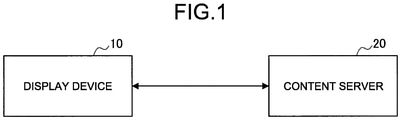
- FIG. 1 is a diagram explaining the outline of an information processing system according to one embodiment of the present disclosure.
- the information processing system in the present embodiment includes, as illustrated in FIG. 1 , a display device 10 (information processing device) and a content server 20.
- the display device 10 is a device having a display unit 150 ( FIG. 2 ) that presents an image of virtual space to a user.
- the display device 10 is implemented by an HMD device to be worn on the head or the face of the user.
- the HMD device has an image display unit for each of the left and right eyes and is configured such that, by using headphones in combination, vision and hearing can be controlled.
- the HMD device can also project different videos to the left and right eyes, and by displaying images having parallax for the left and right eyes, can also present a 3D image.
- the display device 10 has an inertial measurement unit (IMU) that senses the real space in order to recognize the position and posture of the user, an outward-facing camera, an inward-facing camera, a microphone, and the like.
- IMU inertial measurement unit
- the display device 10 acquires content of a virtual space from the content server 20.
- the display device 10 generates, from the acquired content, a free-viewpoint image according to the movement of the user and displays it on the display unit 150.
- the movement of the user includes the posture of the user and, based on the various sensing data for which the user was sensed, the display device 10 follows the posture of the user.
- the display device 10 can, based on the sensing data, perform head tracking and eye-tracking.
- the information processing system in the present disclosure may further include a remote controller or a game controller to communicate the intent of the user to the system.
- the generation of free-viewpoint images and the tracking processing are performed by the display device 10, but the present disclosure is not limited thereto, and it may be configured to be performed by an external device.
- the content of the virtual space provided to the user is spherical content, free-viewpoint content, game content, or the like.
- the spherical content is the content of 360-degree video of the entire circumference (what is called a spherical image), but it may be a wide-angle image (for example, a 180-degree image) that covers at least the entire field of view of the user.
- the free-viewpoint content is the content that, by using video captured by using a plurality of cameras, generates video when placing a virtual camera at any desired position, so that video viewing can be allowed from any viewpoint.
- a person or an object acquired from a plurality of cameras is 3D modeled and then combined and complemented, thereby allowing viewing from any desired viewpoint including an angle where there is no camera.
- the content is recorded or in real-time.
- VR space refers to the representation of a real or fictitious environment having rules of interaction that is simulated by one or more processors for which the actual user can sense via one or more display devices and/or interact via one or more user interfaces.
- the user may be represented by an avatar or, without displaying the avatar on the display, a virtual space world from the viewpoint of the avatar may be displayed.
- the viewpoint of the user (or of the avatar) in the virtual space can be regarded as the field of view of a virtual camera.
- the "virtual camera” refers to the viewpoint in the virtual space and is used for calculations to draw a three-dimensional virtual space as a two-dimensional image on the display (display device).
- a scheme capable of improving usability by allowing the user to leave the seat while continuing to view a portion of a wide-angle image during the viewing of the wide-angle image covering the entire field of view of the user.
- FIG. 2 is a block diagram illustrating one example of a configuration of the display device 10 in the present embodiment.
- the display device 10 in the present embodiment includes a control unit 100, a communication unit 110, a sensor unit 120, an outward-facing camera 130, an operation input unit 140, the display unit 150, a speaker 160, and a storage unit 170.
- the sensor unit 120 senses a user status or surrounding situation at a certain period and outputs the sensed information to the control unit 100.
- the sensor unit 120 has a plurality of sensors such as an inward-facing camera 121 that captures the user's eyes when the display device 10 is worn on the head or the face of the user, a microphone 122 that collects the user's voice or surrounding sound, an IMU 123 that senses the movement of the user, and a direction sensor 124 that detects the orientation of the display device 10.
- the inward-facing camera 121 is a camera (for example, an infrared sensor having an infrared emitting unit and an infrared imaging unit) that captures the eyes of the user wearing the display device 10.
- the inward-facing camera 121 may be provided both for right-eye capturing and left-eye capturing or may be provided only for one of them.
- the microphone 122 collects the user's voice and ambient sound (such as environmental sounds) and outputs an audio signal to the control unit 100.
- the IMU 123 is one example of a motion sensor that has a three-axis gyro sensor and a three-axis acceleration sensor and can calculate a three-dimensional angular velocity and acceleration.
- the motion sensor may be a sensor capable of detecting a total of nine axes by further having a three-axis geomagnetic sensor.
- the motion sensor may be a sensor of at least one of a gyro sensor and an acceleration sensor.
- the direction sensor 124 is a sensor that measures the orientation of the display device 10 and is implemented by a geomagnetic sensor, for example.
- the control unit 100 functions as an arithmetic processing unit and a control device and controls the overall operation of the display device 10 in accordance with various computer programs.
- the control unit 100 is implemented by an electronic circuit such as a central processing unit (CPU) and a microprocessor, for example.
- the control unit 100 may also include a read only memory (ROM) that stores computer programs, calculation parameters, and the like to be used and a random access memory (RAM) that temporarily stores parameters and the like that change as appropriate.
- ROM read only memory
- RAM random access memory
- control unit 100 in the present embodiment also functions as a posture-information acquisition unit 101, a movement-information acquisition unit 102, a line-of-sight information acquisition unit 103, a content-important area identification unit 104, and a drawing processing unit 105.
- the posture-information acquisition unit 101 acquires (calculates), based on the sensing data acquired from the sensor unit 120, the posture information (including the head posture) on the user. For example, the posture-information acquisition unit 101 can calculate, based on the sensing data of the IMU 123 and the direction sensor 124, the user posture including the head posture of the user. This also makes it possible to grasp a transition state of the user's body such as whether the user has sat down or stood up.
- the movement-information acquisition unit 102 acquires (calculates), based on the sensing data acquired from the sensor unit 120, the information concerning the actual movement of the user in the real space. For example, the movement-information acquisition unit 102 acquires, based on the sensing data of the IMU 123 and the direction sensor 124, the movement information including walking of the user, the direction of travel, and the like.
- the line-of-sight information acquisition unit 103 acquires (calculates), based on the sensing data acquired from the sensor unit 120, line-of-sight information on the user. For example, the line-of-sight information acquisition unit 103 calculates, based on the sensing data of the inward-facing camera 121, the line-of-sight direction of the user and a gazing point (line-of-sight position).
- the inward-facing camera 121 is used as one example of a line-of-sight detection sensor for acquiring (calculating) the user's line-of-sight information
- the line-of-sight detection sensor is not limited thereto and may be a myoelectric sensor that detects the movement of muscles around the user's eyes or an electroencephalogram sensor.
- the line-of-sight information acquisition unit 103 may, by using the head posture (orientation of the head) acquired by the posture-information acquisition unit 101, estimate the line-of-sight direction in a pseudo manner.
- the content-important area identification unit 104 has a function to identify an important area in the content that the user is viewing.
- the criteria for determining the important area may be set in advance according to the content. For example, in the case of live video of football, an area containing at least the ball and the player closest to the ball is identified as an important area.
- the drawing processing unit 105 performs generation and display control of an image to be displayed on the display unit 150. For example, as in the foregoing, the drawing processing unit 105 generates, from the content (for example, a spherical image that is the video of virtual space) acquired from the content server 20, a free-viewpoint image according to the operating input by the motion of the user or the controller and displays it on the display unit 150.
- the content for example, a spherical image that is the video of virtual space
- the drawing processing unit 105 generates, from the content (for example, a spherical image that is the video of virtual space) acquired from the content server 20, a free-viewpoint image according to the operating input by the motion of the user or the controller and displays it on the display unit 150.
- the drawing processing unit 105 in the present embodiment has control so that the real-space image acquired by the outward-facing camera 130 provided in the display device 10 is displayed on the display unit 150, and the outside world can be seen even in a state of wearing a shielded HMD device (what is called video see-through). This enables the user to perform a safe moving or work in the real space, in a state of wearing the shielded HMD device.
- the drawing processing unit 105 has control so that the real-space image is displayed in real-time and a 2D image representing a portion of the wide-angle image that has been viewing is displayed on the real-space image.
- This allows the user to continue viewing at least a portion of the wide-angle image while leaving the seat and moving or working in the real space. For example, by displaying the important area of the content as a portion of the wide-angle image, it is possible to prevent missing an important scene while being away from the seat.
- the drawing processing unit 105 may include the area (gazing area) at which the user was looking immediately before leaving the seat in a portion of the wide-angle image to be displayed. Furthermore, the drawing processing unit 105 may place the 2D image representing a portion of the wide-angle image at a certain location in a local coordinate system with reference to the display device 10.
- the communication unit 110 connects to the content server 20 by wire or wirelessly to transmit and receive data.
- the communication unit 110 connects to and communicates with the content server 20 by a wired/wireless local area network (LAN), Wi-Fi (registered trademark), Bluetooth (registered trademark), or the like.
- LAN local area network
- Wi-Fi registered trademark
- Bluetooth registered trademark
- the outward-facing camera 130 images the real space and outputs a captured image (real-space image) to the control unit 100.
- a plurality of outward-facing cameras 130 may be provided. For example, by a stereo camera on which a plurality of outward-facing cameras 130 are provided, a right-eye image and a left-eye image can be acquired.
- the operation input unit 140 detects the operating input of the user to the display device 10 and outputs the operating input information to the control unit 100.
- the operation input unit 140 may be a touch panel, buttons, switches, levers, and the like, for example.
- the operating input of the user to the display device 10 is not limited to the physical operation by the buttons and the like but may be gesture input or voice input.
- the user can also use a controller separate from the display device 10 to perform operating input.
- the display unit 150 includes, when the display device 10 is configured as an HMD device, the left and right screens fixed to correspond to the left and right eyes, respectively, of the user and displays the left-eye image and the right-eye image. Furthermore, the display unit 150 is provided so as to cover at least the entire field of view of the user. Furthermore, the screen of the display unit 150 may be a display panel such as a liquid crystal display (LCD) or an organic electro luminescence (EL) display.
- LCD liquid crystal display
- EL organic electro luminescence
- the speaker 160 is configured as headphones to be worn on the user's head when the display device 10 is configured as an HMD device and reproduces an audio signal. Furthermore, the speaker 160 is not limited to the headphone type and may be configured as earphones or bone conduction speakers.
- the storage unit 170 is implemented by a read only memory (ROM) that stores computer programs, calculation parameters, and the like to be used for the processing of the control unit 100 and a random access memory (RAM) that temporarily stores parameters and the like that change as appropriate.
- ROM read only memory
- RAM random access memory
- the content (spherical image and the like) of virtual space acquired from the content server 20 may be stored.
- the configuration of the display device 10 has been described specifically, but the configuration of the display device 10 by the present disclosure is not limited to the example illustrated in FIG. 2 .
- at least a part of the functional configuration of the control unit 100 may be provided in an external device (for example, an information processing device that connects to and communicates with the display device 10, a server on a network, or the like).
- the content when the content is not that delivered from the content server 20 in real-time such as live video, the content can be reproduced, by storing the content in the storage unit 170 in advance, even in a state of not being connected to the network.
- FIG. 3 is a flowchart illustrating the flow of an operation process by a first example. As illustrated in FIG. 3 , while the user wearing the display device 10 is viewing the spherical image in a sitting position (Step S103), the display device 10 continuously detects, by the inward-facing camera 121, the line of sight of the user (Step S106).
- the display device 10 detects, based on the sensing data sensed from the IMU 123, a rising motion (standing position) of the user by the posture-information acquisition unit 101 (Step S109).
- the posture simply moves while in the sitting position (such as leaning forward or looking around), it is not detected as a standing position, and the display device 10 can move the viewpoint of the user in the virtual space according to the change in the user's posture.
- Step S109 the display device 10 assumes that the user leaves the seat, and performs the processing of turning on the outward-facing camera 130 (Step S112), the identifying of the gazing point of the user in the spherical image immediately before the standing position detection (Step S115), the identifying of an important area in the content (spherical image) (Step S118), and the disabling of operation on the virtual space such as free-viewpoint operation (Step S127). Those processes may be processed in parallel.
- the outward-facing camera 130 that acquires a real-space image is basically turned off while the user is viewing a spherical image in order to reduce power consumption, but because moving or work in a real space is expected when the user rises, the outward-facing camera 130 is controlled to be on and the real-space image is acquired.
- the display device 10 generates a 2D image including the identified gazing area and the important area from the spherical image by the drawing processing unit 105.
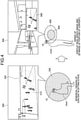
- FIG. 4 is a diagram illustrating a display example in the display unit 150 of the display device 10 in the first example. As illustrated on the left side of FIG. 4 , while the user is viewing the spherical image using the display device 10 in a sitting state, when the user rises, as illustrated on the right side of FIG.
- a real-space image 400 is displayed so as to put it in a video see-through state, and a 2D image 500 including a gazing area 310 at which the user was gazing immediately before and an important area 320 (for example, a football and a chasing player) of the present content is displayed on the real-space image 400 in a superimposed manner.
- a 2D image 500 including a gazing area 310 at which the user was gazing immediately before and an important area 320 (for example, a football and a chasing player) of the present content is displayed on the real-space image 400 in a superimposed manner.
- At least a portion of the content can be viewed continuously without disturbing the moving or the work in the real space and, in particular, by displaying the 2D image including at least the important area 320 of the content, missing an important scene such as the moment of a goal, for example, can be prevented.
- the display position of the 2D image 500 is not specifically limited, and it may be displayed at a certain position (for example, below the field of view) in the local coordinate system with reference to the display device 10, for example. When the user starts to walk, it may be placed at a position not interfering with the movement of the user.
- the shape of the 2D image 500 may be a quadrangle as illustrated in FIG. 4 or may be a circular shape, an elliptical shape, or the like.
- the display device 10 may further make the layer of the background image be the real-space image, and by continuously reducing the area of the spherical image and switching it to the 2D image 500, may display it on the real-space image in a superimposed manner.
- the display device 10 further controls the display angle of view so that an important portion of the spherical image is always visible in the 2D image 500.
- the display control that transitions the angle of view of a 2D image to an important area so that the user does not lose sight of the moving destination of the display angle of view will be described with reference to FIG. 5 to FIG. 7 .
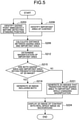
- FIG. 5 is a flowchart illustrating the flow of an operation process by the second example.
- the display device 10 first identifies a gazing point of the user immediately before detecting a standing position (Step S203) and also identifies an important area of the content (spherical image) (Step S206).
- the display device 10 calculates the distance between the gazing area and the important area (Step S209).
- the display device 10 determines the magnification of the important area (Step S212).
- the magnification of the important area is predetermined. For example, in the case of football broadcasting, the magnification at which the ball is in a certain size (recognizable size) may be set.
- the display device 10 determines whether both the gazing area and the important area are within the presentation range of the 2D image (that is, the display size of the 2D image, angle of view) (Step S215). Because the display size of the 2D image is also predetermined basically (as an exception, because it may be controlled to be small when the user is working and the like in the real space, so as not to disturb the work area), the display device 10 may determine based on whether the distance between the gazing area and the important area exceeds a certain value, for example.
- the image when the image is reduced and displayed, it may fit within the presentation range of the 2D image, but if it is too small, it is difficult to see, and thus, as in the foregoing, by considering the predetermined magnification, it may be determined whether both the gazing area and the important area are within a certain angle of view.
- Step S275 the drawing processing unit 105 of the display device 10 generates a 2D image that includes both (Step S218).
- the drawing processing unit 105 of the display device 10 generates 2D images that transition while changing the display magnification from the gazing area to the important area (Step S221).
- the drawing processing unit 105 of the display device 10 may generate 2D images that focus (magnify) from a wide range (reduced image) including both the gazing area and the important area to the important area. Such an example will be described later with reference to FIG. 6 .
- the display device 10 controls so that, on the display unit 150, a 2D image of the content (spherical image) is displayed with the background of the real-space image (Step S224).
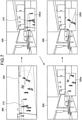
- FIG. 6 is a transition diagram illustrating a display example of 2D images representing a portion of a spherical image by the second example.
- the display device 10 may first, as illustrated in the upper right of FIG. 6 , present a 2D image 500a including both the gazing area 310 and the important area 320 by reducing the image, and then, as illustrated in the lower left of FIG. 6 , present a 2D image 500b that focused on the important area 320, and finally, as illustrated in the lower right of FIG. 6 , display a 2D image 500c in which the important area 320 was enlarged to a certain magnification.
- the display device 10 may first, as illustrated in the upper right of FIG. 7 , present a 2D image 500d including the gazing area 310, and then, as illustrated in the lower left of FIG. 7 , present a 2D image 500e in which the display angle of view transitions toward the important area 320, and finally, as illustrated in the lower right of FIG. 7 , display a 2D image 500f that includes the important area 320 and was enlarged to a certain magnification.
- the display device 10 may, in order to clarify the transition destination of the display angle of view, highlight the important area (for example, illuminating it, surrounding it with blinking lines, or displaying an arrow) in advance, and then transition.
- the important area for example, illuminating it, surrounding it with blinking lines, or displaying an arrow
- the display device 10 may, when the gazing area is different from the important area portion, annotate (may highlight as with the foregoing).
- the display device 10 may display the gazing area for a specific period of time and then transition from there to the important area (at that time, a countdown display and the like may be used).
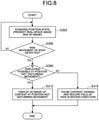
- FIG. 8 is a flowchart illustrating the flow of an operation process by a third example.
- the display device 10 first detects, after being in a standing position state (in a state where a real-space image and a 2D image are presented on the display unit 150) (Step S303), the movement of the user's body (Step S306).
- the movement-information acquisition unit 102 of the display device 10 can detect, based on the sensing data from the IMU 123, the direction sensor 124, and the communication unit 110, the movement of the user's body.
- the display device 10 determines whether the 2D image can be displayed at a position that does not disturb the movement (Step S309).
- the position that does not disturb the movement is assumed to be, in a real-space image, a place avoiding the traveling direction of or the feet of the user, a wall, a ceiling, and the like. For example, it can be determined that, when it can be estimated that the traveling direction of the user is straight from the shape of the corridor and the like, it can be placed on the left or the right side of the corridor, and that, when there are many objects on a passage and the user has to walk carefully, it can be placed upward.
- FIG. 9 illustrates a display example of a 2D image representing a portion of a spherical image by the third example. As illustrated in FIG. 9 , for example, when the user is walking toward the kitchen located to the right in the real-space image 400, the display device 10 displays the 2D image 500 to the left.
- the display device 10 turns the 2D image into non-display and pauses the content viewing, and secures the field of view in the moving direction (Step S315).
- the chased reproduction or the chased high-speed reproduction of the content, the digest reproduction during stopping, and the like may be performed.
- the display device 10 in the present embodiment may, by using the line of sight of the user, control the reproduction of the content (spherical image).
- the display device 10 may continue the reproduction when the user's line of sight is within the content (for example, within a 2D image representing a portion of the content superimposed on the real-space image) for a specific period of time or longer, and when the line of sight is off for a specific period of time or longer, pause the reproduction.
- the reproduction may be started in duplicate from the portion for a specific period of time before stopping.
- the display device 10 may determine that the user is simply moving the posture, not a standing position, and prioritize the content viewing. Conversely, when the gazing point is not on the object in the content or is moved to the periphery, it may be determined to be a standing position.
- the display device 10 may personalize the important area according to the line of sight. It is useful when the important area may differ from person to person. Specifically, when the gazing point distribution in the content viewing space is concentrated at a specific position within a specific period of time, the display device 10 can presume the relevant portion as an important area for the user and personalize the important area. Then, for example, while the user's line of sight is in the real-space image, at least the personalized important area of the content is stored (recorded), and when returned to the content viewing, the chased reproduction or the chased high-speed reproduction of the relevant important area, or the digest reproduction during stopping may be performed.
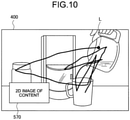
- the display device 10 may, when the moving speed is less than or equal to a certain value and the gazing point is not directed to the content (2D image), assume being in work (making coffee, going to a bathroom, responding to delivery service, or the like) in a real space. In this case, the display device 10 determines, according to the movement of the line of sight, the presentation position of the content (2D image). For example, as illustrated in FIG. 10 , the locus of a gazing point L is analyzed when the user is working at hand or at his/her feet and a position that does not disturb the work is identified, and then the placement of a 2D image 570 of the content is adjusted. For example, in the vicinity of the line-of-sight position in working, a position where there is no object, a position where the body such as a user's hand is not detected, and the like can be assumed.
- the display device 10 may, by analyzing the real-space image and detecting in advance what work the user is trying to do, control the placement of the 2D image. For example, when it is predicted that coffee is made, the places where sugar, milk, and the like are present are also excluded from the 2D image placement possible area in advance.
- the display device 10 can further perform reproduction control according to the motion range of the user. Specifically, when the work area of the user extends beyond a specific range in the real space such as the presence of changes in the body direction greater than or equal to a specific frequency (work in a wide range such as drying laundry, moving objects, or the like), the reproduction of the 2D image of the content may be paused in order not to disturb the work, and be resumed when the user is ready to view such as sitting down again.
- a specific range in the real space such as the presence of changes in the body direction greater than or equal to a specific frequency (work in a wide range such as drying laundry, moving objects, or the like)
- a specific frequency work in a wide range such as drying laundry, moving objects, or the like
- the display device 10 may pause the content (2D image) when detected that the user is interacting with others in the real space.
- the display device 10 may analyze in advance the content that is not real-time video, and present the relevant information to the user when the time of excitement is near, or impart an effect that makes the display angle of view difficult to shrink or an effect that is different from normal when shrinking, in changing the spherical image to a 2D image when the time of excitement is near. Even if the real-time content, when the excitement is expected, the relevant information may be presented to the user.
- the display device 10 may control the reproduction of the content according to the surrounding environment. For example, the display device 10 may, when the real space is a bright place, increase the brightness of the content (2D image) and present it in a large size. In addition, the display device 10 may, in a noisy place, reduce the sound of the 2D-imaged content not so much. In addition, the 2D image of the content may be displayed at a place where the color of the real space is different from the hue of the content.
- the display device 10 may default to the display control in which the display angle of view is reduced toward the center of the spherical image (for example, the center of the user's line of sight) to form a 2D image.
- the place where the character is present in the spherical image may be regarded as an important area.
- the user may be allowed to arbitrarily set the mode in which the 2D-image display can be viewed continuously.
- the shape of the 2D image is not limited to a uniform square or circle and may be scaled to a shape suitable for the content.
- the 2D image may be a plurality of videos (for example, a score display screen in the content of football broadcasting, a play display screen for around the ball, and the like).
- the display device 10 can also shift an intermediate state of transition of the display screen by animation so as to prevent the screen from switching abruptly. Furthermore, when the transition from a sitting position to a standing position is detected, the 2D image may be displayed at the same specific position (for example, the center of the field of view) each time, and then be moved to an appropriate position (the user can be made not to miss the image that has been changed from the spherical image to the 2D image).
- the display device 10 may start switching the display when detected a standing position, but not complete the transition for a specific period of time, and then complete the transition of switching when the certainty factor of recognizing the moving motion is greater than or equal to a specific value, for example.
- the transition in switching may be started at the time the line of sight was shifted to the real-space image (of the background).
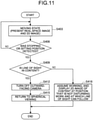
- FIG. 11 is a flowchart illustrating the flow of an operation process by a fourth example.
- the display device 10 first determines, when detected stopping or a sitting position (Yes at Step S406) after being in a moving state (a state in which a real-space image and a 2D image are presented) (Step S403), whether the line of sight (gazing point) is in the content (2D image displayed in superimposition on the real-space image) (Step S406).
- Step S419 if the line of sight (gazing point) is in the content (Yes at Step S409), the display device 10 turns off the outward-facing camera 130 (Step S412) and has control of returning to viewing the spherical image (Step S415).
- the display device 10 assumes that the work is being performed in the real space, and has control so that the 2D image of the content is displayed in a position that does not disturb the work and at which the line of sight can follow (Step S418).
- the display device 10 of the present embodiment is not only limited to the display control of the content but also can have control concerning the sound.
- the display device 10 may continue the reproduction by reducing the volume of the content (2D image).
- the AR representation of the sound is performed, this is stopped.
- the display device 10 also stops the sound. Conversely, when stopping the reproduction of the real-time content, only the sound may be reproduced in order to prevent overlooking.
- the display device 10 can, by warning with the sound and highlighting the excitement, achieve preventing overlooking.
- the display device 10 may, when experiencing a virtual space such as viewing a spherical image, cancel the ambient sound because it is difficult to concentrate on the content when the ambient sound is heard.
- the display device 10 may adjust the speaker 160 so that the ambient volume is relatively small with respect to the volume of the content.
- the general sounds can be registered in DB as cancellation-exclusion sounds, and the other sounds can be registered in advance by the user.
- the cancellation of the ambient sound may be stopped.
- the display device 10 switches the display so as to display the real-space image on the background, turns a portion of the spherical image of the game screen into a 2D image and superimposes it on the real-space image, and disables the operation in the virtual space.
- the display device 10 switches the display so as to display the real-space image on the background, turns a portion of the spherical image of the game screen into a 2D image and superimposes it on the real-space image, and disables the operation in the virtual space.
- the display device 10 notifies the content server 20 of status (for example, "started moving”, “moving”, “suspended”, “away from seat”, and the like), so that, as illustrated in FIG. 12 , in a game screen 600 (spherical image) the other users are viewing, a status notification image 602 such as "moving" is displayed on an avatar 601 of the relevant user.
- status notification image 602 such as "moving” is displayed on an avatar 601 of the relevant user.
- the display device 10 may emphasize the appealing sound to the user.
- the 2D image of the game that progresses in real-time is displayed around the gazing area and the like so as not to disturb the moving or working, so that the progress of the game can be grasped to some extent. Furthermore, when the game is resumed, high-speed reproduction (digest reproduction) may be performed. Furthermore, when the game is being suspended due to a standing position or moving, only the sound of the virtual space may be kept in a reproduction state.
- FIG. 13 is a display example of a 2D image 620 by the present example.
- the display device 10 may enable the operating input by touch gestures to the 2D image 620 illustrated in FIG. 13 , or voice.
- voice recognition and gesture because the erroneous operation to the 2D image 620 is likely to occur when the moving or working in the real space is involved, by combining voice recognition and gesture, activation may be performed by voice, or operation confirmation may be performed by voice.
- the line of sight and the gesture may be combined so that the operation can be performed only where the user is looking.
- the display device 10 may regard a mere stepping motion or posture change as an operation of the content, and regard actual walking for a specific distance or more (for example, when acceleration in a specific direction is detected for a specific level or more) as detection of walking (moving) and secure the field of view needed for the moving (display the real-space image).
- the display device 10 may, when moving out of a specific area set in advance such as leaving the room where viewing is taken place, suspend the content viewing and display the real-space image.
- the display device 10 may, from the viewpoint of avoiding danger, always present the environment of the surrounding real space.
- the display device 10 may make the places, which are likely to cause danger (stepping, bumping, and the like) such as below the feet, below the left and the right, and the like, always kept visible.
- the display device 10 may present the surrounding real-space environment, depending on the situation (dangerous conditions and the like).
- the switching of the display according to the detection of a standing position or moving in the present embodiment is not limited to each of the above-described examples. The following describes some modifications.
- the display device 10 may make the spherical image translucent and display the entire real-space image to be visible. At this time, the display device 10 may increase the transparency of the spherical image when there are many movements of the gazing point to objects in the real space, and conversely, when there are many gazing points in the spherical image, may reduce the transparency of the spherical image. The content is kept reproduced, and when the user stops or sits down, the translucency is canceled.
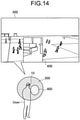
- FIG. 14 is a diagram illustrating one example of a perforated display of the real space in the present embodiment.
- the real-space image 400 is displayed so that it can be viewed.
- display range of the real-space image may be determined, for example, according to the distribution of the gazing point of the user's line of sight. For example, when the real space is being gazed at, the display device 10 may expand the display range of the real-space image.
- the display device 10 may display the real-space image in the moving direction and, in the surrounding portions other than the moving direction, continue the reproduction of the content. Then, when the user stops or sits down, the perforated portion in the content that has been opened for securing the field of view in the real space is filled, and the reproduction of the spherical image is resumed.
- the display device 10 may always fix the display position of the 2D image of the content such as below the front.
- the display device 10 may, as illustrated in FIG. 15 , perform display control so that the spherical image appears to be split up in the traveling direction of the user.
- the image 500 (spherical image) is split up in the traveling direction of the user and is displayed on the left and the right respectively (2D images 500g, 500h).
- a computer program that exerts the functions of the display device 10 and the content server 20 on the hardware such as a CPU, a ROM, a RAM, and the like that are built into the display device 10 (information processing device) and the content server 20.
- a computer-readable storage medium in which the relevant computer program is stored is also provided.
Landscapes
- Engineering & Computer Science (AREA)
- Theoretical Computer Science (AREA)
- Physics & Mathematics (AREA)
- General Engineering & Computer Science (AREA)
- General Physics & Mathematics (AREA)
- Human Computer Interaction (AREA)
- Multimedia (AREA)
- Signal Processing (AREA)
- Databases & Information Systems (AREA)
- Health & Medical Sciences (AREA)
- Social Psychology (AREA)
- General Health & Medical Sciences (AREA)
- Optics & Photonics (AREA)
- Computer Hardware Design (AREA)
- Computer Networks & Wireless Communication (AREA)
- Life Sciences & Earth Sciences (AREA)
- Environmental & Geological Engineering (AREA)
- Environmental Sciences (AREA)
- Remote Sensing (AREA)
- Emergency Management (AREA)
- Ecology (AREA)
- Biodiversity & Conservation Biology (AREA)
- Business, Economics & Management (AREA)
- Controls And Circuits For Display Device (AREA)
- User Interface Of Digital Computer (AREA)
- Two-Way Televisions, Distribution Of Moving Picture Or The Like (AREA)
Applications Claiming Priority (2)
| Application Number | Priority Date | Filing Date | Title |
|---|---|---|---|
| JP2019045082 | 2019-03-12 | ||
| PCT/JP2020/004802 WO2020184021A1 (ja) | 2019-03-12 | 2020-02-07 | 情報処理装置、情報処理方法、およびプログラム |
Publications (2)
| Publication Number | Publication Date |
|---|---|
| EP3940687A1 true EP3940687A1 (de) | 2022-01-19 |
| EP3940687A4 EP3940687A4 (de) | 2022-05-04 |
Family
ID=72426003
Family Applications (1)
| Application Number | Title | Priority Date | Filing Date |
|---|---|---|---|
| EP20770776.1A Pending EP3940687A4 (de) | 2019-03-12 | 2020-02-07 | Informationsverarbeitungsvorrichtung, informationsverarbeitungsverfahren und programm |
Country Status (5)
| Country | Link |
|---|---|
| US (2) | US12025794B2 (de) |
| EP (1) | EP3940687A4 (de) |
| JP (1) | JP7416048B2 (de) |
| CN (2) | CN113544765B (de) |
| WO (1) | WO2020184021A1 (de) |
Families Citing this family (10)
| Publication number | Priority date | Publication date | Assignee | Title |
|---|---|---|---|---|
| CN113544765B (zh) * | 2019-03-12 | 2024-05-24 | 索尼集团公司 | 信息处理装置、信息处理方法和程序 |
| WO2022018836A1 (ja) * | 2020-07-21 | 2022-01-27 | ソニーグループ株式会社 | 情報処理装置、情報処理方法及びプログラム |
| JP7537254B2 (ja) * | 2020-12-02 | 2024-08-21 | 株式会社Jvcケンウッド | 映像表示装置、映像表示装置の制御方法、及びプログラム |
| JPWO2022190735A1 (de) * | 2021-03-11 | 2022-09-15 | ||
| WO2022224586A1 (ja) * | 2021-04-20 | 2022-10-27 | 国立研究開発法人理化学研究所 | 情報処理装置、情報処理方法、プログラム、ならびに、情報記録媒体 |
| JP7317325B1 (ja) | 2022-04-27 | 2023-07-31 | グリー株式会社 | 情報処理システム、情報処理方法およびコンピュータプログラム |
| US11747891B1 (en) * | 2022-07-15 | 2023-09-05 | Google Llc | Content output management in a head mounted wearable device |
| JP7171964B1 (ja) * | 2022-07-29 | 2022-11-15 | 株式会社ドワンゴ | コンテンツ配信システム、コンテンツ配信方法、およびコンテンツ配信プログラム |
| CN115737143A (zh) * | 2022-11-07 | 2023-03-07 | 张博彦 | 手术成像系统和成像手术的显示方法 |
| JP2026052898A (ja) * | 2024-09-12 | 2026-03-25 | 株式会社Jvcケンウッド | 操作装置、操作システム、及び操作方法 |
Family Cites Families (23)
| Publication number | Priority date | Publication date | Assignee | Title |
|---|---|---|---|---|
| JPH07261112A (ja) * | 1994-03-22 | 1995-10-13 | Hitachi Ltd | 頭部搭載型ディスプレイ装置 |
| JP4593406B2 (ja) | 2005-09-05 | 2010-12-08 | Necパーソナルプロダクツ株式会社 | コンピュータ |
| US9217867B2 (en) * | 2011-03-24 | 2015-12-22 | Seiko Epson Corporation | Head-mounted display device and control method for the head-mounted display device |
| CN103765346B (zh) * | 2011-09-08 | 2018-01-26 | 英特尔公司 | 基于眼睛凝视的用于音频视觉回放的位置选择 |
| JP6107276B2 (ja) | 2013-03-22 | 2017-04-05 | セイコーエプソン株式会社 | 頭部装着型表示装置および頭部装着型表示装置の制御方法 |
| JP6361649B2 (ja) | 2013-03-29 | 2018-07-25 | ソニー株式会社 | 情報処理装置、通知状態制御方法及びプログラム |
| US9973722B2 (en) | 2013-08-27 | 2018-05-15 | Qualcomm Incorporated | Systems, devices and methods for displaying pictures in a picture |
| EP2854410A1 (de) | 2013-09-30 | 2015-04-01 | Thomson Licensing | Verfahren und Vorrichtung zur gleichzeitigen Anzeige und Überwachung von Videoprogrammen |
| US10466858B2 (en) * | 2013-12-01 | 2019-11-05 | Upskill, Inc. | Systems and methods for interacting with a virtual menu |
| JP6079614B2 (ja) * | 2013-12-19 | 2017-02-15 | ソニー株式会社 | 画像表示装置及び画像表示方法 |
| US10061509B2 (en) * | 2014-10-09 | 2018-08-28 | Lenovo (Singapore) Pte. Ltd. | Keypad control |
| US10073516B2 (en) | 2014-12-29 | 2018-09-11 | Sony Interactive Entertainment Inc. | Methods and systems for user interaction within virtual reality scene using head mounted display |
| JP2017069687A (ja) * | 2015-09-29 | 2017-04-06 | ソニー株式会社 | 情報処理装置及び情報処理方法並びにプログラム |
| US10025376B2 (en) * | 2016-04-27 | 2018-07-17 | Rovi Guides, Inc. | Methods and systems for displaying additional content on a heads up display displaying a virtual reality environment |
| KR20190005208A (ko) * | 2016-05-07 | 2019-01-15 | 스마트 써드-아이 리미티드 | 핸드헬드 디바이스 내의 에지 카메라 어셈블리를 수반하는 시스템 및 방법 |
| US10482662B2 (en) * | 2016-06-30 | 2019-11-19 | Intel Corporation | Systems and methods for mixed reality transitions |
| CN106951316B (zh) * | 2017-03-20 | 2021-07-09 | 北京安云世纪科技有限公司 | 虚拟模式与现实模式的切换方法、装置及虚拟现实设备 |
| US20180276891A1 (en) * | 2017-03-24 | 2018-09-27 | Pcms Holdings, Inc. | System and method for providing an in-context notification of a real-world event within a virtual reality experience |
| WO2019013016A1 (ja) * | 2017-07-13 | 2019-01-17 | ソニー株式会社 | 情報処理装置、情報処理方法、及びプログラム |
| JP6621165B2 (ja) | 2017-08-07 | 2019-12-18 | ナーブ株式会社 | 画像表示装置、画像表示方法及び画像表示プログラム |
| CN113544765B (zh) * | 2019-03-12 | 2024-05-24 | 索尼集团公司 | 信息处理装置、信息处理方法和程序 |
| US11656682B2 (en) * | 2020-07-01 | 2023-05-23 | The Salty Quilted Gentlemen, LLC | Methods and systems for providing an immersive virtual reality experience |
| US11747622B2 (en) * | 2021-01-04 | 2023-09-05 | Rovi Guides, Inc. | Methods and systems for controlling media content presentation on a smart glasses display |
-
2020
- 2020-02-07 CN CN202080018820.7A patent/CN113544765B/zh active Active
- 2020-02-07 EP EP20770776.1A patent/EP3940687A4/de active Pending
- 2020-02-07 WO PCT/JP2020/004802 patent/WO2020184021A1/ja not_active Ceased
- 2020-02-07 US US17/310,884 patent/US12025794B2/en active Active
- 2020-02-07 JP JP2021505603A patent/JP7416048B2/ja active Active
- 2020-02-07 CN CN202410540425.5A patent/CN118502695A/zh active Pending
-
2024
- 2024-04-15 US US18/635,525 patent/US12379591B2/en active Active
Also Published As
| Publication number | Publication date |
|---|---|
| US20240255754A1 (en) | 2024-08-01 |
| US20220146821A1 (en) | 2022-05-12 |
| JPWO2020184021A1 (de) | 2020-09-17 |
| CN113544765A (zh) | 2021-10-22 |
| WO2020184021A1 (ja) | 2020-09-17 |
| US12025794B2 (en) | 2024-07-02 |
| CN118502695A (zh) | 2024-08-16 |
| EP3940687A4 (de) | 2022-05-04 |
| JP7416048B2 (ja) | 2024-01-17 |
| US12379591B2 (en) | 2025-08-05 |
| CN113544765B (zh) | 2024-05-24 |
Similar Documents
| Publication | Publication Date | Title |
|---|---|---|
| US12379591B2 (en) | Information processing device and image processing method | |
| US12198260B2 (en) | Devices, methods, and graphical user interfaces for interacting with three-dimensional environments | |
| US10733781B2 (en) | Virtual reality | |
| CN109643162B (zh) | 用现实世界内容增强虚拟现实内容 | |
| KR20230048554A (ko) | 3차원 환경들과의 상호작용을 위한 디바이스들, 방법들 및 그래픽 사용자 인터페이스들 | |
| EP3349107B1 (de) | Informationsverarbeitungsvorrichtung und bilderzeugungsverfahren | |
| US20200193634A1 (en) | Information processing apparatus and image generating method | |
| JP6200023B1 (ja) | シミュレーション制御装置及びシミュレーション制御プログラム | |
| WO2019187862A1 (ja) | 情報処理装置、情報処理方法、および記録媒体 | |
| CN116740312A (zh) | 信息处理装置和用户指南呈现方法 | |
| JP5913709B1 (ja) | 画像生成装置、画像生成方法、及び画像生成プログラム | |
| JP2017182218A (ja) | シミュレーション制御装置及びシミュレーション制御プログラム | |
| JPWO2018216402A1 (ja) | 情報処理装置、情報処理方法、及びプログラム | |
| GB2582106A (en) | Display device and display device control method | |
| JP2022169526A (ja) | アプリケーション制御プログラム、アプリケーション制御方法及びアプリケーション制御システム | |
| JP6962579B2 (ja) | 表示制御装置、表示制御システム、及びプログラム | |
| JP6808896B2 (ja) | 表示制御装置、表示制御システム、及びプログラム | |
| WO2018234318A1 (en) | Reducing simulation sickness in virtual reality applications | |
| JP2020014888A (ja) | アプリケーション制御プログラム、アプリケーション制御方法及びアプリケーション制御システム | |
| JP2017182845A (ja) | シミュレーション制御装置及びシミュレーション制御プログラム |
Legal Events
| Date | Code | Title | Description |
|---|---|---|---|
| STAA | Information on the status of an ep patent application or granted ep patent |
Free format text: STATUS: THE INTERNATIONAL PUBLICATION HAS BEEN MADE |
|
| PUAI | Public reference made under article 153(3) epc to a published international application that has entered the european phase |
Free format text: ORIGINAL CODE: 0009012 |
|
| STAA | Information on the status of an ep patent application or granted ep patent |
Free format text: STATUS: REQUEST FOR EXAMINATION WAS MADE |
|
| 17P | Request for examination filed |
Effective date: 20211005 |
|
| AK | Designated contracting states |
Kind code of ref document: A1 Designated state(s): AL AT BE BG CH CY CZ DE DK EE ES FI FR GB GR HR HU IE IS IT LI LT LU LV MC MK MT NL NO PL PT RO RS SE SI SK SM TR |
|
| A4 | Supplementary search report drawn up and despatched |
Effective date: 20220407 |
|
| RIC1 | Information provided on ipc code assigned before grant |
Ipc: H04N 21/442 20110101ALI20220401BHEP Ipc: H04N 21/431 20110101ALI20220401BHEP Ipc: G06F 3/0481 20220101ALI20220401BHEP Ipc: G06F 3/01 20060101ALI20220401BHEP Ipc: G09G 5/38 20060101ALI20220401BHEP Ipc: G09G 5/36 20060101ALI20220401BHEP Ipc: G09G 5/00 20060101AFI20220401BHEP |
|
| DAV | Request for validation of the european patent (deleted) | ||
| DAX | Request for extension of the european patent (deleted) | ||
| STAA | Information on the status of an ep patent application or granted ep patent |
Free format text: STATUS: EXAMINATION IS IN PROGRESS |
|
| 17Q | First examination report despatched |
Effective date: 20240408 |