EP4002075B1 - Schnittstellenanzeigeverfahren und -vorrichtung, endgerät und speichermedium - Google Patents
Schnittstellenanzeigeverfahren und -vorrichtung, endgerät und speichermedium Download PDFInfo
- Publication number
- EP4002075B1 EP4002075B1 EP20843586.7A EP20843586A EP4002075B1 EP 4002075 B1 EP4002075 B1 EP 4002075B1 EP 20843586 A EP20843586 A EP 20843586A EP 4002075 B1 EP4002075 B1 EP 4002075B1
- Authority
- EP
- European Patent Office
- Prior art keywords
- task
- floating window
- display
- window
- icon
- Prior art date
- Legal status (The legal status is an assumption and is not a legal conclusion. Google has not performed a legal analysis and makes no representation as to the accuracy of the status listed.)
- Active
Links
Images





Classifications
-
- G—PHYSICS
- G06—COMPUTING OR CALCULATING; COUNTING
- G06F—ELECTRIC DIGITAL DATA PROCESSING
- G06F3/00—Input arrangements for transferring data to be processed into a form capable of being handled by the computer; Output arrangements for transferring data from processing unit to output unit, e.g. interface arrangements
- G06F3/01—Input arrangements or combined input and output arrangements for interaction between user and computer
- G06F3/048—Interaction techniques based on graphical user interfaces [GUI]
- G06F3/0481—Interaction techniques based on graphical user interfaces [GUI] based on specific properties of the displayed interaction object or a metaphor-based environment, e.g. interaction with desktop elements like windows or icons, or assisted by a cursor's changing behaviour or appearance
-
- G—PHYSICS
- G06—COMPUTING OR CALCULATING; COUNTING
- G06F—ELECTRIC DIGITAL DATA PROCESSING
- G06F3/00—Input arrangements for transferring data to be processed into a form capable of being handled by the computer; Output arrangements for transferring data from processing unit to output unit, e.g. interface arrangements
- G06F3/01—Input arrangements or combined input and output arrangements for interaction between user and computer
- G06F3/048—Interaction techniques based on graphical user interfaces [GUI]
- G06F3/0481—Interaction techniques based on graphical user interfaces [GUI] based on specific properties of the displayed interaction object or a metaphor-based environment, e.g. interaction with desktop elements like windows or icons, or assisted by a cursor's changing behaviour or appearance
- G06F3/04817—Interaction techniques based on graphical user interfaces [GUI] based on specific properties of the displayed interaction object or a metaphor-based environment, e.g. interaction with desktop elements like windows or icons, or assisted by a cursor's changing behaviour or appearance using icons
-
- G—PHYSICS
- G06—COMPUTING OR CALCULATING; COUNTING
- G06F—ELECTRIC DIGITAL DATA PROCESSING
- G06F3/00—Input arrangements for transferring data to be processed into a form capable of being handled by the computer; Output arrangements for transferring data from processing unit to output unit, e.g. interface arrangements
- G06F3/01—Input arrangements or combined input and output arrangements for interaction between user and computer
- G06F3/048—Interaction techniques based on graphical user interfaces [GUI]
- G06F3/0481—Interaction techniques based on graphical user interfaces [GUI] based on specific properties of the displayed interaction object or a metaphor-based environment, e.g. interaction with desktop elements like windows or icons, or assisted by a cursor's changing behaviour or appearance
- G06F3/0482—Interaction with lists of selectable items, e.g. menus
-
- G—PHYSICS
- G06—COMPUTING OR CALCULATING; COUNTING
- G06F—ELECTRIC DIGITAL DATA PROCESSING
- G06F3/00—Input arrangements for transferring data to be processed into a form capable of being handled by the computer; Output arrangements for transferring data from processing unit to output unit, e.g. interface arrangements
- G06F3/01—Input arrangements or combined input and output arrangements for interaction between user and computer
- G06F3/048—Interaction techniques based on graphical user interfaces [GUI]
- G06F3/0484—Interaction techniques based on graphical user interfaces [GUI] for the control of specific functions or operations, e.g. selecting or manipulating an object, an image or a displayed text element, setting a parameter value or selecting a range
- G06F3/0485—Scrolling or panning
-
- G—PHYSICS
- G06—COMPUTING OR CALCULATING; COUNTING
- G06F—ELECTRIC DIGITAL DATA PROCESSING
- G06F3/00—Input arrangements for transferring data to be processed into a form capable of being handled by the computer; Output arrangements for transferring data from processing unit to output unit, e.g. interface arrangements
- G06F3/01—Input arrangements or combined input and output arrangements for interaction between user and computer
- G06F3/048—Interaction techniques based on graphical user interfaces [GUI]
- G06F3/0484—Interaction techniques based on graphical user interfaces [GUI] for the control of specific functions or operations, e.g. selecting or manipulating an object, an image or a displayed text element, setting a parameter value or selecting a range
- G06F3/0486—Drag-and-drop
-
- G—PHYSICS
- G06—COMPUTING OR CALCULATING; COUNTING
- G06F—ELECTRIC DIGITAL DATA PROCESSING
- G06F3/00—Input arrangements for transferring data to be processed into a form capable of being handled by the computer; Output arrangements for transferring data from processing unit to output unit, e.g. interface arrangements
- G06F3/01—Input arrangements or combined input and output arrangements for interaction between user and computer
- G06F3/048—Interaction techniques based on graphical user interfaces [GUI]
- G06F3/0487—Interaction techniques based on graphical user interfaces [GUI] using specific features provided by the input device, e.g. functions controlled by the rotation of a mouse with dual sensing arrangements, or of the nature of the input device, e.g. tap gestures based on pressure sensed by a digitiser
- G06F3/0488—Interaction techniques based on graphical user interfaces [GUI] using specific features provided by the input device, e.g. functions controlled by the rotation of a mouse with dual sensing arrangements, or of the nature of the input device, e.g. tap gestures based on pressure sensed by a digitiser using a touch-screen or digitiser, e.g. input of commands through traced gestures
-
- G—PHYSICS
- G06—COMPUTING OR CALCULATING; COUNTING
- G06F—ELECTRIC DIGITAL DATA PROCESSING
- G06F3/00—Input arrangements for transferring data to be processed into a form capable of being handled by the computer; Output arrangements for transferring data from processing unit to output unit, e.g. interface arrangements
- G06F3/01—Input arrangements or combined input and output arrangements for interaction between user and computer
- G06F3/048—Interaction techniques based on graphical user interfaces [GUI]
- G06F3/0487—Interaction techniques based on graphical user interfaces [GUI] using specific features provided by the input device, e.g. functions controlled by the rotation of a mouse with dual sensing arrangements, or of the nature of the input device, e.g. tap gestures based on pressure sensed by a digitiser
- G06F3/0488—Interaction techniques based on graphical user interfaces [GUI] using specific features provided by the input device, e.g. functions controlled by the rotation of a mouse with dual sensing arrangements, or of the nature of the input device, e.g. tap gestures based on pressure sensed by a digitiser using a touch-screen or digitiser, e.g. input of commands through traced gestures
- G06F3/04883—Interaction techniques based on graphical user interfaces [GUI] using specific features provided by the input device, e.g. functions controlled by the rotation of a mouse with dual sensing arrangements, or of the nature of the input device, e.g. tap gestures based on pressure sensed by a digitiser using a touch-screen or digitiser, e.g. input of commands through traced gestures for inputting data by handwriting, e.g. gesture or text
-
- G—PHYSICS
- G06—COMPUTING OR CALCULATING; COUNTING
- G06F—ELECTRIC DIGITAL DATA PROCESSING
- G06F3/00—Input arrangements for transferring data to be processed into a form capable of being handled by the computer; Output arrangements for transferring data from processing unit to output unit, e.g. interface arrangements
- G06F3/01—Input arrangements or combined input and output arrangements for interaction between user and computer
- G06F3/048—Interaction techniques based on graphical user interfaces [GUI]
- G06F3/0487—Interaction techniques based on graphical user interfaces [GUI] using specific features provided by the input device, e.g. functions controlled by the rotation of a mouse with dual sensing arrangements, or of the nature of the input device, e.g. tap gestures based on pressure sensed by a digitiser
- G06F3/0488—Interaction techniques based on graphical user interfaces [GUI] using specific features provided by the input device, e.g. functions controlled by the rotation of a mouse with dual sensing arrangements, or of the nature of the input device, e.g. tap gestures based on pressure sensed by a digitiser using a touch-screen or digitiser, e.g. input of commands through traced gestures
- G06F3/04886—Interaction techniques based on graphical user interfaces [GUI] using specific features provided by the input device, e.g. functions controlled by the rotation of a mouse with dual sensing arrangements, or of the nature of the input device, e.g. tap gestures based on pressure sensed by a digitiser using a touch-screen or digitiser, e.g. input of commands through traced gestures by partitioning the display area of the touch-screen or the surface of the digitising tablet into independently controllable areas, e.g. virtual keyboards or menus
-
- G—PHYSICS
- G06—COMPUTING OR CALCULATING; COUNTING
- G06F—ELECTRIC DIGITAL DATA PROCESSING
- G06F9/00—Arrangements for program control, e.g. control units
- G06F9/06—Arrangements for program control, e.g. control units using stored programs, i.e. using an internal store of processing equipment to receive or retain programs
- G06F9/44—Arrangements for executing specific programs
- G06F9/451—Execution arrangements for user interfaces
Definitions
- Embodiments of the invention relate to the field of terminal technologies, and in particular, to an interface display method and apparatus, a terminal, a computer-readable storage medium and a computer program product.
- An application program may provide different user interfaces (UI) for a user, to display different information or implement different functions.
- UI user interfaces
- a social application program is used as an example.
- the social application program usually integrates a plurality of functions such as instant messaging, information reading, online shopping, online payment, file browsing, note sharing, and applets. Therefore, when using the social application program, the user may view different information on different UIs, and interface switching is needed.
- a first UI needs to be switched to a second UI
- the user usually needs to return to a main interface from the first UI step by step, and then open the second UI from the main interface step by step. In this case, if the user intends to review information in the first UI, the user still needs to return to the main interface from the second UI step by step, and then open the first UI from the main interface step by step.
- the current application program has a long operation path for switching between the UIs, resulting in relatively low switching efficiency.
- US 2019025988A1 relates to a method and device for displaying a floating window.
- the method includes monitoring an amount of floating windows that are created on a desktop for respective ones of a plurality of applications; determining that there is more than one of the plurality of applications for which a floating window is created on the desktop; forbidding permissions of multiple floating windows based on the determination; launching a system floating window; hiding and containing the multiple floating windows in the system floating window; receiving an activating instruction for the system floating window; extending and displaying the multiple floating windows contained in the system floating window; receiving a selection instruction for the multiple floating windows; displaying a selected floating window of the multiple floating windows; allowing a permission of the selected floating window; and masking a permission of the system floating window.
- Embodiments of the invention provide an interface display method and apparatus, a terminal, a computer-readable storage medium and a computer program product, to improve switching efficiency when switching is performed between a plurality of user interfaces (UI) of an application program.
- UI user interfaces
- an embodiment of the invention provides an interface display method defined in claim 1.
- an embodiment of the invention provides an interface display apparatus defined in claim 11.
- an embodiment of the invention provides a terminal defined in claim 12.
- an embodiment of the invention provides a computer-readable storage medium defined in claim 13.
- an embodiment of the invention provides a computer program product defined in claim 14.
- a multi-task floating window is displayed in front of a UI, after a trigger signal corresponding to the multi-task floating window is obtained, a task floating window set is displayed, and any single-task floating window in the task floating window set may be selected to open a UI of a task corresponding to the single-task floating window.
- the multi-task floating window supports display of a plurality of single-task floating windows, a user may create corresponding single-task floating windows for UIs of a plurality of different tasks. In this way, when switching is performed between the UIs of the plurality of tasks, the different tasks can be selected through the multi-task floating window, thereby achieving quick switching between the plurality of tasks, and adequately improving efficiency of switching between the plurality of tasks.
- FIG. 1 is a schematic diagram of an implementation environment according to an embodiment of the invention.
- the implementation environment may include a terminal 101 and a server 102.
- the terminal 101 may be an electronic device such as a mobile phone, a tablet computer, an eBook reader, a multimedia player, a wearable device, or a personal computer (PC).
- a client of an application program may be installed on the terminal 101.
- the application program may be, for example, a social application program, an instant messaging application program, an online shopping application program, a payment application program, a news information application program, or a video application program.
- the client of the application program may display different UIs to a user, to display different information or provide different functions to the user through different UIs.
- the client is a client of a social application program (briefly referred to as a "social application client").
- the social application client may provide various functions such as instant messaging, information reading, online shopping, online payment, file browsing, note sharing, and applets.
- the server 102 is configured to provide a back-end service to the client in the terminal 101.
- the server 102 may be a back-end server of the client.
- the server 102 may be one server, a server cluster including a plurality of servers, or a cloud computing service center.
- the terminal 101 may communicate with the server 102 through a network 103.
- the network 103 may be a wired network or a wireless network.
- FIG. 2 is a flowchart of an interface display method according to an embodiment of the invention.
- the method may be applied to the terminal described above.
- the method may be applied to the client of the application program in the terminal.
- the method includes the following steps (201 to 204):
- Step 201 Display a multi-task floating window.
- the client displays a UI
- the client may display the multi-task floating window in front of the UI. That is, the multi-task floating window is displayed in front of the UI of the client.
- the multi-task floating window is used for implementing a function of quick switching between a plurality of tasks.
- the UI of the client herein may be any UI, such as a chat session interface, an official account interface, an applet interface, a file browsing interface, a note display interface, a web content display interface, a payment interface, or a game interface. This is not limited in this embodiment of the invention.
- the multi-task floating window is displayed on top in the client, and the multi-task floating window is displayed in front of all other UIs of the client. Therefore, after the multi-task floating window is displayed, regardless of how the UIs behind the multi-task floating window are switched, normal display of the multi-task floating window is not affected.
- Step 202 Display a task floating window set after a trigger signal corresponding to the multi-task floating window is received.
- the multi-task floating window may be an operable control, or the multi-task floating window includes an operable control.
- the operable control refers to a UI control that can respond to a touch operation of a user.
- the user may trigger display of the task floating window set by using the operable control. For example, the user performs a trigger operation corresponding to the multi-task floating window through an operation such as tapping or pressing, and correspondingly, the client receives the trigger signal corresponding to the multi-task floating window.
- the client displays the task floating window set after receiving the trigger signal. For example, after the user taps the multi-task floating window, the client displays the task floating window set. In another example, after the user taps a specific operable control in the multi-task floating window, the client displays the task floating window set.
- the task floating window set includes at least one single-task floating window, and each single-task floating window is corresponding to one task.
- one task is corresponding to one UI, and different tasks correspond to different UIs.
- the client performing a task may be understood as displaying a UI corresponding to the task.
- the client switching between a plurality of tasks may be understood as switching between a plurality of different UIs.
- the single-task floating window is used for quickly opening the UI corresponding to the task.
- the UI of the task is not limited, and may be any UI of a plurality of UIs between which the client supports quickly switching.
- the UI is a chat session interface, an official account interface, an applet interface, a file browsing interface, a note display interface, a web content display interface, a payment interface, or a game interface. This is not limited in this embodiment of the invention.
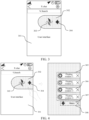
- the client displays a multi-task floating window 302 in front of a UI 301.
- a user taps the multi-task floating window 302
- the client receives a trigger signal corresponding to the multi-task floating window 302
- the client displays a task floating window set 305.
- the task floating window set 305 includes several single-task floating windows 306, such as a "floating window 1", a "floating window 2", a "floating window 3", and a "floating window 4" shown in FIG. 4 .
- the single-task floating window may include an icon, a brief introduction, and a cancel control of a task corresponding to the single-task floating window.
- the icon of the task is used for identifying the task.
- the brief introduction of the task may be a name of the task, or a summary extracted from the UI of the task.
- the cancel control may be configured to cancel display of the single-task floating window.
- a display manner of the task floating window set is not limited in this embodiment of the invention.
- the client after receiving the trigger signal corresponding to the multi-task floating window 302, the client displays a floating window set display interface, and the floating window set display interface is displayed in front of other UIs of the client, that is, the client displays the floating window set display interface on top.
- the floating window set display interface may be semi-transparent or may be opaque.
- the floating window set display interface may be displayed in full screen, or may be displayed in a specific region, which is not limited in this embodiment of the invention.
- the floating window set display interface includes the task floating window set 305.
- single-task floating windows included in the task floating window set may be arranged and displayed in order in a list form, or may be arranged and displayed in an array form, or may be arranged and displayed according to another specified rule, which is not limited in this embodiment of the invention.
- the single-task floating windows 306 included in the task floating window set 305 are arranged in order from top to bottom for display in the floating window set display interface.
- Step 203 Receive a selection instruction corresponding to a first single-task floating window in the task floating window set.
- the first single-task floating window may be any single-task floating window included in the task floating window set.
- a trigger operation corresponding to the selection instruction is not limited in this embodiment of the invention, and may be a touch operation applied to the first single-task floating window, for example, a single-tap operation, a double-tap operation, a sliding operation, or a pressing operation.
- Step 204 Display a UI of a first task corresponding to the first single-task floating window.
- the first single-task floating window is corresponding to the first task.
- the client After receiving the selection instruction corresponding to the first single-task floating window, the client displays the UI of the first task corresponding to the first single-task floating window.
- the user taps a specific single-task floating window 306, for example, a "floating window 1" shown in FIG. 5 , and correspondingly, the client receives a selection instruction corresponding to the "floating window 1".
- the client displays a UI 309 of a task corresponding to the "floating window 1".
- the UI 309 may be a file browsing interface, a web content display interface, an applet interface, a note display interface, or the like.
- the foregoing step 204 may include the following sub-steps:
- the interface information may include an identifier of the UI of the first task and a browsing position when the UI of the first task is closed.
- the previous browsing position is automatically positioned for display, thereby facilitating viewing by the user.
- the client when receiving a long press operation signal corresponding to the multi-task floating window, the client displays the task floating window set, and after a slide operation signal of moving from a trigger position of the long press operation signal to the first single-task floating window is detected, when the slide operation signal disappears, the client directly displays the UI of the first task corresponding to the first single-task floating window.
- the client when receiving a long press operation signal corresponding to the multi-task floating window, the client displays the task floating window set, and after a slide operation signal of moving from a trigger position of the long press operation signal to the first single-task floating window is detected, when the slide operation signal disappears, the client directly displays the UI of the first task corresponding to the first single-task floating window.
- the multi-task floating window includes a task icon, and the task icon is used for indicating related information of a task for which the single-task floating window has been created.
- the task icon is displayed in the multi-task floating window, so that the user can learn, after viewing the task icon, of a task or tasks for which the single-task floating window or single-task floating windows has or have been created, without triggering the display of the task floating window set.
- the task icon includes n elements, each element is corresponding to one task for which the single-task floating window has been created, and n is a positive integer. That is, a quantity of elements included in the task icon is the same as a quantity of single-task floating windows included in the task floating window set. For example, if the quantity of elements included in the task icon is 4, it indicates that four single-task floating windows have been created, that is, the quantity of single-task floating windows included in the task floating window set is 4.
- each element displays identifier information of a UI of a task corresponding to the element.
- a UI of a specific task is a web page provided by a specific official account
- the client displays an icon or a profile photo of the official account in the element of the task icon.
- a UI of a specific task is a UI provided by a specific applet
- the client displays an icon or a profile photo of the applet in the element of the task icon.
- the task icon is displayed in the multi-task floating window, so that not only the user can learn of a task or tasks for which a single-task floating window or single-task floating windows has or have been created, but also a related interface provider can be provided with opportunities for brand display.
- the client may query for and obtain identifier information of the UI based on a pre-stored database, or may parse out the identifier information of the UI from content of the UI, which is not limited in this embodiment of the invention.
- general identifier information may be displayed in the element of the task icon.
- the multi-task floating window further includes a process icon, and the process icon is used for indicating related information of a running process.
- a process may refer to an activity that runs continuously for a period of time, for example, a music playing process or a geographic location acquisition process.
- the process icon is displayed in the multi-task floating window, so that the user can learn, after viewing the process icon, of a process or processes that is or are running.
- each process icon may correspond to one running process, or may correspond to a plurality of running processes in a form of aggregated process icons, which is not limited in this embodiment of the invention.
- the client may further display a process floating window set.
- the process floating window set includes at least one process floating window, and each process floating window is corresponding to one process.
- the process floating window is used for quickly controlling a process corresponding to the process floating window, such as closing the process, pausing the process, or restarting the process.
- the client closes a target process corresponding to the target process floating window.
- the target process floating window may be any process in the process floating window set, and the target process is corresponding to the target process floating window. In the foregoing manner, the process is quickly closed without the need to first switch to an interface related to the process, thereby improving operation efficiency.
- the client when the multi-task floating window 302 includes the task icon 303 and a process icon 304, after receiving the trigger signal corresponding to the multi-task floating window 302, the client simultaneously displays the task floating window set 305 and a process floating window set 307, and the task floating window set 305 and the process floating window set 307 may be divided into two groups in a list form and arranged in order from top to bottom.
- the process floating window set 307 includes at least one process floating window 308.
- the process floating window 308 may include an icon, a brief introduction, and a cancel control of a process corresponding to the process floating window, and the cancel control may be configured to close the process corresponding to the process floating window 308.
- the process floating window 308 is corresponding to a music playing process
- the client closes the music playing process, and cancels display of the process floating window 308.
- a size, a shape, a display position, a style, and other features of the multi-task floating window are not limited in this embodiment of the invention, and may be set according to an actual product form.
- the multi-task floating window is displayed for the first time, the multi-task floating window is displayed at a default position.
- the default position may be a position at an upper right edge of a screen.
- the floating window is displayed for an n th time, the floating window is displayed at a display position of a floating window displayed for an (n-1) th time before display is canceled, and n is an integer greater than 1.
- the floating window may be displayed transparently or semi-transparently.
- the multi-task floating window is displayed in front of the UI, after the trigger signal corresponding to the multi-task floating window is obtained, the task floating window set is displayed, and any single-task floating window in the task floating window set may be selected to open the UI of the task corresponding to the single-task floating window.
- the multi-task floating window supports display of a plurality of single-task floating windows, the user can create corresponding single-task floating windows for UIs of a plurality of different tasks. In this way, when switching is performed between the UIs of the plurality of tasks, the different tasks can be selected through the multi-task floating window, thereby achieving quick switching between the plurality of tasks, and adequately improving efficiency of switching between the plurality of tasks.
- the multi-task floating window may be further configured to trigger display of the process floating window set. Any process floating window in the process floating window set may be selected to quickly close a corresponding process, without the need to first switch to an interface related to the process, thereby improving operation efficiency.
- the creation process may include the following steps:
- the floating window creation instruction is used for triggering the client to create a floating window.
- the floating window creation instruction is generated through triggering by a user.
- the user may trigger generation of the floating window creation instruction through a touch operation, voice, a gesture, or an expression, or in other manners.
- the obtaining a floating window creation instruction corresponding to the UI of the second task includes the following sub-steps:
- the preset condition may be set for any one or a combination of a plurality of characteristics of a start position, a sliding direction, a sliding speed, and a sliding distance of the slide signal.
- the preset condition includes that the start position is at a left edge of a screen and the sliding direction is to the right.
- the preset condition may be appropriately set with reference to actual product requirements, which is not limited in this embodiment of the invention.
- the floating window trigger region is an interactive region used for triggering display of a floating window.
- a size, a shape, a display position, a style, and other features of the floating window trigger region are not limited in this embodiment of the invention, and may be set, with reference to the preset condition, to features that conform to operation habits of the user, to better improve interaction performance.
- the preset condition includes that the start position is at the left edge of the screen and the sliding direction is to the right
- the floating window trigger region may be a sector region at a lower right corner of the screen.
- the floating window trigger region displays a trigger icon, and the trigger icon is used for prompting the user that display of a floating window can be triggered in this region.
- the floating window trigger region is displayed in front of the UI of the second task, so that an operation signal for the floating window trigger region can be received.
- the floating window trigger region may be displayed in an opaque manner, or may be displayed semi-transparently.
- the user When intending to trigger the floating window creation instruction, the user maintains the slide signal uninterrupted, moves a trigger position of the slide signal from outside the floating window trigger region to inside the floating window trigger region, and then terminates the slide signal (for example, releases a finger to cause the finger that triggers the slide signal to leave the screen).
- the client detects that the slide signal is terminated, and the termination position is inside the floating window trigger region, the floating window creation instruction corresponding to the UI of the second task is obtained.
- feedback information is generated.
- the feedback information is used for prompting the user that the floating window trigger region has been activated, and in this case, terminating the slide signal can trigger the floating window creation instruction.
- a form of the feedback information such as vibration feedback, acousto-optic feedback, and graphic-text feedback, is not limited in this embodiment of the invention.
- the client displays a UI 310 of the second task.
- a finger of the user starts sliding to the right from a left edge of a screen, and during sliding, the UI 310 of the second task shrinks to a right side of the screen, and a floating window trigger region 311 gradually appears.
- the floating window trigger region 311 displays a trigger icon 312.
- the client obtains a floating window creation instruction corresponding to the UI 310 of the second task.
- the obtaining a floating window creation instruction corresponding to the UI of the second task includes the following sub-steps:
- the function menu includes a floating window display control
- the floating window display control is an operation control for triggering the floating window creation instruction.
- the floating window display control is a button.
- the function menu may further include at least one of the following controls: an operation control for sharing the UI, an operation control for opening the UI in other applications, an operation control for saving the UI as notes, an operation control for editing a tag corresponding to the UI, and the like, which is not limited in this embodiment of the invention.
- the client obtains the trigger signal corresponding to the floating window display control.
- the floating window creation instruction corresponding to the UI of the second task is obtained.
- the client After the client receives the floating window creation instruction corresponding to the UI of the second task, if the client has not currently created the multi-task floating window, the client creates the multi-task floating window, and adds the single-task floating window corresponding to the second task to the task floating window set. In this way, after tapping the multi-task floating window, the user can view the single-task floating window corresponding to the second task in the task floating window set.
- the single-task floating window corresponding to the second task is used for quickly opening the UI of the second task.
- the client displays the task icon in the created multi-task floating window, and the task icon includes an element corresponding to the second task.
- the client After the client receives the floating window creation instruction corresponding to the UI of the second task, if the client has already created the multi-task floating window, the client does not need to repeatedly create the multi-task floating window, but needs to add only the single-task floating window corresponding to the second task to the task floating window set.
- the client further needs to update the task icon. For example, the client switches the task icon included in the multi-task floating window from a first display style to a second display style, where the task icon in the second display style includes more elements corresponding to the second task than the task icon in the first display style.
- the user may learn, through change of the display style of the task icon, that the single-task floating window corresponding to the second task has been added.
- a multi-task floating window 302 originally includes a task icon 303a in the first display style, after a new single-task floating window is added, the multi-task floating window 302 displays a task icon 303b in the second display style.
- the task icon 303b in the second display style includes one more element corresponding to the foregoing newly added task than the task icon 303a in the first display style.
- a maximum quantity of single-task floating windows allowed to be created may or may not be limited. If the maximum quantity of single-task floating windows is limited, when the first possible implementation described above is adopted to generate the floating window creation instruction through triggering, when the slide signal meeting the preset condition is detected, the client determines whether a quantity of created single-task floating windows has reached a preset threshold. If the quantity of created single-task floating windows has not reached the preset threshold, the client displays the trigger icon in the floating window trigger region, and displays prompt information (marked as "first prompt information" herein) next to the trigger icon. The first prompt information is used for prompting that the quantity of created single-task floating windows has not reached the preset threshold, and in this case, the single-task floating window is allowed to be added.
- the client displays prompt information (marked as "second prompt information" herein) in the floating window trigger region.
- the second prompt information is used for prompting that the quantity of created single-task floating windows has reached the preset threshold, and in this case, the single-task floating window is not allowed to be added.
- the client when a trigger position of the slide signal is moved from outside the floating window trigger region 311 to inside the floating window trigger region 311, the client generates feedback information for prompting that the single-task floating window corresponding to the second task cannot be created.
- the feedback information may be tactile feedback information such as vibration feedback information, for example, two vibrations.
- the user releases the finger, and the client displays reminder information 314.
- the reminder information 314 may be used for indicating the maximum quantity of single-task floating windows allowed to be created.
- the client after the client obtains the floating window creation instruction corresponding to the UI 310 of the second task, if the quantity of created single-task floating windows has reached the preset threshold, the client also displays the reminder information 314, and the reminder information 314 is used for indicating the maximum quantity of single-task floating windows allowed to be created.
- the client may create a current task as the single-task floating window and display the single-task floating window in the task floating window set, and may correspondingly change the display style of the task icon in the multi-task floating window.
- the user can learn, through the change of the display style of the task icon, that the single-task floating window has been added, thereby further improving user experience and optimizing an interface display effect.
- a display manner and a display position of the multi-task floating window are not fixed.
- the display position of the multi-task floating window may be moved.
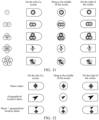
- FIG. 11 shows display styles of the multi-task floating window and the task icon when the multi-task floating window includes the task icon.
- the multi-task floating window can allow up to five single-task floating windows.
- a quantity of elements included in the task icon is the same as the quantity of created single-task floating windows.
- the multi-task floating window may be dragged on the screen.
- FIG. 11 shows styles of the multi-task floating window when being displayed on the left side of the screen, in the middle of the screen, and on the right side of the screen.
- FIG. 12 shows display styles of the multi-task floating window and a process icon when the multi-task floating window includes the process icon.
- An example in which each process is corresponding to one process icon is used in this embodiment of the invention.
- the multi-task floating window may be dragged on the screen.
- FIG. 12 shows styles of the multi-task floating window when being displayed on the left side of the screen, in the middle of the screen, and on the right side of the screen.
- FIG. 13 shows display styles of the multi-task floating window when the multi-task floating window includes the task icon and the process icon.
- the user may drag a position of the multi-task floating window, and the client determines a display position of a task floating window according to a termination position of a drag operation of the user.
- the client may receive a drag operation signal corresponding to the multi-task floating window.
- the multi-task floating window is displayed at a screen edge position corresponding to a disappearance position of the drag operation signal.
- the client displays the multi-task floating window on a left edge of the screen.
- the client attaches the multi-task floating window to the left edge of the screen for display in a form of attachment animation.
- the client When the disappearance position of the drag operation signal is at a right side of the screen, the client displays the multi-task floating window on a right edge of the screen. For example, when the drag operation signal disappears, the client attaches the multi-task floating window to the right edge of the screen for display in the form of attachment animation.
- the task icon and the process icon of the multi-task floating window can clearly display a task and a running process corresponding to the task icon and the process icon, and the user can autonomously change the display position of the multi-task floating window, thereby expanding functions of the multi-task floating window.
- the client may further obtain a close instruction corresponding to a single-task floating window or a process floating window, and cancel display of the single-task floating window or the process floating window according to the close instruction.
- a process in which the client cancels display of a single-task floating window 306 or a process floating window 307 includes: obtaining a trigger signal corresponding to a close control in the single-task floating window 306 or the process floating window 307, and canceling display of the single-task floating window 306, or canceling display of the process floating window 307 and closing a corresponding process.
- the close control is a button
- the user taps the close control
- the client obtains the trigger signal corresponding to the close control.
- display positions of the remaining single-task floating window 306 or the process floating window 307 may further be schematically adjusted, which is not limited in this embodiment of the invention.
- a process in which the client cancels display of a single-task floating window includes: obtaining, by the client after triggering display of a UI of a task corresponding to the single-task floating window through the single-task floating window, a menu invocation instruction corresponding to the UI; and displaying a function menu 318 in front of the UI according to the menu invocation instruction, the function menu 318 including a close control 319, and the close control 319 being an operation control for triggering a close instruction corresponding to the single-task floating window.
- the close control 319 is a button, and if a trigger signal corresponding to the close control is obtained, display of a single-task floating window corresponding to the close control is canceled.
- the close control 319 is a button, if the user taps the close control 319, the client obtains the trigger signal corresponding to the close control, and the client cancels display of the single-task floating window corresponding to the close control 319.
- the client may alternatively cancel display of the multi-task floating window, and the process includes: After displaying the multi-task floating window, the client may further obtain a close instruction corresponding to the multi-task floating window, and cancel display of the multi-task floating window according to the close instruction.
- the close instruction is used for triggering the client to cancel display of the multi-task floating window, and the close instruction is generated through triggering by the user.
- the user may trigger generation of the close instruction through a touch operation, voice, a gesture, or an expression, or in other manners.
- the client cancels display of the multi-task floating window includes the following steps: displaying a floating window canceling region in front of a currently displayed UI when a drag operation signal corresponding to the multi-task floating window is obtained; and canceling display of the multi-task floating window if a termination position of the drag operation signal is inside the floating window canceling region.
- the floating window canceling region is an interactive region used for triggering cancellation of display of the multi-task floating window.
- a size, a shape, a display position, a style, and other features of the floating window canceling region are not limited in this embodiment of the invention.
- the size, the shape, and the display position of the floating window canceling region are the same as those of the floating window trigger region.
- the floating window canceling region displays a cancel icon, and the cancel icon is used for prompting the user that cancelation of display of the multi-task floating window may be triggered in this region.
- the client displays the multi-task floating window at a screen edge position corresponding to the termination position of the drag operation signal.
- the client records a display position of the multi-task floating window before the display is canceled, and when the multi-task floating window is displayed next time, the multi-task floating window is displayed at the display position recorded above.
- a user habit is memorized, and the multi-task floating window is displayed at a suitable position that meets a user requirement.
- the user can move, close, and perform other operations on the multi-task floating window, the single-task floating window, and the process floating window, which is more flexible.
- the client may create two window objects, recorded as a first window object and a second window object.
- the first window object is used for carrying the multi-task window and display of content related to the multi-task window. For example, display of the task floating window set and the process floating window set.
- the second window object is used for carrying display of the UI of the client.
- the first window object is displayed in front of the second window object. In this way, it can be ensured that the multi-task floating window is displayed on top in the client, and the multi-task floating window is displayed in front of all other UIs of the client. Therefore, after the multi-task floating window is displayed, regardless of how the UIs behind the multi-task floating window are switched, normal display of the multi-task floating window is not affected.
- the window object is a UIWindow object.
- the client may create a first UIWindow object and a second UIWindow object.
- the first UIWindow object is used for carrying the multi-task window and display of content related to the multi-task window.
- the second UIWindow object is used for carrying display of the UI of the client.
- the task when the client generates a single-task floating window corresponding to a specific task, the task generates a unique identifier and ancillary information.
- the unique identifier is used for uniquely identifying the task. Different tasks correspond to different unique identifiers.
- the unique identifier may be recorded as taskkey.
- the ancillary information refers to information such as an icon and a brief introduction related to the task.
- the ancillary information may be recorded as taskdata.
- the floating window manager can distinguish a switching request for a UI of a different task by using a unique identifier of the task, and can further display information such as an icon and a brief introduction of the task in the single-task floating window through ancillary information of the task, thereby achieving coexistence of a plurality of tasks and event isolation.
- the floating window manager described above is a functional module, in the client, configured to implement related functions of the multi-task floating window.
- An example in which the task is an applet task is used, and a process of creating a single-task floating window corresponding to the task includes the following steps:
- the applet task executes a part of animation (that is, the floating window creation animation described above), and the floating window manager also executes a part of animation (that is, an animation for updating the multi-task floating window). Therefore, to ensure synchronization of the two parts of animations, when starting executing the animation, the applet task may notify a timestamp at which execution of the animation starts and duration of the animation to the floating window manager by invoking a related function, to facilitate synchronization by the floating window manager.
- An example in which the task is an applet task is still used, and a process of quickly displaying a UI of the applet task through a single-task floating window corresponding to the task includes the following steps:
- the applet task may further notify a timestamp at which the UI starts to be displayed to the floating window manager by invoking a related function, to facilitate execution of related animation synchronization by the floating window manager.
- the foregoing only uses the applet as an example to describe the process of creating the single-task floating window corresponding to the applet and the process of quickly displaying the UI through the single-task floating window corresponding to the applet, and is also applicable to other types of tasks such as a web page, a note, a file preview, and an official account. Details are not described herein.
- the floating window manager may create a process floating window corresponding to the process, and control a state of the process based on the process floating window.
- a music playing process is used as an example.
- the floating window manager creates a process floating window corresponding to the music playing process, a unique identifier and ancillary information of the process are also obtained.
- the floating window manager may associate the music playing process with the unique identifier corresponding to the process floating window, and send a process closing notification to the music playing process.
- the process closing notification may carry the unique identifier corresponding to the process floating window.
- the music playing process After receiving the process closing notification, the music playing process performs verification on the unique identifier carried in the process closing notification, and closes the process after the verification succeeds, that is, stops playing music.
- the first window object and the second window object are created, the first window object is used for carrying the multi-task window and display of content related to the multi-task window, and the second window object is used for carrying display of the UI of the client.
- the first window object is set to be displayed in front of the second window object, so that it can be ensured that the multi-task floating window is displayed on top in the client, thereby achieving isolation between the multi-task floating window and the UI of the client, and achieving a drag-and-drop effect of the multi-task floating window.
- a corresponding unique identifier is assigned to each task or process, and different tasks and different processes are distinguished by using the unique identifiers, so that the multi-task floating window can support coexistence of a plurality of tasks and a plurality of processes, thereby achieving quick switching of a plurality of tasks and quick closing of a process.
- FIG. 16 is a block diagram of an interface display apparatus according to an embodiment of the invention.
- the apparatus 400 has functions of implementing the foregoing method embodiments. The functions may be implemented by hardware, or may be implemented by hardware executing corresponding software.
- the apparatus 400 may be the terminal described above, or may be disposed in the terminal.
- the apparatus 400 includes a floating window display module 410, a set display module 420, an instruction obtaining module 430, and an interface display module 440.
- the floating window display module 410 is configured to display a multi-task floating window, the multi-task floating window being displayed in front of a UI of a client.
- the set display module 420 is configured to display a task floating window set after a trigger signal corresponding to the multi-task floating window is received, the task floating window set including at least one single-task floating window, and each single-task floating window being corresponding to one task.
- the instruction obtaining module 430 is configured to receive a selection instruction corresponding to a first single-task floating window in the task floating window set.
- the interface display module 440 is configured to display a UI of a first task corresponding to the first single-task floating window.
- the multi-task floating window includes a task icon, and the task icon is used for indicating related information of a task for which the single-task floating window has been created.
- the task icon includes n elements, each element is corresponding to one task for which the single-task floating window has been created, and n is a positive integer.
- the multi-task floating window further includes a process icon, and the process icon is used for indicating related information of a running process.
- the apparatus 400 further includes a process closing module 450.
- the set display module 420 is further configured to display a process floating window set after the trigger signal corresponding to the multi-task floating window is received, the process floating window set including at least one process floating window, and each process floating window being corresponding to one process.
- the instruction obtaining module 430 is further configured to receive a close instruction corresponding to a target process floating window in the process floating window set.
- the process closing module 450 is configured to close a target process corresponding to the target process floating window.
- the apparatus 400 further includes a floating window creation module 460.
- the interface display module 440 is further configured to display a UI of a second task.
- the instruction obtaining module 430 is further configured to obtain a floating window creation instruction corresponding to the UI of the second task.
- the floating window creation module 460 is configured to update the task icon included in the multi-task floating window according to the floating window creation instruction, and add a single-task floating window corresponding to the second task to the task floating window set.
- the floating window creation module 460 is configured to switch the task icon included in the multi-task floating window from a first display style to a second display style, where the task icon in the second display style includes more elements corresponding to the second task than the task icon in the first display style.
- the apparatus 400 further includes a trigger region display module, a prompt information display module, and a feedback information generation module (not shown in the figure).
- the trigger region display module is configured to display a floating window trigger region in front of the UI of the second task when a slide signal meeting a preset condition is detected.
- the prompt information display module is configured to display prompt information in the floating window trigger region when a quantity of created single-task floating windows has reached a preset threshold, the prompt information being used for prompting that the quantity of created single-task floating windows has reached the preset threshold.
- the feedback information generation module is configured to generate, when a trigger position of the slide signal is moved from outside of the floating window trigger region to inside of the floating window trigger region, feedback information for prompting that the single-task floating window corresponding to the second task cannot be created.
- the apparatus 400 further includes a reminder information display module (not shown in the figure).
- the reminder information display module is configured to display reminder information when the quantity of created single-task floating windows has reached the preset threshold, the reminder information being used for indicating a maximum quantity of single-task floating windows allowed to be created.
- the apparatus 400 further includes a signal receiving module and a floating window moving module (not shown in the figure).
- the signal receiving module is configured to receive a drag operation signal corresponding to the multi-task floating window.
- the floating window moving module is configured to display the multi-task floating window at a screen edge position corresponding to a disappearance position of the drag operation signal in a case of detecting that the drag operation signal disappears.
- the apparatus 400 further includes: a position recording module (not shown in the figure).
- the position recording module is configured to record, when display of the multi-task floating window is canceled, a display position of the multi-task floating window before the display is canceled.
- the floating window display module 410 is further configured to display the multi-task floating window at the display position when the multi-task floating window is displayed next time.
- the multi-task floating window is displayed in front of the UI, after the trigger signal corresponding to the multi-task floating window is obtained, the task floating window set is displayed, and any single-task floating window in the task floating window set may be selected to open the UI of the task corresponding to the single-task floating window.
- the multi-task floating window supports display of a plurality of single-task floating windows, the user may create corresponding single-task floating windows for UIs of a plurality of different tasks. In this way, when switching is performed between the UIs of the plurality of tasks, the different tasks can be selected through the multi-task floating window, thereby achieving quick switching between the plurality of tasks, and adequately improving efficiency of switching between the plurality of tasks.
- the apparatus provided in the foregoing embodiments implements functions of the apparatus
- the division of the foregoing functional modules is merely an example for description.
- the functions may be assigned to and completed by different functional modules according to the requirements, that is, the internal structure of the device is divided into different functional modules, to implement all or some of the functions described above.
- the apparatus provided in the foregoing embodiment belongs to the same conception as the method embodiment. For a specific implementation process thereof, refer to the method embodiment. Details are not described herein again.
- FIG. 18 is a structural block diagram of a terminal 1800 according to an embodiment of the invention.
- the terminal 1800 may be a mobile phone, a tablet computer, a multimedia player, a wearable device, or the like.
- the terminal 1800 includes a processor 1801 and a memory 1802.
- the processor 1801 may include one or more processing cores, and may be, for example, a 4-core processor or an 8-core processor.
- the processor 1801 may be implemented by using at least one hardware form of a digital signal processor (DSP), a field programmable gate array (FPGA), and a programmable logic array (PLA).
- DSP digital signal processor
- FPGA field programmable gate array
- PDA programmable logic array
- the processor 1801 may alternatively include a main processor and a coprocessor.
- the main processor is a processor configured to process data in an awake state, also referred to as a central processing unit (CPU), and the coprocessor is a low-power processor configured to process data in a standby state.
- the processor 1801 may be integrated with a graphics processing unit (GPU).
- the GPU is responsible for rendering and drawing content that a display screen needs to display.
- the processor 1801 may further include an artificial intelligence (Al) processor.
- the AI processor is configured to process a computing operation
- the memory 1802 may include one or more computer-readable storage medium.
- the computer-readable storage medium may be non-transient.
- the memory 1802 may further include a high-speed random access memory and a non-volatile memory, for example, one or more disk storage devices or flash memory devices.
- a non-transitory computer-readable storage medium in the memory 1802 is configured to store at least one instruction, at least one program, a code set, or an instruction set, the at least one instruction, the at least one program, the code set, or the instruction set being configured to be executed by the processor 1801 to implement the method provided in the method embodiments of the invention.
- the terminal 1800 may include a peripheral device interface 1803 and at least one peripheral device.
- the processor 1801, the memory 1802, and the peripheral device interface 1803 may be connected through a bus or a signal cable.
- Each peripheral device may be connected to the peripheral device interface 1803 through a bus, a signal cable, or a circuit board.
- the peripheral device includes at least one of a radio frequency circuit 1804, a touchscreen 1805, a camera 1806, an audio circuit 1807, a positioning component 1808, and a power supply 1809.
- FIG. 18 constitutes no limitation on the terminal 1800, and the terminal may include more or fewer components than those shown in the figure, or some components may be combined, or a different component deployment may be used.
- a terminal including a processor and a memory, the memory storing at least one instruction, at least one program, a code set, or an instruction set.
- the at least one instruction, the at least one program, the code set, or the instruction set is configured to be executed by one or more processors to implement the foregoing interface display method.
- a computer-readable storage medium is further provided, the storage medium storing at least one instruction, at least one program, a code set, or an instruction set, and the at least one instruction, the at least one program, the code set, or the instruction set, when executed by a processor of a computer device, implementing the foregoing interface display method.
- the computer-readable storage medium may be a ROM, a random access memory (RAM), a CD-ROM, a magnetic tape, a floppy disk, an optical data storage device, or the like.
- a computer program product is further provided, and when executed, the computer program product is used for implementing the foregoing interface display method.
- a plurality of mentioned in the specification means two or more.
- “And/or” describes an association relationship between associated objects and represents that three relationships may exist.
- a and/or B may represent the following three cases: Only A exists, both A and B exist, and only B exists.
- the character “/” generally indicates an "or" relationship between the associated objects.
Landscapes
- Engineering & Computer Science (AREA)
- Theoretical Computer Science (AREA)
- General Engineering & Computer Science (AREA)
- Human Computer Interaction (AREA)
- Physics & Mathematics (AREA)
- General Physics & Mathematics (AREA)
- Software Systems (AREA)
- User Interface Of Digital Computer (AREA)
Claims (14)
- Ein Schnittstellendarstellungsverfahren, umfassend:Anzeigen (201) eines Multi-Task-Schwebefensters vor einer Benutzeroberfläche, UI, des Clients;Anzeigen (202) eines Task-Schwebefenstersatzes als Reaktion auf das Empfangen eines Trigger-Signals, das dem Multi-Task-Schwebefenster entspricht, wobei der Task-Schwebefenstersatz mindestens ein Einzel-Task-Schwebefenster umfasst und ein Einzel-Task-Schwebefenster einem Task entspricht;Empfangen (203) einer Auswahlanweisung, die einem ersten Einzel-Task-Schwebefenster im Task-Schwebefenstersatz entspricht; dadurch gekennzeichnet, dassAnzeigen eine Benutzeroberfläche, UIm eines ersten Tasks, der dem ersten Einzel-Task-Schwebefenster entspricht, wobei das Multi-Task-Schwebefenster ein Task-Symbol umfasst, um relevante Informationen eines Tasks anzuzeigen, für den das Einzel-Task-Schwebefenster erstellt wurde, und das Task-Symbol n Elemente umfasst, wobei jedes der n Elemente einem Task entspricht, für den ein Einzel-Task-Schwebefenster erstellt wurde, und n eine positive ganze Zahl ist.
- Das Verfahren nach Anspruch 1, wobei das Multi-Task-Schwebefenster ferner ein Prozesssymbol umfasst, um relevante Informationen eines laufenden Prozesses anzuzeigen.
- Das Verfahren nach Anspruch 2, ferner umfassend:Anzeigen eines Prozess-Schwebefenstersatzes als Reaktion auf das Empfangen des Trigger-Signals, das dem Multi-Task-Schwebefenster entspricht, wobei der Prozess-Schwebefenstersatz mindestens ein Prozess-Schwebefenster umfasst und ein Prozess-Schwebefenster einem Prozess entspricht;Empfangen einer Schließanweisung, die einem Ziel-Prozess-Schwebefenster im Prozess-Schwebefenstersatz entspricht; undSchließen eines Zielprozesses, der dem Ziel-Prozess-Schwebefenster entspricht.
- Das Verfahren nach Anspruch 1, wobei nach dem Anzeigen des Multi-Task-Schwebefensters das Verfahren ferner umfasst:Anzeigen einer UI eines zweiten Tasks;Empfangen einer Schwebefenster-Erstellungsanweisung, die der UI des zweiten Tasks entspricht;Aktualisieren des Task-Symbols im Multi-Task-Schwebefenster entsprechend der Schwebefenster-Erstellungsanweisung und Hinzufügen eines dem zweiten Task entsprechenden Einzel-Task-Schwebefensters zum Task-Schwebefenstersatz.
- Das Verfahren nach Anspruch 4, wobei das Aktualisieren des Task-Symbols im Multi-Task-Schwebefenster umfasst:Wechseln eines Stils des Task-Symbols im Multi-Task-Schwebefenster von einem ersten Anzeigestil zu einem zweiten Anzeigestil, wobeidas Task-Symbol im zweiten Anzeigestil ein zusätzliches Element umfasst, das dem zweiten Task entspricht, im Vergleich zu dem Task-Symbol im ersten Anzeigestil.
- Das Verfahren nach Anspruch 4, wobei nach dem Anzeigen der UI des zweiten Tasks das Verfahren ferner umfasst:Anzeigen eines Schwebefenster-Trigger-Bereichs vor der Benutzeroberfläche des zweiten Tasks als Reaktion auf das Erkennen eines Wischsignals, das eine voreingestellte Bedingung erfüllt; undEmpfangen der Schwebefenster-Erstellungsanweisung, die der Benutzeroberfläche des zweiten Tasks entspricht, als Reaktion darauf, dass eine Endposition des Wischsignals innerhalb des Schwebefenster-Trigger-Bereichs liegt.
- Das Verfahren nach Anspruch 4, wobei nach dem Empfangen der Schwebefenster-Erstellungsanweisung, die der Benutzeroberfläche des zweiten Tasks entspricht, das Verfahren ferner umfasst:
Anzeigen von Erinnerungshinweisen als Reaktion darauf, dass die Anzahl der erstellten Einzel-Task-Schwebefenster eine voreingestellte Schwelle erreicht, wobei die Erinnerungshinweise die maximale Anzahl der zu erstellenden Einzel-Task-Schwebefenster anzeigen. - Das Verfahren nach einem der Ansprüche 1 bis 7, wobei nach dem Anzeigen des Multi-Task-Schwebefensters das Verfahren ferner umfasst:Empfangen eines Zieh-Betriebssignals, das dem Multi-Task-Schwebefenster entspricht; undAnzeigen des Multi-Task-Schwebefensters an einer Bildschirmrandposition, die einer Verschwindeposition des Zieh-Betriebssignals entspricht, als Reaktion auf das Erkennen, dass das Zieh-Betriebssignal verschwindet.
- Das Verfahren nach einem der Ansprüche 1 bis 7, wobei nach dem Anzeigen des Multi-Task-Schwebefensters das Verfahren ferner umfasst:Aufzeichnen einer Anzeigeposition des Multi-Task-Schwebefensters als Reaktion auf das Abbrechen der Anzeige des Multi-Task-Schwebefensters, bevor die Anzeige abgebrochen wird; undAnzeigen des Multi-Task-Schwebefensters an der Anzeigeposition als Reaktion darauf, dass das Multi-Task-Schwebefenster das nächste Mal angezeigt wird.
- Das Verfahren nach Anspruch 6, wobei nach dem Anzeigen des Schwebefenster-Trigger-Bereichs vor der UI des zweiten Tasks das Verfahren ferner umfasst:Anzeigen von Hinweisinformationen im Schwebefenster-Trigger-Bereich als Reaktion darauf, dass die Anzahl der erstellten Einzel-Task-Schwebefenster eine voreingestellte Schwelle erreicht, wobei die Hinweisinformationen darauf hinweisen, dass die Anzahl der erstellten Einzel-Task-Schwebefenster die voreingestellte Schwelle erreicht hat; undErzeugen von Rückmeldeinformationen als Reaktion darauf, dass eine Triggerposition des Wischsignals von außerhalb des Schwebefenster-Trigger-Bereichs nach innen bewegt wird, wobei die Rückmeldeinformationen darauf hinweisen, dass das Erstellen des Einzel-Task-Schwebefensters, das dem zweiten Task entspricht, fehlgeschlagen ist.
- Eine Schnittstellendarstellungsvorrichtung (400), umfassend:ein Schwebefenster-Anzeigemodul (410), das konfiguriert ist, ein Multi-Task-Schwebefenster vor einer Benutzeroberfläche, UI, eines Clients anzuzeigen;ein Satz-Anzeigemodul (420), das konfiguriert ist, einen Task-Schwebefenstersatz anzuzeigen, als Reaktion auf das Empfangen eines Trigger-Signals, das dem Multi-Task-Schwebefenster entspricht, wobei der Task-Schwebefenstersatz mindestens ein Einzel-Task-Schwebefenster umfasst und ein Einzel-Task-Schwebefenster einem Task entspricht;ein Anweisungs-Empfangsmodul (430), das konfiguriert ist, eine Auswahlanweisung zu empfangen, die einem ersten Einzel-Task-Schwebefenster im Task-Schwebefenstersatz entspricht; dadurch gekennzeichnet, dass die Schnittstellendarstellungsvorrichtung ferner umfasst:
ein Schnittstellen-Anzeigemodul (440), das konfiguriert ist, eine UI eines ersten Tasks anzuzeigen, der dem ersten Einzel-Task-Schwebefenster entspricht, wobei das Multi-Task-Schwebefenster ein Task-Symbol umfasst, um relevante Informationen eines Tasks anzuzeigen, für den das Einzel-Task-Schwebefenster erstellt wurde, und das Task-Symbol n Elemente umfasst, wobei jedes der n Elemente einem Task entspricht, für den ein Einzel-Task-Schwebefenster erstellt wurde, und n eine positive ganze Zahl ist. - Ein Endgerät (1800), umfassend einen Prozessor (1801) und einen Speicher (1802), wobei der Speicher (1802) mindestens eine Anweisung, mindestens ein Programm, einen Code-Satz oder einen Anweisungssatz speichert, und die mindestens eine Anweisung, das mindestens eine Programm, der Code-Satz oder der Anweisungssatz vom Prozessor (1801) geladen und ausgeführt wird, um das Verfahren nach einem der Ansprüche 1 bis 10 auszuführen.
- Ein computerlesbares Speichermedium, das mindestens eine Anweisung, mindestens ein Programm, einen Code-Satz oder einen Anweisungssatz speichert, und die mindestens eine Anweisung, das mindestens eine Programm, der Code-Satz oder der Anweisungssatz vom Prozessor (1801) geladen und ausgeführt wird, um das Verfahren nach einem der Ansprüche 1 bis 10 auszuführen.
- Ein Computerprogrammprodukt, umfassend Anweisungen, die, wenn sie von einem Prozessor (1801) ausgeführt werden, den Prozessor (1801) veranlassen, das Verfahren nach einem der Ansprüche 1 bis 10 auszuführen.
Applications Claiming Priority (2)
| Application Number | Priority Date | Filing Date | Title |
|---|---|---|---|
| CN201910656920.1A CN112241227A (zh) | 2019-07-19 | 2019-07-19 | 界面显示方法、装置、终端及存储介质 |
| PCT/CN2020/096293 WO2021012836A1 (zh) | 2019-07-19 | 2020-06-16 | 界面显示方法、装置、终端及存储介质 |
Publications (4)
| Publication Number | Publication Date |
|---|---|
| EP4002075A1 EP4002075A1 (de) | 2022-05-25 |
| EP4002075A4 EP4002075A4 (de) | 2022-09-14 |
| EP4002075B1 true EP4002075B1 (de) | 2024-12-11 |
| EP4002075C0 EP4002075C0 (de) | 2024-12-11 |
Family
ID=74168329
Family Applications (1)
| Application Number | Title | Priority Date | Filing Date |
|---|---|---|---|
| EP20843586.7A Active EP4002075B1 (de) | 2019-07-19 | 2020-06-16 | Schnittstellenanzeigeverfahren und -vorrichtung, endgerät und speichermedium |
Country Status (5)
| Country | Link |
|---|---|
| US (1) | US11816305B2 (de) |
| EP (1) | EP4002075B1 (de) |
| JP (1) | JP7138804B2 (de) |
| CN (1) | CN112241227A (de) |
| WO (1) | WO2021012836A1 (de) |
Families Citing this family (19)
| Publication number | Priority date | Publication date | Assignee | Title |
|---|---|---|---|---|
| CN111930278B (zh) * | 2020-07-08 | 2022-06-10 | 京东方科技集团股份有限公司 | 智能交互设备、智能交互方法和存储介质 |
| CN112947827A (zh) * | 2021-01-29 | 2021-06-11 | 北京字节跳动网络技术有限公司 | 一种页面展示方法、装置、计算机设备及存储介质 |
| CN112764631A (zh) * | 2021-01-29 | 2021-05-07 | 北京字节跳动网络技术有限公司 | 一种页面展示方法、装置、计算机设备及存储介质 |
| CN112835485A (zh) * | 2021-02-04 | 2021-05-25 | 维沃移动通信有限公司 | 应用界面处理方法、装置、电子设备及可读存储介质 |
| CN114942802B (zh) * | 2021-02-07 | 2025-02-18 | Oppo广东移动通信有限公司 | 应用切换方法、装置、终端及存储介质 |
| JP7702633B2 (ja) * | 2021-03-17 | 2025-07-04 | パナソニックIpマネジメント株式会社 | 視聴端末、アプリケーション画面切替方法、およびプログラム |
| WO2022213389A1 (zh) * | 2021-04-09 | 2022-10-13 | 深圳传音控股股份有限公司 | 组件显示方法、移动终端及存储介质 |
| CN113325988B (zh) | 2021-08-04 | 2021-11-16 | 荣耀终端有限公司 | 多任务管理方法和终端设备 |
| CN113867589A (zh) * | 2021-09-29 | 2021-12-31 | 广州趣丸网络科技有限公司 | 一种页面浮窗生成方法、装置、设备和存储介质 |
| CN114489405A (zh) * | 2022-01-29 | 2022-05-13 | 青岛海信移动通信技术股份有限公司 | 用户界面显示方法及终端设备 |
| CN121614073A (zh) * | 2022-03-03 | 2026-03-06 | 荣耀终端股份有限公司 | 多任务场景下的悬浮球处理方法和电子设备 |
| CN114816188A (zh) * | 2022-05-05 | 2022-07-29 | Oppo广东移动通信有限公司 | 页面控制方法、装置、电子设备、芯片及可读存储介质 |
| USD1040168S1 (en) * | 2022-07-06 | 2024-08-27 | Integra Lifesciences Corporation | Display screen with an animated graphical user interface |
| USD1053889S1 (en) | 2022-07-06 | 2024-12-10 | Integra Lifesciences Corporation | Display screen with a graphical user interface |
| CN115248648B (zh) * | 2022-08-12 | 2024-01-30 | 北京字跳网络技术有限公司 | 任务的处理方法、装置、电子设备和介质 |
| CN117931036B (zh) * | 2022-10-25 | 2024-12-31 | 荣耀终端有限公司 | 基于任务处理的提醒方法及电子设备 |
| KR102882083B1 (ko) * | 2022-11-25 | 2025-11-05 | 쿠팡 주식회사 | 컨텐츠 내부 영역 간 이동을 위한 숏컷 제공 방법 |
| CN119225593A (zh) * | 2023-06-30 | 2024-12-31 | 华为技术有限公司 | 一种显示方法及电子设备 |
| CN119127020B (zh) * | 2024-09-14 | 2025-11-25 | 荣耀终端股份有限公司 | 一种动效显示方法及电子设备 |
Family Cites Families (24)
| Publication number | Priority date | Publication date | Assignee | Title |
|---|---|---|---|---|
| JP2004355573A (ja) | 2003-05-30 | 2004-12-16 | Konica Minolta Photo Imaging Inc | 外字登録情報提供システム、外字情報登録装置及び情報処理方法 |
| KR20110023977A (ko) | 2009-09-01 | 2011-03-09 | 삼성전자주식회사 | 휴대단말기의 위젯 관리 방법 및 장치 |
| US9170708B2 (en) * | 2010-04-07 | 2015-10-27 | Apple Inc. | Device, method, and graphical user interface for managing folders |
| EP2390758A1 (de) | 2010-05-25 | 2011-11-30 | Samsung Electronics Co., Ltd. | Verfahren und Vorrichtung zur Verwaltung einer auf einem tragbaren Endgerät ausgeführten Anwendung |
| KR101957173B1 (ko) * | 2012-09-24 | 2019-03-12 | 삼성전자 주식회사 | 터치 디바이스에서 멀티윈도우 제공 방법 및 장치 |
| US10564792B2 (en) * | 2012-12-06 | 2020-02-18 | Samsung Electronics Co., Ltd. | Display device and method of indicating an active region in a milti-window display |
| CN103067787B (zh) * | 2013-01-31 | 2016-08-10 | 深圳市酷开网络科技有限公司 | 一种智能电视的交互系统及方法 |
| US10474312B2 (en) * | 2013-02-18 | 2019-11-12 | Lg Electronics Inc. | Operation method of portable terminal |
| US9916072B2 (en) * | 2013-02-20 | 2018-03-13 | Lg Electronics Inc. | Application and notification window display management in a mobile terminal |
| KR102155708B1 (ko) | 2013-02-26 | 2020-09-14 | 삼성전자 주식회사 | 휴대 단말기 및 그의 멀티 어플리케이션 운용 방법 |
| CN104239136A (zh) * | 2014-08-12 | 2014-12-24 | 广州三星通信技术研究有限公司 | 应用程序的切换方法和装置 |
| CN104598104B (zh) * | 2014-12-31 | 2019-01-04 | 小米科技有限责任公司 | 微件处理方法和装置 |
| CN106909268A (zh) * | 2015-12-23 | 2017-06-30 | 北京奇虎科技有限公司 | 一种在设备桌面上设置app悬浮窗的方法及装置 |
| CN106980428A (zh) * | 2016-01-16 | 2017-07-25 | 平安科技(深圳)有限公司 | 应用程序切换方法及装置 |
| CN105700776A (zh) * | 2016-02-25 | 2016-06-22 | 努比亚技术有限公司 | 一种后台程序的切换装置和切换方法 |
| US10249266B2 (en) * | 2016-02-29 | 2019-04-02 | Vmware, Inc. | Preserving desktop state across login sessions |
| US11169660B2 (en) * | 2016-12-14 | 2021-11-09 | Microsoft Technology Licensing, Llc | Personalized adaptive task framework for user life events |
| CN107256109B (zh) * | 2017-05-27 | 2021-03-16 | 北京小米移动软件有限公司 | 信息显示方法、装置及终端 |
| CN107436784B (zh) * | 2017-07-19 | 2020-06-02 | 北京小米移动软件有限公司 | 悬浮窗显示方法和装置 |
| KR102394718B1 (ko) * | 2017-08-22 | 2022-05-09 | 삼성전자주식회사 | 전자 장치 및 어플리케이션 실행 방법 |
| US11416126B2 (en) * | 2017-12-20 | 2022-08-16 | Huawei Technologies Co., Ltd. | Control method and apparatus |
| CN108021321B (zh) * | 2017-12-28 | 2019-11-15 | 维沃移动通信有限公司 | 一种应用运行状态控制方法及移动终端 |
| CN108776568B (zh) * | 2018-06-07 | 2023-04-14 | 腾讯科技(深圳)有限公司 | 网页页面的显示方法、装置、终端及存储介质 |
| CN108897473B (zh) * | 2018-06-29 | 2021-01-08 | 维沃移动通信有限公司 | 一种界面显示方法及终端 |
-
2019
- 2019-07-19 CN CN201910656920.1A patent/CN112241227A/zh active Pending
-
2020
- 2020-06-16 EP EP20843586.7A patent/EP4002075B1/de active Active
- 2020-06-16 JP JP2021547246A patent/JP7138804B2/ja active Active
- 2020-06-16 WO PCT/CN2020/096293 patent/WO2021012836A1/zh not_active Ceased
-
2021
- 2021-08-31 US US17/462,183 patent/US11816305B2/en active Active
Also Published As
| Publication number | Publication date |
|---|---|
| JP7138804B2 (ja) | 2022-09-16 |
| JP2022520094A (ja) | 2022-03-28 |
| WO2021012836A1 (zh) | 2021-01-28 |
| US20210397309A1 (en) | 2021-12-23 |
| CN112241227A (zh) | 2021-01-19 |
| EP4002075A1 (de) | 2022-05-25 |
| US11816305B2 (en) | 2023-11-14 |
| EP4002075A4 (de) | 2022-09-14 |
| EP4002075C0 (de) | 2024-12-11 |
Similar Documents
| Publication | Publication Date | Title |
|---|---|---|
| EP4002075B1 (de) | Schnittstellenanzeigeverfahren und -vorrichtung, endgerät und speichermedium | |
| JP7629969B2 (ja) | タッチ感知式セカンダリディスプレイにおいてユーザインタフェースコントロールを動的に提供するシステム、デバイス、及び方法 | |
| US12164745B2 (en) | Device, method, and graphical user interface for managing folders | |
| US10628032B2 (en) | Apparatus and method for application peel | |
| US10551995B1 (en) | Overlay user interface | |
| US12277003B2 (en) | Systems and methods for prompting a log-in to an electronic device based on biometric information received from a user | |
| US20140235222A1 (en) | Systems and method for implementing multiple personas on mobile technology platforms | |
| KR101410113B1 (ko) | 키보드를 맞춤형 컨트롤들로 대체하기 위한 api | |
| EP3757739B1 (de) | Verfahren zur anzeige beim verlassen einer anwendung und endgerät | |
| KR20130026892A (ko) | 이동 단말기 및 그것의 사용자 인터페이스 제공 방법 | |
| CN108984093B (zh) | 触控操作方法、装置、存储介质及电子设备 | |
| CN106681584A (zh) | 一种优化应用显示的方法及终端 | |
| KR20150053694A (ko) | 애플리케이션 동작 방법 및 시스템 | |
| AU2014200272B2 (en) | Method and electronic device for displaying application | |
| WO2025039817A1 (zh) | 页面交互方法、装置、电子设备和计算机可读存储介质 | |
| CN110035171A (zh) | 电子设备及操作辅助方法 | |
| CN108681431A (zh) | 隐藏空间的控制方法、装置及移动终端 | |
| CN106325651B (zh) | 应用于触摸终端的图形用户界面交互方法及触摸终端 | |
| CN112527175A (zh) | 动画实现方法、装置、设备及存储介质 | |
| HK40038129A (en) | Interface display method and apparatus, terminal, and storage medium | |
| CN115888098B (zh) | 游戏的信息处理方法、装置、计算机设备和存储介质 | |
| CN115145433B (zh) | 一种信息提示方法、装置、电子设备及存储介质 | |
| CN120010738A (zh) | 功能执行方法、功能执行装置及电子设备 | |
| CN119248404A (zh) | 信息显示方法、装置、电子设备、存储介质及程序产品 | |
| CN114840109A (zh) | 信息显示方法、装置、电子设备和可读存储介质 |
Legal Events
| Date | Code | Title | Description |
|---|---|---|---|
| STAA | Information on the status of an ep patent application or granted ep patent |
Free format text: STATUS: THE INTERNATIONAL PUBLICATION HAS BEEN MADE |
|
| PUAI | Public reference made under article 153(3) epc to a published international application that has entered the european phase |
Free format text: ORIGINAL CODE: 0009012 |
|
| STAA | Information on the status of an ep patent application or granted ep patent |
Free format text: STATUS: REQUEST FOR EXAMINATION WAS MADE |
|
| 17P | Request for examination filed |
Effective date: 20210629 |
|
| AK | Designated contracting states |
Kind code of ref document: A1 Designated state(s): AL AT BE BG CH CY CZ DE DK EE ES FI FR GB GR HR HU IE IS IT LI LT LU LV MC MK MT NL NO PL PT RO RS SE SI SK SM TR |
|
| RAP3 | Party data changed (applicant data changed or rights of an application transferred) |
Owner name: TENCENT TECHNOLOGY (SHENZHEN) COMPANY LIMITED |
|
| A4 | Supplementary search report drawn up and despatched |
Effective date: 20220818 |
|
| RIC1 | Information provided on ipc code assigned before grant |
Ipc: G06F 3/04817 20220101ALI20220811BHEP Ipc: G06F 3/0481 20220101AFI20220811BHEP |
|
| DAV | Request for validation of the european patent (deleted) | ||
| DAX | Request for extension of the european patent (deleted) | ||
| REG | Reference to a national code |
Ref country code: DE Ref legal event code: R079 Free format text: PREVIOUS MAIN CLASS: G06F0003048100 Ipc: G06F0003048200 Ref country code: DE Ref legal event code: R079 Ref document number: 602020043090 Country of ref document: DE Free format text: PREVIOUS MAIN CLASS: G06F0003048100 Ipc: G06F0003048200 |
|
| GRAP | Despatch of communication of intention to grant a patent |
Free format text: ORIGINAL CODE: EPIDOSNIGR1 |
|
| STAA | Information on the status of an ep patent application or granted ep patent |
Free format text: STATUS: GRANT OF PATENT IS INTENDED |
|
| RIC1 | Information provided on ipc code assigned before grant |
Ipc: G06F 3/0481 20220101ALI20240712BHEP Ipc: G06F 3/04817 20220101ALI20240712BHEP Ipc: G06F 3/04886 20220101ALI20240712BHEP Ipc: G06F 3/04883 20220101ALI20240712BHEP Ipc: G06F 3/0488 20220101ALI20240712BHEP Ipc: G06F 3/0486 20130101ALI20240712BHEP Ipc: G06F 3/0482 20130101AFI20240712BHEP |
|
| INTG | Intention to grant announced |
Effective date: 20240805 |
|
| GRAS | Grant fee paid |
Free format text: ORIGINAL CODE: EPIDOSNIGR3 |
|
| GRAA | (expected) grant |
Free format text: ORIGINAL CODE: 0009210 |
|
| STAA | Information on the status of an ep patent application or granted ep patent |
Free format text: STATUS: THE PATENT HAS BEEN GRANTED |
|
| AK | Designated contracting states |
Kind code of ref document: B1 Designated state(s): AL AT BE BG CH CY CZ DE DK EE ES FI FR GB GR HR HU IE IS IT LI LT LU LV MC MK MT NL NO PL PT RO RS SE SI SK SM TR |
|
| REG | Reference to a national code |
Ref country code: GB Ref legal event code: FG4D |
|
| REG | Reference to a national code |
Ref country code: CH Ref legal event code: EP |
|
| REG | Reference to a national code |
Ref country code: IE Ref legal event code: FG4D |
|
| REG | Reference to a national code |
Ref country code: DE Ref legal event code: R096 Ref document number: 602020043090 Country of ref document: DE |
|
| U01 | Request for unitary effect filed |
Effective date: 20250102 |
|
| U07 | Unitary effect registered |
Designated state(s): AT BE BG DE DK EE FI FR IT LT LU LV MT NL PT RO SE SI Effective date: 20250114 |
|
| PG25 | Lapsed in a contracting state [announced via postgrant information from national office to epo] |
Ref country code: HR Free format text: LAPSE BECAUSE OF FAILURE TO SUBMIT A TRANSLATION OF THE DESCRIPTION OR TO PAY THE FEE WITHIN THE PRESCRIBED TIME-LIMIT Effective date: 20241211 |
|
| PG25 | Lapsed in a contracting state [announced via postgrant information from national office to epo] |
Ref country code: ES Free format text: LAPSE BECAUSE OF FAILURE TO SUBMIT A TRANSLATION OF THE DESCRIPTION OR TO PAY THE FEE WITHIN THE PRESCRIBED TIME-LIMIT Effective date: 20241211 |
|
| PG25 | Lapsed in a contracting state [announced via postgrant information from national office to epo] |
Ref country code: NO Free format text: LAPSE BECAUSE OF FAILURE TO SUBMIT A TRANSLATION OF THE DESCRIPTION OR TO PAY THE FEE WITHIN THE PRESCRIBED TIME-LIMIT Effective date: 20250311 |
|
| PG25 | Lapsed in a contracting state [announced via postgrant information from national office to epo] |
Ref country code: GR Free format text: LAPSE BECAUSE OF FAILURE TO SUBMIT A TRANSLATION OF THE DESCRIPTION OR TO PAY THE FEE WITHIN THE PRESCRIBED TIME-LIMIT Effective date: 20250312 |
|
| PG25 | Lapsed in a contracting state [announced via postgrant information from national office to epo] |
Ref country code: RS Free format text: LAPSE BECAUSE OF FAILURE TO SUBMIT A TRANSLATION OF THE DESCRIPTION OR TO PAY THE FEE WITHIN THE PRESCRIBED TIME-LIMIT Effective date: 20250311 |
|
| PG25 | Lapsed in a contracting state [announced via postgrant information from national office to epo] |
Ref country code: SM Free format text: LAPSE BECAUSE OF FAILURE TO SUBMIT A TRANSLATION OF THE DESCRIPTION OR TO PAY THE FEE WITHIN THE PRESCRIBED TIME-LIMIT Effective date: 20241211 |
|
| PG25 | Lapsed in a contracting state [announced via postgrant information from national office to epo] |
Ref country code: PL Free format text: LAPSE BECAUSE OF FAILURE TO SUBMIT A TRANSLATION OF THE DESCRIPTION OR TO PAY THE FEE WITHIN THE PRESCRIBED TIME-LIMIT Effective date: 20241211 |
|
| PGFP | Annual fee paid to national office [announced via postgrant information from national office to epo] |
Ref country code: GB Payment date: 20250620 Year of fee payment: 6 |
|
| PG25 | Lapsed in a contracting state [announced via postgrant information from national office to epo] |
Ref country code: IS Free format text: LAPSE BECAUSE OF FAILURE TO SUBMIT A TRANSLATION OF THE DESCRIPTION OR TO PAY THE FEE WITHIN THE PRESCRIBED TIME-LIMIT Effective date: 20250411 |
|
| PG25 | Lapsed in a contracting state [announced via postgrant information from national office to epo] |
Ref country code: SK Free format text: LAPSE BECAUSE OF FAILURE TO SUBMIT A TRANSLATION OF THE DESCRIPTION OR TO PAY THE FEE WITHIN THE PRESCRIBED TIME-LIMIT Effective date: 20241211 |
|
| PG25 | Lapsed in a contracting state [announced via postgrant information from national office to epo] |
Ref country code: CZ Free format text: LAPSE BECAUSE OF FAILURE TO SUBMIT A TRANSLATION OF THE DESCRIPTION OR TO PAY THE FEE WITHIN THE PRESCRIBED TIME-LIMIT Effective date: 20241211 |
|
| U20 | Renewal fee for the european patent with unitary effect paid |
Year of fee payment: 6 Effective date: 20250623 |
|
| PLBE | No opposition filed within time limit |
Free format text: ORIGINAL CODE: 0009261 |
|
| STAA | Information on the status of an ep patent application or granted ep patent |
Free format text: STATUS: NO OPPOSITION FILED WITHIN TIME LIMIT |
|
| REG | Reference to a national code |
Ref country code: CH Ref legal event code: L10 Free format text: ST27 STATUS EVENT CODE: U-0-0-L10-L00 (AS PROVIDED BY THE NATIONAL OFFICE) Effective date: 20251022 |
|
| 26N | No opposition filed |
Effective date: 20250912 |
|
| REG | Reference to a national code |
Ref country code: CH Ref legal event code: H13 Free format text: ST27 STATUS EVENT CODE: U-0-0-H10-H13 (AS PROVIDED BY THE NATIONAL OFFICE) Effective date: 20260127 |
|
| PG25 | Lapsed in a contracting state [announced via postgrant information from national office to epo] |
Ref country code: MC Free format text: LAPSE BECAUSE OF FAILURE TO SUBMIT A TRANSLATION OF THE DESCRIPTION OR TO PAY THE FEE WITHIN THE PRESCRIBED TIME-LIMIT Effective date: 20241211 |
|
| PG25 | Lapsed in a contracting state [announced via postgrant information from national office to epo] |
Ref country code: IE Free format text: LAPSE BECAUSE OF NON-PAYMENT OF DUE FEES Effective date: 20250616 |
|
| PG25 | Lapsed in a contracting state [announced via postgrant information from national office to epo] |
Ref country code: CH Free format text: LAPSE BECAUSE OF NON-PAYMENT OF DUE FEES Effective date: 20250630 |