EP4002078B1 - Procédés et systèmes pour résoudre des sélections d'entrées d'utilisateur tactiles - Google Patents
Procédés et systèmes pour résoudre des sélections d'entrées d'utilisateur tactiles Download PDFInfo
- Publication number
- EP4002078B1 EP4002078B1 EP21207010.6A EP21207010A EP4002078B1 EP 4002078 B1 EP4002078 B1 EP 4002078B1 EP 21207010 A EP21207010 A EP 21207010A EP 4002078 B1 EP4002078 B1 EP 4002078B1
- Authority
- EP
- European Patent Office
- Prior art keywords
- user input
- tactile user
- tactile
- graphical element
- display
- Prior art date
- Legal status (The legal status is an assumption and is not a legal conclusion. Google has not performed a legal analysis and makes no representation as to the accuracy of the status listed.)
- Active
Links
Images
Classifications
-
- G—PHYSICS
- G06—COMPUTING OR CALCULATING; COUNTING
- G06F—ELECTRIC DIGITAL DATA PROCESSING
- G06F3/00—Input arrangements for transferring data to be processed into a form capable of being handled by the computer; Output arrangements for transferring data from processing unit to output unit, e.g. interface arrangements
- G06F3/01—Input arrangements or combined input and output arrangements for interaction between user and computer
- G06F3/048—Interaction techniques based on graphical user interfaces [GUI]
- G06F3/0487—Interaction techniques based on graphical user interfaces [GUI] using specific features provided by the input device, e.g. functions controlled by the rotation of a mouse with dual sensing arrangements, or of the nature of the input device, e.g. tap gestures based on pressure sensed by a digitiser
- G06F3/0488—Interaction techniques based on graphical user interfaces [GUI] using specific features provided by the input device, e.g. functions controlled by the rotation of a mouse with dual sensing arrangements, or of the nature of the input device, e.g. tap gestures based on pressure sensed by a digitiser using a touch-screen or digitiser, e.g. input of commands through traced gestures
- G06F3/04886—Interaction techniques based on graphical user interfaces [GUI] using specific features provided by the input device, e.g. functions controlled by the rotation of a mouse with dual sensing arrangements, or of the nature of the input device, e.g. tap gestures based on pressure sensed by a digitiser using a touch-screen or digitiser, e.g. input of commands through traced gestures by partitioning the display area of the touch-screen or the surface of the digitising tablet into independently controllable areas, e.g. virtual keyboards or menus
-
- G—PHYSICS
- G01—MEASURING; TESTING
- G01C—MEASURING DISTANCES, LEVELS OR BEARINGS; SURVEYING; NAVIGATION; GYROSCOPIC INSTRUMENTS; PHOTOGRAMMETRY OR VIDEOGRAMMETRY
- G01C23/00—Combined instruments indicating more than one navigational value, e.g. for aircraft; Combined measuring devices for measuring two or more variables of movement, e.g. distance, speed or acceleration
-
- G—PHYSICS
- G06—COMPUTING OR CALCULATING; COUNTING
- G06F—ELECTRIC DIGITAL DATA PROCESSING
- G06F3/00—Input arrangements for transferring data to be processed into a form capable of being handled by the computer; Output arrangements for transferring data from processing unit to output unit, e.g. interface arrangements
- G06F3/01—Input arrangements or combined input and output arrangements for interaction between user and computer
- G06F3/048—Interaction techniques based on graphical user interfaces [GUI]
- G06F3/0481—Interaction techniques based on graphical user interfaces [GUI] based on specific properties of the displayed interaction object or a metaphor-based environment, e.g. interaction with desktop elements like windows or icons, or assisted by a cursor's changing behaviour or appearance
- G06F3/0482—Interaction with lists of selectable items, e.g. menus
-
- G—PHYSICS
- G06—COMPUTING OR CALCULATING; COUNTING
- G06F—ELECTRIC DIGITAL DATA PROCESSING
- G06F3/00—Input arrangements for transferring data to be processed into a form capable of being handled by the computer; Output arrangements for transferring data from processing unit to output unit, e.g. interface arrangements
- G06F3/01—Input arrangements or combined input and output arrangements for interaction between user and computer
- G06F3/048—Interaction techniques based on graphical user interfaces [GUI]
- G06F3/0484—Interaction techniques based on graphical user interfaces [GUI] for the control of specific functions or operations, e.g. selecting or manipulating an object, an image or a displayed text element, setting a parameter value or selecting a range
- G06F3/04842—Selection of displayed objects or displayed text elements
-
- G—PHYSICS
- G06—COMPUTING OR CALCULATING; COUNTING
- G06F—ELECTRIC DIGITAL DATA PROCESSING
- G06F3/00—Input arrangements for transferring data to be processed into a form capable of being handled by the computer; Output arrangements for transferring data from processing unit to output unit, e.g. interface arrangements
- G06F3/01—Input arrangements or combined input and output arrangements for interaction between user and computer
- G06F3/048—Interaction techniques based on graphical user interfaces [GUI]
- G06F3/0484—Interaction techniques based on graphical user interfaces [GUI] for the control of specific functions or operations, e.g. selecting or manipulating an object, an image or a displayed text element, setting a parameter value or selecting a range
- G06F3/04845—Interaction techniques based on graphical user interfaces [GUI] for the control of specific functions or operations, e.g. selecting or manipulating an object, an image or a displayed text element, setting a parameter value or selecting a range for image manipulation, e.g. dragging, rotation, expansion or change of colour
-
- G—PHYSICS
- G06—COMPUTING OR CALCULATING; COUNTING
- G06F—ELECTRIC DIGITAL DATA PROCESSING
- G06F3/00—Input arrangements for transferring data to be processed into a form capable of being handled by the computer; Output arrangements for transferring data from processing unit to output unit, e.g. interface arrangements
- G06F3/01—Input arrangements or combined input and output arrangements for interaction between user and computer
- G06F3/048—Interaction techniques based on graphical user interfaces [GUI]
- G06F3/0487—Interaction techniques based on graphical user interfaces [GUI] using specific features provided by the input device, e.g. functions controlled by the rotation of a mouse with dual sensing arrangements, or of the nature of the input device, e.g. tap gestures based on pressure sensed by a digitiser
- G06F3/0488—Interaction techniques based on graphical user interfaces [GUI] using specific features provided by the input device, e.g. functions controlled by the rotation of a mouse with dual sensing arrangements, or of the nature of the input device, e.g. tap gestures based on pressure sensed by a digitiser using a touch-screen or digitiser, e.g. input of commands through traced gestures
-
- G—PHYSICS
- G06—COMPUTING OR CALCULATING; COUNTING
- G06F—ELECTRIC DIGITAL DATA PROCESSING
- G06F3/00—Input arrangements for transferring data to be processed into a form capable of being handled by the computer; Output arrangements for transferring data from processing unit to output unit, e.g. interface arrangements
- G06F3/01—Input arrangements or combined input and output arrangements for interaction between user and computer
- G06F3/048—Interaction techniques based on graphical user interfaces [GUI]
- G06F3/0487—Interaction techniques based on graphical user interfaces [GUI] using specific features provided by the input device, e.g. functions controlled by the rotation of a mouse with dual sensing arrangements, or of the nature of the input device, e.g. tap gestures based on pressure sensed by a digitiser
- G06F3/0488—Interaction techniques based on graphical user interfaces [GUI] using specific features provided by the input device, e.g. functions controlled by the rotation of a mouse with dual sensing arrangements, or of the nature of the input device, e.g. tap gestures based on pressure sensed by a digitiser using a touch-screen or digitiser, e.g. input of commands through traced gestures
- G06F3/04883—Interaction techniques based on graphical user interfaces [GUI] using specific features provided by the input device, e.g. functions controlled by the rotation of a mouse with dual sensing arrangements, or of the nature of the input device, e.g. tap gestures based on pressure sensed by a digitiser using a touch-screen or digitiser, e.g. input of commands through traced gestures for inputting data by handwriting, e.g. gesture or text
-
- G—PHYSICS
- G08—SIGNALLING
- G08G—TRAFFIC CONTROL SYSTEMS
- G08G5/00—Traffic control systems for aircraft
- G08G5/20—Arrangements for acquiring, generating, sharing or displaying traffic information
- G08G5/21—Arrangements for acquiring, generating, sharing or displaying traffic information located onboard the aircraft
-
- G—PHYSICS
- G08—SIGNALLING
- G08G—TRAFFIC CONTROL SYSTEMS
- G08G5/00—Traffic control systems for aircraft
- G08G5/30—Flight plan management
- G08G5/34—Flight plan management for flight plan modification
-
- G—PHYSICS
- G08—SIGNALLING
- G08G—TRAFFIC CONTROL SYSTEMS
- G08G5/00—Traffic control systems for aircraft
- G08G5/50—Navigation or guidance aids
- G08G5/53—Navigation or guidance aids for cruising
-
- G—PHYSICS
- G08—SIGNALLING
- G08G—TRAFFIC CONTROL SYSTEMS
- G08G5/00—Traffic control systems for aircraft
- G08G5/50—Navigation or guidance aids
- G08G5/55—Navigation or guidance aids for a single aircraft
Definitions
- Modern electronic displays for vehicles display a considerable amount of information, such as vehicle position, navigation and terrain information.
- many modern flight deck displays or cockpit displays are utilized to provide a number of different displays from which the user can obtain information or perform functions related to, for example, navigation, flight planning, guidance and navigation, and performance management.
- a cockpit display may have a limited viewable area for a user to review the displayed information and make selections. This can be an issue due to the amount of information and selectable elements that may be displayed.
- a pilot may have to pan or otherwise navigate within the display to center or focus the displayed area on the desired element or area for selection, and then zoom in or otherwise change the range or scale of the displayed area to achieve sufficient spatial differentiation among elements to enable selection of the desired element.
- Manipulating the display in such a manner to arrive at the desired selection may be time consuming, inefficient, error prone, and distracting. Accordingly, it is desirable to improve the navigability of, and ease of interaction with, a displayed route of travel.
- WO2007037809 discloses a virtual input device with a plurality of virtual keys. It is detected that a user has touched the touch screen to nominally activate at least one virtual key, and a behavior of the user with respect to touch is determined. The determined behavior is processed and a predetermined characteristic is associated with the nominally-activated at least one virtual key. A reaction to the nominal activation is determined based at least in part on a result of processing the determined behavior.
- a system in another embodiment, includes a display device having a graphical user interface (GUI) display depicted thereon, a user interface to receive a tactile user input with respect to the GUI display, and a processing system coupled to the display device and the user interface to identify a plurality of selectable graphical elements on the GUI display within a threshold distance of the tactile user input, classify the tactile user input into one of a plurality of categories based on a temporal characteristic associated with the tactile user input, resulting in a temporal classification of the tactile user input, determine a selected graphical element of the plurality of selectable graphical elements within the threshold distance of the tactile user input on the display device in accordance with the temporal classification of the tactile user input, and update the GUI display to reflect user selection of the selected graphical element.
- GUI graphical user interface
- a flight plan should be understood as a sequence of navigational reference points or waypoints that define a flight path or route for an aircraft.
- a flight plan may include an initial or beginning reference point (e.g., a departure or takeoff location), a final navigational reference point (e.g., an arrival or landing location), and one or more intermediate navigational reference points (e.g., waypoints, positional fixes, and the like) that define the desired path or route for the aircraft from the initial navigational reference point to the final navigational reference point.
- initial or beginning reference point e.g., a departure or takeoff location
- a final navigational reference point e.g., an arrival or landing location
- intermediate navigational reference points e.g., waypoints, positional fixes, and the like
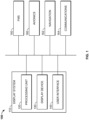
- FIG. 1 is a schematic representation of an aircraft system 100 with a visual display system 110 coupled to a flight management system (FMS) 150 and one or more data sources 160, 162, 164.
- FMS flight management system
- the components and subcomponents of system 100 may be coupled together in any suitable manner, such with as a data bus.
- the system 100 appears in FIG. 1 to be arranged as an integrated system, the system 100 is not so limited and can also include an arrangement whereby one or more aspects of the system 100 are separate components or subcomponents of another system located either onboard or external to the aircraft.
- the visual display system 110 includes a processing unit 120, a display device 130, and a user interface 140. Generally, the visual display system 110 displays information from the FMS 150 via the display device 130 and enables interaction between a user (e.g., a pilot or other type of operator) and the FMS 150, as described in greater detail below. Additional information about the operation will be provided below after a brief introduction of each component.
- a user e.g., a pilot or other type of operator
- the processing unit 120 is a computer processor associated with flight planning and management functions, particularly the display and navigation of a list of waypoints, such as in a flight plan.
- the processing unit 120 functions to at least receive and/or retrieve aircraft flight management information (e.g., from the FMS 150 and data sources 160, 162, 164).
- the processing unit 120 may also generate display commands for displaying the flight management information.
- the processing unit 120 may function as a graphics display generator to generate display commands based on algorithms or other machine instructions stored in the processing unit 120 or in separate memory components.
- the processing unit 120 may then send the generated display commands to display device 130 for presentation to the user.
- the processing unit 120 may additionally receive and generate display commands based on inputs via the user interface 140.
- the processing unit 120 may be implemented or realized with a general-purpose processor, a content addressable memory, a digital signal processor, an application specific integrated circuit, a field programmable gate array, suitable programmable logic device, discrete gate or transistor logic, processing core, discrete hardware components, or any combination thereof.
- the processing unit 120 includes processing logic that may be configured to carry out the functions, techniques, and processing tasks or methods associated with operation of the system 100.
- the processing unit 120 may further include any suitable type of memory or data storage, such as for example, RAM, ROM, EEPROM, flash memory, optical or magnetic storage devices, or any other medium that can be used to store and access desired information.
- the display device 130 is coupled to the processing unit 120 for rendering information to the user based on display commands.
- the display device 130 may be a multifunction monitor, unit, or any display suitable for displaying various symbols and information, such as a multifunction control display unit (MCDU), cockpit display device (CDU), primary flight display (PFD), and/or navigation display.
- MCDU multifunction control display unit
- CDU cockpit display device
- PFD primary flight display
- Any suitable type of display medium capable of visually presenting multi-colored or monochrome flight information for a pilot or other flight crew member can be provided, such as, for example, various types of CRT displays, LCDs, OLED displays, plasma displays, projection displays, HDDs, HUDs, and the like.
- the user interface 140 is coupled to the processing unit 120 to allow a user to interact with the display device 130 and/or other elements of the system 100.
- the user interface may be realized as a keypad, touchpad, keyboard, mouse, touch panel, joystick, knob, line select key or another suitable device adapted to receive input from a user.
- the user interface 140 is realized as audio input and output devices, such as a speaker, microphone, audio transducer, audio sensor, or the like.
- the user interface may be incorporated into the display device 130.
- the display device 130 and user interface 140 are integrated as an interactive MCDU with a display screen and a keyboard, touch-screen and/or other mechanisms for function, display, and/or cursor control.
- the FMS 150 is coupled to the display system 110 and one or more data sources 160, 162, 164 and generally functions to support navigation, flight planning, and other aircraft control functions, as well as provides real-time data and/or information regarding the operational status of the aircraft.
- the FMS 150 may include or otherwise access one or more of the following: a weather system, an air traffic management system, a radar system, a traffic avoidance system, an autopilot system, a flight control system, crew alerting systems, electronic checklist systems, an electronic flight bag, and/or other suitable avionics systems.
- the FMS 150 may store and/or generate a flight plan for traveling between a current or initial destination and a final destination.
- the data sources 160, 162, 164 can include any suitable type of data source that may be used to construct or modify the flight plan, such as an avionics database 160, a navigation system 162, and a communications system 164, as examples.
- the avionics database 160 may store aeronautical information data, including, for example, flight plan data, data related to airways, navigational aids, navigational data, obstructions, taxi registration, Special Use Airspace, political boundaries, COM frequencies, approach information, geographical information and the like.
- the navigation system 162 is configured to provide real-time navigational data and/or information regarding operation of the aircraft.
- the communications system 164 is suitably configured to support communications between the aircraft and another aircraft or ground location (e.g., air traffic control) via a radio system or another suitable data link system.
- the display system 110 particularly functions to display a flight plan, including as examples, a selected or otherwise designated flight plan for subsequent execution, a flight plan selected for review, and/or a flight plan currently being executed by the aircraft.
- the FMS 150 may store predefined flight plans, while in further embodiments, the flight plan may be uplinked via the communications system 164 and/or manually entered or created by the user via the user interface 140.
- the display system 110 renders or otherwise provides a lateral map or other navigational map that includes a graphical representation of at least a portion of the route defined by the flight plan.
- the lateral map may also include graphical representations of terrain, meteorological conditions, navigational reference points (e.g., waypoints, navigational aids, distance measuring equipment (DMEs), very high frequency omnidirectional radio ranges (VORs), and the like), designated special use airspaces or airspace restrictions, air traffic, obstacles, and/or the like.
- the lateral map may include different layers of graphical elements that are based on or otherwise derived from different data sources, which, in some embodiment, may be selectively added or removed from the display. Additionally, graphical elements in different data layers may be collocated or otherwise correspond to overlapping geographic locations or regions, such that different types of graphical elements may overlie one another on the display.
- the flight plan includes a sequence of navigational reference points or waypoints that define a flight path or route to be flown by the aircraft.
- waypoints may have various types of characteristics, attributes, or properties associated therewith. These characteristics may be a function of the waypoint itself or a function of the placement of the waypoint within the flight plan.
- a waypoint may be associated with a particular type of aircraft procedure (e.g., a turn or holding procedure) or be associated with a designated constraint, such as noise, altitude, and/or speed constraints.
- a waypoint may be associated with a specific segment of the flight plan (e.g., departure, en route, approach, missed approach, and/or alternate flight plan).
- One or more of the characteristics, attributes and/or properties associated with a given waypoint may be presented in association with that waypoint when that waypoint is current selected.
- the FMS 150 may associate different characteristics to waypoints of a flight plan based on various factors. For example, the FMS 150 may determine some waypoint characteristics based on information from the navigation system 162 and/or avionics database 160 (e.g., identifying a waypoint as a runway or compulsory reporting point; identifying stored defined patterns associated with the waypoint, such as procedure turns, published holding patterns, etc.) or based on flight plan modifications (e.g., the crew and/or operator may insert a holding pattern at a specific waypoint as instructed by ground station). In practice, the FMS 150 may evaluate and divide the entire flight plan to map the waypoints to specific flight phases (or segments), e.g., departure, en-route, arrival procedures, etc.
- flight phases or segments
- the FMS 150 can assign waypoints from origin to top of climb as departure waypoints; from top of climb to top of descent including any step climbs as en-route waypoints; and from top of descent to destination as arrival waypoints. In this manner, the FMS 150 may identify different logical groupings of waypoints according to logically distinct operational segments of the flight plan.
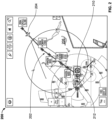
- FIG. 2 depicts an exemplary navigational map graphical user interface (GUI) display 200 that may be displayed, rendered, or otherwise presented by the display system 110 and/or processing unit 120 on a display device 130 onboard an aircraft.
- the navigational map 200 includes a graphical representation of a portion of route 202 defined by a flight plan for the aircraft and a graphical representation 204 of the aircraft overlaid or rendered on top of a background 206.
- the background 206 may include graphical representations of the terrain, topology, navigational reference points, airspace designations and/or restrictions, or other suitable items or points of interest corresponding to the currently displayed area of the navigational map 206, based upon corresponding data which may be maintained in a terrain database, a navigational database, a geopolitical database, or another suitable database.
- the display system 110 and/or processing unit 120 may render a graphical representation of navigational aids (e.g., VORs, VORTACs, DMEs, and the like) and airports within the currently displayed geographic area of the navigational map 200 overlying the background 206.
- navigational aids e.g., VORs, VORTACs, DMEs, and the like
- Some embodiments of the navigational map 200 may also include graphical representations of airspace designations and/or airspace restrictions, cities, towns, roads, railroads, and other geo-political information.
- FIG. 2 depicts a top view (e.g., from above the aircraft 204) of the navigational map 200 (alternatively referred to as a lateral map or lateral view), in practice, alternative embodiments may utilize various perspective views, such as side views, three-dimensional views (e.g., a three-dimensional synthetic vision display), angular or skewed views, and the like.
- the displayed area of the navigational map 200 corresponds to the geographic area that is currently displayed in the navigational map 200, that is, the field of view about the center location of the navigational map 200.
- the center location of the navigational map 200 comprises a reference location for the middle or geometric center of the navigational map 200 which corresponds to a geographic location.
- the navigational map 200 is associated with the movement of the aircraft, and the aircraft symbology 204 and/or background 206 refreshes or otherwise updates as the aircraft travels, such that the graphical representation of the aircraft 204 is positioned over the terrain background 206 in a manner that accurately reflects the current (e.g., instantaneous or substantially real-time) real-world positioning of the aircraft relative to the earth.
- the aircraft symbology 204 is shown as traveling across the navigational map 200 (e.g., by updating the location of the aircraft symbology 204 with respect to the background 206), while in other embodiments, the aircraft symbology 204 may be located at a fixed position on the navigational map 200 (e.g., by updating the background 206 with respect to the aircraft symbology 204 such that the map 200 is maintained centered on and/or aligned with the aircraft symbology 204).
- the navigational map 200 may be oriented in a cardinal direction (e.g., oriented north-up so that moving upward on the map 200 corresponds to traveling northward), or alternatively, the orientation of the navigational map 200 may be track-up or heading-up (i.e., aligned such that the aircraft symbology 204 is always traveling in an upward direction and the background 206 adjusted accordingly).
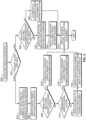
- FIG. 3 depicts an exemplary embodiment of a tactile input resolution process 300 suitable for implementation by an aircraft system or display system to resolve or otherwise map a tactile user input to a particular graphical element displayed on a display device, or alternatively, a particular functionality related to the display.
- the various tasks performed in connection with the illustrated process may be implemented using hardware, firmware, software executed by processing circuitry, or any combination thereof.
- portions of the tactile input resolution process 300 may be performed by different elements of the aircraft system 100 and/or the display system 110.
- the processing unit 120 may initiate or otherwise perform the tactile input resolution process 300 of FIG. 3 to map or otherwise resolve the tactile user input to a particular selection.
- the tactile input resolution process 300 analyzes the temporal characteristics of the tactile user input to classify or otherwise categorize the tactile user input based on the temporal characteristics.
- the processing unit 120 may calculate or otherwise determine a duration of the tactile user input by implementing a timer or similar feature to measure the period of time over which the tactile user interface device 140 provides a substantially constant output indicative of sustained physical contact or proximity for an input selection gesture.
- the duration of the tactile user input may be measured and utilized to calculate other temporal metrics or characteristics associated with the tactile user input gesture, such as, for example, a velocity of the input gesture, an acceleration of the input gesture, and/or the like.
- the tactile input resolution process 300 classifies the tactile user input into a particular category of user input, and then based on that temporal classification, determines which selectable graphical element on the GUI display the user intended to select in accordance with the temporal classification. In this manner, the temporal classification is utilized to disambiguate the intent of the tactile user input gesture.
- the tactile input resolution process 300 classifies the tactile user input into one of a short duration tactile user input category (or short touch) and a long duration tactile user input category (or long touch) (task 302). For example, a tactile user input that results in output signals from the tactile user interface device 140 indicative of physical contact or proximity that persists in substantially the same location (e.g., without moving more than 0.05 inches) for a duration of time longer than a classification threshold time period (e.g., greater than or equal to one second) may be classified as a long touch, while other tactile user inputs having associated durations that are less than the classification threshold duration of time (e.g., less than one second) may be classified as a short touch.
- a classification threshold time period e.g., greater than or equal to one second
- the tactile input resolution process 300 continues by analyzing the coordinate location or other spatial characteristics of the tactile user input with respect to the displayed content to identify or otherwise determine how many selectable graphical elements or objects are displayed within a threshold distance of the tactile user input (task 304).
- the processing unit 120 utilizes the coordinate locations for the touch location on the display 130 that are output by the tactile user interface device 140 to identify or otherwise determine what selectable content is displayed on the display 130 at or within a threshold on-screen distance of the touch location on the display 130.
- the processing unit 120 may analyze the different data layers of a navigational map GUI display 200 presented on the display 130 to identify any selectable graphical elements presented within a threshold distance of the touch location within the respective data layer. In this manner, the processing unit 120 may identify any waypoints or other navigational reference points depicted within a threshold distance of the touch location, any airports or landing locations depicted within a threshold distance of the touch location, any airspaces that overlap or encompass the touch location, any air traffic within a threshold distance of the touch location, and/or the like. In this regard, in some embodiments, the processing unit 120 may exclude certain data layers from analysis or consideration (e.g., the terrain layer).
- the threshold distance is chosen to encompass or otherwise define an area on the display 130 that corresponds to the area of a human fingertip about the location of the tactile user input (e.g., coordinate touch location 212).
- the threshold distance may be chosen to define a circumference, a circular area, an elliptical area or another suitable geometrically shaped region about the touch location that corresponds to an average contact area for a human fingertip when pressed against the tactile user interface device 140 and/or the display 130.
- the tactile input resolution process 300 may be configured to calculate or otherwise determine a geometric center coordinate location of the tactile user input or another representative coordinate location for the tactile user input about which the threshold distance is utilized to identify potential on-screen GUI element encompassed by (or intended to be encompassed by) the tactile user input.
- the threshold distance is utilized by the tactile input resolution process 300 to filter or otherwise exclude selectable elements on the display 130 that are not within the threshold distance of the tactile user input from further consideration as being unlikely to have been intended to be selected by the user.
- the threshold distance dynamically increases with respect to the duration of the long touch, thereby allowing the pilot or other user to progressively and/or incrementally increase the area associated with the user input (and the number of selectable graphical elements encompassed therein) by maintaining the long touch user input for a longer duration of time.
- the tactile input resolution process 300 may generate or otherwise provide a graphical indication of the selected area corresponding to on-screen locations within the threshold distance of the location of the tactile user input, for example, by rendering a circle or ring corresponding to the tactile user input that has a center location corresponding to the center location of the tactile user input and a radius corresponding to the threshold distance. Thereafter, as the duration of the long touch user input increases, the threshold distance and the radius of the displayed circle corresponding to the tactile user input may increase to encompass a larger area and additional selectable graphical elements on the display until the user ceases the long touch user input.
- a circle or ring with a radius equal to the initial threshold distance may be displayed encompassing an initial area around the tactile user input.
- the threshold distance and corresponding radius of the displayed circle or ring may increase by some amount or percentage (e.g., 25%) to encompass a greater area around the tactile user input, with the threshold distance and corresponding radius further increasing by the same amount or percentage to encompass a greater area around the tactile user input once the long touch tactile user input is maintained for another 500 milliseconds (e.g., at least 2 seconds cumulatively), and so on.
- the tactile input resolution process 300 automatically selects or otherwise identifies, for use as the selected graphical element, a highest priority graphical element from among the plurality of selectable graphical elements using a prioritization scheme or prioritization logic (task 306).
- the prioritization scheme or prioritization logic may be static; however, in other embodiments, the prioritization may be context-sensitive and dynamically vary depending on the current operating context of the aircraft (e.g., vary based on the current flight phase, the current location within the flight plan, the current aircraft altitude, the current aircraft configuration, and/or the like).
- the tactile input resolution process 300 identifies or otherwise obtains current status information characterizing the current operating state of the aircraft and dynamically determines the respective priority to be associated with each of the respective selectable graphical elements under consideration.
- displayed graphical elements associated with a particular type of aircraft procedure could be assigned a higher priority when the current flight phase matches or otherwise corresponds to that particular aircraft procedure (e.g., by prioritizing graphical elements related to an approach procedure for an airport when the aircraft is in an approach or descent flight phase en route to that airport), or conversely, be assigned a lower priority (or deprioritized) when the current flight phase is incompatible or inconsistent with that particular aircraft procedure (e.g., by deprioritizing graphical elements related to an approach procedure for an airport when the aircraft is in a departure or climbing flight phase departing from that airport).
- a particular type of aircraft procedure e.g., an approach procedure, a departure procedure, and/or the like
- displayed graphical elements associated with a particular type of aircraft procedure could be assigned a higher priority when the current flight phase matches or otherwise corresponds to that particular aircraft procedure (e.g., by prioritizing graphical elements related to an approach procedure for an airport when the aircraft is in an approach or descent flight phase en route to that airport),
- the coordinate location associated with the tactile user input may be different from the coordinate location associated with the highest priority graphical element identified as selected, and/or the coordinate location associated with the highest priority graphical element identified as selected may be further from the coordinate location associated with the tactile user input than the coordinate location(s) of other graphical element(s) on the display.
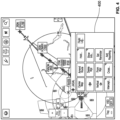
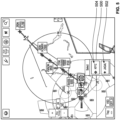
- FIG. 4 depicts a waypoint task menu graphical user interface (GUI) display window 400 that may be generated or otherwise displayed on or overlying the navigational map 200 in response to identifying selection of the JAGAL waypoint as the highest priority selectable graphical element within the threshold distance of a short touch tactile user input.
- GUI graphical user interface
- the tactile input resolution process 300 identifies the various graphical elements that are displayed on the map 200 within a threshold distance of the coordinate touch location 212 corresponding to the center of the tactile user input 210 (e.g., task 304), including, for example, the label associated with the JAGAL waypoint, the KFFZ airport underlying the JAGAL waypoint label, and the airspace associated with the KFFZ airport.
- the tactile input resolution process 300 automatically designates that selectable graphical element as selected by the user, automatically generates, displays, or otherwise provides a menu associated with selection of that identified graphical element (e.g., tasks 306, 308, 310, 312).
- the tactile input resolution process 300 takes no action responsive to the tactile user input.
- the tactile input resolution process 300 reduces the likelihood of inadvertent contact to the display 130 from undesirably altering the displayed content. For example, transient contact associated with a pilot attempting to pan the map by dragging may be ignored rather than interrupting or interfering with the pan by responding and displaying undesired content.
- the tactile input resolution process 300 when the tactile input resolution process 300 identifies multiple selectable graphical elements having the highest priority, the tactile input resolution process 300 analyzes the respective coordinate locations associated with the respective highest priority selectable graphical elements to disambiguate and resolve the tactile user input to the nearest one of the highest priority selectable graphical elements (task 314). In this regard, for each higher priority selectable graphical element, the tactile input resolution process 300 may calculate or otherwise determine a respective distance between the center or reference coordinate location on the display associated with the respective selectable graphical element and the center or reference coordinate location of the tactile user input.
- the tactile input resolution process 300 may then analyze the distances between respective ones of the highest priority selectable graphical elements and the tactile user input to disambiguate the probable or most likely intended selection that has the smallest distance difference and is closest to the tactile user input.
- the tactile input resolution process 300 designates the closest highest priority selectable graphical element as the user selection that was most likely desired by the tactile user input (task 316).
- the tactile input resolution process 300 automatically responds to the tactile user input in accordance with selection of the closest highest priority graphical element by generating or otherwise displaying a menu associated with the identified graphical element in a similar manner as described above in the context of FIG. 4 (e.g., task 312).
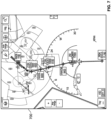
- the short touch tactile user input may effectively operate to zoom in on the current GUI display without requiring more complicated gestures by the user (e.g., pinching, double tapping, etc.) until a short touch tactile user input is resolved to a selectable graphical element on the currently depicted GUI display, as described in greater detail below in the context of FIGS. 6-7 .
- the tactile input resolution process 300 continues by identifying or otherwise determining the particular graphical element selected by the user in response to a subsequent user input with respect to the deconfliction menu and automatically responds to selection of the desired graphical element from within the deconfliction menu by generating or otherwise displaying a menu associated with the selected graphical element(tasks 324, 312).
- the user may select the JAGAL waypoint GUI element 502 within the deconfliction menu window 500 to cause the display to be dynamically updated to include the JAGAL waypoint task menu 400 shown in FIG. 4 (e.g., by transitioning from the state depicted in FIG. 5 to the state depicted in FIG. 4 ).
- the user may select the KFFZ airport GUI element 504 within the deconfliction menu window 500 to cause the display to be updated to include an airport task menu associated with the KFFZ airport.
- the tactile input resolution process 300 automatically identifies the displayed graphical element having a displayed coordinate location on-screen that is closest to the long touch coordinate location as the desired user selection (task 326) and then generates, displays, or otherwise provides a task menu associated with that selectable graphical element identified as being closest to the long touch coordinate location (task 312).
- the tactile input resolution process 300 effectively assumes the long touch is not the result of inadvertent contact and that the user likely intended to select the graphical element closest to the coordinate location of the tactile user input.
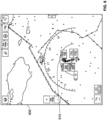
- FIGS. 6-7 depict a sequence of GUI displays for the scenario where there are multiple high priority graphical elements at or within a threshold distance of short touch tactile user input, for example, when more than one of the highest priority graphical element are within the same on-screen distance of the tactile user input so that a closest one of the highest priority graphical element cannot readily be identified (e.g., tasks 314, 316, 318).
- the touchscreen behavior responds in an intuitive and predictable manner that reduces error and frustration, particularly in situations where the requisite spatial precision given the density of the displayed graphical elements may be otherwise unachievable.
Landscapes
- Engineering & Computer Science (AREA)
- General Engineering & Computer Science (AREA)
- Theoretical Computer Science (AREA)
- Physics & Mathematics (AREA)
- General Physics & Mathematics (AREA)
- Human Computer Interaction (AREA)
- Aviation & Aerospace Engineering (AREA)
- Radar, Positioning & Navigation (AREA)
- Remote Sensing (AREA)
- Traffic Control Systems (AREA)
- Navigation (AREA)
Claims (13)
- Procédé de résolution d'une sélection d'utilisateur reçue via une interface utilisateur tactile d'un véhicule, le procédé comprenant :l'identification d'une pluralité d'éléments graphiques sélectionnables dans une distance seuil d'une entrée utilisateur tactile sur un dispositif d'affichage ;la classification de l'entrée utilisateur tactile dans une catégorie d'une pluralité de catégories sur la base d'une caractéristique temporelle associée à l'entrée utilisateur tactile, ce qui résulte en une classification temporelle de l'entrée utilisateur tactile ; etla détermination d'un élément graphique sélectionné parmi la pluralité d'éléments graphiques sélectionnables dans la distance seuil de l'entrée utilisateur tactile sur le dispositif d'affichage correspondant à la sélection d'utilisateur conformément à la classification temporelle de l'entrée utilisateur tactile, caractérisé en ce que la détermination de l'élément graphique sélectionné comprend :quand la classification temporelle de l'entrée utilisateur tactile comprend une première catégorie de la pluralité de catégories, l'identification d'un élément graphique de la plus haute priorité parmi la pluralité d'éléments graphiques sélectionnables comme étant l'élément graphique sélectionné, dans lequel les priorités des éléments graphiques sélectionnables sont déterminées dynamiquement à l'aide de l'information d'état actuelle caractérisant un état de fonctionnement actuel du véhicule ; etquand la classification temporelle de l'entrée utilisateur tactile comprend une deuxième catégorie de la pluralité de catégories, l'affichage d'un menu d'élimination des conflits comprenant la pluralité d'éléments graphiques sélectionnables pour identifier l'élément graphique sélectionné en tant que premier élément graphique de la pluralité d'éléments graphiques sélectionnables en réponse à une sélection d'utilisateur subséquente du premier élément graphique à partir du menu d'élimination des conflits.
- Procédé selon la revendication 1, dans lequel la première catégorie comprend une catégorie d'entrée utilisateur tactile de courte durée et la deuxième catégorie comprend une catégorie d'entrée utilisateur tactile de longue durée.
- Procédé selon la revendication 1, dans lequel la pluralité de catégories comprend une catégorie d'entrée utilisateur tactile de courte durée et une catégorie d'entrée utilisateur tactile de longue durée.
- Procédé selon la revendication 3, comprenant en outre la mesure d'une durée de contact associée à l'entrée utilisateur tactile, dans lequel le classement de l'entrée utilisateur tactile dans une catégorie de la pluralité de catégories sur la base de la caractéristique temporelle comprend la classification de l'entrée utilisateur tactile dans la catégorie entrée tactile d'utilisateur de courte durée quand la durée de contact est inférieure à une durée seuil associée à la catégorie entrée utilisateur tactile de courte durée.
- Procédé selon la revendication 3, comprenant en outre la mesure d'une durée de contact associée à l'entrée utilisateur tactile, dans lequel le classement de l'entrée utilisateur tactile dans une catégorie de la pluralité de catégories sur la base de la caractéristique temporelle comprend la classification de l'entrée utilisateur tactile dans la catégorie entrée utilisateur tactile de longue durée quand la durée de contact est supérieure à une durée seuil associée à la catégorie d'entrée utilisateur tactile de longue durée.
- Procédé selon la revendication 1 dans lequel, quand la classification temporelle comprend une catégorie d'entrée utilisateur tactile de courte durée, la détermination de l'élément graphique sélectionné comprend l'identification d'un élément graphique de la plus haute priorité parmi la pluralité d'éléments graphiques sélectionnables comme étant l'élément graphique sélectionné.
- Procédé selon la revendication 1, dans lequel le contexte opérationnel actuel du véhicule comprend une phase de vol actuelle associée à un aéronef ayant le dispositif d'affichage à bord.
- Procédé selon la revendication 6, comprenant en outre l'affichage automatique d'un menu associé à l'élément graphique de la plus haute priorité sur le dispositif d'affichage.
- Procédé selon la revendication 6, l'entrée utilisateur tactile étant fournie sur un affichage d'interface graphique, GUI - Graphical User Interface, de carte de navigation sur le dispositif d'affichage à bord d'un aéronef, dans lequel l'identification de l'élément graphique de la plus haute priorité comprend la détermination de l'élément graphique de la plus haute priorité de la pluralité d'éléments graphiques sélectionnables sur l'affichage GUI de carte de navigation sur la base d'un plan de vol pour l'aéronef.
- Procédé selon la revendication 1 dans lequel, quand la classification temporelle comprend une catégorie d'entrée utilisateur tactile de longue durée, la détermination de l'élément graphique sélectionné comprend l'affichage automatique d'un menu d'élimination des conflits comprenant la pluralité d'éléments graphiques sélectionnables sur le dispositif d'affichage.
- Procédé selon la revendication 10, dans lequel :l'identification de la pluralité d'éléments graphiques sélectionnables comprend l'exclusion d'un ou plusieurs éléments graphiques sélectionnables affichés sur le dispositif d'affichage à une distance supérieure à la distance seuil de l'entrée utilisateur tactile sur le dispositif d'affichage pour obtenir un sous-ensemble filtré d'éléments graphiques sélectionnables dans la distance seuil ; etle menu d'élimination des conflits comprend le sous-ensemble filtré d'éléments graphiques sélectionnables.
- Procédé selon la revendication 1 dans lequel, quand la classification temporelle comprend une catégorie d'entrée utilisateur tactile de courte durée, la détermination de l'élément graphique sélectionné comprend :l'amélioration d'une portion de contenu sélectionnée affichée sur le dispositif d'affichage, ce qui résulte en une amélioration de la portion de contenu sélectionnée englobant la pluralité d'éléments graphiques sélectionnables dans la distance seuil de l'entrée utilisateur tactile sur le dispositif d'affichage ; etl'identification de l'élément graphique sélectionné en réponse à une deuxième entrée utilisateur tactile par rapport à l'amélioration de la portion de contenu sélectionnée.
- Système pour aéronef, comprenant :un dispositif d'affichage sur lequel figure un affichage d'interface graphique, GUI ;une interface utilisateur pour recevoir une entrée utilisateur tactile par rapport à l'affichage GUI ;un système de gestion de vol, FMS - Flight Management System, et/ou un système de navigation et/ou un autre système avionique configuré pour obtenir de l'information d'état actuelle caractérisant un état de fonctionnement actuel de l'aéronef ; etun système de traitement couplé au dispositif d'affichage et à l'interface utilisateur, dans lequel le système de traitement est configuré pour mettre en oeuvre le procédé selon l'une quelconque des revendications précédentes.
Applications Claiming Priority (2)
| Application Number | Priority Date | Filing Date | Title |
|---|---|---|---|
| IN202011049227 | 2020-11-11 | ||
| US17/452,707 US11915596B2 (en) | 2020-11-11 | 2021-10-28 | Methods and systems for resolving tactile user input selections |
Publications (2)
| Publication Number | Publication Date |
|---|---|
| EP4002078A1 EP4002078A1 (fr) | 2022-05-25 |
| EP4002078B1 true EP4002078B1 (fr) | 2024-07-03 |
Family
ID=78592544
Family Applications (1)
| Application Number | Title | Priority Date | Filing Date |
|---|---|---|---|
| EP21207010.6A Active EP4002078B1 (fr) | 2020-11-11 | 2021-11-08 | Procédés et systèmes pour résoudre des sélections d'entrées d'utilisateur tactiles |
Country Status (1)
| Country | Link |
|---|---|
| EP (1) | EP4002078B1 (fr) |
Families Citing this family (1)
| Publication number | Priority date | Publication date | Assignee | Title |
|---|---|---|---|---|
| FR3139230B1 (fr) * | 2022-08-25 | 2024-07-12 | Continental Automotive Tech Gmbh | Procédé et dispositif de contrôle d’un écran tactile |
Family Cites Families (4)
| Publication number | Priority date | Publication date | Assignee | Title |
|---|---|---|---|---|
| US7614008B2 (en) * | 2004-07-30 | 2009-11-03 | Apple Inc. | Operation of a computer with touch screen interface |
| TWI442303B (zh) * | 2011-03-15 | 2014-06-21 | Htc Corp | 電子裝置及其控制方法與電腦程式產品 |
| US9235324B2 (en) * | 2012-05-04 | 2016-01-12 | Google Inc. | Touch interpretation for displayed elements |
| KR20160139481A (ko) * | 2015-05-27 | 2016-12-07 | 삼성전자주식회사 | 사용자 단말 장치 및 그 제어 방법 |
-
2021
- 2021-11-08 EP EP21207010.6A patent/EP4002078B1/fr active Active
Also Published As
| Publication number | Publication date |
|---|---|
| EP4002078A1 (fr) | 2022-05-25 |
Similar Documents
| Publication | Publication Date | Title |
|---|---|---|
| US11915596B2 (en) | Methods and systems for resolving tactile user input selections | |
| EP2679959B1 (fr) | Système d'affichage avionique assurant une meilleure gestion de plan de vol | |
| US12033250B2 (en) | Capability envelope display methods and systems | |
| EP2922046B1 (fr) | Système et procédé permettant d'obtenir une meilleure gestion de plan de vol | |
| US12314556B2 (en) | Cursor management methods and systems | |
| EP2770490B1 (fr) | Système et procédé de hiérarchisation de trafic | |
| EP3628977A1 (fr) | Systèmes et procédés permettant d'associer des données de référence de vol critiques à un symbole de vecteur de trajectoire de vol | |
| EP3657131B1 (fr) | Système et procédé de présentation de liste de point de cheminement | |
| EP2192504A1 (fr) | Procédés de localisation d'un article lorsque le mode de recherche n'est pas sélectionné | |
| US20150308833A1 (en) | System and method for displaying context sensitive notes | |
| EP4369190A1 (fr) | Procédés et systèmes de gestion de curseur pour récupération à partir d'interactions incomplètes | |
| EP4002078B1 (fr) | Procédés et systèmes pour résoudre des sélections d'entrées d'utilisateur tactiles | |
| US12461702B2 (en) | Methods and systems for propagating user inputs to different displays | |
| US12197715B2 (en) | Methods and systems for automated contextual navigation of GUI displays | |
| EP4358067A1 (fr) | Procédés et systèmes de vérification de procédure d'aéronef à l'aide d'un curseur virtuel | |
| US12122530B2 (en) | Energy constraint management methods and systems | |
| EP4043833B1 (fr) | Procédés et systèmes pour propager des entrées d'utilisateur à plusieurs écrans | |
| EP4148394A1 (fr) | Procédés et systèmes de gestion d'itinéraires personnalisés configurés par l'utilisateur | |
| EP4455854B1 (fr) | Procédés et systèmes de navigation contextuelle automatisée d'affichages gui | |
| EP4250270A1 (fr) | Procédés et systèmes de gestion de contraintes d'énergie | |
| US20250095497A1 (en) | Interactive visualization of predicted information along active flight path on navigation displays | |
| EP4703688A1 (fr) | Système et procédé de génération de plans de vol d'espace aérien à itinéraire libre | |
| US20230072633A1 (en) | Methods and systems for managing user-configured custom routes |
Legal Events
| Date | Code | Title | Description |
|---|---|---|---|
| PUAI | Public reference made under article 153(3) epc to a published international application that has entered the european phase |
Free format text: ORIGINAL CODE: 0009012 |
|
| STAA | Information on the status of an ep patent application or granted ep patent |
Free format text: STATUS: THE APPLICATION HAS BEEN PUBLISHED |
|
| AK | Designated contracting states |
Kind code of ref document: A1 Designated state(s): AL AT BE BG CH CY CZ DE DK EE ES FI FR GB GR HR HU IE IS IT LI LT LU LV MC MK MT NL NO PL PT RO RS SE SI SK SM TR |
|
| STAA | Information on the status of an ep patent application or granted ep patent |
Free format text: STATUS: REQUEST FOR EXAMINATION WAS MADE |
|
| 17P | Request for examination filed |
Effective date: 20221110 |
|
| RBV | Designated contracting states (corrected) |
Designated state(s): AL AT BE BG CH CY CZ DE DK EE ES FI FR GB GR HR HU IE IS IT LI LT LU LV MC MK MT NL NO PL PT RO RS SE SI SK SM TR |
|
| P01 | Opt-out of the competence of the unified patent court (upc) registered |
Effective date: 20230421 |
|
| GRAP | Despatch of communication of intention to grant a patent |
Free format text: ORIGINAL CODE: EPIDOSNIGR1 |
|
| STAA | Information on the status of an ep patent application or granted ep patent |
Free format text: STATUS: GRANT OF PATENT IS INTENDED |
|
| RIC1 | Information provided on ipc code assigned before grant |
Ipc: G06F 3/04883 20220101ALI20231013BHEP Ipc: G06F 3/04842 20220101ALI20231013BHEP Ipc: G06F 3/04886 20220101ALI20231013BHEP Ipc: G06F 3/0488 20220101ALI20231013BHEP Ipc: G06F 3/04845 20220101ALI20231013BHEP Ipc: G06F 3/0482 20130101AFI20231013BHEP |
|
| INTG | Intention to grant announced |
Effective date: 20231110 |
|
| GRAS | Grant fee paid |
Free format text: ORIGINAL CODE: EPIDOSNIGR3 |
|
| GRAA | (expected) grant |
Free format text: ORIGINAL CODE: 0009210 |
|
| STAA | Information on the status of an ep patent application or granted ep patent |
Free format text: STATUS: THE PATENT HAS BEEN GRANTED |
|
| AK | Designated contracting states |
Kind code of ref document: B1 Designated state(s): AL AT BE BG CH CY CZ DE DK EE ES FI FR GB GR HR HU IE IS IT LI LT LU LV MC MK MT NL NO PL PT RO RS SE SI SK SM TR |
|
| REG | Reference to a national code |
Ref country code: CH Ref legal event code: EP |
|
| REG | Reference to a national code |
Ref country code: DE Ref legal event code: R096 Ref document number: 602021015093 Country of ref document: DE |
|
| REG | Reference to a national code |
Ref country code: LT Ref legal event code: MG9D |
|
| REG | Reference to a national code |
Ref country code: NL Ref legal event code: MP Effective date: 20240703 |
|
| PG25 | Lapsed in a contracting state [announced via postgrant information from national office to epo] |
Ref country code: PT Free format text: LAPSE BECAUSE OF FAILURE TO SUBMIT A TRANSLATION OF THE DESCRIPTION OR TO PAY THE FEE WITHIN THE PRESCRIBED TIME-LIMIT Effective date: 20241104 |
|
| REG | Reference to a national code |
Ref country code: AT Ref legal event code: MK05 Ref document number: 1700523 Country of ref document: AT Kind code of ref document: T Effective date: 20240703 |
|
| PG25 | Lapsed in a contracting state [announced via postgrant information from national office to epo] |
Ref country code: NL Free format text: LAPSE BECAUSE OF FAILURE TO SUBMIT A TRANSLATION OF THE DESCRIPTION OR TO PAY THE FEE WITHIN THE PRESCRIBED TIME-LIMIT Effective date: 20240703 |
|
| PG25 | Lapsed in a contracting state [announced via postgrant information from national office to epo] |
Ref country code: PT Free format text: LAPSE BECAUSE OF FAILURE TO SUBMIT A TRANSLATION OF THE DESCRIPTION OR TO PAY THE FEE WITHIN THE PRESCRIBED TIME-LIMIT Effective date: 20241104 Ref country code: NL Free format text: LAPSE BECAUSE OF FAILURE TO SUBMIT A TRANSLATION OF THE DESCRIPTION OR TO PAY THE FEE WITHIN THE PRESCRIBED TIME-LIMIT Effective date: 20240703 |
|
| PG25 | Lapsed in a contracting state [announced via postgrant information from national office to epo] |
Ref country code: NO Free format text: LAPSE BECAUSE OF FAILURE TO SUBMIT A TRANSLATION OF THE DESCRIPTION OR TO PAY THE FEE WITHIN THE PRESCRIBED TIME-LIMIT Effective date: 20241003 |
|
| PG25 | Lapsed in a contracting state [announced via postgrant information from national office to epo] |
Ref country code: FI Free format text: LAPSE BECAUSE OF FAILURE TO SUBMIT A TRANSLATION OF THE DESCRIPTION OR TO PAY THE FEE WITHIN THE PRESCRIBED TIME-LIMIT Effective date: 20240703 Ref country code: GR Free format text: LAPSE BECAUSE OF FAILURE TO SUBMIT A TRANSLATION OF THE DESCRIPTION OR TO PAY THE FEE WITHIN THE PRESCRIBED TIME-LIMIT Effective date: 20241004 Ref country code: PL Free format text: LAPSE BECAUSE OF FAILURE TO SUBMIT A TRANSLATION OF THE DESCRIPTION OR TO PAY THE FEE WITHIN THE PRESCRIBED TIME-LIMIT Effective date: 20240703 |
|
| PG25 | Lapsed in a contracting state [announced via postgrant information from national office to epo] |
Ref country code: BG Free format text: LAPSE BECAUSE OF FAILURE TO SUBMIT A TRANSLATION OF THE DESCRIPTION OR TO PAY THE FEE WITHIN THE PRESCRIBED TIME-LIMIT Effective date: 20240703 |
|
| PG25 | Lapsed in a contracting state [announced via postgrant information from national office to epo] |
Ref country code: LV Free format text: LAPSE BECAUSE OF FAILURE TO SUBMIT A TRANSLATION OF THE DESCRIPTION OR TO PAY THE FEE WITHIN THE PRESCRIBED TIME-LIMIT Effective date: 20240703 |
|
| PG25 | Lapsed in a contracting state [announced via postgrant information from national office to epo] |
Ref country code: IS Free format text: LAPSE BECAUSE OF FAILURE TO SUBMIT A TRANSLATION OF THE DESCRIPTION OR TO PAY THE FEE WITHIN THE PRESCRIBED TIME-LIMIT Effective date: 20241103 Ref country code: AT Free format text: LAPSE BECAUSE OF FAILURE TO SUBMIT A TRANSLATION OF THE DESCRIPTION OR TO PAY THE FEE WITHIN THE PRESCRIBED TIME-LIMIT Effective date: 20240703 |
|
| PG25 | Lapsed in a contracting state [announced via postgrant information from national office to epo] |
Ref country code: HR Free format text: LAPSE BECAUSE OF FAILURE TO SUBMIT A TRANSLATION OF THE DESCRIPTION OR TO PAY THE FEE WITHIN THE PRESCRIBED TIME-LIMIT Effective date: 20240703 Ref country code: CZ Free format text: LAPSE BECAUSE OF FAILURE TO SUBMIT A TRANSLATION OF THE DESCRIPTION OR TO PAY THE FEE WITHIN THE PRESCRIBED TIME-LIMIT Effective date: 20240703 |
|
| PG25 | Lapsed in a contracting state [announced via postgrant information from national office to epo] |
Ref country code: RS Free format text: LAPSE BECAUSE OF FAILURE TO SUBMIT A TRANSLATION OF THE DESCRIPTION OR TO PAY THE FEE WITHIN THE PRESCRIBED TIME-LIMIT Effective date: 20241003 Ref country code: ES Free format text: LAPSE BECAUSE OF FAILURE TO SUBMIT A TRANSLATION OF THE DESCRIPTION OR TO PAY THE FEE WITHIN THE PRESCRIBED TIME-LIMIT Effective date: 20240703 |
|
| PG25 | Lapsed in a contracting state [announced via postgrant information from national office to epo] |
Ref country code: RS Free format text: LAPSE BECAUSE OF FAILURE TO SUBMIT A TRANSLATION OF THE DESCRIPTION OR TO PAY THE FEE WITHIN THE PRESCRIBED TIME-LIMIT Effective date: 20241003 Ref country code: PL Free format text: LAPSE BECAUSE OF FAILURE TO SUBMIT A TRANSLATION OF THE DESCRIPTION OR TO PAY THE FEE WITHIN THE PRESCRIBED TIME-LIMIT Effective date: 20240703 Ref country code: NO Free format text: LAPSE BECAUSE OF FAILURE TO SUBMIT A TRANSLATION OF THE DESCRIPTION OR TO PAY THE FEE WITHIN THE PRESCRIBED TIME-LIMIT Effective date: 20241003 Ref country code: LV Free format text: LAPSE BECAUSE OF FAILURE TO SUBMIT A TRANSLATION OF THE DESCRIPTION OR TO PAY THE FEE WITHIN THE PRESCRIBED TIME-LIMIT Effective date: 20240703 Ref country code: IS Free format text: LAPSE BECAUSE OF FAILURE TO SUBMIT A TRANSLATION OF THE DESCRIPTION OR TO PAY THE FEE WITHIN THE PRESCRIBED TIME-LIMIT Effective date: 20241103 Ref country code: HR Free format text: LAPSE BECAUSE OF FAILURE TO SUBMIT A TRANSLATION OF THE DESCRIPTION OR TO PAY THE FEE WITHIN THE PRESCRIBED TIME-LIMIT Effective date: 20240703 Ref country code: GR Free format text: LAPSE BECAUSE OF FAILURE TO SUBMIT A TRANSLATION OF THE DESCRIPTION OR TO PAY THE FEE WITHIN THE PRESCRIBED TIME-LIMIT Effective date: 20241004 Ref country code: FI Free format text: LAPSE BECAUSE OF FAILURE TO SUBMIT A TRANSLATION OF THE DESCRIPTION OR TO PAY THE FEE WITHIN THE PRESCRIBED TIME-LIMIT Effective date: 20240703 Ref country code: ES Free format text: LAPSE BECAUSE OF FAILURE TO SUBMIT A TRANSLATION OF THE DESCRIPTION OR TO PAY THE FEE WITHIN THE PRESCRIBED TIME-LIMIT Effective date: 20240703 Ref country code: CZ Free format text: LAPSE BECAUSE OF FAILURE TO SUBMIT A TRANSLATION OF THE DESCRIPTION OR TO PAY THE FEE WITHIN THE PRESCRIBED TIME-LIMIT Effective date: 20240703 Ref country code: BG Free format text: LAPSE BECAUSE OF FAILURE TO SUBMIT A TRANSLATION OF THE DESCRIPTION OR TO PAY THE FEE WITHIN THE PRESCRIBED TIME-LIMIT Effective date: 20240703 Ref country code: AT Free format text: LAPSE BECAUSE OF FAILURE TO SUBMIT A TRANSLATION OF THE DESCRIPTION OR TO PAY THE FEE WITHIN THE PRESCRIBED TIME-LIMIT Effective date: 20240703 |
|
| REG | Reference to a national code |
Ref country code: DE Ref legal event code: R097 Ref document number: 602021015093 Country of ref document: DE |
|
| PG25 | Lapsed in a contracting state [announced via postgrant information from national office to epo] |
Ref country code: RO Free format text: LAPSE BECAUSE OF FAILURE TO SUBMIT A TRANSLATION OF THE DESCRIPTION OR TO PAY THE FEE WITHIN THE PRESCRIBED TIME-LIMIT Effective date: 20240703 Ref country code: SM Free format text: LAPSE BECAUSE OF FAILURE TO SUBMIT A TRANSLATION OF THE DESCRIPTION OR TO PAY THE FEE WITHIN THE PRESCRIBED TIME-LIMIT Effective date: 20240703 Ref country code: DK Free format text: LAPSE BECAUSE OF FAILURE TO SUBMIT A TRANSLATION OF THE DESCRIPTION OR TO PAY THE FEE WITHIN THE PRESCRIBED TIME-LIMIT Effective date: 20240703 |
|
| PG25 | Lapsed in a contracting state [announced via postgrant information from national office to epo] |
Ref country code: EE Free format text: LAPSE BECAUSE OF FAILURE TO SUBMIT A TRANSLATION OF THE DESCRIPTION OR TO PAY THE FEE WITHIN THE PRESCRIBED TIME-LIMIT Effective date: 20240703 |
|
| PG25 | Lapsed in a contracting state [announced via postgrant information from national office to epo] |
Ref country code: IT Free format text: LAPSE BECAUSE OF FAILURE TO SUBMIT A TRANSLATION OF THE DESCRIPTION OR TO PAY THE FEE WITHIN THE PRESCRIBED TIME-LIMIT Effective date: 20240703 Ref country code: SK Free format text: LAPSE BECAUSE OF FAILURE TO SUBMIT A TRANSLATION OF THE DESCRIPTION OR TO PAY THE FEE WITHIN THE PRESCRIBED TIME-LIMIT Effective date: 20240703 |
|
| PLBE | No opposition filed within time limit |
Free format text: ORIGINAL CODE: 0009261 |
|
| STAA | Information on the status of an ep patent application or granted ep patent |
Free format text: STATUS: NO OPPOSITION FILED WITHIN TIME LIMIT |
|
| REG | Reference to a national code |
Ref country code: DE Ref legal event code: R119 Ref document number: 602021015093 Country of ref document: DE |
|
| 26N | No opposition filed |
Effective date: 20250404 |
|
| REG | Reference to a national code |
Ref country code: CH Ref legal event code: PL |
|
| PG25 | Lapsed in a contracting state [announced via postgrant information from national office to epo] |
Ref country code: MC Free format text: LAPSE BECAUSE OF FAILURE TO SUBMIT A TRANSLATION OF THE DESCRIPTION OR TO PAY THE FEE WITHIN THE PRESCRIBED TIME-LIMIT Effective date: 20240703 |
|
| PG25 | Lapsed in a contracting state [announced via postgrant information from national office to epo] |
Ref country code: LU Free format text: LAPSE BECAUSE OF NON-PAYMENT OF DUE FEES Effective date: 20241108 |
|
| REG | Reference to a national code |
Ref country code: CH Ref legal event code: PL |
|
| PG25 | Lapsed in a contracting state [announced via postgrant information from national office to epo] |
Ref country code: CH Free format text: LAPSE BECAUSE OF NON-PAYMENT OF DUE FEES Effective date: 20241130 |
|
| REG | Reference to a national code |
Ref country code: BE Ref legal event code: MM Effective date: 20241130 |
|
| PG25 | Lapsed in a contracting state [announced via postgrant information from national office to epo] |
Ref country code: SE Free format text: LAPSE BECAUSE OF FAILURE TO SUBMIT A TRANSLATION OF THE DESCRIPTION OR TO PAY THE FEE WITHIN THE PRESCRIBED TIME-LIMIT Effective date: 20240703 |
|
| PG25 | Lapsed in a contracting state [announced via postgrant information from national office to epo] |
Ref country code: DE Free format text: LAPSE BECAUSE OF NON-PAYMENT OF DUE FEES Effective date: 20250603 |
|
| PG25 | Lapsed in a contracting state [announced via postgrant information from national office to epo] |
Ref country code: BE Free format text: LAPSE BECAUSE OF NON-PAYMENT OF DUE FEES Effective date: 20241130 |
|
| PG25 | Lapsed in a contracting state [announced via postgrant information from national office to epo] |
Ref country code: IE Free format text: LAPSE BECAUSE OF NON-PAYMENT OF DUE FEES Effective date: 20241108 |
|
| PGFP | Annual fee paid to national office [announced via postgrant information from national office to epo] |
Ref country code: FR Payment date: 20251125 Year of fee payment: 5 |
|
| PG25 | Lapsed in a contracting state [announced via postgrant information from national office to epo] |
Ref country code: HU Free format text: LAPSE BECAUSE OF FAILURE TO SUBMIT A TRANSLATION OF THE DESCRIPTION OR TO PAY THE FEE WITHIN THE PRESCRIBED TIME-LIMIT; INVALID AB INITIO Effective date: 20211108 |
|
| PG25 | Lapsed in a contracting state [announced via postgrant information from national office to epo] |
Ref country code: CY Free format text: LAPSE BECAUSE OF FAILURE TO SUBMIT A TRANSLATION OF THE DESCRIPTION OR TO PAY THE FEE WITHIN THE PRESCRIBED TIME-LIMIT; INVALID AB INITIO Effective date: 20211108 |