EP4006706A1 - Nachrichtensendeverfahren und mobiles endgerät - Google Patents
Nachrichtensendeverfahren und mobiles endgerät Download PDFInfo
- Publication number
- EP4006706A1 EP4006706A1 EP20844572.6A EP20844572A EP4006706A1 EP 4006706 A1 EP4006706 A1 EP 4006706A1 EP 20844572 A EP20844572 A EP 20844572A EP 4006706 A1 EP4006706 A1 EP 4006706A1
- Authority
- EP
- European Patent Office
- Prior art keywords
- message
- input
- target
- input box
- response
- Prior art date
- Legal status (The legal status is an assumption and is not a legal conclusion. Google has not performed a legal analysis and makes no representation as to the accuracy of the status listed.)
- Granted
Links
Images



Classifications
-
- G—PHYSICS
- G06—COMPUTING OR CALCULATING; COUNTING
- G06F—ELECTRIC DIGITAL DATA PROCESSING
- G06F3/00—Input arrangements for transferring data to be processed into a form capable of being handled by the computer; Output arrangements for transferring data from processing unit to output unit, e.g. interface arrangements
- G06F3/01—Input arrangements or combined input and output arrangements for interaction between user and computer
- G06F3/048—Interaction techniques based on graphical user interfaces [GUI]
- G06F3/0481—Interaction techniques based on graphical user interfaces [GUI] based on specific properties of the displayed interaction object or a metaphor-based environment, e.g. interaction with desktop elements like windows or icons, or assisted by a cursor's changing behaviour or appearance
-
- H—ELECTRICITY
- H04—ELECTRIC COMMUNICATION TECHNIQUE
- H04L—TRANSMISSION OF DIGITAL INFORMATION, e.g. TELEGRAPHIC COMMUNICATION
- H04L51/00—User-to-user messaging in packet-switching networks, transmitted according to store-and-forward or real-time protocols, e.g. e-mail
- H04L51/07—User-to-user messaging in packet-switching networks, transmitted according to store-and-forward or real-time protocols, e.g. e-mail characterised by the inclusion of specific contents
- H04L51/10—Multimedia information
-
- H—ELECTRICITY
- H04—ELECTRIC COMMUNICATION TECHNIQUE
- H04L—TRANSMISSION OF DIGITAL INFORMATION, e.g. TELEGRAPHIC COMMUNICATION
- H04L51/00—User-to-user messaging in packet-switching networks, transmitted according to store-and-forward or real-time protocols, e.g. e-mail
- H04L51/21—Monitoring or handling of messages
- H04L51/226—Delivery according to priorities
-
- G—PHYSICS
- G06—COMPUTING OR CALCULATING; COUNTING
- G06F—ELECTRIC DIGITAL DATA PROCESSING
- G06F3/00—Input arrangements for transferring data to be processed into a form capable of being handled by the computer; Output arrangements for transferring data from processing unit to output unit, e.g. interface arrangements
- G06F3/01—Input arrangements or combined input and output arrangements for interaction between user and computer
- G06F3/048—Interaction techniques based on graphical user interfaces [GUI]
- G06F3/0481—Interaction techniques based on graphical user interfaces [GUI] based on specific properties of the displayed interaction object or a metaphor-based environment, e.g. interaction with desktop elements like windows or icons, or assisted by a cursor's changing behaviour or appearance
- G06F3/0482—Interaction with lists of selectable items, e.g. menus
-
- G—PHYSICS
- G06—COMPUTING OR CALCULATING; COUNTING
- G06F—ELECTRIC DIGITAL DATA PROCESSING
- G06F3/00—Input arrangements for transferring data to be processed into a form capable of being handled by the computer; Output arrangements for transferring data from processing unit to output unit, e.g. interface arrangements
- G06F3/01—Input arrangements or combined input and output arrangements for interaction between user and computer
- G06F3/048—Interaction techniques based on graphical user interfaces [GUI]
- G06F3/0484—Interaction techniques based on graphical user interfaces [GUI] for the control of specific functions or operations, e.g. selecting or manipulating an object, an image or a displayed text element, setting a parameter value or selecting a range
-
- H—ELECTRICITY
- H04—ELECTRIC COMMUNICATION TECHNIQUE
- H04L—TRANSMISSION OF DIGITAL INFORMATION, e.g. TELEGRAPHIC COMMUNICATION
- H04L51/00—User-to-user messaging in packet-switching networks, transmitted according to store-and-forward or real-time protocols, e.g. e-mail
- H04L51/06—Message adaptation to terminal or network requirements
- H04L51/066—Format adaptation, e.g. format conversion or compression
-
- H—ELECTRICITY
- H04—ELECTRIC COMMUNICATION TECHNIQUE
- H04L—TRANSMISSION OF DIGITAL INFORMATION, e.g. TELEGRAPHIC COMMUNICATION
- H04L51/00—User-to-user messaging in packet-switching networks, transmitted according to store-and-forward or real-time protocols, e.g. e-mail
- H04L51/07—User-to-user messaging in packet-switching networks, transmitted according to store-and-forward or real-time protocols, e.g. e-mail characterised by the inclusion of specific contents
- H04L51/08—Annexed information, e.g. attachments
Definitions
- the present disclosure relates to the field of communications technologies, and in particular, to a message sending method and a mobile terminal.
- a session with a target contact via a communication application, there may be a case where a first text has been edited, but a second text needs to be first sent to the target contact.
- a user first deletes the edited first text, edits the second text and sends it to the target contact, and then re-edits the first text and sends it to the target contact.
- This operation process is relatively complicated.
- the user may first copy or clip the first text, and paste the first text into an input box and send the first text after sending the second text.
- This copy and paste method can avoid a complicated process of re-editing the first text but can copy only the last edited content, and therefore has limitations.
- a session may be conducted by setting and using content of a quick message reply, which can eliminate a process of message editing, but cannot meet diversified session communication requirements, and efficiency of sending session messages is low.
- the present disclosure provides a message sending method and a mobile terminal, to resolve a problem that a message sending method in the related art has limitations and low efficiency.
- an embodiment of the present disclosure provides a message sending method, including:
- an embodiment of the present disclosure further provides a mobile terminal, including:
- an embodiment of the present disclosure further provides a mobile terminal, including a processor, a memory, and a computer program stored in the memory and executable on the processor, where when the computer program is executed by the processor, the steps of the foregoing message sending method are implemented.
- an embodiment of the present disclosure further provides a computer-readable storage medium, where the computer-readable storage medium stores a computer program, and when the computer program is executed by a processor, the steps of the foregoing message sending method are implemented.
- At least one first input is received, and at least one message input box is added to a message editing interface corresponding to a target contact; and at least one second input is received, and message content in a first target input box of the message input boxes is sent to the target contact.
- message contents may be respectively edited in a plurality of message input boxes, to resolve problems such as that a required operation of temporarily adjusting an order of message contents to be sent in a message sending process is complicated and time-consuming, thereby simplifying a user's operations, and helping improve message sending efficiency.
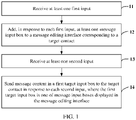
- an embodiment of the present disclosure provides a message sending method, including the following steps:
- step 11 may include: receiving N first inputs; and step 12 may include: adding, in response to each of the N first inputs, at least one message input box to the message editing interface corresponding to the target contact.
- message input boxes displayed in the message editing interface are arranged in a predetermined arrangement mode, for example, arranged in columns (in a single column, in two columns, or the like) or in rows and columns.
- the message input boxes in the message editing interface are arranged in columns; the foregoing step 11 may specifically include: receiving an i-th first input, where i is a positive integer; and the foregoing step 12 may specifically include: adding, in response to the i-th first input, at least one message input box to the message editing interface corresponding to the target contact, where the added message input box is arranged at a position after the message input boxes that are already displayed in the message editing interface.
- an i-th first input may be received; and one message input box may be added, in response to the i-th first input, to the message editing interface corresponding to the target contact at a position adjacent to a second target input box, where the second target input box is a message input box in an editing state in the message editing interface.
- the added message input box may be located after or before the second target input box.
- the second target input box may alternatively be a message input box arranged at the first or the last position in the message input boxes that are already displayed and arranged in a predetermined order in the message editing interface.
- an i-th first input may alternatively be received; and a plurality of (for example, two, three, four...) message input boxes may be added, in response to the i-th first input, to the message editing interface corresponding to the target contact at a position adjacent to a second target input box, where the second target input box is a message input box in an editing state in the message editing interface.
- the added message input boxes may be located after or before the second target input box.
- the second target input box may alternatively be a message input box arranged at the first or the last position in the message input boxes that are already displayed and arranged in a predetermined order in the message editing interface.
- a quantity of message input boxes to be added to the message editing interface in response to the first input may be customized by a user, which can avoid a complicated process of performing a plurality of inputs when a plurality of message input boxes are added.
- the first input may be a predetermined input acting on a display screen, for example, an input with a predetermined arc trajectory, an input with a predetermined zigzag trajectory, or an input with another predetermined graphic trajectory.
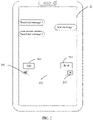
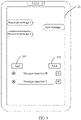
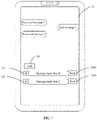
- the first input may alternatively be an input for an add button 201 in a message editing interface 21.
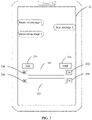
- a second message input box 203 is added to the message editing interface 21 in response to one first input for the add button 201, as shown in FIG. 3 ; and N second message input boxes 203 are added to the message editing interface 21 in response to N first inputs for the add button 201.
- the second target input box is a message input box in an editing state in the message editing interface or a message input box arranged at the last position in the message editing interface.
- the second target input box is a message input box in an editing state in the message editing interface
- the second target input box in an editing state is determined from the message input boxes in response to the first input; and in the message editing interface, the added message input boxes are displayed in a predetermined arrangement mode at a position after or before the second target input box.
- the first message input box 202 where a cursor is located is the second target input box in an editing state.
- a message input box is added to a position after an arrangement position of the second target input box currently in an editing state, to facilitate a user's operations.
- Step 13 Receive at least one second input.
- Step 14 Send message content in a first target input box to the target contact in response to each second input, where the first target input box is one of message input boxes displayed in the message editing interface.
- a send button 204 is provided in the message editing interface 21.
- the foregoing step 13 includes: receiving a second input for the send button 204.
- step 14 may be implemented in a manner including but being not limited to the following.
- Manner 1 Send respectively corresponding message contents in the message input boxes in sequence in response to the second input according to a predetermined arrangement order of the message input boxes in the message editing interface.
- the predetermined arrangement order of the message input boxes in the message editing interface may be adjusted by the user according to needs. For example, the user may drag one of the message input boxes to a target position, to adjust the arrangement order of the message input boxes in the message editing interface, so that the respectively corresponding message contents in the message input boxes are sent in sequence according to the arrangement order after the adjustment. In this way, a plurality of messages may be sent to the target contact by performing one sending operation, helping simplify the user's operations.
- k is a positive integer and is less than or equal to a quantity of message input boxes that are already displayed in the message editing interface.
- the foregoing step 13 may specifically include: receiving a j-th second input, where j is a positive integer; and the foregoing step 14 may specifically include: determining, in response to the j-th second input, a message input box arranged at the j-th position in the message input boxes that are arranged and displayed in a predetermined order in the message editing interface as the first target input box, and sending the message content in the first target input box to the target contact.
- a first message input box For example, there are three message input boxes already displayed and arranged in sequence in a single column in a current message editing interface: a first message input box, a second message input box, and a third message input box.
- a 1-st second input When a 1-st second input is received, message content in the first message input box is sent to the target contact; when a 2-nd second input is received, message content in the second message input box is sent to the target contact; and when a 3-rd second input is received, message content in the third message input box is sent to the target contact.
- the method may further include: deleting the first target input box, where the first target input box is a message input box arranged at the first position in the message input boxes that are arranged and displayed in a predetermined order in the message editing interface.
- the first target input box is the message input box arranged at the first position in the message input boxes that are arranged and displayed in the predetermined order in the message editing interface.
- the first target input box is deleted, so that a message input box that is originally arranged at the second position is rearranged at the first position in turn, which can ensure that message content in the message input box rearranged at the first position is sent to the target contact in response to a next second input, thereby implementing continuous sending of message contents without a need to manually adjust the order of the message input boxes.
- a message input box may be added to the message editing interface in response to the first input, and the message input box is in an editing state.
- the user may directly edit message content to be first sent in the message input box, and then adjust an arrangement position of the message input box to the first position, to directly send the message content in the message input box to the target contact in response to the second input.
- a first message input box is added to the message editing interface in response to the first input, and the first message input box is arranged at a position after an arrangement position of a second message input box (for example, the second message input box is arranged at the first position, so that the second message input box is the first target input box) currently in an editing state.
- the user may alternatively clip and paste message content in the second message input box into the first target input box, and edit the message content to be sent in advance in the second message input box.
- a message input box namely, the first target input box may alternatively be added, in response to the first input, to the message editing interface at the first arrangement position of the message input boxes, so that after adding the first target input box, the user directly edits message content to be first sent in the first target input box, to directly send the message content in the first target input box to the target contact in response to the second input, thereby simplifying a process of order adjustment.
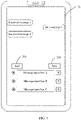
- FIG. 4 there are three message input boxes A, B, and C displayed in a message editing interface 21, where the message input box A is arranged at the first position, the message input box B is arranged at the second position, and the message input box C is arranged at the third position.
- a second input for a send button 204 in the message editing interface 21 is received, and content in the message input box A is sent to the target contact in response to the second input.
- the message input box A is deleted from the message editing interface 21, that is, display of the message input box A in the message editing interface 21 is canceled, so that the message input box B is rearranged at the first position in turn, and the message input box C is rearranged at the second position in turn, as shown in FIG. 5 .
- the message input box B is rearranged at the first position in turn
- the message input box C is rearranged at the second position in turn, as shown in FIG. 5 .
- content in the message input box B currently arranged at the first position is sent to the target contact in response to the second input.
- the message input box B is deleted from the message editing interface 21, that is, display of the message input box B in the message editing interface 21 is canceled, so that the message input box C is rearranged at the first position in turn.
- Other cases are similar, and details are not described herein again.
- each of the message input boxes displayed in the message editing interface 21 corresponds to a send button; and the foregoing step 13 may specifically include: receiving a second input for a target send button, where the target send button is one of the send buttons corresponding to the message input boxes.
- the foregoing step 14 may specifically include: sending, in response to the second input, the message content in the first target input box corresponding to the target send button to the target contact.
- each of the message input boxes corresponds to one send button, so that message content in each message input box is sent via the send button corresponding to the message input box, thereby reducing a step of adjusting an arrangement order of the message input boxes, and achieving higher flexibility.
- the message input box A may alternatively be deleted from the message editing interface 21, that is, display of the message input box A in the message editing interface 21 is canceled, as shown in FIG. 7 .
- At least one first input may be first received and at least one message input box may be added, in response to the first input, to the message editing interface corresponding to the target contact; then the second input may be received and the message content in the first target input box may be sent to the target contact in response to the second input; and at least one first input may further be received and at least one message input box may be added, in response to the first input, to the message editing interface corresponding to the target contact.
- message contents may be respectively edited in a plurality of message input boxes, which avoids a complicated process in which first message content that has been edited in a message input box needs to be first deleted, and then re-edited after second message content that needs to be first sent to the target contact is edited and sent to the target contact, thereby resolving problems such as that a required operation of temporarily adjusting an order of message contents to be sent in a message sending process is complicated and time-consuming, simplifying a user's operations, and helping improve message sending efficiency.
- an embodiment of the present disclosure further provides a message sending method, including the following steps.
- Step 81 Receive at least one first input.
- Step 82 Add, in response to each first input, at least one message input box to a message editing interface corresponding to a target contact.
- Step 83 Receive a third input.
- Step 84 Adjust a position of a third target input box in the message editing interface in response to the third input.
- the foregoing step 83 may specifically include: receiving a third input for the third target input box, where the third target input box is one of message input boxes displayed in the message editing interface.
- the foregoing step 84 may specifically include: adjusting a display position of the third target input box in the message editing interface in response to the third input, where the third target input box is one of the message input boxes already displayed in the message editing interface.
- an operation point of the third input is determined as a target position in response to the third input, and the third target input box is adjusted to the target position.
- the third input may be a drag input acting on the third target input box; an input final position of the drag input is determined as a target position; and the third target input box is adjusted to the target position.
- the drag input is activated by a deep-pressing operation that acts on the third target input box and whose pressing force exceeds a present threshold, thereby guaranteeing accuracy of the operation, and avoiding misoperations.
- the drag input may be an input acting on the third target input box at any position. Because an operation region of the third target input box may meet operation requirements, thereby helping further guarantee operation accuracy, and avoid misoperations.
- each first message input box and each second message input box separately corresponds to a moving button 206.
- the third input is a first slide input for the moving button 206 corresponding to the second message input box 203
- a slide direction of the first slide input is upward
- the second message input box 203 is moved upward by one position, that is, a position of the second message input box 203 is interchanged with a position of the first message input box 202
- the third input is a second slide input acting on the moving button 206 corresponding to the first message input box 202, for example, a slide direction of the second slide input is downward
- the first message input box 202 is moved downward by one position, that is, the position of the second message input box 203 is interchanged with the position of the first message input box 202.
- the third input may alternatively be a drag input acting on the moving button 206 corresponding to the third target input box; an input final position of the drag input is determined as a target position; and the third target input box is adjusted to the target position.
- an arrangement order of message input boxes may be dynamically adjusted according to user needs, for example, the corresponding moving button 206 on the left side of each message input box may be pressed to drag the message input box upward and downward, to adjust the arrangement order of the message input box.
- Step 85 Receive at least one second input.
- Step 86 Send message content in a first target input box to the target contact in response to each second input, where the first target input box is one of message input boxes displayed in the message editing interface.
- the method may further specifically include: deleting the first target input box from the message editing interface, that is, canceling display of the first target input box in the message editing interface.
- a send button 204 is provided in a message editing interface 21, as shown in FIG. 2 and FIG. 3 .
- the foregoing step 85 includes: receiving a second input for the send button 204.
- step 86 may be implemented in a manner including but being not limited to the following.
- Manner 1 Send respectively corresponding message contents in the message input boxes in sequence in response to the second input according to a predetermined arrangement order of the message input boxes in the message editing interface.
- k is a positive integer and is less than or equal to a quantity of message input boxes that are already displayed in the message editing interface.
- the foregoing step 13 may specifically include: receiving a j-th second input, where j is a positive integer; and the foregoing step 14 may specifically include: determining, in response to the j-th second input, a message input box arranged at the j-th position in the message input boxes that are arranged and displayed in a predetermined order in the message editing interface as the first target input box, and sending the message content in the first target input box to the target contact.
- a first message input box For example, there are three message input boxes already displayed and arranged in sequence in a column in a current message editing interface: a first message input box, a second message input box, and a third message input box.
- a 1-st second input When a 1-st second input is received, message content in the first message input box is sent to the target contact; when a 2-nd second input is received, message content in the second message input box is sent to the target contact; and when a 3-rd second input is received, message content in the third message input box is sent to the target contact.
- the method may further include: deleting the first target input box, where the first target input box is a message input box arranged at the first position in the message input boxes that are arranged and displayed in a predetermined order in the message editing interface.
- the first target input box is the message input box arranged at the first position in the message input boxes that are arranged and displayed in a predetermined order in the message editing interface.
- the first target input box is deleted, so that a message input box that is originally arranged at the second position is rearranged at the first position in turn, which can ensure that message content in the message input box rearranged at the first position is sent to the target contact in response to a next second input, thereby implementing continuous sending of message contents without a need to manually adjust the order of the message input boxes.
- a message input box may be added to the message editing interface in response to the first input, and the message input box is in an editing state.
- the user may directly edit message content to be first sent in the message input box, and then adjust an arrangement position of the message input box to the first position, to directly send the message content in the message input box to the target contact in response to the second input.
- a first message input box is added to the message editing interface in response to the first input, and the first message input box is arranged at a position after an arrangement position of a second message input box (for example, the second message input box is arranged at the first position, so that the second message input box is the first target input box) currently in an editing state.
- the user may alternatively clip and paste message content in the second message input box into the first target input box, and edit the message content to be sent in advance in the second message input box.
- a message input box namely, the first target input box may alternatively be added, in response to the first input, to the message editing interface at the first arrangement position of the message input boxes, so that after adding the first target input box, the user directly edits message content to be first sent in the first target input box, to directly send the message content in the first target input box to the target contact in response to the second input, thereby simplifying a process of order adjustment.
- steps 81 to 86 may further be repeated, and details are not described herein again.
- an execution sequence of the foregoing steps 81 to 86 is not limited to that in the foregoing embodiment, for example, steps 83 and 84 may be executed after step 86, may be executed after one first input is received and a response to the first input is made, or may be executed after one second input is received and a response to the second input is made.
- message contents are respectively edited in a plurality of message input boxes, which avoids a complicated process in which first message content that has been edited in a message input box needs to be first deleted, and then re-edited after second message content that needs to be first sent to the target contact is edited and sent to the target contact, thereby resolving problems such as that a required operation of temporarily adjusting an order of message contents to be sent in a message sending process is complicated and time-consuming, thereby simplifying a user's operations, and helping improve message sending efficiency.
- an arrangement order of the message input boxes can be dynamically adjusted, that is, sending an order of message contents respectively corresponding to the message input boxes is adjusted, thereby guaranteeing quick adjustment of the sending order of message contents.
- an embodiment of the present disclosure further provides a message sending method, including the following steps.
- Step 91 Receive at least one first input.
- Step 92 Add, in response to each first input, at least one message input box to a message editing interface corresponding to a target contact.
- Step 93 Receive a fourth input.
- Step 94 Delete a fourth target input box from the message editing interface in response to the fourth input, where the fourth target input box is one of message input boxes already displayed in the message editing interface.
- the fourth input may be a leftward-slide input acting on the fourth target input box; and display of the fourth target input box in the message editing interface is canceled in response to the leftward-slide input, that is, the fourth target input box is deleted from the message editing interface.
- each first message input box and each second message input box separately corresponds to a delete button 205.
- the foregoing step 93 may specifically include: receiving a fourth input for a target delete button, where the target delete button is one of the delete buttons corresponding to the message input boxes; and the foregoing step 94 may specifically include: deleting, in response to the fourth input, the message input box corresponding to the target delete button. In this way, display of the message input box corresponding to the target delete button in the message editing interface is canceled via the fourth input for the target delete button, that is, the message input box corresponding to the target delete button is deleted.
- Step 95 Receive at least one second input.
- Step 96 Send message content in a first target input box to the target contact in response to each second input, where the first target input box is one of message input boxes displayed in the message editing interface.
- the method may further specifically include: deleting the first target input box from the message editing interface, that is, canceling display of the first target input box in the message editing interface.
- steps 91 to 96 may further be repeated, and details are not described herein again.
- an execution sequence of the foregoing steps 91 to 96 is not limited to that in the foregoing embodiment, for example, steps 93 and 94 may be executed after step 96, may be executed after one first input is received and a response to the first input is made, or may be executed after one second input is received and a response to the second input is made.
- message contents may be respectively edited in a plurality of message input boxes, which avoids a complicated process in which first message content that has been edited in a message input box needs to be first deleted, and then re-edited after second message content that needs to be first sent to the target contact is edited and sent to the target contact, thereby resolving problems such as that a required operation of temporarily adjusting an order of message contents to be sent in a message sending process is complicated and time-consuming, simplifying a user's operations, and helping improve message sending efficiency.
- any of a plurality of message input boxes may be deleted, thereby guaranteeing flexible adjustment in a sequence and a quantity of the plurality of message input boxes.
- an embodiment of the present disclosure further provides a mobile terminal 1000, including:
- the first receiving module 1010 includes:
- the second receiving module 1020 includes:
- the mobile terminal 1000 further includes: a deletion module, configured to delete the first target input box, where the first target input box is a message input box arranged at the first position in the message input boxes that are arranged and displayed in a predetermined order in the message editing interface.
- a deletion module configured to delete the first target input box, where the first target input box is a message input box arranged at the first position in the message input boxes that are arranged and displayed in a predetermined order in the message editing interface.
- each of the message input boxes displayed in the message editing interface corresponds to a send button; and the second receiving module 1030 includes:
- the mobile terminal 1000 further includes:
- each of the message input boxes displayed in the message editing interface corresponds to a delete button; and the mobile terminal 1000 further includes:
- the mobile terminal provided in this embodiment of the present disclosure can implement the processes implemented by the mobile terminal in the method embodiments in FIG. 1 to FIG. 9 . To avoid repetition, details are not described herein again.
- message contents may be respectively edited in a plurality of message input boxes, which avoids a complicated process in which first message content that has been edited in a message input box needs to be first deleted, and then re-edited after second message content that needs to be first sent to the target contact is edited and sent to the target contact, thereby resolving problems such as that a required operation of temporarily adjusting an order of message contents to be sent in a message sending process is complicated and time-consuming, simplifying a user's operations, and helping improve message sending efficiency.
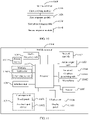
- FIG. 11 is a schematic diagram of a hardware structure of a mobile terminal that implements the embodiments of the present disclosure.
- the mobile terminal 1100 includes, but is not limited to: a radio frequency unit 1101, a network module 1102, an audio output unit 1103, an input unit 1104, a sensor 1105, a display unit 1106, a user input unit 1107, an interface unit 1108, a memory 1109, a processor 1110, and a power supply 1111.
- a radio frequency unit 1101 includes, but is not limited to: a radio frequency unit 1101, a network module 1102, an audio output unit 1103, an input unit 1104, a sensor 1105, a display unit 1106, a user input unit 1107, an interface unit 1108, a memory 1109, a processor 1110, and a power supply 1111.
- the structure of the mobile terminal shown in FIG. 11 constitutes no limitation on the mobile terminal, and the mobile terminal may include more or fewer parts than those shown in the figure, or combine some parts, or have a different part arrangement.
- the mobile terminal includes but is not limited to a mobile phone, a tablet computer, a laptop computer, a palmtop computer, an in-
- the user input unit 1107 is configured to receive at least one first input; and the processor 1110 is configured to add, in response to each first input, at least one message input box to a message editing interface corresponding to a target contact.
- the user input unit 1107 is further configured to receive at least one second input; the processor 1110 is further configured to send message content in a first target input box to the target contact in response to each second input, where the first target input box is one of message input boxes displayed in the message editing interface.
- message contents may be respectively edited in a plurality of message input boxes, which avoids a complicated process in which first message content that has been edited in a message input box needs to be first deleted, and then re-edited after second message content that needs to be first sent to the target contact is edited and sent to the target contact, thereby resolving problems such as that a required operation of temporarily adjusting an order of message contents to be sent in a message sending process is complicated and time-consuming, simplifying a user's operations, and helping improve message sending efficiency.
- the radio frequency unit 1101 may be configured to receive and send information or a signal in a call process. Specifically, after receiving downlink data from a base station, the radio frequency unit 1101 sends the downlink data to the processor 1110 for processing. In addition, the radio frequency unit 1101 sends uplink data to the base station.
- the radio frequency unit 1101 includes but is not limited to: an antenna, at least one amplifier, a transceiver, a coupler, a low noise amplifier, a duplexer, and the like.
- the radio frequency unit 1101 may further communicate with another device by using a wireless communications system and network.
- the mobile terminal provides wireless broadband Internet access for the user by using the network module 1102, for example, helping the user to send and receive an e-mail, browse a web page, and access streaming media.
- the audio output unit 1103 may convert audio data received by the radio frequency unit 1101 or the network module 1102 or stored in the memory 1109 into an audio signal and output the audio signal as sound. Moreover, the audio output unit 1103 may further provide audio output (for example, call signal receiving sound and message receiving sound) related to a specific function performed by the mobile terminal 1100.
- the audio output unit 1103 includes a loudspeaker, a buzzer, a telephone receiver, and the like.
- the input unit 1104 is configured to receive an audio signal or a video signal.
- the input unit 1104 may include a graphics processing unit (Graphics Processing Unit, GPU) 11041 and a microphone 11042.
- the graphics processing unit 11041 processes image data of a static picture or a video obtained by an image capture apparatus (for example, a camera) in video capture mode or image capture mode.
- a processed image frame may be displayed on the display unit 1106.
- An image frame processed by the graphics processing unit 11041 may be stored in the memory 1109 (or another storage medium) or sent by using the radio frequency unit 1101 or the network module 1102.
- the microphone 11042 may receive sound and can process the sound into audio data.
- the processed audio data may be converted, in a call mode, into a format that can be sent by the radio frequency unit 1101 to a mobile communication base station for output.
- the mobile terminal 1100 further includes at least one sensor 1105, such as an optional sensor, a motion sensor, and another sensor.
- the optional sensor includes an ambient light sensor and a proximity sensor.
- the ambient light sensor may adjust luminance of the display panel 11061 based on brightness of ambient light
- the proximity sensor may disable the display panel 11061 and/or backlight when the mobile terminal 1100 approaches an ear.
- an accelerometer sensor may detect an acceleration value in each direction (generally, three axes), and detect a value and a direction of gravity when the accelerometer sensor is static, and may be used in an application for recognizing a mobile terminal posture (such as screen switching between landscape and portrait modes, a related game, or magnetometer posture calibration), a function related to vibration recognition (such as a pedometer or a knock), and the like.
- the sensor 1105 may further include a fingerprint sensor, a pressure sensor, an iris sensor, a molecular sensor, a gyroscope, a barometer, a hygrometer, a thermometer, an infrared sensor, and the like. Details are not described herein.
- the display unit 1106 is configured to display information entered by a user or information provided for a user.
- the display unit 1106 may include a display panel 11061.
- the display panel 11061 may be configured in a form of a liquid crystal display (Liquid Crystal Display, LCD), an organic light-emitting diode (Organic Light-Emitting Diode, OLED), or the like.
- the user input unit 1107 may be configured to receive input digit or character information and generate key signal input related to user setting and function control of the mobile terminal.
- the user input unit 1107 includes a touch panel 11071 and another input device 11072.
- the touch panel 11071 is also referred to as a touchscreen, and may collect a touch operation performed by a user on or near the touch panel 11071 (such as an operation performed by a user on the touch panel 11071 or near the touch panel 11071 by using any proper object or accessory, such as a finger or a stylus).
- the touch panel 11071 may include two parts: a touch detection apparatus and a touch controller.
- the touch detection apparatus detects a touch location of the user, detects a signal brought by the touch operation, and sends the signal to the touch controller.
- the touch controller receives touch information from the touch detection apparatus, converts the touch information into touch point coordinates, and sends the touch point coordinates to the processor 1110, and can receive and execute a command sent by the processor 1110.
- the touch panel 11071 may be implemented as a resistive type, a capacitive type, an infrared type, a surface acoustic wave type, or the like.
- the user input unit 1107 may further include another input device 11072.
- the another input device 11072 may include but is not limited to a physical keyboard, function keys (for example, a volume control key and an on/off key), a trackball, a mouse, and a joystick. Details are not described herein.
- the touch panel 11071 may cover the display panel 11061.
- the touch panel 11071 transmits the touch operation to the processor 1110 to determine a type of a touch event. Then, the processor 1110 provides corresponding visual output on the display panel 11061 based on the type of the touch event.
- the touch panel 11071 and the display panel 11061 are used as two independent parts to implement input and output functions of the mobile terminal, in some embodiments, the touch panel 11071 and the display panel 11061 may be integrated to implement the input and output functions of the mobile terminal. Details are not described herein.
- the interface unit 1108 is an interface for connecting an external apparatus with the mobile terminal 1100.
- the external apparatus may include a wired or wireless headset jack, an external power supply (or a battery charger) port, a wired or wireless data port, a storage card port, a port for connecting an apparatus having an identification module, an audio input/output (I/O) port, a video I/O port, a headset jack, or the like.
- the interface unit 1108 may be configured to receive input (such as data information and power) from the external apparatus and transmit the received input to one or more elements in the mobile terminal 1100, or may be configured to transmit data between the mobile terminal 1100 and the external apparatus.
- the memory 1109 may be configured to store a software program and various data.
- the memory 1109 may mainly include a program storage area and a data storage area.
- the program storage area may store an operating system, an application required for at least one function (for example, a sound playback function or an image playback function), and the like.
- the data storage area may store data (for example, audio data or an address book) or the like created based on use of the mobile phone.
- the memory 1109 may include a high-speed random access memory, or may include a nonvolatile memory, for example, at least one disk storage device, a flash memory, or another volatile solid-state storage device.
- the processor 1110 is a control center of the mobile terminal, and is connected to all parts of the entire mobile terminal by using various interfaces and lines, and performs various functions of the mobile terminal and processes data by running or executing the software program and/or the module that are stored in the memory 1109 and invoking the data stored in the memory 1109, to implement overall monitoring on the mobile terminal.
- the processor 1110 may include one or more processing units.
- the processor 1110 may integrate an application processor and a modem processor.
- the application processor mainly processes an operating system, a user interface, an application, and the like.
- the modem processor mainly processes wireless communication. It can be understood that the foregoing modem processor may not be integrated into the processor 1110.
- the mobile terminal 1100 may further include a power supply 1111 (such as a battery) that supplies power to each component.
- a power supply 1111 such as a battery
- the power supply 1111 may be logically connected to the processor 1110 by using a power supply management system, to implement functions such as charging, discharging, and power consumption management by using the power supply management system.
- the mobile terminal 1100 includes some function modules not shown, and details are not described herein.
- an embodiment of the present disclosure further provides a mobile terminal, including a processor 1110, a memory 1109, and a computer program stored in the memory 1109 and executable on the processor 1110.
- a mobile terminal including a processor 1110, a memory 1109, and a computer program stored in the memory 1109 and executable on the processor 1110.
- the processor 1110 executes the computer program, the foregoing processes of the message sending method embodiment are implemented and a same technical effect can be achieved. To avoid repetition, details are not described herein again.
- An embodiment of the present disclosure further provides a computer-readable storage medium.
- the computer-readable storage medium stores a computer program, and when a processor executes the computer program, the foregoing processes of the message sending method embodiment are implemented and a same technical effect can be achieved. To avoid repetition, details are not described herein again.
- the computer-readable storage medium may be a read-only memory (Read-Only Memory, ROM), a random access memory (Random Access Memory, RAM), a magnetic disk, a compact disc, or the like.
- the method in the foregoing embodiments may be implemented by using software in addition to a necessary universal hardware platform, or by using hardware only. In most circumstances, the former is a preferred implementation.
- the technical solutions of the present disclosure essentially or the part contributing to the prior art may be implemented in a form of a software product.
- the computer software product is stored in a storage medium (such as a ROM/RAM, a hard disk, or an optical disc), and includes several instructions for instructing a terminal (which may be mobile phone, a computer, a server, an air conditioner, a network device, or the like) to perform the methods described in the embodiments of the present disclosure.
Landscapes
- Engineering & Computer Science (AREA)
- General Engineering & Computer Science (AREA)
- Theoretical Computer Science (AREA)
- Computer Networks & Wireless Communication (AREA)
- Signal Processing (AREA)
- Human Computer Interaction (AREA)
- Physics & Mathematics (AREA)
- General Physics & Mathematics (AREA)
- Multimedia (AREA)
- User Interface Of Digital Computer (AREA)
- Information Transfer Between Computers (AREA)
- Telephone Function (AREA)
Applications Claiming Priority (2)
| Application Number | Priority Date | Filing Date | Title |
|---|---|---|---|
| CN201910660528.4A CN110442279B (zh) | 2019-07-22 | 2019-07-22 | 一种消息发送方法及移动终端 |
| PCT/CN2020/099339 WO2021012908A1 (zh) | 2019-07-22 | 2020-06-30 | 消息发送方法及移动终端 |
Publications (3)
| Publication Number | Publication Date |
|---|---|
| EP4006706A1 true EP4006706A1 (de) | 2022-06-01 |
| EP4006706A4 EP4006706A4 (de) | 2022-08-31 |
| EP4006706B1 EP4006706B1 (de) | 2025-05-14 |
Family
ID=68431068
Family Applications (1)
| Application Number | Title | Priority Date | Filing Date |
|---|---|---|---|
| EP20844572.6A Active EP4006706B1 (de) | 2019-07-22 | 2020-06-30 | Nachrichtensendeverfahren und mobiles endgerät |
Country Status (5)
| Country | Link |
|---|---|
| US (1) | US11895069B2 (de) |
| EP (1) | EP4006706B1 (de) |
| CN (1) | CN110442279B (de) |
| ES (1) | ES3029909T3 (de) |
| WO (1) | WO2021012908A1 (de) |
Families Citing this family (4)
| Publication number | Priority date | Publication date | Assignee | Title |
|---|---|---|---|---|
| CN110442279B (zh) | 2019-07-22 | 2021-05-28 | 维沃移动通信有限公司 | 一种消息发送方法及移动终端 |
| CN111030918B (zh) * | 2019-11-19 | 2022-03-25 | 维沃移动通信有限公司 | 一种消息处理方法、电子设备及服务器 |
| CN112748844B (zh) * | 2020-12-31 | 2022-12-20 | 维沃移动通信有限公司 | 消息处理方法、装置及电子设备 |
| CN115378899B (zh) * | 2022-08-16 | 2024-09-03 | 维沃移动通信有限公司 | 消息引用方法、装置、电子设备及存储介质 |
Family Cites Families (21)
| Publication number | Priority date | Publication date | Assignee | Title |
|---|---|---|---|---|
| US8886706B1 (en) * | 2005-03-31 | 2014-11-11 | Google Inc. | Server-based backup system for user data |
| US7996045B1 (en) * | 2007-11-09 | 2011-08-09 | Google Inc. | Providing interactive alert information |
| CA2714454A1 (en) * | 2008-02-22 | 2009-08-27 | Lantana Ltd. | Methods, systems, and computer program products for retrieving a file of machine-readable data |
| US20140181215A1 (en) * | 2009-01-13 | 2014-06-26 | Chukwunonso Omoko | Method, System and Computer Program Product for Messaging Over a Network |
| US9781083B2 (en) * | 2010-04-19 | 2017-10-03 | Amaani, Llc | System and method of efficiently generating and transmitting encrypted documents |
| US9717494B2 (en) * | 2011-12-13 | 2017-08-01 | Ethicon Endo-Surgery, Inc. | Applier for anchoring a lining to a hollow organ |
| KR102029242B1 (ko) * | 2013-01-03 | 2019-11-08 | 엘지전자 주식회사 | 이동 단말기 제어방법 |
| KR102138515B1 (ko) * | 2013-10-01 | 2020-07-28 | 엘지전자 주식회사 | 이동단말기 및 그 제어방법 |
| CN104598245B (zh) * | 2015-01-29 | 2018-05-04 | 广东欧珀移动通信有限公司 | 聊天的方法、装置及移动终端 |
| CN105988657A (zh) * | 2015-02-12 | 2016-10-05 | 阿里巴巴集团控股有限公司 | 一种消息回复方法和装置 |
| CN105049317A (zh) * | 2015-05-21 | 2015-11-11 | 腾讯科技(深圳)有限公司 | 消息转发方法及装置 |
| CN105549876B (zh) * | 2015-12-04 | 2018-11-30 | 小米科技有限责任公司 | 在输入框中进行输入的方法及装置 |
| EP4113268B1 (de) * | 2016-05-18 | 2024-04-17 | Apple Inc. | Vorrichtungen, verfahren und grafische benutzeroberflächen zur nachrichtenübermittlung |
| US11320982B2 (en) * | 2016-05-18 | 2022-05-03 | Apple Inc. | Devices, methods, and graphical user interfaces for messaging |
| CN107515702B (zh) * | 2016-06-16 | 2020-10-27 | 苏宁易购集团股份有限公司 | 一种页面交互方法及装置 |
| KR101913616B1 (ko) * | 2016-12-27 | 2018-10-31 | 주식회사 카카오 | 비밀 메시지를 위한 인스턴트 메시지 서비스 방법 및 상기 방법을 수행하는 사용자 단말 |
| CN108710526A (zh) * | 2018-05-21 | 2018-10-26 | 北京大米科技有限公司 | 消息格式的配置方法、装置、计算机设备及可读存储介质 |
| CN109814968A (zh) * | 2019-01-21 | 2019-05-28 | 维沃移动通信有限公司 | 一种信息输入方法、终端设备和计算机可读存储介质 |
| CN109871164B (zh) * | 2019-01-25 | 2020-10-16 | 维沃移动通信有限公司 | 一种消息发送方法及终端设备 |
| CN110442279B (zh) * | 2019-07-22 | 2021-05-28 | 维沃移动通信有限公司 | 一种消息发送方法及移动终端 |
| US11157089B2 (en) * | 2019-12-27 | 2021-10-26 | Hypori Llc | Character editing on a physical device via interaction with a virtual device user interface |
-
2019
- 2019-07-22 CN CN201910660528.4A patent/CN110442279B/zh active Active
-
2020
- 2020-06-30 EP EP20844572.6A patent/EP4006706B1/de active Active
- 2020-06-30 WO PCT/CN2020/099339 patent/WO2021012908A1/zh not_active Ceased
- 2020-06-30 ES ES20844572T patent/ES3029909T3/es active Active
-
2022
- 2022-01-17 US US17/577,307 patent/US11895069B2/en active Active
Also Published As
| Publication number | Publication date |
|---|---|
| CN110442279B (zh) | 2021-05-28 |
| CN110442279A (zh) | 2019-11-12 |
| EP4006706B1 (de) | 2025-05-14 |
| WO2021012908A1 (zh) | 2021-01-28 |
| US11895069B2 (en) | 2024-02-06 |
| EP4006706A4 (de) | 2022-08-31 |
| US20220141163A1 (en) | 2022-05-05 |
| ES3029909T3 (en) | 2025-06-25 |
Similar Documents
| Publication | Publication Date | Title |
|---|---|---|
| US11675442B2 (en) | Image processing method and flexible-screen terminal | |
| US11340777B2 (en) | Method for editing text and mobile terminal | |
| US11604567B2 (en) | Information processing method and terminal | |
| US20220365641A1 (en) | Method for displaying background application and mobile terminal | |
| US11895069B2 (en) | Message sending method and mobile terminal | |
| CN107943390B (zh) | 一种文字复制方法及移动终端 | |
| EP3961361A1 (de) | Objektverarbeitungsverfahren und endgerät | |
| US12132695B2 (en) | Message sending method and terminal | |
| US11861158B2 (en) | Message processing method and electronic device | |
| US20220171521A1 (en) | Icon display method and terminal | |
| CN110618969A (zh) | 一种图标显示方法及电子设备 | |
| US11669237B2 (en) | Operation method and terminal device | |
| CN110333803B (zh) | 一种多媒体对象选择方法及终端设备 | |
| CN110413363B (zh) | 一种截图方法及终端设备 | |
| US20230087022A1 (en) | Text language type switching method and apparatus, device, and storage medium | |
| CN108628534B (zh) | 一种字符展示方法及移动终端 | |
| US20220083207A1 (en) | Editing method and mobile terminal | |
| CN110851219A (zh) | 一种信息处理方法及电子设备 | |
| CN107992378A (zh) | 一种文件处理方法及移动终端 | |
| CN110780796A (zh) | 一种截屏方法及电子设备 | |
| CN108052270A (zh) | 一种光标的移动方法及移动终端 |
Legal Events
| Date | Code | Title | Description |
|---|---|---|---|
| STAA | Information on the status of an ep patent application or granted ep patent |
Free format text: STATUS: THE INTERNATIONAL PUBLICATION HAS BEEN MADE |
|
| PUAI | Public reference made under article 153(3) epc to a published international application that has entered the european phase |
Free format text: ORIGINAL CODE: 0009012 |
|
| STAA | Information on the status of an ep patent application or granted ep patent |
Free format text: STATUS: REQUEST FOR EXAMINATION WAS MADE |
|
| 17P | Request for examination filed |
Effective date: 20220221 |
|
| AK | Designated contracting states |
Kind code of ref document: A1 Designated state(s): AL AT BE BG CH CY CZ DE DK EE ES FI FR GB GR HR HU IE IS IT LI LT LU LV MC MK MT NL NO PL PT RO RS SE SI SK SM TR |
|
| REG | Reference to a national code |
Ref legal event code: R079 Free format text: PREVIOUS MAIN CLASS: G06F0003048100 Ipc: H04L0051226000 Ref country code: DE Ref legal event code: R079 Ref document number: 602020051378 Country of ref document: DE Free format text: PREVIOUS MAIN CLASS: G06F0003048100 Ipc: H04L0051226000 |
|
| A4 | Supplementary search report drawn up and despatched |
Effective date: 20220728 |
|
| RIC1 | Information provided on ipc code assigned before grant |
Ipc: H04L 51/226 20220101AFI20220722BHEP |
|
| DAV | Request for validation of the european patent (deleted) | ||
| DAX | Request for extension of the european patent (deleted) | ||
| STAA | Information on the status of an ep patent application or granted ep patent |
Free format text: STATUS: EXAMINATION IS IN PROGRESS |
|
| 17Q | First examination report despatched |
Effective date: 20231013 |
|
| GRAP | Despatch of communication of intention to grant a patent |
Free format text: ORIGINAL CODE: EPIDOSNIGR1 |
|
| STAA | Information on the status of an ep patent application or granted ep patent |
Free format text: STATUS: GRANT OF PATENT IS INTENDED |
|
| INTG | Intention to grant announced |
Effective date: 20250212 |
|
| GRAS | Grant fee paid |
Free format text: ORIGINAL CODE: EPIDOSNIGR3 |
|
| GRAA | (expected) grant |
Free format text: ORIGINAL CODE: 0009210 |
|
| STAA | Information on the status of an ep patent application or granted ep patent |
Free format text: STATUS: THE PATENT HAS BEEN GRANTED |
|
| AK | Designated contracting states |
Kind code of ref document: B1 Designated state(s): AL AT BE BG CH CY CZ DE DK EE ES FI FR GB GR HR HU IE IS IT LI LT LU LV MC MK MT NL NO PL PT RO RS SE SI SK SM TR |
|
| REG | Reference to a national code |
Ref country code: GB Ref legal event code: FG4D |
|
| REG | Reference to a national code |
Ref country code: CH Ref legal event code: EP |
|
| REG | Reference to a national code |
Ref country code: IE Ref legal event code: FG4D |
|
| REG | Reference to a national code |
Ref country code: DE Ref legal event code: R096 Ref document number: 602020051378 Country of ref document: DE |
|
| PGFP | Annual fee paid to national office [announced via postgrant information from national office to epo] |
Ref country code: NL Payment date: 20250516 Year of fee payment: 6 |
|
| REG | Reference to a national code |
Ref country code: ES Ref legal event code: FG2A Ref document number: 3029909 Country of ref document: ES Kind code of ref document: T3 Effective date: 20250625 |
|
| REG | Reference to a national code |
Ref country code: NL Ref legal event code: FP |
|
| PGFP | Annual fee paid to national office [announced via postgrant information from national office to epo] |
Ref country code: DE Payment date: 20250507 Year of fee payment: 6 |
|
| PGFP | Annual fee paid to national office [announced via postgrant information from national office to epo] |
Ref country code: GB Payment date: 20250523 Year of fee payment: 6 |
|
| PGFP | Annual fee paid to national office [announced via postgrant information from national office to epo] |
Ref country code: FR Payment date: 20250508 Year of fee payment: 6 |
|
| PG25 | Lapsed in a contracting state [announced via postgrant information from national office to epo] |
Ref country code: FI Free format text: LAPSE BECAUSE OF FAILURE TO SUBMIT A TRANSLATION OF THE DESCRIPTION OR TO PAY THE FEE WITHIN THE PRESCRIBED TIME-LIMIT Effective date: 20250514 Ref country code: PT Free format text: LAPSE BECAUSE OF FAILURE TO SUBMIT A TRANSLATION OF THE DESCRIPTION OR TO PAY THE FEE WITHIN THE PRESCRIBED TIME-LIMIT Effective date: 20250915 |
|
| PGFP | Annual fee paid to national office [announced via postgrant information from national office to epo] |
Ref country code: ES Payment date: 20250707 Year of fee payment: 6 |
|
| REG | Reference to a national code |
Ref country code: LT Ref legal event code: MG9D |
|
| PG25 | Lapsed in a contracting state [announced via postgrant information from national office to epo] |
Ref country code: NO Free format text: LAPSE BECAUSE OF FAILURE TO SUBMIT A TRANSLATION OF THE DESCRIPTION OR TO PAY THE FEE WITHIN THE PRESCRIBED TIME-LIMIT Effective date: 20250814 Ref country code: GR Free format text: LAPSE BECAUSE OF FAILURE TO SUBMIT A TRANSLATION OF THE DESCRIPTION OR TO PAY THE FEE WITHIN THE PRESCRIBED TIME-LIMIT Effective date: 20250815 |
|
| PG25 | Lapsed in a contracting state [announced via postgrant information from national office to epo] |
Ref country code: PL Free format text: LAPSE BECAUSE OF FAILURE TO SUBMIT A TRANSLATION OF THE DESCRIPTION OR TO PAY THE FEE WITHIN THE PRESCRIBED TIME-LIMIT Effective date: 20250514 |
|
| PGFP | Annual fee paid to national office [announced via postgrant information from national office to epo] |
Ref country code: IT Payment date: 20250613 Year of fee payment: 6 |
|
| REG | Reference to a national code |
Ref country code: AT Ref legal event code: MK05 Ref document number: 1795781 Country of ref document: AT Kind code of ref document: T Effective date: 20250514 |
|
| PG25 | Lapsed in a contracting state [announced via postgrant information from national office to epo] |
Ref country code: BG Free format text: LAPSE BECAUSE OF FAILURE TO SUBMIT A TRANSLATION OF THE DESCRIPTION OR TO PAY THE FEE WITHIN THE PRESCRIBED TIME-LIMIT Effective date: 20250514 |
|
| PG25 | Lapsed in a contracting state [announced via postgrant information from national office to epo] |
Ref country code: HR Free format text: LAPSE BECAUSE OF FAILURE TO SUBMIT A TRANSLATION OF THE DESCRIPTION OR TO PAY THE FEE WITHIN THE PRESCRIBED TIME-LIMIT Effective date: 20250514 |
|
| PG25 | Lapsed in a contracting state [announced via postgrant information from national office to epo] |
Ref country code: AT Free format text: LAPSE BECAUSE OF FAILURE TO SUBMIT A TRANSLATION OF THE DESCRIPTION OR TO PAY THE FEE WITHIN THE PRESCRIBED TIME-LIMIT Effective date: 20250514 |
|
| PG25 | Lapsed in a contracting state [announced via postgrant information from national office to epo] |
Ref country code: RS Free format text: LAPSE BECAUSE OF FAILURE TO SUBMIT A TRANSLATION OF THE DESCRIPTION OR TO PAY THE FEE WITHIN THE PRESCRIBED TIME-LIMIT Effective date: 20250814 |
|
| PG25 | Lapsed in a contracting state [announced via postgrant information from national office to epo] |
Ref country code: IS Free format text: LAPSE BECAUSE OF FAILURE TO SUBMIT A TRANSLATION OF THE DESCRIPTION OR TO PAY THE FEE WITHIN THE PRESCRIBED TIME-LIMIT Effective date: 20250914 |
|
| PG25 | Lapsed in a contracting state [announced via postgrant information from national office to epo] |
Ref country code: LV Free format text: LAPSE BECAUSE OF FAILURE TO SUBMIT A TRANSLATION OF THE DESCRIPTION OR TO PAY THE FEE WITHIN THE PRESCRIBED TIME-LIMIT Effective date: 20250514 |
|
| PG25 | Lapsed in a contracting state [announced via postgrant information from national office to epo] |
Ref country code: DK Free format text: LAPSE BECAUSE OF FAILURE TO SUBMIT A TRANSLATION OF THE DESCRIPTION OR TO PAY THE FEE WITHIN THE PRESCRIBED TIME-LIMIT Effective date: 20250514 Ref country code: SM Free format text: LAPSE BECAUSE OF FAILURE TO SUBMIT A TRANSLATION OF THE DESCRIPTION OR TO PAY THE FEE WITHIN THE PRESCRIBED TIME-LIMIT Effective date: 20250514 |
|
| PG25 | Lapsed in a contracting state [announced via postgrant information from national office to epo] |
Ref country code: CZ Free format text: LAPSE BECAUSE OF FAILURE TO SUBMIT A TRANSLATION OF THE DESCRIPTION OR TO PAY THE FEE WITHIN THE PRESCRIBED TIME-LIMIT Effective date: 20250514 |
|
| PG25 | Lapsed in a contracting state [announced via postgrant information from national office to epo] |
Ref country code: EE Free format text: LAPSE BECAUSE OF FAILURE TO SUBMIT A TRANSLATION OF THE DESCRIPTION OR TO PAY THE FEE WITHIN THE PRESCRIBED TIME-LIMIT Effective date: 20250514 |
|
| PG25 | Lapsed in a contracting state [announced via postgrant information from national office to epo] |
Ref country code: RO Free format text: LAPSE BECAUSE OF FAILURE TO SUBMIT A TRANSLATION OF THE DESCRIPTION OR TO PAY THE FEE WITHIN THE PRESCRIBED TIME-LIMIT Effective date: 20250514 Ref country code: SK Free format text: LAPSE BECAUSE OF FAILURE TO SUBMIT A TRANSLATION OF THE DESCRIPTION OR TO PAY THE FEE WITHIN THE PRESCRIBED TIME-LIMIT Effective date: 20250514 |
|
| REG | Reference to a national code |
Ref country code: CH Ref legal event code: H13 Free format text: ST27 STATUS EVENT CODE: U-0-0-H10-H13 (AS PROVIDED BY THE NATIONAL OFFICE) Effective date: 20260127 |
|
| PG25 | Lapsed in a contracting state [announced via postgrant information from national office to epo] |
Ref country code: LU Free format text: LAPSE BECAUSE OF NON-PAYMENT OF DUE FEES Effective date: 20250630 |
|
| REG | Reference to a national code |
Ref country code: DE Ref legal event code: R097 Ref document number: 602020051378 Country of ref document: DE |
|
| PG25 | Lapsed in a contracting state [announced via postgrant information from national office to epo] |
Ref country code: MC Free format text: LAPSE BECAUSE OF FAILURE TO SUBMIT A TRANSLATION OF THE DESCRIPTION OR TO PAY THE FEE WITHIN THE PRESCRIBED TIME-LIMIT Effective date: 20250514 |
|
| REG | Reference to a national code |
Ref country code: BE Ref legal event code: MM Effective date: 20250630 |
|
| PLBE | No opposition filed within time limit |
Free format text: ORIGINAL CODE: 0009261 |
|
| STAA | Information on the status of an ep patent application or granted ep patent |
Free format text: STATUS: NO OPPOSITION FILED WITHIN TIME LIMIT |
|
| REG | Reference to a national code |
Ref country code: CH Ref legal event code: L10 Free format text: ST27 STATUS EVENT CODE: U-0-0-L10-L00 (AS PROVIDED BY THE NATIONAL OFFICE) Effective date: 20260325 |
|
| PG25 | Lapsed in a contracting state [announced via postgrant information from national office to epo] |
Ref country code: IE Free format text: LAPSE BECAUSE OF NON-PAYMENT OF DUE FEES Effective date: 20250630 |
|
| PG25 | Lapsed in a contracting state [announced via postgrant information from national office to epo] |
Ref country code: BE Free format text: LAPSE BECAUSE OF NON-PAYMENT OF DUE FEES Effective date: 20250630 |
|
| 26N | No opposition filed |
Effective date: 20260217 |
|
| PG25 | Lapsed in a contracting state [announced via postgrant information from national office to epo] |
Ref country code: CH Free format text: LAPSE BECAUSE OF NON-PAYMENT OF DUE FEES Effective date: 20250630 |