EP4018428B1 - Systèmes et procédés de simulateur chirurgical - Google Patents
Systèmes et procédés de simulateur chirurgical Download PDFInfo
- Publication number
- EP4018428B1 EP4018428B1 EP20863850.2A EP20863850A EP4018428B1 EP 4018428 B1 EP4018428 B1 EP 4018428B1 EP 20863850 A EP20863850 A EP 20863850A EP 4018428 B1 EP4018428 B1 EP 4018428B1
- Authority
- EP
- European Patent Office
- Prior art keywords
- simulated
- surgical tool
- haptic
- human body
- dimensional
- Prior art date
- Legal status (The legal status is an assumption and is not a legal conclusion. Google has not performed a legal analysis and makes no representation as to the accuracy of the status listed.)
- Active
Links
Images







Classifications
-
- G—PHYSICS
- G09—EDUCATION; CRYPTOGRAPHY; DISPLAY; ADVERTISING; SEALS
- G09B—EDUCATIONAL OR DEMONSTRATION APPLIANCES; APPLIANCES FOR TEACHING, OR COMMUNICATING WITH, THE BLIND, DEAF OR MUTE; MODELS; PLANETARIA; GLOBES; MAPS; DIAGRAMS
- G09B23/00—Models for scientific, medical, or mathematical purposes, e.g. full-sized devices for demonstration purposes
- G09B23/28—Models for scientific, medical, or mathematical purposes, e.g. full-sized devices for demonstration purposes for medicine
Definitions
- This invention relates to the field of surgical simulation, and particularly to a surgical simulator system and method of surgery with haptic force feedback.
- cataracts are common also makes blindness an expected disability in developing countries, especially among the poor. It is understood to be part of the aging process and is accepted as such. Information about cataracts and cataract surgery is lacking or incorrect. Patients who have gone to traditional healers or poorly trained surgeons are often given bad information and poor treatment. Surgical treatment is feared and many people would rather stay blind than undergo surgery. As a result, blind patients in developing nations often come to believe that their only choice is to live with blindness, longing to be free of the dark world in which they have been forced to live, but unable to do anything about it.
- MSICS manual small incision cataract surgery
- PE cataract surgery is considered the gold standard for cataract removal, it requires expensive machinery and an uninterrupted power source. The overall cost and maintenance of machinery and supplies for PE makes it cost-prohibitive for regions with inadequate infrastructure. PE also has a higher rate of intraoperative complications when it is performed on patients who have advanced cataracts.
- MSICS and ECCE are widely practiced outside North America and Europe.
- a distinct advantage of MSICS over ECCE is that a smaller incision is utilized to remove the cataractous natural lens and implant an intraocular lens (IOL).
- IOL intraocular lens
- the smaller incision is also fashioned to be self-sealing and sutureless. This translates into shorter healing times, significantly less astigmatism, reduced intraoperative risk, and overall shorter post-operative recovery.
- ECCE and MSICS are not dependent on any powered machinery other than an operating microscope.
- MSICS is often the preferred technique for high volume cataract surgery.
- MSICS can be used to safely and cost effectively restore vision in developing nations where most of the blind live and with the same quality that would be expected in the high tech world.
- the basic idea of MSICS revolves around properly producing and utilizing a tunnel large enough to deliver even dense cataracts but stable enough to be self-sealing and have minimal impact on the curvature of the cornea.
- Haptic arms (109, 111) provide a simultaneous and bimanual use to represent tools used in an actual MSIC surgery.
- haptic arms (109, 111) are representative of actual surgical instruments.
- haptic arms (109, 111) allow the changing of handles that are representative of actual surgical instruments.
- haptic arms (109, 111) include permanently mounted handles that are representative but may not be exact replicas of actual surgical instruments.
- the instrument visual under simulated microscope (107) may change for each type of instrument.
- the simulator may further simulate other tools, such as, for example, a syringe of the Simcoe Cannula.
- FIGS. 6a-6b are exemplary lists of tools that may be simulated by the simulator. Each tool may have three translational degrees of freedom.
- the haptic point of interest for these translations is at the tip of the tool.
- Three passive rotational degrees of freedom are also provided and measured. Their rotations are centered at this same point of interest.
- the haptics are based on the use of admittance control, using a force sensor as an input.
- the haptic rendering provides the user with virtually the same forces on the instruments as experienced during live surgery.
- Table 1 lists the surgical steps that may be simulated by the simulator, the instrument that may be simulated for each step, a direction of movement of the instrument during surgery, and maximum and minimum values of forces for each surgical step.
- Fz (which is an inwards oriented force) is averaged at 45.6 g (max 62.5 g, min 24.4 g) during this same step. All three degrees of freedom have significant forces during this maneuver. It is important that the surgeon recognize that as the blade wiggles left and right it is also advancing inwards and following the contour of the globe upwards, all up to similar average forces.
- the highest force encountered during the simulation is when slicing the crescent blade to the right or left during the Scleral tunnel lateral extension step.
- Fx of the crescent blade during the "slice" maneuver to the right or left in Scleral tunnel lateral extension step is averaged at 91.3 g (max 115.8 g, min 61.9 g).
- the MSICS simulator reproduces forces from zero to at least the 115.8 g amount.
- the y force value for this step changes depending on whether the surgeon is slicing to the right or to the left. When slicing rightwards, Fy is downward in orientation as the left-handed surgeon follows the contour of the globe.
- Fy max when slicing to the right a downward oriented force, has an average of 31.3 g (max 50.2 g, min 12.0 g).
- Fy when slicing to the left is an upward oriented force with an average of 60.8 g (max 87.1 g, min 41.0 g).
- the Fz force (Fz max) during the crescent "slice” maneuver is an outwards oriented force with average of 66.2 g (max 95.4 g, min 43.5 g).
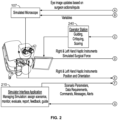
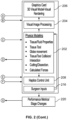
- FIG. 2 is a chart illustrating the flow of data between simulator components during a simulation.
- a physics modeling application (202) models the tissue and fluid properties of the simulated eye and the interaction of the tools with the eye, including the forces applied by tools to the eye.
- Information concerning the visual appearance of the eye and the tools may be processed by a visual image processing application (204) and delivered to a graphics card (206) for 3-D model rendering.
- the 3-D image of the eye is transmitted to simulated microscope (107) and may be viewed by a user during a simulation.
- Haptics control unit (208) receives simulation modeling information from the physics modeling application. Haptics control unit (208) further receives surgical input information (216) from haptic arms (109, 111) concerning the position and orientation of haptic arms (109, 111). Haptics control unit (208) controls the amount of force and resistance applied by haptic mechanisms (113, 115) to haptic arms (109, 111).
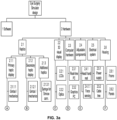
- FIG. 3a is a chart illustrating the interrelation of hardware components of the simulator.
- Haptic components (2.1) may include Gimbal mechanisms (2.1.1.1, 2.1.2.1), motors and drives (2.1.1.2, 2.1.2.2), and hand piece interfaces (2.1.1.3, 2.1.2.3).
- the 3-D visual display (2.2) of simulated microscope (107) may include one or more LCDs (2.2.1), optics (2.2.2) and a microscope housing (2.2.3).
- Computer hardware (2.3) used by, sending information to, or receiving information from the simulator may include a real-time PC (2.3.1), a graphics PC (2.3.2), a panel PC (2.3.3), a database server (2.3.4) and/or a teaching station (2.3.5).
- a simulated head (2.4.1) - depicted in Figure 1 by reference element (105) - and a stretcher/patient bed (2.4.2) - depicted in Figure 1 by reference element (103) - may also be provided.
- the simulator may represent a visual graphical model of a portion of the body on which surgery may be practiced, such as a graphical model of the eye to simulate a realistic MSIC surgery.
- a physics based model of the eye may be programmed to simulate the eye behavior in response to surgical actions.
- the visual 3-D eye model may change according to these actions in real time to give the experience of working with a real eye.
- the virtual eye may have customizable parameters that allow changing not only the way it appears (e.g., color of the iris, skin, sclera), but also other anatomical and technical parameters, such as its shape and/or, cataract type, to allow a user to practice with a wide range of patient conditions that a surgeon may encounter.
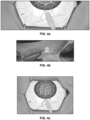
- FIGS. 4a-4f illustrate the physics model depiction.
- a mesh model may be used to build and display the visuals using rasterization, while a physical model that influences the properties, such as collision detection and tissue deformation, runs in parallel.
- the eye model may include all the structures involved in the MSICS surgery.
- the eye model may include high detail for the corneal and limbus to achieve a realistic reflection from its surface.
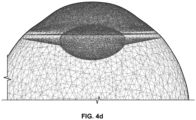
- FIG. 4d shows a wireframe rendering of the eye from the side illustrating the high detail may overlap the limbus.
- FIG. 4e shows the main tunnel as it enters the eye, and
- FIG. 4f illustrates a wireframe of the main cut.
- the simulator may contain two visual displays that a user can work with, including the (1) microscope view, and (2) an external display screen.
- FIGS. 5a-5c illustrate simulated images within the microscope view. Objects in the simulation are perceived to move and deform with physical realism.
- the trainee is presented with an image of the visual model through a 3-D visual display that resembles a stereoscopic microscope. Using the microscope, the trainee sees the virtual eye model and interacts with it using the haptic arms (physical forms representing surgical instruments) to perform the tasks while looking through the microscope eyepieces.
- the visual display may depict a stereoscopic 3-D image of the eye as would be seen under an operating microscope at 5X magnification showing everything within a surgical field of 34 mm to 35 mm circular area.
- the image of the field is preferably surrounded by a black ring approximately 5 mm in width, making the total visual image approximately 4 cm in diameter.
- rasterization may be used for rendering the visuals for the eye-model.
- ray tracing may be used, or a combination of rasterization and ray tracing.
- the external display allows the trainee and the instructor to communicate with the simulator. Communications include, but are not limited to the following: selection of the surgical assignment to practice, review the assignment related information on screen before beginning performance, looking at feedback content (multimedia - text, audio, video, animations, etc.), and parallel display of microscope view, for example, when an assignment is being performed, etc.
- the external display may include a control panel by which the learner and/or instructor exercise control over simulations.
- Guideline (830) may be displayed while surgical instrument (820) is moved by the user and/or when a portion of surgical instrument (820) is displayed in image (800).
- guideline (830) may be displayed in image (800), but then deleted when surgical instrument (820) is moved by the user and/or when a portion of surgical instrument (820) is displayed in image (800).
- guideline (830) may be generated but not displayed.
- the color or colors of guideline (830) may match the color or colors of the eye so as not to be perceptible to the user.
- guideline (830) and one or more surgical instruments (820) are displayed simultaneously in image (800)
- guideline (830) may be displayed as “above” (i.e., in front of) surgical instrument (820) so it is visible regardless of the position of surgical instrument (820).
- guideline (830) may be displayed "below” (i.e., in back of) surgical instrument (820) so that a portion of guideline (830) is not shown when surgical instrument (820) is positioned over surgical instrument (820).
- the color, weight, and/or other characteristic of all, a portion, or portions of guideline (830) may be altered as surgical instrument (820) passes "above" guideline (830).
- incision line (840) deviates beyond a predetermined acceptable distance from guideline (830), at the time the incision is made or after the incision is completed, the system may provide feedback to the trainee that the incision is not sufficiently similar to guideline (830).
- the deviation may be measured, for example, by the distance between the incision line (840) where the surgical instrument (820) is making an incision at a particular time and the nearest point on the guideline (830).
- Different acceptable deviations may also be set for each side of guideline (830). For example, the acceptable deviation may be up to one centimeter on one side of guideline (830), but may be only three millimeters on the other side of guideline (830).
- one or more gauges may be shown in image (800).
- the one or more gauges may provide information concerning the performance of the procedure and/or a simulated condition of the eye.
- gauge (850) may indicate intraocular pressure (IOP) of the eye, and may show the changes in intraocular pressure as the simulated surgery progresses. If the trainee causes a tool to press against the eye (810), gauge (850) may indicate an increase in intraocular pressure.
- the one or more gauges may be shown over the eye and/or adjacent to (below, above, or beside) the eye.
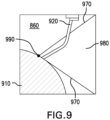
- a two-dimensional view (860) showing surgical instrument (920) and eye (910) may be provided in image (800).
- Two-dimensional view (860) may be displayed in a window, and/or it may be shown over eye (810) (as shown in FIG. 8 ) or adjacent to eye (810).
- Two-dimensional view (860) may show the angle of surgical instrument (920) in relation to eye (910), and the relative distance between the tip of surgical instrument (920) and eye (910).
- Two-dimensional view (860) may help the trainee gauge the orientation of surgical instrument (820, 920) with respect to eye (910), and the spatial relationship between surgical instrument (820, 920) and eye (910).
- Two-dimensional view (860) may show a range of preferred or required angles for surgical instrument (820, 920). As shown in FIG. 9 , a range of preferred or required angles may be shown by one or more range lines (970). Range lines (970) may be any type of line, including solid, dotted, or dashed. Area (980) of two-dimensional view (860) between range lines (970) and/or the area of two-dimensional view (860) outside the range lines (970) may be highlighted with a color.
- a highlight color in area (980) and/or outside the range lines may be applied or changed depending on whether the angle of surgical instrument (820, 920) is within a preferred range. For example, if the angle of surgical instrument (820, 920) is between range lines (970), area (980) may be highlighted with the color green. If the angle of surgical instrument (820, 920) deviates from the preferred range, area (980) and/or the area outside the range lines (970) may be highlighted in a different color (e.g., red), providing an indication to the trainee that the angle of surgical instrument (820, 920) should be adjusted to within the preferred range.
- a different color e.g., red
- the entire two-dimensional view (860) or another sub-portion of two-dimensional view (860) may be highlighted in a color (e.g. red) if the angle of surgical instrument (820, 920) extends beyond a preferred angle or range of angles.
- a physician scheduled to perform an MSICS may perform a simulated MSICS, a simulated subset of the steps required to perform an MSICS, or one or more other simulated exercises that can gauge the physician's performance.
- the physician may be required to guide a simulated scalpel at a particular angle (or at an angle within a given range of angles) and to a particular location on the surface of a simulated patient.
- the physician may only be allowed a set number of tries to bring the scalpel within a predetermined distance of the patient surface at that location and angle to pass the test.
- a similar test may be used by medical students considering whether to specialize in medical fields that require a high degree of dexterity before they decide in which field they intend to practice.
- a similar test may also be used for persons in other fields.
- the system may be used to test persons intending to operate industrial cranes.
- FIG. 3b illustrates software components of the simulator, including components for simulating (1) the tunnel, (2) capsulotomy and lens replacement with complete zonules, (3) managing anterior chamber dynamics, (4) capsulotomy and lens replacement with incomplete zonules, and (5) vitreous loss management.
- Each of those components has a visual, simulation, and haptics subcomponent.
- the simulator software is programmed to support performance of the entire MSICS procedure on the MSICS simulator.
- the software is built around physics based models of the eye, the surgical instruments and the forces experienced during live surgery.
- the software contains the graphic eye models, haptic models, and the courseware / user interface.
- the haptic and visual responses to interaction with the model are nearly indistinguishable from real surgery.
- This model reproduces precise tool-tissue contact, realistic tissue resistance, stiffness, flexibility and texture providing realistic feeling of handling the instruments with the simulator hand pieces.
- the simulator provides sufficient degrees of freedom for movement to allow proper simulation and force feedback.
- a Courseware (Panel PC) computer (350) runs the "Simulator Interface Application” (SIA).
- the Courseware computer (350) may include components for a simulator control panel (352), generating reports (354, 380), saving task evaluation to data service (356), voice recognition (358), task content (360), and task evaluation (362). Trainee results may be saved to a trainee results database (382).
- the supervisor station (370) includes a video display (372).
- the principal function of the SIA is to communicate with the simulator in order to deliver training.
- the SIA allows monitoring, interacting with, and managing the particular student that is currently practicing on the simulator as well as record that student's performance data.
- the SIA interacts with the Simulator Based Learning System (SBLS), as described below, to enable the student to view active Assignments (allowed based on prerequisite conditions), and to download specific Assignment files and content / learning resources corresponding to the Assignment selected by the student.
- SBLS Simulator Based Learning System
- the SIA uploads the student's performance data at the end of each attempt and the session.
- the list of active Assignments are updated.
- the SIA may comprise similar modules described below with respect to the SBLS, including: Assignment Database, Learning Experience Logic, Assignment Information Screens, Simulator Communication, Performance Records, SBLS Interface, Video encoding, streaming, and storage, Reports, and Data/Code Update.
- the Simulator Communication module allows the SIA to communicate with the Simulator using the Simulator API to manage Assignment performance. Such communication is based on the standard Assignments that are received from the SBLS, as described below. In order to track each Assignment performance, trainees authenticate access in order to identify them and store their performance data to their respective records.
- a Simulation Application Programming Interface (Middleware layer) interfaces the simulator computer with the SIA.
- the Middleware layer (330) may include components for loading eye models (332), selecting instruments (334), receiving statistics (336), and receiving events (338).
- API can be hosted and run either on the graphics PC or Panel PC.
- An interface is provided for Ethernet communication between the courseware and simulator in order to start simulations, trigger events, getting metrics and other communication that is necessary.
- the communication requirements between SIA and Simulator Middleware include: Assignment parameters - Eye model configuration and state, Performance Data - Event based, Performance Data - General (Ongoing), Event triggers, Audio Commands, Video Feed, Calibration and Pre-session checks, Performance Logs, and Guidelines, Orientation view and Real time feedback.
- the major elements of communication between SIA and simulator include:
- the SIA contains the following important features. It breaks down the procedure into smaller segments for unit practice. This allows repeated practice with segments to help focus on specific tasks or task groups. For example, assuming that the procedure is broken down into 10 tasks, one should be able to start with task 5 and stop after completing task 6. When starting at task 5, all the actions from task 1 to 4 would have already been completed and such updated state of the eye should be loaded for performance.
- the SIA also collects data on performance metrics (data generated on the simulator relating to the performance activity) to compare them with standards and therefore provide both formative and summative feedback. Formative feedback help improve learning. For instance, force being applied for a task was more than required resulting in poor performance or an incision made of a size much bigger than what was required.
- summative feedback means assessment of performance in line with the goals. Summative feedback also involves evaluation of performance across attempts.
- the SIA configures scenarios same as in real life to prepare trainees suitably in managing them effectively. These could be scenarios would include intraoperative challenges such as excessive bleeding in response to an action, weak zonules that hold the capsule, and other challenges that are presented even as the task is performed accurately. Errors or suboptimal performance in earlier tasks can also lead to intraoperative challenges later in the surgery. In order to present such scenarios, without requiring a learner/trainer to create them every time they need to be practiced, the SIA saves the state of the eye such that the trainee can start practicing with that state.
- SIA 500
- the simulator is connected via an intranet to a central server (510).
- a server or network application called the Simulator Based Learning System (SBLS) (520), is hosted on the central server (510) and is used to manage training delivery to a plurality of trainees.
- SBLS Simulator Based Learning System
- SBLS 520
- SBLS manages learning management across all modes of instructional delivery simulators. It involves management of multiple learners, simulators, training delivery methods, etc.
- the SBLS (520) may manage more than 50-100 simulators. When the simulators are operating simultaneously, a large amount of rich data in the form of video feed, etc.
- the SIA (500) communicates with the Simulation API ( FIG. 3c ) in order to manage simulation practice units i.e. assignments and exchange necessary information.
- the SBLS (520) manages delivery of the assignments for each trainee, identifies trainees, controls access to assignments, record performance data from assignment attempts, and provides other such training management features.
- the communication between SIA (500) and SBLS (520) includes: interface for enabling user authentication, sync up with SBLS (520) to maintain local copy of Assignment database (static files and codes relating to assignment evaluation and scoring), transfer performance data, video, etc. to SBLS (520) for updating trainee records on the SBLS (520), and instructor functionalities related communication.
- the SIA (500) communicates with the SBLS (520) for data such as the following: user authentication, trainee status information (past records, allowable Assignments, content access relating to Assignments), data Sync with SBLS (520) (upload performance data of trainees that is stored on local system to the SBLS (520) on the network), communication with instructor client (530), transfer of video feeds, download and update latest version of SIA (500), and upload reports and issues from simulator calibration and tests.
- data such as the following: user authentication, trainee status information (past records, allowable Assignments, content access relating to Assignments), data Sync with SBLS (520) (upload performance data of trainees that is stored on local system to the SBLS (520) on the network), communication with instructor client (530), transfer of video feeds, download and update latest version of SIA (500), and upload reports and issues from simulator calibration and tests.
- a module may be used for managing various users (e.g., super user, administrator, instructor (trainer), trainee) and providing access control functionality.
- the same or a different module may be used to create assignments that can be assigned to the learners for practice and evaluation on the simulator.
- a trainee will be guided to undertake practice of a set of "Assignments" that will be designed to provide sufficient practice to the trainee on various segments of the procedure and then the entire procedure. The complexity and difficulty levels of each such assignment will increase with progress made by the trainee.
- the trainees are exposed to wide variety of cataract cases and complications using the assignments.
- the assignments are created based on selections of several conditions, training tools, performance parameters, triggers/alerts, scoring, pre-requisites, assignment meta-data etc.
- Each practice unit on the MSICS simulator is referred to herein as an Assignment.
- Each Assignment may have a starting and an ending point (within the MSICS procedure), each indicating the state of the eye and related parameters (e.g. color, size, type of cataract etc.).
- An Assignment may be a segment of a procedure wherein some tasks would have been already completed (e.g. eye with scleral groove has been made).
- An Assignment may also include complications to be presented.
- the SBLS may support a database of a large number of MSICS surgical Assignments using a user-friendly interface and a series of steps to capture and set all the data to define a typical assignment.
- Each Assignment may include all of the information required by the simulator to: (1) begin the simulation (using selections possible for surgical conditions, training conditions, i.e. appropriate eye model variables, patient parameters, standard/custom starting point in the surgical procedure; (2) define access to training tools - provision of guidelines, orientation view and feedback (real-time); apply other level wise settings and tolerances for errors and alerts etc., possible complications and corresponding action; (3) determine the end of the simulation based on trigger of certain conditions viz.
- Each Assignment may also include reference data corresponding to each performance parameter specified to enable evaluation. Corresponding to each level there may be a specified value, range or setting against which the parameters will be compared to assign a score or pass/fail status.
- An assignment database may store assignments and corresponding data that may be communicated to the simulator using, for example, XML messages/commands.
- the Assignment files may include one or more of the following details: (1) associated performance metrics expected to be monitored and/or recorded in real-time and after the Assignment attempt has been completed; (2) Guidelines, Orientation view and Real time feedback requirements (includes Aural feedback and other aural requirements); (3) scenarios for complications that can be triggered by the instructor; (4) triggers for events; (5) parameters (metrics) linked to feedback remedial content resources; (6) reference starting point name and data files corresponding to a custom starting point (saved following a trainee or trainer performance); (7) Assignment Meta data: Task Group/Task/Subtask/Movement Number according to standard proficiency definition for MSICS, Title, description, tags - level, task group etc.
- a Simulator Validation Study may include, for example, a set of 30-40 Assignments, having about 8-10 unique Assignments, each with 2-3 small variations.
- base assignment files can be leveraged for customization in terms of metrics to be used for scoring and alerts and triggers may change to emphasize certain specific learning objective(s) relating to the Assignment.
- an Assignment relating to "making the scleral groove” might have as one of its variants an emphasis on the trainee getting the shape of the groove correct and its metrics may have higher weightage when scoring.
- Other metrics collected, such as length of the groove, depth of the groove etc. may carry low or no weightage. Therefore, the weightage applied to each metric for the score may vary accordingly for providing suitable emphasis corresponding to the learning objective(s).
- Assignment Information Screens may include a set of screens that provide information for each Assignment, including graphics, videos, animations etc.
- the screen can have links that can load further details in pop-up screens. These screens will present standard information on the assignment such as Assignment Description, Steps to Perform, Surgeon Cues, and Best practice to follow, video of expert performance, video from actual surgery etc.
- Learning Experience Logic may evaluate each unique Assignment, determines completion of Assignment based on proficiency requirements, determine the flow or order in which Assignments will be made accessible to users, etc.
- the trainee's experience on the simulator may be determined by a number of features. One of the important ones amongst them may be "individualization.” One of the features relating to individualization may be managing a trainee's progress through a list of assignments. This can be computer controlled or controlled by a trainer.
- a trainee may be expected to progress through the Assignments in a definite order in the computer controlled mode. While it may be possible for the trainee to view the list of Assignments, only those that he or she is qualified to access as per this predefined order may be displayed as active Assignments.
- Active Assignments mean those assignments that are enabled for practice.
- Inactive Assignments may become “Active” when pre-requisite Assignments are completed by the trainee.
- the trainer can give each trainee access to any assignment (in any order) or enable/disable access to each assignment based on his individual judgment.
- trainers may be allowed to change select conditions (specifications provided within the Assignment) referred to as modifiable conditions. Modifiable conditions refer to a selection of conditions for the surgical simulation that any trainer can change to enhance the training experience.
- An Open Assignment is available to the trainer in trainer control mode. It may be configured with default simulation conditions. Default conditions are the most basic settings for simulator practice. The trainer may be able to make changes using modifiable conditions (e.g., within these default conditions and some others) and surgical start point before allowing the trainee to begin the open assignment attempt. The purpose of the open assignment may be to allow trainee familiarization with the simulator setting and the assignment conditions before initiating formative or summative evaluation of the attempts. Standard parameters and performance video may be recorded for each attempt. However, attempts to this assignment may not be evaluated and scored by the system. The trainer can enter attempt feedback notes into the system.
- a computer control mode may also be provided where preset algorithms govern the access to assignments in the assignments library and progression across assignments.
- a trainer may have the ability to override the setting for a trainee, for select assignments and to permit access. In this mode, the trainees can continue practicing assignments without requiring instructors to closely monitor and determine access. However, instructors may be required to review the performance data and provide feedback either on a real time basis or later for the attempts.
- An Instructor Module may allow an instructor to monitor and manage simulator practice sessions.
- the instructor can connect with the SBLS using a desktop/laptop PC and preferably a tablet.
- the instructor module may have the following functionalities for accessing the SBLS and managing the delivery of training: (1) View a dashboard of simulator lab activity - simulators and current user activity; (2) Monitor Assignment performance using video data stream, where the trainer can view a set of video streams together, or select one and toggle between views; (3) Get real time and event based updates/messages; (4) View reports; (5) Add subjective comments to each Assignment attempted by a trainee; (6) Add or reduce scores for an Assignment attempt based on subjective evaluation and observation; (7) Review trainee performance history; and/or (8) Override learning experience logic to allow trainees to progress or prevent progression due to subjective evaluation or other such reasons.
- An Instructor can also login from the simulator Panel PC to access these features and use it for performing Assignments, just like the trainees.
- Simulation software which may include the core simulation and the simulator API code, may be updated periodically to, for example, fix issues and upgrade the functionality.
- certain code and data may be maintained locally on the SIA. This may include data such as Assignment Library and code such as logic for progressing through assignments etc.
- the data/code update module may be allowed to push these to each of the simulators either periodically or on demand. A check may be run periodically to confirm the latest version installed, and update simulators as may be required.
- the following table provides a Use Case Scenario that connects various activities with the functions of the simulator and associated components and features, including the Simulator Based Learning System (SBLS): Typical progression of training activity on the simulator Turn On the simulator: It turns on the Panel PC that runs the Simulator Interface Application (SIA) automatically on startup.
- Login Screen displayed on adjunct screen. Trainee logs in with ID and Password/Code.
- Instructor can also login using the same screen.
- a list of assignments is displayed on adjunct screen. The list will also be present if the assignment is active. That is, enabled for beginning or continuing practice.
- the simulator can restrict access to assignments for managing the order in which they must be practiced. However, the instructor will always have unrestricted access to launch any Assignment, at any time. This data is loaded from the SBLS.
- the SIA communicates to the Simulator via the Simulator API - Selected Assignment related files transferred to the simulator.
- the assignment files define starting point, ending point from the surgical procedure to be practiced, eye model configuration/settings, list of parameters to be tracked real-time and metrics to be provided at the end of performance. Alternatively, these files are received from SBLS on selection and passed on to the Simulation API.
- the simulator uses the assignment files to load the eye model and the simulation activity can begin. The trainee picks up the instrument handles (haptic arms) and looks through the microscope to begin. Trainee gives verbal commands asking for instruments - left and right hand. SIA has voice recognition capability for several verbal commands - these trigger sending commands (using XML files) to simulator for corresponding action.
- Simulator gives audio alert in case incorrect instrument is selected. Trainee brings the instruments in the field of view (microscope viewer) and begins the performance. Real time parameters required by SIA are monitored and alerts provided in case alert conditions are met. All other metrics required are recorded during the assignment attempt. Guidelines, Orientation view and Real time feedback are made available (as per the Assignment settings). Guidelines and Orientation view are artificial objects (lines, arrows etc.) displayed in microscope view for trainee performance support. Feedback is audio alert on trainee errors and short text message appearing with it for a few seconds to communicate the nature of error. These can be turned On/Off by a verbal command. Any specific error or condition that is classified as "complication" may result in halting of the performance as per the assignment settings.
- the simulator will display a message communicating the event to the trainee. These conditions are preset in the simulator software. An alert to keep this condition active for monitoring is set or registered when Assignment files are transferred to the simulator. The instructor client will also be able to view the alerts for which triggers have been configured as part of the Assignment specifications. The instructor/trainee can switch between real-time video on the adjunct screen OR keep the Panel PC - SIA interface displayed. Essentially, the adjunct display can be used for connecting to one of the two display feeds: 1. Panel PC - SIA application interface or 2. HDMI video feed directly from the simulator visual display. The HDMI video feed is also transferred to SIA via the Simulation API and it will be encoded and stored as part of the Assignment attempt data.
- the instructor client will allow viewing the video stream from the simulator(s) via the SBLS - limited set of simulator videos simultaneously.
- the trainee or instructor (standing by) can give a verbal command or use an on-screen button to abort or indicate completion of practice unit.
- End of Assignment performance metrics are communicated to the SIA.
- SIA receives the performance metrics and calculates scores corresponding to preset rubric for each Assignment. Or transfers the metrics to SBLS for calculations.
- SIA/SBLS computes a composite performance score.
- SIA/SBLS provides a success/fail outcome to the performance based on the evaluation rubric.
- SIA/SBLS updates the Assignment status using a preconfigured proficiency requirement. (Not Started, In progress or Completed).
- Verbal commands may be incorporated into the simulator to increase the realism of instrument changes and intraoperative management.
- a verbal command asking for an instrument change may be given and the instrument visual under the microscope may change accordingly.
- the trainee may need to manually change the handles that will be designed to feel like the actual instrument that is chosen for use.
- Voice recognition is also provided as part of the courseware to support the selection of instruments by voice command and other commands by the trainee.
- the simulator restricted to what you see in the microscope and what you feel with your hands. Any other interactions or higher level communication will be handled by courseware and the simulator will provide an interface to the courseware to make any changes to the simulated scene based on whatever interaction is performed on a higher level.
- the simulator may indicate that the microscope bulb has burned out. In this scenario the microscope bulb burns out and the microscope view dims. The response of the surgeon is to ask the nurse to change the microscope bulb, and when this is done the normal light is restored.
- simulator sends command to simulator that the bulb should burn out
- simulator responds by making the view appropriately dark
- courseware identifies whatever sequence of events that are required for the bulb to be changed, e.g. voice command to tell the nurse to change bulb
- courseware sends command to simulator that the bulb should work properly again
- simulator restores the light in the microscope view.
- Heart monitor sounds are also provided. Heart rate is connected to events in the simulator and also be settable from courseware side. In addition, patient sounds, requests, and other sounds are incorporated where the courseware can set sounds to be played at certain events or directly.
Landscapes
- Engineering & Computer Science (AREA)
- Physics & Mathematics (AREA)
- General Physics & Mathematics (AREA)
- Mathematical Analysis (AREA)
- Mathematical Physics (AREA)
- Medicinal Chemistry (AREA)
- General Health & Medical Sciences (AREA)
- Algebra (AREA)
- Computational Mathematics (AREA)
- Chemical & Material Sciences (AREA)
- Health & Medical Sciences (AREA)
- Mathematical Optimization (AREA)
- Medical Informatics (AREA)
- Pure & Applied Mathematics (AREA)
- Business, Economics & Management (AREA)
- Educational Administration (AREA)
- Educational Technology (AREA)
- Theoretical Computer Science (AREA)
- Instructional Devices (AREA)
- Processing Or Creating Images (AREA)
Claims (15)
- Système de simulation d'une opération chirurgicale, le système comprenant :un premier bras haptique (109) représentant un outil chirurgical réel ;un premier mécanisme haptique (113) en communication mécanique avec le premier bras haptique (109), dans lequel le bras haptique (109) et le mécanisme haptique (113) sont configurés pour fournir une rétroaction de force haptique en temps réel à un utilisateur du système lors d'une simulation d'une opération chirurgicale ;une unité de commande haptique configurée pour signaler au premier mécanisme haptique (113) un niveau de rétroaction de force haptique ;un premier ordinateur en communication électronique avec l'unité de commande haptique et comprenant un module de logiciel ayant un modèle basé sur la physique d'une partie du corps humain et configuré pour calculer la rétroaction de force haptique devant être fournie par le premier bras haptique (109) et le premier mécanisme haptique (113), dans lequel la rétroaction de force haptique calculée correspond sensiblement aux mêmes forces exercées sur l'outil chirurgical réel lorsqu'elle interagit avec la partie du corps humain lors d'une opération chirurgicale en direct ; etun microscope simulé (107) ayant une unité d'affichage (2.2),dans lequel l'unité d'affichage (2.2) est configurée pour représenter, au même moment et alors que ledit système simule une opération chirurgicale, une image simulée en trois dimensions de la partie du corps humain, une image en trois dimensions représentant un premier outil chirurgical simulé (820) correspondant à l'outil chirurgical réel, une vue simulée en deux dimensions de la partie du corps humain, et une vue en deux dimensions représentant le premier outil chirurgical simulé (820), sur la base de l'orientation et de la position actuelles du premier bras haptique (109) sous le microscope simulé (107) ;dans lequel la vue en deux dimensions du premier outil chirurgical simulé (820) est affichée par rapport à la vue simulée en deux dimensions de la partie du corps humain incluant une orientation et/ou une position relative(s) de l'outil chirurgical par rapport à la partie du corps humain ;dans lequel sur la base de changements d'orientation et de mouvements du bras haptique (109) sous le microscope simulé (107), l'unité d'affichage (2.2) est configurée pour mettre à jour en temps réel la position relative de l'image simulée en trois dimensions de la partie du corps humain, et la vue en deux dimensions représentant le premier outil chirurgical simulé (820), la vue simulée en deux dimensions de la partie du corps humain, et la vue en deux dimensions représentant le premier outil chirurgical simulé (820) ;dans lequel la rétroaction de force haptique calculée est basée sur des interactions détectées entre le premier outil chirurgical simulé (820) et la partie du corps humain dans l'unité d'affichage (2.2) ;dans lequel le premier outil chirurgical simulé (820) présente une pointe au niveau d'une extrémité de l'outil (820) ; etdans lequel la vue en deux dimensions de la partie du corps humain et la vue en deux dimensions représentant le premier outil chirurgical (820) sont affichées à l'intérieur d'une fenêtre sur l'unité d'affichage (2.2), et dans lequel la fenêtre entière est affichée sur au moins une partie de l'image en trois dimensions de la partie du corps humain.
- Système selon la revendication 1, dans lequel la pointe de l'outil chirurgical simulé (820) comprend une lame simulée ; et/ou
dans lequel la vue en deux dimensions représente l'angle du premier outil chirurgical simulé (820) par rapport à la partie du corps humain. - Système selon la revendication 2 dans lequel la vue en deux dimensions présente l'angle, dans lequel l'angle est mesuré comme l'angle entre la ligne tangentielle au point le plus proche de la partie du corps humain et la pointe du premier outil chirurgical simulé (820), et l'orientation de la pointe du premier outil chirurgical simulé (820) par rapport à la partie du corps humain ; et/ou
la vue en deux dimensions présente en outre deux lignes de plage indiquant une plage d'angles pour l'angle du premier outil chirurgical simulé (820). - Système selon la revendication 3 lorsque la vue en deux dimensions représente deux lignes de plage, dans lequel une zone entre les deux lignes de plage est mise en évidence avec une couleur.
- Système selon la revendication 4 dans lequel la couleur change en fonction de si oui ou non un angle du premier outil chirurgical simulé (820) se situe à l'intérieur d'une plage d'angles prédéterminée.
- Système selon une quelconque revendication précédente, dans lequel la partie du corps humain comprend un œil.
- Système selon une quelconque revendication précédente, dans lequel l'image simulée en trois dimensions comprend un modèle graphique simulé en trois dimensions.
- Système selon une quelconque revendication précédente, dans lequel le premier ordinateur est configuré pour générer une ligne de guidage (830) pour l'incision sur le modèle graphique en trois dimensions de la partie du corps humain mais la ligne de guidage (830) n'est pas visible sur l'unité d'affichage (2.2).
- Système selon la revendication 8, dans lequel le premier ordinateur et/ou l'unité d'affichage (2.2) est/sont configuré(e)(s) pour fournir une indication si l'incision virtuelle dévie au-delà d'une distance prédéterminée à partir de la ligne de guidage (830).
- Système selon la revendication 8 ou 9, dans lequel la ligne de guidage (830) est supprimée lorsque le premier bras haptique (109) est déplacé ; et/oudans lequel la ligne de guidage (830) est supprimée lorsque l'image en trois dimensions du premier outil chirurgical simulé (820) apparaît sur l'unité d'affichage (2.2) ; et/oudans lequel la ligne de guidage (830) est affichée au-dessus du premier outil chirurgical simulé (820) ; oudans lequel la ligne de guidage (830) est affichée au-dessous du premier outil chirurgical simulé (820).
- Système selon la revendication 10 lorsque la ligne de guidage (830) est affichée au-dessous du premier outil chirurgical simulé (820), dans lequel l'apparence d'une partie de la ligne de guidage (830) est modifiée lorsque le premier outil chirurgical simulé (820) passe au-dessus de la ligne de guidage (830).
- Système selon une quelconque revendication précédente, dans lequel le microscope (107) est en outre configuré pour afficher une ligne d'incision (840) indiquant une incision virtuelle faite par le premier outil chirurgical simulé (820).
- Système selon la revendication 12, dans lequel la ligne d'incision (840) est représentée lorsque l'incision virtuelle est faite.
- Système selon la revendication 12 ou 13, dans lequel, sur la base de changements d'orientation et de mouvements du bras haptique (109) sous le microscope simulé (107), l'unité d'affichage (2.2) est en outre configurée pour mettre à jour en temps réel la position relative de la ligne d'incision (840) indiquant une incision virtuelle faite par le premier outil chirurgical simulé (820).
- Système selon une quelconque revendication précédente, dans lequel la vue simulée en deux dimensions de la partie du corps humain comprend un modèle graphique en deux dimensions de la partie du corps humain.
Applications Claiming Priority (2)
| Application Number | Priority Date | Filing Date | Title |
|---|---|---|---|
| US16/564,110 US11227509B2 (en) | 2014-12-29 | 2019-09-09 | Surgical simulator systems and methods |
| PCT/US2020/050021 WO2021050611A1 (fr) | 2019-09-09 | 2020-09-09 | Systèmes et procédés de simulateur chirurgical |
Publications (4)
| Publication Number | Publication Date |
|---|---|
| EP4018428A1 EP4018428A1 (fr) | 2022-06-29 |
| EP4018428A4 EP4018428A4 (fr) | 2023-12-20 |
| EP4018428C0 EP4018428C0 (fr) | 2025-03-12 |
| EP4018428B1 true EP4018428B1 (fr) | 2025-03-12 |
Family
ID=74867212
Family Applications (1)
| Application Number | Title | Priority Date | Filing Date |
|---|---|---|---|
| EP20863850.2A Active EP4018428B1 (fr) | 2019-09-09 | 2020-09-09 | Systèmes et procédés de simulateur chirurgical |
Country Status (4)
| Country | Link |
|---|---|
| EP (1) | EP4018428B1 (fr) |
| CN (1) | CN114402378B (fr) |
| MX (1) | MX2022002822A (fr) |
| WO (1) | WO2021050611A1 (fr) |
Families Citing this family (2)
| Publication number | Priority date | Publication date | Assignee | Title |
|---|---|---|---|---|
| CN115068261A (zh) * | 2022-06-15 | 2022-09-20 | 中国人民解放军陆军军医大学第一附属医院 | 一种手术体验床及其使用方法 |
| CN115294824A (zh) * | 2022-07-29 | 2022-11-04 | 上海市普陀区中心医院 | 一种眼科手术操作的培训方法及系统 |
Family Cites Families (12)
| Publication number | Priority date | Publication date | Assignee | Title |
|---|---|---|---|---|
| US5766016A (en) * | 1994-11-14 | 1998-06-16 | Georgia Tech Research Corporation | Surgical simulator and method for simulating surgical procedure |
| CA2633137C (fr) | 2002-08-13 | 2012-10-23 | The Governors Of The University Of Calgary | Systeme robotique utilise en microchirurgie |
| US20050159759A1 (en) * | 2004-01-20 | 2005-07-21 | Mark Harbaugh | Systems and methods for performing minimally invasive incisions |
| US10004387B2 (en) * | 2009-03-26 | 2018-06-26 | Intuitive Surgical Operations, Inc. | Method and system for assisting an operator in endoscopic navigation |
| KR101903307B1 (ko) * | 2009-03-26 | 2018-10-01 | 인튜어티브 서지컬 오퍼레이션즈 인코포레이티드 | 하나 이상의 랜드마크를 향해 내시경 디바이스의 팁을 조종하고 운전자의 내시경 길찾기를 돕기 위한 시각적 안내를 제공하는 시스템 |
| US8784443B2 (en) * | 2009-10-20 | 2014-07-22 | Truevision Systems, Inc. | Real-time surgical reference indicium apparatus and methods for astigmatism correction |
| US9498231B2 (en) * | 2011-06-27 | 2016-11-22 | Board Of Regents Of The University Of Nebraska | On-board tool tracking system and methods of computer assisted surgery |
| CN106535812B (zh) * | 2014-03-28 | 2020-01-21 | 直观外科手术操作公司 | 带有基于定量三维成像的触觉反馈的手术系统 |
| US20160210882A1 (en) | 2014-12-29 | 2016-07-21 | Help Me See Inc. | Surgical Simulator System and Method |
| CN105825752A (zh) * | 2016-04-22 | 2016-08-03 | 吉林大学 | 基于力反馈设备的虚拟眼角膜手术培训系统 |
| JP6649912B2 (ja) * | 2017-03-15 | 2020-02-19 | 株式会社モリタ | 歯科診療実習装置及び歯科診療実習システム |
| WO2019118739A1 (fr) * | 2017-12-14 | 2019-06-20 | Mako Surgical Corp. | Représentation visuelle indépendante de l'angle de vue d'une procédure de coupe |
-
2020
- 2020-09-09 CN CN202080062998.1A patent/CN114402378B/zh active Active
- 2020-09-09 MX MX2022002822A patent/MX2022002822A/es unknown
- 2020-09-09 WO PCT/US2020/050021 patent/WO2021050611A1/fr not_active Ceased
- 2020-09-09 EP EP20863850.2A patent/EP4018428B1/fr active Active
Also Published As
| Publication number | Publication date |
|---|---|
| EP4018428C0 (fr) | 2025-03-12 |
| WO2021050611A1 (fr) | 2021-03-18 |
| MX2022002822A (es) | 2023-01-30 |
| CN114402378A (zh) | 2022-04-26 |
| EP4018428A1 (fr) | 2022-06-29 |
| EP4018428A4 (fr) | 2023-12-20 |
| CN114402378B (zh) | 2023-02-28 |
Similar Documents
| Publication | Publication Date | Title |
|---|---|---|
| US11984045B2 (en) | Surgical simulator systems and methods | |
| US9595208B2 (en) | Trauma training simulator with event-based gesture detection and instrument-motion tracking | |
| CN103959357B (zh) | 用于眼科检查培训的系统和方法 | |
| US20160210882A1 (en) | Surgical Simulator System and Method | |
| Lam et al. | Virtual reality simulator for phacoemulsification cataract surgery education and training | |
| KR20200048830A (ko) | 가상현실 기반의 교육용 백내장 수술 시뮬레이션 시스템 | |
| US20240165518A1 (en) | Methods for adaptive behavioral training using gaze-contingent eye tracking and devices thereof | |
| KR20240051173A (ko) | 라이브, 가상 또는 원격 눈 수술 훈련 장치 및 방법을 위한 안구 시뮬레이션된 카메라 보조 로봇 | |
| Antaki et al. | Democratizing vitreoretinal surgery training with a portable and affordable virtual reality simulator in the metaverse | |
| CN114402378B (zh) | 手术模拟器系统和方法 | |
| Khaleghi et al. | Toward using effective elements in adults’ amblyopia treatment in a virtual reality-based gamified binocular application | |
| US12175891B2 (en) | Surgical simulator systems and methods | |
| HK40069441A (en) | Surgical simulator systems and methods | |
| HK40069441B (en) | Surgical simulator systems and methods | |
| CN116486665A (zh) | 基于数字孪生技术的白内障手术模拟教学模型构建方法 | |
| Heidari et al. | A survey of versatile ai/robotic architectures for ophthalmic surgery training | |
| CN115294824A (zh) | 一种眼科手术操作的培训方法及系统 | |
| KR20200048825A (ko) | 가상현실 기반의 백내장 수술 시뮬레이터 시스템 | |
| Lee et al. | Ophthalmoscopic examination training using virtual reality | |
| CN120913473A (zh) | 一种眼部手术仿真模拟系统 | |
| Chan | Development and comparison of augmented and virtual reality interactions for direct ophthalmoscopy | |
| CN119132139A (zh) | 一种眼科手术三维仿真系统 | |
| Ottensmeyer et al. | Development of an ocular and craniofacial trauma treatment training system | |
| from Standard et al. | Metaverse Surgical Training: How Virtual Worlds Are Transforming Cataract Education Nov 7, 2025 | |
| Vredevoe et al. | Ophthalmoscopic Examination Training Using Virtual Reality |
Legal Events
| Date | Code | Title | Description |
|---|---|---|---|
| STAA | Information on the status of an ep patent application or granted ep patent |
Free format text: STATUS: THE INTERNATIONAL PUBLICATION HAS BEEN MADE |
|
| PUAI | Public reference made under article 153(3) epc to a published international application that has entered the european phase |
Free format text: ORIGINAL CODE: 0009012 |
|
| STAA | Information on the status of an ep patent application or granted ep patent |
Free format text: STATUS: REQUEST FOR EXAMINATION WAS MADE |
|
| 17P | Request for examination filed |
Effective date: 20220323 |
|
| AK | Designated contracting states |
Kind code of ref document: A1 Designated state(s): AL AT BE BG CH CY CZ DE DK EE ES FI FR GB GR HR HU IE IS IT LI LT LU LV MC MK MT NL NO PL PT RO RS SE SI SK SM TR |
|
| RIN1 | Information on inventor provided before grant (corrected) |
Inventor name: UELTSCHI, JAMES TYLER Inventor name: UELTSCHI, ALBERT LEE Inventor name: JAHANI, SARO Inventor name: STRAUSS, GLENN Inventor name: GULASY, DENNIS |
|
| REG | Reference to a national code |
Ref country code: HK Ref legal event code: DE Ref document number: 40069441 Country of ref document: HK |
|
| DAV | Request for validation of the european patent (deleted) | ||
| DAX | Request for extension of the european patent (deleted) | ||
| A4 | Supplementary search report drawn up and despatched |
Effective date: 20231121 |
|
| RIC1 | Information provided on ipc code assigned before grant |
Ipc: G09B 23/28 20060101AFI20231115BHEP |
|
| GRAP | Despatch of communication of intention to grant a patent |
Free format text: ORIGINAL CODE: EPIDOSNIGR1 |
|
| STAA | Information on the status of an ep patent application or granted ep patent |
Free format text: STATUS: GRANT OF PATENT IS INTENDED |
|
| INTG | Intention to grant announced |
Effective date: 20240718 |
|
| RAP3 | Party data changed (applicant data changed or rights of an application transferred) |
Owner name: HELP ME SEE INC. |
|
| GRAS | Grant fee paid |
Free format text: ORIGINAL CODE: EPIDOSNIGR3 |
|
| GRAA | (expected) grant |
Free format text: ORIGINAL CODE: 0009210 |
|
| STAA | Information on the status of an ep patent application or granted ep patent |
Free format text: STATUS: THE PATENT HAS BEEN GRANTED |
|
| AK | Designated contracting states |
Kind code of ref document: B1 Designated state(s): AL AT BE BG CH CY CZ DE DK EE ES FI FR GB GR HR HU IE IS IT LI LT LU LV MC MK MT NL NO PL PT RO RS SE SI SK SM TR |
|
| REG | Reference to a national code |
Ref country code: GB Ref legal event code: FG4D |
|
| REG | Reference to a national code |
Ref country code: CH Ref legal event code: EP |
|
| REG | Reference to a national code |
Ref country code: DE Ref legal event code: R096 Ref document number: 602020047726 Country of ref document: DE |
|
| REG | Reference to a national code |
Ref country code: IE Ref legal event code: FG4D |
|
| U01 | Request for unitary effect filed |
Effective date: 20250401 |
|
| U07 | Unitary effect registered |
Designated state(s): AT BE BG DE DK EE FI FR IT LT LU LV MT NL PT RO SE SI Effective date: 20250408 |
|
| PG25 | Lapsed in a contracting state [announced via postgrant information from national office to epo] |
Ref country code: RS Free format text: LAPSE BECAUSE OF FAILURE TO SUBMIT A TRANSLATION OF THE DESCRIPTION OR TO PAY THE FEE WITHIN THE PRESCRIBED TIME-LIMIT Effective date: 20250612 |
|
| PG25 | Lapsed in a contracting state [announced via postgrant information from national office to epo] |
Ref country code: ES Free format text: LAPSE BECAUSE OF FAILURE TO SUBMIT A TRANSLATION OF THE DESCRIPTION OR TO PAY THE FEE WITHIN THE PRESCRIBED TIME-LIMIT Effective date: 20250312 |
|
| PG25 | Lapsed in a contracting state [announced via postgrant information from national office to epo] |
Ref country code: NO Free format text: LAPSE BECAUSE OF FAILURE TO SUBMIT A TRANSLATION OF THE DESCRIPTION OR TO PAY THE FEE WITHIN THE PRESCRIBED TIME-LIMIT Effective date: 20250612 |
|
| PG25 | Lapsed in a contracting state [announced via postgrant information from national office to epo] |
Ref country code: HR Free format text: LAPSE BECAUSE OF FAILURE TO SUBMIT A TRANSLATION OF THE DESCRIPTION OR TO PAY THE FEE WITHIN THE PRESCRIBED TIME-LIMIT Effective date: 20250312 |
|
| PG25 | Lapsed in a contracting state [announced via postgrant information from national office to epo] |
Ref country code: GR Free format text: LAPSE BECAUSE OF FAILURE TO SUBMIT A TRANSLATION OF THE DESCRIPTION OR TO PAY THE FEE WITHIN THE PRESCRIBED TIME-LIMIT Effective date: 20250613 |
|
| PG25 | Lapsed in a contracting state [announced via postgrant information from national office to epo] |
Ref country code: SM Free format text: LAPSE BECAUSE OF FAILURE TO SUBMIT A TRANSLATION OF THE DESCRIPTION OR TO PAY THE FEE WITHIN THE PRESCRIBED TIME-LIMIT Effective date: 20250312 |
|
| PG25 | Lapsed in a contracting state [announced via postgrant information from national office to epo] |
Ref country code: PL Free format text: LAPSE BECAUSE OF FAILURE TO SUBMIT A TRANSLATION OF THE DESCRIPTION OR TO PAY THE FEE WITHIN THE PRESCRIBED TIME-LIMIT Effective date: 20250312 |
|
| PG25 | Lapsed in a contracting state [announced via postgrant information from national office to epo] |
Ref country code: CZ Free format text: LAPSE BECAUSE OF FAILURE TO SUBMIT A TRANSLATION OF THE DESCRIPTION OR TO PAY THE FEE WITHIN THE PRESCRIBED TIME-LIMIT Effective date: 20250312 |
|
| U20 | Renewal fee for the european patent with unitary effect paid |
Year of fee payment: 6 Effective date: 20250917 |
|
| PG25 | Lapsed in a contracting state [announced via postgrant information from national office to epo] |
Ref country code: SK Free format text: LAPSE BECAUSE OF FAILURE TO SUBMIT A TRANSLATION OF THE DESCRIPTION OR TO PAY THE FEE WITHIN THE PRESCRIBED TIME-LIMIT Effective date: 20250312 |
|
| PG25 | Lapsed in a contracting state [announced via postgrant information from national office to epo] |
Ref country code: IS Free format text: LAPSE BECAUSE OF FAILURE TO SUBMIT A TRANSLATION OF THE DESCRIPTION OR TO PAY THE FEE WITHIN THE PRESCRIBED TIME-LIMIT Effective date: 20250712 |
|
| PLBE | No opposition filed within time limit |
Free format text: ORIGINAL CODE: 0009261 |
|
| STAA | Information on the status of an ep patent application or granted ep patent |
Free format text: STATUS: NO OPPOSITION FILED WITHIN TIME LIMIT |
|
| REG | Reference to a national code |
Ref country code: CH Ref legal event code: L10 Free format text: ST27 STATUS EVENT CODE: U-0-0-L10-L00 (AS PROVIDED BY THE NATIONAL OFFICE) Effective date: 20260121 |
|
| 26N | No opposition filed |
Effective date: 20251215 |
|
| REG | Reference to a national code |
Ref country code: CH Ref legal event code: H13 Free format text: ST27 STATUS EVENT CODE: U-0-0-H10-H13 (AS PROVIDED BY THE NATIONAL OFFICE) Effective date: 20260425 |