EP4020194B1 - Anzeigesteuerungsverfahren und endgerätevorrichtung - Google Patents
Anzeigesteuerungsverfahren und endgerätevorrichtung Download PDFInfo
- Publication number
- EP4020194B1 EP4020194B1 EP20855765.2A EP20855765A EP4020194B1 EP 4020194 B1 EP4020194 B1 EP 4020194B1 EP 20855765 A EP20855765 A EP 20855765A EP 4020194 B1 EP4020194 B1 EP 4020194B1
- Authority
- EP
- European Patent Office
- Prior art keywords
- control
- input
- target
- scenario information
- communication window
- Prior art date
- Legal status (The legal status is an assumption and is not a legal conclusion. Google has not performed a legal analysis and makes no representation as to the accuracy of the status listed.)
- Active
Links
Images

Classifications
-
- G—PHYSICS
- G06—COMPUTING OR CALCULATING; COUNTING
- G06F—ELECTRIC DIGITAL DATA PROCESSING
- G06F3/00—Input arrangements for transferring data to be processed into a form capable of being handled by the computer; Output arrangements for transferring data from processing unit to output unit, e.g. interface arrangements
- G06F3/01—Input arrangements or combined input and output arrangements for interaction between user and computer
- G06F3/048—Interaction techniques based on graphical user interfaces [GUI]
- G06F3/0481—Interaction techniques based on graphical user interfaces [GUI] based on specific properties of the displayed interaction object or a metaphor-based environment, e.g. interaction with desktop elements like windows or icons, or assisted by a cursor's changing behaviour or appearance
-
- G—PHYSICS
- G06—COMPUTING OR CALCULATING; COUNTING
- G06F—ELECTRIC DIGITAL DATA PROCESSING
- G06F3/00—Input arrangements for transferring data to be processed into a form capable of being handled by the computer; Output arrangements for transferring data from processing unit to output unit, e.g. interface arrangements
- G06F3/01—Input arrangements or combined input and output arrangements for interaction between user and computer
- G06F3/048—Interaction techniques based on graphical user interfaces [GUI]
- G06F3/0481—Interaction techniques based on graphical user interfaces [GUI] based on specific properties of the displayed interaction object or a metaphor-based environment, e.g. interaction with desktop elements like windows or icons, or assisted by a cursor's changing behaviour or appearance
- G06F3/0482—Interaction with lists of selectable items, e.g. menus
-
- G—PHYSICS
- G06—COMPUTING OR CALCULATING; COUNTING
- G06F—ELECTRIC DIGITAL DATA PROCESSING
- G06F3/00—Input arrangements for transferring data to be processed into a form capable of being handled by the computer; Output arrangements for transferring data from processing unit to output unit, e.g. interface arrangements
- G06F3/01—Input arrangements or combined input and output arrangements for interaction between user and computer
- G06F3/048—Interaction techniques based on graphical user interfaces [GUI]
- G06F3/0487—Interaction techniques based on graphical user interfaces [GUI] using specific features provided by the input device, e.g. functions controlled by the rotation of a mouse with dual sensing arrangements, or of the nature of the input device, e.g. tap gestures based on pressure sensed by a digitiser
- G06F3/0488—Interaction techniques based on graphical user interfaces [GUI] using specific features provided by the input device, e.g. functions controlled by the rotation of a mouse with dual sensing arrangements, or of the nature of the input device, e.g. tap gestures based on pressure sensed by a digitiser using a touch-screen or digitiser, e.g. input of commands through traced gestures
-
- G—PHYSICS
- G06—COMPUTING OR CALCULATING; COUNTING
- G06F—ELECTRIC DIGITAL DATA PROCESSING
- G06F9/00—Arrangements for program control, e.g. control units
- G06F9/06—Arrangements for program control, e.g. control units using stored programs, i.e. using an internal store of processing equipment to receive or retain programs
- G06F9/44—Arrangements for executing specific programs
- G06F9/451—Execution arrangements for user interfaces
-
- H—ELECTRICITY
- H04—ELECTRIC COMMUNICATION TECHNIQUE
- H04L—TRANSMISSION OF DIGITAL INFORMATION, e.g. TELEGRAPHIC COMMUNICATION
- H04L51/00—User-to-user messaging in packet-switching networks, transmitted according to store-and-forward or real-time protocols, e.g. e-mail
- H04L51/04—Real-time or near real-time messaging, e.g. instant messaging [IM]
- H04L51/046—Interoperability with other network applications or services
-
- H—ELECTRICITY
- H04—ELECTRIC COMMUNICATION TECHNIQUE
- H04L—TRANSMISSION OF DIGITAL INFORMATION, e.g. TELEGRAPHIC COMMUNICATION
- H04L51/00—User-to-user messaging in packet-switching networks, transmitted according to store-and-forward or real-time protocols, e.g. e-mail
- H04L51/07—User-to-user messaging in packet-switching networks, transmitted according to store-and-forward or real-time protocols, e.g. e-mail characterised by the inclusion of specific contents
- H04L51/10—Multimedia information
-
- H—ELECTRICITY
- H04—ELECTRIC COMMUNICATION TECHNIQUE
- H04L—TRANSMISSION OF DIGITAL INFORMATION, e.g. TELEGRAPHIC COMMUNICATION
- H04L51/00—User-to-user messaging in packet-switching networks, transmitted according to store-and-forward or real-time protocols, e.g. e-mail
- H04L51/52—User-to-user messaging in packet-switching networks, transmitted according to store-and-forward or real-time protocols, e.g. e-mail for supporting social networking services
Definitions
- Embodiments of the present disclosure relate to the field of communications technologies, and in particular, to a display control method and a terminal device.
- one or more meme lists generally include a large number of meme, and the meme are arranged disorderly; therefore, a user may need to look through these meme in these lists for many times before finding the required meme. That is, it is tedious and time-consuming to search for the meme required by the user.
- US20170336928A1 discloses that the electronic device can display an acknowledgement selection affordance at the message region users input on. And the acknowledgement selection affordance will display a plurality of acknowledgement options which can be applied to the message region.
- CN108255316A discloses a method of analyzing description information of a current conversation in an instant messaging client side, and determining the context of the current conversation. And the context of the current conversation can be determined according to the matching degree of various context of current session.
- a target emoticon set corresponding to the context of the current conversation will be selected from multiple backup emoticon sets.
- Embodiments of the present disclosure provide a display control method and a terminal device, so as to solve the problem that the process of searching for the meme required by a user is tedious and time-consuming.
- embodiments of the present disclosure are implemented as follows: according to a first aspect, embodiments of the present disclosure provide a display control method, which is defined in claim 1.
- embodiments of the present disclosure further provides a terminal device, which is defined in claim 7.
- embodiments of the present disclosure provide a computer readable storage medium, which is defined in claim 10.
- A/B may represent A or B.
- "and/or" in this specification merely describes an association relationship between associated objects, and indicates that there may be three relationships.
- a and/or B may represent that there are three cases: there is only A, there are both A and B, and there is only B.
- the term "a plurality of" refers to two or more.
- first the terms “first”, “second”, and so on are intended to distinguish between different objects but do not describe a particular order of the objects.
- a first input and a second input are intended to distinguish between different inputs, instead of describing a particular order of the inputs.
- the first input performed by the user may be received in a case that the first communication window is displayed on the screen of the terminal device; and at least one first control associated with the display content of the first communication window is displayed on the screen in response to the first input, where each of the at least one first control respectively corresponds to at least one object, and the display content of the first communication window includes at least one of a communication title, a communication content and a communication object.
- the terminal device may display at least one first control with a small number and associated with the current display content, and will not directly display a large number of unordered meme and other objects, so that the user can trigger the terminal device rapidly and conveniently to acquire at least one object corresponding to the first target control, such as the meme required by the user. Therefore, the step that the user searches for the meme in a large number of unordered meme for many times is avoided, that is, the step of searching for the meme is simplified.
- the terminal device in the embodiments of the present disclosure may be a mobile terminal device or a non-mobile terminal device.
- the mobile terminal device may be a mobile phone, a tablet computer, a notebook computer, a palmtop computer, a vehicle-mounted terminal, a wearable device, an ultra-mobile personal computer (UMPC), a netbook, a personal digital assistant (personal digital assistant, PDA), or the like.
- the non-mobile terminal device may be a personal computer (PC), a television (TV), a teller machine, a self-service machine, or the like. This is not specifically limited in the embodiment of the present disclosure.
- an execution body may be a terminal device, a central processing unit (CPU) of the terminal device, or a control module configured to perform the display control method in the terminal device.
- the case where the terminal device performs the display control method is taken as an example to describe the display control method provided by the embodiments of the present disclosure.
- the terminal device in the embodiments of the present disclosure may be a terminal device with an operating system.
- the operating system may be an Android (Android) operating system, or may be an iOS operating system or another possible operating system, which is not specifically limited in the embodiments of the present disclosure.
- the Android operating system is taken as an example below to describe a software environment to which a display control method provided by the embodiments of the present disclosure is applied.
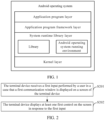
- FIG. 1 is a schematic diagram of an architecture of a possible Android operating system according to an embodiment of the present disclosure.
- the architecture of the Android operating system includes 4 layers, which are an application layer, an application framework layer, a system runtime library layer, and a kernel layer (which may specifically be a Linux kernel layer).
- the application layer includes various applications in the Android operating system (that include system applications and third-party applications).
- the application framework layer is an application framework, and a developer may develop some applications based on the application framework layer following a rule of developing the application framework, for example, application programs such as a system setting application, a system chat application, and a system camera application; or application programs such as a third-party setting application, a third-party camera application, and a third-party chat application.
- application programs such as a system setting application, a system chat application, and a system camera application
- application programs such as a third-party setting application, a third-party camera application, and a third-party chat application.
- the system runtime library layer includes a library (also referred to as a system library) and an Android operating system runtime environment.
- the library mainly provides various resources required for the Android operating system.
- the running environment of the Android operating is used to provide the Android operating system with a software environment.
- the kernel layer is an operating system layer of the Android operating system, and is a lowest layer of software levels of the Android operating system.
- the kernel layer provides core system services and hardware-related driver programs for the Android operating system based on the Linux kernel.
- the Android operating system is taken as an example.
- developers may develop software programs that implement the display control method provided by the embodiments of the present disclosure, so that the display control method can be performed based on the Android operating system as shown in FIG. 1 .
- a processor or the terminal device may run the software program in the Android operating system to implement the display control method provided by the embodiments of the present disclosure.
- the display control method shown in FIG. 2 may include S201 and S202.
- the terminal device receives a first input performed by a user in a case that a first communication window is displayed on a screen of the terminal device.
- a communication application program may be installed in the terminal device, and the communication application program may provide a communication window to support two or more communication objects (one communication object corresponds to one user) to chat.
- the first communication window may be a communication window of two or more communication objects.
- two or more communication objects in the first communication window includes a communication object corresponding to a user.
- the terminal device may receive and transmit communication content in the communication window, and the type of the communication content may include text, picture (such as meme), link, audio and video.
- the object transmitted and displayed by the terminal device in the communication window (such as the first communication window) is the communication content in the communication window.
- the interactive information in the communication window is described as communication content, object or display content in different positions, and different names are only used to distinguish clearly in different scenarios and will not affect the essence of the interactive information.
- the user may perform the first input for the first communication window.
- the terminal may be provided with a touch screen; and the touch screen may be configured to receive the input performed by the user and display the content corresponding to the input to the user in response to the input.
- the above first input may be a touch screen input, a fingerprint input, a gravity input, a key input and the like.
- the touch screen input is a pressing input, a long pressing input, a sliding input, a click input, a suspension input (the input performed by a user near the touch screen) and the like of a user on the touch screen of the terminal.
- the fingerprint input is a swipe fingerprint input, a long-press fingerprint input, a single-click fingerprint input, and a double-click fingerprint input of a user on the terminal's fingerprint reader.
- the gravity input is an input of shaking a terminal in a specific direction by a user, shaking for a specific quantity of times, or the like.
- the key input corresponds to the single-click operation, double-click operation, long-press operation, combined key operation and the like performed by a user on a power key, a volume key, a home key and the like of the terminal.
- the embodiments of the present disclosure do not specifically limit the form of the first input, which may be any achievable form.
- the first input may be a specific input performed by a user on the first communication window, for example, a sliding track in the first communication window is an arc sliding input; or the first input may be a long-press input performed by a user on a certain communication content in the first communication window.
- the object may be meme, picture or other files.
- Each of the at least one first control is provided with one piece of object information, and at least one object corresponding to one first control is an object indicated by the object information of the first control. That is, the object information of one first control may serve as an index of the at least one object corresponding to the first control.
- a user may need to reply different meme in different communication scenarios. For example, when the terminal device receives an electronic red packet in the first communication window, that is, when the communication scenario of the first communication window is the red packet scenario, a user may need to replay the meme "thank you, boss".
- the first input performed by the user is received in a case that the first communication window is displayed on the screen of the terminal device; and at least one first control associated with the display content of the first communication window is displayed on the screen in response to the first input, where each of the at least one first control respectively corresponds to at least one object, and the display content of the first communication window includes at least one of a communication title, a communication content and a communication object.
- the terminal device may display at least one first control with a small number and associated with the current display content, and will not directly display a large number of unordered meme and other objects, so that the user can trigger the terminal device rapidly and conveniently to acquire at least one object corresponding to the first target control, such as the meme required by the user. Therefore, the step that the user searches for the meme in a large number of unordered meme for many times is avoided, that is, the step of searching for the meme is simplified.
- the display control method provided by the embodiments of the present disclosure further includes S203 before S201.
- the terminal device determines the target scenario information according to the display content of the first communication window; where the at least one first control corresponds to target scenario information.
- the terminal device may take the control corresponding to the target scenario information as at least one first control when determining that the target scenario information is acquired, that is, at least one first control associated with the display content of the first communication window is obtained.
- objects which a user needs to reply are generally different in a case that the communication scenarios of the first communication window are different.
- the object which the user generally needs to reply may be an object corresponding to the communication scenario of the first communication window.
- the terminal device when the terminal device receives an electronic red packet in the first communication window, that is, when the communication scenario of the first communication window is the red packet scenario, a user may need to replay the meme "thank you, boss".
- the above target scenario information is determined by the terminal device in real time, or is determined by a server interacting with the terminal device in real time.
- the display content of the first communication window includes a communication title (recorded as information 1). That is, the terminal device determines the target scenario information according to the information 1.
- a title indicated by title information of the first communication window may be "XX company", “XX department”, “XX unit”, “XX software” or "XX development”.
- the terminal device may determine different target scenario information according to different communication titles of the communication window.
- the display content of the first communication window includes a communication content (recorded as information 2). That is, the terminal device determines the target scenario information according to the information 2.
- the communication content of the first communication window specifically may be a keyword included in the communication content, or the communication content itself, or the content type of the communication content (such as text, picture, audio, video or link).
- the display content of the first communication window includes a communication object (recorded as information 3). That is, the terminal device determines the target scenario information according to the information 3. Specifically, the target information is information of the communication object (recorded as a target chat object) for sending the communication content (recorded as the target communication content) in the first communication window.
- the target communication content may be the last communication content in the first communication window by default, or one or more communication contents operated by the user through the first input.
- the information of the target chat object may indicate at least one of the name of the target chat object, the group of the target chat object in the contacts and the label of the target chat object.
- the terminal device may determine a relationship between a user (recorded as a target user) corresponding to the target chat object and a user according to the information of the target chat object. For example, the terminal device determines a relationship with the person according to the name or unit or group of the target general object, and finally determines that the communication scenarios indicated by the target scenario information are "family scenario", "friend scenario”, “colleague scenario”, "schoolmate scenario” and the like.
- the target scenario information is pre-defined. That is, the terminal device determines the pre-defined target scenario information as the target scenario information.
- the pop-up box corresponding to the pre-defined target scenario information may include "are you there", “did you eat”, “hello” and other controls, and these controls are the at least one first control.
- an association relationship between the scenario information and the corresponding at least one first control is preset by a system;
- the scenario information is the common scenario in life, for example, "working scenario” and “red packet scenario” in the above example; and the object information of the first control corresponding to the scenario information may be a common phrase in the corresponding scenario.
- the description of the display content including more of information 1 to information 3 may be referenced to the related description of the first scenario information to the third application scenario in the above embodiment, which will not elaborated by the embodiments of the present disclosure herein.
- the terminal device may automatically determine the target scenario information corresponding to the current first communication window and obtain at least one first control corresponding to the target scenario information, so that at least one object (that is, at least one meme) corresponding to each first control can be obtained.
- the terminal device may display at least one first control associated with the display content of the first communication window on the screen, and it is beneficial to increase the degree that the object such as meme provided by the terminal device meets the requirements of the user.
- the terminal device in a case that the user needs to view at least one object corresponding to each first control, the terminal device may be triggered to display the corresponding object on the screen, so that selection input is performed on these objects.
- the method may further include S204 and S205.
- the terminal device receives a second input performed by a user for a first target control, where the first target control is a control of the at least one first control.
- the description of the input form of the second input may be referenced to the related description of the input form of the first input, which will not be elaborated herein.
- the second input is a click input performed by the user to the first target control.
- Object information of the first target control may serve as an index of at least one object corresponding to the first target control.
- the at least one object corresponding to the first target control may be an object including the object information of the first target control, or an object whose title (or label) is the object information of the first target control.
- the terminal device displays at least one object corresponding to the first target control on the screen in response to the second input.
- the terminal device when the terminal device receives an electronic red packet in the first communication window, that is, when the communication scenario of the first communication window is a red packet scenario, the object information of the first target control may be "thank you, boss", and the at least one object corresponding to the first control is a meme corresponding to "thank you, boss".
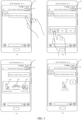
- the first communication window 31 displayed on the screen of the terminal device includes a title "Internet technology exchange group", an identifier "a certain master” of a communication object and a communication content "I posted a technical blog on a forum".
- the "master, take me” control, the "666" control and the "like” control are displayed on the screen of the terminal device, where the object information of the "master, take me” control is master, take me, the object information of the "666” control is 666, and the object information of the "like” control is like.
- the communication scenario indicated by the target scenario information of the first communication window 31 may be a technical scenario, and the at least one control corresponding to the target scenario information is the "master, take me” control, the "666" control and the “like” control.
- a meme 311, a meme 312 and a meme 313 corresponding to the "master, take me” control may be displayed on the screen of the terminal device. That is, the meme 311, the meme 312 and the meme 313 are the at least one object corresponding to the first target control.
- the terminal device may successfully send and display the meme 311 in the first communication window 31.
- the meme 311 is a meme meeting the technical scenario.
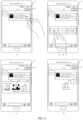
- the first communication window 41 displayed on the screen of the terminal device includes a title "red packet scenario", an identifier "little v” of a communication object and a communication content of electronic red packet "I wish you happiness and prosperity, lots of luck and profits”.
- the user's long-press input that is, the first input
- electronic red packet “I wish you happiness and prosperity, lots of luck and profits”
- the "thank you, boss” control, the “one cent is love” control and the “the red packet is too small” control are displayed on the screen of the terminal device, where the object information of the "thank you, boss” control is thank you, boss, the object information of the "one cent is love” control is one cent is love, and the object information of the "the red packet is too small” control is the red packet is too small.
- the target scenario information (recorded as scenario information 2) of the first communication window 41 indicates a red packet scenario
- at least one control may be the "thank you, boss” control, the “one cent is love” control and the "the red packet is too small” control.
- a meme 411, a meme 412 and a meme 413 corresponding to the "thank you, boss” control may be displayed on the screen of the terminal device. That is, the meme 411, the meme 412 and the meme 413 are the at least one object corresponding to the first target control.
- the terminal device may successfully send and display the meme 413 in the first communication window 41.
- the meme 413 is a meme corresponding to the target scenario information indicating the red packet scenario.
- the second input performed by the user for the first target control in the at least one first control may trigger the terminal device to display at least one object corresponding to the first target control, for example, to display an object such as the meme meeting the requirements of the user. Therefore, the terminal device can rapidly display the object such as the meme required by the user, and the step of searching for the object such as the meme is simplified.
- the S203 may be implemented through S203a-S203c.
- the terminal device searches for the first scenario information corresponding to the display content of the first communication window in a preset scenario information base; where the preset scenario information base includes at least one piece of scenario information (for example, including first scenario information), information of display content of the communication window corresponding to each of the at least one piece of scenario information, and information of at least one control corresponding to each of the at least one piece of scenario information (that is, the object information of each of the at least one first control).
- the preset scenario information base includes at least one piece of scenario information (for example, including first scenario information), information of display content of the communication window corresponding to each of the at least one piece of scenario information, and information of at least one control corresponding to each of the at least one piece of scenario information (that is, the object information of each of the at least one first control).
- the terminal acquiring the display content of the current communication window may be: the display content serves as an index, the scenario information (such as the first scenario information) corresponding to the display content is found from the preset scenario information base, and the at least one first control corresponding to the scenario information is obtained.
- the preset scenario information base may be stored in the terminal device, or in a server interacting with the terminal device.
- the terminal device may provide a user with an entry to modify information in the preset scenario information base so as to support the user to trigger to delete, add or modify certain scenario information in the preset scenario information base and delete, add or modify some first controls corresponding to certain scenario information.
- the setting application program of the terminal device may provide an entry to modify the information in the preset scenario information base.
- S203b the terminal device determines the first scenario information as the target scenario information in a case that the first scenario information is found.
- the first scenario information may be determined and stored by the terminal device or the server in advance according to the display content of the first communication window.
- S203c the terminal device determines pre-defined scenario information as the target scenario information in a case that the first scenario information is not found.
- the terminal device determines different priorities of the target scenario information according to different modes.
- the priorities for determining the modes of the target scenario information are sequentially reduced: mode 1, mode 2, mode 3 and mode 4.
- the terminal device determines the target scenario information according to the high priority mode, and then determines the target scenario information according to the secondary high priority in a case that determination fails.
- the terminal device fails to determine the target scenario information by the mode 1 to the mode 3, which indicates that the scenario information corresponding to the corresponding target information is not stored in the pre-defined scenario information base. That is, in a case of failing to determine the target scenario information according to the display content of the first communication window, the terminal device determines the pre-defined scenario information as the target scenario information.
- the terminal device may determine the target scenario information through many modes, so even if the determination of the target scenario information through a higher priority mode fails, the target scenario information may also be determined through a lower priority mode. In this way, it may be ensured that the terminal device determines to acquire the target scenario information of the current first communication window, so that at least one first control corresponding to the target scenario information is obtained.
- the display control method provided by the embodiments of the present disclosure further includes S206.
- S206 the terminal device displays a second control on the screen; where the second control is used to indicate target scenario information.
- the terminal device may display a second control at a preset position of the screen, such as the upper left corner or the upper right corner.
- the terminal device displays a control 32 at the upper right corner of the screen, and the current target scenario information "technical scenario” is displayed on the control 32.
- the terminal device displays a control 42 on the upper right corner, and the current target scenario information "red packet scenario” is displayed on the control 42.
- the second control may be display first, and then at least one first control may be displayed under the triggering of the user, that is, S206 is performed first and then S202 is performed.
- the first input includes a first sub-input and a second sub-input
- S206 may be replaced with S206a
- S202 may be replaced with S202a.
- S206a the terminal device displays the second control on the screen in response to the first sub-input.
- the terminal device displays at least one first control on the screen in response to the second sub-input; where the first sub-input is an input for the first communication window, the second sub-input is an input for the second control, and the second control is used to indicate the target scenario information.
- the description of the input form of the first sub-input and the second sub-input may be referenced to the related description of the input form of the first input, which will not be elaborated herein.
- the first sub-input is a long-press input performed by the user on the last communication content in the first communication window
- the second sub-input is a long-press input performed by the user to the second control.
- the user may choose whether to trigger the terminal device to display the second control and/or the at least one first control according to the own requirements, which is beneficial to improving the human-computer interaction performance of the user in the process of searching for the object such as the meme by using the terminal.
- the display control method provided by the embodiments of the present disclosure further includes S207 and S208.
- S207 the terminal device receives a third input of the user for the second control.
- the description of the input form of the third input may be referenced to the related description of the input form of the first input, which will not be elaborated herein.
- the third input includes an input performed by the user for the control 32 shown in FIG. 3 and an input of modifying the at least one input corresponding to the target scenario information indicated by the control 32 (that is, modifying the object corresponding to at least one control).
- the terminal device modifies first information in response to the third input, where the first information includes at least one of following: the target scenario information and an object corresponding to a second target control, and the second target control is a control of the at least one first control.
- the second control is an entry to modify the target scenario information and the object corresponding to the second target control.
- the user may modify the target scenario information and the object corresponding to the second target control through the second control; and in a case that the user is not satisfied with the recommended first control, the user may click the second control for edition to trigger the satisfied first control to be added to the scenario, or may also trigger to delete the unnecessary first control to facilitate subsequent reuse.
- the user may perform double-click input on the current second control to edit the information of the second control, and manually specify the communication scenario indicated by the target scenario information and the first control included in the corresponding pop-up box.
- the manually edited target scenario information and the corresponding at least one first control may be stored in a system (such as the system of the terminal device), so that the terminal can directly use the scenario information conveniently next time.
- the second control may be displayed on the screen of the terminal device, and the second control is used to indicate the target scenario information and is configured to trigger to modify the target scenario information and the object corresponding to the control of the at least one first control. Therefore, the user may modify the current target scenario information and the at least one first control into the information meeting the requirements of the user, so that the target scenario information determined by the terminal device subsequently is the scenario information meeting the requirements of the user, and the object (that is, meme) meeting the requirements of the user can be obtained.
- the terminal device displays the at least one first control on the screen in a case that the first communication window is switched into a second communication window and a fourth input for the second communication window is received, where first target scenario information corresponding to the first communication window is different from second target scenario information corresponding to the second communication window.
- the description of the input form of the fourth input may be referenced to the related description of the input form of the first input, which will not be elaborated herein.
- the first target scenario information is the scenario information determined by the terminal device according to the display content of the first communication window, that is, the first target scenario information is applied to the actual communication scenario of the display content in the first communication window.
- the description of the second target scenario information may be referenced to the description of the first target scenario information, which will not be elaborated in the embodiments of the present disclosure.
- the user may perform preset input (such as long-press input) on the second control displayed on the first communication window and fix the communication scenario (that is, fix the current target scenario information) of the current window, or may also unlock fixation.
- the user may also set a global fixed communication scenario (that is, set scenario information) in the system, and use a certain communication scenario for all communication windows.
- the actual communication scenario of the first communication window is "technical scenario", that is, the communication scenario indicated by the target scenario information is “technical scenario”, the actual communication scenario of the second communication window is "news scenario”, and at this time, the terminal device determines that the scenario information of the second communication window is still the target scenario information. Therefore, in a case that the terminal device displays the second communication window, the terminal device displays "master, take me”, “666", “like” and other controls based on the first input, and does not display “you are out”, “true or false”, “circusee”, “onlookers” and other controls.
- the display control method provided by the embodiments of the present disclosure may further include S210.
- the terminal keeps displaying the second control in a case that the first communication window is switched into the second communication window, where the first target scenario information corresponding to the first communication window is different from the second scenario information corresponding to the second communication window.
- That the terminal device keeps displaying the second control on the screen means that the terminal device fixes the scenario information of the communication window as the target scenario information, and does not change the communication scenario indicated by the target scenario information with the change of the display content of the communication window.
- the user when the user requires the terminal device to display at least one first control displayed in the communication window unchanged, the user may trigger the terminal device to fix the scenario information of the communication window so as to display the same at least one first control in different communication windows. Therefore, it is beneficial to improve the human-computer interaction performance in the process of finding meme.
- the user may trigger the terminal device to send the object (such as meme) in the first communication window.
- the user uses the finger to long press text, voice, picture, expression or forwarded message sent by a certain user (that is, an communication object) to be interacted, or uses a sliding gesture to pop up one group of scenario-based choice box (that is, including the choice box of at least one first control) by recognizing the conversion scenario, the user may search for the option name according to the expression library (that is, may use a picture library or a third-party expression library) after choosing a certain option (that is, one first control) and recommend one group of expressions, and the user may choose and send the expressions.
- the expression library that is, may use a picture library or a third-party expression library
- the display control method provided by the embodiments of the present disclosure may trigger the object sending step through S211 and S212.
- the terminal device receives a fifth input performed by the user for the target object; where the target object is an object of at least one object corresponding to the first target control.
- the description of the input form of the fifth input may be referenced to the related description of the input form of the first input, which will not be elaborated herein.
- the fifth input is a double-click input performed by the user for the target object.
- the target object displayed by the terminal device may be an object meeting the requirements of the user, so it is beneficial to reduce the operation that the user triggers the terminal device to search for the object such as meme and improve the convenience of transmitting the object.
- the receiving module 51 is further configured to receive the second input performed by the user for the first target control after the display module 52 displays at least one first control on the screen, where the first target control is a control of at least one first control.
- the display module 52 is further configured to display at least one object corresponding to the first target control on the screen in response to the second input received by the receiving module 51.
- the display module 52 is further configured to display the at least one first control on the screen in a case that the first communication window is switched into a second communication window and a fourth input for the second communication window is received, where first target scenario information corresponding to the first communication window is different from second target scenario information corresponding to the second communication window.
- the display module 52 is further configured to keep displaying the second control in a case that the first communication window is switched into the second communication window after the second control is displayed on the screen, where the first target scenario information corresponding to the first communication window is different from the second scenario information corresponding to the second communication window.
- the first input includes a first sub-input and a second sub-input; and the display module 52 is specifically configured to display the second control on the screen in response to the first sub-input and display at least one first control on the screen in response to the second sub-input, where the first sub-input is an input for the first communication window, the second sub-input is an input for the second control, and the second control is used to indicate the target scenario information.
- the terminal device may display at least one first control with a small number and associated with the current display content, and will not directly display a large number of unordered meme and other objects, so that the user can trigger the terminal device rapidly and conveniently to acquire at least one object corresponding to the first target control, such as the meme required by the user. Therefore, the step that the user searches for the meme in a large number of unordered meme for many times is avoided, that is, the step of searching for the meme is simplified.
- FIG. 6 is a schematic diagram of a hardware structure of a terminal device according to an embodiment of the present disclosure.
- a terminal device 100 includes but is not limited to components such as a radio frequency unit 101, a network module 102, an audio output unit 103, an input unit 104, a sensor 105, a display unit 106, a user input unit 107, an interface unit 108, a memory 109, a processor 110, and a power supply 111.
- the terminal device may include more or fewer components than those shown in the figure, a combination of some components, or different arrangement of components.
- the terminal device includes, but is not limited to, a mobile phone, a tablet computer, a notebook computer, a palmtop computer, a vehicle-mounted terminal, a wearable device, a pedometer, or the like.
- the user input unit 107 is configured to receive the first input performed by the user in a case that the first communication window is displayed on the screen of the terminal device; and the display unit 106 is configured to display at least one first control on the screen in response to the first input received by the user input unit 107, where the at least one first control is associated with the display content of the first communication window, each of the at least one first control respectively corresponds to at least one object, and the display content of the first communication window includes at least one of a communication title, a communication content and a communication object.
- the first input performed by the user may be received in a case that the first communication window is displayed on the screen of the terminal device; and at least one first control associated with the display content of the first communication window is displayed on the screen in response to the first input, where each of the at least one first control respectively corresponds to at least one object, and the display content of the first communication window includes at least one of a communication title, a communication content and a communication object.
- the terminal device may display at least one first control with a small number and associated with the current display content, and will not directly display a large number of unordered meme and other objects, so that the user can trigger the terminal device rapidly and conveniently to acquire at least one object corresponding to the first target control, such as the meme required by the user. Therefore, the step that the user searches for the meme in a large number of unordered meme for many times is avoided, that is, the step of searching for the meme is simplified.
- the radio frequency unit 101 may be configured to receive and transmit information or a signal in a call process. Specifically, after receiving downlink data from a base station, the radio frequency unit 101 transmits the downlink data to the processor 110 for processing. In addition, the radio frequency unit 101 transmits uplink data to the base station.
- the radio frequency unit 101 includes, but is not limited to, an antenna, at least one amplifier, a transceiver, a coupler, a low noise amplifier, and a duplexer, and the like.
- the radio frequency unit 101 may further communicate with another communications device through a wireless communication system and network.
- the terminal device provides wireless broadband Internet access for the user by using the network module 102, for example, helping the user to send and receive an email, browse a web page, and access streaming media.
- the audio output unit 103 may convert audio data received by the radio frequency unit 101 or the network module 102 or stored in the memory 109 into an audio signal, and output the audio signal as sound.
- the audio output unit 103 may further provide an audio output (for example, a call signal receiving sound and a message receiving sound) related to a specific function performed by the terminal device 100.
- the audio output unit 103 includes a speaker, a buzzer, a telephone receiver, and the like.
- the input unit 104 is configured to receive audio or video signals.
- the input unit 104 may include a graphics processing unit (Graphics Processing Unit, GPU) 1041 and a microphone 1042.
- the graphics processing unit 1041 is configured to process image data of a still picture or a video obtained by an image capture apparatus (for example, a camera) in video capture mode or image capture mode.
- a processed image frame may be displayed on the display unit 106.
- the image frame processed by the graphics processing unit 1041 may be stored in the memory 109 (or another storage medium) or transmitted via the radio frequency unit 101 or the network module 102.
- the microphone 1042 may receive a sound and may process such a sound into audio data.
- the processed audio data may be converted, in a call mode, into a format that may be transmitted to a mobile communication base station by using the radio frequency unit 101 for output.
- the terminal device 100 further includes at least one sensor 105, such as an optical sensor, a motion sensor, and other sensors.
- the light sensor includes an ambient light sensor and a proximity sensor.
- the ambient light sensor may adjust luminance of the display panel 1061 based on brightness of ambient light.
- the proximity sensor may turn off the display panel 1061 and/or backlight when the terminal device 100 moves to an ear.
- an accelerometer sensor may detect an acceleration value in each direction (generally, three axes), and detect a value and a direction of gravity when the accelerometer sensor is static, and may be used in an application for recognizing a posture of the terminal device (such as screen switching between landscape and portrait modes, a related game, or magnetometer posture calibration), a function related to vibration recognition (such as a pedometer or a knock), and the like.
- the sensor 105 may further include a fingerprint sensor, a pressure sensor, an iris sensor, a molecular sensor, a gyroscope, a barometer, a hygrometer, a thermometer, an infrared sensor, and the like. Details are not described herein.
- the display unit 106 is configured to display information input by a user or information provided to a user.
- the display unit 106 may include the display panel 1061, and the display panel 1061 may be configured in a form of a liquid crystal display (Liquid Crystal Display, LCD), an organic light-emitting diode (Organic Light-Emitting Diode, OLED), or the like.
- LCD Liquid Crystal Display
- OLED Organic Light-Emitting Diode
- the user input unit 107 may be configured to receive input numeral or character information, and generate key signal input related to user setting and function control of the terminal device.
- the user input unit 107 includes a touch panel 1071 and another input device 1072.
- the touch panel 1071 also called a touch screen, may collect a touch operation of the user on or near the touch panel 1071 (for example, an operation performed by the user on or near the touch panel 1071 by using any suitable object or accessory such as a finger or a stylus).
- the touch panel 1071 may include two parts: a touch detection apparatus and a touch controller.
- the touch detection apparatus detects a touch orientation of the user, detects a signal brought by the touch operation, and sends the signal to the touch controller.
- the touch controller receives touch information from the touch detection apparatus, converts the touch information into touch point coordinates, sends the touch point coordinates to the processor 110, and receives and executes a command sent by the processor 110.
- the touch panel 1071 may be implemented in a plurality of forms such as a resistive type, a capacitive type, an infrared ray, and a surface acoustic wave.
- the user input unit 107 may further include other input devices 1072.
- the another input device 1072 may include, but not limited to, a physical keyboard, a function key (for example, a volume control key or a switch key), a trackball, a mouse, and a joystick. Details are not described herein again.
- the touch panel 1071 can cover the display panel 1061.
- the touch panel 1071 transmits the touch operation to the processor 110 to determine a type of a touch event.
- the processor 110 provides corresponding visual output on the display panel 1061 based on the type of the touch event.
- the touch panel 1071 and the display panel 1061 are configured as two independent components to implement input and output functions of the terminal device, in some embodiments, the touch panel 1071 and the display panel 1061 may be integrated to implement the input and output functions of the terminal device. This is not specifically limited herein.
- the interface unit 108 is an interface for connecting an external apparatus with the terminal device 100.
- the external apparatus may include a wired or wireless headset jack, an external power supply (or a battery charger) port, a wired or wireless data port, a storage card port, a port for connecting an apparatus having an identification module, an audio input/output (I/O) port, a video I/O port, a headset jack, or the like.
- the interface unit 108 may be configured to: receive an input (for example, data information or power) from the external apparatus, and transmit the received input to one or more elements in the terminal device 100, or may be configured to transmit data between the terminal device 100 and the external apparatus.
- the memory 109 may be configured to store a software program and various data.
- the memory 109 may mainly include a program storage area and a data storage area.
- the program storage area may store an operating system, an application (for example, a sound play function or an image play function) required for at least one function, and the like.
- the data storage area may store data created based on use of the mobile phone (for example, audio data and a phone book), and the like.
- the memory 109 may include a high-speed random access memory, and may further include a nonvolatile memory, for example, at least one disk storage device, a flash memory, or other volatile solid-state storage devices.
- the processor 110 is a control center of the terminal device, connects various parts of the entire terminal device by using various interfaces and circuits, and performs various functions of the terminal device and processes data by running or executing the software programs and/or the modules stored in the memory 109 and invoking data stored in the memory 109, so as to monitor the terminal device as a whole.
- the processor 110 may include one or more processing units.
- the processor 110 may be integrated with an application processor and a modem processor.
- the application processor mainly processes an operating system, a user interface, an application, and the like, and the modem processor mainly processes wireless communication. It can be understood that the above-mentioned modem processor may not be integrated in the processor 110.
- the terminal device 100 may further include the power supply 111 (such as a battery) that supplies power to each component.
- the power supply 111 may be logically connected to the processor 110 by using a power management system, to implement functions such as charging, discharging, and power consumption management by using the power management system.
- the terminal device 100 includes some functional modules that are not shown. Details are not described herein.
- the embodiment of the present disclosure further provides a terminal device, including a processor 110, a memory 109, and a computer program stored in the memory 109 and executable on the processor 110.
- a terminal device including a processor 110, a memory 109, and a computer program stored in the memory 109 and executable on the processor 110.
- the computer program is executed by the processor 110, the processes of the foregoing method embodiment are implemented, and a same technical effect can be achieved. To avoid repetition, details are not described herein again.
- the embodiments of the present disclosure further provide a computer readable storage medium.
- the computer readable storage medium stores a computer program, and when the computer program is executed by a processor, the processes of the foregoing method embodiment are implemented and the same technical effect can be achieved. To avoid repetition, details are not described herein again.
- the computer readable storage medium may be a read-only memory (ROM), a random access memory (RAM), a magnetic disk, a compact disc, or the like.
- the method in the foregoing embodiment may be implemented by software in addition to a necessary universal hardware platform or by hardware only. In most circumstances, the former is a preferred implementation manner.
- the technical solutions of the present disclosure essentially or the part contributing to the prior art may be implemented in a form of a software product.
- the computer software product is stored in a storage medium (such as a ROM/RAM, a magnetic disk, or an optical disc), and includes several instructions for instructing a terminal device (which may be a mobile phone, a computer, a server, an air conditioner, a network device, or the like) to perform the methods described in the embodiments of the present disclosure.
Landscapes
- Engineering & Computer Science (AREA)
- Theoretical Computer Science (AREA)
- General Engineering & Computer Science (AREA)
- Software Systems (AREA)
- General Physics & Mathematics (AREA)
- Physics & Mathematics (AREA)
- Human Computer Interaction (AREA)
- Signal Processing (AREA)
- Computer Networks & Wireless Communication (AREA)
- Multimedia (AREA)
- Computing Systems (AREA)
- User Interface Of Digital Computer (AREA)
- Information Transfer Between Computers (AREA)
- Telephone Function (AREA)
Claims (10)
- Anzeigesteuerungsverfahren, das von einem Endgerät durchgeführt wird, umfassend:Bestimmen von Ziel-Szenarioinformationen gemäß dem Anzeigeinhalt eines ersten Kommunikationsfensters (31, 41), das auf einem Bildschirm des Endgeräts angezeigt wird;Empfangen (S201) einer ersten Eingabe, die von einem Benutzer in einem Fall durchgeführt wird, in dem daserste Kommunikationsfenster (31, 41) auf dem Bildschirm desEndgeräts angezeigt wird; undAnzeigen (S202) mindestens ein erstes Steuerelements auf dem Bildschirm als Reaktion auf die erste Eingabe; wobeidas mindestens eine erste Steuerelement mit demAnzeigeinhalt des ersten
Kommunikationsfensters (31, 41) assoziiert ist, wobei das mindestens ein erstes Steuerelement den
Ziel-Szenarioinformationen entspricht und jedes von dem mindestens einem ersten Steuerelement jeweils mindestens einem Objekt entspricht, und der Anzeigeinhalt des ersten Kommunikationsfensters (31, 41) mindestens einen Kommunikationstitel, einen Kommunikationsinhalt und ein Kommunikationsobjekt umfasst;dadurch gekennzeichnet, dass das Verfahren ferner Folgendes umfasst:Anzeigen eines zweiten Steuerelements auf dem Bildschirm, wobei das zweite Steuerelement verwendet wird, um die Ziel-Szenarioinformationen anzugeben; wobeinach dem Anzeigen des zweiten Steuerelements auf dem Bildschirm, das Verfahren ferner Folgendes umfasst:Empfangen einer dritten Eingabe, die von einem Benutzer für das zweite Steuerelement durchgeführt wird;Modifizieren erster Informationen als Reaktion auf die dritte Eingabe, wobei die ersten Informationen mindestens eines von Folgenden umfassen: die Ziel-Szenarioinformationen und ein Objekt, das einem zweiten Ziel-Steuerelement entspricht, und das zweite Ziel-Steuerelement ein Steuerelement des mindestens eines ersten Steuerelements ist; und/oderBeibehalten eines Anzeigens des zweiten Steuerelements auf dem Bildschirm in einem Fall, in dem das erste Kommunikationsfenster (31, 41) in ein zweites Kommunikationsfenster umgeschaltet wird, wobei sich die dem ersten Kommunikationsfenster (31, 41) entsprechenden ersten Ziel-Szenarioinformationen von den zweiten Ziel-Szenarioinformationen unterscheiden, die dem zweiten Kommunikationsfenster entsprechen. - Verfahren nach Anspruch 1, wobei das Verfahren nach dem Anzeigen (S202) des mindestens eines ersten Steuerelements auf dem Bildschirm ferner Folgendes umfasst:Empfangen einer zweiten Eingabe, die von einem Benutzer für ein erstes Ziel-Steuerelement durchgeführt wird, wobei das erste Ziel-Steuerelement ein Steuerelement von dem mindestens ein erstes Steuerelement ist; undAnzeigen mindestens eines Objekts, das dem ersten Ziel-Steuerelement entspricht, auf dem Bildschirm als Reaktion auf die zweite Eingabe.
- Verfahren nach Anspruch 1, wobei das Bestimmen der Ziel-Szenarioinformationen gemäß dem Anzeigeinhalt des ersten Kommunikationsfensters (31, 41) Folgendes umfasst:Suchen nach ersten Szenarioinformationen, die dem Anzeigeinhalt des ersten Kommunikationsfensters (31, 41) entsprechen, in einer voreingestellten Szenarioinformationsbasis gemäß dem Anzeigeinhalt des ersten Kommunikationsfensters (31, 41); undBestimmen der ersten Szenarioinformationen als Ziel-Szenarioinformationen, falls die ersten Szenarioinformationen gefunden werden; oderBestimmen vordefinierter Szenarioinformationen als Ziel-Szenarioinformationen, wenn die ersten Szenarioinformationen nicht gefunden werden.
- Verfahren nach Anspruch 1, ferner umfassend:
in einem Fall, in dem das erste Kommunikationsfenster (31, 41) in ein zweites Kommunikationsfenster umgeschaltet wird und eine vierte Eingabe für das zweite Kommunikationsfenster empfangen wird, Anzeigen des mindestens eines ersten Steuerelements auf dem Bildschirm, wobei die erste Ziel-Szenarioinformationen, die dem ersten Kommunikationsfenster (31, 41) entsprechen, sich von den zweiten Ziel-Szenarioinformationen unterscheiden, die dem zweiten Kommunikationsfenster entsprechen. - Verfahren nach Anspruch 1, wobei die erste Eingabe eine erste Untereingabe und eine zweite Untereingabe umfasst; und
das Anzeigen (S202) des mindestens eines ersten Steuerelements auf dem Bildschirm als Reaktion auf die erste Eingabe Folgendes umfasst:Anzeigen deszweiten Steuerelements auf dem Bildschirm als Reaktion auf die erste Untereingabe;Anzeigen des mindestens eines ersten Steuerelements auf dem Bildschirm als Reaktion auf die zweite Untereingabe; wobeidie erste Untereingabe eine Eingabe für das erste Kommunikationsfenster (31, 41), die zweite Untereingabe eine Eingabe für das zweite Steuerelement ist. - Verfahren nach Anspruch 2, ferner umfassend:Empfangen einer dritten Eingabe, die von einem Benutzer für ein Zielobjekt durchgeführt wird; undÜbertragen des Zielobjekts im ersten Kommunikationsfenster (31, 41) als Reaktion auf die fünfte Eingabe; wobeidas Zielobjekt ein Objekt von mindestens einem Objekt ist, das dem ersten Ziel-Steuerelement entspricht.
- Endgerät (50), umfassend: ein Bestimmungsmodul (53), ein Empfangsmodul (51) und ein Anzeigemodul (52);wobei das Bestimmungsmodul (53) konfiguriert ist, um Ziel-Szenarioinformationen gemäß dem Anzeigeinhalt eines ersten Kommunikationsfensters (31, 41) zu bestimmen, das auf einem Bildschirm des Endgeräts angezeigt wird;das Empfangsmodul (51) konfiguriert ist, um eine erste Eingabe zu empfangen, die von einem Benutzer in einem Fall durchgeführt wird, in dem das erste Kommunikationsfenster (31, 41) auf dem Bildschirm
des Endgeräts
(50) angezeigt wird; undwobei das Anzeigemodul (52) konfiguriert ist, um als Reaktion auf die erste Eingabe, die von dem Empfangsmodul (51) empfangen wird, mindestens ein erstes Steuerelement auf dem Bildschirm anzuzeigen; wobeidas mindestens ein erstes Steuerelement mit demAnzeigeinhalt des ersten
Kommunikationsfensters (31, 41) assoziiert ist, wobei das mindestens eine erste Steuerelement den
Ziel-Szenarioinformationen entspricht und jedes von dem mindestens einem ersten Steuerelement jeweils mindestens einem Objekt entspricht, und der Anzeigeinhalt des ersten Kommunikationsfensters (31, 41) mindestens einen Kommunikationstitel, einen Kommunikationsinhalt und ein Kommunikationsobjekt umfasst; dadurch gekennzeichnet, dassdas Anzeigemodul (52) ferner konfiguriert ist, um ein zweites Steuerelement auf dem Bildschirm anzuzeigen, wobei das zweite Steuerelement verwendet wird, um Ziel-Szenarioinformationen anzugeben;das Empfangsmodul (51) ferner konfiguriert ist, um eine dritte Eingabe zu empfangen, die von einem Benutzer für das zweite Steuerelement durchgeführt wird, nachdem das Anzeigemodul (52) das zweite Steuerelement auf dem Bildschirm angezeigt wird;das Endgerät (50) ferner Folgendes beinhaltet: ein Modifikationsmodul (54), wobeidas Modifikationsmodul (54) konfiguriert ist, um erste Informationen als Reaktion auf die dritte Eingabe zu modifizieren, die von dem Empfangsmodul (51) empfangen wird; wobei die ersten Informationen mindestens eines von Folgenden beinhalten: die Ziel-Szenarioinformationen und ein Objekt, das einem zweiten Ziel-Steuerelement entspricht; und das zweite Ziel-Steuerelement das Steuerelement des mindestens eines ersten Steuerelements ist; und/oderdas Anzeigemodul (52) ferner konfiguriert ist, um ein Anzeigen des zweiten Steuerelements in einem Fall aufrechterhalten, in dem das erste Kommunikationsfenster (31, 41) in ein zweites Kommunikationsfenster umgeschaltet wird, nachdem das zweite Steuerelement auf dem Bildschirm angezeigt wird, wobei sich die ersten Ziel-Szenarioinformationen, die dem ersten Kommunikationsfenster (31, 41) entsprechen, von den zweiten Szenarioinformationen unterscheiden, die dem zweiten Kommunikationsfenster entsprechen. - Endgerät (50) nach Anspruch 7, wobeidas Empfangsmodul (51) ferner konfiguriert ist, um eine zweite Eingabe zu empfangen, die von einem Benutzer für ein erstes Ziel-Steuerelement durchgeführt wird, nachdem das Anzeigemodul (52) mindestens ein erstes Steuerelement auf dem Bildschirm angezeigt hat, wobei das erste Ziel-Steuerelement ein Steuerelement des mindestens eines ersten Steuerelements ist; unddas Anzeigemodul (52) ferner konfiguriert ist, um als Reaktion auf die zweite Eingabe, die von dem Empfangsmodul (51) empfangen wird, mindestens ein Objekt auf dem Bildschirm anzuzeigen, das dem ersten Ziel-Steuerelement entspricht.
- Endgerät (50) nach Anspruch 7, wobei das Bestimmungsmodul (53) spezifisch zu Folgendem konfiguriert ist:Suchen nach ersten Szenarioinformationen, die dem Anzeigeinhalt des ersten Kommunikationsfensters (31, 41) entsprechen, in einer voreingestellten Szenarioinformationsbasis gemäß dem Anzeigeinhalt des ersten Kommunikationsfensters (31, 41); undBestimmen der ersten Szenarioinformationen als Ziel-Szenarioinformationen, falls die ersten Szenarioinformationen gefunden werden; oderBestimmen vordefinierter Szenarioinformationen als Ziel-Szenarioinformationen, wenn die ersten Szenarioinformationen nicht gefunden werden.
- Computerlesbares Speichermedium, dadurch gekennzeichnet, dass das computerlesbare Speichermedium ein Computerprogramm speichert und, wenn das Computerprogramm von einem Prozessor (110) ausgeführt wird, Schritte des Anzeigesteuerungsverfahrens nach einem der Ansprüche 1 bis 6 implementiert werden.
Applications Claiming Priority (2)
| Application Number | Priority Date | Filing Date | Title |
|---|---|---|---|
| CN201910774620.3A CN110609723B (zh) | 2019-08-21 | 2019-08-21 | 一种显示控制方法及终端设备 |
| PCT/CN2020/099039 WO2021031701A1 (zh) | 2019-08-21 | 2020-06-29 | 显示控制方法及终端设备 |
Publications (3)
| Publication Number | Publication Date |
|---|---|
| EP4020194A1 EP4020194A1 (de) | 2022-06-29 |
| EP4020194A4 EP4020194A4 (de) | 2022-10-19 |
| EP4020194B1 true EP4020194B1 (de) | 2025-04-09 |
Family
ID=68890775
Family Applications (1)
| Application Number | Title | Priority Date | Filing Date |
|---|---|---|---|
| EP20855765.2A Active EP4020194B1 (de) | 2019-08-21 | 2020-06-29 | Anzeigesteuerungsverfahren und endgerätevorrichtung |
Country Status (5)
| Country | Link |
|---|---|
| US (1) | US11989390B2 (de) |
| EP (1) | EP4020194B1 (de) |
| CN (1) | CN110609723B (de) |
| ES (1) | ES3026583T3 (de) |
| WO (1) | WO2021031701A1 (de) |
Families Citing this family (11)
| Publication number | Priority date | Publication date | Assignee | Title |
|---|---|---|---|---|
| CN110609723B (zh) * | 2019-08-21 | 2021-08-24 | 维沃移动通信有限公司 | 一种显示控制方法及终端设备 |
| CN113051427A (zh) * | 2019-12-10 | 2021-06-29 | 华为技术有限公司 | 一种表情制作方法和装置 |
| CN111625308B (zh) * | 2020-04-28 | 2022-02-11 | 北京字节跳动网络技术有限公司 | 一种信息展示方法、装置和电子设备 |
| CN121256077A (zh) * | 2020-05-09 | 2026-01-02 | 腾讯科技(深圳)有限公司 | 一种图像推荐方法、装置、客户端及存储介质 |
| US11502983B2 (en) * | 2020-06-08 | 2022-11-15 | Snap Inc. | Reply interface with selectable stickers for messaging system |
| CN112732389B (zh) * | 2021-01-19 | 2025-05-23 | 维沃移动通信有限公司 | 群消息的显示方法及装置 |
| CN112989077B (zh) * | 2021-03-10 | 2023-09-22 | 维沃移动通信有限公司 | 表情对象的管理方法和装置 |
| CN113419800B (zh) * | 2021-06-11 | 2023-03-24 | 北京字跳网络技术有限公司 | 交互方法、装置、介质和电子设备 |
| CN113589956A (zh) * | 2021-07-13 | 2021-11-02 | 北京快乐茄信息技术有限公司 | 常用语处理方法及装置、移动终端及存储介质 |
| CN114489400B (zh) * | 2022-01-13 | 2025-09-30 | 维沃移动通信有限公司 | 界面控制方法、装置、电子设备及介质 |
| CN116440503A (zh) * | 2023-03-28 | 2023-07-18 | 网易(杭州)网络有限公司 | 虚拟角色的互动方法、装置、电子设备及存储介质 |
Family Cites Families (35)
| Publication number | Priority date | Publication date | Assignee | Title |
|---|---|---|---|---|
| KR100782081B1 (ko) * | 2006-09-20 | 2007-12-04 | 삼성전자주식회사 | 휴대 단말기의 터치 스크린을 이용한 데이터 통신 방법 |
| CN102289339B (zh) * | 2010-06-21 | 2013-10-30 | 腾讯科技(深圳)有限公司 | 一种显示表情信息的方法及装置 |
| JP5413448B2 (ja) * | 2011-12-23 | 2014-02-12 | 株式会社デンソー | 表示システム、表示装置、及び操作装置 |
| CN103984494A (zh) * | 2013-02-07 | 2014-08-13 | 上海帛茂信息科技有限公司 | 用于多种设备间的直觉式用户互动系统及方法 |
| KR102057629B1 (ko) * | 2013-02-19 | 2020-01-22 | 엘지전자 주식회사 | 이동 단말기 및 이동 단말기의 제어 방법 |
| US10712936B2 (en) * | 2013-03-18 | 2020-07-14 | Lenovo (Beijing) Co., Ltd. | First electronic device and information processing method applicable to first or second electronic device comprising a first application |
| CN104394057B (zh) * | 2013-11-04 | 2017-11-17 | 贵阳朗玛信息技术股份有限公司 | 表情推荐方法及装置 |
| CN104780093B (zh) * | 2014-01-15 | 2018-05-01 | 阿里巴巴集团控股有限公司 | 即时通讯过程中的表情信息处理方法及装置 |
| CN104063683B (zh) * | 2014-06-06 | 2017-05-17 | 北京搜狗科技发展有限公司 | 一种基于人脸识别的表情输入方法和装置 |
| CN104076944B (zh) | 2014-06-06 | 2017-03-01 | 北京搜狗科技发展有限公司 | 一种聊天表情输入的方法和装置 |
| CN106201161B (zh) * | 2014-09-23 | 2021-09-03 | 北京三星通信技术研究有限公司 | 电子设备的显示方法及系统 |
| JP6461630B2 (ja) * | 2015-02-05 | 2019-01-30 | 任天堂株式会社 | 通信システム、通信装置、プログラム及び表示方法 |
| CN104836726B (zh) * | 2015-04-01 | 2019-03-26 | 网易(杭州)网络有限公司 | 一种显示聊天表情的方法及装置 |
| US10042548B2 (en) * | 2015-06-02 | 2018-08-07 | Facebook, Inc. | Methods and systems for providing user feedback using an emotion scale |
| US20170118145A1 (en) * | 2015-10-21 | 2017-04-27 | Futurefly Ltd. | Method of using emoji to control and enrich 3d chat environments |
| CN106789543A (zh) | 2015-11-20 | 2017-05-31 | 腾讯科技(深圳)有限公司 | 会话中实现表情图像发送的方法和装置 |
| US11112963B2 (en) * | 2016-05-18 | 2021-09-07 | Apple Inc. | Devices, methods, and graphical user interfaces for messaging |
| CN106327342B (zh) * | 2016-08-17 | 2020-02-11 | 腾讯科技(深圳)有限公司 | 一种表情包的处理方法及终端 |
| US20180077096A1 (en) * | 2016-09-13 | 2018-03-15 | Mark A. DeMattei | Messaging environment for mobile device with multitask toolbar, search engine and keyboard control access to apps and centralized functionality |
| CN107038214A (zh) * | 2017-03-06 | 2017-08-11 | 北京小米移动软件有限公司 | 表情信息处理方法及装置 |
| US10529115B2 (en) * | 2017-03-20 | 2020-01-07 | Google Llc | Generating cartoon images from photos |
| CN107315488A (zh) * | 2017-05-31 | 2017-11-03 | 北京安云世纪科技有限公司 | 一种表情信息的搜索方法、装置和移动终端 |
| US10348659B1 (en) * | 2017-12-21 | 2019-07-09 | International Business Machines Corporation | Chat message processing |
| CN108255316B (zh) * | 2018-01-23 | 2021-09-10 | Oppo广东移动通信有限公司 | 动态调整表情符号的方法、电子装置及计算机可读存储介质 |
| CN108363536A (zh) | 2018-02-27 | 2018-08-03 | 维沃移动通信有限公司 | 一种表情包使用方法及终端设备 |
| CN108521366A (zh) * | 2018-03-27 | 2018-09-11 | 联想(北京)有限公司 | 表情推送方法和电子设备 |
| CN108595237A (zh) * | 2018-03-30 | 2018-09-28 | 维沃移动通信有限公司 | 一种显示内容的方法及终端 |
| CN108563378B (zh) * | 2018-04-25 | 2020-06-16 | 维沃移动通信有限公司 | 一种消息管理方法及终端 |
| CN108958593B (zh) * | 2018-08-02 | 2021-01-08 | 维沃移动通信有限公司 | 一种确定通讯对象的方法及移动终端 |
| CN109361814A (zh) * | 2018-09-25 | 2019-02-19 | 联想(北京)有限公司 | 一种控制方法及电子设备 |
| CN109828731B (zh) * | 2018-12-18 | 2022-04-15 | 维沃移动通信有限公司 | 一种搜索方法及终端设备 |
| CN109710753B (zh) | 2018-12-29 | 2021-08-03 | 北京金山安全软件有限公司 | 基于个性化主题的快捷信息生成方法、装置和电子设备 |
| CN109977409A (zh) * | 2019-03-28 | 2019-07-05 | 北京科技大学 | 一种基于用户聊天习惯的智能表情推荐方法和系统 |
| CN110336733B (zh) * | 2019-04-30 | 2022-05-17 | 上海连尚网络科技有限公司 | 一种呈现表情包的方法与设备 |
| CN110609723B (zh) * | 2019-08-21 | 2021-08-24 | 维沃移动通信有限公司 | 一种显示控制方法及终端设备 |
-
2019
- 2019-08-21 CN CN201910774620.3A patent/CN110609723B/zh active Active
-
2020
- 2020-06-29 WO PCT/CN2020/099039 patent/WO2021031701A1/zh not_active Ceased
- 2020-06-29 EP EP20855765.2A patent/EP4020194B1/de active Active
- 2020-06-29 ES ES20855765T patent/ES3026583T3/es active Active
-
2022
- 2022-02-15 US US17/672,455 patent/US11989390B2/en active Active
Also Published As
| Publication number | Publication date |
|---|---|
| ES3026583T3 (en) | 2025-06-11 |
| CN110609723A (zh) | 2019-12-24 |
| CN110609723B (zh) | 2021-08-24 |
| US11989390B2 (en) | 2024-05-21 |
| US20220171507A1 (en) | 2022-06-02 |
| EP4020194A4 (de) | 2022-10-19 |
| WO2021031701A1 (zh) | 2021-02-25 |
| EP4020194A1 (de) | 2022-06-29 |
Similar Documents
| Publication | Publication Date | Title |
|---|---|---|
| EP4020194B1 (de) | Anzeigesteuerungsverfahren und endgerätevorrichtung | |
| CN110233931B (zh) | 一种未读消息管理方法及终端设备 | |
| CN109857290B (zh) | 一种未读内容显示方法及终端设备 | |
| CN111010332A (zh) | 一种群聊方法及电子设备 | |
| CN109543099B (zh) | 一种内容推荐方法及终端设备 | |
| US11658932B2 (en) | Message sending method and terminal device | |
| CN109471690B (zh) | 一种消息显示方法及终端设备 | |
| CN109857494B (zh) | 一种消息提示方法及终端设备 | |
| US12028476B2 (en) | Conversation creating method and terminal device | |
| US20220150201A1 (en) | Message sending method and terminal device | |
| CN110209323A (zh) | 一种显示未读消息的方法及终端设备 | |
| WO2021057290A1 (zh) | 信息控制方法及电子设备 | |
| WO2020168882A1 (zh) | 界面显示方法及终端设备 | |
| WO2020192322A1 (zh) | 显示方法及终端设备 | |
| CN111090489B (zh) | 一种信息控制方法及电子设备 | |
| CN110471711A (zh) | 应用程序预加载方法及终端设备 | |
| CN110489031A (zh) | 内容显示方法及终端设备 | |
| CN110471589A (zh) | 信息显示方法及终端设备 | |
| CN110196664A (zh) | 控制方法及终端设备 | |
| CN111600729A (zh) | 群成员添加方法及电子设备 | |
| CN111597435B (zh) | 一种语音搜索方法、装置及电子设备 | |
| CN110941473B (zh) | 预加载方法、装置、电子设备及介质 | |
| CN110888572A (zh) | 一种消息显示方法及终端设备 | |
| CN111290687A (zh) | 对象查找方法及电子设备 | |
| CN110909377B (zh) | 一种信息显示方法、电子设备及服务器 |
Legal Events
| Date | Code | Title | Description |
|---|---|---|---|
| STAA | Information on the status of an ep patent application or granted ep patent |
Free format text: STATUS: THE INTERNATIONAL PUBLICATION HAS BEEN MADE |
|
| PUAI | Public reference made under article 153(3) epc to a published international application that has entered the european phase |
Free format text: ORIGINAL CODE: 0009012 |
|
| STAA | Information on the status of an ep patent application or granted ep patent |
Free format text: STATUS: REQUEST FOR EXAMINATION WAS MADE |
|
| 17P | Request for examination filed |
Effective date: 20220215 |
|
| AK | Designated contracting states |
Kind code of ref document: A1 Designated state(s): AL AT BE BG CH CY CZ DE DK EE ES FI FR GB GR HR HU IE IS IT LI LT LU LV MC MK MT NL NO PL PT RO RS SE SI SK SM TR |
|
| A4 | Supplementary search report drawn up and despatched |
Effective date: 20220919 |
|
| RIC1 | Information provided on ipc code assigned before grant |
Ipc: H04L 51/52 20220101ALI20220913BHEP Ipc: H04L 51/10 20220101ALI20220913BHEP Ipc: G06F 9/451 20180101AFI20220913BHEP |
|
| DAV | Request for validation of the european patent (deleted) | ||
| DAX | Request for extension of the european patent (deleted) | ||
| GRAP | Despatch of communication of intention to grant a patent |
Free format text: ORIGINAL CODE: EPIDOSNIGR1 |
|
| STAA | Information on the status of an ep patent application or granted ep patent |
Free format text: STATUS: GRANT OF PATENT IS INTENDED |
|
| INTG | Intention to grant announced |
Effective date: 20250103 |
|
| GRAS | Grant fee paid |
Free format text: ORIGINAL CODE: EPIDOSNIGR3 |
|
| GRAA | (expected) grant |
Free format text: ORIGINAL CODE: 0009210 |
|
| STAA | Information on the status of an ep patent application or granted ep patent |
Free format text: STATUS: THE PATENT HAS BEEN GRANTED |
|
| AK | Designated contracting states |
Kind code of ref document: B1 Designated state(s): AL AT BE BG CH CY CZ DE DK EE ES FI FR GB GR HR HU IE IS IT LI LT LU LV MC MK MT NL NO PL PT RO RS SE SI SK SM TR |
|
| REG | Reference to a national code |
Ref country code: GB Ref legal event code: FG4D |
|
| REG | Reference to a national code |
Ref country code: CH Ref legal event code: EP |
|
| REG | Reference to a national code |
Ref country code: DE Ref legal event code: R096 Ref document number: 602020049268 Country of ref document: DE |
|
| REG | Reference to a national code |
Ref country code: IE Ref legal event code: FG4D |
|
| REG | Reference to a national code |
Ref country code: NL Ref legal event code: FP |
|
| REG | Reference to a national code |
Ref country code: ES Ref legal event code: FG2A Ref document number: 3026583 Country of ref document: ES Kind code of ref document: T3 Effective date: 20250611 |
|
| PGFP | Annual fee paid to national office [announced via postgrant information from national office to epo] |
Ref country code: NL Payment date: 20250516 Year of fee payment: 6 |
|
| PGFP | Annual fee paid to national office [announced via postgrant information from national office to epo] |
Ref country code: DE Payment date: 20250507 Year of fee payment: 6 |
|
| PGFP | Annual fee paid to national office [announced via postgrant information from national office to epo] |
Ref country code: GB Payment date: 20250508 Year of fee payment: 6 |
|
| PGFP | Annual fee paid to national office [announced via postgrant information from national office to epo] |
Ref country code: IT Payment date: 20250522 Year of fee payment: 6 |
|
| PGFP | Annual fee paid to national office [announced via postgrant information from national office to epo] |
Ref country code: FR Payment date: 20250508 Year of fee payment: 6 |
|
| REG | Reference to a national code |
Ref country code: AT Ref legal event code: MK05 Ref document number: 1784142 Country of ref document: AT Kind code of ref document: T Effective date: 20250409 |
|
| PG25 | Lapsed in a contracting state [announced via postgrant information from national office to epo] |
Ref country code: PT Free format text: LAPSE BECAUSE OF FAILURE TO SUBMIT A TRANSLATION OF THE DESCRIPTION OR TO PAY THE FEE WITHIN THE PRESCRIBED TIME-LIMIT Effective date: 20250811 Ref country code: FI Free format text: LAPSE BECAUSE OF FAILURE TO SUBMIT A TRANSLATION OF THE DESCRIPTION OR TO PAY THE FEE WITHIN THE PRESCRIBED TIME-LIMIT Effective date: 20250409 |
|
| PGFP | Annual fee paid to national office [announced via postgrant information from national office to epo] |
Ref country code: ES Payment date: 20250703 Year of fee payment: 6 |
|
| REG | Reference to a national code |
Ref country code: LT Ref legal event code: MG9D |
|
| PG25 | Lapsed in a contracting state [announced via postgrant information from national office to epo] |
Ref country code: NO Free format text: LAPSE BECAUSE OF FAILURE TO SUBMIT A TRANSLATION OF THE DESCRIPTION OR TO PAY THE FEE WITHIN THE PRESCRIBED TIME-LIMIT Effective date: 20250709 Ref country code: GR Free format text: LAPSE BECAUSE OF FAILURE TO SUBMIT A TRANSLATION OF THE DESCRIPTION OR TO PAY THE FEE WITHIN THE PRESCRIBED TIME-LIMIT Effective date: 20250710 |
|
| PG25 | Lapsed in a contracting state [announced via postgrant information from national office to epo] |
Ref country code: PL Free format text: LAPSE BECAUSE OF FAILURE TO SUBMIT A TRANSLATION OF THE DESCRIPTION OR TO PAY THE FEE WITHIN THE PRESCRIBED TIME-LIMIT Effective date: 20250409 |
|
| PG25 | Lapsed in a contracting state [announced via postgrant information from national office to epo] |
Ref country code: BG Free format text: LAPSE BECAUSE OF FAILURE TO SUBMIT A TRANSLATION OF THE DESCRIPTION OR TO PAY THE FEE WITHIN THE PRESCRIBED TIME-LIMIT Effective date: 20250409 |
|
| PG25 | Lapsed in a contracting state [announced via postgrant information from national office to epo] |
Ref country code: HR Free format text: LAPSE BECAUSE OF FAILURE TO SUBMIT A TRANSLATION OF THE DESCRIPTION OR TO PAY THE FEE WITHIN THE PRESCRIBED TIME-LIMIT Effective date: 20250409 |
|
| PG25 | Lapsed in a contracting state [announced via postgrant information from national office to epo] |
Ref country code: AT Free format text: LAPSE BECAUSE OF FAILURE TO SUBMIT A TRANSLATION OF THE DESCRIPTION OR TO PAY THE FEE WITHIN THE PRESCRIBED TIME-LIMIT Effective date: 20250409 |
|
| PG25 | Lapsed in a contracting state [announced via postgrant information from national office to epo] |
Ref country code: RS Free format text: LAPSE BECAUSE OF FAILURE TO SUBMIT A TRANSLATION OF THE DESCRIPTION OR TO PAY THE FEE WITHIN THE PRESCRIBED TIME-LIMIT Effective date: 20250709 |
|
| PG25 | Lapsed in a contracting state [announced via postgrant information from national office to epo] |
Ref country code: IS Free format text: LAPSE BECAUSE OF FAILURE TO SUBMIT A TRANSLATION OF THE DESCRIPTION OR TO PAY THE FEE WITHIN THE PRESCRIBED TIME-LIMIT Effective date: 20250809 |
|
| PG25 | Lapsed in a contracting state [announced via postgrant information from national office to epo] |
Ref country code: LV Free format text: LAPSE BECAUSE OF FAILURE TO SUBMIT A TRANSLATION OF THE DESCRIPTION OR TO PAY THE FEE WITHIN THE PRESCRIBED TIME-LIMIT Effective date: 20250409 |
|
| REG | Reference to a national code |
Ref country code: DE Ref legal event code: R097 Ref document number: 602020049268 Country of ref document: DE |
|
| PG25 | Lapsed in a contracting state [announced via postgrant information from national office to epo] |
Ref country code: DK Free format text: LAPSE BECAUSE OF FAILURE TO SUBMIT A TRANSLATION OF THE DESCRIPTION OR TO PAY THE FEE WITHIN THE PRESCRIBED TIME-LIMIT Effective date: 20250409 Ref country code: SM Free format text: LAPSE BECAUSE OF FAILURE TO SUBMIT A TRANSLATION OF THE DESCRIPTION OR TO PAY THE FEE WITHIN THE PRESCRIBED TIME-LIMIT Effective date: 20250409 |
|
| PG25 | Lapsed in a contracting state [announced via postgrant information from national office to epo] |
Ref country code: CZ Free format text: LAPSE BECAUSE OF FAILURE TO SUBMIT A TRANSLATION OF THE DESCRIPTION OR TO PAY THE FEE WITHIN THE PRESCRIBED TIME-LIMIT Effective date: 20250409 |
|
| PG25 | Lapsed in a contracting state [announced via postgrant information from national office to epo] |
Ref country code: EE Free format text: LAPSE BECAUSE OF FAILURE TO SUBMIT A TRANSLATION OF THE DESCRIPTION OR TO PAY THE FEE WITHIN THE PRESCRIBED TIME-LIMIT Effective date: 20250409 |
|
| PG25 | Lapsed in a contracting state [announced via postgrant information from national office to epo] |
Ref country code: SK Free format text: LAPSE BECAUSE OF FAILURE TO SUBMIT A TRANSLATION OF THE DESCRIPTION OR TO PAY THE FEE WITHIN THE PRESCRIBED TIME-LIMIT Effective date: 20250409 Ref country code: RO Free format text: LAPSE BECAUSE OF FAILURE TO SUBMIT A TRANSLATION OF THE DESCRIPTION OR TO PAY THE FEE WITHIN THE PRESCRIBED TIME-LIMIT Effective date: 20250409 |
|
| REG | Reference to a national code |
Ref country code: CH Ref legal event code: H13 Free format text: ST27 STATUS EVENT CODE: U-0-0-H10-H13 (AS PROVIDED BY THE NATIONAL OFFICE) Effective date: 20260127 |
|
| PG25 | Lapsed in a contracting state [announced via postgrant information from national office to epo] |
Ref country code: MC Free format text: LAPSE BECAUSE OF FAILURE TO SUBMIT A TRANSLATION OF THE DESCRIPTION OR TO PAY THE FEE WITHIN THE PRESCRIBED TIME-LIMIT Effective date: 20250409 |
|
| PLBE | No opposition filed within time limit |
Free format text: ORIGINAL CODE: 0009261 |
|
| STAA | Information on the status of an ep patent application or granted ep patent |
Free format text: STATUS: NO OPPOSITION FILED WITHIN TIME LIMIT |
|
| PG25 | Lapsed in a contracting state [announced via postgrant information from national office to epo] |
Ref country code: LU Free format text: LAPSE BECAUSE OF NON-PAYMENT OF DUE FEES Effective date: 20250629 |
|
| REG | Reference to a national code |
Ref country code: CH Ref legal event code: L10 Free format text: ST27 STATUS EVENT CODE: U-0-0-L10-L00 (AS PROVIDED BY THE NATIONAL OFFICE) Effective date: 20260218 |
|
| REG | Reference to a national code |
Ref country code: BE Ref legal event code: MM Effective date: 20250630 |
|
| 26N | No opposition filed |
Effective date: 20260112 |