EP4060979A1 - Videoverarbeitungsverfahren und elektronische vorrichtung - Google Patents
Videoverarbeitungsverfahren und elektronische vorrichtung Download PDFInfo
- Publication number
- EP4060979A1 EP4060979A1 EP20901983.5A EP20901983A EP4060979A1 EP 4060979 A1 EP4060979 A1 EP 4060979A1 EP 20901983 A EP20901983 A EP 20901983A EP 4060979 A1 EP4060979 A1 EP 4060979A1
- Authority
- EP
- European Patent Office
- Prior art keywords
- video frame
- cropping
- target object
- box
- preset
- Prior art date
- Legal status (The legal status is an assumption and is not a legal conclusion. Google has not performed a legal analysis and makes no representation as to the accuracy of the status listed.)
- Granted
Links
Images









Classifications
-
- H—ELECTRICITY
- H04—ELECTRIC COMMUNICATION TECHNIQUE
- H04N—PICTORIAL COMMUNICATION, e.g. TELEVISION
- H04N23/00—Cameras or camera modules comprising electronic image sensors; Control thereof
- H04N23/60—Control of cameras or camera modules
- H04N23/62—Control of parameters via user interfaces
-
- G—PHYSICS
- G06—COMPUTING OR CALCULATING; COUNTING
- G06F—ELECTRIC DIGITAL DATA PROCESSING
- G06F16/00—Information retrieval; Database structures therefor; File system structures therefor
- G06F16/70—Information retrieval; Database structures therefor; File system structures therefor of video data
- G06F16/78—Retrieval characterised by using metadata, e.g. metadata not derived from the content or metadata generated manually
- G06F16/783—Retrieval characterised by using metadata, e.g. metadata not derived from the content or metadata generated manually using metadata automatically derived from the content
- G06F16/7837—Retrieval characterised by using metadata, e.g. metadata not derived from the content or metadata generated manually using metadata automatically derived from the content using objects detected or recognised in the video content
- G06F16/784—Retrieval characterised by using metadata, e.g. metadata not derived from the content or metadata generated manually using metadata automatically derived from the content using objects detected or recognised in the video content the detected or recognised objects being people
-
- H—ELECTRICITY
- H04—ELECTRIC COMMUNICATION TECHNIQUE
- H04N—PICTORIAL COMMUNICATION, e.g. TELEVISION
- H04N23/00—Cameras or camera modules comprising electronic image sensors; Control thereof
- H04N23/60—Control of cameras or camera modules
- H04N23/695—Control of camera direction for changing a field of view, e.g. pan, tilt or based on tracking of objects
-
- G—PHYSICS
- G06—COMPUTING OR CALCULATING; COUNTING
- G06T—IMAGE DATA PROCESSING OR GENERATION, IN GENERAL
- G06T7/00—Image analysis
- G06T7/10—Segmentation; Edge detection
- G06T7/11—Region-based segmentation
-
- G—PHYSICS
- G06—COMPUTING OR CALCULATING; COUNTING
- G06T—IMAGE DATA PROCESSING OR GENERATION, IN GENERAL
- G06T7/00—Image analysis
- G06T7/20—Analysis of motion
- G06T7/246—Analysis of motion using feature-based methods, e.g. the tracking of corners or segments
- G06T7/251—Analysis of motion using feature-based methods, e.g. the tracking of corners or segments involving models
-
- H—ELECTRICITY
- H04—ELECTRIC COMMUNICATION TECHNIQUE
- H04N—PICTORIAL COMMUNICATION, e.g. TELEVISION
- H04N23/00—Cameras or camera modules comprising electronic image sensors; Control thereof
- H04N23/60—Control of cameras or camera modules
- H04N23/61—Control of cameras or camera modules based on recognised objects
-
- H—ELECTRICITY
- H04—ELECTRIC COMMUNICATION TECHNIQUE
- H04N—PICTORIAL COMMUNICATION, e.g. TELEVISION
- H04N23/00—Cameras or camera modules comprising electronic image sensors; Control thereof
- H04N23/60—Control of cameras or camera modules
- H04N23/61—Control of cameras or camera modules based on recognised objects
- H04N23/611—Control of cameras or camera modules based on recognised objects where the recognised objects include parts of the human body
-
- H—ELECTRICITY
- H04—ELECTRIC COMMUNICATION TECHNIQUE
- H04N—PICTORIAL COMMUNICATION, e.g. TELEVISION
- H04N23/00—Cameras or camera modules comprising electronic image sensors; Control thereof
- H04N23/60—Control of cameras or camera modules
- H04N23/63—Control of cameras or camera modules by using electronic viewfinders
- H04N23/631—Graphical user interfaces [GUI] specially adapted for controlling image capture or setting capture parameters
- H04N23/632—Graphical user interfaces [GUI] specially adapted for controlling image capture or setting capture parameters for displaying or modifying preview images prior to image capturing, e.g. variety of image resolutions or capturing parameters
-
- H—ELECTRICITY
- H04—ELECTRIC COMMUNICATION TECHNIQUE
- H04N—PICTORIAL COMMUNICATION, e.g. TELEVISION
- H04N23/00—Cameras or camera modules comprising electronic image sensors; Control thereof
- H04N23/60—Control of cameras or camera modules
- H04N23/63—Control of cameras or camera modules by using electronic viewfinders
- H04N23/633—Control of cameras or camera modules by using electronic viewfinders for displaying additional information relating to control or operation of the camera
- H04N23/635—Region indicators; Field of view indicators
-
- H—ELECTRICITY
- H04—ELECTRIC COMMUNICATION TECHNIQUE
- H04N—PICTORIAL COMMUNICATION, e.g. TELEVISION
- H04N23/00—Cameras or camera modules comprising electronic image sensors; Control thereof
- H04N23/60—Control of cameras or camera modules
- H04N23/667—Camera operation mode switching, e.g. between still and video, sport and normal or high- and low-resolution modes
-
- H—ELECTRICITY
- H04—ELECTRIC COMMUNICATION TECHNIQUE
- H04N—PICTORIAL COMMUNICATION, e.g. TELEVISION
- H04N23/00—Cameras or camera modules comprising electronic image sensors; Control thereof
- H04N23/60—Control of cameras or camera modules
- H04N23/67—Focus control based on electronic image sensor signals
-
- H—ELECTRICITY
- H04—ELECTRIC COMMUNICATION TECHNIQUE
- H04N—PICTORIAL COMMUNICATION, e.g. TELEVISION
- H04N5/00—Details of television systems
- H04N5/222—Studio circuitry; Studio devices; Studio equipment
- H04N5/262—Studio circuits, e.g. for mixing, switching-over, change of character of image, other special effects ; Cameras specially adapted for the electronic generation of special effects
- H04N5/2628—Alteration of picture size, shape, position or orientation, e.g. zooming, rotation, rolling, perspective, translation
-
- G—PHYSICS
- G06—COMPUTING OR CALCULATING; COUNTING
- G06T—IMAGE DATA PROCESSING OR GENERATION, IN GENERAL
- G06T2207/00—Indexing scheme for image analysis or image enhancement
- G06T2207/30—Subject of image; Context of image processing
- G06T2207/30196—Human being; Person
Definitions
- This application relates to the field of computer vision, and in particular, to a video processing method for an electronic device and an electronic device.
- the electronic device usually includes a camera, and can perform image collection and video shooting by using the camera.
- This application provides a video collection method and an electronic device, to resolve a technical problem in the conventional technology that costs are relatively high when a follow shot is implemented by using an electronic device.
- An embodiment of this application provides a video processing method.
- the method is applied to an electronic device, and includes: obtaining a first video frame, determining that the first video frame includes at least one target object, determining a cropping box by using the determined target object as a center, and using content in the cropping box as a second video frame.
- the electronic device may display the second video frame, and does not display the first video frame; or after displaying the first video frame, displays the second video frame in response to enabling a preset function by a user.
- a target object can be focused by using the video processing method without hardware improvement.
- the target object can be automatically tracked, and the target object is always located in a visual center in a video frame. Therefore, an automatic tracking function can be implemented at low costs, and a hardware requirement can be reduced, thereby reducing implementation difficulty of the function.
- An embodiment of this application further provides an electronic device, and the electronic device performs the method in each method embodiment of the present invention.
- the electronic device includes one or more processors, one or more memories, a plurality of application programs, and one or more computer programs.
- the one or more computer programs are stored in the one or more memories.
- the computer program includes instructions, and when the instructions are executed by the one or more processors, the electronic device is enabled to perform the method in the method embodiment, for example, obtaining a first video frame, determining that the first video frame includes at least one target object, determining a cropping box by using the at least one target object as a center, and obtaining content in the cropping box and displaying the content as a second video frame indication.
- the electronic device provided in the present invention can provide an automatic target tracking function for a video.
- a scene moves with movement of a person, and a scene changes with movement of feet.
- the function can be implemented without configuring a hardware facility such as a pan-tilt-zoom, without a manual operation of a photographer, and without installing a dedicated image processing application.
- automatic image processing can be implemented, and intelligent recognition of a target object and automatic image processing are implemented without affecting video smoothness, thereby improving picture quality of video communication, and increasing intelligence of human-computer interaction.
- A/B may represent A or B.
- and/or describes only an association relationship for describing associated objects and represents that three relationships may exist.
- a and/or B may represent the following three cases: Only A exists, both A and B exist, and only B exists.
- first and second are merely intended for a purpose of description, and shall not be understood as an indication or implication of relative importance or implicit indication of the number of indicated technical features. Therefore, a feature limited by “first” or “second” may explicitly or implicitly include one or more features. In the description of the embodiment of this application, unless otherwise stated, "a plurality of' means two or more than two.
- FIG. 1A is a schematic structural diagram of the electronic device 100.
- the electronic device 100 is used as an example below to describe this embodiment in detail. It should be understood that the electronic device 100 shown in FIG. 1A is merely an example, and the electronic device 100 may include more or fewer components than those shown in FIG. 1A , may combine two or more components, or may have different component configurations. Various components shown in the figure may be implemented in hardware that includes one or more signal processing and/or application-specific integrated circuits, in software, or in a combination of hardware and software.
- the electronic device 100 may include a processor 110, an external memory interface 120, an internal memory 121, a universal serial bus (universal serial bus, USB) interface 130, a charging management module 140, a power management module 141, a battery 142, an antenna 1, an antenna 2, a mobile communications module 150, a wireless communications module 160, an audio module 170, a loudspeaker 170A, a telephone receiver 170B, a microphone 170C, a headset jack 170D, a sensor module 180, a button 190, a motor 191, an indicator 192, a camera 193, a display screen 194, a subscriber identity module (subscriber identification module, SIM) card interface 195, and the like.
- a processor 110 an external memory interface 120, an internal memory 121, a universal serial bus (universal serial bus, USB) interface 130, a charging management module 140, a power management module 141, a battery 142, an antenna 1, an antenna 2, a mobile communications module 150, a wireless communications module 160, an audio
- the sensor module 180 may include a pressure sensor 180A, a gyroscope sensor 180B, a barometric pressure sensor 180C, a magnetic sensor 180D, an acceleration sensor 180E, a distance sensor 180F, an optical proximity sensor 180G, a fingerprint sensor 180H, a temperature sensor 180J, a touch sensor 180K, an ambient light sensor 180L, a bone conduction sensor 180M, and the like.
- the schematic structure in this embodiment of the present invention constitutes no specific limitation on the electronic device 100.
- the electronic device 100 may include more or fewer components than those shown in the figure, or some components may be combined, or some components may be split, or components are arranged in different manners.
- the components shown in the figure may be implemented by using hardware, software, or a combination of software and hardware.
- For detailed structure description of the electronic device 100 refer to the previous patent application CN201910430270.9 .
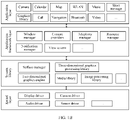
- FIG. 1B is a block diagram of a software structure of the electronic device 100 in this embodiment of this application.
- software is divided into several layers, and each layer has a clear role and task.
- the layers communicate with each other over a software interface.
- an Android system is divided into four layers that are respectively an application layer, an application framework layer, an Android runtime (Android runtime) and system library, and a kernel layer from top to bottom.
- the application layer may include a series of application packages. For detailed description of a software function, refer to the previous patent application CN201910430270.9 .
- an embodiment of the present invention provides a video collection control method, applied to an electronic device.
- the electronic device is an electronic device including no pan-tilt-zoom, so that a camera of the electronic device cannot rotate.
- the method includes the following steps.
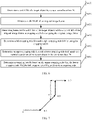
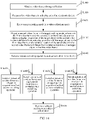
- S200 Display a first video frame, where the first video frame includes a first target object; the first target object is located in a non-specified region in the first video frame; and when the first video frame is collected, the first target object is in a first geographical location.
- S210 Display a second video frame in response to an operation of detecting entry into a target tracking mode, where the second video frame includes the first target object; the first target object is located in a specified region in the second video frame; and when the second video frame is collected, the first target object is in the first geographical location.
- S220 Display a third video frame, where the third video frame includes the first target object; the first target object is located in a specified region in the third video frame; and when the third video frame is collected, the first target object is in a second geographical location, and a distance between the second geographical location and the first geographical location is greater than a preset distance.
- an original video frame needs to be obtained through collection, and an output video frame is obtained based on the original video frame obtained through collection.
- the original video frame is directly output, or the output video frame is obtained after various processing is performed on the original video frame.
- a user may obtain, through collection, the original video frame by performing a video collection operation on a camera APP (Application, application). For example, the user first opens the camera APP, and then taps a video collection button (the operation of tapping the video collection button is the video collection operation). After detecting the operation performed on the video collection button, the electronic device controls a camera to perform video collection to obtain the original video frame through collection.
- a camera APP Application, application
- the electronic device may alternatively obtain the original video frame through collection in a video chat process of the user. For example, if the user wants to perform video communication with a peer user by using an instant messaging APP, the user may enable instant messaging software (for example, WeChat or QQ), enter a chat interface of the contact, and then tap a "video communication" button. After detecting the operation of tapping the "video communication” button, the electronic device enables a function of video communication with the contact, and then enables the camera to obtain the original video frame through collection.
- instant messaging software for example, WeChat or QQ
- a communication function of the electronic device includes a MeeTime function (the MeeTime function refers to a video communication function).
- the MeeTime function refers to a video communication function.
- a main interface of the system call application is displayed.
- the main interface of the system call application includes a telephone control 31, a contact control 32, a favorites control 33, and a MeeTime control 30.
- the telephone control 31 is configured to trigger the electronic device to display a recent call record, including all calls and missed calls.
- the contact control 32 is configured to trigger the electronic device to display all contact information of the call application.
- the personal favorites control 33 is configured to trigger the electronic device to add some contacts to personal favorites. By adding the contact to the personal favorites, quick communication may be performed with the contact, for example, quickly sending a short message or quickly making a call.
- the MeeTime control 30 is configured to trigger the electronic device to enable the video communication function.
- the original video frame may be a video frame collected by using a front-facing camera or a rear-facing camera of the electronic device.
- the original video frame may be a video frame collected by another video collection device communicating with the electronic device. For example, if a data transmission channel exists between the electronic device and a security protection camera at home, the electronic device may obtain a video frame collected by the security protection camera; or if a data transmission channel exists between the electronic device and an unmanned aerial vehicle, the electronic device may obtain a video frame collected by the unmanned aerial vehicle.
- a video stream collected by the another video collection device may be registered as a virtual camera of the system. In a video call process, that the instant messaging software invokes the video frame collected by the virtual camera is considered as a video communication process.
- step S200 after the original video frame is obtained through collection, the original video frame may be directly output, and in this case, the original video frame is the first video frame.
- image processing for example, beautification or cropping
- a processed video frame (the processed video frame is the first video frame, and so on) is output.
- the first physical location may be any location, and may be represented by parameters such as a longitude, a dimension, and an altitude.
- the first target object may include one or at least two target objects.
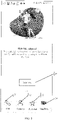
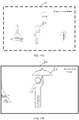
- the non-specified region is another region other than a specified region 43 in the first video frame.
- the specified region 43 is a center region, a golden ratio region, or any other region specified by the user of the electronic device.
- the specified region 43 in FIG. 2 is a center region.
- the target object is located in the specified region 43, for example, a center point of the target object is located in the specified region 43.
- the target object is located in the non-specified region, for example, a center point of the target object is located in the non-specified region.
- the output video frame may be obtained by cropping the collected original video frame, for example, the second video frame, the third video frame, and the like are obtained by cropping the original video frame.
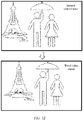
- a geographical location of the first target object does not change in the second video frame, and is still in the first geographical location.
- the first target object is located in a center region (that is, the specified region 43) in the second video frame.
- the original image frame may be cropped by using the first target object as a reference, to obtain the second video frame. How to crop the original image frame by using the first target object as a reference is specifically described subsequently.
- a display size of the first target object in the second video frame is greater than a display size of the first target object in the first video frame.
- the display size of the first target object in the first video frame is 0.5 times or 0.6 times the display size of the first target object in the second video frame.
- a proportion of the display size of the first target object in the first video frame and a proportion of the display size of the first target object in the second video frame vary based on different widths of the first target object in the first video frame.
- step S210 after the target tracking mode is entered, the first target object needs to be first determined, so as to track the first target object in a subsequent video frame.
- the first target object may be determined in a plurality of manners, and two of the manners are listed below for description. Certainly, there are not only the following two cases in a specific implementation process.
- a target object in a video frame may be a target object automatically determined by the electronic device, or may be a target object determined based on a user operation.
- the two cases are separately described below. Certainly, there are not only the following two cases in a specific implementation process.
- the target object is automatically determined by the electronic device.
- the electronic device automatically determines the target object in the video frame based on a preset condition of the target object.
- the preset condition is: all persons in the video frame, an animal in the video frame, or another active object in the video frame.
- the preset condition is a person in the video frame. All the persons included in the video frame may be recognized based on a human body detection technology, and then all the persons are determined as target objects.
- the preset condition is: a person (or an animal, another active object, or the like) that meets a tracking condition in the video frame, or a person meeting a tracking condition that a distance from a left edge an original video frame (that is, a video frame that is collected by the camera and whose size is not processed) is greater than a first preset distance and a distance from a right edge of the original video frame is greater than a second preset distance.
- the first preset distance may be the same as or different from the second preset distance.
- the first preset distance or the second preset distance is 150 pixels or 200 pixels; or the first preset distance or the second preset distance is 0.1 times or 0.2 times an image width.
- a tracked target object is a person relatively located in the middle in a field of view of the camera.
- a met tracking condition is that an area in the original video frame is greater than a preset area.
- the preset area is 10,000 pixels or 20,000 pixels.
- a person (an animal or another active object) that is not completely collected in the original video frame or a person (or an animal or another active object) that is less prominent at an edge of the original video frame is not a tracked target object, so that video tracking is more specific.
- the target object is determined based on a user operation.
- the user operation may also be an operation of triggering entry into the subject tracking mode. For example, after the electronic device enters a video collection mode, and does not enter the subject tracking mode by default or detect another operation of entering the subject tracking mode, after detecting a user operation used to acknowledge the target object, in response to the user operation, the electronic device not only enters the subject tracking mode, but also determines the target object.
- the electronic device when detecting a user operation used to determine the target object, the electronic device first determines whether the electronic device enters the subject tracking mode in a video collection process. If the electronic device enters the subject tracking mode in the video collection process, the electronic device determines the target object based on the user operation, and then performs subject tracking by using the target object as a center. If the electronic device does not enter the subject tracking mode in the video collection process, the electronic device makes no response to the user operation.
- step S220 because the electronic device receives no operation of exiting the target tracking mode, the electronic device still processes the target tracking mode.
- the target tracking mode a video frame displayed by the electronic device moves with movement of the first target object, so as to keep the first target object located in the specified location 43 in the video frame.
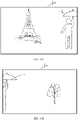
- FIG. 2 it may be learned from FIG. 2 that in the third video frame, the first target object is far away from a tower and moves towards a tree. Therefore, there is a relatively large difference between a picture of the output third video frame and that of the output second video frame, but the first target object is still in the specified region 43 in the video frame.
- an embodiment of the present invention provides a video collection method, and the method includes the following steps.
- a user may obtain, through collection, the video frame by performing a video collection operation on a camera APP (Application, application). For example, the user first opens the camera APP, and then taps a video collection button (the operation of tapping the video collection button is the video collection operation). After detecting the operation performed on the video collection button, an electronic device controls a camera to obtain the video frame through collection.
- a camera APP Application, application
- the user first opens the camera APP, and then taps a video collection button (the operation of tapping the video collection button is the video collection operation).
- an electronic device controls a camera to obtain the video frame through collection.
- the electronic device may alternatively obtain the video frame through collection in a video chat process of the user. For example, if the user wants to perform video communication with a peer user by using an instant messaging APP, the user may enable instant messaging software (for example, WeChat or QQ), enter a chat interface of the contact, and then tap a "video communication" button. After detecting the operation of tapping the "video communication” button, the electronic device enables a function of video communication with the contact, and then enables a camera to obtain the video frame through collection.
- instant messaging software for example, WeChat or QQ
- a communication function of the electronic device includes a MeeTime function (the MeeTime function refers to a video communication function).
- the MeeTime function refers to a video communication function.
- a main interface of the system call application is displayed.
- the main interface of the system call application includes a telephone control 31, a contact control 32, a favorites control 33, and a MeeTime control 30.
- the telephone control 31 is configured to trigger the electronic device to display a recent call record, including all calls and missed calls.
- the contact control 32 is configured to trigger the electronic device to display all contact information of the call application.
- the personal favorites control 33 is configured to trigger the electronic device to add some contacts to personal favorites. By adding the contact to the personal favorites, quick communication may be performed with the contact, for example, quickly sending a short message or quickly making a call.
- the MeeTime control 30 is configured to trigger the electronic device to enable the video communication function.
- the video frame may be a video frame collected by using a front-facing camera or a rear-facing camera of the electronic device, or may be a video frame collected by another video collection device communicating with the electronic device.
- the electronic device may obtain a video frame collected by the security protection camera; or if a data transmission channel exists between the electronic device and an unmanned aerial vehicle, the electronic device may obtain a video frame collected by the unmanned aerial vehicle.
- a video stream collected by the another video collection device may be registered as a virtual camera of the system. In a video call process, that the instant messaging software invokes the video frame collected by the virtual camera is considered as a video communication process.
- S310 Output a first video frame in a display unit of an electronic device.
- FIG. 5A is a schematic diagram of the first video frame that is output by the electronic device, and 40 is an outer box border of the output video frame. If this solution is applied to a video collection process, outputting the first video frame is, for example, outputting the first video frame in a video preview interface of the display unit so that a user previews the first video frame. If this solution is applied to a video communication process, outputting the first video frame is, for example, transmitting the first video frame to a peer electronic device, and displaying the first video frame in a video communications interface.
- a spotlight mode may be set in the video collection process, and a spotlight effect may be set for a specific object in the spotlight mode, that is, highlighting the specific object, for example, setting the spotlight effect (setting a highlight) for the specific object, controlling color display of the specific object, displaying content other than the specific object in black and white, displaying content other than the specific object in a blurring manner, or adding a special effect to the specific object.
- the specific object may be determined in a plurality of manners, and two of the manners are listed below for description. Certainly, there are not only the following two cases in a specific implementation process.
- the specific object is determined by performing a selection operation on the specific object in the video frame.
- the selection operation is a tap operation or a slide operation.
- a user may select one specific object, or may select a plurality of specific objects.
- the user may select a plurality of specific objects by using a plurality of selection operations, or the user may select a plurality of specific objects by using one operation.
- the user simultaneously selects two specific objects by using two fingers with each finger corresponding to one target.
- a sound source is located by using a microphone of the electronic device, and a person in a region in which the sound source is located is determined as the specific object.
- this solution may be applied to a multi-person discussion scenario or a multi-person singing scenario.
- the video frame includes a person A 40, a person B 41, a person C 42, and a person D 43.
- the five persons discuss a problem.
- the person B 41 speaks.
- the spotlight effect is added to the person B 41.
- the person D 43 speaks.
- the person D 43 is determined as the specific object
- the spotlight effect is added to the person D 43
- the spotlight effect of the person B is canceled, and so on.
- a current speaker can be determined by locating the specific object.
- all persons included in the video frame are determined by using a human body recognition technology, and a person in the middle is determined as the specific object.
- the video frame includes a person A, a person B, a person C, a person D, and a person E.
- the electronic device determines that the person C is in the middle, and therefore determines the person C as the specific object.
- a voice instruction of a user is received, and the specific object is determined by using the voice instruction.
- a user of the electronic device says “setting a spotlight effect for a person in the middle”, and in this case, it is determined that the specific object is the person in the middle (for example, a person C).
- a user of the electronic device says “setting a spotlight effect for a highest person”, and in this case, it is determined that the specific object is the highest person in the video frame.
- gesture recognition is performed on a person collected in the video frame, and a person using a preset gesture is determined as the specific object.
- the preset gesture is raising a hand, swinging a hand, or the like.
- an operation of entering the spotlight mode may be first detected and then the specific object is determined, or the specific object may be first determined and then an operation of entering the spotlight mode is detected, so as to generate the spotlight effect for the specific object. This is not listed in detail and not limited in this embodiment of the present invention.
- S320 Enter a subject tracking mode in a video collection mode.
- a picture of a video frame that is output in the subject tracking mode moves with movement of a target object, so that the target object is at a center location of the picture of the video frame, or the target object is at a golden ratio location of the video frame, a location specified by a user, or the like.
- the target object may be a person, an animal, another moving object (for example, a kite, a car, or a robot cleaner), or the like.
- the electronic device may enter the subject tracking mode in response to a preset operation.
- the preset operation is an operation of tapping a preset button displayed by the display unit, an operation of selecting a specific person in the video frame, or an operation of generating a preset gesture by a person in the video frame.
- the electronic device may enter the subject tracking mode by default.
- S330 Output a second video frame in the subject tracking mode, where both the first video frame and the second video frame include a target object, a display proportion of the target object in the second video frame is different from a display proportion of the target object in the first video frame, and a relative location of the target object in the second video frame is different from a relative location of the target object in the first video frame.
- the display proportion of the target object in the second video frame is greater than the display proportion of the target object in the first video frame.
- a width of the target object in the second video frame occupies more than 50% of a total picture width
- a width of the target object in the first video frame occupies 20% of the total picture width
- a height of the target object in the second video frame occupies more than 50% of a total picture height
- a height of the target object in the first video frame occupies 30% of the total picture height.
- the proportions of the width and the height are merely used as examples and are not limited.
- the relative location of the target object in the second video frame is different from a relative location of the target object in the first video frame.
- a second ratio corresponding to the second video frame is different from a first ratio corresponding to the first video frame
- the second ratio is a ratio of a distance between a left box border 50a of the target object in the second video frame and a left box border of the second video frame to a width of the second video frame
- the first ratio is a ratio of a distance between a left box border 50a of the target object in the first video frame and a left box border 50a of the first video frame to a width of the first video frame.
- the second ratio is a ratio of a distance between a right box border 50b of the target object in the second video frame and a right box border of the second video frame to a width of the second video frame
- the first ratio is a ratio of a distance between a right box border 50b of the target object in the first video frame and a right box border of the first video frame to a width of the first video frame.
- the spotlight mode may be further maintained, but a specific object having the spotlight effect is adjusted, for example, the specific object is adjusted to a target object in the subject tracking mode.
- the spotlight mode and the subject tracking mode are a plurality of parallel modes. After it is detected that the subject tracking mode is entered, the spotlight mode is exited.
- the spotlight mode may still be entered after S330 without exiting the subject tracking mode. This is not listed in detail and not limited in this embodiment of the present invention.
- smoothing processing may be performed between the first video frame and the second video frame.
- a plurality of transition video frames further exist between the first video frame and the second video frame.
- the target object may be a person, an animal, another moving object (for example, an unmanned aerial vehicle, a toy car, or a balloon), or the like in the video frame.
- FIG. 5A is used as an example.
- target objects included in the first video frame are a person 41 and a person 42
- the output second video frame is, for example, shown in FIG. 5B . It may be learned from FIG.
- a display region of the target object (the person 41 and the person 42) in the video frame is enlarged, and a relative location of the target object in the video frame changes.
- the target object In the first video frame, the target object is located in a left part of a picture, and in the second video frame, the target object is located in a middle part of the picture.
- a target object in a video frame may be a target object automatically determined by the electronic device, or may be a target object determined based on a user operation. This is described above, and details are not described herein again.
- the output second video frame may be obtained by cropping an original video frame.
- the target object is a person.
- a coordinate box 50 of a human body may be first determined by using a human body detection model, and then a cropping box 81 for cropping the video frame is determined by using the coordinate box 50.
- the coordinate box 50 may be represented by coordinates of each point in the coordinate box 50, may be represented by coordinates in an upper left corner plus coordinates in a lower right corner, may be represented by coordinates in a lower left corner plus coordinates in an upper right corner, and so on.
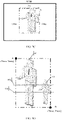
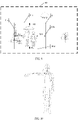
- FIG. 5C is a schematic diagram of a determined coordinate box 50 when there is one target object, and FIG.
- 5D is a schematic diagram of a determined coordinate box 50 when the target object is two persons (a case of a plurality of persons is similar to this). Coordinate boxes 50 of all persons in the original video frame may be first determined based on a human body detection technology, and then the coordinate boxes 50 of all the persons are combined to obtain the coordinate box 50 of the target object.
- the coordinate box 50 is represented by coordinates (Xmin, Ymin) in an upper left corner and coordinates (Xmax, Ymax) in a lower right corner.
- Xmin represents a minimum value on an X-axis
- Ymin represents a minimum value on a Y-axis
- Xmax represents a maximum value on the X-axis
- Ymax represents a maximum value on the Y-axis
- an upper left corner of the video frame is an origin.
- the target object When the coordinate box 50 of the target object is determined, only the target object may be considered without considering another thing attached to the target object, for example, a held umbrella, a hat that is worn, or a bicycle that is rode. However, to consider picture integrity, another thing attached to the target object may be further considered when the target object is determined.
- the cropping box 81 may be determined in a plurality of manners, and several of the manners are listed below for description. Certainly, there are not only the following several cases in a specific implementation process.
- the cropping box 81 for cropping the original video frame may be determined in the following manner.
- the width ⁇ W of the target object may be obtained by subtracting Xmin from Xmax.
- S620 Determine, based on the width ⁇ W of the target object and the width Width of the original image frame, a cropping width for cropping the original image frame.
- the cropping width may be determined by using a ratio of the width ⁇ W of the target object to the width Width of the image. For example, referring to FIG. 7 , when ⁇ W/Width is less than or equal to a first preset ratio, the cropping width is the first preset ratio multiplied by the width of the original image frame. When ⁇ W/Width is greater than the first preset ratio and less than or equal to a second preset ratio, the cropping width is the width ⁇ W of the target object. When ⁇ W/Width is greater than the second preset ratio, the cropping width is Width. For example, the first preset ratio is 0.3 or 0.5, and the second preset ratio is 0.6 or 0.8. Certainly, the first preset ratio may be another value. This is not listed in detail and not limited in this embodiment of the present invention.
- the first preset ratio is 0.5 and the second preset ratio is 0.8.
- the cropping width is 0.5 times the width of the original image frame.
- the cropping width is ⁇ W.
- the cropping width is the width of the original image frame.
- the original image frame is shown in FIG. 8A .
- 80 represents an outer box border of the original video frame
- 50 represents the coordinate box of the target object
- the coordinate box 50 includes a left box border 50a, a right box border 50b, an upper box border 50c, and a lower box border 50d. Because ⁇ W/Width is less than 0.5, it is determined that the cropping width is 0.5 times the width Width of the original video frame.
- the X center point refers to a coordinate of the center point in an X-axis direction
- the Y center point refers to a coordinate of the center point in a Y-axis direction. Only the X center point may be determined, or both the X center point and the Y center point may be determined.
- the center point is extended leftwards by a first preset width W1, and a straight line perpendicular to the X-axis direction is made to determine the left cropping side 81a.
- the center point is extended rightwards by a second preset width W2, and a straight line perpendicular to the X-axis direction is made to obtain the right cropping side 81b.
- a sum of the first preset width W1 and the second preset width W2 is the cropping width, for example, the sum of the first preset width W1 and the second preset width W2 is 0.5 multiplied by Width.
- the first preset width W1 may be equal to the second preset width W2, and both the first preset width W1 and the second preset width W2 are 1/2 of the cropping width, for example, 1/4 ⁇ Width.
- the first preset width W1 may be unequal to the second preset width W2. This is not limited in this embodiment of the present invention.
- the cropping width is equal to ⁇ W.
- the left box border 50a of the coordinate box 50 may be used as the left cropping side 81a
- the right box border 50b of the coordinate box 50 may be used as the right cropping side 81b.
- the cropping width is Width.
- a left box border of the original video frame is the left cropping side 81a
- a right box border of the original video frame is the right cropping side 81b.
- the upper box border 50c may be used as the upper cropping side 81c after being moved upwards by a first preset height H1 (in a specific implementation process, the upper box border 50c may be directly used as the upper cropping side 81c).
- the upper cropping side 81c is used as the lower cropping side 81d after being extended downwards by a second preset height H2.
- the first preset height H1 is 0.05 times or 0.01 times (or which certainly may be another value) a height of the original image frame
- the second preset height H2 is 0.5 times or 0.6 times (or which certainly may be another value) the height of the original image frame, (as shown in FIG. 8A to FIG. 8C ).
- the lower box border 50d may be directly used as the lower cropping side 81d.
- the lower box border 50d may be used as the lower cropping side 81d after being extended downwards by a specific distance.
- the upper cropping side 81c may be determined by extending the center point 82 upwards by a preset height
- the lower cropping side 81d may be determined by extending the center point 82 downwards by a preset height (a manner of determining the upper cropping side 81c and the lower cropping side 81d is similar to a manner of determining the left cropping side 81a and the right cropping side 81b, and details are not described herein again).
- a cropping height may be determined based on a proportion of the width of the original video frame that is occupied by the cropping width, and the upper cropping side 81c and the lower cropping side 81d are determined based on the cropping height.
- a manner of determining the upper cropping side 81c and the lower cropping side 81d is similar to a manner of determining the left cropping side 81a and the right cropping side 81b based on the cropping width, and details are not described herein again.
- ⁇ W may be different due to different distances between the target object and a camera (the electronic device). As a result, the picture of the second video frame also occupies different proportions of the first video frame.
- ⁇ W may be different due to different distances between the target object and a camera and different distances between the two persons. As a result, the picture of the second video frame also occupies different proportions of the first video frame.
- the center point 82 of the target object may be jointly determined by selecting a previous preset frame and a subsequent preset frame of a current frame. For example, a center point of each of the current frame, the previous preset frame (for example, 10 frames or 15 frames), and the subsequent preset frame (for example, 15 frames or 20 frames) is determined, and then an average value of the center points of all the frames are calculated to obtain the center point 82 of the current frame.
- the left box border 50a is moved leftwards by a third preset width W3 to obtain a left cropping side 81a (in a specific implementation process, the left box border 50a may be directly used as the left cropping side 81a).
- the right box border 50b is moved rightwards by a fourth preset width W4 to obtain a right cropping side 81b (in a specific implementation process, the right box border 50b may be directly used as the right cropping side 81b).
- the upper box border 50c is used as an upper cropping side 81c after being moved upwards by a third preset height H3 (in a specific implementation process, the upper box border 50c may be used as the upper cropping side 81c).
- the lower box border 50d is used as a lower cropping side 81d (in a specific implementation process, the lower box border 50d may be moved downwards by a fourth preset height H4 to obtain the lower cropping side 81d).
- the cropping box 81 for cropping the original video frame is determined by using the upper cropping side 81c, the lower cropping side 81d, the left cropping side 81a, and the right cropping side 81b.
- the third preset width W3, the fourth preset width W4, the third preset height H3, and the fourth preset height H4 may be completely the same, partially the same, or completely different.
- the width and the height each are 100 pixels, 200 pixels, or 300 pixels, each are 0.1 times or 0.2 times the width of the original video frame, or each are 0.05 times or 0.15 times the height of the original video frame.
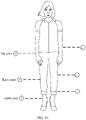
- a lower cropping side 81d may be determined in the following manner: A preset joint point closest to the lower box border 50d is determined, and a cropping location corresponding to the preset joint point is used as the lower cropping side 81d.
- the preset joint point is an ankle joint, a knee joint, or a hip joint.
- a joint point of a person may be determined by using a key point detection algorithm.
- the key point recognition technology is a Pictorial Structure algorithm, a top-down key point detection algorithm, or a bottom-up key human body point detection algorithm. The determined joint point is shown in FIG. 10 .
- the cropping location is usually obtained by moving the preset joint point upwards by a preset distance.
- the preset distance is: (1) a fixed value, such as 30 pixels or 40 pixels; (2) a specific proportion of a total human body height, such as 1/20 or 1/30 of the total human body height; (3) a specific proportion of a total video frame height, such as 1/40 or 1/50; or (4) a specific proportion of a distance between a current joint point and a previous specific joint point, such as 1/3 or 1/4.
- a fixed value such as 30 pixels or 40 pixels
- a specific proportion of a total human body height such as 1/20 or 1/30 of the total human body height
- a specific proportion of a total video frame height such as 1/40 or 1/50
- (4) a specific proportion of a distance between a current joint point and a previous specific joint point such as 1/3 or 1/4.
- the previous specific joint point is, for example, a knee joint; if the current joint point is a knee joint, the previous specific joint point is, for example, a hip joint; or if the current joint point is a hip joint, the previous specific joint point is, for example, an elbow joint, and so on.
- a lower cropping side 81d may be determined in the following manner:
- the cropping box 81 is determined based on a historical operation record of a user for a video (and/or an image).
- a cropping box that a user mostly likes to use is determined based on a historical collection record or a historical cropping record of the user for a video (and/or an image), for example, a distance between the target object in the cropping box and each box border of the video frame.
- the cropping box 81 may be further adjusted.
- a plurality of adjustment manners may be used, and several of the manners are listed below for description. Certainly, there are not only the following several cases in a specific implementation process.
- a preset joint point closest to the lower cropping side 81d is determined, a cropping location corresponding to the preset joint point is determined, and the lower cropping side 81d is moved to the cropping location.
- the preset joint point is an ankle joint, a knee joint, or a hip joint.
- Ajoint point of a person may be determined by using a key point detection algorithm.
- the key point recognition technology is a Pictorial Structure algorithm, a top-down key point detection algorithm, or a bottom-up key human body point detection algorithm.
- the determined joint point is shown in FIG. 9 (which is specific to the first and second manners of determining the cropping box 81).
- the cropping location is usually obtained by moving the preset joint point upwards by a preset distance.
- the preset distance is: (1) a fixed value, such as 30 pixels or 40 pixels; (2) a specific proportion of a total human body height, such as 1/20 or 1/30 of the total human body height; (3) a specific proportion of a total video frame height, such as 1/40 or 1/50; or (4) a specific proportion of a distance between a current joint point and a previous specific joint point, such as 1/3 or 1/4.
- a fixed value such as 30 pixels or 40 pixels
- a specific proportion of a total human body height such as 1/20 or 1/30 of the total human body height
- a specific proportion of a total video frame height such as 1/40 or 1/50
- (4) a specific proportion of a distance between a current joint point and a previous specific joint point such as 1/3 or 1/4.
- the previous specific joint point is, for example, a knee joint; if the current joint point is a knee joint, the previous specific joint point is, for example, a hip joint; or if the current joint point is a hip joint, the previous specific joint point is, for example, an elbow joint, and so on.
- an image cut-off location is determined based on historical operation data of a user for a video (and/or an image), and the lower cropping side 81d is adjusted based on the image cut-off location.
- the historical operation data may include historical video (image) collection data, historical video (image) operation data, and the like.
- an image may be pre-divided into a plurality of human body cut-off regions based on a joint point of a human body, appearance duration of each image cut-off region in a video frame historically collected by a user is determined, a favorite image cut-off region (an image cut-off region with longest appearance duration) of the user is determined based on the appearance duration of each image cut-off region, and the lower cropping side 81d is adjusted based on the image cut-off region.
- a collected video may be split into a plurality of frames of images, and then an image cut-off region of each image is determined in combination with another image collected in the electronic device, an image cut-off region appearing a maximum quantity of times is determined, and the lower cropping side 81d is adjusted based on the image cut-off region.
- a video cropped by a user may be split into a plurality of frames of images, and then an image cut-off region of each image is determined in combination with another image in the electronic device that is cropped by the user, an image cut-off region appearing a maximum quantity of times is determined, and the lower cropping side 81d is adjusted based on the image cut-off region.
- a plurality of manners may be used when the lower cropping side 81d is adjusted based on the image cut-off region, and two of the manners are listed below for description. Certainly, there are not only the following two cases in a specific implementation process.
- a correspondence between the image cut-off region and the lower cropping side 81d may be preset, for example, as shown in Table 1.
- the lower cropping side 81d may be determined whether the lower cropping side 81d is located in the image cut-off region. If the lower cropping side 81d is located in the image cut-off region, a lower cut-off box border does not need to be adjusted. If the lower cropping side 81d is not located in the image cut-off region, the lower cut-off box border may be adjusted to the image cut-off region.
- a quantity of target objects in the video frame may be first determined before the lower cropping side 81d is adjusted based on the image cut-off region. Only when the quantity of target objects is not greater than a preset threshold (such as 1 or 2), the lower cropping side 81d is adjusted by using the image cut-off region. If the quantity of target objects is greater than the preset threshold, the lower cropping side 81d does not need to be adjusted by using the image cut-off region. Based on this solution, when there is an excessively large quantity of targets, it can be avoided that excessive content in some target objects is cropped when the lower cropping side 81d is determined by using this solution.
- a preset threshold such as 1 or 2
- a motion amount of a current video frame relative to a previous frame may be further determined before the lower cropping side 81d is adjusted based on the image cut-off region.
- the motion amount is less than a preset motion amount
- the lower cropping side 81d is adjusted by using the image cut-off region. If the motion amount is not less than the preset motion amount, the lower cropping side 81d is not cropped by using the image cut-off region point.
- the preset motion amount is as follows: A motion amount on a horizontal coordinate is less than a preset proportion of a video frame width (such as 0.02 or 0.025), and a motion amount on a vertical coordinate is less than a preset proportion of a video frame height (such as 0.025 or 0.03). Based on this solution, a large-scale motion of a target object in a video frame and an unsmooth video transition that may be caused by adjustment of the lower cropping side 81d based on the image cut-off region can be prevented.
- an aspect ratio of the cropping box 81 meets a preset ratio (for example, 16:9 or 4:3).
- the cropping box 81 may be further adjusted, so that the aspect ratio of the cropping box 81 meets the preset ratio. For example, if the aspect ratio is less than the preset ratio, the aspect ratio may be made to meet the preset ratio by increasing a width; or if the aspect ratio is greater than the preset ratio, the aspect ratio may be made to meet the preset ratio by increasing a height.
- the cropping box 81 may be adjusted in another manner, so that the aspect ratio meets the preset threshold.
- the electronic device may obtain an aspect ratio of a display screen (or a video display region) of a peer electronic device, and determine the preset ratio based on the aspect ratio.
- the method further includes the following: A center line of each target object is determined, and then it is determined whether the lower cropping side 81d is located below the center lines of all the target objects. If the lower cropping side 81d is not located below the center lines of all the target objects, the lower cropping side 81d is moved downwards until the lower cropping side 81d is located below the center lines of all the target objects.
- the center line is a line that is made in parallel to an X-axis by using a midpoint of a vertical coordinate of each target object as a reference, or a line that is made in parallel to an X-axis by using a hip joint of each target object as a reference.
- the figure includes two target objects that are respectively a target object 60 and a target object 61, a center line of the target object 60 is 60a, and a center line of the target object is 61a.
- the determined lower cropping side 81d should be located below the center line 61a of the target object 61.
- the method when the lower cropping side is adjusted based on a center line of each target object, the method further includes the following: A relative distance between a first preset key point of a first target object and the first preset key point of a second target object is determined. It is determined whether the relative distance is greater than a preset threshold. If the relative distance is greater than the preset threshold, the first center line and the second center line are determined.
- the first preset key point is a head or a neck of a target object.
- the first preset key point of the first target object is a head of the first target object
- the first preset key point of the second target object is a neck of the second target object.
- the preset threshold is: (1) a fixed value, such as 30 pixels, 40 pixels, or 50 pixels; (2) a preset proportion of a total height of the first target object or the second target object, such as 1/4 or 1/5; or (3) a preset proportion of a pre-cropping box, such as 1/4 or 1/6.
- a center line of a first pre-cropping box is located below a center line of a first target object. If the center line of the first pre-cropping box is not located below the center line of the first target object, an upper cropping side of the first pre-cropping box is moved upwards by a second preset distance, and a lower cropping side of the first pre-cropping box is moved downwards by a third preset distance, to obtain the first cropping box.
- a finally output video frame is content in the first cropping box.
- the second preset distance may be the same as or different from the third preset distance.
- the distance is: (1) a fixed value, such as 30 pixels or 40 pixels; (2) a specific proportion of a total human body height, such as 1/20 or 1/30 of the total human body height; (3) a specific proportion of a total video frame height, such as 1/40 or 1/50; or (4) a specific proportion of the first pre-cropping box, such as 1/3 or 1/4.
- a tracked target object may be further re-selected or switched, and several switching manners are listed below for description.
- the user operation is a tap operation or a voice instruction of a user of the electronic device, or a preset gesture or a voice instruction of a user in the video frame.
- the first object can be determined as the target object, and another target object can be canceled (as shown in case (1)).
- Case (1) is continuously described.
- the person 41 is determined as the target object based on the tap operation of the user, and the person 42 is canceled to be the target object.
- the person 41 generates the tracking operation (for example, raising a hand or making a finger heart)
- the default subject tracking mode is restored, and both the person 41 and the person 42 are determined as target objects.
- duration of an interval at which it is detected again that the first object generates the tracking operation is greater than preset duration (for example, one second or two seconds)
- preset duration for example, one second or two seconds
- the person 41 is not the target object determined by the user operation. If the electronic device detects the tracking operation (for example, raising a hand or making a finger heart) of the person 41 in the video frame, the electronic device determines the person 41 as the target object, and crops current and subsequent original video frames by using the person 41 as a reference (for example, a center or a golden ratio), so that an output video frame is a video frame that is output by using the person 41 as a reference.
- a reference for example, a center or a golden ratio
- the electronic device After the electronic device finds that an interval between a time of the current operation and that of the previous operation is only 0.3 seconds after detecting the tacking operation of the person 41 again, the electronic device determines that the current operation is an invalid operation, and still crops the original video frame by using the person 41 as a center. Subsequently, if the electronic device detects the tracking operation of the person 41 again, and finds that an interval between a time of the current operation and that of the previous operation is seven seconds, the electronic device determines that the current operation is a valid operation, uses the person 41 and the person 42 as target objects together, and restores the default subject tracking mode.
- an operation that triggers the first object to be used as the target object is the tracking operation
- the tracking operation when the tracking operation is detected again, it is first determined whether the tracking operation is a valid operation. If the tracking operation is a valid operation, a default subject tracking mode is restored; or if the tracking operation is an invalid operation, the first object is remained as the target object.
- the person 42 is used as an example. If the electronic device detects an operation of tapping the person 42 in a touch display unit, the electronic device controls the person 42 to be used as the target object. Subsequently, the electronic device detects that the person 42 in the original video frame generates the tracking operation. In this case, the default subject tracking mode is restored, and the person 41 and the person 42 are used as target objects. However, in an initial phase, if the electronic device detects the tracking operation of the person 42 in the original video frame, the electronic device controls the person 42 to be used as the target object, and cancels using of the person 41 as the target object.
- the electronic device first determines whether the tracking operation is a valid operation, and restores the default subject tracking mode when the tracking operation is a valid operation, or remains the person 42 as the target object if the tracking operation is an invalid operation.
- the target object is switched from the first object to the second object.
- the operation of controlling the second object to be used as the target object is an operation of tapping, in a touch display unit of the electronic device, a region in which the second object is located, or a tracking operation generated by the second object in the video frame.
- the electronic device detects an operation of tapping, in the touch display unit, a region in which the person 41 (the second object) is located. In this case, the electronic device uses the person 41 as the target object, and cancels using of the person 2 as the target object.
- the person 41 is used as a reference (for example, a center or a golden ratio) without considering a location of the person 42. Therefore, an output video frame is a video frame that uses the second object (the person 41) as a center or a golden ratio.
- the electronic device detects that the person 41 in the original video frame has a tracking operation (for example, raising a hand). In this case, the electronic device cancels using of the person 42 as the target object, and uses the person 41 as the target object.
- a tracking operation for example, raising a hand
- a default subject tracking mode is restored.
- the blank region is a region in which there is no target object, or the blank region is a region in which there is no target object or another moving object.
- the switching processes (1) to (6) are specific to a scenario in which a single target object is re-selected or switched. A plurality of target objects may also be selected or switched, and several manners are listed below for description. Certainly, there are not only the following several cases in a specific implementation process.
- the original video frame includes five people that are respectively a person A, a person B, a person C, a person D, and a person E from left to right.
- a user of the electronic device generates the following voice instruction: "tracking a first person, a third person, and a fourth person from left to right".
- the electronic device first recognizes the five persons included in the original video frame, and then determines that from left to right, the first person is the person A, the third person is the person C, and the fourth person is the person D, and therefore sets the person A, the person C, and the person D as target objects.
- the method further includes the following steps.
- a person (the target object) included in each frame may be recognized by using a human body recognition technology, and then a person included in the current original video frame is compared with a person included in the previous original video frame to determine, as the first target object, a person collected in the previous original video frame but not collected in the current original video frame.
- FIG. 13A includes two target objects that are respectively a target object 41 and a target object 42.
- the target object 42 is located at an edge of the original image frame.
- the current original image frame is shown in FIG. 13B , and the person 42 is no longer in the original image frame. Therefore, it may be determined that the person 42 is the first target object.
- the first preset duration may be represented by time, for example, two seconds or three seconds; or the first preset duration may be represented by a quantity of video frames, for example, 20 frames, 30 frames, or 40 frames.
- FIG. 13C assuming that after Is, the first target object 42 is detected again in the video frame, and cropping is performing by continuously using the first target object 42 and another target object (for example, the target object 41) as a center, and an output video frame is shown in FIG. 13D .
- the first target object does not reappear in the original video frame, crop the original video frame in the first preset duration by using an original location of the first target object and the another target object as a reference, so as to output a video frame determined based on the original location of the first target object and a location of the another target object.
- the original location of the first target object is a location 42a at which the first target object 42 last appears in the original video frame.
- the original video frame is cropped by using the original location 42a of the person 41 and the first target object 42a as a reference, and an output video frame is, for example, shown in FIG. 13E .
- an embodiment of the present invention provides a video collection method. Referring to FIG. 14 , the method includes the following steps.
- step S1410 Output a first video frame in a display unit of an electronic device. This step is similar to step S310, and details are not described herein again.
- S1430 Output a second video frame in the subject tracking mode, where both the first video frame and the second video frame include a target object, a display proportion of the target object in the second video frame is different from a display proportion of the target object in the first video frame, and a relative location of the target object in the second video frame is different from a relative location of the target object in the first video frame.
- This step is similar to S330, and details are not described herein again.
- the picture switching operation may be a plurality of different operations, and therefore there are a plurality of picture moving manners. Four of the manners are listed below for description. Certainly, there are not only the following four cases in a specific implementation process.
- a picture of a video frame is switched leftwards, and the picture may be switched by adjusting a cropping box 81.
- Two adjustment manners are listed below. Certainly, there are not only the following two cases in a specific implementation process.
- a first preset operation is an operation of pointing to the left by an arm of a person (which may be any person or may be only a target object) in a video frame, dragging a video frame rightwards in a touch display unit, or generating a voice instruction.
- a joint point of a person in the video frame may be recognized by using a key point recognition technology, and then coordinates of an elbow joint and a wrist joint of a hand are determined to determine whether the operation of pointing to the left by an arm exists.
- a difference between vertical coordinate values of the elbow joint and the wrist joint is not relatively large, and a horizontal coordinate of the elbow joint is greater than that of the wrist joint, it may be determined that the operation of pointing to the left by an arm exists.
- step S1440B in response to a second picture switching operation, a picture of a video frame is switched leftwards.
- the picture may be switched by adjusting a cropping box 81.
- Two adjustment manners are listed below. Certainly, there are not only the following two cases in a specific implementation process.
- a picture of a video frame is switched upwards.
- the third picture switching operation is an operation of performing dragging in a display unit from top to bottom, an operation of swing an arm from top to bottom, or a voice instruction.
- a manner of switching the picture upwards is similar to a manner of switching the picture leftwards or rightwards, and details are not described herein again.
- a picture of a video frame is switched downwards.
- the fourth picture switching operation is an operation of performing dragging in a display unit from bottom to up, an operation of swing an arm from bottom to top, or a voice instruction.
- a manner of switching the picture downwards is similar to a manner of switching the picture leftwards or rightwards, and details are not described herein again.
- the preset time is two seconds or three seconds. This is not limited in this embodiment of the present invention. How to crop a video frame based on the target object is described above, and details are not described herein again.
- the video collection method may further include the following step: A focus is focused on the person in response to a focus focusing operation, for example, magnifying a proportion of the person in the video frame, performing blurring processing on a background region, and adding a special effect to the person.
- a focus focusing operation for example, magnifying a proportion of the person in the video frame, performing blurring processing on a background region, and adding a special effect to the person.
- a fifth preset operation is an operation of double tapping a region in which the person is located in the video frame, or an operation of generating a specific gesture.
- the method further includes: exiting the subject tracking mode in response to a user operation, and outputting the fourth video frame.
- a display proportion of the target object in the fourth video frame is different from a display proportion of the target object in the second video frame, and the relative location of the target object in the fourth video frame is different from the relative location of the target object in the second video frame.
- the display proportion of the target object in the fourth video frame is less than the display proportion of the target object in the second video frame.
- the method further includes: outputting a fifth video frame in response to an amplification operation.
- a display size of the target object in the fifth video frame is greater than a display size of the target object in the second video frame.
- the amplification operation is a preset gesture (for example, pushing a palm outwards or opening five fingers), or a voice instruction.
- FIG. 16 is a schematic diagram of a comparison between the second video frame and the fifth video frame.
- the display size of the target object may be gradually amplified based on the amplification operation to output a plurality of video frames with an increasingly large display size of the target object. As shown in FIG. 16 , after the second video frame is output, a fifth video frame (I) is output, and then a fifth video frame (II) is output, to implement a smooth transition.
- a third embodiment of the present invention provides a video collection method. Referring to FIG. 17 , the method includes the following steps.
- the specific object may be a single specific object, or may be at least two specific objects, and the specific object may be a person, an animal, another moving object, or the like.
- the target object may be determined in a plurality of manners, and several of the manners are listed below for description. Certainly, there are not only the following several cases in a specific implementation process.
- the specific object is determined by performing a selection operation on the specific object in the video frame.
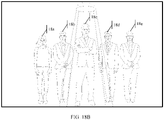
- FIG. 18A is a schematic diagram of a video frame in a video communication process.
- the video frame includes five persons that are respectively a person A 18a, a person B 18b, a person C 18c, a person D 18d, and a person E 18e. If a user of an electronic device wants to determine the person 18b as the specific object, the user generates a selection operation for the person B 18b in the video frame (for example, tapping or sliding), and the electronic device determines the person B 18b as the specific object in response to the selection operation.
- a selection operation for the person B 18b in the video frame for example, tapping or sliding
- the user may select one specific object, or may select a plurality of specific objects.
- the user may select a plurality of specific objects by using a plurality of selection operations, or the user may select a plurality of specific objects by using one operation.
- the user simultaneously selects two specific objects by using two fingers with each finger corresponding to one target.
- a sound source is located by using a microphone of the electronic device, and a person in a region in which the sound source is located is determined as the specific object.
- this solution may be applied to a multi-person discussion scenario or a multi-person singing scenario.
- the video frame still includes a person A 18a, a person B 18b, a person C 18c, a person D 18d, and a person E 18e.
- the five persons discuss a problem.
- the person B 18b speaks, and the person B 18b is determined as the specific object.
- the person D 18d speaks, and the person D 18d is determined as the specific object, and so on.
- a current speaker can be determined by locating the specific object.
- all persons included in the video frame are determined by using a person recognition technology, and a person in the middle is determined as the specific object.
- the video frame still includes the person A 18a, the person B 18b, the person C 18c, the person D 18d, and the person E 18e shown in FIG. 18A .
- the electronic device determines that the person C 18c is in the middle, and therefore determines the person C as the specific object.
- a voice instruction of a user is received, and the specific object is determined by using the voice instruction.
- a user of the electronic device says “setting a spotlight effect for a person in the middle”, and in this case, it is determined that the specific object is the person in the middle (for example, a person C 18c).
- a user of the electronic device says “setting a spotlight effect for a highest person”, and in this case, it is determined that the specific object is the highest person in the video frame.
- gesture recognition is performed on a person collected in the video frame, and a person using a preset gesture is determined as the specific object.
- the preset gesture is raising a hand or swinging a hand.
- S1720 Control the specific object to enter a spotlight mode.
- the specific object may be directly controlled to enter the spotlight mode.
- a preset operation may be received, and the electronic device controls the specific object to enter the spotlight mode in response to the preset operation, so as to highlight the specific object in the spotlight mode.
- Steps S1710 and S1720 may be implemented in a plurality of manners, and two of the manners are listed below for description. Certainly, there are not only the following two cases in a specific implementation process.
- a user of the electronic device generates a preset operation, and the preset operation is used to control video communication to enter the spotlight mode.
- the preset operation is an operation of tapping a preset button that represents the spotlight mode, an operation of generating a voice instruction of entering the spotlight mode, or an operation of generating a preset gesture.
- the electronic device After detecting the preset operation, the electronic device performs step S1610 to prompt the user of the electronic device to select the specific object or automatically determine the specific object. After the specific object is determined, the electronic device automatically performs step S1720, that is, the electronic device controls the specific object to enter the spotlight mode.
- the electronic device determines the specific object based on a user operation (step S1710).
- a specific manner of determining the specific object is described above, and details are not described herein again.
- a user of the electronic device After the specific object is determined, a user of the electronic device generates a preset operation, and the electronic device controls the specific object to enter the spotlight mode in response to the preset operation (step S1720).
- the spotlight mode is a mode in which the specific object is highlighted, and the specific object may be highlighted in a plurality of manners. For example, referring to FIG. 18B , a spotlight effect (setting a high light) is set for the specific object, color display is controlled for the specific object, content other than the specific object is displayed in black and white, or content other than the specific object is displayed in a blurring manner.
- the electronic device includes a corresponding hardware structure and/or software module for performing each of the functions.
- a person of ordinary skill in the art should easily be aware that, in combination with the examples described in the embodiments disclosed in this specification, units, algorithms, and steps may be implemented by hardware or a combination of hardware and computer software. Whether a function is performed by hardware or hardware driven by computer software depends on particular applications and design constraints of the technical solutions. A person skilled in the art may use different methods to implement the described functions for each particular application, but it should not be considered that the implementation goes beyond the scope of the embodiments of the present invention.
- each functional module may be obtained through division for a corresponding function, or two or more functions may be integrated into one processing module.
- the integrated module may be implemented in a form of hardware, or may be implemented in a form of a software functional module.
- division in to the modules is an example, and is merely a logical function division. In actual implementation, another division manner may be used. That each functional module is obtained through division based on each corresponding function is used as an example for description below.
- All or some of the foregoing methods in the embodiments of this application may be implemented by software, hardware, firmware, or any combination thereof.
- the embodiments may be implemented completely or partially in a form of a computer program product.
- the computer program product includes one or more computer instructions.
- the computer may be a general-purpose computer, a dedicated computer, a computer network, a network device, an electronic device, or other programmable apparatuses.
- the computer instructions may be stored in a computer-readable storage medium or may be transmitted from a computer-readable storage medium to another computer-readable storage medium.
- the computer instructions may be transmitted from a website, computer, server, or data center to another website, computer, server, or data center in a wired (for example, a coaxial cable, an optical fiber, or a digital subscriber line (digital subscriber line, DSL)) or wireless (for example, infrared, radio, or microwave) manner.
- the computer-readable storage medium may be any usable medium accessible by a computer, or a data storage device, such as a server or a data center, integrating one or more usable media.
- the usable medium may be a magnetic medium (for example, a floppy disk, a hard disk, or a magnetic tape), an optical medium (for example, a digital video disc (digital video disc, DVD)), a semiconductor medium (for example, an SSD), or the like.
- a magnetic medium for example, a floppy disk, a hard disk, or a magnetic tape
- an optical medium for example, a digital video disc (digital video disc, DVD)
- a semiconductor medium for example, an SSD
- the disclosed system, apparatus, and method may be implemented in other manners.
- the described apparatus embodiment is merely an example.
- the division into units is merely logical function division and may be other division in actual implementation.
- a plurality of units or components may be combined or integrated into another system, or some features may be ignored or not performed.
- the displayed or discussed mutual couplings or direct couplings or communication connections may be implemented through some interfaces.
- the indirect couplings or communication connections between the apparatuses or units may be implemented in electronic, mechanical, or other forms.
- the units described as separate parts may or may not be physically separate, and parts displayed as units may or may not be physical units, may be located in one location, or may be distributed on a plurality of network units. Some or all of the units may be selected based on actual requirements to achieve the objectives of the solutions of the embodiments.
Landscapes
- Engineering & Computer Science (AREA)
- Multimedia (AREA)
- Signal Processing (AREA)
- Theoretical Computer Science (AREA)
- Human Computer Interaction (AREA)
- Physics & Mathematics (AREA)
- General Physics & Mathematics (AREA)
- Library & Information Science (AREA)
- Computer Vision & Pattern Recognition (AREA)
- Databases & Information Systems (AREA)
- General Engineering & Computer Science (AREA)
- Data Mining & Analysis (AREA)
- Image Analysis (AREA)
- User Interface Of Digital Computer (AREA)
Applications Claiming Priority (3)
| Application Number | Priority Date | Filing Date | Title |
|---|---|---|---|
| CN201911315344 | 2019-12-19 | ||
| CN202010753515.4A CN113014793A (zh) | 2019-12-19 | 2020-07-30 | 一种视频处理方法及电子设备 |
| PCT/CN2020/137550 WO2021121374A1 (zh) | 2019-12-19 | 2020-12-18 | 一种视频处理方法及电子设备 |
Publications (3)
| Publication Number | Publication Date |
|---|---|
| EP4060979A1 true EP4060979A1 (de) | 2022-09-21 |
| EP4060979A4 EP4060979A4 (de) | 2022-12-28 |
| EP4060979B1 EP4060979B1 (de) | 2025-09-17 |
Family
ID=76383442
Family Applications (1)
| Application Number | Title | Priority Date | Filing Date |
|---|---|---|---|
| EP20901983.5A Active EP4060979B1 (de) | 2019-12-19 | 2020-12-18 | Videoverarbeitungsverfahren und elektronische vorrichtung |
Country Status (4)
| Country | Link |
|---|---|
| US (1) | US12483792B2 (de) |
| EP (1) | EP4060979B1 (de) |
| CN (1) | CN113014793A (de) |
| WO (1) | WO2021121374A1 (de) |
Cited By (2)
| Publication number | Priority date | Publication date | Assignee | Title |
|---|---|---|---|---|
| US20220108419A1 (en) * | 2015-03-09 | 2022-04-07 | Apple Inc. | Automatic cropping of video content |
| CN119152423A (zh) * | 2024-11-20 | 2024-12-17 | 杭州微帧信息科技有限公司 | 一种内容感知和追踪的方法、装置、电子设备和存储介质 |
Families Citing this family (9)
| Publication number | Priority date | Publication date | Assignee | Title |
|---|---|---|---|---|
| CN115633255B (zh) * | 2021-08-31 | 2024-03-22 | 荣耀终端有限公司 | 视频处理方法和电子设备 |
| CN114339031A (zh) * | 2021-12-06 | 2022-04-12 | 深圳市金九天视实业有限公司 | 画面调节方法、装置、设备以及存储介质 |
| WO2023225910A1 (zh) * | 2022-05-25 | 2023-11-30 | 北京小米移动软件有限公司 | 视频显示方法及装置、终端设备及计算机存储介质 |
| CN115240107B (zh) * | 2022-07-18 | 2025-09-02 | Oppo广东移动通信有限公司 | 运动对象跟踪方法及装置、计算机可读介质和电子设备 |
| CN116033260B (zh) * | 2022-08-25 | 2025-07-18 | 维沃移动通信有限公司 | 拍摄方法、装置、电子设备及存储介质 |
| CN117671776A (zh) * | 2022-08-30 | 2024-03-08 | 广州视源电子科技股份有限公司 | 学生小组讨论行为识别方法、装置、设备及存储介质 |
| CN118118734A (zh) * | 2022-11-30 | 2024-05-31 | 华为技术有限公司 | 一种视频处理的方法以及电子设备 |
| CN117714833B (zh) * | 2023-05-19 | 2024-11-26 | 荣耀终端有限公司 | 图像处理方法、装置、芯片、电子设备及介质 |
| CN119450191A (zh) * | 2023-07-31 | 2025-02-14 | 北京字跳网络技术有限公司 | 视频处理方法、装置及电子设备 |
Family Cites Families (23)
| Publication number | Priority date | Publication date | Assignee | Title |
|---|---|---|---|---|
| US8085302B2 (en) * | 2005-11-21 | 2011-12-27 | Microsoft Corporation | Combined digital and mechanical tracking of a person or object using a single video camera |
| JP4947018B2 (ja) * | 2008-09-12 | 2012-06-06 | 大日本印刷株式会社 | 顔画像の自動トリミング装置 |
| JP5523053B2 (ja) * | 2009-10-19 | 2014-06-18 | キヤノン株式会社 | 物体識別装置及び物体識別方法 |
| CN101951492A (zh) | 2010-09-15 | 2011-01-19 | 中兴通讯股份有限公司 | 视频通话中视频录制的方法及装置 |
| CN103576848B (zh) * | 2012-08-09 | 2016-07-13 | 腾讯科技(深圳)有限公司 | 手势操作方法和手势操作装置 |
| CN103607533A (zh) | 2013-12-03 | 2014-02-26 | 厦门美图移动科技有限公司 | 一种适用于零延迟快门的拍照方法及装置 |
| CN104378552B (zh) | 2014-11-26 | 2017-05-31 | 武汉大学 | 面向连续监视任务的视频卫星摄像机最优指向角控制方法 |
| US10244175B2 (en) | 2015-03-09 | 2019-03-26 | Apple Inc. | Automatic cropping of video content |
| CN106034216A (zh) * | 2015-03-10 | 2016-10-19 | 北京同步科技有限公司 | 基于图像识别的摄像机图像定位系统及其方法 |
| EP3285477B1 (de) * | 2015-04-14 | 2023-06-28 | Sony Group Corporation | Bildverarbeitungsvorrichtung, bildverarbeitungsverfahren und bildverarbeitungssystem |
| CN105979383B (zh) * | 2016-06-03 | 2019-04-30 | 北京小米移动软件有限公司 | 图像获取方法及装置 |
| WO2018152437A1 (en) | 2017-02-17 | 2018-08-23 | Vid Scale, Inc. | Systems and methods for selective object-of-interest zooming in streaming video |
| CN108366303A (zh) * | 2018-01-25 | 2018-08-03 | 努比亚技术有限公司 | 一种视频播放方法、移动终端及计算机可读存储介质 |
| CN108334099B (zh) * | 2018-01-26 | 2021-11-19 | 上海深视信息科技有限公司 | 一种高效的无人机人体跟踪方法 |
| CN109905593B (zh) * | 2018-11-06 | 2021-10-15 | 华为技术有限公司 | 一种图像处理方法和装置 |
| CN110401766B (zh) | 2019-05-22 | 2021-12-21 | 华为技术有限公司 | 一种拍摄方法及终端 |
| CN110189378B (zh) * | 2019-05-23 | 2022-03-04 | 北京奇艺世纪科技有限公司 | 一种视频处理方法、装置及电子设备 |
| CN110198428A (zh) | 2019-05-29 | 2019-09-03 | 维沃移动通信有限公司 | 一种多媒体文件生成方法及第一终端 |
| US11194995B1 (en) * | 2019-06-25 | 2021-12-07 | Amazon Technologies, Inc. | Video composition management system |
| CN110347877B (zh) * | 2019-06-27 | 2022-02-11 | 北京奇艺世纪科技有限公司 | 一种视频处理方法、装置、电子设备及存储介质 |
| CN110427833A (zh) * | 2019-07-10 | 2019-11-08 | 广州市讯码通讯科技有限公司 | 一种手势跟踪方法、系统和存储介质 |
| CN110381281B (zh) | 2019-07-17 | 2022-01-25 | 维沃移动通信有限公司 | 一种提示方法及移动终端 |
| CN110533700B (zh) * | 2019-08-30 | 2023-08-29 | 腾讯科技(深圳)有限公司 | 对象跟踪方法和装置、存储介质及电子装置 |
-
2020
- 2020-07-30 CN CN202010753515.4A patent/CN113014793A/zh active Pending
- 2020-12-18 WO PCT/CN2020/137550 patent/WO2021121374A1/zh not_active Ceased
- 2020-12-18 EP EP20901983.5A patent/EP4060979B1/de active Active
-
2022
- 2022-06-17 US US17/843,242 patent/US12483792B2/en active Active
Cited By (4)
| Publication number | Priority date | Publication date | Assignee | Title |
|---|---|---|---|---|
| US20220108419A1 (en) * | 2015-03-09 | 2022-04-07 | Apple Inc. | Automatic cropping of video content |
| US11967039B2 (en) * | 2015-03-09 | 2024-04-23 | Apple Inc. | Automatic cropping of video content |
| US12462336B2 (en) | 2015-03-09 | 2025-11-04 | Apple Inc. | Automatic cropping of video content |
| CN119152423A (zh) * | 2024-11-20 | 2024-12-17 | 杭州微帧信息科技有限公司 | 一种内容感知和追踪的方法、装置、电子设备和存储介质 |
Also Published As
| Publication number | Publication date |
|---|---|
| CN113014793A (zh) | 2021-06-22 |
| US20220321788A1 (en) | 2022-10-06 |
| EP4060979A4 (de) | 2022-12-28 |
| US12483792B2 (en) | 2025-11-25 |
| EP4060979B1 (de) | 2025-09-17 |
| WO2021121374A1 (zh) | 2021-06-24 |
Similar Documents
| Publication | Publication Date | Title |
|---|---|---|
| EP4060979B1 (de) | Videoverarbeitungsverfahren und elektronische vorrichtung | |
| US12175681B2 (en) | Image processing method and electronic device to improve an image compositing effect | |
| US12284444B2 (en) | Display apparatus and camera tracking method | |
| EP4047922B1 (de) | Objektverfolgungsverfahren und elektronische vorrichtung | |
| US9288388B2 (en) | Method and portable terminal for correcting gaze direction of user in image | |
| US12322180B2 (en) | Image shooting method and electronic device for video generation | |
| CN108255304B (zh) | 基于增强现实的视频数据处理方法、装置和存储介质 | |
| CN107786812A (zh) | 一种拍摄方法、移动终端及计算机可读存储介质 | |
| CN109743504B (zh) | 一种辅助拍照方法、移动终端和存储介质 | |
| US8942510B2 (en) | Apparatus and method for switching a display mode | |
| CN110196640A (zh) | 一种操作控制方法及终端 | |
| CN108989672B (zh) | 一种拍摄方法及移动终端 | |
| CN108881544B (zh) | 一种拍照的方法及移动终端 | |
| CN111031253B (zh) | 一种拍摄方法及电子设备 | |
| CN110049221B (zh) | 拍摄方法及移动终端 | |
| US20210232853A1 (en) | Object Recognition Method and Terminal Device | |
| EP3617851B1 (de) | Informationsverarbeitungsvorrichtung, informationsverarbeitungsverfahren und aufzeichnungsmedium | |
| WO2021036623A1 (zh) | 显示方法及电子设备 | |
| US12022190B2 (en) | Photographing method and electronic device | |
| US20220141390A1 (en) | Photographing method, device, and system, and computer-readable storage medium | |
| CN112434595B (zh) | 行为识别方法及装置、电子设备、存储介质 | |
| CN113849142B (zh) | 图像展示方法、装置、电子设备及计算机可读存储介质 | |
| EP3945717A1 (de) | Starterfassungsverfahren und elektronische vorrichtung und speichermedium | |
| CN113347356A (zh) | 拍摄方法、装置、电子设备及存储介质 | |
| CN114521016B (zh) | 输出方法、输出装置、电子设备和可读存储介质 |
Legal Events
| Date | Code | Title | Description |
|---|---|---|---|
| STAA | Information on the status of an ep patent application or granted ep patent |
Free format text: STATUS: THE INTERNATIONAL PUBLICATION HAS BEEN MADE |
|
| PUAI | Public reference made under article 153(3) epc to a published international application that has entered the european phase |
Free format text: ORIGINAL CODE: 0009012 |
|
| STAA | Information on the status of an ep patent application or granted ep patent |
Free format text: STATUS: REQUEST FOR EXAMINATION WAS MADE |
|
| 17P | Request for examination filed |
Effective date: 20220614 |
|
| AK | Designated contracting states |
Kind code of ref document: A1 Designated state(s): AL AT BE BG CH CY CZ DE DK EE ES FI FR GB GR HR HU IE IS IT LI LT LU LV MC MK MT NL NO PL PT RO RS SE SI SK SM TR |
|
| A4 | Supplementary search report drawn up and despatched |
Effective date: 20221129 |
|
| RIC1 | Information provided on ipc code assigned before grant |
Ipc: G06T 7/11 20170101ALI20221123BHEP Ipc: G06F 16/783 20190101ALI20221123BHEP Ipc: H04N 5/232 20060101AFI20221123BHEP |
|
| DAV | Request for validation of the european patent (deleted) | ||
| DAX | Request for extension of the european patent (deleted) | ||
| STAA | Information on the status of an ep patent application or granted ep patent |
Free format text: STATUS: EXAMINATION IS IN PROGRESS |
|
| 17Q | First examination report despatched |
Effective date: 20240313 |
|
| REG | Reference to a national code |
Ref country code: DE Free format text: PREVIOUS MAIN CLASS: H04N0005232000 Ipc: G06T0007246000 Ref legal event code: R079 Ref document number: 602020059150 Country of ref document: DE |
|
| GRAP | Despatch of communication of intention to grant a patent |
Free format text: ORIGINAL CODE: EPIDOSNIGR1 |
|
| STAA | Information on the status of an ep patent application or granted ep patent |
Free format text: STATUS: GRANT OF PATENT IS INTENDED |
|
| RIC1 | Information provided on ipc code assigned before grant |
Ipc: G06T 7/11 20170101ALI20250507BHEP Ipc: G06F 16/783 20190101ALI20250507BHEP Ipc: H04N 23/667 20230101ALI20250507BHEP Ipc: H04N 23/63 20230101ALI20250507BHEP Ipc: H04N 23/62 20230101ALI20250507BHEP Ipc: H04N 23/611 20230101ALI20250507BHEP Ipc: H04N 23/61 20230101ALI20250507BHEP Ipc: H04N 5/262 20060101ALI20250507BHEP Ipc: G06T 7/246 20170101AFI20250507BHEP |
|
| INTG | Intention to grant announced |
Effective date: 20250519 |
|
| GRAS | Grant fee paid |
Free format text: ORIGINAL CODE: EPIDOSNIGR3 |
|
| GRAA | (expected) grant |
Free format text: ORIGINAL CODE: 0009210 |
|
| STAA | Information on the status of an ep patent application or granted ep patent |
Free format text: STATUS: THE PATENT HAS BEEN GRANTED |
|
| AK | Designated contracting states |
Kind code of ref document: B1 Designated state(s): AL AT BE BG CH CY CZ DE DK EE ES FI FR GB GR HR HU IE IS IT LI LT LU LV MC MK MT NL NO PL PT RO RS SE SI SK SM TR |
|
| REG | Reference to a national code |
Ref country code: GB Ref legal event code: FG4D |
|
| REG | Reference to a national code |
Ref country code: CH Ref legal event code: EP |
|
| REG | Reference to a national code |
Ref country code: DE Ref legal event code: R096 Ref document number: 602020059150 Country of ref document: DE |
|
| REG | Reference to a national code |
Ref country code: IE Ref legal event code: FG4D |
|
| PGFP | Annual fee paid to national office [announced via postgrant information from national office to epo] |
Ref country code: DE Payment date: 20251104 Year of fee payment: 6 |
|
| PGFP | Annual fee paid to national office [announced via postgrant information from national office to epo] |
Ref country code: GB Payment date: 20251030 Year of fee payment: 6 |
|
| PG25 | Lapsed in a contracting state [announced via postgrant information from national office to epo] |
Ref country code: NO Free format text: LAPSE BECAUSE OF FAILURE TO SUBMIT A TRANSLATION OF THE DESCRIPTION OR TO PAY THE FEE WITHIN THE PRESCRIBED TIME-LIMIT Effective date: 20251217 |
|
| REG | Reference to a national code |
Ref country code: LT Ref legal event code: MG9D |
|
| PG25 | Lapsed in a contracting state [announced via postgrant information from national office to epo] |
Ref country code: FI Free format text: LAPSE BECAUSE OF FAILURE TO SUBMIT A TRANSLATION OF THE DESCRIPTION OR TO PAY THE FEE WITHIN THE PRESCRIBED TIME-LIMIT Effective date: 20250917 |
|
| PG25 | Lapsed in a contracting state [announced via postgrant information from national office to epo] |
Ref country code: HR Free format text: LAPSE BECAUSE OF FAILURE TO SUBMIT A TRANSLATION OF THE DESCRIPTION OR TO PAY THE FEE WITHIN THE PRESCRIBED TIME-LIMIT Effective date: 20250917 |
|
| PG25 | Lapsed in a contracting state [announced via postgrant information from national office to epo] |
Ref country code: GR Free format text: LAPSE BECAUSE OF FAILURE TO SUBMIT A TRANSLATION OF THE DESCRIPTION OR TO PAY THE FEE WITHIN THE PRESCRIBED TIME-LIMIT Effective date: 20251218 |
|
| PG25 | Lapsed in a contracting state [announced via postgrant information from national office to epo] |
Ref country code: SE Free format text: LAPSE BECAUSE OF FAILURE TO SUBMIT A TRANSLATION OF THE DESCRIPTION OR TO PAY THE FEE WITHIN THE PRESCRIBED TIME-LIMIT Effective date: 20250917 |
|
| REG | Reference to a national code |
Ref country code: NL Ref legal event code: MP Effective date: 20250917 |
|
| PG25 | Lapsed in a contracting state [announced via postgrant information from national office to epo] |
Ref country code: LV Free format text: LAPSE BECAUSE OF FAILURE TO SUBMIT A TRANSLATION OF THE DESCRIPTION OR TO PAY THE FEE WITHIN THE PRESCRIBED TIME-LIMIT Effective date: 20250917 |
|
| PG25 | Lapsed in a contracting state [announced via postgrant information from national office to epo] |
Ref country code: BG Free format text: LAPSE BECAUSE OF FAILURE TO SUBMIT A TRANSLATION OF THE DESCRIPTION OR TO PAY THE FEE WITHIN THE PRESCRIBED TIME-LIMIT Effective date: 20250917 |
|
| PG25 | Lapsed in a contracting state [announced via postgrant information from national office to epo] |
Ref country code: RS Free format text: LAPSE BECAUSE OF FAILURE TO SUBMIT A TRANSLATION OF THE DESCRIPTION OR TO PAY THE FEE WITHIN THE PRESCRIBED TIME-LIMIT Effective date: 20251217 |
|
| PG25 | Lapsed in a contracting state [announced via postgrant information from national office to epo] |
Ref country code: NL Free format text: LAPSE BECAUSE OF FAILURE TO SUBMIT A TRANSLATION OF THE DESCRIPTION OR TO PAY THE FEE WITHIN THE PRESCRIBED TIME-LIMIT Effective date: 20250917 |
|
| REG | Reference to a national code |
Ref country code: AT Ref legal event code: MK05 Ref document number: 1838999 Country of ref document: AT Kind code of ref document: T Effective date: 20250917 |
|
| PG25 | Lapsed in a contracting state [announced via postgrant information from national office to epo] |
Ref country code: SM Free format text: LAPSE BECAUSE OF FAILURE TO SUBMIT A TRANSLATION OF THE DESCRIPTION OR TO PAY THE FEE WITHIN THE PRESCRIBED TIME-LIMIT Effective date: 20250917 |
|
| PG25 | Lapsed in a contracting state [announced via postgrant information from national office to epo] |
Ref country code: ES Free format text: LAPSE BECAUSE OF FAILURE TO SUBMIT A TRANSLATION OF THE DESCRIPTION OR TO PAY THE FEE WITHIN THE PRESCRIBED TIME-LIMIT Effective date: 20250917 |
|
| PG25 | Lapsed in a contracting state [announced via postgrant information from national office to epo] |
Ref country code: AT Free format text: LAPSE BECAUSE OF FAILURE TO SUBMIT A TRANSLATION OF THE DESCRIPTION OR TO PAY THE FEE WITHIN THE PRESCRIBED TIME-LIMIT Effective date: 20250917 |
|
| PG25 | Lapsed in a contracting state [announced via postgrant information from national office to epo] |
Ref country code: RO Free format text: LAPSE BECAUSE OF FAILURE TO SUBMIT A TRANSLATION OF THE DESCRIPTION OR TO PAY THE FEE WITHIN THE PRESCRIBED TIME-LIMIT Effective date: 20250917 Ref country code: IT Free format text: LAPSE BECAUSE OF FAILURE TO SUBMIT A TRANSLATION OF THE DESCRIPTION OR TO PAY THE FEE WITHIN THE PRESCRIBED TIME-LIMIT Effective date: 20250917 |
|
| PG25 | Lapsed in a contracting state [announced via postgrant information from national office to epo] |
Ref country code: IS Free format text: LAPSE BECAUSE OF FAILURE TO SUBMIT A TRANSLATION OF THE DESCRIPTION OR TO PAY THE FEE WITHIN THE PRESCRIBED TIME-LIMIT Effective date: 20260117 |
|
| PG25 | Lapsed in a contracting state [announced via postgrant information from national office to epo] |
Ref country code: PT Free format text: LAPSE BECAUSE OF FAILURE TO SUBMIT A TRANSLATION OF THE DESCRIPTION OR TO PAY THE FEE WITHIN THE PRESCRIBED TIME-LIMIT Effective date: 20260119 Ref country code: CZ Free format text: LAPSE BECAUSE OF FAILURE TO SUBMIT A TRANSLATION OF THE DESCRIPTION OR TO PAY THE FEE WITHIN THE PRESCRIBED TIME-LIMIT Effective date: 20250917 |
|
| PG25 | Lapsed in a contracting state [announced via postgrant information from national office to epo] |
Ref country code: PL Free format text: LAPSE BECAUSE OF FAILURE TO SUBMIT A TRANSLATION OF THE DESCRIPTION OR TO PAY THE FEE WITHIN THE PRESCRIBED TIME-LIMIT Effective date: 20250917 |
|
| PG25 | Lapsed in a contracting state [announced via postgrant information from national office to epo] |
Ref country code: EE Free format text: LAPSE BECAUSE OF FAILURE TO SUBMIT A TRANSLATION OF THE DESCRIPTION OR TO PAY THE FEE WITHIN THE PRESCRIBED TIME-LIMIT Effective date: 20250917 Ref country code: SK Free format text: LAPSE BECAUSE OF FAILURE TO SUBMIT A TRANSLATION OF THE DESCRIPTION OR TO PAY THE FEE WITHIN THE PRESCRIBED TIME-LIMIT Effective date: 20250917 |