EP4089521A1 - Verfahren und gerät zum betrieb einer elektronischen vorrichtung mit flexibler anzeige - Google Patents
Verfahren und gerät zum betrieb einer elektronischen vorrichtung mit flexibler anzeige Download PDFInfo
- Publication number
- EP4089521A1 EP4089521A1 EP21753117.7A EP21753117A EP4089521A1 EP 4089521 A1 EP4089521 A1 EP 4089521A1 EP 21753117 A EP21753117 A EP 21753117A EP 4089521 A1 EP4089521 A1 EP 4089521A1
- Authority
- EP
- European Patent Office
- Prior art keywords
- display
- preview
- electronic device
- state
- area
- Prior art date
- Legal status (The legal status is an assumption and is not a legal conclusion. Google has not performed a legal analysis and makes no representation as to the accuracy of the status listed.)
- Pending
Links
Images


















Classifications
-
- G—PHYSICS
- G06—COMPUTING OR CALCULATING; COUNTING
- G06F—ELECTRIC DIGITAL DATA PROCESSING
- G06F3/00—Input arrangements for transferring data to be processed into a form capable of being handled by the computer; Output arrangements for transferring data from processing unit to output unit, e.g. interface arrangements
- G06F3/01—Input arrangements or combined input and output arrangements for interaction between user and computer
- G06F3/011—Arrangements for interaction with the human body, e.g. for user immersion in virtual reality
- G06F3/013—Eye tracking input arrangements
-
- G—PHYSICS
- G06—COMPUTING OR CALCULATING; COUNTING
- G06F—ELECTRIC DIGITAL DATA PROCESSING
- G06F1/00—Details not covered by groups G06F3/00 - G06F13/00 and G06F21/00
- G06F1/16—Constructional details or arrangements
- G06F1/1613—Constructional details or arrangements for portable computers
- G06F1/1615—Constructional details or arrangements for portable computers with several enclosures having relative motions, each enclosure supporting at least one I/O or computing function
- G06F1/1616—Constructional details or arrangements for portable computers with several enclosures having relative motions, each enclosure supporting at least one I/O or computing function with folding flat displays, e.g. laptop computers or notebooks having a clamshell configuration, with body parts pivoting to an open position around an axis parallel to the plane they define in closed position
-
- G—PHYSICS
- G06—COMPUTING OR CALCULATING; COUNTING
- G06F—ELECTRIC DIGITAL DATA PROCESSING
- G06F1/00—Details not covered by groups G06F3/00 - G06F13/00 and G06F21/00
- G06F1/16—Constructional details or arrangements
- G06F1/1613—Constructional details or arrangements for portable computers
- G06F1/1633—Constructional details or arrangements of portable computers not specific to the type of enclosures covered by groups G06F1/1615 - G06F1/1626
- G06F1/1637—Details related to the display arrangement, including those related to the mounting of the display in the housing
- G06F1/1647—Details related to the display arrangement, including those related to the mounting of the display in the housing including at least an additional display
-
- G—PHYSICS
- G06—COMPUTING OR CALCULATING; COUNTING
- G06F—ELECTRIC DIGITAL DATA PROCESSING
- G06F1/00—Details not covered by groups G06F3/00 - G06F13/00 and G06F21/00
- G06F1/16—Constructional details or arrangements
- G06F1/1613—Constructional details or arrangements for portable computers
- G06F1/1633—Constructional details or arrangements of portable computers not specific to the type of enclosures covered by groups G06F1/1615 - G06F1/1626
- G06F1/1637—Details related to the display arrangement, including those related to the mounting of the display in the housing
- G06F1/1652—Details related to the display arrangement, including those related to the mounting of the display in the housing the display being flexible, e.g. mimicking a sheet of paper, or rollable
-
- G—PHYSICS
- G06—COMPUTING OR CALCULATING; COUNTING
- G06F—ELECTRIC DIGITAL DATA PROCESSING
- G06F1/00—Details not covered by groups G06F3/00 - G06F13/00 and G06F21/00
- G06F1/16—Constructional details or arrangements
- G06F1/1613—Constructional details or arrangements for portable computers
- G06F1/1633—Constructional details or arrangements of portable computers not specific to the type of enclosures covered by groups G06F1/1615 - G06F1/1626
- G06F1/1675—Miscellaneous details related to the relative movement between the different enclosures or enclosure parts
- G06F1/1677—Miscellaneous details related to the relative movement between the different enclosures or enclosure parts for detecting open or closed state or particular intermediate positions assumed by movable parts of the enclosure, e.g. detection of display lid position with respect to main body in a laptop, detection of opening of the cover of battery compartment
-
- G—PHYSICS
- G06—COMPUTING OR CALCULATING; COUNTING
- G06F—ELECTRIC DIGITAL DATA PROCESSING
- G06F1/00—Details not covered by groups G06F3/00 - G06F13/00 and G06F21/00
- G06F1/16—Constructional details or arrangements
- G06F1/1613—Constructional details or arrangements for portable computers
- G06F1/1633—Constructional details or arrangements of portable computers not specific to the type of enclosures covered by groups G06F1/1615 - G06F1/1626
- G06F1/1684—Constructional details or arrangements related to integrated I/O peripherals not covered by groups G06F1/1635 - G06F1/1675
- G06F1/1686—Constructional details or arrangements related to integrated I/O peripherals not covered by groups G06F1/1635 - G06F1/1675 the I/O peripheral being an integrated camera
-
- G—PHYSICS
- G06—COMPUTING OR CALCULATING; COUNTING
- G06F—ELECTRIC DIGITAL DATA PROCESSING
- G06F1/00—Details not covered by groups G06F3/00 - G06F13/00 and G06F21/00
- G06F1/26—Power supply means, e.g. regulation thereof
- G06F1/32—Means for saving power
- G06F1/3203—Power management, i.e. event-based initiation of a power-saving mode
- G06F1/3206—Monitoring of events, devices or parameters that trigger a change in power modality
- G06F1/3215—Monitoring of peripheral devices
-
- G—PHYSICS
- G06—COMPUTING OR CALCULATING; COUNTING
- G06F—ELECTRIC DIGITAL DATA PROCESSING
- G06F1/00—Details not covered by groups G06F3/00 - G06F13/00 and G06F21/00
- G06F1/26—Power supply means, e.g. regulation thereof
- G06F1/32—Means for saving power
- G06F1/3203—Power management, i.e. event-based initiation of a power-saving mode
- G06F1/3234—Power saving characterised by the action undertaken
- G06F1/325—Power saving in peripheral device
- G06F1/3265—Power saving in display device
-
- G—PHYSICS
- G06—COMPUTING OR CALCULATING; COUNTING
- G06F—ELECTRIC DIGITAL DATA PROCESSING
- G06F1/00—Details not covered by groups G06F3/00 - G06F13/00 and G06F21/00
- G06F1/26—Power supply means, e.g. regulation thereof
- G06F1/32—Means for saving power
- G06F1/3203—Power management, i.e. event-based initiation of a power-saving mode
- G06F1/3234—Power saving characterised by the action undertaken
- G06F1/325—Power saving in peripheral device
- G06F1/3278—Power saving in modem or I/O interface
-
- G—PHYSICS
- G06—COMPUTING OR CALCULATING; COUNTING
- G06F—ELECTRIC DIGITAL DATA PROCESSING
- G06F1/00—Details not covered by groups G06F3/00 - G06F13/00 and G06F21/00
- G06F1/26—Power supply means, e.g. regulation thereof
- G06F1/32—Means for saving power
- G06F1/3203—Power management, i.e. event-based initiation of a power-saving mode
- G06F1/3234—Power saving characterised by the action undertaken
- G06F1/3287—Power saving characterised by the action undertaken by switching off individual functional units in the computer system
-
- G—PHYSICS
- G06—COMPUTING OR CALCULATING; COUNTING
- G06F—ELECTRIC DIGITAL DATA PROCESSING
- G06F3/00—Input arrangements for transferring data to be processed into a form capable of being handled by the computer; Output arrangements for transferring data from processing unit to output unit, e.g. interface arrangements
- G06F3/01—Input arrangements or combined input and output arrangements for interaction between user and computer
- G06F3/048—Interaction techniques based on graphical user interfaces [GUI]
- G06F3/0481—Interaction techniques based on graphical user interfaces [GUI] based on specific properties of the displayed interaction object or a metaphor-based environment, e.g. interaction with desktop elements like windows or icons, or assisted by a cursor's changing behaviour or appearance
-
- G—PHYSICS
- G06—COMPUTING OR CALCULATING; COUNTING
- G06F—ELECTRIC DIGITAL DATA PROCESSING
- G06F3/00—Input arrangements for transferring data to be processed into a form capable of being handled by the computer; Output arrangements for transferring data from processing unit to output unit, e.g. interface arrangements
- G06F3/01—Input arrangements or combined input and output arrangements for interaction between user and computer
- G06F3/048—Interaction techniques based on graphical user interfaces [GUI]
- G06F3/0481—Interaction techniques based on graphical user interfaces [GUI] based on specific properties of the displayed interaction object or a metaphor-based environment, e.g. interaction with desktop elements like windows or icons, or assisted by a cursor's changing behaviour or appearance
- G06F3/0482—Interaction with lists of selectable items, e.g. menus
-
- G—PHYSICS
- G06—COMPUTING OR CALCULATING; COUNTING
- G06F—ELECTRIC DIGITAL DATA PROCESSING
- G06F3/00—Input arrangements for transferring data to be processed into a form capable of being handled by the computer; Output arrangements for transferring data from processing unit to output unit, e.g. interface arrangements
- G06F3/01—Input arrangements or combined input and output arrangements for interaction between user and computer
- G06F3/048—Interaction techniques based on graphical user interfaces [GUI]
- G06F3/0484—Interaction techniques based on graphical user interfaces [GUI] for the control of specific functions or operations, e.g. selecting or manipulating an object, an image or a displayed text element, setting a parameter value or selecting a range
- G06F3/04845—Interaction techniques based on graphical user interfaces [GUI] for the control of specific functions or operations, e.g. selecting or manipulating an object, an image or a displayed text element, setting a parameter value or selecting a range for image manipulation, e.g. dragging, rotation, expansion or change of colour
-
- G—PHYSICS
- G06—COMPUTING OR CALCULATING; COUNTING
- G06F—ELECTRIC DIGITAL DATA PROCESSING
- G06F3/00—Input arrangements for transferring data to be processed into a form capable of being handled by the computer; Output arrangements for transferring data from processing unit to output unit, e.g. interface arrangements
- G06F3/01—Input arrangements or combined input and output arrangements for interaction between user and computer
- G06F3/048—Interaction techniques based on graphical user interfaces [GUI]
- G06F3/0487—Interaction techniques based on graphical user interfaces [GUI] using specific features provided by the input device, e.g. functions controlled by the rotation of a mouse with dual sensing arrangements, or of the nature of the input device, e.g. tap gestures based on pressure sensed by a digitiser
- G06F3/0488—Interaction techniques based on graphical user interfaces [GUI] using specific features provided by the input device, e.g. functions controlled by the rotation of a mouse with dual sensing arrangements, or of the nature of the input device, e.g. tap gestures based on pressure sensed by a digitiser using a touch-screen or digitiser, e.g. input of commands through traced gestures
- G06F3/04883—Interaction techniques based on graphical user interfaces [GUI] using specific features provided by the input device, e.g. functions controlled by the rotation of a mouse with dual sensing arrangements, or of the nature of the input device, e.g. tap gestures based on pressure sensed by a digitiser using a touch-screen or digitiser, e.g. input of commands through traced gestures for inputting data by handwriting, e.g. gesture or text
-
- G—PHYSICS
- G06—COMPUTING OR CALCULATING; COUNTING
- G06F—ELECTRIC DIGITAL DATA PROCESSING
- G06F3/00—Input arrangements for transferring data to be processed into a form capable of being handled by the computer; Output arrangements for transferring data from processing unit to output unit, e.g. interface arrangements
- G06F3/01—Input arrangements or combined input and output arrangements for interaction between user and computer
- G06F3/048—Interaction techniques based on graphical user interfaces [GUI]
- G06F3/0487—Interaction techniques based on graphical user interfaces [GUI] using specific features provided by the input device, e.g. functions controlled by the rotation of a mouse with dual sensing arrangements, or of the nature of the input device, e.g. tap gestures based on pressure sensed by a digitiser
- G06F3/0488—Interaction techniques based on graphical user interfaces [GUI] using specific features provided by the input device, e.g. functions controlled by the rotation of a mouse with dual sensing arrangements, or of the nature of the input device, e.g. tap gestures based on pressure sensed by a digitiser using a touch-screen or digitiser, e.g. input of commands through traced gestures
- G06F3/04886—Interaction techniques based on graphical user interfaces [GUI] using specific features provided by the input device, e.g. functions controlled by the rotation of a mouse with dual sensing arrangements, or of the nature of the input device, e.g. tap gestures based on pressure sensed by a digitiser using a touch-screen or digitiser, e.g. input of commands through traced gestures by partitioning the display area of the touch-screen or the surface of the digitising tablet into independently controllable areas, e.g. virtual keyboards or menus
-
- G—PHYSICS
- G06—COMPUTING OR CALCULATING; COUNTING
- G06F—ELECTRIC DIGITAL DATA PROCESSING
- G06F3/00—Input arrangements for transferring data to be processed into a form capable of being handled by the computer; Output arrangements for transferring data from processing unit to output unit, e.g. interface arrangements
- G06F3/14—Digital output to display device ; Cooperation and interconnection of the display device with other functional units
-
- G—PHYSICS
- G06—COMPUTING OR CALCULATING; COUNTING
- G06F—ELECTRIC DIGITAL DATA PROCESSING
- G06F3/00—Input arrangements for transferring data to be processed into a form capable of being handled by the computer; Output arrangements for transferring data from processing unit to output unit, e.g. interface arrangements
- G06F3/14—Digital output to display device ; Cooperation and interconnection of the display device with other functional units
- G06F3/1423—Digital output to display device ; Cooperation and interconnection of the display device with other functional units controlling a plurality of local displays, e.g. CRT and flat panel display
-
- G—PHYSICS
- G09—EDUCATION; CRYPTOGRAPHY; DISPLAY; ADVERTISING; SEALS
- G09G—ARRANGEMENTS OR CIRCUITS FOR CONTROL OF INDICATING DEVICES USING STATIC MEANS TO PRESENT VARIABLE INFORMATION
- G09G3/00—Control arrangements or circuits, of interest only in connection with visual indicators other than cathode-ray tubes
- G09G3/03—Control arrangements or circuits, of interest only in connection with visual indicators other than cathode-ray tubes specially adapted for displays having non-planar surfaces, e.g. curved displays
- G09G3/035—Control arrangements or circuits, of interest only in connection with visual indicators other than cathode-ray tubes specially adapted for displays having non-planar surfaces, e.g. curved displays for flexible display surfaces
-
- H—ELECTRICITY
- H04—ELECTRIC COMMUNICATION TECHNIQUE
- H04M—TELEPHONIC COMMUNICATION
- H04M1/00—Substation equipment, e.g. for use by subscribers
- H04M1/02—Constructional features of telephone sets
- H04M1/0202—Portable telephone sets, e.g. cordless phones, mobile phones or bar type handsets
- H04M1/0206—Portable telephones comprising a plurality of mechanically joined movable body parts, e.g. hinged housings
- H04M1/0241—Portable telephones comprising a plurality of mechanically joined movable body parts, e.g. hinged housings using relative motion of the body parts to change the operational status of the telephone set, e.g. switching on/off, answering incoming call
- H04M1/0243—Portable telephones comprising a plurality of mechanically joined movable body parts, e.g. hinged housings using relative motion of the body parts to change the operational status of the telephone set, e.g. switching on/off, answering incoming call using the relative angle between housings
-
- H—ELECTRICITY
- H04—ELECTRIC COMMUNICATION TECHNIQUE
- H04M—TELEPHONIC COMMUNICATION
- H04M1/00—Substation equipment, e.g. for use by subscribers
- H04M1/02—Constructional features of telephone sets
- H04M1/0202—Portable telephone sets, e.g. cordless phones, mobile phones or bar type handsets
- H04M1/026—Details of the structure or mounting of specific components
- H04M1/0266—Details of the structure or mounting of specific components for a display module assembly
- H04M1/0268—Details of the structure or mounting of specific components for a display module assembly including a flexible display panel
-
- H—ELECTRICITY
- H04—ELECTRIC COMMUNICATION TECHNIQUE
- H04N—PICTORIAL COMMUNICATION, e.g. TELEVISION
- H04N23/00—Cameras or camera modules comprising electronic image sensors; Control thereof
- H04N23/45—Cameras or camera modules comprising electronic image sensors; Control thereof for generating image signals from two or more image sensors being of different type or operating in different modes, e.g. with a CMOS sensor for moving images in combination with a charge-coupled device [CCD] for still images
-
- H—ELECTRICITY
- H04—ELECTRIC COMMUNICATION TECHNIQUE
- H04N—PICTORIAL COMMUNICATION, e.g. TELEVISION
- H04N23/00—Cameras or camera modules comprising electronic image sensors; Control thereof
- H04N23/60—Control of cameras or camera modules
- H04N23/61—Control of cameras or camera modules based on recognised objects
- H04N23/611—Control of cameras or camera modules based on recognised objects where the recognised objects include parts of the human body
-
- H—ELECTRICITY
- H04—ELECTRIC COMMUNICATION TECHNIQUE
- H04N—PICTORIAL COMMUNICATION, e.g. TELEVISION
- H04N23/00—Cameras or camera modules comprising electronic image sensors; Control thereof
- H04N23/60—Control of cameras or camera modules
- H04N23/63—Control of cameras or camera modules by using electronic viewfinders
- H04N23/631—Graphical user interfaces [GUI] specially adapted for controlling image capture or setting capture parameters
- H04N23/632—Graphical user interfaces [GUI] specially adapted for controlling image capture or setting capture parameters for displaying or modifying preview images prior to image capturing, e.g. variety of image resolutions or capturing parameters
-
- H—ELECTRICITY
- H04—ELECTRIC COMMUNICATION TECHNIQUE
- H04N—PICTORIAL COMMUNICATION, e.g. TELEVISION
- H04N23/00—Cameras or camera modules comprising electronic image sensors; Control thereof
- H04N23/60—Control of cameras or camera modules
- H04N23/63—Control of cameras or camera modules by using electronic viewfinders
- H04N23/633—Control of cameras or camera modules by using electronic viewfinders for displaying additional information relating to control or operation of the camera
-
- H—ELECTRICITY
- H04—ELECTRIC COMMUNICATION TECHNIQUE
- H04N—PICTORIAL COMMUNICATION, e.g. TELEVISION
- H04N23/00—Cameras or camera modules comprising electronic image sensors; Control thereof
- H04N23/60—Control of cameras or camera modules
- H04N23/667—Camera operation mode switching, e.g. between still and video, sport and normal or high- and low-resolution modes
-
- G—PHYSICS
- G06—COMPUTING OR CALCULATING; COUNTING
- G06F—ELECTRIC DIGITAL DATA PROCESSING
- G06F2203/00—Indexing scheme relating to G06F3/00 - G06F3/048
- G06F2203/038—Indexing scheme relating to G06F3/038
- G06F2203/0381—Multimodal input, i.e. interface arrangements enabling the user to issue commands by simultaneous use of input devices of different nature, e.g. voice plus gesture on digitizer
-
- G—PHYSICS
- G06—COMPUTING OR CALCULATING; COUNTING
- G06F—ELECTRIC DIGITAL DATA PROCESSING
- G06F2203/00—Indexing scheme relating to G06F3/00 - G06F3/048
- G06F2203/048—Indexing scheme relating to G06F3/048
- G06F2203/04803—Split screen, i.e. subdividing the display area or the window area into separate subareas
-
- G—PHYSICS
- G06—COMPUTING OR CALCULATING; COUNTING
- G06F—ELECTRIC DIGITAL DATA PROCESSING
- G06F3/00—Input arrangements for transferring data to be processed into a form capable of being handled by the computer; Output arrangements for transferring data from processing unit to output unit, e.g. interface arrangements
- G06F3/14—Digital output to display device ; Cooperation and interconnection of the display device with other functional units
- G06F3/1423—Digital output to display device ; Cooperation and interconnection of the display device with other functional units controlling a plurality of local displays, e.g. CRT and flat panel display
- G06F3/1446—Digital output to display device ; Cooperation and interconnection of the display device with other functional units controlling a plurality of local displays, e.g. CRT and flat panel display display composed of modules, e.g. video walls
-
- G—PHYSICS
- G09—EDUCATION; CRYPTOGRAPHY; DISPLAY; ADVERTISING; SEALS
- G09G—ARRANGEMENTS OR CIRCUITS FOR CONTROL OF INDICATING DEVICES USING STATIC MEANS TO PRESENT VARIABLE INFORMATION
- G09G2300/00—Aspects of the constitution of display devices
- G09G2300/02—Composition of display devices
- G09G2300/026—Video wall, i.e. juxtaposition of a plurality of screens to create a display screen of bigger dimensions
-
- G—PHYSICS
- G09—EDUCATION; CRYPTOGRAPHY; DISPLAY; ADVERTISING; SEALS
- G09G—ARRANGEMENTS OR CIRCUITS FOR CONTROL OF INDICATING DEVICES USING STATIC MEANS TO PRESENT VARIABLE INFORMATION
- G09G2330/00—Aspects of power supply; Aspects of display protection and defect management
- G09G2330/02—Details of power systems and of start or stop of display operation
- G09G2330/026—Arrangements or methods related to booting a display
-
- G—PHYSICS
- G09—EDUCATION; CRYPTOGRAPHY; DISPLAY; ADVERTISING; SEALS
- G09G—ARRANGEMENTS OR CIRCUITS FOR CONTROL OF INDICATING DEVICES USING STATIC MEANS TO PRESENT VARIABLE INFORMATION
- G09G2330/00—Aspects of power supply; Aspects of display protection and defect management
- G09G2330/02—Details of power systems and of start or stop of display operation
- G09G2330/027—Arrangements or methods related to powering off a display
-
- G—PHYSICS
- G09—EDUCATION; CRYPTOGRAPHY; DISPLAY; ADVERTISING; SEALS
- G09G—ARRANGEMENTS OR CIRCUITS FOR CONTROL OF INDICATING DEVICES USING STATIC MEANS TO PRESENT VARIABLE INFORMATION
- G09G2340/00—Aspects of display data processing
- G09G2340/04—Changes in size, position or resolution of an image
- G09G2340/0464—Positioning
- G09G2340/0471—Vertical positioning
-
- G—PHYSICS
- G09—EDUCATION; CRYPTOGRAPHY; DISPLAY; ADVERTISING; SEALS
- G09G—ARRANGEMENTS OR CIRCUITS FOR CONTROL OF INDICATING DEVICES USING STATIC MEANS TO PRESENT VARIABLE INFORMATION
- G09G2340/00—Aspects of display data processing
- G09G2340/04—Changes in size, position or resolution of an image
- G09G2340/0464—Positioning
- G09G2340/0485—Centering horizontally or vertically
-
- G—PHYSICS
- G09—EDUCATION; CRYPTOGRAPHY; DISPLAY; ADVERTISING; SEALS
- G09G—ARRANGEMENTS OR CIRCUITS FOR CONTROL OF INDICATING DEVICES USING STATIC MEANS TO PRESENT VARIABLE INFORMATION
- G09G2354/00—Aspects of interface with display user
-
- G—PHYSICS
- G09—EDUCATION; CRYPTOGRAPHY; DISPLAY; ADVERTISING; SEALS
- G09G—ARRANGEMENTS OR CIRCUITS FOR CONTROL OF INDICATING DEVICES USING STATIC MEANS TO PRESENT VARIABLE INFORMATION
- G09G2380/00—Specific applications
- G09G2380/02—Flexible displays
-
- H—ELECTRICITY
- H04—ELECTRIC COMMUNICATION TECHNIQUE
- H04M—TELEPHONIC COMMUNICATION
- H04M1/00—Substation equipment, e.g. for use by subscribers
- H04M1/02—Constructional features of telephone sets
- H04M1/0202—Portable telephone sets, e.g. cordless phones, mobile phones or bar type handsets
- H04M1/0206—Portable telephones comprising a plurality of mechanically joined movable body parts, e.g. hinged housings
- H04M1/0208—Portable telephones comprising a plurality of mechanically joined movable body parts, e.g. hinged housings characterized by the relative motions of the body parts
- H04M1/0214—Foldable telephones, i.e. with body parts pivoting to an open position around an axis parallel to the plane they define in closed position
- H04M1/0216—Foldable in one direction, i.e. using a one degree of freedom hinge
Definitions
- a method may be included and provided in a computer program product.
- the computer program product may be traded as a product between a seller and a buyer.
- the computer program product may be distributed in the form of a machine-readable storage medium (e.g., compact disc read only memory (CD-ROM)), or be distributed (e.g., downloaded or uploaded) online via an application store (e.g., PlayStore TM ), or between two user devices (e.g., smart phones) directly. If distributed online, at least part of the computer program product may be temporarily generated or at least temporarily stored in the machine-readable storage medium, such as memory of the manufacturer's server, a server of the application store, or a relay server.
- CD-ROM compact disc read only memory
- an application store e.g., PlayStore TM
- two user devices e.g., smart phones
- the sensor module 304 may be configured to generate electric signals or data values corresponding to an internal operation state of the electronic device 101 or an external environment state.
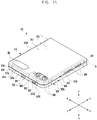
- the sensor module 304 may be configured to sense an external environment through the first surface 311 of the first housing 310.
- the electronic device 101 may further include at least one sensor module disposed to sense an external environment through the second surface 312 of the first housing 310.
- the sensor module 304 e.g., an illuminance sensor and/or a proximity sensor
- the flexible display 300 e.g., disposed as an under-display sensor or an in-display sensor
- under e.g., an under panel
- the preview manager 540 may be configured to perform turn-off-control on the first display 331 (e.g., to cut off power to the first display 331) and thus to display a preview only on the second display 300 without displaying the preview on the first display 331.
- the third set value may include a set value for operating the camera device 308 in a rear camera mode, and may include a configuration which is the same as or similar to the second set value.
- the third set value may include a set value (e.g., a fourth set value) different depending on whether the currently connected camera device is the first camera device 305 (e.g., a front camera device) or the second camera device 308 (e.g., a rear camera device).
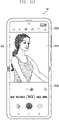
- the processor 120 may be configured to output a preview for a front camera through the first display 331.
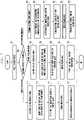
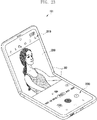
- the processor 120 may be configured to provide a preview in which the preview data obtained from the camera device 308 is controlled to have an image and quality corresponding to a front camera, through the first display 331. The example thereof is illustrated in FIG. 12A to be described later.
- the processor 120 may be configured to perform an image quality control for a rear camera, based on the identified second option.
- the processor 120 may be configured to perform at least one image quality control such as a beauty level, a brightness level, AF, front image quality tuning, a photographing effect, and/or face distortion correction according to a set value set to correspond to the second operation mode.
- operation 907 and operation 909 may not be limited to the illustrated order, and operation 907 and operation 909 may be performed sequentially, in parallel, in reverse order, or heuristically.
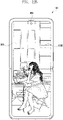
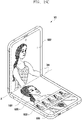
- the processor 120 may be configured to output a preview for a rear camera through the second display 300.
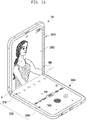
- the processor 120 may be configured to provide a preview in which the preview data obtained from the camera device 308 is controlled to have an image and quality corresponding to a rear camera, through the second display 300. The example thereof is illustrated in FIG. 12B to be described later.
- the electronic device 101 may be configured to output a preview 1230 for the rear camera through the second display 300.
- the electronic device 101 may be configured to provide the preview 1230 in which the preview data obtained from the camera device 308 is controlled to have an image and quality corresponding to a rear camera, through the second display 300.
- the front camera device 305 e.g., the first camera device 305
- the front camera device 305 may be in a disconnected (or inactive) state.
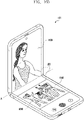
- FIG. 16B may illustrate an example of providing a sub-area as a review-area 1620.
- the electronic device 101 may be configured to separately provide the two divided areas (e.g., the first area 1560 and the second area 1570 of FIG. 15C ) of the display 300 to a preview area and a review area 1620, respectively.
- the review area 1620 may be used (or changed) as an area which provides a photographing result (e.g., the photographing image 1625).
- the sub-area may be changed into the review area 1620.
- the processor 120 of the electronic device 101 may be configured to display a main preview through the second display 300 in the unfolded state of the electronic device 101.
- the processor 120 may be configured to turn on the first display 331, based on the trigger sense for the multi-preview display. According to an embodiment, when the on-event of the first display 331 occurs while the second display 300 is connected (or activated) and the main preview is displayed, the processor 120 may be configured to perform turn-on-control on the first display 331 (e.g., to supply power to the first display 331) so as to connect (or activate) the first display 331.
- the electronic device 101 may be configured to provide a graphic effect in which the size (or ratio) of the sub-area is adjusted and expanded in response to a sliding movement (e.g., a reduced graphic effect) in the upper end direction of the preview area.
- a sliding movement e.g., a reduced graphic effect
- the electronic device 101 may be configured to provide the preview area 2410 and the sub-area 2420 in the intermediate state as separate areas according to a predetermined purpose.
- the electronic device 101 may be configured to provide two divided areas of the display 300 to the preview area 2410 and the sub-area 2420, respectively, and to provide the sub-area 2420 as one area (e.g., a control area) among various designable areas.
- the sub-area 2420 may be variously changed according to a predetermined purpose or the progress of a photographing operation.
- a user input for changing between the preview area 2410 and the sub-area 2420 may not be limited to the trigger for the designated area 2500, and may be provided in various types.
- a user input may be used as a change trigger, based on the voice of a user and/or based on a designated motion (e.g., additional folding of the electronic device 101, or left and right shaking of the electronic device 101).
- FIG. 31 is a view for explaining another example of a preview area and a sub-area in an intermediate state of an electronic device according to various embodiments.
- the processor 120 may be configured to determine whether the entry to a flex mode is the first (e.g., a first time), based on sensing the entry to the flex mode.
- the processor 120 may be configured to record and count the entry to the flex mode performed during a designated period (e.g., during the execution of the camera application, or during a predetermined period according to use of the electronic device 101), and may be configured to determine whether the entry to the flex mode is the first, based on the record and the count for the entry to the flex mode.
- FIG. 32 and FIG. 33 may illustrate examples in which a camera preview is configured (e.g., the position determination of a preview area in which a preview is to be displayed) in an intermediate state (e.g., a table mode or a flex mode).
- a camera preview e.g., the position determination of a preview area in which a preview is to be displayed
- an intermediate state e.g., a table mode or a flex mode
- the objects which deals with elements having relatively lower importance, may have priority to be set to lower, and the non-important elements, of which priority is set to lower, may be determined to be provided (e.g., arranged) at an area (e.g., a sub-area) different from an area (e.g., a preview area) to which a preview is provided.
- the electronic device 101 may be configured to determine a camera angle as a high angle.
- the electronic device 101 when a subject is recognized as a low angle by the camera device C (e.g., the rear camera device 308) and an unfolding angle (e.g., the angle between the first housing 310 and the second housing 320) of the electronic device 101 has a designated range of angle, the electronic device 101 in which the position the preview P is placed at the top of the display300 and a sub-area is placed at the bottom of the display 300, may be provided.
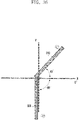
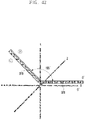
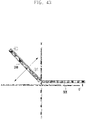
- the angles illustrated in FIG. 37 , FIG. 38 , and FIG. 39 may be angles illustrated with reference to the XY axis.
- the electronic device 101 may be configured to determine a camera angle as a low angle.
- the electronic device 101 may be configured to determine a preview position through the gaze direction of a photographer and automatically control such that the preview is moved to the determined position.
- the electronic device 101 is may be configured such that the preview P is disposed and provided at the top (e.g., see FIG. 40 ) when a photographer's gaze is directed upward, and may be configured such that the preview P is disposed and provided at the bottom (e.g., see FIG. 41 ) when a photographer's gaze is directed downward.
- the electronic device 101 may be configured such that the position of a preview is determined (or set) to the top (e.g., Top preview) of the display 300.
- the electronic device 101 may be configured to identify a designated state (e.g., a state in which a user is holding the electronic device 101) (or a device angle) of the electronic device 101 by using a 6-axis sensor.
- FIG. 43 and FIG. 44 may illustrate examples in which the camera device C (e.g., the front camera device 305) of the electronic device 101 is used in a state (e.g., a fixed state) in which the electronic device 101 is placed on a table.
- a state e.g., a fixed state
- the first area may be configured to provide a layout associated with an interface, which non-interacts with a user
- the second area may be configured to provide a layout associated with an interface, which interacts with a user
Landscapes
- Engineering & Computer Science (AREA)
- Theoretical Computer Science (AREA)
- General Engineering & Computer Science (AREA)
- Physics & Mathematics (AREA)
- General Physics & Mathematics (AREA)
- Human Computer Interaction (AREA)
- Computer Hardware Design (AREA)
- Signal Processing (AREA)
- Multimedia (AREA)
- Mathematical Physics (AREA)
- Computing Systems (AREA)
- User Interface Of Digital Computer (AREA)
Applications Claiming Priority (3)
| Application Number | Priority Date | Filing Date | Title |
|---|---|---|---|
| KR20200015959 | 2020-02-10 | ||
| KR1020200044352A KR20210102010A (ko) | 2020-02-10 | 2020-04-10 | 플렉서블 디스플레이를 갖는 전자 장치의 운영 방법 및 장치 |
| PCT/KR2021/001158 WO2021162295A1 (ko) | 2020-02-10 | 2021-01-28 | 플렉서블 디스플레이를 갖는 전자 장치의 운영 방법 및 장치 |
Publications (2)
| Publication Number | Publication Date |
|---|---|
| EP4089521A1 true EP4089521A1 (de) | 2022-11-16 |
| EP4089521A4 EP4089521A4 (de) | 2023-06-28 |
Family
ID=77292496
Family Applications (1)
| Application Number | Title | Priority Date | Filing Date |
|---|---|---|---|
| EP21753117.7A Pending EP4089521A4 (de) | 2020-02-10 | 2021-01-28 | Verfahren und gerät zum betrieb einer elektronischen vorrichtung mit flexibler anzeige |
Country Status (2)
| Country | Link |
|---|---|
| EP (1) | EP4089521A4 (de) |
| WO (1) | WO2021162295A1 (de) |
Cited By (7)
| Publication number | Priority date | Publication date | Assignee | Title |
|---|---|---|---|---|
| EP4391569A4 (de) * | 2021-12-10 | 2024-12-04 | Samsung Electronics Co., Ltd. | Elektronische vorrichtung zur ausführung einer anwendung unter verwendung verschiedener kamerainformationen gemäss einer fotografieumgebung und steuerungsverfahren dafür |
| WO2025072767A1 (en) * | 2023-09-29 | 2025-04-03 | Farallones Dynamics Llc | Dynamic rear-display feedback |
| US12314553B2 (en) | 2017-06-04 | 2025-05-27 | Apple Inc. | User interface camera effects |
| US12401889B2 (en) | 2023-05-05 | 2025-08-26 | Apple Inc. | User interfaces for controlling media capture settings |
| US12405700B2 (en) | 2021-04-19 | 2025-09-02 | Apple Inc. | User interfaces for managing visual content in media |
| US12450854B2 (en) | 2022-09-22 | 2025-10-21 | Apple Inc. | User interfaces for capturing media and manipulating virtual objects |
| EP4683340A1 (de) * | 2024-07-17 | 2026-01-21 | Beijing Xiaomi Mobile Software Co., Ltd. | Verfahren und vorrichtung zum fotografieren eines bildes, elektronische vorrichtung und speichermedium |
Families Citing this family (2)
| Publication number | Priority date | Publication date | Assignee | Title |
|---|---|---|---|---|
| WO2024048987A1 (ko) * | 2022-08-30 | 2024-03-07 | 삼성전자주식회사 | 힌지 또는 모터의 움직임 따라 비디오를 재생하는 전자 장치 |
| WO2025037867A1 (en) | 2023-08-11 | 2025-02-20 | Samsung Electronics Co., Ltd. | Apparatus and method for seamless video capture during flex-state transition |
Family Cites Families (7)
| Publication number | Priority date | Publication date | Assignee | Title |
|---|---|---|---|---|
| KR20160013748A (ko) * | 2014-07-28 | 2016-02-05 | 엘지전자 주식회사 | 휴대 전자기기 및 그것의 제어방법 |
| KR102171450B1 (ko) * | 2014-08-18 | 2020-10-29 | 엘지전자 주식회사 | 포터블 디바이스 및 그 제어 방법 |
| WO2016104822A1 (ko) * | 2014-12-23 | 2016-06-30 | 엘지전자 주식회사 | 디스플레이 장치 및 제어 방법 |
| KR102137543B1 (ko) * | 2015-01-07 | 2020-08-13 | 삼성전자주식회사 | 벤딩 가능한 사용자 단말 장치 및 이의 디스플레이 방법 |
| KR102660947B1 (ko) * | 2016-10-05 | 2024-04-25 | 삼성전자주식회사 | 양면 디스플레이를 갖는 전자 장치 및 어플리케이션 제어 방법 |
| CN107808600A (zh) * | 2017-12-08 | 2018-03-16 | 京东方科技集团股份有限公司 | 显示装置及其控制方法 |
| KR102485127B1 (ko) * | 2018-07-06 | 2023-01-05 | 삼성전자주식회사 | 카메라의 방향에 따라 프리뷰 이미지의 위치를 변경하기 위한 전자 장치 및 방법 |
-
2021
- 2021-01-28 WO PCT/KR2021/001158 patent/WO2021162295A1/ko not_active Ceased
- 2021-01-28 EP EP21753117.7A patent/EP4089521A4/de active Pending
Cited By (9)
| Publication number | Priority date | Publication date | Assignee | Title |
|---|---|---|---|---|
| US12314553B2 (en) | 2017-06-04 | 2025-05-27 | Apple Inc. | User interface camera effects |
| US12405700B2 (en) | 2021-04-19 | 2025-09-02 | Apple Inc. | User interfaces for managing visual content in media |
| EP4391569A4 (de) * | 2021-12-10 | 2024-12-04 | Samsung Electronics Co., Ltd. | Elektronische vorrichtung zur ausführung einer anwendung unter verwendung verschiedener kamerainformationen gemäss einer fotografieumgebung und steuerungsverfahren dafür |
| US12192622B2 (en) | 2021-12-10 | 2025-01-07 | Samsung Electronics Co., Ltd. | Electronic device for executing applications by using different pieces of camera information according to capturing environment and method for controlling same |
| US12450854B2 (en) | 2022-09-22 | 2025-10-21 | Apple Inc. | User interfaces for capturing media and manipulating virtual objects |
| US12401889B2 (en) | 2023-05-05 | 2025-08-26 | Apple Inc. | User interfaces for controlling media capture settings |
| US12495204B2 (en) | 2023-05-05 | 2025-12-09 | Apple Inc. | User interfaces for controlling media capture settings |
| WO2025072767A1 (en) * | 2023-09-29 | 2025-04-03 | Farallones Dynamics Llc | Dynamic rear-display feedback |
| EP4683340A1 (de) * | 2024-07-17 | 2026-01-21 | Beijing Xiaomi Mobile Software Co., Ltd. | Verfahren und vorrichtung zum fotografieren eines bildes, elektronische vorrichtung und speichermedium |
Also Published As
| Publication number | Publication date |
|---|---|
| WO2021162295A1 (ko) | 2021-08-19 |
| EP4089521A4 (de) | 2023-06-28 |
Similar Documents
| Publication | Publication Date | Title |
|---|---|---|
| EP4089521A1 (de) | Verfahren und gerät zum betrieb einer elektronischen vorrichtung mit flexibler anzeige | |
| KR102746218B1 (ko) | 복수의 카메라들을 이용한 촬영 제어 방법 및 폴더블 장치 | |
| US20230044526A1 (en) | Electronic device and method for controlling and operating foldable display | |
| US11445097B2 (en) | Apparatus and method for providing illumination of camera in electronic device | |
| KR20210102010A (ko) | 플렉서블 디스플레이를 갖는 전자 장치의 운영 방법 및 장치 | |
| KR102685608B1 (ko) | 카메라 프리뷰 이미지를 제공하기 위한 전자 장치 및 그의 동작 방법 | |
| US12452522B2 (en) | Method of obtaining a user-selected angle of view from among a plurality of angles of view of respective cameras and electronic device supporting the same | |
| KR102771303B1 (ko) | 폴더블 전자 장치 및 상기 폴더블 전자 장치에서 복수의 카메라들을 이용한 사진 촬영 방법 | |
| KR102672510B1 (ko) | 스크린들 간 수정 사항을 동기화하는 전자 장치 및 전자 장치의 동작 방법 | |
| KR102542398B1 (ko) | 폴더블 전자 장치 및 상기 폴더블 전자 장치에서 정보를 표시하는 방법 | |
| KR20200132008A (ko) | 전자 장치 및 그의 알림 제공 방법 | |
| EP4068043B1 (de) | Faltbare elektronische vorrichtung mit kamera | |
| EP4096218A1 (de) | Videoaufzeichnungsverfahren mit mehreren kameras und vorrichtung dafür | |
| KR20210072351A (ko) | 회전이 가능한 카메라를 구비한 폴더블 전자 장치 및 이를 이용한 촬영 방법 | |
| KR20210140949A (ko) | 폴더블 전자 장치 및 그의 알림 표시 제어 방법 | |
| CN111405117A (zh) | 一种控制方法及电子设备 | |
| KR20250015570A (ko) | 폴딩 상태에 기반한 디스플레이 운영 방법 및 이를 지원하는 폴더블 전자 장치 | |
| RU2794461C2 (ru) | Способ предоставления изображения на экране и электронное устройство, поддерживающее способ | |
| CN108881715A (zh) | 拍摄模式的启用方法、装置、终端及存储介质 | |
| EP4117261A1 (de) | Verfahren zur durchführung einer anruffunktion und elektronische vorrichtung dafür |
Legal Events
| Date | Code | Title | Description |
|---|---|---|---|
| STAA | Information on the status of an ep patent application or granted ep patent |
Free format text: STATUS: THE INTERNATIONAL PUBLICATION HAS BEEN MADE |
|
| PUAI | Public reference made under article 153(3) epc to a published international application that has entered the european phase |
Free format text: ORIGINAL CODE: 0009012 |
|
| STAA | Information on the status of an ep patent application or granted ep patent |
Free format text: STATUS: REQUEST FOR EXAMINATION WAS MADE |
|
| 17P | Request for examination filed |
Effective date: 20220808 |
|
| AK | Designated contracting states |
Kind code of ref document: A1 Designated state(s): AL AT BE BG CH CY CZ DE DK EE ES FI FR GB GR HR HU IE IS IT LI LT LU LV MC MK MT NL NO PL PT RO RS SE SI SK SM TR |
|
| DAV | Request for validation of the european patent (deleted) | ||
| DAX | Request for extension of the european patent (deleted) | ||
| A4 | Supplementary search report drawn up and despatched |
Effective date: 20230530 |
|
| RIC1 | Information provided on ipc code assigned before grant |
Ipc: G09G 3/00 20060101ALI20230523BHEP Ipc: G06F 3/0481 20220101ALI20230523BHEP Ipc: G06F 3/00 20060101ALI20230523BHEP Ipc: G06F 1/16 20060101ALI20230523BHEP Ipc: G06F 3/14 20060101AFI20230523BHEP |
|
| STAA | Information on the status of an ep patent application or granted ep patent |
Free format text: STATUS: EXAMINATION IS IN PROGRESS |
|
| 17Q | First examination report despatched |
Effective date: 20251121 |