EP4093031A1 - Verfahren und vorrichtung zum livestreaming-raumdatenaustausch - Google Patents
Verfahren und vorrichtung zum livestreaming-raumdatenaustausch Download PDFInfo
- Publication number
- EP4093031A1 EP4093031A1 EP21871144.8A EP21871144A EP4093031A1 EP 4093031 A1 EP4093031 A1 EP 4093031A1 EP 21871144 A EP21871144 A EP 21871144A EP 4093031 A1 EP4093031 A1 EP 4093031A1
- Authority
- EP
- European Patent Office
- Prior art keywords
- interaction
- time stamp
- interaction data
- data
- panel
- Prior art date
- Legal status (The legal status is an assumption and is not a legal conclusion. Google has not performed a legal analysis and makes no representation as to the accuracy of the status listed.)
- Withdrawn
Links
- 238000000034 method Methods 0.000 title claims abstract description 52
- 230000004044 response Effects 0.000 claims abstract description 119
- 230000003993 interaction Effects 0.000 claims description 719
- 230000000977 initiatory effect Effects 0.000 claims description 9
- 238000004891 communication Methods 0.000 description 10
- 238000010586 diagram Methods 0.000 description 10
- 238000005516 engineering process Methods 0.000 description 6
- 230000001960 triggered effect Effects 0.000 description 6
- 230000003287 optical effect Effects 0.000 description 4
- 230000005236 sound signal Effects 0.000 description 4
- 238000007726 management method Methods 0.000 description 3
- 230000001133 acceleration Effects 0.000 description 2
- 238000004590 computer program Methods 0.000 description 2
- 230000006870 function Effects 0.000 description 2
- 230000002093 peripheral effect Effects 0.000 description 2
- 238000003491 array Methods 0.000 description 1
- 230000009286 beneficial effect Effects 0.000 description 1
- 238000013500 data storage Methods 0.000 description 1
- 238000003384 imaging method Methods 0.000 description 1
- 239000004973 liquid crystal related substance Substances 0.000 description 1
- 230000003068 static effect Effects 0.000 description 1
Images



Classifications
-
- H—ELECTRICITY
- H04—ELECTRIC COMMUNICATION TECHNIQUE
- H04N—PICTORIAL COMMUNICATION, e.g. TELEVISION
- H04N21/00—Selective content distribution, e.g. interactive television or video on demand [VOD]
- H04N21/20—Servers specifically adapted for the distribution of content, e.g. VOD servers; Operations thereof
- H04N21/21—Server components or server architectures
- H04N21/218—Source of audio or video content, e.g. local disk arrays
- H04N21/2187—Live feed
-
- H—ELECTRICITY
- H04—ELECTRIC COMMUNICATION TECHNIQUE
- H04L—TRANSMISSION OF DIGITAL INFORMATION, e.g. TELEGRAPHIC COMMUNICATION
- H04L51/00—User-to-user messaging in packet-switching networks, transmitted according to store-and-forward or real-time protocols, e.g. e-mail
- H04L51/04—Real-time or near real-time messaging, e.g. instant messaging [IM]
- H04L51/046—Interoperability with other network applications or services
-
- H—ELECTRICITY
- H04—ELECTRIC COMMUNICATION TECHNIQUE
- H04N—PICTORIAL COMMUNICATION, e.g. TELEVISION
- H04N21/00—Selective content distribution, e.g. interactive television or video on demand [VOD]
- H04N21/20—Servers specifically adapted for the distribution of content, e.g. VOD servers; Operations thereof
- H04N21/23—Processing of content or additional data; Elementary server operations; Server middleware
- H04N21/239—Interfacing the upstream path of the transmission network, e.g. prioritizing client content requests
- H04N21/2393—Interfacing the upstream path of the transmission network, e.g. prioritizing client content requests involving handling client requests
-
- H—ELECTRICITY
- H04—ELECTRIC COMMUNICATION TECHNIQUE
- H04N—PICTORIAL COMMUNICATION, e.g. TELEVISION
- H04N21/00—Selective content distribution, e.g. interactive television or video on demand [VOD]
- H04N21/20—Servers specifically adapted for the distribution of content, e.g. VOD servers; Operations thereof
- H04N21/23—Processing of content or additional data; Elementary server operations; Server middleware
- H04N21/24—Monitoring of processes or resources, e.g. monitoring of server load, available bandwidth, upstream requests
- H04N21/2408—Monitoring of the upstream path of the transmission network, e.g. client requests
-
- H—ELECTRICITY
- H04—ELECTRIC COMMUNICATION TECHNIQUE
- H04N—PICTORIAL COMMUNICATION, e.g. TELEVISION
- H04N21/00—Selective content distribution, e.g. interactive television or video on demand [VOD]
- H04N21/40—Client devices specifically adapted for the reception of or interaction with content, e.g. set-top-box [STB]; Operations thereof
- H04N21/41—Structure of client; Structure of client peripherals
- H04N21/422—Input-only peripherals, i.e. input devices connected to specially adapted client devices, e.g. global positioning system [GPS]
- H04N21/42204—User interfaces specially adapted for controlling a client device through a remote control device; Remote control devices therefor
-
- H—ELECTRICITY
- H04—ELECTRIC COMMUNICATION TECHNIQUE
- H04N—PICTORIAL COMMUNICATION, e.g. TELEVISION
- H04N21/00—Selective content distribution, e.g. interactive television or video on demand [VOD]
- H04N21/40—Client devices specifically adapted for the reception of or interaction with content, e.g. set-top-box [STB]; Operations thereof
- H04N21/43—Processing of content or additional data, e.g. demultiplexing additional data from a digital video stream; Elementary client operations, e.g. monitoring of home network or synchronising decoder's clock; Client middleware
- H04N21/431—Generation of visual interfaces for content selection or interaction; Content or additional data rendering
-
- H—ELECTRICITY
- H04—ELECTRIC COMMUNICATION TECHNIQUE
- H04N—PICTORIAL COMMUNICATION, e.g. TELEVISION
- H04N21/00—Selective content distribution, e.g. interactive television or video on demand [VOD]
- H04N21/40—Client devices specifically adapted for the reception of or interaction with content, e.g. set-top-box [STB]; Operations thereof
- H04N21/43—Processing of content or additional data, e.g. demultiplexing additional data from a digital video stream; Elementary client operations, e.g. monitoring of home network or synchronising decoder's clock; Client middleware
- H04N21/431—Generation of visual interfaces for content selection or interaction; Content or additional data rendering
- H04N21/4312—Generation of visual interfaces for content selection or interaction; Content or additional data rendering involving specific graphical features, e.g. screen layout, special fonts or colors, blinking icons, highlights or animations
-
- H—ELECTRICITY
- H04—ELECTRIC COMMUNICATION TECHNIQUE
- H04N—PICTORIAL COMMUNICATION, e.g. TELEVISION
- H04N21/00—Selective content distribution, e.g. interactive television or video on demand [VOD]
- H04N21/40—Client devices specifically adapted for the reception of or interaction with content, e.g. set-top-box [STB]; Operations thereof
- H04N21/47—End-user applications
- H04N21/472—End-user interface for requesting content, additional data or services; End-user interface for interacting with content, e.g. for content reservation or setting reminders, for requesting event notification, for manipulating displayed content
- H04N21/47202—End-user interface for requesting content, additional data or services; End-user interface for interacting with content, e.g. for content reservation or setting reminders, for requesting event notification, for manipulating displayed content for requesting content on demand, e.g. video on demand
-
- H—ELECTRICITY
- H04—ELECTRIC COMMUNICATION TECHNIQUE
- H04N—PICTORIAL COMMUNICATION, e.g. TELEVISION
- H04N21/00—Selective content distribution, e.g. interactive television or video on demand [VOD]
- H04N21/40—Client devices specifically adapted for the reception of or interaction with content, e.g. set-top-box [STB]; Operations thereof
- H04N21/47—End-user applications
- H04N21/472—End-user interface for requesting content, additional data or services; End-user interface for interacting with content, e.g. for content reservation or setting reminders, for requesting event notification, for manipulating displayed content
- H04N21/47217—End-user interface for requesting content, additional data or services; End-user interface for interacting with content, e.g. for content reservation or setting reminders, for requesting event notification, for manipulating displayed content for controlling playback functions for recorded or on-demand content, e.g. using progress bars, mode or play-point indicators or bookmarks
-
- H—ELECTRICITY
- H04—ELECTRIC COMMUNICATION TECHNIQUE
- H04N—PICTORIAL COMMUNICATION, e.g. TELEVISION
- H04N21/00—Selective content distribution, e.g. interactive television or video on demand [VOD]
- H04N21/40—Client devices specifically adapted for the reception of or interaction with content, e.g. set-top-box [STB]; Operations thereof
- H04N21/47—End-user applications
- H04N21/478—Supplemental services, e.g. displaying phone caller identification, shopping application
- H04N21/4788—Supplemental services, e.g. displaying phone caller identification, shopping application communicating with other users, e.g. chatting
-
- H—ELECTRICITY
- H04—ELECTRIC COMMUNICATION TECHNIQUE
- H04N—PICTORIAL COMMUNICATION, e.g. TELEVISION
- H04N21/00—Selective content distribution, e.g. interactive television or video on demand [VOD]
- H04N21/40—Client devices specifically adapted for the reception of or interaction with content, e.g. set-top-box [STB]; Operations thereof
- H04N21/47—End-user applications
- H04N21/485—End-user interface for client configuration
-
- H—ELECTRICITY
- H04—ELECTRIC COMMUNICATION TECHNIQUE
- H04N—PICTORIAL COMMUNICATION, e.g. TELEVISION
- H04N7/00—Television systems
- H04N7/14—Systems for two-way working
- H04N7/15—Conference systems
Definitions
- the present disclosure relates to the field of livestream technology, and in particular, to a method and an apparatus for data interaction in a live room, and an electronic device.
- An anchor in a live room will check some of the questions in a comment area the audiences care about and answer the questions to interact with the audiences.
- the comment area is used as a window for displaying real-time messages, thus there are many types and quantities of messages in the comment area, such as system messages, gift messages, comment messages, and following messages, etc.
- the messages in the comment area are sorted in chronological order, thus when there are large quantities of messages, the messages in the comment area will be refreshed quickly.
- a method for data interaction in a live room is provided, the method is applied to a first terminal, and includes:
- said sending first interaction data to the anchor in response to obtaining the first interaction data from the audience through the first interaction panel includes one of:
- said displaying the first interaction data on the first interaction panel includes:
- a method for data interaction in a live room is provided, the method is applied to a second terminal, and includes:
- the method further includes:
- a method for data interaction in a live room is provided, the method is applied to a server, and includes:
- said generating a target video based on the first time stamp and the second time stamp includes:
- an apparatus for data interaction in a live room is provided, the apparatus is applied to a first terminal, and includes:
- the first sending module includes:
- the third display module is specifically configured to display the first interaction data at a first target position on the first interaction panel based on an aggregated amount of the first interaction data; wherein an aggregated amount of interaction data displayed at a position before the first target position on the first interaction panel is greater than the aggregated amount of the first interaction data, and an aggregated amount of interaction data displayed at a position after the first target position on the first interaction panel is smaller than the aggregated amount of the first interaction data.
- an apparatus for data interaction in a live room the apparatus is applied to a second terminal, and includes:
- the apparatus further includes:
- an apparatus for data interaction in a live room is provided, the apparatus is applied to a server, and includes:
- the generation module is specifically configured to obtain the livestream video recorded during the time period between the first time stamp and the second time stamp by editing a livestream video recorded by the anchor based on the first time stamp and the second time stamp; and use the livestream video recorded during the time period between the first time stamp and the second time stamp as the target video.
- a first terminal which includes:
- a second terminal which includes:
- a server which includes:
- a storage medium having instructions stored thereon, which when executed by a processor of an electronic device, enables the electronic device to implement the method for data interaction in a live room described in any of above aspects.
- a computer program product includes executable instructions, and when running on a computer, the executable instructions enable the computer to implement the method for data interaction in a live room described in any of above aspects.
- an additional dedicated interaction region is triggered, so that the audience can interact with the anchor through the dedicated interaction region.
- the first target control which is associated with the interaction video, is triggered and displayed in the dedicated interaction region, so that the audience can watch, through the first target control, the interaction video which is provided by the anchor by replying to the interaction data.
- the audience can directly interact with the anchor in the dedicated interaction region and watch the interaction video replied to by the anchor during a livestream in the live room, thereby improving the interaction efficiency between the audience and the anchor.
- an additional dedicated interaction region which is used to display the interaction data the audiences send, is triggered, so that the anchor can interact with the audiences in the live room through the dedicated interaction region.
- a second target control is displayed in association with the interaction data, so that the anchor can reply to the interaction data displayed in the dedicated interaction region through the second target control, and record the interaction video to reply to the interaction data.
- the anchor can directly view and reply to the interaction data from the audience in the dedicated interaction region during a livestream in the live room, thereby improving the interaction efficiency between the anchor and the audience.
- the trigger information is sent to the anchor and all the audiences in the live room, so that the first terminal of the audience and the second terminal of the anchor can respectively trigger and display an additional dedicated interaction region based on the trigger information.
- the server receives the interaction data sent by the audience through the additional dedicated interaction region, sends the interaction data to the anchor, receives the time stamps sent by the anchor when the anchor replies to the interaction data, generates the interaction video used to reply to the interaction data, and send the interaction video to the audience. In this way, the interaction efficiency between the audience and the anchor can be improved during a livestream in the live room.
- the present disclosure is mainly applied to a livestream scene.
- the livestream scene includes multiple devices, which are a first terminal used by an audience in a live room, a second terminal used by an anchor in the live room, and a server.
- the audience uses the first terminal to watch a livestream conducting in the live room and to interact with the anchor.
- the anchor uses the second terminal to record a livestream video and to interact with the audience.
- the server serves as a media device between the audience and the anchor, and is used to transmit the livestream video recorded by the anchor to the audience in real time, and is also used to transmit interaction data between the audience and the anchor.
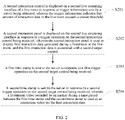
- FIG. 1 illustrates a flowchart of a method for data interaction in a live room according to an exemplary embodiment.
- the method for data interaction in the live room is applied to the first terminal, and includes following steps, as shown in FIG. 1 .
- a first interaction control is displayed on a first live streaming interface of the live room in response to trigger information sent by a server being obtained.
- the trigger information indicates that amount of interaction data in the live room exceeds a preset threshold.
- a first interaction panel is displayed on the first live streaming interface in response to a trigger operation on the first interaction control being received.
- the first interaction panel is used for an interaction between an audience and an anchor.
- first interaction data is sent to the anchor and displayed on the first interaction panel in response to the first interaction data from the audience being obtained through the first interaction panel.
- a first target control is displayed in response to a target video sent by a server being received.
- the target video includes an interaction video provided by the anchor for the first interaction data, and the first target control is associated with the target video.
- a playback interface for the target video is switched to in response to a trigger operation on the first target control being received.
- the first terminal may detect in real time or periodically whether the trigger information sent by the server is received.
- the trigger information indicates that the amount of the interaction data in the live room exceeds a preset threshold.
- the amount of the interaction data in the live room may include two indicators, which are current number of persons who interact with others in the live room and amount of interaction information in the live room.
- the current number of persons who interact with others in the live room may be number of online audiences in the live room.
- the amount of the interaction information in the live room may be number of comments per unit of time, such as the number of comments per second.
- the server may generate the trigger information and send the trigger information to the audiences.
- the first terminal of the audience may display a first interaction control on a first live streaming interface of the live room.
- the first interaction control is used to trigger an interaction function of the first terminal.
- the first interaction control may be displayed at the bottom of the first live streaming interface of the live room, which may be referred to as a question button.
- the audience may trigger the first interaction control, and the first terminal may accordingly display a first interaction panel on the first live streaming interface of the live room.
- the first interaction panel is an interaction region dedicated for the audience and the anchor, and the audience can interact with the anchor through the first interaction panel.
- the first interaction panel may pop up from the bottom of the first live streaming interface of the live room.
- the first interaction panel may be referred to as a question panel.
- the dedicated interaction region may be referred to as a question region, in which the audience can ask questions to the anchor.
- the dedicated interaction region may also be used for other purposes, such as for comments.
- the audience interacts with the anchor in the manner of asking questions through the dedicated interaction region is taking as an example for detailed description, that is, the first interaction data includes question data through which the audience asks questions to the anchor.
- a step S103 specifically includes one of the following:
- the audience can ask questions through the first interaction panel in two ways, and can choose any one of the ways to ask questions.
- One way to ask questions is as follows, the first interaction panel may include an interaction area and an interaction initiation control, the audience can input the questions to be asked in the interaction area of the first interaction panel, and trigger the interaction initiation control when finishing inputting, to send the questions out.
- the first terminal sends the first interaction data out, in response to receiving the question data inputted by the audience in the interaction area of the first interaction panel, and receiving the trigger operation on the interaction initiation control by the audience.
- the first interaction panel also displays questions asked by other audiences in the live room.
- the audience of the first terminal can perform the trigger operation on the first interaction data, to indicate that the question displayed is also the question that the audience of the first terminal wants to ask.
- the trigger operation herein allows the audience to give a 'like' to the question represented by the first interaction data. Accordingly, the first terminal sends the first interaction data to the anchor via the server in response to receiving the interaction operation on the first interaction data.
- the first terminal can display the questions on the first interaction panel in two ways.
- One way to display the questions is as follows, the first interaction data is directly displayed on the first interaction panel when the first interaction data is the question data inputted by the audience in the interaction area.
- Another way to display the questions is as follows, when the first interaction data is the question data generated based on the displayed first interaction data to which the audience has given a 'like', tip information representing the number of likes is displayed on the first interaction data, and the number of likes is increased by one each time a like is given.
- a step of displaying the first interaction data on the first interaction panel includes following steps.
- the first interaction data is displayed at a first target position on the first interaction panel based on an aggregated amount of the first interaction data.
- an aggregated amount of interaction data displayed at a position before the first target position on the first interaction panel is greater than the aggregated amount of the first interaction data
- an aggregated amount of interaction data displayed at a position after the first target position on the first interaction panel is smaller than the aggregated amount of the first interaction data
- the question data can be sorted in descending order of the aggregated amount thereof, so that the question data from the audiences can be aggregated while the audience can intuitively learn what issues other audiences are concerned about.
- the aggregated amount herein refers to the number of the questions aggregated based on the likes the audiences give, which can be represented by the number of likes.
- the question data displayed on the first interaction panel may include two kinds of interaction states, which are a first state and a second state.
- the first state indicates that the question data has been replied to by the anchor
- the second state indicates that the question data has not been replied to by the anchor.
- a first target control may correspond to the question data, and may be displayed at a position after the position where the question data is located.
- the first target control may be referred to as a viewing control, and a target video may be associated with the viewing control.
- the target video includes an interaction video provided by the anchor for the question data corresponding to the viewing control. That is, the target video includes the interaction video provided by the anchor by replying to the question data corresponding to the viewing control.
- the first terminal will jump to the target video associated with the viewing control, and the audience can watch a livestream video recorded when the anchor answers audience's questions.
- the target video sent by the server can be received.
- the first target control corresponding the question data may be displayed, indicating that the question data has been converted from the second state to the first state.
- an additional dedicated interaction region is triggered, so that the audience can interact with the anchor through the dedicated interaction region.
- the first target control which is associated with the interaction video
- the interaction video is triggered and displayed in the dedicated interaction region, so that the audience can watch, through the first target control, the interaction video which is provided by the anchor by replying to the interaction data.
- the audience can directly interact with the anchor in the dedicated interaction region and watch the interaction video replied to by the anchor during a livestream in the live room, thereby improving the interaction efficiency between the audience and the anchor.
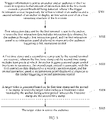
- FIG. 2 illustrates another flowchart of a method for data interaction in a live room according to an exemplary embodiment.
- the method for data interaction in the live room is used in a second terminal, and the method includes following steps, as shown in FIG. 2 .
- a second interaction control is displayed on a second live streaming interface of a live room in response to trigger information sent by a server being obtained.
- the trigger information indicates that amount of interaction data in the live room exceeds a preset threshold.
- a second interaction panel is displayed on the second live streaming interface in response to a trigger operation on the second interaction control being received.
- the second interaction panel is used to display first interaction data generated during a livestream in the live room, and the first interaction data is associated with a second target control.
- a first time stamp is sent to the server in response to a first trigger operation on the second target control being received.
- a second time stamp is sent to the server in response to a second trigger operation on the second target control being received.
- a livestream video recorded by an anchor during a time period between the first time stamp and the second time stamp is used as an interaction video for the first interaction data.
- the second terminal may detect in real time or periodically whether the trigger information sent by the server is received.
- the trigger information indicates that the amount of the interaction data in the live room exceeds a preset threshold.
- the amount of the interaction data in the live room may include two indicators, which are current number of persons who interact with others in the live room and amount of interaction information in the live room.
- the current number of persons who interact with others in the live room may be number of online audiences in the live room.
- the amount of the interaction information in the live room may be number of comments per unit of time, such as the number of comments per second.
- the server may generate the trigger information and send the trigger information to the anchor.
- the second terminal of the anchor may display a second interaction control on a second live streaming interface of the live room.
- the second interaction control is used to trigger an interaction function of the second terminal.
- the second interaction control may be displayed at the bottom of the second live streaming interface of the live room, and the second interaction control may be referred to as a question button.
- the anchor may trigger the second interaction control, and the second terminal may accordingly display a second interaction panel on the second live streaming interface of the live room.
- the second interaction panel is an interaction region dedicated for the anchor and the audience, and the anchor can interact with the audience through the second interaction panel.
- the second interaction panel may pop up from the bottom of the second live streaming interface of the live room.
- the second interaction panel may be referred to as a question panel.
- the dedicated interaction region may be referred to as a question region, and the anchor can answer the questions raised by the audience through the dedicated interaction region.
- the second interaction panel includes questions raised by the audiences, and question data displayed on the second interaction panel also includes two kinds of interaction states, which are a first state and a second state.
- the first state indicates that the question data has been replied to by the anchor
- the second state indicates that the question data has not been replied to by the anchor.
- the second interaction panel may be different from the first interaction panel.
- the second interaction panel is designed to better display to the anchor the question data from the audiences, and to allow the anchor to interact with the audiences more conveniently.
- the method includes following steps.
- a target display priority of the first interaction data to be displayed on the second interaction panel is determined based on an interaction state of the first interaction data.
- the target display priority of the first interaction data of which the interaction state indicates that the first interaction data has not been replied is higher than a second display priority of second interaction data of which an interaction state indicates that the second interaction data has been replied.
- the first interaction data is displayed at a second target position on the second interaction panel according to an aggregated amount of the first interaction data.
- the second target position matches with the target display priority.
- An aggregated amount of interaction data displayed at a position before the second target position on the second interaction panel is greater than the aggregated amount of the first interaction data, and an aggregated amount of interaction data displayed at a position after the second target position on the second interaction panel is smaller than the aggregated amount of the first interaction data.
- the second interaction panel displays all questions raised by the audiences, and the questions are sorted according to the interaction state and the number of likes of the question data.
- the question data having high number of likes and not having been replied to (or not having been handled) is preferentially displayed.
- a second target control is displayed in association.
- the second target control may be referred to as a reply control.
- the anchor When the anchor is ready to answer the question, he may click the second target control and start answering the question. Accordingly, the second terminal will send to the server a time point at which the anchor triggers the second target control when he is ready to answer the question as a first time stamp.
- the anchor When the anchor finishes answering the question, he may click the second target control again, and accordingly, the second terminal will send to the server a time point at which the anchor triggers the second target control when he finishes answering the question as a second time stamp.
- the interaction state of the question data is converted from the second state to the first state.
- the server After receiving the first time stamp and the second time stamp, the server will generate a target video, and send the target video to all audiences in the live room.
- the target video includes a livestream video recorded by the anchor during a time period between the first time stamp and the second time stamp.
- an additional dedicated interaction region which is used to display the interaction data the audiences send, is triggered, so that the anchor can interact with the audiences in the live room through the dedicated interaction region.
- a second target control is displayed in association with the interaction data, so that the anchor can reply to the interaction data displayed in the dedicated interaction region through the second target control, and record the interaction video to reply to the interaction data.
- the anchor can directly view and reply to the interaction data from the audience in the dedicated interaction region during a livestream in the live room, thereby improving the interaction efficiency between the anchor and the audience.
- FIG. 3 illustrates another flowchart of a method for data interaction in a live room according to an exemplary embodiment.
- the method for data interaction in the live room is used in a server, and the method includes following steps, as shown in FIG. 3 .
- trigger information is sent to an anchor and an audience in the live room in response to that amount of interaction data in the live room exceeds a preset threshold being detected.
- the trigger information is used respectively for a first terminal of an audience and a second terminal of an anchor to display an interaction control on a live streaming interface of the live room.
- first interaction data sent by the first terminal is sent to the anchor.
- the first interaction data includes interaction data obtained by the audience through a first interaction panel, and the first interaction panel is an interaction panel displayed in response to the audience triggering a first interaction control.
- a first time stamp and a second time stamp sent by the second terminal are received.
- the first time stamp and the second time stamp includes time points at which the anchor triggers a second target control two times in succession.
- the second target control is associated with the first interaction data displayed on a second interaction panel, and the second interaction panel is an interaction panel displayed in response to the anchor triggering a second interaction control.
- a target video is generated based on the first time stamp and the second time stamp.
- the target video includes a livestream video recorded by the anchor during a time period between the first time stamp and the second time stamp.
- the target video is sent to the audience.
- the server acts as a media device between the anchor and the audience, detects the amount of the interaction data in the live room, generates trigger information after detecting that the amount of the interaction data in the live room exceeds a preset threshold, and sends the trigger information to the anchor and all the audiences, so that the first terminal of the audience and the second terminal of the anchor respectively display an interaction control on the live streaming interface of the live room based on the trigger information.
- the server may also send to the anchor the question data from the audience, so that the audience can ask questions to the anchor.
- the server may also receive the first time stamp and the second time stamp involved when the anchor replies to the question data from the audience, generate the target video based on the first time stamp and the second time stamp, and send the target video to the audience, so that the anchor can answer the questions raised by the audience.
- a step of generating the target video based on the first time stamp and the second time stamp includes following steps.
- the livestream video recorded during the time period between the first time stamp and the second time stamp is obtained by editing a livestream video recorded by the anchor based on the first time stamp and the second time stamp.
- the livestream video recorded during the time period between the first time stamp and the second time stamp is used as the target video.
- the trigger information is sent to the anchor and all the audiences in the live room, so that the first terminal of the audience and the second terminal of the anchor can respectively trigger and display an additional dedicated interaction region based on the trigger information.
- the server receives the interaction data sent by the audience through the additional dedicated interaction region, sends the interaction data to the anchor, receives the time stamps sent by the anchor when the anchor replies to the interaction data, generates the interaction video used to reply to the interaction data, and send the interaction video to the audience. In this way, the interaction efficiency between the audience and the anchor can be improved during a livestream in the live room.
- FIG. 4 illustrates a block diagram of an apparatus for data interaction in a live room according to an exemplary embodiment.
- the apparatus is applied to a first terminal.
- the apparatus includes a first display module 401, a second display module 402, a first sending module 403, a third display module 404, a fourth display module 405 and a switching module 406.
- the first display module 401 is configured to display a first interaction control on a first live streaming interface of the live room in response to obtaining trigger information sent by a server, wherein the trigger information indicates that amount of interaction data in the live room exceeds a preset threshold.
- the second display module 402 is configured to display a first interaction panel on the first live streaming interface in response to receiving a trigger operation on the first interaction control, wherein the first interaction panel is used for an interaction between an audience and an anchor.
- a first sending module 403 is configured to send first interaction data to the anchor in response to obtaining the first interaction data from the audience through the first interaction panel.
- the third display module 404 is configured to display the first interaction data on the first interaction panel.
- the fourth display module 405 is configured to display a first target control in response to receiving a target video sent by the server, wherein the target video includes an interaction video provided by the anchor for the first interaction data, and the first target control is associated with the target video.
- the switching module 406 is configured to switch to a playback interface for the target video in response to receiving a trigger operation on the first target control.
- the first sending module 403 includes a first sending unit and a second sending unit.
- the first sending unit is configured to send the first interaction data to the anchor via the server in response to receiving the first interaction data inputted by the audience in an interaction area of the first interaction panel, and receiving a trigger operation on an interaction initiation control of the first interaction panel.
- the second sending unit is configured to send the first interaction data to the anchor via the server in response to receiving an interaction operation on the first interaction data displayed on the first interaction panel.
- the third display module 404 is specifically configured to display the first interaction data at a first target position on the first interaction panel based on an aggregated amount of the first interaction data; wherein an aggregated amount of interaction data displayed at a position before the first target position on the first interaction panel is greater than the aggregated amount of the first interaction data, and an aggregated amount of interaction data displayed at a position after the first target position on the first interaction panel is smaller than the aggregated amount of the first interaction data.
- FIG. 5 illustrates a block diagram of an apparatus for data interaction in a live room according to an exemplary embodiment.
- the apparatus is applied to a second terminal.
- the apparatus includes a fifth display module 501, a sixth display module 502, a second sending module 503 and a third sending module 504.
- the fifth display module 501 is configured to display a second interaction control on a second live streaming interface of the live room in response to obtaining trigger information sent by a server, wherein the trigger information indicates that amount of interaction data in the live room exceeds a preset threshold.
- the sixth display module 502 is configured to display a second interaction panel on the second live streaming interface in response to receiving a trigger operation on the second interaction control, wherein the second interaction panel is used to display first interaction data generated during a livestream in the live room, and the first interaction data is associated with a second target control.
- the second sending module 503 is configured to send a first time stamp to the server in response to receiving a first trigger operation on the second target control.
- a third sending module 504 is configured to send a second time stamp to the server in response to receiving a second trigger operation on the second target control.
- a livestream video recorded by an anchor during a time period between the first time stamp and the second time stamp is used as an interaction video for the first interaction data.
- the apparatus further includes a determination module and a seventh display module.
- the determination module is configured to determine a target display priority of the first interaction data to be displayed on the second interaction panel based on an interaction state of the first interaction data, wherein the target display priority of the first interaction data of which the interaction state indicates that the first interaction data has not been replied is higher than a second display priority of second interaction data of which an interaction state indicates that the second interaction data has been replied.
- the seventh display module is configured to display, based on the target display priority, the first interaction data at a second target position on the second interaction panel according to an aggregated amount of the first interaction data.
- the second target position matches with the target display priority, and an aggregated amount of interaction data displayed at a position before the second target position on the second interaction panel is greater than the aggregated amount of the first interaction data, and an aggregated amount of interaction data displayed at a position after the second target position on the second interaction panel is smaller than the aggregated amount of the first interaction data.
- FIG. 6 illustrates a block diagram of an apparatus for data interaction in a live room according to an exemplary embodiment.
- the apparatus is applied to a server.
- the apparatus includes a fourth sending module 601, a fifth sending module 602, a receiving module 603, a generation module 604 and a sixth sending module 605.
- the fourth sending module 601 is configured to send trigger information to an anchor and an audience in the live room in response to detecting that amount of interaction data in the live room exceeds a preset threshold, wherein the trigger information is used respectively for a first terminal of an audience and a second terminal of an anchor to display an interaction control on a live streaming interface of the live room.
- the fifth sending module 602 is configured to send first interaction data sent by the first terminal to the anchor, wherein the first interaction data includes interaction data obtained by the audience through a first interaction panel, and the first interaction panel is an interaction panel displayed in response to the audience triggering a first interaction control.
- the receiving module 603 is configured to receive a first time stamp and a second time stamp sent by the second terminal, wherein the first time stamp and the second time stamp includes time points at which the anchor triggers a second target control two times in succession, and wherein the second target control is associated with the first interaction data displayed on a second interaction panel, and the second interaction panel is an interaction panel displayed in response to the anchor triggering a second interaction control.
- the generation module 604 is configured to generate a target video based on the first time stamp and the second time stamp, wherein the target video includes a livestream video recorded by the anchor during a time period between the first time stamp and the second time stamp.
- the sixth sending module 605 is configured to send the target video to the audience.
- the generation module 604 is specifically configured to obtain the livestream video recorded during the time period between the first time stamp and the second time stamp by editing a livestream video recorded by the anchor based on the first time stamp and the second time stamp; and use the livestream video recorded during the time period between the first time stamp and the second time stamp as the target video.
- FIG. 7 illustrates a block diagram of an electronic device according to an exemplary embodiment.
- the electronic device may be a first terminal or a second terminal, which may be mobile phones, computers, digital broadcasting terminals, message sending and receiving devices, game consoles, tablet devices, medical equipment, fitness equipment, personal digital assistants, etc.
- an electronic device 700 may include one or more of following components: a processing component 702, a memory 704, a power supply component 706, a multimedia component 708, an audio component 710, an input/output (I/O) interface 712, a sensor component 714, and a communication component 716.
- the processing component 702 generally controls overall operations of the electronic device 700, such as operations associated with display, phone calls, data communications, cameras, and recording.
- the processing component 702 may include one or more processors 720 to execute instructions to implement all or part of the steps of the method on the first terminal side or the method on the second terminal side described above.
- the processing component 702 may include one or more modules to facilitate interactions between the processing component 702 and other components.
- the processing component 702 may include a multimedia module to facilitate an interaction between the multimedia component 708 and the processing component 702.
- the power supply component 706 provides power to various components of electronic device 700.
- the power supply component 706 may include a power management system, one or more power supplies, and other components associated with generating, managing, and distributing power to electronic device 700.
- the multimedia component 708 includes a screen that provides an output interface between the electronic device 700 and a user.
- the screen may include a liquid crystal display (LCD) and a touch panel (TP).
- the screen may be implemented as a touch screen to receive input signals from the user.
- the touch panel includes one or more touch sensors to sense touch, swipe, and other gestures on the touch panel. The touch sensor may not only sense boundaries of a touch or a swipe action, but also detect duration and pressure associated with the touch or swipe action.
- the multimedia component 708 includes a front camera and/or a rear camera. When the electronic device 700 is in an operation mode, such as a shooting mode or a video mode, the front camera and/or the rear camera may receive external multimedia data.
- Each of the front and rear cameras can be a fixed optical lens system or have focal length and optical zoom capability.
- the audio component 710 is configured to output and/or input audio signals.
- the audio component 710 includes a microphone (MIC) that is configured to receive external audio signals when the electronic device 700 is in an operating mode, such as a call mode, a recording mode, and a voice recognition mode.
- the received audio signal may be further stored in memory 704 or transmitted via the communication component 716.
- the audio component 710 further includes a speaker for outputting audio signals.
- I/O interface 712 provides an interface between the processing component 702 and peripheral interface modules, and the peripheral interface modules may be keyboards, click wheels, buttons, and the like. These buttons may include, but are not limited to a home button, a volume button, a start button, and a lock button.
- the sensor component 714 includes one or more sensors for providing state assessment of various aspects of electronic device 700.
- the sensor component 714 can detect an open/closed state of the electronic device 700, relative positioning of the component, such as the display and the keypad of the electronic device 700.
- the sensor component 714 can also detect changes in a position of the electronic device 700 or one component of the electronic devices 700, presence or absence of contact with the electronic device 700, orientation or acceleration/deceleration of the electronic device 700 and changes in temperature of the electronic device 700.
- the sensor component 714 may include a proximity sensor configured to detect the presence of nearby objects when there is no physical contact.
- the sensor component 714 may also include a light sensor, such as a CMOS or a CCD image sensor, for use in imaging applications.
- the sensor component 714 may also include an acceleration sensor, a gyroscope sensor, a magnetic sensor, a pressure sensor, or a temperature sensor.
- the communication component 716 is configured to facilitate wired or wireless communications between electronic device 700 and other devices.
- the electronic device 700 may access to a wireless network based on a communication standard, such as WiFi, a carrier network (e.g., 2G, 3G, 4G, or 5G), or a combination thereof.
- the communication component 716 receives broadcast signals or broadcast related information from an external broadcast management system via a broadcast channel.
- the communication component 716 further includes a near field communication (NFC) module to facilitate short-range communication.
- the NFC module may be implemented based on radio frequency identification (RFID) technology, infrared data association (IrDA) technology, ultra-wideband (UWB) technology, Bluetooth (BT) technology and other technologies.
- RFID radio frequency identification
- IrDA infrared data association
- UWB ultra-wideband
- Bluetooth Bluetooth
- electronic device 700 may be implemented by one or more application specific integrated circuits (ASICs), digital signal processors (DSPs), digital signal processing devices (DSPDs), programmable logic devices (PLDs), field programmable gate arrays (FPGAs), controllers, microcontrollers, microprocessors or other electronic components, for implementing the method on the first terminal side, or the method on the second terminal side mentioned above.
- ASICs application specific integrated circuits
- DSPs digital signal processors
- DSPDs digital signal processing devices
- PLDs programmable logic devices
- FPGAs field programmable gate arrays
- controllers microcontrollers, microprocessors or other electronic components
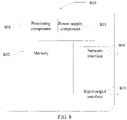
- FIG. 8 is a block diagram of a server according to an exemplary embodiment.
- the server includes a processing component 801, further one or more processors, and a memory resource represented by a memory 802 for storing instructions, such as an application, that can be executed by the processing component 801.
- An application stored in memory 802 may include one or more modules, each corresponding to a set of instructions.
- the processing component 801 is configured to execute instructions to implement the method on the server side described above.
- Server 800 may also include a power supply component 803 configured to perform power management of the server 800, a wired or wireless network interface 804 configured to connect server 800 to a network, and an input/output (I/O) interface 805.
- Server 800 may be operated based on an operating system stored in memory 802, such as Windows Server TM , Mac OS X TM , Unix TM , Linux TM , FreeBSD TM , and the like.
- a storage medium including instructions such as a memory including instructions, is also provided, and the instructions can be executed by a processor of a terminal to implement above method on the first terminal side, or above method on the second terminal side, or above method on the server side.
- the storage medium may be a non-transitory computer-readable storage medium, for example, the non-transitory computer-readable storage medium may be ROM, random access memory (RAM), CD-ROM, magnetic tape, floppy disk, and optical data storage devices, etc.
Landscapes
- Engineering & Computer Science (AREA)
- Signal Processing (AREA)
- Multimedia (AREA)
- Databases & Information Systems (AREA)
- Human Computer Interaction (AREA)
- General Engineering & Computer Science (AREA)
- Computer Networks & Wireless Communication (AREA)
- Two-Way Televisions, Distribution Of Moving Picture Or The Like (AREA)
Applications Claiming Priority (2)
| Application Number | Priority Date | Filing Date | Title |
|---|---|---|---|
| CN202011033500.7A CN112153407B (zh) | 2020-09-27 | 2020-09-27 | 直播间数据互动方法、相关装置及设备 |
| PCT/CN2021/113092 WO2022062771A1 (zh) | 2020-09-27 | 2021-08-17 | 直播间数据交互方法及装置 |
Publications (2)
| Publication Number | Publication Date |
|---|---|
| EP4093031A1 true EP4093031A1 (de) | 2022-11-23 |
| EP4093031A4 EP4093031A4 (de) | 2023-05-24 |
Family
ID=73895369
Family Applications (1)
| Application Number | Title | Priority Date | Filing Date |
|---|---|---|---|
| EP21871144.8A Withdrawn EP4093031A4 (de) | 2020-09-27 | 2021-08-17 | Verfahren und vorrichtung zum livestreaming-raumdatenaustausch |
Country Status (4)
| Country | Link |
|---|---|
| US (1) | US20220417566A1 (de) |
| EP (1) | EP4093031A4 (de) |
| CN (1) | CN112153407B (de) |
| WO (1) | WO2022062771A1 (de) |
Families Citing this family (17)
| Publication number | Priority date | Publication date | Assignee | Title |
|---|---|---|---|---|
| CN112153407B (zh) * | 2020-09-27 | 2021-10-26 | 北京达佳互联信息技术有限公司 | 直播间数据互动方法、相关装置及设备 |
| TWI812933B (zh) * | 2021-03-12 | 2023-08-21 | 瑪克多股份有限公司 | 線上直播示教系統 |
| CN115933919A (zh) * | 2021-06-16 | 2023-04-07 | 北京字节跳动网络技术有限公司 | 交互方法、装置、电子设备及计算机可读存储介质 |
| CN113721807B (zh) * | 2021-08-30 | 2023-08-22 | 北京字跳网络技术有限公司 | 一种信息展示方法、装置、电子设备和存储介质 |
| CN113660506A (zh) * | 2021-08-31 | 2021-11-16 | 五八同城信息技术有限公司 | 信息显示方法、装置、电子设备及存储介质 |
| CN115808970A (zh) * | 2021-09-15 | 2023-03-17 | 北京字跳网络技术有限公司 | 交互方法、装置、电子设备及存储介质 |
| CN113760145B (zh) * | 2021-09-18 | 2024-02-06 | 北京字跳网络技术有限公司 | 一种互动方法、装置、电子设备及存储介质 |
| CN113923500B (zh) * | 2021-09-30 | 2024-05-14 | 北京达佳互联信息技术有限公司 | 数据处理方法、装置、服务器及存储介质 |
| CN116074562A (zh) * | 2021-11-03 | 2023-05-05 | 北京字跳网络技术有限公司 | 互动控件展示方法、装置、设备、介质和产品 |
| US12375774B2 (en) * | 2022-06-08 | 2025-07-29 | Hytto Pte. Ltd | System and method for livestream smart assistance |
| US12520009B2 (en) | 2022-06-08 | 2026-01-06 | Hytto Pte. Ltd | System and method for livestream smart assistance |
| CN115052169B (zh) * | 2022-07-25 | 2025-01-24 | 抖音视界有限公司 | 一种互动方法、装置、电子设备、计算机可读介质 |
| CN115396684B (zh) * | 2022-08-23 | 2024-07-23 | 抖音视界有限公司 | 一种连麦展示方法、装置、电子设备、计算机可读介质 |
| CN115767118A (zh) * | 2022-11-01 | 2023-03-07 | 上海哔哩哔哩科技有限公司 | 互动面板更新方法、第一服务端、用户端及系统 |
| CN115604500A (zh) * | 2022-11-10 | 2023-01-13 | 北京字跳网络技术有限公司(Cn) | 直播间页面显示方法、装置、电子设备及存储介质 |
| CN117651197A (zh) * | 2023-12-11 | 2024-03-05 | 行吟信息科技(武汉)有限公司 | 交互指引方法、装置、计算机设备和计算机可读存储介质 |
| CN119088389B (zh) * | 2024-08-28 | 2025-06-10 | 河北网星软件有限公司 | 页面配置生成方法及装置 |
Family Cites Families (13)
| Publication number | Priority date | Publication date | Assignee | Title |
|---|---|---|---|---|
| CN105828123A (zh) * | 2016-03-30 | 2016-08-03 | 乐视控股(北京)有限公司 | 一种在直播中进行交互的方法及装置 |
| CN105915952A (zh) * | 2016-05-13 | 2016-08-31 | 武汉斗鱼网络科技有限公司 | 一种基于视频网站智能弹幕保存方法和装置 |
| US11127307B2 (en) * | 2016-10-15 | 2021-09-21 | Talking Stick, Inc. | Joint media broadcasting and live media methods and systems |
| US10841660B2 (en) * | 2016-12-29 | 2020-11-17 | Dressbot Inc. | System and method for multi-user digital interactive experience |
| CN106993234A (zh) * | 2017-03-22 | 2017-07-28 | 北京潘达互娱科技有限公司 | 弹幕显示方法和装置 |
| CN108259936B (zh) * | 2017-12-29 | 2021-11-02 | 平安健康互联网股份有限公司 | 基于直播技术的问答方法、服务器及存储介质 |
| CN110012360B (zh) * | 2018-01-04 | 2021-03-12 | 武汉斗鱼网络科技有限公司 | 基于直播间的多人互动方法、存储介质、电子设备及系统 |
| CN108419138B (zh) * | 2018-02-05 | 2021-06-22 | 平安科技(深圳)有限公司 | 直播互动装置、方法及计算机可读存储介质 |
| US11659222B2 (en) * | 2018-08-14 | 2023-05-23 | Comcast Cable Communications, Llc | Adaptive multicast streaming |
| CN110536166B (zh) * | 2019-08-30 | 2022-04-01 | 北京字节跳动网络技术有限公司 | 直播应用程序的互动触发方法、装置、设备及存储介质 |
| CN110784753B (zh) * | 2019-10-15 | 2023-01-17 | 腾讯科技(深圳)有限公司 | 互动视频播放方法及装置、存储介质、电子设备 |
| CN111327913B (zh) * | 2020-01-20 | 2021-07-20 | 北京字节跳动网络技术有限公司 | 消息处理方法、装置及电子设备 |
| CN112153407B (zh) * | 2020-09-27 | 2021-10-26 | 北京达佳互联信息技术有限公司 | 直播间数据互动方法、相关装置及设备 |
-
2020
- 2020-09-27 CN CN202011033500.7A patent/CN112153407B/zh active Active
-
2021
- 2021-08-17 WO PCT/CN2021/113092 patent/WO2022062771A1/zh not_active Ceased
- 2021-08-17 EP EP21871144.8A patent/EP4093031A4/de not_active Withdrawn
-
2022
- 2022-08-29 US US17/897,819 patent/US20220417566A1/en not_active Abandoned
Also Published As
| Publication number | Publication date |
|---|---|
| CN112153407A (zh) | 2020-12-29 |
| CN112153407B (zh) | 2021-10-26 |
| US20220417566A1 (en) | 2022-12-29 |
| WO2022062771A1 (zh) | 2022-03-31 |
| EP4093031A4 (de) | 2023-05-24 |
Similar Documents
| Publication | Publication Date | Title |
|---|---|---|
| EP4093031A1 (de) | Verfahren und vorrichtung zum livestreaming-raumdatenaustausch | |
| US10728196B2 (en) | Method and storage medium for voice communication | |
| EP3182716A1 (de) | Verfahren und vorrichtung für videoanzeige | |
| US20220301005A1 (en) | Method and server for live streaming | |
| EP2928169A1 (de) | Verfahren für Sprachanrufe, Verfahren zur Sprachwiedergabe und Vorrichtungen dafür | |
| EP3107086A1 (de) | Verfahren und vorrichtung zur wiedergabe einer multimediadatei | |
| CN111405302B (zh) | 直播间关注提醒方法、装置、电子设备及存储介质 | |
| EP3796317A1 (de) | Videoverarbeitungsverfahren, videoabspielverfahren, vorrichtungen und speichermedium | |
| CN109521918B (zh) | 一种信息分享方法、装置、电子设备及存储介质 | |
| EP3264774A1 (de) | Live-übertragungs-verfahren und vorrichtung zur live-übertragung | |
| US20220391446A1 (en) | Method and device for data sharing | |
| CN107272896B (zh) | Vr模式与非vr模式之间切换的方法及装置 | |
| CN113382270B (zh) | 虚拟资源处理方法、装置、电子设备及存储介质 | |
| CN113365153A (zh) | 数据分享方法、装置、存储介质及电子设备 | |
| CN112291631A (zh) | 信息获取方法、装置、终端及存储介质 | |
| CN105049763B (zh) | 触发投影的方法及装置 | |
| US11635933B2 (en) | Cross-device information display method and device, and storage medium | |
| EP3099023A1 (de) | Verfahren und vorrichtung zum senden von nachrichten | |
| CN110162366B (zh) | 一种信息显示方法、装置、电子设备及存储介质 | |
| CN115904599B (zh) | 虚拟资源信息展示方法、装置、电子设备和存储介质 | |
| CN106034214A (zh) | 视频数据录制方法及装置 | |
| CN112685599A (zh) | 视频推荐方法及装置 | |
| CN103973883B (zh) | 一种控制语音输入设备的方法及装置 | |
| CN105138298B (zh) | 信息共享方法、装置及终端 | |
| US11496787B2 (en) | Information processing method and device, electronic device, and storage medium |
Legal Events
| Date | Code | Title | Description |
|---|---|---|---|
| STAA | Information on the status of an ep patent application or granted ep patent |
Free format text: STATUS: THE INTERNATIONAL PUBLICATION HAS BEEN MADE |
|
| PUAI | Public reference made under article 153(3) epc to a published international application that has entered the european phase |
Free format text: ORIGINAL CODE: 0009012 |
|
| STAA | Information on the status of an ep patent application or granted ep patent |
Free format text: STATUS: REQUEST FOR EXAMINATION WAS MADE |
|
| 17P | Request for examination filed |
Effective date: 20220819 |
|
| AK | Designated contracting states |
Kind code of ref document: A1 Designated state(s): AL AT BE BG CH CY CZ DE DK EE ES FI FR GB GR HR HU IE IS IT LI LT LU LV MC MK MT NL NO PL PT RO RS SE SI SK SM TR |
|
| A4 | Supplementary search report drawn up and despatched |
Effective date: 20230421 |
|
| RIC1 | Information provided on ipc code assigned before grant |
Ipc: H04N 21/4788 20110101ALI20230417BHEP Ipc: H04N 21/431 20110101ALI20230417BHEP Ipc: H04N 21/24 20110101ALI20230417BHEP Ipc: H04N 21/239 20110101ALI20230417BHEP Ipc: H04L 51/043 20220101ALI20230417BHEP Ipc: G06F 16/78 20190101ALI20230417BHEP Ipc: G06F 16/738 20190101ALI20230417BHEP Ipc: H04N 7/15 20060101ALI20230417BHEP Ipc: H04N 21/472 20110101ALI20230417BHEP Ipc: H04N 21/2187 20110101AFI20230417BHEP |
|
| DAV | Request for validation of the european patent (deleted) | ||
| DAX | Request for extension of the european patent (deleted) | ||
| STAA | Information on the status of an ep patent application or granted ep patent |
Free format text: STATUS: THE APPLICATION IS DEEMED TO BE WITHDRAWN |
|
| 18D | Application deemed to be withdrawn |
Effective date: 20231121 |