EP4134793A1 - Verfahren und vorrichtung zum steuern der eingabefunktion sowie speichermedium - Google Patents
Verfahren und vorrichtung zum steuern der eingabefunktion sowie speichermedium Download PDFInfo
- Publication number
- EP4134793A1 EP4134793A1 EP22158940.1A EP22158940A EP4134793A1 EP 4134793 A1 EP4134793 A1 EP 4134793A1 EP 22158940 A EP22158940 A EP 22158940A EP 4134793 A1 EP4134793 A1 EP 4134793A1
- Authority
- EP
- European Patent Office
- Prior art keywords
- input
- event
- function
- shared
- input device
- Prior art date
- Legal status (The legal status is an assumption and is not a legal conclusion. Google has not performed a legal analysis and makes no representation as to the accuracy of the status listed.)
- Pending
Links
Images

Classifications
-
- G—PHYSICS
- G06—COMPUTING OR CALCULATING; COUNTING
- G06F—ELECTRIC DIGITAL DATA PROCESSING
- G06F3/00—Input arrangements for transferring data to be processed into a form capable of being handled by the computer; Output arrangements for transferring data from processing unit to output unit, e.g. interface arrangements
- G06F3/01—Input arrangements or combined input and output arrangements for interaction between user and computer
- G06F3/03—Arrangements for converting the position or the displacement of a member into a coded form
- G06F3/033—Pointing devices displaced or positioned by the user, e.g. mice, trackballs, pens or joysticks; Accessories therefor
- G06F3/038—Control and interface arrangements therefor, e.g. drivers or device-embedded control circuitry
-
- G—PHYSICS
- G06—COMPUTING OR CALCULATING; COUNTING
- G06F—ELECTRIC DIGITAL DATA PROCESSING
- G06F3/00—Input arrangements for transferring data to be processed into a form capable of being handled by the computer; Output arrangements for transferring data from processing unit to output unit, e.g. interface arrangements
- G06F3/01—Input arrangements or combined input and output arrangements for interaction between user and computer
- G06F3/048—Interaction techniques based on graphical user interfaces [GUI]
- G06F3/0487—Interaction techniques based on graphical user interfaces [GUI] using specific features provided by the input device, e.g. functions controlled by the rotation of a mouse with dual sensing arrangements, or of the nature of the input device, e.g. tap gestures based on pressure sensed by a digitiser
- G06F3/0489—Interaction techniques based on graphical user interfaces [GUI] using specific features provided by the input device, e.g. functions controlled by the rotation of a mouse with dual sensing arrangements, or of the nature of the input device, e.g. tap gestures based on pressure sensed by a digitiser using dedicated keyboard keys or combinations thereof
- G06F3/04897—Special input arrangements or commands for improving display capability
-
- G—PHYSICS
- G06—COMPUTING OR CALCULATING; COUNTING
- G06F—ELECTRIC DIGITAL DATA PROCESSING
- G06F3/00—Input arrangements for transferring data to be processed into a form capable of being handled by the computer; Output arrangements for transferring data from processing unit to output unit, e.g. interface arrangements
- G06F3/01—Input arrangements or combined input and output arrangements for interaction between user and computer
- G06F3/02—Input arrangements using manually operated switches, e.g. using keyboards or dials
- G06F3/023—Arrangements for converting discrete items of information into a coded form, e.g. arrangements for interpreting keyboard generated codes as alphanumeric codes, operand codes or instruction codes
-
- G—PHYSICS
- G06—COMPUTING OR CALCULATING; COUNTING
- G06F—ELECTRIC DIGITAL DATA PROCESSING
- G06F3/00—Input arrangements for transferring data to be processed into a form capable of being handled by the computer; Output arrangements for transferring data from processing unit to output unit, e.g. interface arrangements
- G06F3/01—Input arrangements or combined input and output arrangements for interaction between user and computer
- G06F3/048—Interaction techniques based on graphical user interfaces [GUI]
- G06F3/0484—Interaction techniques based on graphical user interfaces [GUI] for the control of specific functions or operations, e.g. selecting or manipulating an object, an image or a displayed text element, setting a parameter value or selecting a range
-
- G—PHYSICS
- G06—COMPUTING OR CALCULATING; COUNTING
- G06F—ELECTRIC DIGITAL DATA PROCESSING
- G06F2203/00—Indexing scheme relating to G06F3/00 - G06F3/048
- G06F2203/038—Indexing scheme relating to G06F3/038
- G06F2203/0382—Plural input, i.e. interface arrangements in which a plurality of input device of the same type are in communication with a PC
-
- G—PHYSICS
- G06—COMPUTING OR CALCULATING; COUNTING
- G06F—ELECTRIC DIGITAL DATA PROCESSING
- G06F2203/00—Indexing scheme relating to G06F3/00 - G06F3/048
- G06F2203/038—Indexing scheme relating to G06F3/038
- G06F2203/0383—Remote input, i.e. interface arrangements in which the signals generated by a pointing device are transmitted to a PC at a remote location, e.g. to a PC in a LAN
-
- G—PHYSICS
- G06—COMPUTING OR CALCULATING; COUNTING
- G06F—ELECTRIC DIGITAL DATA PROCESSING
- G06F2203/00—Indexing scheme relating to G06F3/00 - G06F3/048
- G06F2203/038—Indexing scheme relating to G06F3/038
- G06F2203/0384—Wireless input, i.e. hardware and software details of wireless interface arrangements for pointing devices
Definitions
- the present disclosure relates to the field of communication transmission, and in particular to a method for controlling an input function, an apparatus for controlling an input function and a storage medium thereof.
- the terminal is connected to a keyboard through Bluetooth, and the terminal intercepts a key value input by the keyboard and displays it on the terminal, which can greatly improve the efficiency of inputting text on the terminal.
- the user's terminal and the keyboard are connected through Bluetooth Low Energy (BLE) or a connection wire.
- BLE Bluetooth Low Energy
- the input device can only be controlled by the terminal device currently connected to the input device, and the input device cannot be shared with other terminal devices other than the current connected terminal device.
- the user wants to switch the input device from one terminal device to another terminal device, the user needs to manually switch the connection wire used to connect the input device and the terminal device, or manually disconnect the connection between the BLE with one terminal device and switch the connection with another terminal device, resulting in poor user experience.
- the present disclosure provides a method for controlling an input function, an apparatus for controlling an input function and a storage medium thereof.
- an input function control method is provided, which is applied to a first device connected to a input device, and the input function control method includes: in response to detecting that an input device sharing function is enabled and an input event sent by the input device is monitored, intercepting the input event; and forwarding the intercepted input event to a second device connected with the first device.
- the input device includes a plurality of input devices, and after detecting that the input device sharing function is enabled, the method further includes: determining one or more input devices to be shared for sharing to the second device an input function to be shared, saving respective device information of the one or more input devices to be shared, and registering a listening interface in an input subsystem of the first device; wherein the input event sent by the input device is monitored includes: if the input event is listened through the listening interface and determining, based on the saved device information, the device to be shared that sends the input event is one of the one or more input devices to be shared, determining that the input event sent by the input device is monitored.
- the intercepting the input event includes: in response to that the input event comprises a key event, forwarding a key value corresponding to the key event to the listening interface; and/or in response to that the input event comprises a wheel event of a mouse, shielding a display icon of a mouse pointer on a display interface of the first device, setting a coordinate position of the mouse pointer, and forwarding a relative position change data of the mouse pointer to the listening interface.
- the forwarding the intercepted input event to the second device connected with the first device includes: based on device descriptor information of the second device, encapsulating the input data sent by the input event and forwarding the encapsulated input data to the second device connected with the first device.
- the method for controlling the input function further includes: in response to monitoring that a switching function is triggered, switching and inputting the input event of the input device to the first device or the second device.
- the monitoring that the switching function is triggered includes: in response to that a function option of a switching control on a display interface of the first device or the second device is triggered, determining that the switching function is monitored to be triggered; or in response to monitoring that a key and/or a key combination on the input device is triggered, determining that the switching function is monitored to be triggered and displayed.
- the detecting that the input device sharing function is enabled includes: detecting that an input device sharing function control is enabled; and/or receiving a control instruction used to enable the input device sharing function.
- the method for controlling the input function further includes: in response to detecting that the first device is disconnected from the input device and monitoring that the input device establishes a connection with the first device again, determining the input device for which a connection relationship is re-established as the input device to be shared.
- an apparatus for controlling an input function is applied to a first device connected with an input device and includes: an intercepting unit configured to, in response to detecting that an input device sharing function is enabled and an input event sent by the input device is monitored, intercept the input event; and a forwarding unit configured to forward the intercepted input event to a second device connected with the first device.
- the intercepting unit is configured to: the input device comprises a plurality of input devices, and after detecting that the input device sharing function is enabled, determine one or more input devices to be shared for sharing to the second device an input function to be shared, save respective device information of the one or more input devices to be shared, and register a listening interface in an input subsystem of the first device; and if the input event is listened through the listening interface and determining, based on the saved device information, the device to be shared that sends the input event is one of the one or more input devices to be shared, determine that the input event sent by the input device is monitored.
- the intercepting unit is configured to: in response to that the input event comprises a key event, forward a key value corresponding to the key event to the listening interface; and/or in response to that the input event comprises a wheel event of a mouse, shield a display icon of a mouse pointer on a display interface of the first device, set a coordinate position of the mouse pointer, and forward a relative position change data of the mouse pointer to the listening interface.
- the forwarding unit is configured to: based on device descriptor information of the second device, encapsulate the input data sent by the input event and forward the encapsulated input data to the second device connected with the first device.
- the apparatus for controlling the input function is further includes a switching unit configured to, in response to monitoring that a switching function is triggered, switch and input the input event of the input device to the first device or the second device.
- the switching unit is configured to: in response to that a function option of a switching control on a display interface of the first device or the second device is triggered, determine that the switching function is monitored to be triggered; or in response to monitoring that a key and/or a key combination on the input device is triggered, determine that the switching function is monitored to be triggered and displayed.
- the intercepting unit is configured to: detect that an input device sharing function control is enabled; and/or receive a control instruction used to enable the input device sharing function.
- the apparatus for controlling the input function is further includes a determining unit configured to, in response to detecting that the first device is disconnected from the input device and monitoring that the input device establishes a connection with the first device again, determine the input device for which a connection relationship is re-established as the input device to be shared.
- a device for controlling an input function includes: a processor; memory for storing instructions executable by the processor; wherein, the processor is configured to execute the method for controlling the input function according to the first aspect or any one of embodiments in first aspect.
- a non-transitory computer-readable storage medium when instructions in the storage medium are executed by a processor of a mobile terminal, the mobile terminal is enabled to implement the method for controlling the input function according to the first aspect or any one of embodiments in first aspect.
- the technical solutions provided by the embodiments of the present disclosure may include the following beneficial effects: if it is detected that the input device sharing function is enabled, and the input event sent by the input device is monitored, the input event is intercepted and the intercepted input event is forwarded to the second device connected with the first device. In this way, the input event sent by the input device connected to the first device is shared with the second device connected with the first device.
- a Bluetooth keyboard including a plurality of Bluetooth modules, each Bluetooth module is connected to one device, and the Bluetooth keyboard supports connection with a plurality of different devices, and the user switches to a device to be operated through a shortcut key. That is, the keyboard is mapped to the device to be operated through Bluetooth, and a key value of the keyboard is shared with the device to be operated, so as to improve the input efficiency.
- the Bluetooth keyboard only supports devices with Bluetooth function, and is not suitable for devices that do not support Bluetooth function. In real life, a user has multiple terminal devices, but the number of input devices such as keyboards and mice does not match the number of terminal devices, so there may be situations where multiple terminal devices share one set of input devices.
- the input device can only serve the terminal device connected currently, and it is impossible to share the input device among multiple terminal devices.
- the sharing means that after any one of the terminal devices is connected to the input device, other terminal devices can also have or enjoy services provided by the input device.
- the user needs to operate other terminal devices through the input device, he or she needs to manually switch the connection wire used to connect the input device and the terminal device, or manually disconnect the connection between BLE and one terminal device and switch to another terminal device, resulting in poor user experience.
- embodiments of the present disclosure provide a method for controlling an input function.
- the method for controlling the input function is applied to a device that is currently connected to an input device.
- the device that is currently connected to the input device is referred to as a first device.
- the first device is provided with an input device sharing function control.
- the input event is intercepted.
- the intercepted input event is forwarded to other devices connected with the first device.
- one or more other devices connected to the first device are referred to as second devices.
- the first device forwards the intercepted input event to the second device connected with the first device, so as to realize displaying the input event sent by the input device on the second device, and the user does not need to manually operate the connection wire between the input device and the first device as well as the second device, which improves the user experience.
- the second device may be the same device, or may be multiple different devices.
- FIG. 1 is a flowchart of a method for controlling an input function according to some embodiments. As shown in FIG. 1 , the method for controlling the input function is used in a first device, and the first device is connected with an input device. The method for controlling the input function includes the following steps.
- a step S11 in response to detecting that an input device sharing function is enabled and an input event sent by the input device is monitored, the input event is intercepted.
- a state of the input device sharing function is detected in the first device, and in response to detecting that the input device sharing function is enabled or turned on, continues to monitor whether the input device sends an input event. In response to detecting that the input device sends the input event, the input event is intercepted, and the intercepted input event is forwarded to the second device.
- the state of the input device sharing function is determined by an input device sharing function control set in the first device and/or the received control instruction.
- the embodiments of the present disclosure aim at the defect that multiple devices share a set of input devices, and after one of the multiple devices is connected to the input device, other devices cannot enjoy the services provided by the input device.
- the first device is provided with an input device sharing function control, and the state of the input device sharing function control is detected. If it is detected that the input device sharing function control is triggered, or an instruction instructing to enable or turn on the input device sharing function is received, all the input devices connected to the first device are displayed on a display interface of the first device for the user to select an input device to be shared, i.e., a shared input device.
- the input device to be shared selected by the user is monitored, when the input device to be shared sends an input event, the first device intercepts the input event, and forwards the intercepted input event to the second device at the same time, wherein the second device is a device that is pre-specified by the user and establishes a connection with the first device.
- the device involved in the embodiments of the present disclosure may also be referred to as terminal equipment, a terminal, a mobile station (MS), a mobile terminal (MT), etc., and is a device for providing with the user voice and/or data connectivity.
- the user equipment (UE) may be a handheld device, a vehicle-mounted device, or the like, having wireless connecting function.
- UEs are: smart phones or mobile phones, Pocket Personal Computers (PPCs), handheld computers, Personal Digital Assistants (PDAs), notebook computers, tablet computers, wearable devices, or vehicle-mounted devices, etc. It should be understood that the embodiments of the present disclosure do not limit the specific technology and specific device form adopted by the device.
- the first device in some embodiments may be a smartphone, a notebook, a tablet, a TV, etc.; the second device may be a smartphone, a notebook, a tablet, a TV, etc.; and the input device may be a human-machine interface Device (HID), such as a mouse, a keyboard, a touch screen, etc..
- HID human-machine interface Device
- the first device and the input device may establish a connection through Bluetooth, or establish a connection through a connection wire.
- the first device and the second device may establish a connection through Bluetooth, or establish a connection through Near Field Communication (NFC).
- NFC Near Field Communication
- step S12 the intercepted input event is forwarded to the second device connected with the first device.
- FIG. 2 is a schematic diagram illustrating an application scenario of a method for controlling an input function according to some embodiments.
- the input devices such as a mouse and a keyboard
- the first device and the second device are connected through Bluetooth.
- Whether to perform an input device sharing can be selected through the input device sharing function control provided on the first device, for example, enabling a keyboard share or disabling the keyboard share.
- the input device sharing function control provided on the first device, for example, enabling a keyboard share or disabling the keyboard share.
- the enabling the keyboard sharing function as an example, the method for controlling the input function in this embodiment is described.
- the first device After the keyboard sharing function is enabled or turned on, the first device performs the BLE broadcast to inform the second device.
- the first device When the first device receives a connection request from the second device and establishes a connection with the second device, the first device performs an interception operation, so as to intercept the input events sent by the keyboard in Android Input Subsystem (i.e., Android framework Input), and forwards the intercepted input events to the second device connected with the first device.
- Android Input Subsystem i.e., Android framework Input
- the first device when the input device comprises multiple input devices, the first device is connected with the multiple input devices. All input devices connected with the first device can be obtained, and an input device list is generated.
- the input device list includes device information of the input devices, and the device information includes a vendor identity identifier (Vendor ID), a product identity identifier (Product ID), an input device identifier (Input Device ID), and an input device name (Name).
- the input device list is displayed to the user. In order to the simplicity of the display interface, only the input device name is displayed in the input device list to display to the user.
- an association relationship between the input device name and the Vendor Id, the Product Id as well as the Input Device Id is established in advance.
- One or more input devices to be shared for sharing to the second device an input function to be shared is selected and determined by the user in the input device list. For example, the user selects the keyboard connected to the first device as the input device to be shared, and the input function of the keyboard is treated as the input function to be shared.
- the device information of one or more input devices to be shared is saved, and a listening interface of each of the one or more input devices to be shared is registered in an Input subsystem of the first device. The input event sent by each of input devices to be shared is monitored through the respective listening interface.
- the input event is monitored through the listening interface, and based on the saved device information, it is determined that the device to be shared of the input event is an input device to be shared among one or more input devices to be shared, then it is determined that the input event sent by the input device is monitored.
- the Vendor Id, Product Id, and Input Device Id of the input device to be shared are recorded into the Input subsystem, and recorded in a list of input devices to be shared.
- the interception will be triggered. That is, when the Input subsystem receives the input event and the input device that reports this input event belongs to the list of input devices to be shared, the input event is forwarded to the listening interface.
- the listening interface encapsulates the input data sent by the input event according to device descriptor information of the second device, and forwards it to the second device connected with the first device.
- an input device sharing function control such as a virtual switch
- a key on the first device may also be set as an input device sharing function control.
- a volume control key can be set as the input device sharing function control.
- a message receiving function or a voice monitoring function of the first device may also be called, and whether the input device sharing function is enabled is determined by detecting whether a control instruction for enabling or turning on the input device sharing function is received.
- the control instruction may be sent by another device associated with the first device, for example, other device associated with the first device sends the control instruction for enabling the input device sharing function to the first device.
- the control instruction may also be a voice control command issued by the user, for example, "Xiao Ai, turn on the input device sharing function" issued by the user is detected.
- the previously saved information of the input device to be shared is cleared in the Input interface, and input events sent by the input device is only retained on the first device connected to the input device, that is, returning to keep the input events sent by the input device on the first device.
- the input device in response to detecting that the first device is disconnected from the input device, and monitoring that the input device establishes a connection with the first device again, it is determined that the input device of which a connection relationship is re-established is the input device to be shared.
- the keyboard of the input device is used as the input device to be shared, and the keyboard may disconnected from the first device due to other reasons (poor contact or unstable connection signal).
- the keyboard After the keyboard re-establishes a connection with the first device, the keyboard will be determined as the input device to be shared again, since the keyboard has been saved in the first device as the input device to be shared, that is, saved in the list of input device to be shared of the Input subsystem, and the input event triggered by the keyboard will be shared to a second device connected to the first device via the Input subsystem and the listening interface.
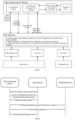
- FIG. 3 is a schematic diagram illustrating interaction between an input device and a first device according to some embodiments.
- the method for controlling the input function provided by the embodiments of the present disclosure is encapsulated as an input function control application (APP) and installed on the first device.
- APP input function control application
- the Input subsystem For a wheel sliding event and a key event reported by the mouse device of the input device as well as a key event reported by the keyboard device of the input device received by Input subsystem in the first device, the Input subsystem performs the interception and interaction with the input function control APP, and forwards the input events to the second device through the Bluetooth service.
- the process of intercepting and interacting between the Input subsystem and the input function control APP includes: the input function control APP obtains one or more input devices connected to the first device, and displays them in the user interaction interface; after the user determines the input device to be shared, the input function control APP sends the ID information of the input device to be shared to the Input subsystem, and registers the listening interface in the Input subsystem.
- the Input subsystem saves the ID information of the input device to be shared in the data structure, and determines the intercepted input device according to the information of the input device to be shared.
- the listening interface reports the intercepted wheel sliding event and/or the key event to the input function control APP, and the input function control APP forwards the wheel sliding event and/or the key event to the second device through the Bluetooth service.
- FIG. 4 is a schematic diagram illustrating an interaction inside of a first device according to some embodiments.
- the interaction process between the user interaction interface of the input function control APP, the Input subsystem and the APP Bluetooth service includes: the input function control APP determines the input devices currently connected with the first device by querying the Input subsystem, and the input devices currently connected with the first device are displayed on the user interaction interface, one or more input device to be shared is determined according to the user's selection, and the one or more input device to be shared is regarded as a device that needs to be intercepted and forwarded currently.
- the input function control APP sets the device information that needs to be intercepted and forwarded currently and sends it to the Input subsystem, and registers the listening interface in the Input subsystem.
- the input function control APP calls the Bluetooth service, starts the Bluetooth broadcast and wait for the second device to connect. If a connection to the first device initiated by the second device is received, then after the first device and the second device establish the connection, the Input subsystem starts to intercept input events via the Input subsystem.
- the input event sent by the input device connected with the first device is shared to the second device, which avoids the inconvenience caused by the user switching between multiple devices when multiple devices share the same input device.
- device descriptor information of the first device needs to be initialized according to the information of the input device to be shared, that is, node information is declared in the human-machine interface Device (HID) descriptor of the first device, so as to support sharing of multiple input devices to be shared.
- HID human-machine interface Device
- the user selects the mouse and the keyboard as input devices to be shared at the same time, and the information of both of the mouse and the keyboard need to be declared in the HID descriptor of the first device.
- the input event may be a key event, and the key value corresponding to the key event is forwarded to the listening interface.
- the key event may include a key event triggered by the mouse and a key event triggered by the keyboard.
- the key event triggered by the mouse includes selecting a certain application program in the second device
- the key event triggered by the keyboard includes a key value corresponding to the key in the keyboard.
- the Input subsystem will obtain the key value through a reader, and distribute the key value to a current window corresponding to the first device through a dispatcher. If it is detected that the input device sharing function is enabled and the input device to be shared is detected, then the key value is forwarded to the listening interface according to the ID information of the input device to be shared recorded in the Input subsystem.
- the input event can also be a wheel event of a mouse.
- a display icon of a mouse pointer or a mouse arrow is shielded on the display interface of the first device, and a coordinate position of the mouse pointer is set, and a relative position change data of the mouse pointer is forwarded to the listening interface.
- the input event may also be a touchpad event, and the input data corresponding to the touchpad event is forwarded to the listening interface.
- the method for controlling the input function further includes: if it is detected that a switching function is triggered, switching and inputting the input event of the input device to the first device or the second device.
- the user can flexibly switch the input event triggered by the input device between the first device and the second device by controlling the switching function.
- a switching function option is set on the display interface of the first device or the second device, and the switching function is achieved by the switching function option. After triggering the switching function option, function options of the switching control is displayed on the display interface of the corresponding device for the user to select.
- the switching function can also be implemented by a key or a key combination.
- the second device when the second device is one device, it is preset that if the switching instruction of the keys Ctrl+@ is monitored, the input event of the input device is switched from the current device to another device. That is, switching from the first device to the second device, or switching from the second device to the first device.
- the second devices includes multiple devices, for the convenience of description, two second devices are taken as an example, one of the second devices is represented by the second device A, and the other second device is represented by the second device B. It is preset that the switching instruction of keys Ctrl+Alt+A denotes switching the input event of the input device from the current device to the second device A.
- the switching instruction of keys Ctrl+Alt+B denotes switching the input event of the input device from the current device to the second device B.
- the combination of keys may be performed according to the user's preference during the specific setting, and the combination mode of the keys is not limited in this embodiment.
- the switching function is set to support the switching of the input device between the first device and the second device. If the switching function is triggered, the object serviced by the input device is switched.
- monitoring that the switching function is triggered includes: in response to that a function option of the switching control on the display interface of the first device or the second device is triggered, determining that the triggered switching function is monitored. Monitoring that the switching function is triggered further includes: if it is monitored that the key and/or the key combination on the input device is triggered, determining that the triggered and displayed switching function is monitored. Through the switching function, multiple devices and a set of keyboard and mouse can work together.
- a connection is established between the first device and the input device through a connection wire, and a connection is established between the first device and the second device through BLE.
- the input device sharing function is enabled, and it is monitored that the input device sends an input event, then by intercepting the input event and forwarding the input event to the second device, the input device connected to the first device is capable to share with the second device through BLE, and the Bluetooth function of the first device is fully utilized.
- the collaborative work between the first device and the second device is realized, such as the collaborative work between other electronic devices supporting Bluetooth such as mobile phones, tablets, notebooks, TVs, etc.
- the related functions implemented through the general low-power Bluetooth application specification hid over gatt profile, HOGP
- the embodiments of the present disclosure also provide an apparatus for controlling an input function.
- the apparatus for controlling an input function includes corresponding hardware structures and/or software modules for executing each function.
- the embodiments of the present disclosure can be implemented in hardware or a combination of hardware and computer software. Whether a function is performed by hardware or computer software driving hardware depends on the specific application and design constraints of the technical solution. Those skilled in the art may use different methods to implement the described functions for each specific application, but such implementation should not be considered beyond the scope of the technical solutions of the embodiments of the present disclosure.
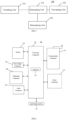
- Fig. 5 is a block diagram of an apparatus for controlling an input function according to some embodiments.
- the apparatus for controlling the input function 100 is applied to a first device, the first device is connected to the input device, and the apparatus for controlling the input function 100 includes an intercepting unit 101 and a forwarding unit 102.
- the intercepting unit 101 is configured, in response to detecting that an input device sharing function is enabled and an input event sent by the input device is monitored, intercept the input event; the forwarding unit 102 is configured to forward the intercepted input event to a second device connected with the first device.
- the interception unit 101 is configured to: the input device comprises a plurality of input devices, and after detecting that the input device sharing function is enabled, determine one or more input devices to be shared for sharing to the second device an input function to be shared, save respective device information of the one or more input devices to be shared, and register a listening interface in an input subsystem of the first device; and if the input event is listened through the listening interface and determining, based on the saved device information, the device to be shared that sends the input event is one of the one or more input devices to be shared, determine that the input event sent by the input device is monitored.
- the interception unit 101 is configured to: in response to that the input event comprises a key event, forward a key value corresponding to the key event to the listening interface; and/or in response to that the input event comprises a wheel event of a mouse, shield a display icon of a mouse pointer on a display interface of the first device, set a coordinate position of the mouse pointer, and forward a relative position change data of the mouse pointer to the listening interface.
- the forwarding unit 102 is configured to, based on device descriptor information of the second device, encapsulate the input data sent by the input event and forward the encapsulated input data to the second device connected with the first device.
- the input function control device further includes a switching unit 103, which is configured to switch the input event of the input device to the first device or the second device in response to monitoring that the switching function is triggered.
- the switching unit 103 is configured to: in response to that a function option of a switching control on a display interface of the first device or the second device is triggered, determine that the switching function is monitored to be triggered; or in response to monitoring that a key and/or a key combination on the input device is triggered, determine that the switching function is monitored to be triggered and displayed.
- the interception unit 101 is configured to detect that an input device sharing function control is enabled; and/or receive a control instruction used to enable the input device sharing function.
- the apparatus for controlling the input function further includes a determining unit 104, which is configured to in response to detecting that the first device is disconnected from the input device and monitoring that the input device establishes a connection with the first device again, determine the input device for which a connection relationship is re-established as the input device to be shared.
- Fig. 6 is a block diagram of a device for controlling an input function according to an exemplary embodiment.
- the device 200 may be a mobile phone, a computer, a digital broadcast terminal, a messaging device, a game console, a tablet device, a medical device, a fitness device, a personal digital assistant, and the like.
- the device 200 may include one or more of the following components: a processing component 202, a memory 204, a power supply component 206, a multimedia component 208, an audio component 210, an input/output (I/O) interface 212, a sensor component 214, and a communication component 216.
- a processing component 202 may include one or more of the following components: a memory 204, a power supply component 206, a multimedia component 208, an audio component 210, an input/output (I/O) interface 212, a sensor component 214, and a communication component 216.
- the processing component 202 generally controls the overall operations of the device 200, such as operations associated with displaying, telephone calls, data communication, camera operations, and recording operations.
- the processing component 202 may include one or more processors 220 to execute instructions to complete all or part of the steps in the above method.
- the processing component 202 may include one or more modules to facilitate interaction between the processing component 202 and other components.
- the processing component 202 may include a multimedia module to facilitate interaction between the multimedia component 208 and the processing component 202.
- the memory 204 is configured to store various types of data to support operations at the device 200. Examples of these data include instructions for any application or method operating on the device 200, contact data, phone book data, messages, pictures, videos, and so on.
- the memory 204 may be implemented by any type of volatile or non-volatile storage device or a combination of the any type of volatile or non-volatile storage device, such as static random access memory (SRAM), electrically erasable programmable read only memory (EEPROM), erasable programmable read only memory (EPROM), programmable read only memory (PROM), read only memory (ROM), magnetic memory, flash memory, magnetic disk or optical disk.
- SRAM static random access memory
- EEPROM electrically erasable programmable read only memory
- EPROM erasable programmable read only memory
- PROM programmable read only memory
- ROM read only memory
- magnetic memory flash memory
- flash memory magnetic disk or optical disk.
- the power supply component 206 provides power to various components of the device 200.
- the power supply component 206 may include a power supply management system, one or more power supplies, and other components associated with generating, managing, and distributing power for the device 200.
- the multimedia component 208 includes a screen that provides an output interface between the device 200 and the user.
- the screen may include a liquid crystal display (LCD) and a touch panel (TP). If the screen includes a touch panel, then the screen may be implemented as a touch screen to receive input signals from the user.
- the touch panel includes one or more touch sensors, to sense touching, swiping, and gestures on the touch panel. The touch sensor may not only sense a boundary of the touching operation or swiping operation, but also detect a duration and pressure related to the touching operation or swiping operation.
- the multimedia component 208 includes a front camera and/or a rear camera. When the device 200 is in an operation mode, such as a shooting mode or a video mode, the front camera and/or the rear camera may receive external multimedia data. Each of the front camera and rear camera may be a fixed optical lens system or have focal length and optical zoom capabilities.
- the audio component 210 is configured to output and/or input audio signals.
- the audio component 210 includes a microphone (MIC).
- the microphone When the device 200 is in an operation mode, such as a call mode, a recording mode, and a voice recognition mode, the microphone is configured to receive an external audio signal.
- the received audio signal may be further stored in the memory 204 or transmitted via the communication component 216.
- the audio component 210 further includes a speaker for outputting audio signals.
- the I/O interface 212 provides an interface between the processing component 202 and a peripheral interface module.
- the peripheral interface module may be a keyboard, a click wheel, a button and so on. These buttons may include, but are not limited to: home button, volume button, start button, and lock button.
- the sensor assembly 214 includes one or more sensors for providing the status assessment of various aspects for the device 200.
- the sensor component 214 can detect the on/off state of the device 200, and the relative positioning of the components, for example, the component is a display and a keypad of the device 200, and the sensor component 214 can also detect the position change of the device 200 or a component of the device 200, the presence or absence of user contact with the device 200, the orientation or acceleration/deceleration of the device 200, and the temperature change of the device 200.
- the sensor assembly 214 may include a proximity sensor configured to detect the presence of nearby objects without any physical contact.
- the sensor assembly 214 may also include a light sensor, such as a CMOS or CCD image sensor, for use in imaging applications.
- the sensor assembly 214 may also include an acceleration sensor, a gyro sensor, a magnetic sensor, a pressure sensor, or a temperature sensor.
- the communication component 216 is configured to facilitate wired or wireless communication between the device 200 and other devices.
- the device 200 can access a wireless network based on a communication standard, such as WiFi, 2G, or 3G, or a combination of the communication standard.
- the communication component 216 receives a broadcast signal or broadcast related information from an external broadcast management system via a broadcast channel.
- the communication component 216 further includes a near field communication (NFC) module to facilitate short-range communication.
- the NFC module can be implemented based on radio frequency identification (RFID) technology, infrared data association (IrDA) technology, ultra-wideband (UWB) technology, Bluetooth (BT) technology and other technologies.
- RFID radio frequency identification
- IrDA infrared data association
- UWB ultra-wideband
- Bluetooth Bluetooth
- the device 200 may be implemented by one or more application specific integrated circuits (ASICs), digital signal processors (DSPs), digital signal processing devices (DSPDs), programmable logic devices (PLDs), Field programmable gate array (FPGA), controller, microcontroller, microprocessor or other electronic components, to execute the interface display method described in any of the above examples.
- ASICs application specific integrated circuits
- DSPs digital signal processors
- DSPDs digital signal processing devices
- PLDs programmable logic devices
- FPGA Field programmable gate array
- controller microcontroller, microprocessor or other electronic components
- non-transitory computer-readable storage medium including instructions, such as a memory 204 including instructions, which can be executed by the processor 220 of the device 200 to complete the above method.
- the non-transitory computer-readable storage medium may be ROM, random access memory (RAM), CD-ROM, magnetic tape, floppy disk, optical data storage device, or the like.
- first, second, etc. are used to describe various information, but the information should not be limited to these terms. These terms are only used to distinguish the same type of information from one another, and do not imply a particular order or level of importance. In fact, the expressions “first”, “second” etc. are used completely interchangeably.
- the first information may also be referred to as the second information, and similarly, the second information may also be referred to as the first information, without departing from the scope of the present disclosure.
- connection includes a direct connection between the two without other components, and also includes an indirect connection between the two with other elements.
Landscapes
- Engineering & Computer Science (AREA)
- General Engineering & Computer Science (AREA)
- Theoretical Computer Science (AREA)
- Human Computer Interaction (AREA)
- Physics & Mathematics (AREA)
- General Physics & Mathematics (AREA)
- Input From Keyboards Or The Like (AREA)
- User Interface Of Digital Computer (AREA)
Applications Claiming Priority (1)
| Application Number | Priority Date | Filing Date | Title |
|---|---|---|---|
| CN202110912614.7A CN113687765A (zh) | 2021-08-10 | 2021-08-10 | 输入功能控制方法、输入功能控制装置及存储介质 |
Publications (1)
| Publication Number | Publication Date |
|---|---|
| EP4134793A1 true EP4134793A1 (de) | 2023-02-15 |
Family
ID=78579418
Family Applications (1)
| Application Number | Title | Priority Date | Filing Date |
|---|---|---|---|
| EP22158940.1A Pending EP4134793A1 (de) | 2021-08-10 | 2022-02-25 | Verfahren und vorrichtung zum steuern der eingabefunktion sowie speichermedium |
Country Status (3)
| Country | Link |
|---|---|
| US (1) | US12032752B2 (de) |
| EP (1) | EP4134793A1 (de) |
| CN (1) | CN113687765A (de) |
Families Citing this family (7)
| Publication number | Priority date | Publication date | Assignee | Title |
|---|---|---|---|---|
| CN117519622A (zh) * | 2022-07-29 | 2024-02-06 | 北京小米移动软件有限公司 | 投屏方法、装置、电子设备、存储介质及芯片 |
| US12204464B2 (en) * | 2023-01-18 | 2025-01-21 | Dell Products, L.P. | Systems and methods for managing shared-use peripheral devices |
| CN119225542B (zh) * | 2023-06-30 | 2025-11-28 | 荣耀终端股份有限公司 | 共享输入设备的方法、电子设备及存储介质 |
| CN119311131A (zh) * | 2023-07-12 | 2025-01-14 | 荣耀终端有限公司 | 键鼠穿越方法、通信系统及计算机可读存储介质 |
| US20250110680A1 (en) * | 2023-09-28 | 2025-04-03 | Motorola Mobility Llc | Device input control based on spatial alignment of displays |
| CN118444797B (zh) * | 2023-11-15 | 2025-04-29 | 荣耀终端股份有限公司 | 触控操作的识别方法和电子设备 |
| US12430090B2 (en) | 2023-12-22 | 2025-09-30 | Motorola Mobility Llc | Virtual view of a device based on device contextual state |
Citations (1)
| Publication number | Priority date | Publication date | Assignee | Title |
|---|---|---|---|---|
| US20170353549A1 (en) * | 2016-06-03 | 2017-12-07 | Logitech Europe S.A. | Automatic multi-host discovery in a flow-enabled system |
Family Cites Families (7)
| Publication number | Priority date | Publication date | Assignee | Title |
|---|---|---|---|---|
| US7071919B2 (en) * | 2001-02-26 | 2006-07-04 | Microsoft Corporation | Positional scrolling |
| TWI416368B (zh) * | 2009-01-19 | 2013-11-21 | Nuvoton Technology Corp | 鍵盤滑鼠切換器及其切換方法 |
| US8682249B2 (en) * | 2010-08-11 | 2014-03-25 | International Business Machines Corporation | Input device with switchable frequency channel for switchable use between computer systems |
| CN103561220A (zh) * | 2013-10-28 | 2014-02-05 | 三星电子(中国)研发中心 | 一种电视终端及其多屏显示和控制的方法 |
| KR20190096811A (ko) * | 2018-02-09 | 2019-08-20 | (주) 에디토 | 터치 디스플레이 장치 |
| US11353964B2 (en) * | 2018-11-14 | 2022-06-07 | Samsung Electronics Co., Ltd. | Wearable device for displaying con lent, and method thereof |
| CN111092795B (zh) * | 2019-11-18 | 2022-04-01 | 北京小米移动软件有限公司 | 功能控制方法、功能控制装置及计算机可读存储介质 |
-
2021
- 2021-08-10 CN CN202110912614.7A patent/CN113687765A/zh active Pending
-
2022
- 2022-02-25 EP EP22158940.1A patent/EP4134793A1/de active Pending
- 2022-03-03 US US17/686,138 patent/US12032752B2/en active Active
Patent Citations (1)
| Publication number | Priority date | Publication date | Assignee | Title |
|---|---|---|---|---|
| US20170353549A1 (en) * | 2016-06-03 | 2017-12-07 | Logitech Europe S.A. | Automatic multi-host discovery in a flow-enabled system |
Also Published As
| Publication number | Publication date |
|---|---|
| CN113687765A (zh) | 2021-11-23 |
| US20230051203A1 (en) | 2023-02-16 |
| US12032752B2 (en) | 2024-07-09 |
Similar Documents
| Publication | Publication Date | Title |
|---|---|---|
| EP4134793A1 (de) | Verfahren und vorrichtung zum steuern der eingabefunktion sowie speichermedium | |
| US20250013348A1 (en) | Multi-Window Interface with Historical Task Bar | |
| KR101949737B1 (ko) | 이동 단말기 및 이의 제어 방법, 이를 위한 기록 매체 | |
| CN107526494B (zh) | 键盘显示方法、装置、终端及存储介质 | |
| EP3675460A1 (de) | Dateiteilungsverfahren und -endgerät | |
| US20170322709A1 (en) | Split-screen display method, apparatus and medium | |
| EP3099063A1 (de) | Videokommunikationsverfahren und -vorrichtung | |
| JP2018535455A (ja) | 画面分割表示方法および装置 | |
| EP3553663A1 (de) | Nachrichtenerinnerungsverfahren für ein endgerät sowie und endgerät | |
| CN110262692B (zh) | 一种触摸屏扫描方法、装置及介质 | |
| US11596018B2 (en) | Region configuration method and device | |
| EP3232301B1 (de) | Mobiles endgerät und verarbeitungsverfahren für virtuellen tasten | |
| EP3232325B1 (de) | Verfahren und vorrichtung zum starten einer anwendungsschnittstelle | |
| CN104915091A (zh) | 一种显示状态栏提示信息的方法和装置 | |
| EP3901754A1 (de) | Verfahren und vorrichtung zum anzeigen einer anwendung und speichermedium | |
| US20170019482A1 (en) | Method and apparatus for downloading control program | |
| JP7252905B2 (ja) | タッチ信号の処理方法、装置および媒体 | |
| US20170147134A1 (en) | Method and apparatus for controlling touch-screen sensitivity | |
| US12417059B2 (en) | Method and apparatus for split-screen display, electronic device and computer readable storage medium | |
| EP4312111B1 (de) | Bildschirmprojektionsverfahren, bildschirmprojektionsvorrichtung, elektronische vorrichtung, speichermedium und chip | |
| CN106773753B (zh) | 设备控制方法和装置 | |
| CN115700459B (zh) | 分屏控制方法、装置及存储介质 | |
| EP4398609A1 (de) | Lokalisierungsverfahren und -vorrichtung, elektronische vorrichtung und speichermedium | |
| CN109375959B (zh) | 定向拉起应用的方法及装置 | |
| CN105373333A (zh) | 触控响应方法及装置 |
Legal Events
| Date | Code | Title | Description |
|---|---|---|---|
| PUAI | Public reference made under article 153(3) epc to a published international application that has entered the european phase |
Free format text: ORIGINAL CODE: 0009012 |
|
| STAA | Information on the status of an ep patent application or granted ep patent |
Free format text: STATUS: THE APPLICATION HAS BEEN PUBLISHED |
|
| AK | Designated contracting states |
Kind code of ref document: A1 Designated state(s): AL AT BE BG CH CY CZ DE DK EE ES FI FR GB GR HR HU IE IS IT LI LT LU LV MC MK MT NL NO PL PT RO RS SE SI SK SM TR |
|
| STAA | Information on the status of an ep patent application or granted ep patent |
Free format text: STATUS: REQUEST FOR EXAMINATION WAS MADE |
|
| 17P | Request for examination filed |
Effective date: 20230302 |
|
| RBV | Designated contracting states (corrected) |
Designated state(s): AL AT BE BG CH CY CZ DE DK EE ES FI FR GB GR HR HU IE IS IT LI LT LU LV MC MK MT NL NO PL PT RO RS SE SI SK SM TR |
|
| STAA | Information on the status of an ep patent application or granted ep patent |
Free format text: STATUS: EXAMINATION IS IN PROGRESS |
|
| 17Q | First examination report despatched |
Effective date: 20240902 |