EP4150452B1 - Verfahren und system zum aufrufen/abgeben einer aktion von einer externen anwendung innerhalb einer bestehenden offenen anwendung - Google Patents
Verfahren und system zum aufrufen/abgeben einer aktion von einer externen anwendung innerhalb einer bestehenden offenen anwendung Download PDFInfo
- Publication number
- EP4150452B1 EP4150452B1 EP21804075.6A EP21804075A EP4150452B1 EP 4150452 B1 EP4150452 B1 EP 4150452B1 EP 21804075 A EP21804075 A EP 21804075A EP 4150452 B1 EP4150452 B1 EP 4150452B1
- Authority
- EP
- European Patent Office
- Prior art keywords
- application
- application window
- window
- executing
- software application
- Prior art date
- Legal status (The legal status is an assumption and is not a legal conclusion. Google has not performed a legal analysis and makes no representation as to the accuracy of the status listed.)
- Active
Links
Images





Classifications
-
- G—PHYSICS
- G06—COMPUTING OR CALCULATING; COUNTING
- G06F—ELECTRIC DIGITAL DATA PROCESSING
- G06F3/00—Input arrangements for transferring data to be processed into a form capable of being handled by the computer; Output arrangements for transferring data from processing unit to output unit, e.g. interface arrangements
- G06F3/01—Input arrangements or combined input and output arrangements for interaction between user and computer
- G06F3/048—Interaction techniques based on graphical user interfaces [GUI]
- G06F3/0481—Interaction techniques based on graphical user interfaces [GUI] based on specific properties of the displayed interaction object or a metaphor-based environment, e.g. interaction with desktop elements like windows or icons, or assisted by a cursor's changing behaviour or appearance
-
- G—PHYSICS
- G06—COMPUTING OR CALCULATING; COUNTING
- G06F—ELECTRIC DIGITAL DATA PROCESSING
- G06F3/00—Input arrangements for transferring data to be processed into a form capable of being handled by the computer; Output arrangements for transferring data from processing unit to output unit, e.g. interface arrangements
- G06F3/01—Input arrangements or combined input and output arrangements for interaction between user and computer
- G06F3/048—Interaction techniques based on graphical user interfaces [GUI]
- G06F3/0484—Interaction techniques based on graphical user interfaces [GUI] for the control of specific functions or operations, e.g. selecting or manipulating an object, an image or a displayed text element, setting a parameter value or selecting a range
- G06F3/04842—Selection of displayed objects or displayed text elements
-
- G—PHYSICS
- G06—COMPUTING OR CALCULATING; COUNTING
- G06F—ELECTRIC DIGITAL DATA PROCESSING
- G06F9/00—Arrangements for program control, e.g. control units
- G06F9/06—Arrangements for program control, e.g. control units using stored programs, i.e. using an internal store of processing equipment to receive or retain programs
- G06F9/44—Arrangements for executing specific programs
- G06F9/451—Execution arrangements for user interfaces
-
- G—PHYSICS
- G06—COMPUTING OR CALCULATING; COUNTING
- G06F—ELECTRIC DIGITAL DATA PROCESSING
- G06F9/00—Arrangements for program control, e.g. control units
- G06F9/06—Arrangements for program control, e.g. control units using stored programs, i.e. using an internal store of processing equipment to receive or retain programs
- G06F9/46—Multiprogramming arrangements
- G06F9/48—Program initiating; Program switching, e.g. by interrupt
- G06F9/4806—Task transfer initiation or dispatching
- G06F9/4843—Task transfer initiation or dispatching by program, e.g. task dispatcher, supervisor, operating system
- G06F9/485—Task life-cycle, e.g. stopping, restarting, resuming execution
-
- G—PHYSICS
- G06—COMPUTING OR CALCULATING; COUNTING
- G06F—ELECTRIC DIGITAL DATA PROCESSING
- G06F9/00—Arrangements for program control, e.g. control units
- G06F9/06—Arrangements for program control, e.g. control units using stored programs, i.e. using an internal store of processing equipment to receive or retain programs
- G06F9/46—Multiprogramming arrangements
- G06F9/54—Interprogram communication
- G06F9/542—Event management; Broadcasting; Multicasting; Notifications
-
- G—PHYSICS
- G06—COMPUTING OR CALCULATING; COUNTING
- G06F—ELECTRIC DIGITAL DATA PROCESSING
- G06F9/00—Arrangements for program control, e.g. control units
- G06F9/06—Arrangements for program control, e.g. control units using stored programs, i.e. using an internal store of processing equipment to receive or retain programs
- G06F9/46—Multiprogramming arrangements
- G06F9/54—Interprogram communication
- G06F9/547—Remote procedure calls [RPC]; Web services
Definitions
- GUI graphical user interfaces
- the principles disclosed herein pertain to the art of a method for calling and executing an action from an outside application from within an existing open application to perform an action, thereby streamlining the user experience while performing a task.
- the method comprises of: (a) a running application; (b) a plurality of external actions that can be invoked; (c) an application method and state that can call external actions; and (d) means for calling and executing these external actions without leaving the running application state.
- CRM customer relationship management
- the principles disclosed herein provides the ability for a computer operator to add a new customer within a CRM from anywhere within the application without leaving the current area of the application.
- a computer operator using a CRM could be in the reporting area of the CRM application and type 'add new customer' in a search box and have the ability to add a new customer without ever leaving the reporting area of the CRM.
- the principles disclosed herein can massively streamline computer operator workflow, massively negate the need for application training, and fundamentally change what is possible today with computer application interfaces.
- the principles disclosed herein are applicable across various industries and devices. For example, automotive screens and voice interfaces, mobile phone platforms, computer based applications, and other computing devices.
- US 2018/0330333 A1 relates to a method for performing actions with respect to records maintained by a database system from within a calendar context of a calendar application.
- the calendar application comprises a drop-down menu including several different types of quick actions that can be taken with respect to a selected task object which is displayed as calendar item in the main calendar UI.
- An exemplary method comprises executing a first application on the primary application window.
- the primary application window displays a plurality of GUI elements associated with the first application.
- the first application is configured to execute a second application upon processing an event invoked on the primary application window. Thereafter, the first application and the primary application window are suspended and a secondary application window is displayed within the primary application window.
- the second application window displays a plurality of GUI elements associated with the secondary application. The first application and primary application window automatically resume after closing the secondary application window.
- an input mechanism (text search input, buttons, links, voice application programming interface (API), web API) that searches for matching events.
- the input mechanism may also search multiple types of fields simultaneously such as customers, items, etc. in addition to matching events.
- Matching Events may include pre-defined phrases, user modifiable phrases, and A.I. augmented phrases based on user activity.
- a listening mechanism is disclosed to identify Matching Events.
- the listening mechanism identifies a matching Quick Action the Quick Action link is returned to be passed via an App Method off an identifiable tag, class, or attribute of an element.
- an application method based off an identifiable tag, class, or attribute of an element permits the ability to open a window within the current running application.
- the application method will also pass a callback function to the application method making it possible to maintain the original running application state at the end of the Quick Action.
- a scripting application running within the running application such as JavaScript
- the principles disclosed herein also provides the ability for the application method to be called and run within the scripting application.
- the principles disclosed herein provides a support for executing actions within a modal or window of the running application such a showing a form, adding events to the form, and adding event specific buttons or actions.
- One or more aspects of the principles disclosed herein provides user interaction and input within the modal or window of the running application for the Quick Action.
- each block in the flowcharts or block diagrams may represent a module, segment, or portion of code, which comprises one or more executable instructions for implementing the specified local function(s).
- the functions noted in a block may occur out of the order noted in the figures.
- two blocks shown in succession may, in fact, be executed substantially concurrently, or the blocks may sometimes be executed in the reverse order, depending upon the functionality involved.
- each block of the block diagrams and/or flowchart illustration, and combinations of blocks in the block diagrams and/or flowchart illustration can be implemented by special purpose hardware-based systems that perform the specified functions or acts, or combinations of special purpose hardware and computer instructions.
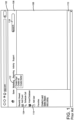
- FIG. 1 illustrates a problem associated with current GUI systems where a user of an exemplary customer relationship management (CRM) web application is required to navigate to various separate application windows to perform actions.
- CRMs include, but are not limited to, ZOHO CRM, SUGAR CRM, SALESFORCE, HUBSPOT, and MICROSOFT DYNAMICS 365.
- Window 102 is displayed on a user terminal executing a web application.
- the user terminal communicates over a network with a server.
- window 102 comprises various GUI elements, including sidebar area 104, top header area 106, main area 108, and footer area 110.
- sidebar area 104 a user is required to learn the specifics associated with the user interface of the CRM web application before efficiently utilizing the various functions and accessing information.
- top header area 106 comprises top navigation menu 112 comprises a plurality of uniform resource location (URL) links configured to navigate users to the various functions and information of the web application.
- top navigation menu 112 comprises a tab-based menu system that requires a user to navigate through various tabs to access the plurality of URL links.
- sidebar area 104 comprises side navigation menu 114, which comprises a plurality of additional URL links to access the functions and information of the web application.
- the learning curve for navigating the functions and information of the web application can be steep and require excessing time and resource demand of the user.
- Such difficulties can further exasperate the adoption of technology within organizations that some businesses are facing.
- Organizations today are measuring the adoption rate of the technology they deploy and generally seek training solutions to low adoption rates. Because of these low adoption rates, user productivity suffers, company reporting is incomplete, and users struggle to be successful at their position.
- window 102 comprises search bar 116.
- Search bar 116 is configured to search the web application for URL links to the various functions and information of the web application.
- the search can require a user to visit various applications when searching for a function, thereby needlessly expending time and system resources.
- each URL link is configured to generate a Hypertext Transfer Protocol (HTTP) GET request to a server and download Hypertext Markup Language (HTML), images, Cascading Style Sheets (CSS), and JavaScript code onto the local memory of the user terminal.
- HTTP Hypertext Transfer Protocol
- HTML Hypertext Markup Language
- CSS Cascading Style Sheets
- JavaScript code onto the local memory of the user terminal.
- the user terminal is required to cache or re-download portions of the web application as the user inefficiently navigates from application to application. This can adversely affect the performance of the web application on user terminals due to limited system resources, and can negatively impact the productivity of the user.
- Providing a solution to these usability problem has tremendous positive financial implications to various businesses and users of software technology.
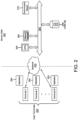
- Server side 300 can be implemented on hardware or a combination of hardware and software.
- the techniques disclosed herein are implemented in a software environment such as an operating system or in an application running on an operation system.
- This software can include, but is not limited to resident software, firmware, etc. or is implemented on a cloud-based or virtualized network system.
- Server side 300 comprises at least one computer processing unit (CPU) 304 and at least one memory 306 are interconnected to bus 302.
- Communication Module 310 is configured to allow server side 300 to communicate through network 400 with user terminals 202.
- the computer system architecture comprises CRM database 308.
- CRM database 308 is configured to store CRM data including, but not limited to, sales, user, and marketing information.
- CRM database 308 can store data over one or multiple databases.
- server side 300 is a simplified view and can include additional elements that are not depicted without departing from the principles disclosed herein.
- server side 300 can be local, remote, or a combination thereof.
- server side 300 is configured to communicate over network 400.
- User terminals 202 communicate over network 400 with server side 300.
- Exemplary user terminals include, but are not limited to, a mobile telephone, cellular telephone, smart telephone, laptop computer, netbook, personal digital assistant (PDA), or any other computing device with a display and suitable for network communication.
- user terminals 202 comprises a web browser application that supports executing JavaScript code, Asynchronous JavaScript and XML(AJAX), HTML, and CSS.
- Application 204 comprises computer executable instructions and is stored in memory located on user terminal 202. As described in detail below, Application 204 is configured to execute quick actions that can receive, process, store, and transmit information between user terminal 202 and server side 300.
- Network 400 can be a local area network (LAN), a wide area network (WAN), the Internet, cellular networks, satellite networks or any other network that permits the transfer and/or reception of data to and/or from server side 300.
- the data transmitted to or from server side 300 through network 400 can be transmitted and/or received utilizing standard telecommunications protocol or standard networking protocol.
- TCP/IP Transmission Control Protocol/Internet Protocol
- network 400 is the Internet.
- Other examples of protocols for transmitting and/or receiving data include, but are not limited to, Voice Over IP (VOIP) protocol, Short Message Service (SMS), and Global System for Mobile Communications (GSM).
- VOIP Voice Over IP
- SMS Short Message Service
- GSM Global System for Mobile Communications
- Network 400 is capable of utilizing one or more protocols of application 204 and server side 300.
- network 400 can translate to or from other protocols to one or more protocols of user terminals 202. As a result, a user can seamlessly transition from one device to another and continue utilizing a CRM web application in accordance with the
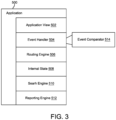
- FIG. 3 depicts a block diagram of exemplary components for a CRM application executing on a user terminal in accordance with the principles disclosed herein.
- Application 500 comprises application view 502, event handler 504, routing engine 506, internal state 508, search engine 510, and reporting engine 512.
- Application view 502 is configured to display various GUI elements, including input mechanism. Exemplary input mechanisms include, but are not limited to, a search input, buttons, URL links, and voice or speech input.
- Search engine 510 is configured to receive an input from a user terminal.
- Event comparator 514 is configured to identify a corresponding matching event based on a comparison of the input and predefined events. Thereafter, search engine 510 returns a list of URL links corresponding to relevant quick actions and/or standard URL links.
- a quick action is selected based on an identifiable tag, class, or attribute that is related to the input.
- the event comparator can be configured to return the identifiable tag, class, or attribute definition of addCustomer for inputs related to "add a new customer,” “new customer,” “new,” and/or "add.” It would be apparent to one of ordinary skill in the art to use a variety of other terms or phrases for mapping the addCustomer identifiable tag, class, or attribute definition to a user input without departing from the principles disclosed herein.
- Routing engine 506 is configured to receive information and determine the application 500 and application view 502 of the CRM application to display on a user terminal (shown in FIG. 2 ).
- Internal state 508 comprises global variables and the application state.
- Event handler 504 is configured to handle events that occur on the user interface of application view 502.
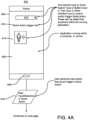
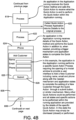
- user terminal 602 is a smart phone and comprises display 604 and microphone 606. Shown on display 604 is a web browser application executing an exemplary CRM application comprising JavaScript code, AJAX, HTML, and CSS.
- Code excerpt 1 illustrates an exemplary code fragment for implementing quick actions that are executed on user terminal 602.
- a code fragment is an incomplete set of instructions in a specific software language, such as Javascript code, AJAX, HTML, CSS, C#, and/or C++, and may contain a routine and/or sub-routine.
- Code excerpt 1 quick actions utilizing callback functions are defined for searching and adding customers.
- the app variable corresponds to the main class of the CRM application and defines global functions and global variables that are accessible by any application of the CRM application. Therefore, the quick actions for searchCustomers and addCustomers are configured to be called from any application of the CRM application.
- the arguments passed to the searchCustomers method includes options, a callback function, and a callback object.
- the arguments passed to the addCustomer method includes options, a callback function, and a callback object.
- Code excerpt 1 also includes configurations for click handlers for an identifiable tag, class, or attribute. These click handlers are configured to call the global methods searchCustomers and addCustomer, respectively. The click handlers are defined outside of the app variable, and therefore only accessible to the specific application of the CRM application that they are defined.
- Primary application window 608 depicts the current application of the CRM web application that the user is interacting with.
- primary application window 608 comprises a plurality of GUI elements, including search bar 610, URL link 612, and URL link 614.
- URL link 612 comprises selectable text while URL link 614 comprises a selectable icon.
- URL link 612 and URL link 614 comprise of an identifiable tag, class, or attribute definition for addCustomer.
- URL link 612 and URL link 614 are configured to call a quick action to add a customer in accordance with the principles disclosed herein.
- search bar 610 is configured to allow a user to search for and select a quick action in accordance with the principles disclosed herein.
- the user can enter a text input into search bar 610.
- user terminal 602 is configured to receive voice or speech input through microphone 606.
- a speech-to-text service or processor is configured to generate a textual interpretation of the voice or speech input which is entered into search bar 610.
- the search engine of the CRM application compares the input and returns a list of user selectable quick actions and/or standard URLs to access the applications of the CRM application.
- a result for "add customer" includes an identifiable tag, class, or attribute for addCustomer. It would be apparent to one of ordinary skill in the art that the text input, audio search input, button input, or text input can be selected from anywhere within primary application window 608 and/or the CRM application, without departing from the principles disclosed herein.
- step 616 the user selects a quick action to add a customer.
- this triggers an onClick event that the event handler of the CRM application processes in step 618 (shown in FIG. 4B ).
- the event handler determines the quick action to process by comparing the identifiable tag, class, or attribute definition of the element that triggered the onClick event to predefined quick actions.
- Code excerpt 2 illustrates an exemplary code fragment for processing an onClick event to add a customer.
- the event handler suspends the internal state of the application currently executing on primary application window 608.
- the browser is prevented from changing the current application by disabling the Hypertext Reference (HREF) command and stopping all other events of the current application from executing.
- HREF Hypertext Reference
- the plurality of GUI elements of the application currently executing on primary application window 608 are configured to remain rendered on primary application window 608, while its internal state is suspended.
- any HTML, images, CSS, and JavaScript code associated with the application currently executing on primary application window 608 remain stored on the system Random Access Memory (RAM).
- RAM Random Access Memory
- the event handler stores a reference to the element that was clicked on, thereby allowing the quick action to access the values of the element that was clicked on.
- Code excerpt 2 a reference to the application currently suspended on primary application window 608 is stored.
- the functions (including quick actions) and variables defined in Code excerpt 1 can be accessed within a quick action.
- the quick action is processed utilizing a callback function.
- Code excerpt 3 illustrates an exemplary code fragment for processing a quick action to add a customer.
- the quick action for adding a customer comprises a callback function.
- the quick action is configured to load various GUI elements for adding a customer within secondary application window 626.
- Secondary application window 626 is configured to be rendered within the bounds of primary application window 608.
- secondary application window 626 is not an independent window and its contents are displayed within primary application window 608.
- the various GUI elements of secondary application window 626 overlap the plurality of GUI elements of primary application window 608 that are positioned within the bounds of secondary application window 626.
- the responsiveness of user terminal 602 can be improved, because user terminal 602 is not required to unload the various GUI elements shown in primary application window 608 prior to displaying the GUI elements of secondary application window 626.
- GUI elements of primary application window 608 user terminal 602 can quickly display primary application window 608 upon exiting of the quick action. It would be apparent to one of ordinary skill in the art to display secondary application window in its own independent window, for example a pop-up window, without departing from the principles disclosed herein.
- Secondary application window 626 is a child to primary application window 608 and displayed within application window 608. A user is prevented from interacting with primary application window 608 while secondary application window 626 is open.
- step 620 the details of the quick action are returned to the original process that called the quick action. Thereafter, the original process renders application window 626 within primary application window 608.
- secondary application window 626 comprises fields to enter the name, email address, and phone number of the new customer. Further, secondary application window 626 comprises submit button 628.
- step 630 the user presses the submit button. Thereafter, the event handler of the CRM application processes the quick action event for adding a customer in step 632. As shown in Code excerpt 3, first the default action of a submit button for submitting a form is disabled. Thereafter, a form post is executed whereby the quick action information including variables and data are configured to return the data back to the original call back function. Finally, in step 634, secondary application window 626 is closed and primary application window 608 returns to its application state prior to the initiation of the quick action. In certain examples, this process can include clearing any events queued in the event handler. Also, the primary application window can notify the user whether the addition of the new user was successful or use the data for other functions. For example, if the application in the primary window was creating a new property listing, the data returned from the quick action to create a new customer can be used to populate the ownership and contact information of the new property listing.
- Code excerpt 3 comprises an event handler for a callback function in secondary application window 626 to search for customers.
- the quick action for searching for a customer comprises a callback function.
- the quick action is configured to load various GUI elements for searching a customer within a secondary application window.
- the process of searching for a customer is similar to the steps described above for adding a new customer utilizing quick actions in accordance with the principles disclosed herein.
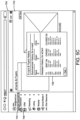
- FIG. 5A is an exemplary GUI of a CRM application.
- Primary application window 702 displays the current application of the CRM application.
- the current application is for creating an Open House E-Card to promote an open house for a property listing.
- Primary application window 702 comprises search bar 704.
- the input for search bar 704 is "send open house ecard," or any other additional phrase related to sending a e-card.
- the search engine of the CRM application is configured to receive the input from search bar 704 and display a list of URL links corresponding to relevant quick actions and/or standard URL links.
- URL link 706 corresponds to a quick action to the e-mail marketing section of the CRM application.
- the conventional method requires a user to take various steps to send an e-card.
- Each step transmits a HTTP GET request to a server and downloads HTML, images, CSS, and JavaScript code onto the local memory of the user terminal.
- the user terminal is required to cache or re-download portions of the web application as the user inefficiently navigates from application to application to send an e-card.
- the event handler of the CRM application processes the corresponding quick action for e-mailing the open house e-card.
- the quick action utilizes a call back function to suspend the internal state of the current application executing on primary application window 702 and executing another application displayed on secondary application window 708.
- secondary application window 708 comprises various GUI elements to allow a user to configure the subject line, recipients, and date and time to send an e-card.
- Submit button 710 is configured to process sending the e-card when the user clicks submit button 710, in accordance with the principles disclosed herein.
- the user quickly can quickly preview portions of the e-card (which is currently suspended in primary application window 702) while they configure the recipients of the e-card.
- the secondary application window can be configured to move within primary application window, thereby allow the user to preview different portions of the e-card.
- advantages include allowing a user to preview the e-card for any errors without being directed to a different application of the CRM application. Further, the user can quickly determine which e-card they were currently working on, in the event that they step away from the CRM application and return at a later time.
- secondary application window 708 displays a summary indicating a summary of the recipients of the e-card and options to share the e-card on various social media platforms. Further, the user can exit secondary application window 708 and automatically return to primary application window 702.
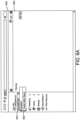
- Screen 800 comprises primary application window 802.
- Primary application window 802 is configured to display the current application of the CRM application that the user is interacting with.
- primary application window 802 depicts an exemplary home page of a CRM web application.
- Primary application window 802 comprises search bar 804.
- search bar 804 is "setup seller report.”
- URL link 806 corresponds to a quick action to the e-mail reporting application of the CRM application.
- the conventional method requires a user to take various steps to navigate to the email marketing engine of the CRM application and set-up a new Property Seller Report.
- Each step taken by the user to navigate utilizing the routing engine transmits a HTTP GET request to a server and downloads HTML, images, CSS, and JavaScript code onto the local memory of the user terminal.
- the user terminal is required to cache or re-download portions of the web application as the user inefficiently navigates from application to application to setup a Property Seller Report. This can adversely affect the performance of the web application on user terminals due to limited system resources.
- the use of quick actions in accordance with the principles disclosed herein drastically reduces the time needed, the steps required, and therefore the training necessary for a user to effectively learn to send and setup a Property Seller Report.
- the event handler of the CRM application processes the corresponding quick action for creating a seller report.
- the quick action utilizes a callback function to suspend the internal state of the current application executing on primary application window 802 and executing another application displayed on secondary application window 808.
- secondary application window 808 comprises various GUI elements to allow a user to configure a seller report.
- Submit button 810 is configured to process the seller report, and return the user to continue interacting with the application executing in primary application window 802.
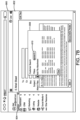
- FIGs. 7A-7B depict another exemplary method of utilizing quick actions to improve the usability of a GUI in accordance with the principles disclosed herein.
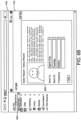
- screen 900 is an exemplary GUI of a CRM application.
- Primary application window 902 displays the current application of the CRM application for drafting a client e-mail.
- the drafting e-mail functionality is part of the e-mail marketing engine of the CRM application.
- Primary application window 902 comprises search bar 904.
- the input for search bar 904 is "customer.”
- the search engine of the CRM application is configured to receive the input from search bar 904 and display a list of URL links corresponding to relevant quick actions and/or standard URL links.
- URL link 906 corresponds to a quick action to execute the customer information application of the CRM application.
- the conventional method requires the user to either save a draft of the e-mail and leave the e-mail application to execute the client information lookup application of the CRM application.
- the user In the event that the user is not using an application, they would be required to open an additional web browser window, navigate to the appropriate section of the CRM application, lookup the client information, and then go back to the other web browser window.
- quick actions drastically improve the user workflow and thereby diminishes the need for user training.
- the event handler of the CRM application processes the corresponding quick action to lookup client information.
- the quick action utilizes a callback function to suspend the internal state of the current application executing on primary application window 902 and display secondary application window 908.
- secondary application window 908 comprises various GUI elements to allow a user to search for client information.
- Submit button 910 is configured to search the CRM database for the requested customer information when the user selects submit button 910, in accordance with the principles disclosed herein. Once the user has found the needed client information, they can close secondary application window 908 and continue working on drafting the client e-mail on primary application window 902.
- the driver when using a car infotainment system, the driver can be required to access features of the car by opening an application and responding to prompts, all while performing various tasks related to driving.
- exemplary systems include, but are not limited to, the BMW iDrive Interface.
- Conventional car infotainment systems can require the user to navigate various windows to access some of these features, which can distract the user's attention from driving.
- Car interface system 1000 comprises display 1002 coupled to vehicle interface controller 1004.
- Display 1002 comprises a touch-screen.
- Vehicle interface controller 1004 comprises central processor unit (CPU) 1006, graphics processor unit (GPU) 1008, and memory 1010.
- CPU central processor unit
- GPU graphics processor unit
- vehicle interface controller 1004 is coupled to the various controls and subsystems of the vehicle via CAN (Controller Area Network) transceiver 1012 and LIN (Local Interconnect Network) transceiver 1014.
- CAN Controller Area Network
- LIN Local Interconnect Network
- Exemplary subsystems include Tire Pressure Monitoring (TPM) Subsystem 1016, climate control subsystem 1018, audio subsystem 1020, drive train monitoring subsystem 1022, power management subsystem 1024, and power train subsystem 1026.
- the subsystems of the vehicle are configured to be accessed and/or viewed on display 1002 by a car interface application executing on vehicle interface controller 1004 in accordance with the principles disclosed herein.
- the car interface application comprises an application view, event handler, internal state, and search engine.
- the search engine is configured to receive an input from vehicle interface 1004.
- vehicle interface 1004 is configured to communicate with buttons, knobs, and switches via I 2 C (Inter-Integrated Circuit) bus 1028.
- Vehicle interface 1004 is also configured to receive inputs from icons displayed on display 1002.
- the car interface application comprises an event comparator configured to identify a corresponding matching event based on a comparison of input and predefined events.
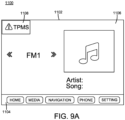
- FIG 9A shows an exemplary screen 1100 in accordance with the car interface system discussed in FIG 8 above.
- Screen 1100 comprises display 1102 and controls 1104.
- Controls 1104 comprises buttons that are shortcuts for designated applications that are displayed on display 1102 when selected.
- Display 1102 comprises a touch screen which displays primary application window 1106.
- a user is able to quickly and easily access the various applications of the car interface system. For example, while driving, a user may receive a notification 1106 that the tire pressure is low while primary application window 1106 is displaying the radio application.
- notification 1106 is configured as a quick link in accordance with the principles disclosed herein.
- the event handler of the car interface application processes the corresponding quick action to review the TPM subsystem.
- the quick action utilizes a callback function to display secondary application window 1110 in front of primary application window 1106. Further, the user is suspended from interacting with primary application window. Once the user has completed reviewing the notification and/or resetting the TPM subsystem, secondary application window 1108 can be closed. Thereafter, the user can fully interact with the radio application on primary application window 1106.
Landscapes
- Engineering & Computer Science (AREA)
- Theoretical Computer Science (AREA)
- Software Systems (AREA)
- General Engineering & Computer Science (AREA)
- Physics & Mathematics (AREA)
- General Physics & Mathematics (AREA)
- Human Computer Interaction (AREA)
- Multimedia (AREA)
- User Interface Of Digital Computer (AREA)
- Stored Programmes (AREA)
- Nitrogen And Oxygen Or Sulfur-Condensed Heterocyclic Ring Systems (AREA)
- Digital Computer Display Output (AREA)
Claims (10)
- Nicht transitorische computerlesbare Speichervorrichtung, die computerausführbare Befehle speichert, die, wenn sie durch einen Computer ausgeführt werden, den Computer steuern, ein Verfahren zum Ausführen einer zweiten Software-Anwendung in einer ersten Software-Anwendung durchzuführen, wobei das Verfahren Folgendes umfasst:Definieren von mehreren globalen Funktionen, die mindestens eine Rückruffunktion umfassen, wobei mehrere Software-Anwendungen konfiguriert sind, die mindestens eine Rückruffunktion auszuführen;Ausführen der ersten Software-Anwendung der mehreren Software-Anwendungen, die Codefragmente zum Implementieren von schnellen Aktionen zur Verwendung von Rückruffunktionen, die im Computer ausgeführt werden, umfassen;Anzeigen von mehreren ersten Elementen einer graphischen Anwenderschnittstelle, GUI-Elementen (610, 612, 614, 704, 706, 804, 806, 904, 906), die der ersten Software-Anwendung entsprechen, an einem Hauptanwendungsfenster (608, 702, 802, 902);Konfigurieren mindestens eines ersten GUI-Elements (610, 612, 614, 704, 706, 804, 806, 904, 906), das ein Klickereignis umfasst, wobei das Klickereignis des mindestens einen ersten GUI-Elements (610, 612, 614, 704, 706, 804, 806, 904, 906) die mindestens eine Rückruffunktion aufruft;Empfangen einer Eingabe von dem mindestens einen ersten GUI-Element (610, 612, 614, 704, 706, 804, 806, 904, 906) des Hauptanwendungsfensters (608, 702, 802, 902);wobei ein Ereigniskomparator (514) die empfangene Eingabe und vordefinierte Ereignisse vergleicht und eine Suchmaschine (510) der ersten Anwendung eine Liste von anwenderwählbaren schnellen Aktionen zurückgibt;Wählen einer schnellen Aktion, die das jeweilige Klickereignis auslöst;Verwenden der mindestens einen Rückruffunktion zum Unterbrechen der ersten Software-Anwendung und des Hauptanwendungsfensters (608, 702, 802, 902) in Reaktion auf ein Ausführen des Klickereignisses vom Hauptanwendungsfenster (608, 702, 802, 902);Verwenden der mindestens einen Rückruffunktion zum Anzeigen eines Nebenanwendungsfensters (626, 808, 908), das im Hauptanwendungsfenster (608, 702, 802, 902) positioniert ist, in Reaktion darauf, dass die erste Software-Anwendung die zweite Software-Anwendung ausführt, die Codefragmente umfasst, die einen Bezug auf die erste Anwendung, die gegenwärtig unterbrochen ist, speichern;Konfigurieren der zweiten Anwendung, Daten zu der mindestens einen Rückruffunktion zurückzugeben, undSchließen des Nebenanwendungsfensters (626, 808, 908) und Fortsetzen der ersten Software-Anwendung und des Hauptanwendungsfensters (608, 702, 802, 902).
- Nicht transitorische computerlesbare Speichervorrichtung nach Anspruch 1, wobei das Unterbrechen der ersten Software-Anwendung und des Hauptanwendungsfensters (608, 702, 802, 902) in Reaktion auf ein Ausführen des Klickereignisses vom Hauptanwendungsfenster (608, 702, 802, 902) Folgendes umfasst:Verhindern, dass das Hauptanwendungsfenster (608, 702, 802, 902) sich ändert, undVerhindern der Ausführung zusätzlicher Klickereignisse.
- Nicht transitorische computerlesbare Speichervorrichtung nach einem der vorhergehenden Ansprüche, wobei das Anzeigen eines Nebenanwendungsfensters (626, 808, 908) in Reaktion darauf, dass die erste Software-Anwendung eine zweite Software-Anwendung ausführt, ein Anzeigen von mehreren zweiten Elementen einer graphischen Anwenderschnittstelle, GUI-Elementen, am Nebenanwendungsfenster (626, 808, 908) umfasst.
- Nicht transitorische computerlesbare Speichervorrichtung nach einem der vorhergehenden Ansprüche, wobei das Anzeigen von mehreren ersten GUI-Elementen (610, 612, 614, 704, 706, 804, 806, 904, 906) am Hauptanwendungsfenster (608, 702, 802, 902) ein Anzeigen eines modalen Fensters umfasst.
- Nicht transitorische computerlesbare Speichervorrichtung nach einem der vorhergehenden Ansprüche, die ferner ausführbare Befehle enthält, um den Computer zu konfigurieren, ein Verfahren durchzuführen, wobei das Verfahren Folgendes umfasst:
Konfigurieren mindestens eines zweiten GUI-Elements mit einem Klickereignis, das konfiguriert ist, eine zweite Rückruffunktion aufzurufen. - Nicht transitorische computerlesbare Speichervorrichtung nach einem der vorhergehenden Ansprüche, wobei das Ausführen einer ersten Software-Anwendung ein Ausführen einer Berichtsanwendung einer Kundenbeziehungsmanagementanwendung, CRM-Anwendung, umfasst.
- Nicht transitorische computerlesbare Speichervorrichtung nach einem der vorhergehenden Ansprüche, die ferner ausführbare Befehle enthält, um den Computer zu konfigurieren, ein Verfahren durchzuführen, wobei das Verfahren Folgendes umfasst:
Konfigurieren des Nebenanwendungsfensters (626, 808, 908), sich im Hauptanwendungsfenster (608, 702, 802, 902) zu bewegen. - Nicht transitorische computerlesbare Speichervorrichtung nach Anspruch 5, die ferner ausführbare Befehle enthält, um den Computer zu konfigurieren, ein Verfahren durchzuführen, wobei das Verfahren Folgendes umfasst:Unterbrechen der zweiten Software-Anwendung und des Nebenanwendungsfensters (626, 808, 908) in Reaktion auf das Klickereignis, das konfiguriert ist, die zweite Rückruffunktion aufzurufen;Ausführen einer dritten Software-Anwendung undWiederaufnehmen der zweiten Software-Anwendung nach Abschluss der dritten Software-Anwendung.
- Nicht transitorische computerlesbare Speichervorrichtung nach Anspruch 8, wobei das Unterbrechen der zweiten Software-Anwendung und des Nebenanwendungsfensters (626, 808, 908) in Reaktion auf das Klickereignis, das konfiguriert ist, eine zweite Rückruffunktion aufzurufen, Folgendes umfasst:Verhindern, dass das Nebenanwendungsfenster (626, 808, 908) sich ändert; undVerhindern der Ausführung zusätzlicher Klickereignisse am Nebenanwendungsfenster (626, 808, 908).
- Nicht transitorische computerlesbare Speichervorrichtung nach Anspruch 3, wobei das Verfahren ferner Folgendes umfasst:Anzeigen der mehreren ersten GUI-Elemente, die der ersten Software-Anwendung entsprechen, am Hauptanwendungsfenster (608, 702, 802, 902);Empfangen eines Ereignisses vom Hauptanwendungsfenster (608, 702, 802, 902);Aufrufen der ersten Software-Anwendung, um die zweite Software-Anwendung auszuführen;Anzeigen der mehreren zweiten GUI-Elemente, die der zweiten Software-Anwendung entsprechen, am Nebenanwendungsfenster (626, 808, 908) undautomatisches Fortsetzen der ersten Software-Anwendung und des Hauptanwendungsfensters (608, 702, 802, 902) nach dem Schließen des Nebenanwendungsfensters (626, 808, 908).
Applications Claiming Priority (3)
| Application Number | Priority Date | Filing Date | Title |
|---|---|---|---|
| US202063022703P | 2020-05-11 | 2020-05-11 | |
| US17/215,620 US11704138B2 (en) | 2020-05-11 | 2021-03-29 | Method and system for calling/executing an action from an outside application within an existing open application |
| PCT/US2021/031515 WO2021231262A1 (en) | 2020-05-11 | 2021-05-10 | Method and system for calling/executing an action from an outside application within an existing open application |
Publications (3)
| Publication Number | Publication Date |
|---|---|
| EP4150452A1 EP4150452A1 (de) | 2023-03-22 |
| EP4150452A4 EP4150452A4 (de) | 2024-06-05 |
| EP4150452B1 true EP4150452B1 (de) | 2025-06-25 |
Family
ID=78412618
Family Applications (1)
| Application Number | Title | Priority Date | Filing Date |
|---|---|---|---|
| EP21804075.6A Active EP4150452B1 (de) | 2020-05-11 | 2021-05-10 | Verfahren und system zum aufrufen/abgeben einer aktion von einer externen anwendung innerhalb einer bestehenden offenen anwendung |
Country Status (11)
| Country | Link |
|---|---|
| US (2) | US11704138B2 (de) |
| EP (1) | EP4150452B1 (de) |
| JP (1) | JP7798797B2 (de) |
| CN (1) | CN115917503B (de) |
| AU (1) | AU2021271799B2 (de) |
| ES (1) | ES3042513T3 (de) |
| FI (1) | FI4150452T3 (de) |
| IL (1) | IL298106B2 (de) |
| MX (1) | MX2022014100A (de) |
| PL (1) | PL4150452T3 (de) |
| WO (1) | WO2021231262A1 (de) |
Families Citing this family (1)
| Publication number | Priority date | Publication date | Assignee | Title |
|---|---|---|---|---|
| USD625733S1 (en) * | 2009-03-04 | 2010-10-19 | Apple Inc. | Graphical user interface for a display screen or portion thereof |
Family Cites Families (22)
| Publication number | Priority date | Publication date | Assignee | Title |
|---|---|---|---|---|
| WO1994014115A2 (en) * | 1992-12-01 | 1994-06-23 | Microsoft Corporation | A method and system for in-place interaction with embedded objects |
| US6523022B1 (en) * | 1997-06-09 | 2003-02-18 | Allen Hobbs | Method and apparatus for selectively augmenting retrieved information from a network resource |
| JP2001154966A (ja) | 1999-11-29 | 2001-06-08 | Sony Corp | コンピュータ・ネットワーク上で構築・提供される共有仮想空間上で複数ユーザが参加可能な仮想会話を支援する会話支援システム及び会話支援方法、並びに、プログラム記憶媒体 |
| US6901588B1 (en) * | 2000-04-17 | 2005-05-31 | Codemesh, Inc. | Sharing components between programming languages by use of polymorphic proxy |
| US7594181B2 (en) * | 2002-06-27 | 2009-09-22 | Siebel Systems, Inc. | Prototyping graphical user interfaces |
| US7913183B2 (en) * | 2002-10-08 | 2011-03-22 | Microsoft Corporation | System and method for managing software applications in a graphical user interface |
| US8527943B1 (en) * | 2004-02-12 | 2013-09-03 | Raju V. Chiluvuri | System and method of application development |
| US7499951B2 (en) * | 2005-11-18 | 2009-03-03 | Oracle International Corporation | Capturing data from user selected portions of a business process and transferring captured data to user identified destinations |
| US9690474B2 (en) * | 2007-12-21 | 2017-06-27 | Nokia Technologies Oy | User interface, device and method for providing an improved text input |
| US8365144B1 (en) * | 2008-02-28 | 2013-01-29 | The Mathworks, Inc. | Proxy graphical user interface generation |
| AU2009265217A1 (en) | 2008-07-01 | 2010-01-07 | Talisma Corporation Private Ltd. | Selecting from a list of short message service (SMS) gateways from a graphical user interface (GUI) |
| US9081471B2 (en) * | 2008-09-19 | 2015-07-14 | Oracle International Corporation | Providing modal window views for widgets on web pages |
| TW201331769A (zh) * | 2012-01-31 | 2013-08-01 | Chi Mei Comm Systems Inc | 功能表項查找方法及系統 |
| KR102105460B1 (ko) | 2013-06-14 | 2020-06-01 | 엘지전자 주식회사 | 이동 단말기 및 그것의 제어방법 |
| US20140380139A1 (en) * | 2013-06-21 | 2014-12-25 | Microsoft Corporation | Embedded experience through bidirectional integration of crm applications and spreadsheet applications |
| CA2972406A1 (en) * | 2015-01-02 | 2016-07-07 | Systech Corporation | Control infrastructure |
| KR101730256B1 (ko) | 2015-09-21 | 2017-04-26 | 엔에이치엔엔터테인먼트 주식회사 | 오버레이 제어 방법 및 시스템 |
| US9910722B2 (en) * | 2015-12-29 | 2018-03-06 | Sap Se | Generic callback handling |
| US20170185612A1 (en) * | 2015-12-29 | 2017-06-29 | Successfactors, Inc. | Dynamically designing web pages |
| US10504069B2 (en) * | 2017-05-12 | 2019-12-10 | Salesforce.Com, Inc. | Calendar application, system and method for performing actions on records in a cloud computing platform from within the context of the calendar application |
| US10574097B2 (en) * | 2017-05-26 | 2020-02-25 | The United States Of America, As Represented By The Secretary Of The Navy | Dynamic wireless power/energy transfer system apparatus including modeling and simulation (M and S), analysis, and visualization (MSAV) systems along with related methods |
| US11106934B2 (en) * | 2019-02-11 | 2021-08-31 | Innovaccer Inc. | Automatic visual display overlays of contextually related data from multiple applications |
-
2021
- 2021-03-29 US US17/215,620 patent/US11704138B2/en active Active
- 2021-05-10 WO PCT/US2021/031515 patent/WO2021231262A1/en not_active Ceased
- 2021-05-10 IL IL298106A patent/IL298106B2/en unknown
- 2021-05-10 ES ES21804075T patent/ES3042513T3/es active Active
- 2021-05-10 CN CN202180048132.XA patent/CN115917503B/zh active Active
- 2021-05-10 JP JP2022568806A patent/JP7798797B2/ja active Active
- 2021-05-10 PL PL21804075.6T patent/PL4150452T3/pl unknown
- 2021-05-10 EP EP21804075.6A patent/EP4150452B1/de active Active
- 2021-05-10 MX MX2022014100A patent/MX2022014100A/es unknown
- 2021-05-10 FI FIEP21804075.6T patent/FI4150452T3/fi active
- 2021-05-10 AU AU2021271799A patent/AU2021271799B2/en active Active
-
2023
- 2023-06-27 US US18/341,876 patent/US20230333866A1/en not_active Abandoned
Also Published As
| Publication number | Publication date |
|---|---|
| CN115917503B (zh) | 2025-04-04 |
| BR112022023073A2 (pt) | 2022-12-20 |
| US11704138B2 (en) | 2023-07-18 |
| MX2022014100A (es) | 2023-02-22 |
| AU2021271799A2 (en) | 2022-12-22 |
| US20210349740A1 (en) | 2021-11-11 |
| US20230333866A1 (en) | 2023-10-19 |
| JP2023518117A (ja) | 2023-04-27 |
| IL298106A (en) | 2023-01-01 |
| EP4150452A4 (de) | 2024-06-05 |
| ES3042513T3 (en) | 2025-11-21 |
| FI4150452T3 (fi) | 2025-09-26 |
| PL4150452T3 (pl) | 2025-11-03 |
| WO2021231262A1 (en) | 2021-11-18 |
| IL298106B1 (en) | 2023-10-01 |
| AU2021271799A1 (en) | 2022-12-15 |
| IL298106B2 (en) | 2024-02-01 |
| AU2021271799B2 (en) | 2023-07-13 |
| CN115917503A (zh) | 2023-04-04 |
| CA3178318A1 (en) | 2021-11-18 |
| EP4150452A1 (de) | 2023-03-22 |
| JP7798797B2 (ja) | 2026-01-14 |
Similar Documents
| Publication | Publication Date | Title |
|---|---|---|
| EP4167084B1 (de) | Initialisierung eines gesprächs mit einem automatisierten agenten über auswählbares grafisches element | |
| US8392837B2 (en) | Browser supporting multiple users | |
| US8838808B2 (en) | Asynchronous communication in web applications | |
| CA2723274C (en) | Multi-process browser architecture | |
| US8782127B2 (en) | Notification based web applications | |
| US8788627B2 (en) | Interactive web application framework | |
| US8341464B2 (en) | Diagnostic dashboard for web pages | |
| US20230333866A1 (en) | Method and system for calling/executing an action from an outside application within an existing open application | |
| US10257281B2 (en) | Message-based contextual dialog | |
| CA3178318C (en) | Method and system for calling/executing an action from an outside application within an existing open application | |
| US20100146485A1 (en) | Environment Abstraction of a Business Application and the Executing Operating Environment | |
| BR112022023073B1 (pt) | Dispositivos de armazenamento legível por computador não transitório e de computação para executar um segundo aplicativo de software dentro de um primeiro aplicativo de software, métodos realizado por um dispositivo de computação configurado para exibir uma interface gráfica de usuário em uma tela, realizado por um dispositivo de computação configurado para acessar um banco de dados que armazena registros de gerenciamento de relacionamento com o cliente e para executar um segundo aplicativo de software dentro de um primeiro aplicativo de software, e, gerenciamento de relacionamento com o cliente | |
| CN114356481A (zh) | 数据处理方法、装置、电子设备及存储介质 | |
| CN117331618A (zh) | 页面数据处理方法、装置、电子设备及存储介质 |
Legal Events
| Date | Code | Title | Description |
|---|---|---|---|
| STAA | Information on the status of an ep patent application or granted ep patent |
Free format text: STATUS: THE INTERNATIONAL PUBLICATION HAS BEEN MADE |
|
| PUAI | Public reference made under article 153(3) epc to a published international application that has entered the european phase |
Free format text: ORIGINAL CODE: 0009012 |
|
| STAA | Information on the status of an ep patent application or granted ep patent |
Free format text: STATUS: REQUEST FOR EXAMINATION WAS MADE |
|
| 17P | Request for examination filed |
Effective date: 20221110 |
|
| AK | Designated contracting states |
Kind code of ref document: A1 Designated state(s): AL AT BE BG CH CY CZ DE DK EE ES FI FR GB GR HR HU IE IS IT LI LT LU LV MC MK MT NL NO PL PT RO RS SE SI SK SM TR |
|
| DAV | Request for validation of the european patent (deleted) | ||
| DAX | Request for extension of the european patent (deleted) | ||
| A4 | Supplementary search report drawn up and despatched |
Effective date: 20240508 |
|
| RIC1 | Information provided on ipc code assigned before grant |
Ipc: G06F 3/0481 20130101ALI20240502BHEP Ipc: G06F 9/48 20060101ALI20240502BHEP Ipc: G06F 9/451 20180101AFI20240502BHEP |
|
| GRAP | Despatch of communication of intention to grant a patent |
Free format text: ORIGINAL CODE: EPIDOSNIGR1 |
|
| STAA | Information on the status of an ep patent application or granted ep patent |
Free format text: STATUS: GRANT OF PATENT IS INTENDED |
|
| INTG | Intention to grant announced |
Effective date: 20250206 |
|
| GRAS | Grant fee paid |
Free format text: ORIGINAL CODE: EPIDOSNIGR3 |
|
| GRAA | (expected) grant |
Free format text: ORIGINAL CODE: 0009210 |
|
| STAA | Information on the status of an ep patent application or granted ep patent |
Free format text: STATUS: THE PATENT HAS BEEN GRANTED |
|
| AK | Designated contracting states |
Kind code of ref document: B1 Designated state(s): AL AT BE BG CH CY CZ DE DK EE ES FI FR GB GR HR HU IE IS IT LI LT LU LV MC MK MT NL NO PL PT RO RS SE SI SK SM TR |
|
| REG | Reference to a national code |
Ref country code: GB Ref legal event code: FG4D |
|
| REG | Reference to a national code |
Ref country code: CH Ref legal event code: EP |
|
| REG | Reference to a national code |
Ref country code: CH Ref legal event code: EP |
|
| REG | Reference to a national code |
Ref country code: IE Ref legal event code: FG4D |
|
| REG | Reference to a national code |
Ref country code: DE Ref legal event code: R096 Ref document number: 602021032986 Country of ref document: DE |
|
| REG | Reference to a national code |
Ref country code: FI Ref legal event code: FGE |
|
| REG | Reference to a national code |
Ref country code: SE Ref legal event code: TRGR |
|
| REG | Reference to a national code |
Ref country code: LT Ref legal event code: MG9D |
|
| PG25 | Lapsed in a contracting state [announced via postgrant information from national office to epo] |
Ref country code: GR Free format text: LAPSE BECAUSE OF FAILURE TO SUBMIT A TRANSLATION OF THE DESCRIPTION OR TO PAY THE FEE WITHIN THE PRESCRIBED TIME-LIMIT Effective date: 20250926 Ref country code: NO Free format text: LAPSE BECAUSE OF FAILURE TO SUBMIT A TRANSLATION OF THE DESCRIPTION OR TO PAY THE FEE WITHIN THE PRESCRIBED TIME-LIMIT Effective date: 20250925 |
|
| REG | Reference to a national code |
Ref country code: NL Ref legal event code: FP |
|
| PG25 | Lapsed in a contracting state [announced via postgrant information from national office to epo] |
Ref country code: BG Free format text: LAPSE BECAUSE OF FAILURE TO SUBMIT A TRANSLATION OF THE DESCRIPTION OR TO PAY THE FEE WITHIN THE PRESCRIBED TIME-LIMIT Effective date: 20250625 |
|
| PG25 | Lapsed in a contracting state [announced via postgrant information from national office to epo] |
Ref country code: HR Free format text: LAPSE BECAUSE OF FAILURE TO SUBMIT A TRANSLATION OF THE DESCRIPTION OR TO PAY THE FEE WITHIN THE PRESCRIBED TIME-LIMIT Effective date: 20250625 |
|
| PG25 | Lapsed in a contracting state [announced via postgrant information from national office to epo] |
Ref country code: RS Free format text: LAPSE BECAUSE OF FAILURE TO SUBMIT A TRANSLATION OF THE DESCRIPTION OR TO PAY THE FEE WITHIN THE PRESCRIBED TIME-LIMIT Effective date: 20250925 |
|
| PG25 | Lapsed in a contracting state [announced via postgrant information from national office to epo] |
Ref country code: LV Free format text: LAPSE BECAUSE OF FAILURE TO SUBMIT A TRANSLATION OF THE DESCRIPTION OR TO PAY THE FEE WITHIN THE PRESCRIBED TIME-LIMIT Effective date: 20250625 |
|
| REG | Reference to a national code |
Ref country code: ES Ref legal event code: FG2A Ref document number: 3042513 Country of ref document: ES Kind code of ref document: T3 Effective date: 20251121 |
|
| PG25 | Lapsed in a contracting state [announced via postgrant information from national office to epo] |
Ref country code: PT Free format text: LAPSE BECAUSE OF FAILURE TO SUBMIT A TRANSLATION OF THE DESCRIPTION OR TO PAY THE FEE WITHIN THE PRESCRIBED TIME-LIMIT Effective date: 20251027 |
|
| REG | Reference to a national code |
Ref country code: AT Ref legal event code: MK05 Ref document number: 1807185 Country of ref document: AT Kind code of ref document: T Effective date: 20250625 |
|
| PG25 | Lapsed in a contracting state [announced via postgrant information from national office to epo] |
Ref country code: IS Free format text: LAPSE BECAUSE OF FAILURE TO SUBMIT A TRANSLATION OF THE DESCRIPTION OR TO PAY THE FEE WITHIN THE PRESCRIBED TIME-LIMIT Effective date: 20251025 |
|
| PG25 | Lapsed in a contracting state [announced via postgrant information from national office to epo] |
Ref country code: AT Free format text: LAPSE BECAUSE OF FAILURE TO SUBMIT A TRANSLATION OF THE DESCRIPTION OR TO PAY THE FEE WITHIN THE PRESCRIBED TIME-LIMIT Effective date: 20250625 Ref country code: SM Free format text: LAPSE BECAUSE OF FAILURE TO SUBMIT A TRANSLATION OF THE DESCRIPTION OR TO PAY THE FEE WITHIN THE PRESCRIBED TIME-LIMIT Effective date: 20250625 |
|
| PG25 | Lapsed in a contracting state [announced via postgrant information from national office to epo] |
Ref country code: CZ Free format text: LAPSE BECAUSE OF FAILURE TO SUBMIT A TRANSLATION OF THE DESCRIPTION OR TO PAY THE FEE WITHIN THE PRESCRIBED TIME-LIMIT Effective date: 20250625 |
|
| PG25 | Lapsed in a contracting state [announced via postgrant information from national office to epo] |
Ref country code: EE Free format text: LAPSE BECAUSE OF FAILURE TO SUBMIT A TRANSLATION OF THE DESCRIPTION OR TO PAY THE FEE WITHIN THE PRESCRIBED TIME-LIMIT Effective date: 20250625 |
|
| PG25 | Lapsed in a contracting state [announced via postgrant information from national office to epo] |
Ref country code: SK Free format text: LAPSE BECAUSE OF FAILURE TO SUBMIT A TRANSLATION OF THE DESCRIPTION OR TO PAY THE FEE WITHIN THE PRESCRIBED TIME-LIMIT Effective date: 20250625 |
|
| PG25 | Lapsed in a contracting state [announced via postgrant information from national office to epo] |
Ref country code: DK Free format text: LAPSE BECAUSE OF FAILURE TO SUBMIT A TRANSLATION OF THE DESCRIPTION OR TO PAY THE FEE WITHIN THE PRESCRIBED TIME-LIMIT Effective date: 20250625 |
|
| PG25 | Lapsed in a contracting state [announced via postgrant information from national office to epo] |
Ref country code: IT Free format text: LAPSE BECAUSE OF FAILURE TO SUBMIT A TRANSLATION OF THE DESCRIPTION OR TO PAY THE FEE WITHIN THE PRESCRIBED TIME-LIMIT Effective date: 20250625 |
|
| PLBE | No opposition filed within time limit |
Free format text: ORIGINAL CODE: 0009261 |
|
| STAA | Information on the status of an ep patent application or granted ep patent |
Free format text: STATUS: NO OPPOSITION FILED WITHIN TIME LIMIT |