EP4171000A1 - Verfahren zur anzeige einer sperrbildschirmschnittstelle einer elektronischen vorrichtung und elektronische vorrichtung - Google Patents
Verfahren zur anzeige einer sperrbildschirmschnittstelle einer elektronischen vorrichtung und elektronische vorrichtung Download PDFInfo
- Publication number
- EP4171000A1 EP4171000A1 EP21847360.1A EP21847360A EP4171000A1 EP 4171000 A1 EP4171000 A1 EP 4171000A1 EP 21847360 A EP21847360 A EP 21847360A EP 4171000 A1 EP4171000 A1 EP 4171000A1
- Authority
- EP
- European Patent Office
- Prior art keywords
- lock screen
- lock
- screen
- electronic device
- application
- Prior art date
- Legal status (The legal status is an assumption and is not a legal conclusion. Google has not performed a legal analysis and makes no representation as to the accuracy of the status listed.)
- Granted
Links
Images





Classifications
-
- H—ELECTRICITY
- H04—ELECTRIC COMMUNICATION TECHNIQUE
- H04M—TELEPHONIC COMMUNICATION
- H04M1/00—Substation equipment, e.g. for use by subscribers
- H04M1/72—Mobile telephones; Cordless telephones, i.e. devices for establishing wireless links to base stations without route selection
- H04M1/724—User interfaces specially adapted for cordless or mobile telephones
- H04M1/72448—User interfaces specially adapted for cordless or mobile telephones with means for adapting the functionality of the device according to specific conditions
- H04M1/72463—User interfaces specially adapted for cordless or mobile telephones with means for adapting the functionality of the device according to specific conditions to restrict the functionality of the device
-
- H—ELECTRICITY
- H04—ELECTRIC COMMUNICATION TECHNIQUE
- H04M—TELEPHONIC COMMUNICATION
- H04M1/00—Substation equipment, e.g. for use by subscribers
- H04M1/66—Substation equipment, e.g. for use by subscribers with means for preventing unauthorised or fraudulent calling
- H04M1/667—Preventing unauthorised calls from a telephone set
- H04M1/67—Preventing unauthorised calls from a telephone set by electronic means
-
- H—ELECTRICITY
- H04—ELECTRIC COMMUNICATION TECHNIQUE
- H04M—TELEPHONIC COMMUNICATION
- H04M1/00—Substation equipment, e.g. for use by subscribers
- H04M1/72—Mobile telephones; Cordless telephones, i.e. devices for establishing wireless links to base stations without route selection
- H04M1/724—User interfaces specially adapted for cordless or mobile telephones
- H04M1/72448—User interfaces specially adapted for cordless or mobile telephones with means for adapting the functionality of the device according to specific conditions
- H04M1/72463—User interfaces specially adapted for cordless or mobile telephones with means for adapting the functionality of the device according to specific conditions to restrict the functionality of the device
- H04M1/724631—User interfaces specially adapted for cordless or mobile telephones with means for adapting the functionality of the device according to specific conditions to restrict the functionality of the device by limiting the access to the user interface, e.g. locking a touch-screen or a keypad
-
- G—PHYSICS
- G06—COMPUTING OR CALCULATING; COUNTING
- G06F—ELECTRIC DIGITAL DATA PROCESSING
- G06F21/00—Security arrangements for protecting computers, components thereof, programs or data against unauthorised activity
- G06F21/70—Protecting specific internal or peripheral components, in which the protection of a component leads to protection of the entire computer
- G06F21/82—Protecting input, output or interconnection devices
- G06F21/83—Protecting input, output or interconnection devices input devices, e.g. keyboards, mice or controllers thereof
-
- G—PHYSICS
- G06—COMPUTING OR CALCULATING; COUNTING
- G06F—ELECTRIC DIGITAL DATA PROCESSING
- G06F21/00—Security arrangements for protecting computers, components thereof, programs or data against unauthorised activity
- G06F21/70—Protecting specific internal or peripheral components, in which the protection of a component leads to protection of the entire computer
- G06F21/82—Protecting input, output or interconnection devices
- G06F21/84—Protecting input, output or interconnection devices output devices, e.g. displays or monitors
-
- G—PHYSICS
- G06—COMPUTING OR CALCULATING; COUNTING
- G06F—ELECTRIC DIGITAL DATA PROCESSING
- G06F3/00—Input arrangements for transferring data to be processed into a form capable of being handled by the computer; Output arrangements for transferring data from processing unit to output unit, e.g. interface arrangements
- G06F3/01—Input arrangements or combined input and output arrangements for interaction between user and computer
- G06F3/048—Interaction techniques based on graphical user interfaces [GUI]
- G06F3/0481—Interaction techniques based on graphical user interfaces [GUI] based on specific properties of the displayed interaction object or a metaphor-based environment, e.g. interaction with desktop elements like windows or icons, or assisted by a cursor's changing behaviour or appearance
-
- G—PHYSICS
- G06—COMPUTING OR CALCULATING; COUNTING
- G06F—ELECTRIC DIGITAL DATA PROCESSING
- G06F3/00—Input arrangements for transferring data to be processed into a form capable of being handled by the computer; Output arrangements for transferring data from processing unit to output unit, e.g. interface arrangements
- G06F3/01—Input arrangements or combined input and output arrangements for interaction between user and computer
- G06F3/048—Interaction techniques based on graphical user interfaces [GUI]
- G06F3/0481—Interaction techniques based on graphical user interfaces [GUI] based on specific properties of the displayed interaction object or a metaphor-based environment, e.g. interaction with desktop elements like windows or icons, or assisted by a cursor's changing behaviour or appearance
- G06F3/0483—Interaction with page-structured environments, e.g. book metaphor
-
- G—PHYSICS
- G06—COMPUTING OR CALCULATING; COUNTING
- G06F—ELECTRIC DIGITAL DATA PROCESSING
- G06F3/00—Input arrangements for transferring data to be processed into a form capable of being handled by the computer; Output arrangements for transferring data from processing unit to output unit, e.g. interface arrangements
- G06F3/01—Input arrangements or combined input and output arrangements for interaction between user and computer
- G06F3/048—Interaction techniques based on graphical user interfaces [GUI]
- G06F3/0487—Interaction techniques based on graphical user interfaces [GUI] using specific features provided by the input device, e.g. functions controlled by the rotation of a mouse with dual sensing arrangements, or of the nature of the input device, e.g. tap gestures based on pressure sensed by a digitiser
- G06F3/0488—Interaction techniques based on graphical user interfaces [GUI] using specific features provided by the input device, e.g. functions controlled by the rotation of a mouse with dual sensing arrangements, or of the nature of the input device, e.g. tap gestures based on pressure sensed by a digitiser using a touch-screen or digitiser, e.g. input of commands through traced gestures
- G06F3/04883—Interaction techniques based on graphical user interfaces [GUI] using specific features provided by the input device, e.g. functions controlled by the rotation of a mouse with dual sensing arrangements, or of the nature of the input device, e.g. tap gestures based on pressure sensed by a digitiser using a touch-screen or digitiser, e.g. input of commands through traced gestures for inputting data by handwriting, e.g. gesture or text
-
- H—ELECTRICITY
- H04—ELECTRIC COMMUNICATION TECHNIQUE
- H04M—TELEPHONIC COMMUNICATION
- H04M1/00—Substation equipment, e.g. for use by subscribers
- H04M1/72—Mobile telephones; Cordless telephones, i.e. devices for establishing wireless links to base stations without route selection
- H04M1/724—User interfaces specially adapted for cordless or mobile telephones
- H04M1/72448—User interfaces specially adapted for cordless or mobile telephones with means for adapting the functionality of the device according to specific conditions
- H04M1/72454—User interfaces specially adapted for cordless or mobile telephones with means for adapting the functionality of the device according to specific conditions according to context-related or environment-related conditions
-
- H—ELECTRICITY
- H04—ELECTRIC COMMUNICATION TECHNIQUE
- H04M—TELEPHONIC COMMUNICATION
- H04M1/00—Substation equipment, e.g. for use by subscribers
- H04M1/72—Mobile telephones; Cordless telephones, i.e. devices for establishing wireless links to base stations without route selection
- H04M1/724—User interfaces specially adapted for cordless or mobile telephones
- H04M1/72469—User interfaces specially adapted for cordless or mobile telephones for operating the device by selecting functions from two or more displayed items, e.g. menus or icons
- H04M1/72472—User interfaces specially adapted for cordless or mobile telephones for operating the device by selecting functions from two or more displayed items, e.g. menus or icons wherein the items are sorted according to specific criteria, e.g. frequency of use
-
- H—ELECTRICITY
- H04—ELECTRIC COMMUNICATION TECHNIQUE
- H04M—TELEPHONIC COMMUNICATION
- H04M2250/00—Details of telephonic subscriber devices
- H04M2250/12—Details of telephonic subscriber devices including a sensor for measuring a physical value, e.g. temperature or motion
Definitions
- This application relates to the communications field, and in particular, to a lock screen display method for an electronic device and an electronic device.
- Lock screen manners include a lock screen included in an operating system of the mobile phone and a lock screen provided by a third-party application downloaded on the mobile phone.
- the lock screen provided by the third-party application covers the lock screen included in the operating system of the mobile phone, to form a third-party lock screen.
- a lock screen provided by a music APP covers the lock screen included in the operating system of the mobile phone, to form a music lock screen
- a lock screen provided by an exercise APP covers the lock screen included in the operating system of the mobile phone, to form an exercise lock screen.
- Each third-party application can provide, on a lock screen of the third-party application, content display and common function operations of the application, to implement quick viewing of content of the application and quick control of the application when the lock screen included in the operating system is not unlocked.
- a third-party lock screen provided by a third-party application implements viewing of content of the application and quick control of the application when a mobile phone is not unlocked.
- a plurality of third-party applications are running and a plurality of third-party lock screens exist, it is most convenient to view and operate a lock screen displayed at an uppermost layer.
- content of a next-layer lock screen of the lock screen at the uppermost layer changes, the user can view content of the next-layer lock screen of the lock screen at the uppermost layer only after removing the lock screen at the uppermost layer. Operations are cumbersome, and therefore user experience is affected.
- the present invention aims to provide a lock screen display method for an electronic device and an electronic device.
- a user can view information on a lock screen and operate the lock screen without unlocking lock screens one by one. Operations are simple, and therefore user experience is improved.
- an embodiment of this application discloses a lock screen display method for an electronic device.
- the electronic device includes a plurality of to-be-displayed lock screens, and the lock screen display method for the electronic device includes the following operations:
- a first lock screen with a highest sequence level in the plurality of lock screens is displayed on a screen of the electronic device based on a preset sequence.
- the preset sequence may be set based on at least priorities of applications corresponding to the lock screens.
- a lock screen with a higher priority has a higher corresponding sequence level and is preferentially displayed on the screen of the electronic device.
- a second lock screen is determined from the plurality of lock screens based on triggering of a preset condition.
- the preset condition includes at least the following: When content displayed on the lock screens changes (content output by the applications changes), the electronic device uses, as a target lock screen, a lock screen whose content changes, and displays the lock screen on the screen of the electronic device.
- the electronic device determines the target lock screen in descending order of sequence levels based on the preset sequence, and displays the target lock screen on the screen of the electronic device through switching.
- the applications corresponding to the lock screens request the electronic device to use the lock screens of the applications as target lock screens and display the lock screens on the screen of the electronic device.
- the second lock screen is displayed on the screen.
- the lock screens are arranged in the predetermined sequence, and a lock screen with a high sequence level is first displayed on the screen of the electronic device as a lock screen 1. Based on triggering of the predetermined condition, a lock screen is determined as a lock screen 2 and displayed on the screen of the electronic device. In this way, before a predetermined rule is triggered, for the plurality of lock screens, the lock screen with the high sequence level in the predetermined sequence is displayed on the screen of the electronic device as the lock screen 1. After the predetermined rule is triggered, the electronic device can determine the lock screen 2 from the plurality of lock screens and display the lock screen 2 on the screen. The user can view information on a lock screen and operate the lock screen without unlocking the lock screens one by one. Operations are simple, and therefore user experience is improved.
- the preset condition is triggered when content displayed on a lock screen changes, and a target lock screen whose displayed content changes is selected as the second lock screen.
- At least a part of the plurality of lock screens are lock screens associated with applications in the electronic device; and the change in the content displayed on the lock screen is associated with a change in content output by an application.
- the content of the first lock screen is updated to form the second lock screen.
- the lock screen corresponding to the second application is used as the second lock screen.
- the electronic device when a plurality of applications trigger the foregoing rule, to avoid a problem that a lock screen of another application cannot be displayed due to cyclical lock screen switching between lock screens at first two high sequence levels, according to some embodiments of this application, after completing sequential switching and display of lock screens of the plurality of applications that trigger the foregoing rule, the electronic device cyclically switches to the lock screen with the high sequence level.
- the electronic device recovers an original display sequence of the lock screens of the applications based on the preset sequence.
- a second lock screen with a highest sequence level in the preset sequence is selected from the plurality of determined second lock screens and displayed on the screen.
- the preset condition is triggered when the electronic device receives a preset operation manner of the user for the electronic device.
- the operation manner includes: the user presses a power button of the electronic device to enable the electronic device to switch between a screen-on state and a screen-off state; and the determining a second lock screen includes:
- the operation manner includes: the user shakes the electronic device; and the determining a second lock screen includes: determining, as the second lock screen based on motion data of the electronic device and the preset sequence, a lock screen ranked next to the first lock screen.
- the second lock screen is determined based on the preset sequence and displayed on the screen.
- the preset sequence is set based on the priorities of the applications corresponding to the lock screens, and a lock screen corresponding to an application with a higher priority has a higher sequence level and is preferentially displayed on the screen of the electronic device.
- the priorities of the applications are customized by the user; and the customization includes:
- the priorities are set based on access frequency of the user for the applications.
- a target application corresponding to a lock screen whose displayed content changes requests the electronic device to switch the lock screen of the target application to the screen for display and determine the target lock screen as the second lock screen.
- request frequency at which the target application is allowed to request the electronic device to use the lock screen of the target application as the second lock screen through switching is less than a threshold.
- lock screen windows of the applications corresponding to the lock screens are all pushed into a pre-established window stack.
- the lock screen windows are sequentially pushed into the window stack based on priorities of the applications, that is, the lock screen windows are pushed into the window stack in ascending order of the priorities of the applications, and a sequence in which the lock screen windows are pulled from the stack is used as the preset sequence of the lock screens of the applications.
- the determining a second lock screen from the plurality of lock screens and displaying the second lock screen on the screen includes:
- the first lock screen and a next-sequence-level lock screen of the first lock screen are pulled from the stack; and the first lock screen is pushed into the stack, and the next-sequence-level lock screen of the first lock screen is pushed into the top of the stack, to display the next-sequence-level lock screen of the first lock screen on the screen of the electronic device as the second lock screen.
- a stack pulling operation is performed on a lock screen pulled window from the stack and the second lock screen again, and the lock screen window pulled from the stack and the second lock screen are pushed into the stack again based on the preset sequence.
- an embodiment of this application discloses an electronic device.
- the electronic device includes a plurality of to-be-displayed lock screens, and the electronic device includes at least one processor and at least one memory.
- the at least one memory stores instructions.
- the electronic device When the instructions are executed by the at least one processor, the electronic device is enabled to perform the following operations:
- the lock screens are arranged in the predetermined sequence, and a lock screen with a high sequence level is first displayed on the screen of the electronic device 10 as a lock screen 1. Based on triggering of the predetermined condition, a lock screen is determined as a lock screen 2 and displayed on the screen of the electronic device 10. In this way, before a predetermined rule is triggered, for the plurality of lock screens, the lock screen with the high sequence level in the predetermined sequence is displayed on the screen of the electronic device as the lock screen 1. After the predetermined rule is triggered, the electronic device can determine the lock screen 2 from the plurality of lock screens and display the lock screen 2 on the screen. A user can view information on a lock screen and operate the lock screen without unlocking the lock screens one by one. Operations are simple, and therefore user experience is improved.
- the electronic device when the instructions are executed by the at least one processor, the electronic device is enabled to further perform the following steps: triggering the preset condition when content displayed on a lock screen changes, and selecting, as the second lock screen, a target lock screen whose displayed content changes.
- the electronic device when the instructions are executed by the at least one processor, the electronic device is enabled to further perform the following step: triggering the preset condition when the electronic device receives a preset operation manner of the user for the electronic device.
- the electronic device when the instructions are executed by the at least one processor, the electronic device is enabled to further perform the following step: setting the preset sequence based on priorities of applications corresponding to the lock screens, where a lock screen with a higher priority has a higher sequence level and is preferentially displayed on the screen of the electronic device.
- an electronic device is a mobile phone.
- the electronic device may be alternatively a tablet computer, a notebook computer, a laptop computer, or the like.
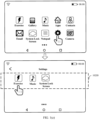
- FIG. 1(a) illustrates an example user interface that is on a mobile phone 10 and that is used to display applications installed in the mobile phone.
- a user interface 100 may include a status bar 101 and application icons 102.
- the status bar 101 may include one or more signal strength indicators 101A of a wireless fidelity (wireless fidelity, Wi-Fi) signal, a battery status indicator 101B, and a time indicator 101C.
- the status bar 101 may further include one or more signal strength indicators of a mobile communication signal (also referred to as a cellular signal), and an operator name (for example, "China Mobile").
- the user interface 100 may further include a navigation bar 104.
- the navigation bar 104 may include system navigation keys such as a return key 104A, a home key 104B, and a multitasking key 104C.
- the navigation keys may have other names. This is not limited in this application.
- Each navigation key in the navigation bar 104 is not limited to a virtual key, and may be alternatively implemented as a physical button.
- the application icons 102 may be an exercise icon 102A, a gallery icon 102B, a music icon 102C, an app store icon 102D, a contacts icon 102E, an email icon 102F, a system lock screen application icon 102G, a notepad icon 102H, a settings icon 102I, a camera icon 102J, and the like.
- the user interface 10 may further include a page indicator 103.
- Other application icons may be distributed on a plurality of pages, and the page indicator 103 may be used to indicate a specific page on which a user currently browses an application. The user may leftward or rightward slide an area of another application icon to browse an application icon on another page.
- a touch panel is configured for a display of the mobile phone 10, and may be configured to receive a touch operation of the user.
- the touch operation is an operation in which the user is contact with the display by using a hand, an elbow, a stylus, or the like.
- the touch operation of the user may be tapping the application icons 102 to implement operations of applications.
- FIG. 1(a) merely illustrates the user interface on the mobile phone 10, and the user interface may further include other application icons or other information. This should not constitute a limitation on this embodiment of this application.
- the settings 102I may receive a user operation (for example, a touch operation), and in response to the detected user operation, the mobile phone 10 may display an application setting interface of lock screens of applications.
- the application setting interface includes at least two different applications, and each application is configured to be capable of presenting a corresponding lock screen on the display of the mobile phone 10.
- the user may touch corresponding lock screens to determine a display sequence of the lock screens.
- an exercise application and a music application correspondingly have lock screens.
- the lock screens are a music lock screen and an exercise lock screen that are provided by the music application and the exercise application and that are presented on the screen of the mobile phone when the mobile phone is in a screen-on locked state.
- the mobile phone 100 has a system wallpaper.
- Some applications in the application icons 102 and a system of the mobile phone 10 may provide lock screens for the mobile phone 10 when the mobile phone 10 is in a screen-off state or a screen-on locked state.
- the lock screens are, for example, the exercise lock screen provided by the exercise application corresponding to the exercise icon 102A, the music lock screen provided by the music application corresponding to the music icon 102C, and a system lock screen 102K included in the system of the mobile phone 10.
- the settings 102I may receive a user operation (for example, a touch operation), and in response to the detected user operation, the mobile phone 10 may display an application setting interface of lock screens of applications.
- the application setting interface includes at least two different applications, and each application is configured to be capable of presenting a corresponding lock screen on the display of the mobile phone 10.
- the user may touch corresponding lock screens to determine a display sequence of the lock screens.
- the lock screens are arranged in a predetermined sequence, and a lock screen with a high sequence level is first displayed on the screen of the mobile phone 10 as a lock screen 1.
- a lock screen is determined as a lock screen 2 and displayed on the screen of the mobile phone 10.
- the lock screen with the high sequence level in the predetermined sequence is displayed on the screen of the mobile phone as the lock screen 1.
- the mobile phone can determine the lock screen 2 from the plurality of lock screens and display the lock screen 2 on the screen. The user can view information on a lock screen and operate the lock screen without unlocking the lock screens one by one. Operations are simple, and therefore user experience is improved.
- the following describes a structure of the mobile phone 10 that implements the lock screen display method illustrated in the foregoing embodiments of this application.
- FIG. 2(a) is a schematic diagram of a hardware structure of the mobile phone 10.
- the mobile phone 10 may include a processor 110, an external memory interface 120, an internal memory 121, a universal serial bus (universal serial bus, USB) port 130, a charging management module 140, a power management module 141, a battery 142, an antenna 1, an antenna 2, a mobile communications module 150, a wireless communications module 160, an audio module 170, a speaker 170A, a receiver 170B, a microphone 170C, a headset jack 170D, a sensor module 180, a button 190, a motor 191, an indicator 192, a camera 193, a display 194, a subscriber identification module (subscriber identification module, SIM) card interface 195, and the like.
- a processor 110 an external memory interface 120, an internal memory 121, a universal serial bus (universal serial bus, USB) port 130, a charging management module 140, a power management module 141, a battery 142, an antenna 1, an antenna 2, a mobile communications module 150, a wireless communications module 160, an audio module 170,
- the sensor module 180 may include a pressure sensor 180A, a gyroscope sensor 180B, a barometric pressure sensor 180C, a magnetic sensor 180D, an acceleration sensor 180E, a distance sensor 180F, an optical proximity sensor 180G, a fingerprint sensor 180H, a temperature sensor 180J, a touch sensor 180K, an ambient light sensor 180L, a bone conduction sensor 180M, a gravity sensor (not shown in the figure), and the like. It may be understood that the structure shown in this embodiment of the present invention constitutes no specific limitation on the mobile phone 10. In some other embodiments of this application, the mobile phone 10 may include more or fewer components than those shown in the figure, combine some components, split some components, or have different component arrangements. The components shown in the figure may be implemented by using hardware, software, or a combination of software and hardware.
- the processor 110 may include one or more processing units.
- the processor 110 may include an application processor (application processor, AP), a modem processor, a graphics processing unit (graphics processing unit, GPU), an image signal processor (image signal processor, ISP), a controller, a video codec, a digital signal processor (digital signal processor, DSP), a baseband processor, a neural-network processing unit (neural-network processing unit, NPU), and/or the like.
- Different processing units may be independent devices, or may be integrated into one or more processors.
- the processor 110 may generate an operation control signal based on instruction operation code and a time sequence signal, to complete control of instruction fetching and instruction execution.
- a memory may be further disposed in the processor 110, and is configured to store instructions and data.
- the memory in the processor 110 is a cache.
- the memory may store instructions or data just used or cyclically used by the processor 110. If the processor 110 needs to use the instructions or the data again, the processor may directly invoke the instructions or the data from the memory. This avoids repeated access, reduces waiting time of the processor 110, and improves system efficiency.
- the memory may store application packages of the applications in FIG. 1(a) , data of lock screens of the applications, data generated by the applications in running processes, and the like.
- the memory may further store the user interface, the preset sequence, and the preset condition that are described in the foregoing embodiments, for use by the processor 110.
- the internal memory 121 may be configured to store computer-executable program code.
- the executable program code includes instructions.
- the internal memory 121 may include a program storage area and a data storage area.
- the program storage area may store an operating system, an application required by at least one function (for example, a sound playing function or an image playing function), and the like.
- the data storage area may also store data (for example, audio data or a phone book) created in a process of using the mobile phone 10.
- the internal memory 121 may include a high-speed random access memory, and may further include a nonvolatile memory, for example, at least one magnetic disk storage device, a flash memory device, or a universal flash storage (universal flash storage, UFS).
- the processor 110 runs instructions stored in the internal memory 121 and/or instructions stored in the memory disposed in the processor, to perform various function applications and data processing of the mobile phone 10.
- the wireless communications module 160 may provide a wireless communication solution that is applied to the mobile phone 10 and that includes a wireless local area network (wireless local area networks, WLAN) (for example, a wireless fidelity (wireless fidelity, Wi-Fi) network), Bluetooth (Bluetooth, BT), a global navigation satellite system (global navigation satellite system, GNSS), frequency modulation (frequency modulation, FM), a near field communication (near field communication, NFC) technology, or the like.
- the display 194 is configured to display an interface that is related to a running service of the smart TV 10 and that is included in remote view logic information.
- the display 194 includes a display panel.
- the display panel may be a liquid crystal display (liquid crystal display, LCD), an organic light-emitting diode (organic light-emitting diode, OLED), an active-matrix organic light-emitting diode (active-matrix organic light-emitting diode, AMOLED), a flexible light-emitting diode (flex light-emitting diode, FLED), a mini-LED, a micro-LED, a micro-OLED, a quantum dot light-emitting diode (quantum dot light-emitting diode, QLED), or the like.
- the mobile phone 10 may include one or N displays 170, where N is a positive integer greater than 1.
- the button 190 may include a power button, a volume button, or the like on the mobile phone 10.
- the user may operate the power button to enable the mobile phone 10 to switch between a screen-on state and a screen-off state.
- the user may operate the volume button to increase or decrease a playback volume of the mobile phone 10.
- the gyroscope sensor 180B may be configured to determine a motion gesture of the mobile phone 10. In some embodiments, angular velocities of the mobile phone 10 around three axes (that is, axes x, y, and z) may be determined by using the gyroscope sensor 180B.
- the touch sensor 180K is also referred to as a "touch component”.
- the touch sensor 180K may be disposed on the display 194, and the touch sensor 180K and the display 194 form a touchscreen, which is also referred to as a "touch screen”.
- the touch sensor 180K is configured to detect a touch operation performed on or near the touch sensor.
- the touch sensor may transfer the detected touch operation to the application processor to determine a type of a touch event.
- a visual output related to the touch operation may be provided through the display 194.
- the touch sensor 180K may be alternatively disposed on a surface of the mobile phone 10, which is different from a position of the display 194.
- the touch sensor 180K detects the touch operation of the user and transmits the touch operation to the processor.
- the processor executes an instruction stored in the processor.
- the instruction implements a quantity of times the user touches a notification message on the display of the mobile phone, to correspondingly expand content and an operation that are related to the notification message.
- the acceleration sensor 180E may detect values of accelerations of the mobile phone 10 in all directions (usually three axes). When the mobile phone 10 is stationary, the acceleration sensor 180E may detect a value and a direction of gravity. The acceleration sensor 180E may be further configured to identify a posture of the mobile phone, and is applied to applications such as horizontal-vertical screen switching and a pacemaker.
- the gravity sensor is a sensor that converts motion or gravity into an electrical signal, and is mainly configured to measure parameters such as an oblique angle, an inertia force, impact, and vibration.
- the gravity sensor 118 may measure a shaking speed of the mobile phone 10.
- a software system of the mobile phone 10 may use a layered architecture, an event-driven architecture, a microkernel architecture, a microservice architecture, or a cloud architecture.
- an Android system of a layered architecture is used as an example to illustrate a software structure of the mobile phone 10.
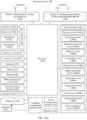
- FIG. 2(b) is a block diagram of a software structure of the mobile phone 10.
- a layered architecture software is divided into several layers, and each layer has a clear role and task.
- the layers communicate with each other through a software interface.
- the Android system is divided into four layers: an application layer, an application framework layer, an Android runtime (Android runtime) and system library, and a kernel layer from top to bottom.
- the application layer may include a series of application packages.
- the application packages may include applications such as Camera, Exercise, Gallery, App Store, Contacts, Email, Cloud Share, Notepad, Settings, Music, and Messaging.
- the application framework layer provides an application programming interface (application programming interface, API) and a programming framework for an application at the application layer.
- the application framework layer includes some predefined functions.
- the application framework layer may include a display policy service, a power manager service (power manager service, PMS), and a display manager service (display manager service, DMS).
- the application framework layer may further include an activity manager, a window manager service (window manager service, WMS), a content provider, a view system, a phone manager, a resource manager, a notification manager, and the like. This is not limited in this embodiment of this application.
- the display policy service may be used to obtain a touch instruction of the user from the notification manager. Further, the display policy service may display to-be-displayed content on the display, namely, content currently displayed on the display, based on a notification message corresponding to the touch instruction. For example, when the user taps the settings icon 102I, the display policy service displays an application setting interface on the display, to present the interface to the user.
- the software system of the mobile phone 10 receives the touch operation by using the touch sensor 180K, and a corresponding hardware interruption is sent to the kernel layer.
- the kernel layer processes the touch operation into an original input event (including information such as touch coordinates and a timestamp of the touch operation).
- the original input event is stored at the kernel layer.
- the application framework layer obtains the original input event from the kernel layer, and identifies a control (setting control) corresponding to the input event.
- the processor 110 identifies that the touch sensor 180K receives the touch operation (the corresponding application icon tapped by the user), and the display police service displays, on the display, a detailed interface that appears after the application is enabled.
- the display policy service displays a lock screen of a background running program on the display 194.
- the display policy service displays the lock screens on the display 194 based on the preset sequence and the preset condition described in the foregoing embodiments.
- the WMS is used to manage a window program.
- the window manager service may obtain a size of the display 194, determine whether there is a status bar, lock the screen of the mobile phone 10, shot a screen, and identify whether a window attribute of an application carries a lock screen application identifier to determine whether the application has a lock screen.
- the window manager service may monitor a quantity of all currently running lock screen windows, whether content displayed on lock screens corresponding to the lock screen windows changes, and the like.
- the content provider is configured to store and obtain data, and enable the data to be accessed by an application.
- the data may include a video, an image, audio, calls that are made and received, a browsing history and bookmarks, a phone book, and the like.
- the view system includes visual controls, such as a control for displaying a text and a control for displaying an image.
- the view system may be configured to construct an application.
- a display interface may include one or more views.
- the display interface may include the lock screen of the music application icon, and may include a text display view and a picture display view.
- the phone manager is configured to provide a communication function of the mobile phone 10, for example, management of a call status (including answering, declining, or the like).
- the resource manager provides, for an application, various resources such as a localized character string, an icon, a picture, a layout file, and a video file.
- the notification manager enables an application to display notification information in the status bar 101 or in the system lock screen 102K.
- the notification manager may alternatively be a notification that appears in a top status bar of the system in a form of a graph or a scroll bar text, for example, a notification of an application running on the background, or may be a notification that appears on a screen in a form of a dialog window.
- the notification manager may be a text information prompt in the status bar, a sent alert tone, mobile phone vibration, or indicator flashing.
- the Android runtime includes a kernel library and a virtual machine.
- the Android runtime is responsible for scheduling and management of the Android system.
- the kernel library includes two parts: a function that needs to be called in Java language, and a kernel library of Android.
- the application layer and the application framework layer run on the virtual machine.
- the virtual machine executes Java files at the application layer and the application framework layer as binary files.
- the virtual machine is configured to perform functions such as object lifecycle management, stack management, thread management, security and exception management, and garbage collection.
- the system library may include a plurality of functional modules, for example, a surface manager (surface manager), a media library (Media Libraries), a three-dimensional graphics processing library (for example, OpenGLES), and a 2D graphics engine (for example, SGL).
- a surface manager surface manager
- Media Libraries media libraries
- a three-dimensional graphics processing library for example, OpenGLES
- 2D graphics engine for example, SGL
- the surface manager is configured to manage a display subsystem and provide fusion of 2D and 3D layers for a plurality of applications.
- the media library supports playing and recording of a plurality of commonly used audio and video formats, static image files, and the like.
- the media library may support a plurality of audio/video coding formats, such as MPEG4, H.264, MP3, AAC, AMR, JPG, and PNG.
- the three-dimensional graphics processing library is configured to implement three-dimensional graphics drawing, image rendering, composition, layer processing, and the like.
- the 2D graphics engine is a drawing engine for 2D drawing.
- the kernel layer is a layer between hardware and software.
- the kernel layer includes at least a display driver, a display driver, a button driver, a sensor driver, and the like. This is not limited in this embodiment of this application.
- a plurality of applications that all can provide lock screens run in the mobile phone 10.
- the plurality of lock screens of the plurality of applications cover the system lock screen of the mobile phone 10 to form a multi-layer lock screen.
- three layers of lock screens appear after the screen of the mobile phone 10 is locked.
- the three layers of lock screens are an exercise lock screen 102A0, a music lock screen 102C0, and the system lock screen 102K in sequence.
- FIG. 1(b) illustrates an example exercise lock screen that is on the mobile phone 10 and that is used to display the exercise application installed in the mobile phone 10.
- the exercise lock screen 102A0 displays any one of the following information: the status bar 101 (including at least the signal strength indicator 101A, the battery status indicator 10 1B, and the time indicator 101C), a content display area 102A00 (including at least an exercise kilometer quantity (for example, 3.01 kilometers), an elevation rising quantity (for example, 1 meter), and duration (for example, 00:30:20)) of the exercise application on the exercise lock screen 102A0, and an unlocking interface display area 102A01.
- the user may use a finger to upward slide the screen on the touch panel configured for the display of the mobile phone 10, to unlock the exercise lock screen.
- FIG. 1(c) illustrates an example music lock screen that is on the mobile phone 10 and that is used to display the music application installed in the mobile phone 10.
- the music lock screen 102C0 displays at least one of the following information: the status bar 101, a content display area 102C00 (displaying at least currently-played song information 102C001 (such as lyrics, a song name, and a singer), an operation button 102C000, time, a date, and the like) of the music application on the music lock screen 102C0, and an unlocking interface display area 102C01.
- the user may use a finger to rightward slide the screen on the touch panel configured for the display of the mobile phone 10, to unlock the music lock screen.
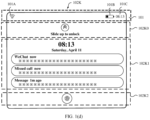
- FIG. 1(d) illustrates an example system lock screen that is on the mobile phone 10 and that is used to display a system application in the mobile phone 10.
- the system lock screen 102K may be a Huawei magazine lock screen, and displays at least one of the following information: the status bar 101, an unlocking interface display area 102K0, a content display area 102K1 (which may display notification messages of different applications (such as WeChat, Phone, and Messaging)) of the system lock screen 102K, and a fingerprint unlocking display area 102K2.
- the user may use a finger to upward slide the screen on the touch panel configured for the display of the mobile phone 10, to unlock the system lock screen, or the user may use a finger to operate the fingerprint unlocking display area 102K2, to unlock the system lock screen.
- lock screens on the mobile phone 10 may further include other types of lock screens, and the user may unlock the lock screen in other manners, such as leftward sliding, rightward sliding, and upward sliding. This is not limited in embodiments of this application. Unlocking manners of the lock screens may be the same or may be different from each other. For example, as shown in FIG. 1c , the music lock screen is unlocked through rightward sliding; and as shown in FIG. 1(d) , the system lock screen is unlocked through upward sliding.
- a lock screen with a high sequence level in a plurality of lock screens is first displayed on the screen of the mobile phone 10 as a lock screen 1 based on a preset sequence.
- the mobile phone 10 may determine a target lock screen (a lock screen 2) from the plurality of lock screens based on the preset condition. If the lock screen 1 and the lock screen 2 are of a same application, content of the lock screen 1 of the application may be updated, so that updated content of the lock screen is consistent with content of the lock screen 2.
- the lock screen 1 and the lock screen 2 are of different applications, the lock screen 1 may be directly switched, and the lock screen 2 may be switched to an uppermost layer of other lock screens and displayed on the screen of the mobile phone 10.
- the target lock screen is displayed on the display of the mobile phone 10, and the user can intuitively view content displayed on the target lock screen without other operations.
- the preset sequence may be set based on at least priorities of applications corresponding to the lock screens.
- a lock screen with a higher priority has a higher corresponding sequence level and is preferentially displayed on the screen of the mobile phone 10.
- a setting manner of the priorities of the applications includes at least one of the following manners: The priorities of the applications are customized by the user. The priorities of the applications are set based on access frequency of the user for the applications. The priorities of the applications are set based on a sequence in which the user accesses the applications (a sequence in which the user enables the applications). The priorities of the applications may be set in other manners. This is not limited herein in this embodiment of this application.
- the user operates (for example, taps) the settings 102I on the display provided by the mobile phone 10.
- the mobile phone 10 presents an application setting interface 102I0 for the user based on an operation instruction of the user.
- the application setting interface includes at least two different applications (in FIG. 1(e) , the exercise application, the music application, and the system lock screen application are used as an example), and each application is configured to be capable of presenting a corresponding lock screen on the mobile phone 10.
- the mobile phone 10 sets display priorities of the lock screens based on a sequence in which the user taps (sets) the applications.
- a lock screen that is set earlier has a higher sequence level, and the lock screen with the higher sequence level also has a higher corresponding priority. For example, if the user sequentially taps the exercise application, the music application, and the system lock screen application, a priority of the exercise application is higher than a priority of the music application, and the priority of the music application is higher than a priority of the system lock screen application.
- the priorities may be set by dragging positions of the applications in a queue. For example, an application located on a leftmost side of the screen of the mobile phone has a highest priority, and an application located at a rightmost side of the screen of the mobile phone has a lowest priority.
- the mobile phone 10 sets the priorities based on quantities of times the user accesses the applications corresponding to the lock screens.
- a lock screen with a larger quantity of access times has a higher priority.
- the user first taps the music application to enter the interface provided by the music application, and then exits the music application, so that the application runs in the background; and then taps the exercise application to enter the interface provided by the exercise application.
- the user first enables the music application, and then enables the exercise application. Therefore, a priority of the music application is higher than a priority of the exercise application.
- the mobile phone 10 sets the priorities based on a sequence in which the user enables the applications corresponding to the lock screens, where a lock screen that is enabled earlier has a higher priority.
- the preset condition includes at least one of the following rules:
- Rule 1 When content displayed on the lock screens changes (content output by the applications changes), the mobile phone 10 uses, as a target lock screen, a lock screen whose content changes, and displays the lock screen on the screen of the mobile phone 10.
- the change in the content displayed on the lock screen is an update of information presented on the lock screen for the user.
- the change is song switching or a change in a song name or the like displayed by the operation button 102C000 in the content display area 102C00 on the music lock screen 102C0.
- the change is a change in an exercise distance (a switching node such as 5 kilometers or 10 kilometers is reached), a change in a rising elevation (a switching node such as 1 meter or 2 meters is reached), and a change in exercise duration (a switching node such as 1 hour or 2 hours is reached) on the exercise lock screen 102A0.
- the system lock screen application receives a notification and therefore displays the notification on the system lock screen. This also belongs to the change in the content of the lock screen.
- the notification is a notification message displayed on a Huawei magazine page.
- Rule 2 When the user operates the mobile phone 10, and enables, based on each operation manner of the user, status data of the mobile phone to meet a status data switching requirement corresponding to each operation manner, the mobile phone 10 determines the target lock screen in descending order of sequence levels based on the preset sequence, and displays the target lock screen on the screen of the mobile phone 10 through switching.
- a manner in which the user operates the mobile phone 10 may include that, for example, the user operates the power button of the mobile phone to enable the mobile phone 10 to switch between a screen-off state and a screen-on state, or the user shakes the mobile phone 10 to enable the mobile phone 10 to generate motion data (which may include a shaking speed).
- the status data of the mobile phone 10 may include a time difference between a screen-off state and a screen-on state between which the mobile phone 10 is switched by the user by operating the power button of the mobile phone, and the shaking speed of the mobile phone 10.
- a switching requirement 1 may be that the time difference does not exceed a threshold 1 (for example, 1 second)
- the switching requirement 2 may be that the shaking speed exceeds a threshold 2.
- Specific values of the threshold 1 and the threshold 2 may be determined based on an actual case. This is not limited herein in this embodiment of this application.
- Rule 3 The applications corresponding to the lock screens request the mobile phone 10 to use the lock screens of the applications as target lock screens and display the lock screens on the screen of the mobile phone 10. Specifically, when the applications identify that the content on the corresponding lock screens changes, the applications corresponding to the lock screens request the mobile phone to use the lock screens as the target lock screens and display the lock screens on the screen of the mobile phone 10. To prevent a same application from frequently requesting the mobile phone 10 to use a lock screen of the application as a target lock screen, according to some embodiments of this application, within predetermined time, request frequency at which the mobile phone 10 allows a same application to request the mobile phone 10 to use a lock screen of the application as a target lock screen is less than a threshold.
- a same application can request the mobile phone 10 for a maximum of three times within predetermined time of 1 minute.
- the preset time and the threshold may be other values. This is not limited herein in this embodiment of this application.
- the rule 1 may be triggered when the mobile phone 10 is in a screen-off state.
- the manner in which the user operates the mobile phone 10 alternatively includes that the user touches the display of the mobile phone 10. Each time the user touches the display, the user switches one lock screen based on the preset sequence.
- the touch includes but is not limited to tapping, upward sliding, downward sliding, leftward sliding, rightward sliding, or the like.
- the mobile phone 10 may choose, based on the preset sequence, to display a lock screen with a high sequence level (ranked top) on the screen of the mobile phone 10 as the target lock screen.
- the mobile phone may cyclically switch and display the lock screens based on the preset sequence.
- the exercise lock screen 102A0, the music lock screen 102C0, and the system lock screen 102K are arranged in descending order of sequence levels.
- the exercise lock screen 102A0 is first displayed on the screen of the mobile phone as a lock screen with a highest sequence level.
- the music lock screen 102C0 is switched to the screen of the mobile phone for display.
- the system lock screen 102K is switched to the screen of the mobile phone for display.
- the exercise lock screen 102A0 is switched to the screen of the mobile phone for display again.
- the lock screen 2 and the lock screen 1 may be a lock screen of a same application.
- the lock screen of the new application and the original lock screens are also sorted and switched and displayed in the same manner, that is, based on a preset sequence and a preset condition. Details are not described herein in this embodiment of this application.
- a process of a lock screen of the application also correspondingly disappears, and the lock screen does not join in a lock screen sorting process and a lock screen switching and display process.
- the mobile phone 10 recovers display of the exercise lock screen on the screen of the mobile phone 10 based on the preset sequence. If a plurality of applications trigger the foregoing rule, after time during which the lock screen 2 used as the target lock screen is displayed on the screen of the mobile phone 10 reaches predetermined time, the mobile phone 10 displays a next-sequence-level lock screen of the current target lock screen on the screen of the mobile phone 10 as a new target lock screen through switching based on sequence levels in the preset sequence.
- the mobile phone 10 displays the system lock screen on the screen of the mobile phone 10 based on the preset sequence.
- the predetermined time may be set to any value. This is not limited herein in this embodiment of this application.
- the mobile phone 10 cyclically switches to the lock screen with the high sequence level. For example, the exercise lock screen used as the lock screen 1 is switched to the music lock screen used as the target lock screen and the music lock screen is displayed on the screen of the mobile phone 10.
- the mobile phone 10 After time during which the music lock screen is displayed on the screen of the mobile phone 10 reaches 30 minutes, the mobile phone 10 displays, on the screen of the mobile phone 10 through switching, the system lock screen that triggers the preset condition. After time during which the system lock screen is displayed on the screen of the mobile phone 10 reaches 30 minutes, the exercise lock screen is displayed on the screen of the mobile phone 10 through cyclical switching.
- the lock screen display method before a predetermined rule is triggered, for the plurality of lock screens, the lock screen with the high sequence level in the predetermined sequence is used as the lock screen 1 and displayed on the screen of the mobile phone.
- the mobile phone can determine the lock screen 2 from the plurality of lock screens and display the lock screen 2 on the screen. The user can view information on a lock screen and operate the lock screen without unlocking the lock screens one by one. Operations are simple, and therefore user experience is improved.
- the following uses the lock screens that are displayed on the mobile phone 10 and that are shown in FIG. 1(b), FIG. 1(c) , and FIG. 1(d) as an example to describe the lock screen display method provided in this embodiment of this application.
- the memory in the mobile phone 10 stores the three lock screens of the exercise application, the music application, and the system application.
- the display policy service separately displays the exercise lock screen 102A0, the music lock screen 102C0, and the system lock screen 102K in descending order of sequence levels (in descending order of priorities) in a predetermined sequence.
- a lock screen with a highest sequence level is the exercise lock screen, and the exercise lock screen is displayed on the screen of the mobile phone 10 as a lock screen 1.
- the exercise lock screen 102A0 is presented for the user.
- the exercise lock screen 102A0 displays any one of the following information: the status bar 101 (including at least the signal strength indicator 101A, the battery status indicator 101B, and the time indicator 101C), a content display area 102A00 (including at least an exercise kilometer quantity (for example, 3.01 kilometers), an elevation rising quantity (for example, 1 meter), and duration (for example, 00:30:20)) of the exercise application on the exercise lock screen 102A0, and an unlocking interface display area 102A01.
- the user may directly view content displayed on the exercise lock screen 102A0.
- the user may use a finger to upward slide the screen on the touch panel configured for the display of the mobile phone 10, to unlock the music lock screen.
- the preset sequence may be set based on at least the priorities of the applications corresponding to the lock screens.
- a lock screen with a higher priority has a higher corresponding sequence level and is preferentially displayed on the screen of the mobile phone 10.
- a setting manner of the priorities of the applications includes at least one of the following manners: The priorities of the applications are customized by the user. The priorities of the applications are set based on access frequency of the user for the applications. The priorities of the applications are set based on a sequence in which the user accesses the applications (a sequence in which the user enables the applications). The priorities of the applications may be set in other manners. This is not limited herein in this embodiment of this application.
- the user operates (for example, taps) the settings 102I on the display provided by the mobile phone 10.
- the mobile phone 10 presents an application setting interface for the user based on an operation instruction of the user.
- the application setting interface includes at least two of the exercise application, the music application, and the system application, and each application is configured to be capable of presenting a corresponding lock screen on the mobile phone 10.
- the mobile phone 10 sets the priorities of the applications based on a sequence in which the user taps (sets) the exercise application, the music application, and the system application, and correspondingly determines display sequence levels of the lock screens of the applications based on the priorities of the applications.
- a lock screen that is set earlier has a higher sequence level.
- the lock screens are the exercise lock screen 102A0, the music lock screen 102C0, and the system lock screen 102K in descending order of the sequence levels. That is, a priority of the exercise lock screen 102A0 is higher than a priority of the music lock screen 102C0, and the priority of the music lock screen 102C0 is higher than a priority of the system lock screen 102K.
- the mobile phone 10 sets the priorities based on quantities of times the user accesses the applications corresponding to the lock screens.
- the lock screens are the exercise lock screen 102A0, the music lock screen 102C0, and the system lock screen 102K in descending order of sequence levels determined based on the quantities of access times.
- a priority of the exercise lock screen 102A0 is higher than a priority of the music lock screen 102C0
- the priority of the music lock screen 102C0 is higher than a priority of the system lock screen 102K.
- the mobile phone 10 sets the priorities of the applications based on a sequence in which the user enables the applications corresponding to the lock screens, where an application that is enabled earlier has a higher priority, and correspondingly a lock screen of the application with the higher priority has a higher sequence level.
- the display policy service When the preset condition is triggered, the display policy service newly adjusts a display sequence of the exercise lock screen 102A0, the music lock screen 102C0, and the system lock screen 102K on the display 194 of the mobile phone 10 based on the preset condition; and determines a target lock screen from the exercise lock screen 102A0, the music lock screen 102C0, and the system lock screen 102K and displays the target lock screen on the display 194 of the mobile phone 10.
- the display policy service determines the music lock screen 102C0 as the target lock screen, and switches the music lock screen 102C0 to the display 194 of the mobile phone 10 for display.
- the system lock screen 102K is placed at a next layer of the exercise lock screen 102A0 based on the preset sequence.
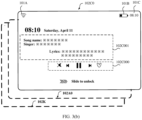
- the music lock screen 102C0 displays at least one of the following information: the status bar 101 (including at least the signal strength indicator 101A, the battery status indicator 101B, and the time indicator 101C), a content display area 102C00 (displaying at least currently-played song information 102C001 (such as lyrics, a song name, and a singer), an operation button 102C000, time, a date, and the like) of the music application on the music lock screen 102C0, and an unlocking interface display area 102C01.
- the display policy service switches the music lock screen 102C0 to the display 194 of the mobile phone 10 for display, the mobile phone 10 switches from a screen-off state to a screen-on state, and in FIG. 3(b) , the user may directly view content displayed on the music lock screen 102C0.
- the user may use a finger to rightward slide the screen on the touch panel configured for the display of the mobile phone 10, to unlock the music lock screen.
- the following describes the preset condition by using an example in which the lock screens are the exercise lock screen 102A0, the music lock screen 102C0, and the system lock screen 102K.
- the music application corresponding to the music lock screen 102C0 requests the mobile phone 10 to use the music lock screen 102C0 as a target lock screen and display the music lock screen 102C0 on the screen of the mobile phone 10, this rule may be triggered only when the mobile phone 10 is in a screen-off state.
- the exercise lock screen 102A0 is first displayed on the screen of the mobile phone as a lock screen with a high sequence level.
- the music lock screen 102C0 when at least content in the content display area 102C00 (displaying at least currently-played song information 102C001 (such as a song name and a singer)) of the music application on the music lock screen 102C0 changes, or the operation button 102C000 displays song switching, the mobile phone 10 uses the music lock screen 102C0 as a target lock screen and displays the music lock screen 102C0 on the screen of the mobile phone 10.
- the mobile phone 10 may choose, based on the preset sequence, to display the music lock screen 102C0 with a higher lock screen sequence level (a higher priority of the corresponding application) on the screen of the mobile phone 10 as a target lock screen (the lock screen 2).
- the display policy service of the mobile phone 10 sequentially determines the music lock screen 102C0 and the system lock screen 102K as target lock screens based on the preset sequence and sequence levels of the exercise lock screen 102A0, the music lock screen 102C0, and the system lock screen 102K, and performs switching.
- the user operates the power button of the mobile phone 10 to enable the mobile phone 10 to switch between a screen-off state and a screen-on state
- the window manager service identifies the screen-off state and the screen-on state of the mobile phone 10.
- the display policy service of the mobile phone 10 switches the music lock screen 102C0 to the screen of the mobile phone 10 for display.
- the display policy service of the mobile phone 10 switches the system lock screen 102K to the screen of the mobile phone 10 for display.
- the display policy service of the mobile phone 10 cyclically switches the exercise lock screen 102A0 to the screen of the mobile phone 10 again for display.
- the mobile phone 10 switches a lock screen based on motion data. For example, when the user shakes the mobile phone 10 up and down as a shaking period, and a shaking speed of the mobile phone 10 exceeds a threshold 2 (a switching threshold) or a shaking acceleration of the mobile phone 10 exceeds a threshold 3, the display policy service of the mobile phone 10 switches the music lock screen 102C0 to the screen of the mobile phone 10 for display.
- motion data such as a shaking speed or a shaking acceleration that is of the mobile phone 10 and that is measured by the gyroscope sensor 180B, the acceleration sensor 180E, and the gravity sensor of the mobile phone 10 to change
- the mobile phone 10 switches a lock screen based on motion data. For example, when the user shakes the mobile phone 10 up and down as a shaking period, and a shaking speed of the mobile phone 10 exceeds a threshold 2 (a switching threshold) or a shaking acceleration of the mobile phone 10 exceeds a threshold 3, the display policy service of the mobile phone 10 switches the music lock screen 102C0 to the screen of
- the display policy service of the mobile phone 10 switches the system lock screen 102K to the screen of the mobile phone 10 for display.
- the lock screens are cyclically displayed. The manner in which the lock screen is switched based on the motion data may be performed only when the mobile phone 10 is in a screen-on state.
- the threshold 2 and the threshold 3 may be customized based on empirical values. Specific values of the threshold 2 and the threshold 3 are not limited in this application.
- the exercise lock screen 102A0 may continue to be displayed on the screen of the mobile phone 10 as the lock screen 2.
- the exercise application may trigger the rule 1 when the exercise application broadcasts a change in an exercise distance (the rule may be triggered when an exercise distance reaches a trigger node (such as 1 kilometer, 5 kilometers, or 15 kilometers)), a change in a rising elevation (the change may be that a rising elevation reaches a trigger node (for example, an elevation rises or falls by 1 meter)), a change in exercise duration (the change may be that exercise duration reaches a trigger node (such as 30 minutes or 60 minutes)), or the like.
- a trigger node such as 1 kilometer, 5 kilometers, or 15 kilometers
- a change in a rising elevation the change may be that a rising elevation reaches a trigger node (for example, an elevation rises or falls by 1 meter)
- a change in exercise duration the change may be that exercise duration reaches a trigger node (such as 30 minutes or 60 minutes)
- the mobile phone 10 displays the music lock screen 102C0 on the screen of the mobile phone 10 through switching based on the sequence levels in the preset sequence.
- the exercise lock screen 102A0 is at a next sequence level of the music lock screen 102C0, and the system lock screen 102K is at the last sequence level.
- the mobile phone 10 cyclically switches, based on the preset sequence, the exercise lock screen 102A0, the music lock screen 102C0, and the system lock screen 102K that trigger the foregoing rule. Only after the system lock screen 102K is used as the lock screen 2 through switching, the lock screen can be cyclically switched to the exercise lock screen 102A0.
- the lock screen display method before a predetermined rule is triggered, for the plurality of lock screens, the lock screen with the high sequence level in the predetermined sequence is used as the lock screen 1 and displayed on the screen of the mobile phone.
- the mobile phone can determine the lock screen 2 from the plurality of lock screens and display the lock screen 2 on the screen. The user can view information on a lock screen and operate the lock screen without unlocking the lock screens one by one. Operations are simple, and therefore user experience is improved.
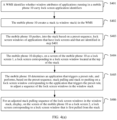
- the lock screen display method includes the following steps.
- Step S401 The WMS identifies whether window attributes of applications running in the mobile phone 10 carry lock screen application identifiers. For an application that carries a lock screen application identifier, it is determined that the application has a lock screen. For an application that carries no lock screen application identifier, it is determined that the application has no lock screen.
- the lock screen application identifier may be set to the following format: Window Manager.Layout Params.FLAG_SHOW_WHEN LOCKED, and an application whose window attribute carries a Window Manager.Layout Params.FLAG_SHOW _WHEN _LOCKED field may be considered as an application having a lock screen.
- the lock screen application identifier may be alternatively of another type. This is not limited in this embodiment of this application.
- the WMS determines that window attributes of a music application, an exercise application, and a system lock screen application in running applications on the mobile phone 10 each carry the Window Manager.Layout Params.FLAG_SHOW_WHEN_LOCKED field, the WMS determines that the music application, the exercise application, and the system lock screen application have lock screens.
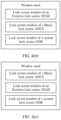
- Step S402 The mobile phone 10 creates a stack (a window stack) in the WMS.
- the stack is used to store lock screen windows corresponding to lock screens.
- the stack is specifically created based on a linked list.
- Step S403 The mobile phone 10 pushes, into the stack based on a preset sequence, lock screen windows of applications that have lock screens and that are identified in step S401. Specifically, the lock screen windows are pushed into the stack in ascending order of priorities of the applications. That is, a lock screen window of an application with a lower sequence level (a lower priority) is first pushed into the stack and is located at the bottom of the stack, and a lock screen window of an application with a higher sequence level (a higher priority) is last pushed into the stack and is located at the top of the stack. A lock screen window that is first pushed into the stack is last pulled from the stack.
- a lock screen window of an application with a lower sequence level a lower priority
- a lock screen window of an application with a higher sequence level a higher priority
- a lock screen window located at the top of the stack is first pulled from the stack, and a corresponding lock screen is first displayed on the screen of the mobile phone 10.
- a lock screen window located at the bottom of the stack is last pulled from the stack, and a corresponding lock screen is last displayed on the screen of the mobile phone 10. That is, a stack pulling sequence of the lock screen windows is a preset sequence of the applications.
- the preset sequence may be set based on at least the priorities of the applications corresponding to the lock screens.
- a lock screen with a higher priority has a higher corresponding sequence level and is preferentially displayed on the screen of the mobile phone 10.
- a setting manner of the priorities of the applications includes at least one of the following manners: The priorities of the applications are customized by the user. The priorities of the applications are set based on access frequency of the user for the applications. The priorities of the applications are set based on a sequence in which the user accesses the applications (a sequence in which the user opens the applications). The priorities of the applications may be set in other manners. This is not limited in this embodiment of this application.
- the user operates (for example, taps) the settings 102I on the display provided by the mobile phone 10, and the touch sensor of the mobile phone detects a touch instruction.
- the mobile phone 10 presents an application setting interface for the user based on the touch instruction of the user.
- the application setting interface includes at least two different applications (in FIG. 1(e) , the exercise application, the music application, and the system lock screen application are used as an example), and each application is configured to be capable of presenting a corresponding lock screen on the mobile phone 10.
- the mobile phone 10 identifies, based on touch instructions transmitted by the touch sensor, application identifiers and touch time of the applications tapped (set) by the user; and correspondingly sets the priorities of the applications based on a touch time sequence.
- An application corresponding to an application identifier with earlier touch time has a higher priority, and a lock screen of the application with the higher priority has a higher sequence level.
- a priority of the exercise application corresponding to the exercise application identifier is higher than a priority of the music application corresponding to the music application identifier
- the priority of the music application corresponding to the music application identifier is higher than a priority of the system lock screen application corresponding to the system lock screen application identifier.
- the mobile phone 10 collects statistics on occurrence frequency (corresponding to quantities of times the user taps the applications (quantities of access times)) of the application identifiers of the applications based on the touch instructions transmitted by the touch sensor, to set the priorities of the applications.
- occurrence frequency corresponding to quantities of times the user taps the applications (quantities of access times)
- a lock screen with higher occurrence frequency has a higher priority.
- a priority of the exercise lock screen 102A0 is higher than a priority of the music lock screen 102C0, and the priority of the music lock screen 102C0 is higher than a priority of the system lock screen 102K. As shown in FIG. 3(a) and FIG. 3(b) , a priority of the exercise lock screen 102A0 is higher than a priority of the music lock screen 102C0, and the priority of the music lock screen 102C0 is higher than a priority of the system lock screen 102K. As shown in FIG.
- the mobile phone 10 first pushes a lock screen window of the system lock screen 102K into the stack and enables the lock screen window to be located at the bottom of the stack; then pushes a lock screen window of the music lock screen 102C0 into the stack and enables the lock screen window to be located above the lock screen window of the system lock screen 102K; and finally pushes a lock screen window of the exercise lock screen 102A0 into the stack and enables the lock screen window to be located at the top of the stack.
- the exercise lock screen 102A0 located at the top of the stack is first displayed on the screen of the mobile phone 10.
- Step S404 The mobile phone 10 displays, on the screen of the mobile phone 10 as a lock screen 1, a lock screen corresponding to a lock screen window located at the top of the stack.
- the exercise lock screen 102A0 is located at the top of the stack.
- the exercise lock screen 102A0 is first displayed on the screen of the mobile phone 10 as a lock screen 1 with a high sequence level.
- Step S405 The mobile phone 10 determines an application that triggers a preset condition, and performs, based on the preset sequence, stack pulling and stack re-pushing on a lock screen window corresponding to the application that triggers the preset condition, to adjust a sequence of the lock screen windows in the window stack.
- Step S406 For an adjusted stack pulling sequence of the lock screen windows in the window stack, display, on the screen of the mobile phone 10 as a lock screen 2, a lock screen corresponding to a lock screen window that is first pulled from the stack.
- the display policy service determines the music lock screen 102C0 as a target lock screen (the lock screen 2) based on the preset condition.
- the mobile phone 10 performs a stack pulling operation on the lock screen window of the exercise lock screen 102A0 and the lock screen window of the music lock screen 102C0 in the window stack, so that the lock screen window of the exercise lock screen 102A0 and the lock screen window of the music lock screen 102C0 are pulled from the stack.
- the position of the system lock screen 102K in the window stack remains unchanged, that is, the system lock screen 102K is still located at the bottom of the stack.
- the mobile phone 10 first pushes, into the window stack, the lock screen window that is of the exercise lock screen 102A0 and that is pulled from the stack and enables the lock screen window to be located above the lock screen window of the system lock screen 102K; and then pushes, into the window stack, the lock screen window that is of the music lock screen 102C0 and that is pulled from the stack and enables the lock screen window to be located at the top of the stack.
- the music lock screen 102C0 is displayed on the screen of the mobile phone 10 as the lock screen 2.
- the exercise lock screen 102A0 triggers the preset condition
- the system lock screen 102K, the music lock screen 102C0, and the exercise lock screen 102A0 trigger the preset condition
- the exercise lock screen 102A0 and the music lock screen 102C0 trigger the preset condition
- the exercise lock screen 102A0 and the system lock screen 102K trigger the preset condition
- the sequence of the lock screen windows in the window stack remains unchanged
- the exercise lock screen 102A0 is still first pulled from the stack and displayed on the screen of the mobile phone 10 as the lock screen 2, that is, the lock screen 1 and the lock screen 2 are lock screens of a same application.
- the display policy service determines the system lock screen 102K as a target lock screen (the lock screen 2) based on the preset condition, and performs stack pulling on the lock screen window of the exercise application, the lock screen window of the music application, and the lock screen window of the system lock screen application in the window stack; then, based on the preset sequence, first pushes the lock screen window of the music application into the stack and enables the lock screen window to be located at the bottom of the stack, and then pushes the lock screen window of the exercise application into the stack and enables the lock screen window to be located above the lock screen window of the music application; and finally, pushes the lock screen window of the system lock screen application into the stack and enables the lock screen window to be located at the top of the stack.
- the following describes the preset condition by using an example in which the lock screens are the exercise lock screen 102A0, the music lock screen 102C0, and the system lock screen 102K.
- the music application corresponding to the music lock screen 102C0 requests the mobile phone 10 to use the music lock screen 102C0 as the target lock screen.
- the mobile phone pulls the exercise lock screen 102A0 and the music lock screen 102C0 from the stack; and then pushes the exercise lock screen 102A0 into the stack again, and pushes the music lock screen 102C0 into the top of the window stack and displays the music lock screen 102C0 on the screen of the mobile phone 10 through switching. It should be noted that this may be triggered only when the mobile phone 10 is in a screen-off state.
- the mobile phone first determines, based on the preset sequence, to first display, on the screen of the mobile phone as a lock screen with a high sequence level, the exercise lock screen 102A0 of the exercise application corresponding to the exercise application identifier.
- the mobile phone pulls the exercise lock screen 102A0 and the music lock screen 102C0 from the window stack; and then pushes the exercise lock screen 102A0 into the stack again, and pushes the music lock screen 102C0 into the top of the window stack and displays the music lock screen 102C0 on the screen of the mobile phone 10 through switching.
- the mobile phone 10 may choose, based on the preset sequence, to display the music lock screen 102C0 with a high sequence level on the screen of the mobile phone 10 as a target lock screen (the lock screen 2).
- the mobile phone first determines, based on the preset sequence, to first display, on the screen of the mobile phone as a lock screen with a high sequence level, the exercise lock screen 102A0 of the exercise application corresponding to the exercise application identifier.
- the user operates the mobile phone 10 (for example, shakes the mobile phone or continuously presses the power button), and the mobile phone 10 receives signals transmitted by the acceleration sensor, the gravity sensor, and/or the gyroscope sensor, or a button module.
- the mobile phone 10 determines whether motion data corresponding to the signals meets a switching requirement. For example, if the motion data is a shaking speed or a shaking acceleration and changes, and the user shakes the mobile phone 10 up and down as a shaking period, the mobile phone 10 switches a lock screen when the motion data meets the switching requirement. For example, the user shakes the mobile phone as a shaking period, and the mobile phone 10 receives signals transmitted by the gyroscope sensor 180B, the acceleration sensor 180E, and the gravity sensor.
- the display policy service of the mobile phone 10 sequentially determines the music lock screen 102C0 and the system lock screen 102K as target lock screens based on the preset sequence and sequence levels of the exercise lock screen 102A0, the music lock screen 102C0, and the system lock screen 102K, and performs switching.
- the mobile phone 10 when the user shakes the mobile phone once and motion data meets the switching requirement, the mobile phone 10 first pulls the exercise lock screen 102A0, the music lock screen 102C0, and the system lock screen 102K from the stack; and then, first pushes the exercise lock screen 102A0 into the bottom of the window stack, pushes the system lock screen 102K into the window stack and enables the system lock screen 102K to be located above the exercise lock screen 102A0, and finally pushes the music lock screen 102C0 into the top of the window stack and displays the music lock screen 102C0 on the screen of the mobile phone 10.
- the mobile phone 10 When the user shakes the mobile phone again as a next shaking period and motion data meets the switching requirement, the mobile phone 10 first pulls the music lock screen 102C0 and the system lock screen 102K from the stack; and then, pushes the music lock screen 102C0 into the window stack and enables the music lock screen 102C0 to be located above the exercise lock screen 102A0, and finally pushes the system lock screen 102K into the top of the window stack and displays the system lock screen 102K on the screen of the mobile phone 10.
- the lock screens are cyclically displayed. The manner in which the lock screen is switched based on the motion data may be performed only when the mobile phone 10 is in a screen-on state.
- the user operates the power button of the mobile phone 10 to enable the mobile phone 10 to switch between a screen-off state and a screen-on state
- the window manager service identifies the screen-off state and the screen-on state of the mobile phone 10.
- the window manager service monitors a screen-off broadcast android.intent.action.SCREEN OFF to implement determining of screen-off of the mobile phone 10; and the window manager service monitors a screen-on broadcast android.intent.action.SCREEN_ON to implement determining of screen-on of the mobile phone 10.
- the mobile phone determines a time difference between monitored screen-off broadcast android.intent.action.SCREEN_OFF and screen-on broadcast android.intent.action.SCREEN_ON.
- the display policy service of the mobile phone 10 performs stack pulling and stack re-pushing operations on the exercise lock screen 102A0 and the music lock screen 102C0, to push the music lock screen 102C0 into the top of the window stack to switch the music lock screen 102C0 to the screen of the mobile phone 10 for display.
- the mobile phone determines a time difference between monitored screen-off broadcast android.intent.action. SCREEN_OFF and screen-on broadcast android.intent.action.SCREEN_ON.
- the display policy service of the mobile phone 10 switches the system lock screen 102K to the screen of the mobile phone 10 for display.
- the mobile phone determines a time difference between monitored screen-off broadcast android.intent.action. SCREEN_OFF and screen-on broadcast android.intent.action.SCREEN_ON.
- the display policy service of the mobile phone 10 cyclically switches the exercise lock screen 102A0 to the screen of the mobile phone 10 again for display.
- the lock screen windows in the window stack are resorted based on the preset sequence.
- the mobile phone 10 performs a stack pulling operation on the lock screen window of the exercise lock screen 102A0 and the lock screen window of the music lock screen 102C0 in the window stack.
- the lock screen window of the system lock screen 102K is still located at the bottom of the window stack.
- the mobile phone 10 pushes the lock screen window of the exercise lock screen 102A0 into the window stack, and finally pushes the lock screen window of the music lock screen 102C0 into the top of the window stack and displays the music lock screen 102C0 on the screen of the mobile phone 10. This avoids a problem that a screen resource of the mobile phone is occupied because the exercise lock screen 102A0 used as the lock screen 1 is displayed on the screen of the mobile phone 10 for long time.
- the lock screen display method before a predetermined rule is triggered, for the plurality of lock screens, the lock screen with the high sequence level in the predetermined sequence is used as the lock screen 1 and first pulled from the stack and displayed on the screen of the mobile phone.
- the mobile phone can determine the lock screen 2 from the plurality of lock screens and first pull the lock screen 2 from the stack and display the lock screen 2 on the screen. The user can view information on a lock screen and operate the lock screen without unlocking the lock screens one by one. Operations are simple, and therefore user experience is improved.
- FIG. 5 is a schematic diagram of a structure of an electronic device according to an embodiment of this application.
- a controller hub 804 communicates with a processor 801 by using a multi-branch bus such as a front side bus (FSB), a point-to-point interface such as quick path interconnect (QPI), or a similar connection.
- the processor 801 executes an instruction for controlling a data processing operation of a general type.
- the controller hub 804 includes, but is not limited to, a graphics & memory controller hub (GMCH) (not shown in the figure) and an input output hub (IOH) (which may be on separate chips) (not shown in the figure).
- the GMCH includes a memory and a graphics controller and is coupled to the IOH.
- the electronic device 800 may further include a coprocessor 806 and a memory 802 that are coupled to the controller hub 804.
- a coprocessor 806 and a memory 802 that are coupled to the controller hub 804.
- one or both of the memory 802 and the GMCH may be integrated into the processor 801 (as described in this application), the memory 802 and the coprocessor 806 are directly coupled to the processor 801 and the controller hub 804, and the controller hub 804 and the IOH are located in a single chip.
- the memory 802 may be, for example, a dynamic random access memory (DRAM), a phase change memory (PCM), or a combination thereof.
- the memory 802 may include one or more tangible non-temporary computer readable media configured to store data and/or instructions.
- the computer readable storage medium stores instructions, and specifically, stores temporary and permanent copies of the instructions.
- the coprocessor 806 is a dedicated processor, such as a high throughput MIC processor, a network or communications processor, a compression engine, a graphics processor, a GPU, or an embedded processor.
- a dedicated processor such as a high throughput MIC processor, a network or communications processor, a compression engine, a graphics processor, a GPU, or an embedded processor.
- An optional property of the coprocessor 806 is represented by a dashed line in FIG. 5 .
- the electronic device 800 may further include a network interface (NIC) 803.
- the network interface 803 may include a transceiver, configured to provide a radio interface for the device 800 to communicate with any other suitable device (for example, a front-end module or an antenna).
- the network interface 803 may be integrated with another component of the electronic device 800.
- the network interface 803 may implement a function of the communications unit in the foregoing embodiment.
- the electronic device 800 may further include an input/output (I/O) device 805.
- the input/output (I/O) device 805 may include: a user interface, where the design enables a user to interact with the electronic device 800; a peripheral component interface, where the design enables a peripheral component to also interact with the electronic device 800; and/or a sensor, where the design is used to determine an environmental condition and/or position information related to the electronic device 800.
- FIG. 5 is merely an example. That is, although FIG. 5 shows that the electronic device 800 includes a plurality of components such as the processor 801, the controller hub 804, and the memory 802, in actual application, a device that uses the methods in this application may include only a part of the components of the electronic device 800, for example, may include only the processor 801 and the NIC 803. Properties of optional components in FIG. 5 are shown by using dashed lines.
- the instructions stored in the computer readable storage medium of the electronic device 800 may include instructions causing the device to implement the lock screen display method for the electronic device in the foregoing embodiments when being executed by at least one unit in the processor.
- the instructions run on a computer the computer is enabled to perform the foregoing lock screen display method for the electronic device in the foregoing embodiments.
- FIG. 6 is a schematic diagram of a structure of an SoC according to an embodiment of this application.
- FIG. 6 is a block diagram of an SoC (System on Chip, System on Chip) 1000 according to an embodiment of this application.
- SoC System on Chip, System on Chip
- similar components have same reference signs.
- a dashed line box is an optional feature of a more advanced SoC.
- the SoC may be used in an electronic device according to an embodiment of this application, and may implement corresponding functions based on instructions stored in the SoC.
- the SoC 1000 includes: an interconnection unit 1002, coupled to a processor 1001; a system agent unit 1006; a bus controller unit 1005; an integrated memory controller unit 1003; a group of or one or more coprocessors 1007, which may include integrated graphics logic, an image processor, an audio processor, and a video processor; a static random access memory (SRAM) unit 1008; and a direct memory access (DMA) unit 1004.
- the coprocessor 1007 includes a dedicated processor, such as a network or communications processor, a compression engine, a GPGPU, a high throughput MIC processor, or an embedded processor.
- the static random access memory (SRAM) unit 1008 may include one or more computer readable media configured to store data and/or instructions.
- the computer readable storage medium may store instructions, and specifically, stores temporary and permanent copies of the instructions.
- the instructions stored in the computer readable storage medium may include instructions causing the electronic device to implement the lock screen display method for the electronic device in the foregoing embodiments when being executed by at least one unit in the processor.
- the instructions run on a computer the computer is enabled to perform the foregoing lock screen display method for the electronic device in the foregoing embodiments.
- an embodiment of this application further discloses a computer readable storage medium.
- a processing program is stored in the computer readable storage medium. When the processing program is executed by a processor, the lock screen display method for the electronic device in the foregoing embodiments is implemented.
- the computer readable storage medium may be a read-only memory, a random access memory, a hard disk, an optical disc, or the like.
Landscapes
- Engineering & Computer Science (AREA)
- Theoretical Computer Science (AREA)
- General Engineering & Computer Science (AREA)
- Computer Security & Cryptography (AREA)
- Human Computer Interaction (AREA)
- Physics & Mathematics (AREA)
- General Physics & Mathematics (AREA)
- Signal Processing (AREA)
- Computer Hardware Design (AREA)
- Computer Networks & Wireless Communication (AREA)
- Software Systems (AREA)
- User Interface Of Digital Computer (AREA)
- Telephone Function (AREA)
Applications Claiming Priority (2)
| Application Number | Priority Date | Filing Date | Title |
|---|---|---|---|
| CN202010711209.4A CN113973150B (zh) | 2020-07-22 | 2020-07-22 | 一种电子设备的锁屏界面显示方法和电子设备 |
| PCT/CN2021/107149 WO2022017328A1 (zh) | 2020-07-22 | 2021-07-19 | 一种电子设备的锁屏界面显示方法和电子设备 |
Publications (3)
| Publication Number | Publication Date |
|---|---|
| EP4171000A1 true EP4171000A1 (de) | 2023-04-26 |
| EP4171000A4 EP4171000A4 (de) | 2023-12-27 |
| EP4171000B1 EP4171000B1 (de) | 2025-05-07 |
Family
ID=79584855
Family Applications (1)
| Application Number | Title | Priority Date | Filing Date |
|---|---|---|---|
| EP21847360.1A Active EP4171000B1 (de) | 2020-07-22 | 2021-07-19 | Verfahren zur anzeige einer sperrbildschirmschnittstelle einer elektronischen vorrichtung und elektronische vorrichtung |
Country Status (4)
| Country | Link |
|---|---|
| US (1) | US12526362B2 (de) |
| EP (1) | EP4171000B1 (de) |
| CN (1) | CN113973150B (de) |
| WO (1) | WO2022017328A1 (de) |
Families Citing this family (5)
| Publication number | Priority date | Publication date | Assignee | Title |
|---|---|---|---|---|
| US12287720B2 (en) * | 2022-08-02 | 2025-04-29 | Samsung Electronics Co., Ltd. | Displaying device-usage information |
| CN115586853B (zh) * | 2022-11-24 | 2024-02-27 | 统信软件技术有限公司 | 一种窗口显示方法、计算设备和存储介质 |
| CN116257154B (zh) * | 2022-12-29 | 2026-04-07 | 维沃移动通信有限公司 | 显示控制方法、装置及电子设备 |
| CN116931790A (zh) * | 2023-07-25 | 2023-10-24 | 北京字跳网络技术有限公司 | 多媒体播放应用程序的控制方法、装置及电子设备 |
| CN117596418B (zh) * | 2023-10-11 | 2024-11-05 | 书行科技(北京)有限公司 | 直播间ui展示控制方法、装置、电子设备及存储介质 |
Family Cites Families (11)
| Publication number | Priority date | Publication date | Assignee | Title |
|---|---|---|---|---|
| KR101677639B1 (ko) * | 2011-05-06 | 2016-11-18 | 엘지전자 주식회사 | 휴대 전자기기 및 이의 제어방법 |
| CN102520940A (zh) * | 2011-12-01 | 2012-06-27 | 深圳市中兴移动通信有限公司 | 在触摸屏终端锁屏界面显示Widget的方法及装置 |
| CN104615350B (zh) * | 2015-01-14 | 2017-12-22 | 小米科技有限责任公司 | 在锁屏界面上展示信息的方法及装置 |
| CN105740669A (zh) * | 2016-01-27 | 2016-07-06 | 宇龙计算机通信科技(深圳)有限公司 | 一种锁屏界面处理方法及终端 |
| KR20170142477A (ko) * | 2016-06-17 | 2017-12-28 | 주식회사 매드업 | 미디어 플레이어를 통해 코드 이미지를 제공하는 휴대용 단말기 및 그 동작 방법 |
| CN106161789A (zh) * | 2016-06-30 | 2016-11-23 | 努比亚技术有限公司 | 一种移动终端、切换锁屏壁纸的装置及方法 |
| CN107368310A (zh) * | 2017-07-07 | 2017-11-21 | Tcl移动通信科技(宁波)有限公司 | 移动终端锁屏界面动态显示方法、储存装置及移动终端 |
| CN107608726A (zh) * | 2017-08-10 | 2018-01-19 | 珠海市君天电子科技有限公司 | 监控方法、装置、电子设备及存储介质 |
| US20190138205A1 (en) * | 2017-11-09 | 2019-05-09 | Hisense Mobile Communications Technology Co., Ltd. | Image display method of a dual-screen device, dual-screen device, and non-transitory storage medium |
| CN110995917A (zh) * | 2019-10-22 | 2020-04-10 | 华为技术有限公司 | 一种锁屏解锁的方法及移动终端 |
| CN111259460B (zh) * | 2019-12-18 | 2023-01-17 | 明度智云(浙江)科技有限公司 | 一种锁止状态的信息显示方法和装置 |
-
2020
- 2020-07-22 CN CN202010711209.4A patent/CN113973150B/zh active Active
-
2021
- 2021-07-19 EP EP21847360.1A patent/EP4171000B1/de active Active
- 2021-07-19 US US18/006,318 patent/US12526362B2/en active Active
- 2021-07-19 WO PCT/CN2021/107149 patent/WO2022017328A1/zh not_active Ceased
Also Published As
| Publication number | Publication date |
|---|---|
| EP4171000A4 (de) | 2023-12-27 |
| US20230300240A1 (en) | 2023-09-21 |
| CN113973150A (zh) | 2022-01-25 |
| US12526362B2 (en) | 2026-01-13 |
| WO2022017328A1 (zh) | 2022-01-27 |
| EP4171000B1 (de) | 2025-05-07 |
| CN113973150B (zh) | 2023-03-10 |
Similar Documents
| Publication | Publication Date | Title |
|---|---|---|
| EP4171000B1 (de) | Verfahren zur anzeige einer sperrbildschirmschnittstelle einer elektronischen vorrichtung und elektronische vorrichtung | |
| EP4145286A1 (de) | Speicherverwaltungsverfahren und elektronische vorrichtung | |
| US9999021B2 (en) | Electronic device and method of providing notification by electronic device | |
| KR102148948B1 (ko) | 전자 장치의 멀티 태스킹 방법 및 그 전자 장치 | |
| CN106095449B (zh) | 提供便携式装置的用户接口的方法和设备 | |
| WO2021057868A1 (zh) | 一种界面切换方法及电子设备 | |
| CN110060672A (zh) | 一种语音控制方法及电子设备 | |
| CN113360222B (zh) | 一种应用信息的显示方法及相关设备 | |
| AU2014288039A1 (en) | Remote operation of applications using received data | |
| US11991040B2 (en) | Network configuration method and device | |
| US20150128079A1 (en) | Method for executing function in response to touch input and electronic device implementing the same | |
| JP2021506016A (ja) | メモリを処理するための方法および装置ならびに記憶媒体 | |
| EP4583481A1 (de) | Netzwerksystem und -verfahren für mehrere vorrichtungen und endgerätevorrichtungen | |
| CN110569080A (zh) | 一种应用的控制方法与电子设备 | |
| CN118244950B (zh) | 一种微件显示方法及电子设备 | |
| US20260037098A1 (en) | Two-Dimensional Code Display Method and Related Electronic Device | |
| CN116661645A (zh) | 显示应用卡片的方法、电子设备及可读存储介质 | |
| EP4160416A1 (de) | Vorrichtungssteuerungsverfahren und -vorrichtung | |
| CN115291995B (zh) | 一种消息显示方法及相关电子设备、可读存储介质 | |
| CN118394242B (zh) | 一种悬浮窗的管理方法及相关装置 | |
| CN116700813B (zh) | 微件的加载方法、电子设备及可读存储介质 | |
| WO2024001871A1 (zh) | 一种操控方法和电子设备 | |
| EP4708039A1 (de) | Anzeigeverfahren und elektronische vorrichtung | |
| CN118503957A (zh) | 广告拦截方法、设备及介质 | |
| CN119576104A (zh) | 息屏显示方法及相关装置 |
Legal Events
| Date | Code | Title | Description |
|---|---|---|---|
| STAA | Information on the status of an ep patent application or granted ep patent |
Free format text: STATUS: THE INTERNATIONAL PUBLICATION HAS BEEN MADE |
|
| PUAI | Public reference made under article 153(3) epc to a published international application that has entered the european phase |
Free format text: ORIGINAL CODE: 0009012 |
|
| STAA | Information on the status of an ep patent application or granted ep patent |
Free format text: STATUS: REQUEST FOR EXAMINATION WAS MADE |
|
| 17P | Request for examination filed |
Effective date: 20230119 |
|
| AK | Designated contracting states |
Kind code of ref document: A1 Designated state(s): AL AT BE BG CH CY CZ DE DK EE ES FI FR GB GR HR HU IE IS IT LI LT LU LV MC MK MT NL NO PL PT RO RS SE SI SK SM TR |
|
| DAV | Request for validation of the european patent (deleted) | ||
| DAX | Request for extension of the european patent (deleted) | ||
| REG | Reference to a national code |
Ref country code: DE Ref country code: DE Ref legal event code: R079 Ref document number: 602021030584 Country of ref document: DE Free format text: PREVIOUS MAIN CLASS: H04M0001725000 Ipc: H04M0001724000 |
|
| A4 | Supplementary search report drawn up and despatched |
Effective date: 20231128 |
|
| RIC1 | Information provided on ipc code assigned before grant |
Ipc: G06F 3/04883 20220101ALI20231122BHEP Ipc: G06F 3/0483 20130101ALI20231122BHEP Ipc: H04M 1/72463 20210101ALI20231122BHEP Ipc: G06F 21/84 20130101ALI20231122BHEP Ipc: G06F 21/83 20130101ALI20231122BHEP Ipc: G06F 3/0481 20220101ALI20231122BHEP Ipc: H04M 1/724 20210101AFI20231122BHEP |
|
| GRAP | Despatch of communication of intention to grant a patent |
Free format text: ORIGINAL CODE: EPIDOSNIGR1 |
|
| STAA | Information on the status of an ep patent application or granted ep patent |
Free format text: STATUS: GRANT OF PATENT IS INTENDED |
|
| RIC1 | Information provided on ipc code assigned before grant |
Ipc: G06F 3/04883 20220101ALI20241126BHEP Ipc: G06F 3/0483 20130101ALI20241126BHEP Ipc: H04M 1/72463 20210101ALI20241126BHEP Ipc: G06F 21/84 20130101ALI20241126BHEP Ipc: G06F 21/83 20130101ALI20241126BHEP Ipc: G06F 3/0481 20220101ALI20241126BHEP Ipc: H04M 1/724 20210101AFI20241126BHEP |
|
| INTG | Intention to grant announced |
Effective date: 20241205 |
|
| GRAS | Grant fee paid |
Free format text: ORIGINAL CODE: EPIDOSNIGR3 |
|
| GRAA | (expected) grant |
Free format text: ORIGINAL CODE: 0009210 |
|
| STAA | Information on the status of an ep patent application or granted ep patent |
Free format text: STATUS: THE PATENT HAS BEEN GRANTED |
|
| AK | Designated contracting states |
Kind code of ref document: B1 Designated state(s): AL AT BE BG CH CY CZ DE DK EE ES FI FR GB GR HR HU IE IS IT LI LT LU LV MC MK MT NL NO PL PT RO RS SE SI SK SM TR |
|
| REG | Reference to a national code |
Ref country code: GB Ref legal event code: FG4D |
|
| REG | Reference to a national code |
Ref country code: CH Ref legal event code: EP |
|
| REG | Reference to a national code |
Ref country code: DE Ref legal event code: R096 Ref document number: 602021030584 Country of ref document: DE |
|
| REG | Reference to a national code |
Ref country code: IE Ref legal event code: FG4D |
|
| PGFP | Annual fee paid to national office [announced via postgrant information from national office to epo] |
Ref country code: GB Payment date: 20250529 Year of fee payment: 5 |
|
| REG | Reference to a national code |
Ref country code: NL Ref legal event code: MP Effective date: 20250507 |
|
| PG25 | Lapsed in a contracting state [announced via postgrant information from national office to epo] |
Ref country code: FI Free format text: LAPSE BECAUSE OF FAILURE TO SUBMIT A TRANSLATION OF THE DESCRIPTION OR TO PAY THE FEE WITHIN THE PRESCRIBED TIME-LIMIT Effective date: 20250507 Ref country code: ES Free format text: LAPSE BECAUSE OF FAILURE TO SUBMIT A TRANSLATION OF THE DESCRIPTION OR TO PAY THE FEE WITHIN THE PRESCRIBED TIME-LIMIT Effective date: 20250507 Ref country code: PT Free format text: LAPSE BECAUSE OF FAILURE TO SUBMIT A TRANSLATION OF THE DESCRIPTION OR TO PAY THE FEE WITHIN THE PRESCRIBED TIME-LIMIT Effective date: 20250908 |
|
| PGFP | Annual fee paid to national office [announced via postgrant information from national office to epo] |
Ref country code: DE Payment date: 20250604 Year of fee payment: 5 |
|
| REG | Reference to a national code |
Ref country code: LT Ref legal event code: MG9D |
|
| PG25 | Lapsed in a contracting state [announced via postgrant information from national office to epo] |
Ref country code: NO Free format text: LAPSE BECAUSE OF FAILURE TO SUBMIT A TRANSLATION OF THE DESCRIPTION OR TO PAY THE FEE WITHIN THE PRESCRIBED TIME-LIMIT Effective date: 20250807 Ref country code: GR Free format text: LAPSE BECAUSE OF FAILURE TO SUBMIT A TRANSLATION OF THE DESCRIPTION OR TO PAY THE FEE WITHIN THE PRESCRIBED TIME-LIMIT Effective date: 20250808 |
|
| PG25 | Lapsed in a contracting state [announced via postgrant information from national office to epo] |
Ref country code: NL Free format text: LAPSE BECAUSE OF FAILURE TO SUBMIT A TRANSLATION OF THE DESCRIPTION OR TO PAY THE FEE WITHIN THE PRESCRIBED TIME-LIMIT Effective date: 20250507 Ref country code: PL Free format text: LAPSE BECAUSE OF FAILURE TO SUBMIT A TRANSLATION OF THE DESCRIPTION OR TO PAY THE FEE WITHIN THE PRESCRIBED TIME-LIMIT Effective date: 20250507 |
|
| REG | Reference to a national code |
Ref country code: AT Ref legal event code: MK05 Ref document number: 1793764 Country of ref document: AT Kind code of ref document: T Effective date: 20250507 |
|
| PG25 | Lapsed in a contracting state [announced via postgrant information from national office to epo] |
Ref country code: BG Free format text: LAPSE BECAUSE OF FAILURE TO SUBMIT A TRANSLATION OF THE DESCRIPTION OR TO PAY THE FEE WITHIN THE PRESCRIBED TIME-LIMIT Effective date: 20250507 |
|
| PG25 | Lapsed in a contracting state [announced via postgrant information from national office to epo] |
Ref country code: HR Free format text: LAPSE BECAUSE OF FAILURE TO SUBMIT A TRANSLATION OF THE DESCRIPTION OR TO PAY THE FEE WITHIN THE PRESCRIBED TIME-LIMIT Effective date: 20250507 |
|
| PG25 | Lapsed in a contracting state [announced via postgrant information from national office to epo] |
Ref country code: AT Free format text: LAPSE BECAUSE OF FAILURE TO SUBMIT A TRANSLATION OF THE DESCRIPTION OR TO PAY THE FEE WITHIN THE PRESCRIBED TIME-LIMIT Effective date: 20250507 |
|
| PG25 | Lapsed in a contracting state [announced via postgrant information from national office to epo] |
Ref country code: RS Free format text: LAPSE BECAUSE OF FAILURE TO SUBMIT A TRANSLATION OF THE DESCRIPTION OR TO PAY THE FEE WITHIN THE PRESCRIBED TIME-LIMIT Effective date: 20250807 |
|
| PG25 | Lapsed in a contracting state [announced via postgrant information from national office to epo] |
Ref country code: IS Free format text: LAPSE BECAUSE OF FAILURE TO SUBMIT A TRANSLATION OF THE DESCRIPTION OR TO PAY THE FEE WITHIN THE PRESCRIBED TIME-LIMIT Effective date: 20250907 |
|
| PG25 | Lapsed in a contracting state [announced via postgrant information from national office to epo] |
Ref country code: LV Free format text: LAPSE BECAUSE OF FAILURE TO SUBMIT A TRANSLATION OF THE DESCRIPTION OR TO PAY THE FEE WITHIN THE PRESCRIBED TIME-LIMIT Effective date: 20250507 |
|
| PG25 | Lapsed in a contracting state [announced via postgrant information from national office to epo] |
Ref country code: DK Free format text: LAPSE BECAUSE OF FAILURE TO SUBMIT A TRANSLATION OF THE DESCRIPTION OR TO PAY THE FEE WITHIN THE PRESCRIBED TIME-LIMIT Effective date: 20250507 Ref country code: SM Free format text: LAPSE BECAUSE OF FAILURE TO SUBMIT A TRANSLATION OF THE DESCRIPTION OR TO PAY THE FEE WITHIN THE PRESCRIBED TIME-LIMIT Effective date: 20250507 |
|
| PG25 | Lapsed in a contracting state [announced via postgrant information from national office to epo] |
Ref country code: CZ Free format text: LAPSE BECAUSE OF FAILURE TO SUBMIT A TRANSLATION OF THE DESCRIPTION OR TO PAY THE FEE WITHIN THE PRESCRIBED TIME-LIMIT Effective date: 20250507 |
|
| PG25 | Lapsed in a contracting state [announced via postgrant information from national office to epo] |
Ref country code: EE Free format text: LAPSE BECAUSE OF FAILURE TO SUBMIT A TRANSLATION OF THE DESCRIPTION OR TO PAY THE FEE WITHIN THE PRESCRIBED TIME-LIMIT Effective date: 20250507 |
|
| PG25 | Lapsed in a contracting state [announced via postgrant information from national office to epo] |
Ref country code: SK Free format text: LAPSE BECAUSE OF FAILURE TO SUBMIT A TRANSLATION OF THE DESCRIPTION OR TO PAY THE FEE WITHIN THE PRESCRIBED TIME-LIMIT Effective date: 20250507 |
|
| PG25 | Lapsed in a contracting state [announced via postgrant information from national office to epo] |
Ref country code: IT Free format text: LAPSE BECAUSE OF FAILURE TO SUBMIT A TRANSLATION OF THE DESCRIPTION OR TO PAY THE FEE WITHIN THE PRESCRIBED TIME-LIMIT Effective date: 20250507 |
|
| PG25 | Lapsed in a contracting state [announced via postgrant information from national office to epo] |
Ref country code: RO Free format text: LAPSE BECAUSE OF FAILURE TO SUBMIT A TRANSLATION OF THE DESCRIPTION OR TO PAY THE FEE WITHIN THE PRESCRIBED TIME-LIMIT Effective date: 20250507 |
|
| REG | Reference to a national code |
Ref country code: DE Ref legal event code: R097 Ref document number: 602021030584 Country of ref document: DE |
|
| REG | Reference to a national code |
Ref country code: CH Ref legal event code: H13 Free format text: ST27 STATUS EVENT CODE: U-0-0-H10-H13 (AS PROVIDED BY THE NATIONAL OFFICE) Effective date: 20260224 |
|
| PLBE | No opposition filed within time limit |
Free format text: ORIGINAL CODE: 0009261 |
|
| STAA | Information on the status of an ep patent application or granted ep patent |
Free format text: STATUS: NO OPPOSITION FILED WITHIN TIME LIMIT |
|
| PG25 | Lapsed in a contracting state [announced via postgrant information from national office to epo] |
Ref country code: LU Free format text: LAPSE BECAUSE OF NON-PAYMENT OF DUE FEES Effective date: 20250719 |
|
| REG | Reference to a national code |
Ref country code: CH Ref legal event code: L10 Free format text: ST27 STATUS EVENT CODE: U-0-0-L10-L00 (AS PROVIDED BY THE NATIONAL OFFICE) Effective date: 20260318 |
|
| REG | Reference to a national code |
Ref country code: BE Ref legal event code: MM Effective date: 20250731 |
|
| 26N | No opposition filed |
Effective date: 20260210 |
|
| PG25 | Lapsed in a contracting state [announced via postgrant information from national office to epo] |
Ref country code: BE Free format text: LAPSE BECAUSE OF NON-PAYMENT OF DUE FEES Effective date: 20250731 |
|
| PG25 | Lapsed in a contracting state [announced via postgrant information from national office to epo] |
Ref country code: FR Free format text: LAPSE BECAUSE OF NON-PAYMENT OF DUE FEES Effective date: 20250731 |
|
| PG25 | Lapsed in a contracting state [announced via postgrant information from national office to epo] |
Ref country code: CH Free format text: LAPSE BECAUSE OF NON-PAYMENT OF DUE FEES Effective date: 20250731 |