EP4178193A1 - Bildverarbeitungsverfahren, bildverarbeitungsvorrichtung, elektronische vorrichtung und speichermedium - Google Patents
Bildverarbeitungsverfahren, bildverarbeitungsvorrichtung, elektronische vorrichtung und speichermedium Download PDFInfo
- Publication number
- EP4178193A1 EP4178193A1 EP21832748.4A EP21832748A EP4178193A1 EP 4178193 A1 EP4178193 A1 EP 4178193A1 EP 21832748 A EP21832748 A EP 21832748A EP 4178193 A1 EP4178193 A1 EP 4178193A1
- Authority
- EP
- European Patent Office
- Prior art keywords
- image
- interface
- sharing
- thumbnail
- response
- Prior art date
- Legal status (The legal status is an assumption and is not a legal conclusion. Google has not performed a legal analysis and makes no representation as to the accuracy of the status listed.)
- Pending
Links
Images



Classifications
-
- H—ELECTRICITY
- H04—ELECTRIC COMMUNICATION TECHNIQUE
- H04N—PICTORIAL COMMUNICATION, e.g. TELEVISION
- H04N23/00—Cameras or camera modules comprising electronic image sensors; Control thereof
- H04N23/60—Control of cameras or camera modules
- H04N23/63—Control of cameras or camera modules by using electronic viewfinders
- H04N23/631—Graphical user interfaces [GUI] specially adapted for controlling image capture or setting capture parameters
- H04N23/632—Graphical user interfaces [GUI] specially adapted for controlling image capture or setting capture parameters for displaying or modifying preview images prior to image capturing, e.g. variety of image resolutions or capturing parameters
-
- H—ELECTRICITY
- H04—ELECTRIC COMMUNICATION TECHNIQUE
- H04N—PICTORIAL COMMUNICATION, e.g. TELEVISION
- H04N23/00—Cameras or camera modules comprising electronic image sensors; Control thereof
- H04N23/60—Control of cameras or camera modules
- H04N23/63—Control of cameras or camera modules by using electronic viewfinders
-
- G—PHYSICS
- G06—COMPUTING OR CALCULATING; COUNTING
- G06F—ELECTRIC DIGITAL DATA PROCESSING
- G06F3/00—Input arrangements for transferring data to be processed into a form capable of being handled by the computer; Output arrangements for transferring data from processing unit to output unit, e.g. interface arrangements
- G06F3/01—Input arrangements or combined input and output arrangements for interaction between user and computer
- G06F3/048—Interaction techniques based on graphical user interfaces [GUI]
- G06F3/0481—Interaction techniques based on graphical user interfaces [GUI] based on specific properties of the displayed interaction object or a metaphor-based environment, e.g. interaction with desktop elements like windows or icons, or assisted by a cursor's changing behaviour or appearance
- G06F3/04817—Interaction techniques based on graphical user interfaces [GUI] based on specific properties of the displayed interaction object or a metaphor-based environment, e.g. interaction with desktop elements like windows or icons, or assisted by a cursor's changing behaviour or appearance using icons
-
- G—PHYSICS
- G06—COMPUTING OR CALCULATING; COUNTING
- G06F—ELECTRIC DIGITAL DATA PROCESSING
- G06F3/00—Input arrangements for transferring data to be processed into a form capable of being handled by the computer; Output arrangements for transferring data from processing unit to output unit, e.g. interface arrangements
- G06F3/01—Input arrangements or combined input and output arrangements for interaction between user and computer
- G06F3/017—Gesture based interaction, e.g. based on a set of recognized hand gestures
-
- G—PHYSICS
- G06—COMPUTING OR CALCULATING; COUNTING
- G06F—ELECTRIC DIGITAL DATA PROCESSING
- G06F3/00—Input arrangements for transferring data to be processed into a form capable of being handled by the computer; Output arrangements for transferring data from processing unit to output unit, e.g. interface arrangements
- G06F3/01—Input arrangements or combined input and output arrangements for interaction between user and computer
- G06F3/048—Interaction techniques based on graphical user interfaces [GUI]
- G06F3/0481—Interaction techniques based on graphical user interfaces [GUI] based on specific properties of the displayed interaction object or a metaphor-based environment, e.g. interaction with desktop elements like windows or icons, or assisted by a cursor's changing behaviour or appearance
- G06F3/0482—Interaction with lists of selectable items, e.g. menus
-
- G—PHYSICS
- G06—COMPUTING OR CALCULATING; COUNTING
- G06F—ELECTRIC DIGITAL DATA PROCESSING
- G06F3/00—Input arrangements for transferring data to be processed into a form capable of being handled by the computer; Output arrangements for transferring data from processing unit to output unit, e.g. interface arrangements
- G06F3/01—Input arrangements or combined input and output arrangements for interaction between user and computer
- G06F3/048—Interaction techniques based on graphical user interfaces [GUI]
- G06F3/0484—Interaction techniques based on graphical user interfaces [GUI] for the control of specific functions or operations, e.g. selecting or manipulating an object, an image or a displayed text element, setting a parameter value or selecting a range
- G06F3/04845—Interaction techniques based on graphical user interfaces [GUI] for the control of specific functions or operations, e.g. selecting or manipulating an object, an image or a displayed text element, setting a parameter value or selecting a range for image manipulation, e.g. dragging, rotation, expansion or change of colour
-
- G—PHYSICS
- G06—COMPUTING OR CALCULATING; COUNTING
- G06F—ELECTRIC DIGITAL DATA PROCESSING
- G06F3/00—Input arrangements for transferring data to be processed into a form capable of being handled by the computer; Output arrangements for transferring data from processing unit to output unit, e.g. interface arrangements
- G06F3/01—Input arrangements or combined input and output arrangements for interaction between user and computer
- G06F3/048—Interaction techniques based on graphical user interfaces [GUI]
- G06F3/0487—Interaction techniques based on graphical user interfaces [GUI] using specific features provided by the input device, e.g. functions controlled by the rotation of a mouse with dual sensing arrangements, or of the nature of the input device, e.g. tap gestures based on pressure sensed by a digitiser
- G06F3/0488—Interaction techniques based on graphical user interfaces [GUI] using specific features provided by the input device, e.g. functions controlled by the rotation of a mouse with dual sensing arrangements, or of the nature of the input device, e.g. tap gestures based on pressure sensed by a digitiser using a touch-screen or digitiser, e.g. input of commands through traced gestures
-
- H—ELECTRICITY
- H04—ELECTRIC COMMUNICATION TECHNIQUE
- H04L—TRANSMISSION OF DIGITAL INFORMATION, e.g. TELEGRAPHIC COMMUNICATION
- H04L51/00—User-to-user messaging in packet-switching networks, transmitted according to store-and-forward or real-time protocols, e.g. e-mail
- H04L51/07—User-to-user messaging in packet-switching networks, transmitted according to store-and-forward or real-time protocols, e.g. e-mail characterised by the inclusion of specific contents
- H04L51/10—Multimedia information
-
- H—ELECTRICITY
- H04—ELECTRIC COMMUNICATION TECHNIQUE
- H04N—PICTORIAL COMMUNICATION, e.g. TELEVISION
- H04N23/00—Cameras or camera modules comprising electronic image sensors; Control thereof
- H04N23/60—Control of cameras or camera modules
- H04N23/62—Control of parameters via user interfaces
-
- H—ELECTRICITY
- H04—ELECTRIC COMMUNICATION TECHNIQUE
- H04N—PICTORIAL COMMUNICATION, e.g. TELEVISION
- H04N23/00—Cameras or camera modules comprising electronic image sensors; Control thereof
- H04N23/60—Control of cameras or camera modules
- H04N23/63—Control of cameras or camera modules by using electronic viewfinders
- H04N23/631—Graphical user interfaces [GUI] specially adapted for controlling image capture or setting capture parameters
-
- H—ELECTRICITY
- H04—ELECTRIC COMMUNICATION TECHNIQUE
- H04N—PICTORIAL COMMUNICATION, e.g. TELEVISION
- H04N23/00—Cameras or camera modules comprising electronic image sensors; Control thereof
- H04N23/80—Camera processing pipelines; Components thereof
Definitions
- the present disclosure relates to, but is not limited to, the field of image processing technologies, and more particularly, to an image processing method, an image processing apparatus, an electronic device, and a storage medium.
- a thumbnail of the captured image is displayed in a specific region of a photographing interface.
- a user in order to share the image corresponding to the thumbnail to an application associated with a camera, a user needs to click on the thumbnail to go to the image and then click on a sharing button.
- Embodiments of the present disclosure provide an image processing method, an image processing apparatus, an electronic device, and a storage medium.
- An image processing method includes: obtaining a trigger event from an interface of a photographing preview image; and invoking and displaying a sharing interface according to the trigger event, and displaying, in the sharing interface, one or more icons of one or more image sharing applications supported by an operating system of an electronic device.
- Each of the one or more icons is configured to share, in response to being triggered, an image corresponding to a thumbnail displayed in the the interface of the photographing preview image via the application associated with the icon.
- the image processing apparatus includes: an obtaining module configured to obtain a trigger event from an interface of a photographing preview image; a processing module configured to invoke a sharing interface according to the trigger event; and a display module configured to display the sharing interface, and display, in the sharing interface, one or more icons of one or more image sharing applications supported by an operating system of an electronic device.
- Each of the one or more icons is configured to share, in response to being triggered, an image corresponding to a thumbnail displayed in the the interface of the photographing preview image via the application associated with the icon.
- the electronic device includes: a processor; a memory; and a communication bus.
- the communication bus is configured to implement a communication connection between the processor and the memory.
- the processor is configured to execute an image processing program stored in the memory to implement the steps of the image processing method as described above.
- a storage medium is provided.
- the storage medium stores one or more programs.
- the one or more programs are executable by one or more processors to implement the steps of the image processing method as described above.
- an image processing method an image processing apparatus, an electronic device, and a storage medium are provided.
- the trigger event is obtained from the interface of the photographing preview image.
- the sharing interface is invoked and displayed according to the trigger event.
- the one or more icons of the one or more image sharing applications supported by the operating system of the electronic device are displayed in the sharing interface.
- Each of the one or more icons is configured to share, in response to being triggered, the image corresponding to the thumbnail displayed in the the interface of the photographing preview image via the application associated with the icon. That is, the present disclosure at least provides a portal for quick image sharing.
- first/second/third involved are used only to distinguish similar objects and do not represent a particular sequence for objects. It should be understood that “first/second/third” may be interchanged in a particular order or sequence where permitted, so that the embodiments of the present disclosure described herein can be implemented in a sequence other than that illustrated or described herein.
- the image processing method includes: obtaining a trigger event from an interface of a photographing preview image; and invoking and displaying a sharing interface according to the trigger event, and displaying, in the sharing interface, one or more icons of one or more image sharing applications supported by an operating system of an electronic device.
- Each of the one or more icons is configured to share, in response to being triggered, an image corresponding to a thumbnail displayed in the interface of the photographing preview image via the application associated with the icon.
- the operation of obtaining the trigger event from the interface of the photographing preview image includes: obtaining, from the interface of the photographing preview image, operation information of an operator on the thumbnail; and generating the trigger event in response to determining that the operation information indicates invocation and display of the sharing interface.
- the operation of obtaining the trigger event from the interface of the photographing preview image includes: obtaining an operation gesture of an operator from the interface of the photographing preview image; and generating the trigger event in response to determining that the operation gesture indicates invocation and display of the sharing interface.
- the operation of invoking and displaying the sharing interface according to the trigger event includes: invoking and displaying an editing interface according to the trigger event, and displaying the image corresponding to the thumbnail in the editing interface; editing the image in response to an editing operation on the image in the editing interface, and obtaining and saving the edited image, the image corresponding to the thumbnail displayed in the the interface of the photographing preview image being the edited image; and invoking and displaying the sharing interface in response to a sharing operation on the edited image.
- the method further includes, subsequent to the operation of displaying the image corresponding to the thumbnail in the editing interface: invoking and displaying the the interface of the photographing preview image in response to a hiding operation in the editing interface.
- the method further includes, subsequent to the operation of displaying, in the sharing interface, the one or more icons of the one or more image sharing applications supported by the operating system of the electronic device: sharing, in response to a selection operation performed by an operator on at least one of the one or more icons, the image corresponding to the thumbnail via an application associated with the at least one icon.
- the operation of displaying, in the sharing interface, the one or more icons of the one or more image sharing applications supported by the operating system of the electronic device includes: displaying the one or more icons in the sharing interface together with the image corresponding to the thumbnail.
- the method further includes: performing, in response to a switching operation on the displayed image in the sharing interface, image switching based on an image stored in an image storage unit of the electronic device; and obtaining a target image selected by the operator during the image switching.
- the method further includes, subsequent to the operation of sharing the image corresponding to the thumbnail via the application associated with the at least one icon: sharing the target image via the application associated with the at least one icon.
- the image processing apparatus includes: an obtaining module configured to obtain a trigger event from an interface of a photographing preview image; a processing module configured to invoke a sharing interface according to the trigger event; and a display module configured to display the sharing interface, and display, in the sharing interface, one or more icons of one or more image sharing applications supported by an operating system of an electronic device.
- Each of the one or more icons is configured to share, in response to being triggered, an image corresponding to a thumbnail displayed in the the interface of the photographing preview image via the application associated with the icon.
- the obtaining module is configured to obtain, from the interface of the photographing preview image, operation information of an operator on the thumbnail.
- the processing module is configured to generate the trigger event in response to determining that the operation information indicates invocation and display of the sharing interface.
- the obtaining module is configured to obtain an operation gesture of an operator from the interface of the photographing preview image.
- the processing module is configured to generate the trigger event in response to determining that the operation gesture indicates invocation and display of the sharing interface.
- the processing module is configured to invoke an editing interface according to the trigger event.
- the display module is configured to display the editing interface, and display the image corresponding to the thumbnail in the editing interface.
- the processing module is further configured to edit the image in response to an editing operation on the image in the editing interface, and obtain and save the edited image, the image corresponding to the thumbnail displayed in the the interface of the photographing preview image being the edited image.
- the processing module is further configured to invoke the sharing interface in response to a sharing operation on the edited image.
- the processing module is configured to invoke the the interface of the photographing preview image in response to a hiding operation in the editing interface
- the display module is configured to display the the interface of the photographing preview image.
- the processing module is configured to share, in response to a selection operation performed by an operator on at least one of the one or more icons, the image corresponding to the thumbnail via an application associated with the at least one icon.
- the display module is configured to display the one or more icons in the sharing interface together with the image corresponding to the thumbnail.
- the processing module is configured to perform, in response to a switching operation on the displayed image in the sharing interface, image switching based on an image stored in an image storage unit of the electronic device.
- the obtaining module is configured to obtain a target image selected by the operator during the image switching.
- the processing module is further configured to share the target image via the application associated with the at least one icon.
- the electronic device includes: a processor; a memory; and a communication bus.
- the communication bus is configured to implement a communication connection between the processor and the memory.
- the processor is configured to execute an image processing program stored in the memory to implement the steps of the image processing method as described above.
- a storage medium is provided.
- the storage medium stores one or more programs.
- the one or more programs are executable by one or more processors to implement the steps of the image processing method as described above.
- an image processing method is provided.
- the image processing method is applied in an electronic device. As illustrated in FIG. 1 , the method includes actions at blocks 101 and 102.
- a trigger event is obtained from an interface of a photographing preview image.
- the electronic device may be a mobile terminal device such as a mobile phone, a tablet computer, a laptop computer, a Personal Digital Assistant (PDA), a camera, a wearable device, or a fixed terminal device such as a desktop computer.
- a mobile terminal device such as a mobile phone, a tablet computer, a laptop computer, a Personal Digital Assistant (PDA), a camera, a wearable device, or a fixed terminal device such as a desktop computer.
- PDA Personal Digital Assistant
- the interface of the photographing preview image includes a photographing preview window, a control region for controlling a preview window, and a thumbnail region.
- the photographing preview window is a viewfinder.
- a photographing range corresponding to the viewfinder is the same as a field of view of an operator of the electronic device.
- the viewfinder includes at least one filter window.
- the viewfinder is a full-screen photographing window when the viewfinder includes one filter window; or the viewfinder is a nine-grid photographing window when the viewfinder includes a plurality of filter windows, e.g., nine filter windows.
- the control region includes a touch button and a photographing button.
- the photographing button is configured to control photographing to obtain the photographed content.
- the touch button is configured to adjust attribute parameters of the photographed content presented in the photographing preview window. For example, when the photographing preview window is a full-screen window, the touch button can be used to switch to a filter window corresponding to the full-screen window to capture images in different filter modes. Of course, in a case where the viewfinder includes one window, images may be captured based on a filterless mode.
- the thumbnail region shows a thumbnail of an image captured over a nearest predetermined period of time. It should be noted that a number of thumbnails displayed in the thumbnail region may be set based on an actual requirement. Accordingly, a size of one or more thumbnails displayed in the thumbnail region may be set based on the number of the one or more thumbnails. At least one thumbnail is displayed in the thumbnail region.
- an image corresponding to the thumbnail includes at least one frame. That is, the image corresponding to the thumbnail may be one frame of image, i.e., one picture, or the images corresponding to the thumbnail may also be a collection of images that includes at least two ordered frames of images, in which case the collection of images forms a video.
- the trigger event is configured to invoke a sharing interface.
- the sharing interface is a sharing portal for quickly sharing the image corresponding to the thumbnail.
- a sharing interface is invoked and displayed according to the trigger event, and one or more icons of one or more image sharing applications supported by an operating system of an electronic device are displayed in the sharing interface.
- each of the one or more icons is configured to share, in response to being triggered, an image corresponding to a thumbnail displayed in the the interface of the photographing preview image via the application associated with the icon.
- the sharing interface displays one or more icons of one or more image sharing applications supported at an operating system level. That is, cons of all applications supported by the operating system of the electronic device that are capable of performing image sharing are displayed in the sharing interface. In this way, a sharing range is expanded, which provides more sharing channels to support image sharing.
- the one or more image sharing applications supported at the operating system level include, but are not limited to, at least one of an instant messaging application, a short message application, an email application, a near field communication application, an editing application, or an information collection application.
- the electronic device invokes and displays the sharing interface according to the trigger event, and displays, in the sharing interface, the one or more icons of the one or more image sharing applications supported by the operating system of the electronic device, which facilitates invoking, by the operator, an application for image sharing based on the icon of the application in the sharing interface. That is, in the present disclosure, by means of the trigger event, an image sharing portal can be quickly provided, and the image corresponding to the thumbnail can be directly shared, which eliminates an operation of clicking on the thumbnail for an enlargement. Also, the system-level image sharing portal provided by the present disclosure makes a wider selection of sharing objects possible, improves sharing efficiency, and expands the sharing range, which enhance user experience.
- the trigger event is obtained from the interface of the photographing preview image.
- the sharing interface is invoked and displayed according to the trigger event.
- the one or more icons of the one or more image sharing applications supported by the operating system of the electronic device are displayed in the sharing interface.
- Each of the one or more icons is configured to share, in response to being triggered, the image corresponding to the thumbnail displayed in the the interface of the photographing preview image via the application associated with the icon. That is, in the present disclosure, the sharing interface is invoked according to the trigger event.
- the sharing interface provides icons of all image sharing applications supported by the operating system of the electronic device, such that the image corresponding to the thumbnail can be quickly shared through any application under the operating system, thereby providing a quick image sharing portal and enhancing the user experience.
- an image processing method is provided.
- the image processing method is applied in an electronic device. As illustrated in FIG. 2 , the method includes actions at blocks 201 to 203.
- operation information of an operator on a thumbnail is obtained from an interface of a photographing preview image.
- the operation information includes an operation position and an operation event.
- the operation information includes an operation position of an edge of the thumbnail and an operation event of a click operation.
- the operation information includes an operation position corresponding to a trajectory from one point on the thumbnail to another point in the the interface of the photographing preview image and an operation event of a sliding operation.
- a trigger event is generated in response to determining that the operation information indicates invocation and display of a sharing interface.
- the electronic device generates the trigger event for invoking the sharing interface when determining that the operation information indicates invocation and display of the sharing interface.
- the sharing interface is invoked and displayed according to the trigger event, and one or more icons of one or more image sharing applications supported by an operating system of an electronic device are displayed in the sharing interface.
- each of the one or more icons is configured to share, in response to being triggered, an image corresponding to the thumbnail displayed in the the interface of the photographing preview image via the application associated with the icon.
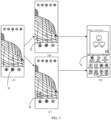
- the electronic device obtains one image when the operator clicks on a photographing button 31 illustrated in (A) in FIG. 3 in a the interface of the photographing preview image.
- the electronic device detects whether operation information of the operator on a thumbnail is obtained.
- the thumbnail presents content that has been photographed and the photographing preview window presents content that is to be photographed.
- the thumbnail and the photographing preview window can present different contents, i.e., different photographing objects.
- the thumbnail and the photographing preview window can present the same content.
- the thumbnail and the photographing preview window present the same content.
- the thumbnail and the photographing preview window present different contents.
- a photographing object presented by the thumbnail is a flower and a photographing object presented by the photographing preview window is a building.
- Schemes implemented in the present disclosure to quickly invoke the sharing interface are described below.
- Scheme 1 as illustrated in (B) in FIG. 3 , when the operator clicks on a dynamic arrow region 32 on the thumbnail, the operation information includes an operation position of an edge of the thumbnail and an operation event of a click operation.
- the electronic device detects the operation information of the operator on the thumbnail and determines that the operation information indicates invocation and display of a sharing interface 33 illustrated in (D) in FIG. 3 , so as to generate a trigger event.
- the electronic device invokes and displays the sharing interface according to the trigger event, and displays, in the sharing interface, icons of image sharing applications supported by an operating system of the electronic device.
- Scheme 2 as illustrated in (C) in FIG. 3 , when the operator slides up on the thumbnail region, the operation information includes an operation position corresponding to a trajectory from one point on the thumbnail to another point in the the interface of the photographing preview image and an operation event of a sliding operation.
- the electronic device detects the operation information of the operator on the thumbnail and determines that the operation information indicates the invocation and the display of the sharing interface 33, so as to generate a trigger event.
- the electronic device invokes and displays the sharing interface according to the trigger event, and displays, in the sharing interface, icons of the image sharing applications supported by the operating system of the electronic device.
- the electronic device may also display a sharing button 34 illustrated in (C) in FIG. 3 after obtaining a sliding-up operation. Further, the operator clicks on the sharing button 34 to invoke and display the sharing interface 33, which enriches implementations of invoking the sharing interface 33.
- an image processing method is provided.
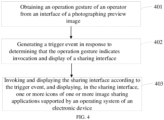
- the image processing method is applied in an electronic device. As illustrated in FIG. 4 , the method includes actions at blocks 401 to 403.
- an operation gesture of an operator is obtained from an interface of a photographing preview image.
- the electronic device can quickly and easily invoke the sharing interface by means of the operation gesture of the operator.
- the operation gesture may be a tap gesture.
- the electronic device performs a detection through a sensor such as a gyroscope and an accelerometer.
- a tap as an input gesture may be determined by the sensor in any state of the electronic device.
- a trigger event is generated in response to determining that the operation gesture indicates invocation and display of a sharing interface.
- the trigger event when the electronic device detects the operation gesture and determines that the operation gesture indicates invocation and display of the sharing interface, the trigger event is generated.
- the electronic device such as a smartphone determines, in response to detecting a tapping operation gesture performed by the operator, that the operation gesture indicates the invocation and the display of the sharing interface, and generates the trigger event for invoking the sharing interface.
- the sharing interface is invoked and displayed according to the trigger event, and one or more icons of one or more image sharing applications supported by an operating system of an electronic device are displayed in the sharing interface.
- each of the one or more icons is configured to share, in response to being triggered, an image corresponding to a thumbnail displayed in the the interface of the photographing preview image via the application associated with the icon.
- a quick invocation of the sharing interface based on the tap gesture is achieved, which in turn provides a portal for image sharing.
- an image processing method is provided.
- the image processing method is applied in an electronic device. As illustrated in FIG. 5 , the method includes actions at blocks 501 to 505.
- a trigger event is obtained from an interface of a photographing preview image.
- an editing interface is invoked and displayed according to the trigger event, and an image corresponding to a thumbnail is displayed in the editing interface.
- the electronic device may invoke the editing interface according to the trigger event, and then invoke a sharing interface, which provides not only a quick editing portal but also a quick sharing portal, simplifying operation complexity of the operator in a process of processing the image, improving efficiency of image processing, and enhancing the user experience.
- the image is edited in response to an editing operation on the image in the editing interface, and the edited image is obtained and saved.
- the image corresponding to the thumbnail displayed in the interface of the photographing preview image is the edited image.
- the electronic device invokes the editing interface first, after the operator edits the image corresponding to the thumbnail based on the editing interface to obtain the edited image, the electronic device saves the edited image and updates the image corresponding to the thumbnail as the edited image.
- a sharing interface is invoked and displayed in response to a sharing operation on the edited image.
- the sharing operation may be an operation in which in the editing interface, the operator clicks on a sharing and sending button in the editing interface.
- the electronic device invokes and displays the sharing interface in response to the sharing operation on the edited image.
- one or more icons of one or more image sharing applications supported by an operating system of an electronic device are displayed in the sharing interface.
- each of the one or more icons is configured to share, in response to being triggered, an image corresponding to a thumbnail displayed in the the interface of the photographing preview image via the application associated with the icon.
- the method further includes, subsequent to the operation of displaying the image corresponding to the thumbnail in the editing interface at block: invoking and displaying the the interface of the photographing preview image in response to a hiding operation in the editing interface. That is, in the editing interface, when the electronic device receives the hiding operation to hide the editing interface, the electronic device exits the editing interface to invoke and display the the interface of the photographing preview image.
- the interface of the photographing preview image includes the thumbnail of an image previously captured, and contents presented by the thumbnail and the the interface of the photographing preview image are different.
- a photographing object presented by the thumbnail is a flower and a photographing object presented by the photographing preview window is a building.
- operation information includes an operation position corresponding to a trajectory from one point on the thumbnail to another point in the the interface of the photographing preview image and an operation event of a sliding operation.
- the electronic device detects the operation information of the operator on the thumbnail.
- an editing button 61 shown in (A) in FIG. 6 is displayed. Further, the operator clicks on the editing button 61 to invoke and display an editing interface 62 shown in (B) in FIG. 6 . An image 63 corresponding to the thumbnail is displayed in the editing interface 62. Further, the electronic device edits the image in response to an editing operation on the image in the editing interface 62, and obtains and saves the edited image.
- the electronic device invokes and displays a sharing interface 65 shown in (C) in FIG. 6 (the sharing interface 65 in (C) in FIG. 6 corresponds to the sharing interface 33 in (D) in FIG. 3 ) in response to the sharing operation on the edited image, e.g., a click operation on Send 64 in the editing interface, and displays, in the sharing interface 65, icons of image sharing applications supported by the operating system of the electronic device.
- description is made by taking an example of editing a video.
- the video is obtained by photographing flowers.
- the electronic device obtains a click operation of the operator on Cancel 71 in the editing interface.
- the electronic device invokes and displays the the interface of the photographing preview image in response to a hiding operation in the editing interface.
- an image processing method is provided.
- the image processing method is applied in an electronic device. As illustrated in FIG. 8 , the method includes actions at blocks 801 to 803.
- a trigger event is obtained from an interface of a photographing preview image.
- a sharing interface is invoked and displayed according to the trigger event, one or more icons of one or more image sharing applications supported by an operating system of an electronic device are displayed in the sharing interface, and an image corresponding to a thumbnail is displayed.
- each of the one or more icons is configured to share, in response to being triggered, an image corresponding to a thumbnail displayed in the the interface of the photographing preview image via the application associated with the icon.
- the image corresponding to the thumbnail is shared, in response to a selection operation performed by an operator on at least one of the one or more icons, via an application associated with the at least one icon.
- the following actions may also be performed.
- image switching is performed based on an image stored in an image storage unit of the electronic device. That is, in this case, a region used to display an image in the sharing interface is a window region in which the displayed image comes from the image storage unit of the electronic device. The operator may perform the switching operation to change the image displayed in the window region, and also filter the displayed image. Any selected image may be used as a sharing image.
- the target image may be shared via the application associated with the at least one icon after or simultaneously with the action at block 803 of sharing, in response to the selection operation performed by the operator on the at least one of the one or more icons, the image corresponding to the thumbnail via the application associated with the at least one icon.
- the sharing interface may be invoked by a quick invoking operation and sharing of at least one image can be achieved, which improves the sharing efficiency and enhances the user experience.
- the present disclosure supports quick sharing and edition of photos and videos.
- a number of applications supporting the quick sharing is not limited, as long as they are applications that support the image sharing under the operating system.
- an operation path of the image sharing is shortened and timeliness of sharing is improved.
- an image processing apparatus is provided.
- the image processing apparatus may be applied in the image processing method according to any of the embodiments corresponding to FIG. 1, FIG. 2 , FIG. 4 , FIG. 5 , and FIG. 8 .
- an image processing apparatus 9 includes an obtaining module 91, a processing module 92, and a display module 93.
- the obtaining module 91 is configured to obtain a trigger event from an interface of a photographing preview image.
- the processing module 92 is configured to invoke a sharing interface according to the trigger event.
- the display module 93 is configured to display the sharing interface, and display, in the sharing interface, one or more icons of one or more image sharing applications supported by an operating system of an electronic device.
- each of the one or more icons is configured to share, in response to being triggered, an image corresponding to a thumbnail displayed in the the interface of the photographing preview image via the application associated with the icon.
- the obtaining module 91 is further configured to obtain, from the interface of the photographing preview image, operation information of an operator on the thumbnail; and generate the trigger event in response to determining that the operation information indicates invocation and display of the sharing interface.
- the obtaining module 91 is further configured to obtain an operation gesture of an operator from the interface of the photographing preview image; and generate the trigger event in response to determining that the operation gesture indicates invocation and display of the sharing interface.
- the processing module 92 is further configured to invoke and display an editing interface according to the trigger event, and display the image corresponding to the thumbnail in the editing interface; edit the image in response to an editing operation on the image in the editing interface, and obtain and save the edited image, the image corresponding to the thumbnail displayed in the interface of the photographing preview image being the edited image; and invoke the sharing interface in response to a sharing operation on the edited image.
- the processing module 92 is further configured to invoke the the interface of the photographing preview image in response to a hiding operation in the editing interface.
- the display module 93 is configured to display the the interface of the photographing preview image.
- the processing module 92 is further configured to share, in response to a selection operation performed by an operator on at least one of the one or more icons, the image corresponding to the thumbnail via an application associated with the at least one icon.
- the display module 93 is further configured to display the one or more icons in the sharing interface together with the image corresponding to the thumbnail.
- the processing module 92 is further configured to perform, in response to a switching operation on the displayed image in the sharing interface, image switching based on an image stored in an image storage unit of the electronic device; and obtain a target image selected by the operator during the image switching.
- the processing module 92 is further configured to share the target image via the application associated with the at least one icon.
- an electronic device is provided.
- the electronic device may be applied in the image processing method according to any of the embodiments corresponding to FIG. 1, FIG. 2 , FIG. 4 , FIG. 5 , and FIG. 8 .
- an electronic device 10 (the electronic device 10 in FIG. 10 corresponds to the image processing apparatus 9 in FIG. 9 ) includes a processor 1001, a storage device 1002, a communication bus 1003, and a display 1004.
- the communication bus 1003 is configured to implement a communication connection among the processor 1001, the storage device 1002, and the display 1004.
- the processor 1001 is configured to execute an image processing program stored in the storage device 1002 to implement actions of: obtaining a trigger event from an interface of a photographing preview image; and invoking and displaying a sharing interface according to the trigger event, and displaying, in the sharing interface, one or more icons of one or more image sharing applications supported by an operating system of an electronic device.
- Each of the one or more icons is configured to share, in response to being triggered, an image corresponding to a thumbnail displayed in the the interface of the photographing preview image via the application associated with the icon.
- the processor 1001 is configured to execute an image processing program stored in the storage device 1002 to implement actions of: obtaining, from the interface of the photographing preview image, operation information of an operator on the thumbnail; and generating the trigger event in response to determining that the operation information indicates invocation and display of the sharing interface.
- the processor 1001 is configured to execute an image processing program stored in the storage device 1002 to implement actions of: obtaining an operation gesture of an operator from the interface of the photographing preview image; and generating the trigger event in response to determining that the operation gesture indicates invocation and display of the sharing interface.
- the processor 1001 is configured to execute an image processing program stored in the storage device 1002 to implement actions of: invoking and displaying an editing interface according to the trigger event, and displaying the image corresponding to the thumbnail in the editing interface; editing the image in response to an editing operation on the image in the editing interface, and obtaining and saving the edited image, the image corresponding to the thumbnail displayed in the the interface of the photographing preview image being the edited image; and invoking the sharing interface in response to a sharing operation on the edited image.
- the display 1004 is configured to display the sharing interface.
- the processor 1001 is configured to execute an image processing program stored in the storage device 1002 to implement actions of: invoking the the interface of the photographing preview image in response to a hiding operation in the editing interface.
- the display 1004 is configured to display the the interface of the photographing preview image.
- the processor 1001 is configured to execute an image processing program stored in the storage device 1002 to implement actions of: sharing, in response to a selection operation performed by an operator on at least one of the one or more icons, the image corresponding to the thumbnail via an application associated with the at least one icon.
- the display 1004 is configured to display the one or more icons in the sharing interface together with the image corresponding to the thumbnail.
- the processor 1001 is configured to execute an image processing program stored in the storage device 1002 to implement actions of: performing, in response to a switching operation on the displayed image in the sharing interface, image switching based on an image stored in an image storage unit of the electronic device; and obtaining a target image selected by the operator during the image switching.
- the processor 1001 is further configured to, subsequent to the operation of sharing the image corresponding to the thumbnail via the application associated with the at least one icon, share the target image via the application associated with the at least one icon.
- the processor 1001 may be an integrated circuit chip having processing capabilities for signals, such as a general purpose processor, a Digital Signal Processor (DSP), or another programmable logic device, a discrete gate or a transistor logic device, a discrete hardware component, etc.
- the general purpose processor may be a microprocessor or any conventional processor, etc.
- a computer-readable storage medium stores one or more programs.
- the one or more programs are executable by one or more processors to implement actions of: obtaining a trigger event from an interface of a photographing preview image; and invoking and displaying a sharing interface according to the trigger event, and displaying, in the sharing interface, one or more icons of one or more image sharing applications supported by an operating system of an electronic device.
- Each of the one or more icons is configured to share, in response to being triggered, an image corresponding to a thumbnail displayed in the the interface of the photographing preview image via the application associated with the icon.
- the one or more programs are executable by the one or more processors to further implement actions of: obtaining, from the interface of the photographing preview image, operation information of an operator on the thumbnail; and generating the trigger event in response to determining that the operation information indicates invocation and display of the sharing interface.
- the one or more programs are executable by the one or more processors to further implement actions of: obtaining an operation gesture of an operator from the interface of the photographing preview image; and generating the trigger event in response to determining that the operation gesture indicates invocation and display of the sharing interface.
- the one or more programs are executable by the one or more processors to further implement actions of: invoking and displaying an editing interface according to the trigger event, and displaying the image corresponding to the thumbnail in the editing interface; editing the image in response to an editing operation on the image in the editing interface, and obtaining and saving the edited image, the image corresponding to the thumbnail displayed in the the interface of the photographing preview image being the edited image; and invoking and displaying the sharing interface in response to a sharing operation on the edited image.
- the one or more programs are executable by the one or more processors to further implement actions of: invoking and displaying the the interface of the photographing preview image in response to a hiding operation in the editing interface.
- the one or more programs are executable by the one or more processors to further implement actions of: sharing, in response to a selection operation performed by an operator on at least one of the one or more icons, the image corresponding to the thumbnail via an application associated with the at least one icon.
- the one or more programs are executable by the one or more processors to further implement actions of: displaying the one or more icons in the sharing interface together with the image corresponding to the thumbnail; performing, in response to a switching operation on the displayed image in the sharing interface, image switching based on an image stored in an image storage unit of the electronic device; and obtaining a target image selected by the operator during the image switching.
- the one or more programs are further executable by the one or more processors to further implement actions of: subsequent to the operation of sharing the image corresponding to the thumbnail via the application associated with the at least one icon, sharing the target image via the application associated with the at least one icon.
- the embodiments of the present disclosure can be provided as a method, a system, or a computer program product. Therefore, the present disclosure may adopt a form of a hardware embodiment, a complete software embodiment, or an embodiment combining software and hardware. In addition, the present disclosure may adopt a form of a computer program product implemented on one or more computer-usable storage media (including but not limited to disk storage, optical storage, etc.) including computer-usable program codes.
- a computer-usable storage media including but not limited to disk storage, optical storage, etc.
- These computer program instructions can also be stored in a computer-readable memory that can guide a computer or other programmable data processing devices to work in a specific manner, such that instructions stored in the computer-readable memory produce an article of manufacture including an instruction device.
- the instruction device implements functions specified in one or more processes in the flowchart and/or one or more blocks in the block diagram.
- These computer program instructions can also be loaded on a computer or other programmable data processing devices to enable a series of operation steps to be executed on the computer or other programmable devices for producing computer-implemented processing, such that instructions executed on the computer or other programmable devices provide steps for implementing functions specified in one or more processes in the flowchart and/or one or more blocks in the block diagram.
- the trigger event is obtained from the interface of the photographing preview image.
- the sharing interface is invoked and displayed according to the trigger event.
- the one or more icons of the one or more image sharing applications supported by the operating system of the electronic device are displayed in the sharing interface.
- Each of the one or more icons is configured to share, in response to being triggered, the image corresponding to the thumbnail displayed inthe interface of the photographing preview image via the application associated with the icon. That is, in the present disclosure, the sharing interface is invoked according to the trigger event.
- the sharing interface provides icons of all image sharing applications supported by the operating system of the electronic device, such that the image corresponding to the thumbnail can be quickly shared through any application under the operating system, thereby providing a quick image sharing portal and enhancing the user experience.
Landscapes
- Engineering & Computer Science (AREA)
- General Engineering & Computer Science (AREA)
- Theoretical Computer Science (AREA)
- Human Computer Interaction (AREA)
- Multimedia (AREA)
- Signal Processing (AREA)
- Physics & Mathematics (AREA)
- General Physics & Mathematics (AREA)
- Computer Networks & Wireless Communication (AREA)
- User Interface Of Digital Computer (AREA)
Applications Claiming Priority (2)
| Application Number | Priority Date | Filing Date | Title |
|---|---|---|---|
| CN202010636450.5A CN111866379A (zh) | 2020-07-03 | 2020-07-03 | 一种图像处理方法、图像处理装置、电子设备和存储介质 |
| PCT/CN2021/098188 WO2022001572A1 (zh) | 2020-07-03 | 2021-06-03 | 一种图像处理方法、图像处理装置、电子设备和存储介质 |
Publications (2)
| Publication Number | Publication Date |
|---|---|
| EP4178193A1 true EP4178193A1 (de) | 2023-05-10 |
| EP4178193A4 EP4178193A4 (de) | 2023-12-06 |
Family
ID=73153427
Family Applications (1)
| Application Number | Title | Priority Date | Filing Date |
|---|---|---|---|
| EP21832748.4A Pending EP4178193A4 (de) | 2020-07-03 | 2021-06-03 | Bildverarbeitungsverfahren, bildverarbeitungsvorrichtung, elektronische vorrichtung und speichermedium |
Country Status (4)
| Country | Link |
|---|---|
| US (1) | US12432440B2 (de) |
| EP (1) | EP4178193A4 (de) |
| CN (1) | CN111866379A (de) |
| WO (1) | WO2022001572A1 (de) |
Families Citing this family (4)
| Publication number | Priority date | Publication date | Assignee | Title |
|---|---|---|---|---|
| CN113497888B (zh) * | 2020-04-07 | 2023-05-02 | 华为技术有限公司 | 照片预览方法、电子设备和存储介质 |
| CN111866379A (zh) | 2020-07-03 | 2020-10-30 | Oppo广东移动通信有限公司 | 一种图像处理方法、图像处理装置、电子设备和存储介质 |
| CN115631293A (zh) * | 2022-08-18 | 2023-01-20 | 中通服慧展科技有限公司 | 一种3d大场景可视化编辑方法、装置、电子设备及介质 |
| CN115729419A (zh) * | 2022-11-22 | 2023-03-03 | 北京字跳网络技术有限公司 | 引导用户互动的方法、装置及电子设备 |
Family Cites Families (31)
| Publication number | Priority date | Publication date | Assignee | Title |
|---|---|---|---|---|
| JP2003308439A (ja) * | 2002-04-12 | 2003-10-31 | Canon Inc | フォト管理サーバ及び情報処理装置、フォト管理システム及びそれらの制御方法、プログラム |
| US8482403B2 (en) * | 2007-12-12 | 2013-07-09 | Sony Corporation | Interacting with devices based on physical device-to-device contact |
| KR101517638B1 (ko) * | 2010-04-22 | 2015-05-15 | 엘지전자 주식회사 | 콘텐츠 제공 방법 및 그를 이용한 디스플레이장치 |
| JP5360106B2 (ja) * | 2011-03-25 | 2013-12-04 | ブラザー工業株式会社 | 情報処理プログラム、情報処理装置、および情報処理方法 |
| US20130080932A1 (en) * | 2011-09-27 | 2013-03-28 | Sanjiv Sirpal | Secondary single screen mode activation through user interface toggle |
| US20130332526A1 (en) * | 2012-06-10 | 2013-12-12 | Apple Inc. | Creating and sharing image streams |
| KR101935039B1 (ko) * | 2012-09-11 | 2019-01-03 | 엘지전자 주식회사 | 이동 단말기 및 이동 단말기의 제어 방법 |
| CN103677609A (zh) * | 2012-09-24 | 2014-03-26 | 华为技术有限公司 | 照片处理方法和终端 |
| CN103118169A (zh) * | 2012-12-26 | 2013-05-22 | 东莞宇龙通信科技有限公司 | 一种分享照片或视频的方法及系统 |
| US20150009152A1 (en) * | 2013-07-03 | 2015-01-08 | Htc Corporation | Method of sharing application and electronic device using the same |
| CN103369048B (zh) * | 2013-07-19 | 2016-08-17 | 广州市幸福网络技术有限公司 | 基于拖拽操作的内容分享方法及系统 |
| US9479656B2 (en) * | 2013-10-10 | 2016-10-25 | Andrew Yuan-Da Lin | System and method for taking and sharing photographs in a photo kiosk |
| US10120528B2 (en) * | 2013-12-24 | 2018-11-06 | Dropbox, Inc. | Systems and methods for forming share bars including collections of content items |
| US10079040B2 (en) * | 2013-12-31 | 2018-09-18 | Disney Enterprises, Inc. | Systems and methods for video clip creation, curation, and interaction |
| US9477689B2 (en) * | 2014-02-15 | 2016-10-25 | Barry Crutchfield | Embedding digital content within a digital photograph during capture of the digital photograph |
| KR102230267B1 (ko) * | 2014-09-04 | 2021-03-19 | 삼성전자주식회사 | 영상 표시 장치 및 방법 |
| KR102302197B1 (ko) * | 2015-04-01 | 2021-09-14 | 삼성전자주식회사 | 촬영 장치, 그 제어 방법 및 컴퓨터로 판독 가능한 기록매체. |
| CN105955607B (zh) * | 2016-04-22 | 2020-06-19 | 北京小米移动软件有限公司 | 内容分享方法和装置 |
| CN106293338A (zh) * | 2016-08-01 | 2017-01-04 | 乐视控股(北京)有限公司 | 多媒体文件分享方法和系统 |
| CN106502527A (zh) * | 2016-09-29 | 2017-03-15 | 北京小米移动软件有限公司 | 一种内容分享的方法、装置及终端 |
| CN108259315A (zh) * | 2017-01-16 | 2018-07-06 | 广州市动景计算机科技有限公司 | 在线图片分享方法、设备、客户端及电子设备 |
| CN108153900A (zh) * | 2018-01-12 | 2018-06-12 | 维沃移动通信有限公司 | 一种图片处理方法及移动终端 |
| CN108536365B (zh) * | 2018-03-16 | 2020-07-28 | 维沃移动通信有限公司 | 一种图像分享方法及终端 |
| CN110213440B (zh) * | 2019-05-27 | 2021-12-28 | 维沃移动通信有限公司 | 一种图像分享方法及终端 |
| CN110072071B (zh) * | 2019-05-31 | 2023-05-05 | 广东图盛超高清创新中心有限公司 | 一种视频录制交互控制方法、设备及计算机可读存储介质 |
| CN112580400B (zh) * | 2019-09-29 | 2022-08-05 | 荣耀终端有限公司 | 图像选优方法及电子设备 |
| US11095584B2 (en) * | 2019-10-25 | 2021-08-17 | Facebook, Inc. | Generating content to be shared between users |
| CN112839163B (zh) * | 2019-11-25 | 2022-03-18 | 深圳市万普拉斯科技有限公司 | 拍摄图像分享方法、装置、移动终端和可读存储介质 |
| CN111127595B (zh) * | 2019-12-19 | 2023-11-03 | 维沃移动通信有限公司 | 图像处理方法及电子设备 |
| CN111273832B (zh) * | 2020-02-27 | 2023-06-13 | Oppo广东移动通信有限公司 | 内容分享方法、装置、终端及存储介质 |
| CN111866379A (zh) * | 2020-07-03 | 2020-10-30 | Oppo广东移动通信有限公司 | 一种图像处理方法、图像处理装置、电子设备和存储介质 |
-
2020
- 2020-07-03 CN CN202010636450.5A patent/CN111866379A/zh active Pending
-
2021
- 2021-06-03 EP EP21832748.4A patent/EP4178193A4/de active Pending
- 2021-06-03 WO PCT/CN2021/098188 patent/WO2022001572A1/zh not_active Ceased
-
2022
- 2022-12-23 US US18/088,399 patent/US12432440B2/en active Active
Also Published As
| Publication number | Publication date |
|---|---|
| US20230131307A1 (en) | 2023-04-27 |
| US12432440B2 (en) | 2025-09-30 |
| WO2022001572A1 (zh) | 2022-01-06 |
| EP4178193A4 (de) | 2023-12-06 |
| CN111866379A (zh) | 2020-10-30 |
Similar Documents
| Publication | Publication Date | Title |
|---|---|---|
| US12432440B2 (en) | Image processing method, image processing apparatus, electronic device, and storage medium | |
| CN105955607B (zh) | 内容分享方法和装置 | |
| CN111913628B (zh) | 分享方法、装置和电子设备 | |
| CN113093968B (zh) | 拍摄界面显示方法、装置、电子设备及介质 | |
| EP3660646A1 (de) | Verfahren zur anzeige einer multitask-verwaltungsschnittstelle, vorrichtung, endgerät und speichermedium | |
| US11188203B2 (en) | Method for generating multimedia material, apparatus, and computer storage medium | |
| CN111447484B (zh) | 电子节目指南epg的加载方法及装置、存储介质 | |
| RU2663709C2 (ru) | Способ и устройство для обработки информации | |
| US11836342B2 (en) | Method for acquiring historical information, storage medium, and system | |
| CN111866571A (zh) | 在智能电视上编辑内容的方法、装置及存储介质 | |
| CN112202958B (zh) | 截图方法、装置及电子设备 | |
| CN112584222A (zh) | 视频处理方法和装置、用于视频处理的装置 | |
| CN112911147A (zh) | 显示控制方法、显示控制装置及电子设备 | |
| CN113296661A (zh) | 图像处理方法、装置、电子设备及可读存储介质 | |
| KR102907562B1 (ko) | 사진 촬영 방법, 장치 및 전자기기 | |
| CN112162805A (zh) | 截图方法、装置和电子设备 | |
| CN114416269A (zh) | 界面显示方法和显示设备 | |
| CN113835577A (zh) | 显示方法、装置、电子设备及存储介质 | |
| CN111427449A (zh) | 界面显示方法、装置及存储介质 | |
| CN112383708B (zh) | 拍摄方法、装置、电子设备及可读存储介质 | |
| US11016660B2 (en) | Method and apparatus for responding to gesture operation and storage medium | |
| CN112306702B (zh) | 数据共享方法、装置、电子设备及储存介质 | |
| WO2025036323A1 (zh) | 相册显示方法、装置、设备和存储介质 | |
| US20210333988A1 (en) | Method and device for switching interface, touch terminal, and storage medium | |
| CN113726953A (zh) | 显示内容获取方法和装置 |
Legal Events
| Date | Code | Title | Description |
|---|---|---|---|
| STAA | Information on the status of an ep patent application or granted ep patent |
Free format text: STATUS: THE INTERNATIONAL PUBLICATION HAS BEEN MADE |
|
| PUAI | Public reference made under article 153(3) epc to a published international application that has entered the european phase |
Free format text: ORIGINAL CODE: 0009012 |
|
| STAA | Information on the status of an ep patent application or granted ep patent |
Free format text: STATUS: REQUEST FOR EXAMINATION WAS MADE |
|
| 17P | Request for examination filed |
Effective date: 20221229 |
|
| AK | Designated contracting states |
Kind code of ref document: A1 Designated state(s): AL AT BE BG CH CY CZ DE DK EE ES FI FR GB GR HR HU IE IS IT LI LT LU LV MC MK MT NL NO PL PT RO RS SE SI SK SM TR |
|
| DAV | Request for validation of the european patent (deleted) | ||
| DAX | Request for extension of the european patent (deleted) | ||
| REG | Reference to a national code |
Ref country code: DE Ref legal event code: R079 Free format text: PREVIOUS MAIN CLASS: H04N0005232000 Ipc: H04N0023620000 |
|
| A4 | Supplementary search report drawn up and despatched |
Effective date: 20231103 |
|
| RIC1 | Information provided on ipc code assigned before grant |
Ipc: G06F 3/01 20060101ALI20231027BHEP Ipc: H04N 23/62 20230101AFI20231027BHEP |
|
| STAA | Information on the status of an ep patent application or granted ep patent |
Free format text: STATUS: EXAMINATION IS IN PROGRESS |
|
| 17Q | First examination report despatched |
Effective date: 20250709 |