EP4187909A1 - Bilderfassungsverfahren und -vorrichtung, server und elektronische vorrichtung - Google Patents
Bilderfassungsverfahren und -vorrichtung, server und elektronische vorrichtung Download PDFInfo
- Publication number
- EP4187909A1 EP4187909A1 EP21863662.9A EP21863662A EP4187909A1 EP 4187909 A1 EP4187909 A1 EP 4187909A1 EP 21863662 A EP21863662 A EP 21863662A EP 4187909 A1 EP4187909 A1 EP 4187909A1
- Authority
- EP
- European Patent Office
- Prior art keywords
- preview image
- area
- size information
- image
- screen size
- Prior art date
- Legal status (The legal status is an assumption and is not a legal conclusion. Google has not performed a legal analysis and makes no representation as to the accuracy of the status listed.)
- Pending
Links
Images




Classifications
-
- G—PHYSICS
- G09—EDUCATION; CRYPTOGRAPHY; DISPLAY; ADVERTISING; SEALS
- G09G—ARRANGEMENTS OR CIRCUITS FOR CONTROL OF INDICATING DEVICES USING STATIC MEANS TO PRESENT VARIABLE INFORMATION
- G09G5/00—Control arrangements or circuits for visual indicators common to cathode-ray tube indicators and other visual indicators
- G09G5/003—Details of a display terminal, the details relating to the control arrangement of the display terminal and to the interfaces thereto
- G09G5/005—Adapting incoming signals to the display format of the display terminal
-
- H—ELECTRICITY
- H04—ELECTRIC COMMUNICATION TECHNIQUE
- H04N—PICTORIAL COMMUNICATION, e.g. TELEVISION
- H04N21/00—Selective content distribution, e.g. interactive television or video on demand [VOD]
- H04N21/40—Client devices specifically adapted for the reception of or interaction with content, e.g. set-top-box [STB]; Operations thereof
- H04N21/43—Processing of content or additional data, e.g. demultiplexing additional data from a digital video stream; Elementary client operations, e.g. monitoring of home network or synchronising decoder's clock; Client middleware
- H04N21/431—Generation of visual interfaces for content selection or interaction; Content or additional data rendering
- H04N21/4312—Generation of visual interfaces for content selection or interaction; Content or additional data rendering involving specific graphical features, e.g. screen layout, special fonts or colors, blinking icons, highlights or animations
-
- G—PHYSICS
- G06—COMPUTING OR CALCULATING; COUNTING
- G06F—ELECTRIC DIGITAL DATA PROCESSING
- G06F16/00—Information retrieval; Database structures therefor; File system structures therefor
- G06F16/90—Details of database functions independent of the retrieved data types
- G06F16/95—Retrieval from the web
- G06F16/957—Browsing optimisation, e.g. caching or content distillation
- G06F16/9577—Optimising the visualization of content, e.g. distillation of HTML documents
-
- G—PHYSICS
- G06—COMPUTING OR CALCULATING; COUNTING
- G06F—ELECTRIC DIGITAL DATA PROCESSING
- G06F16/00—Information retrieval; Database structures therefor; File system structures therefor
- G06F16/50—Information retrieval; Database structures therefor; File system structures therefor of still image data
- G06F16/54—Browsing; Visualisation therefor
-
- G—PHYSICS
- G06—COMPUTING OR CALCULATING; COUNTING
- G06T—IMAGE DATA PROCESSING OR GENERATION, IN GENERAL
- G06T3/00—Geometric image transformations in the plane of the image
- G06T3/40—Scaling of whole images or parts thereof, e.g. expanding or contracting
-
- H—ELECTRICITY
- H04—ELECTRIC COMMUNICATION TECHNIQUE
- H04N—PICTORIAL COMMUNICATION, e.g. TELEVISION
- H04N21/00—Selective content distribution, e.g. interactive television or video on demand [VOD]
- H04N21/20—Servers specifically adapted for the distribution of content, e.g. VOD servers; Operations thereof
- H04N21/23—Processing of content or additional data; Elementary server operations; Server middleware
- H04N21/234—Processing of video elementary streams, e.g. splicing of video streams or manipulating encoded video stream scene graphs
- H04N21/2343—Processing of video elementary streams, e.g. splicing of video streams or manipulating encoded video stream scene graphs involving reformatting operations of video signals for distribution or compliance with end-user requests or end-user device requirements
- H04N21/23439—Processing of video elementary streams, e.g. splicing of video streams or manipulating encoded video stream scene graphs involving reformatting operations of video signals for distribution or compliance with end-user requests or end-user device requirements for generating different versions
-
- H—ELECTRICITY
- H04—ELECTRIC COMMUNICATION TECHNIQUE
- H04N—PICTORIAL COMMUNICATION, e.g. TELEVISION
- H04N21/00—Selective content distribution, e.g. interactive television or video on demand [VOD]
- H04N21/20—Servers specifically adapted for the distribution of content, e.g. VOD servers; Operations thereof
- H04N21/25—Management operations performed by the server for facilitating the content distribution or administrating data related to end-users or client devices, e.g. end-user or client device authentication, learning user preferences for recommending movies
- H04N21/258—Client or end-user data management, e.g. managing client capabilities, user preferences or demographics, processing of multiple end-users preferences to derive collaborative data
- H04N21/25808—Management of client data
- H04N21/25825—Management of client data involving client display capabilities, e.g. screen resolution of a mobile phone
-
- H—ELECTRICITY
- H04—ELECTRIC COMMUNICATION TECHNIQUE
- H04N—PICTORIAL COMMUNICATION, e.g. TELEVISION
- H04N21/00—Selective content distribution, e.g. interactive television or video on demand [VOD]
- H04N21/20—Servers specifically adapted for the distribution of content, e.g. VOD servers; Operations thereof
- H04N21/25—Management operations performed by the server for facilitating the content distribution or administrating data related to end-users or client devices, e.g. end-user or client device authentication, learning user preferences for recommending movies
- H04N21/266—Channel or content management, e.g. generation and management of keys and entitlement messages in a conditional access system, merging a VOD unicast channel into a multicast channel
- H04N21/2662—Controlling the complexity of the video stream, e.g. by scaling the resolution or bitrate of the video stream based on the client capabilities
-
- H—ELECTRICITY
- H04—ELECTRIC COMMUNICATION TECHNIQUE
- H04N—PICTORIAL COMMUNICATION, e.g. TELEVISION
- H04N21/00—Selective content distribution, e.g. interactive television or video on demand [VOD]
- H04N21/40—Client devices specifically adapted for the reception of or interaction with content, e.g. set-top-box [STB]; Operations thereof
- H04N21/47—End-user applications
- H04N21/485—End-user interface for client configuration
- H04N21/4858—End-user interface for client configuration for modifying screen layout parameters, e.g. fonts, size of the windows
-
- H—ELECTRICITY
- H04—ELECTRIC COMMUNICATION TECHNIQUE
- H04N—PICTORIAL COMMUNICATION, e.g. TELEVISION
- H04N21/00—Selective content distribution, e.g. interactive television or video on demand [VOD]
- H04N21/60—Network structure or processes for video distribution between server and client or between remote clients; Control signalling between clients, server and network components; Transmission of management data between server and client, e.g. sending from server to client commands for recording incoming content stream; Communication details between server and client
- H04N21/65—Transmission of management data between client and server
- H04N21/658—Transmission by the client directed to the server
- H04N21/6582—Data stored in the client, e.g. viewing habits, hardware capabilities, credit card number
-
- H—ELECTRICITY
- H04—ELECTRIC COMMUNICATION TECHNIQUE
- H04N—PICTORIAL COMMUNICATION, e.g. TELEVISION
- H04N21/00—Selective content distribution, e.g. interactive television or video on demand [VOD]
- H04N21/80—Generation or processing of content or additional data by content creator independently of the distribution process; Content per se
- H04N21/81—Monomedia components thereof
- H04N21/8146—Monomedia components thereof involving graphical data, e.g. 3D object, 2D graphics
- H04N21/8153—Monomedia components thereof involving graphical data, e.g. 3D object, 2D graphics comprising still images, e.g. texture, background image
-
- G—PHYSICS
- G06—COMPUTING OR CALCULATING; COUNTING
- G06T—IMAGE DATA PROCESSING OR GENERATION, IN GENERAL
- G06T2200/00—Indexing scheme for image data processing or generation, in general
- G06T2200/16—Indexing scheme for image data processing or generation, in general involving adaptation to the client's capabilities
-
- G—PHYSICS
- G09—EDUCATION; CRYPTOGRAPHY; DISPLAY; ADVERTISING; SEALS
- G09G—ARRANGEMENTS OR CIRCUITS FOR CONTROL OF INDICATING DEVICES USING STATIC MEANS TO PRESENT VARIABLE INFORMATION
- G09G2340/00—Aspects of display data processing
- G09G2340/04—Changes in size, position or resolution of an image
- G09G2340/045—Zooming at least part of an image, i.e. enlarging it or shrinking it
-
- G—PHYSICS
- G09—EDUCATION; CRYPTOGRAPHY; DISPLAY; ADVERTISING; SEALS
- G09G—ARRANGEMENTS OR CIRCUITS FOR CONTROL OF INDICATING DEVICES USING STATIC MEANS TO PRESENT VARIABLE INFORMATION
- G09G2340/00—Aspects of display data processing
- G09G2340/04—Changes in size, position or resolution of an image
- G09G2340/0464—Positioning
-
- H—ELECTRICITY
- H04—ELECTRIC COMMUNICATION TECHNIQUE
- H04L—TRANSMISSION OF DIGITAL INFORMATION, e.g. TELEGRAPHIC COMMUNICATION
- H04L67/00—Network arrangements or protocols for supporting network services or applications
- H04L67/2866—Architectures; Arrangements
- H04L67/30—Profiles
- H04L67/303—Terminal profiles
-
- H—ELECTRICITY
- H04—ELECTRIC COMMUNICATION TECHNIQUE
- H04N—PICTORIAL COMMUNICATION, e.g. TELEVISION
- H04N21/00—Selective content distribution, e.g. interactive television or video on demand [VOD]
- H04N21/40—Client devices specifically adapted for the reception of or interaction with content, e.g. set-top-box [STB]; Operations thereof
- H04N21/41—Structure of client; Structure of client peripherals
- H04N21/4104—Peripherals receiving signals from specially adapted client devices
- H04N21/4113—PC
-
- H—ELECTRICITY
- H04—ELECTRIC COMMUNICATION TECHNIQUE
- H04N—PICTORIAL COMMUNICATION, e.g. TELEVISION
- H04N21/00—Selective content distribution, e.g. interactive television or video on demand [VOD]
- H04N21/40—Client devices specifically adapted for the reception of or interaction with content, e.g. set-top-box [STB]; Operations thereof
- H04N21/41—Structure of client; Structure of client peripherals
- H04N21/4104—Peripherals receiving signals from specially adapted client devices
- H04N21/4126—The peripheral being portable, e.g. PDAs or mobile phones
Definitions
- This application pertains to the field of computer technologies, and specifically relates to an image obtaining method and apparatus, a server, and an electronic device.
- a black side may appear on some electronic devices when the preview image is displayed, that is, a size of the preview image does not match a screen size, and consequently, the preview image cannot cover the entire screen, and a black side appears.
- the size of the current preview image does not match the screen size of the electronic device, and a poor display effect is caused.
- Embodiments of this application are to provide an image obtaining method and apparatus, a server, and an electronic device, to resolve a problem in the prior art that a display effect of an electronic device is poor when a preview image is displayed.
- an embodiment of this application provides an image obtaining method, applied to a server, and including:
- an embodiment of this application provides an image obtaining method, applied to an electronic device, and including:
- an embodiment of this application provides an image obtaining apparatus, applied to a server, and including:
- an embodiment of this application provides an image obtaining apparatus, applied to an electronic device, and including:
- an embodiment of this application provides a server, including a processor, a memory, and a program or an instruction stored in the memory and executable on the processor, and when the program or the instruction is executed by the processor, steps in the image obtaining method described in the first aspect are implemented.
- an embodiment of this application provides an electronic device.
- the electronic device includes a processor, a memory, and a program or an instruction stored in the memory and executable on the processor, and when the program or the instruction is executed by the processor, steps in the method described in the second aspect are implemented.
- an embodiment of this application provides a readable storage medium.
- a program or an instruction is stored in the readable storage medium, and when the program or the instruction is executed by a processor, steps in the method described in the first aspect are implemented, or when the program or the instruction is executed by the processor, steps in the method described in the second aspect are implemented.
- an embodiment of this application provides a chip, where the chip includes a processor and a communication interface, the communication interface is coupled to the processor, and the processor is configured to execute a program or an instruction to implement the method described in the first aspect or the second aspect.
- the screen size information sent by the electronic device is received, the target preview image that matches the screen size information is determined, and the target preview image is sent to the electronic device.
- the target preview image may be determined based on the screen size information of the electronic device, so that the electronic device may display the target preview image that matches the screen size information of the electronic device, thereby improving a display effect of the preview image.
- first and second in the specification and claims of this application are used to distinguish between similar objects, and do not need to be used to describe a specific order or sequence. It should be understood that data used in this way may be interchangeable in an appropriate case, so that the embodiments of this application can be implemented in a sequence other than those shown or described herein, and objects distinguished by “first” and “second” are generally of a same type, and a quantity of objects is not limited. For example, there may be one or more first targets.
- “and/or” represents at least one of connected objects, and the character “/” generally represents an "or” relationship between associated objects.
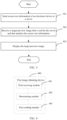
- FIG. 1 is a flowchart of an image obtaining method according to an embodiment of this application. As shown in FIG. 1 , the image obtaining method is applied to a server and includes: Step 101: Receive screen size information sent by an electronic device.
- the screen size information is screen size information of a display screen of the electronic device.
- the electronic device may directly send a display screen size to the server explicitly or implicitly.
- Explicit sending means that the electronic device may directly send the screen size information to the server.
- Implicit sending means that a product model of the electronic device is sent to the server, and the server learns the screen size information of the display screen of the electronic device based on the product model.
- the screen size information may be resolution, and a quantity of pixels in a length direction and a quantity of pixels in a width direction may be determined based on the resolution, or the screen size information is a length-width ratio.
- Step 102 Determine a target preview image that matches the screen size information.
- the server may pre-generate, based on an existing preview resource, multiple target preview images that match different screen size information, and in a case that the server receives the screen size information, the server may select one target preview image that matches the screen size information from the multiple target preview images.
- the server may also process the preview resource based on the screen size information to generate the target preview image that matches the screen size information, or when failing to find the target preview image that matches the screen size information from the multiple target preview images, the server may process the preview resource based on the screen size information to generate the target preview image that matches the screen size information.
- Step 103 Send the target preview image to the electronic device.
- the target preview image is sent to the electronic device.
- the target preview image may include a wallpaper element.
- the target preview image may further include one or more of an icon element, a pendant element, and a status bar element, and each element has a corresponding sub-image.
- a sub-image corresponding to the element in the target preview image is displayed on the display screen of the electronic device.
- the image obtaining method in this embodiment is used to provide preview images suitable for different screen sizes for a user, so that the electronic device may directly display a preview image based on a size of the preview image, to prevent a case that the size of the preview image does not match a size of the display screen of the electronic device from affecting a display effect of the preview image.
- the server receives the screen size information sent by the electronic device, determines the target preview image that matches the screen size information, and sends the target preview image to the electronic device, to determine the target preview image based on the screen size information of the electronic device, so that the electronic device may display the target preview image that matches the screen size information of the electronic device, thereby improving a display effect of the preview image.
- the step 102 of determining a target preview image that matches the screen size information includes:
- the initial preview image may be understood as a wallpaper.
- the preview image element may include one or more of an icon element, a pendant element, and a status bar element.
- Each preview image element includes a corresponding sub-image.
- the icon element includes an application icon, the icon may be considered as a sub-image, and icons corresponding to different applications may be different.
- the pendant element includes a sub-image corresponding to a pendant, and the status bar element includes a sub-image corresponding to a status bar.
- the preview image element has a corresponding display position in the initial preview image.
- the status bar element is generally displayed at an upper end or a lower end of the initial preview image
- the pendant element is generally displayed in an upper half area of the initial preview image
- the icon element is generally displayed in a lower half area of the initial preview image
- the display position of the preview image element in the initial preview image may be set according to an actual situation.
- the initial preview image has a size, and the size may not match the size of the display screen of the electronic device.
- the size of the initial preview image is adjusted, so that an obtained target size matches the screen size information, and an image obtained after the size of the initial preview image is adjusted is the intermediate preview image.
- the intermediate preview image may be considered as a sub-image corresponding to the wallpaper element in the target preview image.
- the target preview image includes the intermediate preview image, the preview image element, and a display position of the preview image element in the intermediate preview image, and each element includes a corresponding sub-image.
- the display position of the preview image element in the initial preview image may not be applicable to the intermediate preview image. If the display position of the preview image in the intermediate preview image uses the display position of the preview image element in the initial preview image, a display effect may be affected.
- the display position of the preview image element in the intermediate preview image may be adjusted after the intermediate preview image is obtained.
- the size of the initial preview image is adjusted to the target size based on the screen size information, to obtain the intermediate preview image, and the display position of the preview image element in the intermediate preview image is adjusted to obtain the target preview image, that is, the wallpaper element (that is, the initial preview image) and the preview image element are separately adjusted, so that a display effect of the finally obtained target preview image is better.
- the adjusting a size of the initial preview image to a target size based on the screen size information, to obtain an intermediate preview image includes:
- the initial preview image may be a desktop wallpaper, a lock screen wallpaper, or the like in a desktop theme.
- Lengths or widths of preview images in a same theme may be adjusted based on a preview image of a home screen in the following embodiments. For example, if there are multiple preview images in a same theme, when sizes of the multiple preview images are adjusted based on the screen size information, a length or width direction of the preview image of the home screen may be adjusted first based on the screen size information, and then another preview image in the theme is adjusted in a same adjustment manner as that of the preview image of the home screen.
- the first area and the second area may be selected according to an actual situation.
- the first area and the second area may be respectively a top area and a bottom area of the initial preview image.
- the first area is an area that is a first preset distance from the top of the initial preview image, that is, an area shown by a symbol A1 in FIG. 2a .
- the second area is an area that is a second preset distance from the bottom of the initial preview image, that is, an area shown by a symbol B1 in FIG. 2a
- a symbol C1 shows an area between the first area and the second area in the initial preview image.
- the first preset distance and the second preset distance may be set according to an actual situation. This is not limited herein. It should be noted that a sum of the first preset distance and the second preset distance is not greater than a length of the initial preview image.
- icons 1, 2, 3, and 4 are separately icons of applications installed on the electronic device.
- the preview image element may include one or more of an icon element, a pendant element, and a status bar element.
- the first area and the second area may be further divided according to classification of the preview image element. For example, an area displayed by the status bar element is the first area, and an area displayed by an icon element of an application is the second area.
- the first length is determined based on the screen size information. If the screen size information is a length-width ratio of the display screen, after obtaining the screen size information, the server determines a quantity of pixels in the length direction and a quantity of pixels in the width direction based on the length-width ratio. For example, as shown in Table 1, in Table 1, a first column is a screen ratio, that is, the length-width ratio of the display screen of the electronic device, and a second column is corresponding resolution, that is, the quantity of pixels in the length direction and the quantity of pixels in the width direction.
- Table 1 Screen ratio Resolution 18:9 2160 ⁇ 1080 18.8:9 2256 ⁇ 1080 19:9 2280 ⁇ 1080 19.3:9 2316 ⁇ 1080 19.5:9 2340 ⁇ 1080 19.8:9 2376 ⁇ 1080 20:9 2400 ⁇ 1080 20.5:9 2460 ⁇ 1080 20.07:9 2408 ⁇ 1080
- the first length is the quantity of pixels in the length direction. For example, it may be learned from Table 1 that if the screen ratio is 18:9, the quantity of pixels in the length direction is 2160. If the screen size information is the resolution, the quantity of pixels in the length direction may be directly learned based on the resolution.
- a reference device is selected, and resolution of a display screen of the reference device is reference resolution. For example, 1920 ⁇ 1080 is selected as the reference resolution, the initial preview image matches the resolution of the display screen of the reference device, and the second length of the initial preview image may be understood as a quantity of pixels, in the length direction, of the reference resolution that matches the initial preview image. In addition, the second length of the initial preview image may also be understood as a quantity of pixels of the initial preview image in the length direction.
- a difference operation is performed on the first length and the second length to obtain a length difference. If the length difference is a positive number, it indicates that the first length is greater than the second length of the initial preview image, and the second length of the initial preview image needs to be stretched, so that the second length matches the display screen of the electronic device. If the length difference is a negative number, it indicates that the first length is less than the second length of the initial preview image, and the second length of the initial preview image needs to be cut, so that the second length matches the display screen of the electronic device, to avoid a black side around the preview image and improve a display effect.
- the distance between the first area and the second area in the length direction is Ll
- M1 the distance between the first area and the second area in the length direction
- the second distance is a sum of L1 and M1. If M1 is greater than 0, the distance between the first area and the second area in the length direction is increased, and an area between the first area and the second area in the initial preview image may be stretched.
- the initial preview image matches the resolution of the display screen of the reference device
- the second length of the initial preview image is a quantity of pixels, in the length direction, of the reference resolution that matches the initial preview image.
- Resolution of the electronic device that is determined based on the screen size information is 2376 ⁇ 1080, and therefore, the first length is 2376, the second length is 1920, and a difference between the first length and the second length is 456 pixels.
- the area between the first area and the second area in the initial preview image may be stretched, that is, an area shown in C 1 in FIG. 2a is stretched in the length direction, and a distance of 456 pixels is increased, so that the intermediate preview image is obtained.
- An effect achieved after stretching is shown in FIG. 2b .
- FIG. 2a is a schematic diagram of an effect achieved when the initial preview image is displayed on a display screen of a first size (that is, 16:9, where resolution is 1920 ⁇ 1080).
- FIG. 2b is a schematic diagram of an effect achieved when the target preview image is displayed on a display screen of a second size (that is, 19.8:9, where resolution is 2376 ⁇ 1080). It may be learned from comparison FIG. 2a and FIG. 2b that a distance between the first area and the second area in FIG. 2b increases, that is, a length of an area shown by C2 is greater than a length of an area shown by C1.
- a display position of the preview image element in the intermediate preview image is adjusted, so that a display position of the adjusted preview image element relative to an upper left corner or a lower left corner of the intermediate preview image is the same as a display position of the unadjusted preview image element relative to an upper left corner or a lower left corner of the initial preview image.
- a position, in the intermediate preview image, of the preview image element in the first area is adjusted based on a distance from the upper left corner (or the upper right corner) of the initial preview image.
- a distance of a preview image element in the area shown by A2 relative to the upper left corner of the initial preview image is the same as a distance of a preview image element in an area shown by A1 in FIG. 2a relative to the upper left corner of the intermediate preview image.
- a position, in the intermediate preview image, of the preview image element in the second area is adjusted based on a distance from the lower left corner (or the lower right corner) of the initial preview image.
- a distance of a preview image element in the area shown by B2 relative to the lower left corner (or the lower right corner) of the initial preview image is the same as a distance of a preview image element in an area shown by B1 in FIG. 2a relative to the lower left corner (or the lower right corner).
- M1 is less than 0, the distance between the first area and the second area in the length direction is reduced, and an area between the first area and the second area in the initial preview image may be cut.
- the size of the initial preview image in the length direction is adjusted based on the screen size information.
- stretching or cutting is performed on the area between the first area and the second area, and the first area and the second area are not adjusted, that is, only a partial area of the initial preview image in the length direction is adjusted, so that an adjustment area may be reduced as much as possible, and a display effect of the preview image is further optimized.
- the adjusting a size of the initial preview image to a target size based on the screen size information, to obtain an intermediate preview image includes:
- the third area and the fourth area may be selected according to an actual situation.
- the third area and the fourth area may be respectively a left area and a right area of the initial preview image.
- the third area is an area that is of a third preset distance from the left of the initial preview image
- the fourth area is an area that is of a fourth preset distance from the right of the initial preview image.
- the third preset distance and the fourth preset distance may be set according to an actual situation. It should be noted that a sum of the third preset distance and the fourth preset distance is not greater than a width of the initial preview image.
- the first width is determined based on the screen size information. If the screen size information is a length-width ratio of the display screen, after obtaining the screen size information, the server determines a quantity of pixels in the length direction and a quantity of pixels in the width direction based on the length-width ratio. The first width is the quantity of pixels in the width direction.
- a reference device is selected, and resolution of a display screen of the reference device is reference resolution. For example, 1920 ⁇ 1080 is selected as the reference resolution, the initial preview image matches the resolution of the display screen of the reference device, and the second width of the initial preview image may be understood as a quantity of pixels, in the width direction, of the reference resolution that matches the initial preview image. In addition, the second width of the initial preview image may also be understood as a quantity of pixels of the initial preview image in the width direction.
- a difference operation is performed on the first width and the second width to obtain a width difference. If the width difference is a positive number, it indicates that the first width is greater than the second width of the initial preview image, and the second width of the initial preview image needs to be stretched, so that the second width matches the display screen of the electronic device. If the width difference is a negative number, it indicates that the first width is less than the second width of the initial preview image, and the second width of the initial preview image needs to be cut, so that the second width matches the display screen of the electronic device.
- the distance between the third area and the fourth area in the width direction is L2
- the fourth distance is a sum of L2 and M2. If M2 is greater than 0, the distance between the third area and the fourth area in the width direction is increased, and an area between the third area and the fourth area in the initial preview image may be stretched. If M2 is less than 0, the distance between the third area and the fourth area in the width direction is shortened, and the area between the third area and the fourth area in the initial preview image may be cut.
- the size of the initial preview image in the width direction is adjusted based on the screen size information.
- stretching or cutting is performed on the area between the third area and the fourth area, and the third area and the fourth area are not adjusted, that is, only a partial area of the initial preview image in the width direction is adjusted, so that an adjustment area may be reduced as much as possible, and a display effect of the preview image is further optimized.
- the server may store original preview image materials, and generate a corresponding preview image when a new screen ratio is subsequently added, to ensure compatibility of a subsequent model and improve a display effect of the preview image.
- FIG. 3 is a flowchart of an image obtaining method according to an embodiment of this application.
- the image obtaining method provided in this embodiment is applied to an electronic device, and includes: Step 301: Send screen size information of the electronic device to a server.
- the screen size information is screen size information of a display screen of the electronic device.
- the electronic device may directly send a display screen size to the server explicitly or implicitly.
- Explicit sending means that the electronic device may directly send the screen size information to the server.
- Implicit sending means that a product model of the electronic device is sent to the server, and the server learns the screen size information of the display screen of the electronic device based on the product model.
- the screen size information may be resolution, and a quantity of pixels in a length direction and a quantity of pixels in a width direction may be determined based on the resolution, or the screen size information is a length-width ratio.
- Step 302 Receive a target preview image that is sent by the server and that matches the screen size information.
- the server may pre-generate, based on an existing preview resource, multiple target preview images that match different screen size information, and in a case that the server receives the screen size information, the server may select one target preview image that matches the screen size information from the multiple target preview images.
- the server may also process the preview resource based on the screen size information to generate the target preview image that matches the screen size information, or when failing to find the target preview image that matches the screen size information from the multiple target preview images, the server may process the preview resource based on the screen size information to generate the target preview image that matches the screen size information.
- the target preview image may include a wallpaper element.
- the target preview image may further include one or more of an icon element, a pendant element, and a status bar element, and each element has a corresponding sub-image.
- a sub-image corresponding to the element in the target preview image is displayed on the display screen of the electronic device.
- Step 303 Display the target preview image.
- the electronic device After receiving the target preview image, the electronic device displays the target preview image.
- the target preview image includes an intermediate preview image, and the intermediate preview image is a sub-image corresponding to a wallpaper element.
- the intermediate preview image is also a image that matches the screen size information of the electronic device and that is obtained after the size of the initial preview image is adjusted.
- the target preview image may further include a preview image element and a display position of the preview image element in the intermediate preview image, and each element has a corresponding sub-image.
- the image obtaining method in this embodiment is used to provide preview images suitable for different screen sizes for a user, so that the electronic device may directly display a preview image based on a size of the preview image, to prevent a case that the size of the preview image does not match a size of the display screen of the electronic device from affecting a display effect of the preview image.
- the electronic device in this embodiment sends the screen size information of the electronic device to the server, receives the target preview image that is sent by the server and that matches the screen size information, and displays the target preview image.
- the electronic device may obtain the target preview image based on the screen size information, to obtain the target preview image that matches the screen size information, thereby improving a display effect of the preview image.
- this embodiment of this application provides an image obtaining method on a server side, and an entity for execution may be a first image obtaining apparatus, or a control module, in the first image obtaining apparatus, configured to perform and load the image obtaining method.
- an example in which the first image obtaining apparatus performs and loads the image obtaining method is used to describe the image obtaining method provided in this embodiment of this application.
- This embodiment of this application provides an image obtaining method on an electronic device side, and an entity for execution may be a second image obtaining apparatus, or a control module, in the second image obtaining apparatus, configured to perform and load the image obtaining method.
- an example in which the second image obtaining apparatus performs and loads the image obtaining method is used to describe the image obtaining method on the electronic device side provided in this embodiment of this application.
- FIG. 4 is a structural diagram of an image obtaining apparatus according to an embodiment of this application.
- the first image obtaining apparatus 400 provided in this embodiment is applied to a server and includes:
- the determining module includes:
- the first adjustment submodule is configured to:
- the first adjustment submodule is configured to:
- the first image obtaining apparatus 400 provided in this embodiment of this application can implement processes implemented by the server in the method embodiment of FIG. 1 . To avoid repetition, details are not described herein again.
- the first image obtaining apparatus 400 receives the screen size information sent by the electronic device, determines the target preview image that matches the screen size information, and sends the target preview image to the electronic device, to determine the target preview image based on the screen size information of the electronic device, so that the electronic device may display the target preview image that matches the screen size information of the electronic device, thereby improving a display effect of the preview image.
- FIG. 5 is a structural diagram of an image obtaining apparatus according to an embodiment of this application.
- a second image obtaining apparatus 500 provided in this embodiment is applied to an electronic device and includes:
- the second image obtaining apparatus in this embodiment of this application may be an apparatus, or may be a component, an integrated circuit, or a chip in a terminal.
- the apparatus may be a mobile electronic device, or may be a non-mobile electronic device.
- the mobile electronic device may be a mobile phone, a tablet computer, a notebook computer, a palmtop computer, an in-vehicle terminal device, a wearable device, an ultra-mobile personal computer (ultra-mobile personal computer, UMPC), a netbook, or a personal digital assistant (personal digital assistant, PDA), and the non-mobile electronic device may be a network attached storage (Network Attached Storage, NAS), a personal computer (personal computer, PC), a television (television, TV), a counter, or a self-service machine. This is not specifically limited in this embodiment of this application.
- the second image obtaining apparatus in this embodiment of this application may be an apparatus with an operating system.
- the operating system may be an Android (Android) operating system, may be an iOS operating system, or may be another possible operating system. This is not specifically limited in this embodiment of this application.
- the second image obtaining apparatus provided in this embodiment of this application can implement processes implemented by the electronic device in the method embodiment of FIG. 3 . To avoid repetition, details are not described herein again.
- the second image obtaining apparatus 500 in this embodiment sends the screen size information of the electronic device to the server, receives the target preview image that is sent by the server and that matches the screen size information, and displays the target preview image.
- the electronic device may obtain the target preview image based on the screen size information, to obtain the target preview image that matches the screen size information, thereby improving a display effect of the preview image.
- FIG. 6 is a schematic diagram of a hardware structure of an electronic device for implementing embodiments of this application.
- an embodiment of this application further provides an electronic device, including a processor 610, a memory 609, and a program or an instruction stored in the memory 609 and executable on the processor 610.
- the program or the instruction is executed by the processor 610, processes of the embodiments of the image obtaining method can be implemented, and a same technical effect can be achieved. To avoid repetition, details are not described herein.
- the electronic device in this embodiment of this application includes the foregoing mobile electronic device and the foregoing non-mobile electronic device.
- the electronic device 600 includes but is not limited to components such as a radio frequency unit 601, a network module 602, an audio output unit 603, an input unit 604, a sensor 605, a display unit 606, a user input unit 607, an interface unit 608, a memory 609, and a processor 610.
- the electronic device 600 may further include a power supply (such as a battery) that supplies power to each component.
- the power supply may be logically connected to the processor 610 by using a power management system, to implement functions such as charging, discharging, and power consumption management by using the power management system.
- a structure of the electronic device shown in FIG. 6 does not constitute a limitation on the electronic device, and may include more or fewer parts than those shown in the figure, or combine some components, or have different part arrangements. Details are not described herein again.
- the radio frequency unit 601 is configured to: send screen size information of the electronic device to a server, and receive a target preview image that is sent by the server and that matches the screen size information.
- the display unit 606 is configured to display the target preview image.
- the electronic device 600 in this embodiment sends the screen size information of the electronic device to the server, receives the target preview image that is sent by the server and that matches the screen size information, and displays the target preview image.
- the electronic device may obtain the target preview image based on the screen size information, to obtain the target preview image that matches the screen size information, thereby improving a display effect of the preview image.
- an embodiment of this application further provides a server, including a processor 701, a memory 702, and a program or an instruction stored in the memory 702 and executable on the processor 701.
- a server including a processor 701, a memory 702, and a program or an instruction stored in the memory 702 and executable on the processor 701.
- the program or the instruction is executed by the processor 701
- processes of the embodiments of the image obtaining method in FIG. 1 can be implemented, and a same technical effect can be achieved. To avoid repetition, details are not described herein.
- An embodiment of this application further provides a readable storage medium.
- a program or an instruction is stored in the readable storage medium.
- the processes of the embodiments of the image obtaining method can be implemented, and a same technical effect can be achieved. To avoid repetition, details are not described herein.
- the processor is a processor in the electronic device in the foregoing embodiment.
- the readable storage medium includes a computer-readable storage medium such as a read-only memory (Read-Only Memory, ROM), a random access memory (Random Access Memory, RAM), a magnetic disk, an optical disc, or the like.
- An embodiment of this application further provides a chip.
- the chip includes a processor and a communication interface, the communication interface is coupled to the processor, and the processor is configured to execute a program or an instruction to implement the processes of the embodiments of the image obtaining method, and a same technical effect can be achieved. To avoid repetition, details are not described herein again.
- the chip mentioned in this embodiment of this application may also be referred to as a system-level chip, a system chip, a chip system, or a system on a chip.
- the foregoing method embodiments may be implemented by using software and a required universal hardware platform, or certainly may be implemented by using hardware. However, in many cases, the former is a better implementation.
- the technical solutions of this application essentially or the part contributing to existing technologies may be implemented in a form of a software product.
- the computer software product is stored in a storage medium (such as a ROM/RAM, a magnetic disk, or an optical disc) and includes several instructions for instructing a terminal (which may be a mobile phone, a computer, a server, an air conditioner, or a network device) to execute the methods described in the embodiments of this application.
Landscapes
- Engineering & Computer Science (AREA)
- Multimedia (AREA)
- Signal Processing (AREA)
- Theoretical Computer Science (AREA)
- Databases & Information Systems (AREA)
- General Physics & Mathematics (AREA)
- Physics & Mathematics (AREA)
- General Engineering & Computer Science (AREA)
- Data Mining & Analysis (AREA)
- Human Computer Interaction (AREA)
- Computer Graphics (AREA)
- Computer Hardware Design (AREA)
- Computer Security & Cryptography (AREA)
- User Interface Of Digital Computer (AREA)
Applications Claiming Priority (2)
| Application Number | Priority Date | Filing Date | Title |
|---|---|---|---|
| CN202010922592.8A CN112055244B (zh) | 2020-09-04 | 2020-09-04 | 图像获取方法、装置、服务器和电子设备 |
| PCT/CN2021/116238 WO2022048598A1 (zh) | 2020-09-04 | 2021-09-02 | 图像获取方法、装置、服务器和电子设备 |
Publications (2)
| Publication Number | Publication Date |
|---|---|
| EP4187909A1 true EP4187909A1 (de) | 2023-05-31 |
| EP4187909A4 EP4187909A4 (de) | 2023-12-20 |
Family
ID=73608214
Family Applications (1)
| Application Number | Title | Priority Date | Filing Date |
|---|---|---|---|
| EP21863662.9A Pending EP4187909A4 (de) | 2020-09-04 | 2021-09-02 | Bilderfassungsverfahren und -vorrichtung, server und elektronische vorrichtung |
Country Status (4)
| Country | Link |
|---|---|
| US (1) | US12367850B2 (de) |
| EP (1) | EP4187909A4 (de) |
| CN (1) | CN112055244B (de) |
| WO (1) | WO2022048598A1 (de) |
Families Citing this family (6)
| Publication number | Priority date | Publication date | Assignee | Title |
|---|---|---|---|---|
| CN112055244B (zh) | 2020-09-04 | 2022-06-21 | 维沃移动通信有限公司 | 图像获取方法、装置、服务器和电子设备 |
| CN116149531A (zh) * | 2021-11-19 | 2023-05-23 | 华为终端有限公司 | 快照处理方法和装置 |
| CN116264634B (zh) * | 2021-12-14 | 2025-09-12 | 荣耀终端股份有限公司 | 拍摄方法、电子设备及系统 |
| CN114756186B (zh) * | 2022-03-21 | 2025-07-29 | 京东方科技集团股份有限公司 | 显示控制方法、显示控制系统及显示终端 |
| CN115062575B (zh) * | 2022-06-10 | 2023-08-29 | 扬州虹扬科技发展有限公司 | 一种三相整流桥塑封模注胶口位置优化方法及系统 |
| CN117648142A (zh) * | 2022-08-18 | 2024-03-05 | 华为技术有限公司 | 一种图像的获取方法和电子设备 |
Family Cites Families (20)
| Publication number | Priority date | Publication date | Assignee | Title |
|---|---|---|---|---|
| JP2005258634A (ja) * | 2004-03-10 | 2005-09-22 | Nippon Telegr & Teleph Corp <Ntt> | 画像表示サイズ調整システム、画像表示サイズ調整装置、および、画像表示サイズ調整プログラムを記録したコンピュータ読み取り可能な記録媒体 |
| CN101778168B (zh) * | 2010-02-05 | 2012-07-18 | 中国电信股份有限公司 | 一种移动终端浏览器上网页优化显示方法和系统 |
| CN102662616B (zh) * | 2012-03-28 | 2015-12-16 | 北京邮电大学 | 用于移动终端的屏幕图形自适应方法及系统 |
| CN103885755A (zh) * | 2012-12-19 | 2014-06-25 | 腾讯科技(深圳)有限公司 | 自绘控件的屏幕适配实现方法及实现装置 |
| KR102045957B1 (ko) * | 2013-01-18 | 2019-11-18 | 삼성전자 주식회사 | 휴대단말의 촬영 방법 및 장치 |
| US9519624B1 (en) * | 2013-02-05 | 2016-12-13 | Inkling Systems, Inc. | Displaying previews of content items for electronic works in a target rendering environment |
| CN104461300B (zh) * | 2014-12-15 | 2017-12-12 | 宇龙计算机通信科技(深圳)有限公司 | 图片预览方法及系统 |
| CN104504651B (zh) * | 2015-01-22 | 2017-11-14 | 网易(杭州)网络有限公司 | 预览图生成方法和设备 |
| CN104932923A (zh) * | 2015-06-19 | 2015-09-23 | 上海卓悠网络科技有限公司 | 一种更新桌面的方法、服务器和移动终端 |
| CN105578268B (zh) * | 2015-12-17 | 2019-03-01 | 深圳Tcl数字技术有限公司 | 图片显示方法及装置 |
| CN106293589B (zh) * | 2016-08-31 | 2019-04-12 | 宇龙计算机通信科技(深圳)有限公司 | 一种设置预览分辨率的方法、装置及终端 |
| CN106406794A (zh) * | 2016-09-14 | 2017-02-15 | 乐视控股(北京)有限公司 | 一种屏幕适配方法及其装置 |
| CN106528109B (zh) * | 2016-10-25 | 2019-05-07 | 奉化波导软件有限公司 | 一种智能终端屏幕壁纸的快速设置方法 |
| CN108595239B (zh) * | 2018-04-18 | 2021-08-13 | 腾讯科技(深圳)有限公司 | 图片处理方法、装置、终端及计算机可读存储介质 |
| CN109189533A (zh) * | 2018-08-29 | 2019-01-11 | 万帮充电设备有限公司 | 一种屏幕尺寸适配方法和系统 |
| CN109683895A (zh) * | 2018-12-21 | 2019-04-26 | 上海哔哩哔哩科技有限公司 | 基于css预处理器的网页适配多种浏览器尺寸的方法及系统 |
| CN109729423A (zh) * | 2018-12-27 | 2019-05-07 | 麒麟合盛网络技术股份有限公司 | 一种桌面壁纸设置方法及装置 |
| CN111552530B (zh) * | 2020-04-22 | 2024-04-12 | 北京完美赤金科技有限公司 | 用户界面的终端屏幕适配方法、装置及设备 |
| CN112055244B (zh) * | 2020-09-04 | 2022-06-21 | 维沃移动通信有限公司 | 图像获取方法、装置、服务器和电子设备 |
| CN112911152A (zh) * | 2021-01-29 | 2021-06-04 | 北京乐学帮网络技术有限公司 | 预览图像生成方法、装置、设备和存储介质 |
-
2020
- 2020-09-04 CN CN202010922592.8A patent/CN112055244B/zh active Active
-
2021
- 2021-09-02 WO PCT/CN2021/116238 patent/WO2022048598A1/zh not_active Ceased
- 2021-09-02 EP EP21863662.9A patent/EP4187909A4/de active Pending
-
2023
- 2023-03-06 US US18/118,091 patent/US12367850B2/en active Active
Also Published As
| Publication number | Publication date |
|---|---|
| US20230206878A1 (en) | 2023-06-29 |
| US12367850B2 (en) | 2025-07-22 |
| EP4187909A4 (de) | 2023-12-20 |
| CN112055244A (zh) | 2020-12-08 |
| CN112055244B (zh) | 2022-06-21 |
| WO2022048598A1 (zh) | 2022-03-10 |
Similar Documents
| Publication | Publication Date | Title |
|---|---|---|
| EP4187909A1 (de) | Bilderfassungsverfahren und -vorrichtung, server und elektronische vorrichtung | |
| US12610133B2 (en) | Photographing interface display method and apparatus, electronic device, and medium | |
| US12563285B2 (en) | Display control method and apparatus, electronic device, and medium | |
| EP4310651B1 (de) | Bildschirmerfassungsverfahren und -vorrichtung, elektronische vorrichtung und lesbares speichermedium | |
| CN112099686A (zh) | 图标显示控制方法、装置和电子设备 | |
| US20170269655A1 (en) | Electronic device | |
| CN111638818A (zh) | 窗口位置调整方法、装置及电子设备 | |
| CN112199149A (zh) | 界面渲染方法、装置及电子设备 | |
| US20230274388A1 (en) | Photographing Method, and Electronic Device and Non-Transitory Readable Storage Medium | |
| CN113362749B (zh) | 一种显示方法和装置 | |
| CN107908380B (zh) | 基于组态的多屏显示方法、装置、终端设备及存储介质 | |
| WO2022183869A1 (zh) | 显示方法、终端及存储介质 | |
| US12457413B2 (en) | Image generation method and apparatus, and electronic device | |
| CN109413325B (zh) | 一种基于柔性屏的相机控制方法和移动终端 | |
| CN114429754A (zh) | 一种基于rgb三通道的亮度控制方法、装置及电子设备 | |
| EP4571466A1 (de) | Anwendungskartenanpassungsverfahren und -vorrichtung sowie endgerätevorrichtung und speichermedium | |
| CN115640087A (zh) | 一种调整方法、装置、设备和计算机可读存储介质 | |
| WO2023174297A1 (zh) | 屏幕控制方法、装置及电子设备 | |
| WO2023071954A1 (zh) | 画面修正方法、装置及电子设备 | |
| US11334309B2 (en) | Image display method, apparatus and computer readable storage medium | |
| WO2022228314A1 (zh) | 内容显示方法、装置、电子设备和可读存储介质 | |
| CN112637413A (zh) | 一种显示控制方法、装置、终端设备及存储介质 | |
| CN111966259A (zh) | 截图方法、装置及电子设备 | |
| CN111796787B (zh) | 一种显示方法及显示装置 | |
| US11238567B2 (en) | Data processing method and device for managing discreet display |
Legal Events
| Date | Code | Title | Description |
|---|---|---|---|
| STAA | Information on the status of an ep patent application or granted ep patent |
Free format text: STATUS: THE INTERNATIONAL PUBLICATION HAS BEEN MADE |
|
| PUAI | Public reference made under article 153(3) epc to a published international application that has entered the european phase |
Free format text: ORIGINAL CODE: 0009012 |
|
| STAA | Information on the status of an ep patent application or granted ep patent |
Free format text: STATUS: REQUEST FOR EXAMINATION WAS MADE |
|
| 17P | Request for examination filed |
Effective date: 20230222 |
|
| AK | Designated contracting states |
Kind code of ref document: A1 Designated state(s): AL AT BE BG CH CY CZ DE DK EE ES FI FR GB GR HR HU IE IS IT LI LT LU LV MC MK MT NL NO PL PT RO RS SE SI SK SM TR |
|
| DAV | Request for validation of the european patent (deleted) | ||
| DAX | Request for extension of the european patent (deleted) | ||
| A4 | Supplementary search report drawn up and despatched |
Effective date: 20231120 |
|
| RIC1 | Information provided on ipc code assigned before grant |
Ipc: H04N 21/81 20110101ALI20231114BHEP Ipc: H04N 21/658 20110101ALI20231114BHEP Ipc: H04N 21/41 20110101ALI20231114BHEP Ipc: H04N 21/2662 20110101ALI20231114BHEP Ipc: H04N 21/258 20110101ALI20231114BHEP Ipc: H04N 21/2343 20110101ALI20231114BHEP Ipc: H04N 21/485 20110101ALI20231114BHEP Ipc: H04N 21/431 20110101AFI20231114BHEP |