EP4235548A2 - Procédé et appareil pour fournir un historique de travail d'affichage de calendrier de document - Google Patents
Procédé et appareil pour fournir un historique de travail d'affichage de calendrier de document Download PDFInfo
- Publication number
- EP4235548A2 EP4235548A2 EP23176511.6A EP23176511A EP4235548A2 EP 4235548 A2 EP4235548 A2 EP 4235548A2 EP 23176511 A EP23176511 A EP 23176511A EP 4235548 A2 EP4235548 A2 EP 4235548A2
- Authority
- EP
- European Patent Office
- Prior art keywords
- document
- history information
- calendar
- work history
- server
- Prior art date
- Legal status (The legal status is an assumption and is not a legal conclusion. Google has not performed a legal analysis and makes no representation as to the accuracy of the status listed.)
- Pending
Links
Images







































































Classifications
-
- G—PHYSICS
- G06—COMPUTING OR CALCULATING; COUNTING
- G06Q—INFORMATION AND COMMUNICATION TECHNOLOGY [ICT] SPECIALLY ADAPTED FOR ADMINISTRATIVE, COMMERCIAL, FINANCIAL, MANAGERIAL OR SUPERVISORY PURPOSES; SYSTEMS OR METHODS SPECIALLY ADAPTED FOR ADMINISTRATIVE, COMMERCIAL, FINANCIAL, MANAGERIAL OR SUPERVISORY PURPOSES, NOT OTHERWISE PROVIDED FOR
- G06Q10/00—Administration; Management
- G06Q10/10—Office automation; Time management
- G06Q10/101—Collaborative creation, e.g. joint development of products or services
-
- G—PHYSICS
- G06—COMPUTING OR CALCULATING; COUNTING
- G06F—ELECTRIC DIGITAL DATA PROCESSING
- G06F40/00—Handling natural language data
- G06F40/10—Text processing
- G06F40/197—Version control
-
- G—PHYSICS
- G06—COMPUTING OR CALCULATING; COUNTING
- G06F—ELECTRIC DIGITAL DATA PROCESSING
- G06F40/00—Handling natural language data
- G06F40/10—Text processing
- G06F40/166—Editing, e.g. inserting or deleting
-
- G—PHYSICS
- G06—COMPUTING OR CALCULATING; COUNTING
- G06Q—INFORMATION AND COMMUNICATION TECHNOLOGY [ICT] SPECIALLY ADAPTED FOR ADMINISTRATIVE, COMMERCIAL, FINANCIAL, MANAGERIAL OR SUPERVISORY PURPOSES; SYSTEMS OR METHODS SPECIALLY ADAPTED FOR ADMINISTRATIVE, COMMERCIAL, FINANCIAL, MANAGERIAL OR SUPERVISORY PURPOSES, NOT OTHERWISE PROVIDED FOR
- G06Q10/00—Administration; Management
- G06Q10/10—Office automation; Time management
-
- G—PHYSICS
- G06—COMPUTING OR CALCULATING; COUNTING
- G06Q—INFORMATION AND COMMUNICATION TECHNOLOGY [ICT] SPECIALLY ADAPTED FOR ADMINISTRATIVE, COMMERCIAL, FINANCIAL, MANAGERIAL OR SUPERVISORY PURPOSES; SYSTEMS OR METHODS SPECIALLY ADAPTED FOR ADMINISTRATIVE, COMMERCIAL, FINANCIAL, MANAGERIAL OR SUPERVISORY PURPOSES, NOT OTHERWISE PROVIDED FOR
- G06Q10/00—Administration; Management
- G06Q10/10—Office automation; Time management
- G06Q10/109—Time management, e.g. calendars, reminders, meetings or time accounting
- G06Q10/1091—Recording time for administrative or management purposes
-
- G—PHYSICS
- G06—COMPUTING OR CALCULATING; COUNTING
- G06Q—INFORMATION AND COMMUNICATION TECHNOLOGY [ICT] SPECIALLY ADAPTED FOR ADMINISTRATIVE, COMMERCIAL, FINANCIAL, MANAGERIAL OR SUPERVISORY PURPOSES; SYSTEMS OR METHODS SPECIALLY ADAPTED FOR ADMINISTRATIVE, COMMERCIAL, FINANCIAL, MANAGERIAL OR SUPERVISORY PURPOSES, NOT OTHERWISE PROVIDED FOR
- G06Q10/00—Administration; Management
- G06Q10/10—Office automation; Time management
- G06Q10/109—Time management, e.g. calendars, reminders, meetings or time accounting
- G06Q10/1093—Calendar-based scheduling for persons or groups
-
- H—ELECTRICITY
- H04—ELECTRIC COMMUNICATION TECHNIQUE
- H04L—TRANSMISSION OF DIGITAL INFORMATION, e.g. TELEGRAPHIC COMMUNICATION
- H04L65/00—Network arrangements, protocols or services for supporting real-time applications in data packet communication
- H04L65/40—Support for services or applications
- H04L65/403—Arrangements for multi-party communication, e.g. for conferences
-
- H—ELECTRICITY
- H04—ELECTRIC COMMUNICATION TECHNIQUE
- H04L—TRANSMISSION OF DIGITAL INFORMATION, e.g. TELEGRAPHIC COMMUNICATION
- H04L67/00—Network arrangements or protocols for supporting network services or applications
- H04L67/50—Network services
- H04L67/535—Tracking the activity of the user
Definitions
- Apparatuses and methods consistent with exemplary embodiments relate to providing a calendar that displays a work history of a document.
- One or more exemplary embodiments provide a method and apparatus for providing a calendar that displays a work history of a document.
- a server for managing work history information of a document including: a transceiver configured to receive, from at least one first device of a user, work history information of a document on the at least one first device; and a controller configured to arrange the received work history information in a calendar form by using time information included in the received work history information, wherein the transceiver provides the work history information in the calendar form to a second device.
- the transceiver may provide, to the second device, the work history information of the document corresponding to the selected indicator.
- the controller may instruct the at least one first device to transmit the document to the second device.
- the controller may control the transceiver to receive the document from the at least one first device and to transmit the received document to the second device.
- the server may further include a database configured to store the received work history information and the document corresponding to the work history information, wherein the transceiver may receive the document from the at least one first device.
- the indicator may include an identification value of the at least one first device which transmits the work history information.
- the work history information may include at least one of time corresponding to work on the document, a title of the document, a type of the document, a type of a work on the document, an identification value of the user, an identification value of the at least one first device, and a title of a program used to perform the work.
- the type of the work may include at least one of creating of the document, reading of the document, and editing of the document.
- a device for viewing work history information of a document including: a transceiver configured to communicate with a server; and a controller configured to output, at a corresponding date in a calendar form based on information received from the server, an indicator of the work history information of the document, and to control the transceiver to request, from the server, the work history information of the document in response to a selection of the indicator.
- the work history information of the document may correspond to work performed on the document by another device.
- the controller may control the transceiver to receive the document from the server.
- the controller may generate the work history information in response to a predetermined event with respect to the document.
- the predetermined event may be at least one of a creating of the document, a saving of the document, and a closing of the document.
- the controller may be configured to output filtered indicators in the calendar form, filtered according to a selection of a least one of a user, a document type, a document, and a device.
- the indicator may include at least one of an identification value of a user who works on the document on the corresponding date, and an identification value of a corresponding device for the document.
- a system for managing work history information of a document including: a first device configured to generate the work history information, the first device including: a first controller configured to generate the work history based on a work on the document, and a first transceiver configured to transmit the generated work history information; and a server configured to store the work history information of the document, the server including: a second transceiver configured to receive, from the first device, the transmitted work history information; and a second controller configured to arrange the received work history information in a calendar form by using time information included in the received work history information.
- the second transceiver may provide the work history information in the calendar form to a second device.
- the first controller may be configured to output, at a corresponding date in the calendar form based on information received from the server, an indicator of the work history information of the document, and to control the first transceiver to request, from the server, the work history information of the document in response to a selection of the indicator.
- a server for managing work history information of a document comprising: a receiver configured to receive, from at least one first device, work history information of a document, the work history information comprising time information; a controller configured to arrange the received work history information in a calendar form by using the time information; and a transmitter configured to transmit the work history information in the calendar form to at least one second device.
- a computer program comprising instructions arranged, when executed, to implement a method, system, device and/or apparatus, in accordance with any aspect, embodiment, example or claim disclosed herein.
- a further aspect of the present invention provides a machine-readable storage storing such a program.
- outputting of a screen of a device means displaying of a specific screen on the screen of the device.
- outputting of a screen of a device includes “displaying of a screen of a device”.
- database means a set of data containing predetermined information and storage in which the set of data is stored.
- a server may alternatively by performed by another device, for example a device that is not a dedicated server (e.g. a user device, a general purpose device or multipurpose device).
- a device that is not a dedicated server e.g. a user device, a general purpose device or multipurpose device.
- one or more, or all, of the functions described in relation to the server 100 may alternatively be performed by one or more of the devices 110.
- all functions of the server may be distributed to one or more other devices, such that the system 1 may operate without requiring a server 100.
- any suitable technique for displaying or presenting information in a chronological form may be used (e.g. a timeline or schedule) as an alternative, or in addition to a calendar.
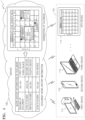
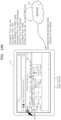
- FIG. 1 illustrates a system 1 that interworks work history information with a calendar of a user according to an exemplary embodiment.
- the system 1 includes a server 100 and devices 110.
- the server 100 and the devices 110 may transmit and receive data based on a wired and/or wireless communication method.
- the server 100 interworks the work history information with the calendar of the user by using time information included in the work history information of a document received from at least one of the devices 110.
- the time information refers to information indicating a time (e.g., at least one of a time duration, a starting time, an ending time, etc.) that at least one of the devices 110 works on the document.
- the calendar refers to an object showing schedule information of the user. For example, if the user works on the document by using a first device 111, the first device 111 generates work history information when work on the document is performed.
- the first device 111 transmits the generated work history information to the server 100, and the server 100 extracts information indicating a time taken to work on the document from the work history information received from the first device 111.
- the server 100 interworks the work history information received from the first device 111 with the calendar of the user by using the extracted information indicating the time.
- Examples in which the first device 111 transmits the work history information to the server 100 are as follows.
- the first device 111 may simultaneously generate the work history information and transmit the same to the server 100.
- the first device 111 stores the generated work history information in a memory 16580 and may transmit all of the work history information stored in the memory 16580.
- the first device 111 generates the work history information and stores the generated work history information in the memory 16580. If an interworking request is received from the server 100, the work history information stored in the memory 16580 may be transmitted to the server 100.
- the first device 111 may immediately transmit the work history information to the server 100. Meanwhile, when the user works on the document work by using the first device 111 without logging into the server 100, the first device 111 may first store the work history information in the memory 16580. When the user logs into the server 100 at a later time, the first device 111 may transmit, to the server 100, the work history information that is previously stored in the memory 16580. In this case, the first device 111 may automatically transmit the work history information that is previously stored in the memory 16580 to the server 100, but may transmit the work history information that is previously stored in the memory 16580 to the server 100 after a request for transmitting the work history information is received from the user.
- the user may create a certain folder in the first device 111 and may set the created folder to be connected to the server 100.
- work history information of a document included in the folder is transmitted to the server 100, but work history information of a document which is not included in the folder may not be stored in the server 100.
- the work history information of documents may be immediately transmitted to the server 100 when the user has logged into the server 100.
- Work history information which is generated when the user does not log into the server 100 may be transmitted to the server 100 at a point in time when the user logs into the server 100 at a later time.
- the server 100 interworks the work history information with the calendar of the user by reflecting or adding the work history information to the calendar (or in calendar form) of the user. Examples of reflecting the work history information to the calendar of the user are as follows.
- the server 100 may store the work history information in a database 16430 according to a work date.
- the server 100 may store the work history information according to a work date when the device works on a document.
- the server 100 may store first work history information in a field of the database 16430 which corresponds to "May 14, 2014, 09:04:42 a.m.”.
- the database 16430 may be included in the server 100 or in a device separate from the server 100.
- the server 100 accesses the database 16430 via a calendar program installed in the server 100 and may perform reading, editing, adding, etc. of the work history information.
- the server 100 stores the work history information in the database 16430 and may extract the work history information that is previously stored via the calendar program installed in the server 100 so that the extracted work history information may be displayed on a calendar Ul.
- the server 100 extracts the first work history information from the database 16430 and may display the extracted first work history information on a calendar Ul corresponding to May 2014.
- the server 100 generates an indicator indicating the first work history information and may display the generated indicator on the calendar Ul.
- the server 100 may immediately reflect the work history information received from at least one of the devices 110 to the calendar via the calendar program installed in the server 100. For example, if it is assumed that work history information regarding work performed on May 14, 2014 is received from the first device 111, the server 100 may reflect the work history information to a calendar corresponding to May 2014 via the calendar program. Then, the server 100 may store the calendar, to which the work history information is reflected, in the database 16430.
- the server 100 may reflect the work history information in the calendar of the user or may display the work history information on the calendar Ul by generating an indicator indicating the work history information or a document worked on.
- the indicator refers to an object displayed on the calendar.
- the indicator may include an icon, a symbol, a popup window, etc.
- the server 100 may transmit the generated indicator or information corresponding to the generated indicator (e.g., metadata) so that the device may output the indicator on the calendar.
- the server 100 interworking work history information with a calendar of a user may include the server 100 transmitting the work history information corresponding to an indicator to a device when the user of the device selects the indicator displayed on the calendar output on the device.
- the device may receive the transmitted work history information corresponding to the selected indicator, and may output the received work history information on a screen.
- the server 100 interworking work history information with a calendar of a user may include the server 100 transmitting a document corresponding to an indicator or screen information indicating the document to a device when the user selects the indicator displayed on the calendar output on the device.
- the device may output the document corresponding to the selected indicator on the screen.
- the device requests the server 100 to transmit information to be displayed on the calendar, and the server 100 transmits the information to be displayed on the calendar based on the request.
- the device outputs the calendar of the user on the screen based on the information received from the server 100. Examples of outputting the calendar of the user on the screen are as follows.
- a calendar program for clients (or an application) (hereinafter, referred to as a first calendar program) is installed in the devices 110
- a calendar program for a server (or an application) (hereinafter, referred to as a second calendar program) may be installed in the server 100.
- the first device 111 generates a calendar Ul by using the first calendar program and may store the generated calendar Ul in the memory 16580.
- the first device 111 may output the calendar Ul stored in the memory 16580 as well as the work history information (or an indicator) received from the server 100.
- the server may transmit the work history information (or the indicator) stored in the database 16430.
- the first device 111 may extract the calendar UI stored in the memory 16580.
- the first device 111 may output the calendar on the screen by displaying the work history information (or the indicator) transmitted by the server 100 on the extracted calendar Ul.
- the first device 111 receives a screen of the second calendar program from the server 100 and then may output (mirror) the received screen on the screen of the first device 111. Therefore, the first device 111 may output the calendar of the user on the screen.
- the server 100 when the server 100 generates the calendar and stores the generated calendar in the database 16430, and when the first device 111 requests the server 100 to transmit the information to be displayed on the calendar, the server 100 may transmit the calendar to the first device 111 in a webpage form.
- a calendar UI and an indicator to be displayed on the calendar Ul are included in the calendar generated by the server 100.
- the first device 111 uses a web browser to access a webpage generated by the server 100 and may display the calendar on the screen.
- the server may authenticate the user by using the account information of the user.
- the server 100 extracts the calendar stored in the database 16430 and generates a webpage by using the extracted calendar.
- the first device 111 uses the web browser to access the webpage generated by the server 100 and may output the calendar on the screen. Therefore, the first device 111 may output a calendar of the user on the screen.
- the server 100 transmits the information to the first device 111 when the first device 111 requests the server 100 to transmit the information to be displayed on the calendar.
- the server 100 transmits the information to the first device 111.
- the inventive concept is not limited thereto.
- the device outputs the calendar of the user on the screen.
- the server 100 may output the calendar of the user.
- the server 100 may output the calendar of the user via the display.
- the server 100 is connected to a device of an administrator, the calendar of the user may be output via a screen of the device of the administrator. In this case, the server 100 may output the calendar via a webpage or a screen of a second calendar program.
- the first device 111 may transmit all of the work history information, or only a portion of the work history information to the server 100. Examples in which the device transmits a portion of the work history information are as follows.
- the first device 111 may transmit only work history information of the first document to the server 100.
- the first device 111 may transmit only work history information generated by editing the first document to the server 100.
- the first device 111 may display an indicator asking whether to transmit the work history information to the server 100. In this case, only when a user input which requests the transmission of the work history information to the server 100 via the user input device 16510 is received, the first device 111 may transmit the work history information the server 100.
- the first device 111 may transmit work history information of a document worked on during a certain period to the server 100.
- the first device 11 may transmit work history information of a document worked on between 1 May, 2014, 00:00:00 a.m. and 5 May, 2014, 11:59:59 p.m.
- the first device 111 may transmit work history information of a document worked on between 09:00:00 a.m. and 05:59:59 p.m.
- the user may designate a device among the devices 110 for transmitting the work history information to the server 100, and the designated device may transmit the work history information to the server 100.
- the first device 111 may only transmit the work history information to the server 100.
- the server 100 may interwork a portion of the work history information received from the first device 111 with the calendar of the user.
- the amount of work history information transmitted to the server 100 and the amount of work history information interworking with the calendar of the user may be different from each other.
- the number of pieces of the work history information transmitted to the server 100 and the number of pieces of the work history information interworking with the calendar of the user are described below.
- the server 100 may interwork only the work history information of the first document with the calendar of the user.
- the server 100 may interwork only the work history information generated by editing the first document with the calendar of the user.
- each of the first device 111 through the Nth device 114 generates the work history information when the document is worked on.
- the first device 111 generates first work history information
- the Nth device 114 generates Nth work history information.
- the first device 111 through the Nth device 114 transmit the work history information to the server 100.
- the server 100 extracts time information indicating time taken to work on the document from the first through Nth work history information received from the first device 111 through the Nth device 114.
- the server 100 interworks the work history information received from the first device 111 through the Nth device 114 with the calendar of the user by using the extracted time information.
- each of the first device 111 through the Nth device 114 may transmit all of the work history information, or only a portion of the work history information or may interwork a portion of the work history information received by the server 100 with the calendar of the user as described above.
- the user refers to a subject who works on the document by using at least one of the devices 110.
- the devices 110 may be devices of a same user or devices of different users.
- the user may work on the document using at least one of the devices 110 by using a program installed in at least one of the devices 110, although it is understood that one or more other exemplary embodiments are not limited thereto.
- the user may work on the document by using a program installed in the server 100 via at least one of the devices 110.
- the user works on the document by using at least one of the devices 110, although it is understood that one or more other exemplary embodiments are not limited thereto.
- the user may work on a content by using at least one of the devices 110.
- the document may include a text document or a multimedia document.
- the document may include an object worked on by using a word processing program (e.g., MICROSOFT WORD), a spreadsheet processing program (e.g., MICROSOFT EXCEL), a presentation program (e.g., MICROSOFT POWERPOINT), etc., that are installed in the devices 110 or the server 100.
- a word processing program e.g., MICROSOFT WORD
- a spreadsheet processing program e.g., MICROSOFT EXCEL
- a presentation program e.g., MICROSOFT POWERPOINT
- Content may include photos, images, moving images, music, etc.
- content may include an object worked on by using a dictionary execution program, an image execution program, a moving image execution program, a music execution program, etc., that are installed in one or more of the devices 110 and/or the server 100.
- the document work may include at least one of creating, reading, viewing, opening, printing, deleting, editing, transmitting, copying, moving, changing properties (e.g., metadata), etc., of the document.
- the first device 111 performing the document work may include at least one of the first device 111 creating the document, the first device 111 reading the document, the first device 111 editing the document, etc.
- the first device 111 reading the document includes the first device 111 outputting the document on a screen.
- the first device 111 editing the document includes the first device 111 adding new content to content of a previously created document or deleting the content of the previously created document.
- the first device 111 viewing the document includes the first device 111 viewing the document or a portion thereof in a preview application or a viewer application (e.g., a third party viewer application).
- the device may output the work history information on the screen. For example, at least one of a type or a title of the document, an identification value of the user, an identification value of the device, etc., may be displayed on the indicator.
- the identification value of the user may include a title (i.e., name), a symbol, an abbreviation, an image, etc., of the user
- the identification value of the device may include a title (i.e., name), a model, a serial number, a symbol, an image, a label, etc., of the device.
- At least one of the work history information of the document and the document itself may be output.
- the indicator when the indicator is selected a first time or according to a first type of input selection (e.g., a single click or touch selection), the work history information may be output, and when the indicator is selected a second time or according to a second type of input selection (e.g., a double click or touch selection), the document worked on may be output.
- the indicator when the indicator is selected, the work history information may be output, and when another indicator included in the output work history information is selected, the document worked on may be output.
- the work history information refers to information generated when at least one of the devices 110 performs the document work.
- the work history information may include at least one of time taken to work on the document, a starting time of work on the document, an ending time of work on the document, a title of the document worked on, a type of the document worked on, a type of the document work, the identification value of the user, the identification value of the device, a title of a program used to work on the document, a size of the document, a directory information of the document, etc.
- the server 100 may transmit, to one or more of the devices 110, all or some of the work history of a document when the server 100 transmits the indicator or the information corresponding to the indicator.
- the server 100 may transmit the work history of the document to one or more of the devices 110 on at least one of a user basis (e.g., to only devices of one or more users authorized to access the document), on a group basis (e.g., to only devices corresponding to one or more groups authorized to access the document), on a per-request basis (e.g., to only devices that have requested the indicator and/or the work history), on a network basis (e.g., to only devices that are connected to a particular network), on a device type basis (e.g., to only devices of a particular type, such as mobile, persona computer, etc.), etc.
- the server 100 may transmit, to one or more of the devices 110, all or some of the work history of a document in response to a selection of
- a device that receives work history information may display all or some of the received work history information in response to a selection of a corresponding indicator.
- the device may display only some of the received work history information according to a filter condition. For example, if the filter condition is for work history information of one or more particular users, the device may display the work history information of only the one or more particular users among all of the work history information for the document.
- the server 100 may generate and/or the device may display a plurality of indicators for a same document, each of the indicators respectively corresponding to a different type of work history information (e.g., one indicator corresponding to a program type of the document, and another indicator corresponding to a user of the document).
- the device may generate and/or output different types of indicators according to the work history information and/or according to received information corresponding to the indicators (e.g., metadata).
- the device may display different calendars corresponding to different types of work history information by, for example, outputting the corresponding indicators for the different types of work history information.
- a device may output a calendar corresponding to one or more users (e.g., a user calendar mode) by outputting only the indicators for work history information of a particular user, or by displaying different indicators respectively for different users.
- the device may output a calendar corresponding to one or more groups (e.g., a group calendar mode) by outputting only the indicators for work history information of a particular group, or by displaying different indicators respectively for different groups.
- the device may output a calendar corresponding to one or more projects (e.g., a project calendar mode) by outputting only the indicators for work history information of a particular project, or by displaying different indicators respectively for different projects.
- the determination of which indicators and/or work history information to generate and/or output may be made at the server 100 or at the device. For example, in response to receiving, from a device, a selection of a least one of a user, a document type, a document, a device, etc., the server 100 may filter the work history information in a calendar form according to the selection and provide the filtered work history information to the second device. Furthermore, this determination of indicators (e.g., filter conditions) may be based on prior or default settings, on user settings, on an application's settings, on a particular calendar's settings, etc.
- the device transmits and receives data to and from the server 100.
- the device may include a desktop personal computer (PC), a notebook PC, a laptop PC, a smartphone, a tablet PC, a wearable device, a smartphone, a mobile device, a portable device, a portable multimedia player, a television, a display device, etc.
- the device may transmit both a document and corresponding work history information to the server 100, the work history information without the document to the server 100, or a document including the work history information (e.g., as metadata thereof).
- the server 100 may instruct the first device to transmit the document to the second device.
- the server 100 may control to receive the document from the first device and transmit the received document to the second device (or provide access to the document via a program executed on the server 100).
- the devices 110 corresponds to the server 100, and the devices 110 perform a document work
- the device that performs an operation of the server 100 interworks work history information with a calendar of a user
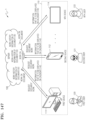
- the server 100 when the users of the devices 110 are the same, and the server 100 performs a document work based on requests of the devices 110, one or more exemplary embodiments in which the server 100 interworks work history information with a calendar of a user will be described with reference to FIGS. 101 through 146 .
- the server 100 when the users of the devices 110 are different, and the server 100 performs a document work based on requests of the devices 110, one or more exemplary embodiments in which the server 100 interworks work history information with a calendar of a user will be described with reference to FIGS. 147 through 149 .
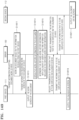
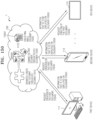
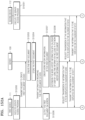
- server 100 when the server 100 performs authoring on a document based on requests of the devices 110, one or more exemplary embodiments in which the server 100 interworks work history information with a calendar of a user will be described with reference to FIGS. 150 through 161 .
- the devices 110 corresponds to the server 100, and a device that performs an operation of the server 100 performs a document work based on requests of the devices 110
- a device that performs an operation of the server 100 performs a document work based on requests of the devices 110
- one or more exemplary embodiments in which the device that performs the operation of the server 100 interworks work history information with a calendar of a user will be described with reference to FIGS. 162 and 163 .
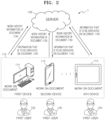
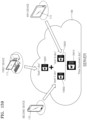
- FIG. 2 is a diagram for explaining an example in which when users of the devices 110 are the same, and the devices 110 perform a document work, the server 100 interworks work history information 130 with a calendar of a user according to an exemplary embodiment.
- At least one of the devices 110 performs the document work and transmits the work history information 130 of a document to the server 100.
- the first device 111 performs the document work and transmits the work history information 130 of the document to the server 100.
- a second device 112 through the Nth device 114 may perform the document work and transmit the work history information 130 of the document to the server 100.
- the server 100 interworks the work history information 130 transmitted from the devices 110 with the calendar (or a calendar form) of the user.
- the server 100 transmits information 140 that is to be displayed on the calendar to the devices 110.
- the information 140 that is to be displayed on the calendar is information that is to be displayed on the output calendar (or output calendar form).
- the information 140 that is to be displayed on the calendar may include work history information that is to be output on the screen of the device when an indicator that is to be displayed on the calendar or an indicator that is displayed on the calendar is selected.
- the output calendar or output calendar form may be provided in a calendar program, a calendar application, an application outputting a calendar or a calendar form, a web page, a widget, etc.
- the server 100 may automatically transmit (for example, push) the information 140 that is to be displayed on the calendar to the first device 111.
- the server 100 may automatically transmit the information 140 that is to be displayed on the calendar of the first user 120 although there is no request from the first device 111 at a later time.
- the server 100 may automatically transmit the information 140 according to a prior setting or a default setting to automatically transmit the information 140 at predetermined time intervals or predetermined time points.
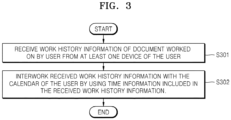
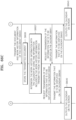
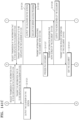
- FIG. 3 is a flowchart of an example in which the server 100 interworks work history information 130 with a calendar of a user according to an exemplary embodiment.
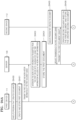
- the server 100 receives the work history information of a document worked on by the user from at least one device of the user.
- at least one device of a same user performs a document work and transmits the work history information to the server 100.
- the at least one device may transmit only a portion of the work history information to the server 100 as described above with reference to FIG. 1 .
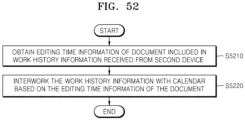
- the server 100 interworks the received work history information with the calendar of the user by using time information included in the received work history information.
- the time information may be information indicating time taken for the device to work on a document, although it is understood that one or more other exemplary embodiments are not limited thereto as described above.
- the server 100 may generate an indicator that is to be displayed on May 12, 2014 in a calendar of the first user 120, and, when the indicator displayed on May 12, 2014 is selected, may determine work history information that is to be output on a screen of the first device 111 of the first user 120.
- the server 100 may interwork only a portion of the received work history information with the calendar of the user as described above with reference to FIG. 1 .
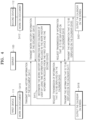
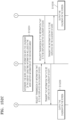
- first device 111 and the second device 112 work on the document in FIG. 4 for convenience of description, but it is understood that one or more other exemplary embodiments are not limited thereto. In other words, there is no limit to the number of devices that work on the document in one or more other exemplary embodiments. If one device works on the document, operations of the second device 112 that will be described below may be performed by the first device 111. If it is assumed that the number of devices that work on the document is N (where N is greater than or equal to three), operations of the second device 112 that will be described below may be performed by at least one of a third device 113 through the Nth device 114.
- a document that the first device 111 works on is "abc.doc"
- a program used to create, read, edit, etc., "abc.doc” is a first program
- the first device 111 may execute the first program and create, read, edit, etc., "abc.doc”.
- the first device 111 may transmit the work history information of the document to the server 100 at a point in time when the user of the first device 111 logs into the server 100.
- methods used by the user of the first device 111 to log into the server 100 may vary, the methods including a method of inputting an ID and passwords.
- the first device 111 may transmit the work history information of the document to the server 100.
- a separate window used to ask whether to execute a transmission program may be output on a screen of the first device 111.
- the first device 111 may transmit the work history information of the document to the server 100.
- the user of the first device 111 may generate or edits a document and selects a button for storing the document, a separate window used to ask whether to transmit the work history information may be output on the screen of the first device 111.
- the first device 111 may transmit the work history information of the document to the server 100.
- types of documents whose work history information is to be transmitted may be registered in the server 100.
- the user of the first device 111 may register a type of a document whose work history information is to be transmitted in the server 100 in advance.
- the user of the first device 111 may register filename extensions (for example, ".doc”, “.xls”, “.txt”, “.ppt”, etc.) of documents in the server 100 or execution programs (for example, MS Word, MS Excel, MS PowerPoint, etc.) for documents.
- execution programs for example, MS Word, MS Excel, MS PowerPoint, etc.
- a type of a document whose work history information is to be transmitted may be initially set in the server 100.
- the type of the document may be set in a manner in which the filename extension or execution program of the document is designated.
- the user of the first device 111 may edit types of documents set in the server.
- the second device 112 works on the document.
- the second device 112 may execute a program used to work on the document and work on the document by using the program. If a document that the second device 112 works on is "abcd.xls", and a program used to create, read, edit, etc., "abcd.xls" is a second program, the second device 112 may execute the second program and create, read, edit, etc., "abcd.xis".
- the server 100 interworks the work history information with the calendar of the user by using time information included in the work history information received from the first device 111 and the second device 112. For example, if it is assumed that the first device 111 stores "abc.doc" at 08:01:42 a.m. on May 18, 2014, and the second device 112 stores "abcd.xls" at 14:29:00 p.m. on May 20, 2014, the server 100 may generate a first indicator that is to be displayed on a field of the calendar corresponding to May 18, 2014 and a second indicator that is to be displayed on a field of the calendar corresponding to May 20, 2014.
- the first device 111 requests the server 100 to transmit information that is to be displayed on the calendar (i.e., the output calendar). For example, the first device 111 may request the server 100 to transmit the work history information that is to be output on a screen of the first device 111 when an indicator that is to be displayed on the calendar or an indicator displayed on the calendar is selected. For example, the first device 111 may request the server 100 to transmit the work history information that is to be output on the screen of the first device 111 when the first indicator, the second indicator, or the first and second indicators are selected.
- the server 100 transmits the information that is to be displayed on the calendar to the first device 111.
- the server 100 may transmit only the information, among the work history information, that is to be displayed on the calendar of the first device 111, or may transmit more of the work history information that that which is to be displayed.
- the first device 111 may set or determine which information is to be displayed on the calendar among received information.
- the first device 111 may determine which information is to be displayed based on a prior setting or a default setting, or based on one or more user inputs (e.g., filter requests).
- the first device 111 outputs the calendar on the screen.
- the first device 111 may output the calendar that displays the first indicator and the second indicator that are transmitted from the server 100 on the screen.
- the second device 112 requests the server 100 to transmit information that is to be displayed on the calendar.
- the second device 112 may request the server 100 to transmit the work history information that is to be output on the screen of the device when the indicator that is to be displayed on the calendar or the indicator displayed on the calendar is selected.
- the second device 112 may request the server 100 to transmit the work history information that is to be output on the screen of the device when the first indicator, the second indicator, or the first and second indicators are selected.
- the server 100 transmits the information that is to be displayed on the calendar to the second device 112.
- the server 100 may transmit only the information, among the work history information, that is to be displayed on the calendar of the second device 112, or may transmit more of the work history information that that which is to be displayed.
- the second device 112 may set or determine which information is to be displayed on the calendar among received information.
- the second device 112 may determine which information is to be displayed based on a prior setting or a default setting, or based on one or more user inputs (e.g., filter requests).
- the second device 112 outputs the calendar on the screen.
- the second device 112 may output the calendar that displays the first indicator and the second indicator that are transmitted from the server 100 on the screen.
- the server 100 interworks work history information with a calendar of a user will now be described with reference to FIGS. 5 through 26B .
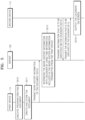
- FIG. 5 is a flowchart of an example in which when the first device 111 creates a document, the server 100 interworks work history information with a calendar of a user according to an exemplary embodiment.
- the first device 111 creates the document and the second device 112 outputs the calendar on a screen in FIG. 5 for convenience of description, although it is understood that one or more other exemplary embodiments are not limited thereto.
- the first device 111 may create the document, and the first device 111 and the second device 112 may output the calendar on the screen.
- N is greater than or equal to three
- operations of the first device 111 or operations of the second device 112 that will be described below may be performed by at least one of the third device 113 through the Nth device 114.
- the first device 111 creates the document and stores the created document.
- the first device 111 transmits the work history information of the document to the server 100.
- the user of the first device 111 logs into the server 100.
- examples in which the first device 111 transmits the work history information to the server are the same as the descriptions provided with reference to operation S411 of FIG. 4 .
- the first device 111 may transmit the work history information of the document to the server 100 at the time of storing the document, although it is understood that one or more other exemplary embodiments are not limited thereto as described above.
- the work history information of the document may be information generated when the first device 111 creates the document and stores the created document.
- the work history information may include a title of the document worked on, a document type, time taken to work on the document, a title of a device that performs a document work, a device user, a program used to work on the document, a document size, a work type, etc.
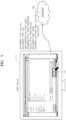
- FIGS. 6A through 7 are diagrams for explaining an example in which when a document is a text document, the first device 111 transmits work history information of the document to the server 100 according to an exemplary embodiment.
- the first device 111 executes a first program to create the text document.
- the first device 111 may select an indicator 610 (e.g., an icon, a symbol, etc.) indicating the first program based on a user input received through the user input device 16510.
- the first device 111 may execute a program corresponding to the selected indicator 610.
- the first device 111 creates the text document.
- the first device 111 may process content 620 included in the text document based on a user input received through the user input device 16510.
- the first device 111 stores the text document.
- the first device 111 may select an indicator 710 indicating "storing" of the text document based on the user input received through the user input device 16510.
- the first device 111 may store the text document.
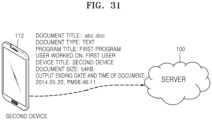
- the first device 111 After storing the text document, the first device 111 transmits the work history information of the text document to the server 100. For example, if it is assumed that the first device 111 stores a document entitled "abc.doc" having a size of 54 KB (kilobytes) at 12:28:04 p.m. on May 12, 2014 by using the first program, the first device 111 may transmit at least one of "abc.doc", text, first program, first device, 12:28:04 p.m. on May 12, 2014, and 54 KB to the server 100.
- the first device 111 may additionally encrypt the work history information and may transmit the encrypted work history information to the server 100.
- the first device 111 may additionally encrypt the work history information and may transmit the encrypted work history information to the server 100.
- the user may create a certain folder in the first device 111, and a document included in the created folder may be set to have a high level of security.
- the first device 111 may additionally encrypt the work history information and may transmit the encrypted work history information to the server 100.
- the user may access the work history information transmitted to the server 100 after logging into the server 100.
- additional information may be required to access the encrypted work history information.
- it may be necessary to input separate passwords to access the encrypted work history information.
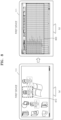
- FIGS. 8A through 9 is a diagram for explaining another example in which when a document is a text document, the first device 111 transmits work history information of the document to the server 100 according to an exemplary embodiment.
- the first device 111 executes a second program to create the text document.
- the second program executed by the first device 111 may be different from the first program described above with reference to FIG. 6A.
- the first device 111 may use various programs to create the text document, and may create various types of text documents by using different programs.
- the first device 111 may select an indicator 810 indicating the second program based on a user input received through the user input device 16510.
- the first device 111 may execute the second program.
- the first device 111 creates the text document based on the executed second program. For example, the first device 111 may process content 820 included in the text document based on a user input received through the user input device 16510.
- the first device 111 stores the text document.
- the first device 111 may select an indicator 910 indicating "storing" of the text document based on a user input received through the user input device 16510.
- the first device 111 may store the text document.
- the first device 111 After storing the text document, the first device 111 transmits the work history information of the text document to the server 100. For example, if it is assumed that the first device 111 creates a document entitled "abcd.xls" having a size of 47 KB (kilobytes) at 02:25:56 p.m. on April 22, 2014 by using the second program, the first device 111 may transmit at least one of "abcd.xls", text, second program, first device, 02:25:56 p.m. on April 22, 2014, and 47 KB to the server 100.
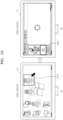
- FIGS. 10A through 11 are diagrams for explaining another example in which when a document is a text document, the first device 111 transmits work history information of the document to the server 100 according to an exemplary embodiment.
- the first device 111 executes a third program to create the text document.
- the first device 111 may create various types of text documents, and may use various programs to create the text documents according to types of the text documents.
- the first device 111 may select an indicator 1010 indicating the second program based on a user input received through the user input device 16510.
- the first device 111 may execute the third program.
- an example in which the first device 111 selects the indicator 1010 and executes a program corresponding to the selected indicator 1010 is the same as or similar to the example described above with reference to FIG. 6A.
- the first device 111 creates the text document based on the third program.
- the first device 111 may process content 1020 included in the text document based on a user input received through the user input device 16510.
- the first device 111 stores the text document.
- the first device 111 may select an indicator 1110 indicating "storing" of the text document based on a user input received through the user input device 16510.
- the first device 111 may store the text document.
- the first device 111 After storing the text document, the first device 111 transmits the work history information of the text document to the server 100. For example, if it is assumed that the first device 111 creates a document entitled "kkk.ppt" having a size of 2387 KB (kilobytes) at 02:21:04 p.m. on January 1, 2013 by using the third program, the first device 111 may transmit at least one of "kkk.ppt", image, third program, first device, 02:21:04 p.m. on January 1, 2013, and 2387 KB to the server 100.
- the server 100 interworks the work history information transmitted from the first device 111 with the calendar by using time information included in the work history information.
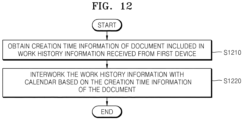
- FIG. 12 is a flowchart of an example in which the server 100 interworks work history information of a document with a calendar according to an exemplary embodiment.
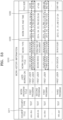
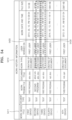
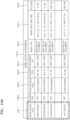
- FIGS. 13 and 14 are tables illustrating examples of work history information 1310 and 1410 obtained by the server 100 according to one or more exemplary embodiments.
- the work history information 1310 of the document includes a document title 1311, a document type 1312, a work program title 1313, a work device title 1314, a device user 1315, a work type 1316, a work date and time 1317, and a file size 1318, although it is understood that one or more other exemplary embodiments are not limited thereto.
- the work history information 1310 of the document may correspond to information without limitation as long as the information may be generated by working on the document.
- the server 100 may arrange (or align) the work history information 1310 received from the first device 111 according to the title 1311 of the document, and may store the arranged work history information 1310 in a database 16430.
- the work history information 1410 of FIG. 14 includes the same type of information.
- the work history information 1410 of FIG. 14 includes a document title 1414, a document type 1412, a work program title 1413, a work device title 1411, a device user 1416, a work type 1415, a work date and time 1417, and a file size 1418.
- the server 100 may arrange the work history information 1410 received from the first device 111 according to the title 1311 of the work device, and may store the arranged work history information 1410 in the database 16430.
- the server 100 interworks the work history information with the calendar of the user based on the creation time information of the document.
- the server 100 interworks work history information with a calendar of a user will now be described with reference to FIG. 15 .
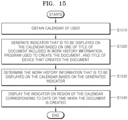
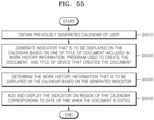
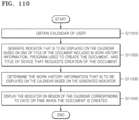
- FIG. 15 is a flowchart of an example in which the server 100 interworks work history information with a calendar of a user according to an exemplary embodiment.
- the server 100 obtains the calendar of the user.
- the calendar of the user may refer to a form, framework, format, etc., that is to interwork with the work history information of a document.
- the server 100 may read the calendar of the user that matches with an account of the user and is stored in the database 16430, and may receive the calendar of the user from at least one of the devices 110.
- the calendar of the user may include a calendar on an hour basis, a day basis, a calendar on a week basis, a calendar on a month basis, a calendar on a year basis, etc.
- the server 100 may generate an indicator that is to be displayed on the calendar based on at least one of a title (i.e., at least one of a name, a symbol, a model number, an abbreviation, etc.) of the document, a program used to create the document, a title of a device that creates the document, etc.
- the server 100 may determine at least one of the title of the document, the program used to create the document, the title of the device that creates the document, etc., as an item for the indicator and generates the indicator based on the determined item.
- the server 100 determines the work history information that is to be displayed on the calendar based on the generated indicator.
- the server 100 displays the indicator on a region of the calendar corresponding to a date or a time when the document is created.
- the region of the calendar corresponding to the date or the time refers to a data field or a time field in the calendar.
- the second device 112 requests the server 100 to transmit the information that is to be displayed on the calendar.
- the second device 112 may request the server 100 to transmit the information that is to be displayed on the calendar after executing a calendar output program installed in the second device 112 and/or performing user authentication.
- the server 100 transmits the information that is to be displayed on the calendar to the second device 112.
- the server 100 transmits the information that is to be displayed on the calendar to the second device 112 in operation S515, although it is understood that one or more other exemplary embodiments are not limited thereto.
- the server 100 may transmit (for example, push) the information that is to be displayed on the calendar to the second device 112, as described above.
- the server 100 may transmit only the information, among the work history information, that is to be displayed on the calendar of the second device 112, or may transmit more of the work history information that that which is to be displayed.
- the second device 112 may set or determine which information is to be displayed on the calendar among received information.
- the second device 112 may determine which information is to be displayed based on a prior setting or a default setting, or based on one or more user inputs (e.g., filter requests).
- the second device 112 outputs the calendar on the screen.
- FIGS. 16 through 25 illustrate examples of a calendar on a day basis, a calendar on a month basis, and a calendar on a year basis for convenience of description, although it is understood that one or more other exemplary embodiments are not limited thereto.
- the calendar of a user may include various examples of a calendar on a week basis, a calendar on a three day basis, a calendar on a time basis, etc.
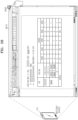
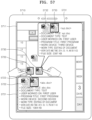
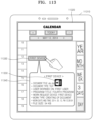
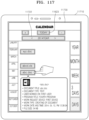
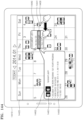
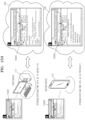
- FIG. 16 illustrates an example of a daily calendar 1620 displayed on a screen of a device 1610 according to an exemplary embodiment.
- the daily calendar 1620 is output on the screen of the device 1610.
- the calendar 1620 may include a region 1630 indicating dates and an indicator 1640 that may designate a date desired by a user.
- the calendar 1620 may also include an indicator 1650 that may display (i.e., in response to a selection thereof) a calendar corresponding to a date of "today".
- the calendar 1620 may include an indicator without limitation as long as the user may use the indicator to control a display type of the calendar.
- An indicator 1660 indicating a title of a document may be displayed on the calendar 1620. For example, if it is assumed that the first device 111 creates a document entitled "abc.doc" on May 12, 2014, the first device 111 may display the indicator 1660 indicating "abc.doc” on a region of the calendar 1620 corresponding to May 12, 2014.
- the device 1610 may select the indicator 1660 indicating "abc.doc” according to a user input received through the user input device 16510.
- the device 1610 may output work history information 1670 of the document on the screen. For example, if it is assumed that the first device 111 stores the document entitled "abc.doc” having a size of 54 KB (kilobytes) at 12:28:04 p.m. on May 12, 2014 by using a first program, at least one of "abc.doc", text, first program, first device, 12:28:04 p.m. on May 12, 2014, and 54 KB may be output as the work history information 1670.
- the device 1610 may output the work history information 1670 of the document on the screen as a popup window, although it is understood that one or more other exemplary embodiments are not limited thereto.
- the device 1610 may output the document on an entirety of the screen, on a designated region of the screen, etc., in one or more other exemplary embodiments.
- An indicator 1680 that may output the document on the screen of the device 1610 may be displayed on the work history information 1670 of the document.
- the device 1610 may output the document created by the first device 111 on the screen as the popup window separately from the calendar 1620, although it is understood that one or more other exemplary embodiments are not limited thereto.
- the device 1610 may output the document on an entirety of the screen, on a designated region of the screen, etc., in one or more other exemplary embodiments.
- the daily calendar 1720 may be output on the screen of the device 1710.
- the calendar 1720 of FIG. 17 has the same form as that of the calendar 1620 of FIG. 16 .
- the descriptions of the indicators provided above with reference to FIG. 16 may apply to indicators that may be displayed on the calendar 1720 of FIG. 17 .
- An indicator 1730 indicating a program used to work on a document may be displayed on the calendar 1720. For example, if it is assumed that the first device 111 creates a document by using a first program on May 12, 2014, the indicator 1730 indicating the "first program" may be displayed on a region of the calendar 1720 corresponding to May 12, 2014.
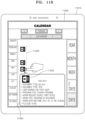
- FIG. 18 illustrates another example of a daily calendar 1820 displayed on a screen of a device 1810 according to an exemplary embodiment.
- the daily calendar 1820 may be output on the screen of the device 1810.
- the calendar 1820 of FIG. 18 has the same form as that of the calendar 1620 of FIG. 16 .
- the descriptions of the indicators provided above with reference to FIG. 16 may apply to indicators that may be displayed on the calendar 1820 of FIG. 18 .
- the device 1810 may select an indicator 1840 indicating the "first device” according to a user input received through the user input device 16510.
- the device 1810 may output work history information 1840 of the document on the screen. For example, if it is assumed that the first device 111 stores a document entitled "abc.doc” having a size of 54 KB (kilobytes) at 12:28:04 p.m. on May 12, 2014 by using the first program, at least one of "abc.doc", text, first program, first device, 12:28:04 p.m. on May 12, 2014, and 54 KB may be output as the work history information 1840.
- the device 1810 may output the work history information 1840 of the document on the screen as a popup window, although it is understood that one or more other exemplary embodiments are not limited thereto as described above.
- the device 1810 may output the work history information 1840 on an entirety of the screen, on a designated region of the screen, etc., in one or more other exemplary embodiments.
- An indicator 1850 that may output the document on the screen of the device 1810 may be displayed on the work history information 1840 of the document.
- the device 1810 may output the document created by the first device 111 on the screen as the popup window separately from the calendar 1820, although it is understood that one or more other exemplary embodiments are not limited thereto as described above.
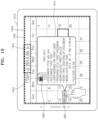
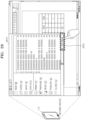
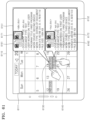
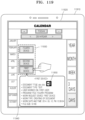
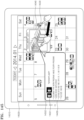
- FIG. 19 illustrates an example of a monthly calendar 1920 displayed on a screen of a device 1910 according to an exemplary embodiment.
- the monthly calendar 1920 is output on the screen of the device 1910.
- the calendar 1920 may include a region 1930 indicating each of dates included in a month and an indicator 1940 that may designate a month desired by a user.
- the calendar 1920 may also include an indicator 1950 that may display a monthly calendar including a date of "today".
- the calendar 1920 may include an indicator without limitation as long as the user may use the indicator to control a display type of the calendar.
- An indicator 1960 indicating a title of a document may be displayed on the calendar 1920. For example, if it is assumed that the first device 111 creates a document entitled “abc.doc” on May 12, 2014, the first device 111 may display the indicator 1960 indicating "abc.doc” on a region of the calendar 1920 corresponding to May 12, 2014.
- the device 1910 may select the indicator 1960 indicating "abc.doc” according to a user input received through the user input device 16510.
- the device 1910 may output work history information 1970 of the document on the screen.
- An indicator 1980 that may output the document on the screen of the device 1910 may be displayed on the work history information 1970 of the document.
- the device 1910 may output the document created by the first device 111 on the screen as the popup window separately from the calendar 1920, although it is understood that one or more other exemplary embodiments are not limited thereto as described above.
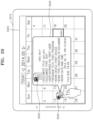
- FIG. 20 illustrates another example of a monthly calendar 2020 displayed on a screen of a device 2010 according to an exemplary embodiment.
- the monthly calendar 2020 may be output on the screen of the device 2010.
- the calendar 2020 of FIG. 20 has the same form as that of the calendar 1920 of FIG. 19 .
- the descriptions of the indicators provided above with reference to FIG. 19 may apply to indicators that may be displayed on the calendar 2020 of FIG. 20 .
- An indicator 2030 indicating a program used to work on the document may be displayed on the calendar 2020. For example, if it is assumed that the first device 111 creates a document by using a first program on May 12, 2014, the indicator 2030 indicating the "first program" may be displayed on a region of the calendar 2020 corresponding to May 12, 2014.
- the device 2010 may select the indicator 2030 indicating the "first program” according to a user input received through the user input device 16510.
- the device 2010 may output work history information 2040 of the document on the screen. For example, if it is assumed that the first device 111 stores a document entitled "abc.doc" having a size of 54 KB (kilobytes) at 12:28:04 p.m. on May 12, 2014 by using the first program, at least one of "abc.doc", text, first program, first device, 12:28:04 p.m. on May 12, 2014, and 54 KB may be output as the work history information 2040. Meanwhile, the device 2010 may output the work history information 2040 of the document on the screen as a popup window, although it is understood that one or more other exemplary embodiments are not limited thereto as described above.
- An indicator 2050 that may output the document on the screen of the device 2010 may be displayed on the work history information 2040 of the document.
- the device 2010 may output the document created by the first device 111 on the screen as the popup window separately from the calendar 2020, although it is understood that one or more other exemplary embodiments are not limited thereto as described above.
- FIG. 21 illustrates another example of a monthly calendar 2120 displayed on a screen of a device 2110 according to an exemplary embodiment.
- the monthly calendar 2120 may be output on the screen of the device 2110.
- the calendar 2120 of FIG. 21 has the same frame as that of the calendar 1920 of FIG. 19 .
- the descriptions of the indicators provided above with reference to FIG. 16 may apply to indicators that may be displayed on the calendar 2120 of FIG. 21 .
- An indicator 2130 indicating a title of a device may be displayed on the calendar 2120. For example, if it is assumed that the first device 111 creates a document on May 12, 2014, the indicator 2130 indicating the "first device” may be displayed on a region of the calendar 2120 corresponding to May 12, 2014.
- the device 2110 may select the indicator 2130 indicating the "first device” according to a user input received through the user input device 16510.
- the device 2110 may output work history information 2140 of the document on the screen. For example, if it is assumed that the first device 111 stores a document entitled "abc.doc" having a size of 54 KB (kilobytes) at 12:28:04 p.m. on May 12, 2014 by using the first program, at least one of "abc.doc," text, first program, first device, 12:28:04 p.m. on May 12, 2014, and 54 KB may be output as the work history information 2140. Meanwhile, the device 2110 may output the work history information 2140 of the document on the screen as a popup window, although it is understood that one or more other exemplary embodiments are not limited thereto as described above.
- An indicator 2150 that may output the document on the screen of the device 2110 may be displayed on the work history information 2140 of the document.
- the device 2110 may output the document created by the first device 111 on the screen as the popup window separately from the calendar 2120, although it is understood that one or more other exemplary embodiments are not limited thereto as described above.
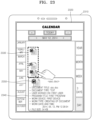
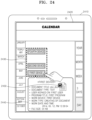
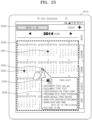
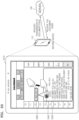
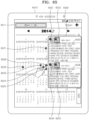
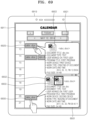
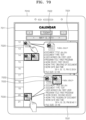
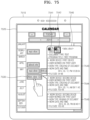
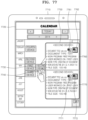
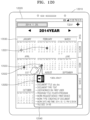
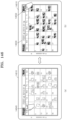
- FIG. 22 through 25 illustrate examples of annual calendars 2220, 2320, 2420, and 2520 displayed on screens of devices 2210, 2310, 2410, and 2510, respectively, according to an exemplary embodiment.
- the annual calendar 2220 is output on the screen of the device 2210.
- the calendar 2220 may include a region 2230 displaying months included in a year and an indicator 2240 that may designate a year desired by a user.
- the calendar 2220 may also include an indicator 2250 that may display a calendar of a year including a date of "today".
- the calendar 2220 may include an indicator without limitation as long as the user may use the indicator to control a display type of the calendar.
- Indicators 2260, 2261, and 2262 indicating titles of documents may be displayed on the calendar 2220. For example, if it is assumed that the first device 111 creates a document entitled "xyz.doc" on February 12, 2014, the first device 111 may display the indicator 2262 indicating "xyz.doc” on a region of the calendar 2220 corresponding to February of 2014.
- the first device 111 may display the indicator 2261 indicating "abcd.xls” on a region of the calendar 2220 corresponding to April of 2014. If it is assumed that the first device 111 creates a document entitled “abc.doc” on May 12, 2014, the first device 111 may display the indicator 2260 indicating "abc.doc” on a region of the calendar 2220 corresponding to May of 2014. While “xyz.doc”, “abcd.xls”, and “abc.doc” are created by the first device 111 in the present example, it is understood that the documents may be created by different devices.
- the device 2210 may select the indicators 2260, 2261, and 2262 indicating the titles of the documents according to a user input received through the user input device 16510. When the indicators 2260, 2261, and 2262 indicating the titles of the documents are selected, the device 2210 may output work history information 2270 of the documents on the screen.
- the first device 111 stores the document entitled "abc.doc” having a size of 54 KB (kilobytes) at 12:28:04 p.m. on May 12, 2014 by using a first program.
- the indicator 2260 indicating "abc.doc” is selected, at least one of "abc.doc", text, first program, first device, 12:28:04 p.m. on May 12, 2014, and 54 KB may be output as the work history information 2270.
- the device 2210 may output the work history information 2270 of the documents on the screen as a popup window, although it is understood that one or more other exemplary embodiments are not limited thereto as described above.
- An indicator 2280 that may output the documents on the screen of the device 2210 may be displayed on the work history information 2270 of the documents.
- the device 2210 may output the document created by the first device 111 on the screen as the popup window separately from the calendar 2220, although it is understood that one or more other exemplary embodiments are not limited thereto as described above.
- the annular calendar 2320 is output on the screen of the device 2310.
- An indicator 2330 indicating a program used to work on the document is displayed on the calendar 2320.
- the device 2310 may output work history information 2340 of a document on the screen.
- an indicator 2350 that may output the document is selected from the screen that displays the work history information 2340 of the document, the device 2310 may output the document created by the first device 111 on the screen.
- the annular calendar 2420 is output on the screen of the device 2410.
- An indicator 2430 indicating a device is displayed on the calendar 2420.
- the device 2410 may output execution history information 2440 of a document on the screen.
- an indicator 2450 that may output the document is selected from the screen that displays the execution history information 2440 of the document, the device 2410 may output the document created by the first device 111 on the screen.
- the annular calendar 2520 is output on the screen of the device 2510.
- the annular calendars 2220, 2320, and 2420 of FIGS. 22 through 24 include regions displaying months included in a year, whereas the annular calendar 2520 of FIG. 25 includes a region 2530 displaying days included in a year.
- the device 2510 may modify a type of the annular calendar 2520 in various ways to output the annular calendar 2520 on the screen.
- Indicators 2531, 2532, and 2533 may be displayed on respective dates of the calendar 2520 on which the documents are worked. For example, if it is assumed that the first device 111 creates a document entitled "xyz.doc" on February 12, 2014, the indicator 2531 indicating "xyz.doc” may be displayed on a region of the calendar 2520 corresponding to February 12, 2014. If it is assumed that the first device 111 creates a document entitled "abcd.xls" on April 22, 2014, the first device 111 may display the indicator 2531 indicating "abcd.xls" on a region of the calendar 2520 corresponding to April 22, 2014.
- the first device 111 may display the indicator 2533 indicating "abc.doc” on a region of the calendar 2520 corresponding to May 12, 2014. While “xyz.doc”, “abcd.xls”, and “abc.doc” are created by the first device 111 in the present example, it is understood that the documents may be created by different devices.
- the device 2510 may output work history information 2540 of a document on the screen.
- the device 2510 may output the document created by the first device 111 on the screen.
- the server 100 interworks work history information with a calendar of a user will be described with reference to FIGS. 26A through 47 .
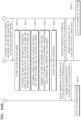
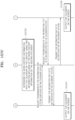
- FIGS. 26A and 26B are flowcharts of an example in which when the first device 111 creates a document, and the second device 112 reads the document, the server 100 interworks work history information with a calendar of a user according to an exemplary embodiment.
- first device 111 creates the document
- second device 112 reads the document in the present exemplary embodiment of FIGS. 26A and 26B
- the first device 111 may create the document and read the document.
- N there is no limit to the number of devices. If the number of devices that execute the document is N (where N is greater than or equal to three), operations of the first device 111 or operations of the second device 112 that will be described below may be performed by at least one of the third device 113 through the Nth device 114 in one or more other exemplary embodiments.
- Operations S2510 through S2616 of FIG. 26A correspond to operations S510 through S516 of FIG. 5 , respectively.
- the descriptions provided above with reference to FIGS. 5 through 25 may apply to descriptions that will be described with reference to operations S2510 through S2616 of FIG. 26A .
- the first device 111 executes a program that creates the document.
- the first device 111 creates the document and stores the created document.
- the first device 111 transmits the work history information of the document to the server 100.
- the first device 111 may transmit the work history information of the document at the time of storing the document, although it is understood that one or more other exemplary embodiments are not limited thereto as described above.
- the first device 111 may transmit the work history information of the document in response to a predetermined event (e.g., saving, opening, etc., the document), and/or according to a prior setting or a default setting (e.g., transmit the work history information at predetermined time intervals, at predetermined time points, and/or in accordance with a device setting such as only when connected to a local area network).
- a predetermined event e.g., saving, opening, etc., the document
- a prior setting or a default setting e.g., transmit the work history information at predetermined time intervals, at predetermined time points, and/or in accordance with a device setting such as only when connected to a local area network.
- a device setting
- the server 100 interworks the work history information with the calendar by using time information included in the work history information transmitted from the first device 111.
- the second device 112 requests the server 100 to transmit information that is to be displayed on the calendar.
- the second device 112 may request the server 100 to transmit the information that is to be displayed on the calendar after executing a calendar output program installed in the second device 112 and authenticating the user by using an input user account.
- the server 100 transmits the information that is to be displayed on the calendar to the second device 112.
- the server 100 transmits the information that is to be displayed on the calendar to the second device 112 in operation S2615, although it is understood that one or more other exemplary embodiments are not limited thereto.
- the server 100 may transmit (for example, push) the information that is to be displayed on the calendar to the second device 112, as described above.
- the server 100 may transmit only the information, among the work history information, that is to be displayed on the calendar of the second device 112, or may transmit more of the work history information that that which is to be displayed.
- the second device 112 may set or determine which information is to be displayed on the calendar among received information.
- the second device 112 may determine which information is to be displayed based on a prior setting or a default setting, or based on one or more user inputs (e.g., filter requests).
- the second device 112 outputs the calendar on a screen.
- the second device 112 requests the first device 111 to transmit the document. For example, when a predetermined indicator displayed on the calendar is selected according to a user input received by the second device 112, the second device 112 may request the first device 111 to transmit the document.
- the predetermined indicator may be the indicator 1680 that may output the document displayed on the calendar 1620 of FIG. 16 .
- the second device 112 may request the first device 111 to transmit the document and receive the document from the first device 111.
- the second device 112 may request the server 100 to transmit the document and receive the document from the server 100.
- the second device 112 requests the first device 111 to transmit a document and receives the document from the first device 111 will now be described with reference to FIG. 27 .
- FIG. 27 is a diagram for explaining an example in which the second device 112 requests the first device 111 to transmit a document and receives the document from the first device 111 according to an exemplary embodiment.
- a calendar 2710 output on a screen of the second device 112 is illustrated.
- the calendar 2710 is a calendar output on the screen of the second device 112 as a result of performing operation S2616 of FIG. 26A .
- the second device 112 receives a user input that selects an indicator 2620 displayed on the calendar 2710 through the user input device 16510.
- the second device 112 outputs work history information 2730 of the document on the screen according to the received user input.
- an indicator 2740 that may output the document on the screen of the second device 112 may be displayed on the screen displaying the work history information 2730 of the document.
- a preview screen of the document or a processing screen of the document may be output on the second device 112.
- a first type of input e.g., a short touch as an input
- the preview screen of the document may be output
- the processing screen of the document may be output.
- a cursor displayed on the screen of the second device 112 moves on the indicator 2740
- the preview screen of the document may be output, and, if the user clicks on the indicator 2740, the processing screen of the document may be output.
- the second device 112 receives a user input (for example, the long touch or click) that selects the indicator 2740 through the user input device 16510.
- the second device 112 requests the first device 111 to transmit the document according to the received user input.
- the first device 111 transmits the document to the second device 112 according to a request of the second device 112.
- the second device 112 outputs the document transmitted from the first device 111 on the screen.
- the second device 112 ends output of the document.
- examples in which the second device 112 ends output of the document will now be described with reference to FIGS. 28 through 30 .
- FIGS. 28 through 30 are diagrams for explaining examples in which the second device 112 ends outputting a document according to an exemplary embodiment.
- the document received from the first device 111 is output 2810 on a screen of the second device 112.
- the second device 112 receives a user input that ends output 2810 of the document through the user input device 16510.
- the user input may be inputs 2820 and 2910 that end a program for executing the document or an input 3010 that closes a window that outputs the document while maintaining execution of the program.
- the second device 112 receives a user input that selects an indicator 2820 displayed on the screen.
- the second device 112 ends the program for executing the document according to the received user input.
- the second device 112 receives a user input that selects an indicator 2910 displayed on the screen.
- the second device 112 ends the program for executing the document according to the received user input.
- the second device 112 receives a user input that selects an indicator 3010 displayed on the screen.
- the second device 112 closes the window that outputs the document displayed on the screen according to the received user input.
- the second device 112 transmits the work history information of the document to the server 100.
- the second device 112 may transmit the work history information of the document to the server 100 at the time of ending execution of the document (i.e., at the time of ending output of the document).
- the second device 112 transmits work history information of a document to the server 100 will now be described with reference to FIG. 31 .
- the second device 112 may end output of the document by ending a program for executing the document or closing a window that outputs the document, although it is understood that one or more other exemplary embodiments are not limited thereto.
- the second device 112 ends the program or closes the window that outputs the document by not adding or deleting content of the document, the second device 112 determines that the document is read.
- the second device 112 transmits the work history information of the document to the server 100. In other words, the second device 112 transmits information generated by reading the document to the server 100.
- the second device 112 may transmit at least one of "abc.doc", text, first program, first device, 08:46:11 p.m. on May 20, 2014, and 54 KB to the server 100.
- the first device 111 requests the server 100 to transmit the information that is to be displayed on the calendar.
- the first device 111 may request the server 100 to transmit the work history information that is to be displayed on a screen of a device when an indicator that is to be displayed on the calendar or an indicator that is displayed on the calendar is selected.
- the server 100 transmits the information that is to be displayed on the calendar to the first device 111.
- the server 100 may transmit only the information, among the work history information, that is to be displayed on the calendar of the first device 111, or may transmit more of the work history information that that which is to be displayed.
- the first device 111 outputs the calendar on the screen.
- the server 100 transmits the information that is to be displayed on the calendar to the first device 111 in operation S2624, although it is understood that one or more other exemplary embodiments are not limited thereto.
- the server 100 may transmit (for example, push) the information that is to be displayed on the calendar to the first device 111.
- the server 100 may automatically transmit the information that is to be displayed on the calendar although there is no request from the first device 111 at a later time.
- the server 100 may automatically transmit the information according to a prior setting or a default setting to automatically transmit the information at predetermined time intervals or predetermined time points.
- the second device 112 requests the server 100 to transmit the information that is to be displayed on the calendar.
- the server 100 transmits the information that is to be displayed on the calendar to the second device 112.
- the server 100 may transmit only the information, among the work history information, that is to be displayed on the calendar of the second device 112, or may transmit more of the work history information that that which is to be displayed.
- the second device 112 requests the first device 111 to transmit the document, and, in operation S2618, the second device 112 receives the document from the first device 111.
- the second device 112 may request the server 100 to transmit the document and receive the document from the server 100.
- FIGS. 32A and 33 an example in which the second device 112 receives a document from the server 100 will be described with reference to FIGS. 32A and 33 .
- FIGS. 32A and 32B are flowcharts of another example in which when the first device 111 creates a document, and the second device 112 reads the document, the server 100 interworks work history information with a calendar of a user according to an exemplary embodiment.
- operations S3210 and S3211 of FIGS. 32A and 32B are the same as or similar to operations S2610 and S2611 of FIGS. 26A and 26B .
- Operations S3220 through S3229 of FIGS. 32A and 32B are the same as or similar to operations S2619 through S2628 of FIGS. 26A and 26B .
- descriptions of operations S3210 and S3211 and operations S3220 through S3229 of FIGS. 32A and 32B are omitted below.
- the first device 111 transmits the document and information regarding execution of the document to the server 100.
- the first device 111 transmits, to the server 100, the document and work history information generated by storing the document.
- the user of the first device 111 logs into the server 100.
- examples in which the first device 111 transmits the work history information to the server 100 have been described with reference to operation S411 of FIG. 4 .
- the server 100 stores the document received from the first device 111.
- the server 100 interworks the work history information with the calendar by using time information included in the work history information transmitted from the first device 111.
- the second device 112 requests the server 100 to transmit information that is to be displayed on the calendar.
- the second device 112 may request the server 100 to transmit the information that is to be displayed on the calendar after executing a calendar output program installed in the second device 112 and authenticating the user by using a user account.
- the server 100 transmits the information that is to be displayed on the calendar to the second device 112.
- the server 100 may transmit only the information, among the work history information, that is to be displayed on the calendar of the second device 112, or may transmit more of the work history information that that which is to be displayed.
- the second device 112 outputs the calendar on a screen.
- the second device 112 requests the server 100 to transmit the document. For example, when an indicator that requests execution of the document displayed on the calendar is selected according to a user input to the second device 112, the second device 112 may request the server 100 to transmit the document. In this case, when a predetermined indicator displayed on the calendar is selected according to the user input received by the second device 112, the second device 112 may request the server 100 to transmit the document.
- the predetermined indicator may be the indicator 1680 that may output the document displayed on the calendar 1620 of FIG. 16 .
- the server 100 transmits the document to the second device 112 according to a request of the second device 112.
- FIG. 33 is a diagram for explaining an example in which the second device 112 requests the server 100 to transmit a document and receives the document from the server 100 according to an exemplary embodiment.
- a calendar 3310 output on a screen of the second device 112 is illustrated.
- the second device 112 receives a user input that selects an indicator 3320 displayed on the calendar 3310 through the user input device 16510.
- the second device 112 outputs work history information 3330 of the document according to the received user input.
- the second device 112 may output the work history information 3330 of the document on the screen as a popup window separately from the calendar 3310, although it is understood that one or more other exemplary embodiments are not limited thereto as described above.
- An indicator 3340 that may output the document on the screen of the second device 112 may be displayed on the screen displaying the work history information 3330 of the document.
- a preview screen of the document or a processing screen of the document may be output on the second device 112.
- a first type of input e.g., a short touch as an input
- the preview screen of the document may be output
- the processing screen of the document may be output.
- a cursor displayed on the screen of the second device 112 moves on the indicator 3340
- the preview screen of the document may be output, and, if the user clicks on the indicator 3340, the processing screen of the document may be output.
- the second device 112 receives a user input (for example, the long touch or click) that selects the indicator 3340 through the user input device 16510.
- the second device 112 requests 3350 the first device 111 to transmit the document according to the received user input.
- the first device 111 transmits 3360 the document to the second device 112 according to the request of the second device 112.
- the flowchart of FIG. 34 corresponds to operation S2622 of FIG. 26B and operation S3223 of FIG. 32B .
- FIGS. 35 and 36 are tables illustrating examples of work history information 3510 and 3610 of a document according to an exemplary embodiment.
- the work history information 3510 of FIG. 35 is generated by updating the work history information 1310 of the document of FIG. 13 .
- the work history information 1310 of the document of FIG. 13 is generated when a device creates the document.
- the work history information 3510 of FIG. 35 is generated by adding new work history information 3520 and 3530 when the device creates the document, and at least one of the devices reads the created document.
- the server 100 may arrange the work history information 3510, 3520, and 3530 received from the second device 112 according to a title 3511 of the document.
- the work history information 3610 of FIG. 36 is generated by updating the work history information 1410 of the document of FIG. 14 .
- the work history information 1410 of the document of FIG. 14 is generated when a device creates the document.
- the work history information 3610 of FIG. 36 is generated by adding new work history information 3620 and 3630 when the device creates the document, and at least one of the devices reads the created document.
- the server 100 interworks the work history information with the calendar of the user based on the reading time information of the document.
- the server 100 interworks work history information with a calendar of a user will now be described with reference to FIG. 37 .
- FIG. 37 is a flowchart of an example in which the server 100 interworks work history information with a calendar of a user according to an exemplary embodiment.
- the server 100 obtains a previously generated calendar of the user.
- the previously generated calendar of the user may be a calendar generated when the server 100 interworks the work history information transmitted from the first device 111 with the calendar in operation S3214 of FIG. 32B .
- the server 100 In operation S3720, the server 100 generates an indicator that is to be displayed on the calendar based on at least one of a title of the document included in the work history information, a program used to read the document, and a title of a device that reads the document.
- the work history information is received from the second device 112.
- the server 100 may determine at least one of the title of the document included in the work history information, the program used to read the document, and the title of the device that reads the document as an item indicating an indicator and generate the indicator based on the determined item.
- the server 100 determines the work history information that is to be displayed on the calendar based on the generated indicator.
- the server 100 adds and displays the indicator to and on a region of the calendar corresponding to a date or time when the document is read.
- FIGS. 38 through 47 examples of calendars that are output on devices will be described with reference to FIGS. 38 through 47 .
- the calendars of FIGS. 38 through 47 correspond to updated versions of the calendars of FIGS. 16 through 25 .
- the descriptions provided above with reference to 16 through 25 may apply to FIGS. 38 through 47 .
- FIGS. 38 through 40 illustrate examples of daily calendars 3811, 3911, and 4011 displayed on screens of devices 3810, 3910, and 4010, respectively, according to an exemplary embodiment.
- the daily calendar 3811 is output on the screen of the device 3810.
- An indicator 3820 displayed on a previously generated calendar and an indicator 3830 added by updating the calendar as well may be displayed on the calendar 3811.
- the indicators 3820 and 3830 may be indicators indicating titles of documents.
- the indicator 3830 indicating "abc.doc" may be additionally displayed on a region of the calendar 3811 corresponding to May 20, 2014.
- the device 3810 may select at least one of the indicators 3820 and 3830 according to a user input received through the user input device 16510.
- the device 3810 may output work history information 3821 and 3831 corresponding to the selected indicator on the screen.
- Indicators 3822 and 3832 that may output the document on the screen of the device 3810 may be displayed on the screen displaying the work history information 3821 and 3831.
- the daily calendar 3911 is output on the screen of the device 3910.
- An indicator 3920 displayed on a previously generated calendar and an indicator 3930 added by updating the calendar as well may be displayed on the calendar 3911.
- the indicators 3920 and 3930 may be indicators indicating titles of programs used to execute the document.
- the indicator 3930 indicating the "first program” may be additionally displayed on a region of the calendar 3911 corresponding to May 20, 2014.
- Work history information 3921 and 3931 and indicators 3922 and 3932 that may output the document on the screen of the device 3910 may be displayed on the screen of the device 3910 according to a user input received through the user input device 16510 as described above with reference to FIG. 38 .
- the daily calendar 4011 is output on the screen of the device 4010.
- An indicator 4020 displayed on a previously generated calendar as well as an indicator 4030 added by updating the calendar may be displayed on the calendar 4011.
- the indicators 4020 and 4030 may be indicators indicating titles of devices that execute the document.
- the indicator 4030 indicating a "second device” may be additionally displayed on a region of the calendar 4011 corresponding to May 20, 2014.
- Work history information 4021 and 4031 and indicators 4022 and 4032 that may output the document on the screen of the device 4010 may be displayed on the screen of the device 4010 according to a user input received through the user input device 16510 as described above with reference to FIG. 38 .
- FIGS. 41 through 43 illustrate examples of monthly calendars 4111, 4211, and 4311 displayed on screens of devices 4110, 4210, and 4310, respectively, according to an exemplary embodiment.
- the monthly calendar 4111 is output on the screen of the device 4110.
- An indicator 4120 displayed on a previously generated calendar as well as indicators 4130 and 4140 added by updating the calendar may be displayed on the calendar 4111.
- the indicators 4120, 4130, and 4140 may be indicators indicating titles of documents.
- the indicator 4130 indicating "abc.doc” may be additionally displayed on a region of the calendar 4111 corresponding to May 20, 2014. If it is assumed that the third device 113 reads a document entitled "kkk.ppt” on May 28, 2014, the indicator 4140 indicating "kkk.ppt” may be additionally displayed on a region of the calendar 4111 corresponding to May 28, 2014.
- Work history information 4151 and 4152 and indicators 4161 and 4162 that may output (i.e., in response to a selection thereof) the document on the screen of the device 4110 may be displayed on the screen of the device 4110 according to a user input received through the user input device 16510 as described above with reference to FIG. 38 .
- the monthly calendar 4211 is output on the screen of the device 4210.
- an indicator displayed on a previously generated calendar as well as indicators 4230 and 4240 added by updating the calendar may be displayed on the calendar 4211.
- the indicators 4230 and 4240 may be indicators indicating titles of programs used to execute the document.
- the indicator 4230 indicating the "first program” may be additionally displayed on a region of the calendar 4211 corresponding to May 20, 2014. If it is assumed that the third device 113 reads a document entitled "kkk.ppt" on May 28, 2014 by using a third program, the indicator 4240 indicating the "third program” may be additionally displayed on a region of the calendar 4211 corresponding to May 28, 2014.
- Work history information 4251 and 4252 and indicators 4261 and 4262 that may output the document on the screen of the device 4210 may be displayed on the screen of the device 4210 according to a user input received through the user input device 16510 as described above with reference to FIG. 38 .
- the daily calendar 4311 is output on the screen of the device 4310.
- an indicator displayed on a previously generated calendar and indicators 4330 and 4340 added by updating the calendar as well may be displayed on the calendar 4311.
- the indicators 4330 and 4340 may be indicators indicating titles of devices that execute the document.
- the indicator 4330 indicating a "second device” may be additionally displayed on a region of the calendar 4311 corresponding to May 20, 2014. If it is assumed that the third device 113 reads a document entitled "kkk.ppt" on May 28, 2014, the indicator 4340 indicating a "third device” may be additionally displayed on a region of the calendar 4311 corresponding to May 28, 2014.
- Work history information 4351 and 4352 and an indicator that may output the document on the screen of the device 4310 may be displayed on the screen of the device 4310 according to a user input received through the user input device 16510 as described above with reference to FIG. 38 .
- FIGS. 44 through 47 illustrate examples of annual calendars 4411, 4511, 4611, and 4711 displayed on screens of devices 4410, 4510, 4610, and 4710 according to an exemplary embodiment.
- the annual calendar 4411 is output on the screen of the device 4410.
- Indicators 4420, 4430, 4440, and 4450 indicating titles of documents may be displayed on the calendar 4411. For example, if it is assumed that the first device 111 creates a document entitled "xyz.doc" on February 12, 2014, the indicator 4420 indicating "xyz.doc” may be displayed on a region of the calendar 4411 corresponding to February of 2014.
- the indicator 4430 indicating "abcd.xis” may be displayed on a region of the calendar 4411 corresponding to April of 2014.
- the indicator 4440 indicating "abc.doc” may be displayed on a region of the calendar 4411 corresponding to May of 2014. If it is assumed that the first device 111 creates a document entitled "kkk.ppt” on May 20, 2014, the indicator 4450 indicating "kkk.ppt” may be displayed on a region of the calendar 4411 corresponding to May of 2014.
- the device 4410 may select the indicators 4420, 4430, 4440, and 4450 indicating the titles of the documents according to a user input received through the user input device 16510.
- the indicators 4420, 4430, 4440, and 4450 indicating the titles of the documents are selected, the device 4410 may output work history information 4460 of the document on the screen.
- the first device 111 stores the document entitled "abc.doc” having a size of 54 KB (kilobytes) at 12:28:04 p.m. on May 12, 2014 by using a first program. It is also assumed, in this example, that the first device 111 reads the document entitled "abc.doc” having the size of 54 KB (kilobytes) at 08:46:11 p.m. on May 20, 2014 by using the first program.
- the work history information 4460 including first work history information 4462 and second work history information 4463 may be output.
- the first work history information 4462 may output at least one of "abc.doc", text, first program, first device, 12:28:04 p.m. on May 12, 2014, and 54 KB.
- the second work history information 4463 may output at least one of "abc.doc", text, first program, second device, 08:46:11 p.m. on May 20, 2014, and 54 KB.
- the device 4410 may output the work history information 4460 of the document on the screen as a popup window, although it is understood that one or more other exemplary embodiments are not limited thereto as described above.
- the device 4410 may output the work history information 4460 on an entirety of the screen, on a designated region of the screen, etc., in one or more other exemplary embodiments.
- An indicator 4461 that may output the document on the screen of the device 4410 may be displayed on the work history information 4460 of the document.
- the device 4410 may output a document created by the first device 111 on the screen as the popup window, although it is understood that one or more other exemplary embodiments are not limited thereto as described above.
- the annual calendar 4511 is output on the screen of the device 4510.
- Indicators 4520, 4530, 4540, and 4550 indicating programs used to work on the document are displayed on the calendar 4511.
- the device 4510 may output work history information 4560 of the document including first work history information 4562 and second work history information 4563 on the screen.
- the device 4510 may output the document created by the first device 111 on the screen.
- the annual calendar 4611 is output on the screen of the device 4610.
- Indicators 4620, 4630, 4640, and 4650 indicating devices are displayed on the calendar 4611.
- the device 4610 may output work history information 4670 of the document on the screen.
- an indicator 4671 that may output the document is selected on the screen displaying the work history information 4670 of the document, the device 4610 may output the document created by the first device 111 on the screen.
- the annual calendar 4711 is output on the screen of the device 4710.
- the annual calendars of FIGS. 44 through 46 include regions displaying months included in a year, whereas the annual calendar 4711 of FIG. 47 includes a region displaying days included in a year.
- the device 4710 may modify a type of the annual calendar 4711 in various ways to output the annual calendar 4711 on the screen.
- Indicators 4720, 4721, 4722, 4730, and 4731 may be displayed on respective dates of the calendar 4711 on which the document is worked on. For example, if it is assumed that the first device 111 creates a document entitled "xyz.doc" on February 12, 2014, the indicator 4720 indicating "xyz.doc” may be displayed on a region of the calendar 4711 corresponding to the February 12, 2014.
- the indicator 4722 indicating "abcd.xis” may be displayed on a region of the calendar 4711 corresponding to April of 2014.
- the indicator 4721 indicating "abc.doc” may be displayed on a region of the calendar 4711 corresponding to May of 2014. If it is assumed that the first device 111 creates a document entitled "kkk.ppt” on May 20, 2014, the indicator 4730 indicating "kkk.ppt” may be displayed on a region of the calendar 4711 corresponding to May of 2014.
- the device 4710 may select the indicators 4720, 4721, 4722, 4730, and 4731 indicating titles of documents according to a user input received through the user input device 16510. For example, it is assumed that the third device 113 reads the document entitled "kkk.ppt" having the size of 54 KB (kilobytes) at 08:21:11 p.m. on May 28, 2014 by using a third program. In this regard, if the indicator 4731 indicating "kkk.ppt" is selected, work history information 4750 may be output. The work history information 4750 may output "kkk.ppt, text, third program, third device, 08:21:11 p.m. on May 28, 2014, and 2387 KB". Meanwhile, the device 4710 may output the work history information 4750 of the document on the screen as a popup window, although it is understood that one or more other exemplary embodiments are not limited thereto as described above.
- the server 100 interworks work history information with a calendar of a user will be described with reference to FIGS. 48A through 65 .
- first device 111 creates the document and the second device 112 edits the document in FIGS. 48A and 48B , it is understood that one or more other exemplary embodiments are not limited thereto.
- the first device 111 may create and edit the document.
- N is greater than or equal to three
- operations of the first device 111 or operations of the second device 112 that will be described below may be performed by at least one of the third device 113 through the Nth device 114.
- Operations S4810 through S4816 of FIG. 48A correspond to operations S510 through S516.
- the descriptions provided above with reference to FIGS. 5 through 25 may apply to descriptions that will be described with reference to operations S4810 through S4816 of FIG. 48A .
- the first device 111 executes a program that creates the document.
- the first device 111 creates the document and stores the created document.
- the first device 111 transmits the work history information of the document to the server 100.
- the first device 111 may transmit the work history information of the document to the server 100 at the time of storing the document. In this case, it is assumed that the user of the first device 111 logs into the server 100. Also, examples in which the first device 111 transmits the work history information to the server 100 have been described with reference to operation S411 of FIG. 4 .
- the server 100 interworks the work history information transmitted from the first device 111 with the calendar by using time information included in the work history information.
- the second device 112 requests the server 100 to transmit information that is to be displayed on the calendar.
- the second device 112 may request the server 100 to transmit the information that is to be displayed on the calendar after executing a calendar output program installed in the second device 112 and/or authenticating the user by using an input user account.
- the server 100 transmits the information that is to be displayed on the calendar to the second device 112.
- the server 100 may transmit only the information, among the work history information, that is to be displayed on the calendar of the second device 112, or may transmit more of the work history information that that which is to be displayed.
- the second device 112 may set or determine which information is to be displayed on the calendar among received information.
- the second device 112 may determine which information is to be displayed based on a prior setting or a default setting, or based on one or more user inputs (e.g., filter requests).
- the server 100 transmits the information that is to be displayed on the calendar to the second device 112 in operation S4815, although it is understood that one or more other exemplary embodiments are not limited thereto.
- the server 100 may transmit (for example, push) the information that is to be displayed on the calendar to the second device 112.
- the server 100 may automatically transmit the information that is to be displayed on the calendar although there is no request from the second device 112 at a later time.
- the server 100 may automatically transmit the information according to a prior setting or a default setting to automatically transmit the information at predetermined time intervals or predetermined time points.
- the second device 112 outputs the calendar on the screen.
- the second device 112 outputs the document on the screen.
- the second device 112 may request the first device 111 to transmit the document and output the document received from the first device 111 on the screen.
- the second device 112 may request the server 100 to transmit the document and output the document received from the server 100 on the screen.
- FIGS. 49 and 50 are diagrams for explaining examples in which the second device 112 edits a document according to one or more exemplary embodiments.
- the document received from the first device 111 or the server 100 is output 4910 on a screen of the second device 112.
- the second device 112 receives a user input that edits the document through the user input device 16510.
- the user input may be used to add 4920 new content to the document or delete 5010 content of the document partially or wholly.
- the user input may be used to modify the content of the document partially or wholly.
- the new content is added 4920 to an output document 4910.
- the second device 112 receives the user input to delete the content of the document partially or wholly, the content included in the output document 4910 is partially deleted 5010.
- the second device 112 transmits the edited and stored document and work history information of the document to the server 100.
- the second device 112 may transmit the document and the work history information of the document to the server 100 at the time of ending editing of the document (i.e., at the time of storing the document), although it is understood that one or more other exemplary embodiments are not limited thereto as set forth above.
- the second device 112 transmits a document and work history information of the document to the server 100 will now be described with reference to FIG. 51 .
- FIG. 51 is a diagram for explaining an example in which the second device 112 transmits a document and work history information of the document to the server 100 according to an exemplary embodiment.
- the second device 112 may add new content to the document or partially or wholly modify or delete content of the document if receiving a user input to edit the document.
- the second device 112 stores the document after adding the new content to the document or partially or wholly modifying or deleting the content of the document, the second device 112 determines that the document has been edited.
- the second device 112 transmits the document and the work history information of the document to the server 100. In other words, the second device 112 transmits information generated when editing the document to the server 100.
- the server 100 stores the document transmitted from the second device 112.
- the first device 111 requests the server 100 to transmit the information that is to be displayed on the calendar.
- the first device 111 may request the server 100 to transmit work history information that is to be output on the screen of the device when an indicator that is to be displayed on the calendar or an indicator that is displayed on the calendar is selected.
- the second device 112 requests the server 100 to transmit the information that is to be displayed on the calendar.
- the second device 112 outputs the calendar on the screen.
- FIGS. S4822 through S4828 of FIG. 48B A specific example of the descriptions provided with reference to FIGS. S4822 through S4828 of FIG. 48B will now be described with reference to FIGS. 52 through 54 .
- FIG. 52 is a flowchart of an example in which the server 100 interworks work history information of a document with a calendar according to an exemplary embodiment.
- the flowchart of FIG. 52 corresponds to a detailed flowchart of operation S4822 of FIG. 48B .
- FIGS. 53 and 54 are tables illustrating examples of work history information 5310 and 5410, respectively, of a document according to an exemplary embodiment.
- the work history information 5310 of the document of FIG. 53 is updated from the work history information 1310 of the document of FIG. 13 .
- the work history information 1310 of the document of FIG. 13 is generated when a device creates the document.
- the work history information 5310 of the document of FIG. 53 is generated by adding new work history information 5320 and 5330 when the device creates the document and at least one of devices edits the created document.
- the server 100 may arrange the work history information received from the second device 112 according to a title 5311 of the document.
- the work history information 5410 of the document of FIG. 54 is updated from the work history information 1410 of the document of FIG. 14 .
- the work history information 1410 of the document of FIG. 14 is generated when the device creates the document.
- the work history information 5410 of the document of FIG. 54 is generated by adding new work history information 5420 and 5430 when the device creates the document and at least one of devices edits the created document.
- the server 100 may arrange the work history information received from the second device 112 according to a title 5411 of the document.
- the server 100 interworks the work history information with the calendar of the user based on the editing time information of the document.
- the server 100 interworks work history information with a calendar of a user will be described with reference to FIG. 55 .
- FIG. 55 is a flowchart of an example in which the server 100 interworks work history information with a calendar of a user according to an exemplary embodiment.
- the server 100 obtains a previously generated calendar of the user.
- the previously generated calendar of the user may be a calendar generated when the server 100 interworks the work history information transmitted from the first device 111 with the calendar in operation S4813 of FIG. 48A .
- the server 100 In operation S5520, the server 100 generates an indicator that is to be displayed on the calendar based on at least one of a title of a document included in the work history information, a program used to edit the document, and a title of a device that edits the document.
- the work history information is work history information received from the second device 112.
- the server 100 may determine at least one of the title of the document, the program used to edit the document, and the title of the device that edits the document as an item indicating the indicator and generate the indicator based on the determined item.
- the server 100 determines work history information that is to be displayed on the calendar according to the generated indicator.
- the server 100 adds and displays the indicator to and on a region of the calendar corresponding to a date or time when the document is edited.
- FIG. 56 illustrates an example of a daily calendar 5611 displayed on a screen of a device 5610 according to an exemplary embodiment.
- the daily calendar 5611 is output on the screen of the device 5610.
- the calendar 5611 may include a region 5612 indicating dates and an indicator 5613 that may designate a date desired by a user.
- the calendar 5611 may also include an indicator 5614 that may display a calendar corresponding to a date "today".
- the calendar 5611 may include an indicator without limitation as long as the user may use the indicator to control a display type of the calendar.
- An indicator 5620 indicating a title of a document may be displayed on the calendar 5611. For example, if it is assumed that the first device 111 edits a document entitled "abc.doc” on May 14, 2014, the indicator 5620 indicating "abc.doc” may be displayed on a region of the calendar 5611 corresponding to May 12, 2014.
- the device 5610 may select the indicator 5620 indicating "abc.doc” according to a user input received through the user input device 16510.
- the device 5610 may output work history information 5621 of the document on the screen. For example, if it is assumed that the second device 112 edits the document entitled "abc.doc” having a size of 1084 KB (kilobytes) at 09:11:43 p.m. on May 14, 2014 by using a first program, at least one of "abc.doc", text, first program, second device, 09:11:43 p.m. on May 14, 2014, and 1084 KB may be output as the work history information 5621.
- the device 5610 may output the work history information 5621 of the document on the screen as a popup window, although it is understood that one or more other exemplary embodiments are not limited thereto as described above.
- the device 5610 may output the work history information 5621 on an entirety of the screen, on a designated region of the screen, etc., in one or more other exemplary embodiments.
- Indicators 5622 and 5623 that may output the document on the screen of the device 5610 may be displayed on the work history information 5621 of the document.
- the indicator 5622 may indicate an original document at the time of creating the document or a document previous to a current work.
- the indicator 5623 may indicate a currently editing document.
- the indicator 5623 indicating the editing document may be displayed distinguishably from the indicator 5622 indicating the original document or the document previous to the current work.
- a border line may be additionally displayed on the indicator 5622 indicating the original document or the document previous to the current work.
- the device 5610 may output the original document or a document edited by the second device 112 on the screen as the popup window separately from the calendar 5611, although it is understood that one or more other exemplary embodiments are not limited thereto as described above.
- a plurality of indicators indicating titles of documents may be displayed on the single calendar 5611. For example, if it is assumed that the third device 113 edits a document entitled "xyz.doc” on May 12, 2014, an indicator 5630 indicating "xyz.doc” may be displayed on a region of the calendar 5611 corresponding to May 12, 2014.
- the device 5610 may select the indicator 5630 indicating "xyz.doc” according to the user input received through the user input device 16510.
- the device 5610 may output work history information 5631 of the document on the screen. For example, if it is assumed that the third device 113 edits the document entitled "xyz.doc” having a size of 2387 KB (kilobytes) at 09:11:43 a.m. on May 12, 2014 by using a first program, at least one of "xyz.doc", text, first program, third device, 09:11:43 a.m. on May 14, 2014, and 2387 KB may be output as the work history information 5631. Meanwhile, the device 5610 may output the work history information 5631 of the document on the screen as the popup window, although it is understood that one or more other exemplary embodiments are not limited thereto as described above.
- Indicators 5632 and 5633 that may output the document on the screen of the device 5610 may be displayed on the work history information 5631 of the document.
- the indicator 5632 may indicate an original document at the time of creating the document or a document previous to a current work.
- the indicator 5633 may indicate a currently editing document.
- FIG. 57 illustrates another example of a daily calendar 5711 displayed on a screen of a device 5710 according to an exemplary embodiment.
- the daily calendar 5711 may be output on the screen of the device 5710.
- the calendar 5711 of FIG. 57 has the same form as that of the calendar 5611 of FIG. 56 .
- the descriptions of the indicators provided above with reference to FIG. 56 may apply to indicators that may be displayed on the calendar 5711 of FIG. 57 .
- An indicator 5720 indicating a program used to work on a document may be displayed on the calendar 5711. For example, if it is assumed that the second device 112 creates a document by using a first program on May 14, 2014, the indicator 5720 indicating the "first program" may be displayed on a region of the calendar 5711 corresponding to May 12, 2014.
- the device 5710 may select the indicator 5720 indicating the "first program” according to a user input received through the user input device 16510.
- the device 5710 may output work history information 5721 of the document on the screen. For example, if it is assumed that the second device 112 edits a document entitled "abc.doc” having a size of 1084 KB (kilobytes) at 09:11:43 p.m. on May 14, 2014 by using the first program, at least one of "abc.doc", text, first program, second device, 09:11:43 p.m. on May 14, 2014, and 1084 KB may be output as the work history information 5721. Meanwhile, the device 5710 may output the work history information 5721 of the document on the screen as a popup window, although it is understood that one or more other exemplary embodiments are not limited thereto as described above.
- Indicators 5722 and 5723 that may output the document on the screen of the device 5710 may be displayed on the work history information 5721 of the document.
- the indicator 5722 may indicate an original document at the time of creating the document or a document previous to a current work.
- the indicator 5723 may indicate a currently editing document.
- the indicator 5723 indicating the editing document may be displayed distinguishably from the indicator 5722 indicating the original document or the document previous to the current work.
- a border line may be additionally displayed on the indicator 5722 indicating the original document or the document previous to the current work.
- the device 5710 may output the original document or a document edited by the second device 112 on the screen as the popup window separately from the calendar 5711, although it is understood that one or more other exemplary embodiments are not limited thereto as described above.
- a plurality of indicators indicating titles of documents may be displayed on the single calendar 5711. For example, if it is assumed that the third device 113 edits a document entitled "xyz.doc" on May 12, 2014, an indicator 5730 indicating the "first program” may be displayed on a region of the calendar 5711 corresponding to May 12, 2014.
- the device 5710 may select the indicator 5730 indicating the "first program” according to the user input received through the user input device 16510.
- the device 5710 may output work history information 5731 of the document on the screen. For example, if it is assumed that the third device 113 edits the document entitled "xyz.doc” having a size of 2384 KB (kilobytes) at 09:14:03 a.m. on May 12, 2014 by using the first program, at least one of "xyz.doc", text, first program, third device, 09:14:03 a.m. on May 12, 2014, and 2387 KB may be output as the work history information 5731. Meanwhile, the device 5710 may output the work history information 5731 of the document on the screen as the popup window, although it is understood that one or more other exemplary embodiments are not limited thereto as described above.
- An indicator 5732 that may output the document on the screen of the device 5710 may be displayed on the work history information 5731 of the document.
- the device 5710 may output a document edited by the third device 113 on the screen as the popup window separately from the calendar 5711, although it is understood that one or more other exemplary embodiments are not limited thereto as described above.
- FIG. 58 illustrates another example of a daily calendar 5811 displayed on a screen of a device 5810 according to an exemplary embodiment.
- the daily calendar 5811 may be output on the screen of the device 5810.
- the calendar 5811 of FIG. 58 has the same form as that of the calendar 5611 of FIG. 56 .
- the descriptions of the indicators provided above with reference to FIG. 56 may apply to indicators that may be displayed on the calendar 5811 of FIG. 58 .
- An indicator 5820 indicating a title of a device may be displayed on the calendar 5811. For example, if it is assumed that the second device 112 creates a document on May 14, 2014, the indicator 5820 indicating the "second device” may be displayed on a region of the calendar 5811 corresponding to May 12, 2014.
- Indicators 5822 and 5823 that may output the document on the screen of the device 5810 may be displayed on the work history information 5821 of the document.
- the indicator 5822 may indicate an original document at the time of creating the document or a document previous to a current work.
- the indicator 5823 may indicate a currently editing document.
- the indicator 5823 indicating the editing document may be displayed distinguishably from the indicator 5822 indicating the original document or the document previous to the current work.
- a border line may be additionally displayed on the indicator 5822 indicating the original document or the document previous to the current work.
- a plurality of indicators indicating titles of documents may be displayed on the single calendar 5811. For example, if it is assumed that the third device 113 edits a document entitled "xyz.doc" on May 12, 2014, an indicator 5830 indicating the "third device” may be displayed on a region of the calendar 5811 corresponding to May 12, 2014.
- the device 5810 may select the indicator 5830 indicating the "third device” according to the user input received through the user input device 16510.
- the device 5810 may output work history information 5831 of the document on the screen. For example, if the third device 113 edits the document entitled "xyz.doc" having a size of 2387 KB (kilobytes) at 09:14:03 a.m. on May 12, 2014 by using the first program, at least one of "xyz.doc", text, first program, third device, 09:14:03 a.m. on May 12, 2014, and 2387 KB may be output as the work history information 5831. Meanwhile, the device 5810 may output the work history information 5831 of the document on the screen as the popup window, although it is understood that one or more other exemplary embodiments are not limited thereto as described above.
- Indicators 5832 and 5833 that may output the document on the screen of the device 5810 may be displayed on the work history information 5831 of the document.
- the indicator 5832 may indicate an original document at the time of creating the document or a document previous to a current work.
- the indicator 5833 may indicate a currently editing document.
- the indicator 5833 indicating the editing document may be displayed distinguishably from the indicator 5832 indicating the original document or the document previous to the current work.
- a border line may be additionally displayed on the indicator 5832 indicating the original document or the document previous to the current work.
- the device 5810 may output the original document or a document edited by the second device 112 on the screen as the popup window separately from the calendar 5811, although it is understood that one or more other exemplary embodiments are not limited thereto as described above.
- FIG. 59 illustrates an example of a monthly calendar 5911 displayed on a screen of a device 5910 according to an exemplary embodiment.
- the monthly calendar 5911 may be output on the screen of the device 5910.
- the calendar 5911 of FIG. 59 has the same form as that of the calendar 1920 of FIG. 19 .
- the descriptions of the indicators provided above with reference to FIG. 19 may apply to objects that may be displayed on the calendar 5911 of FIG. 59 .
- Indicators 5930 and 5940 indicating titles of documents may be displayed on the calendar 5911. For example, if it is assumed that the second device 112 edits a document entitled “abc.doc” on May 14, 2014, the indicator 5930 indicating "abc.doc” may be displayed on a region of the calendar 5911 corresponding to May 14, 2014. Likewise, if it is assumed that the third device 113 edits a document entitled “xyz.doc” on May 14, 2014, the indicator 5940 indicating "xyz.doc” may be displayed on the region of the calendar 5911 corresponding to May 14, 2014.
- the device 5910 may select the indicator 5930 indicating "abc.doc” according to a user input received through the user input device 16510.
- the device 5910 may output work history information 5951 of a document on the screen.
- the second device 112 stores a document entitled "abc.doc" having a size of 1084 KB (kilobytes) at 09:11:43 p.m. on May 14, 2014 by using a first program
- at least one of "abc.doc", text, first program, second device, 09:11:43 p.m. on May 14, 2014, and 1084 KB may be output as the work history information 5921.
- the device 5910 may output the work history information 5951 of the document on the screen as a popup window, although it is understood that one or more other exemplary embodiments are not limited thereto as described above.
- the device 5910 may select the indicator 5940 indicating "xyz.doc” according to the user input received through the user input device 16510.
- the device 5910 may output work history information 5952 of the document on the screen.
- the third device 113 stores a document entitled "xyz.doc" having a size of 2387 KB (kilobytes) at 09:14:03 a.m. on May 14, 2014 by using the first program
- at least one of "xyz.doc", text, first program, third device, 09:14:03 a.m. on May 14, 2014, and 2387 KB may be output as the work history information 5952.
- the device 5910 may output the work history information 5952 of the document on the screen as the popup window, although it is understood that one or more other exemplary embodiments are not limited thereto as described above.
- Indicators 5961 and 5971 that may output the document on the screen of the device 5910 may be displayed on the work history information 5951 of the document.
- the device 5910 may output a document before the document is edited by the second device 112 on the screen as the popup window separately from the calendar 5911.
- the device 5910 may output the document edited by the second device 112 on the screen as the popup window separately from the calendar 5911, although it is understood that one or more other exemplary embodiments are not limited thereto as described above.
- indicators 5962 and 5972 that may output the document on the screen of the device 5910 may be displayed on the work history information 5952 of the document.
- the device 5910 may output a document before the document is edited by the third device 113 on the screen as the popup window separately from the calendar 5911.
- the device 5910 may output the document edited by the third device 113 on the screen as the popup window separately from the calendar 5911, although it is understood that one or more other exemplary embodiments are not limited thereto as described above.
- FIG. 60 illustrates another example of a monthly calendar 6011 displayed on a screen of a device 6010 according to an exemplary embodiment.
- the monthly calendar 6011 may be output on the screen of the device 5010.
- the calendar 6011 of FIG. 60 has the same form as that of the calendar 1920 of FIG. 19 .
- the descriptions of the indicators provided above with reference to FIG. 19 may apply to objects that may be displayed on the calendar 6011 of FIG. 60 .
- Indicators 6030 and 6040 indicating programs used to work on a document may be displayed on the calendar 6011. For example, if it is assumed that the second device 112 edits a document on May 14, 2014 by using a first program, the indicator 6030 indicating the "first program” may be displayed on a region of the calendar 6011 corresponding to May 14, 2014. Likewise, if it is assumed that the third device 113 edits the document on May 14, 2014 by using the first program, the indicator 6040 indicating the "first program” may be displayed on the region of the calendar 6011 corresponding to May 14, 2014.
- the device 6010 may select the indicator 6030 indicating the "first program” according to a user input received through the user input device 16510.
- the device 6010 may output work history information 6051 of the document on the screen. For example, if it is assumed that the second device 112 stores a document entitled "abc.doc” having a size of 1084 KB (kilobytes) at 09:11:43 p.m. on May 14, 2014 by using the first program, at least one of "abc.doc", text, first program, second device, 09:11:43 p.m. on May 14, 2014, and 1084 KB may be output as the work history information 6051. Meanwhile, the device 6010 may output the work history information 6051 of the document on the screen as a popup window, although it is understood that one or more other exemplary embodiments are not limited thereto as described above.
- the device 6010 may select the indicator 6040 indicating the "first program” according to the user input received through the user input device 16510.
- the device 6010 may output work history information 6052 of the document on the screen. For example, if it is assumed that the third device 113 stores a document entitled "xyz.doc” having a size of 2387 KB (kilobytes) at 09:14:03 a.m. on May 14, 2014 by using the first program, at least one of "xyz.doc", text, first program, third device, 09:14:03 a.m. on May 14, 2014, and 2387 KB may be output as the work history information 6052. Meanwhile, the device 6052 may output the work history information 6052 of the document on the screen as the popup window, although it is understood that one or more other exemplary embodiments are not limited thereto as described above.
- Indicators 6061 and 6071 that may output the document on the screen of the device 6010 may be displayed on the work history information 6051 of the document.
- the device 6010 may output a document before the document is edited by the second device 112 on the screen as the popup window separately from the calendar 6011.
- the device 5910 may output the document edited by the second device 112 on the screen as the popup window separately from the calendar 6011, although it is understood that one or more other exemplary embodiments are not limited thereto as described above.
- indicators 6062 and 6072 that may output the document on the screen of the device 6010 may be displayed on the work history information 6052 of the document.
- the device 6010 may output a document before the document is edited by the third device 113 on the screen as the popup window separately from the calendar 6011.
- the device 6010 may output the document edited by the third device 113 on the screen as the popup window separately from the calendar 6011, although it is understood that one or more other exemplary embodiments are not limited thereto as described above.
- FIG. 61 illustrates another example of a monthly calendar 6111 displayed on a screen of a device 6110 according to an exemplary embodiment.
- the monthly calendar 6111 may be output on the screen of the device 5110.
- the calendar 6111 of FIG. 61 has the same form as that of the calendar 1920 of FIG. 19 .
- the descriptions of the indicators provided above with reference to FIG. 19 may apply to objects that may be displayed on the calendar 6111 of FIG. 61 .
- Indicators 6130 and 6140 indicating titles of devices may be displayed on the calendar 6111. For example, if it is assumed that the second device 112 edits a document on May 14, 2014, the indicator 6130 indicating the "second device” may be displayed on a region of the calendar 6111 corresponding to May 14, 2014. Likewise, if it is assumed that the third device 113 edits the document on May 14, 2014, the indicator 6140 indicating the "third device” may be displayed on the region of the calendar 6111 corresponding to May 14, 2014.
- Indicators 6161 and 6171 that may output the document on the screen of the device 6110 may be displayed on the work history information 6151 of the document. For example, when the indicator 6161 that may output the document is selected according to the user input received through the user input device 16510, the device 6110 may output a document before the document is edited by the second device 112 on the screen as the popup window separately from the calendar 6111. When the indicator 6171 is selected, the device 6110 may output the document edited by the second device 112 on the screen as the popup window separately from the calendar 6111, although it is understood that one or more other exemplary embodiments are not limited thereto as described above.
- indicators 6162 and 6172 that may output the document on the screen of the device 6110 may be displayed on the work history information 6152 of the document.
- the device 6110 may output a document before the document is edited by the third device 113 on the screen as the popup window separately from the calendar 6111.
- the device 6110 may output the document edited by the third device 113 on the screen as the popup window separately from the calendar 6111, although it is understood that one or more other exemplary embodiments are not limited thereto as described above.
- FIG. 62 illustrates an example of an annual calendar 6211 displayed on a screen of a device 6210 according to an exemplary embodiment.
- the annual calendar 6211 may be output on the screen of the device 6210.
- Indicators 6220, 6230, 6240, 6250, and 6260 indicating titles of documents may be displayed on the calendar 6211.
- the indicator 6250 indicating "xyz.doc” may be displayed on a region of the calendar 6211 corresponding to May of 2014.
- the indicator 6260 indicating "abc.doc” may be displayed on the region of the calendar corresponding to May of 2014.
- the device 6210 may output the work history information 6270 and 6280 of the documents on the screen as popup windows, although it is understood that one or more other exemplary embodiments are not limited thereto as described above.
- Indicators 6271, 6272, 6281, and 6282 that may output the documents on the screen of the device 6210 may be displayed on the work history information 6270 and 6280 of the documents.
- the indicator 6271 may be an indicator that may output an original document of "abc.doc” on the screen of the device 6210.
- the indicator 6281 may be an indicator that may output an original document of "xyz.doc” on the screen of the device 6210.
- the indicator 6272 may be an indicator that may output an edited document of "abc.doc” on the screen of the device 6210.
- the indicator 6282 may be an indicator that may output an edited document of "xyz.doc” on the screen of the device 6210.
- the device 6210 may output the document "abc.doc" edited by the second device 112 on the screen as a popup window, although it is understood that one or more other exemplary embodiments are not limited thereto as described above.
- FIG. 63 illustrates another example of an annual calendar 6311 displayed on a screen of a device 6310 according to an exemplary embodiment.
- FIG. 64 illustrates another example of an annual calendar 6411 displayed on a screen of a device 6400 according to an exemplary embodiment.
- FIG. 65 illustrates another example of an annual calendar 6511 displayed on a screen of a device 6510 according to an exemplary embodiment.
- the annual calendar 6511 may be output on the screen of the device 6510.
- the annular calendars 6211, 6311, and 6411 of FIGS. 62 through 64 include regions displaying months included in a year, whereas the annular calendar 6511 of FIG. 65 includes a region displaying days included in a year.
- the device 6510 may modify a type of the annular calendar 6511 in various ways to output the annular calendar 6511 on the screen.
- the device 6510 may output work history information 6530 of a document on the screen.
- the work history information 6530 may include first work history information 6533 displaying work history information of "abc.doc", and second work history information 6536 displaying work history information of "xyz.doc".
- first work history information 6533 displaying work history information of "abc.doc”
- second work history information 6536 displaying work history information of "xyz.doc”.
- FIGS. 66A through 66C are flowcharts of another example in which when the first device 111 creates a document, and the second device 112 reads and edits the document, the server 100 interworks work history information with a calendar of a user according to an exemplary embodiment.
- Operations S6610 through S6629 of FIGS. 66A through 66C relate to a process in which the server 100 interworks the work history information with the calendar of the user when the document is read and are the same as or similar to operations S3210 through S3229 of FIGS. 32A and 32B .
- operations S6610 through S6629 of FIGS. 66A through 66C are omitted below.
- the second device 112 requests the server 100 to transmit the document.
- the server 100 transmits the document to the second device 112.
- FIGS. 67 and 68 are tables illustrating examples of work history information 6710 and 6810, respectively, of a document according to an exemplary embodiment.
- the work history information 6710 of the document of FIG. 67 is updated from the work history information 1310 of FIG. 13 .
- the work history information 1310 of FIG. 13 is generated when a device creates the document.
- the work history information 6710 of the document of FIG. 67 is generated by adding new work history information 6720, 6730, and 6740 when the device creates the document, and at least one of devices reads and edits the created document.
- the server 100 may arrange the work history information 6710 received from the second device 112 according to a title 6711 of the document.
- the work history information 6810 of the document of FIG. 68 is updated from the work history information 1410 of FIG. 14 .
- the work history information 1410 of FIG. 14 is generated when a device creates the document.
- the work history information 6810 of the document of FIG. 68 is generated by adding new work history information 6820, 6830, and 6840 when the device creates the document, and at least one of devices reads and edits the created document.
- the server 100 may arrange the work history information 6810 received from the second device 112 according to a title 6811 of the document.
- FIG. 69 illustrates an example of a daily calendar 6911 displayed on a screen of a device 6910 according to an exemplary embodiment.
- the daily calendar 6911 may be output on the screen of the device 6910.
- An indicator 6920 indicating a title of a document may be displayed on the calendar 6911. For example, if it is assumed that the first device 111 creates a document entitled "abc.doc" on May 12, 2014, the indicator 6920 indicating "abc.doc” may be displayed on a region of the calendar 6911 corresponding to May 12, 2014.
- the device 6910 may select the indicator 6920 indicating "abc.doc” according to a user input received through the user input device 16510.
- the device 6910 may output work history information 6921 of the document on the screen. For example, if it is assumed that the first device 111 stores the document entitled "abc.doc” having a size of 54 KB (kilobytes) at 12:28:04 p.m. on May 12, 2014 by using a first program, at least one of "abc.doc", text, first program, first device, 12:28:04 p.m. on May 12, 2014, and 54 KB may be output as the work history information 6921. Meanwhile, the device 6910 may output the work history information 6921 of the document on the screen as a popup window, although it is understood that one or more other exemplary embodiments are not limited thereto as described above.
- An indicator 6922 that may output the document on the screen of the device 6910 may be displayed on the work history information 6921 of the document.
- the device 6910 may output the document created by the first device 111 on the screen as a popup window separately from the calendar 6911, although it is understood that one or more other exemplary embodiments are not limited thereto as described above.
- a plurality of indicators indicating titles of documents may be displayed on the single calendar 6911. For example, if it is assumed that the second device 112 reads the document entitled "abc.doc” on May 20, 2014, an indicator 6930 indicating "abc.doc” may be displayed on a region of the calendar 6911 corresponding to May 12, 2014.
- the device 6910 may select the indicator 6930 indicating "abc.doc” according to a user input received through the user input device 16510.
- the device 6910 may output work history information 6931 of the document on the screen. For example, if it is assumed that the second device 112 reads the document entitled "abc.doc” having the size of 54 KB (kilobytes) at 08:46:11 p.m. on May 20, 2014 by using a first program, at least one of "abc.doc", text, first program, second device, 08:46:11 p.m. on May 20, 2014, and 54 KB may be output as the work history information 6931. Meanwhile, the device 6910 may output the work history information 6931 of the document on the screen as the popup window, although it is understood that one or more other exemplary embodiments are not limited thereto as described above.
- Indicators 6932 and 6933 that may output the document on the screen of the device 6910 may be displayed on the work history information 6931 of the document.
- the indicator 6932 may indicate an original document at the time of creating the document or a document previous to a current work.
- the indicator 6933 may indicate a currently editing document.
- the indicator 6933 indicating the editing document may be displayed distinguishably from the indicator 6932 indicating the original document or the document previous to the current work.
- a border line may be additionally displayed on the indicator 6932 indicating the original document or the document previous to the current work.
- FIG. 70 illustrates another example of a daily calendar 7011 displayed on a screen of a device 7010 according to an exemplary embodiment.
- An indicator 7020 indicating a program used to work on a document may be displayed on the calendar 7011. For example, if it is assumed that the first device 111 creates the document on May 12, 2014 by using a first program, the indicator 7020 indicating the "first program" may be displayed on a region of the calendar 7011 corresponding to May 12, 2014.
- the device 7010 may select the indicator 7020 indicating the "first program” according to a user input received through the user input device 16510.
- the device 7010 may output work history information 7021 of the document on the screen. For example, if it is assumed that the first device 111 creates a document entitled "abc.doc” having a size of 54 KB (kilobytes) at 12:28:04 p.m. on May 12, 2014 by using the first program, at least one of "abc.doc", text, first program, first device, 12:28:04 p.m. on May 12, 2014, and 54 KB may be output as the work history information 7021.
- the device 7010 may output the work history information 7021 of the document on the screen as a popup window, although it is understood that one or more other exemplary embodiments are not limited thereto as described above.
- the device 7010 may output the work history information 7021 on an entirety of the screen, on a designated region of the screen, etc., in one or more other exemplary embodiments.
- An indicator 7022 that may output the document on the screen of the device 7010 may be displayed on the work history information 7021 of the document.
- the device 7010 may output the document created by the first device 111 on the screen as a popup window separately from the calendar 7011, although it is understood that one or more other exemplary embodiments are not limited thereto as described above.
- a plurality of indicators indicating programs may be displayed on the single calendar 7011. For example, if it is assumed that the second device 112 reads the document entitled "abc.doc" on May 20, 2014, an indicator 7030 indicating the "first program” may be displayed on the region of the calendar 7011 corresponding to May 12, 2014.
- Indicators 7032 and 7033 that may output the document on the screen of the device 7010 may be displayed on the work history information 7031 of the document.
- the indicator 7032 may indicate an original document at the time of creating the document or a document previous to a current work.
- the indicator 7033 may indicate a currently editing document.
- the indicator 7033 indicating the editing document may be displayed distinguishably from the indicator 7032 indicating the original document or the document previous to the current work.
- a border line may be additionally displayed on the indicator 7032 indicating the original document or the document previous to the current work.
- FIG. 71 illustrates another example of a daily calendar 7111 displayed on a screen of a device 7110 according to an exemplary embodiment.
- the daily calendar 7111 may be output on the screen of the device 7110.
- the calendar 7111 of FIG. 71 has the same form as that of the calendar 6911 of FIG. 69 .
- the descriptions of indicators provided above with reference to FIG. 69 may apply to indicators that may be displayed on the calendar 7111 of FIG. 71 .
- An indicator 7120 indicating a title of a document may be displayed on the calendar 7111. For example, if it is assumed that the first device 111 creates the document on May 12, 2014, the indicator 7120 indicating the "first device” may be displayed on a region of the calendar 7111 corresponding to May 12, 2014.
- the device 7110 may select the indicator 7120 indicating the "first device” according to a user input received through the user input device 16510.
- the device 7110 may output work history information 7121 of the document on the screen. For example, if it is assumed that the first device 111 stores a document entitled "abc.doc" having a size of 54 KB (kilobytes) at 12:28:04 p.m. on May 12, 2014 by using a first program, at least one of "abc.doc", text, first program, first device, 12:28:04 p.m. on May 12, 2014, and 54 KB may be output as the work history information 7121. Meanwhile, the device 7110 may output the work history information 7121 of the document on the screen as a popup window, although it is understood that one or more other exemplary embodiments are not limited thereto as described above.
- Indicators 7122 and 7123 that may output the document on the screen of the device 7110 may be displayed on the work history information 7121 of the document.
- the indicator 7122 may indicate an original document at the time of creating the document or a document previous to a current work.
- the indicator 7123 may indicate a currently editing document.
- the indicator 7123 indicating the editing document may be displayed distinguishably from the indicator 7122 indicating the original document or the document previous to the current work.
- a border line may be additionally displayed on the indicator 7122 indicating the original document or the document previous to the current work.
- a plurality of indicators indicating titles of devices may be displayed on the single calendar 7111. For example, if it is assumed that the second device 112 reads a document entitled "abc.doc" on May 20, 2014, an indicator 7130 indicating the "second device” may be displayed on the region of the calendar 7111 corresponding to May 12, 2014.
- Indicators 7132 and 7133 that may output the document on the screen of the device 7110 may be displayed on the work history information 7131 of the document.
- the indicator 7132 may indicate an original document at the time of creating the document or a document previous to a current work.
- the indicator 7133 may indicate a currently editing document.
- the indicator 7133 indicating the editing document may be displayed distinguishably from the indicator 7132 indicating the original document or the document previous to the current work.
- a border line may be additionally displayed on the indicator 7132 indicating the original document or the document previous to the current work.
- FIG. 72 illustrates an example of a monthly calendar 7211 displayed on a screen of a device 7210 according to an exemplary embodiment.
- the monthly calendar 7211 may be output on the screen of the device 7210.
- the calendar 7211 of FIG. 72 has the same form as that of the calendar 1920 of FIG. 19 .
- the descriptions of indicators provided above with reference to FIG. 19 may apply to indicators that may be displayed on the calendar 7211 of FIG. 72 .
- An indicator 7230 indicating a title of a document may be displayed on the calendar 7211. For example, if it is assumed that the first device 111 creates a document entitled “abc.doc” on May 12, 2014, the indicator 7230 indicating "abc.doc” may be displayed on a region of the calendar 7211 corresponding to May 12, 2014. Likewise, if it is assumed that the second device 112 reads the document entitled “abc.doc” on May 20, 2014, an indicator 7240 indicating "abc.doc” may be displayed on a region of the calendar 7211 corresponding to May 20, 2014.
- the device 7210 may select the indicator 7230 indicating "abc.doc” according to a user input received through the user input device 16510. When the indicator 7230 indicating "abc.doc" is selected, the device 7210 may output work history information 7251 of the document on the screen.
- the first device 111 stores the document entitled "abc.doc" having a size of 54 KB (kilobytes) at 12:28:04 p.m. on May 12, 2014 by using a first program
- at least one of "abc.doc" text, first program, first device, 12:28:04 p.m. on May 12, 2014, and 54 KB may be output as the work history information 7251.
- the device 7210 may output the work history information 7251 of the document on the screen as a popup window, although it is understood that one or more other exemplary embodiments are not limited thereto as described above.
- the device 7210 may select the indicator 7240 indicating "abc.doc” according to the user input received through the user input device 16510.
- the device 7210 may output work history information 7252 of the document on the screen.
- the second device 112 reads the document entitled "abc.doc" having the size of 54 KB (kilobytes) at 08:46:11 p.m. on May 20, 2014 by using the first program, at least one of "abc.doc", text, first program, second device, 08:46:11 p.m. on May 20, 2014, and 54 KB may be output as the work history information 7252.
- the device 7210 may output the work history information 7252 of the document on the screen as the popup window, although it is understood that one or more other exemplary embodiments are not limited thereto as described above.
- An indicator 7261 that may output the document on the screen of the device 7210 may be displayed on the work history information 7251 of the document.
- the device 7210 may output the document created by the first device 111 on the screen as a popup window separately from the calendar 7211, although it is understood that one or more other exemplary embodiments are not limited thereto as described above.
- indicators 7262 and 7272 that may output the document on the screen of the device 7210 may be displayed on the work history information 7252 of the document.
- the device 7210 may output the original document on the screen as the popup window separately from the calendar 7211.
- the device 7210 may output an edited document on the screen as the popup window separately from the calendar 7211, although it is understood that one or more other exemplary embodiments are not limited thereto as described above.
- the device 7210 may output the edited document on an entirety of the screen, on a designated region of the screen, etc., in one or more other exemplary embodiments.
- FIG. 73 illustrates another example of a monthly calendar 7311 displayed on a screen of a device 7310 according to an exemplary embodiment.
- the monthly calendar 7311 may be output on the screen of the device 7310.
- the calendar 7311 of FIG. 73 has the same form as that of the calendar 1920 of FIG. 19 .
- the descriptions of objects provided above with reference to FIG. 19 may apply to objects that may be displayed on the calendar 7311 of FIG. 73 .
- Indicators 7330 and 7340 indicating programs used to work on a document may be displayed on the calendar 7311. For example, if it is assumed that the first device 111 creates the document on May 12, 2014 by using a first program, the indicator 7330 indicating the "first program” may be displayed on a region of the calendar 7320 corresponding to May 12, 2014. Likewise, if it is assumed that the second device 112 reads the document on May 20, 2014 by using the first program, the indicator 7340 indicating the "first program” may be displayed on a region of the calendar 7311 corresponding to May 20, 2014.
- the device 7310 may select the indicator 7330 indicating the "first program” according to a user input received through the user input device 16510.
- the device 7310 may output work history information 7351 of the document on the screen. For example, if it is assumed that the first device 111 stores a document entitled "abc.doc" having a size of 54 KB (kilobytes) at 12:28:04 p.m. on May 12, 2014 by using the first program, at least one of "abc.doc", text, first program, first device, 12:28:04 p.m. on May 12, 2014, and 54 KB may be output as the work history information 7351. Meanwhile, the device 7310 may output the work history information 7351 of the document on the screen as a popup window, although it is understood that one or more other exemplary embodiments are not limited thereto as described above.
- the device 7310 may select the indicator 7340 indicating the "first program” according to the user input received through the user input device 16510.
- the device 7310 may output work history information 7352 of the document on the screen. For example, if it is assumed that the second device 112 reads the document entitled "abc.doc" having the size of 54 KB (kilobytes) at 08:46:11 p.m. on May 20, 2014 by using the first program, at least one of "abc.doc", text, first program, second device, 08:46:11 p.m. on May 20, 2014, and 54 KB may be output as the work history information 7351. Meanwhile, the device 7310 may output the work history information 7352 of the document on the screen as the popup window, although it is understood that one or more other exemplary embodiments are not limited thereto as described above.
- An indicator 7361 that may output the document on the screen of the device 7310 may be displayed on the work history information 7351 of the document.
- the device 7310 may output the document created by the first device 111 on the screen as a popup window separately from the calendar 7311, although it is understood that one or more other exemplary embodiments are not limited thereto as described above.
- Indicators 7362 and 7372 that may output the document on the screen of the device 7310 may be displayed on the work history information 7352 of the document. For example, when the indicator 7362 that may output the document is selected according to the user input received through the user input device 16510, the device 7310 may output the original document on the screen as the popup window separately from the calendar 7311. When the indicator 7372 is selected, the device 7310 may output an edited document on the screen as the popup window separately from the calendar 7311, although it is understood that one or more other exemplary embodiments are not limited thereto as described above.
- FIG. 74 illustrates another example of a monthly calendar 7411 displayed on a screen of a device 7410 according to an exemplary embodiment.
- the monthly calendar 7411 may be output on the screen of the device 7410.
- the calendar 7411 of FIG. 74 has the same form as that of the calendar 1910 of FIG. 19 .
- the descriptions of objects provided above with reference to FIG. 19 may apply to indicators that may be displayed on the calendar 7411 of FIG. 74 .
- the device 7410 may select the indicator 7430 indicating the "first device” according to a user input received through the user input device 16510.
- the device 7410 may output work history information 7451 of the document on the screen. For example, if it is assumed that the first device 111 stores a document entitled "abc.doc" having a size of 54 KB (kilobytes) at 12:28:04 p.m. on May 12, 2014 by using a first program, at least one of "abc.doc", text, first program, first device, 12:28:04 p.m. on May 12, 2014, and 54 KB may be output as the work history information 7451. Meanwhile, the device 7410 may output the work history information 7451 of the document on the screen as a popup window, although it is understood that one or more other exemplary embodiments are not limited thereto as described above.
- the device 7410 may select the indicator 7440 indicating the "second device” according to the user input received through the user input device 16510.
- the device 7410 may output work history information 7452 of the document on the screen. For example, if it is assumed that the second device 112 reads the document entitled "abc.doc" having the size of 54 KB (kilobytes) at 08:46:11 p.m. on May 20, 2014 by using the first program, at least one of "abc.doc", text, first program, second device, 08:46:11 p.m. on May 20, 2014, and 54 KB may be output as the work history information 7452. Meanwhile, the device 7410 may output the work history information 7452 of the document on the screen as the popup window, although it is understood that one or more other exemplary embodiments are not limited thereto as described above.
- An indicator 7461 that may output the document on the screen of the device 7410 may be displayed on the work history information 7451 of the document.
- the device 7410 may output the document created by the first device 111 on the screen as the popup window, although it is understood that one or more other exemplary embodiments are not limited thereto as described above.
- indicators 7462 and 7472 that may output the document on the screen of the device 7410 may be displayed on the work history information 7452 of the document.
- the device 7410 may output an original document on the screen as the popup window separately from the calendar 7411.
- the device 7411 may output an edited document on the screen as the popup window separately from the calendar 7411, although it is understood that one or more other exemplary embodiments are not limited thereto as described above.
- FIG. 75 illustrates an example of an annual calendar 7520 displayed on a screen of a device 7510 according to an exemplary embodiment.
- the annual calendar 7520 may be output on the screen of the device 7510.
- An indicator 7530 indicating a title of a document may be displayed on the calendar 7520. For example, if it is assumed that the first device 111 creates a document entitled "abc.doc” on May 12, 2014, and, the second device 112 creates the document entitled “abc.doc” on May 14, 2014 and reads the same document on May 20, 2014, the indicator 7530 indicating "abc.doc” may be displayed on a region of the calendar 7520 corresponding to May of 2014. The number of work history information of the document may be included and displayed on the indicator 7530.
- the number of work history information "(3)" and the title of the document "abc.doc” as well may be displayed on the indicator 7530.
- the device 7510 may select the indicator 7530 indicating the title of the document according to a user input received through the user input device 16510. When the indicator 7530 indicating the title of the document is selected, the device 7510 may output work history information 7540 of the document on the screen.
- the first device 111 stores the document entitled "abc.doc” having a size of 54 KB (kilobytes) at 12:28:04 p.m. on May 12, 2014 by using a first program
- the second device 112 creates a document entitled "abc.doc” having a size of 105 KB (kilobytes) at 09:11:43 p.m. on May 14, 2014 by using the first program and reads the same document at 08:46:11 p.m. on May 20, 2014.
- the work history information 7540 may include first work history information 7543, second work history information 7544, and third work history information 7545. In this case, at least one of "abc.doc", text, and first program may be displayed on the work history information 7540.
- the "first device, creation of document, 12:28:04 p.m. on May 12, 2014, and 54 KB” may be output as the first work history information 7543.
- the "second device, creation of document, 09:11:43 p.m. on May 14, and 105 KB” may be output as the second work history information 7544.
- the "second device, reading of document, 08:46:11 p.m. on May 20, 2014, and 105 KB” may be output as the third work history information 7545.
- the device 7510 may output the work history information 7540 of the document as a popup window, although it is understood that one or more other exemplary embodiments are not limited thereto as described above.
- Indicators 7541 and 7542 that may output the document on the screen of the device 7510 may be displayed on the work history information 7540 of the document.
- the indicator 7541 may be an indicator that may output an original document of "abc.doc” on the screen of the device 7510.
- the indicator 7542 may be an indicator that may output an edited document of "abc.doc” on the screen of the device 7510.
- the device 7510 may output the document created by the first device 111 on the screen as the popup window separately from the calendar 7520, although it is understood that one or more other exemplary embodiments are not limited thereto as described above.
- the device 7510 may output the document on an entirety of the screen, on a designated region of the screen, etc., in one or more other exemplary embodiments.
- FIG. 76 illustrates another example of an annual calendar 7620 displayed on a screen of a device 7610 according to an exemplary embodiment.
- the annual calendar 7620 may be output on the screen of the device 7610.
- An indicator 7630 indicating a program used to work on a document may be displayed on the calendar 7620.
- the number 7640 of work history information may be displayed on the indicator 7630.
- the device 7610 may output work history information 7650 of the document on the screen.
- indicators 7651 and 7652 that may output the document are selected on the screen displaying the work history information 7650 of the document, the device 7610 may output the document indicated by the corresponding indicators 7651 and 7652 on the screen.
- FIG. 77 illustrates another example of an annual calendar 7720 displayed on a screen of a device 7710 according to an exemplary embodiment.
- the annual calendar 7720 may be output on the screen of the device 7710.
- An indicator 7730 indicating a device may be displayed on the calendar 7720.
- the number 7740 of work history information may be displayed on the indicator 7730.
- the device 7710 may output processing history information 7750 of a document on the screen.
- the second device 112 creates a document entitled "abc.doc" having a size of 105 KB (kilobytes) at 09:11:43 a.m. on May 14, 2014 by using a first program and reads the same document at 08:46:11 p.m. on May 20, 2014.
- the work history information 7750 may include first work history information 7760 and second work history information 7770.
- the "abc.doc, text, first program, creation of document, 09:11:43 a.m. on May 14, 2014, and 105 KB” may be output as the first work history information 7760.
- the "abc.doc, text, first program, reading of document, 08:46:11 p.m. on May 20, 2014, and 105 KB” may be output as the third work history information 7770.
- the device 7710 may output the work history information 7750 of the document as a popup window, although it is understood that one or more other exemplary embodiments are not limited thereto as described above.
- the device 7710 may output the corresponding document on the screen.
- FIG. 78 illustrates another example of an annual calendar 7820 displayed on a screen of a device 7810 according to an exemplary embodiment.
- Indicators 7830, 7840, and 7850 may be displayed on respective dates of the calendar 7820 on which documents are worked. For example, if it is assumed that the third device 113 creates a document entitled "xyz.doc" on February 12, 2014, the indicator 7830 indicating "xyz.doc” may be displayed on a region of the calendar 7820 corresponding to February 12, 2014.
- the indicator 7840 indicating "abc.doc” may be displayed on a region of the calendar 7820 corresponding to May 12, 2014.
- the indicator 7850 indicating "kkk.ppt" may be displayed on a region of the calendar 7820 corresponding to May 28, 2014.
- the indicators 7830, 7840, and 7850 may have different colors, shapes, etc. While all of “xyz.doc”, “abc.doc”, and “kkk.ppt” are created by the third device 113 in the present example, it is understood that the documents may be created by different devices.
- the device 7810 may output work history information 7860, 7870, and 7880, respectively, of the documents on the screen.
- the device 7810 may output the corresponding documents on the screen.
- FIGS. 79 and 80 illustrate examples of calendars 7920 and 8020 output on screens of devices 7910 and 8010, respectively, according to an exemplary embodiment.
- FIG. 79 an example of the calendar 7920 output on the screen of the device 7910 is illustrated. While the monthly calendar 7920 is output on the screen of the device 7910 in FIG. 79 , it is understood that one or more other exemplary embodiments are not limited thereto. For example, other types of calendars may be displayed in one or more other exemplary embodiments.
- an indicator 7930 indicating a number of the documents worked on may be displayed on the calendar 7920. For example, if it is assumed that at least one of the devices 111 works on a total number of 9 documents on January 10, 2014, the indicator 7930 indicating that the 9 documents have been worked on may be displayed on a region of the calendar 7920 showing January 10, 2014.
- the device 7910 may output wok history information 7950 of the selected document 7941 on the screen.
- Indicators 7951 and 7952 that may output the document 7941 on the screen of the device 7910 may be displayed on the work history information 7950 of the document 7941.
- the indicator 7951 may indicate an original document at the time of creating the document 7941 or a document previous to a current work.
- the indicator 7952 may indicate a currently editing document.
- FIGS. 81 and 82 illustrate other examples of calendars 8120 and 8220 output on screens of devices 8110 and 8210, respectively, according to an exemplary embodiment.
- FIG. 81 an example of the calendar 8120 output on the screen of the device 8110 is illustrated. While the monthly calendar 8120 is output on the screen of the device 8110 in FIG. 81 for convenience of description, it is understood that one or more other exemplary embodiments are not limited thereto. For example, other types of calendars may be displayed in one or more other exemplary embodiments.
- an indicator 8030 indicating a number of the documents worked on may be displayed on the calendar 8120. For example, if it is assumed that the first device 111 works on a total number of 3 documents on January 11, 2014, the indicator 8130 indicating that the 3 documents have been worked on may be displayed on a region of the calendar 8120 showing January 11, 2014.
- the device 8110 may select the indicator 8130 according to a user input received through the user input device 16510. When the indicator 8130 is selected, the device 8110 may output a list 8140 of the documents worked on the screen.
- the first mode calendar 8320 may interwork with information related to a user's daily life.
- the first mode calendar 8320 may interwork with information relating to a user's schedule or plan.
- the first mode calendar 8320 may interwork with history information of a function of the device 8310 used by a user.
- the first mode calendar 8320 may interwork with a history of calls that the user makes by using the device 8310, a history of photographing performed by using a camera included in the device 8310, a history of memos generated by using a memo program installed in the device 8310, a history of messages or emails transmitted and received by using the device 8310, a history of a social networking service (SNS) used by using an SNS program installed in the device 8310, etc.
- SNS social networking service
- the second mode calendar 8330 may interwork with work history information of a document.
- Indicators 8340 and 8350 that may switch modes of the calendars 8320 and 8330 may be displayed on the calendars 8320 and 8330 that are output on the device 8310.
- the indicator 8340 that requests output of the first mode calendar 8320 and the indicator 8350 that requests output of the second mode calendar 8330 may be displayed on the screen of the device 8310.
- Schedule information relating to the work history information displayed on the second mode calendar 8330 may be displayed on the first mode calendar 8320 output on the device 8310.
- the user works on a document "performance report of 2013.doc” on December 23, 2013, and has a conference schedule relating to the document "performance report of 2013.doc” on January 3, 2014.
- an indicator informing the user of reviewing "performance report of 2013.doc” may be displayed on a field of January 2, 2014 of the first mode calendar 8320.
- the work history information of the document may interwork with a calendar of a user, and thus the user may intuitively determine a work history of a document.
- the document may be displayed on a screen of a device through an indicator (for example, an icon, a symbol, an image, etc.) displayed on the calendar, and thus the user may easily read or edit the document.
- a calendar displaying a personal schedule of the user and a calendar displaying a document work history of the user may be switched, thereby increasing convenience of the user.
- FIG. 84 is a diagram for explaining an example in which when users of the devices 110 are different, and the devices 110 perform a document work, the server 100 interworks work history information with a calendar of a user according to an exemplary embodiment.
- the system 1 includes the server 100 and the devices 110.
- the devices 110 mean devices of different users.
- the first device 111 may be a device of the first user 120
- the second device 112 may be a device of a second user 121
- the Nth device 114 may be a device of an Nth user 122.
- At least one of the devices 110 performs the document work and transmits work history information 130 of a document to the server 100.
- the first device 111 performs the document work and transmits the work history information 130 of the document to the server 100.
- the second device 112 through the Nth device 114 perform the document work and transmit the work history information 130 of the document to the server 100.
- the server 100 interworks the work history information 130 transmitted from the devices 110 with the calendar of the user.
- the server 100 transmits the information 140 that is to be displayed on the calendar to the devices 110.
- the information 140 that is to be displayed on the calendar is information that is to be displayed on the output calendar.
- the information 140 that is to be displayed on the calendar may include work history information that is to be output on the screen of the device when an indicator that is to be displayed on the calendar or an indicator that is displayed on the calendar is selected.
- the server 100 may transmit only the information, among the work history information, that is to be displayed on the calendar, or may transmit more of the work history information that that which is to be displayed.
- devices 110 may set or determine which information is to be displayed on the calendar among received information.
- the devices 110 may determine which information is to be displayed based on a prior setting or a default setting, or based on one or more user inputs (e.g., filter requests).
- the server 100 may transmit the information 140 that is to be displayed on the calendar to only a device that requests the server 100 to transmit the information 140 that is to be displayed on the calendar, among the devices 110, although it is understood that one or more other exemplary embodiments are not limited thereto.
- the first device 111 executes a program that outputs the calendar, and authenticates the first user 120 based on a user account input via the user input device 16510, thereby requesting the server 100 to transmit the information 140 that is to be displayed on a calendar of the first user 120.
- the server 100 may automatically transmit (for example, push) the information 140 that is to be displayed on the calendar to the first device 111.
- the server 100 may automatically transmit the information 140 that is to be displayed on the calendar of the first user 120 although there is no request from the first device 111 at a later time.
- the server 100 may automatically transmit the information according to a prior setting or a default setting to automatically transmit the information at predetermined time intervals or predetermined time points.
- FIG. 85 is a flowchart of an example in which the server 100 interworks work history information with a calendar of a user according to an exemplary embodiment.
- the server 100 receives the work history information of a document worked on by a plurality of users from devices of the plurality of users.
- devices of at least two users transmit respective document works and transmit work history information to the server 100.
- the devices may transmit only a portion of the work history information to the server 100 as described above with reference to FIG. 1 .
- the server 100 interworks the received work history information with a calendar of at least one of the users by using time information included in the received work history information.
- the time information is information indicating time taken for the device to work on the document. For example, if it is assumed that the first device 111 of the first user 120 creates a document "abc.doc" at 12:28:04 p.m. of May 12, 2014, when an indicator that is to be displayed on May 12, 2014 is generated in the calendar of the user, and the indicator displayed on May 12, 2014 is selected, the server 100 may determine work history information that is to be output on a screen of the second device 112 of the second user 121. In this regard, the server 100 may interwork only a portion of the work history information received from the devices with the calendar of the at least one of the users as described above with reference to FIG. 1 .
- FIG. 86 is a flowchart of an example in which when the first device 111 and the second device 112 work on a document, the server 100 interworks work history information with a calendar of the first user 120 according to an exemplary embodiment.
- first device 111 and the second device 112 work on the document in FIG. 86 , it is understood that one or more other exemplary embodiments are not limited thereto. In other words, there is no limit to the number of devices that work on the document in one or more other exemplary embodiments. If one device works on the document, all operations of the second device 112 that will be described below may be performed by the first device 111. If the number of devices that work on the document is N (where N is greater than or equal to three), the operations of the second device 112 that will be described below may be performed by at least one of the third device 113 through the Nth device 114.
- the first device 111 works on the document.
- the first device 111 may execute a program used to work on the document and work on the document by using the program.
- the program used to work on the document may be MS OFFICE WORD for the WINDOWS OS installed in the first device 111 or PAGES for the MAC OS.
- a document that the first device 111 works on is "abc.doc"
- a program used to create, read, or edit "abc.doc” is a first program
- the first device 111 may execute the first program and create, read, or edit "abc.doc”.
- the first device 111 transmits the work history information of the document to the server 100.
- the first device 111 may transmit the work history information of the document to the server 100 at the time of ending execution of the program used to work on the document or storing the document.
- the first device 111 may transmit work history information of "abc.doc" to the server 100 at the time of storing "abc.doc” or ending execution of the first program.
- the second device 112 works on the document.
- the second device 112 may execute a program used to work on the document and work on the document by using the program. If a document that the second device 112 works on is "abcd.xls", and a program used to create, read, or edit "abcd.xls" is a second program, the second device 112 may execute the second program and create, read, or edit "abcd.xis".
- the second device 112 transmits the work history information of the document to the server 100.
- the second device 112 may transmit the work history information of the document to the server 100 at the time of ending execution of the program used to work on the document or storing the document.
- the second device 112 may transmit work history information of "abcd.xls" to the server 100 at the time of storing "abcd.xls" or ending execution of the second program, although it is understood that one or more other exemplary embodiments are not limited thereto as described above.
- the second device 112 may transmit the work history information of the document in response to a predetermined event (e.g., saving, opening, etc., the document), and/or according to a prior setting or a default setting (e.g., transmit the work history information at predetermined time intervals, at predetermined time points, and/or in accordance with a device setting such as only when connected to a local area network).
- a predetermined event e.g., saving, opening, etc., the document
- a prior setting or a default setting e.g., transmit the work history information at predetermined time intervals, at predetermined time points, and/or in accordance with a device setting such as only when connected to a local area network.
- the server 100 interworks the work history information with the calendar of the user by using time information included in the work history information received from the first device 111 and the second device 112. For example, if it is assumed that the first device 111 stores "abc.doc" at 08:01:42 a.m. of May 18, 2014, and the second device 112 stores "abcd.xls" at 14:29:00 p.m. of May 20, 2014, the server 100 may generate a first indicator that is to be displayed on a region of the calendar corresponding to May 18, 2014 and a second calendar that is to be displayed on a region of the calendar corresponding to May 20, 2014.
- the first device 111 requests the server 100 to transmit information that is to be displayed on the calendar.
- the first device 111 may request the server 100 to transmit the work history information that is to be output on a screen of a device when an indicator that is to be displayed on the calendar or an indicator displayed on the calendar is selected.
- the first device 111 may request the server 100 to transmit the work history information that is to be output on the screen of the device when the first indicator, the second indicator, or the first and second indicators are selected.
- the server 100 transmits the information that is to be displayed on the calendar to the first device 111.
- the server 100 may transmit only the information, among the work history information, that is to be displayed on the calendar of the first device 111, or may transmit more of the work history information that that which is to be displayed.
- the first device 111 outputs the calendar on the screen.
- the first device 111 may output the calendar that displays the first indicator and the second indicator that are transmitted from the server 100 on the screen.
- the second device 112 requests the server 100 to transmit information that is to be displayed on the calendar.
- the second device 112 may request the server 100 to transmit the work history information that is to be output on the screen of the device when the indicator that is to be displayed on the calendar or the indicator displayed on the calendar is selected.
- the second device 112 may request the server 100 to transmit the work history information that is to be output on the screen of the device when the first indicator, the second indicator, or the first and second indicators are selected.
- the server 100 transmits the information that is to be displayed on the calendar to the second device 112.
- the server 100 may transmit only the information, among the work history information, that is to be displayed on the calendar of the second device 112, or may transmit more of the work history information that that which is to be displayed.
- the second device 112 outputs the calendar on the screen.
- the second device 112 may output the calendar that displays the first indicator and the second indicator that are transmitted from the server 100 on the screen.
- FIG. 87 is a flowchart of an example in which when the first through Nth devices 111 through 114 perform cooperation authoring on a document, the server 100 interworks work history information with a calendar of a user according to an exemplary embodiment.
- the system 1 includes the server 100, the first device 11, the second device 112, and the Nth device 114.
- the devices 110 correspond to devices used by the first user 120, the second user 121, and the Nth user 122.
- the devices 110 may correspond to devices by a same user (for example, the first user 120). That is, the number of users who use the devices 111 is not limited by one of the users.
- the first device 111 creates a first document by using a program installed in the first device 111.
- the second device 112 creates a second document by using a program installed in the second device 112.
- the Nth device 114 creates an Nth document by using a program installed in the Nth device 114.
- programs installed by the devices 111 may correspond to a Word program, an Excel program, a PowerPoint program, etc.
- Each of the devices 111 transmits information 8730 regarding the created document to the server 100.
- the first device 111 transmits information regarding the created first document to the server 100
- the second device 112 transmits information regarding the created second document to the server 100
- the Nth device 114 transmits information regarding the created Nth document to the server 100.
- the first device 111 through the Nth device 114 transmit the information 8730 regarding the created first through Nth documents to the server 100, thereby performing cooperation authoring.
- Cooperation authoring refers to an activity of creating, editing, modifying, etc., a single document 8701 by a plurality of devices 110. In other words, cooperation authoring refers to creating of contents that are to be included in the single document 8701 by using the devices 110.
- a portion of the contents that are to be included in the single document 8701 may be contents included in the first document created by the first device 111, and the other parts thereof may be contents included in the second document created by the second device 112.
- the server 100 creates 8720 the single document 8701 by combining 8710 the first document through the Nth document received from the devices 110. Thus, all of contents of the first document, contents of the second document, and contents of the Nth document may be included in the single document 8701.
- the server 100 may transmit creation history information of the single document 8701 to each of the devices 110 that join cooperation authoring of the single document 8701.
- the server 100 transmits information 8740 that is to be displayed on the calendar to the devices 110.
- the information 8740 that is to be displayed on the calendar is information that is to be displayed on the output calendar.
- the work history information that is to be output on the screen of the device may be included in the information 8740 that is to be displayed on the calendar when an indicator that is to be displayed on the calendar or an indicator displayed on the calendar is selected.
- the work history information may include the creation history information of the single document 8701.
- the server 100 may transmit the information 8740 that is to be displayed on the calendar to only a device that requests the server 100 to transmit the information 8740 that is to be displayed on the calendar, among the devices 110.
- the first device 111 executes a program that outputs the calendar, and authenticates the first user 120 based on a user account input via the user input device 16510, thereby requesting the server 100 to transmit the information 8740 that is to be displayed on a calendar of the first user 120.
- the server 100 may automatically transmit (for example, push) the information 8740 that is to be displayed on the calendar to the first device 111.
- the server 100 may automatically transmit the information 8740 that is to be displayed on the calendar of the first user 120 although there is no request from the first device 111 at a later time.
- the server 100 may automatically transmit the information according to a prior setting or a default setting to automatically transmit the information at predetermined time intervals or predetermined time points.
- FIG. 88 is a flowchart of an example in which the server 100 interworks work history information with a calendar of a user according to an exemplary embodiment.
- the server 100 receives documents created by the plurality of devices 110 and work history information of each of the documents from the devices 110.
- the server 100 may receive first through Nth devices and work history information of each of the first through Nth devices from the devices 110.
- the devices 100 may transmit only a portion of the work history information to the server 100 as described above with reference to FIG. 1 .
- the server 100 creates a final document based on a connection relationship between the received documents.
- the final document may correspond to the single document 8701 described with reference to FIG. 87 .
- the connection relationship between the documents which will be described below, is an order of seed documents that are to be connected and combined as the final document, for example, an order of a table of contents, an order of storage dates and time, etc.
- the server 100 interworks the received work history information with the calendar of the user by using time information included in the received work history information.
- the time information is information indicating time taken for a device to work on a document. For example, if it is assumed that the first device 111 creates a document "abc.doc" at 12:28:04 p.m. of May 12, 2014, the server 100 may create an indicator that is to be displayed on May 12, 2014 of the calendar of a user of the first device 111, and, when the indicator displayed on May 12, 2014 is selected, determine work history information that is to be output on a screen of the first device 111. In this regard, the server 100 may interwork only a portion of the work history information received from the devices 110 with the calendar of the user as described above with reference to FIG. 1 .
- FIGS. 89A and 89B are flowcharts of examples in which when the first device 111 and the second device 112 perform cooperation authoring, the server 100 interworks work history information with a calendar of a user according to an exemplary embodiment.
- the second device 112 executes a program that creates the document.
- the second device 112 creates a second document and stores the created second document.
- the first device 111 transmits the first document and work history information of the first document to the server 100.
- the first device 111 may transmit the work history information of the first document to the server 100 at the time of storing the first document.
- the work history information of the first document may be information generated when the first device 111 creates and stores the first document.
- the work history information may include at least one of a title of the document worked on, a document type, time taken to work on the document, a title of a device that performs a document work, a device user, a program used to work on the document, a document size, and a work type. In this case, it is assumed that the user of the first device 111 logs into the server 100. Also, examples in which the first device 111 transmits the work history information to the server 100 have been described with reference to operation S411 of FIG. 4 .
- the second device 112 transmits the second document and work history information of the second document to the server 100.
- the second device 112 may transmit the work history information of the second document to the server 100 at the time of storing the second document. In this case, it is assumed that the user of the second device 112 logs into the server 100. Also, examples in which the second device 112 transmits the work history information of the document the server 100 have been described with reference to operation S411 of FIG. 4 .
- the server 100 determines a connection relationship between the first document and the second document.
- the connection relationship between the first document and the second document may refer to an order of the first document and the second document that are to be connected and combined as a final document, for example, an order between a table of contents of the first document and a table of contents of the second document, an order between a storage date and time of the first document and a storage date and time of the second document, etc.
- the server 100 combines the first document and the second document according to the determined connection relationship and creates the final document.
- the server 100 stores the final document.
- the server 100 interworks the work history information with the calendar by using time information included in the work history information transmitted from the first device 111 and the second device 112.
- the second device 112 requests the server 100 to transmit information that is to be displayed on the calendar.
- the second device 112 may request the server 100 to transmit the information that is to be displayed on the calendar after executing a calendar output program installed in the second device 112 and authenticating the user.
- the server 100 transmits the information that is to be displayed on the calendar to the second device 112.
- the server 100 may transmit only the information, among the work history information, that is to be displayed on the calendar of the second device 112, or may transmit more of the work history information that that which is to be displayed.
- the second device 112 may set or determine which information is to be displayed on the calendar among received information.
- the second device 112 may determine which information is to be displayed based on a prior setting or a default setting, or based on one or more user inputs (e.g., filter requests).
- an order of operations S8921 through S8924 may vary in one or more other exemplary embodiments.
- the server 100 transmits the information that is to be displayed on the calendar to the first device 111 and the second device 112 in operations S8923 and S8924, although it is understood that one or more other exemplary embodiments are not limited thereto.
- the server 100 may automatically transmit (for example, push) the information that is to be displayed on the calendar to the first device 111 or the second device 112.
- the server 100 may automatically transmit the information that is to be displayed on the calendar although there is no request from the first device 111 or the second device 112 at a later time. According to another example, the server 100 may automatically transmit the information according to a prior setting or a default setting to automatically transmit the information at predetermined time intervals or predetermined time points.
- the first device 111 outputs the calendar on the screen.
- the second device 112 outputs the calendar on the screen.
- the first device 111 executes a program 9001 that creates the document.
- the program 9001 that creates the document may be a MS OFFICE WORD program for a WINDOWS operating system (OS) or a PAGE program for a MC OS that is installed in the first device 111.
- OS WINDOWS operating system
- PAGE program for a MC OS that is installed in the first device 111.
- a user may prepare texts by using the program 9001 executed in the first device 111.
- the first device 111 may create some contents of a patent specification entitled, "Method For Controlling Application", and prepared by the user through the program 9001.
- the first device 111 may store a document named "draft specification 1.doc".
- a date and time of storing the document "draft specification 1.doc” may be, for example, "09:11:43 a.m., May 14, 2014".
- the second device 112 executes a program 9002 that is installed in the second device 112 and creates the document.
- the program 9002 that creates the document may be a MS OFFICE WORD application for a mobile OS installed in the second device 112. That is, since the second device 112 is assumed as a mobile device in FIG. 90 , the program 9002 installed in the second device 112 may correspond to a mobile version of the program 9001 installed in the first device 111. However, if the second device 112 is a PC, the program 9002 installed in the second device 112 may be the MS OFFICE WORD program for the WINDOWS OS or the PAGE program.
- the user may prepare texts by using the program 9002 executed in the second device 112.
- the second device 112 may generate claims of a patent specification prepared by the user through the program 9002.
- the second device 112 may store a document named "draft specification 2.doc".
- a date and time of storing the document "draft specification 2.doc” may be, for example, "08:46:11 p.m., May 20, 2014".
- FIG. 91 is a diagram for explaining an example in which the first device 111 and the second device 112 transmit created documents and work history information of the documents to the server 100 according to an exemplary embodiment.
- the first device 111 stores a first document 9101 "draft specification 1.doc” at a date and time of "09:11:43 a.m., May 14, 2014".
- the second device 112 stores a second document 9102 "draft specification 2.doc” at a date and time of "08:46:11 p.m., May 20, 2014".
- the work history information 9103 of the first document 9101 "draft specification 1.doc” may include the date and time of "09:11:43 a.m., May 14, 2014" of the document 9101 "draft specification 1.doc", a device title, a document creator, document information of a table of contents, etc.
- the work history information 9104 of the second document 9102 "draft specification 2.doc” may include the date and time of "08:46:11 p.m., May 20, 2014", a device title, a document creator, document information of the table of contents, etc.
- FIG. 92 is a diagram for explaining an example of a process of combining documents through cooperation authoring performed by the first device 111, the second device 112, and the Nth device 114 according to an exemplary embodiment.
- the first device 111, the second device 112, and the Nth device 114 create documents for cooperation authoring by using programs that are installed in the first device 111, the second device 112, and the Nth device 114 and create the documents.
- the first device 111 may create a document 9201 regarding content of ⁇ sales details of May 14, 2014> stored at a date and time of "09:11:43 a.m., May 14, 2014”
- the second device 112 may create a document 9202 regarding content of ⁇ sales details of May 12, 2014> stored at a date and time of "12:28:04 p.m., May 12, 2014”
- the Nth device 114 may create a document 9203 regarding content of ⁇ sales details of May 28, 2014> stored at a date and time of "08:21:11 p.m., May 28, 2014”.
- the server 100 determines a connection relationship between the documents 9201, 9202, and 9203.
- the connection relationship is based on the dates and times for storing the documents 9201, 9202, and 9203.
- the document 9201 is the first to be stored in the first device 111 at the date and time of "09:11:43 a.m., May 14, 2014" among the documents 9201, 9202, and 9203, and thus the document 9201 has a first priority.
- the document 9202 is the second to be stored in the second device 112 at the date and time of "12:28:04 p.m., May 12, 2014" among the documents 9201, 9202, and 9203, and thus the document 9202 has a second priority.
- the document 9203 is the last to be stored in the Nth device 114 at the date and time of "08:21:11 p.m., May 28, 2014" among the documents 9201, 9202, and 9203, and thus the document 9203 has an Nth priority (where N is a natural number).
- the server 100 may determine that the connection relationship between the documents 9201, 9202, and 9203 is an order of the documents 9201, 9202, and 9203.
- the server 100 creates a final document 9210 as a result of cooperation authoring performed by the first device 111, the second device 112, and the Nth device 114.
- the server 100 may create the final document 9210 by combining the documents 9201, 9202, and 9203 by using the determined connection relationship between the documents 9201, 9202, and 9203. That is, the server 100 may create the final document 9210 by combining contents of the documents 9201, 9202, and 9203 in an order of the document 9201 having the first priority, the document 9202 having the second priority, and the document 9203 having the Nth priority.
- the server 100 may create the final document 9210 that sequentially combines the content of ⁇ sales details of May 14, 2014>, the content of ⁇ sales details of May 12, 2014>, and the content ⁇ sales details of May 28, 2014> through cooperation authoring.
- FIG. 93 is a diagram for explaining another example of a process of combining documents through cooperation authoring performed by the first device 111, the second device 112, and the Nth device 114 according to an exemplary embodiment.
- the first device 111 may create a document 9301 "draft patent specification 1.doc” of "BACKGROUND” and "SUMMARY” of the patent specification.
- the second device 112 may create a document 9302 "draft patent specification 2.doc” of "DETAILED DESCRIPTION” of the patent specification.
- the Nth device 114 may create a document 9303 "draft patent specification 3.doc” of "WHAT IS CLAIMED IS:” of the patent specification.
- the first device 111, the second device 112, and the Nth device 114 transmit the created documents 9301, 9302, and 9303, respectively, to the server 100.
- the document 9301 contains content of a first table of contents "BACKGROUND” and "SUMMARY” compared to the documents 9302 and 9303, and thus the document 9301 has a first priority.
- the document 9302 contains content of a next table of contents "DETAILED DESCRIPTION”, and thus the document 9302 has a second priority.
- the document 9303 contains content of a next table of contents "WHAT IS CLAIMED IS:”, and thus the document 9203 has an Nth priority.
- the server 100 may determine that the connection relationship between the documents 9301, 9302, and 9303 is an order of the documents 9301, 9302, and 9303.
- the server 100 creates a final document 9310 as a result of cooperation authoring performed by the first device 111, the second device 112, and the Nth device 114.
- the server 100 may create the final document 9310 by combining the documents 9301, 9302, and 9303 by using the determined connection relationship between the documents 9301, 9302, and 9303. That is, the server 100 may create the final document 9310 by combining contents of the documents 9301, 9302, and 9303 in an order of the document 9301 having the first priority, the document 9302 having the second priority, and the document 9303 having the Nth priority.
- the server 100 may create the final document 9310 of the patent specification that sequentially combines the contents of "BACKGROUND”, “SUMMARY”, ..., “DETAILED DESCRIPTION”, ... and, "WHAT IS CLAIMED IS:” through cooperation authoring.
- the first device 111 transmits the first document and work history information of the first document to the server 100.
- the first device 111 may transmit the work history information of the first document to the server 100 at the time of storing the first document.
- the work history information of the first document is information generated when the first device 111 creates and stores the first document.
- the work history information may include a title of the document worked on, a document type, time taken to work on the document, a title of a device that performs a document work, a device user, a program used to work on the document, a document size, and a work type. In this case, it is assumed that the user of the first device 111 logs into the server 100. Also, examples in which the first device 111 transmits the work history information of the document to the server 100 have been described with reference to operation S411 of FIG. 4 .
- the server 100 interworks the work history information transmitted from the first device 111 with the calendar by using time information included in the work history information.
- the server 100 stores the first document.
- the second device 112 executes a program that creates the document.
- the second device 112 requests the server 100 to transmit the first document.
- the server 100 transmits the first document to the second device 112.
- the second device 112 creates a second document based on the first document and stores the created second document.
- the second device 112 transmits the second document and work history information of the second document to the server 100.
- the second device 112 may transmit the work history information of the second document to the server 100 at the time of storing the second document.
- the work history information of the second document is information generated when the second device 112 creates and stores the second document. In this case, it is assumed that the user of the second device 112 logs into the server 100. Also, examples in which the second device 112 transmits the work history information of the document to the server 100 have been described with reference to operation S411 of FIG. 4 .
- the server 100 stores the second document.
- the server 100 interworks the work history information transmitted from the second device 112 with the calendar by using time information included in the work history information.
- the server 100 determines a connection relationship between the first document and the second document.
- the connection relationship between the first document and the second document may refer to an order of the first document and the second document that are to be connected and combined as a final document, for example, an order between a table of contents of the first document and a table of contents of the second document, an order between a storage date and time of the first document and a storage date and time of the second document, etc.
- the server 100 combines the first document and the second document according to the determined connection relationship and creates the final document.
- the server 100 stores the final document.
- the first device 111 requests the server 100 to transmit information that is to be displayed on the calendar.
- the first device 111 may request the server 100 to transmit the information that is to be displayed on the calendar after executing a calendar output program installed in the first device 111 and authenticating the user.
- the server 100 transmits the information that is to be displayed on the calendar to the first device 111.
- the server 100 may transmit only the information, among the work history information, that is to be displayed on the calendar of the first device 111, or may transmit more of the work history information that that which is to be displayed.
- the first device 111 may set or determine which information is to be displayed on the calendar among received information.
- the first device 111 may determine which information is to be displayed based on a prior setting or a default setting, or based on one or more user inputs (e.g., filter requests).
- An order of operations S9415 through S9418 may vary in one or more other exemplary embodiments.
- the server 100 transmits the information that is to be displayed on the calendar to the first device 111 and the second device 112 in operations S9417 and S9418, although it is understood that one or more other exemplary embodiments are not limited thereto.
- the server 100 may automatically transmit (for example, push) the information that is to be displayed on the calendar to the first device 111 or the second device 112, as described above.
- the second device 112 outputs the calendar on the screen.
- FIG. 95 is a diagram for explaining another example of a process of combining documents through cooperation authoring performed by the first device 111, the second device 112, and the Nth device 114 according to an exemplary embodiment.
- the first device 111, the second device 112, and the Nth device 114 create documents for cooperation authoring by using programs that are installed in the first device 111, the second device 112, and the Nth device 114 and create the documents.
- FIG. 95 an example in which the first device 111, the second device 112, and the Nth device 114 perform cooperation authoring on minutes of a meeting will now be described.
- a table of contents of the minutes is determined in an order of ⁇ purpose of meeting>, ⁇ preparations of meeting> 9502, and ⁇ discussion content of meeting> 9503.
- the second device 112 is used by a Chief Executive Officer (CEO) of a company
- the Nth device 114 is used by a manager of the company
- the first device 111 is used by a staff of the company.
- CEO Chief Executive Officer
- the CEO may create a document 9501 in which the table of contents of the meeting minutes is arranged by using the second device 112 of the CEO to hold the meeting for the ⁇ purpose of meeting> of a specific subject.
- the document 9501 created by the second device 112 may be transmitted to the server 100.
- the document 9501 may be transmitted to the Nth device 114 of the manager and the first device 111 of the staff from the second device 112 through the server 100.
- the ⁇ purpose of meeting> is determined by the CEO, contents that are to be included in the other items of the meeting minutes, the ⁇ preparations of meeting> 9502 and the ⁇ discussion contents of meeting> 9503, may be prepared by staff of the CEO.
- the manager may create a document 9504 regarding the ⁇ preparations of meeting> 9502 by using the Nth device 114.
- the staff may create a document 9505 regarding the ⁇ discussion content of meeting> 9503 by using the first device 111.
- the first device 111 and the Nth device 114 transmit the created documents 9504 and 9505, respectively, to the server 100.
- the server 100 determines a connection relationship between the documents 9501, 9504, and 9505.
- the connection relationship is based on a table of contents contained in the documents 9501, 9504, and 9505.
- the document 9501 contains content of the first table of contents ⁇ purpose of meeting> compared to the documents 9504 and 9505, and thus the document 9501 has a first priority.
- the document 9504 contains content of the next table of contents ⁇ preparations of meeting> 9502, and thus the document 9504 has a second priority.
- the document 9505 contains content of the next table of contents ⁇ discussion content of meeting> 9503, and thus the document 9505 has an Nth priority.
- the server 100 may determine that the connection relationship between the documents 9501, 9504, and 9505 is an order of the documents 9501, 9504, and 9505.
- the server 100 creates a final document 9510 as a result of cooperation authoring performed by the first device 111, the second device 112, and the Nth device 114.
- the server 100 may create the final document 9510 by combining the documents 9501, 9504, and 9505 by using the determined connection relationship between the documents 9501, 9504, and 9505. That is, the server 100 may create the final document 9510 by combining contents of the documents 9501, 9504, and 9505 in an order of the document 9501 having the first priority, the document 9502 having the second priority, and the document 9503 having the Nth priority.
- the server 100 may create the final document 9510 of the minutes of the meeting that sequentially combines the contents of " ⁇ purpose of meeting>, ⁇ preparations of meeting> 9502, and ⁇ discussion content of meeting> 9503 through cooperation authoring.
- the server 100 may determine that the connection relationship between the documents 9501, 9504, and 9505 is based on ranks of writers who create the documents 9501, 9504, and 9505.
- the document 9501 is created by the CEO with the highest rank compared to the documents 9504 and 9505, and thus the document 9501 has the first priority.
- the document 9504 is created by the manager with a next rank, and thus the document 9504 has the second priority.
- the document 9505 is created by the staff with a next rank, and thus the document 9505 has the Nth priority.
- the server 100 may determine that the connection relationship between the documents 9501, 9504, and 9505 is the order of the documents 9501, 9504, and 9505.
- the server 100 may create the final document 9510 that sequentially combines contents of the documents 9501, 9504, and 9505 in an order of the document 9510 having the first priority, the document 9504 having the second priority, and the document 9505 having the Nth priority.
- FIG. 96 is a diagram for explaining an example of creating a final document 9610 through cooperation authoring performed by the first device 111, the second device 112, and the Nth device 114 according to an exemplary embodiment.
- the first device 111 transmits a first document 9601 "draft 1.doc" to the server 100
- the second device 112 transmits a second document 9602 "draft 2.doc” to the server 100
- the Nth device 114 transmits an Nth document 9603 "draft N.doc” to the server 100.
- the server 100 determines a connection relationship between the first document 9601 through the Nth document 9603.
- the connection relationship between the first document 9610 through the Nth document 9603 may refer to an order of the document 9601 through the Nth document 9603 that are to be connected and combined as the final document 9610, which was described in the examples above.
- the server 100 creates the final document 9601 that combines the first document 9601 through the Nth document 9603 according to the determined connection relationship and stores the final document 9610.
- FIG. 97 illustrates an example of displaying histories of documents created through cooperation authoring on a monthly calendar 9720 displayed on a screen of a device 9710 according to an exemplary embodiment.
- the monthly calendar 9720 is output on the screen of the device 9710.
- An indicator 9730 in a shape of " ⁇ " indicating a cooperation authoring document may be displayed on the calendar 9720.
- a number included in the shape " ⁇ " of the indicator 9730 may refer to a number of documents combined for cooperation authoring.
- the indicator 9730 displayed on May 4, 2014 of the calendar 9720 may indicate 3 documents combined through cooperation authoring.
- the work history information 9740 of the cooperation authoring document includes information regarding a file name of the cooperation authoring document "workshop.doc” and information of a list of documents combined through cooperation authoring, "workshop_1.doc", “workshop_2.doc”, and “workshop_3.doc”.
- the work history information 9740 of the cooperation authoring document may also include information regarding dates and times when “workshop_1.doc”, “workshop_2.doc”, and “workshop_3.doc” are created, devices that create “workshop_1.doc”, “workshop_2.doc”, and “workshop_3.doc”, etc.
- the work history information 9740 of the cooperation authoring document may include information that a creation date and time of "workshop_2.doc” is "11:40:39 a.m., December 26, 2013" and a device that creates "workshop_2.doc” is the first device 111.
- the device 9710 may select an item 9750 of "workshop_2.doc” that is a portion of the cooperation authoring document according to the user input received through the user input device 16510.
- the device 9710 may output work history information 9760 of "workshop_2.doc” corresponding to the item 9750 on the screen.
- FIG. 98 illustrates another example of displaying histories of documents created through cooperation authoring on a monthly calendar 9820 displayed on a screen of a device 9810 according to an exemplary embodiment.
- the monthly calendar 9820 may be output on the screen of the device 9810.
- the device 9810 may select an indicator 9830 in the shape of " ⁇ " displayed on January 6, 2014 of the calendar 9820 according to a user input received through the user input device 16510.
- the device 9810 displays an indicator 9840 on a date of January 1, 2014 and displays an indicator 9850 on a date of January 28, 2014.
- the indicators 9840 and 9850 displayed with the indicator 9830 are displayed to distinguish a document designated by the indicator 9830 with a cooperation authoring document. That is, the document designated by the indicator 9830 displayed on January 6, 2014 is used to perform cooperation authoring, along with a document designated by the indicator 9840 displayed on January 1, 2014 and the indicator 9850 displayed on January 28, 2014.
- the device 9810 may output work history information 9860 of the cooperation authoring document on the screen.
- the work history information 9860 of the cooperation authoring document includes information regarding "party.doc” a file name of the cooperation authoring document, and information regarding of a list of documents combined for cooperation authoring "party_1.doc", “party_2.doc”, and “party_3.doc”.
- the work history information 9860 of the cooperation authoring document may also include information regarding dates and times when “party_1.doc”, “party_2.doc”, and “party_3.doc” are created, devices that create “party_1.doc”, “party_2.doc”, and “party_3.doc”, etc.
- the device 9810 may select an item 9870 of "party_2.doc” that is a portion of the cooperation authoring document according to the user input received through the user input device 16510. When the item 9870 is selected, the device 9810 may output work history information 9880 of "party_2.doc" corresponding to the item 9870 on the screen.
- FIG. 99 is a diagram for an example in which when at least one of the devices 110 corresponds to the server 100, and the devices 110 perform a document work, the at least one device that acts as the server 100 interworks work history information with a calendar of a user according to an exemplary embodiment.
- the system 1 includes the first device 111 and the second device 112 through the Nth device 114.
- the first device 111 is a device acting as the server 100 of FIG. 2 .
- At least one of the second device 112 through the Nth device 114 performs a document work and transmits work history information 130 of the document to the first device 111.
- the second device 112 performs the document work and work history information of the document to the first device 111.
- the third device 113 through the Nth device 114 perform the document work and transmit the work history information 130 of the document to the first device 111.
- the first device 111 interworks the work history information 130 transmitted from the second device 112 through the Nth device 114 with the calendar of the user.
- the first device 111 transmits information that is to be displayed on the calendar to at least one of the second device 112 through the Nth device 114.
- the information that is to be displayed on the calendar is information that is to be displayed on the output calendar.
- the information that is to be displayed on the calendar may include work history information that is to be output on the screen of the device when an indicator that is to be displayed on the calendar or an indicator that is displayed on the calendar is selected.
- the first device 111 interworks work history information with a calendar of a user will be described with reference to FIG. 100 .
- the second device 112 works on the document.
- the second device 112 may execute a program used to work on the document in the second device 112 and work on the document by using the program executed in the second device 112.
- the program used to work on the document may be MS OFFICE WORD for the WINDOWS OS or PAGES for the MAC OS installed in the second device 112.
- the second device 112 transmits the work history information of the document to the first device 111.
- the second device 112 may transmit the work history information of the document to the first device 111 at the time of ending execution of the program used to work on the document or storing the document.
- the second device 112 may transmit work history information of "abc.doc" to the first device 111 at the time of storing "abc.doc” or ending execution of the second program.
- examples in which the second device 112 transmits the work history information of the document to the first device 111 have been described with reference to operation S411 of FIG. 4 .
- the third device 113 works on the document.
- the third device 113 may execute a program used to work on the document and work on the document by using the program.
- the program used to work on the document may be MS OFFICE WORD for the WINDOWS OS or PAGES for the MAC OS installed in the third device 113.
- a user of the third device 113 logs into the first device 111.
- examples in which the third device 113 transmits the work history information to the first device 111 have been described with reference to operation S411 of FIG. 4 .
- the third device 113 transmits the work history information of the document to the first device 111.
- the third device 113 may transmit the work history information of the document to the first device 111 at the time of ending execution of the program used to work on the document or storing the document.
- the third device 113 may transmit work history information of "abcd.xls" to the first device 111 at the time of storing "abcd.xls" or ending execution of the second program, although it is understood that one or more other exemplary embodiments are not limited thereto as described above.
- the third device 113 may transmit the work history information of the document in response to a predetermined event (e.g., saving, opening, etc., the document), and/or according to a prior setting or a default setting (e.g., transmit the work history information at predetermined time intervals, at predetermined time points, and/or in accordance with a device setting such as only when connected to a local area network).
- a predetermined event e.g., saving, opening, etc., the document
- a prior setting or a default setting e.g., transmit the work history information at predetermined time intervals, at predetermined time points, and/or in accordance with a device setting such as only when connected to a local area network.
- the second device 112 outputs the calendar on the screen.
- the second device 112 may output the calendar that displays the first indicator and the second indicator that are transmitted from the first device 111 on the screen.
- the third device 113 requests the first device 111 to transmit information that is to be displayed on the calendar.
- the third device 113 may request the first device 111 to transmit the work history information that is to be output on the screen of the device when the indicator that is to be displayed on the calendar or the indicator displayed on the calendar is selected.
- the third device 113 may request the first device 111 to transmit the work history information that is to be output on the screen of the device when the first indicator, the second indicator, or the first and second indicators are selected.
- a device may act as a server, thereby resulting in a personal network system without an intervention of an external server.
- the system 1 includes the server 100 and the devices 110.
- the devices 110 mean all devices of the first user 120.
- the server 100 of FIG. 101 executes the program that is installed in the server 100 and is used to work on the document.
- the program used to work on the document is not installed in a device
- the first user 120 may perform the document work by accessing the server 100 in the device.
- a subject that performs the document work is the server 100, and thus the server 100 may not receive work history information of the document from the devices 110 but may obtain the work history information of the document from the server 100.
- the server 100 may receive at least some of the work history information (e.g., user information, device information, time zone information, etc.) of the document from the devices 110.
- the server 100 receives a request for the document work from at least one of the devices 110 and performs the document work.
- the server 100 obtains the work history information 130 of the document after completely performing the document work, although it is understood that one or more other exemplary embodiments are not limited thereto.
- the server 100 may obtain the work history information 130 of the document at predetermined intervals, in response to one or more predetermined events (e.g., a saving of the document work, a printing of the document work, an emailing of the document work, etc.), in response to a user request to obtain the work history information, etc.
- predetermined events e.g., a saving of the document work, a printing of the document work, an emailing of the document work, etc.
- the server 100 interworks the obtained work history information 130 of the document with the calendar of the user.
- the server 100 transmits the information 140 that is to be displayed on the calendar to the devices 110.
- the information 140 that is to be displayed on the calendar is information that is to be displayed on the output calendar.
- the information 140 that is to be displayed on the calendar may include work history information that is to be output on the screen of the device when an indicator that is to be displayed on the calendar or an indicator that is displayed on the calendar is selected.
- the server 100 may transmit only the information, among the work history information, that is to be displayed on the calendar of the device, or may transmit more of the work history information that that which is to be displayed.
- the device may set or determine which information is to be displayed on the calendar among received information.
- the device may determine which information is to be displayed based on a prior setting or a default setting, or based on one or more user inputs (e.g., filter requests).
- the server 100 may transmit the information 140 that is to be displayed on the calendar to only a device that requests the server 100 to transmit the information 140 that is to be displayed on the calendar, among the devices 110.
- the first device 111 executes a program that outputs the calendar, and authenticates the first user 120 based on a user account input via the user input device 16510, thereby requesting the server 100 to transmit the information 140 that is to be displayed on a calendar of the first user 120.
- the server 100 may automatically transmit (for example, push) the information 140 that is to be displayed on the calendar to the first device 111.
- the server 100 may automatically transmit the information 140 that is to be displayed on the calendar of the first user 120 although there is no request from the first device 111 at a later time.
- the server 100 may automatically transmit the information according to a prior setting or a default setting to automatically transmit the information at predetermined time intervals or predetermined time points.
- FIGS. 102 through 163 show that the server 100 works on a document by using a fourth program.
- the fourth program may be a document work program based on cloud storage, for example, MS OFFICE 365, GOOGLE DOCS, etc.
- the device when the device executes a work program (or an application) installed therein, the device may transmit the information requesting the document work to the server 100.
- the user of the device executes the work program installed in the device and works on the document.
- the device transmits an input of the user who works on the document, and the server 100 may work on the document based on the transmitted input.
- the server 100 transmits information regarding the document worked on to the device, and the device may output the received information onto the screen.
- FIG. 102 is a flowchart of another example in which the server 100 interworks work history information with a calendar of a user according to an exemplary embodiment.
- the server 100 obtains the work history information of a document worked on by the server 100 according to a request of the user.
- the server 100 receives a request for a document work from at least one device of a same user, performs the document work, and obtains the work history information.
- the server 100 interworks the obtained work history information with the calendar of the user by using time information included in the obtained work history information.
- the time information is information indicating time taken for the server 100 to work on a document. For example, if it is assumed that the first device 111 creates a document "abc.doc" at 12:28:04 p.m. of May 12, 2014 according to a request of the first device 111, the server 100 may generate an indicator that is to be displayed on May 12, 2014 of a calendar of a user of the first device 111, and, when the indicator displayed on May 12, 2014 is selected, may determine work history information that is to be output on a screen of the first device 111. In this regard, the server 100 may interwork only a portion of the work history information obtained in operation S10210 with the calendar of the user as described above with reference to FIG. 1 .
- FIG. 103 is a flowchart of an example in which when the server 100 performs a document work according to a document work request of the first device 111, the server 100 interworks work history information with a calendar of a first user according to an exemplary embodiment.
- server 100 works on a document according to the document work request of the first device 111 in FIG. 103 , it is understood that one or more other exemplary embodiments are not limited thereto. In other words, there is no limit to the number of devices that request the document work in one or more other exemplary embodiments. There is also no limit to the number of devices that request the server 100 to transmit information that is to be displayed on the calendar in one or more other exemplary embodiments.
- the first device 111 transmits information requesting the document work to the server 100.
- the first device 111 may transmit information used to request a document work to the server 100.
- methods used by the user of the first device 111 to log into the fourth device may vary, the methods including a method of inputting an ID and passwords.
- the server 100 works on the document based on the information received from the first device 111.
- the server 100 may execute a program used to work on the document and work on the document by using the program executed in the server 100. If it is assumed that a document that the server 100 works on is "abc.doc", and a program used to create, read, or edit "abc.doc" is a fourth program, the server 100 may execute the fourth program and create, read, or edit "abc.doc".
- the server 100 transmits information regarding a work screen of the document to the first device 111. For example, every time the server 100 works on the document based on the information received from the first device 111, the server 100 may transmit the information regarding the work screen of the document to the first device 111. In other words, the server 100 may transmit the information regarding the work screen of the document that is modified every time the document is worked on by using the program executed in the server 100 to the first device 111.
- the first device 111 outputs the work screen of the document.
- the first device 111 may output the work screen of the document based on the information regarding the work screen of the document transmitted from the server 100.
- the server 100 obtains the work history information of the document.
- the server 100 may obtain the work history information of the document at the time of ending execution of the program used to work on the document or storing the document.
- the server 100 may obtain work history information of "abc.doc" at the time of storing "abc.doc” or ending execution of the fourth program.
- the server 100 may store the obtained work history information in storage corresponding to the account of the user of the first device 111.
- the server 100 interworks the obtained work history information with the calendar of the user by using time information included in the obtained work history information. For example, if it is assumed that the server 100 stores "abc.doc" at 12:28:04 p.m. of May 12, 2014, the server 100 may generate an indicator that is to be displayed on a region of the calendar corresponding to May 12, 2014.
- the first device 111 requests the server 100 to transmit information that is to be displayed on the calendar.
- the first device 111 may request the server 100 to transmit work history information that is to be output on a screen of a device when an indicator that is to be displayed on the calendar or an indicator displayed on the calendar is selected.
- the server 100 transmits the information that is to be displayed on the calendar to the first device 111.
- the server 100 may transmit only the information, among the work history information, that is to be displayed on the calendar of the first device 111, or may transmit more of the work history information that that which is to be displayed.
- the first device 111 may set or determine which information is to be displayed on the calendar among received information.
- the first device 111 may determine which information is to be displayed based on a prior setting or a default setting, or based on one or more user inputs (e.g., filter requests).
- the first device 111 outputs the calendar on the screen.
- the first device 111 may output the calendar that displays the transmitted indicator on the screen.
- the second device 112 requests the server 100 to transmit information that is to be displayed on the calendar.
- the second device 112 may request the server 100 to transmit the work history information that is to be output on the screen of the device when the indicator that is to be displayed on the calendar or the indicator displayed on the calendar is selected.
- the server 100 transmits the information that is to be displayed on the calendar to the second device 112.
- the server 100 may transmit only the information, among the work history information, that is to be displayed on the calendar of the second device 112, or may transmit more of the work history information that that which is to be displayed.
- the second device 112 may set or determine which information is to be displayed on the calendar among received information.
- the second device 112 may determine which information is to be displayed based on a prior setting or a default setting, or based on one or more user inputs (e.g., filter requests).
- the second device 112 outputs the calendar on the screen.
- the second device 112 may output the calendar that displays the transmitted indicator on the screen.
- FIG. 104 is a flowchart of an example in which when the server 100 creates a document, the server 100 interworks work history information with a calendar of a user according to an exemplary embodiment.
- server 100 creates the document according to a document work request of the first device 111, and the second device 112 outputs the calendar on a screen in FIG. 104 , it is understood that one or more other exemplary embodiments are not limited thereto.
- the server 100 may create the document according to the document work request of the first device 111, and the first device 111 and the second device 112 output the calendar on the screen.
- N is greater than or equal to three
- operations of the first device 111 or operations of the second device 112 that will be described below may be performed by at least one of the third device 113 through the Nth device 114.
- the first device 111 executes a server access program.
- the first device 111 may execute the server access program.
- the user of the first device 111 executes the server access program and may input the ID and passwords of the user.
- the first device 111 transmits information requesting the document work to the server 100.
- the server 100 creates the document.
- the server 100 may execute a program used to work on the document and work on the document by using the program executed in the server 100. If it is assumed that a document created by the server 100 is "abc.doc", and a program used to create, read, or edit "abc.doc" is a fourth program, the server 100 may execute the fourth program and create, read, or edit "abc.doc".
- the server 100 transmits information regarding a work screen of the document to the first device 111.
- the server 100 may transmit the information regarding the work screen of the created document to the first device 111.
- the first device 111 outputs the work screen of the document.
- the first device 111 may output the work screen of the document based on the transmitted information regarding the work screen of the document.
- the server 100 stores the document.
- the server 100 may receive a request to store the document from the user on the work screen of the document output on the first device 111 and store the created document.
- the server 100 obtains the work history information of the document.
- the server 100 may obtain the work history information of the document at the time of storing the document.
- the work history information of the document is information generated when the server 100 creates and stores the document.
- the work history information may include a title of the document worked on, a document type, time taken to work on the document, a title of a device that performs a document work, a device user, a program used to work on the document, a document size, and a work type.
- the server 100 may store the obtained work history information in the storage corresponding to the account of the user of the first user 111.
- the server 100 executes a program, creates and stores a document, and obtains work history information of the document will be described with reference to FIGS. 105 and 106 .
- FIGS. 105 and 106 are diagrams for explaining an example in which the server 100 executes a program, creates and stores a document, and obtains work history information of the document according to an exemplary embodiment.
- the first device 111 executes a server access program.
- the first device 111 may select an indicator indicating the server access program based on a user input received through the user input device 16510.
- the first device 111 may execute the server access program corresponding to the selected indicator.
- the server access program may be a Web browser. An Internet address of a server may be input to an address window of the Web browser.
- the server 100 transmits information regarding a server access program work screen to the first device 111.
- the first device 111 transmits information requesting a document work to the server 100 through the server access program.
- the information requesting the document work may be information requesting creation of the document.
- the first device 111 outputs a work screen of the document based on information regarding the work screen of the document.
- the first device 111 may select an indicator requesting "storage" of a text document based on a user input received through the user input device 16510.
- the first device 111 may request the server 100 to store the text document.
- the server 100 After storing the text document, the server 100 obtains work history information of the document. For example, if it is assumed that the server 100 stores a document entitled "abc.doc" having a size of 54 KB (kilobytes) at 12:28:04 p.m. on May 12, 2014 by using a fourth program, the server 100 may obtain at least one of "abc.doc", text, fourth program, first device, 12:28:04 p.m. on May 12, 2014, and 54 KB.
- the server 100 may additionally encrypt the work history information and may store the encrypted work history information.
- the server 100 may additionally encrypt the work history information.
- the user creates a certain folder, and a document included in the created folder may be set to have a high level of security.
- the server 100 may additionally encrypt the work history information.
- the user may access the work history information transmitted to the server 100. However, it may be necessary to input additional information in order to access the encrypted work history information. For example, after the user logs into the server 100 by inputting the passwords and ID, additional passwords may be necessary to access the encrypted work history information.
- FIG. 106 shows an example in which the server 100 obtains work history information of a document when the document is a text document according to an exemplary embodiment but a type of the document is not limited thereto.
- the server 100 interworks the work history information with the calendar by using time information included in the work history information.
- FIG. 107 is a flowchart of an example in which the server 100 interworks work history information of a document with a calendar according to an exemplary embodiment.
- the server 100 obtains creation time information of the document included in work history information obtained when the document is created based on a work request from the first device 111. For example, according to the example described above with reference to FIG. 106 , the server 100 obtains "12:28:04 p.m. on May 12, 2014" from the work history information obtained when the document is created based on the work request from the first device 111.
- FIGS. 108 and 109 illustrate examples of work history information 10810 and 10910 of a document according to an exemplary embodiment.
- the work history information 10810 of the document includes a document title 10811, a document type 10812, a work program title 10813, a title 10814 of a work request device, a device user 10815, a work type 10816, a work date and time 10817, and a file size 10818 but is not limited thereto.
- the work history information 10810 of the document may correspond to information as long as the information may be generated by performing a document work.
- the server 100 may arrange the obtained work history information 10810 according to the title 10811 of the document, and may store the arranged work history information 10810 in the database 16430.
- the work history information 10910 of FIG. 109 includes a document title 10914, a document type 10912, a work program title 10913, a title 10911 of a work request device, a device user 10916, a work type 10915, a work date and time 10917, and a file size 10918.
- the server 100 may arrange the obtained work history information 10910 according to the title 10911 of the work device, and may store the arranged work history information 10910 in the database 16430.
- the server 100 interworks the work history information with the calendar of the user based on the creation time information of the document.
- the server 100 interworks work history information with a calendar of a user will now be described with reference to FIG. 110 .
- FIG. 110 is a flowchart of an example in which the server 100 interworks work history information with a calendar of a user according to an exemplary embodiment.
- the server 100 obtains the calendar of the user.
- the calendar of the user refers to a form that is to interwork with the work history information of a document.
- the server 100 may read the calendar of the user that matches with an account of the user and is stored in the database 16430, and may receive the calendar of the user from at least one of the devices 110.
- the calendar of the user may include a calendar on a day basis, a calendar on a week basis, a calendar on a month basis, or a calendar on a year basis.
- the server 100 may generate an indicator that is to be displayed on the calendar based on at least one of a title of the document included in the work history information, a program used to create the document, and a title of a device that requests creation of the document. In other words, the server 100 determines one of the title of the document, the program used to create the document, and the title of the device that requests creation of the document as an item indicating the indicator and generates the indicator based on the determined item.
- the server 100 determines the work history information that is to be displayed on the calendar based on the generated indicator.
- the server 100 displays the indicator on a region of the calendar corresponding to a date or time when the document is created.
- the second device 112 requests the server 100 to transmit the information that is to be displayed on the calendar.
- the second device 112 may request the server 100 to transmit the information that is to be displayed on the calendar after executing a calendar output program installed in the second device 112 and performing user authentication.
- the server 100 transmits the information that is to be displayed on the calendar to the second device 112.
- the server 100 may transmit only the information, among the work history information, that is to be displayed on the calendar of the second device 112, or may transmit more of the work history information that that which is to be displayed.
- the server 100 transmits the information that is to be displayed on the calendar to the second device 112 in operation S10419, although it is understood that one or more other exemplary embodiments are not limited thereto.
- the server 100 may transmit (for example, push) the information that is to be displayed on the calendar to the second device 112.
- the server 100 may automatically transmit the information that is to be displayed on the calendar although there is no request from the second device 112 at a later time.
- the server 100 may automatically transmit the information according to a prior setting or a default setting to automatically transmit the information at predetermined time intervals or predetermined time points.
- the second device 112 outputs the calendar on the screen.
- FIG. 111 illustrates an example of a daily calendar 11120 displayed on a screen of a device 11110 according to an exemplary embodiment.
- the daily calendar 11120 is output on the screen of the device 11110.
- An indicator 11160 indicating a title of a document may be displayed on the calendar 11120. For example, if it is assumed that the server 100 creates a document entitled "abc.doc" on May 12, 2014 by using a fourth program according to a request of the first device 111, the indicator 11160 indicating "abc.doc” may be displayed on a region of the calendar 11120 corresponding to May 12, 2014.
- the device 11110 may select the indicator 11160 indicating "abc.doc” according to a user input received through the user input device 16510.
- the device 11110 may output work history information 11170 of the document on the screen. For example, if it is assumed that the server 100 stores the document entitled "abc.doc” having a size of 54 KB (kilobytes) at 12:28:04 p.m. on May 12, 2014 by using the fourth program according to the request of the first device 111, at least one of "abc.doc", text, fourth program, first device, 12:28:04 p.m. on May 12, 2014, and 54 KB may be output as the work history information 11170.
- the device 11110 may output the work history information 11170 of the document on the screen as a popup window, although it is understood that one or more other exemplary embodiments are not limited thereto as described above.
- the device 11110 may output the work history information 11170 on an entirety of the screen, on a designated region of the screen, etc., in one or more other exemplary embodiments.
- An indicator 11180 that may output the document on the screen of the device 11110 may be displayed on the work history information 11170 of the document.
- the device 11110 may output the document on the screen as the popup window separately from the calendar 11120, although it is understood that one or more other exemplary embodiments are not limited thereto as described above.
- FIG. 112 illustrates another example of a daily calendar 11220 displayed on a screen of a device 11210 according to an exemplary embodiment.
- the daily calendar 11220 may be output on the screen of the device 11210.
- the calendar 11220 of FIG. 112 has the same form as that of the calendar 11120 of FIG. 111 .
- the descriptions of the indicators provided above with reference to FIG. 111 may apply to indicators that may be displayed on the calendar 11220 of FIG. 112 .
- An indicator 11230 indicating a program used to work on a document may be displayed on the calendar 11220. For example, if it is assumed that the server 100 creates a document on May 12, 2014 by using a fourth program according to a request of the first device 111, the indicator 11230 indicating the "fourth program" may be displayed on a region of the calendar 11220 corresponding to May 12, 2014.
- the device 11210 may select the indicator 11230 indicating the "fourth program” according to a user input received through the user input device 16510.
- the device 11210 may output work history information 11240 of the document on the screen. For example, if it is assumed that the server 100 stores a document entitled "abc.doc” having a size of 54 KB (kilobytes) at 12:28:04 p.m. on May 12, 2014 by using the fourth program according to the request of the first device 111, at least one of "abc.doc", text, fourth program, first device, 12:28:04 p.m. on May 12, 2014, and 54 KB may be output as the work history information 11240. Meanwhile, the device 11210 may output the work history information 11240 of the document on the screen as a popup window, although it is understood that one or more other exemplary embodiments are not limited thereto as described above.
- An indicator 11250 that may output the document on the screen of the device 11210 may be displayed on the work history information 11240 of the document.
- the device 11210 may output the document on the screen as the popup window separately from the calendar 11220, although it is understood that one or more other exemplary embodiments are not limited thereto as described above.
- FIG. 113 illustrates another example of a daily calendar 11320 displayed on a screen of a device 11310 according to an exemplary embodiment.
- the daily calendar 11320 may be output on the screen of the device 11310.
- the calendar 11320 of FIG. 113 has the same form as that of the calendar 11120 of FIG. 111 .
- the descriptions of the indicators provided above with reference to FIG. 111 may apply to indicators that may be displayed on the calendar 11320 of FIG. 113 .
- An indicator 11330 indicating a title of a device may be displayed on the calendar 11320. For example, if it is assumed that the server 100 creates a document on May 12, 2014 by using a fourth program according to a request of the first device 111, the indicator 11340 indicating the "first device" may be displayed on a region of the calendar 11320 corresponding to May 12, 2014.
- the device 11310 may select an indicator 11330 indicating the "first device” according to a user input received through the user input device 16510.
- the device 11310 may output work history information 11340 of the document on the screen. For example, if it is assumed that the server 100 stores a document entitled "abc.doc” having a size of 54 KB (kilobytes) at 12:28:04 p.m. on May 12, 2014 by using the fourth program according to the request of the first device 111, at least one of "abc.doc", text, fourth program, first device, 12:28:04 p.m. on May 12, 2014, and 54 KB may be output as the work history information 11340. Meanwhile, the device 11310 may output the work history information 11340 of the document on the screen as a popup window, although it is understood that one or more other exemplary embodiments are not limited thereto as described above.
- An indicator 11350 that may output the document on the screen of the device 11310 may be displayed on the work history information 11340 of the document.
- the device 11310 may output the document on the screen as the popup window separately from the calendar 11320, although it is understood that one or more other exemplary embodiments are not limited thereto as described above.
- FIG. 114 illustrates an example of a monthly calendar 11420 displayed on a screen of a device 11410 according to an exemplary embodiment.
- the monthly calendar 11420 is output on the screen of the device 11410.
- the calendar 11420 of FIG. 114 has the same form as that of the calendar 1920 of FIG. 19 .
- the descriptions of the indicators provided above with reference to FIG. 19 may apply to indicators that may be displayed on the calendar 11420 of FIG. 114 .
- An indicator 11430 indicating a title of a document may be displayed on the calendar 11420. For example, if it is assumed that the server 100 creates a document entitled "abc.doc" on May 12, 2014 according to a request of the first device 111, the indicator 11430 indicating "abc.doc" may be displayed on a region of the calendar 11420 corresponding to May 12, 2014.
- the device 11410 may select the indicator 11430 indicating "abc.doc” according to a user input received through the user input device 16510. When the indicator 11430 indicating "abc.doc" is selected, the device 11410 may output work history information 11440 of the document on the screen.
- the server 100 stores the document entitled "abc.doc” having a size of 54 KB (kilobytes) at 12:28:04 p.m. on May 12, 2014 by using a fourth program according to the request of the first device 111, at least one of "abc.doc", text, fourth program, first device, 12:28:04 p.m. on May 12, 2014, and 54 KB may be output as the work history information 11440.
- the device 11410 may output the work history information 11440 of the document on the screen as a popup window, although it is understood that one or more other exemplary embodiments are not limited thereto as described above.
- the device 11510 may select the indicator 11530 indicating the "fourth program” according to a user input received through the user input device 16510.
- the device 11510 may output work history information 11540 of the document on the screen. For example, if it is assumed that the server 100 stores a document entitled "abc.doc” having a size of 54 KB (kilobytes) at 12:28:04 p.m. on May 12, 2014 by using the fourth program according to a request of the first document 111, at least one of "abc.doc", text, fourth program, first device, 12:28:04 p.m. on May 12, 2014, and 54 KB may be output as the work history information 2040.
- the monthly calendar 11620 may be output on the screen of the device 11610.
- the calendar 11620 of FIG. 116 has the same form as that of the calendar 1920 of FIG. 19 .
- the descriptions of the indicators provided above with reference to FIG. 16 may apply to indicators that may be displayed on the calendar 11620 of FIG. 116 .
- An indicator 11630 indicating a title of a device may be displayed on the calendar 11620. For example, if it is assumed that the server 100 creates a document on May 12, 2014 according to a request of the first device 111, the indicator 11630 indicating the "first device" may be displayed on a region of the calendar 11620 corresponding to May 12, 2014.
- the annual calendar 11720 is output on the screen of the device 11710.
- the calendar 11720 may include a region 11721 displaying months included in a year and an indicator 11722 that may designate a year desired by a user.
- the calendar 11720 may also include an indicator 11723 that may display a calendar of a year including a date of "today".
- the calendar 11720 may include an indicator without limitation as long as the user may use the indicator to control a display type of the calendar.
- the indicator 11740 indicating "abcd.xis” may be displayed on a region of the calendar 11720 corresponding to April of 2014.
- the annual calendar 11820 is output on the screen of the device 11810.
- An indicator 11830 indicating a program (for example, a fourth program) used to work on a document is displayed on the calendar 11820.
- FIG. 119 illustrates another example of an annual calendar 11920 displayed on a screen of a device 11910 according to an exemplary embodiment.
- the annular calendar 11920 is output on the screen of the device 11910.
- An indicator 11930 indicating a device is displayed on the calendar 11920.
- the device 11910 may output execution history information 11940 of a document on the screen.
- an indicator 11950 that may output the document is selected from the screen that displays the execution history information 11940 of the document, the device 11910 may output the document created by the first device 111 on the screen.
- FIG. 120 illustrates another example of an annual calendar 12020 displayed on a screen of a device 12010 according to an exemplary embodiment.
- the annular calendar 12020 is output on the screen of the device 12010.
- the annular calendars 11720, 11820, and 11920 of FIGS. 117 through 119 include regions displaying months included in a year, whereas the annular calendar 12020 of FIG. 120 includes a region 12030 displaying days included in a year.
- the device 12010 may modify a type of the annular calendar 12020 in various ways to output the annular calendar 12020 on the screen.
- Indicators 12031, 12032, and 12033 may be displayed on respective dates of the calendar 12020 on which the documents are worked. For example, if it is assumed that the server 100 creates a document entitled "xyz.doc" on February 12, 2014 according to a request of the first device 111, the indicator 12031 indicating "xyz.doc” may be displayed on a region of the calendar 12020 corresponding to February 12, 2014.
- the indicator 12032 indicating "abcd.xis” may be displayed on a region of the calendar 12020 corresponding to April 22, 2014.
- the indicator 12033 indicating "abc.doc” may be displayed on a region of the calendar 12020 corresponding to May 12, 2014.
- the device 12010 may output work history information 12040 of a document on the screen. For example, "abc.doc, text, fourth program, first device, 12:28:04 p.m. on May 12, 2014, and 54 KB" may be output as the work history information 12040.
- the device 12010 may output the document created by the first device 111 on the screen.
- FIGS. 121A through 121C are flowcharts of examples in which when the server 100 performs a document work according to a document work request of the first device 111, and the second device 112 reads the document, the server 100 interworks work history information with a calendar of a first user according to an exemplary embodiment.
- While the server 100 works on a document according to the document work request of the first device 111 in FIGS. 121A through 121C , it is understood that one or more other exemplary embodiments are not limited thereto. In other words, there is no limit to the number of devices that request the document work in one or more other exemplary embodiments. There is also no limit to the number of devices that request the server 100 to transmit information that is to be displayed on the calendar in one or more other exemplary embodiments.
- the first device 111 executes a server access program.
- the first device 111 may execute the server access program.
- the user of the first device 111 executes the server access program and may input the ID and passwords of the user.
- the first device 111 transmits information requesting the document work to the server 100.
- the first device 111 outputs the work screen of the document.
- the first device 111 may output the work screen of the document based on the information regarding the work screen of the document transmitted from the server 100.
- the server 100 interworks the obtained work history information with the calendar of the user by using time information included in the obtained work history information. For example, if it is assumed that the server 100 stores "abc.doc" at 12:28:04 p.m. of May 12, 2014, the server 100 may generate an indicator that is to be displayed on a region of the calendar corresponding to May 12, 2014.
- the server 100 transmits the information that is to be displayed on the calendar to the second device 112.
- the server 100 may transmit only the information, among the work history information, that is to be displayed on the calendar of the second device 112, or may transmit more of the work history information that that which is to be displayed.
- the second device 112 outputs the calendar on the screen.
- the second device 112 may output the calendar that displays an indicator transmitted from the server 100 on the screen.
- the second device 112 transmits the information requesting the document work to the server 100.
- the second device 112 outputs the work screen of the document.
- the second device 112 informs the server 100 of having ending the output of the work screen.
- the server 100 interworks the work history information with the calendar by using time information included in the obtained work history information.
- the first device 111 requests the server 100 to transmit the information that is to be displayed on the calendar.
- the first device 111 may request the server 100 to transmit the work history information that is to be output on the screen of the device when the indicator that is to be displayed on the calendar or the indicator displayed on the calendar is selected.
- the second device 112 requests the server 100 to transmit the information that is to be displayed on the calendar.
- the server 100 transmits the information that is to be displayed on the calendar to the first device 111.
- the server 100 may transmit only the information, among the work history information, that is to be displayed on the calendar of the first device 111, or may transmit more of the work history information that that which is to be displayed.
- the first device 111 may set or determine which information is to be displayed on the calendar among received information.
- the first device 111 may determine which information is to be displayed based on a prior setting or a default setting, or based on one or more user inputs (e.g., filter requests).
- the server 100 transmits the information that is to be displayed on the calendar to the second device 112.
- the second device 112 outputs the calendar on the screen.
- the second device 112 requests the server 100 to work on a document and receives information regarding a work screen from the server 100 will be described with reference to FIG. 122 .
- the second device 1112 receives a user input that selects an indicator 12220 displayed on the calendar 12210 through the user input device 16510.
- the second device 112 outputs work history information 12230 of the document on the screen according to the received user input.
- an indicator 12240 that may output the document on the screen of the second device 112 may be displayed on the screen displaying the work history information 12230 of the document.
- the second device 112 outputs the work screen of the document transmitted from the server 100 on the screen.
- the second device 112 ends output of the work screen.
- an example in which the second device 112 ends output of a work screen will now be described with reference to FIG. 123 .
- FIG. 123 is a diagram for explaining an example in which the second device 112 ends output of a work screen according to an exemplary embodiment.
- the work screen received from the server 100 is output 12310 on a screen of the second device 112.
- the second device 112 receives a user input that ends output 12310 of the work screen through the user input device 16510.
- the user input may be an input 12320 that ends execution of a program used to work on a document.
- the second device 112 receives a user input that selects an indicator 12320 displayed on the screen.
- the second device 112 ends the program used to work on the document according to the received user input.
- FIG. 124 is a diagram for explaining an example in which the second device 112 transmits work history information of a document to the server 100 according to an exemplary embodiment.
- the second device 112 informs the server 100 of ending output of the document, and the server receives the work history information of the document from the second device 112.
- the server 100 obtains work history information of a text document after storing the text document. For example, if it is assumed that the second device 112 stores a document entitled "abc.doc" having a size of 54 KB (kilobytes) at 08:46:11 p.m. on May 20, 2014 by using a fourth program, the server 100 may obtain at least one of "abc.doc", text, fourth program, second device, 08:46:11 p.m. on May 20, 2014, and 54 KB.
- the server 100 obtains reading time information of the document included in work history information obtained by reading the document based on a work request from the second device 112. For example, according to the example described above with reference to FIG. 124 , the server 100 obtains "08:46:11 p.m. of May 20, 2014" from the work history information obtained by reading the document based on the work request from the second device 112.
- FIGS. 126 and 127 are tables illustrating examples of work history information 12610 and 12710 of a document according to an exemplary embodiment.
- the work history information 12610 of the document includes a document title 12611, a document type, a work program title, a user who work on the document, a work device title, a work type, a work date and time, and a file size but is not limited thereto.
- the work history information 12610 of the document may correspond to information without limitation as long as the information may be generated by working on the document.
- the work history information 12610 of the document of FIG. 126 is generated by updating the work history information 10810 of the document of FIG. 108 .
- the work history information 12610 of the document of FIG. 126 is generated when a device creates the document.
- the work history information 12610 of the document of FIG. 126 is generated by adding new work history information 12620 when the first device 111 creates the document, and the second device 112 reads the document.
- FIG. 126 shows an example in which the first device 111 creates a document "abc.doc" at 12:28:04 p.m. on May 12, 2014, and the second device 112 adds the new work history information 12620 by reading the document "abc.doc" at 08:46:11 p.m. on May 20, 2014.
- the work history information 12610 of the document of FIG. 126 is generated by adding new work history information 12630 when the Nth device 114 creates the document, and the third device 113 reads the document.
- FIG. 126 shows an example in which a first user creates a document "kkk.ppt" at 02:21:04 a.m. on January 1, 2013 by using the Nth device 114, and adds the new work history information 12630 by reading the document "kkk.ppt" at 08:21:11 p.m. on May 28, 2014 by using the third device 113.
- the work history information 12710 of the document is illustrated.
- the work history information 12710 of the document of FIG. 126 and the work history information 12610 of the document of FIG. 126 include the same information.
- the work history information 12710 of the document of FIG. 127 includes a work device request title 12711, a document type, a work program title, a document title, a work type, a user who work on the document, a work date and time, and a file size.
- the work history information 12710 of the document of FIG. 126 is generated by updating the work history information 10910 of the document of FIG. 109 .
- the work history information 12710 of the document of FIG. 126 is generated when a device creates the document.
- the work history information 12710 of the document of FIG. 126 is generated by adding new work history information 12720 and 12730 when at least one of devices reads the created document.
- the work history information 12710 of the document of FIG. 126 is generated by adding the new work history information 12720 when the second device 112 reads a document "abc.doc".
- FIG. 127 shows an example in which the new work history information 12720 is added when the second device 112 reads the document "abc.doc" at 08:46:11 p.m. of May 20, 2014.
- the work history information 12710 of the document of FIG. 127 is generated by adding the new work history information 12730 when the third device 113 reads a document "kkk.ppt".
- FIG. 127 shows an example in which the new work history information 12730 is added when the third device 113 reads the document "kkk.ppt" at 08:21:11 p.m. on May 28, 2014.
- FIG. 128 is a flowchart of an example in which the server 100 interworks work history information with a calendar of a user according to an exemplary embodiment.
- the server 100 obtains a previously generated calendar of the user.
- the previously generated calendar of the user is a form that is to interwork with the work history information of a document.
- the server 100 may read the calendar of the user that matches with an account of the user and is stored in the database 16430, and may receive the calendar of the user from at least one of the devices 110.
- the calendar of the user may include a calendar on a day basis, a calendar on a week basis, a calendar on a month basis, or a calendar on a year basis.
- the server 100 may generate an indicator that is to be displayed on the calendar based on at least one of a title of the document included in the work history information, a program used to read the document, and a title of a device that requests reading of the document. In other words, the server 100 determines one of the title of the document, the program used to read the document, and the title of the device that requests reading of the document as an item indicating the indicator and generates the indicator based on the determined item.
- the server 100 determines the work history information that is to be displayed on the calendar based on the generated indicator.
- the server 100 adds and displays the indicator to and on a region of the calendar corresponding to a date or time when the document is read.
- FIG. 129 illustrates an example of a daily calendar 12911 displayed on a screen of a device 12910 according to an exemplary embodiment.
- the device 12910 may select the indicator 12920 indicating "abc.doc” according to a user input received through the user input device 16510.
- the device 12910 may output work history information 12921 of the document on the screen. For example, if it is assumed that the server 100 stores the document entitled "abc.doc” having a size of 54 KB (kilobytes) at 12:28:04 p.m. on May 12, 2014 by using a fourth program according to the request of the first device 111, at least one of "abc.doc", text, fourth program, first device, 12:28:04 p.m. on May 12, 2014, and 54 KB may be output as the work history information 12921.
- the device 12910 may output the work history information 12921 of the document on the screen as a popup window, although it is understood that one or more other exemplary embodiments are not limited thereto as described above.
- the device 12910 may output the work history information 12921 on an entirety of the screen, on a designated region of the screen, etc., in one or more other exemplary embodiments.
- An indicator 12922 that may output the document on the screen of the device 12910 may be displayed on the work history information 12921 of the document.
- the device 12910 may output the document created by the first device 111 on the screen as the popup window separately from the calendar 12911, although it is understood that one or more other exemplary embodiments are not limited thereto as described above.
- the device 13010 may select the indicator 13020 indicating "first device” according to a user input received through the user input device 16510.
- the device 13010 may output work history information 13021 of the document on the screen. For example, if it is assumed that the server 100 stores a document entitled "abc.doc” having a size of 54 KB (kilobytes) at 12:28:04 p.m. on May 12, 2014 by using a fourth program according to a request of the first device 111, at least one of "abc.doc", text, fourth program, first device, 12:28:04 p.m. on May 12, 2014, and 54 KB may be output as the work history information 13021. Meanwhile, the device 13010 may output the work history information 13021 of the document on the screen as a popup window, although it is understood that one or more other exemplary embodiments are not limited thereto as described above.
- An indicator 13032 that may output the document on the screen of the device 13010 may be displayed on the work history information 13031 of the document.
- the device 13010 may output the document read by the second device 112 on the screen as the popup window separately from the calendar 13011, although it is understood that one or more other exemplary embodiments are not limited thereto as described above.
- the first device 111 requests the server 100 to create the document and the second device 112 requests the server 100 to edit the document in FIGS. 131A through 131C , it is understood that one or more other exemplary embodiments are not limited thereto.
- the first device 111 may request the server 100 to create and edit the document.
- N is greater than or equal to three
- the operations of the first device 111 or operations of the second device 112 that will be described below may be performed by at least one of the third device 113 through the Nth device 114.
- Operations S13110 through S13120 of FIG. 131A correspond to operations S10410 through S10420 of FIG. 104 .
- the descriptions provided above with reference to FIGS. 104 through 120 may apply to descriptions that will be described with reference to operations S13110 through S13120 of FIG. 131A .
- the first device 111 executes a server access program.
- the first device 111 may execute the server access program.
- the user of the first device 111 executes the server access program and may input the ID and passwords of the user.
- the server 100 obtains the work history information of the document.
- the server 100 may obtain the work history information of the document at the time of storing the document, although it is understood that one or more other exemplary embodiments are not limited thereto as described above.
- the server 100 may obtain the work history information of the document in response to a predetermined event (e.g., saving, opening, etc., the document), and/or according to a prior setting or a default setting (e.g., receive or request the work history information at predetermined time intervals, at predetermined time points, and/or in accordance with a device setting such as only when connected to a local area network).
- the server 100 may store the obtained work history information in the storage corresponding to the account of the user of the first device 111.
- the server 100 interworks the work history information with the calendar by using time information included in the work history information.
- the server 100 transmits the information that is to be displayed on the calendar to the second device 112 in operation S13119, although it is understood that one or more other exemplary embodiments are not limited thereto.
- the server 100 may transmit (for example, push) the information that is to be displayed on the calendar to the second device 112.
- the server 100 may automatically transmit the information that is to be displayed on the calendar although there is no request from the second device 112 at a later time.
- the server 100 may automatically transmit the information according to a prior setting or a default setting to automatically transmit the information at predetermined time intervals or predetermined time points.
- the second device 112 executes the server access program.
- the second device 112 may execute the server access program.
- the user of the second device 112 executes the server access program and may input the ID and passwords of the user.
- the second device 112 transmits information requesting the document work to the server 100.
- the second device 112 outputs the work screen of the document.
- the server 100 edits the document.
- FIGS. 132 and 133 illustrate examples in which the server 100 edits a document according to an exemplary embodiment.
- the second device 112 receives work screens 13210 and 13310 of the document from the server 100 and displays the work screens 13210 and 13310 on a screen.
- the second device 112 receives a user input that edits the document through the user input device 16510.
- the user input may be used to add 13220 new content to the document or delete 13320 content of the document partly or wholly.
- the user input may be used to modify the content of the document partly or wholly.
- the second device 112 transmits editing request information of the document to request addition of the new content to the server 100, and the server 100 transmits the work screen 13310 of the document from which some content is deleted 13320 according to the received editing request information to the second device 112.
- the second device 112 if the second device 112 receives the user input to delete the content of the document partly, the second device 112 transmits editing request information of the document to request deletion of some content to the server 100, and the server 119 transmits the work screen 13310 of the document from which some content is deleted 13320 according to the received editing request information to the second device 112.
- the server 100 obtains the work history information of the document.
- the server 100 may obtain the work history information of the document at the time of ending editing of the document (e.g., at the time of storing the document) , although it is understood that one or more other exemplary embodiments are not limited thereto as described above.
- the server 100 obtains work history information of a document will be described with reference to FIG. 134 .
- FIG. 134 is a diagram for explaining an example in which the server 100 obtains work history information of a document according to an exemplary embodiment.
- the server 100 may add new content to the document or partially or wholly modify or delete content of the document if receiving editing request information of the document.
- the server 100 stores the document after adding the new content to the document or partially or wholly modifying or deleting the content of the document, the server 100 determines that the document has been edited.
- the server 100 obtains the work history information of the document. In other words, the server 100 obtains information generated when editing the document.
- the server 100 may obtain at least one of "abc.doc", text, second program, second device, 09:11:43 p.m. on May 14, 2014, and 1084 KB as the work history information.
- the server 100 interworks the work history information with the calendar by using time information included in the obtained work history information. For example, the server 100 interworks the work history information obtained in operation S13116 with the calendar in operation S13117, and additionally interworks the work history information obtained in operation S13131 with the calendar in operation S13132.
- the first device 111 requests the server 100 to transmit the information that is to be displayed on the calendar.
- the first device 111 may request the server 100 to transmit work history information that is to be output on the screen of the device when an indicator that is to be displayed on the calendar or an indicator that is displayed on the calendar is selected.
- the server 100 transmits the information that is to be displayed on the calendar to the first device 111.
- the server 100 may transmit only the information, among the work history information, that is to be displayed on the calendar of the first device 111, or may transmit more of the work history information that that which is to be displayed.
- the first device 111 may set or determine which information is to be displayed on the calendar among received information.
- the first device 111 may determine which information is to be displayed based on a prior setting or a default setting, or based on one or more user inputs (e.g., filter requests).
- the first device 111 outputs the calendar on the screen.
- the server 100 transmits the information that is to be displayed on the calendar to the first device 111 in operation S13134, although it is understood that one or more other exemplary embodiments are not limited thereto.
- the server 100 may transmit (for example, push) the information that is to be displayed on the calendar to the first device 111, as described above.
- the second device 112 requests the server 100 to transmit the information that is to be displayed on the calendar.
- the server 100 transmits the information that is to be displayed on the calendar to the second device 112.
- the server 100 may transmit only the information, among the work history information, that is to be displayed on the calendar of the second device 112, or may transmit more of the work history information that that which is to be displayed.
- the second device 112 may set or determine which information is to be displayed on the calendar among received information.
- the second device 112 may determine which information is to be displayed based on a prior setting or a default setting, or based on one or more user inputs (e.g., filter requests).
- the second device 112 outputs the calendar on the screen.
- FIGS. S13132 through S13138 of FIG. 131C will be described with reference to FIGS. 135 through 140 .
- FIG. 135 is a flowchart of an example in which the server 100 interworks work history information of a document with a calendar according to an exemplary embodiment.
- the flowchart of FIG. 135 corresponds to a detailed flowchart of operation S13132 of FIG. 131C .
- the server 100 obtains editing time information of the document included in the work history information obtained by editing the document based on the work request of the second device 112. For example, according to the example described above with reference to FIG. 134 , the server 100 obtains "May 14, 2014, 09:11:43 p.m.” from the work history information.
- FIGS. 136 and 137 are tables illustrating examples of work history information 13610 and 13710, respectively, of a document according to an exemplary embodiment.
- the work history information 13610 of the document of FIG. 136 is updated from the work history information 10810 of the document of FIG. 108 .
- the work history information 10810 of the document of FIG. 108 is generated when the server 100 that receives a document work request from a device creates the document.
- the work history information 13610 of the document of FIG. 136 is generated by adding new work history information 13620 and 13630 when the server 100 creates and edits the document.
- the server 100 may arrange the obtained work history information according to a title 13611 of the document.
- the work history information 13710 of the document of FIG. 137 is updated from the work history information 10910 of the document of FIG. 109 .
- the work history information 10910 of the document of FIG. 109 is generated when the server 100 that receives a document work request from a device creates the document.
- the work history information 13710 of the document of FIG. 137 is generated by adding new work history information 13720 and 13730 when the server 100 creates and edits the document.
- the server 100 may arrange the obtained work history information according to a title 13711 of the document.
Landscapes
- Engineering & Computer Science (AREA)
- Business, Economics & Management (AREA)
- Human Resources & Organizations (AREA)
- Entrepreneurship & Innovation (AREA)
- Strategic Management (AREA)
- Theoretical Computer Science (AREA)
- General Physics & Mathematics (AREA)
- Physics & Mathematics (AREA)
- General Business, Economics & Management (AREA)
- Economics (AREA)
- Tourism & Hospitality (AREA)
- Quality & Reliability (AREA)
- Data Mining & Analysis (AREA)
- Operations Research (AREA)
- Marketing (AREA)
- General Engineering & Computer Science (AREA)
- Signal Processing (AREA)
- Computer Networks & Wireless Communication (AREA)
- Artificial Intelligence (AREA)
- Audiology, Speech & Language Pathology (AREA)
- Computational Linguistics (AREA)
- Educational Administration (AREA)
- Health & Medical Sciences (AREA)
- General Health & Medical Sciences (AREA)
- Multimedia (AREA)
- Computer Hardware Design (AREA)
- User Interface Of Digital Computer (AREA)
- Information Transfer Between Computers (AREA)
- Document Processing Apparatus (AREA)
Applications Claiming Priority (4)
| Application Number | Priority Date | Filing Date | Title |
|---|---|---|---|
| KR20140029258 | 2014-03-12 | ||
| KR20140063114 | 2014-05-26 | ||
| KR1020140188640A KR102287945B1 (ko) | 2014-03-12 | 2014-12-24 | 문서의 작업 이력을 표시하는 캘린더를 제공하는 방법 및 장치. |
| EP15158871.2A EP2919176A1 (fr) | 2014-03-12 | 2015-03-12 | Procédé et appareil pour fournir un historique de travail d'affichage de calendrier de document |
Related Parent Applications (1)
| Application Number | Title | Priority Date | Filing Date |
|---|---|---|---|
| EP15158871.2A Division EP2919176A1 (fr) | 2014-03-12 | 2015-03-12 | Procédé et appareil pour fournir un historique de travail d'affichage de calendrier de document |
Publications (2)
| Publication Number | Publication Date |
|---|---|
| EP4235548A2 true EP4235548A2 (fr) | 2023-08-30 |
| EP4235548A3 EP4235548A3 (fr) | 2023-10-18 |
Family
ID=52692453
Family Applications (2)
| Application Number | Title | Priority Date | Filing Date |
|---|---|---|---|
| EP15158871.2A Ceased EP2919176A1 (fr) | 2014-03-12 | 2015-03-12 | Procédé et appareil pour fournir un historique de travail d'affichage de calendrier de document |
| EP23176511.6A Pending EP4235548A3 (fr) | 2014-03-12 | 2015-03-12 | Procédé et appareil pour fournir un historique de travail d'affichage de calendrier de document |
Family Applications Before (1)
| Application Number | Title | Priority Date | Filing Date |
|---|---|---|---|
| EP15158871.2A Ceased EP2919176A1 (fr) | 2014-03-12 | 2015-03-12 | Procédé et appareil pour fournir un historique de travail d'affichage de calendrier de document |
Country Status (4)
| Country | Link |
|---|---|
| US (3) | US10540428B2 (fr) |
| EP (2) | EP2919176A1 (fr) |
| CN (1) | CN104915367A (fr) |
| WO (1) | WO2015137620A1 (fr) |
Families Citing this family (20)
| Publication number | Priority date | Publication date | Assignee | Title |
|---|---|---|---|---|
| US10579212B2 (en) * | 2014-05-30 | 2020-03-03 | Apple Inc. | Structured suggestions |
| US9292876B1 (en) | 2014-12-16 | 2016-03-22 | Docusign, Inc. | Systems and methods for employing document snapshots in transaction rooms for digital transactions |
| US10769365B2 (en) | 2015-12-29 | 2020-09-08 | Microsoft Technology Licensing, Llc | Document history interface |
| US10708488B2 (en) * | 2016-09-27 | 2020-07-07 | Snap Inc. | Eyewear device mode indication |
| JP6631501B2 (ja) * | 2016-12-27 | 2020-01-15 | 京セラドキュメントソリューションズ株式会社 | 議事録作成システム |
| US10467230B2 (en) | 2017-02-24 | 2019-11-05 | Microsoft Technology Licensing, Llc | Collection and control of user activity information and activity user interface |
| US10732796B2 (en) | 2017-03-29 | 2020-08-04 | Microsoft Technology Licensing, Llc | Control of displayed activity information using navigational mnemonics |
| US10671245B2 (en) | 2017-03-29 | 2020-06-02 | Microsoft Technology Licensing, Llc | Collection and control of user activity set data and activity set user interface |
| US10853220B2 (en) | 2017-04-12 | 2020-12-01 | Microsoft Technology Licensing, Llc | Determining user engagement with software applications |
| US10693748B2 (en) | 2017-04-12 | 2020-06-23 | Microsoft Technology Licensing, Llc | Activity feed service |
| US11580088B2 (en) | 2017-08-11 | 2023-02-14 | Microsoft Technology Licensing, Llc | Creation, management, and transfer of interaction representation sets |
| US11507612B2 (en) * | 2017-09-15 | 2022-11-22 | Dg Ip Llc | Document elimination for compact and secure storage and management thereof |
| CN110164541A (zh) * | 2018-02-12 | 2019-08-23 | 北京绪水互联科技有限公司 | 医疗设备周期内的工作状况确定方法及系统 |
| US11238414B2 (en) | 2018-02-28 | 2022-02-01 | Dropbox, Inc. | Generating digital associations between documents and digital calendar events based on content connections |
| US11006043B1 (en) | 2018-04-03 | 2021-05-11 | Snap Inc. | Image-capture control |
| US10929814B2 (en) * | 2019-05-02 | 2021-02-23 | Microsoft Technology Licensing, Llc | In-context display of out-of-context contact activity |
| US11290531B2 (en) * | 2019-12-04 | 2022-03-29 | Dropbox, Inc. | Immediate cloud content item creation from local file system interface |
| CN111931464A (zh) * | 2020-07-30 | 2020-11-13 | 北京字节跳动网络技术有限公司 | 一种文档编辑方法、装置和电子设备 |
| US11424936B2 (en) | 2020-10-30 | 2022-08-23 | Docusign, Inc. | Post-completion action management in online document system |
| US11314927B1 (en) * | 2021-03-31 | 2022-04-26 | Docusign, Inc. | Management of tracked changes objects for cloud document editing |
Family Cites Families (30)
| Publication number | Priority date | Publication date | Assignee | Title |
|---|---|---|---|---|
| US6085205A (en) * | 1997-11-12 | 2000-07-04 | Ricoh Company Limited | Calendar incorporating document retrieval interface |
| JP2002041964A (ja) | 2000-07-31 | 2002-02-08 | Mishima Shinbundo:Kk | カレンダー連動型サービス情報提供システム及び広告情報の登録方法 |
| JP2002312352A (ja) * | 2001-04-12 | 2002-10-25 | Ricoh Co Ltd | 関連文書管理システム |
| US8719325B2 (en) * | 2003-02-28 | 2014-05-06 | Microsoft Corporation | Method to initiate server based collaboration on e-mail attachments |
| JP2006524857A (ja) * | 2003-03-10 | 2006-11-02 | コーニンクレッカ フィリップス エレクトロニクス エヌ ヴィ | 携帯用装置とネットワークとの間のコンテンツ交換 |
| US20050165740A1 (en) | 2003-12-29 | 2005-07-28 | Kerr Bernard J. | System and method for scrolling within a list of documents |
| US7812860B2 (en) * | 2004-04-01 | 2010-10-12 | Exbiblio B.V. | Handheld device for capturing text from both a document printed on paper and a document displayed on a dynamic display device |
| US7340484B2 (en) * | 2004-06-29 | 2008-03-04 | Sap Ag | Integrated calendar |
| US7747966B2 (en) | 2004-09-30 | 2010-06-29 | Microsoft Corporation | User interface for providing task management and calendar information |
| US7707284B2 (en) * | 2005-08-03 | 2010-04-27 | Novell, Inc. | System and method of searching for classifying user activity performed on a computer system |
| US8365080B2 (en) | 2006-02-04 | 2013-01-29 | Karlson Bruce L | Document reminder system |
| US20070233786A1 (en) | 2006-03-31 | 2007-10-04 | Martina Rothley | Method and system for collaborative substitution on projects |
| US9135228B2 (en) * | 2006-05-01 | 2015-09-15 | Domo, Inc. | Presentation of document history in a web browsing application |
| JP2008165459A (ja) | 2006-12-28 | 2008-07-17 | Sony Corp | コンテンツ表示方法、コンテンツ表示装置、及びコンテンツ表示プログラム |
| US20080235595A1 (en) * | 2007-03-20 | 2008-09-25 | At&T Knowledge Ventures, Lp | Device and method for accessing a multimedia timeline |
| US20090241048A1 (en) * | 2008-03-21 | 2009-09-24 | Augustine Nancy L | Systems and methods for displaying a data modification timeline |
| KR101075023B1 (ko) * | 2008-12-31 | 2011-10-20 | 주식회사 한글과컴퓨터 | 연결문서를 이용한 문서의 히스토리관리 방법 및 이를 이용한 시스템 |
| US20100306265A1 (en) | 2009-05-18 | 2010-12-02 | Dynology Corporation | Data and event management system and method |
| US20110055177A1 (en) * | 2009-08-26 | 2011-03-03 | International Business Machines Corporation | Collaborative content retrieval using calendar task lists |
| US9135312B2 (en) * | 2009-11-02 | 2015-09-15 | Google Inc. | Timeslider |
| US8806355B2 (en) * | 2009-11-06 | 2014-08-12 | Cisco Technology, Inc. | Method and apparatus for visualizing and navigating within an immersive collaboration environment |
| KR20110065921A (ko) | 2009-12-10 | 2011-06-16 | 에스케이 텔레콤주식회사 | 일정 동기화 시스템 및 그 방법 |
| KR20120038826A (ko) | 2010-10-14 | 2012-04-24 | 엘지전자 주식회사 | 전자 다이어리 서비스를 제공하는 전자 장치 및 전자 다이어리 서비스 제공 방법, 그리고 전자 다이어리 서비스를 위한 인터페이스 방법 |
| US9015505B2 (en) * | 2010-11-18 | 2015-04-21 | Google Inc. | Delayed shut down of computer |
| US8868657B2 (en) * | 2010-12-17 | 2014-10-21 | Avaya Inc. | Method and system for generating a collaboration timeline illustrating application artifacts in context |
| US8874525B2 (en) * | 2011-04-19 | 2014-10-28 | Autodesk, Inc. | Hierarchical display and navigation of document revision histories |
| US10984387B2 (en) | 2011-06-28 | 2021-04-20 | Microsoft Technology Licensing, Llc | Automatic task extraction and calendar entry |
| US9348802B2 (en) | 2012-03-19 | 2016-05-24 | Litéra Corporation | System and method for synchronizing bi-directional document management |
| CN102855052A (zh) | 2012-08-24 | 2013-01-02 | 鸿富锦精密工业(深圳)有限公司 | 文件显示装置及显示方法 |
| CN103106574A (zh) | 2013-02-25 | 2013-05-15 | 广东欧珀移动通信有限公司 | 在电子设备的日历中提供视频链接的方法及系统 |
-
2015
- 2015-01-28 WO PCT/KR2015/000868 patent/WO2015137620A1/fr not_active Ceased
- 2015-02-06 US US14/616,253 patent/US10540428B2/en active Active
- 2015-03-11 CN CN201510105570.1A patent/CN104915367A/zh active Pending
- 2015-03-12 EP EP15158871.2A patent/EP2919176A1/fr not_active Ceased
- 2015-03-12 EP EP23176511.6A patent/EP4235548A3/fr active Pending
- 2015-08-28 US US14/838,400 patent/US10540429B2/en active Active
-
2019
- 2019-12-17 US US16/717,255 patent/US11222173B2/en active Active
Also Published As
| Publication number | Publication date |
|---|---|
| US11222173B2 (en) | 2022-01-11 |
| US20150370765A1 (en) | 2015-12-24 |
| WO2015137620A1 (fr) | 2015-09-17 |
| US10540429B2 (en) | 2020-01-21 |
| US20150261732A1 (en) | 2015-09-17 |
| EP4235548A3 (fr) | 2023-10-18 |
| US10540428B2 (en) | 2020-01-21 |
| EP2919176A1 (fr) | 2015-09-16 |
| US20200117853A1 (en) | 2020-04-16 |
| CN104915367A (zh) | 2015-09-16 |
Similar Documents
| Publication | Publication Date | Title |
|---|---|---|
| US11222173B2 (en) | Method and apparatus for providing calendar displaying work history of document | |
| US12034796B2 (en) | Systems and methods for notifying users of changes to files in cloud-based file-storage systems | |
| US11748366B2 (en) | Shared folder backed integrated workspaces | |
| US10176156B2 (en) | System and method for providing linked note-taking | |
| US20160140139A1 (en) | Local representation of shared files in disparate locations | |
| US11895076B2 (en) | Electronic messaging platform that allows users to edit and delete messages after sending | |
| CN107408242B (zh) | 提供对通信内的内容的交互式预览 | |
| US9641472B2 (en) | Tracking conversation threads among electronic communications | |
| CN104769579A (zh) | 文档管理系统中的列表管理 | |
| AU2024204338A1 (en) | Systems and methods for automatically generating designs | |
| KR20160071698A (ko) | 단말장치 및 컨텐츠 검색 방법 | |
| KR20150106819A (ko) | 문서의 작업 이력을 표시하는 캘린더를 제공하는 방법 및 장치. |
Legal Events
| Date | Code | Title | Description |
|---|---|---|---|
| PUAI | Public reference made under article 153(3) epc to a published international application that has entered the european phase |
Free format text: ORIGINAL CODE: 0009012 |
|
| STAA | Information on the status of an ep patent application or granted ep patent |
Free format text: STATUS: THE APPLICATION HAS BEEN PUBLISHED |
|
| AC | Divisional application: reference to earlier application |
Ref document number: 2919176 Country of ref document: EP Kind code of ref document: P |
|
| AK | Designated contracting states |
Kind code of ref document: A2 Designated state(s): AL AT BE BG CH CY CZ DE DK EE ES FI FR GB GR HR HU IE IS IT LI LT LU LV MC MK MT NL NO PL PT RO RS SE SI SK SM TR |
|
| REG | Reference to a national code |
Ref country code: DE Ref legal event code: R079 Free format text: PREVIOUS MAIN CLASS: G06Q0010100000 Ipc: G06Q0010101000 |
|
| PUAL | Search report despatched |
Free format text: ORIGINAL CODE: 0009013 |
|
| AK | Designated contracting states |
Kind code of ref document: A3 Designated state(s): AL AT BE BG CH CY CZ DE DK EE ES FI FR GB GR HR HU IE IS IT LI LT LU LV MC MK MT NL NO PL PT RO RS SE SI SK SM TR |
|
| RIC1 | Information provided on ipc code assigned before grant |
Ipc: G06Q 10/1093 20230101ALI20230912BHEP Ipc: G06Q 10/101 20230101AFI20230912BHEP |
|
| STAA | Information on the status of an ep patent application or granted ep patent |
Free format text: STATUS: REQUEST FOR EXAMINATION WAS MADE |
|
| 17P | Request for examination filed |
Effective date: 20240122 |
|
| RBV | Designated contracting states (corrected) |
Designated state(s): AL AT BE BG CH CY CZ DE DK EE ES FI FR GB GR HR HU IE IS IT LI LT LU LV MC MK MT NL NO PL PT RO RS SE SI SK SM TR |