EP4242811A1 - Procédé de recadrage d'interface d'application, et dispositif électronique - Google Patents
Procédé de recadrage d'interface d'application, et dispositif électronique Download PDFInfo
- Publication number
- EP4242811A1 EP4242811A1 EP21905657.9A EP21905657A EP4242811A1 EP 4242811 A1 EP4242811 A1 EP 4242811A1 EP 21905657 A EP21905657 A EP 21905657A EP 4242811 A1 EP4242811 A1 EP 4242811A1
- Authority
- EP
- European Patent Office
- Prior art keywords
- cropping
- electronic device
- interface
- region
- layer
- Prior art date
- Legal status (The legal status is an assumption and is not a legal conclusion. Google has not performed a legal analysis and makes no representation as to the accuracy of the status listed.)
- Pending
Links
Images




Classifications
-
- H—ELECTRICITY
- H04—ELECTRIC COMMUNICATION TECHNIQUE
- H04M—TELEPHONIC COMMUNICATION
- H04M1/00—Substation equipment, e.g. for use by subscribers
- H04M1/72—Mobile telephones; Cordless telephones, i.e. devices for establishing wireless links to base stations without route selection
- H04M1/724—User interfaces specially adapted for cordless or mobile telephones
- H04M1/72469—User interfaces specially adapted for cordless or mobile telephones for operating the device by selecting functions from two or more displayed items, e.g. menus or icons
-
- G—PHYSICS
- G11—INFORMATION STORAGE
- G11B—INFORMATION STORAGE BASED ON RELATIVE MOVEMENT BETWEEN RECORD CARRIER AND TRANSDUCER
- G11B27/00—Editing; Indexing; Addressing; Timing or synchronising; Monitoring; Measuring tape travel
- G11B27/10—Indexing; Addressing; Timing or synchronising; Measuring tape travel
- G11B27/34—Indicating arrangements
-
- G—PHYSICS
- G06—COMPUTING OR CALCULATING; COUNTING
- G06F—ELECTRIC DIGITAL DATA PROCESSING
- G06F3/00—Input arrangements for transferring data to be processed into a form capable of being handled by the computer; Output arrangements for transferring data from processing unit to output unit, e.g. interface arrangements
- G06F3/01—Input arrangements or combined input and output arrangements for interaction between user and computer
- G06F3/048—Interaction techniques based on graphical user interfaces [GUI]
- G06F3/0481—Interaction techniques based on graphical user interfaces [GUI] based on specific properties of the displayed interaction object or a metaphor-based environment, e.g. interaction with desktop elements like windows or icons, or assisted by a cursor's changing behaviour or appearance
-
- G—PHYSICS
- G06—COMPUTING OR CALCULATING; COUNTING
- G06F—ELECTRIC DIGITAL DATA PROCESSING
- G06F3/00—Input arrangements for transferring data to be processed into a form capable of being handled by the computer; Output arrangements for transferring data from processing unit to output unit, e.g. interface arrangements
- G06F3/01—Input arrangements or combined input and output arrangements for interaction between user and computer
- G06F3/048—Interaction techniques based on graphical user interfaces [GUI]
- G06F3/0481—Interaction techniques based on graphical user interfaces [GUI] based on specific properties of the displayed interaction object or a metaphor-based environment, e.g. interaction with desktop elements like windows or icons, or assisted by a cursor's changing behaviour or appearance
- G06F3/04817—Interaction techniques based on graphical user interfaces [GUI] based on specific properties of the displayed interaction object or a metaphor-based environment, e.g. interaction with desktop elements like windows or icons, or assisted by a cursor's changing behaviour or appearance using icons
-
- G—PHYSICS
- G06—COMPUTING OR CALCULATING; COUNTING
- G06F—ELECTRIC DIGITAL DATA PROCESSING
- G06F3/00—Input arrangements for transferring data to be processed into a form capable of being handled by the computer; Output arrangements for transferring data from processing unit to output unit, e.g. interface arrangements
- G06F3/01—Input arrangements or combined input and output arrangements for interaction between user and computer
- G06F3/048—Interaction techniques based on graphical user interfaces [GUI]
- G06F3/0484—Interaction techniques based on graphical user interfaces [GUI] for the control of specific functions or operations, e.g. selecting or manipulating an object, an image or a displayed text element, setting a parameter value or selecting a range
-
- G—PHYSICS
- G06—COMPUTING OR CALCULATING; COUNTING
- G06F—ELECTRIC DIGITAL DATA PROCESSING
- G06F3/00—Input arrangements for transferring data to be processed into a form capable of being handled by the computer; Output arrangements for transferring data from processing unit to output unit, e.g. interface arrangements
- G06F3/01—Input arrangements or combined input and output arrangements for interaction between user and computer
- G06F3/048—Interaction techniques based on graphical user interfaces [GUI]
- G06F3/0487—Interaction techniques based on graphical user interfaces [GUI] using specific features provided by the input device, e.g. functions controlled by the rotation of a mouse with dual sensing arrangements, or of the nature of the input device, e.g. tap gestures based on pressure sensed by a digitiser
- G06F3/0488—Interaction techniques based on graphical user interfaces [GUI] using specific features provided by the input device, e.g. functions controlled by the rotation of a mouse with dual sensing arrangements, or of the nature of the input device, e.g. tap gestures based on pressure sensed by a digitiser using a touch-screen or digitiser, e.g. input of commands through traced gestures
- G06F3/04883—Interaction techniques based on graphical user interfaces [GUI] using specific features provided by the input device, e.g. functions controlled by the rotation of a mouse with dual sensing arrangements, or of the nature of the input device, e.g. tap gestures based on pressure sensed by a digitiser using a touch-screen or digitiser, e.g. input of commands through traced gestures for inputting data by handwriting, e.g. gesture or text
-
- G—PHYSICS
- G06—COMPUTING OR CALCULATING; COUNTING
- G06F—ELECTRIC DIGITAL DATA PROCESSING
- G06F3/00—Input arrangements for transferring data to be processed into a form capable of being handled by the computer; Output arrangements for transferring data from processing unit to output unit, e.g. interface arrangements
- G06F3/01—Input arrangements or combined input and output arrangements for interaction between user and computer
- G06F3/048—Interaction techniques based on graphical user interfaces [GUI]
- G06F3/0487—Interaction techniques based on graphical user interfaces [GUI] using specific features provided by the input device, e.g. functions controlled by the rotation of a mouse with dual sensing arrangements, or of the nature of the input device, e.g. tap gestures based on pressure sensed by a digitiser
- G06F3/0488—Interaction techniques based on graphical user interfaces [GUI] using specific features provided by the input device, e.g. functions controlled by the rotation of a mouse with dual sensing arrangements, or of the nature of the input device, e.g. tap gestures based on pressure sensed by a digitiser using a touch-screen or digitiser, e.g. input of commands through traced gestures
- G06F3/04886—Interaction techniques based on graphical user interfaces [GUI] using specific features provided by the input device, e.g. functions controlled by the rotation of a mouse with dual sensing arrangements, or of the nature of the input device, e.g. tap gestures based on pressure sensed by a digitiser using a touch-screen or digitiser, e.g. input of commands through traced gestures by partitioning the display area of the touch-screen or the surface of the digitising tablet into independently controllable areas, e.g. virtual keyboards or menus
-
- G—PHYSICS
- G06—COMPUTING OR CALCULATING; COUNTING
- G06F—ELECTRIC DIGITAL DATA PROCESSING
- G06F9/00—Arrangements for program control, e.g. control units
- G06F9/06—Arrangements for program control, e.g. control units using stored programs, i.e. using an internal store of processing equipment to receive or retain programs
- G06F9/44—Arrangements for executing specific programs
- G06F9/451—Execution arrangements for user interfaces
-
- H—ELECTRICITY
- H04—ELECTRIC COMMUNICATION TECHNIQUE
- H04M—TELEPHONIC COMMUNICATION
- H04M1/00—Substation equipment, e.g. for use by subscribers
- H04M1/72—Mobile telephones; Cordless telephones, i.e. devices for establishing wireless links to base stations without route selection
- H04M1/724—User interfaces specially adapted for cordless or mobile telephones
- H04M1/72403—User interfaces specially adapted for cordless or mobile telephones with means for local support of applications that increase the functionality
- H04M1/7243—User interfaces specially adapted for cordless or mobile telephones with means for local support of applications that increase the functionality with interactive means for internal management of messages
- H04M1/72436—User interfaces specially adapted for cordless or mobile telephones with means for local support of applications that increase the functionality with interactive means for internal management of messages for text messaging, e.g. short messaging services [SMS] or e-mails
-
- G—PHYSICS
- G06—COMPUTING OR CALCULATING; COUNTING
- G06F—ELECTRIC DIGITAL DATA PROCESSING
- G06F2203/00—Indexing scheme relating to G06F3/00 - G06F3/048
- G06F2203/048—Indexing scheme relating to G06F3/048
- G06F2203/04803—Split screen, i.e. subdividing the display area or the window area into separate subareas
-
- G—PHYSICS
- G11—INFORMATION STORAGE
- G11B—INFORMATION STORAGE BASED ON RELATIVE MOVEMENT BETWEEN RECORD CARRIER AND TRANSDUCER
- G11B27/00—Editing; Indexing; Addressing; Timing or synchronising; Monitoring; Measuring tape travel
- G11B27/02—Editing, e.g. varying the order of information signals recorded on, or reproduced from, record carriers
- G11B27/031—Electronic editing of digitised analogue information signals, e.g. audio or video signals
Definitions
- This application relates to the field of terminal technologies, and more specifically, to an application interface cropping method and an electronic device.
- a floating window to display an interface of application software.
- a user may enable a display screen of the smartphone to display the chat interface of the communication software B, and display the playback interface of the music software A by using the floating window.
- the floating window is located at a top layer of the display screen, to prevent the floating window from being covered by the chat interface of the communication software B. If the floating window occupies a quarter of the display screen, the playback interface of the music software A is reduced to a quarter of the original by a same proportion.
- the user does not need to display all content of the playback interface of the music software A in the floating window, and only needs to display a part of content of the playback interface of the music software A in the floating window. For example, the user only uses a "Previous” button, a "Next” button, and a "Pause” button on the playback interface of the music software A.
- a current operating system of the electronic device does not support display of some content of a playback interface of application software in the floating window, and the floating window can display only all content of the playback interface of the application software. Because function buttons on the playback interface of the application software in the floating window are also reduced by a same proportion, it is extremely inconvenient for the user to operate the function buttons on the playback interface in the floating window.
- This application provides an application interface cropping method and an electronic device, so that a floating window on the electronic device may display an application interface obtained by a user through cropping.
- this application provides an application interface cropping method, and the method includes: An electronic device receives a first instruction entered by a user, where the first instruction instructs the electronic device to determine a first cropping region on a displayed first interface of a first application.
- the electronic device obtains first cropping information corresponding to the first cropping region, where the first cropping information is for describing a position and a size of the first cropping region on the first interface.
- the electronic device obtains a first layer corresponding to the first interface, where the first layer is a layer obtained by the electronic device through drawing based on a configuration file of the first interface.
- the electronic device crops the first layer based on the first cropping information to obtain a second layer.
- the electronic device displays the first cropping region in the first window based on the second layer.
- the electronic device may display, by performing internal processing, the first cropping region cropped by the user in the floating window, so that the floating window can be prevented from reducing the first interface of the first application for display. Because a function button in the first cropping region in the floating window is not reduced, it is very convenient for the user to operate the function button in the first cropping region in the floating window.
- the method further includes: The electronic device receives a first operation instruction entered by a user, where the first operation instruction is an instruction generated based on a first operation gesture.
- the electronic device deletes the first window.
- the electronic device displays a first icon corresponding to the first application.
- the user may enter the first operation instruction to the electronic device, so that the electronic device deletes the first window and displays the first icon corresponding to the first application.
- the user may perform an operation on the first icon, so that the electronic device may display the first window again.
- the method further includes: The electronic device receives a second operation instruction entered by the user, where the second operation instruction is an instruction generated based on a second operation gesture.
- the electronic device deletes the first icon.
- the electronic device displays the first cropping region in a first window based on the second layer.
- the electronic device displays the first icon corresponding to the first application
- the electronic device deletes the first icon, and displays the first cropping region in the first window based on the second layer, so as to switch the first icon to the first window.
- the method further includes: The electronic device receives a third operation instruction entered by the user, where the third operation instruction is an instruction generated based on a third operation gesture.
- the electronic device deletes the first icon.
- the electronic device displays the first interface and a cropping border, where the cropping border is for determining a display region that needs to be cropped on the first interface.
- the electronic device displays the first icon corresponding to the first application
- the electronic device deletes the first icon, and displays the first interface and the cropping border, so as to switch the first icon to the first interface and the cropping border.
- the method further includes: The electronic device receives a fourth operation instruction entered by the user, where the fourth operation instruction is an instruction generated based on a fourth operation gesture.
- the electronic device deletes the first icon.
- the electronic device displays the first interface.
- the electronic device displays the first icon corresponding to the first application
- the electronic device deletes the first icon, and displays the first interface, so as to switch the first icon to the first interface.
- the method further includes: The electronic device receives a fifth operation instruction entered by the user, where the fifth operation instruction is an instruction generated based on a fifth operation gesture.
- the electronic device deletes the first window.
- the electronic device displays the first interface and a cropping border, where the cropping border is for determining a display region that needs to be cropped on the first interface.
- the electronic device displays the first cropping region in the first window based on the second layer
- the electronic device deletes the first window, and displays the first interface and the cropping border, so as to switch the first window to the first interface and the cropping border.
- the method further includes: The electronic device receives a sixth operation instruction entered by the user, where the sixth operation instruction is an instruction generated based on a sixth operation gesture.
- the electronic device deletes the first window.
- the electronic device displays the first interface.
- the electronic device displays the first cropping region in the first window based on the second layer, if the user enters the sixth operation instruction to the electronic device, the electronic device deletes the first window and displays the first interface, so as to switch the first window to the first interface.
- an electronic device receives a first instruction entered by a user includes: The electronic device receives a first trigger instruction entered by a user, where the first trigger instruction instructs the electronic device to display a cropping border on a displayed first interface of a first application, and the cropping border is for determining a display region that needs to be cropped on the first interface.
- the electronic device displays the cropping border on the first interface.
- the electronic device receives a first adjustment instruction entered by the user, where the first adjustment instruction instructs the electronic device to adjust a shape of the cropping border, a size of the cropping border, and a relative position of the cropping border on the first interface.
- the electronic device receives a first cropping instruction entered by the user, where the first cropping instruction instructs the electronic device to determine a region in which the cropping border is located on the first interface as a first cropping region.
- the first trigger instruction may enable the electronic device to display the cropping border
- the first adjustment instruction may enable the electronic device to adjust the cropping border
- the first cropping instruction may enable the electronic device to determine a region in which the cropping border is located as the first cropping region.
- that the electronic device crops the first layer based on the first cropping information to obtain a second layer includes: The electronic device determines a second cropping region on the first layer based on the first cropping information. The electronic device crops the second cropping region on the first layer to obtain the second layer.
- the first cropping information includes a shape of the first cropping region, a size of the first cropping region, and a relative position of a center point of the first cropping region on the first interface.
- this application provides an electronic device, including: a receiving module, configured to receive a first instruction entered by a user, where the first instruction instructs the electronic device to determine a first cropping region on a displayed first interface of a first application; a processing module, configured to: obtain first cropping information corresponding to the first cropping region, where the first cropping information is for describing a position and a size of the first cropping region on the first interface; obtain a first layer corresponding to the first interface, where the first layer is a layer obtained by the electronic device through drawing based on a configuration file of the first interface; and crop the first layer based on the first cropping information to obtain a second layer; and a display module, configured to display the first cropping region in a first window based on the second layer.
- the receiving module is further configured to receive a first operation instruction entered by the user, where the first operation instruction is an instruction generated based on the first operation gesture.
- the processing module is further configured to: delete the first window; and display a first icon corresponding to the first application.
- the receiving module is further configured to receive a second operation instruction entered by the user, where the second operation instruction is an instruction generated based on a second operation gesture.
- the processing module is further configured to: delete the first icon; and display the first cropping region in the first window based on the second layer.
- the receiving module is further configured to receive a third operation instruction entered by the user, where the third operation instruction is an instruction generated based on the third operation gesture.
- the processing module is further configured to: delete the first icon; and display the first interface and a cropping border, where the cropping border is for determining a display region that needs to be cropped on the first interface.
- the receiving module is further configured to receive a fourth operation instruction entered by the user, where the fourth operation instruction is an instruction generated based on a fourth operation gesture.
- the processing module is further configured to: delete the first icon; and display the first interface.
- the receiving module is further configured to receive a fifth operation instruction entered by the user, where the fifth operation instruction is an instruction generated based on the fifth operation gesture.
- the processing module is further configured to: delete the first window; and display the first interface and a cropping border, where the cropping border is for determining a display region that needs to be cropped on the first interface.
- the receiving module is further configured to receive a sixth operation instruction entered by the user, where the sixth operation instruction is an instruction generated based on a sixth operation gesture.
- the processing module is further configured to: delete the first window; and display the first interface.
- the receiving module is specifically configured to receive a first trigger instruction entered by the user, where the first trigger instruction instructs the electronic device to display a cropping border on a displayed first interface of a first application, and the cropping border is for determining a display region that needs to be cropped on the first interface; receive a first adjustment instruction entered by the user, the first adjustment instruction instructs the electronic device to adjust a shape of the cropping border, a size of the cropping border, and a relative position of the cropping border on the first interface; and receive a first cropping instruction entered by the user, where the first cropping instruction instructs the electronic device to determine a region in which the cropping border is located on the first interface as a first cropping region.
- the display module is further configured to display the cropping border on the first interface.
- the processing module is specifically configured to: determine a second cropping region on the first layer based on the first cropping information; and crop the second cropping region on the first layer to obtain the second layer.
- the first cropping information includes a shape of the first cropping region, a size of the first cropping region, and a relative position of a center point of the first cropping region on the first interface.
- this application provides an electronic device, including one or more processors and a memory.
- the one or more processors are configured to read software code stored in the memory and perform the first aspect and each possible implementation of the first aspect.
- this application provides a computer-readable storage medium.
- the computer-readable storage medium stores software code.
- the software code can perform the method according to the first aspect or each possible implementation of the first aspect.
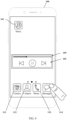
- FIG. 1 is a schematic diagram of a desktop of a smartphone 100 according to this application.
- application software such as Music software 101, Camera 111, Contacts 112, Phone 113, and Messages 114 are installed in a smartphone 100.
- a floating window on the smartphone 100 may display a part of an interface of the application software cropped by a user.
- the following describes in detail the application interface cropping method provided in this application.
- FIG. 2 is a flowchart of an application interface cropping method according to this application.
- the application interface cropping method shown in FIG. 2 is applied to an electronic device, and the electronic device may be a device such as a smartphone or a tablet computer.
- the method shown in FIG. 2 includes steps S101 to S105.
- An electronic device receives a first instruction entered by a user.
- the first instruction instructs the electronic device to determine a first cropping region on a displayed first interface of a first application.
- the first instruction is a cropping instruction entered by the user.
- the electronic device displays the first interface of the first application, the user may draw a region on the first interface by using a finger joint, and the electronic device may determine the region drawn by the user as the first cropping region.
- the first instruction includes a plurality of instructions entered by the user.
- S101 may specifically include steps S1011 to S1014:
- the electronic device receives a first trigger instruction entered by the user.
- the first trigger instruction instructs the electronic device to display a cropping border on the displayed first interface of the first application, and the cropping border is for determining a display region that needs to be cropped on the first interface.
- the electronic device presets a shape of the cropping border, and the user may select the shape of the cropping border in advance, so that after the electronic device receives the first trigger instruction entered by the user, the electronic device may display the shape of the cropping border that is selected by the user in advance.
- the shape of the cropping border preset in the electronic device includes a square, a rectangle, a circle, an oval, an irregular shape, and the like.
- the user may select a shape of the cropping border in the electronic device in advance.
- the electronic device displays a cropping border on the first interface.
- the electronic device receives a first adjustment instruction entered by the user.
- the first adjustment instruction instructs the electronic device to adjust the shape of the cropping border, a size of the cropping border, and a relative position of the cropping border on the first interface.
- the electronic device receives a first cropping instruction entered by the user.
- the first cropping instruction instructs the electronic device to determine a region in which the cropping border is located on the first interface as the first cropping region.
- FIG. 3 is a schematic diagram of a playback interface 102 of Music software 101 according to this application.
- FIG. 4 is a schematic diagram of displaying a cropping border 104 on a playback interface 102 according to this application.
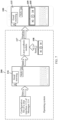
- an operating system 200 is an operating system of the smartphone 100. After the smartphone 100 starts Music software 101, the operating system 200 draws a layer 103 based on a configuration file of the playback interface 102 of Music software 101. The operating system 200 sends the layer 103 corresponding to the playback interface 102 to a display screen of the smartphone 100. The display screen of the smartphone 100 displays the playback interface 102 based on the layer 103.
- the user may enter the first trigger instruction to the smartphone 100, so that the smartphone 100 displays the cropping border 104 on the playback interface 102.
- the user may press a physical button on the smartphone 100, to input the first trigger instruction into the smartphone 100.
- the user may enter a special gesture on the display screen of the smartphone 100, to input the first trigger instruction into the smartphone 100.
- the special gesture may be the finger joint tapping on the display screen of the smartphone 100.
- the user may drag the cropping border 104 to any position of the playback interface 102 by using the finger, or may change the size of the cropping border 104 by using the finger, to input the first adjustment instruction to the smartphone 100.
- the user may tap a virtual button or the physical button by using the finger, to input the first cropping instruction to the smartphone 100, so that the smartphone 100 determines a region in which the cropping border 104 is located on the playback interface 102 as a first cropping region 105.
- the electronic device obtains first cropping information corresponding to the first cropping region
- the first cropping information is for describing a position and a size of the first cropping region on the first interface.
- the first cropping information includes a shape of the first cropping region, a size of the first cropping region, and a relative position of a center point of the first cropping region on the first interface.
- the electronic device obtains a first layer corresponding to the first interface.
- the first layer is a layer obtained by the electronic device through drawing based on a configuration file of the first interface.
- the electronic device crops the first layer based on the first cropping information to obtain a second layer.
- S104 includes the following steps: The electronic device determines a second cropping region on the first layer based on the first cropping information, and crops the second cropping region on the first layer to obtain the second layer.
- the electronic device displays the first cropping region in a first window based on the second layer.
- FIG. 5 is a schematic diagram of displaying a first cropping region 105 of a playback interface 102 in a floating window 109 according to this application.
- the operating system 200 obtains the first cropping information 106 corresponding to the first cropping region 105.
- the first cropping information 106 includes a shape of the first cropping region 105, a size of the first cropping region 105, and a relative position of a center point of the first cropping region 105 on the first interface 102.
- the operating system 200 draws the layer 103 based on the configuration file of the playback interface 102 of Music software 101.
- the operating system 200 determines the second cropping region 107 on the layer 103 based on the first cropping information 106.
- the operating system 200 crops the second cropping region 107 on the layer 103 to obtain a layer 108, and sends the layer 108 to the display screen of the smartphone 100.
- the display screen of the smartphone 100 displays the first cropping region 105 of the playback interface 102 in the floating window 109 based on the layer 108.
- the floating window 109 occupies only a partial display region of the display screen of the smartphone 100
- the display screen of the smartphone 100 can further display an icon of Music software 101, an icon of Camera 111, an icon of Contacts 112, an icon of Phone 113, and an icon of Messages 114 on the desktop of the smartphone 100.
- the electronic device may display, by performing internal processing, the first cropping region cropped by the user in the floating window, so as to prevent the floating window from reducing the first interface of the first application for display. Because a function button in the first cropping region in the floating window is not reduced, it is very convenient for the user to operate the function button in the first cropping region in the floating window.
- FIG. 6 is a schematic diagram in which a user taps an icon of Messages 114 by using a finger according to this application.
- FIG. 7 is a schematic diagram of simultaneously displaying a chat interface 115 of Messages 114 and a floating window 109 on a display screen of a smartphone 100 according to this application.
- the operating system 200 draws a layer 116 based on a configuration file of the chat interface 115 of Messages 114, and sends the layer 116 to a layer synthesis module 117. Because the display screen of the smartphone 100 also needs to display the layer 108 in the floating window 109, the operating system 200 further obtains a layer 108 that is cropped in advance, and sends the layer 108 to the layer synthesis module 117.
- the layer synthesis module 117 synthesizes the layer 116 and the layer 108, because a display priority of the layer 108 is higher than a display priority of the layer 116, the layer synthesis module 117 covers the layer 108 on an upper part of the layer 116, to avoid that the layer 108 is blocked by the layer 116.
- the layer synthesis module 117 sends a synthesized layer 116 and the layer 108 to the display screen of the smartphone 100.
- the display screen of the smartphone 100 After the display screen of the smartphone 100 receives the synthesized layer 116 and the layer 108 that are sent by the layer synthesis module 117, the display screen of the smartphone 100 displays the chat interface 115 of Messages 114 in full screen based on the layer 116, and displays the first cropping region 105 of the playback interface 102 of Music software 101 in the floating window 109 based on the layer 108.
- the chat interface 115 of Messages 114 is displayed on the display screen of the smartphone 100, and a floating box 109 is further displayed on the upper part of the chat interface 115.
- the first cropping region 105 of the playback interface 102 of Music software 101 is displayed in the floating box 109.
- the floating window 109 on the smartphone 100 may display only the first cropping region 105 after the user cropping, and display the chat interface 115 of Messages 114 in a region other than the floating window 109, so that the user may simultaneously use a function button in the first cropping region 105 of Music software 101 and a function button in the chat interface 115 of Messages 114 on the smartphone 100.
- the electronic device receives a fifth operation instruction entered by the user, where the fifth operation instruction is an instruction generated based on a fifth operation gesture.
- the electronic device deletes the first window.
- the electronic device displays the first interface and a cropping border.
- the cropping border is for determining a display region that needs to be cropped on the first interface.
- the electronic device displays the first cropping region in the first window based on the second layer
- the electronic device deletes the first window, and displays the first interface and the cropping border, so as to switch the first window to the first interface and the cropping border.
- the following steps may further be included:
- the electronic device receives a sixth operation instruction entered by the user, where the sixth operation instruction is an instruction generated based on a sixth operation gesture.
- the electronic device deletes the first window.
- the electronic device displays a first interface.
- the electronic device displays the first cropping region in the first window based on the second layer, if the user enters the sixth operation instruction to the electronic device, the electronic device deletes the first window and displays the first interface, so as to switch the first window to the first interface.
- FIG. 8 is a schematic diagram of conversion of a floating window 109 according to this application.
- the user may enter the fifth operation gesture to the smartphone 100, so that the smartphone 100 generates the fifth operation instruction based on the fifth operation gesture.
- the smartphone 100 deletes the floating window 109 based on an indication of the fifth operation instruction, and displays the playback interface 102 and the cropping border 104 of Music software 101.
- the fifth operation gesture is a double-tap operation entered by the user on the floating window 109 by using the finger.
- the user may enter the sixth operation gesture to the smartphone 100, so that the smartphone 100 generates the sixth operation instruction based on the sixth operation gesture.
- the smartphone 100 deletes the floating window 109 based on an indication of the sixth operation instruction, and displays the playback interface 102 of Music software 101.
- the sixth operation gesture is a touch and hold operation entered by the user on the floating window 109 by using the finger.
- FIG. 9 is a flowchart of another application interface cropping method according to this application.
- the application interface cropping method provided in this application may further include the method shown in FIG. 9 .
- the method shown in FIG. 9 includes steps S201 to S203.
- An electronic device receives a first operation instruction entered by a user.
- the first operation instruction is an instruction generated based on a first operation gesture.
- the first operation gesture is that the user drags the first window to an edge region of a display screen of the electronic device by using a finger.
- the electronic device deletes the first window.
- the electronic device displays a first icon corresponding to a first application.
- the user when the user does not need to use the first window temporarily, the user may enter the first operation instruction to the electronic device, so that the electronic device deletes the first window and displays the first icon corresponding to the first application.
- the user may perform an operation on the first icon, so that the electronic device may display the first window again.
- FIG. 10 is a schematic diagram of converting a floating window 109 into a floating icon 118 according to this application.
- the user may enter the first operation gesture to the smartphone 100, so that the smartphone 100 generates the first operation instruction based on the first operation gesture.
- the smartphone 100 deletes the floating window 109 based on an indication of the first operation instruction, and displays the floating icon 118 corresponding to Music software 101 in an edge region of the display screen of the smartphone 100.
- the first operation gesture is that the user drags the floating window 109 to the edge region of the display screen of the smartphone 100 by using the finger.
- the electronic device receives a second operation instruction entered by the user, where the second operation instruction is an instruction generated based on a second operation gesture.
- the electronic device deletes a first icon.
- the electronic device displays the first cropping region in a first window based on the second layer.
- the electronic device displays the first icon corresponding to the first application
- the electronic device deletes the first icon, and displays the first cropping region in the first window based on the second layer, so as to switch the first icon to the first window.
- the following steps may further be included:
- the electronic device receives a third operation instruction entered by the user, where the third operation instruction is an instruction generated based on the third operation gesture.
- the electronic device deletes a first icon.
- the electronic device displays the first interface and a cropping border.
- the cropping border is for determining a display region that needs to be cropped on the first interface.
- the electronic device displays the first icon corresponding to the first application
- the electronic device deletes the first icon, and displays the first interface and the cropping border, so as to switch the first icon to the first interface and the cropping border.
- the electronic device receives a fourth operation instruction entered by the user, where the fourth operation instruction is an instruction generated based on a fourth operation gesture.
- the electronic device deletes a first icon.
- the electronic device displays a first interface.
- the electronic device displays the first icon corresponding to the first application
- the electronic device deletes the first icon, and displays the first interface, so as to switch the first icon to the first interface.
- FIG. 11 is a schematic diagram of conversion of a floating icon 118 according to this application.
- the user may enter the second operation gesture to the smartphone 100, so that the smartphone 100 generates the second operation instruction based on the second operation gesture.
- the smartphone 100 deletes the floating icon 118 based on an indication of the second operation instruction, and displays the first cropping region 105 in the floating window 109 based on the layer 108.
- the second operation gesture is a tap operation entered by the user on the floating icon 118 by using the finger.
- the user may enter the third operation gesture to the smartphone 100, so that the smartphone 100 generates the third operation instruction based on the third operation gesture.
- the smartphone 100 deletes the floating icon 118 based on an indication of the third operation instruction, and displays the playback interface 102 and the cropping border 104 of Music software 101.
- the third operation gesture is a double-tap operation entered by the user on the floating icon 118 by using the finger.
- the user may enter the fourth operation gesture to the smartphone 100, so that the smartphone 100 generates the fourth operation instruction based on the fourth operation gesture.
- the smartphone 100 deletes the floating icon 118 based on an indication of the fourth operation instruction, and displays the playback interface 102 of Music software 101.
- the fourth operation gesture is a touch and hold operation entered by the user on the floating icon 118 by using the finger.
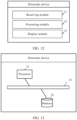
- FIG. 12 is a schematic diagram of an electronic device according to this application.
- a first device shown in FIG. 12 includes a receiving module 11, a processing module 12, and a display module 13.
- the receiving module 11 is configured to receive a first instruction entered by a user, where the first instruction instructs the electronic device to determine a first cropping region on a displayed first interface of a first application.
- the processing module 12 is configured to: obtain first cropping information corresponding to the first cropping region, where the first cropping information is for describing a position and a size of the first cropping region on the first interface; obtain a first layer corresponding to the first interface, where first layer is a layer obtained by the electronic device through drawing based on a configuration file of the first interface; and crop the first layer based on the first cropping information to obtain a second layer.
- the display module 13 is configured to display the first cropping region in the first window based on the second layer.
- the apparatus embodiment in FIG. 12 is merely an example.
- the module division is merely logical function division and may be other division during actual implementation.
- a plurality of modules or components may be combined or integrated into another system, or some features may be ignored or not performed.
- Functional modules in embodiments of this application may be integrated into one processing module, or each module may exist alone physically, or two or more modules may be integrated into one module.
- FIG. 13 is a schematic diagram of another electronic device according to this application.
- the electronic device shown in FIG. 13 includes a processor 21 and a memory 22.
- the processor 21 is configured to perform an instruction stored in the memory 22, so that the electronic device performs the following operations: Receive a first instruction entered by a user, where the first instruction instructs the electronic device to determine a first cropping region on a displayed first interface of a first application. Obtain first cropping information corresponding to the first cropping region, where the first cropping information is for describing a position and a size of the first cropping region on the first interface; obtain a first layer corresponding to the first interface, where first layer is a layer obtained by the electronic device through drawing based on a configuration file of the first interface; and crop the first layer based on the first cropping information to obtain a second layer. Display the first cropping region in the first window based on the second layer.
- the processor 21 is one or more CPUs.
- the CPU is a single-core CPU or a multi-core CPU.
- the memory 22 includes, but is not limited to, a random access memory (random access memory, RAM), a read only memory (Read only Memory, ROM), and an erasable programmable read-only memory (erasable programmable read-only memory, EPROM or flash memory), a flash memory, an optical memory, or the like.
- the memory 22 stores code of the operating system.
- the electronic device further includes a bus 23, and the processor 21 and the memory 22 are connected to each other through the bus 23, or may be connected to each other in another manner.
- Embodiments in this specification are all described in a progressive manner, mutual reference may be made to the same or similar part of the embodiments, and each embodiment focuses on illustrating a difference from other embodiments.
- the system embodiment since it is basically similar to a method embodiment, the system embodiment is described simply, and the relevant part may be obtained with reference to the part of the description of the method embodiment.
Landscapes
- Engineering & Computer Science (AREA)
- Theoretical Computer Science (AREA)
- General Engineering & Computer Science (AREA)
- Human Computer Interaction (AREA)
- Physics & Mathematics (AREA)
- General Physics & Mathematics (AREA)
- Software Systems (AREA)
- Signal Processing (AREA)
- Computer Networks & Wireless Communication (AREA)
- Business, Economics & Management (AREA)
- General Business, Economics & Management (AREA)
- Multimedia (AREA)
- User Interface Of Digital Computer (AREA)
Applications Claiming Priority (2)
| Application Number | Priority Date | Filing Date | Title |
|---|---|---|---|
| CN202011486031.4A CN114647348A (zh) | 2020-12-16 | 2020-12-16 | 一种应用界面的裁剪方法及电子设备 |
| PCT/CN2021/137389 WO2022127728A1 (fr) | 2020-12-16 | 2021-12-13 | Procédé de recadrage d'interface d'application, et dispositif électronique |
Publications (2)
| Publication Number | Publication Date |
|---|---|
| EP4242811A1 true EP4242811A1 (fr) | 2023-09-13 |
| EP4242811A4 EP4242811A4 (fr) | 2024-05-01 |
Family
ID=81990864
Family Applications (1)
| Application Number | Title | Priority Date | Filing Date |
|---|---|---|---|
| EP21905657.9A Pending EP4242811A4 (fr) | 2020-12-16 | 2021-12-13 | Procédé de recadrage d'interface d'application, et dispositif électronique |
Country Status (4)
| Country | Link |
|---|---|
| US (1) | US20230328173A1 (fr) |
| EP (1) | EP4242811A4 (fr) |
| CN (1) | CN114647348A (fr) |
| WO (1) | WO2022127728A1 (fr) |
Families Citing this family (2)
| Publication number | Priority date | Publication date | Assignee | Title |
|---|---|---|---|---|
| CN115774511A (zh) * | 2021-09-06 | 2023-03-10 | 华为技术有限公司 | 批注方法和电子设备 |
| CN117666893A (zh) * | 2022-08-24 | 2024-03-08 | 华为技术有限公司 | 一种窗口裁剪方法与电子设备 |
Family Cites Families (16)
| Publication number | Priority date | Publication date | Assignee | Title |
|---|---|---|---|---|
| US5157763A (en) * | 1987-10-15 | 1992-10-20 | International Business Machines Corporation | Visually assisted method for transfer of data within an application or from a source application to a receiving application |
| US5404442A (en) * | 1992-11-30 | 1995-04-04 | Apple Computer, Inc. | Visible clipboard for graphical computer environments |
| CA2356573A1 (fr) * | 2001-08-31 | 2003-02-28 | John-Paul J. Gignac | Methode de cadrage d'une image numerique |
| US7669140B2 (en) * | 2003-08-21 | 2010-02-23 | Microsoft Corporation | System and method for providing rich minimized applications |
| US7627174B1 (en) * | 2005-08-24 | 2009-12-01 | Qurio Holdings, Inc. | Digital image crop and order linked to a physical cropping tool |
| US7487465B2 (en) * | 2006-01-06 | 2009-02-03 | International Business Machines Corporation | Application clippings |
| US8587614B2 (en) * | 2007-12-10 | 2013-11-19 | Vistaprint Schweiz Gmbh | System and method for image editing of electronic product design |
| US20100153168A1 (en) * | 2008-12-15 | 2010-06-17 | Jeffrey York | System and method for carrying out an inspection or maintenance operation with compliance tracking using a handheld device |
| CN102665130B (zh) * | 2012-05-14 | 2014-10-15 | 青岛海信传媒网络技术有限公司 | 应用程序窗口与视频播放窗口的显示方法及装置 |
| US9916072B2 (en) * | 2013-02-20 | 2018-03-13 | Lg Electronics Inc. | Application and notification window display management in a mobile terminal |
| CN105988686A (zh) * | 2015-06-10 | 2016-10-05 | 乐视致新电子科技(天津)有限公司 | 播放界面的显示方法、装置及终端 |
| CN107861672B (zh) * | 2017-11-29 | 2018-11-13 | 掌阅科技股份有限公司 | 有声电子书的播讲方法、电子设备及计算机存储介质 |
| CN110381195A (zh) * | 2019-06-05 | 2019-10-25 | 华为技术有限公司 | 一种投屏显示方法及电子设备 |
| CN112085818B (zh) * | 2019-06-14 | 2023-03-14 | 腾讯数码(天津)有限公司 | 一种图片处理方法以及装置 |
| CN110489043B (zh) * | 2019-07-31 | 2023-03-24 | 华为技术有限公司 | 一种悬浮窗口的管理方法及相关装置 |
| CN111240550B (zh) * | 2020-01-13 | 2021-07-06 | 深圳市元征科技股份有限公司 | 聊天窗口的展示方法、装置、电子设备及存储介质 |
-
2020
- 2020-12-16 CN CN202011486031.4A patent/CN114647348A/zh active Pending
-
2021
- 2021-12-13 EP EP21905657.9A patent/EP4242811A4/fr active Pending
- 2021-12-13 WO PCT/CN2021/137389 patent/WO2022127728A1/fr not_active Ceased
-
2023
- 2023-06-14 US US18/209,673 patent/US20230328173A1/en not_active Abandoned
Also Published As
| Publication number | Publication date |
|---|---|
| CN114647348A (zh) | 2022-06-21 |
| WO2022127728A1 (fr) | 2022-06-23 |
| US20230328173A1 (en) | 2023-10-12 |
| EP4242811A4 (fr) | 2024-05-01 |
Similar Documents
| Publication | Publication Date | Title |
|---|---|---|
| US8760557B2 (en) | User interface for a digital camera | |
| US11054988B2 (en) | Graphical user interface display method and electronic device | |
| US20200204738A1 (en) | Photographing method and mobile terminal | |
| KR100746874B1 (ko) | 이동 단말기에서 터치패드를 이용한 서비스 제공 장치 및방법 | |
| EP3674899B1 (fr) | Procédé et dispositif pour le partage de ressources multimédia et support d'informations | |
| US9569099B2 (en) | Method and apparatus for displaying keypad in terminal having touch screen | |
| US20080129759A1 (en) | Method for processing image for mobile communication terminal | |
| US20130055087A1 (en) | Device, Method, and Graphical User Interface for Editing Videos | |
| US20230328173A1 (en) | Application interface cropping method and electronic device | |
| CN105204729A (zh) | 一种指纹触控方法及系统 | |
| CN104765549A (zh) | 一种移动终端显示界面缩放的实现方法和装置 | |
| JP5875510B2 (ja) | 電子機器、メニュー表示方法 | |
| CN106896995B (zh) | 移动终端的壁纸配置方法和装置 | |
| CA2807866C (fr) | Interface utilisateur pour un appareil photo numerique | |
| CN110244889B (zh) | 图片缩放方法、装置、终端及存储介质 | |
| WO2020087504A1 (fr) | Procédé d'interaction par capture d'écran, dispositif électronique et support d'enregistrement lisible par ordinateur | |
| US20260056652A1 (en) | Resource integration method, electronic device, and storage medium | |
| EP4738082A1 (fr) | Procédé et dispositif d'affichage, dispositif électronique et support d'informations | |
| JP5916033B2 (ja) | 電子機器、画像表示制御方法 | |
| CN112162811B (zh) | 显示方法和显示装置 | |
| CN111381667A (zh) | 界面布局的调整方法、装置及存储介质 | |
| CN119342144A (zh) | 通知消息处理方法、装置及存储介质 | |
| CN115357167A (zh) | 截屏方法、装置和电子设备 | |
| CN119576259A (zh) | 分屏展示方法、装置、设备及存储介质 | |
| JP2015049836A (ja) | 携帯端末 |
Legal Events
| Date | Code | Title | Description |
|---|---|---|---|
| STAA | Information on the status of an ep patent application or granted ep patent |
Free format text: STATUS: THE INTERNATIONAL PUBLICATION HAS BEEN MADE |
|
| PUAI | Public reference made under article 153(3) epc to a published international application that has entered the european phase |
Free format text: ORIGINAL CODE: 0009012 |
|
| STAA | Information on the status of an ep patent application or granted ep patent |
Free format text: STATUS: REQUEST FOR EXAMINATION WAS MADE |
|
| 17P | Request for examination filed |
Effective date: 20230607 |
|
| AK | Designated contracting states |
Kind code of ref document: A1 Designated state(s): AL AT BE BG CH CY CZ DE DK EE ES FI FR GB GR HR HU IE IS IT LI LT LU LV MC MK MT NL NO PL PT RO RS SE SI SK SM TR |
|
| DAV | Request for validation of the european patent (deleted) | ||
| DAX | Request for extension of the european patent (deleted) | ||
| A4 | Supplementary search report drawn up and despatched |
Effective date: 20240405 |
|
| RIC1 | Information provided on ipc code assigned before grant |
Ipc: G11B 27/031 20060101ALN20240328BHEP Ipc: G06F 9/451 20180101ALI20240328BHEP Ipc: G11B 27/34 20060101ALI20240328BHEP Ipc: G06F 3/0484 20220101ALI20240328BHEP Ipc: G06F 3/04817 20220101ALI20240328BHEP Ipc: G06F 3/04886 20220101ALI20240328BHEP Ipc: G06F 3/04883 20220101ALI20240328BHEP Ipc: G06F 3/0481 20220101AFI20240328BHEP |