EP4300979A1 - Anzeigeverfahren, endgerät und speichermedium - Google Patents
Anzeigeverfahren, endgerät und speichermedium Download PDFInfo
- Publication number
- EP4300979A1 EP4300979A1 EP22762337.8A EP22762337A EP4300979A1 EP 4300979 A1 EP4300979 A1 EP 4300979A1 EP 22762337 A EP22762337 A EP 22762337A EP 4300979 A1 EP4300979 A1 EP 4300979A1
- Authority
- EP
- European Patent Office
- Prior art keywords
- region
- size
- video
- virtual keyboard
- display
- Prior art date
- Legal status (The legal status is an assumption and is not a legal conclusion. Google has not performed a legal analysis and makes no representation as to the accuracy of the status listed.)
- Granted
Links
Images


Classifications
-
- G—PHYSICS
- G06—COMPUTING OR CALCULATING; COUNTING
- G06F—ELECTRIC DIGITAL DATA PROCESSING
- G06F3/00—Input arrangements for transferring data to be processed into a form capable of being handled by the computer; Output arrangements for transferring data from processing unit to output unit, e.g. interface arrangements
- G06F3/01—Input arrangements or combined input and output arrangements for interaction between user and computer
- G06F3/048—Interaction techniques based on graphical user interfaces [GUI]
- G06F3/0487—Interaction techniques based on graphical user interfaces [GUI] using specific features provided by the input device, e.g. functions controlled by the rotation of a mouse with dual sensing arrangements, or of the nature of the input device, e.g. tap gestures based on pressure sensed by a digitiser
- G06F3/0488—Interaction techniques based on graphical user interfaces [GUI] using specific features provided by the input device, e.g. functions controlled by the rotation of a mouse with dual sensing arrangements, or of the nature of the input device, e.g. tap gestures based on pressure sensed by a digitiser using a touch-screen or digitiser, e.g. input of commands through traced gestures
- G06F3/04886—Interaction techniques based on graphical user interfaces [GUI] using specific features provided by the input device, e.g. functions controlled by the rotation of a mouse with dual sensing arrangements, or of the nature of the input device, e.g. tap gestures based on pressure sensed by a digitiser using a touch-screen or digitiser, e.g. input of commands through traced gestures by partitioning the display area of the touch-screen or the surface of the digitising tablet into independently controllable areas, e.g. virtual keyboards or menus
-
- H—ELECTRICITY
- H04—ELECTRIC COMMUNICATION TECHNIQUE
- H04N—PICTORIAL COMMUNICATION, e.g. TELEVISION
- H04N21/00—Selective content distribution, e.g. interactive television or video on demand [VOD]
- H04N21/40—Client devices specifically adapted for the reception of or interaction with content, e.g. set-top-box [STB]; Operations thereof
- H04N21/43—Processing of content or additional data, e.g. demultiplexing additional data from a digital video stream; Elementary client operations, e.g. monitoring of home network or synchronising decoder's clock; Client middleware
- H04N21/431—Generation of visual interfaces for content selection or interaction; Content or additional data rendering
- H04N21/4312—Generation of visual interfaces for content selection or interaction; Content or additional data rendering involving specific graphical features, e.g. screen layout, special fonts or colors, blinking icons, highlights or animations
-
- G—PHYSICS
- G06—COMPUTING OR CALCULATING; COUNTING
- G06T—IMAGE DATA PROCESSING OR GENERATION, IN GENERAL
- G06T3/00—Geometric image transformations in the plane of the image
- G06T3/40—Scaling of whole images or parts thereof, e.g. expanding or contracting
-
- H—ELECTRICITY
- H04—ELECTRIC COMMUNICATION TECHNIQUE
- H04N—PICTORIAL COMMUNICATION, e.g. TELEVISION
- H04N21/00—Selective content distribution, e.g. interactive television or video on demand [VOD]
- H04N21/40—Client devices specifically adapted for the reception of or interaction with content, e.g. set-top-box [STB]; Operations thereof
- H04N21/47—End-user applications
- H04N21/478—Supplemental services, e.g. displaying phone caller identification, shopping application
- H04N21/4788—Supplemental services, e.g. displaying phone caller identification, shopping application communicating with other users, e.g. chatting
-
- H—ELECTRICITY
- H04—ELECTRIC COMMUNICATION TECHNIQUE
- H04N—PICTORIAL COMMUNICATION, e.g. TELEVISION
- H04N21/00—Selective content distribution, e.g. interactive television or video on demand [VOD]
- H04N21/40—Client devices specifically adapted for the reception of or interaction with content, e.g. set-top-box [STB]; Operations thereof
- H04N21/47—End-user applications
- H04N21/485—End-user interface for client configuration
- H04N21/4858—End-user interface for client configuration for modifying screen layout parameters, e.g. fonts, size of the windows
-
- G—PHYSICS
- G06—COMPUTING OR CALCULATING; COUNTING
- G06F—ELECTRIC DIGITAL DATA PROCESSING
- G06F2203/00—Indexing scheme relating to G06F3/00 - G06F3/048
- G06F2203/048—Indexing scheme relating to G06F3/048
- G06F2203/04803—Split screen, i.e. subdividing the display area or the window area into separate subareas
Definitions
- the present application relates to the field of video playing in the communication field, and in particular to a display method, a terminal device and a storage medium.
- a user when a user watches a video through a terminal device such as a cell phone, the user may click on or tap on a preset input box to wake up a virtual keyboard, and input a comment message in the preset input box via the virtual keyboard.
- the comment message is displayed in the form of bullet chat message on the video playing interface.
- the video picture would be occluded or shielded by the virtual keyboard while the user is inputting the comment message.
- a display method, a terminal device and a storage medium are provided in the present application.
- a display method is provided in some embodiments of the present application.
- the display method includes: dividing, in response to a video being played while waking-up of a virtual keyboard being detected, a display region of a display screen at least into a first region and a second region, the first region and the second region being not overlapped with each other; and playing the video in the first region, and loading the virtual keyboard into the second region.
- a terminal device is provided in some embodiments of the present application.
- the terminal device includes a splitting unit and a displaying unit.
- the splitting unit is configured to: divide, in response to the video being played while waking-up of the virtual keyboard being detected, the display region of the display screen at least into a first region and a second region, the first region and the second region being not overlapped with each other.
- the displaying unit is configured to: play the video in the first region, and load the virtual keyboard into the second region.
- a terminal device is further provided in some embodiments of the present application.
- the terminal device includes a processor and a memory.
- the memory is configured to store a computer program capable of running on the processor.
- the processor is configured to perform, in response to running the computer program, operations of the above-mentioned display method.
- a storage medium is further provided in some embodiments of the present application.
- the storage medium stores a computer program.
- the computer program when being executed by a processor, is configured to implement operations of the above-mentioned display method.
- the display region of the display screen in response to the video being played while waking-up of the virtual keyboard being detected, is at least divided into the first region and the second region, the first region and the second region are not overlapped with each other; the video is played in the first region, and the virtual keyboard is loaded into the second region.
- the virtual keyboard is loaded to a region different from that of the video, and is not superimposed and displayed over the video picture. The user may watch a full video picture in the first region, the displayed virtual keyboard would not occlude or shield the video picture being displayed, and thus the user won't be disturbed from watching the video.
- Fig. 1 in related art, when a user wakes up a virtual keyboard of a video playing terminal device during a process of watching a video, the virtual keyboard is superimposed over the video picture for being displayed, resulting that the virtual keyboard occludes the video picture.
- a display method in the embodiments of the present disclosure.
- the display method includes: dividing, in response to the video being played while the waking-up of the virtual keyboard being detected, the display region of the display screen is at least divided into a first region and a second region, the first region and the second region being not overlapped with each other; playing the video in the first region, and loading the virtual keyboard into the second region.
- the virtual keyboard may be prevented from being superimposed over the video picture for being displayed, and the displayed virtual keyboard is prevented from occluding the video picture.
- the operation of dividing the display region of the display screen at least into the first region and the second region includes: dividing, based on a first aspect ratio of the video and a second aspect ratio of the display screen, the display region at least into the first region and the second region in a first direction.
- the first direction represents the length direction or the width direction of the display screen.
- the operation of dividing, based on the first aspect ratio of the video and the second aspect ratio of the display screen, the display region at least into the first region and the second region in the first direction includes: dividing, in response to the first aspect ratio being less than the second aspect ratio, the display region at least into the first region and the second region in the length direction of the display screen; or dividing, in response to the first aspect ratio being greater than or equal to the second aspect ratio, the display region at least into the first region and the second region in the width direction of the display screen.
- the operation of dividing the display region at least into the first region and the second region in the first direction further includes: determining, based on a first size of the virtual keyboard and a second size of the video, a size of the first region in the first direction and a size of the second region in the first direction.
- the first size represents a corresponding size of the virtual keyboard in the first direction
- the second size represents a corresponding size of the video in the first direction.
- the operation of determining, based on the first size of the virtual keyboard and the second size of the video, the size of the first region in the first direction and the size of the second region in the first direction further includes: in response to a first sum being less than or equal to a third size of the display region in the first direction, determining, based on the second size, the size of the first region in the first direction and the size of the second region in the first direction; or in response to the first sum being greater than the third size, determining, a minimum size supported by the virtual keyboard in the first direction, as the size of the second region in the first direction.
- the first sum represents a sum of the second size of the video and the minimum size supported by the virtual keyboard in the first direction.
- the operation of playing the video in the first region includes: in response to zooming or scaling of a picture of the video, playing the video in the first region.
- the method further includes: receiving a bullet chat message relating to the video, the bullet chat message being input via the loaded virtual keyboard.
- the operation of dividing the display region of the display screen at least into the first region and the second region includes: dividing, in response to the display screen meeting a set condition, the display region of the display screen into the first region, the second region and a third region.
- the third region is configured to display contents other than the video and the virtual keyboard.
- the set condition includes: the display screen of the dual-screen foldable terminal device being in an unfolded state.
- the third region is configured to display the bullet chat message corresponding to the video.
- a terminal device is provided in some embodiments of the present application.
- the terminal device includes a splitting unit and a displaying unit.
- the splitting unit is configured to: divide, in response to the video being played while waking-up of the virtual keyboard being detected, the display region of the display screen at least into the first region and the second region. The first region and the second region are not overlapped with each other.
- the displaying unit is configured to: play the video in the first region, and load the virtual keyboard into the second region.
- the splitting unit is configured to: divide, based on the first aspect ratio of the video and the second aspect ratio of the display screen, the display region at least into the first region and the second region in the first direction.
- the first direction represents the length direction or the width direction of the display screen.
- the splitting unit is configured to: divide, in response to the first aspect ratio being less than the second aspect ratio, the display region at least into the first region and the second region in the length direction of the display screen; or dividing, in response to the first aspect ratio being greater than or equal to the second aspect ratio, the display region at least into the first region and the second region in the width direction of the display screen.
- the terminal device further includes a determining unit.
- the determining unit is configured to: determine, based on the first size of the virtual keyboard and the second size of the video, the size of the first region in the first direction and the size of the second region in the first direction.
- the first size represents the corresponding size of the virtual keyboard in the first direction
- the second size represents the corresponding size of the video in the first direction.
- the determining unit is further configured to: in response to the first sum being less than or equal to the third size of the display region in the first direction, determine, based on the second size, the size of the first region in the first direction and the size of the second region in the first direction; or determine, in response to the first sum being greater than the third size, the minimum size supported by the virtual keyboard in the first direction as the size of the second region in the first direction.
- the first sum represents a sum of the second size and the minimum size supported by the virtual keyboard in the first direction.
- the terminal device further includes a receiving unit.
- the receiving unit is configured to: receive the bullet chat message relating to the video.
- the bullet chat message is input via the loaded virtual keyboard.
- the splitting unit is configured to: divide, in response to the display screen meeting a set condition, the display region of the display screen into the first region, the second region and the third region.
- the third region is configured to display contents other than the video and the virtual keyboard.
- the set condition includes: the display screen of the dual-screen foldable terminal device being in the unfolded state.
- a terminal device is provided in some embodiments of the present application.
- the terminal device includes a processor and a memory.
- the memory is configured to store a computer program capable of running on the processor.
- the processor is configured to, perform, in response to running the computer program, operations of any of the above-mentioned display methods.
- a storage medium is further provided in some embodiments of the present application.
- the storage medium stores a computer program.
- the computer program when being executed by a processor, is configured to implement operations of any of the above-mentioned display methods.
- Fig. 2 is a schematic implementing flowchart of the display method according to an embodiment of the present application.
- the execution subject of the process is a terminal device such as a cell phone or a tablet.
- the display screen of the terminal device may be a foldable screen.
- the display method includes operations at blocks illustrated in Fig. 2 .
- the user may play the video through a built-in video playing application (APP) of the terminal device or a built-in browser of the terminal device. While watching the video, the user may wake up the virtual keyboard via a preset input box in a corresponding interactive interface.
- APP video playing application
- the terminal device divides, in response to the waking-up of the virtual keyboard being detected, the display region of the display screen at least into the first region and the second region.
- the display region of the display screen may be divided by the terminal device into the first region and the second region.
- the second region is located adjacent to and below the first region in the width direction of the display screen.
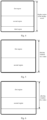
- the schematic diagram of the display region of the display screen is as illustrated in Fig. 3 .
- the display region of the display screen may also be divided by the terminal device into the first region and the second region, and the second region is located adjacent to and at the right side of the first region in the length direction of the display screen.
- the length direction herein refers to a horizontal direction when the user holds the terminal device by hands
- the width direction herein refers to a vertical direction of the display screen.
- the size of the display screen is (1280 pixels) * (768 pixels)
- the size of the display screen in the length direction is 1280 pixels
- the size of the display screen in the width direction is 768 pixels.
- the size of the display screen in the length direction is 768 pixels
- the size of the display screen in the width direction is 1280 pixels.
- the display region of the display screen may be divided by the terminal device into the first region and the second region.
- the display region of the display screen is divided into the first region, the second region and the third region as illustrated in Fig. 4 .
- the third region may be configured to display contents other than the video and the virtual keyboard.
- the first region is configured to display the video picture
- the second region is configured to load the virtual keyboard.
- the third region is configured to display the bullet chat message corresponding to the displayed video, or to display relevant information of the video playing page. In actual applications, priority is given to ensure displaying of the whole or full played video.
- the third region is configured to display the bullet chat message corresponding to the displayed video
- the third region is located adjacent to and below the first region. In this way, the bullet chat message and the video picture are displayed separately. The user's watching of the video would be prevented from being disturbed by the bullet chat message floatingly displayed over the video picture.
- the operation of dividing the display region of the display screen at least into the first region and the second region includes: dividing, based on the first aspect ratio of the video and the second aspect ratio of the display screen, the display region at least into the first region and the second region in the first direction.
- the first direction represents the length direction or the width direction of the display screen.
- the aspect ratio may also be referred as a length-width ratio or a width-height ratio.
- the aspect ratio is for example 16:9 or 4:3.
- the first aspect ratio of the video and the second aspect ratio of the display screen are compared, and a comparison result is obtained. Based on the comparison result, the display region is at least divided into the first region and the second region in the length direction of the display screen; or the display region is at least divided into the first region and the second region in the width direction of the display screen.
- the terminal device when the dual-screen foldable terminal device is in a fully unfolded state, the terminal device divides, in the width direction of the display screen, the display region at least into the first region and the second region.
- the second region is located adjacent to and below the first region.
- the operation of dividing, based on the first aspect ratio of the video and the second aspect ratio of the display screen, the display region at least into the first region and the second region in the first direction includes: dividing, in response to the first aspect ratio being less than the second aspect ratio, the display region at least into the first region and the second region in the length direction of the display screen; or, dividing, in response to the first aspect ratio being greater than or equal to the second aspect ratio, the display region at least into the first region and the second region in the width direction of the display screen.
- the display region of the display screen is divided into the first region and the second region, and the second region is located adjacent to and at the right side of the first region.
- the first width-height ratio is 4:3 and when the second width-height ratio is 1:1, at least the first region and the second region are divided out in the width direction of the display screen. In this way, the display region of the display screen is divided into the first region and the second region, and the second region is located adjacent to and below the first region.
- the operation of dividing the display region at least into the first region and the second region in the first direction further includes: determining, based on the first size of the virtual keyboard and the second size of the video, the size of the first region in the first direction and the size of the second region in the first direction.
- the first size represents the corresponding size of the virtual keyboard in the first direction
- the second size represents the corresponding size of the video in the first direction.
- the first size of the virtual keyboard is the size corresponding to the virtual keyboard when it is not scaled or zoomed.
- the first size of the virtual keyboard is set and stored in a local database.
- the second aspect ratio of the display screen (a horizontal resolution x a horizontal pixel length) : (a vertical resolution x a vertical pixel length).
- the sizes referred to in some embodiments of the present application are all measured in pixels.
- the size of the display screen in the length direction represents the product of a horizontal pixel number and a horizontal pixel length.
- the size of the display screen in the width direction represents the product of a vertical pixel number and a vertical pixel length. In some embodiments, the size of the display screen in the length direction represents the horizontal pixel number, and the size of the display screen in the width direction represents the vertical pixel number.
- the terminal device when the first direction represents the length direction of the display screen, the terminal device is configured to: determine, based on the first aspect ratio of the video and the second aspect ratio of the display screen, the horizontal resolution of the video; determine, the product of the horizontal resolution of the video and the horizontal pixel length of the video, as a picture length supported by the video; and determine, based on the length of the virtual keyboard and the picture length supported by the video, the length of the first region and the length of the second region.
- the sum of the length of the first region and the length of the second region is less than or equal to the length of the video playing window.
- the length of the video playing window is less than or equal to the length of the display screen.
- the terminal device is configured to: determine, based on the first aspect ratio of the video and the second aspect ratio of the display screen, the vertical resolution of the video; determine, the product of the vertical resolution of the video and the vertical pixel length, as the picture width supported by the video; and determine, based on the width of the virtual keyboard and the picture width supported by the video, the width of the first region and the width of the second region.
- the sum of the width of the first region and the width of the second region is less than or equal to the width of the video playing window.
- the width of the video playing window is less than or equal to the width of the display screen.
- the playing window of the video corresponds to the display region of the display screen.
- the width of the playing window of the video is equal to the width of the display region of the display screen.
- the width of the playing window of the video is less than the width of the display region of the display screen.
- the size of the second region in the first direction is greater than or equal to the minimum size supported by the virtual keyboard in the first direction.
- the size of the second region in the first direction is normally less than or equal to the first size of the virtual keyboard in the first direction, and is greater than or equal to the minimum size supported by the virtual keyboard in the first direction. In this way, more regions may be reserved or left in the playing window of the video for playing the video.
- the size of the determined second region in the first direction may be greater than the second size of the virtual keyboard in the first direction. In this way, the scaled-up virtual keyboard may be loaded into the second region.
- the size of the first region in the first direction is greater than the size of the second region in the first direction.
- the operation of determining, based on the first size of the virtual keyboard and the second size of the video, the size of the first region and the size of the second region in the first direction further includes: in response to the first sum being less than or equal to a third size of the display region in the first direction, determining, based on the second size, the size of the first region in the first direction and the size of the second region in the first direction; or in response to the first sum being greater than the third size, determining, the minimum size supported by the virtual keyboard in the first direction, as the size of the second region in the first direction.
- the first sum represents the sum of the second size and the minimum size supported by the virtual keyboard in the first direction.
- the terminal device is configured to: calculate the sum of the second size of the video in the first direction and the minimum size supported by the virtual keyboard in the first direction, to obtain the first sum; compare the calculated first sum and the third size of the video playing window in the first direction, to obtain the comparison result.
- the playing window of the video may also display the whole or full video picture and the virtual keyboard without scaling-down the video picture or the virtual keyboard.
- the terminal device determines, based on the second size of the video, the size of the first region in the first direction and the size of the second region in the first direction.
- the size of the first region in the first direction is greater than the second size of the video in the first direction, and the size of the second region in the first direction is equal to the size of the virtual keyboard in the first direction.
- the video whose picture has been scaled up may be played in the first region.
- the size in the first direction is greater than the second size of the video in the first direction, and the size of the second region in the first direction is greater than the size of the virtual keyboard in the first direction, thus the scaled-up virtual keyboard may be loaded into the second region.
- the first region is configured for performance of full-size playing of the video by the terminal device.
- the first region is configured for playing of the video by the terminal device according to the second size of the video in the first direction, and an extra region in the first region is set to black.
- the sum of the size of the extra region that has been set to black in the first direction and the size of the video in the first direction is equal to the size of the first region in the first direction.
- a top portion and a bottom portion that are adjacent to the video picture are set to black, or the left side and the right side that are adjacent to the video picture are set to black.
- the playing window of the video is incapable of displaying the full video picture and the virtual keyboard without scaling down the video picture or the virtual keyboard.
- the minimum size supported by the virtual keyboard in the first direction is determined as the size of the second region in the first direction. Therefore, the virtual keyboard is loaded into the second region based on the minimum size supported by the virtual keyboard.
- the terminal device is configured to: play the video in the first region of the display screen, and load the virtual keyboard into the second region. Therefore, the user may input the bullet chat message corresponding to the played video via the virtual keyboard.
- the first direction is the width direction of the display screen
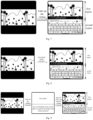
- the variation of the interface during the video playing process of the terminal device is as illustrated in Fig. 7 or Fig. 8 .
- the bullet chat message corresponding to the played video is floatingly displayed on the image of the first region.
- the bullet chat message corresponding to the played video may be displayed on the set-to-black region of the first region.
- the bullet chat message corresponding to the played video may be simultaneously displayed in the set-to-black region and the video picture of the first region.
- the terminal device may be configured to: play, based on the size of the first region in the first direction and the second size of the video in the first direction, the video in the first region; load, based on the size of the second region in the first direction, the first size of the virtual keyboard in the first direction and the minimum size supported by the virtual keyboard in the first direction, the virtual keyboard into the second region.
- the terminal device In response to the size of the first region in the first direction being less than the size of the video in the first direction, the terminal device is configured to: scale down the picture of the displayed video, and display the scaled-down video picture in the first region.
- the terminal device does not perform scaling of the displayed video.
- the terminal device is configured to: perform scaling-up of the picture of the displayed video, and display the scaled-up video picture in the first region.
- the loading of the virtual keyboard is performed in the second region based on the minimum size supported by the virtual keyboard.
- the size of the virtual keyboard displayed in the second region is equal to the minimum size supported by the virtual keyboard.
- the virtual keyboard is scaled down based on the size of the second region in the first direction, and the scaled-down virtual keyboard is loaded into the second region.
- the size of the scaled-down virtual keyboard in the first direction is greater than the minimum height supported by the virtual keyboard in the first direction.
- the virtual keyboard is not scaled down.
- the terminal device in response to the first sum being less than or equal to the third size, and the size of the first region in the first direction being greater than the second size of the video in the first direction, the terminal device may be configured to: scale up, based on the size of the first region in the first direction and the first width-height ratio of the video, the picture of the video; play the video whose picture has been scaled up in the first region, so as to play the video in the first region in full size.
- the terminal device may also be configured to: play, based on the second size of the video in the first direction, the video in the first region, and set the extra region in the first region to be black.
- the terminal device is configured to: load, based on the first size of the virtual keyboard in the first direction, or based on the minimum size supported by the virtual keyboard in the first direction, the virtual keyboard into the second region.
- Fig. 9 illustrates a schematic diagram illustrating the variation of the interface during the video playing process provided according to another embodiment of the present application.
- the terminal device When the first direction is the width direction of the display screen, the terminal device is configured to: play, based on the picture width of the video, the video in the first region, and set the top portion and the bottom portion that are adjacent to the video picture to be black.
- the terminal device is configured to: load, based on the width of the virtual keyboard, the virtual keyboard into the second region.
- the picture width in the first region is equal to the picture width of the video, and is less than the width of the first region.
- the width of the virtual keyboard displayed in the second region is equal to the width of the virtual keyboard.
- the terminal device When the first direction is the width direction of the display screen, the terminal device is configured to: play the video in the first region in full size. The terminal device is configured to: load, based on the minimum width supported by the virtual keyboard, the virtual keyboard in the second region. At this point, the picture width in the first region is greater than the picture width of the video, and the width of the virtual keyboard displayed in the second region is equal to the minimum width supported by the virtual keyboard.
- the terminal device in response to the first sum being less than or equal to the third size, and the size of the first region in the first direction being equal to the second size of the video in the first direction, the terminal device is configured to: play, based on the second size of the video in the first direction, the video in the first region; scale up, based on the size of the second region in the first direction, the virtual keyboard; and load the scaled-up virtual keyboard in the second region.
- the operation of playing the video in the first region includes: in response to scaling of the picture of the video, playing the video in the first region.
- the size of the second region in the first direction is equal to the minimum size supported by the virtual keyboard in the first direction
- the size of the first region in the first direction is equal to a difference value between the third size and the minimum size supported by the virtual keyboard in the first direction.
- the terminal device is configured to: load, based on the minimum size supported by the virtual keyboard in the first direction, the virtual keyboard into the second region; scale, based on the size of the first region in the first direction, the picture of the video; and play the video whose picture has been scaled in the first region.
- the size in the first direction of the virtual keyboard displayed in the second region by the terminal device is equal to the minimum size supported by the virtual keyboard.
- the terminal device is configured to: after scaling up the picture of the video based on the size of the first region in the first direction, play the video in the first region.
- the terminal device In response to the size of the first region in the first direction being less than the second size of the video in the first direction, the terminal device is configured to: after scaling down the picture of the video based on the size of the first region in the first direction, play the video in the first region.
- Fig. 11 illustrates a schematic diagram illustrating the variation of the interface during the video playing process provided according to yet another embodiment of the present application.
- the terminal device is configured to: play the video whose picture has been scaled down in the first region; load, based on the minimum width supported by the virtual keyboard, the virtual keyboard into the second region.
- the terminal device is configured to: display the full video picture in the first region.
- the terminal device is further configured to: display the bullet chat message corresponding to the played video in the first region.
- the operation of playing the video in the first region, and loading the virtual keyboard into the second region further includes: centering and playing the video in the first region; and/or, loading the virtual keyboard into the second region and centering the virtual keyboard in the second region.
- the user may be facilitated to watch the video, and by loading and centering the virtual keyboard in the second region, the user may be facilitated to operate the virtual keyboard by his/her two hands.
- the method may further include: receiving the bullet chat message relating to the video.
- the bullet chat message is input via the loaded virtual keyboard.
- the terminal device may receive the bullet chat message relating to the video and input by the user via the virtual keyboard.
- the terminal device When it is detected that, the user has triggered a send command, the terminal device would send the bullet chat message that has been input via the virtual keyboard to a server corresponding to the video.
- the server in response to the reception of the bullet chat message that is sent from the terminal device, may broadcast the received bullet chat message. Therefore, a user that is watching the video is capable of viewing the corresponding bullet chat message.
- the user may watch the full video picture.
- the terminal device displays the bullet chat message that has not been sent in the second region.
- the display region of the display screen is divided at least into the first region and the second region, the first region and the second region are not overlapped with each other; the video is played in the first region, and the virtual keyboard is loaded into the second region.
- the virtual keyboard is loaded into a region different from that of the video, and is not superimposed and displayed above the video picture.
- the user may watch the full video picture in the second region.
- the bullet chat message is corresponding to the displayed video and the virtual keyboard has been loaded into the second region, thus the virtual keyboard won't occlude the picture of the displayed video. The user's watching of the video would not be disturbed.
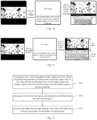
- Fig. 12 is a schematic flowchart of the display method according to some application embodiments of the present application.
- the display method includes the operations illustrated at blocks illustrated in Fig. 12 .
- the display region in response to the video being played while waking-up of the virtual keyboard being detected, based on the height of the virtual keyboard and the vertical video resolution of the video, dividing, based on the first aspect ratio of the video and the second aspect ratio of the display screen, the display region at least into the first region and the second region in the first direction.
- the first direction represents the length direction or the width direction of the display screen.
- the first region and the second region are not overlapped with each other.
- the present embodiment mainly relates to the application scenario in which the video is played in the landscape display mode, and to the application scenario in which the video is displayed in the full-screen mode.
- the terminal device is configured to: in response to the video being played while waking-up of the virtual keyboard being detected, detecting a current display mode and a current playing mode.
- the display mode includes the landscape display mode and the portrait display mode.
- the playing mode includes the full-screen playing mode and the non-full-screen playing mode.
- the terminal device is configured to: center and play the video in the first region, load the virtual keyboard into the second region and center the virtual keyboard in the second region.
- the terminal device includes a splitting unit 131 and a displaying unit 132.
- the splitting unit 131 is configured to: divide, in response to the video being played while waking-up of the virtual keyboard being detected, the display region of the display screen at least into the first region and the second region.
- the first region and the second region are not overlapped with each other.
- the displaying unit 132 is configured to: play the video in the first region, and load the virtual keyboard into the second region.
- the splitting unit 131 is configured to: divide, based on the first aspect ratio of the video and the second aspect ratio of the display screen, the display region at least into the first region and the second region in the first direction.
- the first direction represents the length direction or the width direction of the display screen.
- the splitting unit 131 is configured to: divide, in response to the first aspect ratio being less than the second aspect ratio, the display region at least into the first region and the second region in the length direction of the display screen; or divide, in response to the first aspect ratio being greater than or equal to the second aspect ratio, the display region at least into the first region and the second region in the width direction of the display screen.
- the terminal device further includes a determining unit.
- the determining unit is configured to: determine, based on the first size of the virtual keyboard and the second size of the video, the size of the first region and the size of the second region in the first direction.
- the first size represents the corresponding size of the virtual keyboard in the first direction
- the second size represents the corresponding size of the video in the first direction.
- the determining unit is configured to: in response to the first sum being less than or equal to the third size of the display region in the first direction, determine, based on the second size, the size of the first region in the first direction and the size of the second region in the first direction; or in response to the first sum being greater than the third size, determine, the minimum size supported by the virtual keyboard in the first direction, as the size of the second region in the first direction.
- the first sum represents the sum of the second size and the minimum size supported by the virtual keyboard in the first direction.
- the displaying unit 132 in response to the first sum being greater than the third size, is configured to: in response to scaling of the picture of the video, play the video in the first region.
- the terminal device further includes a receiving unit.
- the receiving unit is configured to: receive a bullet chat message relating to the video.
- the bullet chat is input via the loaded virtual keyboard.
- the splitting unit 131 is configured to: in response to the display screen meeting a set condition, divide the display region of the display screen into the first region, the second region and the third region.
- the first region, the second region and the third region are not overlapped with each other.
- the third region is configured to display contents other than the video and the virtual keyboard.
- the set condition includes: the display screen of the dual-screen foldable terminal device being in the unfolded state.
- the third region is configured to display the bullet chat message corresponding to the video.
- the splitting unit 131 and the displaying unit 132 may be implemented by the processor in the terminal device.
- the processor may be a central processing unit (CPU), a digital signal processor (DSP), a Microcontroller Unit (MCU) or a Field-Programmable Gate Array (FPGA) etc.
- the receiving unit may be cooperatively implemented by the processor and a communication interface.
- the processor needs to run a program stored in a memory to achieve the function of each of the above-mentioned program modules.
- the terminal device provided in the above-mentioned embodiment When the terminal device provided in the above-mentioned embodiment is playing the video, the division manner of each of the above-mentioned program modules is only taken as an example for illustration. In an actual application, the above-mentioned processing may be assigned to be implemented by different program modules according to the needs. In other words, the internal structure of the apparatus may be divided into different program modules, so as to complete the above-described processing in whole or in part.
- the terminal device provided by the above-mentioned embodiment belongs to a same concept as that of the display method embodiments. The specific implementing process of the terminal device is detailed in the method embodiments, which will not be repeated herein.
- Fig. 14 is a schematic structural diagram illustrating the hardware composition of the terminal device according to some embodiments of the present application.
- the terminal device 14 includes a communication interface 141 and a processor 142.
- the communication interface 141 is configured to enable information interaction with other devices, such as a network device.
- the processor 142 is configured to be connected to the communication interface 141, thereby enabling the processor 142 to interact information with other devices.
- the processor 142 is configured to run the computer program, the method provided at the above-mentioned terminal device side according to one or more technical scheme is implemented.
- the computer program is stored in the memory 143.
- bus system 144 is configured to implement connection and communication between these components.
- the bus system 144 may further include a power bus, a control bus and a status signal bus.
- Fig. 14 all kinds of buses are denoted in Fig. 14 as the bus system 144.
- the memory 143 is configured to store various types of data, to support operation of the terminal device 14. Examples of such data may include any computer program configured to be operated on the terminal device 14.
- the memory 143 may be a volatile memory or a non-volatile memory.
- the memory 143 may include both the volatile memory and the non-volatile memory.
- the non-volatile memory may be a read only memory (ROM), a programmable read-only memory (PROM), an erasable programmable read-only memory (EPROM), an electrically erasable programmable read-only memory (EEPROM), a ferromagnetic random access memory (FRAM), a flash memory, a magnetic surface memory, an optical disk or a compact disc read-only memory (CD-ROM).
- the magnetic surface memory may be magnetic disk memory or magnetic tape memory.
- the volatile memory may be a random access memory (RAM), and is used as an external high-speed cache.
- the RAM may be a static random access memory (SRAM), a synchronous static random access memory (SSRAM), a dynamic random access memory (DRAM), a synchronous dynamic random access memory (SDRAM), a double data rate synchronous dynamic random access memory (DDRSDRAM), an enhanced synchronous dynamic random access memory (ESDRAM), a SyncLink dynamic random access memory (SLDRAM) and a direct Rambus random access memory (DRRAM).
- SRAM static random access memory
- SSRAM synchronous static random access memory
- DRAM dynamic random access memory
- SDRAM synchronous dynamic random access memory
- DDRSDRAM double data rate synchronous dynamic random access memory
- ESDRAM enhanced synchronous dynamic random access memory
- SLDRAM SyncLink dynamic random access memory
- DRRAM direct Rambus random access memory
- the method disclosed in the above-mentioned embodiments of the present application may be performed or implemented by the processor 1422.
- the processor 142 may be an integrated circuit chip with signal processing capability. During implementation, the steps of the above-mentioned method may be accomplished by an integrated logic circuitry in hardware-form or instructions in software-form in the processor 142.
- the above-mentioned processor 142 may be a general purpose processor, a DSP, or another programmable logic device, a discrete gate or a transistor logic device, a discrete hardware component, or the like.
- the processor 142 may implement or perform the various methods, steps, and logic block diagrams disclosed in the embodiments of the present application.
- the general purpose processor may be a micro-processor or any conventional processor, etc.
- the steps of methods disclosed in conjunction with the embodiments of the present disclosure may be performed directly by the hardware decoding processor, or by a combination of hardware and software modules in the decoding processor.
- the software module may be arranged in the storage medium.
- the storage medium may be arranged in the memory 143.
- the processor 142 may read the program in the memory 143, and complete the operations of the method in conjunction with the hardware of the processor 142.
- the processor 142 when executing the program, may implement the corresponding process implemented by the terminal device in each method of the embodiments of the present application. For the sake of brevity, the details are not repeated here.
- a storage medium is further provided.
- the storage medium is a computer storage medium, specifically a computer-readable storage medium, which for example includes the memory 143 configured to store the computer program.
- the computer program may be executable by the processor 141 of the terminal device, so as to implement the operations described in the above-mentioned methods.
- the computer-readable storage medium may be a memory such as a FRAM, a ROM, a PROM, an EPROM, an EEPROM, a Flash Memory, a magnetic surface memory, an optical disk, or a CD-ROM.
- the disclosed device and method may be embodied in other ways.
- the device embodiments described above are merely illustrative.
- the division of units is only a logical function division, and there may be other division manners in actual implementations.
- multiple units or components may be combined or integrated into another system, or some features may be ignored or not implemented.
- the couplings, direct couplings or communication connections between the components illustrated or discussed may be indirect couplings or communication connections through some interfaces, devices or units, and may be electrical, mechanical or of other forms.
- the units described above as separate components may or may not be physically separate.
- the component displayed as a unit may or may not be a physical unit. That is, it may be located in one place or distributed in multiple network units. Some or all of the units may be selected according to actual requirements, to achieve the object of the solution of the present embodiment.
- the functional units in the embodiments of the present disclosure may all be integrated into a processing module, or each unit may be individually used as a unit, or two or more units may be integrated into one unit.
- the above-mentioned integrated units may be realized in the form of hardware, or in the form of hardware plus software functional units.
- the above-mentioned program may be stored in a computer readable storage medium. When being executed, the program may execute the operations of the above-mentioned method embodiments.
- the afore-mentioned storage medium includes: various mediums such as a removable storage devices, a read-only memory (ROM), a random access memory (RAM), a magnetic disk, or a CD-ROM that is capable of storing program codes.
Landscapes
- Engineering & Computer Science (AREA)
- General Engineering & Computer Science (AREA)
- Theoretical Computer Science (AREA)
- Multimedia (AREA)
- Signal Processing (AREA)
- Physics & Mathematics (AREA)
- General Physics & Mathematics (AREA)
- Human Computer Interaction (AREA)
- User Interface Of Digital Computer (AREA)
- Digital Computer Display Output (AREA)
- Controls And Circuits For Display Device (AREA)
Applications Claiming Priority (2)
| Application Number | Priority Date | Filing Date | Title |
|---|---|---|---|
| CN202110236181.8A CN115037976A (zh) | 2021-03-03 | 2021-03-03 | 显示方法、终端及存储介质 |
| PCT/CN2022/073261 WO2022183869A1 (zh) | 2021-03-03 | 2022-01-21 | 显示方法、终端及存储介质 |
Publications (3)
| Publication Number | Publication Date |
|---|---|
| EP4300979A1 true EP4300979A1 (de) | 2024-01-03 |
| EP4300979A4 EP4300979A4 (de) | 2024-10-02 |
| EP4300979B1 EP4300979B1 (de) | 2025-12-03 |
Family
ID=83117852
Family Applications (1)
| Application Number | Title | Priority Date | Filing Date |
|---|---|---|---|
| EP22762337.8A Active EP4300979B1 (de) | 2021-03-03 | 2022-01-21 | Anzeigeverfahren, endgerät und speichermedium |
Country Status (4)
| Country | Link |
|---|---|
| US (1) | US12353708B2 (de) |
| EP (1) | EP4300979B1 (de) |
| CN (1) | CN115037976A (de) |
| WO (1) | WO2022183869A1 (de) |
Families Citing this family (2)
| Publication number | Priority date | Publication date | Assignee | Title |
|---|---|---|---|---|
| CN115037976A (zh) | 2021-03-03 | 2022-09-09 | Oppo广东移动通信有限公司 | 显示方法、终端及存储介质 |
| US20250211815A1 (en) * | 2023-12-21 | 2025-06-26 | Directv, Llc | Methods and apparatus to present visual interfaces |
Family Cites Families (22)
| Publication number | Priority date | Publication date | Assignee | Title |
|---|---|---|---|---|
| WO2010110550A1 (en) * | 2009-03-23 | 2010-09-30 | Core Logic Inc. | Apparatus and method for providing virtual keyboard |
| KR20100136616A (ko) * | 2009-06-19 | 2010-12-29 | 삼성전자주식회사 | 휴대용 단말기에서 멀티 터치 입력 오류를 줄이기 위한 장치 및 방법 |
| US9280273B2 (en) * | 2011-06-30 | 2016-03-08 | Nokia Technologies Oy | Method, apparatus, and computer program for displaying content items in display regions |
| KR102177607B1 (ko) * | 2014-05-16 | 2020-11-11 | 엘지전자 주식회사 | 이동 단말기 및 이의 제어방법 |
| WO2015187941A1 (en) * | 2014-06-05 | 2015-12-10 | Reel, Inc. | Apparatus and method for sharing content items among a plurality of mobile devices |
| CN104317498A (zh) * | 2014-10-21 | 2015-01-28 | 天津三星通信技术研究有限公司 | 便携式终端及其操作方法 |
| US20160191837A1 (en) * | 2014-12-29 | 2016-06-30 | Samsung Electronics Co., Ltd. | Display apparatus and display method |
| US9746937B2 (en) * | 2015-10-02 | 2017-08-29 | Blackberry Limited | Method and apparatus for movable assembly position sensing and virtual keyboard display |
| KR102503937B1 (ko) * | 2015-12-16 | 2023-02-27 | 삼성전자 주식회사 | 전자 장치의 사용자 인터페이스 제공 방법 및 장치 |
| US10866651B1 (en) * | 2017-05-15 | 2020-12-15 | Ramzi Khalil Maalouf | Integration of a physical keyboard into a terminal system with a virtual keyboard |
| CN107678667B (zh) * | 2017-09-18 | 2020-01-31 | 维沃移动通信有限公司 | 一种虚拟键盘显示方法及移动终端 |
| JP2019070762A (ja) * | 2017-10-10 | 2019-05-09 | シャープ株式会社 | 電子機器、制御装置、電子機器の制御方法、および制御プログラム |
| US11314409B2 (en) * | 2018-12-03 | 2022-04-26 | Microsoft Technology Licensing, Llc | Modeless augmentations to a virtual trackpad on a multiple screen computing device |
| CN109600659B (zh) * | 2018-12-17 | 2021-08-31 | 北京小米移动软件有限公司 | 播放视频时的操作方法、装置、设备及存储介质 |
| CN110493651B (zh) | 2019-08-07 | 2021-12-07 | 咪咕视讯科技有限公司 | 弹幕内容的显示方法、电子设备及计算机可读存储介质 |
| CN111081156B (zh) * | 2019-12-11 | 2022-07-12 | 中国电子科技集团公司第三十八研究所 | 一种智慧城市综合数据看板平台 |
| CN111338555B (zh) * | 2020-02-19 | 2022-03-15 | 昆明闻泰通讯有限公司 | 通过虚拟键盘实现输入的方法、装置、设备及存储介质 |
| CN111669459B (zh) * | 2020-04-23 | 2022-08-26 | 华为技术有限公司 | 键盘显示方法、电子设备和计算机可读存储介质 |
| CN111601141A (zh) * | 2020-04-30 | 2020-08-28 | 维沃移动通信有限公司 | 弹幕显示方法、装置、电子设备及可读存储介质 |
| CN111857532B (zh) * | 2020-07-30 | 2022-04-29 | 京东方科技集团股份有限公司 | 虚拟键盘显示方法、装置及电子设备 |
| CN112416238A (zh) * | 2020-11-30 | 2021-02-26 | 联想(北京)有限公司 | 信息处理方法、装置及电子设备和存储介质 |
| CN115037976A (zh) | 2021-03-03 | 2022-09-09 | Oppo广东移动通信有限公司 | 显示方法、终端及存储介质 |
-
2021
- 2021-03-03 CN CN202110236181.8A patent/CN115037976A/zh active Pending
-
2022
- 2022-01-21 WO PCT/CN2022/073261 patent/WO2022183869A1/zh not_active Ceased
- 2022-01-21 EP EP22762337.8A patent/EP4300979B1/de active Active
-
2023
- 2023-08-23 US US18/454,653 patent/US12353708B2/en active Active
Also Published As
| Publication number | Publication date |
|---|---|
| EP4300979B1 (de) | 2025-12-03 |
| US12353708B2 (en) | 2025-07-08 |
| WO2022183869A1 (zh) | 2022-09-09 |
| US20230409195A1 (en) | 2023-12-21 |
| CN115037976A (zh) | 2022-09-09 |
| EP4300979A4 (de) | 2024-10-02 |
Similar Documents
| Publication | Publication Date | Title |
|---|---|---|
| US11868586B2 (en) | Floating window user interface display method and apparatus, device, and storage medium | |
| EP3907595A1 (de) | Anzeigeverfahren und -vorrichtung für benutzerschnittstelle, endgerät und speichermedium | |
| US9547525B1 (en) | Drag toolbar to enter tab switching interface | |
| US10031712B2 (en) | System and method for display mirroring | |
| CN107615770B (zh) | 应用程序的处理方法及终端设备 | |
| CN107728901B (zh) | 界面显示方法、装置及终端 | |
| CA2922060C (en) | Swipe toolbar to switch tabs | |
| CN108415752A (zh) | 用户界面显示方法、装置、设备及存储介质 | |
| US12353708B2 (en) | Display method, terminal device and non-transitory storage medium | |
| CN110019464B (zh) | 页面处理方法及装置 | |
| CN115454233B (zh) | 多屏幕交互方法和装置 | |
| US10585581B2 (en) | Controlling display object on display screen | |
| WO2022194211A1 (zh) | 图像处理方法、装置、电子设备及可读存储介质 | |
| CN108595134A (zh) | 智能交互平板及矢量图处理方法、装置和设备 | |
| US20160179357A1 (en) | Method, device and terminal for implementing rotation of floating window | |
| CN115665314A (zh) | 屏幕显示方法、终端和计算机可读存储介质 | |
| CN111897607B (zh) | 应用界面加载与交互方法、设备及存储介质 | |
| CN114356479A (zh) | 一种页面渲染方法及装置 | |
| CN111831198B (zh) | 双屏触控方法及装置 | |
| CN115756353B (zh) | 内容显示方法、装置、车载设备及存储介质 | |
| CN113589992A (zh) | 游戏界面交互方法、游戏界面交互装置、介质及终端设备 | |
| CN116204094A (zh) | 一种分屏显示方法和装置 | |
| CN114815971B (zh) | 信息展示方法、装置、电子设备及存储介质 | |
| CN120596171A (zh) | 页面批注方法、装置、设备和存储介质 | |
| CN121411665A (zh) | 一种媒体文件的播放方法及装置 |
Legal Events
| Date | Code | Title | Description |
|---|---|---|---|
| STAA | Information on the status of an ep patent application or granted ep patent |
Free format text: STATUS: THE INTERNATIONAL PUBLICATION HAS BEEN MADE |
|
| PUAI | Public reference made under article 153(3) epc to a published international application that has entered the european phase |
Free format text: ORIGINAL CODE: 0009012 |
|
| STAA | Information on the status of an ep patent application or granted ep patent |
Free format text: STATUS: REQUEST FOR EXAMINATION WAS MADE |
|
| 17P | Request for examination filed |
Effective date: 20230926 |
|
| AK | Designated contracting states |
Kind code of ref document: A1 Designated state(s): AL AT BE BG CH CY CZ DE DK EE ES FI FR GB GR HR HU IE IS IT LI LT LU LV MC MK MT NL NO PL PT RO RS SE SI SK SM TR |
|
| DAV | Request for validation of the european patent (deleted) | ||
| DAX | Request for extension of the european patent (deleted) | ||
| A4 | Supplementary search report drawn up and despatched |
Effective date: 20240829 |
|
| RIC1 | Information provided on ipc code assigned before grant |
Ipc: H04N 21/431 20110101AFI20240823BHEP |
|
| REG | Reference to a national code |
Ref country code: DE Ref legal event code: R079 Ipc: G06F0003048860 Ref country code: DE Ref legal event code: R079 Ref document number: 602022026172 Country of ref document: DE Free format text: PREVIOUS MAIN CLASS: H04N0021431000 Ipc: G06F0003048860 |
|
| GRAP | Despatch of communication of intention to grant a patent |
Free format text: ORIGINAL CODE: EPIDOSNIGR1 |
|
| STAA | Information on the status of an ep patent application or granted ep patent |
Free format text: STATUS: GRANT OF PATENT IS INTENDED |
|
| RIC1 | Information provided on ipc code assigned before grant |
Ipc: G06F 3/04886 20220101AFI20250624BHEP Ipc: G06T 3/40 20240101ALI20250624BHEP Ipc: H04N 21/431 20110101ALI20250624BHEP Ipc: H04N 21/4788 20110101ALI20250624BHEP Ipc: H04N 21/485 20110101ALI20250624BHEP |
|
| INTG | Intention to grant announced |
Effective date: 20250704 |
|
| GRAS | Grant fee paid |
Free format text: ORIGINAL CODE: EPIDOSNIGR3 |
|
| GRAA | (expected) grant |
Free format text: ORIGINAL CODE: 0009210 |
|
| STAA | Information on the status of an ep patent application or granted ep patent |
Free format text: STATUS: THE PATENT HAS BEEN GRANTED |
|
| AK | Designated contracting states |
Kind code of ref document: B1 Designated state(s): AL AT BE BG CH CY CZ DE DK EE ES FI FR GB GR HR HU IE IS IT LI LT LU LV MC MK MT NL NO PL PT RO RS SE SI SK SM TR |
|
| REG | Reference to a national code |
Ref country code: CH Ref legal event code: F10 Free format text: ST27 STATUS EVENT CODE: U-0-0-F10-F00 (AS PROVIDED BY THE NATIONAL OFFICE) Effective date: 20251203 Ref country code: GB Ref legal event code: FG4D |
|
| REG | Reference to a national code |
Ref country code: DE Ref legal event code: R096 Ref document number: 602022026172 Country of ref document: DE |
|
| REG | Reference to a national code |
Ref country code: IE Ref legal event code: FG4D |
|
| P01 | Opt-out of the competence of the unified patent court (upc) registered |
Free format text: CASE NUMBER: UPC_APP_0001914_4300979/2026 Effective date: 20260120 |
|
| REG | Reference to a national code |
Ref country code: NL Ref legal event code: MP Effective date: 20251203 |
|
| PG25 | Lapsed in a contracting state [announced via postgrant information from national office to epo] |
Ref country code: ES Free format text: LAPSE BECAUSE OF FAILURE TO SUBMIT A TRANSLATION OF THE DESCRIPTION OR TO PAY THE FEE WITHIN THE PRESCRIBED TIME-LIMIT Effective date: 20251203 |
|
| REG | Reference to a national code |
Ref country code: LT Ref legal event code: MG9D |
|
| PG25 | Lapsed in a contracting state [announced via postgrant information from national office to epo] |
Ref country code: NO Free format text: LAPSE BECAUSE OF FAILURE TO SUBMIT A TRANSLATION OF THE DESCRIPTION OR TO PAY THE FEE WITHIN THE PRESCRIBED TIME-LIMIT Effective date: 20260303 |
|
| PGFP | Annual fee paid to national office [announced via postgrant information from national office to epo] |
Ref country code: DE Payment date: 20260126 Year of fee payment: 5 |
|
| PG25 | Lapsed in a contracting state [announced via postgrant information from national office to epo] |
Ref country code: FI Free format text: LAPSE BECAUSE OF FAILURE TO SUBMIT A TRANSLATION OF THE DESCRIPTION OR TO PAY THE FEE WITHIN THE PRESCRIBED TIME-LIMIT Effective date: 20251203 Ref country code: HR Free format text: LAPSE BECAUSE OF FAILURE TO SUBMIT A TRANSLATION OF THE DESCRIPTION OR TO PAY THE FEE WITHIN THE PRESCRIBED TIME-LIMIT Effective date: 20251203 |
|
| PGFP | Annual fee paid to national office [announced via postgrant information from national office to epo] |
Ref country code: AT Payment date: 20260301 Year of fee payment: 5 |
|
| PG25 | Lapsed in a contracting state [announced via postgrant information from national office to epo] |
Ref country code: RS Free format text: LAPSE BECAUSE OF FAILURE TO SUBMIT A TRANSLATION OF THE DESCRIPTION OR TO PAY THE FEE WITHIN THE PRESCRIBED TIME-LIMIT Effective date: 20260303 |
|
| PG25 | Lapsed in a contracting state [announced via postgrant information from national office to epo] |
Ref country code: PL Free format text: LAPSE BECAUSE OF FAILURE TO SUBMIT A TRANSLATION OF THE DESCRIPTION OR TO PAY THE FEE WITHIN THE PRESCRIBED TIME-LIMIT Effective date: 20251203 |
|
| PG25 | Lapsed in a contracting state [announced via postgrant information from national office to epo] |
Ref country code: LV Free format text: LAPSE BECAUSE OF FAILURE TO SUBMIT A TRANSLATION OF THE DESCRIPTION OR TO PAY THE FEE WITHIN THE PRESCRIBED TIME-LIMIT Effective date: 20251203 |
|
| PG25 | Lapsed in a contracting state [announced via postgrant information from national office to epo] |
Ref country code: BG Free format text: LAPSE BECAUSE OF FAILURE TO SUBMIT A TRANSLATION OF THE DESCRIPTION OR TO PAY THE FEE WITHIN THE PRESCRIBED TIME-LIMIT Effective date: 20251203 |
|
| REG | Reference to a national code |
Ref country code: AT Ref legal event code: MK05 Ref document number: 1864359 Country of ref document: AT Kind code of ref document: T Effective date: 20251203 |
|
| PG25 | Lapsed in a contracting state [announced via postgrant information from national office to epo] |
Ref country code: NL Free format text: LAPSE BECAUSE OF FAILURE TO SUBMIT A TRANSLATION OF THE DESCRIPTION OR TO PAY THE FEE WITHIN THE PRESCRIBED TIME-LIMIT Effective date: 20251203 |
|
| PG25 | Lapsed in a contracting state [announced via postgrant information from national office to epo] |
Ref country code: LT Free format text: LAPSE BECAUSE OF FAILURE TO SUBMIT A TRANSLATION OF THE DESCRIPTION OR TO PAY THE FEE WITHIN THE PRESCRIBED TIME-LIMIT Effective date: 20251203 |
|
| PG25 | Lapsed in a contracting state [announced via postgrant information from national office to epo] |
Ref country code: SM Free format text: LAPSE BECAUSE OF FAILURE TO SUBMIT A TRANSLATION OF THE DESCRIPTION OR TO PAY THE FEE WITHIN THE PRESCRIBED TIME-LIMIT Effective date: 20251203 |
|
| PG25 | Lapsed in a contracting state [announced via postgrant information from national office to epo] |
Ref country code: IT Free format text: LAPSE BECAUSE OF FAILURE TO SUBMIT A TRANSLATION OF THE DESCRIPTION OR TO PAY THE FEE WITHIN THE PRESCRIBED TIME-LIMIT Effective date: 20251203 |
|
| PG25 | Lapsed in a contracting state [announced via postgrant information from national office to epo] |
Ref country code: AT Free format text: LAPSE BECAUSE OF FAILURE TO SUBMIT A TRANSLATION OF THE DESCRIPTION OR TO PAY THE FEE WITHIN THE PRESCRIBED TIME-LIMIT Effective date: 20251203 |
|
| PG25 | Lapsed in a contracting state [announced via postgrant information from national office to epo] |
Ref country code: EE Free format text: LAPSE BECAUSE OF FAILURE TO SUBMIT A TRANSLATION OF THE DESCRIPTION OR TO PAY THE FEE WITHIN THE PRESCRIBED TIME-LIMIT Effective date: 20251203 |
|
| PG25 | Lapsed in a contracting state [announced via postgrant information from national office to epo] |
Ref country code: IS Free format text: LAPSE BECAUSE OF FAILURE TO SUBMIT A TRANSLATION OF THE DESCRIPTION OR TO PAY THE FEE WITHIN THE PRESCRIBED TIME-LIMIT Effective date: 20260403 Ref country code: PT Free format text: LAPSE BECAUSE OF FAILURE TO SUBMIT A TRANSLATION OF THE DESCRIPTION OR TO PAY THE FEE WITHIN THE PRESCRIBED TIME-LIMIT Effective date: 20260406 |
|
| PG25 | Lapsed in a contracting state [announced via postgrant information from national office to epo] |
Ref country code: CZ Free format text: LAPSE BECAUSE OF FAILURE TO SUBMIT A TRANSLATION OF THE DESCRIPTION OR TO PAY THE FEE WITHIN THE PRESCRIBED TIME-LIMIT Effective date: 20251203 |
|
| PG25 | Lapsed in a contracting state [announced via postgrant information from national office to epo] |
Ref country code: SK Free format text: LAPSE BECAUSE OF FAILURE TO SUBMIT A TRANSLATION OF THE DESCRIPTION OR TO PAY THE FEE WITHIN THE PRESCRIBED TIME-LIMIT Effective date: 20251203 |
|
| PG25 | Lapsed in a contracting state [announced via postgrant information from national office to epo] |
Ref country code: SE Free format text: LAPSE BECAUSE OF FAILURE TO SUBMIT A TRANSLATION OF THE DESCRIPTION OR TO PAY THE FEE WITHIN THE PRESCRIBED TIME-LIMIT Effective date: 20251203 |