EP4312111A1 - Procédé de projection d'écran, appareil de projection d'écran, dispositif électronique, support d'informations et puce - Google Patents
Procédé de projection d'écran, appareil de projection d'écran, dispositif électronique, support d'informations et puce Download PDFInfo
- Publication number
- EP4312111A1 EP4312111A1 EP22204606.2A EP22204606A EP4312111A1 EP 4312111 A1 EP4312111 A1 EP 4312111A1 EP 22204606 A EP22204606 A EP 22204606A EP 4312111 A1 EP4312111 A1 EP 4312111A1
- Authority
- EP
- European Patent Office
- Prior art keywords
- screen
- control
- target
- electronic device
- user
- Prior art date
- Legal status (The legal status is an assumption and is not a legal conclusion. Google has not performed a legal analysis and makes no representation as to the accuracy of the status listed.)
- Granted
Links
Images


Classifications
-
- G—PHYSICS
- G06—COMPUTING OR CALCULATING; COUNTING
- G06F—ELECTRIC DIGITAL DATA PROCESSING
- G06F3/00—Input arrangements for transferring data to be processed into a form capable of being handled by the computer; Output arrangements for transferring data from processing unit to output unit, e.g. interface arrangements
- G06F3/14—Digital output to display device ; Cooperation and interconnection of the display device with other functional units
- G06F3/1454—Digital output to display device ; Cooperation and interconnection of the display device with other functional units involving copying of the display data of a local workstation or window to a remote workstation or window so that an actual copy of the data is displayed simultaneously on two or more displays, e.g. teledisplay
-
- G—PHYSICS
- G06—COMPUTING OR CALCULATING; COUNTING
- G06F—ELECTRIC DIGITAL DATA PROCESSING
- G06F3/00—Input arrangements for transferring data to be processed into a form capable of being handled by the computer; Output arrangements for transferring data from processing unit to output unit, e.g. interface arrangements
- G06F3/01—Input arrangements or combined input and output arrangements for interaction between user and computer
- G06F3/048—Interaction techniques based on graphical user interfaces [GUI]
- G06F3/0481—Interaction techniques based on graphical user interfaces [GUI] based on specific properties of the displayed interaction object or a metaphor-based environment, e.g. interaction with desktop elements like windows or icons, or assisted by a cursor's changing behaviour or appearance
-
- G—PHYSICS
- G06—COMPUTING OR CALCULATING; COUNTING
- G06F—ELECTRIC DIGITAL DATA PROCESSING
- G06F3/00—Input arrangements for transferring data to be processed into a form capable of being handled by the computer; Output arrangements for transferring data from processing unit to output unit, e.g. interface arrangements
- G06F3/01—Input arrangements or combined input and output arrangements for interaction between user and computer
- G06F3/03—Arrangements for converting the position or the displacement of a member into a coded form
- G06F3/033—Pointing devices displaced or positioned by the user, e.g. mice, trackballs, pens or joysticks; Accessories therefor
- G06F3/038—Control and interface arrangements therefor, e.g. drivers or device-embedded control circuitry
-
- G—PHYSICS
- G06—COMPUTING OR CALCULATING; COUNTING
- G06F—ELECTRIC DIGITAL DATA PROCESSING
- G06F3/00—Input arrangements for transferring data to be processed into a form capable of being handled by the computer; Output arrangements for transferring data from processing unit to output unit, e.g. interface arrangements
- G06F3/01—Input arrangements or combined input and output arrangements for interaction between user and computer
- G06F3/048—Interaction techniques based on graphical user interfaces [GUI]
- G06F3/0484—Interaction techniques based on graphical user interfaces [GUI] for the control of specific functions or operations, e.g. selecting or manipulating an object, an image or a displayed text element, setting a parameter value or selecting a range
- G06F3/04847—Interaction techniques to control parameter settings, e.g. interaction with sliders or dials
-
- G—PHYSICS
- G06—COMPUTING OR CALCULATING; COUNTING
- G06F—ELECTRIC DIGITAL DATA PROCESSING
- G06F9/00—Arrangements for program control, e.g. control units
- G06F9/06—Arrangements for program control, e.g. control units using stored programs, i.e. using an internal store of processing equipment to receive or retain programs
- G06F9/44—Arrangements for executing specific programs
- G06F9/451—Execution arrangements for user interfaces
-
- G—PHYSICS
- G06—COMPUTING OR CALCULATING; COUNTING
- G06F—ELECTRIC DIGITAL DATA PROCESSING
- G06F2203/00—Indexing scheme relating to G06F3/00 - G06F3/048
- G06F2203/038—Indexing scheme relating to G06F3/038
- G06F2203/0383—Remote input, i.e. interface arrangements in which the signals generated by a pointing device are transmitted to a PC at a remote location, e.g. to a PC in a LAN
Definitions
- the disclosure relates to the technical field of screen projection, and more particularly, to a screen projection method, a screen projection apparatus, an electronic device, a storage medium, and a chip.
- the virtual screen to be projected can be determined according to the target screen displayed by the tablet computer, and the virtual screen can be projected onto a screen projection device, thus facilitating a plurality of people to browse the projected content together.
- the disclosure provides a screen projection method, a screen projection apparatus, an electronic device, a storage medium, and a chip.
- a screen projection method performed by an electronic device.
- the electronic device is connected with an external control device, and the method includes:
- switching the control object of the external control device from the target screen to the virtual screen includes:
- determining the virtual screen to be projected according to the target interface displayed by the target screen of the electronic device includes:
- the method further includes: in response to receiving a first control event triggered by the user via the external control device, dispatching the first control event to the virtual screen.
- the method further includes: in response to receiving a second control event triggered by the user through a control component of the electronic device, dispatching the second control event to the target screen.
- the method further includes: in response to receiving a second control switching instruction triggered by the user, switching the control object of the external control device from the virtual screen to the target screen.
- a screen projection apparatus including:
- the switching module is further configured to acquire, from the first control switching instruction, a screen identifier of the virtual screen; and switch the control object of the external control device from the target screen to the virtual screen according to the screen identifier.
- the screen generation module is further configured to determine a screen projection object selected by the user from the target interface; generate a screen projection interface according to the screen projection object; and determine the virtual screen according to the screen projection interface, the virtual screen displaying the screen projection interface.
- the apparatus further includes: a first dispatching module, configured to, in response to receiving a first control event triggered by the user via the external control device, dispatch the first control event to the virtual screen.
- a first dispatching module configured to, in response to receiving a first control event triggered by the user via the external control device, dispatch the first control event to the virtual screen.
- the apparatus further includes: a second dispatching module, configured to, in response to receiving a second control event triggered by the user through a control component of the electronic device, dispatch the second control event to the target screen.
- a second dispatching module configured to, in response to receiving a second control event triggered by the user through a control component of the electronic device, dispatch the second control event to the target screen.
- the switching module is further configured to in response to receiving a second control switching instruction triggered by the user, switch the control object of the external control device from the virtual screen to the target screen.
- an electronic device the device includes:
- a non-transitory computer-readable storage medium on which computer program instructions are stored, the program instructions, when executed by a processor, implement the steps of the method provided in the first aspect of the disclosure.
- a chip including a processor and an interface; the processor is configured to read instructions to perform the steps of the screen projection method provided in the first aspect of the disclosure.
- the disclosure is capable of, in response to receiving a screen projection instruction triggered by a user, determining a virtual screen to be projected according to a target interface displayed by a target screen of the electronic device; projecting the virtual screen to a target screen projecting device; and, in response to receiving a first control switching instruction triggered by the user, switching a control object of the external control device from the target screen to the virtual screen and setting a control object of a control component of the electronic device as the target screen.
- the interactive operation with the virtual screen can be realized through the external control device connected with the electronic device, and the interactive operation with the target screen can be realized through the control component of the electronic device itself, so that the user can control the target screen projection device and the electronic device at the same time, thus making the operation mode of the control operation more flexible and improving the work efficiency.
- the virtual screen to be projected can be determined according to the target screen displayed by the tablet computer, and the virtual screen can be projected onto a screen projection device, thus facilitating a plurality of people to browse the projected content together.
- the tablet computer can be connected with an external control device (such as a keyboard and a mouse, etc.), and the target screen of the tablet computer can be controlled and operated by the external control device.
- an external control device such as a keyboard and a mouse, etc.
- the operation mode of the above control operation is relatively simple and inflexible.
- the disclosure can be applied to a screen projection scenario.
- the scenario can include an electronic device 120, an external control device 110 connected to the electronic device 120, a local area network (LAN) device 130, and a target screen projection device 140.
- the electronic device is connected to the external control device, and the electronic device is connected to the target screen projection device through the LAN device, thus the electronic device and the target screen projection device are located in the same LAN.
- the electronic device can also be directly connected to the target screen projection device through short-range wireless communication (such as Bluetooth).
- the electronic device can be a tablet computer, a laptop, a mobile phone and other terminals.
- the target screen projection device can be a display device that supports the screen projection function, such as a television or screen projection device.
- the external control device can be an external keyboard, a mouse, a touch pad or a voice input device (such as a microphone).
- the user can determine the screen projection object on the target screen of the electronic device. For example, the user can take all the objects displayed on the target screen as screen projection objects, or select some objects from the target screen as screen projection objects. For example, the user can select at least one application interface from the plurality of application interfaces displayed on the target screen as the screen projection object.
- the electronic device can generate a screen projection interface according to the screen projection object, and generate a virtual screen displaying the screen projection interface, and project the virtual screen to the target screen projection device, so as to display the virtual screen on the target screen projection device.
- the above operation mode can only operate the target screen or virtual screen, and cannot operate the target screen and virtual screen at the same time, which makes the operation mode of the control operation inflexible and affects the work efficiency.
- the disclosure provides a screen projection method, a screen projection apparatus, an electronic device, a storage medium, and a chip.
- the method can switch the control object of the external control device from the target screen displayed by the electronic device to the virtual screen to be projected according to the first control switching instruction triggered by the user, so that the external control device can control the virtual screen.
- the control object of the control component of the electronic device is set as the target screen, so that the target screen can be controlled and operated through the control component of the electronic device itself. In this way, the user can simultaneously control the virtual screen displayed by the target projection device and the target screen displayed by the electronic device, thus making the operation mode of the control operation more flexible and improving the work efficiency.
- Fig. 2 is a flow diagram illustrating a screen projection method according to an example.
- the screen projection method can be performed by an electronic device, which is connected to an external control device.
- the method can include: In S201, in response to receiving a screen projection instruction triggered by a user, a virtual screen to be projected is determined according to a target interface displayed by a target screen of the electronic device.
- a screen projection button displayed on the target interface can be triggered to trigger the screen projection instruction.
- a screen projection object selected by the user from the target interface can be determined, a screen projection interface is generated according to the screen projection object, the virtual screen is determined according to the screen projection object, and the virtual screen displays the screen projection interface.
- the target interface can be the current display interface of the electronic device, and the screen projection object can be part of the target interface or at least one application interface of the target interface.
- the screen projection object can also include all the contents of the target interface, so the generated virtual screen can be regarded as a mirror image of the target screen.
- the target interface displays three application interfaces, namely an interface A, an interface B and an interface C.
- the user only wants to project the interface A in screen projection.
- the electronic device will display the selection interface.
- the selection interface can include three options: the interface A, the interface B and the interface C.
- the user selects the interface A (i.e. the projected object) through the selection interface, and the screen projection interface is generated according to the selected interface A, the screen projection interface includes the interface A, but does not include the interface B and the interface C.
- the virtual screen is projected to the target projection device.
- a control object of the external control device is switched from the target screen to the virtual screen and a control object of a control component of the electronic device is set as the target screen.
- the control component of the electronic device may be a touch screen, a keyboard, or a voice input device, and other assemblies of the electronic device itself, as an example, a switching button may be provided on the target screen of the electronic device, when the switching button is triggered by the user, the first control switching instruction is triggered, or the user may input a voice instruction through a voice input device, and the first control switching instruction is triggered.
- the control object of the external control device is the target screen of the electronic device by default.
- the first control switching instruction can include a screen identifier of the virtual screen.
- the first control switching instruction is configured to indicate that the control object of the external control device is switched from the target screen to the virtual screen.
- the screen identifier of the virtual screen can be obtained from the first control switching instruction, and the control object of the external control device can be switched from the target screen to the virtual screen according to the screen identifier, and the control object of the control component of the electronic device is set as the target screen.
- the virtual screen can be controlled by the external control device, and the target screen can be controlled by the control component of the electronic device itself.
- prompt information can also be displayed on the target screen.
- the prompt information is used for prompting that the control object of the external control device is switched to the virtual screen, so as to prompt the user that the control object is switched in time and improve the user experience.
- the user can simultaneously control the virtual screen and the target screen displayed by the electronic device, thus making the operation mode of the control operation more flexible and improving the work efficiency.
- the first control event is dispatched to the virtual screen in response to receiving the first control event triggered by the user through the external control device.
- the first control event can be the update of the text content, such as modifying the text content, deleting the text content or adding the text content.
- the user can trigger the input operation through an external control device (such as an external keyboard) to update the text content.
- the first control event can also be the control operation of the displayed application, for example, starting the application interface or closing the application interface.
- the first control event can also be other operations, which are not limited in the disclosure, such as turning the page of the document displayed on the screen projection interface of the virtual screen or switching the image displayed on the screen projection interface of the virtual screen. In this way, the first control event can directly control the virtual screen that is projected to the target projection device.
- the second control event is dispatched to the target screen in response to receiving the second control event triggered by the user through the control component of the electronic device.
- the second control event can refer to the above description of the first control event, which will not be repeated here, so that the target screen of the electronic device can be controlled through the second control event.
- first control event and the second control event can be triggered at the same time.
- one user can control the interface of the electronic device through the control component of the electronic device itself, and another user can control the interface of the target projection device through the external control device, which makes it more flexible to control and operate the target screen and the virtual screen in the screen projection scenario.
- illustration is made by still taking the situation that the above target interface displays three application interfaces, namely the interface A, the interface B and the interface C as an example.
- the screen projection interface displayed on the virtual screen only displays the interface A
- a user A can operate the interface A displayed on the virtual screen through the external control device
- a user B can operate the interface B and/or the interface C displayed on the target screen through the control component of the electronic device itself, in such way, the user A and the user B can operate the virtual screen and target screen independently, which improves the work efficiency.
- the control object of the external control device in response to receiving the second control switching instruction triggered by the user, can be switched from the virtual screen to the target screen.
- the second control switching instruction is used for indicating that the control object of the external control device is switched from the virtual screen to the target screen.
- the second control switching instruction can include the screen identifier of the target screen, the screen identifier of the target screen can be obtained from the second control switching instruction, and the control object of the external control device can be switched from the virtual screen to the target screen according to the screen identifier of the target screen. In this way, the control object of the external control device can be switched back to the target screen from the virtual screen, which facilitates the user to flexibly switch the control object of the external control device and improves the user experience.
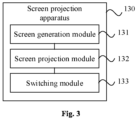
- Fig. 3 is a block diagram illustrating a screen projection apparatus according to an example.
- the apparatus 130 includes a screen generation module 131, a screen projection module 132, and a switching module 133.
- the screen generation module 131 is configured to, in response to receiving a screen projection instruction triggered by a user, determine a virtual screen to be projected according to a target interface displayed by a target screen of the electronic device;
- the switching module is also configured to acquire, from the first control switching instruction, a screen identifier of the virtual screen; and switch the control object of the external control device from the target screen to the virtual screen according to the screen identifier.
- the screen generation module is also configured to determine a screen projection object selected by the user from the target interface; generate a screen projection interface according to the screen projection object; and determine the virtual screen according to the screen projection interface, the virtual screen displaying the screen projection interface.
- the apparatus also includes: a first dispatching module, configured to, in response to receiving a first control event triggered by the user via the external control device, dispatch the first control event to the virtual screen.
- a first dispatching module configured to, in response to receiving a first control event triggered by the user via the external control device, dispatch the first control event to the virtual screen.
- the apparatus also includes: a second dispatching module configured to, in response to receiving a second control event triggered by the user through a control component of the electronic device, dispatch the second control event to the target screen.
- a second dispatching module configured to, in response to receiving a second control event triggered by the user through a control component of the electronic device, dispatch the second control event to the target screen.
- the switching module is also configured to, in response to receiving the second control switching instruction triggered by the user, switch the control object of the external control device from the virtual screen to the target screen.
- the disclosure provides a screen projection method, a screen projection apparatus, an electronic device, a storage medium, and a chip.
- a virtual screen to be projected is determined according to a target interface displayed by a target screen of the electronic device; the virtual screen is projected to a target screen projecting device; and, in response to receiving a first control switching instruction triggered by the user, a control object of the external control device is switched from the target screen to the virtual screen and a control object of a control component of the electronic device is set as the target screen.
- the interactive operation with the virtual screen can be realized through the external control device connected with the electronic device, and the interactive operation with the target screen can be realized through the control component of the electronic device itself, so that the user can control the target screen projection device and the electronic device at the same time, thus making the operation mode of the control operation more flexible and improving the work efficiency.
- the disclosure also provides a non-transitory computer-readable storage medium, on which computer program instructions are stored. When the program instructions are executed by the processor, the steps of the screen projection method provided by the disclosure are realized.
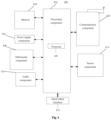
- Fig. 4 is a block diagram illustrating an electronic device 400 according to an example.
- the electronic device 400 can be a mobile phone, a computer, a digital broadcasting terminal, a message receiving and sending device, a game console, a tablet device, a medical device, a fitness device, a personal digital assistant, and the like.
- the electronic device 400 may include one or more of the following components: a processing component 402, a memory 404, a power supply component 406, a multimedia component 408, an audio component 410, an input/output interface 412, a sensor component 414, and a communication component 416.
- the processing component 402 typically controls the overall operations of the electronic device 400, such as operations associated with display, telephone call, data communication, a camera operation, and a recording operation.
- the processing component 402 may include one or more processors 420 to execute instructions to complete all or part of the steps of the above screen projection method.
- processing component 402 may include one or more modules to facilitate interactions between the processing component 402 and other components.
- processing component 402 may include a multimedia module to facilitate interaction between the multimedia component 408 and the processing component 402.
- the memory 404 is configured to store various types of data to support operations at the electronic device 400. Examples of such data include instructions, contact data, phone book data, messages, pictures, videos, and the like for any application or method operating on the electronic device 400.
- the memory 404 may be implemented by any type of volatile or non-volatile storage device or their combination, such as a static random access memory (SRAM), an electrically erasable programmable read-only memory (EEPROM), an erasable programmable read-only memory (EPROM), a programmable read only memory (PROM), a read-only memory (ROM), a magnetic memory, a flash memory, a disk or an optical disk.
- SRAM static random access memory
- EEPROM electrically erasable programmable read-only memory
- EPROM erasable programmable read-only memory
- PROM programmable read only memory
- ROM read-only memory
- the power supply component 406 provides power for various components of the electronic device 400.
- the power supply component 406 may include a power management system, one or more power supplies, and other components associated with power generating, managing, and distributing for the electronic device 400.
- the multimedia component 408 includes a screen providing an output interface between the electronic device 400 and the user.
- the screen may include a liquid crystal display (LCD) and a touch panel (TP). If the screen includes a touch panel, the screen may be implemented as a touch screen to receive an input signal from the user.
- the touch panel includes one or more touch sensors to sense touch, sliding, and gestures on the touch panel. The touch sensor may not only sense the boundary of a touch or slide operation, but also detect the duration and pressure associated with the touch or slide operation.
- the multimedia component 408 includes a front camera and/or a rear camera. When the electronic device 400 is in an operation mode, such as a shooting mode or video mode, the front camera and/or rear camera can receive external multimedia data. Each front camera and rear camera can be a fixed optical lens system or have focal length and optical zoom capability.
- the audio component 410 is configured to output and/or input audio signals.
- the audio component 410 includes a microphone (MIC), which is configured to receive an external audio signal when the electronic device 400 is in an operation mode, such as a call mode, a recording mode, and a voice recognition mode.
- the received audio signal may be further stored in the memory 404 or transmitted via the communication component 416.
- the audio component 410 also includes a speaker for outputting the audio signal.
- the input/output interface 412 provides an interface between the processing component 402 and the peripheral interface module, and the peripheral interface module can be a keyboard, a click wheel, a button, etc. These buttons may include, but are not limited to, the Home button, the Volume button, the Start button, and the Lock button.
- the sensor component 414 includes one or more sensors for providing status evaluation of various aspects for the electronic device 400.
- the sensor component 414 can detect the open/closed state of the electronic device 400, the relative positioning of the components, for example, the components are the display and keypad of the electronic device 400.
- the sensor component 414 can also detect the position change of the electronic device 400 or one component of the electronic device 400, the presence or absence of the user's contact with the electronic device 400, the orientation or acceleration/deceleration of the electronic device 400, and the temperature change of the electronic device 400.
- the sensor component 414 may include a proximity sensor configured to detect the presence of nearby objects without any physical contact.
- the sensor component 414 may also include a light sensor, such as a CMOS or CCD image sensor, for use in imaging applications.
- the sensor component 414 may also include an acceleration sensor, a gyroscope sensor, a magnetic sensor, a pressure sensor or a temperature sensor.
- the communication component 416 is configured to facilitate wired or wireless communication between the electronic device 400 and other devices.
- the electronic device 400 may access a wireless network based on a communication standard, such as WiFi, 2G or 3G, or their combination.
- the communication component 416 receives a broadcast signal or broadcast related information from an external broadcast management system via a broadcast channel.
- the communication component 416 also includes a near field communication (NFC) module to facilitate short range communication.
- the NFC module can be implemented based on radio frequency identification (RFID) technology, infrared data association (IrDA) technology, ultra wideband (UWB) technology, Bluetooth (BT) technology and other technologies.
- RFID radio frequency identification
- IrDA infrared data association
- UWB ultra wideband
- Bluetooth Bluetooth
- the electronic device 400 may be implemented by one or more application specific integrated circuits (ASICs), digital signal processors (DSPs), digital signal processing devices (DSPDs), programmable logic devices (PLDs), field programmable gate arrays (FPGAs), controllers, microcontrollers, microprocessors, or other electronic components for performing the above screen projection method.
- ASICs application specific integrated circuits
- DSPs digital signal processors
- DSPDs digital signal processing devices
- PLDs programmable logic devices
- FPGAs field programmable gate arrays
- controllers microcontrollers, microprocessors, or other electronic components for performing the above screen projection method.
- a non temporary computer-readable storage medium including instructions is also provided, such as a memory 404 including instructions, which can be executed by the processor 420 of the electronic device 400 to complete the above screen projection method.
- the non temporary computer-readable storage medium can be a ROM, a random access memory (RAM), a CD-ROM, a tape, a floppy disk, an optical data storage device, etc.
- the apparatus can also be a part of an independent electronic device.
- the apparatus can be an integrated circuit (IC) or a chip, and the integrated circuit can be one IC or a collection of a plurality of ICs; the chip can include but not limited to the following types: GPU (Graphics Processing Unit), CPU (Central Processing Unit), FPGA (Field Programmable Gate Array), DSP (Digital Signal Processor), ASIC (Application Specific Integrated Circuit), SOC (System on Chip, or system level chip), etc.
- the integrated circuit or chip can be used to execute executable instructions (or codes) to realize the screen projection method.
- the executable instructions can be stored in the integrated circuit or chip, or obtained from other apparatuses or devices.
- the integrated circuit or chip includes a processor, a memory, and interfaces for communication with other apparatuses.
- the executable instruction can be stored in the memory, and when the executable instruction is executed by the processor, the screen projection method described above can be realized; alternatively, the integrated circuit or chip can receive executable instructions through the interface and transmit them to the processor for execution, so as to realize the above screen projection method.
- a computer program product includes a computer program that can be executed by a programmable apparatus.
- the computer program has a code portion for executing the above screen projection method when executed by the programmable apparatus.
Landscapes
- Engineering & Computer Science (AREA)
- Theoretical Computer Science (AREA)
- General Engineering & Computer Science (AREA)
- Human Computer Interaction (AREA)
- Physics & Mathematics (AREA)
- General Physics & Mathematics (AREA)
- Software Systems (AREA)
- User Interface Of Digital Computer (AREA)
Applications Claiming Priority (1)
| Application Number | Priority Date | Filing Date | Title |
|---|---|---|---|
| CN202210912134.5A CN117519622A (zh) | 2022-07-29 | 2022-07-29 | 投屏方法、装置、电子设备、存储介质及芯片 |
Publications (2)
| Publication Number | Publication Date |
|---|---|
| EP4312111A1 true EP4312111A1 (fr) | 2024-01-31 |
| EP4312111B1 EP4312111B1 (fr) | 2026-05-06 |
Family
ID=84238543
Family Applications (1)
| Application Number | Title | Priority Date | Filing Date |
|---|---|---|---|
| EP22204606.2A Active EP4312111B1 (fr) | 2022-07-29 | 2022-10-31 | Procédé de projection d'écran, appareil de projection d'écran, dispositif électronique, support d'informations et puce |
Country Status (3)
| Country | Link |
|---|---|
| US (1) | US20240036803A1 (fr) |
| EP (1) | EP4312111B1 (fr) |
| CN (1) | CN117519622A (fr) |
Citations (4)
| Publication number | Priority date | Publication date | Assignee | Title |
|---|---|---|---|---|
| US20110275391A1 (en) * | 2010-05-07 | 2011-11-10 | Lg Electronics Inc. | Mobile terminal and controlling method thereof |
| US20140259029A1 (en) * | 2013-03-11 | 2014-09-11 | Samsung Electronics Co., Ltd. | Multi-input control method and system, and electronic device supporting the same |
| CN113687765A (zh) * | 2021-08-10 | 2021-11-23 | 北京小米移动软件有限公司 | 输入功能控制方法、输入功能控制装置及存储介质 |
| US20220066725A1 (en) * | 2018-12-29 | 2022-03-03 | Huawei Technologies Co., Ltd. | Message processing method, related apparatus, and system |
-
2022
- 2022-07-29 CN CN202210912134.5A patent/CN117519622A/zh active Pending
- 2022-10-26 US US18/049,965 patent/US20240036803A1/en active Pending
- 2022-10-31 EP EP22204606.2A patent/EP4312111B1/fr active Active
Patent Citations (5)
| Publication number | Priority date | Publication date | Assignee | Title |
|---|---|---|---|---|
| US20110275391A1 (en) * | 2010-05-07 | 2011-11-10 | Lg Electronics Inc. | Mobile terminal and controlling method thereof |
| US20140259029A1 (en) * | 2013-03-11 | 2014-09-11 | Samsung Electronics Co., Ltd. | Multi-input control method and system, and electronic device supporting the same |
| US20220066725A1 (en) * | 2018-12-29 | 2022-03-03 | Huawei Technologies Co., Ltd. | Message processing method, related apparatus, and system |
| CN113687765A (zh) * | 2021-08-10 | 2021-11-23 | 北京小米移动软件有限公司 | 输入功能控制方法、输入功能控制装置及存储介质 |
| US20230051203A1 (en) * | 2021-08-10 | 2023-02-16 | Beijing Xiaomi Mobile Software Co., Ltd. | Method and apparatus for controlling input function, and storage medium |
Also Published As
| Publication number | Publication date |
|---|---|
| US20240036803A1 (en) | 2024-02-01 |
| EP4312111B1 (fr) | 2026-05-06 |
| CN117519622A (zh) | 2024-02-06 |
Similar Documents
| Publication | Publication Date | Title |
|---|---|---|
| CN107037949B (zh) | 一种分屏显示方法及装置 | |
| CN107908351B (zh) | 应用界面的显示方法、装置及存储介质 | |
| US20170322709A1 (en) | Split-screen display method, apparatus and medium | |
| EP3232340A1 (fr) | Procédé de fonctionnement d'un afficheur et afficheur permettant d'afficher des pages d'un programme d'application | |
| EP3086539A1 (fr) | Procédé et dispositif de suppression de scène intelligente | |
| CN106537319A (zh) | 分屏显示方法及装置 | |
| CN106599251A (zh) | 展示主播排名的方法和装置 | |
| EP3136699A1 (fr) | Procédé et dispositif permettant de connecter un équipement externe | |
| EP3147802B1 (fr) | Procédé et appareil de traitement d'informations | |
| CN106547663A (zh) | 按键管理方法及装置 | |
| US20180088664A1 (en) | Method and device for switching environment picture | |
| US20220391446A1 (en) | Method and device for data sharing | |
| EP3901754A1 (fr) | Procédé et dispositif d'affichage d'application et support d'enregistrement | |
| CN106095285B (zh) | 操作执行方法及装置 | |
| CN109521923B (zh) | 悬浮窗控制方法、装置及存储介质 | |
| US10225387B2 (en) | Call processing method and device | |
| CN114268802B (zh) | 虚拟空间展示方法、装置、电子设备及存储介质 | |
| EP3128722A1 (fr) | Transmission de fichier; procéde, appareil et programme informatique. | |
| CN114296587A (zh) | 光标控制方法、装置、电子设备和存储介质 | |
| EP4312111A1 (fr) | Procédé de projection d'écran, appareil de projection d'écran, dispositif électronique, support d'informations et puce | |
| CN112423092A (zh) | 视频录制方法和视频录制装置 | |
| US11209665B2 (en) | Application interface display method and apparatus, and storage medium | |
| JP2018500612A (ja) | 情報処理方法および装置 | |
| CN112463085B (zh) | 功能集合系统及功能集合设备 | |
| CN118259797A (zh) | 信息显示方法、装置、存储介质及芯片 |
Legal Events
| Date | Code | Title | Description |
|---|---|---|---|
| PUAI | Public reference made under article 153(3) epc to a published international application that has entered the european phase |
Free format text: ORIGINAL CODE: 0009012 |
|
| STAA | Information on the status of an ep patent application or granted ep patent |
Free format text: STATUS: REQUEST FOR EXAMINATION WAS MADE |
|
| 17P | Request for examination filed |
Effective date: 20221031 |
|
| AK | Designated contracting states |
Kind code of ref document: A1 Designated state(s): AL AT BE BG CH CY CZ DE DK EE ES FI FR GB GR HR HU IE IS IT LI LT LU LV MC ME MK MT NL NO PL PT RO RS SE SI SK SM TR |
|
| RBV | Designated contracting states (corrected) |
Designated state(s): AL AT BE BG CH CY CZ DE DK EE ES FI FR GB GR HR HU IE IS IT LI LT LU LV MC ME MK MT NL NO PL PT RO RS SE SI SK SM TR |
|
| STAA | Information on the status of an ep patent application or granted ep patent |
Free format text: STATUS: EXAMINATION IS IN PROGRESS |
|
| 17Q | First examination report despatched |
Effective date: 20241212 |
|
| GRAP | Despatch of communication of intention to grant a patent |
Free format text: ORIGINAL CODE: EPIDOSNIGR1 |
|
| STAA | Information on the status of an ep patent application or granted ep patent |
Free format text: STATUS: GRANT OF PATENT IS INTENDED |
|
| INTG | Intention to grant announced |
Effective date: 20251218 |
|
| GRAS | Grant fee paid |
Free format text: ORIGINAL CODE: EPIDOSNIGR3 |
|
| GRAA | (expected) grant |
Free format text: ORIGINAL CODE: 0009210 |
|
| STAA | Information on the status of an ep patent application or granted ep patent |
Free format text: STATUS: THE PATENT HAS BEEN GRANTED |