EP4332741A1 - Procédé d'affichage et dispositif électronique - Google Patents
Procédé d'affichage et dispositif électronique Download PDFInfo
- Publication number
- EP4332741A1 EP4332741A1 EP22794732.2A EP22794732A EP4332741A1 EP 4332741 A1 EP4332741 A1 EP 4332741A1 EP 22794732 A EP22794732 A EP 22794732A EP 4332741 A1 EP4332741 A1 EP 4332741A1
- Authority
- EP
- European Patent Office
- Prior art keywords
- pointer
- application
- target
- display
- icon
- Prior art date
- Legal status (The legal status is an assumption and is not a legal conclusion. Google has not performed a legal analysis and makes no representation as to the accuracy of the status listed.)
- Pending
Links
Images



Classifications
-
- G—PHYSICS
- G06—COMPUTING OR CALCULATING; COUNTING
- G06F—ELECTRIC DIGITAL DATA PROCESSING
- G06F3/00—Input arrangements for transferring data to be processed into a form capable of being handled by the computer; Output arrangements for transferring data from processing unit to output unit, e.g. interface arrangements
- G06F3/01—Input arrangements or combined input and output arrangements for interaction between user and computer
- G06F3/048—Interaction techniques based on graphical user interfaces [GUI]
- G06F3/0481—Interaction techniques based on graphical user interfaces [GUI] based on specific properties of the displayed interaction object or a metaphor-based environment, e.g. interaction with desktop elements like windows or icons, or assisted by a cursor's changing behaviour or appearance
- G06F3/04817—Interaction techniques based on graphical user interfaces [GUI] based on specific properties of the displayed interaction object or a metaphor-based environment, e.g. interaction with desktop elements like windows or icons, or assisted by a cursor's changing behaviour or appearance using icons
-
- G—PHYSICS
- G06—COMPUTING OR CALCULATING; COUNTING
- G06F—ELECTRIC DIGITAL DATA PROCESSING
- G06F3/00—Input arrangements for transferring data to be processed into a form capable of being handled by the computer; Output arrangements for transferring data from processing unit to output unit, e.g. interface arrangements
- G06F3/01—Input arrangements or combined input and output arrangements for interaction between user and computer
- G06F3/048—Interaction techniques based on graphical user interfaces [GUI]
- G06F3/0484—Interaction techniques based on graphical user interfaces [GUI] for the control of specific functions or operations, e.g. selecting or manipulating an object, an image or a displayed text element, setting a parameter value or selecting a range
- G06F3/04845—Interaction techniques based on graphical user interfaces [GUI] for the control of specific functions or operations, e.g. selecting or manipulating an object, an image or a displayed text element, setting a parameter value or selecting a range for image manipulation, e.g. dragging, rotation, expansion or change of colour
-
- G—PHYSICS
- G04—HOROLOGY
- G04G—ELECTRONIC TIME-PIECES
- G04G21/00—Input or output devices integrated in time-pieces
-
- G—PHYSICS
- G04—HOROLOGY
- G04G—ELECTRONIC TIME-PIECES
- G04G9/00—Visual time or date indication means
-
- G—PHYSICS
- G04—HOROLOGY
- G04G—ELECTRONIC TIME-PIECES
- G04G9/00—Visual time or date indication means
- G04G9/0082—Visual time or date indication means by building-up characters using a combination of indicating elements and by selecting desired characters out of a number of characters or by selecting indicating elements the positions of which represents the time, i.e. combinations of G04G9/02 and G04G9/08
-
- G—PHYSICS
- G06—COMPUTING OR CALCULATING; COUNTING
- G06F—ELECTRIC DIGITAL DATA PROCESSING
- G06F1/00—Details not covered by groups G06F3/00 - G06F13/00 and G06F21/00
- G06F1/16—Constructional details or arrangements
- G06F1/1613—Constructional details or arrangements for portable computers
- G06F1/163—Wearable computers, e.g. on a belt
-
- G—PHYSICS
- G06—COMPUTING OR CALCULATING; COUNTING
- G06F—ELECTRIC DIGITAL DATA PROCESSING
- G06F3/00—Input arrangements for transferring data to be processed into a form capable of being handled by the computer; Output arrangements for transferring data from processing unit to output unit, e.g. interface arrangements
- G06F3/01—Input arrangements or combined input and output arrangements for interaction between user and computer
- G06F3/048—Interaction techniques based on graphical user interfaces [GUI]
- G06F3/0481—Interaction techniques based on graphical user interfaces [GUI] based on specific properties of the displayed interaction object or a metaphor-based environment, e.g. interaction with desktop elements like windows or icons, or assisted by a cursor's changing behaviour or appearance
- G06F3/04812—Interaction techniques based on cursor appearance or behaviour, e.g. being affected by the presence of displayed objects
-
- G—PHYSICS
- G06—COMPUTING OR CALCULATING; COUNTING
- G06F—ELECTRIC DIGITAL DATA PROCESSING
- G06F3/00—Input arrangements for transferring data to be processed into a form capable of being handled by the computer; Output arrangements for transferring data from processing unit to output unit, e.g. interface arrangements
- G06F3/01—Input arrangements or combined input and output arrangements for interaction between user and computer
- G06F3/048—Interaction techniques based on graphical user interfaces [GUI]
- G06F3/0481—Interaction techniques based on graphical user interfaces [GUI] based on specific properties of the displayed interaction object or a metaphor-based environment, e.g. interaction with desktop elements like windows or icons, or assisted by a cursor's changing behaviour or appearance
- G06F3/0482—Interaction with lists of selectable items, e.g. menus
-
- G—PHYSICS
- G06—COMPUTING OR CALCULATING; COUNTING
- G06F—ELECTRIC DIGITAL DATA PROCESSING
- G06F3/00—Input arrangements for transferring data to be processed into a form capable of being handled by the computer; Output arrangements for transferring data from processing unit to output unit, e.g. interface arrangements
- G06F3/01—Input arrangements or combined input and output arrangements for interaction between user and computer
- G06F3/048—Interaction techniques based on graphical user interfaces [GUI]
- G06F3/0484—Interaction techniques based on graphical user interfaces [GUI] for the control of specific functions or operations, e.g. selecting or manipulating an object, an image or a displayed text element, setting a parameter value or selecting a range
- G06F3/04842—Selection of displayed objects or displayed text elements
-
- G—PHYSICS
- G06—COMPUTING OR CALCULATING; COUNTING
- G06F—ELECTRIC DIGITAL DATA PROCESSING
- G06F3/00—Input arrangements for transferring data to be processed into a form capable of being handled by the computer; Output arrangements for transferring data from processing unit to output unit, e.g. interface arrangements
- G06F3/01—Input arrangements or combined input and output arrangements for interaction between user and computer
- G06F3/048—Interaction techniques based on graphical user interfaces [GUI]
- G06F3/0487—Interaction techniques based on graphical user interfaces [GUI] using specific features provided by the input device, e.g. functions controlled by the rotation of a mouse with dual sensing arrangements, or of the nature of the input device, e.g. tap gestures based on pressure sensed by a digitiser
-
- G—PHYSICS
- G06—COMPUTING OR CALCULATING; COUNTING
- G06F—ELECTRIC DIGITAL DATA PROCESSING
- G06F3/00—Input arrangements for transferring data to be processed into a form capable of being handled by the computer; Output arrangements for transferring data from processing unit to output unit, e.g. interface arrangements
- G06F3/01—Input arrangements or combined input and output arrangements for interaction between user and computer
- G06F3/048—Interaction techniques based on graphical user interfaces [GUI]
- G06F3/0487—Interaction techniques based on graphical user interfaces [GUI] using specific features provided by the input device, e.g. functions controlled by the rotation of a mouse with dual sensing arrangements, or of the nature of the input device, e.g. tap gestures based on pressure sensed by a digitiser
- G06F3/0488—Interaction techniques based on graphical user interfaces [GUI] using specific features provided by the input device, e.g. functions controlled by the rotation of a mouse with dual sensing arrangements, or of the nature of the input device, e.g. tap gestures based on pressure sensed by a digitiser using a touch-screen or digitiser, e.g. input of commands through traced gestures
- G06F3/04883—Interaction techniques based on graphical user interfaces [GUI] using specific features provided by the input device, e.g. functions controlled by the rotation of a mouse with dual sensing arrangements, or of the nature of the input device, e.g. tap gestures based on pressure sensed by a digitiser using a touch-screen or digitiser, e.g. input of commands through traced gestures for inputting data by handwriting, e.g. gesture or text
-
- G—PHYSICS
- G06—COMPUTING OR CALCULATING; COUNTING
- G06F—ELECTRIC DIGITAL DATA PROCESSING
- G06F2203/00—Indexing scheme relating to G06F3/00 - G06F3/048
- G06F2203/048—Indexing scheme relating to G06F3/048
- G06F2203/04806—Zoom, i.e. interaction techniques or interactors for controlling the zooming operation
-
- G—PHYSICS
- G06—COMPUTING OR CALCULATING; COUNTING
- G06F—ELECTRIC DIGITAL DATA PROCESSING
- G06F2203/00—Indexing scheme relating to G06F3/00 - G06F3/048
- G06F2203/048—Indexing scheme relating to G06F3/048
- G06F2203/04808—Several contacts: gestures triggering a specific function, e.g. scrolling, zooming, right-click, when the user establishes several contacts with the surface simultaneously; e.g. using several fingers or a combination of fingers and pen
Definitions
- This application pertains to the field of terminal technologies, and specifically relates to a display method and an electronic device.
- display of an application interface in an electronic device is generally triggered by a physical button or an icon control, and is restricted by material quality and a force feedback of the physical button, and scattered distribution of icon controls, resulting a poor effect of triggering display of the application interface.
- Embodiments of this application aim to provide a display method and an electronic device, to resolve a problem that an effect of triggering display of an application interface is poor.
- an embodiment of this application provides a display method, and the method includes:
- an embodiment of this application provides a display apparatus, and the apparatus includes:
- an embodiment of this application provides an electronic device.
- the electronic device includes a processor, a memory, and a program or an instruction that is stored in the memory and executable on the processor, where when the program or the instruction is executed by the processor, steps of the method in the first aspect are implemented.
- an embodiment of this application provides a readable storage medium.
- the readable storage medium stores a program or an instruction, and when the program or the instruction is executed by a processor, steps of the method in the first aspect are implemented.
- an embodiment of this application provides a chip.
- the chip includes a processor and a communication interface, the communication interface is coupled to the processor, and the processor is configured to run a program or an instruction to implement the method in the first aspect.
- an embodiment of this application provides a computer program product.
- the computer program product is stored in a non-volatile storage medium, and the computer program product is executed by at least one processor to implement the method in the first aspect.
- an electronic device configured to perform the method in the first aspect.
- a time dial is displayed, where the time dial includes K pointers, and the K pointers are used to indicate time; a first input performed for a first pointer in the K pointers is received; M application icons associated with the first pointer are displayed in response to the first input, where M is a positive integer; and an application interface corresponding to a target icon is displayed in a case that the first pointer indicates the target icon, where the M application icons include the target icon.
- the time dial may be displayed, and display of the application interface may be triggered by a pointer on the time dial.
- the pointer may not be restricted by material quality and a force feedback relative to a physical button, but the pointer may be triggered to display M application icons associated with the pointer relative to an icon control. Therefore, the application interface that needs to be displayed is selected, and the pointer may not be restricted by scattered distribution of icon controls, thereby improving an effect of triggering display of the application interface.
- first”, second, and the like are intended to distinguish between similar objects but do not describe a specific order or sequence. It should be understood that, data used in such a way are interchangeable in proper circumstances, so that the embodiments of this application can be implemented in an order other than the order illustrated or described herein.
- Objects classified by "first”, “second”, and the like are usually of a same type, and the number of objects is not limited. For example, there may be one or more first objects.
- "and/or" represents at least one of connected objects, and a character “/" generally represents an "or” relationship between associated objects.
- FIG. 1 is a flowchart of a display method according to an embodiment of this application. As shown in FIG. 1 , the method includes the following steps: Step 101: Display a time dial, where the time dial includes K pointers, and the K pointers are used to indicate time.
- the display method provided in this embodiment of this application may be performed by a display apparatus or a control module that is in the display apparatus and that is configured to perform the display method.
- the time dial is a general term of elements for indicating time, and may include each element for indicating time, where a pointer is an essential element for indicating time in the time dial, the time dial may include K pointers, and K is a positive integer. Certainly, in addition to the K pointers, the time dial may include a time scale. This is not specifically limited herein.
- the K pointers include at least one of an hour hand, a minute hand, and a second hand. In an optional implementation, the K pointers include all of the hour hand, the minute hand, and the second hand.
- a shape of the time dial may be a circle, a square, or the like.
- the shape of the time dial is a circle.
- the time dial may be displayed on an interface of the display apparatus by using an installed dial plug-in, or the time dial may be displayed on an interface of the display apparatus by invoking a corresponding program.
- the interface of the display apparatus may be a main interface, an interface displayed when a screen is locked, or may be another interface. This is not specifically limited herein.
- Step 102 Receive a first input performed for a first pointer in the K pointers.
- the K pointers may be a control in a pointer form, that is, the display apparatus may receive an input of a user based on a pointer, and perform a related function based on the input of the user.
- the pointer may have a specific pointing function.
- a feature of the pointer may include at least one of the following:
- the user may control the display apparatus to perform a related function for the operation.
- the first input may be a voice input, a gesture input, a touch input, or the like, and the touch input may include a touch and hold input, a slide input, a drag input, and the like.
- the first input is a touch input.
- the first input may include a touch and hold input and a slide input
- the user may press an hour hand for a long time to enable the hour hand to enter a target state.
- a pointer in the target state may be used as a control in a pointer form, and sliding is performed on the pointer, so that the pointer can be stretched, contracted, or rotated.
- Step 103 Display, in response to the first input, M application icons associated with the first pointer.
- M is a positive integer.
- the M application icons may be preset application icons, or may be application icons corresponding to the most recently used applications. This is not specifically limited herein.
- the preset application icon may be a shortcut function icon, or may be an application icon corresponding to an application.
- M may be 1, or may be determined based on a length or a rotation angle of the first pointer. This is not specifically limited herein.
- Different first pointers may also be associated with different application icons.
- the hour hand may be associated with an application icon corresponding to a most recently used application, where the most recently used application may be an application that was last used by the user at a current time.
- the minute hand may be associated an application icon corresponding to an application of a call function, a sports function, and a short message function.
- the second hand may be associated with an application icon corresponding to an application of breathing training, a physical activity value, heart rate monitoring, sleep monitoring, pressure monitoring, blood oxygen monitoring, music, and weather.
- Step 104 Display an application interface corresponding to a target icon in a case that the first pointer indicates the target icon, where the M application icons include the target icon.
- the first pointer has a pointing function, and may indicate an icon by using any one of a pointing position, a length, and a rotation angle of the first pointer.
- the application interface corresponding to the target icon may be immediately displayed, or the application interface corresponding to the target icon may be displayed after the first pointer is released. This is not specifically limited herein.
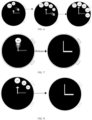
- an application corresponding to the target icon is started after the first pointer is released, and the application interface corresponding to the target icon is displayed, as shown in FIG. 2 .
- a time dial is displayed, where the time dial includes K pointers, and the K pointers are used to indicate time; a first input performed for a first pointer in the K pointers is received; M application icons associated with the first pointer are displayed in response to the first input, where M is a positive integer; and an application interface corresponding to a target icon is displayed in a case that the first pointer indicates the target icon, where the M application icons include the target icon.
- the time dial may be displayed, and display of the application interface may be triggered by a pointer on the time dial.
- the pointer may not be restricted by material quality and a force feedback relative to a physical button, but the pointer may be triggered to display M application icons associated with the pointer relative to an icon control. Therefore, the application interface that needs to be displayed is selected, and the pointer may not be restricted by scattered distribution of icon controls, thereby improving an effect of triggering display of the application interface.
- a specific feature design may be performed by using a product feature of the display apparatus, to improve a use value of a pointer.
- step 103 specifically includes:
- the display state of the first pointer is a display state of the first pointer on an interface of the display apparatus.
- the display state of the first pointer is an initial state
- the first pointer in the initial state is used to display time, and the first pointer is touched and held, so that the display state of the first pointer can change.
- the hour hand, the minute hand, or the second hand may be touched and held to enable the hour hand, the minute hand, or the second hand to be in a target state, where the target state includes at least one of a stretching state, a contraction state, and a rotating state.
- the hour hand is touched and held, the hour hand is in a stretching state, and other content may be dimmed, as shown in FIG. 3 and FIG. 4 .
- a display state of the hour hand may be changed, and a pointer in the display state may be a control 302 in a pointer form.
- a manner of triggering a minute hand and a second hand is similar to a manner of triggering an hour hand to display a control in a pointer form, and details are not described herein again.
- the pointer in the display state may include two endpoints, where one endpoint is a fixed end 3021, the other endpoint is a pointing end 3022, and a length from the fixed end to the pointing end is a length of the pointer.
- the length of the first pointer may be a preset minimum value, which may be stretched on this basis, or may be a preset maximum value, which may be contracted on this basis. This is not specifically limited herein.
- the user may control the first pointer to stretch or contract the length from the fixed end to the pointing end based on the fixed end, or may control the first pointer to rotate based on a length.
- the user may perform an operation such as stretching, contraction, or rotation on the first pointer.
- the display apparatus may adjust the display state of the first pointer to the first display state, where the first display state matches an input parameter of the first input.
- the first display state of the first pointer is the length of the first pointer, and the input parameter of the first input is stretching by 5 mm. Before stretching, the length of the first pointer is 5 mm. Correspondingly, the display state of the first pointer is adjusted to increase a stretched length. In this case, the length of the first pointer is 1 cm.
- the M application icons associated with the first display state may be displayed, where the M application icons displayed in different first display states may be different. Therefore, different application icons may be displayed by using different display states of the first pointer. In this way, an application interface corresponding to an application icon that needs to be displayed is selected, thereby improving an effect of triggering display of the application interface.
- the first display state of the first pointer includes at least one of the following:
- M application icons that are in a one-to-one correspondence with the most recently used M applications may be displayed, or preset M application icons may be displayed, where M may be determined based on the target length, and M is greater than 1; or only an application icon corresponding to one recently used application may be displayed, or only one preset application icon may be displayed, where the application icon may be determined based on the target length.
- M application icons that are in a one-to-one correspondence with the most recently used M applications may be displayed, or preset M application icons may be displayed, where M may be determined based on the target angle, and M is greater than 1; or only an application icon corresponding to one recently used application may be displayed, or only one preset application icon may be displayed, where the application icon may be determined based on the target angle.
- a display manner of the M application icons may be overlapping display.
- the M application icons are displayed in a pointing direction of the first pointer in an overlapping manner, or may be displayed at intervals on the time dial such as an edge of the time dial. This is not specifically limited herein.
- the M application icons may be displayed in the pointing direction of the first pointer in an overlapping manner, and the target position may point to an application icon displayed at the top layer.
- M may be determined based on the target length and/or the target angle.
- the hour hand may be associated with an application icon corresponding to the most recently used application, and a quantity of application icons may be set according to an actual situation. For example, 8 or 15 application icons may be set.
- a length of the pointer may be equally divided based on a maximum length of the pointer, where a quantity for equal division may be equal to a quantity of application icons, and each length corresponds to display of one application icon; or a rotation angle of the pointer may be equally divided based on a maximum rotation angle of the pointer, where a quantity for equal division may be equal to a quantity of application icons, and each rotation angle corresponds to display of one application icon.
- application icons corresponding to the most recently used applications may be successively displayed based on the target length or the target angle. If the target length is shorter or the target angle is smaller, an application icon of an application that is used closer to the current time is displayed, and if the target length is longer or the target angle is larger, an application icon of an application that is used farther away from the current time is displayed.
- the minute hand may be associated with a preset application icon, and a quantity of application icons may also be set according to an actual situation. For example, three application icons may be set.
- a length of the pointer may be equally divided based on a maximum length of the pointer, where a quantity for equal division may be equal to a quantity of application icons, and each length corresponds to display of one application icon.
- preset application icons may be successively displayed based on the target length.
- application icons corresponding to applications of a call function, a sports function, and a short message function are successively displayed in an ascending order of lengths based on the target length.
- the second hand may be associated with a preset application icon, and a quantity of application icons may also be set according to an actual situation.
- a quantity of application icons may also be set according to an actual situation.
- eight application icons may be set.
- a length of the pointer may be equally divided based on a maximum length of the pointer, where a quantity for equal division may be equal to a quantity of application icons, and each length corresponds to display of one application icon.
- preset application icons may be successively displayed based on the target length.
- application icons corresponding to applications of breathing training, a physical activity value, heart rate monitoring, sleep monitoring, pressure monitoring, blood oxygen monitoring, music, and weather are successively displayed in an ascending order of lengths based on the target length.
- M may be a positive integer, and may be 1, and only one application icon corresponding to the target length may be displayed. M may be alternatively greater than 1, and an application icon corresponding to each length of the pointer may be displayed in a stretching process.
- a value of M may be determined by determining a quantity for equal length division corresponding to the target length. For example, a maximum length of the pointer is 4 cm and is divided into 8 equal parts in advance, each of which is 5 mm. When the target length is 3.3 cm, it may be determined that the quantity for equal length division corresponding to the target length is 7, that is, M is 7.
- an application icon A corresponding to the length may be displayed based on the length of the first pointer.
- the application icon A is hidden, and an application icon B corresponding to a current length is displayed.
- a previously displayed application icon may be displayed through gradient fading-out, or application icon may be successively displayed in an ascending order of sizes, that is, an application icon corresponding to each length of the first pointer is displayed in the stretching process.
- application icons corresponding to the lengths of the first pointer are successively displayed through gradient fading-out.
- An application icon corresponding to the target length of the first pointer is displayed at the top layer, and an application icon corresponding to the first length of the first pointer is displayed at the bottom.
- application icons corresponding to the lengths of the first pointer are successively displayed in the ascending order of sizes until a display length corresponding to the application icon is exceeded.
- a size of the application icon does not change.
- the successively displayed application icons may be displayed in a clockwise direction at an edge of the time dial, and the displayed application icons are preferably not overlapped with each other.
- the display state of the first pointer is set to include at least one of the pointing position, the length, and the rotation angle. In this way, a type of the first display state can be more diversified, thereby improving flexibility of displaying an application icon.
- the first display state is the target length or the target angle
- the method further includes: in a case that the first display state is the target length, the M application icons are any one of the following:
- the M application icons include application icons corresponding to the most recently used applications.
- Application icons corresponding to the most recently used applications may be successively displayed based on the target length. In a stretching process, if the target length is shorter, an application icon of an application that is used closer to the current time is displayed, and if the target length is longer, an application icon of an application that is used farther away from the current time is displayed.
- the application icons corresponding to the most recently used applications when the application icons corresponding to the most recently used applications are being displayed, the application icons corresponding to each length in the target length may be displayed, that is, the application icons corresponding to the first M applications arranged in the ascending order of intervals from the current time in the most recently used applications are displayed, where M is determined based on the target length, and may be specifically a quantity for equal length division corresponding to the target length.
- Application icons corresponding to the most recently used applications may be successively displayed based on the target angle. If the target angle is smaller, an application icon of an application that is used closer to the current time is displayed, and if the target angle is larger, an application icon of an application that is used farther away from the current time is displayed.
- the application icons corresponding to the most recently used applications when the application icons corresponding to the most recently used applications are being displayed, the application icons corresponding to each angle in the target angle may be displayed, that is, the application icons corresponding to the first M applications arranged in the ascending order of intervals from the current time in the most recently used applications are displayed, where M is determined based on the target angle, and may be specifically a quantity for equal angle division corresponding to the target angle.
- an application icon corresponding to the target length may also be displayed, that is, the application icon corresponding to the N-th application arranged in the ascending order of intervals from the current time in the most recently used applications are displayed, where N is determined based on the target length, and is specifically a quantity for equal length division corresponding to the target length.
- An application icon corresponding to the target angle may be alternatively displayed, that is, the application icon corresponding to the N-th application arranged in the ascending order of intervals from the current time in the most recently used applications are displayed, where N is determined based on the target angle, and is specifically a quantity for equal angle division corresponding to the target angle.
- the target length or the target angle of the first pointer is associated with an application icon corresponding to the most recently used application.
- a stretching process if the target length is shorter or the target angle is smaller, an application icon of an application that is used closer to the current time is displayed, and if the target length is longer or the target angle is larger, an application icon of an application that is used farther away from the current time is displayed.
- the user may choose, by stretching or rotating the first pointer, to start applications corresponding to different application icons based on a stretching length or a rotation angle, and display a corresponding application interface, thereby improving a startup effect of entering the most recently used application and improving user experience and interest of entering the most recently used application.
- step 104 specifically includes:
- the first pointer indicates the target icon. In a case that it is determined that the first pointer indicates the target icon, the application interface corresponding to the target icon is displayed. In a case that it is determined that the first pointer does not indicate the target icon, when a finger of the user touching the first pointer is released, the first pointer may be restored to an initial state, and the first pointer in the initial state is used to indicate time, as shown in FIG. 7 and FIG. 8 .
- Whether the first pointer indicates the target icon may be determined by using any one of the pointing position, the rotation angle, and the length of the first pointer.
- the application interface corresponding to the target icon may be displayed, as shown in FIG. 2 .
- the pointing position of the first pointer may point to one or more application icons. This is not specifically limited herein.
- the application interface corresponding to the target icon may be displayed.
- the application interface corresponding to the target icon may be displayed.
- the method further includes:
- a display manner of the M application icons is being displayed at intervals at an edge of the time dial.
- the first pointer may be rotated to adjust the display state of the first pointer to a second display state, where the second display state may be used to indicate the target icon, so that the rotation angle of the first pointer corresponds to an application icon to be started, that is, the target icon.
- the target icon is in a selected state, that is, the first pointer indicates the target icon.
- the first pointer may not be rotated.
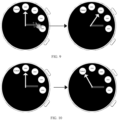
- the rotation angle of the first pointer may also correspond to the target icon, and the target icon may be the earliest displayed application icon, as shown in FIG. 6 .
- the preset length may be a maximum length that the first pointer is stretched to, or may be a length of the first pointer when a quantity for equal length division is a specific quantity. For example, when the quantity for equal length division is 4, that is, at least four application icons are displayed, the rotation angle of the first pointer may be corresponding to the target icon.
- the preset length is a maximum length that the first pointer is stretched to.
- the first pointer when the first pointer is not stretched to a maximum length, the first pointer cannot be rotated, and the first pointer is released, so that the display state of the first pointer is restored to the initial state, as shown in FIG. 8 .
- the first pointer When the first pointer is stretched to a maximum length, the first pointer may be rotated, and a rotation manner of the first pointer may be non-infinite rotation. During rotation, a width of an application icon may be used as an interval, and a specific application icon corresponding to the rotation angle of the first pointer is temporarily selected.
- an initial default rotation angle of the first pointer is 0, and the earliest displayed application icon in the M application icons is correspondingly selected.
- the rotation angle of the first pointer is correspondingly obtained, and the target icon is determined based on the rotation angle.
- the method further includes:
- the preset icon may be a "cancel" icon. As shown in FIG. 10 , when the first pointer is stretched to a maximum length, the first pointer is rotated, so that the rotation angle of the first pointer corresponds to the "cancel" icon. In this case, the first pointer is released, and the display state of the first pointer may be restored to the initial state.
- the first pointer may indicate the target icon in different manners, and in a case that the first pointer indicates the target icon, the application interface corresponding to the target icon is displayed. In this way, flexibility of indicating an icon by the first pointer can be improved, thereby improving an effect of triggering display of the application interface.
- M is greater than 1, and before the displaying the application interface corresponding to the target icon in a case that a pointing position of the first pointer points to the target icon, the method further includes: in a case that a pointing direction of the first pointer displays a plurality of application icons in the M application icons, determining that an application icon displayed at a top layer in the pointing direction of the first pointer is the target icon pointed to by the pointing position of the first pointer.
- the pointing direction of the first pointer displays a plurality of application icons in the M application icons, that is, when the plurality of application icons in the M application icons are displayed in the pointing direction of the first pointer in an overlapping manner
- the display duration of the application icon displayed at the top layer in the M application icons is greater than the preset threshold, that is, the user no longer stretches the first pointer within a display time of the application icon displayed at the top layer.
- the application icon displayed at the top layer is in a selected state, that is, it is determined that the application icon displayed at the top layer in the pointing direction of the first pointer is the target icon pointed to by the pointing position of the first pointer.
- the preset threshold may be set according to an actual situation. For example, the preset threshold is set to 1s.
- the application icon displayed at the top layer reaches 1s, the suspended application icon may be slightly magnified and displayed in a selected state. As shown in FIG. 2 , in this case, an application corresponding to the application icon in the selected state may be entered after the hand is released, and a corresponding application interface is displayed.
- the application corresponding to the target icon may be started after the hand is released, and the corresponding application interface is displayed. In this way, the application can be conveniently started by using the first pointer, and the corresponding application interface is displayed.
- the method before the displaying the application interface corresponding to the target icon in a case that a rotation angle of the first pointer corresponds to the target icon, the method further includes:
- the rotation angle of the first pointer in the first display state may be obtained.
- the rotation angle may be 0 by default, and the earliest displayed application icon in the M application icons may be correspondingly selected.
- the rotation angle of the first pointer relative to the initial position may be obtained, where the initial position is a position of the first pointer before the first input is received.
- the application interface corresponding to the target icon may be displayed.
- the rotation angle of the first pointer relative to the second pointer in the K pointers may also be obtained.
- the first pointer is an hour hand and the second pointer is a minute hand
- a rotation angle of the hour hand relative to the minute hand may be obtained.
- the application interface corresponding to the target icon may be displayed.
- the rotation angle of the first pointer may be obtained in different manners, to select a to-be-selected application icon to start an application, and display a corresponding application interface. In this way, the rotation angle of the first pointer can be used to flexibly select an application icon to start an application, and display a corresponding application interface.
- the display method provided in the embodiments of this application may be performed by a display apparatus, or a control module that is in the display apparatus and that is configured to perform the display method.
- a display apparatus or a control module that is in the display apparatus and that is configured to perform the display method.
- an example in which the display apparatus performs the display method is used to describe the display apparatus provided in the embodiments of this application.
- FIG. 11 is a structural diagram of a display apparatus according to an embodiment of this application. As shown in FIG. 11 , a display apparatus 1100 includes:
- the second display module 1103 includes:
- the first display state of the first pointer includes at least one of the following:
- the first display state is the target length or the target angle
- the apparatus further includes: in a case that the first display state is the target length, the M application icons are any one of the following:
- the third display module 1104 includes:
- M is greater than 1
- the apparatus further includes: a determining module, configured to: in a case that a pointing direction of the first pointer displays a plurality of application icons in the M application icons, determine that an application icon displayed at the top layer in the pointing direction of the first pointer is the target icon pointed to by the pointing position of the first pointer.
- the apparatus further includes:
- the first display module 1101 displays a time dial, where the time dial includes K pointers, and the K pointers are used to indicate time; the receiving module 1102 receives a first input performed for a first pointer in the K pointers; the second display module 1103 displays, in response to the first input, M application icons associated with the first pointer, where M is a positive integer; and the third display module 1104 displays an application interface corresponding to a target icon in a case that the first pointer indicates the target icon, where the M application icons include the target icon.
- the time dial may be displayed, and display of the application interface may be triggered by a pointer on the time dial.
- the pointer may not be restricted by material quality and a force feedback relative to a physical button, but the pointer may be triggered to display M application icons associated with the pointer relative to an icon control. Therefore, the application interface that needs to be displayed is selected, and the pointer may not be restricted by scattered distribution of icon controls, thereby improving an effect of triggering display of the application interface.
- the display apparatus in this embodiment of this application may be an apparatus, or may be a component, an integrated circuit, or a chip in a terminal.
- the apparatus may be a mobile electronic device, or may be a non-mobile electronic device.
- the mobile electronic device may be a mobile phone, a tablet computer, a laptop computer, a palmtop computer, an in-vehicle electronic device, a wearable device, an ultra-mobile personal computer (ultra-mobile personal computer, UMPC), a netbook, or a personal digital assistant (personal digital assistant, PDA).
- the non-mobile electronic device may be a server, a network attached storage (Network Attached Storage, NAS), a personal computer (personal computer, PC), a television (television, TV), an automated teller machine, or a self-service machine. This is not specifically limited in this embodiment of this application.
- Network Attached Storage NAS
- PC personal computer
- TV television
- automated teller machine or a self-service machine. This is not specifically limited in this embodiment of this application.
- the display apparatus in this embodiment of this application may be an apparatus with an operating system.
- the operating system may be an Android (Android) operating system, an iOS operating system, or another possible operating system. This is not specifically limited in this embodiment of this application.
- the display apparatus provided in this embodiment of this application can implement the processes implemented in the method embodiments in FIG. 1 to FIG. 10 . To avoid repetition, details are not described herein again.
- an embodiment of this application further provides an electronic device 1200, including a processor 1201, a memory 1202, and a program or an instruction that is stored in the memory 1202 and executable on the processor 1201, where when the program or the instruction is executed by the processor 1201, the processes of the foregoing display method embodiment are implemented and a same technical effect can be achieved. To avoid repetition, details are not described herein again.
- the electronic device in this embodiment of this application includes the foregoing mobile electronic device and the foregoing non-mobile electronic device.
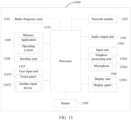
- FIG. 13 is a schematic structural diagram of hardware of an electronic device according to an embodiment of this application.
- An electronic device 1300 includes but is not limited to components such as a radio frequency unit 1301, a network module 1302, an audio output unit 1303, an input unit 1304, a sensor 1305, a display unit 1306, a user input unit 1307, an interface unit 1308, a memory 1309, and a processor 1310.
- the electronic device 1300 may further include a power supply (such as a battery) that supplies power to each component.
- the power supply may be logically connected to the processor 1310 by using a power supply management system, to implement functions such as charging and discharging management, and power consumption management by using the power supply management system.
- the structure of the electronic device shown in FIG. 13 does not constitute a limitation on the electronic device.
- the electronic device may include components more or fewer than those shown in the diagram, a combination of some components, or different component arrangements. Details are not described herein.
- the display unit 1306 is configured to display a time dial, where the time dial includes K pointers, the K pointers are used to indicate time, and K is a positive integer.
- the input unit 1304 is configured to receive a first input performed for a first pointer in the K pointers.
- the display unit 1306 is further configured to display, in response to the first input, M application icons associated with the first pointer, where M is a positive integer.
- the display unit 1306 is further configured to display an application interface corresponding to a target icon in a case that the first pointer indicates the target icon, where the M application icons include the target icon.
- the display unit 1306 displays a time dial, where the time dial includes K pointers, and the K pointers are used to indicate time; the input unit 1304 receives a first input performed for a first pointer in the K pointers; and the display unit 1306 displays, in response to the first input, M application icons associated with the first pointer, where M is a positive integer; and displays an application interface corresponding to a target icon in a case that the first pointer indicates the target icon, where the M application icons include the target icon.
- the time dial may be displayed, and display of the application interface may be triggered by a pointer on the time dial.
- the pointer may not be restricted by material quality and a force feedback relative to a physical button, but the pointer may be triggered to display M application icons associated with the pointer relative to an icon control. Therefore, the application interface that needs to be displayed is selected, and the pointer may not be restricted by scattered distribution of icon controls, thereby improving an effect of triggering display of the application interface.
- the processor 1310 is configured to adjust a display state of the first pointer to a first display state in response to the first input.
- the display unit 1306 is further configured to display the M application icons associated with the first display state.
- the first display state of the first pointer includes at least one of the following:
- the first display state is the target length or the target angle
- the M application icons are any one of the following:
- the display unit 1306 is further configured to:
- M is greater than 1
- the processor 1310 is further configured to: in a case that a pointing direction of the first pointer displays a plurality of application icons in the M application icons, determine that an application icon displayed at the top layer in the pointing direction of the first pointer is the target icon pointed to by the pointing position of the first pointer.
- processor 1310 is further configured to:
- the input unit 1304 may include a graphics processing unit (Graphics Processing Unit, GPU) 13041 and a microphone 13042, and the graphics processing unit 13041 processes image data of a still picture or a video obtained by an image capture apparatus (such as a camera) in a video capture mode or an image capture mode.
- the display unit 1306 may include a display panel 13061.
- the display panel 13061 may be configured in a form such as a liquid crystal display or an organic light-emitting diode.
- the user input unit 1307 includes a touch panel 13071 and another input device 13072.
- the touch panel 13071 is also referred to as a touchscreen.
- the touch panel 13071 may include two parts: a touch detection apparatus and a touch controller.
- the another input device 13072 may include but is not limited to a physical keyboard, a functional button (such as a volume control button or a power on/off button), a trackball, a mouse, and a joystick. Details are not described herein.
- the memory 1309 may be configured to store a software program and various data, including but not limited to an application and an operating system.
- An application processor and a modem processor may be integrated into the processor 1310, the application processor mainly processes an operating system, a user interface, an application, and the like, and the modem processor mainly processes wireless communication. It can be understood that, alternatively, the modem processor may not be integrated into the processor 1310.
- An embodiment of this application further provides a readable storage medium.
- the readable storage medium stores a program or an instruction, and the program or the instruction is executed by a processor to implement the processes of the foregoing display method embodiment and a same technical effect can be achieved. To avoid repetition, details are not described herein again.
- the processor is a processor in the electronic device in the foregoing embodiment.
- the readable storage medium includes a computer-readable storage medium, such as a computer read-only memory (Read-Only Memory, ROM), a random access memory (Random Access Memory, RAM), a magnetic disk, or an optical disc.
- An embodiment of this application further provides a chip.
- the chip includes a processor and a communication interface, the communication interface is coupled to the processor, and the processor is configured to run a program or an instruction to implement the processes of the foregoing display method embodiment, and a same technical effect can be achieved. To avoid repetition, details are not described herein again.
- the chip mentioned in this embodiment of this application may also be referred to as a system-level chip, a system chip, a chip system, or an on-chip system chip.
- An embodiment of this application further provides a computer program product.
- the computer program product is stored in a non-volatile storage medium, and the computer program product is executed by at least one processor to implement the processes of the foregoing display method embodiment, and a same technical effect can be achieved. To avoid repetition, details are not described herein again.
- the method in the foregoing embodiment may be implemented by software in addition to a necessary universal hardware platform or by hardware only. In most circumstances, the former is a preferred implementation. Based on such an understanding, the technical solutions of this application essentially or the part contributing to the prior art may be implemented in a form of a computer software product.
- the computer software product is stored in a storage medium (such as a ROM/RAM, a hard disk, or an optical disc), and includes several instructions for instructing a terminal (which may be mobile phone, a computer, a server, a network device, or the like) to perform the methods described in the embodiments of this application.
Landscapes
- Engineering & Computer Science (AREA)
- Theoretical Computer Science (AREA)
- General Engineering & Computer Science (AREA)
- Physics & Mathematics (AREA)
- General Physics & Mathematics (AREA)
- Human Computer Interaction (AREA)
- Computer Hardware Design (AREA)
- User Interface Of Digital Computer (AREA)
Applications Claiming Priority (2)
| Application Number | Priority Date | Filing Date | Title |
|---|---|---|---|
| CN202110459451.1A CN113190141B (zh) | 2021-04-27 | 2021-04-27 | 显示方法和电子设备 |
| PCT/CN2022/088125 WO2022228261A1 (fr) | 2021-04-27 | 2022-04-21 | Procédé d'affichage et dispositif électronique |
Publications (2)
| Publication Number | Publication Date |
|---|---|
| EP4332741A1 true EP4332741A1 (fr) | 2024-03-06 |
| EP4332741A4 EP4332741A4 (fr) | 2024-10-16 |
Family
ID=76979373
Family Applications (1)
| Application Number | Title | Priority Date | Filing Date |
|---|---|---|---|
| EP22794732.2A Pending EP4332741A4 (fr) | 2021-04-27 | 2022-04-21 | Procédé d'affichage et dispositif électronique |
Country Status (4)
| Country | Link |
|---|---|
| US (1) | US12493400B2 (fr) |
| EP (1) | EP4332741A4 (fr) |
| CN (1) | CN113190141B (fr) |
| WO (1) | WO2022228261A1 (fr) |
Families Citing this family (3)
| Publication number | Priority date | Publication date | Assignee | Title |
|---|---|---|---|---|
| CN113190141B (zh) | 2021-04-27 | 2025-02-07 | 维沃移动通信有限公司 | 显示方法和电子设备 |
| CN113703628B (zh) * | 2021-08-31 | 2025-07-18 | 维沃移动通信有限公司 | 交互处理方法和装置 |
| CN114047709B (zh) * | 2021-11-09 | 2023-12-08 | 杭州逗酷软件科技有限公司 | 设备控制方法、装置、智能手表、芯片及存储介质 |
Family Cites Families (11)
| Publication number | Priority date | Publication date | Assignee | Title |
|---|---|---|---|---|
| KR20010044214A (ko) * | 2000-05-22 | 2001-06-05 | 강성광 | 네비게이션 바를 이용한 사용자 인터페이싱 방법 |
| US7302650B1 (en) * | 2003-10-31 | 2007-11-27 | Microsoft Corporation | Intuitive tools for manipulating objects in a display |
| KR101466872B1 (ko) * | 2007-06-08 | 2014-12-01 | 소니 가부시끼가이샤 | 정보 처리 장치, 입력 장치, 정보 처리 시스템 및 컴퓨터 판독가능한 기록 매체 |
| US10551928B2 (en) * | 2012-11-20 | 2020-02-04 | Samsung Electronics Company, Ltd. | GUI transitions on wearable electronic device |
| KR102101741B1 (ko) * | 2013-08-16 | 2020-05-29 | 엘지전자 주식회사 | 이동 단말기 및 이의 제어방법 |
| CN103761120B (zh) * | 2013-12-31 | 2018-04-06 | 上海斐讯数据通信技术有限公司 | 一种快速启动移动终端应用程序的方法及移动终端 |
| US9940006B2 (en) * | 2014-03-26 | 2018-04-10 | Unanimous A. I., Inc. | Intuitive interfaces for real-time collaborative intelligence |
| CN105607457B (zh) * | 2014-11-20 | 2019-09-13 | 南京中兴新软件有限责任公司 | 一种智能手表屏幕解锁的方法、装置及智能手表 |
| CN111428659A (zh) * | 2020-03-27 | 2020-07-17 | 京东方科技集团股份有限公司 | 一种指针定位方法、装置及仪表 |
| CN112416232A (zh) * | 2020-11-18 | 2021-02-26 | 维沃移动通信有限公司 | 快捷功能启动方法、装置、设备及存储介质 |
| CN113190141B (zh) * | 2021-04-27 | 2025-02-07 | 维沃移动通信有限公司 | 显示方法和电子设备 |
-
2021
- 2021-04-27 CN CN202110459451.1A patent/CN113190141B/zh active Active
-
2022
- 2022-04-21 EP EP22794732.2A patent/EP4332741A4/fr active Pending
- 2022-04-21 WO PCT/CN2022/088125 patent/WO2022228261A1/fr not_active Ceased
-
2023
- 2023-10-26 US US18/384,356 patent/US12493400B2/en active Active
Also Published As
| Publication number | Publication date |
|---|---|
| CN113190141A (zh) | 2021-07-30 |
| WO2022228261A1 (fr) | 2022-11-03 |
| US20240053874A1 (en) | 2024-02-15 |
| EP4332741A4 (fr) | 2024-10-16 |
| US12493400B2 (en) | 2025-12-09 |
| CN113190141B (zh) | 2025-02-07 |
Similar Documents
| Publication | Publication Date | Title |
|---|---|---|
| US11966577B2 (en) | Devices, methods, and graphical user interfaces for accessing notifications | |
| US11893233B2 (en) | Device, method, and graphical user interface for moving user interface objects | |
| US20240345694A1 (en) | Device, Method, and Graphical User Interface for Manipulating Application Window | |
| US12493400B2 (en) | Display method and electronic device | |
| US20240152210A1 (en) | Device, Method, and Graphical User Interface for Providing Tactile Feedback for Operations Performed in a User Interface | |
| US20220091678A1 (en) | Tactile Feedback for Locked Device User Interfaces | |
| US10200587B2 (en) | Remote camera user interface | |
| US20210034233A1 (en) | Devices, methods, and graphical user interfaces for providing multitouch inputs and hardware-based features using a single touch input | |
| US10394441B2 (en) | Device, method, and graphical user interface for controlling display of application windows | |
| US8806369B2 (en) | Device, method, and graphical user interface for managing and interacting with concurrently open software applications | |
| EP4343491A2 (fr) | Dispositifs, procédés et interfaces utilisateur graphiques pour fournir un remplacement de bouton domestique | |
| CN104932809B (zh) | 用于控制显示面板的装置和方法 | |
| EP2772844A1 (fr) | Dispositif terminal et procédé de lancement rapide d'un programme | |
| US20120032891A1 (en) | Device, Method, and Graphical User Interface with Enhanced Touch Targeting | |
| US20160357357A1 (en) | Device, Method, and Graphical User Interface for Manipulating Related Application Windows | |
| US20130227472A1 (en) | Device, Method, and Graphical User Interface for Managing Windows | |
| US9836211B2 (en) | Device, method, and graphical user interface for selection of views in a three-dimensional map based on gesture inputs | |
| US20210405870A1 (en) | Systems and methods for activating and using a trackpad at an electronic device with a touch-sensitive display and no force sensors | |
| WO2013119813A1 (fr) | Dispositif, procédé et interface graphique utilisateur destinés au réglage de fenêtres partiellement hors écran | |
| CN109828706A (zh) | 一种信息显示方法及终端 | |
| CN112783408A (zh) | 电子设备的手势导航方法、装置、设备及可读存储介质 | |
| WO2023025060A1 (fr) | Procédé et appareil de traitement d'adaptation d'affichage d'interface, et dispositif électronique | |
| CN112764647B (zh) | 显示方法、装置、电子设备及可读存储介质 | |
| US20140152586A1 (en) | Electronic apparatus, display control method and storage medium | |
| CN112394806A (zh) | 用户界面的显示方法和装置、电子设备及存储介质 |
Legal Events
| Date | Code | Title | Description |
|---|---|---|---|
| STAA | Information on the status of an ep patent application or granted ep patent |
Free format text: STATUS: THE INTERNATIONAL PUBLICATION HAS BEEN MADE |
|
| PUAI | Public reference made under article 153(3) epc to a published international application that has entered the european phase |
Free format text: ORIGINAL CODE: 0009012 |
|
| STAA | Information on the status of an ep patent application or granted ep patent |
Free format text: STATUS: REQUEST FOR EXAMINATION WAS MADE |
|
| 17P | Request for examination filed |
Effective date: 20231114 |
|
| AK | Designated contracting states |
Kind code of ref document: A1 Designated state(s): AL AT BE BG CH CY CZ DE DK EE ES FI FR GB GR HR HU IE IS IT LI LT LU LV MC MK MT NL NO PL PT RO RS SE SI SK SM TR |
|
| DAV | Request for validation of the european patent (deleted) | ||
| DAX | Request for extension of the european patent (deleted) | ||
| REG | Reference to a national code |
Ref country code: DE Ref legal event code: R079 Free format text: PREVIOUS MAIN CLASS: G06F0003048100 Ipc: G06F0003048200 |
|
| A4 | Supplementary search report drawn up and despatched |
Effective date: 20240917 |
|
| RIC1 | Information provided on ipc code assigned before grant |
Ipc: G06F 3/04842 20220101ALI20240911BHEP Ipc: G06F 3/04883 20220101ALI20240911BHEP Ipc: G06F 3/04845 20220101ALI20240911BHEP Ipc: G06F 3/04817 20220101ALI20240911BHEP Ipc: G06F 1/16 20060101ALI20240911BHEP Ipc: G04G 21/00 20100101ALI20240911BHEP Ipc: G04G 9/00 20060101ALI20240911BHEP Ipc: G06F 3/04812 20220101ALI20240911BHEP Ipc: G06F 3/0482 20130101AFI20240911BHEP |