EP4332762A1 - Procédé et appareil d'affichage de page pour programme d'application, et dispositif électronique - Google Patents
Procédé et appareil d'affichage de page pour programme d'application, et dispositif électronique Download PDFInfo
- Publication number
- EP4332762A1 EP4332762A1 EP22814981.1A EP22814981A EP4332762A1 EP 4332762 A1 EP4332762 A1 EP 4332762A1 EP 22814981 A EP22814981 A EP 22814981A EP 4332762 A1 EP4332762 A1 EP 4332762A1
- Authority
- EP
- European Patent Office
- Prior art keywords
- publisher
- style
- navigation bar
- application
- color
- Prior art date
- Legal status (The legal status is an assumption and is not a legal conclusion. Google has not performed a legal analysis and makes no representation as to the accuracy of the status listed.)
- Pending
Links
Images




Classifications
-
- G—PHYSICS
- G06—COMPUTING OR CALCULATING; COUNTING
- G06F—ELECTRIC DIGITAL DATA PROCESSING
- G06F3/00—Input arrangements for transferring data to be processed into a form capable of being handled by the computer; Output arrangements for transferring data from processing unit to output unit, e.g. interface arrangements
- G06F3/01—Input arrangements or combined input and output arrangements for interaction between user and computer
- G06F3/048—Interaction techniques based on graphical user interfaces [GUI]
- G06F3/0484—Interaction techniques based on graphical user interfaces [GUI] for the control of specific functions or operations, e.g. selecting or manipulating an object, an image or a displayed text element, setting a parameter value or selecting a range
-
- G—PHYSICS
- G06—COMPUTING OR CALCULATING; COUNTING
- G06F—ELECTRIC DIGITAL DATA PROCESSING
- G06F3/00—Input arrangements for transferring data to be processed into a form capable of being handled by the computer; Output arrangements for transferring data from processing unit to output unit, e.g. interface arrangements
- G06F3/01—Input arrangements or combined input and output arrangements for interaction between user and computer
- G06F3/048—Interaction techniques based on graphical user interfaces [GUI]
- G06F3/0481—Interaction techniques based on graphical user interfaces [GUI] based on specific properties of the displayed interaction object or a metaphor-based environment, e.g. interaction with desktop elements like windows or icons, or assisted by a cursor's changing behaviour or appearance
- G06F3/0482—Interaction with lists of selectable items, e.g. menus
-
- G—PHYSICS
- G06—COMPUTING OR CALCULATING; COUNTING
- G06F—ELECTRIC DIGITAL DATA PROCESSING
- G06F9/00—Arrangements for program control, e.g. control units
- G06F9/06—Arrangements for program control, e.g. control units using stored programs, i.e. using an internal store of processing equipment to receive or retain programs
- G06F9/44—Arrangements for executing specific programs
- G06F9/451—Execution arrangements for user interfaces
-
- G—PHYSICS
- G06—COMPUTING OR CALCULATING; COUNTING
- G06F—ELECTRIC DIGITAL DATA PROCESSING
- G06F3/00—Input arrangements for transferring data to be processed into a form capable of being handled by the computer; Output arrangements for transferring data from processing unit to output unit, e.g. interface arrangements
- G06F3/01—Input arrangements or combined input and output arrangements for interaction between user and computer
- G06F3/048—Interaction techniques based on graphical user interfaces [GUI]
- G06F3/0481—Interaction techniques based on graphical user interfaces [GUI] based on specific properties of the displayed interaction object or a metaphor-based environment, e.g. interaction with desktop elements like windows or icons, or assisted by a cursor's changing behaviour or appearance
-
- G—PHYSICS
- G06—COMPUTING OR CALCULATING; COUNTING
- G06F—ELECTRIC DIGITAL DATA PROCESSING
- G06F3/00—Input arrangements for transferring data to be processed into a form capable of being handled by the computer; Output arrangements for transferring data from processing unit to output unit, e.g. interface arrangements
- G06F3/01—Input arrangements or combined input and output arrangements for interaction between user and computer
- G06F3/048—Interaction techniques based on graphical user interfaces [GUI]
- G06F3/0487—Interaction techniques based on graphical user interfaces [GUI] using specific features provided by the input device, e.g. functions controlled by the rotation of a mouse with dual sensing arrangements, or of the nature of the input device, e.g. tap gestures based on pressure sensed by a digitiser
- G06F3/0488—Interaction techniques based on graphical user interfaces [GUI] using specific features provided by the input device, e.g. functions controlled by the rotation of a mouse with dual sensing arrangements, or of the nature of the input device, e.g. tap gestures based on pressure sensed by a digitiser using a touch-screen or digitiser, e.g. input of commands through traced gestures
- G06F3/04886—Interaction techniques based on graphical user interfaces [GUI] using specific features provided by the input device, e.g. functions controlled by the rotation of a mouse with dual sensing arrangements, or of the nature of the input device, e.g. tap gestures based on pressure sensed by a digitiser using a touch-screen or digitiser, e.g. input of commands through traced gestures by partitioning the display area of the touch-screen or the surface of the digitising tablet into independently controllable areas, e.g. virtual keyboards or menus
-
- G—PHYSICS
- G09—EDUCATION; CRYPTOGRAPHY; DISPLAY; ADVERTISING; SEALS
- G09G—ARRANGEMENTS OR CIRCUITS FOR CONTROL OF INDICATING DEVICES USING STATIC MEANS TO PRESENT VARIABLE INFORMATION
- G09G5/00—Control arrangements or circuits for visual indicators common to cathode-ray tube indicators and other visual indicators
- G09G5/10—Intensity circuits
-
- G—PHYSICS
- G09—EDUCATION; CRYPTOGRAPHY; DISPLAY; ADVERTISING; SEALS
- G09G—ARRANGEMENTS OR CIRCUITS FOR CONTROL OF INDICATING DEVICES USING STATIC MEANS TO PRESENT VARIABLE INFORMATION
- G09G5/00—Control arrangements or circuits for visual indicators common to cathode-ray tube indicators and other visual indicators
- G09G5/14—Display of multiple viewports
-
- G—PHYSICS
- G09—EDUCATION; CRYPTOGRAPHY; DISPLAY; ADVERTISING; SEALS
- G09G—ARRANGEMENTS OR CIRCUITS FOR CONTROL OF INDICATING DEVICES USING STATIC MEANS TO PRESENT VARIABLE INFORMATION
- G09G2320/00—Control of display operating conditions
- G09G2320/02—Improving the quality of display appearance
- G09G2320/0233—Improving the luminance or brightness uniformity across the screen
-
- G—PHYSICS
- G09—EDUCATION; CRYPTOGRAPHY; DISPLAY; ADVERTISING; SEALS
- G09G—ARRANGEMENTS OR CIRCUITS FOR CONTROL OF INDICATING DEVICES USING STATIC MEANS TO PRESENT VARIABLE INFORMATION
- G09G2320/00—Control of display operating conditions
- G09G2320/04—Maintaining the quality of display appearance
- G09G2320/043—Preventing or counteracting the effects of ageing
- G09G2320/046—Dealing with screen burn-in prevention or compensation of the effects thereof
-
- G—PHYSICS
- G09—EDUCATION; CRYPTOGRAPHY; DISPLAY; ADVERTISING; SEALS
- G09G—ARRANGEMENTS OR CIRCUITS FOR CONTROL OF INDICATING DEVICES USING STATIC MEANS TO PRESENT VARIABLE INFORMATION
- G09G2320/00—Control of display operating conditions
- G09G2320/06—Adjustment of display parameters
- G09G2320/066—Adjustment of display parameters for control of contrast
-
- G—PHYSICS
- G09—EDUCATION; CRYPTOGRAPHY; DISPLAY; ADVERTISING; SEALS
- G09G—ARRANGEMENTS OR CIRCUITS FOR CONTROL OF INDICATING DEVICES USING STATIC MEANS TO PRESENT VARIABLE INFORMATION
- G09G2320/00—Control of display operating conditions
- G09G2320/06—Adjustment of display parameters
- G09G2320/0686—Adjustment of display parameters with two or more screen areas displaying information with different brightness or colours
Definitions
- the disclosure relates to the technical field of computers, in particular to a method, apparatus and electronic device of page display for application.
- the present disclosure provides method, apparatus, and electronic device of page display for application.
- the present disclosure may provide a page display method for an application, which includes:
- the electronic device displays a navigation bar which includes a first style of publisher therein.
- the electronic device switches to display a second style of publisher in the navigation bar from the first style of publisher.
- a color contrast between the second style of publisher and the navigation bar is smaller than that between the first style of publisher and the navigation bar, and/or a display area of a target color in the second style of publisher is smaller than that of the target color in the first style of publisher, and the target color is a color which is most distinct from a fill color of the navigation bar. Therefore, by adjusting parameters such as brightness, color and duration, etc.
- the brightness difference between the publisher and the navigation bar is reduced, the number and power consumption of pixel points which are in white always-on states in the screen area where the publisher is located can be reduced, and the problem of screen burning or afterimage appearing in the screen area where the publisher is located due to long-time display of the publisher can be avoided, so that the electronic device can display the publisher in the navigation bar for a long time, improve the user's experience of using the application and prolong the service life of the screen of the electronic device.
- the first style of publisher can include a background element filled with the target color and a key element located inside the background element;
- the second style of publisher may include: a key element that is not filled with the target color; wherein the background element is used to highlight the publisher, and the key element is used to trigger the publisher.
- the background element is in a shape of rounded rectangular ring and the key element is in a shape of cross.
- the displaying the second style of publisher in the navigation bar includes rotating and displaying the key element in the navigation bar.
- the background element is in a shape of rounded rectangular ring and the key element is in a shape of circle.
- the displaying the second style of publisher in the navigation bar includes enlarging the key element in the navigation bar.
- the first style of publisher can include a background element filled with the target color and a key element located inside the background element;
- the second style of publisher may include: a background element filled with a first color and a key element located inside the background element, and the first color is not the target color; wherein the background element is used to highlight the publisher, and the key element is used to trigger the publisher.
- the background element is in a shape of circular ring and the key element is in a shape of cross, or, the background element is in a shape of rounded rectangular ring and the key element is in a shape of cross.
- the second style of publisher when playing a multimedia content of the application, further includes a first identification element located inside the background element, which is used to indicate that the publisher can be triggered to create multimedia contents; or when playing a live webcast picture of the application, the second style of publisher further includes a second identification element located inside the background element, which is used to indicate that the publisher can be triggered to start the live webcast.
- the method may further include: hiding the navigation bar when no operation triggered on the publisher is received after a second preset duration, wherein the second preset duration is longer than the first preset duration.
- the present disclosure may provide a page display apparatus for an application, which includes:
- the first style of publisher can include a background element filled with the target color and a key element located inside the background element;
- the second style of publisher may include: a key element that is not filled with the target color; wherein the background element is used to highlight the publisher, and the key element is used to trigger the publisher.
- the background element is in a shape of rounded rectangular ring and the key element is in a shape of cross.
- the second display module is specifically configured to rotate and display the key element in the navigation bar.
- the background element is in a shape of rounded rectangular ring and the key element is in a shape of circle.
- the second display module is specifically configured to enlarge and display the key element in the navigation bar.
- the first style of publisher can include a background element filled with the target color and a key element located inside the background element;
- the second style of publisher may include: a background element filled with a first color and a key element located inside the background element, and the first color is not the target color; wherein the background element is used to highlight the publisher, and the key element is used to trigger the publisher.
- the background element is in a shape of circular ring and the key element is in a shape of cross, or, the background element is in a shape of rounded rectangular ring and the key element is in a shape of cross.
- the second style of publisher when playing a multimedia content of the application, the second style of publisher further includes a first identification element located inside the background element, which is used to indicate that the publisher can be triggered to create multimedia contents; or when playing a live webcast picture of the application, the second style of publisher further includes a second identification element located in the background element, which is used to indicate that the publisher can be triggered to start the live webcast.
- the apparatus further may include a hiding module configured to hide the navigation bar when no operation triggered on the publisher is received after a second preset duration, wherein the second preset duration is longer than the first preset duration.
- the page display apparatus for the application provided in the above second aspect and various possible designs of the above second aspect can achieve advantageous effects which can refer to the advantageous effects achieved by the above first aspect and various possible implementations of the first aspect, and will not be described in detail herein.
- the present disclosure may provide an electronic device including a memory and a processor; the memory is configured to store program instructions; and the processor is configured to invoke the program instructions in the memory so that the electronic device executes the page display method for the application in the first aspect and any possible implementation of the first aspect.
- the present disclosure may provide a computer storage medium including computer instructions that, when running on an electronic device, cause the electronic device to execute the page display method for the application in the first aspect and any possible implementation of the first aspect.
- the present disclosure may provide a computer program product that, when running on a computer, cause the computer to execute the page display method for the application in the first aspect and any possible implementation of the first aspect.
- the present disclosure may provide a chip system, which is applicable to an electronic device including a display, a memory and a sensor; the chip system includes a processor; when the processor executes computer instructions stored in the memory, the electronic device executes the page display method for the application in the first aspect and any possible implementation of the first aspect.
- an embodiment of the present disclosure may also provide a computer program, which includes program codes that, when executed by a computer, cause implementation of the page display method for the application in the first aspect and any possible implementation of the first aspect.
- a navigation bar in an application often needs to be displayed on the screen of electronic device for a long time.
- the navigation bar occupies a relatively large area in the screen, while controls, such as publishers, etc., in the navigation bar occupy relatively small areas in the screen. Therefore, pixel points in the screen area where the navigation bar is located can be set to black always-off state, and the pixels in the screen area where the controls are located can be set to white always-on state, which can avoid the problem that large-scale screen burning or afterimage appear in the screen area where the navigation bar is located.
- the present disclosure provides a method, apparatus, device, computer storage medium and computer program product for page display for an application, which can, by adjusting parameters such as brightness, area and duration, etc., change parameters involved in styles of the controls in a navigation bar such as color and/or shape, etc., reduce the brightness difference between the controls and the navigation bar, reduce the number and power consumption of pixel points in the screen area where the controls are located which are in white always-on states, avoid the problem of screen burning or afterimage appearing in the screen area where the controls are located due to the long-time display of the controls, so that the electronic device can have a function of displaying the navigation bar and the controls in the navigation bar for a long time, which is beneficial to improve the user's experience of using the application and prolong the service life of the screen of the electronic device.
- parameters such as brightness, area and duration, etc., change parameters involved in styles of the controls in a navigation bar such as color and/or shape, etc.
- the screen of the electronic device may include, but not limited to, an Organic Light-Emitting Diode (OLED) screen or a liquid crystal display (LCD) screen, etc..
- OLED Organic Light-Emitting Diode
- LCD liquid crystal display
- the page display method for the application of the present disclosure can be executed by electronic devices.
- Electronic devices can be tablet computers, mobile phones, wearable devices, vehicle-mounted devices, augmented reality (AR)/ virtual reality (VR) devices, notebook computers, ultra-mobile personal computer (UMPC), netbooks, personal digital assistant (PDAs), smart TVs, smart screens, high-definition TVs, 4K TVs, smart speakers, smart projectors, etc., and the specific types of electronic devices are not limited in any way in the present disclosure.
- the type of operating system of electronic device is not limited in any way in the present disclosure, and can be, for example, Android system, Linux system, Windows system, iOS system, etc..
- the embodiment of this disclosure takes the electronic device as an example, and elaborates the page display method for the application provided by this disclosure in combination with the drawings and application scenarios.
- FIG. 1 is a flow diagram of a page display method for an application provided by an embodiment of the present disclosure.
- the page display method for the application provided by the present disclosure may include: S 101. display a navigation bar of the application, which includes a first style of publisher therein.
- the application needs to display the navigation bar on the screen of the electronic device for a long time, which is convenient for the application to recommend various functions in the application to the user, so that the user can use the application conveniently and increase the user's interest in using the application.
- the navigation bar is used to provide a set of recommended functions of the application.
- the specific implementations of the application and navigation bar are not limited in the present disclosure.
- the navigation bar is located at the bottom of the screen.
- Controls in the navigation bar can include: publishers.
- the application also needs to display the publisher on the screen for a long time, so that the user can experience the function of creating multimedia content and/or starting live webcast, and the publisher can increase the user's enjoyment of using the application.
- the publisher is used to create multimedia content and/or start the live webcast. This disclosure does not limit the specific implementation of the publisher.
- the publisher is located in the middle of the navigation bar.
- the controls in the navigation bar can also include one or more page options, and each page option is used to trigger displaying a recommended page in the application, so that users can watch rich and shared contents.
- a first type of publisher can be displayed in the navigation bar on the screen of the electronic device.
- the first style can be understood as a representation style of the icon of the publisher.
- the specific implementation of the first style is not limited in the present disclosure.
- S 102 switch to display of a second style of publisher in the navigation bar from the first style of publisher, when no operation triggered on the publisher is received after a first preset duration, wherein the color contrast between the second style of publisher and the navigation bar is smaller than that between the first style of publisher and the navigation bar; and/or the display area of target color in the second style of publisher is smaller than that in the first style of publisher, and the target color is a color which is most distinct from the fill color of the navigation bar.
- step S101 the first style of publisher is displayed in the screen of the electronic device. Therefore, during usage of the application, the user is likely to trigger the publisher to create multimedia contents and/or start live webcast.
- the electronic device After the first preset duration, the electronic device does not receive the operation on the publisher triggered by the user, therefore, the electronic device can determine that the user does not create multimedia content and does not want to start live webcast.
- the specific value of the first preset duration can be determined based on parameters, such as actual conditions, empirical values and so on.
- the electronic device can switch to display the second style of publisher in the navigation bar from the first style of publisher, so that the number and power consumption of pixel points in the screen area where the publisher is located can be reduced, and the problem of screen burning or afterimage appearing in the screen area where the publisher is located due to long-time display can be avoided.
- the color contrast between the second style of publisher and the navigation bar is smaller than that between the first style of publisher and the navigation bar
- the specific explanation can include: From the color point of view, the color contrast between the second style of publisher and the navigation bar is smaller than that between the first style of publisher and the navigation bar. That is, compared with the first style of publisher, the second style of publisher is closer to the navigation bar in terms of fill color.
- the fill color (or referred to as base color or background color) of the navigation bar is black
- the fill color of the first style of publisher is white
- the fill color of the second style of publisher is gray.
- the display area of the target color in the second style of publisher is smaller than that in the first style of publisher, and the target color is a color which is most distinct from the fill color of the navigation bar
- the specific explanation can include: From the area point of view, the display area of the target color in the second style of publisher is smaller than that in the first style of publisher, and the target color is the color which is most distinct from the fill color of the navigation bar. That is, compared with the first style of publisher, the display area of the target color in the second style of publisher is smaller.
- the fill color (or be referred to as base color or background color) of the navigation bar is black
- the color which is most distinct from the fill color of the navigation bar is white, that is, the target color is white. Therefore, the display area of the white color in the first style publisher is larger than that in the second style publisher.
- the present disclosure can implement different styles of publishers in combination with the above two implementations.
- the present disclosure can also shorten the display time of the first style of publisher, that is, reduce the value of the first preset duration, so that the brightness difference between the publisher and the navigation bar becomes smaller.
- a navigation bar is displayed by an electronic device on a screen, and the navigation bar includes a first style of publisher.
- the electronic device switches to display a second style of publisher in the navigation bar from the first style of publisher.
- the color contrast between the second style of publisher and the navigation bar is smaller than that between the first style of publisher and the navigation bar; and/or, the display area of a target color in the second style of publisher is smaller than that in the first style of publisher, and the target color is a color which is most distinct from a fill color of the navigation bar.
- the electronic device can display the publisher in the navigation bar for a long time, which improves the user's experience of using applications and prolongs the service life of the screen of the electronic device.
- the electronic device reduces the brightness difference between the publisher and the navigation bar by changing the parameters involved in the style of the publisher, such as color and/or shape, etc..
- FIGs. 2A- 2C , 3A- 3B , 4A- 4B and 5A- 5B there illustrates an example in which the electronic device is a mobile phone, the screen of the mobile phone is an OLED screen, and a short video social APP (abbreviated as application 1 ) is installed in the mobile phone.
- the electronic device is a mobile phone
- the screen of the mobile phone is an OLED screen
- a short video social APP abbreviated as application 1
- the first style of publisher can include a background element filled with the target color and a key element located inside the background element.
- the second style of publisher may include: a key element that is not filled with the target color.
- the background element is used to highlight the publisher, and the key element is used to trigger the publisher.
- This disclosure does not limit specific implementations of the background element and the key element.
- the background element may be in a shape of rounded rectangular ring, and the key elements may be in a shape of cross.
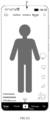
- FIGs. 2A- 2C are schematic diagrams of human-machine interaction interfaces provided by embodiments of the present disclosure.
- the application 1 can display on a mobile phone a user interface 10 as exemplarily shown in FIG. 2A , the user interface 10 is used to display the playing page of application 1, and the application 1 can perform a certain set of functions in the playing page of the application 1, such as playing a video and displaying a navigation bar, or displaying multiple messages and navigation bars, or the like.
- the user interface 10 may include a navigation bar 101, indicating that a user can trigger controls in the navigation bar 101 in the user interface 10, and the navigation bar 101 can be used to trigger controls in the navigation bar 101.
- the present disclosure takes setting the fill color of the navigation bar 101 as black as an example.
- the navigation bar 101 may include a first style of publisher 201, which indicates that a user can trigger the publisher 201 in the navigation bar 101, and the publisher 201 is used to trigger creation of multimedia contents and/or starting of live webcast.
- the fill color of the first style of publisher 201 can be set to white, that is, the first style of publisher 201 can be displayed as a background element filled with white color and in a shape of rounded rectangular ring and a key element filled with black color and in a shape of cross.
- the application 1 can sequentially display the second style of publishers 202 on the user interface 10 as exemplarily shown in FIGs. 2B and 2C , wherein the second style of publisher 202 can be displayed as a key element filled with white color and in a shape of cross. Therefore, the key elements in the shape of cross can be rotated and displayed in the navigation bar 101, and the publisher can be highlighted, which is beneficial to arouse users' interest in triggering the publisher.
- the electronic device can display a dynamic process of changing the style of the publisher, which not only reduces the power consumption caused by long-time display of the publisher, avoids the problem of screen burning or afterimage in the screen area where the publisher is located, but also arouses users' interest in triggering the publisher.
- the background element may be in a shape of rounded rectangular ring, and the key element may be in a shape of circle.
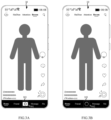
- FIGs. 3A- 3B are schematic diagrams of human-machine interaction interfaces provided by embodiments of the present disclosure.
- the application 1 can display on the mobile phone a user interface 10 as exemplarily shown in FIG. 3A .
- the user interface 10 is used to display the playing page in the application 1, and the application 1 can perform a certain set of functions in the playing page of the application 1, such as playing a video and displaying a navigation bar, or displaying multiple messages and navigation bars, or the like.
- the user interface 10 may include a navigation bar 101, indicating that a user can trigger controls in the navigation bar 101 in the user interface 10, and the navigation bar 101 can be used to trigger controls in the navigation bar 101.
- the present disclosure takes setting the fill color of the navigation bar 101 as black as an example.
- the navigation bar 101 may include a first style of publisher 301, which indicates that a user can trigger the publisher 301 in the navigation bar 101, and the publisher 301 is used to trigger creation of multimedia contents and/or starting of live webcast.
- the fill color of the first style of publisher 301 can be set to white, that is, the first style of publisher 301 can be displayed as a background element filled with white color and in a shape of rounded rectangular ring and a key element filled with black color and in a shape of cross.
- the application 1 can display the second style of publishers 302 on the user interface 10 as exemplarily shown in FIG. 3B , wherein the second style of publisher 302 can be displayed as a key element filled with gray color and in a shape of circle. Therefore, the key elements of the circular shape can be amplified and displayed in the navigation bar 101, and the publisher can be highlighted, which is beneficial to arouse users' interest in triggering the publisher.
- the electronic device can dynamically display a process of changing the style of the publisher, which not only reduces the power consumption caused by long-time display of the publisher, avoids the problem of screen burning or afterimage in the screen area where the publisher is located, but also arouses users' interest in triggering the publisher.
- the first style of publisher can include a background element filled with the target color and a key element located inside the background element.
- the second style of publisher may include: a background element filled with a first color and a key element located inside the background element, and the first color is not the target color.
- the background element is used to highlight the publisher, and the key element is used to trigger the publisher. This disclosure does not limit specific implementations of the background element and the key element.
- the background element may be in a shape of circle and the key element may be in a shape of cross .
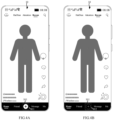
- FIGs. 4A- 4B are schematic diagrams of human-machine interaction interfaces provided by embodiments of the present disclosure.
- the application 1 can display on the mobile phone a user interface 10 as exemplarily shown in FIG. 4A .
- the user interface 10 is used to display the playing page in the application 1, and the application 1 can perform a certain set of functions in the playing page of the application 1, such as playing a video and displaying a navigation bar, or displaying multiple messages and navigation bars, or the like.
- the user interface 10 may include a navigation bar 101, indicating that a user can trigger controls in the navigation bar 101 in the user interface 10, and the navigation bar 101 can be used to trigger controls in the navigation bar 101.
- the present disclosure takes setting the fill color of the navigation bar 101 as black as an example.
- the navigation bar 101 may include a first style of publisher 401, which indicates that a user can trigger the publisher 401 in the navigation bar 101, and the publisher 401 is used to trigger creation of multimedia contents and/or starting of live webcast.
- the fill color of the navigation bar 101 is black
- the target color is white.
- a first color is set to black. Therefore, the fill color of the first style of publisher 401 can be set to white, that is, the first style of publisher 401 can be displayed as a background element filled with white color and in a shape of circular ring and a key element filled with black color and in a shape of cross.
- the application 1 can display the second style of publishers 402 on the user interface 10 as exemplarily shown in FIG. 4B , wherein the second style of publisher 402 can be displayed as a background element filled with back color and in a shape of circular ring and a key element filled with white color and in a shape of cross.
- the electronic device can change the style of the publisher, which reduces the power consumption caused by long-time display of the publisher, avoids the problem of screen burning or afterimage in the screen area where the publisher is located.
- the background element may be in a shape of rounded rectangular ring, and the key element may be in a shape of cross.
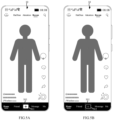
- FIGs. 5A- 5B are schematic diagrams of human-machine interaction interfaces provided by embodiments of the present disclosure.
- the application 1 can display on the mobile phone a user interface 10 as exemplarily shown in FIG. 5A .
- the user interface 10 is used to display the playing page in the application 1, and the application 1 can perform a certain set of functions in the playing page of the application 1, such as playing a video and displaying a navigation bar, or displaying multiple messages and navigation bars, or the like.
- the user interface 10 may include a navigation bar 101, indicating that a user can trigger controls in the navigation bar 101 in the user interface 10, and the navigation bar 101 can be used to trigger controls in the navigation bar 101.
- the present disclosure takes setting the fill color of the navigation bar 101 as black as an example.
- the navigation bar 101 may include a first style of publisher 501, which indicates that a user can trigger the publisher 501 in the navigation bar 101, and the publisher 501 is used to trigger creation of multimedia contents and/or starting of live webcast.
- the fill color of the navigation bar 101 is black
- the target color is white.
- a first color is set to black. Therefore, the fill color of the first style of publisher 501 can be set to white, that is, the first style of publisher 501 can be displayed as a background element filled with white color and in a shape of circular ring and a key element filled with black color and in a shape of cross.
- the application 1 can display the second style of publishers 502 on the user interface 10 as exemplarily shown in FIGs. 5B , wherein the second style of publisher 502 can be displayed as a background element filled with back color and in a shape of rounded rectangular ring and a key element filled with white color and in a shape of cross.
- the electronic device can change the style of the publisher, which reduces the power consumption caused by long-time display of the publisher, avoids the problem of screen burning or afterimage in the screen area where the publisher is located.
- the electronic device may adjust the style of the publisher based on the contents displayed in the application.
- the second style of publisher may also include a first identification element located inside the background elements.
- the first identification element is used to indicate that the publisher can be triggered to create multimedia contents. This disclosure does not limit the specific implementation of the first identification element. In some embodiments, the first identification element may take the form of word, picture, character, etc..
- the electronic device can inform the user that the multimedia content of the application is being played, which is also beneficial to arouse the user's interest in triggering the publisher.
- the second style of publisher may also include a second identification element located inside the background elements.
- the second identification element is used to indicate that the publisher can be triggered to start live webcast. This disclosure does not limit the specific implementation of the second identification element. In some embodiments, the second identification element may take the form of word, picture, character, etc..
- the electronic device can inform the user that the live webcast picture of the application is being played, which is also beneficial to arouse the user's interest in triggering the publisher.
- FIGs. 6A- 6B are schematic diagrams of human-machine interaction interfaces provided by embodiments of the present disclosure.
- the application 1 can display on the mobile phone the user interface 10 as exemplarily shown in FIG. 6A or 6B , and the user interface 10 is used to display the playing page of the application 1, and the application 1 can perform a certain set of functions in the playing page of the application 1, such as playing a video and displaying a navigation bar.
- the user interface 10 may include a navigation bar 101 for indicating that the user can trigger the controls in the navigation bar 101 in the user interface 10, and the navigation bar 101 can be used to trigger controls in the navigation bar 101.
- this disclosure takes the fill color of the navigation bar 101 as black as an example.
- the navigation bar 101 may include a second style of publisher 601, which indicates that a user can trigger the publisher 601 in the navigation bar 101, and the publisher 601 is used to trigger creation of multimedia contents.
- the fill color of the navigation bar 101 is black, the target color is white. Furthermore, a first color is set to light grey. Therefore, the fill color of the second style of publisher 601 can be set to light grey, that is, the second style of publisher 601 can be displayed as a background element filled with light grey color and in a shape of circular ring, a key element filled with white color and in a shape of cross, and a first identification element in the form of white font "issue video".
- the navigation bar 101 may include a second style of publisher 602, which indicates that a user can trigger the publisher 602 in the navigation bar 101, and the publisher 602 is used to trigger starting of live webcast.
- the fill color of the navigation bar 101 is black, the target color is white. Furthermore, a first color is set to dark grey. Therefore, the fill color of the second style of publisher 602 can be set to dark grey, that is, the second style of publisher 602 can be displayed as a background element filled with dark grey color and in a shape of circular ring, a key element filled with white color and in a signal shape, and a second identification element in the form of white font "start live".
- the background element can also be in a shape of rounded rectangular ring, which is not limited by this disclosure.
- the publisher is displayed in the screen of the electronic device.
- the electronic device does not receive an operation triggered by the user on the publisher, that is, the electronic device can determine that the user is unwilling to create multimedia contents and start live webcast.
- the second preset duration is greater than the first preset duration, and the specific value of the second preset duration can be determined based on parameters, such as actual conditions, empirical values, and so on.
- the electronic device can hide the navigation bar in the screen, which reduces the power consumption caused by the navigation bar, avoids the problem of screen burning or afterimage in the screen area where the navigation bar is located.
- FIG. 7 is a schematic diagram of a human-machine interaction interface provided by an embodiment of the present disclosure.
- the application 1 can display a user interface 10 exemplarily shown in FIGs. 2A- 2C , 3A- 3B , 4A- 4B , 5A- 5B and 6A- 6B on the mobile phone.
- the user interface 10 is used to display the playing page in the application 1, and the application 1 can perform a certain set of functions in the playing page of the application 1, such as playing a video and displaying a navigation bar, or displaying multiple messages and navigation bars, or the like.
- the user interface 10 may include a navigation bar 101, indicating that a user can trigger controls in the navigation bar 101 in the user interface 10, and the navigation bar 101 can be used to trigger controls in the navigation bar 101.
- the present disclosure takes setting the fill color of the navigation bar 101 as black as an example.
- the application 1 can display the user interface 10 exemplarily shown in FIG. 7 on the mobile phone, wherein the user interface 10 does not include the navigation bar 101 therein. Therefore, the electronic device can hide the navigation bar.
- the present disclosure provides a page display apparatus for an application.
- FIG. 8 is a structural diagram of a page display apparatus for an application provided by an embodiment of the present disclosure.
- the page display apparatus for the application according to the present disclosure can be configured in an electronic device, and can implement operations of the electronic device corresponding to the page display method for the application according to the embodiments of FIGs. 1- 7 described above.
- the page display apparatus 100 for the application provided by the present disclosure may include a first display module 101 and a second display module 102.
- a first display module 101 configured to display a navigation bar of the application, which includes a first style of publisher therein, the navigation bar is configured to provide a set of recommended functions of the application, and the publisher is configured to create multimedia content and/or start live webcast;
- a second display module 102 configured to when no operation triggered on the publisher is received after a first preset duration, switch to display a second style of publisher in the navigation bar from the first style of publisher, wherein the color contrast between the second style of publisher and the navigation bar is smaller than that between the first style of publisher and the navigation bar; and/or the display area of target color in the second style of publisher is smaller than that in the first style of publisher, and the target color is a color which is most distinct from the fill color of the navigation bar.
- the first style of publisher includes a background element filled with the target color and a key element located inside the background element; the second style of publisher includes a key element that is not filled with the target color, wherein the background element is used to highlight the publisher, and the key element is used to trigger the publisher.
- the background element is in a shape of rounded rectangular ring and the key element is in a shape of cross.
- the second display module 102 is specifically used to rotate and display the key element in a navigation bar.
- the background element is in a shape of rounded rectangular ring and the key element is in a shape of circle.
- the second display module 102 is specifically used to enlarge the key element in the navigation bar.
- the first style of publisher includes: a background element filled with a target color and a key element located inside the background element;
- the second style of publisher includes: a background element filled with the first color and a key element located inside the background element, the first color is not the target color; wherein the background element is used to highlight the publisher, and the key element is used to trigger the publisher.
- the background element is in a shape of circular ring and the key element is in a shape of cross, or, the background element is in a shape of rounded rectangular ring, and the key element is in a shape of cross.
- the second style of publisher when playing a multimedia content of an application, further includes a first identification element located inside the background element, which is used to indicate that the publisher can be triggered to create the multimedia content;
- the second style of publisher when playing a live webcast picture of the application, further includes a second identification element located in the background element, which is used to indicate that the publisher can be triggered to start the live webcast.
- FIG. 9 is a structural diagram of a page display apparatus for an application provided by an embodiment of the present disclosure.
- the page display apparatus 100 for the application provided by the present disclosure may further include a hiding module 103, based on the apparatus structure as shown in FIG. 8 .
- the hiding module 103 is configured to hide the navigation bar when no operation triggered on the publisher is received after a second preset duration, wherein the second preset duration is greater than the first preset duration.
- the page display apparatus for the application provided by this disclosure can execute the above method embodiment, and its specific implementation principle and technical effect can refer to the above method embodiment, and will not be repeated herein.
- each of the above units only belongs to a logical module classified according to the specific function it implements, instead of limiting its specific implementation manner, for example, it can be implemented in software, hardware, or a combination of software and hardware.
- the foregoing units may be implemented as separate physical entities, or may be implemented by a single entity (for example, a processor (CPU or DSP, etc.), an integrated circuit, etc.).
- the apparatus may include a memory, which may store various information generated in operation by the apparatus as well as each module included in the apparatus, programs and data for operation, data to be transmitted by a communication unit, and so on.
- the memory may be volatile memory and/or non-volatile memory.
- the memory may include, but not limited to, random access memory (RAM), dynamic random access memory (DRAM), static random access memory (SRAM), read only memory (ROM), and flash memory.
- RAM random access memory
- DRAM dynamic random access memory
- SRAM static random access memory
- ROM read only memory
- flash memory flash memory
- the apparatus may also include a communication unit which can communicate with other apparatuses.
- the communication unit can be implemented in any appropriate manner known in the art, which will not be described in detail.
- the present disclosure provides an electronic device including one or more processors; memory; and one or more computer programs; wherein one or more computer programs are stored in the memory; and when the one or more processors execute the one or more computer programs, the electronic device can realize the page display method for the application according to the previous embodiment.
- the present disclosure provides a chip system, which is applied to an electronic device including a display, a memory and a sensor; the chip system includes a processor; when the processor executes computer instructions stored in the memory, the electronic device executes the page display method for the application according to the previous embodiment.
- the present disclosure provides a computer-readable storage medium on which a computer program is stored, and the computer program, when executed by a processor, cause an electronic device to execute the page display method for the application according to the previous embodiment.
- the present disclosure provides a computer program product that, when the computer program product runs on a computer, causes the computer to execute the page display method for the application according to the previous embodiment.
- the present disclosure provides a computer program, which includes program codes that, when executed by a computer, cause the computer to implement the page display method for the application according to the previous embodiment.
- all or part of the functions can be realized by software, hardware, or a combination of software and hardware.
- the functions can be implemented in whole or in part in the form of a computer program product.
- a computer program product includes one or more computer instructions.
- Computer instructions may be stored in a computer-readable storage medium.
- Computer-readable storage medium can be any available medium that can be accessed by computers, or a data storage device that integrates one or more available medium, such as server and data center.
- the available medium can be magnetic medium (e.g., floppy disk, hard disk, magnetic tape), optical medium (e.g., DVD), or semiconductor medium (e.g., solid state disk (SSD)), etc.
Landscapes
- Engineering & Computer Science (AREA)
- Theoretical Computer Science (AREA)
- General Engineering & Computer Science (AREA)
- Physics & Mathematics (AREA)
- General Physics & Mathematics (AREA)
- Human Computer Interaction (AREA)
- Software Systems (AREA)
- Computer Hardware Design (AREA)
- User Interface Of Digital Computer (AREA)
- Information Transfer Between Computers (AREA)
- Digital Computer Display Output (AREA)
- Controls And Circuits For Display Device (AREA)
- Circuits Of Receivers In General (AREA)
Applications Claiming Priority (2)
| Application Number | Priority Date | Filing Date | Title |
|---|---|---|---|
| CN202110603466.0A CN115480852A (zh) | 2021-05-31 | 2021-05-31 | 应用程序的页面显示方法、装置和电子设备 |
| PCT/CN2022/091886 WO2022252934A1 (fr) | 2021-05-31 | 2022-05-10 | Procédé et appareil d'affichage de page pour programme d'application, et dispositif électronique |
Publications (2)
| Publication Number | Publication Date |
|---|---|
| EP4332762A1 true EP4332762A1 (fr) | 2024-03-06 |
| EP4332762A4 EP4332762A4 (fr) | 2024-10-16 |
Family
ID=84193001
Family Applications (1)
| Application Number | Title | Priority Date | Filing Date |
|---|---|---|---|
| EP22814981.1A Pending EP4332762A4 (fr) | 2021-05-31 | 2022-05-10 | Procédé et appareil d'affichage de page pour programme d'application, et dispositif électronique |
Country Status (8)
| Country | Link |
|---|---|
| US (1) | US11698714B2 (fr) |
| EP (1) | EP4332762A4 (fr) |
| JP (1) | JP2024520613A (fr) |
| KR (1) | KR20240008367A (fr) |
| CN (1) | CN115480852A (fr) |
| AU (1) | AU2022286374B2 (fr) |
| BR (1) | BR112023025069A2 (fr) |
| WO (1) | WO2022252934A1 (fr) |
Families Citing this family (16)
| Publication number | Priority date | Publication date | Assignee | Title |
|---|---|---|---|---|
| US9912860B2 (en) | 2016-06-12 | 2018-03-06 | Apple Inc. | User interface for camera effects |
| DK180859B1 (en) | 2017-06-04 | 2022-05-23 | Apple Inc | USER INTERFACE CAMERA EFFECTS |
| US11722764B2 (en) | 2018-05-07 | 2023-08-08 | Apple Inc. | Creative camera |
| DK201870623A1 (en) | 2018-09-11 | 2020-04-15 | Apple Inc. | User interfaces for simulated depth effects |
| US11128792B2 (en) | 2018-09-28 | 2021-09-21 | Apple Inc. | Capturing and displaying images with multiple focal planes |
| US11321857B2 (en) | 2018-09-28 | 2022-05-03 | Apple Inc. | Displaying and editing images with depth information |
| US11770601B2 (en) | 2019-05-06 | 2023-09-26 | Apple Inc. | User interfaces for capturing and managing visual media |
| US11054973B1 (en) | 2020-06-01 | 2021-07-06 | Apple Inc. | User interfaces for managing media |
| US11212449B1 (en) | 2020-09-25 | 2021-12-28 | Apple Inc. | User interfaces for media capture and management |
| US11778339B2 (en) | 2021-04-30 | 2023-10-03 | Apple Inc. | User interfaces for altering visual media |
| USD1003918S1 (en) * | 2021-05-14 | 2023-11-07 | Beijing Kuaimajiabian Technology Co., Ltd. | Display screen or portion thereof with an animated graphical user interface |
| US12112024B2 (en) * | 2021-06-01 | 2024-10-08 | Apple Inc. | User interfaces for managing media styles |
| USD1021926S1 (en) * | 2021-08-12 | 2024-04-09 | Beijing Kuaimajiabian Technology Co., Ltd. | Display screen or portion thereof with a graphical user interface |
| USD1092490S1 (en) | 2021-08-13 | 2025-09-09 | Beijing Kuaimajiabian Technology Co., Ltd. | Display screen or portion thereof with a graphical user interface |
| USD1021927S1 (en) * | 2021-09-13 | 2024-04-09 | Beijing Kuaimajiabian Technology Co., Ltd. | Display screen or portion thereof with an animated graphical user interface |
| JP1728334S (ja) | 2021-11-25 | 2022-10-26 | 動画再生用gui |
Family Cites Families (24)
| Publication number | Priority date | Publication date | Assignee | Title |
|---|---|---|---|---|
| US20070109284A1 (en) * | 2005-08-12 | 2007-05-17 | Semiconductor Energy Laboratory Co., Ltd. | Display device |
| JP2007072455A (ja) * | 2005-08-12 | 2007-03-22 | Semiconductor Energy Lab Co Ltd | 表示装置 |
| US20080016156A1 (en) * | 2006-07-13 | 2008-01-17 | Sean Miceli | Large Scale Real-Time Presentation of a Network Conference Having a Plurality of Conference Participants |
| JP2010020532A (ja) * | 2008-07-10 | 2010-01-28 | Sharp Corp | 情報表示装置及び情報表示方法 |
| CA2674663A1 (fr) | 2008-10-08 | 2010-04-08 | Research In Motion Limited | Methode et dispositif portable de navigation bimodal a ecran tactile |
| US8510677B2 (en) * | 2010-01-06 | 2013-08-13 | Apple Inc. | Device, method, and graphical user interface for navigating through a range of values |
| US20140173698A1 (en) * | 2012-12-18 | 2014-06-19 | Eric Michael Faccer | Software publisher and device authentication using customizable multimedia |
| US20160011758A1 (en) * | 2014-07-09 | 2016-01-14 | Selfie Inc. | System, apparatuses and methods for a video communications network |
| CN105741766B (zh) * | 2016-04-25 | 2018-12-11 | 广东欧珀移动通信有限公司 | 一种基于光传感器的显示控制方法、装置及智能终端 |
| WO2018003859A1 (fr) * | 2016-06-28 | 2018-01-04 | 株式会社ニコン | Dispositif d'affichage, programme, procédé d'affichage et dispositif de commande |
| JP2018005172A (ja) * | 2016-07-08 | 2018-01-11 | レノボ・シンガポール・プライベート・リミテッド | 情報処理装置、焼き付き防止方法、及びプログラム |
| JP6729493B2 (ja) * | 2016-12-27 | 2020-07-22 | カシオ計算機株式会社 | 電子機器、プログラム及び情報報知方法 |
| CN107122199A (zh) * | 2017-07-04 | 2017-09-01 | 京东方科技集团股份有限公司 | 一种显示栏的显示控制方法及装置 |
| CN107479793A (zh) * | 2017-09-07 | 2017-12-15 | 青岛海信移动通信技术股份有限公司 | 导航栏显示方法、装置和计算机可读存储介质 |
| CN108055589B (zh) * | 2017-12-20 | 2021-04-06 | 聚好看科技股份有限公司 | 智能电视 |
| JP6719166B2 (ja) * | 2018-09-13 | 2020-07-08 | 貴弘 市橋 | ライブ放送システム |
| CN109597538B (zh) | 2018-09-21 | 2020-07-28 | 北京字节跳动网络技术有限公司 | 可操作控件的显示方法、装置、设备及可读介质 |
| US12377349B2 (en) * | 2019-02-22 | 2025-08-05 | Sony Group Corporation | Information processing apparatus and information processing method |
| CN111722765A (zh) * | 2019-03-19 | 2020-09-29 | 北京京东尚科信息技术有限公司 | 页面切换方法、装置、设备及存储介质 |
| KR102326537B1 (ko) * | 2019-09-09 | 2021-11-16 | 애플 인크. | 디스플레이 사용량을 관리하기 위한 기법들 |
| US11336946B1 (en) * | 2020-08-19 | 2022-05-17 | Amazon Technologies, Inc. | Presenting options for selecting content via navigation bars and designated content spaces |
| CN112463237B (zh) * | 2020-12-02 | 2025-07-25 | 北京小米移动软件有限公司 | 防烧屏方法、装置、设备及存储介质 |
| JP7309969B2 (ja) * | 2021-01-05 | 2023-07-18 | 楽天グループ株式会社 | 表示制御装置、表示制御方法、及びプログラム |
| CN115605836A (zh) * | 2021-01-05 | 2023-01-13 | 乐天集团股份有限公司(Jp) | 显示控制装置、显示控制方法以及程序 |
-
2021
- 2021-05-31 CN CN202110603466.0A patent/CN115480852A/zh active Pending
- 2021-11-02 US US17/517,551 patent/US11698714B2/en active Active
-
2022
- 2022-05-10 KR KR1020237043400A patent/KR20240008367A/ko active Pending
- 2022-05-10 EP EP22814981.1A patent/EP4332762A4/fr active Pending
- 2022-05-10 WO PCT/CN2022/091886 patent/WO2022252934A1/fr not_active Ceased
- 2022-05-10 JP JP2023574221A patent/JP2024520613A/ja active Pending
- 2022-05-10 BR BR112023025069A patent/BR112023025069A2/pt unknown
- 2022-05-10 AU AU2022286374A patent/AU2022286374B2/en active Active
Also Published As
| Publication number | Publication date |
|---|---|
| CN115480852A (zh) | 2022-12-16 |
| AU2022286374A1 (en) | 2023-12-14 |
| US11698714B2 (en) | 2023-07-11 |
| US20220382417A1 (en) | 2022-12-01 |
| AU2022286374B2 (en) | 2025-05-08 |
| KR20240008367A (ko) | 2024-01-18 |
| BR112023025069A2 (pt) | 2024-02-20 |
| WO2022252934A1 (fr) | 2022-12-08 |
| EP4332762A4 (fr) | 2024-10-16 |
| JP2024520613A (ja) | 2024-05-24 |
Similar Documents
| Publication | Publication Date | Title |
|---|---|---|
| EP4332762A1 (fr) | Procédé et appareil d'affichage de page pour programme d'application, et dispositif électronique | |
| US11320960B2 (en) | Icon display method, device, and terminal | |
| KR102726289B1 (ko) | 사용자 인터페이스의 디스플레이 방법, 장치, 디바이스 및 기억 매체 | |
| RU2606055C2 (ru) | Система рабочего стола и способ и устройство для взаимодействия с интерфейсом для мобильного терминала | |
| CN109144649B (zh) | 图标的显示方法、装置、终端及存储介质 | |
| KR102762358B1 (ko) | 영상 특수 효과 처리 방법 및 장치 | |
| CN108279966B (zh) | 网页截图方法、装置、终端及存储介质 | |
| CN109032722B (zh) | 更新ui组件的显示效果的方法、装置及设备、介质 | |
| AU2013211505B2 (en) | Immersive mode for a web browser | |
| KR102735294B1 (ko) | 애플리케이션을 위한 페이지 디스플레이의 방법, 기기 및 전자 장치 | |
| WO2019174477A1 (fr) | Procédé et dispositif d'affichage d'interface utilisateur, et terminal | |
| US20170127141A1 (en) | Method and electronic device for dynamic reminding of live broadcast contents | |
| CN110769300B (zh) | 一种呈现信息流中横屏视频的方法与设备 | |
| WO2022001452A1 (fr) | Procédé et appareil d'affichage d'informations, dispositif à porter sur soi, et support de stockage | |
| CN103677883B (zh) | 显示停靠栏图标的方法及装置 | |
| US20170169594A1 (en) | Method and electronic device for implementing video recommendation | |
| CN106941621B (zh) | 一种移动终端的控制方法、装置及移动终端 | |
| US20160154545A1 (en) | Electronic device and method for managing and displaying application icons | |
| CN107562324B (zh) | 数据显示控制的方法和终端 | |
| WO2018113748A1 (fr) | Procédé de mise en œuvre de plein écran pour vidéo, et dispositif électronique | |
| WO2025039975A1 (fr) | Procédé et appareil d'affichage de page, et dispositif électronique | |
| WO2019132409A1 (fr) | Dispositif électronique et son procédé de commande | |
| CN110109663B (zh) | 一种设置全屏的方法及相关装置 | |
| KR101545292B1 (ko) | Osd 생성 장치 및 osd 구현 방법 | |
| CN117156036A (zh) | 消息提示方法和装置 |
Legal Events
| Date | Code | Title | Description |
|---|---|---|---|
| STAA | Information on the status of an ep patent application or granted ep patent |
Free format text: STATUS: THE INTERNATIONAL PUBLICATION HAS BEEN MADE |
|
| PUAI | Public reference made under article 153(3) epc to a published international application that has entered the european phase |
Free format text: ORIGINAL CODE: 0009012 |
|
| STAA | Information on the status of an ep patent application or granted ep patent |
Free format text: STATUS: REQUEST FOR EXAMINATION WAS MADE |
|
| 17P | Request for examination filed |
Effective date: 20231201 |
|
| AK | Designated contracting states |
Kind code of ref document: A1 Designated state(s): AL AT BE BG CH CY CZ DE DK EE ES FI FR GB GR HR HU IE IS IT LI LT LU LV MC MK MT NL NO PL PT RO RS SE SI SK SM TR |
|
| DAV | Request for validation of the european patent (deleted) | ||
| DAX | Request for extension of the european patent (deleted) | ||
| A4 | Supplementary search report drawn up and despatched |
Effective date: 20240912 |
|
| RIC1 | Information provided on ipc code assigned before grant |
Ipc: G09G 3/32 20160101ALN20240906BHEP Ipc: G06F 3/0481 20220101ALI20240906BHEP Ipc: G06F 9/451 20180101AFI20240906BHEP |
|
| STAA | Information on the status of an ep patent application or granted ep patent |
Free format text: STATUS: EXAMINATION IS IN PROGRESS |
|
| 17Q | First examination report despatched |
Effective date: 20250606 |
|
| GRAP | Despatch of communication of intention to grant a patent |
Free format text: ORIGINAL CODE: EPIDOSNIGR1 |
|
| STAA | Information on the status of an ep patent application or granted ep patent |
Free format text: STATUS: GRANT OF PATENT IS INTENDED |
|
| RIC1 | Information provided on ipc code assigned before grant |
Ipc: G06F 9/451 20180101AFI20251113BHEP Ipc: G06F 3/0481 20220101ALI20251113BHEP Ipc: G09G 3/32 20160101ALN20251113BHEP |
|
| INTG | Intention to grant announced |
Effective date: 20251202 |
|
| RIC1 | Information provided on ipc code assigned before grant |
Ipc: G06F 9/451 20180101AFI20251121BHEP Ipc: G06F 3/0481 20220101ALI20251121BHEP Ipc: G09G 3/32 20160101ALN20251121BHEP |
|
| GRAS | Grant fee paid |
Free format text: ORIGINAL CODE: EPIDOSNIGR3 |