EP4342519A1 - Medizinische vorrichtung - Google Patents
Medizinische vorrichtung Download PDFInfo
- Publication number
- EP4342519A1 EP4342519A1 EP22913615.5A EP22913615A EP4342519A1 EP 4342519 A1 EP4342519 A1 EP 4342519A1 EP 22913615 A EP22913615 A EP 22913615A EP 4342519 A1 EP4342519 A1 EP 4342519A1
- Authority
- EP
- European Patent Office
- Prior art keywords
- display
- area
- label
- function
- medical device
- Prior art date
- Legal status (The legal status is an assumption and is not a legal conclusion. Google has not performed a legal analysis and makes no representation as to the accuracy of the status listed.)
- Pending
Links
Images






Classifications
-
- A—HUMAN NECESSITIES
- A61—MEDICAL OR VETERINARY SCIENCE; HYGIENE
- A61N—ELECTROTHERAPY; MAGNETOTHERAPY; RADIATION THERAPY; ULTRASOUND THERAPY
- A61N1/00—Electrotherapy; Circuits therefor
- A61N1/18—Applying electric currents by contact electrodes
- A61N1/32—Applying electric currents by contact electrodes alternating or intermittent currents
- A61N1/38—Applying electric currents by contact electrodes alternating or intermittent currents for producing shock effects
- A61N1/39—Heart defibrillators
- A61N1/3904—External heart defibrillators [EHD]
-
- A—HUMAN NECESSITIES
- A61—MEDICAL OR VETERINARY SCIENCE; HYGIENE
- A61N—ELECTROTHERAPY; MAGNETOTHERAPY; RADIATION THERAPY; ULTRASOUND THERAPY
- A61N1/00—Electrotherapy; Circuits therefor
- A61N1/18—Applying electric currents by contact electrodes
- A61N1/32—Applying electric currents by contact electrodes alternating or intermittent currents
- A61N1/38—Applying electric currents by contact electrodes alternating or intermittent currents for producing shock effects
- A61N1/39—Heart defibrillators
- A61N1/3993—User interfaces for automatic external defibrillators
-
- G—PHYSICS
- G06—COMPUTING OR CALCULATING; COUNTING
- G06F—ELECTRIC DIGITAL DATA PROCESSING
- G06F3/00—Input arrangements for transferring data to be processed into a form capable of being handled by the computer; Output arrangements for transferring data from processing unit to output unit, e.g. interface arrangements
- G06F3/01—Input arrangements or combined input and output arrangements for interaction between user and computer
- G06F3/048—Interaction techniques based on graphical user interfaces [GUI]
- G06F3/0481—Interaction techniques based on graphical user interfaces [GUI] based on specific properties of the displayed interaction object or a metaphor-based environment, e.g. interaction with desktop elements like windows or icons, or assisted by a cursor's changing behaviour or appearance
- G06F3/0482—Interaction with lists of selectable items, e.g. menus
-
- G—PHYSICS
- G06—COMPUTING OR CALCULATING; COUNTING
- G06F—ELECTRIC DIGITAL DATA PROCESSING
- G06F3/00—Input arrangements for transferring data to be processed into a form capable of being handled by the computer; Output arrangements for transferring data from processing unit to output unit, e.g. interface arrangements
- G06F3/01—Input arrangements or combined input and output arrangements for interaction between user and computer
- G06F3/048—Interaction techniques based on graphical user interfaces [GUI]
- G06F3/0484—Interaction techniques based on graphical user interfaces [GUI] for the control of specific functions or operations, e.g. selecting or manipulating an object, an image or a displayed text element, setting a parameter value or selecting a range
-
- G—PHYSICS
- G16—INFORMATION AND COMMUNICATION TECHNOLOGY [ICT] SPECIALLY ADAPTED FOR SPECIFIC APPLICATION FIELDS
- G16H—HEALTHCARE INFORMATICS, i.e. INFORMATION AND COMMUNICATION TECHNOLOGY [ICT] SPECIALLY ADAPTED FOR THE HANDLING OR PROCESSING OF MEDICAL OR HEALTHCARE DATA
- G16H40/00—ICT specially adapted for the management or administration of healthcare resources or facilities; ICT specially adapted for the management or operation of medical equipment or devices
- G16H40/60—ICT specially adapted for the management or administration of healthcare resources or facilities; ICT specially adapted for the management or operation of medical equipment or devices for the operation of medical equipment or devices
- G16H40/63—ICT specially adapted for the management or administration of healthcare resources or facilities; ICT specially adapted for the management or operation of medical equipment or devices for the operation of medical equipment or devices for local operation
-
- A—HUMAN NECESSITIES
- A61—MEDICAL OR VETERINARY SCIENCE; HYGIENE
- A61N—ELECTROTHERAPY; MAGNETOTHERAPY; RADIATION THERAPY; ULTRASOUND THERAPY
- A61N1/00—Electrotherapy; Circuits therefor
- A61N1/02—Details
- A61N1/04—Electrodes
- A61N1/0404—Electrodes for external use
- A61N1/0408—Use-related aspects
- A61N1/046—Specially adapted for shock therapy, e.g. defibrillation
Definitions
- the disclosure relates to medical instruments, and more particularly to a medical device.
- the most important life-saving tool for professional emergency personnel is a defibrillation monitor.
- the vast majority of devices on the market include treatment functions through discharge for short-term fatal heart diseases, such as ventricular fibrillation, atrial fibrillation, or arrhythmia, which functions include such as manual defibrillation, automated external defibrillation, and pacing function.
- short-term fatal heart diseases such as ventricular fibrillation, atrial fibrillation, or arrhythmia
- functions include such as manual defibrillation, automated external defibrillation, and pacing function.
- the display page related to the one treatment function should be closed and then the display page related to the other treatment function can be reopened, which is very inconvenient to operate.
- a medical device including a processor and a display apparatus, wherein the processor is connected with the display apparatus and configured to control the display apparatus for displaying; a display interface of the display apparatus includes a function display area, which is configured to selectively or fixedly display a navigation area, wherein the function display area is further configured to display a first function page, when receiving a display instruction; wherein the navigation area is configured to simultaneously display multiple labels, which include at least two of a manual external defibrillator label, an automated external defibrillator label and a pacing label; wherein the first function page is configured to display content related to a selected label, when selecting one of the multiple labels.
- a medical device including a processor and a display apparatus, wherein the processor is connected with the display apparatus and configured to control the display apparatus for displaying;
- a display interface of the display apparatus includes a function display area, which is configured to selectively or fixedly display a navigation area, wherein the function display area is further configured to display a first function page, when receiving a display instruction;
- the navigation area is configured to simultaneously display multiple labels, which include a first label and a second label; wherein the first function page is configured to display defibrillation energy when selecting the first label, and the first function page is configured to display a pacing rate and/or a pacing current when selecting the second label.
- a medical device including a processor and a display apparatus, wherein the processor is connected with the display apparatus and configured to control the display apparatus for displaying; a display interface of the display apparatus includes a function display area, which is configured to selectively or fixedly display a navigation area, wherein the function display area is further configured to display a first function page, when receiving a display instruction; wherein the navigation area is configured to display a first label; wherein the first function page is configured to display defibrillation energy, as well as a pacing rate and/or a pacing current, when selecting the first label.
- the medical device can simultaneously display labels for at least two treatment functions related to defibrillation and/or pacing. If any label is selected, the corresponding treatment function page can be displayed. Therefore, one treatment function page can be switched to another by simply selecting a label without requiring complex operations of closing the current treatment function page and reopening another treatment function page, which allows emergency personnel to quickly select suitable treatment functions based on a situation and to view corresponding content, so as to timely diagnose and treat patients.
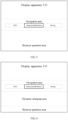
- FIG. 1 is a structural block diagram of a medical device 100 according to an embodiment of this disclosure, as well as an example diagram for a display interface of the medical device 100.
- the medical device 100 includes a display apparatus 110 and a processor 120.
- a display interface of the display apparatus 110 includes a function display area, which selectively or fixedly displays a navigation area.
- the function display area displays a first function page when receiving a display instruction.
- the navigation area simultaneously displays multiple labels, which include at least two of a manual external defibrillator label, an automated external defibrillator (AED) label, and a pacing label (as an example shown in FIG. 1 , three labels).
- AED automated external defibrillator
- pacing label as an example shown in FIG. 1 , three labels.
- the display interface of the medical device 100 includes a function display area, which is configured to display medical functions of the medical device 100.
- the function display area fixedly displays the navigation area.
- the navigation area can be fixedly displayed at at least one of an upper side, a lower side, a left side, or a right side of the display interface.
- the navigation area is permanently displayed on the display interface, achieving an effect of quickly entering the first function page.
- the navigation area displays multiple labels simultaneously, which relate to a defibrillation treatment function and/or a pacing treatment function.
- these labels include at least two of a manual external defibrillator label, an automated external defibrillator label and a pacing label.
- the function display area receives a display instruction, so as to display the first function page, which displays content related to the selected label.
- the function display area selectively displays the navigation area.
- the function display area receives a display instruction
- the first function page is displayed
- the navigation area is displayed when displaying the first function page.
- the navigation area can be displayed at an upper side, a lower side, a left side, or a right side of the first function page, and can be a part of the first function page, or can be displayed inside other areas of the function display area.
- the navigation area can also be opened or closed together with the corresponding first function page. When the first function page is closed, the navigation area is no longer displayed, which never occupies too more display space, allowing the display interface to display more other information.
- the navigation area simultaneously displays multiple labels, which relate to a defibrillation treatment function and/or a pacing treatment function.
- these labels include at least two of a manual external defibrillator label, an automated external defibrillator label and a pacing label.
- the first function page displays content related to the selected label.
- the navigation area includes at least two labels
- the first function page when displaying the relevant content of one label in the first function page, if the user wishes to switch to another treatment function, by selecting another label in the navigation area, the first function page can be directly switched to the content related to said another label, without requiring complex operations of closing the current treatment function page and reopening another treatment function page, which allows emergency personnel to quickly select suitable treatment functions based on a situation and to view corresponding content, so as to timely diagnose and treat patients.
- the aforementioned first function page can include the aforementioned navigation area and a dynamic changing area, as shown in FIG. 2 .
- the dynamic changing area displays content related to the selected label.
- the content related to the selected label is displayed through the dynamic changing area.
- the reason that it is called as a dynamic changing area is because the displayed content at a display position of the dynamic changing area changes dynamically due to a change of the selected label. Therefore, the displayed content in this area is dynamically changing.
- the aforementioned labels of the navigation area include three labels, namely the manual external defibrillator label, the automated external defibrillator label and the pacing label.
- the navigation area includes the manual external defibrillator label, the automated external defibrillator label and the pacing label. Therefore, when the manual external defibrillator label is selected, the first function page displays content related to the manual defibrillation treatment function. When the automated external defibrillator label is selected, the first function page displays content related to the automated defibrillation treatment function. When the pacing label is selected, the first function page displays content related to the pacing treatment function.
- the first function page further includes a shortcut operation area, as shown in FIG. 3 .
- the shortcut operation area displays at least an auxiliary treatment key related to the selected label, and the shortcut operation area and the content related to the selected label are displayed on the same screen.
- the auxiliary treatment key related to the selected label are displayed through the shortcut operation area, where the auxiliary treatment key is a key that has an auxiliary treatment function for the corresponding treatment function of the selected label, such as a medication record key, an event record key, etc.
- auxiliary treatment key related to the selected label in the shortcut operation area and the content related to the selected label user (emergency personnel) can view the auxiliary treatment function related to a certain treatment function while viewing the content related to said treatment function, which is more conducive to the diagnosis and treatment of patient.
- the first function page further includes a shortcut operation area, which is displayed on the same screen with the navigation area and the dynamic changing area, as shown in FIG. 4 .
- the shortcut operation area displays at least an auxiliary treatment key related to the selected label.
- the aforementioned navigation area, dynamic changing area, and shortcut operation area are displayed on the same screen, allowing user (emergency personnel) to conveniently switch treatment functions through the navigation area, view the currently selected treatment function through the dynamic changing area, and conveniently view auxiliary treatment functions associated with the currently selected treatment function in the shortcut operation area, greatly improving the selection function during patient diagnosis and treatment and the convenience of information viewing.
- a layout in which the navigation area, the dynamic changing area, and the shortcut operation area are arranged side by side along an up-down direction, is used as an example layout. It should be understood that in other examples, the positions of the navigation area, dynamic changing area, and shortcut operation area can also have other layout situations, such as the navigation area, dynamic changing area, and shortcut operation area are arranged along a left-right direction.
- the aforementioned shortcut operation area can include a medication record area, as shown in FIG. 5 .
- the auxiliary treatment key displayed inside the shortcut operation area can include a medication record key.
- the medication record area displays at least one medication record key, and each medication record key displays a medication name and a corresponding dosage of the medication name.
- the user can conveniently view the medication record of the current rescued patient, including the medication name and the corresponding dosage used, which facilitates the user to combine medication and treatment conditions to determine a treatment effect and/or treatment plan.
- different medication record keys can display the same medication name, but the different medication record keys with the same medication name display different medication dosages.
- the medication record area of the shortcut operation area includes multiple medication record keys. Different medication record keys may display the same medication name but different dosages. On the one hand, it allows user to more flexibly set multiple treatment plans for using the same medication, and on the other hand, it also allows user to view subtle changes in the medication situation of the rescued person, and more accurately understand the changes in the condition of the rescued patient.
- the aforementioned shortcut operation area can include an event record area, as shown in FIG. 5 .
- the auxiliary treatment key includes an event record key, the event record area displays at least one event record key, and each event record key displays a rescue event.
- the rescue event can include at least one of oxygen inhalation, ventilation, intubation, neck support, hemostasis, bandaging, and fixation.
- the user can conveniently view the rescue event of the rescued patient, making it easy for the user to determine the treatment effect of the rescued patient and/or the next treatment plan based on the rescue event.
- the first function page which displays content related to the selected label
- the first function page includes a graphic area and a dynamic area, as shown in FIG. 6 .
- the graphic area display at least one of an operation graphic, a pressing graphic, a warning graphic and a rescue timing graphic.
- the dynamic area can dynamically display treatment indication information (such as low impedance) and/or treatment suggestion information (such as "please connect electrode correctly") and/or provide treatment operation entry (such as charging, discharging, etc.).
- the dynamic area can include a defibrillation statistic area, which displays treatment statistic information (such as shock count). Based on information displayed inside the graphic area and the dynamic area, the user can view many aspects of the defibrillation treatment process in real-time, which provides great convenience for the defibrillation treatment of the rescued patient.
- the first function page can display or close the defibrillation statistic area and/or the shortcut operation area based on a user operation.
- a display of the defibrillation statistic area and/or a display of the shortcut operation area is user selectable, and the user can select to display or close the defibrillation statistic area and/or the shortcut operation area, so as to satisfy requirements of different scenarios.
- the first function page when the pacing label is selected, includes multiple sub-label pages, which include a fixed pacing sub-label page and an on-demand pacing sub-label page which are switchable between each other, as shown in FIG. 7 .
- the pacing treatment function further provides two sub-functions, namely fixed pacing and on-demand pacing. These two sub-functions are displayed through two sub-label pages that can be switched between each other. The user can select one of the sub-functions according to his/her requirement to display the corresponding sub-label page for that sub-function. Of course, when displaying a sub-label page, user can also easily switch from it to another sub-label page.
- each of the multiple sub-label pages includes an adjustment key for a pacing rate, an adjustment key for a pacing current, and guidance text during a pacing process, as shown in FIG. 8 . Based on this, user can conveniently adjust the pacing rate and the pacing current as needed, and can also understand the pacing treatment situation through the guidance text during the pacing process (such as "pacing in progress").
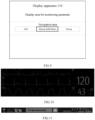
- the display interface may also include a display area for monitoring parameter(s), which is configured to display waveform(s) and/or value(s) of the monitoring parameter(s), as shown in FIG. 9 .
- the display interface of the medical device 100 in addition to displaying the aforementioned treatment functions related to defibrillation and/or pacing, the display interface of the medical device 100 also displays monitoring parameter data, facilitating user to view both monitoring and treatment information at the same time, which is more conducive for rescue personnel to evaluating treatment quality and determining the next step of treatment plan based on the evaluation results.
- the aforementioned display area for monitoring parameter(s) can include a graphic display area and a numerical display area, as shown in FIG. 10 .
- the graphic display area is configured display waveform(s) of the monitoring parameter(s) (such as electrocardiogram waveform(s), filtered electrocardiogram waveform(s), and carbon dioxide CO 2 waveform(s), shown in FIG. 10 )
- the numerical display area is configured to display value(s) of the monitoring parameter(s) (such as heart rate value(s) and carbon dioxide value(s) shown in FIG. 10 ).
- the user can view a trend over time of physiological parameter(s) of the rescued patient.
- the user can view real-time value(s) of the physiological parameter(s) of the rescued patient. Therefore, combined with the display of the graphic display area and the display of the numerical display area, user can view the detailed physiological parameter(s) of the rescued patient during the treatment process in real time, which helps to monitor the rescued patient in real time and evaluate the treatment process.
- the aforementioned display area for monitoring parameter(s) can display waveforms of at least three monitoring parameters, which allows user to view a large number of monitoring parameter situations and facilitate comprehensive evaluation of the condition of the rescued patient.
- the display area for monitoring parameter(s) can display at least electrocardiogram waveforms, blood oxygen waveforms, and carbon dioxide waveforms, allowing user to view changes in electrocardiogram signals, blood oxygen signals, and carbon dioxide signals of the rescued patient.
- the changes in these three parameters are usually important for the emergency process, so displaying the waveforms of these three parameters simultaneously is beneficial for emergency personnel to monitor and evaluate the rescued patient during the emergency process.
- the display area for monitoring parameter(s) can switch from currently displayed waveform(s) to another target waveform(s) based on a user operation.
- the display area for monitoring parameter(s) is user interactive, so that user can select to display desired waveform(s) of monitoring parameter(s) according to his/her requirements.
- the user can click on waveforms of one monitoring parameter currently displayed to switch to waveforms of another monitoring parameter. For example, clicking on a CO 2 waveform area can switch from CO 2 waveforms to another waveforms (such as blood oxygen waveforms, etc., which can be set by the user). Clicking on the waveform area for waveform switching is more intuitive and can save screen display area. It can be understood that the waveform switching control can also be set separately in other positions on the screen instead of being set in the waveform area.
- the display interface may also include a display area for a state bar, which displays at least one of patient information, department, license plate, rescue time, alarm information, and device state. Based on the content displayed inside the display area for a state bar, user can view information related to patient, device, alarm, etc.
- a state bar which displays at least one of patient information, department, license plate, rescue time, alarm information, and device state.
- the display area for a state bar includes a patient information area, a display area for a department number and a license plate number, rescue time, an alarm information area, and a device state area.
- the patient information area needs to display at least a graphic or text for a patient type (such as "adult” shown in FIG. 11 ).
- the display area for the department number and the license plate number should display at least one piece of information (such as license plate number information shown in FIG. 11 ).
- the alarm information area includes a physiological alarm, a technical alarm, and indication information (such as physiological alarm information for ECG shown in FIG. 11 ).
- the physiological alarm includes several types of information, such as a high-level physiological alarm, an intermediate physiological alarm, and a low-level physiological alarm, as well as several alarm states, such as alarm sound pause, alarm sound turnoff, alarm pause, alarm turnoff, and alarm reset.
- At least two of the physiological alarm, the technical alarm, and the indication information are displayed inside the same area through a polling manner.
- the three types of information are displayed inside a unified area through a polling manner, achieving a streamlined display of alarm information and providing more display space for information display in other areas.
- a priority order for the display can be the physiological alarm, the technical alarm, and then the indication information.
- a priority order for the display of the physiological alarm can be the high-level physiological alarm, the intermediate physiological alarm, and then the low-level physiological alarm.
- the device state area can include a battery state graphic, a state graphic for a network connection, a record state graphic, a camera state graphic, an entry to a connection state and operation, an entry to system time and setting, and so on.
- the battery state graphic can include an AC graphic, a graphic which indicates the battery is normal, a charging graphic, a battery level graphic, a graphic which indicates the battery is not in place, a graphic which indicates the battery is abnormal, and so on.
- the state graphic for the network connection can include Bluetooth, Wi-Fi, wired network, and so on.
- the device state area must generally display the battery state graphic and the system time. It can be understood that the above information can be displayed through graphics, colors, texts, and other means.
- the display area for a state bar is a global state display area
- the interface in any rescue mode can display information for at least one area of the display area for a state bar.
- the content of these areas can be combined arbitrarily.
- only the patient information area and device state area can be displayed.
- only the alarm information area and the patient information area can be displayed, or optionally other combination of areas can be displayed.
- the layout and display for the information inside the display area for a state bar can be arbitrary. For example, the patient type is on the left, the battery state and system time is on the right, and the alarm information is in the middle, all of which can be adjusted on demand.
- the function display area may also include a function key area, as shown in FIG. 12 .
- the aforementioned function key area can be configured to display a function key of the medical device 100, such as a main menu key.
- a main menu key When the main menu key is selected, at least one clinical operation key, which is non-high frequency, is displayed. Due to the infrequent use of some non-high frequency clinical operations, their corresponding keys can be hidden in the main menu key for saving the display space and providing more space for the display of other important information, so that important information (such as the content displayed inside the display area for monitoring parameter(s) and defibrillation related function pages mentioned earlier) can be displayed more clearly.
- the main menu key can serve as an entry to a global operation, and can be displayed on any interface during the rescue process, and can be kept at a bottom right position of the screen for user to click and operate.
- shortcut function keys such as a record key and a scoring key
- auxiliary function keys such as an ultrasound key, a twelve-lead electrocardiogram analysis key, a traumatic brain injury monitoring key, and a video key
- these auxiliary function keys are not displayed because they are covered by other contents in the function display area (such as the content corresponding to defibrillation/pacing labels).
- these keys can also be left, such as being displayed below the medication record area and the event record area.
- the function keys are also used for user to conveniently open the desired function page.
- the display interface After selecting a specific function key, the display interface displays the corresponding function page, such as the first function page.
- the corresponding function page such as the first function page.
- only one treatment function key can be set, and once the treatment function key is selected, the first function page can be accessed.
- User can select to set a default display of content corresponding to the manual external defibrillator label, automated external defibrillator label, pacing label, or other treatment related labels.
- the function key area includes the navigation area, where the labels in the navigation area themselves are also function keys.
- the function display area covers waveforms and/or numerical values of some monitoring parameters displayed inside the display area for monitoring parameter(s) when displaying the function page. Therefore, the function display area and the display area for monitoring parameter(s) can be integrated with each other and then displayed.
- the function pages can all include a close key to close the currently displayed function page. After the function page is closed, the display interface can re-display the covered waveforms and/or numerical values of some monitoring parameters.
- the display area for monitoring parameter(s) when the function display area displays the function page, can also adjust formats of the waveforms and/or values of the monitoring parameters, such as sizes, layouts, etc., so that when the function page is opened, as much monitoring information as possible can be displayed inside the remaining limited display space.
- the display area for monitoring parameter(s) when the function display area displays the function page, can also directly turn off the display of the monitoring parameters in the corresponding area of the function page, in order to save display resources.
- the display layout of the display area for a state bar, the display area for monitoring parameter(s), and the function display area can be default or user-defined.
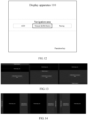
- the display area for a state bar can be located at an upper side, a lower side, a left side or a right side of the display area for monitoring parameter(s) and the function display area. The following is an exemplary description in conjunction with FIG.S 13 to 16 .
- the display area for a state bar, the display area for monitoring parameter(s) (referred to as monitoring area), and the function display area (referred to as defibrillation treatment area) can be arranged in an up-middle-down layout.
- the display area for a state bar is located above the monitoring area, and the monitoring area is located above the defibrillation treatment area.
- the monitoring area is located above the display area for a state bar, and the display area for a state bar is located above the defibrillation treatment area.
- the monitoring area is located above the defibrillation treatment area, and the defibrillation treatment area is located above the display area for a state bar.
- the display area for a state bar, the display area for monitoring parameter(s) (referred to as monitoring area), and the function display area (referred to as defibrillation treatment area) can be arranged in a left-middle-right layout.
- the display area for a state bar is on the left of the monitoring area, and the monitoring area is on the left of the defibrillation treatment area.
- the monitoring area is on the left of the defibrillation treatment area
- the defibrillation treatment area is on the left of the display area for a state bar.
- the display area for a state bar is on the left of the defibrillation treatment area
- the defibrillation treatment area is on the left of the monitoring area.
- the display area for a state bar, the display area for monitoring parameter(s) (referred to as monitoring area), and the function display area (referred to as defibrillation treatment area) can include a left-right and up-down layout.
- the display area for a state bar is on the left of the monitoring area and the defibrillation treatment area, while the monitoring area is above the defibrillation treatment area.
- the display area for a state bar is located on the left of the monitoring area and the defibrillation treatment area, while the defibrillation treatment area is located above the monitoring area.
- the display area for a state bar, the display area for monitoring parameter(s) (referred to as monitoring area), and the function display area (referred to as defibrillation treatment area) can include a left-right and up-down layout.
- the display area for a state bar is located on the right of the monitoring area and the defibrillation treatment area, while the monitoring area is located below the defibrillation treatment area.
- the display area for a state bar is located on the right of the monitoring area and the defibrillation treatment area, while the defibrillation treatment area is located below the monitoring area.
- relatively less important display areas can be invoked for display through a user operation.
- the defibrillation statistic area, the shortcut operation area (such as medication record area), and waveforms of at least one monitoring parameter mentioned above can be invoked and displayed through a user operation (such as gesture, for example, single-finger sliding, double-finger sliding, etc.; as well as clicking a key to invoke).
- a user operation such as gesture, for example, single-finger sliding, double-finger sliding, etc.; as well as clicking a key to invoke.
- they can be invoked in a pop-up style. This can provide greater display space for important display areas to better display important information.
- the content of a single large area can be reorganized with the content of another large area.
- at least one of the navigation area, the dynamic changing area, and the shortcut operation area mentioned earlier can be displayed inside the display area for monitoring parameter(s), and/or at least one of the navigation area, the dynamic changing area, and the shortcut operation area can be displayed inside another area among the navigation area, the dynamic changing area, and the shortcut operation area. That is to say, in this embodiment, different display areas on the display interface can be fused for display, which increases a display area of the function page and enable it to display more treatment information.
- the display apparatus 110 may also include physical keys for safe backup in areas outside the display interface, such as a defibrillation key, an ultrasound key, an electrocardiogram key, a discharge key, an energy addition/subtraction key, an AED key, etc.
- Physical keys can reduce the risk of accidental touch by user, thereby reducing the risk of incorrect treatment.
- FIGS. 17 to 23 a more detailed example diagram including a display interface of a medical device 100 according to an embodiment of this disclosure, which can be a combination of several embodiments mentioned above, is illustrated in conjunction with FIGS. 17 to 23 .
- FIG. 17 is diagram for an example of a page displayed when a manual external defibrillator label in a navigation area of the medical device 100 is selected, according to an embodiment of this disclosure.
- the display interface consists of a display area for a state bar, a display area for monitoring parameter(s), and a function display area, from top to bottom.
- the display area for a state bar displays patient information, time, alarm information, device power, and other contents.
- the display area for monitoring parameter(s) displays waveforms and values of several monitoring parameters.
- the function display area currently displays content related to manual defibrillation, including a graphic area, a dynamic area, a medication record area, and an event record area.
- the graphic area displays an operation graphic (with electrode patches attached to a human body graphic) and a rescue timing graphic (1 minute and 45 seconds).
- the dynamic area displays treatment suggestion information ("Please connect electrode correctly").
- the dynamic area also displays a defibrillation statistic area, which displays treatment statistic information (shock count 2, defibrillation energy 200J).
- the medication record area displays three medication record keys, namely, adrenaline (1mg), amiodarone (Img), and amiodarone (3mg). Due to that the guidelines defines the dosages of adrenaline and lidocaine used in the rescue process, the medication record area at least displays incidental dosages of adrenaline and lidocaine. In additional, interval countdown indication for the adrenaline is also displayed.
- medication records can include medications, such as amiodarone, atropine, adenosine, dopamine, and aminophylline, along with relevant information such as dosages.
- the event record area displays two event of oxygen and intubation.
- the function display area also displays a function key, that is, the main menu key.
- FIG. 18 is diagram for another example of a page displayed when a manual external defibrillator label in a navigation area of the medical device 100 is selected, according to an embodiment of this disclosure.
- the display interface consists of a display area for a state bar, a display area for monitoring parameter(s), and a function display area, from top to bottom.
- the display area for a state bar displays patient information, time, alarm information, device power, and other contents.
- the display area for monitoring parameter(s) displays waveforms and values of several monitoring parameters.
- the function display area currently displays content related to manual defibrillation, including a graphic area, a dynamic area, a medication record area, and an event record area.
- the graphic area displays a pressing graphic (pressing frequency 108) and a rescue timing graphic (1 minute and 45 seconds).
- the dynamic area displays treatment indication information ("impedance is too low") and treatment operation entry ("charging").
- the dynamic area also displays a defibrillation statistic area, which displays treatment statistic information (shock count 2, defibrillation energy 200J).
- the medication record area displays three medication record keys, namely adrenaline (1mg), amiodarone (1mg), and amiodarone (3mg).
- the event record area displays two events of oxygen and intubation.
- the function display area also displays a function key, that is, the main menu key.
- FIG. 19 is an enlarged view of the function display area in FIG. 18 , which can be combined to provide a clearer view of the content displayed inside the function display area.
- FIG. 20 is diagram for another example of a page displayed when an AED label in a navigation area of the medical device 100 is selected, according to an embodiment of this disclosure.
- the display interface consists of a display area for a state bar, a display area for monitoring parameter(s), and a function display area, from top to bottom.
- the display area for a state bar displays patient information, time, alarm information, device power, and other contents.
- the display area for monitoring parameter(s) displays waveforms and values of several monitoring parameters.
- the function display area currently displays content related to automated defibrillation, including a graphic area, a dynamic area, a medication record area, and an event record area.
- the graphic area displays a pressing graphic (pressing frequency 108).
- the dynamic area displays treatment indication information ("Analyzing, please do not touch patient”).
- the dynamic area also displays a defibrillation statistic area, which displays treatment statistic information (shock count 2, defibrillation energy 200J).
- the medication record area displays three medication record keys, namely adrenaline (1mg), amiodarone (1mg), and amiodarone (3mg).
- the event record area displays two events of oxygen and intubation.
- the function display area also displays a function keys, that is, the main menu key.
- FIG. 21 is diagram for another example of a page displayed when an AED label in a navigation area of the medical device 100 is selected, according to an embodiment of this disclosure.
- the display interface consists of a display area for a state bar, a display area for monitoring parameter(s), and a function display area, from top to bottom.
- the display area for a state bar displays patient information, time, alarm information, device power, and other contents.
- the display area for monitoring parameter(s) displays waveforms and values of several monitoring parameters.
- the function display area currently displays content related to automated defibrillation, including a graphic area, a dynamic area, a medication record area, and an event record area.
- the graphic area displays a pressing graphic (pressing frequency 108).
- the dynamic area displays treatment suggestion information ("Suggest electric shock, charge to 200J").
- the dynamic area also displays a defibrillation statistic area, which displays treatment statistic information (shock count 2, defibrillation energy 200J).
- the medication record area displays three medication record keys, namely adrenaline (1mg), amiodarone (1mg), and amiodarone (3mg).
- the event record area displays two events of oxygen and intubation.
- the function display area also displays a function keys, that is, the main menu key.
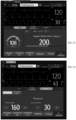
- FIG. 22 is diagram for an example of a page displayed when a pacing label in a navigation area of the medical device 100 is selected, according to an embodiment of this disclosure.
- the display interface consists of a display area for a state bar, a display area for monitoring parameter(s), and a function display area, from top to bottom.
- the display area for a state bar displays patient information, time, alarm information, device power, and other contents.
- the display area for monitoring parameter(s) displays waveforms and values of several monitoring parameters.
- the function display area currently displays content related to pacing.
- the function page corresponding to the pacing label further includes two sub-label pages, namely a fixed pacing sub-label page and an on-demand pacing sub-label page.
- the fixed pacing sub-label page is currently displayed.
- the sub-label page includes an adjustment key for a pacing rate (such as plus and minus keys on the left and right sides of 160 shown in FIG. 22 ), an adjustment key for a pacing current (such as plus and minus keys on the left and right sides of 30 shown in FIG. 22 ), and guidance text during a pacing process (such as "Pacing in Progress" shown in FIG. 22 ).
- the sub-label page also includes a medication record area and an event record area.
- the medication record area displays three medication record keys, namely adrenaline (1mg), amiodarone (1mg), and amiodarone (3mg).
- the event record area displays two events of oxygen and intubation.
- the function display area also displays a function keys, that is, the main menu key.
- FIG. 23 is diagram for another example of a page displayed when a pacing label in a navigation area of the medical device 100 is selected, according to an embodiment of this disclosure.
- the display interface consists of a display area for a state bar, a display area for monitoring parameter(s), and a function display area, from top to bottom.
- the display area for a state bar displays patient information, time, alarm information, device power, and other contents.
- the display area for monitoring parameter(s) displays waveforms and values of several monitoring parameters.
- the function display area currently displays content related to pacing.
- the function page corresponding to the pacing label further includes two sub-label pages, namely a fixed pacing sub-label page and an on-demand pacing sub-label page.
- the fixed pacing sub-label page is currently displayed.
- the sub-label page includes an adjustment key for a pacing rate (such as plus and minus keys on the left and right sides of 160 shown in FIG. 23 ), an adjustment key for a pacing current (such as plus and minus keys on the left and right sides of 30 shown in FIG. 23 ), and guidance text during a pacing process (such as "Pacing is in progress" shown in FIG. 23 ), as well as alarm information of "ECG lead detachment".
- a pacing rate such as plus and minus keys on the left and right sides of 160 shown in FIG. 23
- an adjustment key for a pacing current such as plus and minus keys on the left and right sides of 30 shown in FIG. 23
- guidance text during a pacing process such
- the sub-label page also includes a medication record area and an event record area.
- the medication record area displays three medication record keys, namely adrenaline (1mg), amiodarone (1mg), and amiodarone (3mg).
- the event record area displays two events of oxygen and intubation.
- the function display area also displays a function keys, that is, the main menu key.
- the medical device 100 can simultaneously display labels for at least two treatment functions related to defibrillation and/or pacing. If any label is selected, the corresponding treatment function page can be displayed. Therefore, one treatment function page can be switched to another by simply selecting a label without requiring complex operations of closing the current treatment function page and reopening another treatment function page, which allows emergency personnel to quickly select suitable treatment functions based on a situation and to view corresponding content, so as to timely diagnose and treat patients.
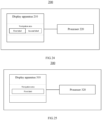
- the medical device 200 includes a display apparatus 210 and a processor 220, wherein the processor 220 is connected with the display apparatus 210, and configured to control the display apparatus for displaying 210.
- a display interface of the display apparatus 210 includes a function display area, which selectively or fixedly displays a navigation area.
- the function display area is further configured to display a first function page, when receiving a display instruction.
- the navigation area simultaneously displays multiple labels, which include a first label and a second label.
- the first function page is configured to display defibrillation energy when selecting the first label, and the first function page is configured to display a pacing rate and/or a pacing current when selecting the second label.
- the medical device 200 according to the embodiment of this disclosure is generally similar to the medical device 100 according to the embodiment of this disclosure mentioned earlier, with following difference.
- the navigation area of the function display area includes at least two labels of an automated external defibrillator label, a manual external defibrillator label, and a pacing label, wherein the automated external defibrillator label and the manual external defibrillator label are separate and independent labels.
- the navigation area of the function display area does not distinguish the automated external defibrillator label and the manual external defibrillator label, but instead displays the defibrillation energy by selecting the first label.
- the function display area combines the corresponding contents of the automated defibrillation and the manual defibrillation into one page for display.
- the structure and display interface of the medical device 100 are described in detail in the previous description, for the sake of brevity, no further details are given here, only some main display contents are described. Those skilled in the art can combine the previous description to understand the structure and display interface of the medical device 200 according to the embodiment of this disclosure.
- the first function page includes a navigation area and a dynamic changing area.
- the dynamic changing area displays defibrillation energy.
- the dynamic changing area displays a pacing rate and/or a pacing current.
- the first label is a defibrillation label
- the second label is a pacing label
- the defibrillation label corresponds to a manual external defibrillation function and/or an automated external defibrillation function.
- the display interface of the display apparatus includes a display area for monitoring parameter(s) and a function display area, wherein the display area for monitoring parameter(s) is configured to display waveform(s) and/or value(s) of the monitoring parameter(s).
- the function display area is configured to display a second function page that is different from the first function page when receiving a display instruction.
- the function display area is further configured to cover waveforms and/or numerical values of several monitoring parameters, which are displayed inside the display area for monitoring parameter(s), when displaying the first function page and/or the second function page.
- the first function page and the second function page respectively includes a close key, which is configured to close a currently displayed first or second function page. After the first and second function pages are closed, the display interface re-displays the covered waveforms and/or values of said monitored parameters.
- the medical device 200 can simultaneously display labels for at least two treatment functions related to defibrillation and pacing. If any label is selected, the corresponding treatment function page can be displayed. Therefore, one treatment function page can be switched to another by simply selecting a label without requiring complex operations of closing the current treatment function page and reopening another treatment function page, which allows emergency personnel to quickly select suitable treatment functions based on a situation and to view corresponding content, so as to timely diagnose and treat patients.
- medical device 300 includes a display apparatus 310 and a processor 320, wherein the processor 320 is connected with the display apparatus 310, and configured to control the display apparatus for displaying 310.
- a display interface of the display apparatus 310 includes a function display area, which selectively or fixedly displays a navigation area.
- the function display area is further configured to display a first function page, when receiving a display instruction.
- the navigation area is configured to at least display a first label. When the first label is selected, the first function page displays defibrillation energy, as well as a pacing rate and/or a pacing current.
- the medical device 300 according to the embodiment of this disclosure is generally similar to the medical device 100 according to the embodiment of this disclosure mentioned earlier, with following difference.
- the navigation area of the function display area includes at least two labels of an automated external defibrillator label, a manual external defibrillator label, and a pacing label, wherein the automated external defibrillator label, the manual external defibrillator label and the pacing label are separate and independent labels.
- the navigation area of the function display area includes at least one label, which displays the defibrillation energy, pacing rate, and/or pacing current when selected. That is to say, on the display interface of the display apparatus 310 of the medical device 300, the navigation area of the function display area does not distinguish the automated external defibrillator label, the manual external defibrillator label, and the pacing label. Instead, by selecting one label, the defibrillation function related content and pacing function related content are displayed simultaneously.
- the function display area combines the corresponding contents of the automated defibrillation, the manual defibrillation, and the pacing into one page for display.
- the structure and display interface of the medical device 100 are described in detail in the previous description, for the sake of brevity, no further details are given here, only some main display contents are described. Those skilled in the art can combine the previous description to understand the structure and display interface of the medical device 300 according to the embodiment of this disclosure.
- the medical device 300 can display labels for defibrillation and pacing related treatment functions when selected, without requiring complex operations of closing the current treatment function page and reopening another treatment function page, which allows emergency personnel to quickly select suitable treatment functions based on a situation and to view corresponding content, so as to timely diagnose and treat patients.
- the disclosed devices and methods can be implemented in other ways.
- the device embodiments described above are only schematic.
- the division of the units is only a logical functional division, and there may be other division methods in actual implementations.
- multiple units or components can be combined or integrated into another device, or some features can be ignored or not executed.
- the various component embodiments of this disclosure can be implemented in hardware, software modules running on one or more processors, or a combination thereof. Technicians in this field should understand that a microprocessor or digital signal processor (DSP) can be used in practice to implement some or all of the functions of some modules according to the embodiments of this disclosure.
- DSP digital signal processor
- This disclosure can also be implemented as a partial or complete device program (such as a computer program and a computer program product) for executing the method described herein.
- the program implementing this disclosure can be stored at a computer-readable medium or can have the form of one or more signals. Such signals can be downloaded from internet websites, provided on carrier signals, or in any other form.
Landscapes
- Engineering & Computer Science (AREA)
- Health & Medical Sciences (AREA)
- Theoretical Computer Science (AREA)
- General Engineering & Computer Science (AREA)
- Biomedical Technology (AREA)
- Cardiology (AREA)
- General Health & Medical Sciences (AREA)
- Human Computer Interaction (AREA)
- Public Health (AREA)
- Radiology & Medical Imaging (AREA)
- Life Sciences & Earth Sciences (AREA)
- Veterinary Medicine (AREA)
- Animal Behavior & Ethology (AREA)
- General Physics & Mathematics (AREA)
- Nuclear Medicine, Radiotherapy & Molecular Imaging (AREA)
- Physics & Mathematics (AREA)
- Heart & Thoracic Surgery (AREA)
- Business, Economics & Management (AREA)
- Primary Health Care (AREA)
- Epidemiology (AREA)
- Medical Informatics (AREA)
- General Business, Economics & Management (AREA)
- Electrotherapy Devices (AREA)
Applications Claiming Priority (2)
| Application Number | Priority Date | Filing Date | Title |
|---|---|---|---|
| CN202111664247 | 2021-12-31 | ||
| PCT/CN2022/123844 WO2023124351A1 (zh) | 2021-12-31 | 2022-10-08 | 医疗设备 |
Publications (2)
| Publication Number | Publication Date |
|---|---|
| EP4342519A1 true EP4342519A1 (de) | 2024-03-27 |
| EP4342519A4 EP4342519A4 (de) | 2024-11-06 |
Family
ID=86997443
Family Applications (1)
| Application Number | Title | Priority Date | Filing Date |
|---|---|---|---|
| EP22913615.5A Pending EP4342519A4 (de) | 2021-12-31 | 2022-10-08 | Medizinische vorrichtung |
Country Status (3)
| Country | Link |
|---|---|
| EP (1) | EP4342519A4 (de) |
| CN (1) | CN118234539A (de) |
| WO (1) | WO2023124351A1 (de) |
Families Citing this family (1)
| Publication number | Priority date | Publication date | Assignee | Title |
|---|---|---|---|---|
| CN118189044A (zh) * | 2024-04-11 | 2024-06-14 | 深圳高发气体股份有限公司 | 一种液氧站的可视管理方法及相关设备 |
Family Cites Families (11)
| Publication number | Priority date | Publication date | Assignee | Title |
|---|---|---|---|---|
| US20040064169A1 (en) * | 2002-09-30 | 2004-04-01 | Briscoe Kathleen E. | User interface for medical device |
| US20040152954A1 (en) * | 2003-01-31 | 2004-08-05 | Christopher Pearce | Menu-driven medical device configuration |
| EP2506926B1 (de) * | 2009-11-30 | 2016-08-03 | Zoll Medical Corporation | Anzeige für ein medizinisches gerät mit doppelmodus |
| CA2906277A1 (en) * | 2013-03-15 | 2014-09-18 | Koninklijke Philips N.V. | Monitor defibrillator with touch screen user interface for ecg review and therapy |
| CN105852799B (zh) * | 2015-01-21 | 2019-06-21 | 深圳迈瑞生物医疗电子股份有限公司 | 一种显示cpr监测数据的方法、设备、呼吸机及监护仪 |
| JP6839937B2 (ja) * | 2016-07-14 | 2021-03-10 | フクダ電子株式会社 | 心臓電気刺激装置 |
| CN108962341A (zh) * | 2017-05-26 | 2018-12-07 | 中国医学科学院北京协和医院 | 一种记录抢救过程事件的方法、装置及医疗设备 |
| CN118304526A (zh) * | 2018-01-17 | 2024-07-09 | Zoll医疗公司 | 用于辅助救助者的医疗系统 |
| US11925439B2 (en) * | 2018-10-23 | 2024-03-12 | Zoll Medical Corporation | Data playback interface for a medical device |
| US11684318B2 (en) * | 2018-12-24 | 2023-06-27 | Shenzhen Mindray Bio-Medical Electronics Co., Ltd. | Monitoring device |
| CN111543974A (zh) * | 2019-02-11 | 2020-08-18 | Zoll医疗公司 | 多模式医疗设备 |
-
2022
- 2022-10-08 CN CN202280076500.6A patent/CN118234539A/zh active Pending
- 2022-10-08 WO PCT/CN2022/123844 patent/WO2023124351A1/zh not_active Ceased
- 2022-10-08 EP EP22913615.5A patent/EP4342519A4/de active Pending
Also Published As
| Publication number | Publication date |
|---|---|
| CN118234539A (zh) | 2024-06-21 |
| WO2023124351A1 (zh) | 2023-07-06 |
| EP4342519A4 (de) | 2024-11-06 |
Similar Documents
| Publication | Publication Date | Title |
|---|---|---|
| US20240252047A1 (en) | Data playback interface for medical device | |
| JP6764596B2 (ja) | システム | |
| US9152765B2 (en) | Multi-display bedside monitoring system | |
| US6289248B1 (en) | System and method for detecting and displaying parameter interactions | |
| CN101385635B (zh) | 一种病理事件分析装置 | |
| WO2020037597A1 (zh) | 医疗监护系统、呼吸事件的回顾方法和装置 | |
| EP4649994A2 (de) | Elektronischer elektrokardiogrammmessschieber | |
| CN116763270B (zh) | 监护仪、应用于监护仪的显示方法、显示装置和存储介质 | |
| US12114985B2 (en) | Vital-sign data statistics system and patient monitor | |
| CN111543976B (zh) | 除颤器装置 | |
| WO2020037599A1 (zh) | 医疗设备、呼吸暂停事件监测方法和装置 | |
| KR20090097280A (ko) | 시각적 스트레스를 완화하는 시각적 도우미 장치와검사방법 | |
| WO2022135530A1 (zh) | 监护设备及监测数据的显示方法 | |
| WO2023124351A1 (zh) | 医疗设备 | |
| WO2023126012A1 (zh) | 病人监护设备和病人监护报警方法 | |
| JP3133752B2 (ja) | 生体信号波形表示方法 | |
| CN116407770A (zh) | 医疗设备 | |
| US20240215930A1 (en) | Medical device and information display method therefor | |
| CN116407086A (zh) | 医疗设备及其显示界面的显示方法 | |
| CN120203501A (zh) | 医疗设备以及用于医疗设备的数据显示方法 | |
| CN120280181A (zh) | 病人数据显示方法、医用设备及其界面显示方法 | |
| CN120000952A (zh) | 具有体征监测功能的自动体外除颤仪、方法及存储介质 | |
| CN116490118A (zh) | 监护设备及其监护方法 | |
| CN121987340A (zh) | 一种应用于手术室的信息显示方法及信息显示系统 | |
| CN116369850A (zh) | 病人监护设备及报警事件的分析方法 |
Legal Events
| Date | Code | Title | Description |
|---|---|---|---|
| STAA | Information on the status of an ep patent application or granted ep patent |
Free format text: STATUS: THE INTERNATIONAL PUBLICATION HAS BEEN MADE |
|
| PUAI | Public reference made under article 153(3) epc to a published international application that has entered the european phase |
Free format text: ORIGINAL CODE: 0009012 |
|
| STAA | Information on the status of an ep patent application or granted ep patent |
Free format text: STATUS: REQUEST FOR EXAMINATION WAS MADE |
|
| 17P | Request for examination filed |
Effective date: 20231217 |
|
| AK | Designated contracting states |
Kind code of ref document: A1 Designated state(s): AL AT BE BG CH CY CZ DE DK EE ES FI FR GB GR HR HU IE IS IT LI LT LU LV MC ME MK MT NL NO PL PT RO RS SE SI SK SM TR |
|
| REG | Reference to a national code |
Ref country code: DE Ref legal event code: R079 Free format text: PREVIOUS MAIN CLASS: A61N0001390000 Ipc: G16H0040630000 |
|
| A4 | Supplementary search report drawn up and despatched |
Effective date: 20241009 |
|
| RIC1 | Information provided on ipc code assigned before grant |
Ipc: G06F 3/0484 20220101ALI20241002BHEP Ipc: G06F 3/0482 20130101ALI20241002BHEP Ipc: A61N 1/04 20060101ALI20241002BHEP Ipc: A61N 1/39 20060101ALI20241002BHEP Ipc: G16H 40/63 20180101AFI20241002BHEP |
|
| DAV | Request for validation of the european patent (deleted) | ||
| DAX | Request for extension of the european patent (deleted) |