EP4343543A1 - Vorrichtung und verfahren zur hervorhebung der beziehung von benutzerschnittstellenabschnitten - Google Patents
Vorrichtung und verfahren zur hervorhebung der beziehung von benutzerschnittstellenabschnitten Download PDFInfo
- Publication number
- EP4343543A1 EP4343543A1 EP22197018.9A EP22197018A EP4343543A1 EP 4343543 A1 EP4343543 A1 EP 4343543A1 EP 22197018 A EP22197018 A EP 22197018A EP 4343543 A1 EP4343543 A1 EP 4343543A1
- Authority
- EP
- European Patent Office
- Prior art keywords
- user interface
- interface section
- focus
- section
- sections
- Prior art date
- Legal status (The legal status is an assumption and is not a legal conclusion. Google has not performed a legal analysis and makes no representation as to the accuracy of the status listed.)
- Pending
Links
Images
Classifications
-
- G—PHYSICS
- G06—COMPUTING OR CALCULATING; COUNTING
- G06F—ELECTRIC DIGITAL DATA PROCESSING
- G06F9/00—Arrangements for program control, e.g. control units
- G06F9/06—Arrangements for program control, e.g. control units using stored programs, i.e. using an internal store of processing equipment to receive or retain programs
- G06F9/44—Arrangements for executing specific programs
- G06F9/451—Execution arrangements for user interfaces
-
- G—PHYSICS
- G01—MEASURING; TESTING
- G01R—MEASURING ELECTRIC VARIABLES; MEASURING MAGNETIC VARIABLES
- G01R1/00—Details of instruments or arrangements of the types included in groups G01R5/00 - G01R13/00 and G01R31/00
- G01R1/02—General constructional details
- G01R1/025—General constructional details concerning dedicated user interfaces, e.g. GUI, or dedicated keyboards
-
- G—PHYSICS
- G06—COMPUTING OR CALCULATING; COUNTING
- G06F—ELECTRIC DIGITAL DATA PROCESSING
- G06F3/00—Input arrangements for transferring data to be processed into a form capable of being handled by the computer; Output arrangements for transferring data from processing unit to output unit, e.g. interface arrangements
- G06F3/01—Input arrangements or combined input and output arrangements for interaction between user and computer
- G06F3/048—Interaction techniques based on graphical user interfaces [GUI]
- G06F3/0484—Interaction techniques based on graphical user interfaces [GUI] for the control of specific functions or operations, e.g. selecting or manipulating an object, an image or a displayed text element, setting a parameter value or selecting a range
- G06F3/04842—Selection of displayed objects or displayed text elements
-
- G—PHYSICS
- G06—COMPUTING OR CALCULATING; COUNTING
- G06F—ELECTRIC DIGITAL DATA PROCESSING
- G06F3/00—Input arrangements for transferring data to be processed into a form capable of being handled by the computer; Output arrangements for transferring data from processing unit to output unit, e.g. interface arrangements
- G06F3/01—Input arrangements or combined input and output arrangements for interaction between user and computer
- G06F3/048—Interaction techniques based on graphical user interfaces [GUI]
- G06F3/0484—Interaction techniques based on graphical user interfaces [GUI] for the control of specific functions or operations, e.g. selecting or manipulating an object, an image or a displayed text element, setting a parameter value or selecting a range
- G06F3/04845—Interaction techniques based on graphical user interfaces [GUI] for the control of specific functions or operations, e.g. selecting or manipulating an object, an image or a displayed text element, setting a parameter value or selecting a range for image manipulation, e.g. dragging, rotation, expansion or change of colour
-
- G—PHYSICS
- G06—COMPUTING OR CALCULATING; COUNTING
- G06F—ELECTRIC DIGITAL DATA PROCESSING
- G06F3/00—Input arrangements for transferring data to be processed into a form capable of being handled by the computer; Output arrangements for transferring data from processing unit to output unit, e.g. interface arrangements
- G06F3/01—Input arrangements or combined input and output arrangements for interaction between user and computer
- G06F3/048—Interaction techniques based on graphical user interfaces [GUI]
- G06F3/0484—Interaction techniques based on graphical user interfaces [GUI] for the control of specific functions or operations, e.g. selecting or manipulating an object, an image or a displayed text element, setting a parameter value or selecting a range
- G06F3/04847—Interaction techniques to control parameter settings, e.g. interaction with sliders or dials
-
- G—PHYSICS
- G01—MEASURING; TESTING
- G01R—MEASURING ELECTRIC VARIABLES; MEASURING MAGNETIC VARIABLES
- G01R13/00—Arrangements for displaying electric variables or waveforms
- G01R13/02—Arrangements for displaying electric variables or waveforms for displaying measured electric variables in digital form
- G01R13/029—Software therefor
-
- G—PHYSICS
- G06—COMPUTING OR CALCULATING; COUNTING
- G06F—ELECTRIC DIGITAL DATA PROCESSING
- G06F2203/00—Indexing scheme relating to G06F3/00 - G06F3/048
- G06F2203/048—Indexing scheme relating to G06F3/048
- G06F2203/04803—Split screen, i.e. subdividing the display area or the window area into separate subareas
-
- G—PHYSICS
- G06—COMPUTING OR CALCULATING; COUNTING
- G06F—ELECTRIC DIGITAL DATA PROCESSING
- G06F2203/00—Indexing scheme relating to G06F3/00 - G06F3/048
- G06F2203/048—Indexing scheme relating to G06F3/048
- G06F2203/04806—Zoom, i.e. interaction techniques or interactors for controlling the zooming operation
Definitions
- the invention relates to emphasizing the relation of user interface sections. More specifically, the invention distinguishes the correspondence of a first user interface section for receiving an input parameter and a second user interface section for showing a measurement result which is influenced by the input parameter.
- a conventional device e.g., a measurement device, such as an oscilloscope or a signal analyzer
- the input dialog may appear in a foreground of the screen (e.g., in a window), wherein the background (e.g., the entire screen) may contain several result representations.
- a first user interface section comprises the input dialog
- a second user interface section comprises the result representation. That is, both the first and the second user interface section can be regarded a graphical user interface (GUI) element.
- GUI graphical user interface
- Conventional devices divide the screen into several (typically rectangular) areas that may contain a wide variety of result representations (e.g., measurement results, wave forms, curves, tables, status information, 3D diagrams).
- the results can be provided by different sources, e.g. (measurement) applications, and can have different as well as common settings or parameters. If an application only can use a small area of the screen, the size of the input dialog or the result representation is limited to such a small area.
- an input dialog e.g., for entering settings or parameters which affect a result representation
- an input dialog e.g., for entering settings or parameters which affect a result representation
- the object of the present invention is to emphasize the relation of user interface sections.
- the present invention in particular allows for distinguishing, which user interface sections are related or not related to each other.
- the present invention highlights which result representation corresponds with an input dialog.
- An inventive device for emphasizing the relation of user interface sections comprises a first user interface section and a second user interface section, wherein the first user interface section and the second user interface section are configured to display at least one of an instrument parameter, a measurement result, a waveform, and wherein the device is configured to de-focus the second user interface section with respect to the first user interface section based on the selection of an instrument parameter in the first user interface section.
- Input dialogues can be displayed or can become larger. Input dialogues, provided that they do not make up the entire screen, can be freely positioned by a user, e.g., to better recognize the reference to the second user interface section (i.e. the display of results). There can be several relevant and irrelevant user interface sections.
- to de-focus comprises to prevent a user from focusing their gaze on the respective interface section.
- the selection of an instrument parameter in the first user interface section may comprise to select, by the device, the instrument parameter to be displayed in the first user interface section, and/or to select, by a user, the instrument parameter which is displayed in the first user interface section.
- the selection done by the user in particular comprises clicking.
- first user interface section and/or the second user interface section are configured for input and output.
- first user interface section and/or the second user interface section comprise a display.
- first user interface section and/or the second user interface section are comprised by a same display.
- first user interface section and/or the second user interface section comprise a touch screen display.
- the device comprises an instrument, e.g., a measurement device.
- the first user interface section overlaps with at least one other user interface section.
- the first user interface section does not overlap with any other user interface section.
- the device is further configured to blur the second user interface section to de-focus the second user interface section.
- the device is further configured to show a colored overlay on the second user interface section to de-focus the second user interface section.
- the colored overlay is a semitransparent grey overlay or a semitransparent overlay of any color.
- the device is further configured to reduce the size of the second user interface section to de-focus the second user interface section.
- the device further comprises a third user interface section, wherein the device is in particular configured to increase the size of the third user interface section to de-focus the second user interface section.
- the device further comprises a fourth user interface section, wherein the device is in particular configured to increase the size of the fourth user interface section to de-focus the second user interface section.
- At least two of the user interface sections are non-rectangular user interface sections.
- the device is further configured to de-focus the second user interface section displaying a measurement result with respect to the first user interface section displaying an instrument parameter based on the selection of the instrument parameter in the first user interface section.
- An inventive method for emphasizing the relation of user interface sections comprises the steps of displaying, by a first user interface section of a device and a second user interface section of the device, at least one of an instrument parameter, a measurement result, a waveform; and de-focusing, by the device, the second user interface section with respect to the first user interface section based on the selection of an instrument parameter in the first user interface section.
- the method further comprises the step of blurring, by the device, the second user interface section, to de-focus the second user interface section.
- the method further comprises the step of reducing, by the device, the size of the second user interface section to de-focus the second user interface section.
- the device further comprises a third user interface section
- the method in particular comprises the step of increasing, by the device, the size of the third user interface section to de-focus the second user interface section.
- the device further comprises a fourth user interface section
- the method in particular comprises the step of increasing, by the device, the size of the fourth user interface section to de-focus the second user interface section.
- At least two of the user interface sections are non-rectangular user interface sections.
- the method further comprises the step of de-focusing, by the device, the second user interface section displaying a measurement result with respect to the first user interface section displaying an instrument parameter based on the selection of the instrument parameter in the first user interface section.
- the inventive method comprises the same advantages as the inventive device.
- An inventive computer program comprises instructions which, when the program is executed by a computer, cause the computer to carry out the inventive method.
- the inventive computer program product comprises the same advantages as the inventive device.
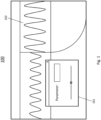
- Fig. 1 shows a schematic illustration of an embodiment of the inventive device 100.
- the device 100 is for emphasizing the relation of user interface sections 101, 102 and can be any kind of device 100 with a user interface, such as a display or a touch screen display.
- the device 100 in particular can be a measurement device.
- the device 100 in particular can be an oscilloscope or a signal analyzer.
- the device 100 comprises a first user interface section 101 and a second user interface section 102.
- the first user interface section 101 and the second user interface section 102 are configured to display at least one of: an instrument parameter, a measurement result, a waveform. That is, an interface section 101, 102 may act as an input dialog, which can display and/or receive an instrument parameter.
- An interface section 101, 102 may also act as an output dialog, which is for result representation, that is, for displaying e.g., a measurement result, a waveform or a calculation result, obtained by the device 100.
- the device 100 is configured to de-focus the second user interface section 102 with respect to the first user interface section 101 based on the selection of an instrument parameter in the first user interface section 101.
- the second user interface section 102 which shows a measurement result or a waveform that is not affected by the instrument parameter, is de-focused.
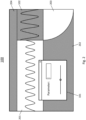
- the device 100 is now going to be described in more detail in view of FIG. 2 .
- the device 100 of FIG. 2 includes all functions and features of the device 100 as described in view of FIG. 1 .
- the device 100 optionally is configured to blur the second user interface section 102 to de-focus the second user interface section 102.
- the second user interface section 102 By blurring the second user interface section 102, the user more easily focusses on another user interface section, e.g., the third user interface section 201 shown in the figure.
- the third user interface section 201 may relate to the parameter which is input in the first user interface section 101. Hatched areas in FIG. 2 mean that what is displayed underneath is blurred (e.g., by means of "Gaussian Blur") or overlaid by a transparent colored (e.g., gray) layer.
- Various implementations of "blurring" are possible. Examples are blurring or using colored and/or semitransparent overlays.
- the size of the second user interface section 102 can be reduced to de-focus the second user interface section 102.
- more space is available for visualizing other information.
- a user puts less focus on the second user interface section 102, as it is smaller and less visible.
- the device 100 optionally may comprise a third user interface section 201.
- the device 100 optionally can be configured to increase the size of the third user interface section 201 to de-focus the second user interface section 102. For example, if the parameter, which is input in the first user interface section 101, relates to the third user interface section 201, the size of the third user interface section is increased so that more space is available e.g., for visualizing the changes which the parameter causes on the measurement result displayed in the third user interface section 201.
- the device 100 optionally may comprise a fourth user interface section 202.
- the device 100 may increase the size of the fourth user interface section 202 to de-focus the second user interface section 102.
- the fourth user interface section 202 is not the interface section on which the user should focus, the size of the fourth user interface section 202 is increased to ensure a consistent distribution of user interface sections across the overall screen.
- the fourth user interface section 202 is also illustrated in a blurred manner, as in this example, the user should not focus on this section.
- the user interface sections 101, 102, 201, 202, 203 optionally can be non-rectangular user interface sections 202, 203.
- the device 100 thus can adapt the interface sections to a predefined use case, e.g., to adjust the shape of a section to a shape of displayed content, or to make optimal use of space.
- FIG. 2 also a fifth user interface section 203 is shown.
- the section is of non-rectangular and is not blurred.
- the parameter which is adjusted in the first user interface section 101 affects the signal shown in the third user interface section 201, and affects information which is displayed in the fifth user interface section 203.
- the content of the fifth user interface section 203 is not shown in FIG. 2 .
- the device 100 may de-focus the second user interface section 102 displaying a measurement result with respect to the first user interface section 101 displaying an instrument parameter based on the selection of the instrument parameter in the first user interface section 101. That is, in a specific use case, the second user interface section 102 displays a measurement result, and the first user interface section 101 displays an instrument parameter.
- FIG. 2 may show a display unit of a device (e.g., a measurement device).
- a device e.g., a measurement device.
- the corresponding teaching could apply to any graphical user interface of any display unit of any device.
- the display unit can be divided into several areas, e.g., the third user interface section 201, the second user interface section 102, the fourth user interface section 202, the fifth user interface section 203 and a sixth user interface section 204.
- the content of these user interface sections may depend on settings that are adjusted in the first user interface section 101 and e.g., further settings that are not shown.
- the terms first user interface section 101 and dialog 101 can be used interchangeably.
- the user interface sections can be rectangular, but also can be shaped differently.
- the second to fifth user interface section could contain result representations comprising at least one of: a diagram, a grid line, a label, a measurement curve, a waveform, a signal.
- the sixth user interface section 204 could, for example, show status information and important setting parameters (i.e. no measurement results).
- results that originate exclusively from measurement application A could be displayed.
- results of application B and application C could be shown.
- Device settings that apply to all measurement applications can be displayed in the sixth user interface section 204 (which e.g., is a global section).
- a user can now open a (settings) dialog 101, e.g., by clicking.
- This dialog corresponds to the first user interface section 101.
- the first user interface section 101 in FIG. 2 shows such a dialog which is already opened.
- the size of the dialog 101 is not limited to the area of the third user interface section 201, although it corresponds to the measurement application A which is assigned to the third user interface section 201.
- dialogs should still be displayed large (e.g., that there are sufficiently large buttons for touchscreen operation).
- the second user interface section 102 and the fourth user interface section were not blurred and the fifth user interface section 203 was not reduced in size, it would not be obvious to the user to which area or which (measurement) application the dialog 101 belongs.
- the dialog 101 contains two parameters that can be set, one input field with the label "Parameter” and a slider.
- the relevant user interface sections 201 and 203 could be enlarged (e.g., zoomed) and the sections 102 and 202 could be reduced in size or disappear. Thereby, relevant areas are shown in sharp focus and irrelevant areas are made unrecognizable. Thus, a customer may recognize what is currently (in the current operating context) important. As soon as the dialog 101 is open (or has focus), relevant user interface sections (here 201 and 203) are displayed normally.
- dialogs 101 e.g., hierarchies
- multiple dialogs 101 could be displayed. Then the dialog 101 that has focus is decisive for which user interface sections are de-focused.
- a user interface section e.g., is relevant if it has a connection or relation with something that can be influenced by the dialog 101. For example, changing the parameter in user interface section 101 could affect user interface sections 201 and 203.
- a user should therefore pay attention to areas 201 and 203 and can safely ignore areas 102, 202 and 204. These areas can be made unrecognizable (blurred) so that the user is not distracted by them.
- the customer operates the slider in dialog 101. Now all user interface sections are blurred, which cannot be influenced by the slider operation.
- the user has the option of placing the dialog 101 (e.g., by dragging it) freely on the screen. If the dialog 101 is closed or loses focus (e.g. by clicking outside the dialog 101 or clicking "X" for closing the dialog 101), the blur disappears.
- the out-of-focus areas can be adjusted accordingly.
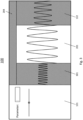
- FIG. 3 shows another example of the device 100.
- the device 100 of FIG. 3 includes all functions and features of the device 100 as described in view of FIG. 1 and FIG.2 above.
- a screen of the device 100 illustrated in FIG. 3 shows a settings area (i.e., the first user interface section 101, which can also be called dialog 101), and display areas 102, 201 and 301 (i.e. the second user interface section 102, the third user interface section 201 and a further user interface section 301), as well as a status area 204 (i.e., the sixth user interface section 204).
- a settings area i.e., the first user interface section 101, which can also be called dialog 101
- display areas 102, 201 and 301 i.e. the second user interface section 102, the third user interface section 201 and a further user interface section 301
- a status area 204 i.e., the sixth user interface section 204.
- the dialogue 101 does not cover any other user interface sections. That is, for the operating principle described in this document, it may be not relevant, where the dialog 101 is and how big it is.
- the screen layout of the device 100 could also change dynamically (e.g., areas can become larger, smaller, or disappear depending on a user interaction).
- those user interface sections 102, 204, 301 which are not related to the parameter which is adjusted in the dialog 101 can be blurred or reduced in size.
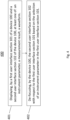
- FIG. 4 schematically shows a method 400 according to an embodiment of the present invention.
- the method is for emphasizing the relation of user interface sections 101, 102.
- the method 400 comprises a step of displaying 401, by a first user interface section 101 of a device 100 and a second user interface section 102 of the device 100, at least one of: an instrument parameter, a measurement result, a waveform.
- the method comprises another step of de-focusing 402, by the device 100, the second user interface section 102 with respect to the first user interface section 101 based on the selection of an instrument parameter in the first user interface section 101.
- the invention is not limited to the illustrated embodiment.
- the network devices may be mobile terminals such as mobile phones, but also computers such as personal computers or the like. All features described above, or features shown in the figures can be combined with each other in any advantageous manner within the scope of the invention.
Landscapes
- Engineering & Computer Science (AREA)
- Theoretical Computer Science (AREA)
- General Engineering & Computer Science (AREA)
- Human Computer Interaction (AREA)
- Physics & Mathematics (AREA)
- General Physics & Mathematics (AREA)
- Software Systems (AREA)
- User Interface Of Digital Computer (AREA)
Priority Applications (3)
| Application Number | Priority Date | Filing Date | Title |
|---|---|---|---|
| EP22197018.9A EP4343543A1 (de) | 2022-09-22 | 2022-09-22 | Vorrichtung und verfahren zur hervorhebung der beziehung von benutzerschnittstellenabschnitten |
| US18/347,238 US20240103703A1 (en) | 2022-09-22 | 2023-07-05 | Device and method for emphasizing the relation of user interface sections |
| CN202311004158.1A CN117742850A (zh) | 2022-09-22 | 2023-08-10 | 用于强调用户界面部分的关系的设备和方法 |
Applications Claiming Priority (1)
| Application Number | Priority Date | Filing Date | Title |
|---|---|---|---|
| EP22197018.9A EP4343543A1 (de) | 2022-09-22 | 2022-09-22 | Vorrichtung und verfahren zur hervorhebung der beziehung von benutzerschnittstellenabschnitten |
Publications (1)
| Publication Number | Publication Date |
|---|---|
| EP4343543A1 true EP4343543A1 (de) | 2024-03-27 |
Family
ID=83689017
Family Applications (1)
| Application Number | Title | Priority Date | Filing Date |
|---|---|---|---|
| EP22197018.9A Pending EP4343543A1 (de) | 2022-09-22 | 2022-09-22 | Vorrichtung und verfahren zur hervorhebung der beziehung von benutzerschnittstellenabschnitten |
Country Status (3)
| Country | Link |
|---|---|
| US (1) | US20240103703A1 (de) |
| EP (1) | EP4343543A1 (de) |
| CN (1) | CN117742850A (de) |
Citations (5)
| Publication number | Priority date | Publication date | Assignee | Title |
|---|---|---|---|---|
| US20090019031A1 (en) * | 2007-07-10 | 2009-01-15 | Yahoo! Inc. | Interface for visually searching and navigating objects |
| US20110047502A1 (en) * | 2000-04-04 | 2011-02-24 | Definiens Ag | Method for navigating between sections on a display space |
| US20150160162A1 (en) * | 2013-12-11 | 2015-06-11 | Agilent Technologies, Inc. | User interfaces, systems and methods for displaying multi-dimensional data for ion mobility spectrometry-mass spectrometry |
| WO2015188036A1 (en) * | 2014-06-05 | 2015-12-10 | Deutsche Bank Ag | System and method for facilitating interactive data visualization and manipulation |
| US10783214B1 (en) * | 2018-03-08 | 2020-09-22 | Palantir Technologies Inc. | Adaptive and dynamic user interface with linked tiles |
Family Cites Families (15)
| Publication number | Priority date | Publication date | Assignee | Title |
|---|---|---|---|---|
| EP1393154B1 (de) * | 2001-05-18 | 2013-11-20 | Rohde & Schwarz GmbH & Co. KG | Messgerät mit dialogbedienung über dialogfenster und entsprechendes verfahren |
| US7403560B2 (en) * | 2004-02-09 | 2008-07-22 | Lecroy Corporation | Simultaneous physical and protocol layer analysis |
| US8060836B2 (en) * | 2007-01-08 | 2011-11-15 | Virgin Mobile Usa, Llc | Navigating displayed content on a mobile device |
| JP5135890B2 (ja) * | 2007-05-31 | 2013-02-06 | 横河電機株式会社 | 波形測定装置 |
| CN101493749A (zh) * | 2008-01-21 | 2009-07-29 | 联想(北京)有限公司 | 窗口显示状态的调整方法与装置 |
| DE102008017289B4 (de) * | 2008-03-03 | 2021-10-14 | Rohde & Schwarz GmbH & Co. Kommanditgesellschaft | Anpassbares Messgerät und Verfahren zur Anpassung |
| US9714956B2 (en) * | 2012-12-13 | 2017-07-25 | Tektronix, Inc. | Test and measurement instrument user interface with move mode |
| DE102014203346B4 (de) * | 2014-02-25 | 2023-01-05 | Rohde & Schwarz Gmbh & Co. Kg | Messgerät und Messverfahren mit in Größe und Informationsgehalt anpassbaren Benutzerdialogen |
| US10466663B2 (en) * | 2015-01-22 | 2019-11-05 | Siemens Industry, Inc. | Systems, methods and apparatus for an improved interface to energy management systems |
| US20170011418A1 (en) * | 2015-05-29 | 2017-01-12 | Claude Denton | System and method for account ingestion |
| US11157149B2 (en) * | 2017-12-08 | 2021-10-26 | Google Llc | Managing comments in a cloud-based environment |
| CN108491127B (zh) * | 2018-03-12 | 2020-02-07 | Oppo广东移动通信有限公司 | 输入法界面显示方法、装置、终端及存储介质 |
| EP3870280A1 (de) * | 2018-10-23 | 2021-09-01 | Zoll Medical Corporation | Datenwiedergabeschnittstelle für ein medizinprodukt |
| US11554230B2 (en) * | 2019-01-17 | 2023-01-17 | Covidien Lp | Ventilator-initiated decision support and waveform capture during ventilation |
| US12032803B2 (en) * | 2020-09-23 | 2024-07-09 | Apple Inc. | Devices, methods, and graphical user interfaces for interacting with three-dimensional environments |
-
2022
- 2022-09-22 EP EP22197018.9A patent/EP4343543A1/de active Pending
-
2023
- 2023-07-05 US US18/347,238 patent/US20240103703A1/en active Pending
- 2023-08-10 CN CN202311004158.1A patent/CN117742850A/zh active Pending
Patent Citations (5)
| Publication number | Priority date | Publication date | Assignee | Title |
|---|---|---|---|---|
| US20110047502A1 (en) * | 2000-04-04 | 2011-02-24 | Definiens Ag | Method for navigating between sections on a display space |
| US20090019031A1 (en) * | 2007-07-10 | 2009-01-15 | Yahoo! Inc. | Interface for visually searching and navigating objects |
| US20150160162A1 (en) * | 2013-12-11 | 2015-06-11 | Agilent Technologies, Inc. | User interfaces, systems and methods for displaying multi-dimensional data for ion mobility spectrometry-mass spectrometry |
| WO2015188036A1 (en) * | 2014-06-05 | 2015-12-10 | Deutsche Bank Ag | System and method for facilitating interactive data visualization and manipulation |
| US10783214B1 (en) * | 2018-03-08 | 2020-09-22 | Palantir Technologies Inc. | Adaptive and dynamic user interface with linked tiles |
Also Published As
| Publication number | Publication date |
|---|---|
| CN117742850A (zh) | 2024-03-22 |
| US20240103703A1 (en) | 2024-03-28 |
Similar Documents
| Publication | Publication Date | Title |
|---|---|---|
| Burigat et al. | Navigation techniques for small-screen devices: An evaluation on maps and web pages | |
| US9582171B2 (en) | Controlling visualization of data by a dashboard widget | |
| JP5618904B2 (ja) | インタラクティブ・フィルタのためのシステム、方法およびコンピュータ・プログラム(インタラクティブ・フィルタのためのシステムおよび方法) | |
| US20100185976A1 (en) | Graphic user interface and a method thereof | |
| US10430060B2 (en) | Graphical user interface and related method | |
| US10572114B2 (en) | Systems and methods for effectively using data controls in a graphical user interface on a small visual display | |
| US9639238B2 (en) | Modification of a characteristic of a user interface object | |
| US7580909B2 (en) | Visual representation tool for structured arguments | |
| US8952991B1 (en) | Selective zoom response behavior in computing systems | |
| US9158789B2 (en) | Coordinated geospatial, list-based and filter-based selection | |
| US8930851B2 (en) | Visually representing a menu structure | |
| US20120284656A1 (en) | Color labeling in a graphical user interface | |
| US7701471B1 (en) | Methods and apparatus to display a viewing region | |
| US20070226642A1 (en) | Apparatus and method for displaying transparent windows when copying or moving items between windows | |
| US8689126B2 (en) | Displaying graphical indications to indicate dependencies between scripts | |
| US9721366B2 (en) | Data interpretation overlay mechanism | |
| EP4343543A1 (de) | Vorrichtung und verfahren zur hervorhebung der beziehung von benutzerschnittstellenabschnitten | |
| US20150120608A1 (en) | Interactive multidimensional portfolio analysis | |
| CN104951477B (zh) | 用于过滤数据的方法和装置 | |
| Gong | SDG Viz: a web-based system for visualizing sustainable development indicators | |
| AU2010282212A1 (en) | Navigating a network of options | |
| US9129045B2 (en) | Interactive magnification tool | |
| US9021346B2 (en) | Systems and methods for displaying and editing state-specific link attributes | |
| EP3276474B1 (de) | Viewport-anordnung von komponenten einer grafischen benutzeroberfläche | |
| US20070271520A1 (en) | Method for transforming a graphical user interface |
Legal Events
| Date | Code | Title | Description |
|---|---|---|---|
| PUAI | Public reference made under article 153(3) epc to a published international application that has entered the european phase |
Free format text: ORIGINAL CODE: 0009012 |
|
| STAA | Information on the status of an ep patent application or granted ep patent |
Free format text: STATUS: THE APPLICATION HAS BEEN PUBLISHED |
|
| STAA | Information on the status of an ep patent application or granted ep patent |
Free format text: STATUS: REQUEST FOR EXAMINATION WAS MADE |
|
| AK | Designated contracting states |
Kind code of ref document: A1 Designated state(s): AL AT BE BG CH CY CZ DE DK EE ES FI FR GB GR HR HU IE IS IT LI LT LU LV MC MK MT NL NO PL PT RO RS SE SI SK SM TR |
|
| 17P | Request for examination filed |
Effective date: 20240305 |
|
| RBV | Designated contracting states (corrected) |
Designated state(s): AL AT BE BG CH CY CZ DE DK EE ES FI FR GB GR HR HU IE IS IT LI LT LU LV MC MK MT NL NO PL PT RO RS SE SI SK SM TR |
|
| STAA | Information on the status of an ep patent application or granted ep patent |
Free format text: STATUS: EXAMINATION IS IN PROGRESS |
|
| 17Q | First examination report despatched |
Effective date: 20250402 |
|
| REG | Reference to a national code |
Ref country code: DE Ref legal event code: R079 Free format text: PREVIOUS MAIN CLASS: G06F0009451000 Ipc: G01R0013020000 |
|
| GRAP | Despatch of communication of intention to grant a patent |
Free format text: ORIGINAL CODE: EPIDOSNIGR1 |
|
| STAA | Information on the status of an ep patent application or granted ep patent |
Free format text: STATUS: GRANT OF PATENT IS INTENDED |
|
| INTG | Intention to grant announced |
Effective date: 20260302 |
|
| RIC1 | Information provided on ipc code assigned before grant |
Ipc: G01R 13/02 20060101AFI20260223BHEP Ipc: G06F 3/04845 20220101ALI20260223BHEP Ipc: G06F 3/04847 20220101ALI20260223BHEP Ipc: G06F 9/451 20180101ALI20260223BHEP Ipc: G01R 1/02 20060101ALI20260223BHEP |
|
| GRAS | Grant fee paid |
Free format text: ORIGINAL CODE: EPIDOSNIGR3 |
|
| GRAA | (expected) grant |
Free format text: ORIGINAL CODE: 0009210 |
|
| STAA | Information on the status of an ep patent application or granted ep patent |
Free format text: STATUS: THE PATENT HAS BEEN GRANTED |