EP4354266A1 - Anzeigesteuerungsvorrichtung und anzeigesteuerungsverfahren - Google Patents
Anzeigesteuerungsvorrichtung und anzeigesteuerungsverfahren Download PDFInfo
- Publication number
- EP4354266A1 EP4354266A1 EP21848123.2A EP21848123A EP4354266A1 EP 4354266 A1 EP4354266 A1 EP 4354266A1 EP 21848123 A EP21848123 A EP 21848123A EP 4354266 A1 EP4354266 A1 EP 4354266A1
- Authority
- EP
- European Patent Office
- Prior art keywords
- animation
- display
- screen
- voice
- display screen
- Prior art date
- Legal status (The legal status is an assumption and is not a legal conclusion. Google has not performed a legal analysis and makes no representation as to the accuracy of the status listed.)
- Pending
Links
Images










Classifications
-
- G—PHYSICS
- G06—COMPUTING OR CALCULATING; COUNTING
- G06F—ELECTRIC DIGITAL DATA PROCESSING
- G06F3/00—Input arrangements for transferring data to be processed into a form capable of being handled by the computer; Output arrangements for transferring data from processing unit to output unit, e.g. interface arrangements
- G06F3/14—Digital output to display device ; Cooperation and interconnection of the display device with other functional units
-
- G—PHYSICS
- G06—COMPUTING OR CALCULATING; COUNTING
- G06F—ELECTRIC DIGITAL DATA PROCESSING
- G06F3/00—Input arrangements for transferring data to be processed into a form capable of being handled by the computer; Output arrangements for transferring data from processing unit to output unit, e.g. interface arrangements
- G06F3/14—Digital output to display device ; Cooperation and interconnection of the display device with other functional units
- G06F3/147—Digital output to display device ; Cooperation and interconnection of the display device with other functional units using display panels
-
- B—PERFORMING OPERATIONS; TRANSPORTING
- B60—VEHICLES IN GENERAL
- B60H—ARRANGEMENTS OF HEATING, COOLING, VENTILATING OR OTHER AIR-TREATING DEVICES SPECIALLY ADAPTED FOR PASSENGER OR GOODS SPACES OF VEHICLES
- B60H1/00—Heating, cooling or ventilating devices
- B60H1/00642—Control systems or circuits; Control members or indication devices for heating, cooling or ventilating devices
- B60H1/00985—Control systems or circuits characterised by display or indicating devices, e.g. voice simulators
-
- B—PERFORMING OPERATIONS; TRANSPORTING
- B60—VEHICLES IN GENERAL
- B60K—ARRANGEMENT OR MOUNTING OF PROPULSION UNITS OR OF TRANSMISSIONS IN VEHICLES; ARRANGEMENT OR MOUNTING OF PLURAL DIVERSE PRIME-MOVERS IN VEHICLES; AUXILIARY DRIVES FOR VEHICLES; INSTRUMENTATION OR DASHBOARDS FOR VEHICLES; ARRANGEMENTS IN CONNECTION WITH COOLING, AIR INTAKE, GAS EXHAUST OR FUEL SUPPLY OF PROPULSION UNITS IN VEHICLES
- B60K35/00—Instruments specially adapted for vehicles; Arrangement of instruments in or on vehicles
- B60K35/20—Output arrangements, i.e. from vehicle to user, associated with vehicle functions or specially adapted therefor
- B60K35/21—Output arrangements, i.e. from vehicle to user, associated with vehicle functions or specially adapted therefor using visual output, e.g. blinking lights or matrix displays
-
- B—PERFORMING OPERATIONS; TRANSPORTING
- B60—VEHICLES IN GENERAL
- B60K—ARRANGEMENT OR MOUNTING OF PROPULSION UNITS OR OF TRANSMISSIONS IN VEHICLES; ARRANGEMENT OR MOUNTING OF PLURAL DIVERSE PRIME-MOVERS IN VEHICLES; AUXILIARY DRIVES FOR VEHICLES; INSTRUMENTATION OR DASHBOARDS FOR VEHICLES; ARRANGEMENTS IN CONNECTION WITH COOLING, AIR INTAKE, GAS EXHAUST OR FUEL SUPPLY OF PROPULSION UNITS IN VEHICLES
- B60K35/00—Instruments specially adapted for vehicles; Arrangement of instruments in or on vehicles
- B60K35/20—Output arrangements, i.e. from vehicle to user, associated with vehicle functions or specially adapted therefor
- B60K35/28—Output arrangements, i.e. from vehicle to user, associated with vehicle functions or specially adapted therefor characterised by the type of the output information, e.g. video entertainment or vehicle dynamics information; characterised by the purpose of the output information, e.g. for attracting the attention of the driver
-
- G—PHYSICS
- G06—COMPUTING OR CALCULATING; COUNTING
- G06F—ELECTRIC DIGITAL DATA PROCESSING
- G06F3/00—Input arrangements for transferring data to be processed into a form capable of being handled by the computer; Output arrangements for transferring data from processing unit to output unit, e.g. interface arrangements
- G06F3/01—Input arrangements or combined input and output arrangements for interaction between user and computer
- G06F3/048—Interaction techniques based on graphical user interfaces [GUI]
- G06F3/0481—Interaction techniques based on graphical user interfaces [GUI] based on specific properties of the displayed interaction object or a metaphor-based environment, e.g. interaction with desktop elements like windows or icons, or assisted by a cursor's changing behaviour or appearance
-
- G—PHYSICS
- G06—COMPUTING OR CALCULATING; COUNTING
- G06F—ELECTRIC DIGITAL DATA PROCESSING
- G06F3/00—Input arrangements for transferring data to be processed into a form capable of being handled by the computer; Output arrangements for transferring data from processing unit to output unit, e.g. interface arrangements
- G06F3/01—Input arrangements or combined input and output arrangements for interaction between user and computer
- G06F3/048—Interaction techniques based on graphical user interfaces [GUI]
- G06F3/0484—Interaction techniques based on graphical user interfaces [GUI] for the control of specific functions or operations, e.g. selecting or manipulating an object, an image or a displayed text element, setting a parameter value or selecting a range
-
- G—PHYSICS
- G06—COMPUTING OR CALCULATING; COUNTING
- G06F—ELECTRIC DIGITAL DATA PROCESSING
- G06F3/00—Input arrangements for transferring data to be processed into a form capable of being handled by the computer; Output arrangements for transferring data from processing unit to output unit, e.g. interface arrangements
- G06F3/16—Sound input; Sound output
-
- G—PHYSICS
- G06—COMPUTING OR CALCULATING; COUNTING
- G06F—ELECTRIC DIGITAL DATA PROCESSING
- G06F3/00—Input arrangements for transferring data to be processed into a form capable of being handled by the computer; Output arrangements for transferring data from processing unit to output unit, e.g. interface arrangements
- G06F3/16—Sound input; Sound output
- G06F3/167—Audio in a user interface, e.g. using voice commands for navigating, audio feedback
-
- G—PHYSICS
- G06—COMPUTING OR CALCULATING; COUNTING
- G06T—IMAGE DATA PROCESSING OR GENERATION, IN GENERAL
- G06T13/00—Animation
- G06T13/80—Two-dimensional [2D] animation, e.g. using sprites
-
- G—PHYSICS
- G06—COMPUTING OR CALCULATING; COUNTING
- G06T—IMAGE DATA PROCESSING OR GENERATION, IN GENERAL
- G06T3/00—Geometric image transformations in the plane of the image
- G06T3/40—Scaling of whole images or parts thereof, e.g. expanding or contracting
-
- G—PHYSICS
- G06—COMPUTING OR CALCULATING; COUNTING
- G06T—IMAGE DATA PROCESSING OR GENERATION, IN GENERAL
- G06T7/00—Image analysis
- G06T7/20—Analysis of motion
- G06T7/246—Analysis of motion using feature-based methods, e.g. the tracking of corners or segments
-
- G—PHYSICS
- G09—EDUCATION; CRYPTOGRAPHY; DISPLAY; ADVERTISING; SEALS
- G09G—ARRANGEMENTS OR CIRCUITS FOR CONTROL OF INDICATING DEVICES USING STATIC MEANS TO PRESENT VARIABLE INFORMATION
- G09G5/00—Control arrangements or circuits for visual indicators common to cathode-ray tube indicators and other visual indicators
- G09G5/14—Display of multiple viewports
-
- B—PERFORMING OPERATIONS; TRANSPORTING
- B60—VEHICLES IN GENERAL
- B60K—ARRANGEMENT OR MOUNTING OF PROPULSION UNITS OR OF TRANSMISSIONS IN VEHICLES; ARRANGEMENT OR MOUNTING OF PLURAL DIVERSE PRIME-MOVERS IN VEHICLES; AUXILIARY DRIVES FOR VEHICLES; INSTRUMENTATION OR DASHBOARDS FOR VEHICLES; ARRANGEMENTS IN CONNECTION WITH COOLING, AIR INTAKE, GAS EXHAUST OR FUEL SUPPLY OF PROPULSION UNITS IN VEHICLES
- B60K2360/00—Indexing scheme associated with groups B60K35/00 or B60K37/00 relating to details of instruments or dashboards
- B60K2360/16—Type of output information
- B60K2360/165—Videos and animations
-
- G—PHYSICS
- G09—EDUCATION; CRYPTOGRAPHY; DISPLAY; ADVERTISING; SEALS
- G09G—ARRANGEMENTS OR CIRCUITS FOR CONTROL OF INDICATING DEVICES USING STATIC MEANS TO PRESENT VARIABLE INFORMATION
- G09G2320/00—Control of display operating conditions
- G09G2320/10—Special adaptations of display systems for operation with variable images
- G09G2320/103—Detection of image changes, e.g. determination of an index representative of the image change
-
- G—PHYSICS
- G09—EDUCATION; CRYPTOGRAPHY; DISPLAY; ADVERTISING; SEALS
- G09G—ARRANGEMENTS OR CIRCUITS FOR CONTROL OF INDICATING DEVICES USING STATIC MEANS TO PRESENT VARIABLE INFORMATION
- G09G2340/00—Aspects of display data processing
- G09G2340/04—Changes in size, position or resolution of an image
-
- G—PHYSICS
- G09—EDUCATION; CRYPTOGRAPHY; DISPLAY; ADVERTISING; SEALS
- G09G—ARRANGEMENTS OR CIRCUITS FOR CONTROL OF INDICATING DEVICES USING STATIC MEANS TO PRESENT VARIABLE INFORMATION
- G09G2340/00—Aspects of display data processing
- G09G2340/04—Changes in size, position or resolution of an image
- G09G2340/0464—Positioning
-
- G—PHYSICS
- G09—EDUCATION; CRYPTOGRAPHY; DISPLAY; ADVERTISING; SEALS
- G09G—ARRANGEMENTS OR CIRCUITS FOR CONTROL OF INDICATING DEVICES USING STATIC MEANS TO PRESENT VARIABLE INFORMATION
- G09G2354/00—Aspects of interface with display user
-
- G—PHYSICS
- G09—EDUCATION; CRYPTOGRAPHY; DISPLAY; ADVERTISING; SEALS
- G09G—ARRANGEMENTS OR CIRCUITS FOR CONTROL OF INDICATING DEVICES USING STATIC MEANS TO PRESENT VARIABLE INFORMATION
- G09G2380/00—Specific applications
- G09G2380/10—Automotive applications
-
- G—PHYSICS
- G10—MUSICAL INSTRUMENTS; ACOUSTICS
- G10L—SPEECH ANALYSIS TECHNIQUES OR SPEECH SYNTHESIS; SPEECH RECOGNITION; SPEECH OR VOICE PROCESSING TECHNIQUES; SPEECH OR AUDIO CODING OR DECODING
- G10L15/00—Speech recognition
- G10L15/22—Procedures used during a speech recognition process, e.g. man-machine dialogue
-
- G—PHYSICS
- G10—MUSICAL INSTRUMENTS; ACOUSTICS
- G10L—SPEECH ANALYSIS TECHNIQUES OR SPEECH SYNTHESIS; SPEECH RECOGNITION; SPEECH OR VOICE PROCESSING TECHNIQUES; SPEECH OR AUDIO CODING OR DECODING
- G10L15/00—Speech recognition
- G10L15/22—Procedures used during a speech recognition process, e.g. man-machine dialogue
- G10L2015/225—Feedback of the input speech
Definitions
- the present invention relates to a display control device and a display control method.
- a user interface device that is capable of transitioning from a display of a transition source screen, which is a screen of a transition source, to a display of a transition destination screen, which is a screen of a transition destination by means of animation is known from the prior art (for example, Patent Document 1).
- This user interface device calculates the necessity to save screen information of the transition source screen based on transition information of the transition source screen, acquires information on the transition source screen corresponding to one acquisition step based on the necessity, and saves the acquired information on the transition source screen as screen information. Then, if the screen information of the transition destination screen in the current transition is saved, the saved screen information of the transition source screen is acquired as the screen information of the transition destination screen in the current transition.
- Patent Document 1 International Publication No. 2017/212758
- the problem to be solved by the present invention is to provide a display control device and a display control method that achieves a natural rendering of the animation before and after a screen transition.
- a first index and a second index are assigned to a plurality of first still images and a plurality of second still images, respectively, such that feature points having periodic movements correspond to each other between the plurality of first still images and the plurality of second still images;
- a first animation included in a first display screen and a second animation included in a second display screen are displayed by means of continuous playback of the plurality of first still images and the plurality of second still images; and when there is a transition from the first display screen to the second display screen, a pre-transition image, which is the first still image immediately before the screen transition, is displayed, the second index corresponding to the first index assigned to the pre-transition image is selected, and the second still image is played back from the selected second index, thereby solving the problem described above.
- animation can be displayed with a natural effect before and after a screen transition.
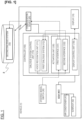
- FIG. 1 is a block diagram showing a dialogue service system according to one embodiment of the present invention.
- the dialogue service system is a system installed in a vehicle and comprises a display 10, a communication device 20, a steering wheel switch 30, an ECU 40, and a controller 100.
- the dialogue service system according to the present embodiment includes a system that uses a voice processing function to interact with occupants in order to provide service to the occupants, and a system for controlling the display screen of the display.
- the display 10 is a touch panel display, which is mounted on a vehicle.
- the touch panel display 10 has a pressure-sensitive sensor and measures the pressing force applied to the display 10 at the time of a touch operation, thereby detecting a touch operation carried out by a user (occupant).
- the mechanism of the pressure-sensitive sensor is not particularly limited, and any method known at the time of filing may be appropriately used.
- the touch panel is not limited to a pressure-sensitive type and may be another type such as a capacitive type.
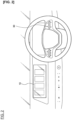
- Figure 2 is a front view of the vicinity of a dashboard equipped with a touch panel. As shown in Figure 2 , the display 10 is a display (center display) in the front portion of the dashboard and is disposed between the driver's seat and the passenger's seat.
- the display 10 is provided in a position that can be touched by both an occupant sitting in the driver's seat and an occupant sitting in the passenger's seat.
- the display 10 need not necessarily be disposed in a position that can be touched by both the driver and the occupant of the passenger's seat, and may be disposed in a position that can be touched only by the driver.
- the display 10 is not limited to the dashboard and may be disposed in a position that can be touched by an occupant of the rear seat.
- a touch operation is a pointing operation performed with a gesture using a finger, such as bringing a finger close to or in contact with an icon or a button displayed on the display 10.
- touch operations include tapping (touching the screen once), double tapping (touching the screen twice), long tapping (pressing down on the screen), swiping (sliding (tracing) a finger against the screen), flicking (making a quick flipping movement of the finger against the screen), pinch in/pinch out (touching the screen with two fingers and moving the two fingers closer together/away from each other), etc.
- Touch operations are not limited to a first gesture in which a finger touches one point or a plurality of points on a screen, and may include a second gesture in which the contact point of the finger is moved in a state of contact with the screen.
- the touch operation need not be a direct contact with the display screen but also a so-called hovering, in which a finger, or the like, is brought close to the display screen.
- the operation method of the touch operation is not limited to the foregoing and other methods may be employed.
- the communication device 20 is capable of communication with a server 2 outside of the vehicle.
- the communication device 20 sends and receives signals between the controller 100 and the server 2.
- the handle switch (steering switch) 30 is a switch for starting (activating) the dialogue system and is provided on the steering wheel as shown in Figure 2 .
- an occupant When desiring to receive provision of a service by means of the dialogue system, an occupant (driver) operates the steering wheel switch 30 in order to activate the dialogue system.
- the dialogue system includes a first dialogue system 112 that mainly uses a voice recognition engine provided in the vehicle 1 to carry out voice processing, thereby providing service, and a second dialogue system 32 that mainly uses a voice recognition engine included in the server 2 to carry out voice processing, thereby providing service from the server 2 to the occupant.
- the steering wheel switch 30 is then assigned to activate one of the dialogue systems, and by means of operation of the steering wheel switch 30, either the first dialogue system or the second dialogue system is activated.
- the ECU 40 is a control unit that controls a control target, such as an air conditioner 41 and a sunroof 42, and controls the controller 100 and the control target by means of a CAN communication network.
- the ECU 40 is not limited to one, but is made up of a plurality of control units, and the ECU 40 is connected to each control target.
- the controller 100 is composed of a computer provided with hardware and software, and has a memory unit in which a program is stored, a CPU that executes the program stored in the memory, and the like.
- the controller 100 has, as function blocks, a dialogue system control unit 110, an activation unit 120, and a display control unit 130, and a program for realizing each function of the dialogue system control unit 110, the activation unit 120, and the display control unit 130 is stored in the memory.
- the computer included in the controller 100 executes the program in order to realize each function of the function blocks.
- the controller 100 is connected to the display 10, the communication device 20, the steering wheel switch 30, and the ECU 40 by the CAN communication network, or the like.
- the controller 100 is not limited to the dialogue system control unit 110, the activation unit 120, and the display control unit 130, and has control blocks for controlling various systems in the vehicle cabin, such as a function for controlling an audio system, for example, and controls other on-board devices.
- a device having the controller 100 corresponds to the "display control device" of the present invention.
- the dialogue system control unit 110 has a function to recognize the occupant's voice and controls the dialogue system.
- the dialogue system control unit 110 includes a voice recognition unit 111 and the first dialogue system 112.
- the voice recognition unit 111 detects the occupant's voice input and uses the voice recognition engine included in the first dialogue system 112 in order to recognize voice by means of voice processing carried out on the detected voice.
- the voice recognition unit 11 detects the input voice. Voice detection is executed from the start of voice input until a prescribed period of time has elapsed after the voice input ends.
- the voice recognition unit 11 detects voice from beginning to end of the message, and ends the voice detection after a prescribed period of silence has elapsed after the end of the message.
- the voice recognition unit 11 carries out voice processing on the detected voice using the voice recognition engine in order to recognize the voice.
- the voice recognition unit 111 outputs to a second interface 122, described below, a control signal indicating that a wake-up word has been recognized.
- a wake-up word is a call-out message such as "Hello ⁇ (name of car manufacturer, compatibility of the dialogue system, etc.)" and is set in advance. The wake-up word may be changed by means of the occupant's setting.
- the first dialogue system 112 is an on-board voice processing system, the primary purpose being cooperation with on-board devices, and uses the voice recognition engine to carry out interactions between an occupant and the controller 100 in order to provide the occupant with a service corresponding to the content of the interaction.
- the first dialogue system 112 is connected to the ECU 40 in order to cause on-board devices, such as the air conditioner 41, the sunroof 42, a navigation system, an audio system, a hands-free system, and the like, to cooperate with each other.
- the first dialogue system 112 has a communication function to communicate with each ECU.
- the voice recognition unit 111 carries out voice processing and identifies the air conditioner 41 as the control target based on the voice data recognized by the voice recognition unit 111 in order to generate a control command and output the control command to the ECU 40 via an in-vehicle communication path (CAN communication network).
- CAN communication network an in-vehicle communication path
- the in-vehicle communication path through which the control signal passes does not include the communication path that connects the controller 100 and the communication device 20.
- the ECU 40 controls the air conditioner 41 in accordance with the control command in order to change the set-point temperature of the air conditioner 41.
- the first dialogue system 112 thereby provides service to the occupant through dialogue.
- Services provided by the first dialogue system 112 are not limited to setting the air conditioner 41 and may also include airflow direction adjustment, air volume adjustment, etc., of the air conditioner 41.
- Other examples of services include operations of on-board devices, such as route guidance by a navigation system, audio system settings, operation of the telephone and telephone number searches by means of a hands-free system, short message service (SMS), and the opening/closing of the sunroof 42, windows, rear doors, sliding doors, and the like.
- SMS short message service
- the second dialogue system 32 included in the server 2 is a system that uses an external voice recognition engine in order to carry out voice processing, and the vehicle 1 connects to the server 2 to access external information in order to provide services to occupants.
- the services provided by the second dialogue system 32 are diverse, such as shopping using the Internet, remote operation of home appliances, and the like.
- the second dialogue system 32 is not intended for cooperation with on-board devices.
- the first dialogue system and the second dialogue system are separate dialogue systems in which the first dialogue system has control commands to on-board devices via the in-vehicle communication path and has a voice recognition engine, whereas the second dialogue system has a different voice recognition engine than the voice recognition engine included in the first dialogue system.
- the difference between the first dialogue system 112 and the second dialogue system 32 is that the first dialogue system 112 inputs or outputs control commands to/from on-board devices via an in-vehicle communication path, whereas the second dialogue system 32 is a system that does not input or output control commands to/from on-board devices via an in-vehicle communication path, other than the communication device 20.
- the difference between the first dialogue system 112 and the second dialogue system 32 is that the first dialogue system 112 may be a system that outputs control commands to the on-board devices via an in-vehicle communication path other than the communication path connecting the communication device 20 and the first dialogue system 112, and that does not output control commands via an in-vehicle communication path other than the communication path connecting the communication device 20 and the first dialogue system 112.
- the voice recognition unit 111 detects a voice input from the occupant and outputs the detected voice data to the server 2 via the communication device 20.
- the second dialogue system 32 of the server 2 voice-processes the input voice data and outputs the processing result to the vehicle 1.
- the voice recognition unit 111 outputs the processing result of the second dialogue system 32 on a display screen of the display 10, or by means of voice output from an on-board speaker.
- the first dialogue system 112 may connect with the server 2 outside of the vehicle.
- the first dialogue system 112 may connect to the server 2 outside of the vehicle and use a voice recognition engine outside of the vehicle in order to carry out the voice recognition process.
- a voice recognition engine outside of the vehicle in order to carry out the voice recognition process.
- the first dialogue system 112 uses a voice recognition engine outside of the vehicle to carry out the voice recognition process.
- the activation unit 120 is a function block for activating the first dialogue system 112 and the second dialogue system 32 and has a first interface 121 and the second interface 122.
- the first interface 121 outputs an activation command to the dialogue system by means of the operation of the steering wheel switch 30, that is, the first interface 121 serves as a connection unit that connects the steering wheel switch 30 and the first dialogue system 112, as well as the steering wheel switch 30 and the second dialogue system 32.
- the first interface 121 outputs an activation command to one of either the first dialogue system 112 or the second dialogue system 32.
- the first interface 121 never outputs a control command to both the first dialogue system 112 and the second dialogue system 32 simultaneously.
- the transmission destination for the control command sent by the first interface 121 is determined as a user setting and/or a factory default setting. If the steering wheel switch 30 is assigned to activate the first dialogue system 112, the first interface 121 outputs an activation command to the first dialogue system 112 when receiving an operation command by means of an operation of the steering wheel switch 30. If the steering wheel switch 30 is assigned to activate the second dialogue system 32, the second interface 122 outputs an activation command to the second dialogue system 32.
- the activation command for the second dialogue system 32 brings about a state in which communication between the vehicle 1 and the server 2 can take place, thereby allowing the vehicle 1 to use the dialogue system of the server 2.
- the second interface 122 outputs an activation command to the dialogue system by means of a wake-up word.
- the second interface 122 is a connection unit between the voice recognition unit 111 and the dialogue system.
- the second interface 122 outputs an activation command to one of either the first dialogue system 112 or the second dialogue system 32.
- the first interface 121 never outputs a control command to both the first dialogue system 112 and the second dialogue system 32 simultaneously.
- the second interface 122 outputs an activation command to the first dialogue system 112.
- the transmission destination for the control command sent by the second interface 122 is determined by a factory default setting.
- the second interface 122 outputs an activation command to the first dialogue system 112 when the voice recognition unit 111 recognizes the wake-up word because the wake-up word has been assigned to activate the first dialogue system 112. That is, the voice recognition engine included in the first dialogue system 112 stands by in a state in which at least the wake-up word can be recognized, and when the voice recognition unit 111 recognizes the wake-up word, the second interface 122 outputs an activation command to the first dialogue system 112, and the first dialogue system 112 activates the voice recognition engine so as to be able to recognize various words other than the wake-up word. If the wake-up word is assigned to activate the second dialogue system 32, the second interface 122 outputs an activation command to the second dialogue system 32.
- the activation unit 120 sets the transmission destination of the activation command to one of either the first dialogue system 112 or the second dialogue system 32 based on the occupant's operation.
- the occupant's operation for setting the transmission destination of the activation command includes a touch operation of the display 10, the operation of a switch other than the steering wheel switch 30, or the like.
- the controller 100 displays a settings screen of the dialogue system on the display 10, and the occupant touches a selection menu on the displayed settings screen to select one of either the first dialogue system 112 or the second dialogue system 32 in order to select the dialogue system on the selection menu that the occupant wishes to use.
- the activation unit 120 sets a transmission destination for an activation signal of the first interface 121 to output the activation signal to the dialogue system selected by means of the touch operation to the display 10. For example, if, when operating the steering wheel switch 30, the occupant touches the display 10 and changes the target system to be activated from the first dialogue system 112 to the second dialogue system 32, the activation unit 120 sets the transmission destination for the activation signal from the first interface 121 to the second dialogue system 32. The occupant can thus select the preferred dialogue system to be activated from the first dialogue system 112 and the second dialogue system 32 through an operation of the steering wheel switch 30.
- the activation unit 120 may set the transmission destination of activation commands from the first interface 121 to one of either the first dialogue system 112 or the second dialogue system 32 based on voice recognition by the dialogue system control unit 110. For example, suppose that the occupant expresses the desire to change the assignment of the steering wheel switch 30 from the first dialogue system 112 to the second dialogue system 32 in a state in which the occupant is interacting with the controller 100 by means of the first dialogue system 112.
- the dialogue system control unit 110 recognizes the occupant's voice and outputs a control command to the activation unit 120 for assigning the steering wheel switch 30 to the activation of the second dialogue system 32
- the activation unit 120 sets the transmission destination for activation signals from the first interface 121 to the second dialogue system 32 based on the control command.
- the occupant when operating the steering wheel switch 30, can thus select the target system to be activated from the first dialogue system 112 and the second dialogue system 32 by means of an interaction using the dialogue system.
- the user in the dialogue system that can be activated by operating the steering wheel switch 30, the user can select between either the first dialogue system 112 or the second dialogue system 32, but the dialogue system that can be activated by a wake-up word is fixed to the first dialogue system 112.
- the first dialogue system 112 is used mainly for the purpose of cooperation with on-board devices and is more frequently used than the second dialogue system 32.
- the activation by means of the wake-up word to the first dialogue system 112
- the assignment of the steering wheel switch 30 can be made by the occupant, some measure of freedom in selecting the dialogue system can be ensured.
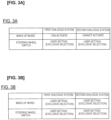
- Figure 3A is a table for explaining whether it is possible to switch between activation of the first and second dialogue systems.
- the "wake-up word" can activate the first dialogue system 112 but not the second dialogue system 32.
- the "steering wheel switch” can activate one of either the first dialogue system 112 or the second dialogue system 32, in accordance with the occupant's setting. That is, the activation of a dialogue system by means of the steering wheel switch 30 can be selected in a mutually exclusive manner.
- the second dialogue system 32 cannot be activated by means of the wake-up word or an operation of the steering wheel switch 30, but the second dialogue system 32 can be activated by means of selection on a menu screen displayed on the display 10 or an operation of a switch other than the steering wheel switch 30, for example.
- Figure 3B is a table for explaining the correlation between the first and second dialogue systems and activation in the dialogue service system according to a modified example of the present embodiment.
- the dialogue system that can be activated by the wake-up word can be selected by means of a user setting in a mutually exclusive manner.
- the activation unit 120 sets the transmission destination of the activation command to one of either the first dialogue system 112 or the second dialogue system 32.
- the occupant can select the dialogue system to be activated from either the first dialogue system 112 or the second dialogue system 32 by means of a touch operation of the display 10, the operation of a switch other than the steering wheel switch 30, or by interacting with the controller 100 using the dialogue system.
- the dialogue system may have a proprietary standard relating to the activation of the system.
- An example of a proprietary standard is "in a state in which a specific dialogue system can be activated, other dialogue systems must be turned off (disabled)," or the like.
- a dialogue system with such a standard for the first dialogue system 112 it should be configured such that a user setting can change the assignment of the steering wheel switch 30 or select a dialogue system in a mutually exclusive manner, as in the present embodiment.
- the dialogue system to be activated by the wake-up word when the dialogue system to be activated by the wake-up word is made user-configurable, it should be configured such that a user setting can change the assignment of what is to be activated by the wake-up word, or such that the user setting can select a dialogue system in a mutually exclusive manner, as in the modified example. That is, due to the standard of the first dialogue system, it is necessary to activate the first dialogue system 112 or the second dialogue system 32 in a mutually exclusive manner. Thus, it is possible to ensure some measure of freedom when the dialogue system is selected while complying with the standards of the dialogue system by making the assignment of the steering wheel switch 30 and the assignment of what is to be activated by the wake-up word user-configurable.
- the dialogue system control unit 110 may output the content of the change to the occupant by voice.
- the display control unit 130 controls the display screen of the display 10. In addition, when detecting a touch operation on the display, the display control unit 130 receives an operation command corresponding to the type of the touch operation and the position of the touch operation on the display screen. The display control unit 130 displays on the display 10 an operation screen for operating the dialogue system, a settings screen of the dialogue system, a screen that displays information provided by the dialogue system, and the like. In addition, the display control unit 130 outputs the operation command received by means of the touch operation on the display 10 to the dialogue system control unit 110 and the activation unit 120.
- Control of the dialogue system by the dialogue system control unit 110 and control of the display screen by the display control unit 130 are associated with each other by means of an application (software).
- the operating state of the dialogue system by the dialogue system control unit 110 is displayed on the display 10.
- the display control unit 130 controls the display screen of the display 10 in accordance with the interactions of the dialogue system.
- the dialogue system control unit 110 outputs a control command corresponding to the content of the interaction to the display control unit 130, and the display control unit 130 causes the display screen of the display 10 to transition in accordance with the control command.
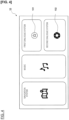
- Figure 4 is a display screen of the display 10, showing the home screen of the entire system, including the dialogue service system.
- the display control unit 130 displays the home screen on the display 10.
- the home screen is a menu screen for selecting the navigation system, music, the first dialogue system 112, or the second dialogue system 32.
- Each menu screen includes an icon representing the contents; for example, the menu image of the first dialogue system 112 includes a first icon 101, and the menu image of the second dialogue system 32 includes a second icon 102.
- the first icon 101 is an icon to enable touch operation for activating the first dialogue system 112
- the second icon 102 is an icon for enabling touch operation for activating the second dialogue system 32. If the occupant touches the first icon 101, the activation unit 120 outputs an activation signal to the first dialogue system 112.
- the activation unit 120 If the occupant touches the second icon 102, the activation unit 120 outputs an activation signal to the second dialogue system 32.
- the first dialogue system 112 or the second dialogue system 32 can be selected in a mutually exclusive manner by means of a touch operation of the display 10.
- Figures 5-8 show display screens that are displayed on the display 10 for each operating state of the first dialogue system 112.
- the display control unit 130 displays the screen shown in Figure 5 .
- the initial state is the state from the time that the voice recognition engine is activated based on an activation signal until the time that voice detection becomes possible.
- the voice recognition unit 111 carries out an initialization process that is performed before voice-processing occurs.
- the operating state of the first dialogue system 112 shifts from the initial state to the voice reception ready state.
- voice reception ready state voice can be received but the occupant is not speaking.
- voice detecting state voice can be received, the occupant is speaking, and voice is being detected. That is, when voice is not being input during a state in which voice can be detected, the operating state of the first dialogue system 112 is the voice input reception state and when voice is being input, the operating state of the first dialogue system 112 is the voice detecting state. Then, when the voice detecting state ends and a prescribed period of time has elapsed, the operating state of the first dialogue system 112 becomes the voice-processing state. In the voice-processing state, voice processing is being carried out by the voice recognition engine.
- the display screens of Figures 5-8 show the main images of the service provided through the dialogue system and include operating state images indicating the operating states of the dialogue system.
- the operating state images indicate to the occupant the current state (status) of the dialogue system and correspond to text, animation, patterns, etc.
- a main message 50 and/or animation 70 correspond to operating state images.
- Figure 5 shows the screen that is displayed on the display 10 when the operating state of the first dialogue system 112 is in the "initial state.”
- the display screen of the "initial state” includes the main message 50, a sample message 60, and animation 70.
- the main message 50 is a message from the first dialogue system 112 to the occupant and is a notice prompting the occupant to input voice. The occupant can check the main message 50, and thereby confirm that the dialogue system has been activated. That is, the main message 50 corresponds to an operating state image indicating that the dialogue system has been activated.
- the sample message 60 shows example sentences that the occupant should voice in order to use the first dialogue system 112, and includes a command 61 and a setting value 62.
- the command 61 is a word representing a state or an operation of the service that the occupant wishes to receive through the dialogue system and represents an operation command from the occupant to the dialogue system.
- the setting value 62 is a phrase representing the target of the service, and is represented by a numerical value or a noun, such as a name. For example, in the message "Play station AAA Radio" of the second line of the sample message 60, "Play” indicates a command and "station AAA Radio" indicates a setting value.
- the command “Play” indicates an operation of the audio system, and "station AAA Radio" indicates the target (name of a radio station) to be played back by the audio system.
- the sample message 60 also serves as a function button and, for example, if the occupant touches the message "Enter Number" in the third row, the screen transitions to a screen for inputting a telephone number.
- the animation 70 is an image representing the states of a prescribed function by means of a periodic movement.
- the prescribed function corresponds to the voice-detection processing function of the dialogue system
- the status corresponds to the operating state of the dialogue system.
- the periodic movement is represented by a movement of a waveform. That is, the animation 70 includes four animations 71-74 for representing the four operating states of the first dialogue system 112. That is, the progression of the voice processing carried out by the first dialogue system 112 is represented by the four animations 71-74.
- the animation 70 distinguishes each operating state such that the occupant seeing the animation can recognize the operating state from the shape, color, size, etc., of the wave.
- the controller 100 then operates the animation 70 in accordance with the occupant's voice input, and thereby displays the progression of the voice processing on the screen of the display 10.
- the animation 71 of Figure 5 represents the "initial state.”
- the animation 71 is a gray waveform of low amplitude.
- the animation 70 is displayed in a position between the main message 50 and the sample message 60.
- the operating state image indicating the operating state of the dialogue system need only include at least one of the main message 50 or the animation 70.
- the operating state image need only include at least one of the main message 50 or the animation 70.
- Figure 6 shows the display screen that is displayed on the display 10 when the operating state of the first dialogue system 112 is the "voice reception ready state.”
- the display screen of the "voice reception ready state” includes the main message 50, the sample message 60, and the animation 70.
- the displayed positions and the displayed images of the main message 50 and the sample message 60 are the same as those in Figure 5 .
- the animation 72 of Figure 6 represents the "voice reception ready state.”
- the animation 72 is a blue waveform, and the amplitude of the animation 72 is greater than the amplitude of the wave of the animation 71. If voice is detected while the "voice reception ready state” is displayed, the display screen of the display 10 is switched to the screen of Figure 7 . If voice is not detected while the "voice- receivable state” is displayed, the display screen of the display 10 is kept in the state of Figure 6 .
- Figure 7 shows the display screen that is displayed on the display 10 when the operating state of the first dialogue system 112 is the "voice detecting state.”
- the display screen of the "voice detecting state” includes the main message 50, the sample message 60, and the animation 70.
- the displayed positions and the displayed images of the main message 50 and the sample message 60 are the same as those in Figures 5 and 6 .
- the animation 73 of Figure 7 represents the "voice detecting state.”
- the animation 73 is a blue waveform and the amplitude of the wave of the animation 73 is greater than the amplitude of the wave of the animation 72.
- the display control unit 130 may change the amplitude of the animation 73 in accordance with the volume of the detected voice. For example, the display control unit 130 controls the amplitude of the animation 73 in accordance with the voice input such that the amplitude of the animation 73 increases as the volume of the detected voice increases. The occupant may observe the movement of the amplitude of the animation 73 while speaking in order to confirm from the display screen that voice is detected by the voice recognition system.
- the animation 73 may be an animation in which a plurality of waves are superimposed to convey a dynamic feel to the movement.
- Figure 8 shows the display screen that is displayed on the display 10 when the operating state of the first dialogue system 112 is the "voice-processing state.”
- the display screen of the "voice-processing state” includes the main message 50, the sample message 60, and the animation 70.
- the displayed positions and the displayed images of the main message 50 and the sample message 60 are the same as those in Figures 5 to 7 .
- the animation 74 of Figure 8 represents the "voice-processing state.”
- the animation 74 is a red, white, and green waveform, and the different areas of the wave are color-coded. For example, at a certain time, the animation 74 is displayed in the order of red, white, and green, from left to right, in Figure 8 .
- the animation 74 may be an animation in which a plurality of waves are superimposed to convey a dynamic feel to the movement. Not only the animation 74, but also the animations 71-73 may be animations in which a plurality of waves are superimposed.
- the number of colors assigned to the animation 74 is three, which is greater than the number of colors assigned to the animations 71-73. The occupant can thus more clearly distinguish the "voice- processing state" of the first dialogue system 112 from the other operating states of the first dialogue system 112 besides the "voice processing state” by the form of the display of the animation 70.
- there are four types of animations 40 in accordance with the operating states of the voice processing function but the number of types of animations is not limited to four and may be two, three, or five or more types.
- the motion that is displayed by the animation is not limited to undulations, and may be conveyed by changes in pattern, changes in the height of a bar graph, etc., and only requires that the changes be cyclical.
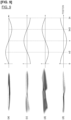
- Figure 9 shows graphs for explaining the temporal transition of the animation 73 representing the "voice detecting state.”
- the animation 73 changes the shape of the wave each cycle (2 ⁇ ).
- the wave shown by the animation 73 includes feature points that move cyclically.
- the feature points are represented by positions of the nodes/antinodes of the wave, positions of the vertices of the wave, color change points, and the like.
- Feature points are points that serve as indices for coordinating with other animations 71, 72, 74.
- (a) represents the animation 73 at time (0)
- (c), and (d) represent the animation 73 at times ( ⁇ /2, ⁇ , 3 ⁇ /2).
- the left side of Figure 9 shows images of waves that are displayed on the display screen.
- the right side of Figure 9 conceptually shows the movements of the feature points included in the waveform of the animation 73.
- changes in the shape, color, hue, coordinates, etc., of the wave may be represented as waves (periodic function), and the waves may be superimposed to create a standing wave, which may be used to represent movements of the feature points.
- Changes in the feature points need not be represented solely by a movement or a color that the occupant can visually confirm, and may be represented by a point that is calculated by computation.
- Figure 10 shows graphs for explaining the relationship between the still images of the animations 71-74 and the feature points in each of the animations 71-74 at a certain timepoints in the cycle.
- (a) represents the still image of the animation 71
- (b) to (d) represent the still images of the animations 72-74.
- (e) is a graph of the feature points in the animations 71-74.
- the shape of the wave, the color of the wave, etc., of the animations 71-74 are different for each animation, even at the same time in the cycle.
- the animations 71-74 have the same cycle.
- the waveform of the animation 71 and the waveform of the animation 72 have different colors and shapes at time ( ⁇ /2).
- the feature points having cyclical movements of the animations 71-74 are represented by the same waveform if the time in the cycle is the same.
- Figure 11 is a conceptual diagram for explaining the image configuration for displaying the animations 71-74 and still images that are played back before and after a screen transition.
- the first and second display screens are display screens that are displayed in accordance with each operating state of the first dialogue system 112, the first display screen shows a screen before a transition, and the second display screen shows a screen after the transition.
- the first display screen corresponds to the display screen of the "initial state” and the second display screen corresponds to the display screen of the " voice reception ready state.”
- the animations 71-74 are displayed by means of continuous playback of a plurality of still images.
- the images that display the animations 71-74 are composed of 60 still images, where each image is indexed from 0 to 59.
- the number of the still images is the same for each of the animations 71-74.
- the indices are identifiers for the still images and represent the playback order.
- the indices are assigned to the still images such that the feature points having cyclical movements correspond to each other between the images included in the animations 71-74.
- the still images of the animations 71-74 represent images at the same time in the cycle, so that the same index is assigned thereto. In other words, when the still images are compared between the animations 71-74, the still images in which the feature points correspond to each other are assigned the same index.
- the display control unit 130 When displaying the animations 71-74, the display control unit 130 outputs images to the display 10 at a playback rate of 30 still images per second. That is, the time slot (display interval) of the still images is 20 msec per image. The display control unit 130 starts the playback of the still images in the order of the assigned indices. In this manner, in the present embodiment, because the animations 71-74 are displayed by playing back a plurality of still images, the processing load on the CPU can be reduced. In addition, when executing a screen transition from the first display screen to the second display screen, the display control unit 130 displays up to the pre-transition image, which is the still image immediately before the screen transition, and selects the second index corresponding to the first index assigned to the pre-transition image. The display control unit 130 then starts the playback of the second still image from the selected second index.
- the display control unit 130 starts image playback from a still image assigned the index "#0" in order to display the "initial state" of the first dialogue system 112 by means of the animation 71. Then, assuming that the operating state of the first dialogue system 112 transitions from the "initial state” to the "voice reception ready state” in a state in which the still image assigned the index "#9" is displayed.
- the display control unit 130 selects from among the 60 still images for displaying the animation 72, the still image assigned the same index "#9" as the index assigned to the pre-transition image.
- the display control unit 130 displays the pre-transition image on the display 10, and, at the point in time at which the time slot for the pre-transition image has elapsed, starts the playback of the images for displaying the animation 72 from the selected index "#9.” That is, when executing a screen transition, the display control unit 130 selects an index such that the feature points having periodic movements displayed in the animation 71 and the feature points having periodic movements displayed in the animation 72 maintain continuity, and starts the playback of the still images from the selected index.
- the display would appear as if the movement of the wave were interrupted in the middle; thus it would appear as if the movement of the animation were interrupted. That is, in the example of Figure 11 , if the index is not handed over at the time of the transition from the first display screen to the second display screen and the playback order is reset, the feature points will not correspond to each other between the still images before and after the transition; thus, the animation will be rendered unnaturally.
- indices are assigned such that the feature points having periodic movements correspond to each other between the images included in each of the animations 71-74, and the still images are played back after the index is handed over at the time of a screen transition.
- the continuity of the animation display can be maintained even if the method of rendering the animation changes, so that the animation can be displayed with a natural appearance before and after a screen transition.
- the display is switched to the second display screen. It is thus possible to maintain continuity of the animation.
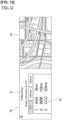
- Figure 12 shows the display screen of the display 10 after the first dialogue system 112 recognizes voice related to a POI.
- the occupant says "Coffee Shop” as voice related to a POI in a state in which the display 10 is displaying the display screen of Figure 6 .
- the voice recognition unit 111 detects the voice "Coffee Shop” and executes a voice recognition process.
- the dialogue system control unit 110 determines, from the word related to the POI (Point of Interest) that is input by means of voice, that the occupant is looking for a "Coffee Shop" near the current location, and outputs a control command to the display control unit 130 to cause the display 10 to display a guidance image 80 related to the POI and a map 90 of the area near the current location.
- the guidance image 80 includes a character string 81 representing the result of the voice recognition and POI information 82.
- the character string 81 is a character string of the speech recognized by the first dialogue system 112. In the example shown in Figure 12 , "Coffee Shop" is displayed. The occupant can thus confirm what kind of speech was recognized by the system.
- the POI information 82 shows information related to the POI, such as the names and distances from the current location of the POIs that are in the vicinity of the current location.
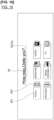
- the display screen of the display 10 transitions to the screen of Figure 13 .
- the voice recognition process based on the utterance of "Coffee Shop” is completed, the first dialogue system 112 again enters the voice reception ready state.
- the animation 72 representing the "voice reception ready state” is displayed in the position at which the character string 81 was displayed. That is, the occupant can observe the display of the animation 72 where the character string 81 of "Coffee Shop” was displayed, and thereby confirm that the occupant may say the words that follow "Coffee Shop.”
- the first dialogue system 112 detects the voice of the occupant. As shown in Figure 14 , as the voice is detected, in the display screen of the display 10, the display of the animation 70 becomes the animation 73 representing the "voice detecting state.” Thereafter, when the voice-processing state is entered after voice detection is completed, the display of the animation 70 becomes the animation 74 representing the "voice-processing state," as shown in Figure 15 . The occupant can thus confirm the processing status of the first dialogue system by means of the display on the display 10 while viewing the map information and POI guidance information.
- the first dialogue system 112 outputs a control signal to the display control unit 130 indicating that voice recognition has failed.
- the display control unit 130 displays the animation 71 of the gray waveform at the position of the animation 73 in the display screen of Figure 14 .
- the occupant can thus confirm from the display on the display 10 that voice recognition has failed.
- voice such as "please input voice again” may be output to prompt the occupant to speak.
- the display control unit 130 switches the display screen in accordance with the status of the first dialogue system 112. That is, the display control unit 130 switches between screens including images (corresponding to the "First information display image” of the present invention) displaying the main message 50 and the sample message, as shown in Figures 5-8 , and screens including images (corresponding to the "second information display image” of the present invention) displaying map information and POI-related information for display on the display 10, as shown in Figures 12-15 .
- the main message 50 and the sample message correspond to the "first information" of the present invention
- the POI-related information and the map information corresponds to the "second information" of the present invention.
- Each display screen includes the images of the animation 70.
- Cases in which voice processing is not completed normally are cases in which a prescribed period of time has elapsed in the "voice reception ready state.” For example, after the display screen of the display 10 becomes the screen shown in Figure 6 , if the occupant does not speak, the voice recognition unit 111 does not detect voice. If such a state continues for a prescribed period of time, the voice recognition unit 111 determines that voice processing will not be completed normally. In addition, cases in which voice processing is not completed normally include cases in which an abnormality occurs during voice processing. The voice recognition unit 111 executes voice recognition process with respect to the detected voice.
- the voice recognition unit 111 determines that the voice processing is abnormal. Cases of abnormal voice processing determinations also correspond to cases in which voice processing is not completed normally.
- the display 10 displays the main screen, as shown in Figure 6 . Then, when it is determined that voice processing will not be completed normally, the display screen on the display 10 becomes the screen shown in Figure 16.
- Figure 16 shows the display screen on the display 10 when voice processing is not completed normally from the "voice reception ready state.”
- the display control unit 130 displays a category screen, as shown in Figure 16 .
- the category screen includes category images that group the commands 61.
- a plurality of commands are grouped together, and the category images represent the group names by means of text or icons.
- Each category image includes a name 201 and an icon 202 for the category.
- a plurality of commands relating to telephones such as "call and/or dial,” “redial,” “telephone,” and the like, are grouped into a single category “Phone.”
- the icon 202 for the category is displayed next to the category name 201.
- the groupings of the commands 61 are not limited to telephone, and may include navigation and audio commands, and the names and icons of the grouped categories are included in the category screen.
- the images and icons 202 including the category names 201 represent areas in which touch operation is enabled. That is, the images and icons 202 including the category names 201 also have button functions for allowing the occupant to select a category. For example, if the occupant touches the icon for the category "Phone" or an image including the name 201 of the category "Phone," the display control unit 130 changes the display screen from the category screen to a list screen, described further below.
- the category images to be displayed on the main screen need only include at least one of the name 201 or the icon 202.
- the category screen includes the main message 50 and the animation 70.
- the animation 70 is the animation 72 representing the "voice detecting state.”
- the voice recognition process carried out by the voice recognition unit 111 also effectively functions when the category screen is displayed, so that the occupant can confirm that the operating state of the first dialogue system 112 is the "voice reception ready state" from the display of the animation 72.
- the occupant can proceed with the dialogue system from the display of the category name 201 and icon 202.
- category images that also function as buttons may be displayed, thereby allowing the occupant to operate the dialogue system.
- those category images that also function as buttons that are frequently used are displayed, which enhances convenience.
- the category screen includes the main message 50 and the animation 72, the occupant can confirm from the screen display that it is possible to continue through the system by interacting with the controller 100.
- the selection of the category and/or from the list by the occupant may be by means of voice input or another switch operation. That is, the controller 100 may determine the presence or absence of a category selection based on any one of the occupant's voice, the occupant's touch operation of the display screen of the display 10, or the occupant's switch operation, in a state in which the category screen is displayed on the display 10.
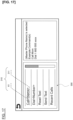
- the display control unit 130 causes the display 10 to display a list screen, such as that shown in Figure 17.
- Figure 17 shows a list screen that is displayed on the display 10.
- the list screen is an image including grouped commands, and includes a list 300 having a plurality of commands.
- the list 300 has a plurality of syntaxes 310, and the syntax 310 has at least the command 61, and also a sample text 311 in addition to the command.
- the list screen does not include the animation 70.
- the syntax 310 displays by means of text a combination of the command 61 and the setting value 62.
- the sample text 311 shows an arbitrary text of the setting value 62 following the command, and shows information of either a character string or a numeric string assigned to the syntax 310.
- the syntax at the top of the list is composed of a "Call" command and a sample text " ⁇ Name>.”
- " ⁇ Name>” indicates that the setting value 62 such as a person's name or a store name is entered after the command.
- the occupant touches the display of the syntax 310 in the list an example of the setting value 62 entered in the sample text 311 is shown to the right of the list 300.
- a list of settings that are entered in the sample text 311, such as that shown in Figure 18 is displayed.
- the display screen of Figure 17 if the syntax "Call ⁇ Name>" at the top of the list is selected, information of either a character string or a numeric string assigned to the syntax 310 is displayed, as shown in Figure 1 .
- the occupant can touch the number display to select the command 61 and the sample assigned to the syntax 310.
- the controller 100 may call the number in the list that is touched, or display a notification to the effect that a call will be made on the display 10.
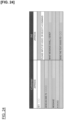
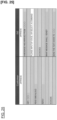
- Figure 19 , 20 , and 22-25 show response messages that the controller 100 returns with respect to utterances of the occupant.
- "Customer” indicates examples of messages spoken by the occupant
- "INI” indicates examples of messages generated by the dialogue system.
- Figures 19 , 20 , and 22-25 are merely examples, and the dialogue system can carry out a dialogue using other model flows.
- Figure 19 is a model flow of a dialogue relating to the temperature setting of the air conditioner 41.
- the controller 100 emits the message in Japanese "please input by voice, or select, a command" by means of a mechanical sound.
- the dialogue system proceeds forward and the set temperature of the air conditioner 41 can be changed.
- Figure 20 is a model flow of a dialogue relating to a POI search.
- the controller 100 responds with the message "please input by voice, or select, a command.”
- the occupant then voices the message "I want to go to a cafe near the destination," which includes a word that can specify a POI, such as the genre of the shop.
- the controller 100 carries out a search using the navigation system and responds with the message "please input by voice an item number from the displayed list, or select another tab.”
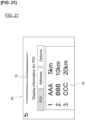
- the display screen shown in Figure 21 is displayed on the display 10.
- the controller 100 displays, on the display 10, the guidance image 80 relating to the POI.
- the controller 100 can also display a map.
- the guidance image 80 includes the animation 72 indicating the "voice reception ready state” and the POI information 82 obtained from the search result. Item numbers are assigned to the POI information. The occupant can voice an item number to select a POI. In the example of Figure 21 , the occupant says “one,” thereby selecting the POI "AAA.” The controller 100 repeats the "one” spoken by the occupant and responds with the next selection message, such as "do you want to change the destination?"
- Figure 22 is a model flow of a dialogue related to the destination.
- Figure 23 is a model flow of a dialogue related to music playback.
- Figure 24 is a model flow of a dialogue related to sending an SMS (short message).
- Figure 25 is a model flow of a dialogue related to sending and receiving an SMS (short message).
- the controller 100 displays on the display 10 a first display screen including a first animation and a second display screen including a second animation, wherein the first animation and the second animation are animations that represent a status of a prescribed function by means of periodic movements and are displayed by means of the continuous playback of a plurality of first still images and a plurality of second still images.
- a first index and a second index are assigned to the plurality of first still images and the plurality of second still images, respectively, such that feature points having periodic movements correspond to each other between the plurality of first still images and the plurality of second still images.
- the controller 100 displays the pre-transition image, which is the first still image immediately before the screen transition, selects the second index corresponding to the first index assigned to the pre-transition image, and plays back the second still image from the selected second index.
- the differences between the animation before and after the screen transition becomes small, so that the animation can be displayed with a natural appearance before and after the screen transition. As a result, it is possible to reduce the load on the CPU due to the animation.
- the first animation corresponds to the animation 70 included in the display screen (first display screen) before a screen transition
- the second animation corresponds to the animation 70 included in the display screen (second display screen) after the screen transition
- the first still images corresponds to an image for playing back the first animation
- the second still images corresponds to an image for playing back the second animation.
- the display control method executed by the controller 100 plays back a plurality of the first still images in the order of the first indices in order to display the first animation on the first display screen, and continuously plays back a plurality of the second still images in the order of the second indices, in order to display the second animation on the second display screen.
- the controller displays the pre-transition image, which is the first still image immediately before the screen transition, selects the second index corresponding to the first index assigned to the pre-transition image, and plays back the second still image from the selected second index.
- an image to suggest an operation to the occupant is displayed on the display 10. That is, if voice input is not detected and voice processing is not completed normally, a category screen such as that shown in Figure 16 is displayed, and an image including the category name 201 and the icon 202 are thereby displayed as an image to suggest an operation. As a result, even when the occupant does not know the voice for operating the first dialogue system, the occupant can proceed with the dialogue system.
- the controller 100 may select a second index such that the difference in the position of the animation 70 or the difference in the shape of the animation 70 before and after a screen transition becomes less than a prescribed value. As a result, it is possible to suppress displacements in the animation before and after a screen transition.
- the controller 100 may select a second index that does not correspond to the first index assigned to the pre-transition image when a screen transition is performed. If, in the case that the status of the voice processing changes and the status change is to be represented by a discontinuity of the animation, a second index that does not correspond to the first index before and after a screen transition may be selected, and the playback of the still image can be started from the selected second index.
- the controller 100 may display the animation 70 and a message image, such as the main message 50 or the sample message 60, in an overlapping manner.
- the controller 100 may not detect the input voice and make the amplitude of the waveform animation 70 larger than the amplitude of the animation of the waveform. It can be confirmed from the animation that voice cannot be detected because of its volume.
- the controller 100 may control the display screen of the display 10 such that the positions of the nodes of the waveform move over time on the display screen.
Landscapes
- Engineering & Computer Science (AREA)
- Theoretical Computer Science (AREA)
- Physics & Mathematics (AREA)
- General Physics & Mathematics (AREA)
- General Engineering & Computer Science (AREA)
- Human Computer Interaction (AREA)
- Multimedia (AREA)
- Health & Medical Sciences (AREA)
- Audiology, Speech & Language Pathology (AREA)
- Mechanical Engineering (AREA)
- Computer Hardware Design (AREA)
- General Health & Medical Sciences (AREA)
- Chemical & Material Sciences (AREA)
- Combustion & Propulsion (AREA)
- Transportation (AREA)
- Computer Vision & Pattern Recognition (AREA)
- Acoustics & Sound (AREA)
- Computational Linguistics (AREA)
- Thermal Sciences (AREA)
- User Interface Of Digital Computer (AREA)
- Processing Or Creating Images (AREA)
- Controls And Circuits For Display Device (AREA)
Applications Claiming Priority (1)
| Application Number | Priority Date | Filing Date | Title |
|---|---|---|---|
| PCT/JP2021/021229 WO2022254667A1 (ja) | 2021-06-03 | 2021-06-03 | 表示制御装置及び表示制御方法 |
Publications (2)
| Publication Number | Publication Date |
|---|---|
| EP4354266A1 true EP4354266A1 (de) | 2024-04-17 |
| EP4354266A4 EP4354266A4 (de) | 2024-07-31 |
Family
ID=84324038
Family Applications (1)
| Application Number | Title | Priority Date | Filing Date |
|---|---|---|---|
| EP21848123.2A Pending EP4354266A4 (de) | 2021-06-03 | 2021-06-03 | Anzeigesteuerungsvorrichtung und anzeigesteuerungsverfahren |
Country Status (5)
| Country | Link |
|---|---|
| US (1) | US11893297B2 (de) |
| EP (1) | EP4354266A4 (de) |
| JP (1) | JP7323050B2 (de) |
| CN (1) | CN115943358A (de) |
| WO (1) | WO2022254667A1 (de) |
Families Citing this family (3)
| Publication number | Priority date | Publication date | Assignee | Title |
|---|---|---|---|---|
| US12626701B2 (en) * | 2021-06-03 | 2026-05-12 | Nissan Motor Co., Ltd. | Dialogue service device and dialogue system control method |
| USD1092553S1 (en) * | 2023-06-16 | 2025-09-09 | Thales Avs France Sas | Portion of a display panel with an animated graphical user interface |
| USD1089252S1 (en) * | 2023-11-30 | 2025-08-19 | AIP Technology Corporation | Display screen or portion thereof with a graphical user interface |
Family Cites Families (16)
| Publication number | Priority date | Publication date | Assignee | Title |
|---|---|---|---|---|
| JP4253875B2 (ja) * | 1998-09-30 | 2009-04-15 | ソニー株式会社 | 送信方法および送信装置、受信方法および受信装置、並びに伝送方法および伝送システム |
| JP4213835B2 (ja) * | 1999-12-28 | 2009-01-21 | ローランド株式会社 | 波形再生装置 |
| JP2005176925A (ja) * | 2003-12-16 | 2005-07-07 | Sankyo Kk | 遊技機 |
| JP2007172716A (ja) * | 2005-12-20 | 2007-07-05 | Sony Corp | 再生装置、再生方法および再生プログラム、記録媒体およびデータ構造、ならびに、オーサリング装置、オーサリング方法およびオーサリングプログラム |
| JP2008109601A (ja) * | 2006-10-26 | 2008-05-08 | Masashi Hayashi | 動画映像音声情報処理システム |
| JP2009076982A (ja) * | 2007-09-18 | 2009-04-09 | Toshiba Corp | 電子機器および顔画像表示方法 |
| DE112012007137T5 (de) * | 2012-11-15 | 2015-08-06 | Mitsubishi Electric Corporation | Anwenderschnittstellenvorrichtung |
| US9721587B2 (en) * | 2013-01-24 | 2017-08-01 | Microsoft Technology Licensing, Llc | Visual feedback for speech recognition system |
| JP2014178905A (ja) * | 2013-03-14 | 2014-09-25 | Ricoh Co Ltd | 画像表示装置、画像表示方法およびプログラム |
| CN106873863B (zh) * | 2015-12-09 | 2021-02-19 | 斑马智行网络(香港)有限公司 | 一种界面切换动画的设置方法及装置 |
| JP6505322B2 (ja) | 2016-06-08 | 2019-04-24 | 三菱電機株式会社 | ユーザインタフェース装置 |
| US10409552B1 (en) * | 2016-09-19 | 2019-09-10 | Amazon Technologies, Inc. | Speech-based audio indicators |
| JP6870257B2 (ja) * | 2016-09-22 | 2021-05-12 | 株式会社三洋物産 | 遊技機 |
| CN106873937A (zh) * | 2017-02-16 | 2017-06-20 | 北京百度网讯科技有限公司 | 语音输入方法和装置 |
| JP7012385B2 (ja) * | 2020-02-04 | 2022-01-28 | 株式会社ユピテル | システム及びプログラム |
| US11461649B2 (en) * | 2020-03-19 | 2022-10-04 | Adobe Inc. | Searching for music |
-
2021
- 2021-06-03 CN CN202180004774.XA patent/CN115943358A/zh active Pending
- 2021-06-03 US US17/629,830 patent/US11893297B2/en active Active
- 2021-06-03 WO PCT/JP2021/021229 patent/WO2022254667A1/ja not_active Ceased
- 2021-06-03 JP JP2022504682A patent/JP7323050B2/ja active Active
- 2021-06-03 EP EP21848123.2A patent/EP4354266A4/de active Pending
Also Published As
| Publication number | Publication date |
|---|---|
| JPWO2022254667A1 (de) | 2022-12-08 |
| JP7323050B2 (ja) | 2023-08-08 |
| US11893297B2 (en) | 2024-02-06 |
| WO2022254667A1 (ja) | 2022-12-08 |
| EP4354266A4 (de) | 2024-07-31 |
| CN115943358A (zh) | 2023-04-07 |
| US20230359418A1 (en) | 2023-11-09 |
Similar Documents
| Publication | Publication Date | Title |
|---|---|---|
| US12626701B2 (en) | Dialogue service device and dialogue system control method | |
| KR101647848B1 (ko) | 정보 입력 및 표시를 위한 운전자 보조 시스템의 멀티모드 사용자 인터페이스 | |
| US11893297B2 (en) | Display control device and display control method | |
| CN101801705B (zh) | 汽车系统和运行汽车系统的方法 | |
| US9881605B2 (en) | In-vehicle control apparatus and in-vehicle control method | |
| US8532871B2 (en) | Multi-modal vehicle operating device | |
| KR101570096B1 (ko) | 핸들에 부착되는 입력 장치 및 이를 구비한 차량 | |
| US20140267035A1 (en) | Multimodal User Interface Design | |
| US20220258606A1 (en) | Method and operating system for detecting a user input for a device of a vehicle | |
| JP2025107443A (ja) | 制御装置及び制御方法 | |
| JP2024144620A (ja) | 表示制御装置、表示システム、表示制御方法及び表示制御プログラム | |
| JP2005208798A (ja) | 情報提供端末、および情報提供方法 | |
| WO2018098049A1 (en) | Controls for dictated text navigation | |
| US12596517B2 (en) | Linked display system and linked display method | |
| JP6379822B2 (ja) | 入力装置及び電子機器 | |
| JP4152267B2 (ja) | 入力装置 | |
| JP2002013942A (ja) | 車載電子ユニット | |
| KR20250066057A (ko) | 명령 인식 정확도를 높인 hud를 이용한 차량 편의 기능 제어 장치 및 방법 | |
| JP2018124874A (ja) | 入力装置、入力方法及び入力プログラム |
Legal Events
| Date | Code | Title | Description |
|---|---|---|---|
| STAA | Information on the status of an ep patent application or granted ep patent |
Free format text: STATUS: UNKNOWN |
|
| STAA | Information on the status of an ep patent application or granted ep patent |
Free format text: STATUS: THE INTERNATIONAL PUBLICATION HAS BEEN MADE |
|
| PUAI | Public reference made under article 153(3) epc to a published international application that has entered the european phase |
Free format text: ORIGINAL CODE: 0009012 |
|
| STAA | Information on the status of an ep patent application or granted ep patent |
Free format text: STATUS: REQUEST FOR EXAMINATION WAS MADE |
|
| 17P | Request for examination filed |
Effective date: 20220203 |
|
| AK | Designated contracting states |
Kind code of ref document: A1 Designated state(s): AL AT BE BG CH CY CZ DE DK EE ES FI FR GB GR HR HU IE IS IT LI LT LU LV MC MK MT NL NO PL PT RO RS SE SI SK SM TR |
|
| A4 | Supplementary search report drawn up and despatched |
Effective date: 20240703 |
|
| RIC1 | Information provided on ipc code assigned before grant |
Ipc: B60H 1/00 20060101ALI20240627BHEP Ipc: G06F 3/14 20060101ALI20240627BHEP Ipc: G06F 3/16 20060101ALI20240627BHEP Ipc: G06T 13/80 20110101ALI20240627BHEP Ipc: G10L 15/22 20060101ALI20240627BHEP Ipc: G09G 5/14 20060101ALI20240627BHEP Ipc: G06F 3/147 20060101ALI20240627BHEP Ipc: B60K 35/28 20240101ALI20240627BHEP Ipc: B60K 35/21 20240101ALI20240627BHEP Ipc: G06F 3/0484 20220101ALI20240627BHEP Ipc: G06F 3/0481 20220101AFI20240627BHEP |
|
| DAV | Request for validation of the european patent (deleted) | ||
| DAX | Request for extension of the european patent (deleted) |