EP4358060A1 - Dispositif de traitement d'image et procédé de traitement d'image - Google Patents
Dispositif de traitement d'image et procédé de traitement d'image Download PDFInfo
- Publication number
- EP4358060A1 EP4358060A1 EP21945374.3A EP21945374A EP4358060A1 EP 4358060 A1 EP4358060 A1 EP 4358060A1 EP 21945374 A EP21945374 A EP 21945374A EP 4358060 A1 EP4358060 A1 EP 4358060A1
- Authority
- EP
- European Patent Office
- Prior art keywords
- face
- user
- camera
- display
- video
- Prior art date
- Legal status (The legal status is an assumption and is not a legal conclusion. Google has not performed a legal analysis and makes no representation as to the accuracy of the status listed.)
- Withdrawn
Links
Images




Classifications
-
- G—PHYSICS
- G06—COMPUTING OR CALCULATING; COUNTING
- G06F—ELECTRIC DIGITAL DATA PROCESSING
- G06F3/00—Input arrangements for transferring data to be processed into a form capable of being handled by the computer; Output arrangements for transferring data from processing unit to output unit, e.g. interface arrangements
- G06F3/01—Input arrangements or combined input and output arrangements for interaction between user and computer
- G06F3/011—Arrangements for interaction with the human body, e.g. for user immersion in virtual reality
- G06F3/012—Head tracking input arrangements
-
- G—PHYSICS
- G06—COMPUTING OR CALCULATING; COUNTING
- G06V—IMAGE OR VIDEO RECOGNITION OR UNDERSTANDING
- G06V40/00—Recognition of biometric, human-related or animal-related patterns in image or video data
- G06V40/60—Static or dynamic means for assisting the user to position a body part for biometric acquisition
- G06V40/67—Static or dynamic means for assisting the user to position a body part for biometric acquisition by interactive indications to the user
-
- B—PERFORMING OPERATIONS; TRANSPORTING
- B60—VEHICLES IN GENERAL
- B60K—ARRANGEMENT OR MOUNTING OF PROPULSION UNITS OR OF TRANSMISSIONS IN VEHICLES; ARRANGEMENT OR MOUNTING OF PLURAL DIVERSE PRIME-MOVERS IN VEHICLES; AUXILIARY DRIVES FOR VEHICLES; INSTRUMENTATION OR DASHBOARDS FOR VEHICLES; ARRANGEMENTS IN CONNECTION WITH COOLING, AIR INTAKE, GAS EXHAUST OR FUEL SUPPLY OF PROPULSION UNITS IN VEHICLES
- B60K35/00—Instruments specially adapted for vehicles; Arrangement of instruments in or on vehicles
- B60K35/10—Input arrangements, i.e. from user to vehicle, associated with vehicle functions or specially adapted therefor
-
- B—PERFORMING OPERATIONS; TRANSPORTING
- B60—VEHICLES IN GENERAL
- B60K—ARRANGEMENT OR MOUNTING OF PROPULSION UNITS OR OF TRANSMISSIONS IN VEHICLES; ARRANGEMENT OR MOUNTING OF PLURAL DIVERSE PRIME-MOVERS IN VEHICLES; AUXILIARY DRIVES FOR VEHICLES; INSTRUMENTATION OR DASHBOARDS FOR VEHICLES; ARRANGEMENTS IN CONNECTION WITH COOLING, AIR INTAKE, GAS EXHAUST OR FUEL SUPPLY OF PROPULSION UNITS IN VEHICLES
- B60K35/00—Instruments specially adapted for vehicles; Arrangement of instruments in or on vehicles
- B60K35/20—Output arrangements, i.e. from vehicle to user, associated with vehicle functions or specially adapted therefor
- B60K35/21—Output arrangements, i.e. from vehicle to user, associated with vehicle functions or specially adapted therefor using visual output, e.g. blinking lights or matrix displays
- B60K35/22—Display screens
-
- B—PERFORMING OPERATIONS; TRANSPORTING
- B60—VEHICLES IN GENERAL
- B60K—ARRANGEMENT OR MOUNTING OF PROPULSION UNITS OR OF TRANSMISSIONS IN VEHICLES; ARRANGEMENT OR MOUNTING OF PLURAL DIVERSE PRIME-MOVERS IN VEHICLES; AUXILIARY DRIVES FOR VEHICLES; INSTRUMENTATION OR DASHBOARDS FOR VEHICLES; ARRANGEMENTS IN CONNECTION WITH COOLING, AIR INTAKE, GAS EXHAUST OR FUEL SUPPLY OF PROPULSION UNITS IN VEHICLES
- B60K35/00—Instruments specially adapted for vehicles; Arrangement of instruments in or on vehicles
- B60K35/20—Output arrangements, i.e. from vehicle to user, associated with vehicle functions or specially adapted therefor
- B60K35/28—Output arrangements, i.e. from vehicle to user, associated with vehicle functions or specially adapted therefor characterised by the type of the output information, e.g. video entertainment or vehicle dynamics information; characterised by the purpose of the output information, e.g. for attracting the attention of the driver
-
- B—PERFORMING OPERATIONS; TRANSPORTING
- B60—VEHICLES IN GENERAL
- B60R—VEHICLES, VEHICLE FITTINGS, OR VEHICLE PARTS, NOT OTHERWISE PROVIDED FOR
- B60R25/00—Fittings or systems for preventing or indicating unauthorised use or theft of vehicles
- B60R25/20—Means to switch the anti-theft system on or off
- B60R25/25—Means to switch the anti-theft system on or off using biometry
-
- G—PHYSICS
- G06—COMPUTING OR CALCULATING; COUNTING
- G06T—IMAGE DATA PROCESSING OR GENERATION, IN GENERAL
- G06T7/00—Image analysis
- G06T7/70—Determining position or orientation of objects or cameras
-
- G—PHYSICS
- G06—COMPUTING OR CALCULATING; COUNTING
- G06V—IMAGE OR VIDEO RECOGNITION OR UNDERSTANDING
- G06V20/00—Scenes; Scene-specific elements
- G06V20/50—Context or environment of the image
- G06V20/59—Context or environment of the image inside of a vehicle, e.g. relating to seat occupancy, driver state or inner lighting conditions
-
- G—PHYSICS
- G06—COMPUTING OR CALCULATING; COUNTING
- G06V—IMAGE OR VIDEO RECOGNITION OR UNDERSTANDING
- G06V40/00—Recognition of biometric, human-related or animal-related patterns in image or video data
- G06V40/10—Human or animal bodies, e.g. vehicle occupants or pedestrians; Body parts, e.g. hands
- G06V40/16—Human faces, e.g. facial parts, sketches or expressions
-
- G—PHYSICS
- G06—COMPUTING OR CALCULATING; COUNTING
- G06V—IMAGE OR VIDEO RECOGNITION OR UNDERSTANDING
- G06V40/00—Recognition of biometric, human-related or animal-related patterns in image or video data
- G06V40/10—Human or animal bodies, e.g. vehicle occupants or pedestrians; Body parts, e.g. hands
- G06V40/16—Human faces, e.g. facial parts, sketches or expressions
- G06V40/161—Detection; Localisation; Normalisation
- G06V40/166—Detection; Localisation; Normalisation using acquisition arrangements
-
- G—PHYSICS
- G06—COMPUTING OR CALCULATING; COUNTING
- G06V—IMAGE OR VIDEO RECOGNITION OR UNDERSTANDING
- G06V40/00—Recognition of biometric, human-related or animal-related patterns in image or video data
- G06V40/10—Human or animal bodies, e.g. vehicle occupants or pedestrians; Body parts, e.g. hands
- G06V40/16—Human faces, e.g. facial parts, sketches or expressions
- G06V40/172—Classification, e.g. identification
-
- B—PERFORMING OPERATIONS; TRANSPORTING
- B60—VEHICLES IN GENERAL
- B60K—ARRANGEMENT OR MOUNTING OF PROPULSION UNITS OR OF TRANSMISSIONS IN VEHICLES; ARRANGEMENT OR MOUNTING OF PLURAL DIVERSE PRIME-MOVERS IN VEHICLES; AUXILIARY DRIVES FOR VEHICLES; INSTRUMENTATION OR DASHBOARDS FOR VEHICLES; ARRANGEMENTS IN CONNECTION WITH COOLING, AIR INTAKE, GAS EXHAUST OR FUEL SUPPLY OF PROPULSION UNITS IN VEHICLES
- B60K2360/00—Indexing scheme associated with groups B60K35/00 or B60K37/00 relating to details of instruments or dashboards
- B60K2360/16—Type of output information
- B60K2360/165—Videos and animations
-
- B—PERFORMING OPERATIONS; TRANSPORTING
- B60—VEHICLES IN GENERAL
- B60K—ARRANGEMENT OR MOUNTING OF PROPULSION UNITS OR OF TRANSMISSIONS IN VEHICLES; ARRANGEMENT OR MOUNTING OF PLURAL DIVERSE PRIME-MOVERS IN VEHICLES; AUXILIARY DRIVES FOR VEHICLES; INSTRUMENTATION OR DASHBOARDS FOR VEHICLES; ARRANGEMENTS IN CONNECTION WITH COOLING, AIR INTAKE, GAS EXHAUST OR FUEL SUPPLY OF PROPULSION UNITS IN VEHICLES
- B60K2360/00—Indexing scheme associated with groups B60K35/00 or B60K37/00 relating to details of instruments or dashboards
- B60K2360/20—Optical features of instruments
- B60K2360/21—Optical features of instruments using cameras
-
- B—PERFORMING OPERATIONS; TRANSPORTING
- B60—VEHICLES IN GENERAL
- B60K—ARRANGEMENT OR MOUNTING OF PROPULSION UNITS OR OF TRANSMISSIONS IN VEHICLES; ARRANGEMENT OR MOUNTING OF PLURAL DIVERSE PRIME-MOVERS IN VEHICLES; AUXILIARY DRIVES FOR VEHICLES; INSTRUMENTATION OR DASHBOARDS FOR VEHICLES; ARRANGEMENTS IN CONNECTION WITH COOLING, AIR INTAKE, GAS EXHAUST OR FUEL SUPPLY OF PROPULSION UNITS IN VEHICLES
- B60K2360/00—Indexing scheme associated with groups B60K35/00 or B60K37/00 relating to details of instruments or dashboards
- B60K2360/20—Optical features of instruments
- B60K2360/31—Virtual images
-
- G—PHYSICS
- G06—COMPUTING OR CALCULATING; COUNTING
- G06T—IMAGE DATA PROCESSING OR GENERATION, IN GENERAL
- G06T2207/00—Indexing scheme for image analysis or image enhancement
- G06T2207/10—Image acquisition modality
- G06T2207/10016—Video; Image sequence
-
- G—PHYSICS
- G06—COMPUTING OR CALCULATING; COUNTING
- G06T—IMAGE DATA PROCESSING OR GENERATION, IN GENERAL
- G06T2207/00—Indexing scheme for image analysis or image enhancement
- G06T2207/30—Subject of image; Context of image processing
- G06T2207/30196—Human being; Person
- G06T2207/30201—Face
-
- G—PHYSICS
- G06—COMPUTING OR CALCULATING; COUNTING
- G06T—IMAGE DATA PROCESSING OR GENERATION, IN GENERAL
- G06T2207/00—Indexing scheme for image analysis or image enhancement
- G06T2207/30—Subject of image; Context of image processing
- G06T2207/30248—Vehicle exterior or interior
- G06T2207/30268—Vehicle interior
Definitions
- the invention relates to an image processing device and an image processing method.
- Patent Literature 1 describes a technique for recognizing the face of a user in a car.
- a camera attached to the car captures an image of the user, and the face of the user is recognized by using face feature information of the captured face image and previously registered face feature information.
- Patent Literature 1 Japanese Unexamined Patent Application Publication No. 2008-017227
- the camera captures an image of a user
- the user may not always be facing an appropriate direction. In this case, it may take time to register or authenticate the user's face data.
- an object of the present invention is to provide an image processing device and an image processing method capable of reducing the time required for registering or authenticating user's face data.
- An image processing device performs registration or authentication of face data of a user by using a plurality of face images which are different from each other and in which orientations of a face captured by the camera are each within a first angle that is based on a state in which the user faces a front of the camera, and displays on a display a video in which a human face-imitating image changes a face orientation until the registration or the authentication is completed, and a second angle formed by a direction from a seating position toward the camera and a direction from the seating position of the user toward the display is smaller than the first angle.
- the present invention reduces the time required for registration or authentication of user's face data.
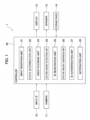
- the image processing device 1 includes an input interface (IF) 10, a camera 11, a controller 20, a display 12, a speaker 13, and a storage device 14.
- IF input interface
- the image processing device 1 includes an input interface (IF) 10, a camera 11, a controller 20, a display 12, a speaker 13, and a storage device 14.
- the image processing device 1 is a device for executing processing related to face authentication of users (mainly drivers). Face authentication includes two phases. One is a phase of newly registering face data of a user. The other is a phase of utilizing registered face data. The phase of utilizing registered face data is a phase of authenticating face data by matching a camera image with registered face data, for example.
- the input IF 10 is a virtual button displayed on the display 12 or a mechanical switch installed near the display 12.
- the input IF 10 is used when a user newly registers face data.
- the camera 11 includes an imaging sensor such as a CCD (charge-coupled device) or a CMOS (complementary metal oxide semiconductor).
- the camera 11 is installed in a vehicle. For example, as illustrated in FIG. 2 , the camera 11 is installed in a center part of the steering wheel. The camera 11 mainly images the face of the user sitting in the driver's seat. The image captured by the camera 11 is output to the controller 20.
- Reference sign 30 in FIG. 2 is a human face-imitating CG image (CG: computer graphics). Reference sign 30 is hereinafter referred to as a face image 30.
- the display 12 is installed in a center part of the instrument panel.
- a video playback unit 23 described below plays videos on the display 12.
- the video in the present embodiment is constituted by images in which the face image 30 changes the face orientation. In other words, the video is constituted by images in which the face image 30 shakes the head.
- the camera 11 and the display 12 are installed side by side in the vehicle width direction.
- the controller 20 is a general-purpose microcomputer having a CPU (central processing unit), a memory, and an input/output unit.
- a computer program for causing the microcomputer to function as the image processing device 1 is installed in the microcomputer.
- the microcomputer functions as multiple information processing circuits provided in the image processing device 1. Note that here, an example of realizing multiple information processing circuits provided in the image processing device 1 using software is described, but of course, it is also possible to configure the information processing circuits by preparing dedicated hardware for executing each information processing described below.
- the multiple information processing circuits may be configured by individual hardware.
- the controller 20 includes, as multiple information processing circuits, an input reception unit 21, a state determination unit 22, a video playback unit 23, a feature amount extraction unit 24, an ID registration unit 25, a feature amount comparison unit 26, an ID authentication unit 27, and a notification unit 28.
- the user sits in the driver's seat of the vehicle.
- the user presses a register button (input IF 10).
- the register button may be a virtual button displayed on the display 12 or a mechanical switch installed near the display 12.
- the user's input is transmitted to the input reception unit 21.
- the input reception unit 21 transmits a signal indicating the reception to the state determination unit 22.
- the state determination unit 22 determines the state of the vehicle. Specifically, the state determination unit 22 determines whether or not the power supply state of the vehicle is "IGN-ON".
- the "IGN-ON" power supply state of the vehicle is defined as a state in which the power switch installed in the vehicle is turned on and all electrical components including the meter and blower motor are activated.
- the state determination unit 22 determines whether the shift position is "P" or not.
- the condition may be that the power supply switch is on. That is, a condition that the power switch of the vehicle is on and the shift position is "P" may be adopted as the condition for registering a face ID.
- the state determination unit 22 transmits a signal indicating the determination result to the video playback unit 23.
- "Satisfying the condition for registering a face ID” means that the power supply state of the vehicle is "IGN-ON" and the shift position is "P”.
- the video playback unit 23 plays the video on the display 12.
- the video played by the video playback unit 23 will be described with reference to FIG. 3 .
- the video is stored in the storage device 14.
- the storage device 14 includes an HDD (Hard Disk Drive) or an SSD (Solid State Drive).
- the video playback unit 23 plays a video stored in the storage device 14. As illustrated in FIG. 3 , face images change the face orientation in the video.
- a face image 31 faces to the right.
- a face image 32 faces to the left.
- a face image 33 faces upward.
- a face image 34 faces downward.
- the video does not necessarily need to be stored in the storage device 14.
- the video may be stored in a cloud-type server (what is called a cloud server).
- the controller 20 may access the cloud server and play the video. This ensures that the latest video is always available.
- head angles in the vertical direction are in a range of +20 degrees to -20 degrees.
- Head angles in the lateral direction are in a range of +30 degrees to -30 degrees.
- the angle values described above indicate a change from this reference.
- Angles in the up and left directions are positive, and angles in the down and right directions are negative.
- the video in which the human face-imitating CG image changes its face orientation is repeatedly played.
- the head angles of the human face-imitating CG image are angles for capturing images with face orientations required for registration or authentication of a face ID.
- Face images 35 to 39 illustrated in FIG. 4 are an example of "multiple face images each having a different face orientation".
- the orientation of the face image 35 is 20 degrees in the upward direction and 30 degrees in the right direction.
- the orientation of the face image 36 is 20 degrees in the downward direction and 20 degrees in the right direction.
- the orientation of the face image 37 is front (0 degrees in the vertical direction and the horizontal direction).
- the orientation of the face image 38 is 20 degrees in the upward direction and 20 degrees in the left direction.
- the orientation of the face image 39 is 20 degrees in the downward direction and 30 degrees in the left direction.
- the camera 11 captures five face images (face images 35 to 39) each having a different face orientation.
- the five images are an example, and three or four images may be used as long as there are multiple images. Note that it is sufficient that the orientations of the face are different from each other, and the front image such as the face image 37 is not essential.
- the multiple face images 35 to 39 captured by the camera 11 are transmitted to the feature amount extraction unit 24.
- the feature amount extraction unit 24 extracts features of face data using the multiple face images 35 to 39 acquired from the camera 11.
- the feature amount extraction unit 24 extracts features of face data using a convolutional neural network (CNN).
- CNN convolutional neural network
- the feature extraction method is not limited to this, and other machine learning algorithms may be used. Note that since the feature extraction method using machine learning algorithms is a well-known technique, the detailed description thereof will be omitted. The reason why multiple face images each having a different face orientation are captured in the present embodiment is to extract features of face data with high accuracy.
- the feature amount extraction unit 24 transmits the extracted features of face data to the ID registration unit 25.
- the ID registration unit 25 registers a face ID using features of face data acquired from the feature amount extraction unit 24.
- the registered face ID is stored in the storage device 14.
- the ID registration unit 25 transmits a signal indicating that the registration of the face ID has been completed to the video playback unit 23 and the notification unit 28.
- the video playback unit 23 stops the video, and the notification unit 28 notifies the user that the registration has been completed.
- the notification unit 28 may display the text "Registration of the face ID is completed" on the display 12 or may use voice.
- the video playback unit 23 plays the video until registration of the face ID is completed.
- the user moves the face in the same manner as in the video until registration of the face ID is completed. This makes it possible to capture multiple face images each having a different face orientation in a short time, and reduces the time required for registration of face data.
- face images change the face orientation (shaking the head), but there are a moving part and a non-moving part.
- FIG. 5 in the face image 31 displayed on the display 12, an area 40 above the neck moves, and an area 41 below the neck does not move.
- the area 40 includes the face and the neck itself.
- the area 41 includes the upper body part from the chest to the neck.
- reference sign 50 indicates a user
- reference sign 51 indicates a user's nose (the orientation of the user's face).
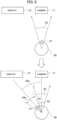
- the upper view of FIG. 6 illustrates a state where the user faces the front of the camera 11.
- Reference sign 52 denotes a predetermined angle. The predetermined angle is based on a state in which the user 50 faces the front of the camera 11, and is defined as an angle for causing a large amount of face data to be included in face images captured by the camera 11. That is, the predetermined angle 52 is a range of angles of face orientations in images required for registration or authentication of the face ID.
- a human face-imitating image changes its face orientation (shaking the head) within a range of angles equal to the predetermined angle 52.
- the face orientation of the user 50 is preferably included within the range of the predetermined angle 52.
- the predetermined angle 52 is obtained through experiments and simulation.
- the predetermined angle 52 is composed of first angles 61 and 62 in the left and right directions on the basis of a state where the user 50 faces the front of the camera 11.
- An example of first angles 61 and 62 is 30 degrees in the left direction and 30 degrees in the right direction on the basis of a state where the user faces the front of the camera 11 (0 degrees in the up and down directions and the left and right directions).
- the range of the predetermined angle 52 is 60 degrees.
- the user 50 moves the face while gazing at the video displayed on the display 12. Then, the line of sight of the user 50 is necessarily directed to the display 12 (lower view of FIG. 6 ).
- Reference sign 63a in FIG. 6 indicates a second angle formed by a direction from the seating position of the user 50 toward the camera 11 and a direction from the seating position of the user 50 toward the display 12. "Direction from the seating position of the user 50 toward the camera 11" may be expressed as "direction of line of sight of the user 50 when the user 50 looks at the camera 11". Similarly, "direction from the seating position of the user 50 toward the display 12" may be expressed as "direction of line of sight of the user 50 when the user 50 looks at the display 12".
- the range 64a does not overlap with the range of the predetermined angle 52.
- the face orientation of face images captured by the camera 11 when the user 50 moved the face in the left and right directions while gazing at the video is not included in the range of the predetermined angle 52. That is, even when the user 50 moves the face in the same manner as in the video while gazing at the video, it may be difficult to acquire images having face orientations required for registration or authentication of a face ID.
- the angle range in which the user moved the face in the left and right directions while gazing at the video overlaps with the range of the predetermined angle 52. Therefore, in the present embodiment, the camera 11 and the display 12 are installed at positions such that the angle range in which the user 50 moved the face in the left and right directions while gazing at the video overlaps with the range of the predetermined angle 52.
- the camera 11 and the display 12 are installed close to each other, the angle of the second angle 63a is reduced, and the range of the angle 64a in which the user 50 moved the face in the left and right directions while gazing at the video approaches the range of the predetermined angle 52.
- the camera 11 and the display 12 are installed at positions such that the second angle 63b is smaller than the predetermined angle 52 composed of the first angles 61 and 62.
- a range 64b is a range in which the range 64a is offset clockwise. Since the range 64b partially overlaps with the range of the predetermined angle 52, one face orientation of the user 50 can be captured within the range of the predetermined angle 52.
- the camera 11 and the display 12 may be installed at positions such that the second angle 63b is smaller than the first angles 61 and 62.
- a range 64c is a range in which the range 64b is further offset clockwise, and a second angle 63c in FIG. 8 is smaller than the second angle 63b in FIG. 7 .
- the range 64c has a larger portion that overlaps with the range of the predetermined angle 52 compared with the range 64b, and left and right face orientations of the user 50 can be captured within the range of the predetermined angle 52.
- the distance between the camera 11 and the display 12 is preferably short. Instead of adjusting the positional relationship between the camera 11 and the display 12, the range of the predetermined angle 52 may be adjusted so that the range of the predetermined angle 52 is larger than the second angle.
- the angle at which the human face-imitating image shakes the head may be adjusted so that the angle range in which the user 50 moved the face in the left and right directions while gazing at the video overlaps with the range of the predetermined angle 52.
- the angle at which the human face-imitating image shakes the head may be adjusted so that the range 65 in which the user 50 moves the face in the right direction while gazing at the video becomes larger than the second angle 63d on the basis of a state where the user 50 faces the front of the display 12.
- the video playback unit 23 plays a video in which the angle at which the human face-imitating image shakes the head in the left direction (corresponding to the range 65 in which the user moves the face in the right direction) becomes larger than the second angle 63d.
- the range 65 in which the user 50 moves the face in the right direction while gazing at the video partially overlaps with the predetermined angle 52, so that left and right face orientations of the user 50 can be captured within the range of the predetermined angle 52.
- step S101 the input reception unit 21 receives input from a user.
- the input reception unit 21 transmits a signal indicating the reception to the state determination unit 22.
- the processing proceeds to step S103, and when receiving the signal from the input reception unit 21, the state determination unit 22 determines the state of a vehicle. When determining that the condition for registering a face ID is satisfied, the state determination unit 22 transmits a signal indicating the determination result to the video playback unit 23.
- step S105 when receiving the signal from the state determination unit 22, the video playback unit 23 plays a video on the display 12 (see FIG. 3 ).
- the notification unit 28 When the video is displayed on the display 12, the notification unit 28 notifies the user to turn the face in the direction of the camera 11 and to change the face orientation in the vertical and horizontal directions in the same manner as in the video, until registration or authentication of the face ID is completed.
- a notification method there is a notification using text information or a notification using voice.
- the notification unit 28 may display the text "Please turn your face in the direction of the camera, and change your face orientation up, down, left, and right in the same manner as in the video" on the display 12.
- the notification using voice the notification unit 28 may provide, through the speaker 13, the voice notification "Please turn in the direction of the camera and change the orientation of your face up, down, left, and right in the same manner as in the video".
- step S107 when the user is moving the face while gazing at the video, the camera 11 captures multiple face images which are different from each other and in which face orientations are each within the first angles 61 and 62 on the basis of a state where the user faces the front of the camera 11.
- step S109 the feature amount extraction unit 24 determines whether or not the features of face data can be extracted.
- the determination method is not particularly limited, and for example, when it is detected that the user is wearing a mask, the feature amount extraction unit 24 determines that the features of face data cannot be extracted (NO in step S 109). In contrast, when it is not detected that the user is wearing a mask, the feature amount extraction unit 24 determines that the features of face data can be extracted (YES in step S 109). In the case of NO in step S109, the processing is interrupted. At this time, the notification unit 28 may notify "Please remove the mask and take the image again" or may notify "Are you wearing something to hide your face?".
- step S109 the processing proceeds to step S111, and the feature amount extraction unit 24 determines whether or not multiple images have been acquired within a predetermined time.
- the processing proceeds to step S113, and the notification unit 28 prompts the user to retry imaging and notifies the user, when the video is displayed on the display 12, to turn the face in the direction of the camera 11 and to change the face orientation in the same manner as in the video until registration or authentication of the face ID is completed.
- the notification method is the same as that in step S105. After alerting the user through the notification, the processing returns to step S101.
- step S111 the processing proceeds to step S115, and the feature amount extraction unit 24 extracts the features of face data using multiple face images acquired from the camera 11.
- the feature amount extraction unit 24 transmits the extracted features of face data to the ID registration unit 25.
- step S117 the ID registration unit 25 registers a face ID using the features of face data acquired from the feature amount extraction unit 24.
- the ID registration unit 25 transmits a signal indicating that the registration of the face ID has been completed to the video playback unit 23 and the notification unit 28.
- step S119 the video playback unit 23 stops the video when receiving the signal, and the notification unit 28 notifies the user that the registration has been completed.
- step S201 the input reception unit 21 determines whether or not the trigger for authentication is turned on.
- Trigger for authentication is turned on is one of “accessories are turned on”, “user has pressed the authentication button (input IF 10)", and “receiving a signal indicating that the vehicle door has been opened and then closed”.
- "accessories are turned on” is defined as a state in which the power switch installed in the vehicle is turned on and all electrical components except the meter and blower motor are activated.
- the definition of "accessories are turned on” is not limited to this.
- a predetermined signal is transmitted to the controller 20 when the user presses the unlocking switch of an intelligence key possessed by the user before entering the vehicle.
- the controller 20 transitions the power position from the power off to a predetermined state. This state may be defined as "accessories are turned on”.
- the intelligence key is used to remotely unlock and lock the door.
- the intelligence key may also be described as a smart key or a remote key.
- "receiving a signal indicating that the vehicle door has been opened and then closed” may be employed as the trigger.
- step S 201 When the trigger for authentication is turned on (YES in step S 201), the processing proceeds to step S203, and the state determination unit 22 determines the state of the vehicle. When determining that the condition for authenticating a face ID is satisfied, the state determination unit 22 transmits a signal indicating the determination result to the video playback unit 23.
- “Satisfying the condition for authenticating a face ID” means that the power supply state of the vehicle is "IGN-ON" and the shift position is "P”. Note that "satisfying the condition for authenticating a face ID” may be that "accessories are turned on” and the shift position is "P".
- step S217 the feature amount comparison unit 26 compares the features of face data extracted in step S215 with the features of face data stored in the storage device 14.
- the feature amount comparison unit 26 outputs a face ID having the highest similarity as a recognition result to the ID authentication unit 27.
- the processing proceeds to step S219, and the ID authentication unit 27 authenticates the face ID. Note that when the features of face data extracted in step S215 do not match the features of face data stored in the storage device 14, that is, when there is no face ID that matches the face data extracted in step S215, the ID authentication unit 27 may authenticate the user as "GUEST".
- GUIEST means that the user is not a unique user whose face ID is registered, and when the user is authenticated as "GUEST", initial values are reflected in various settings.
- the ID authentication unit 27 transmits a signal indicating that the authentication of the face ID has been completed to the video playback unit 23 and the notification unit 28.
- the processing proceeds to step S221, and the video playback unit 23 stops the video when receiving the signal, and the notification unit 28 notifies the user that the authentication has been completed.
- the image processing device 1 can obtain the following action and effect.
- the image processing device 1 includes the camera 11 that captures an image of a user, the controller 20 that performs registration or authentication of face data of the user by using images captured by the camera 11, and a display that displays a video.
- the controller 20 performs registration or authentication of the face data of the user using multiple face images which are different from each other and in which orientations of the face captured by the camera 11 are each within the first angles 61 and 62 that is based on a state in which the user faces the front of the camera 11.
- the controller 20 displays on the display 12 a video in which a human face-imitating image changes its face orientation until the registration or authentication is completed.
- the second angle formed by a direction from the user's seating position toward the camera 11 and a direction from the user's seating position toward the display 12 is smaller than the first angles 61 and 62.
- the camera 11 is installed in front of the seat in the vehicle.
- the direction in which the face orientation is changed includes any one of up, down, left, and right directions, or a combination of up, down, left, and right directions (see FIG. 4 ).
- the camera 11 and the display 12 are installed so as to be arranged in the vehicle width direction or in the vehicle height direction (see FIG. 2 ). When the user is sitting in the driver's seat, the camera 11 can capture images of the user from the front.
- the controller 20 may notify the user to change the face orientation at the same speed as the human face-imitating image changes its face orientation.
- a notification method there is a notification using text information or a notification using voice.
- the controller 20 may display the text "Please change your face orientation at the same speed as in the video" on the display 12.
- the controller 20 may provide, through the speaker 13, the voice notification "Please change your face orientation at the same speed as in the video". This prevents the user from moving too quickly or too slowly.
- the controller 20 may notify the user to change the face orientation in the same manner as in the video until registration or authentication is completed.
- the controller 20 may notify the user to face in the direction of the camera 11 and to change the face orientation in the vertical and horizontal directions in the same manner as in the video, until registration or authentication is complete. Notification method examples have been described in the above-described S111.
- the user is prevented from stopping movement before registration or authentication is completed.
- the user can be facilitated to change the face orientation on the basis of a state where the user faces the front of the camera 11, and the angle range in which the user moved the face is likely to overlap with the range of predetermined angle 52. Images required for registration or authentication of a face ID are acquired more quickly.
- face images captured by the camera 11 may be taken in any direction as long as the orientations are different.
- a condition may be added that at least one face image oriented in each of the four directions of up, down, left, and right is required.
- the controller 20 may notify the user of the missing orientation (left direction).
- the color may be changed when the CG image is oriented in the left direction.
- the camera 11 is installed in front of the seat in the vehicle.
- the camera 11 and the display 12 may be installed so as to be arrange in the longitudinal direction of the vehicle. When the user gazes steadily at the display 12, the user will also face the front of the camera 11. This makes it easier to capture distinctive face images.
- the image processing device 1 may further include a sensor that detects the sitting height of the user.
- the controller 20 may change the video displayed on the display 12 according to the sitting height detected by the sensor.
- the height relative to the camera 11 differs between a user having a low sitting height and a user having a high sitting height.
- the controller 20 can play a video according to the angle at which the user is seen from the camera 11. To correspond to the sitting height, multiple videos are stored in the storage device 14.
- Either one of the angles at which the human face-imitating image shakes the head in the right direction and the left direction may be larger than the second angle.
- the controller 20 may determine whether the user's line of sight is toward the camera 11 or toward the display 12 based on an image captured by the camera 11.
- the controller 20 may change the video to be displayed on the display 12 based on the determination result.
- the controller 20 can play a video corresponding to the user's line of sight.
- multiple videos are stored in the storage device 14.
- the controller 20 determines that the line of sight of the user 50 is toward the display 12, either one of the angles at which a human face-imitating image shakes the head in the right direction and in the left direction may be made larger than the second angle.
- the controller 20 can play a video in which the angle of shaking the head toward the direction of the camera 11 when viewed from the display 12 is larger than the second angle. Since the range 65 where the user moves the face while gazing at the video partially overlaps with the predetermined angle 52, the left and right face orientations of the user 50 within the predetermined angle 52 can be captured.
- the angle in the opposite direction from either one of the angles at which the human face-imitating image shakes the head in the right direction and in the left direction may be made smaller than the second angle.
- the range 66 in which the user moves the face while gazing at the video becomes small, and it is possible to prevent images having face orientations outside the predetermined angle 52 from being captured.
- the image processing unrequired for registration or authentication of a face ID can be suppressed, and the processing load of the controller 20 can be reduced.
- the processing circuit includes a programmed processing device such as a processing device including electrical circuits.
- the processing circuit also includes devices such as an application specific integrated circuit (ASIC) arranged to perform the described functions and circuit components.
- ASIC application specific integrated circuit
- the image processing device 1 has been described as a device to be mounted on a vehicle, but is not limited thereto.
- the image processing device 1 may be a terminal device (e.g., a smartphone).
- the terminal device may capture images of a user with a camera while playing a video on the display. Processing related to registration or authentication of a face ID is realized by a controller incorporated in the terminal device.
- FIG. 12 there is a known technique that links a vehicle key ID (an ID transmitted from a key 70) with an in-vehicle device and controls an in-vehicle device and function according to the key ID.
- the onboard device associated with the key ID include a meter 74, a HUD 75, a mirror 78, a seat 80, and a steering wheel 81.
- Examples of a function associated with the key ID include air conditioning 76 and a drive mode 77.
- a single vehicle may be used by multiple people in common.
- An example is family sharing. When a vehicle is shared, there is usually one key. Therefore, it is not possible to set in-vehicle devices and functions according to the preferences of multiple people by using only the key ID.
- face IDs are used.
- IVI72 in-vehicle infotainment
- face ID a user ID associated with the face ID becomes available. It is sufficient to associate the setting of in-vehicle devices and functions with this user ID.
- face ID By using two IDs, the key ID and the user ID (face ID), it is possible to set in-vehicle devices and functions according to the preferences of each user, even when a vehicle is shared.
Landscapes
- Engineering & Computer Science (AREA)
- Theoretical Computer Science (AREA)
- Physics & Mathematics (AREA)
- General Physics & Mathematics (AREA)
- Human Computer Interaction (AREA)
- Multimedia (AREA)
- Mechanical Engineering (AREA)
- Health & Medical Sciences (AREA)
- General Health & Medical Sciences (AREA)
- Oral & Maxillofacial Surgery (AREA)
- Chemical & Material Sciences (AREA)
- Transportation (AREA)
- Combustion & Propulsion (AREA)
- General Engineering & Computer Science (AREA)
- Computer Vision & Pattern Recognition (AREA)
- Collating Specific Patterns (AREA)
- Image Analysis (AREA)
Applications Claiming Priority (2)
| Application Number | Priority Date | Filing Date | Title |
|---|---|---|---|
| PCT/JP2021/022695 WO2022264264A1 (fr) | 2021-06-15 | 2021-06-15 | Dispositif de traitement d'image et procédé de traitement d'image |
| PCT/JP2021/044346 WO2022264453A1 (fr) | 2021-06-15 | 2021-12-02 | Dispositif de traitement d'image et procédé de traitement d'image |
Publications (2)
| Publication Number | Publication Date |
|---|---|
| EP4358060A1 true EP4358060A1 (fr) | 2024-04-24 |
| EP4358060A4 EP4358060A4 (fr) | 2024-07-17 |
Family
ID=84525995
Family Applications (1)
| Application Number | Title | Priority Date | Filing Date |
|---|---|---|---|
| EP21945374.3A Withdrawn EP4358060A4 (fr) | 2021-06-15 | 2021-12-02 | Dispositif de traitement d'image et procédé de traitement d'image |
Country Status (5)
| Country | Link |
|---|---|
| US (1) | US12322212B2 (fr) |
| EP (1) | EP4358060A4 (fr) |
| JP (1) | JP7537615B2 (fr) |
| CN (1) | CN117480541A (fr) |
| WO (2) | WO2022264264A1 (fr) |
Families Citing this family (1)
| Publication number | Priority date | Publication date | Assignee | Title |
|---|---|---|---|---|
| US12288433B2 (en) * | 2021-12-02 | 2025-04-29 | Ford Global Technologies, Llc | Enhanced biometric authorization |
Family Cites Families (11)
| Publication number | Priority date | Publication date | Assignee | Title |
|---|---|---|---|---|
| JP4561703B2 (ja) | 2006-07-06 | 2010-10-13 | 株式会社デンソー | 顔認識装置及びそれを用いた自動車用ユーザーもてなしシステム |
| JP4807167B2 (ja) * | 2006-07-06 | 2011-11-02 | オムロン株式会社 | なりすまし検知装置 |
| JP2009113621A (ja) * | 2007-11-06 | 2009-05-28 | Toyota Motor Corp | 乗員画像撮像装置、運転支援装置 |
| JP2010006362A (ja) * | 2008-05-27 | 2010-01-14 | Tokai Rika Co Ltd | 乗員撮像装置及び居眠り防止装置 |
| JP5920894B2 (ja) * | 2013-11-07 | 2016-05-18 | 株式会社ソニー・インタラクティブエンタテインメント | 情報処理装置および顔識別用データの登録方法 |
| EP3159820B1 (fr) * | 2014-06-19 | 2025-01-22 | Nec Corporation | Dispositif d'authentification, système d'authentification, procédé d'authentification et support de mémoire programme |
| CN110088761B (zh) * | 2016-12-20 | 2023-11-14 | 三菱电机株式会社 | 图像认证装置、图像认证方法及汽车 |
| US20190080065A1 (en) * | 2017-09-12 | 2019-03-14 | Synaptics Incorporated | Dynamic interface for camera-based authentication |
| JP6691309B2 (ja) * | 2017-10-31 | 2020-04-28 | キヤノンマーケティングジャパン株式会社 | 情報処理装置、及びその制御方法、プログラム |
| JP2019134397A (ja) * | 2018-01-30 | 2019-08-08 | パナソニックIpマネジメント株式会社 | 誘導制御装置、方法、及びコンピュータプログラム |
| JP2019212156A (ja) * | 2018-06-07 | 2019-12-12 | パナソニックIpマネジメント株式会社 | 顔画像登録システム、顔画像登録方法、移動体端末、及び顔認証画像登録装置 |
-
2021
- 2021-06-15 WO PCT/JP2021/022695 patent/WO2022264264A1/fr not_active Ceased
- 2021-12-02 JP JP2023529444A patent/JP7537615B2/ja active Active
- 2021-12-02 EP EP21945374.3A patent/EP4358060A4/fr not_active Withdrawn
- 2021-12-02 US US18/569,515 patent/US12322212B2/en active Active
- 2021-12-02 WO PCT/JP2021/044346 patent/WO2022264453A1/fr not_active Ceased
- 2021-12-02 CN CN202180099263.0A patent/CN117480541A/zh active Pending
Also Published As
| Publication number | Publication date |
|---|---|
| US12322212B2 (en) | 2025-06-03 |
| CN117480541A (zh) | 2024-01-30 |
| WO2022264264A1 (fr) | 2022-12-22 |
| JP7537615B2 (ja) | 2024-08-21 |
| EP4358060A4 (fr) | 2024-07-17 |
| US20240273951A1 (en) | 2024-08-15 |
| JPWO2022264453A1 (fr) | 2022-12-22 |
| WO2022264453A1 (fr) | 2022-12-22 |
Similar Documents
| Publication | Publication Date | Title |
|---|---|---|
| KR102504746B1 (ko) | 신뢰 모바일 컴퓨팅 디바이스와 함께 차량 내 카메라를 사용한 무결절 운전자 인증 | |
| US10745018B2 (en) | Hybrid user recognition systems for vehicle access and control | |
| JP7070588B2 (ja) | 生体認証装置、システム、方法およびプログラム | |
| KR20190127338A (ko) | 차량 단말 및 그의 얼굴 인증 방법 | |
| US20180052982A1 (en) | Sitting posture for biometric identification | |
| JP2012121386A (ja) | 車載装置 | |
| WO2022048118A1 (fr) | Procédé et appareil permettant de commander un robot embarqué, véhicule, dispositif électronique et support | |
| JP2017016512A (ja) | 判定装置、判定方法、および判定プログラム | |
| JP2016136332A (ja) | 情報処理装置、情報処理方法及び記憶媒体 | |
| CN114202677A (zh) | 认证车辆内部中的乘员的方法和系统 | |
| KR102093858B1 (ko) | 바이오메트릭스 기반 차량 제어 장치 및 이를 이용한 차량 제어 방법 | |
| US12322212B2 (en) | Image processing device and image processing method | |
| US10471965B2 (en) | Securing guest access to vehicle | |
| US20200218347A1 (en) | Control system, vehicle and method for controlling multiple facilities | |
| US11874908B2 (en) | Biometric authentication system, control device, and non-transitory computer readable medium | |
| JP7723524B2 (ja) | 乗員に応じた車両の設定システム、および車両 | |
| US12411923B2 (en) | Method and system for enabling a vehicle function based on a user profile | |
| US20230311812A1 (en) | Control system and control method of control system | |
| CN107107756A (zh) | 通过检测驾驶员的运动和/或表情控制交通工具功能的人/机界面和方法 | |
| JP7719660B2 (ja) | 乗員に応じた車両の設定システム | |
| US20240371207A1 (en) | Information Recording Method and Apparatus, and Transportation Means | |
| JP2009257964A (ja) | ナビゲーション装置 | |
| KR102837020B1 (ko) | 생체 인증을 위한 전자 장치, 그 동작 방법 및 저장 매체 | |
| CN119367751A (zh) | 角色位置调整方法、装置、设备、介质及计算机程序产品 | |
| CN121799294A (zh) | 车辆的后视镜调节方法、装置、存储介质及程序产品 |
Legal Events
| Date | Code | Title | Description |
|---|---|---|---|
| STAA | Information on the status of an ep patent application or granted ep patent |
Free format text: STATUS: THE INTERNATIONAL PUBLICATION HAS BEEN MADE |
|
| PUAI | Public reference made under article 153(3) epc to a published international application that has entered the european phase |
Free format text: ORIGINAL CODE: 0009012 |
|
| STAA | Information on the status of an ep patent application or granted ep patent |
Free format text: STATUS: REQUEST FOR EXAMINATION WAS MADE |
|
| 17P | Request for examination filed |
Effective date: 20240108 |
|
| AK | Designated contracting states |
Kind code of ref document: A1 Designated state(s): AL AT BE BG CH CY CZ DE DK EE ES FI FR GB GR HR HU IE IS IT LI LT LU LV MC MK MT NL NO PL PT RO RS SE SI SK SM TR |
|
| REG | Reference to a national code |
Ref country code: DE Ref legal event code: R079 Free format text: PREVIOUS MAIN CLASS: G08G0001160000 Ipc: G06F0003010000 |
|
| A4 | Supplementary search report drawn up and despatched |
Effective date: 20240617 |
|
| RIC1 | Information provided on ipc code assigned before grant |
Ipc: B60R 25/25 20130101ALI20240611BHEP Ipc: G06V 40/16 20220101ALI20240611BHEP Ipc: G08G 1/16 20060101ALI20240611BHEP Ipc: G06F 3/01 20060101AFI20240611BHEP |
|
| DAV | Request for validation of the european patent (deleted) | ||
| DAX | Request for extension of the european patent (deleted) | ||
| STAA | Information on the status of an ep patent application or granted ep patent |
Free format text: STATUS: THE APPLICATION HAS BEEN WITHDRAWN |
|
| 18W | Application withdrawn |
Effective date: 20250404 |