EP4394567A1 - Procédé d'affichage et dispositif électronique - Google Patents
Procédé d'affichage et dispositif électronique Download PDFInfo
- Publication number
- EP4394567A1 EP4394567A1 EP22889113.1A EP22889113A EP4394567A1 EP 4394567 A1 EP4394567 A1 EP 4394567A1 EP 22889113 A EP22889113 A EP 22889113A EP 4394567 A1 EP4394567 A1 EP 4394567A1
- Authority
- EP
- European Patent Office
- Prior art keywords
- page
- folder
- application
- interface
- electronic device
- Prior art date
- Legal status (The legal status is an assumption and is not a legal conclusion. Google has not performed a legal analysis and makes no representation as to the accuracy of the status listed.)
- Withdrawn
Links
Images











Classifications
-
- G—PHYSICS
- G06—COMPUTING OR CALCULATING; COUNTING
- G06F—ELECTRIC DIGITAL DATA PROCESSING
- G06F3/00—Input arrangements for transferring data to be processed into a form capable of being handled by the computer; Output arrangements for transferring data from processing unit to output unit, e.g. interface arrangements
- G06F3/01—Input arrangements or combined input and output arrangements for interaction between user and computer
- G06F3/048—Interaction techniques based on graphical user interfaces [GUI]
- G06F3/0481—Interaction techniques based on graphical user interfaces [GUI] based on specific properties of the displayed interaction object or a metaphor-based environment, e.g. interaction with desktop elements like windows or icons, or assisted by a cursor's changing behaviour or appearance
- G06F3/04817—Interaction techniques based on graphical user interfaces [GUI] based on specific properties of the displayed interaction object or a metaphor-based environment, e.g. interaction with desktop elements like windows or icons, or assisted by a cursor's changing behaviour or appearance using icons
-
- G—PHYSICS
- G06—COMPUTING OR CALCULATING; COUNTING
- G06F—ELECTRIC DIGITAL DATA PROCESSING
- G06F3/00—Input arrangements for transferring data to be processed into a form capable of being handled by the computer; Output arrangements for transferring data from processing unit to output unit, e.g. interface arrangements
- G06F3/01—Input arrangements or combined input and output arrangements for interaction between user and computer
- G06F3/048—Interaction techniques based on graphical user interfaces [GUI]
-
- G—PHYSICS
- G06—COMPUTING OR CALCULATING; COUNTING
- G06F—ELECTRIC DIGITAL DATA PROCESSING
- G06F3/00—Input arrangements for transferring data to be processed into a form capable of being handled by the computer; Output arrangements for transferring data from processing unit to output unit, e.g. interface arrangements
- G06F3/01—Input arrangements or combined input and output arrangements for interaction between user and computer
- G06F3/048—Interaction techniques based on graphical user interfaces [GUI]
- G06F3/0481—Interaction techniques based on graphical user interfaces [GUI] based on specific properties of the displayed interaction object or a metaphor-based environment, e.g. interaction with desktop elements like windows or icons, or assisted by a cursor's changing behaviour or appearance
-
- G—PHYSICS
- G06—COMPUTING OR CALCULATING; COUNTING
- G06F—ELECTRIC DIGITAL DATA PROCESSING
- G06F3/00—Input arrangements for transferring data to be processed into a form capable of being handled by the computer; Output arrangements for transferring data from processing unit to output unit, e.g. interface arrangements
- G06F3/01—Input arrangements or combined input and output arrangements for interaction between user and computer
- G06F3/048—Interaction techniques based on graphical user interfaces [GUI]
- G06F3/0481—Interaction techniques based on graphical user interfaces [GUI] based on specific properties of the displayed interaction object or a metaphor-based environment, e.g. interaction with desktop elements like windows or icons, or assisted by a cursor's changing behaviour or appearance
- G06F3/0482—Interaction with lists of selectable items, e.g. menus
-
- G—PHYSICS
- G06—COMPUTING OR CALCULATING; COUNTING
- G06F—ELECTRIC DIGITAL DATA PROCESSING
- G06F3/00—Input arrangements for transferring data to be processed into a form capable of being handled by the computer; Output arrangements for transferring data from processing unit to output unit, e.g. interface arrangements
- G06F3/01—Input arrangements or combined input and output arrangements for interaction between user and computer
- G06F3/048—Interaction techniques based on graphical user interfaces [GUI]
- G06F3/0481—Interaction techniques based on graphical user interfaces [GUI] based on specific properties of the displayed interaction object or a metaphor-based environment, e.g. interaction with desktop elements like windows or icons, or assisted by a cursor's changing behaviour or appearance
- G06F3/0483—Interaction with page-structured environments, e.g. book metaphor
-
- G—PHYSICS
- G06—COMPUTING OR CALCULATING; COUNTING
- G06F—ELECTRIC DIGITAL DATA PROCESSING
- G06F3/00—Input arrangements for transferring data to be processed into a form capable of being handled by the computer; Output arrangements for transferring data from processing unit to output unit, e.g. interface arrangements
- G06F3/01—Input arrangements or combined input and output arrangements for interaction between user and computer
- G06F3/048—Interaction techniques based on graphical user interfaces [GUI]
- G06F3/0484—Interaction techniques based on graphical user interfaces [GUI] for the control of specific functions or operations, e.g. selecting or manipulating an object, an image or a displayed text element, setting a parameter value or selecting a range
- G06F3/04847—Interaction techniques to control parameter settings, e.g. interaction with sliders or dials
-
- G—PHYSICS
- G06—COMPUTING OR CALCULATING; COUNTING
- G06F—ELECTRIC DIGITAL DATA PROCESSING
- G06F3/00—Input arrangements for transferring data to be processed into a form capable of being handled by the computer; Output arrangements for transferring data from processing unit to output unit, e.g. interface arrangements
- G06F3/01—Input arrangements or combined input and output arrangements for interaction between user and computer
- G06F3/048—Interaction techniques based on graphical user interfaces [GUI]
- G06F3/0484—Interaction techniques based on graphical user interfaces [GUI] for the control of specific functions or operations, e.g. selecting or manipulating an object, an image or a displayed text element, setting a parameter value or selecting a range
- G06F3/0486—Drag-and-drop
-
- G—PHYSICS
- G06—COMPUTING OR CALCULATING; COUNTING
- G06F—ELECTRIC DIGITAL DATA PROCESSING
- G06F3/00—Input arrangements for transferring data to be processed into a form capable of being handled by the computer; Output arrangements for transferring data from processing unit to output unit, e.g. interface arrangements
- G06F3/01—Input arrangements or combined input and output arrangements for interaction between user and computer
- G06F3/048—Interaction techniques based on graphical user interfaces [GUI]
- G06F3/0487—Interaction techniques based on graphical user interfaces [GUI] using specific features provided by the input device, e.g. functions controlled by the rotation of a mouse with dual sensing arrangements, or of the nature of the input device, e.g. tap gestures based on pressure sensed by a digitiser
- G06F3/0488—Interaction techniques based on graphical user interfaces [GUI] using specific features provided by the input device, e.g. functions controlled by the rotation of a mouse with dual sensing arrangements, or of the nature of the input device, e.g. tap gestures based on pressure sensed by a digitiser using a touch-screen or digitiser, e.g. input of commands through traced gestures
-
- G—PHYSICS
- G06—COMPUTING OR CALCULATING; COUNTING
- G06F—ELECTRIC DIGITAL DATA PROCESSING
- G06F3/00—Input arrangements for transferring data to be processed into a form capable of being handled by the computer; Output arrangements for transferring data from processing unit to output unit, e.g. interface arrangements
- G06F3/01—Input arrangements or combined input and output arrangements for interaction between user and computer
- G06F3/048—Interaction techniques based on graphical user interfaces [GUI]
- G06F3/0487—Interaction techniques based on graphical user interfaces [GUI] using specific features provided by the input device, e.g. functions controlled by the rotation of a mouse with dual sensing arrangements, or of the nature of the input device, e.g. tap gestures based on pressure sensed by a digitiser
- G06F3/0488—Interaction techniques based on graphical user interfaces [GUI] using specific features provided by the input device, e.g. functions controlled by the rotation of a mouse with dual sensing arrangements, or of the nature of the input device, e.g. tap gestures based on pressure sensed by a digitiser using a touch-screen or digitiser, e.g. input of commands through traced gestures
- G06F3/04883—Interaction techniques based on graphical user interfaces [GUI] using specific features provided by the input device, e.g. functions controlled by the rotation of a mouse with dual sensing arrangements, or of the nature of the input device, e.g. tap gestures based on pressure sensed by a digitiser using a touch-screen or digitiser, e.g. input of commands through traced gestures for inputting data by handwriting, e.g. gesture or text
-
- G—PHYSICS
- G06—COMPUTING OR CALCULATING; COUNTING
- G06F—ELECTRIC DIGITAL DATA PROCESSING
- G06F3/00—Input arrangements for transferring data to be processed into a form capable of being handled by the computer; Output arrangements for transferring data from processing unit to output unit, e.g. interface arrangements
- G06F3/01—Input arrangements or combined input and output arrangements for interaction between user and computer
- G06F3/048—Interaction techniques based on graphical user interfaces [GUI]
- G06F3/0487—Interaction techniques based on graphical user interfaces [GUI] using specific features provided by the input device, e.g. functions controlled by the rotation of a mouse with dual sensing arrangements, or of the nature of the input device, e.g. tap gestures based on pressure sensed by a digitiser
- G06F3/0488—Interaction techniques based on graphical user interfaces [GUI] using specific features provided by the input device, e.g. functions controlled by the rotation of a mouse with dual sensing arrangements, or of the nature of the input device, e.g. tap gestures based on pressure sensed by a digitiser using a touch-screen or digitiser, e.g. input of commands through traced gestures
- G06F3/04886—Interaction techniques based on graphical user interfaces [GUI] using specific features provided by the input device, e.g. functions controlled by the rotation of a mouse with dual sensing arrangements, or of the nature of the input device, e.g. tap gestures based on pressure sensed by a digitiser using a touch-screen or digitiser, e.g. input of commands through traced gestures by partitioning the display area of the touch-screen or the surface of the digitising tablet into independently controllable areas, e.g. virtual keyboards or menus
-
- G—PHYSICS
- G06—COMPUTING OR CALCULATING; COUNTING
- G06F—ELECTRIC DIGITAL DATA PROCESSING
- G06F9/00—Arrangements for program control, e.g. control units
- G06F9/06—Arrangements for program control, e.g. control units using stored programs, i.e. using an internal store of processing equipment to receive or retain programs
- G06F9/44—Arrangements for executing specific programs
- G06F9/451—Execution arrangements for user interfaces
-
- G—PHYSICS
- G06—COMPUTING OR CALCULATING; COUNTING
- G06F—ELECTRIC DIGITAL DATA PROCESSING
- G06F2203/00—Indexing scheme relating to G06F3/00 - G06F3/048
- G06F2203/048—Indexing scheme relating to G06F3/048
- G06F2203/04803—Split screen, i.e. subdividing the display area or the window area into separate subareas
Definitions
- the electronic device may expand the first page of the folder in response to the second operation of the user.
- an application may be searched for on an expanded page, so that different use habits of different users can be satisfied, and user experience can be improved.
- the preset quantity is 8 or 9.
- an application can be opened without expanding the folder. This improves application opening efficiency and improves user experience.
- the quantity of application icons included in the first folder is greater than the preset quantity, and the first page includes icons displayed in an overlapping manner.
- the user may perform the first operation at a position of the application icons displayed in the overlapping manner, and the electronic device may expand, on the second interface in response to the first operation of the user, the application icons displayed in the overlapping manner.
- the icons displayed in the overlapping manner may be displayed as a plurality of non-overlapped icons on the second interface.
- the user can conveniently search for an application, and does not need to tap the overlapped application icons to expand the folder. This can improve application search efficiency.
- the user may perform an operation on the second page of the folder, and the electronic device displays the first page of the folder in response to the operation of the user, to slide the second page back to the first page.
- an embodiment of this application provides a computer program product.
- the computer program product runs on an electronic device, the electronic device is enabled to perform the method according to any one of the first aspect and the possible designs of the first aspect in embodiments of this application.
- the folder may include a large folder and a small folder, and the large folder and the small folder can be switched to each other.
- the folder is a small folder
- the user may touch and hold the small folder, and then switch the small folder to a large folder for display.
- the folder is a large folder
- the user may also touch and hold the large folder, and then switch the large folder to a small folder for display.
- the small folder first needs to be expanded, and then an application icon is tapped to open the application.
- an application icon can be directly tapped to open the application.
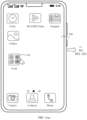
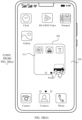
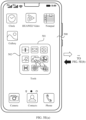
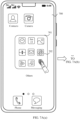
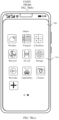
- FIG. 1(a) to FIG. 1(c) It is assumed that a mobile phone displays a home screen, for example, an interface 100 shown in FIG. 1(a) .
- the interface 100 may include a small folder 101, and a user may tap the small folder 101 to expand the folder.
- an interface 110 shown in FIG. 1(b) may be displayed.
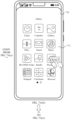
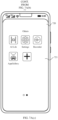
- the interface 110 may include a display manner switching button, namely, "display as a large folder" 111. After the user taps the button "display as a large folder" 111, the small folder 101 may be displayed as a large folder.
- an interface 120 shown in FIG. 1(c) is displayed, and the interface 120 may include a large folder 121.
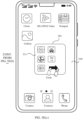
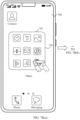
- a ninth app icon and more app icons may be, for example, displayed as those on an interface shown in FIG. 1(c) .
- a plurality of app icons are stacked together.
- the user needs to tap a position of the ninth icon, then expand the large folder, and tap app icons in an expanded large folder to enter the ninth app and the app after the ninth app.
- the quantity of apps is greater than 8
- to open the ninth app and the app after the ninth app is complex, and experience is poor.
- embodiments of this application provide a display method.
- a touch target is set in a specified area of a large folder.
- a user can implement page switching of the large folder when sliding on the touch target, so that the user can conveniently search for an application on a page after a first page of the large folder. This improves an application search rate and improves user experience.
- the following uses a mobile phone as an example to describe a structure of the electronic device.
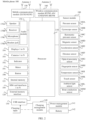
- the sensor module 180 may include a pressure sensor 180A, a gyroscope sensor 180B, a barometric pressure sensor 180C, a magnetic sensor 180D, an acceleration sensor 180E, a distance sensor 180F, an optical proximity sensor 180G, a fingerprint sensor 180H, a temperature sensor 180J, a touch sensor 180K, an ambient light sensor 180L, a bone conduction sensor 180M, and the like.
- the USB interface 130 is an interface that conforms to a USB standard specification, and may be specifically a mini USB interface, a micro USB interface, a USB type-C interface, or the like.
- the USB interface 130 may be configured to connect to a charger to charge the mobile phone 100, or may be configured to perform data transmission between the mobile phone 100 and a peripheral device.
- the charging management module 140 is configured to receive a charging input from the charger.
- the power management module 141 is configured to connect to the battery 142, the charging management module 140, and the processor 110.
- the power management module 141 receives an input of the battery 142 and/or the charging management module 140, to supply power to the processor 110, the internal memory 121, an external memory, the display 194, the camera 193, the wireless communication module 160, and the like.
- the wireless communication module 160 may provide a wireless communication solution that is applied to the mobile phone 100, and that includes a wireless local area network (wireless local area network, WLAN) (for example, a wireless fidelity (wireless fidelity, Wi-Fi) network), Bluetooth (Bluetooth, BT), a global navigation satellite system (global navigation satellite system, GNSS), frequency modulation (frequency modulation, FM), a near field communication (near field communication, NFC) technology, an infrared (infrared, IR) technology, or the like.
- the wireless communication module 160 may be one or more components integrating at least one communication processor module.
- the GNSS may include a global positioning system (global positioning system, GPS), a global navigation satellite system (global navigation satellite system, GLONASS), a BeiDou navigation satellite system (BeiDou navigation satellite system, BDS), a quasi-zenith satellite system (quasi-zenith satellite system, QZSS), and/or a satellite based augmentation system (satellite based augmentation system, SBAS).
- GPS global positioning system
- GLONASS global navigation satellite system
- BeiDou navigation satellite system BeiDou navigation satellite system
- BDS BeiDou navigation satellite system
- QZSS quasi-zenith satellite system
- SBAS satellite based augmentation system
- the internal memory 121 may be configured to store computer-executable program code.
- the executable program code includes instructions.
- the processor 110 implements various function applications and data processing of the mobile phone 100 by running the instructions stored in the internal memory 121.
- the internal memory 121 may include a program storage area and a data storage area.
- the program storage area may store an operating system, software code of at least one application (such as an iQIYI application or a WeChat application), and the like.
- the data storage area may store data (for example, an image and a video) and the like generated in a process of using the mobile phone 100.
- the internal memory 121 may include a high-speed random access memory, and may further include a non-volatile memory, for example, at least one magnetic disk storage device, a flash memory device, or a universal flash storage (universal flash storage, UFS).
- a non-volatile memory for example, at least one magnetic disk storage device, a flash memory device, or a universal flash storage (universal flash storage, UFS).
- the mobile phone 100 may implement an audio function, for example, music playing and recording, through the audio module 170, the speaker 170A, the receiver 170B, the microphone 170C, the headset jack 170D, the application processor, and the like.
- an audio function for example, music playing and recording
- the pressure sensor 180A is configured to sense a pressure signal, and may convert the pressure signal into an electrical signal. In some embodiments, the pressure sensor 180A may be disposed on the display 194.
- the gyroscope sensor 180B may be configured to determine a motion posture of the mobile phone 100. In some embodiments, the gyroscope sensor 180B may be configured to determine angular velocities of the mobile phone 100 around three axes (namely, x, y, and z axes).
- the barometric pressure sensor 180C is configured to measure barometric pressure.
- the mobile phone 100 calculates an altitude based on a value of the atmospheric pressure measured by the barometric pressure sensor 180C, to assist positioning and navigation.
- the magnetic sensor 180D includes a Hall effect sensor.
- the mobile phone 100 may detect opening and closing of a flip cover by using the magnetic sensor 180D.
- the mobile phone 100 may detect opening and closing of a flip cover by using the magnetic sensor 180D.
- a feature such as automatic unlocking upon opening of the flip cover is set based on a detected opening or closing state of the flip cover.
- the acceleration sensor 180E may detect magnitude of accelerations in various directions (usually on three axes) of the mobile phone 100.
- the acceleration sensor may be further configured to identify a posture of the electronic device, and is used in an application such as switching between a landscape mode and a portrait mode or a pedometer.
- the distance sensor 180F is configured to measure a distance.
- the mobile phone 100 may measure a distance through infrared or laser. In some embodiments, in a photographing scenario, the mobile phone 100 may measure a distance by using the distance sensor 180F, to implement quick focusing.
- the optical proximity sensor 180G may include, for example, a light-emitting diode (LED) and an optical detector, for example, a photodiode.
- the light-emitting diode may be an infrared light-emitting diode.
- the mobile phone 100 emits infrared light by using the light-emitting diode.
- the mobile phone 100 detects infrared reflected light from a nearby object by using the photodiode.
- the mobile phone 100 may detect, by using the optical proximity sensor 180G, that the user holds the mobile phone 100 close to an ear for a call, to automatically turn off the screen to save power.
- the optical proximity sensor 180G may also be used in a smart cover mode or a pocket mode to automatically perform screen unlocking or locking.
- the ambient light sensor 180L is configured to sense ambient light brightness.
- the mobile phone 100 may adaptively adjust brightness of the display 194 based on the sensed ambient light brightness.
- the ambient light sensor 180L may also be configured to automatically adjust white balance during photographing.
- the ambient light sensor 180L may also cooperate with the optical proximity sensor 180G, to detect whether the mobile phone 100 is in a pocket, to avoid an accidental touch.
- the fingerprint sensor 180H is configured to collect a fingerprint.
- the mobile phone 100 may use a feature of the collected fingerprint to implement fingerprint-based unlocking, application lock access, fingerprint-based photographing, fingerprint-based call answering, and the like.
- the temperature sensor 180J is configured to detect a temperature.
- the mobile phone 100 executes a temperature processing policy by using the temperature detected by the temperature sensor 180J. For example, when the temperature reported by the temperature sensor 180J exceeds a threshold, the mobile phone 100 reduces performance of a processor near the temperature sensor 180J, to reduce power consumption and implement heat protection. In some other embodiments, when the temperature is lower than another threshold, the mobile phone 100 heats the battery 142 to prevent the mobile phone 100 from being shut down abnormally because of a low temperature. In some other embodiments, when the temperature is lower than still another threshold, the mobile phone 100 boosts an output voltage of the battery 142, to avoid an abnormal shutdown caused by a low temperature.
- the touch sensor 180K is also referred to as a "touch panel”.
- the touch sensor 180K may be disposed on the display 194.
- the touch sensor 180K and the display 194 form a touchscreen, which is also referred to as a "touch screen”.
- the touch sensor 180K is configured to detect a touch operation performed on or near the touch sensor.
- the touch sensor may transfer the detected touch operation to the application processor to determine a type of the touch event.
- a visual output related to the touch operation may be provided through the display 194.
- the touch sensor 180K may alternatively be disposed on a surface of the mobile phone 100 at a position different from a position of the display 194.
- the bone conduction sensor 180M may obtain a vibration signal.
- the bone conduction sensor 180M may obtain a vibration signal of a vibration bone of a human vocal-cord part.
- the bone conduction sensor 180M may also be in contact with a human pulse, and receive a blood pressure beating signal.
- the button 190 includes a power button, a volume button, and the like.
- the button 190 may be a mechanical button or a touch button.
- the mobile phone 100 may receive a button input, and generate a button signal input related to a user setting and function control of the mobile phone 100.
- the motor 191 may generate a vibration prompt.
- the motor 191 may be configured to provide an incoming call vibration prompt and a touch vibration feedback. For example, touch operations performed on different applications (for example, photo taking and audio playing) may correspond to different vibration feedback effects.
- the indicator 192 may be an indicator light, and may be configured to indicate a charging status and a power change, or may be configured to indicate a message, a missed call, a notification, and the like.
- the SIM card interface 195 is configured to connect to a SIM card. The SIM card may be inserted into the SIM card interface 195 or removed from the SIM card interface 195, to implement contact with and separation from the mobile phone 100.
- the components shown in FIG. 2 do not constitute a specific limitation on the mobile phone.
- the mobile phone may include more or fewer components than those shown in the figure, some components may be combined, some components may be split, or different component arrangements may be used.
- the mobile phone 100 shown in FIG. 2 is used as an example for description.
- FIG. 3 is a block diagram of the software structure of the mobile phone 100 according to an embodiment of this application.
- software is divided into several layers, and each layer has a clear role and task.
- the layers communicate with each other through a software interface.
- the Android system is divided into five layers: an application layer, an application framework layer, an Android runtime (Android runtime, ART) and native C/C++ library, a hardware abstract layer (hardware abstract layer, HAL), and a kernel layer from top to bottom.
- the content provider is configured to store and obtain data, and enable the data to be accessed by an application.
- the data may include a video, an image, audio, calls that are made and received, a browsing history and bookmarks, an address book, and the like.
- the view system includes visual controls such as a control for displaying a text and a control for displaying an image.
- the view system may be used to construct an application.
- a display interface may include one or more views.
- a display interface including an SMS message notification icon may include a text display view and an image display view.
- the resource manager provides various resources such as a localized string, an icon, an image, a layout file, and a video file for an application.
- the notification manager enables an application to display notification information in a status bar, and may be configured to convey a notification message.
- the notification manager may automatically disappear after a short pause without requiring a user interaction.
- the notification manager is configured to notify download completion, provide a message notification, and the like.
- the notification manager may alternatively be a notification that appears in a top status bar of the system in a form of a graph or a scroll bar text, for example, a notification of an application running on the background or a notification that appears on a screen in a form of a dialog window.
- text information is displayed in the status bar, an announcement is given, the electronic device vibrates, or the indicator light blinks.
- the activity manager may provide an activity manager service (Activity Manager Service, AMS), and the AMS may be used to start, switch, and schedule system components (such as activities, services, content providers, and broadcast receivers), and manage and schedule application processes.
- Activity Manager Service Activity Manager Service
- AMS Activity Manager Service
- the Android runtime includes a core library and Android runtime.
- the Android runtime is responsible for converting source code into machine code.
- the Android runtime mainly includes an ahead of time (ahead of time, AOT) compilation technology and a just in time (just in time, JIT) compilation technology.
- the surface manager is configured to manage a display subsystem, and provide fusion of 2D and 3D layers for a plurality of applications.
- the media framework supports playing and recording of a plurality of commonly used audio and video formats, static image files, and the like.
- the media library may support a plurality of audio and video encoding formats, for example, MPEG-4, H.264, MP3, AAC, AMR, JPG, and PNG.
- the OpenGL ES draws and operates 2D and 3D graphics in an application.
- the SQLite provides a lightweight relational database for an application of the electronic device 100.
- the kernel layer is a layer between hardware and software.
- the kernel layer includes at least a display driver, a camera driver, an audio driver, and a sensor driver.
- a corresponding hardware interrupt is sent to the kernel layer.
- the kernel layer processes the touch operation into an original input event (including coordinates of the touch operation).
- the original input event is stored at the kernel layer.
- the application framework layer obtains the original input event from the kernel layer, and identifies a control corresponding to the input event.
- the touch operation is a slide operation.
- a corresponding hardware interrupt is sent to the kernel layer.
- the kernel layer may process the slide operation into an original input event and store the event.
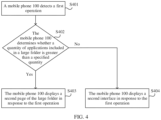
- FIG. 4 is a flowchart of a display method according to an embodiment of this application. As shown in FIG. 4 , the method may include the following steps.
- the first operation may be a slide operation performed by the user on a first page of a large folder included on a first interface of a display.
- the slide operation may be a slide operation performed by the user from right to left starting from any position on the large folder, for example, a slide operation starting from a position close to a right edge of the large folder to left, or a slide operation starting from a position that is close to a right edge of the large folder but at a distance from the right edge to left.
- the slide operation may be a slide operation from left to right/from top to bottom/from bottom to top on the large folder, for example, may be a slide operation starting from a position at a left edge of the large folder to right, or a slide operation starting from a position that is close to a left edge of the large folder but at a distance from the left edge to right.
- the slide operation may alternatively be a slide operation from right to left/from left to right/from top to bottom/from bottom to top on the large folder with pressure.
- the mobile phone 100 responds to a right-to-left slide operation only when the mobile phone 100 detects the slide operation and a pressure sensor disposed on the display detects that a value of pressure generated by the slide operation is greater than a specified threshold.
- the slide operation may alternatively be a slide operation that is from right to left/from left to right/from top to bottom/from bottom to top on the large folder and that stays or holds at a sliding end position for preset duration without an interval.
- the mobile phone 100 responds to a right-to-left slide operation performed by the user on the large folder only when the mobile phone 100 detects the slide operation and the mobile phone 100 detects that the slide operation slides to an end position (namely, the sliding end position) and stays or holds for the preset duration (for example, 2 seconds) at the end position.
- the application icons displayed in the overlapping manner are application icons of a ninth application and applications after the ninth application.
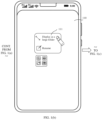
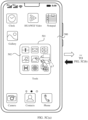
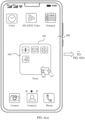
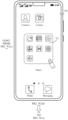
- An area in which the dashed-line box shown in the figure is located represents a range of the touch target. During actual product implementation, the dashed-line box is not displayed on the interface.
- the touch target may set in an upper/lower edge area of the large folder.
- a position of the touch target may be a position of a dashed-line box on an interface shown in FIG. 5D(a) .
- the interface shown in FIG. 5D(a) is the home screen of the mobile phone 100.
- the user may perform a slide operation on the large folder, to implement page switching of the large folder. This helps the user search for an application, improves operation efficiency of searching for the application by the user, and therefore improves user experience.
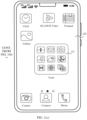
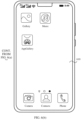
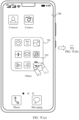
- the mobile phone may display an interface 720 shown in FIG. 7A(c) in response to the slide operation, that is, slide the interface 710 to the interface 720.
- the interface 720 may include a second page 721 obtained after the large folder is expanded, namely, a thirteenth application icon to a sixteenth application icon. It should be understood that, when the large folder includes more application icons, if the large folder is expanded, a first application icon to a twelfth application icon are displayed on a first page obtained after the large folder is expanded, and a thirteenth application icon to a twenty-fourth application icon are displayed on a second page obtained after the large folder is expanded. Subsequent pages may be deduced by analogy in the foregoing manner.
- the large folder 701 includes more than 12 application icons, for example, 17 application icons, is used.
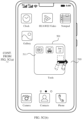
- FIG. 7B(a) to FIG. 7B(c) it is assumed that the mobile phone displays an interface 700 shown in FIG. 7B(a) .
- the interface 700 may include a large folder 701 and a first page 702 of the large folder. After the user slides in a direction shown in the figure at a position of a ninth application icon, the mobile phone may slide the first page 702 of the large folder to a next page in response to the slide operation, for example, may display an interface 730 shown in FIG. 7B(b) .
- the interface 730 may include a second page 731 of the large folder.
- a first application icon on the page 731 is a ninth application icon included in the large folder. In other words, application icons displayed on the page 731 start from the ninth application icon included in the large folder.
- a first application icon in application icons displayed on an expanded page may be a thirteenth application icon of the large folder, and a last application icon on the expanded page may be a twenty-fourth application icon of the large folder.
- a first application icon in application icons displayed on an expanded page may be a ninth application icon of the large folder, and a last application icon on the expanded page may be a twentieth application icon of the large folder. This is not limited in this application.
- S801 An electronic device displays a first interface.
- the first interface includes at least one control and a first folder, and the at least one control is displayed outside the first folder.
- the first folder may include a plurality of pages, for example, a first page and a second page, the first page includes at least one application icon, and the second page includes at least one application icon.
- the second interface includes the at least one control and the second page.
- the second page herein is the second page of the first folder.
- the method provided in embodiments of this application is described from a perspective of the electronic device as an execution body.
- the electronic device may include a hardware structure and/or a software module, and implement the functions in a form of the hardware structure, the software module, or a combination of the hardware structure and the software module. Whether a function in the foregoing functions is performed by using the hardware structure, the software module, or the combination of the hardware structure and the software module depends on particular applications and design constraints of the technical solutions.
- an electronic device may be an electronic device having a display.
- an electronic device 1000 includes a display 1001, one or more processors 1002, one or more memories 1003, one or more sensors 1004 (not shown in the figure), a plurality of applications 1005 (not shown in the figure), and one or more computer programs 1006 (not shown in the figure).
- the components may be connected through one or more communication buses 1007.
- the display 1001 is configured to display a display interface of an application in the electronic device, or display prompt information.
- the memory 1003 stores one or more computer programs, and when instructions are invoked and executed by the one or more processors 1002, the electronic device 1000 is enabled to perform the following steps.
- the display 1001 displays a first interface, where the first interface includes at least one control and a first folder, the control is displayed outside the first folder, the first folder includes a first page and a second page, the first page includes at least one application icon, the second page includes at least one application icon, and the first page is displayed on the first interface; detects a first operation performed by a user on the first page of the first folder; displays a second interface in response to the first operation, where the second interface includes the at least one control and the second page.
- application icons on the second page include a part of application icons on the first page.
- the first operation includes any one of the following operations: a slide operation at a position of an N th application icon on the first page of the first folder, where N is a positive integer; a slide operation in a first specified area of the first folder, where the first specified area includes any one of a left edge, a right edge, an upper edge, or a lower edge of the first folder; and a slide operation in any area of the first folder.
- the electronic device 1000 When the instructions are invoked and executed by the one or more processors 1002, the electronic device 1000 is enabled to perform the following steps: detecting a second operation performed by the user at a position of a P th application icon on the first page; and displaying a third interface in response to the second operation, where the third interface includes a first application icon to an M th application icon on the first page, M is greater than the preset quantity, and a quantity of application icons that are in the first folder and that are able to be displayed on the third interface is greater than a quantity of application icons that are able to be displayed on the first page.
- the electronic device 1000 when the instructions are invoked and executed by the one or more processors 1002, the electronic device 1000 is enabled to further perform the following steps: detecting a third operation performed by the user at a position of a P th application icon on the second page; and displaying a fourth interface in response to the third operation, where the fourth interface includes a first application icon to an O th application icon on the second page, or the fourth interface includes an L th application icon to an O th application icon on the second page, L ⁇ P ⁇ O, and a quantity of application icons that are in the first folder and that are able to be displayed on the fourth interface is greater than a quantity of application icons that are able to be displayed on the second page.
- the preset quantity is 8 or 9.
- an icon of a first application is displayed on the first page.
- the electronic device 1000 is enabled to further perform the following steps: detecting a fourth operation performed on the icon of the first application on the first interface; and opening the first application in response to the fourth operation.
- the quantity of application icons included in the first folder is greater than the preset quantity, and the first page includes icons displayed in an overlapping manner.
- the electronic device 1000 when the instructions are invoked and executed by the one or more processors 1002, the electronic device 1000 is enabled to perform the following step: detecting the first operation performed by the user on the icons displayed in the overlapping manner, where the icons displayed in the overlapping manner are displayed as a plurality of non-overlapped icons on the second interface.
- the electronic device 1000 when the instructions are invoked and executed by the one or more processors 1002, the electronic device 1000 is enabled to further perform the following steps: detecting a fifth operation performed by the user on the second page of the first folder; and displaying the first page of the first folder in response to the fifth operation.
- the processor 1002 may be a general-purpose processor, a digital signal processor, an application-specific integrated circuit, a field programmable gate array or another programmable logic device, a discrete gate or a transistor logic device, or a discrete hardware component, and may implement or perform the methods, steps, and logical block diagrams disclosed in embodiments of this application.
- the general-purpose processor may be a microprocessor or any conventional processor or the like.
- the steps of the method disclosed with reference to embodiments of this application may be directly performed by a hardware processor, or may be performed by using a combination of hardware in the processor and a software module.
- the software module may be located in the memory 1003.
- the processor 1002 reads the program instructions from the memory 1003, and completes the steps of the method in combination with the hardware of the processor.
- the memory 1003 may be a non-volatile memory, for example, a hard disk drive (hard disk drive, HDD) or a solid-state drive (solid-state drive, SSD), or may be a volatile memory (volatile memory), for example, a RAM.
- the memory may alternatively be any other medium that can be configured to carry or store expected program code in an instruction form or a data structure form and that can be accessed by a computer. This is not limited thereto.
- the memory in this embodiment of this application may alternatively be a circuit or any other apparatus that can implement a storage function, and is configured to store instructions and/or data.
- this application further provides a computer storage medium.
- the computer storage medium stores a computer program.
- the computer program is executed by a computer, the computer is enabled to perform the display method provided in the foregoing embodiments.
- An embodiment of this application further provides a computer program product including instructions.
- the computer program product is run on a computer, the computer is enabled to perform the display method provided in the foregoing embodiments.
- Embodiments of this application are described with reference to the flowcharts and/or block diagrams of the method, the device (system), and the computer program product according to embodiments of this application. It should be understood that instructions may be used to implement each process and/or each block in the flowcharts and/or the block diagrams and a combination of a process and/or a block in the flowcharts and/or the block diagrams.
- These instructions may be provided for a general-purpose computer, a dedicated computer, an embedded processor, or a processor of any other programmable data processing device to generate a machine, so that the instructions executed by a computer or a processor of any other programmable data processing device generate an apparatus for implementing a specific function in one or more processes in the flowcharts and/or in one or more blocks in the block diagrams.
- These computer program instructions may alternatively be stored in a computer-readable memory that can instruct the computer or the another programmable data processing device to work in a specific manner, so that the instructions stored in the computer-readable memory generate an artifact that includes an instruction apparatus.
- the instruction apparatus implements a specific function in one or more processes in the flowcharts and/or in one or more blocks in the block diagrams.
- the computer program instructions may alternatively be loaded onto a computer or another programmable data processing device, so that a series of operations and steps are performed on the computer or the another programmable device, so that computer-implemented processing is generated. Therefore, the instructions executed on the computer or the another programmable device provide steps for implementing a specific function in one or more procedures in the flowcharts and/or in one or more blocks in the block diagrams.
Landscapes
- Engineering & Computer Science (AREA)
- Theoretical Computer Science (AREA)
- General Engineering & Computer Science (AREA)
- Human Computer Interaction (AREA)
- Physics & Mathematics (AREA)
- General Physics & Mathematics (AREA)
- Software Systems (AREA)
- User Interface Of Digital Computer (AREA)
Applications Claiming Priority (2)
| Application Number | Priority Date | Filing Date | Title |
|---|---|---|---|
| CN202111296371.5A CN116069207A (zh) | 2021-11-03 | 2021-11-03 | 一种显示方法及电子设备 |
| PCT/CN2022/126252 WO2023078088A1 (fr) | 2021-11-03 | 2022-10-19 | Procédé d'affichage et dispositif électronique |
Publications (2)
| Publication Number | Publication Date |
|---|---|
| EP4394567A1 true EP4394567A1 (fr) | 2024-07-03 |
| EP4394567A4 EP4394567A4 (fr) | 2024-12-25 |
Family
ID=85460641
Family Applications (1)
| Application Number | Title | Priority Date | Filing Date |
|---|---|---|---|
| EP22889113.1A Withdrawn EP4394567A4 (fr) | 2021-11-03 | 2022-10-19 | Procédé d'affichage et dispositif électronique |
Country Status (5)
| Country | Link |
|---|---|
| US (1) | US12327005B2 (fr) |
| EP (1) | EP4394567A4 (fr) |
| JP (1) | JP7669638B2 (fr) |
| CN (3) | CN117215446B (fr) |
| WO (1) | WO2023078088A1 (fr) |
Families Citing this family (1)
| Publication number | Priority date | Publication date | Assignee | Title |
|---|---|---|---|---|
| CN116156043B (zh) * | 2023-04-03 | 2023-08-15 | 荣耀终端有限公司 | 应用程序推荐位的显示方法、电子设备和可读存储介质 |
Family Cites Families (20)
| Publication number | Priority date | Publication date | Assignee | Title |
|---|---|---|---|---|
| US8497884B2 (en) * | 2009-07-20 | 2013-07-30 | Motorola Mobility Llc | Electronic device and method for manipulating graphic user interface elements |
| US9170708B2 (en) * | 2010-04-07 | 2015-10-27 | Apple Inc. | Device, method, and graphical user interface for managing folders |
| US8799815B2 (en) * | 2010-07-30 | 2014-08-05 | Apple Inc. | Device, method, and graphical user interface for activating an item in a folder |
| US20120084732A1 (en) | 2010-10-01 | 2012-04-05 | Vasily Filippov | Methods and apparatus for organizing applications and widgets on a mobile device interface |
| KR101762611B1 (ko) | 2010-12-10 | 2017-07-28 | 삼성전자 주식회사 | 터치스크린을 구비한 휴대 단말기의 화면 표시 방법 및 장치 |
| US9430120B2 (en) * | 2012-06-08 | 2016-08-30 | Apple Inc. | Identification of recently downloaded content |
| JP6097835B2 (ja) * | 2013-06-09 | 2017-03-15 | アップル インコーポレイテッド | 複数のページを有するフォルダを管理するためのデバイス、方法、及びグラフィカルユーザインタフェース |
| CN106257389B (zh) * | 2015-06-19 | 2019-08-06 | 深圳超多维科技有限公司 | 实现文件夹图标交互的方法及触控终端 |
| CN106020604A (zh) * | 2016-05-18 | 2016-10-12 | 北京金山安全软件有限公司 | 一种切换文件夹的方法、装置及电子设备 |
| CN106951492B (zh) * | 2017-03-14 | 2020-09-22 | Oppo广东移动通信有限公司 | 文件搜索方法、装置和电子设备 |
| CN108255372B (zh) * | 2018-01-24 | 2020-10-27 | 维沃移动通信有限公司 | 一种桌面应用图标整理方法及移动终端 |
| CN108874279B (zh) * | 2018-05-04 | 2020-11-03 | 珠海格力电器股份有限公司 | 一种选择方法及装置、终端设备和可读存储介质 |
| US11609683B2 (en) * | 2018-06-29 | 2023-03-21 | Huawei Technologies Co., Ltd. | Method for browsing application folder and electronic device |
| CN110456953A (zh) * | 2019-06-27 | 2019-11-15 | 维沃移动通信有限公司 | 文件夹界面切换方法及终端设备 |
| CN110489385B (zh) * | 2019-07-31 | 2021-06-15 | 维沃移动通信有限公司 | 一种信息处理方法及终端设备 |
| CN110727385B (zh) * | 2019-09-30 | 2021-04-13 | Oppo广东移动通信有限公司 | 桌面图标整理方法、装置、电子设备及存储介质 |
| CN115220838A (zh) * | 2020-01-17 | 2022-10-21 | 华为技术有限公司 | 一种微件处理方法以及相关装置 |
| CN111338530B (zh) * | 2020-02-27 | 2021-08-24 | 维沃移动通信有限公司 | 应用程序图标的控制方法和电子设备 |
| CN111459360A (zh) * | 2020-03-31 | 2020-07-28 | Oppo广东移动通信有限公司 | 文件夹界面切换方法和装置 |
| CN112099695B (zh) * | 2020-09-24 | 2022-10-21 | 维沃移动通信有限公司 | 图标位置调整方法、装置及电子设备 |
-
2021
- 2021-11-03 CN CN202311045349.2A patent/CN117215446B/zh active Active
- 2021-11-03 CN CN202111296371.5A patent/CN116069207A/zh active Pending
- 2021-11-03 CN CN202211354383.3A patent/CN115794272B/zh active Active
-
2022
- 2022-10-19 EP EP22889113.1A patent/EP4394567A4/fr not_active Withdrawn
- 2022-10-19 JP JP2024526531A patent/JP7669638B2/ja active Active
- 2022-10-19 US US18/700,716 patent/US12327005B2/en active Active
- 2022-10-19 WO PCT/CN2022/126252 patent/WO2023078088A1/fr not_active Ceased
Also Published As
| Publication number | Publication date |
|---|---|
| JP2024543030A (ja) | 2024-11-19 |
| CN117215446B (zh) | 2024-06-04 |
| CN115794272B (zh) | 2023-06-27 |
| JP7669638B2 (ja) | 2025-04-30 |
| CN117215446A (zh) | 2023-12-12 |
| WO2023078088A1 (fr) | 2023-05-11 |
| CN116069207A (zh) | 2023-05-05 |
| CN115794272A (zh) | 2023-03-14 |
| EP4394567A4 (fr) | 2024-12-25 |
| US12327005B2 (en) | 2025-06-10 |
| US20250004607A1 (en) | 2025-01-02 |
Similar Documents
| Publication | Publication Date | Title |
|---|---|---|
| EP4027231B1 (fr) | Procédé de commutation d'interface et dispositif électronique | |
| US20250231683A1 (en) | Split-screen display method and electronic device | |
| EP3848786B1 (fr) | Procédé de commande d'affichage pour une barre de navigation de système, interface utilisateur graphique et dispositif électronique | |
| US20230384919A1 (en) | File Dragging Method and Electronic Device | |
| CN110727382A (zh) | 一种分屏显示方法及电子设备 | |
| EP4024828B1 (fr) | Procédé de lancement rapide d'une application, et dispositif électronique à écran pliable | |
| WO2021063097A1 (fr) | Procédé d'affichage et équipement électronique | |
| CN110602273A (zh) | 一种消息显示方法与电子设备 | |
| EP3958106B1 (fr) | Procédé d'affichage d'interface et dispositif électronique | |
| WO2021037223A1 (fr) | Procédé de commande tactile et dispositif électronique | |
| EP3964932A1 (fr) | Procédé de recherche de mot-clé basé sur l'apprentissage et dispositif électronique | |
| EP4086740A1 (fr) | Procédé d'affichage et dispositif électronique | |
| CN110647731A (zh) | 一种显示方法及电子设备 | |
| EP4485152A1 (fr) | Procédé d'édition de texte et dispositif électronique | |
| EP4394567A1 (fr) | Procédé d'affichage et dispositif électronique | |
| CN117632323A (zh) | 一种显示方法及电子设备 | |
| EP4625208A1 (fr) | Procédé d'affichage de contenu thématique et dispositif électronique | |
| US12547592B2 (en) | Application compression method, application decompression method, and electronic device | |
| CN118433302A (zh) | 一种元素的显示方法及电子设备 | |
| WO2024046237A1 (fr) | Procédé de démarrage à chaud d'applications et dispositif électronique |
Legal Events
| Date | Code | Title | Description |
|---|---|---|---|
| STAA | Information on the status of an ep patent application or granted ep patent |
Free format text: STATUS: THE INTERNATIONAL PUBLICATION HAS BEEN MADE |
|
| PUAI | Public reference made under article 153(3) epc to a published international application that has entered the european phase |
Free format text: ORIGINAL CODE: 0009012 |
|
| STAA | Information on the status of an ep patent application or granted ep patent |
Free format text: STATUS: REQUEST FOR EXAMINATION WAS MADE |
|
| 17P | Request for examination filed |
Effective date: 20240327 |
|
| AK | Designated contracting states |
Kind code of ref document: A1 Designated state(s): AL AT BE BG CH CY CZ DE DK EE ES FI FR GB GR HR HU IE IS IT LI LT LU LV MC ME MK MT NL NO PL PT RO RS SE SI SK SM TR |
|
| A4 | Supplementary search report drawn up and despatched |
Effective date: 20241122 |
|
| RIC1 | Information provided on ipc code assigned before grant |
Ipc: G06F 9/451 20180101ALI20241118BHEP Ipc: G06F 3/04886 20220101ALI20241118BHEP Ipc: G06F 3/04883 20220101ALI20241118BHEP Ipc: G06F 3/0488 20220101ALI20241118BHEP Ipc: G06F 3/0486 20130101ALI20241118BHEP Ipc: G06F 3/04847 20220101ALI20241118BHEP Ipc: G06F 3/0483 20130101ALI20241118BHEP Ipc: G06F 3/0482 20130101ALI20241118BHEP Ipc: G06F 3/04817 20220101ALI20241118BHEP Ipc: G06F 3/0481 20220101ALI20241118BHEP Ipc: G06F 3/048 20130101AFI20241118BHEP |
|
| DAV | Request for validation of the european patent (deleted) | ||
| DAX | Request for extension of the european patent (deleted) | ||
| STAA | Information on the status of an ep patent application or granted ep patent |
Free format text: STATUS: THE APPLICATION HAS BEEN WITHDRAWN |
|
| 18W | Application withdrawn |
Effective date: 20250715 |