EP4395336A2 - Génération automatique et programmatique de marqueurs de changement de scène - Google Patents
Génération automatique et programmatique de marqueurs de changement de scène Download PDFInfo
- Publication number
- EP4395336A2 EP4395336A2 EP24176844.9A EP24176844A EP4395336A2 EP 4395336 A2 EP4395336 A2 EP 4395336A2 EP 24176844 A EP24176844 A EP 24176844A EP 4395336 A2 EP4395336 A2 EP 4395336A2
- Authority
- EP
- European Patent Office
- Prior art keywords
- content
- user
- frame
- markers
- crowdsourced
- Prior art date
- Legal status (The legal status is an assumption and is not a legal conclusion. Google has not performed a legal analysis and makes no representation as to the accuracy of the status listed.)
- Granted
Links
Images


Classifications
-
- H—ELECTRICITY
- H04—ELECTRIC COMMUNICATION TECHNIQUE
- H04N—PICTORIAL COMMUNICATION, e.g. TELEVISION
- H04N21/00—Selective content distribution, e.g. interactive television or video on demand [VOD]
- H04N21/40—Client devices specifically adapted for the reception of or interaction with content, e.g. set-top-box [STB]; Operations thereof
- H04N21/47—End-user applications
- H04N21/472—End-user interface for requesting content, additional data or services; End-user interface for interacting with content, e.g. for content reservation or setting reminders, for requesting event notification, for manipulating displayed content
- H04N21/47217—End-user interface for requesting content, additional data or services; End-user interface for interacting with content, e.g. for content reservation or setting reminders, for requesting event notification, for manipulating displayed content for controlling playback functions for recorded or on-demand content, e.g. using progress bars, mode or play-point indicators or bookmarks
-
- H—ELECTRICITY
- H04—ELECTRIC COMMUNICATION TECHNIQUE
- H04N—PICTORIAL COMMUNICATION, e.g. TELEVISION
- H04N21/00—Selective content distribution, e.g. interactive television or video on demand [VOD]
- H04N21/20—Servers specifically adapted for the distribution of content, e.g. VOD servers; Operations thereof
- H04N21/23—Processing of content or additional data; Elementary server operations; Server middleware
- H04N21/235—Processing of additional data, e.g. scrambling of additional data or processing content descriptors
- H04N21/2353—Processing of additional data, e.g. scrambling of additional data or processing content descriptors specifically adapted to content descriptors, e.g. coding, compressing or processing of metadata
-
- H—ELECTRICITY
- H04—ELECTRIC COMMUNICATION TECHNIQUE
- H04N—PICTORIAL COMMUNICATION, e.g. TELEVISION
- H04N21/00—Selective content distribution, e.g. interactive television or video on demand [VOD]
- H04N21/20—Servers specifically adapted for the distribution of content, e.g. VOD servers; Operations thereof
- H04N21/25—Management operations performed by the server for facilitating the content distribution or administrating data related to end-users or client devices, e.g. end-user or client device authentication, learning user preferences for recommending movies
- H04N21/251—Learning process for intelligent management, e.g. learning user preferences for recommending movies
- H04N21/252—Processing of multiple end-users' preferences to derive collaborative data
-
- H—ELECTRICITY
- H04—ELECTRIC COMMUNICATION TECHNIQUE
- H04N—PICTORIAL COMMUNICATION, e.g. TELEVISION
- H04N21/00—Selective content distribution, e.g. interactive television or video on demand [VOD]
- H04N21/40—Client devices specifically adapted for the reception of or interaction with content, e.g. set-top-box [STB]; Operations thereof
- H04N21/43—Processing of content or additional data, e.g. demultiplexing additional data from a digital video stream; Elementary client operations, e.g. monitoring of home network or synchronising decoder's clock; Client middleware
- H04N21/431—Generation of visual interfaces for content selection or interaction; Content or additional data rendering
- H04N21/4312—Generation of visual interfaces for content selection or interaction; Content or additional data rendering involving specific graphical features, e.g. screen layout, special fonts or colors, blinking icons, highlights or animations
-
- H—ELECTRICITY
- H04—ELECTRIC COMMUNICATION TECHNIQUE
- H04N—PICTORIAL COMMUNICATION, e.g. TELEVISION
- H04N21/00—Selective content distribution, e.g. interactive television or video on demand [VOD]
- H04N21/40—Client devices specifically adapted for the reception of or interaction with content, e.g. set-top-box [STB]; Operations thereof
- H04N21/43—Processing of content or additional data, e.g. demultiplexing additional data from a digital video stream; Elementary client operations, e.g. monitoring of home network or synchronising decoder's clock; Client middleware
- H04N21/442—Monitoring of processes or resources, e.g. detecting the failure of a recording device, monitoring the downstream bandwidth, the number of times a movie has been viewed, the storage space available from the internal hard disk
- H04N21/44213—Monitoring of end-user related data
-
- H—ELECTRICITY
- H04—ELECTRIC COMMUNICATION TECHNIQUE
- H04N—PICTORIAL COMMUNICATION, e.g. TELEVISION
- H04N21/00—Selective content distribution, e.g. interactive television or video on demand [VOD]
- H04N21/60—Network structure or processes for video distribution between server and client or between remote clients; Control signalling between clients, server and network components; Transmission of management data between server and client, e.g. sending from server to client commands for recording incoming content stream; Communication details between server and client
- H04N21/65—Transmission of management data between client and server
- H04N21/658—Transmission by the client directed to the server
- H04N21/6587—Control parameters, e.g. trick play commands, viewpoint selection
-
- H—ELECTRICITY
- H04—ELECTRIC COMMUNICATION TECHNIQUE
- H04N—PICTORIAL COMMUNICATION, e.g. TELEVISION
- H04N21/00—Selective content distribution, e.g. interactive television or video on demand [VOD]
- H04N21/80—Generation or processing of content or additional data by content creator independently of the distribution process; Content per se
- H04N21/83—Generation or processing of protective or descriptive data associated with content; Content structuring
- H04N21/845—Structuring of content, e.g. decomposing content into time segments
- H04N21/8455—Structuring of content, e.g. decomposing content into time segments involving pointers to the content, e.g. pointers to the I-frames of the video stream
Definitions
- This disclosure is generally directed to using learning systems to enhance the user's experience when playing content, such as movies and TV shows.
- Roku leads the over-the-top (OTT) market with more viewers streaming movies and TV shows on Roku devices than any other streaming device, including Google Chromecast, Amazon Fire, and Apple TV. Movies dominate the type of video-on-demand (VOD) content viewed across all regions and generations. A 2016 Nielsen report found that "Eighty percent of global respondents who watch on-demand content say they view movies.” Roku streams over a billion hours of video per month, a 61 percent increase over 2016. ( Bloomberg Technology, May 2017 ).
- Streaming video has yet to adopt the idea of the DVD / Blu-ray scene change marker because the user can continue watching wherever they left off and scrub through a timeline of thumbnails. From a technology and implementation perspective, there are barriers in automatically and programmatically generating scene change markers. Scene transitions or chapter breaks to this day are still input manually, so it would be impossible to apply a manual approach to all the movies in an OTT provider's catalog. More importantly, simple automation would not be able to capture the interest level of millions of viewers.
- a method is directed to automatically and programmatically generating scene change markers.
- the method operates in a media device that is communicatively coupled to, for example, a display device.
- the method can operate in other devices, such as but not limited to a smart TV.
- the display device includes a graphical user interface (GUI) having a playback bar.
- the playback bar includes a current playback time (CTI) and a plurality of markers.
- GUI graphical user interface
- CTI current playback time
- the method operates by detecting user interactions as a user navigates through a movie or TV show (or other content) being presented on the display device. Point values are assigned to the user interactions. The detected user interactions and assigned point values represent training data. The training data is provided to a crowdsource server.
- the crowdsource server is configured to determine correlations and patterns in the training data to automatically and programmatically define crowdsourced markers for the movie/TV show using, for example, machine learning and artificial intelligence (AI) algorithms.
- AI machine learning and artificial intelligence
- the playback bar is part of a graphical user interface (GUI) for a TV or other display device, and includes a current playback time (CTI) and a plurality of scene change markers.
- GUI graphical user interface
- CTI current playback time
- the playback bar is sticky. The stickiness of the playback bar is based on (1) a speed of the CTI in the playback bar, while a movie or TV show (or other content) is being played in the display device, and (2) a distance of the CTI to a closest scene change marker in the playback bar, at a time a pause or stop command is received.
- the method operates by receiving a first command to play, pause, fast forward, or rewind while interacting with the content being played on the display device.
- the first command is executed, and then a second command to pause or stop is received.
- the second command is executed.
- a scene change marker in the playback bar closest to the CTI after execution of the second command is identified.
- the time thresholds associated with speeds of the CTI may be adjusted in a crowdsourced manner. It is noted that the above example involves a sequence of two user actions (i.e., the first command followed by the second command). More generally, the method monitors and analyzes user actions (i.e., presses of buttons on a remote control), and such actions can be a single action or a sequence of multiple actions.
- This disclosure is directed to using learning systems to improve the playback of content, such as but not limited to movies and TV shows. Some embodiments are directed to automatically and programmatically generating scene change markers. Other embodiments are directed to enhancements to the video playback bar, involving snapping to time markers. These embodiments are described below.
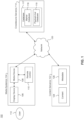
- FIG. 1 illustrates a block diagram of a multimedia environment 102, according to some embodiments.
- multimedia environment 102 is directed to streaming media.
- the terms “media” and “content” are used interchangeably herein.
- the multimedia environment 102 may include one or more media systems 104 and one or more content servers 122 communicatively coupled via a network 120.
- the network 120 can include, without limitation, wired and/or wireless intranet, extranet, Internet, cellular, Bluetooth, broadcast, satellite, terrestrial, and/or any other short range, long range, local, regional, global communications network, as well as any combination thereof.
- Media system 104 may include a display device 106, media device 108 and remote control 110.
- Display device 106 may be a monitor, television, computer, smart phone, tablet, wearable (such as a watch), and/or projector, to name just a few examples.
- Media device 108 may be a streaming media device, DVD device, Blu-Ray device, audio/video playback device, cable box, and/or digital video recording device, to name just a few examples.
- the media device 108 can be a part of, integrated with, operatively coupled to, and/or connected to display device 106.
- the media device 108 may be configured to communicate with network 120.
- Remote control 110 can be any component, part, apparatus or method for controlling media device 108 and/or display device 106, such as a remote control, a tablet, laptop computer, smartphone, wearable device, on-screen controls, voice responsive controls, integrated control buttons, or any combination thereof, to name just a few examples.
- An example remote control 110 is illustrated in FIG. 2B .
- Content servers 122 may each include databases to store content 124 and metadata 126.
- Content 124 may include any combination of music, videos, movies, TV shows, multimedia, images, still pictures, text, graphics, gaming applications, advertisements, software, and/or any other content or data objects in electronic form.
- metadata 126 comprises data about content 124.
- metadata 126 may include associated or ancillary information indicating or related to writer, director, producer, composer, artist, actor, summary, chapters, production, history, year, trailers, alternate versions, related content, applications, and/or any other information pertaining or relating to the content 124.
- Metadata 126 may also or alternatively include links to any such information pertaining or relating to the content 124.
- Metadata 126 may also or alternatively include one or more indexes of content 124, such as but not limited to a trick mode index.
- the multimedia environment 102 may also include one or more crowdsource servers 114.
- crowdsource servers 114 each include one or more databases 117. Databases may include a marker database 118 and/or a playback bar database 119.
- the crowdsource servers 114 may be configured to communicate with network 120.
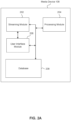
- FIG. 2A illustrates an example block diagram of the media device 108, according to some embodiments.
- Media device 108 may include a streaming module 202, processing module 204, user interface module 206 and database or storage 208.
- user 112 may use remote control 110 (or, for example, voice responsive controls) to interact with the user interface module 206 of media device 108 to select content, such as a movie, TV show, music, book, application, game, etc.
- the streaming module 202 of media device 108 may request the selected content from content server(s) 122 over the network 120.
- Content server(s) 122 may transmit the requested content to the media device 108.
- Media device 108 may transmit the received content to display device 106 for presentation to user 112.
- the streaming module 202 in media device 108 may transmit the content to display device 106 in real time or near real time as it receives such content from content server(s) 122.
- media device 108 may buffer or store the content received from content server(s) 122 in database 208 for later playback on display device 106.
- the user 112 may use the remote control 110 to navigate through the movie/TV show. For example, in some embodiments, the user 112 may press the [Left] or [Right] buttons 222, the rewind button 226 and/or the fast forward button 236 to display the example graphic user interface (GUI) 302 shown in FIG. 3 . It should be understood that there may be other buttons (or combination of buttons) on the remote control 110 that may result in displaying the GUI 302 on the display device 106.
- GUI graphic user interface
- GUI 302 may represent a 10-foot UI when the display device 106 is a television, for example.
- the GUI 302 may display a video still 301 of the last frame of the movie that was being played when the user 112 invoked the GUI 302.
- the GUI 302 may support thumbnail navigation for enabling the user 112 to quickly and efficiently navigate through the movie.
- the GUI 302 may include thumbnails such as a frame in focus 305 representing a current scene change or chapter.
- Other thumbnails may include one or more previous scene change or chapter still frames 304, and one or more next scene change or chapter still frames 307.
- the user 112 can use remote control 110 to scroll through or otherwise select any of these thumbnails (that is, frames 304, 305 and 307) to quickly navigate through the movie.
- the GUI 302 may also include a playback bar 311 (element 310 represents the footprint of the playback bar 311).
- the playback bar 311 generally represents a timeline of the video being presented in the display device 106, and indicates the amount of the video that has been played.
- the right-most point of the playback bar 311 is the CTI (current playback time) 312, which in the timeline of the video corresponds to the video still 301 of the last frame played.
- the playback bar 311 includes scene change markers 314 that, when positioned to the right of the CTI 312 (as shown in the example of FIG. 3 ), correspond to the next scene change or chapter still frames 307.
- the GUI 302 may include other elements representing the state of playback as feedback to the user 112.
- the GUI 302 may indicate the CTI time 316 and the duration or time remaining 320.
- the GUI 302 may also include a playback status icon 318, indicating whether the video is currently in chapter mode, being rewound, fast forwarded, played, paused, stopped, etc.
- scene change markers 314 within the playback bar 311 are automatically and programmatically generated in a crowdsourced manner. Such embodiments leverage the fact that millions of people watch any given movie or TV show (or other content). These embodiments determine the level of interest of viewers through learning their interactions, so as to programmatically generate scene change markers.
- FIG. 4 illustrates a method 402 for automatically and programmatically generating scene change markers in a crowdsourced manner, according to some embodiments.
- Method 402 can be performed by processing logic that can comprise hardware (e.g., circuitry, dedicated logic, programmable logic, microcode, etc.), software (e.g., instructions executing on a processing device), or a combination thereof. It is to be appreciated that not all steps may be needed to perform the disclosure provided herein. Further, some of the steps may be performed simultaneously, or in a different order than shown in FIG. 4 , as will be understood by a person of ordinary skill in the art.
- method 402 is directed to a learning system with two primary aspects: training data and a training algorithm. Accordingly, in step 404, training data is obtained. For example, as users 112 watch and interact with content, the media device 108 receives data on user interactions. The media device 108 identifies and distinguishes user interactions, and assigns point values to the types of interactions detected.
- an interaction (called “Interaction 1" for reference purposes) involving a user pausing the video for at least 10 seconds, and then resuming play without fast forwarding or rewinding, may have a point value of 1.
- Interaction 2 Another interaction (called “Interaction 2" for reference purposes) involving a user playing video for at least 10 minutes after fast forwarding or rewinding through the content a single time may have a point value of 2 points.
- interactions are assigned point values based on the degree to which they reflect the user's intent to locate a particular location in the content (such as the beginning of a particular scene in a movie or TV show, for example).
- Interaction 3 is assigned a higher point value than Interaction 2, because fast forwarding/rewinding multiple times (per Interaction 3) indicates greater user intent to locate a particular location in the video, versus fast forwarding/rewinding a single time (per Interaction 2).
- pausing the video and then resuming play may indicate some, but limited, user intent to locate a particular location in the content, so Interaction 1 is given a lower point value than either Interaction 2 or 3.
- Interaction 4 Another example interaction may involve a user playing video for at least X minutes after fast forwarding and rewinding through the content several times. Similar to Interactions 2 and 3, the landing frame for Interaction 4 is the frame where the fast forwarding/rewinding ended before the user resumed playing the video. As will be appreciated, watching the video for 10 minutes versus 5 minutes (for example) may indicate greater user interest in the landing frame and thus merit a higher point value. Thus, the points for Interaction 4 may be a function of X, where the points increase as X increases.
- certain interactions may have negative points.
- An example interaction (called “Interaction 5" for reference purposes) may involve a user pausing the video for at least 10 seconds, and then fast forwarding or rewinding, rather than resuming play.
- the landing frame of Interaction 5 is the frame where the video is paused. Fast forwarding or rewinding from this frame, rather than playing, may indicate user disinterest in the landing frame. Accordingly, in some embodiments, the landing frame of Interaction 5 may be assigned a negative value, such as -1.
- step 404 is performed locally by media devices 108.
- millions of media devices 108 around the world may perform step 404 while their respective users watch a given movie or TV show (or other content), to detect user interactions associated with that movie/TV show.
- step 404 These user interactions detected in step 404, and their associated point values, represent training data that is input to a training algorithm (represented by step 406, which is described below).
- a minimum amount of training data is needed for the training algorithm to provide acceptable accuracy, typically N number of frames across M sessions.
- the values of N and M may be a function of the training algorithm used, and may depend on the desired accuracy of prediction.
- the training algorithm is executed at the crowdsource server 114.
- the training algorithm makes use of the training data to find correlations and patterns in the data using machine learning and artificial intelligence (AI) algorithms.
- AI machine learning and artificial intelligence
- the algorithm reasons if there are many users who rewind or fast forward to play frame X, and thereafter continuously play the content, then frame X is of interest to a substantial number of users. Frame X may then be designated a crowdsourced scene change marker.
- the learning system with its training algorithm is configured to expose relevant patterns and correlations hidden in data, and reflect user behavior related to a single piece of content.
- Method 502 can be performed by processing logic that can comprise hardware (e.g., circuitry, dedicated logic, programmable logic, microcode, etc.), software (e.g., instructions executing on a processing device), or a combination thereof. It is to be appreciated that not all steps may be needed to perform the disclosure provided herein. Further, some of the steps may be performed simultaneously, or in a different order than shown in FIG. 5 , as will be understood by a person of ordinary skill in the art. Method 502 shall be described with reference to FIGS. 1-3 . However, method 502 is not limited to those example embodiments.
- the media device 108 tracks actions of the user 112 to detect and distinguish user interactions. Examples of these user interactions are discussed above.
- the media device 108 assigns point values to the interactions detected in step 504.
- the point values may be fixed (such as with the example Interactions 1-3 and 5 discussed above) or variable (such as with the example Interaction 4).
- step 510 the media device 108 periodically transmits the detected interactions and assigned point values from the database 208 to the crowdsource server 114.
- Steps 504-510 may be performed repeatedly by media device as users 112 view and navigate through content, as indicated by the control branch from step 510 to step 504. Also, millions of media devices 108 around the world may repeatedly perform steps 504-510 to detect user interactions and assign point values. This training data (that is, the detected interactions and point values) are provided to the crowdsource server 114 in step 510.
- the crowdsourced markers described above enable users to find the content they are interested in watching quickly. However, users also wish to navigate within the content they have selected without error.
- the playback bar 311 is a sticky playback bar that helps to avoid errors while users navigate through movies and other content. Based on the speed of the CTI 312 either during playback, fast forward, or rewind, when the user 112 hits the play/pause button 228, the CTI 312 will snap to the nearest time or scene change marker 314. However, the CTI 312 will not snap to the closest marker 314 when the closest marker 314 is far enough away from the CTI 312 to reasonably assume the user 112 did not intended to play/pause at that marker 314. Thus, whether the snap occurs depends on (1) the speed of the CTI 312 when the user 112 hits the play/pause button 228; and (2) the distance of the CTI 312 to the closest marker 308. These factors determine the stickiness of the playback bar 311 at any given time.
- Speed 3 may correspond to fast forward or rewind times 2 speed, and have a time threshold of 1500 milliseconds. If the CTI 312 is moving at Speed 3 (via either fast forwarding or rewinding) at the time of the pause/stop, then the snap will occur if the distance from the CTI 312 to the closest marker 308 is 1500 milliseconds at normal play time of the video.
- step 604 media device 108 receives a command to play, pause, fast forward or rewind the movie (or other content) that is being presented in the display device 106.
- this command is denoted as Command 1.
- the media device 108 identifies the closest marker 314 to the CTI 312 in the playback bar 311.
- the closest marker 314 can be before or after the CTI 312 in the playback bar 311. In other embodiments, based on system or user preferences for example, the closest marker 314 may only be prior to, or may only be after, the CTI 312 in the playback bar 311.
- the media device 108 modifies (i.e., snaps) the CTI 312 to the closest marker 314, and also modifies the movie in the display device 106 to the point in the video corresponding to the new position of the CTI 312 in the playback bar 311.
- step 704 the media device 108 detects a scrub operation performed by the user 112 after the pause/stop command of step 608.
- this information is transmitted to the crowdsource server 114 in step 708.
- step 806 media device 108 requests the movie from the content server 122.
- step 810 media device 108 plays the movie to the user 112 on display device 106.
- GUI 302 includes the playback bar 311.
- the playback bar 311 includes scene change markers 314, some or all of which may be crowdsourced markers.
- the playback bar 311 While playing the movie to the user 112 in step 810, the playback bar 311 may be sticky, as described above. As also described above, the extent to which the playback bar 311 is sticky may be adjusted in a crowdsourced manner.
- Computer system 900 includes one or more processors (also called central processing units, or CPUs), such as a processor 904.
- processors also called central processing units, or CPUs
- Processor 904 is connected to a communication infrastructure or bus 906.
- One or more processors 904 can each be a graphics processing unit (GPU).
- a GPU is a processor that is a specialized electronic circuit designed to process mathematically intensive applications.
- the GPU can have a parallel structure that is efficient for parallel processing of large blocks of data, such as mathematically intensive data common to computer graphics applications, images, videos, etc.
- Computer system 900 also includes user input/output device(s) 903, such as monitors, keyboards, pointing devices, etc., that communicate with communication infrastructure 906 through user input/output interface(s) 902.
- user input/output device(s) 903 such as monitors, keyboards, pointing devices, etc.
- Computer system 900 also includes a main or primary memory 908, such as random access memory (RAM).
- Main memory 908 can include one or more levels of cache.
- Main memory 908 has stored therein control logic (i.e., computer software) and/or data.
- Removable storage drive 914 can interact with a removable storage unit 918.
- Removable storage unit 918 includes a computer usable or readable storage device having stored thereon computer software (control logic) and/or data.
- Removable storage unit 918 can be a floppy disk, magnetic tape, compact disk, DVD, optical storage disk, and/ any other computer data storage device.
- Removable storage drive 914 reads from and/or writes to removable storage unit 918 in a well-known manner.
- secondary memory 910 can include other means, instrumentalities or other approaches for allowing computer programs and/or other instructions and/or data to be accessed by computer system 900.
- Such means, instrumentalities or other approaches can include, for example, a removable storage unit 922 and an interface 920.
- the removable storage unit 922 and the interface 920 can include a program cartridge and cartridge interface (such as that found in video game devices), a removable memory chip (such as an EPROM or PROM) and associated socket, a memory stick and USB port, a memory card and associated memory card slot, and/or any other removable storage unit and associated interface.
- references herein to "one embodiment,” “an embodiment,” “an example embodiment,” or similar phrases, indicate that the embodiment described can include a particular feature, structure, or characteristic, but every embodiment can not necessarily include the particular feature, structure, or characteristic. Moreover, such phrases are not necessarily referring to the same embodiment. Further, when a particular feature, structure, or characteristic is described in connection with an embodiment, it would be within the knowledge of persons skilled in the relevant art(s) to incorporate such feature, structure, or characteristic into other embodiments whether or not explicitly mentioned or described herein. Additionally, some embodiments can be described using the expression “coupled” and “connected” along with their derivatives. These terms are not necessarily intended as synonyms for each other.
Landscapes
- Engineering & Computer Science (AREA)
- Signal Processing (AREA)
- Multimedia (AREA)
- Databases & Information Systems (AREA)
- Computing Systems (AREA)
- Health & Medical Sciences (AREA)
- General Health & Medical Sciences (AREA)
- Social Psychology (AREA)
- Computer Networks & Wireless Communication (AREA)
- Library & Information Science (AREA)
- Human Computer Interaction (AREA)
- User Interface Of Digital Computer (AREA)
- Two-Way Televisions, Distribution Of Moving Picture Or The Like (AREA)
- Electrically Operated Instructional Devices (AREA)
Priority Applications (1)
| Application Number | Priority Date | Filing Date | Title |
|---|---|---|---|
| EP26152661.0A EP4708883A3 (fr) | 2017-11-08 | 2018-11-07 | Génération automatique et programmatique de marqueurs de changement de scène |
Applications Claiming Priority (3)
| Application Number | Priority Date | Filing Date | Title |
|---|---|---|---|
| US15/806,384 US10531138B2 (en) | 2017-11-08 | 2017-11-08 | Automatically and programmatically generating scene change markers |
| EP18875133.3A EP3707913B1 (fr) | 2017-11-08 | 2018-11-07 | Génération automatique et programmatique de marqueurs de changement de scène |
| PCT/US2018/059519 WO2019094401A1 (fr) | 2017-11-08 | 2018-11-07 | Génération automatique et programmatique de marqueurs de changement de scène |
Related Parent Applications (2)
| Application Number | Title | Priority Date | Filing Date |
|---|---|---|---|
| EP18875133.3A Division EP3707913B1 (fr) | 2017-11-08 | 2018-11-07 | Génération automatique et programmatique de marqueurs de changement de scène |
| EP18875133.3A Division-Into EP3707913B1 (fr) | 2017-11-08 | 2018-11-07 | Génération automatique et programmatique de marqueurs de changement de scène |
Related Child Applications (2)
| Application Number | Title | Priority Date | Filing Date |
|---|---|---|---|
| EP26152661.0A Division EP4708883A3 (fr) | 2017-11-08 | 2018-11-07 | Génération automatique et programmatique de marqueurs de changement de scène |
| EP26152661.0A Division-Into EP4708883A3 (fr) | 2017-11-08 | 2018-11-07 | Génération automatique et programmatique de marqueurs de changement de scène |
Publications (4)
| Publication Number | Publication Date |
|---|---|
| EP4395336A2 true EP4395336A2 (fr) | 2024-07-03 |
| EP4395336A3 EP4395336A3 (fr) | 2024-09-04 |
| EP4395336C0 EP4395336C0 (fr) | 2026-02-25 |
| EP4395336B1 EP4395336B1 (fr) | 2026-02-25 |
Family
ID=66327886
Family Applications (3)
| Application Number | Title | Priority Date | Filing Date |
|---|---|---|---|
| EP24176844.9A Active EP4395336B1 (fr) | 2017-11-08 | 2018-11-07 | Génération automatique et programmatique de marqueurs de changement de scène |
| EP18875133.3A Active EP3707913B1 (fr) | 2017-11-08 | 2018-11-07 | Génération automatique et programmatique de marqueurs de changement de scène |
| EP26152661.0A Pending EP4708883A3 (fr) | 2017-11-08 | 2018-11-07 | Génération automatique et programmatique de marqueurs de changement de scène |
Family Applications After (2)
| Application Number | Title | Priority Date | Filing Date |
|---|---|---|---|
| EP18875133.3A Active EP3707913B1 (fr) | 2017-11-08 | 2018-11-07 | Génération automatique et programmatique de marqueurs de changement de scène |
| EP26152661.0A Pending EP4708883A3 (fr) | 2017-11-08 | 2018-11-07 | Génération automatique et programmatique de marqueurs de changement de scène |
Country Status (3)
| Country | Link |
|---|---|
| US (1) | US10531138B2 (fr) |
| EP (3) | EP4395336B1 (fr) |
| WO (1) | WO2019094401A1 (fr) |
Families Citing this family (1)
| Publication number | Priority date | Publication date | Assignee | Title |
|---|---|---|---|---|
| US10390110B2 (en) | 2017-11-08 | 2019-08-20 | Roku, Inc. | Automatically and programmatically generating crowdsourced trailers |
Family Cites Families (14)
| Publication number | Priority date | Publication date | Assignee | Title |
|---|---|---|---|---|
| JP2004362723A (ja) | 2003-06-09 | 2004-12-24 | Funai Electric Co Ltd | 情報再生装置 |
| EP2377316A4 (fr) | 2009-01-05 | 2013-01-02 | Lg Electronics Inc | Récepteur iptv et procédé pour exécuter une fonction d'enregistrement vidéo personnelle dans le récepteur iptv |
| US8296675B2 (en) * | 2009-03-09 | 2012-10-23 | Telcordia Technologies, Inc. | System and method for capturing, aggregating and presenting attention hotspots in shared media |
| GB2486002A (en) | 2010-11-30 | 2012-06-06 | Youview Tv Ltd | Media Content Provision |
| US20120159329A1 (en) | 2010-12-16 | 2012-06-21 | Yahoo! Inc. | System for creating anchors for media content |
| US8898259B2 (en) * | 2013-01-09 | 2014-11-25 | Verizon Patent And Licensing Inc. | Bookmarking system |
| US9307269B2 (en) * | 2013-03-14 | 2016-04-05 | Google Inc. | Determining interest levels in videos |
| US9317188B2 (en) * | 2013-03-15 | 2016-04-19 | Arris Enterprises, Inc. | Devices and methods for providing navigation images associated with adaptive bit rate video content |
| US9465435B1 (en) * | 2013-08-26 | 2016-10-11 | Google Inc. | Segmentation of a video based on user engagement in respective segments of the video |
| US20150074728A1 (en) | 2013-09-10 | 2015-03-12 | Opentv, Inc. | Systems and methods of displaying content |
| KR20150039627A (ko) | 2013-10-02 | 2015-04-13 | 주식회사 케이티 | Iptv 서비스 제공 시스템 및 방법 |
| US9432735B2 (en) * | 2014-07-08 | 2016-08-30 | Echostar Uk Holdings Limited | Systems and methods for timing the recording and playback of television programming |
| WO2016153326A1 (fr) | 2015-03-26 | 2016-09-29 | 엘지전자 주식회사 | Dispositif d'émission de signal de diffusion, dispositif de réception de signal de diffusion, procédé d'émission de signal de diffusion et procédé de réception de signal de diffusion |
| JP6628394B2 (ja) | 2015-06-10 | 2020-01-08 | 株式会社日本ビデオセンター | テレビ視聴システム |
-
2017
- 2017-11-08 US US15/806,384 patent/US10531138B2/en active Active
-
2018
- 2018-11-07 WO PCT/US2018/059519 patent/WO2019094401A1/fr not_active Ceased
- 2018-11-07 EP EP24176844.9A patent/EP4395336B1/fr active Active
- 2018-11-07 EP EP18875133.3A patent/EP3707913B1/fr active Active
- 2018-11-07 EP EP26152661.0A patent/EP4708883A3/fr active Pending
Non-Patent Citations (1)
| Title |
|---|
| BLOOMBERG TECHNOLOGY, May 2017 (2017-05-01) |
Also Published As
| Publication number | Publication date |
|---|---|
| EP3707913A4 (fr) | 2021-04-28 |
| EP4395336C0 (fr) | 2026-02-25 |
| EP4708883A2 (fr) | 2026-03-11 |
| WO2019094401A1 (fr) | 2019-05-16 |
| EP4395336A3 (fr) | 2024-09-04 |
| EP3707913A1 (fr) | 2020-09-16 |
| EP3707913B1 (fr) | 2024-07-10 |
| US10531138B2 (en) | 2020-01-07 |
| US20190141378A1 (en) | 2019-05-09 |
| EP4395336B1 (fr) | 2026-02-25 |
| EP4708883A3 (fr) | 2026-04-08 |
Similar Documents
| Publication | Publication Date | Title |
|---|---|---|
| EP3707914B1 (fr) | Barre de lecture améliorée | |
| US11838604B2 (en) | Generating crowdsourced trailers based on forward or rewind commands | |
| US11431772B2 (en) | Skipping content of lesser interest when streaming media | |
| US9473548B1 (en) | Latency reduction in streamed content consumption | |
| US10282375B2 (en) | Analyzing user interactions with a video | |
| US20220353588A1 (en) | Program searching for people with visual impairments or blindness | |
| US12563260B2 (en) | Dynamically generating and highlighting references to content segments in videos related to a main video that is being watched | |
| US20260012667A1 (en) | Smart automatic skip mode | |
| US10003834B1 (en) | Enhanced trick mode to enable presentation of information related to content being streamed | |
| US20250181229A1 (en) | User control mode of a companion application | |
| EP3707913B1 (fr) | Génération automatique et programmatique de marqueurs de changement de scène | |
| CN120151580B (zh) | 基于电视视频信息的多模式交互方法、装置及带屏设备 | |
| KR20160013878A (ko) | 관련 미디어 자산들의 동적 발견을 위한 방법 및 시스템 |
Legal Events
| Date | Code | Title | Description |
|---|---|---|---|
| PUAI | Public reference made under article 153(3) epc to a published international application that has entered the european phase |
Free format text: ORIGINAL CODE: 0009012 |
|
| STAA | Information on the status of an ep patent application or granted ep patent |
Free format text: STATUS: REQUEST FOR EXAMINATION WAS MADE |
|
| 17P | Request for examination filed |
Effective date: 20240520 |
|
| AC | Divisional application: reference to earlier application |
Ref document number: 3707913 Country of ref document: EP Kind code of ref document: P |
|
| AK | Designated contracting states |
Kind code of ref document: A2 Designated state(s): AL AT BE BG CH CY CZ DE DK EE ES FI FR GB GR HR HU IE IS IT LI LT LU LV MC MK MT NL NO PL PT RO RS SE SI SK SM TR |
|
| REG | Reference to a national code |
Ref country code: DE Ref legal event code: R079 Ref country code: DE Ref legal event code: R079 Ref document number: 602018089512 Country of ref document: DE Free format text: PREVIOUS MAIN CLASS: H04N0021431000 Ipc: H04N0021472000 |
|
| PUAL | Search report despatched |
Free format text: ORIGINAL CODE: 0009013 |
|
| AK | Designated contracting states |
Kind code of ref document: A3 Designated state(s): AL AT BE BG CH CY CZ DE DK EE ES FI FR GB GR HR HU IE IS IT LI LT LU LV MC MK MT NL NO PL PT RO RS SE SI SK SM TR |
|
| RIC1 | Information provided on ipc code assigned before grant |
Ipc: H04N 21/431 20110101ALI20240801BHEP Ipc: H04N 21/442 20110101ALI20240801BHEP Ipc: H04N 21/25 20110101ALI20240801BHEP Ipc: H04N 21/845 20110101ALI20240801BHEP Ipc: H04N 21/6587 20110101ALI20240801BHEP Ipc: H04N 21/422 20110101ALI20240801BHEP Ipc: H04N 21/466 20110101ALI20240801BHEP Ipc: H04N 21/443 20110101ALI20240801BHEP Ipc: H04N 21/472 20110101AFI20240801BHEP |
|
| RAP3 | Party data changed (applicant data changed or rights of an application transferred) |
Owner name: ROKU, INC. |
|
| GRAP | Despatch of communication of intention to grant a patent |
Free format text: ORIGINAL CODE: EPIDOSNIGR1 |
|
| STAA | Information on the status of an ep patent application or granted ep patent |
Free format text: STATUS: GRANT OF PATENT IS INTENDED |
|
| RIC1 | Information provided on ipc code assigned before grant |
Ipc: H04N 21/472 20110101AFI20250908BHEP Ipc: H04N 21/443 20110101ALI20250908BHEP Ipc: H04N 21/466 20110101ALI20250908BHEP Ipc: H04N 21/422 20110101ALI20250908BHEP Ipc: H04N 21/6587 20110101ALI20250908BHEP Ipc: H04N 21/845 20110101ALI20250908BHEP Ipc: H04N 21/25 20110101ALI20250908BHEP Ipc: H04N 21/442 20110101ALI20250908BHEP Ipc: H04N 21/431 20110101ALI20250908BHEP |
|
| INTG | Intention to grant announced |
Effective date: 20250922 |
|
| GRAS | Grant fee paid |
Free format text: ORIGINAL CODE: EPIDOSNIGR3 |
|
| GRAA | (expected) grant |
Free format text: ORIGINAL CODE: 0009210 |
|
| STAA | Information on the status of an ep patent application or granted ep patent |
Free format text: STATUS: THE PATENT HAS BEEN GRANTED |
|
| AC | Divisional application: reference to earlier application |
Ref document number: 3707913 Country of ref document: EP Kind code of ref document: P |
|
| AK | Designated contracting states |
Kind code of ref document: B1 Designated state(s): AL AT BE BG CH CY CZ DE DK EE ES FI FR GB GR HR HU IE IS IT LI LT LU LV MC MK MT NL NO PL PT RO RS SE SI SK SM TR |
|
| REG | Reference to a national code |
Ref country code: CH Ref legal event code: F10 Free format text: ST27 STATUS EVENT CODE: U-0-0-F10-F00 (AS PROVIDED BY THE NATIONAL OFFICE) Effective date: 20260225 Ref country code: GB Ref legal event code: FG4D |
|
| REG | Reference to a national code |
Ref country code: DE Ref legal event code: R096 Ref document number: 602018089512 Country of ref document: DE |
|
| REG | Reference to a national code |
Ref country code: IE Ref legal event code: FG4D |
|
| U01 | Request for unitary effect filed |
Effective date: 20260313 |
|
| U07 | Unitary effect registered |
Designated state(s): AT BE BG DE DK EE FI FR IT LT LU LV MT NL PT RO SE SI Effective date: 20260319 |