EP4398094A1 - Procédé d'installation d'application et dispositifs associés - Google Patents
Procédé d'installation d'application et dispositifs associés Download PDFInfo
- Publication number
- EP4398094A1 EP4398094A1 EP22871922.5A EP22871922A EP4398094A1 EP 4398094 A1 EP4398094 A1 EP 4398094A1 EP 22871922 A EP22871922 A EP 22871922A EP 4398094 A1 EP4398094 A1 EP 4398094A1
- Authority
- EP
- European Patent Office
- Prior art keywords
- electronic device
- application
- information
- user
- server
- Prior art date
- Legal status (The legal status is an assumption and is not a legal conclusion. Google has not performed a legal analysis and makes no representation as to the accuracy of the status listed.)
- Pending
Links
Images












Classifications
-
- G—PHYSICS
- G06—COMPUTING OR CALCULATING; COUNTING
- G06F—ELECTRIC DIGITAL DATA PROCESSING
- G06F8/00—Arrangements for software engineering
- G06F8/60—Software deployment
- G06F8/61—Installation
-
- H—ELECTRICITY
- H04—ELECTRIC COMMUNICATION TECHNIQUE
- H04L—TRANSMISSION OF DIGITAL INFORMATION, e.g. TELEGRAPHIC COMMUNICATION
- H04L67/00—Network arrangements or protocols for supporting network services or applications
- H04L67/01—Protocols
- H04L67/10—Protocols in which an application is distributed across nodes in the network
- H04L67/104—Peer-to-peer [P2P] networks
- H04L67/1061—Peer-to-peer [P2P] networks using node-based peer discovery mechanisms
-
- H—ELECTRICITY
- H04—ELECTRIC COMMUNICATION TECHNIQUE
- H04L—TRANSMISSION OF DIGITAL INFORMATION, e.g. TELEGRAPHIC COMMUNICATION
- H04L67/00—Network arrangements or protocols for supporting network services or applications
- H04L67/34—Network arrangements or protocols for supporting network services or applications involving the movement of software or configuration parameters
-
- H—ELECTRICITY
- H04—ELECTRIC COMMUNICATION TECHNIQUE
- H04W—WIRELESS COMMUNICATION NETWORKS
- H04W4/00—Services specially adapted for wireless communication networks; Facilities therefor
- H04W4/80—Services using short range communication, e.g. near-field communication [NFC], radio-frequency identification [RFID] or low energy communication
Definitions
- intelligent electronic devices such as smartphones and tablet computers
- one user may have a plurality of intelligent electronic devices at the same time, and various functions of these intelligent electronic devices are usually implemented by using applications installed on the intelligent electronic devices.
- an embodiment of this application provides an application installation method applied to a first electronic device.
- the method includes: The first electronic device displays a first interface of an application market program, where the first interface includes an icon of a first application and a first option corresponding to the first application; the first electronic device detects a first operation performed by a user on the first option; in response to the first operation, the first electronic device displays a second interface of the application market program, where the second interface includes a second option identifying the first electronic device and a third option identifying a second electronic device, the third option is generated based on device information of the second electronic device, and the device information of the second electronic device is obtained by the first electronic device from a server or the second electronic device; the first electronic device detects a second operation of the user; and in response to the second operation, the first electronic device sends a first request to the second electronic device, where the first request indicates the second electronic device to install the first application corresponding to the second electronic device.
- the application installation method provided in this embodiment of this application can resolve a problem of confusion of the user caused when the user uses an electronic device to search for an application to be installed and a same application applicable to a plurality of electronic devices of different types (such as a PC and a mobile phone) may be found.
- cross-device application installation is performed. This can resolve a problem that the user needs to perform a download and installation procedure on each device when the user wants to install a same application on a plurality of devices, thereby simplifying user operations and improving user experience.
- that the first electronic device sends the first request to the second electronic device specifically includes: The first electronic device sends the first request to the second electronic device by using the server.
- the first request includes information about the first application corresponding to the second electronic device.
- the first electronic device may send, to the second electronic device by using the server, the information about the first application corresponding to the second electronic device.
- the second electronic device may download the first application based on the information about the first application corresponding to the second electronic device.
- that the first electronic device sends the first request to the second electronic device specifically includes: The first electronic device sends the first request to the second electronic device based on the short-range communication connection.
- the first request includes the information about the first application corresponding to the second electronic device.
- that the second electronic device receives the first request sent by the first electronic device specifically includes: The second electronic device receives the first request sent by the first electronic device by using a server.
- the first request includes the information about the first application corresponding to the second electronic device.
- an embodiment of this application provides a computer storage medium.
- the computer storage medium stores a computer program.
- the computer program includes program instructions. When the program instructions are run on an electronic device, the electronic device is enabled to perform the method in any possible implementation of the first aspect or the third aspect.
- an embodiment in this application means that a specific feature, structure, or characteristic described in combination with the embodiment may be included in at least one embodiment of this application. Phrases appearing at various locations in the specification do not necessarily refer to a same embodiment, and are not independent or alternative embodiments mutually exclusive with other embodiments. A person skilled in the art explicitly and implicitly understands that embodiments described in this application may be combined with other embodiments.
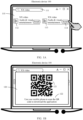
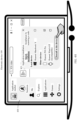
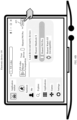
- the two applications that have a same icon and a same name but are not associated are displayed on the user interface 110. This is likely to cause misunderstanding of the user.
- the user also has doubts when selecting an application to install, and it is difficult for the user to identify an application applicable to installation on a mobile phone and an application applicable to installation on a PC.
- the application can be successfully installed only when the user makes a correct selection. If the user makes an incorrect selection, the application cannot be successfully installed, and user experience is poor.
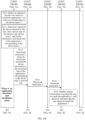
- FIG. 2 shows an example of a communication system according to an embodiment of this application.
- the plurality of electronic devices in the communication system may be connected by logging in to a same account.
- the plurality of electronic devices may log in to a same Huawei ID, and may be remotely connected and communicate with each other through a server.
- the account may be a mobile phone number, an email address, a user-defined user name, a user name allocated by an app server, a user name used for login in an app in an electronic device, or the like.
- the communication connections established between the plurality of electronic devices in the communication system may include but are not limited to: a wired connection, a wireless connection like a Bluetooth (Bluetooth, BT) connection, a wireless local area network (wireless local area network, WLAN) connection like a wireless fidelity point-to-point (wireless fidelity point to point, Wi-Fi P2P) connection, a wireless fidelity (wireless fidelity, Wi-Fi) connection, a near field communication (near field communication, NFC) connection, an infrared technology (infrared, IR) connection, a remote connection (for example, a connection established through a server), and the like.
- a wired connection a wireless connection like a Bluetooth (Bluetooth, BT) connection, a wireless local area network (wireless local area network, WLAN) connection like a wireless fidelity point-to-point (wireless fidelity point to point, Wi-Fi P2P) connection, a wireless fidelity (wireless fidelity, Wi-Fi) connection, a near field
- the electronic device 100 may be a PC
- a system of the electronic device 100 may be a Windows ® operating system
- the electronic device 200 may be a mobile phone
- a system of the electronic device 200 may be an Android ® operating system.
- the electronic device 100 may detect an operation of logging in to the account 1 by the user in the application market. In response to the operation, the electronic device 100 may send the account name 1 and the device information 1 to the server 100.
- the device information 1 may include but is not limited to the information like the device name 1 and the device type 1.
- the account name 1 is an account name of the account 1, and the account name may be a user-defined user name, a mobile phone number, an email address, or the like.
- the account name of the account 1 may be Summon.
- the device name 1 is a device name of the electronic device 100.
- the device name may be a default device name of the device, or may be a device name set by the user.
- the device name of the electronic device 100 may be Huawei Matebook X.
- the device type 1 is a device type of the electronic device 100.
- the device type of the electronic device 100 is a PC.
- the server 100 may store the account name 1 and the device information 1.
- the electronic device 200 may also include an application downloading module, and the application downloading module is configured to download and install various applications.
- the application downloading module may be an application market installed on the electronic device 200.
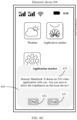
- the electronic device 100 may detect an operation (for example, a tap operation) performed by the user on an application market icon 421 displayed on a user interface 420, and in response to the operation, the electronic device 200 may open the application market.
- the electronic device 200 may detect the operation of logging in to the account 1 by the user in the application market, and in response to the operation, the electronic device 200 may send the account name 1 and the device information 2 to the server 100.
- the device information 2 may include but is not limited to the information like the device name 2 and the device type 2.
- the account name 1 is an account name of the account 1, and the account name may be a user-defined user name, a mobile phone number, an email address, or the like.
- the account name of the account 1 may be Summon.
- the device type 2 is a device type of the electronic device 200.
- the electronic device 200 is a mobile phone
- the device type of the electronic device 200 is a mobile phone.
- the server 100 may store the account name 1 and the device information 2.
- Table 1 shows an example of an account name and device information (for example, a device name and a device type) that are stored by the server 100 after both the electronic device 100 and the electronic device 200 log into the account 1.
- device information for example, a device name and a device type
- the electronic device may send both account information and device information to the account server, and the account server may store both the account information and the device information.
- the account information is not limited to the foregoing account name
- the device information is not limited to the foregoing device name and device type, and may further include information like a device ID, a serial number, a media access control address, and a device model. This is not limited in this embodiment of this application.
- the account login operation of the user in step S301 and step S304 may be an operation in which the user enters information like an account name and an account password when logging in to the application market for the first time; or may be an operation in which the user opens the application market after logging in to a system account, and the application market logs in to the system account by default; or may be an operation in which the user logs in to the application market for the first time, exits the application market, opens the application market, and logs in to an account again.
- Phase 2 a phase of obtaining and displaying application information and device information
- the electronic device 100 detects an operation of searching for an application 1 by the user; in response to the operation, the electronic device 100 sends, to the server 200, a request for obtaining related information of the application 1, where the request may carry information like an application name of the application 1; and after receiving the request, the server 200 sends the related information of the application 1 to the electronic device 100, where the related information includes a device type applicable to the application 1, and names of application installation packages, download links, and the like that are of the application 1 corresponding to different device types.
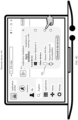
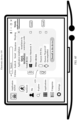
- a user interface 430 is an example of a user interface that has a search function in an application market of the electronic device 100.
- the application 1 is an "XX video" application.
- the electronic device 100 may detect an operation of searching for "XX video" in a search box 431 by the user (for example, the user enters a keyword "XX video").
- the electronic device 100 may send a request for obtaining related information of the "XX video” application to the server 200.
- the request may carry information like an application name of the "XX video” application.
- the server 200 may send the related information of the "XX video” application to the electronic device 100.
- the related information may include but is not limited to a device type applicable to the "XX video” application, and names of application installation packages, download links, and the like of the "XX video" application corresponding to different device types.
- the related information further includes an application name.
- the related information may not include a download link.
- the electronic device 100 may send a request to the server 200.
- the request indicates the server 200 to send a download link of the application 1 to the electronic device 100.
- an application name is "XX video”
- the "XX video” application is applicable to two types of devices: a PC and a mobile phone.
- a name of an application installation package corresponding to the XX video application whose device type is a PC is XXTV, and a download link is http://AAAAAA.
- a name of an application installation package corresponding to the XX video application whose device type is a mobile phone is com.xxtv.quickapp, and a download link is http://BBBBBB.
- Table 2 Application names Names of application installation packages Device types Download links XX video XXTV Personal computer (PC) http://AAAAAA XX video com.xxtv.quickapp Mobile phone (phone) http:/BBBBBB
- the electronic device 100 sends, to the server 100, a request for obtaining device information of a device that has logged in to the account 1, and after receiving the request, the server 100 sends, to the electronic device 100, the device information of the device that has logged in to the account 1.
- the electronic device 100 may send, to the server 100, the request for obtaining device information of a device that has logged in to the account 1 (for example, the account whose account name is Summon).
- the request may carry information like an account name of the account 1.
- the server 100 has stored, in advance, device information of all electronic devices that log in to the account 1
- the server 100 may send, to the electronic device 100, the device information of the device that has logged in to the account 1.
- the device information may be the device information that is of the device logging in to the account 1 and that is already stored by the server 100 in the Table 1, for example, the device name and the device type of the electronic device 100, and the device name and the device type of the electronic device 200.
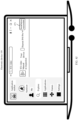
- the window 440 may include only a device name of a device that has logged into the account 1, for example, a device name Huawei Matebook X of the electronic device 100 or a device name Huawei P40 Pro of the electronic device 200.
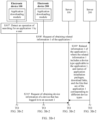
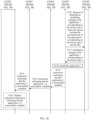
- step S307 to step S312 in the phase 2 may also be step S307' to step S313' shown in FIG. 3B-1 and FIG. 3B-2 as an example.
- step S307' to step S313' shown in FIG. 3B-1 and FIG. 3B-2 may also be step S307' to step S313' shown in FIG. 3B-1 and FIG. 3B-2 as an example. The following provides detailed descriptions.
- the server 200 sends the related information 1 of the application 1 to the server 100, where the related information 1 may include a device type applicable to the application 1, and names of application installation packages, download links, and the like that are of the application 1 corresponding to different device types.
- S310' The electronic device 100 sends, to the server 100, a request for obtaining device information of a device that has logged in to the account 1.
- step S310' For a specific execution process of step S310', refer to related content in step S310 in the embodiment shown in FIG. 3A-1 to FIG. 3A-3 . Details are not described herein again.
- the server 100 may determine, based on a received device type that is applicable to the application 1 and that is sent by the server 200, the device type of a device that is applicable to the application 1 and that has logged in to the account 1.
- the server 100 may further determine the installation package name of the application 1, the download link of the application 1, and the like based on the received names of application installation packages, download links, and the like that are sent by the server 200 and that are of the application 1 corresponding to different device types.
- the installation package name of the application 1 is a name of an application installation package of the application 1 corresponding to a device type of a device that is applicable to the application 1 and has logged in to the account 1
- the download link of the application 1 is a download link of the application 1 corresponding to the device type of the device that is applicable to the application 1 and that has logged in to the account 1, and the like.
- the electronic device 100 installs the "XX video” application on the electronic device 200
- a device name of the electronic device 200 is a device name 2
- the device name 2 is Huawei P40 Pro
- the application 1 is the "XX video” application.
- the electronic device 100 may detect the operation that the user selects to install the "XX video” application on the device corresponding to the device name 2 (for example, an operation of clicking, by the user, a Huawei P40 Pro option shown in FIG. 4D and an operation of clicking, by the user, an "Install” option 435 shown in FIG. 4E ).
- the electronic device 100 sets the Huawei P40 Pro option to a selected state shown in FIG.
- the electronic device 100 may determine, based on the device selected by the user, that the device type of the device is the device type 2 (namely, a mobile phone). Further, because the electronic device 100 obtains, in advance, the related information of the "XX video" application (refer to Table 2), the electronic device 100 may determine that the download link of the "XX video” application corresponding to the device type 2 is http://BBBBBB.
- the detected operation that the user selects to install the "XX video" application on the device corresponding to the device name 2 may also be only the operation of clicking, by the user, the Huawei P40 Pro option shown in FIG. 4D .
- the user after selecting the device option for installing the "XX video” application, the user does not need to click the "Install” option, and the electronic device 100 can perform subsequent steps.
- the request may carry the download link of the application 1 corresponding to the device type 2, and the electronic device 200 may automatically route, based on the download link that is of the application 1 corresponding to the device type 2 and that is sent by the server 200, to the server 200 to download the installation package of the application 1 corresponding to the device type 2.
- the electronic device 200 may install the application 1.
- An installation process is the same as that in the conventional technology, and details are not described herein again.
- FIG. 4H device information of more other electronic devices that establish a connection to the electronic device 100 may be further displayed, for example, an electronic device 300 (not shown in the figure).
- the user may select a plurality of devices at a time to simultaneously install the "XX video” application.
- the user may simultaneously select the electronic device 200 and the electronic device 300. It is easy to understand that a process of installing the "XX video" application by the electronic device 300 is similar to a process of installing the "XX video” application by the electronic device 200, and details are not described herein again.
- the local device may provide, for the peer device, a download link of an application corresponding to a device type of the peer device, and the peer device may download an installation package file of the corresponding application based on the download link, so that cross-device application installation can be implemented.
- the peer device can automatically install an application without performing a download and installation operation repeatedly by a user, thereby simplifying user operations and improving user experience.
- FIG. 5A to FIG. 5C show an example of a specific procedure of another application installation method according to an embodiment of this application.
- the method may be applied to a communication system including an electronic device 100, an electronic device 200, and a server 200.
- the server 200 may be a distribution server
- the electronic device 100 may be a PC
- the electronic device 200 may be a mobile phone.
- Both the electronic device 100 and the electronic device 200 may include an application downloading module and a device discovery module.
- the application downloading module is configured to download and install various applications.
- the application downloading module of the electronic device 100 may be an application market of a PC
- the application downloading module of the electronic device 200 may be an application market of a mobile phone.
- the device discovery module is configured to be responsible for mutual discovery of nearby devices and establish a short-range communication connection between different electronic devices.
- the device discovery module may be a Wi-Fi module, a Bluetooth module, an NFC module, or the like. The following describes in detail specific steps of the method.
- Phase 1 a communication connection establishment phase
- S501 The electronic device 100 establishes a short-range communication connection to the electronic device 200.
- Phase 2 a phase of obtaining and displaying application information and device information
- the download instruction 2 may also include only the name of the application installation package of the application 1 corresponding to the device type 2 and the device name of the electronic device 200.
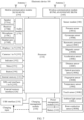
- the electronic device 100 may include a processor 110, an external memory interface 120, an internal memory 121, a universal serial bus (universal serial bus, USB) interface 130, a charging management module 140, a power management module 141, a battery 142, an antenna 1, an antenna 2, a mobile communication module 150, a wireless communication module 160, an audio module 170, a speaker 170A, a receiver 170B, a microphone 170C, a headset jack 170D, a sensor module 180, a button 190, a motor 191, an indicator 192, a camera 193, a display 194, a subscriber identity module (subscriber identity module, SIM) card interface 195, and the like.
- a processor 110 an external memory interface 120, an internal memory 121, a universal serial bus (universal serial bus, USB) interface 130, a charging management module 140, a power management module 141, a battery 142, an antenna 1, an antenna 2, a mobile communication module 150, a wireless communication module 160, an audio module 170,
- an interface connection relationship between the modules shown in this embodiment of this application is merely an example for description, and does not constitute a structural limitation on the electronic device 100.
- the electronic device 100 may alternatively use an interface connection manner different from that in the foregoing embodiment, or a combination of a plurality of interface connection manners.
- the camera 193 is configured to capture a static image or a video.
- An object generates an optical image by using the lens and is projected to a photosensitive element.
- the photosensitive element may be a charge coupled device (charge coupled device, CCD) or a complementary metal-oxide-semiconductor (complementary metal-oxide-semiconductor, CMOS) optoelectronic transistor.
- CCD charge coupled device
- CMOS complementary metal-oxide-semiconductor
- the photosensitive element converts an optical signal into an electrical signal, and then transmits the electrical signal to the ISP for converting the electrical signal into a digital image signal.
- the ISP outputs the digital image signal to the DSP for processing.
- the DSP converts the digital image signal into an image signal in a standard format such as RGB or YUV.
- the electronic device 100 may include one or N cameras 193, where N is a positive integer greater than 1.
- the button 190 includes a power button, a volume button, and the like.
- the button 190 may be a mechanical button, or may be a touch key.
- the electronic device 100 may receive a button input, and generate a signal input of a button related to a user setting and function control of the electronic device 100.
- the following describes a software structure of an electronic device 100 according to an embodiment of this application.
- FIG. 8 shows an example of a software structure of an electronic device 100 according to an embodiment of this application.
- a software system of the electronic device 100 may use a layered architecture, an event-driven architecture, a micro kernel architecture, a microservice architecture, or a cloud architecture.
- an Android system with a layered architecture is used as an example to describe the software structure of the electronic device 100.
- the layered architecture divides software into layers, and each layer has a clear role and responsibility.
- the layers communicate with each other through software interfaces.
- the Android system is divided into four layers from top to bottom: an application layer, an application framework layer, Android runtime (Android runtime), a system library, and a kernel layer.
- the application layer may include a series of application packages.
- the application framework layer provides an application programming interface (application programming interface, API) and a programming framework for the application at the application layer.
- the application framework layer includes some predefined functions.
- the window manager is used to manage a window program.
- the window manager can obtain a size of a display, determine whether there is a status bar, lock a screen, capture a screen, and the like.
- the content provider is used to store and obtain data and make the data accessible to an application.
- the data may include a video, an image, an audio, a call made and answered, a browsing history and a bookmark, a phone book, and the like.
- the view system includes visual controls such as a control for displaying a text and a control for displaying a picture.
- the view system may be used to build an application.
- a display interface may include one or more views.
- a display interface including a notification icon of Messages may include a text display view and a picture display view.
- the resource manager provides various resources for an application, such as a localized character string, an icon, a picture, a layout file, and a video file.
- the notification manager enables an application to display notification information in a status bar, and may be used to convey a notification type message.
- the message may automatically disappear after a short pause without user interaction.
- the notification manager is used to notify download completion, a message notification, and the like.
- the notification manager may alternatively be a notification that appears in a top of a status bar in a system in a form of a graph or a scroll bar text, for example, a notification of an application running on a background or a notification that appears on a screen in a form of a dialog window.
- text information is prompted in the status bar, a prompt tone is produced, the electronic device vibrates, or an indicator light blinks.
- the application layer and the application framework layer run in the virtual machine.
- the virtual machine executes Java files at the application layer and the application framework layer as binary files.
- the virtual machine is used to perform functions such as object lifecycle management, stack management, thread management, security and exception management, and garbage collection.
- the media library supports playing and recording of a plurality of commonly used audio and video formats, static image files, and the like.
- the media library may support a plurality of audio and video coding formats, for example: MPEG 4, H.264, MP3, AAC, AMR, JPG and PNG.
- the three-dimensional graphics processing library is configured to implement three-dimensional graphics drawing, image rendering, composition, layer processing, and the like.
- the 2D graphics engine is a drawing engine for 2D drawing.
- a corresponding hardware interrupt is sent to the kernel layer.
- the kernel layer processes the touch operation into an original input event (including information like touch coordinates and a timestamp of the touch operation).
- the original input event is stored at the kernel layer.
- the application framework layer obtains the original input event from the kernel layer, and identifies a control corresponding to the input event.
- An example in which the touch operation is a touch operation, and a control corresponding to the touch operation is a control of a camera application icon is used.
- the camera application invokes an interface of the application framework layer to enable the camera application, then enables the camera driver by invoking the kernel layer, and captures a static image or a video through the camera 193.
- a software structure of the electronic device 200 may be the same as or similar to the software structure of the electronic device 100.
- FIG. 9 shows an example of another structure of an electronic device 100 according to an embodiment of this application.
- the electronic device 100 may include an application downloading module 901 and a device discovery module 902.
- the application downloading module 901 may be configured to: download and install various applications, install various applications for another device, receive and/or send a related instruction, request, and the like.
- the application downloading module 901 may be an application market on the electronic device 100.
- the electronic device 200 may also include an application downloading module and a device discovery module.
- an application downloading module and a device discovery module.
- the following describes a structure of a server 200 provided in an embodiment of this application.
- FIG. 10 is a schematic diagram of a structure of a server 200 according to an embodiment of this application.
- the server 200 may include one or more processors 1001, a memory 1002, a communication interface 1003, a transmitter 1005, a receiver 1006, a coupler 1007, and an antenna 1008. These components may be connected through a bus 1004 or in another manner. In FIG. 10 , an example in which the components are connected through a bus is used.
- the communication interface 1003 may be used by the server 200 to communicate with another communication device, for example, the electronic device 100 or the electronic device 200.
- the communication interface 1003 may be a 3G communication interface, a 4G communication interface, a 5G communication interface, a future new radio communication interface, or the like.
- the server 200 may be further configured with a wired communication interface 1003, for example, a local access network (local access network, LAN) interface.
- the transmitter 1005 may be configured to transmit a signal output by the processor 1001.
- the receiver 1006 may be configured to receive a mobile communication signal received by the antenna 1008.
- the transmitter 1005 and the receiver 1006 may be considered as wireless modems.
- the server 200 there may be one or more transmitters 1005 and receivers 1006.
- the antenna 1008 may be configured to convert electromagnetic energy in a transmission line into an electromagnetic wave in free space, or convert an electromagnetic wave in free space into electromagnetic energy in a transmission line.
- the coupler 1007 is configured to: divide a mobile communication signal received by the antenna 1008 into a plurality of signals, and allocate the plurality of signals to a plurality of receivers 1006.
- the memory 1002 is coupled to the processor 1001, and is configured to store various software programs and/or a plurality of groups of instructions.
- the memory 1002 may include a high-speed random access memory, and may also include a non-volatile memory, for example, one or more disk storage devices, a flash memory device, or another non-volatile solid-state storage device.
- the memory 1002 may store a network communication program.
- the network communication program may be used to communicate with one or more additional devices, one or more terminal devices, and one or more network devices.
- the memory 1002 may be configured to store a program for implementing, on a server 200 side, the application installation method provided in one or more embodiments of this application.
- the application installation method provided in one or more embodiments of this application refer to the foregoing embodiments.
- the processor 1001 may be configured to read and execute computer-readable instructions. Specifically, the processor 1001 may be configured to: invoke a program stored in the memory 1002, for example, the program for implementing, on a server 200 side, the application installation method provided in one or more embodiments of this application, and execute instructions included in the program.
- server 200 shown in FIG. 10 is merely an implementation of this embodiment of this application. In actual application, the server 200 may further include more or fewer components. This is not limited herein.
- the structure of the server 100 may be the same as or similar to the structure of the server 200.
- For related content of the structure of the server 100 refer to related text descriptions of the structure of the server 200 shown in FIG. 10 . Details are not described herein again.
- All or some of the foregoing embodiments may be implemented by using software, hardware, firmware, or any combination thereof.
- the implementation may be totally or partially implemented in a form of a computer program product.
- the computer program product includes one or more computer instructions.
- computer program instructions When computer program instructions are loaded and executed on a computer, all or some of the procedures or functions according to this application are generated.
- the computer may be a general-purpose computer, a dedicated computer, a computer network, or another programmable apparatus.
- the computer instructions may be stored in a computer-readable storage medium or may be transmitted from a computer-readable storage medium to another computer-readable storage medium.
- the computer instructions may be transmitted from a website, computer, server, or data center to another website, computer, server, or data center in a wired (for example, a coaxial cable, an optical fiber, or a digital subscriber line) or wireless (for example, infrared, radio, or microwave) manner.
- the computer-readable storage medium may be any usable medium accessible by a computer, or a data storage device, such as a server or a data center integrating one or more usable media.
- the usable medium may be a magnetic medium (for example, a floppy disk, a hard disk, or a magnetic tape), an optical medium (for example, a DVD), a semiconductor medium (for example, a solid state disk (solid state disk, SSD)), or the like.
- the procedures may be implemented by a computer program instructing related hardware.
- the program may be stored in a computer-readable storage medium. When the program is executed, the procedure of each method embodiment described above may be included.
- the foregoing storage medium includes any medium that can store program code, for example, a ROM, a random access memory RAM, a magnetic disk, or an optical disc.
Landscapes
- Engineering & Computer Science (AREA)
- Software Systems (AREA)
- General Engineering & Computer Science (AREA)
- Theoretical Computer Science (AREA)
- Computer Networks & Wireless Communication (AREA)
- Signal Processing (AREA)
- Physics & Mathematics (AREA)
- General Physics & Mathematics (AREA)
- Stored Programmes (AREA)
Applications Claiming Priority (3)
| Application Number | Priority Date | Filing Date | Title |
|---|---|---|---|
| CN202111126103 | 2021-09-24 | ||
| CN202111383611.5A CN115857964A (zh) | 2021-09-24 | 2021-11-19 | 应用程序安装方法及相关设备 |
| PCT/CN2022/119661 WO2023045876A1 (fr) | 2021-09-24 | 2022-09-19 | Procédé d'installation d'application et dispositifs associés |
Publications (2)
| Publication Number | Publication Date |
|---|---|
| EP4398094A1 true EP4398094A1 (fr) | 2024-07-10 |
| EP4398094A4 EP4398094A4 (fr) | 2024-12-04 |
Family
ID=85652764
Family Applications (1)
| Application Number | Title | Priority Date | Filing Date |
|---|---|---|---|
| EP22871922.5A Pending EP4398094A4 (fr) | 2021-09-24 | 2022-09-19 | Procédé d'installation d'application et dispositifs associés |
Country Status (4)
| Country | Link |
|---|---|
| US (1) | US20240394027A1 (fr) |
| EP (1) | EP4398094A4 (fr) |
| CN (1) | CN115857964A (fr) |
| WO (1) | WO2023045876A1 (fr) |
Family Cites Families (14)
| Publication number | Priority date | Publication date | Assignee | Title |
|---|---|---|---|---|
| CN102752457B (zh) * | 2012-07-19 | 2014-09-03 | 腾讯科技(深圳)有限公司 | 一种安装应用的方法及系统 |
| US20140040226A1 (en) * | 2012-07-31 | 2014-02-06 | Microsoft Corporation | Providing application result and preview |
| US20140067835A1 (en) * | 2012-08-30 | 2014-03-06 | Microsoft Corporation | Search extensibility application framework in a hosted search |
| US20150348032A1 (en) * | 2014-05-30 | 2015-12-03 | Apple Inc. | Real time approval of digital store purchases for a shared content storage account |
| CN105204885A (zh) * | 2014-06-30 | 2015-12-30 | 宇龙计算机通信科技(深圳)有限公司 | 跨平台关联设备间的应用的安装方法及其系统 |
| US9769301B2 (en) * | 2014-09-02 | 2017-09-19 | Apple Inc. | Accessory device application bundling |
| KR102320151B1 (ko) * | 2015-02-16 | 2021-11-01 | 삼성전자주식회사 | 어플리케이션을 설치하는 전자 장치 및 그 제어 방법 |
| CN104850463B (zh) * | 2015-06-08 | 2019-11-15 | 三星电子(中国)研发中心 | 应用程序共享方法及装置 |
| US20160378455A1 (en) * | 2015-06-29 | 2016-12-29 | Facebook, Inc. | Methods and Systems for Installing an Application Version via Close-Range Communications |
| CN105389175A (zh) * | 2015-09-25 | 2016-03-09 | 深圳市金立通信设备有限公司 | 一种应用程序共享方法及移动终端 |
| US10394838B2 (en) * | 2015-11-11 | 2019-08-27 | Apple Inc. | App store searching |
| DK201670582A1 (en) * | 2016-06-12 | 2018-01-02 | Apple Inc | Identifying applications on which content is available |
| EP3500928B1 (fr) * | 2017-01-05 | 2024-05-22 | Samsung Electronics Co., Ltd. | Procédés et systèmes de gestion d'installation d'application |
| CN114968614A (zh) * | 2020-02-27 | 2022-08-30 | 华为技术有限公司 | 多设备之间的应用互动方法及相关设备 |
-
2021
- 2021-11-19 CN CN202111383611.5A patent/CN115857964A/zh active Pending
-
2022
- 2022-09-19 WO PCT/CN2022/119661 patent/WO2023045876A1/fr not_active Ceased
- 2022-09-19 EP EP22871922.5A patent/EP4398094A4/fr active Pending
- 2022-09-19 US US18/694,585 patent/US20240394027A1/en active Pending
Also Published As
| Publication number | Publication date |
|---|---|
| CN115857964A (zh) | 2023-03-28 |
| US20240394027A1 (en) | 2024-11-28 |
| EP4398094A4 (fr) | 2024-12-04 |
| WO2023045876A1 (fr) | 2023-03-30 |
Similar Documents
| Publication | Publication Date | Title |
|---|---|---|
| US12039144B2 (en) | Display information interaction method and related apparatus | |
| EP3872807B1 (fr) | Procédé de commande vocale et dispositif électronique | |
| CN116360725B (zh) | 显示交互系统、显示方法及设备 | |
| EP4084486A1 (fr) | Procédé de projection de contenu inter-dispositif et dispositif électronique | |
| WO2020173370A1 (fr) | Procédé pour déplacer des icônes d'applications et dispositif électronique | |
| EP4163782A1 (fr) | Procédé de gestion de bureau inter-dispositifs, premier dispositif électronique et second dispositif électronique | |
| WO2022042326A1 (fr) | Procédé de commande d'affichage et appareil associé | |
| US12578913B2 (en) | Display method, electronic device, and system | |
| EP4293997A1 (fr) | Procédé d'affichage, dispositif électronique et système | |
| WO2022095820A1 (fr) | Procédé de saisie de texte, dispositif électronique et système | |
| WO2022135157A1 (fr) | Procédé et appareil d'affichage de page, ainsi que dispositif électronique et support de stockage lisible | |
| WO2022062902A1 (fr) | Procédé de transfert de fichier et dispositif électronique | |
| CN115243235A (zh) | 数据传输方法及相关设备 | |
| CN116301510A (zh) | 一种控件定位方法及电子设备 | |
| EP4443281A1 (fr) | Procédé de gestion de composant d'application et dispositif associé | |
| EP4398094A1 (fr) | Procédé d'installation d'application et dispositifs associés | |
| EP4239464A1 (fr) | Procédé permettant d'invoquer des capacités d'autres dispositifs, dispositif électronique et système | |
| CN116527266A (zh) | 数据归集方法及相关设备 | |
| WO2024114212A1 (fr) | Procédé de commutation de mise au point inter-dispositifs, dispositif électronique et système | |
| WO2022052767A1 (fr) | Procédé de commande de dispositif, dispositif électronique et système | |
| CN118276730A (zh) | 应用程序的界面显示方法及电子设备 | |
| CN117255400A (zh) | 应用组件交互方法及相关设备 | |
| HK40078045A (en) | Cross-device content projection method, and electronic device | |
| CN116560769A (zh) | 应用组件分享方法及相关设备 |
Legal Events
| Date | Code | Title | Description |
|---|---|---|---|
| STAA | Information on the status of an ep patent application or granted ep patent |
Free format text: STATUS: THE INTERNATIONAL PUBLICATION HAS BEEN MADE |
|
| PUAI | Public reference made under article 153(3) epc to a published international application that has entered the european phase |
Free format text: ORIGINAL CODE: 0009012 |
|
| STAA | Information on the status of an ep patent application or granted ep patent |
Free format text: STATUS: REQUEST FOR EXAMINATION WAS MADE |
|
| 17P | Request for examination filed |
Effective date: 20240402 |
|
| AK | Designated contracting states |
Kind code of ref document: A1 Designated state(s): AL AT BE BG CH CY CZ DE DK EE ES FI FR GB GR HR HU IE IS IT LI LT LU LV MC MK MT NL NO PL PT RO RS SE SI SK SM TR |
|
| A4 | Supplementary search report drawn up and despatched |
Effective date: 20241104 |
|
| RIC1 | Information provided on ipc code assigned before grant |
Ipc: G06F 8/61 20180101AFI20241029BHEP |
|
| DAV | Request for validation of the european patent (deleted) | ||
| DAX | Request for extension of the european patent (deleted) | ||
| STAA | Information on the status of an ep patent application or granted ep patent |
Free format text: STATUS: EXAMINATION IS IN PROGRESS |
|
| 17Q | First examination report despatched |
Effective date: 20250715 |
|
| GRAP | Despatch of communication of intention to grant a patent |
Free format text: ORIGINAL CODE: EPIDOSNIGR1 |
|
| STAA | Information on the status of an ep patent application or granted ep patent |
Free format text: STATUS: GRANT OF PATENT IS INTENDED |
|
| RIC1 | Information provided on ipc code assigned before grant |
Ipc: G06F 8/61 20180101AFI20260304BHEP Ipc: H04W 4/80 20180101ALI20260304BHEP |
|
| INTG | Intention to grant announced |
Effective date: 20260317 |