EP4400955A1 - Procédé de commande d'interface utilisateur sans contact pour présentations - Google Patents
Procédé de commande d'interface utilisateur sans contact pour présentations Download PDFInfo
- Publication number
- EP4400955A1 EP4400955A1 EP23151420.9A EP23151420A EP4400955A1 EP 4400955 A1 EP4400955 A1 EP 4400955A1 EP 23151420 A EP23151420 A EP 23151420A EP 4400955 A1 EP4400955 A1 EP 4400955A1
- Authority
- EP
- European Patent Office
- Prior art keywords
- scene
- user
- spatial
- input area
- person
- Prior art date
- Legal status (The legal status is an assumption and is not a legal conclusion. Google has not performed a legal analysis and makes no representation as to the accuracy of the status listed.)
- Withdrawn
Links
Images



Classifications
-
- G—PHYSICS
- G06—COMPUTING OR CALCULATING; COUNTING
- G06F—ELECTRIC DIGITAL DATA PROCESSING
- G06F3/00—Input arrangements for transferring data to be processed into a form capable of being handled by the computer; Output arrangements for transferring data from processing unit to output unit, e.g. interface arrangements
- G06F3/01—Input arrangements or combined input and output arrangements for interaction between user and computer
- G06F3/048—Interaction techniques based on graphical user interfaces [GUI]
- G06F3/0481—Interaction techniques based on graphical user interfaces [GUI] based on specific properties of the displayed interaction object or a metaphor-based environment, e.g. interaction with desktop elements like windows or icons, or assisted by a cursor's changing behaviour or appearance
- G06F3/04812—Interaction techniques based on cursor appearance or behaviour, e.g. being affected by the presence of displayed objects
-
- G—PHYSICS
- G06—COMPUTING OR CALCULATING; COUNTING
- G06F—ELECTRIC DIGITAL DATA PROCESSING
- G06F3/00—Input arrangements for transferring data to be processed into a form capable of being handled by the computer; Output arrangements for transferring data from processing unit to output unit, e.g. interface arrangements
- G06F3/01—Input arrangements or combined input and output arrangements for interaction between user and computer
- G06F3/011—Arrangements for interaction with the human body, e.g. for user immersion in virtual reality
-
- G—PHYSICS
- G06—COMPUTING OR CALCULATING; COUNTING
- G06F—ELECTRIC DIGITAL DATA PROCESSING
- G06F3/00—Input arrangements for transferring data to be processed into a form capable of being handled by the computer; Output arrangements for transferring data from processing unit to output unit, e.g. interface arrangements
- G06F3/01—Input arrangements or combined input and output arrangements for interaction between user and computer
- G06F3/017—Gesture based interaction, e.g. based on a set of recognized hand gestures
-
- G—PHYSICS
- G06—COMPUTING OR CALCULATING; COUNTING
- G06F—ELECTRIC DIGITAL DATA PROCESSING
- G06F3/00—Input arrangements for transferring data to be processed into a form capable of being handled by the computer; Output arrangements for transferring data from processing unit to output unit, e.g. interface arrangements
- G06F3/01—Input arrangements or combined input and output arrangements for interaction between user and computer
- G06F3/03—Arrangements for converting the position or the displacement of a member into a coded form
- G06F3/0304—Detection arrangements using opto-electronic means
-
- G—PHYSICS
- G06—COMPUTING OR CALCULATING; COUNTING
- G06F—ELECTRIC DIGITAL DATA PROCESSING
- G06F3/00—Input arrangements for transferring data to be processed into a form capable of being handled by the computer; Output arrangements for transferring data from processing unit to output unit, e.g. interface arrangements
- G06F3/01—Input arrangements or combined input and output arrangements for interaction between user and computer
- G06F3/048—Interaction techniques based on graphical user interfaces [GUI]
- G06F3/0481—Interaction techniques based on graphical user interfaces [GUI] based on specific properties of the displayed interaction object or a metaphor-based environment, e.g. interaction with desktop elements like windows or icons, or assisted by a cursor's changing behaviour or appearance
- G06F3/0483—Interaction with page-structured environments, e.g. book metaphor
Definitions
- the present invention generally relates to controlling a touchless user interface, and more particularly to a touchless user interface control method for providing user input to an essentially stationary display means. Further, the present invention relates to a touchless user interface control system providing a user with a touchless user interface. Further, the present invention relates to a data processing apparatus and to a computer program for carrying out the touchless user interface control method.
- Display means have nowadays become omnipresent in various areas of modern life. Examples include electronic display screens or electronic display projectors in public places which provide useful information to the user, e. g., in shopping malls, trade shows, train stations, airports, and the like, a field which is commonly termed "digital signage". Other examples include the use of said displays for presentations, lectures or the like. Presentations and lectures may be performed in private environments, such as at home using a large screen display, e.g., a television device. Also, presentations and lectures may be performed in public environments, e.g., in schools, universities and other educational institutions.
- modifying includes modifying the first scene in accordance with the at least one control command, wherein the modifications applied to the first scene are at least partially also applied to the second scene. It may be provided that the first and second scene are modified correspondingly in accordance with the at least one control command, wherein the first and second scene are at least partially identical.
- the second display means is an essentially stationary display means having a size such that an average user person is not able to reach every part of a displayed second scene using a hand for the purpose of pointing at a specific area of the scene
- the present setting where the user person is able to see the first display means and control the second scene through controlling the first scene, as it is described further below, is particularly useful.
- the second display means is not in the same room as the first display means.
- the second display means may be an essentially stationary display means such that the at least one participant person is spaced apart from said second display means during a presentation.
- This enables the method of the present invention to be suitable for presentations which can be seen by a plurality of participant persons in the same room at the same time. Such plurality of participant persons may be understood as an audience.
- Said essentially stationary display means may be placed in the back of a presenter person while looking at the first display means. In such setting, the user person is essentially not able to see the second display means when he looks at the first display means. Vice versa, the at least one participant person may be essentially not able to see the first display means when looking at the second display means.
- Examples for essentially stationary second display means are projector assemblies including a projector and a projection surface, electronic display screens such as LCD screens or LED screens, and holographic display means.
- An essentially stationary second display means may in particular be a large display means, for example having a display size of more than 70 inches, preferably more than 100 inches, preferably more than 130 inches, preferably more than 160 inches, preferably more than 200 inches, preferably more than 300 inches.
- a benefit of a large second display means is that a great number of participant persons may be able to see a displayed second scene.
- a scene displayed by the first and/or second display means may for example include content such as presentation slides, photos, videos, text, diagrams, or the like.
- the display means despite their bulky size, can be conveniently and intuitively operated by means of the present invention, which is described in more detail below.
- the at least one depth sensing device may be integrated in the interface provision means, e.g., being arranged in a housing of the interface provision means or being mounted at a housing of the interface provision means.
- the interface provision means may be a physical device. Particular embodiments of interface provision means are described further below.
- the interface provision means and the, preferably essentially stationary, first display means may be spaced apart from each other, e.g., in such manner that the user person is able to see the entire first scene which is displayed by the first display means essentially without moving the user person's body, in particular essentially without moving the user person's head, and/or in such manner that a different person may move between the interface provision means and the first display means, and/or is such manner that the distance between the interface provision means and the first display means is more than 1 meter, preferably more than 1,5 meters, preferably more than 2 meters, preferably more than 3 meters, preferably more than 4 meters, preferably more than 5 meters, preferably more than 7 meters, preferably more than 10 meters.
- the interface provision means and the, preferably essentially stationary, second display means may be spaced apart from each other in the same manner.
- the at least one depth sensing device may be a sensor device, a sensor assembly or a sensor array which is able to capture the relevant information in order to translate a movement and/or position and/or orientation of an input object, in particular of a user person's hand, into control commands.
- depth information may be capturable by the depth sensing device. It may be placed such as to observe the spatial input area.
- at least two depth sensing devices are provided and placed such as to observe the spatial input area.
- the depth sensing devices may be arranged facing each other having an overlap in their field of view, each at least partially covering the spatial input area.
- the depth sensing device may preferably be a depth camera.
- An example for a depth camera is the Intel RealSense depth camera.
- the at least one depth sensing device may, as described above, be part of the interface provision means or be integrated in the interface provision means or be mounted at the interface provision means. Therefore, also the at least one depth camera and the first and/or display means may be spaced apart from each other in the same manner as described above with respect to the interface provision means and the first and/or second display means.
- control command may be understood as any command that may be derived from a user input.
- a control command may be generated based on a translation of a captured user input into a control command. Examples for control commands are "show hovering pointer which overlays the current scene” or “switch to the next page or slide in the presentation”.
- modifying the first displayed scene and second displayed scene may be understood as any modification of one or both displayed scene(s) which is caused by a captured user input, i.e., by generated control commands which were generated based on captured user input, as described above.
- modifications of a displayed scene are: Showing a hovering pointer which overlays a current scene; turning a page to the next one; switching from a currently shown slide to a next slide of a presentation; overlay a current scene with a freehand drawing; mark specific keywords; zoom in; zoom out; and the like.
- Modifying may be performed for the first scene displayed by the first display means and subsequently at least partially also performed for the second scene displayed by the second display means.
- the modification may be performed at both, the first and the second scene, at the same time and in the same manner. It may be provided that the first and second scene are identical, or that the second scene corresponds to a part of the first scene, for example if the first scene is a presenter mode of a presentation and the second screen is the actual presentation meant to be seen by at least one participant person. It may alternatively be provided that the first screen corresponds to a part of the second scene.
- the spatial input area and captured user input which is performed within the spatial input area is mapped to the first scene and at least partially to the second scene.
- the spatial input area may be defined to be a virtual plane in space.
- the mapping may follow one or more rules.
- the spatial input area may be mapped to the displayed scene and/or to the display means essentially without changing the width-to-height ratio.
- mapping from the spatial input area to the fist scene or mapping from the first scene to the second scene may be performed, wherein the width-to-height ratio remains unchanged, i.e., no distortions need to be performed.
- mapping from the spatial input area to the first scene may be performed without changing the width-to-height ratio, but mapping from the first scene to the second scene may be performed following underlying mapping rules which fit the different width-to-height ratios to one another in order to provide an optimum user experience.
- each of the aforementioned examples may on the one hand comprise mapping from the spatial input area directly to the first and second scene, or may on the other hand comprise mapping from the spatial input area to the first scene and subsequent mapping from the first scene to the second scene.
- the spatial input area is or comprises a virtual plane defined in space which virtual plan may form a virtual touchpad which does not require physical touch during a user interaction.
- the virtual plane may have boundary limits which at least partially delimit the spatial input area.
- this virtual representation may consist of or comprise an illustration of said boundary limits.
- the first and second display means may be connected with wires or wirelessly in order to communicate with each other. Additionally or alternatively, the interface provision means may be connected to the first and/or second display means in order to communicate with each other.
- the first display means and/or the second display means and/or the interface provision means may comprise a computer as a main processing unit for the present invention.
- control scheme is predefined.
- at least two control schemes are predefined and available for the user person to choose from.
- the control scheme may at least partially be adaptable by the user.
- the control scheme can be tailored to the user person's needs, preferences and physical abilities, for example if the user person is handicapped. This increases the versatility of the present invention and creates a wide range of possible usage options.
- control commands include at least two control command types, preferably including hovering pointer commands and gesture input commands. These control command types are described in further detail below.
- the present invention is applicable to various fields of application and is particularly advantageous for presenting content to participant persons and/or an audience.
- experience and testing have shown that the intuitively designed touchless user interface control method according to the present invention provides a particularly appealing and easy to learn user experience.
- pointing to specific areas on a scene as well as controlling a scene is combined in one single control scheme which is provided by the present invention.
- the present invention provides a high benefit over the prior art because even though the user person and the interface provision means are spaced apart from the display means, it is still possible to process user input. Due to the interface provision means that makes the spatial input area at least partially recognizable by the user person, the user experience is enhanced because this feature supports the user person during interaction and significantly reduces the need to become familiar with the control method in beforehand.
- a locking condition may be required to be met.
- Such locking condition may require the user person to perform a specific user input, such as a gesture, successive gestures, pressing a button, input voice commands and/or the like.
- a detected hand of a user person may be initially displayed on the display means before the locking condition is met, so that the user person can easily see and decide whether the correct hand which is intended for interaction is detected and locked.
- the user person may perform a gesture, for example a double click gesture moving the hand back and forth, if such gesture is set to be the locking condition.
- touchless user input is captured which is provided by the user person via an input object, preferably via a hand of the user person
- the captured distance of the input object with respect to the virtual plane and the position of the input object relative to the plane and/or the movement of the input object relative to the plane is processed and generating at least one control command is performed based thereon.
- One example for a user input which causes generating a hovering pointer command is that the input object is moved with respect to the spatial input area while essentially not penetrating more than a threshold value in the direction perpendicular to a virtual plane of the spatial input area and/or in the direction perpendicular to the scene displayed by the display means.
- the spatial input area may be essentially parallel to the first scene and/or to the first display means.
- the spatial input area, preferably the virtual plane may be tilted, i.e., inclined, with respect to the first scene displayed by the first display means, preferably tilted, i.e., inclined, with respect to the first display means.
- the spatial input area may have a spatial orientation that is particularly convenient for the user person for providing user input.
- the user person is provided with a control option to adjust the spatial orientation of the spatial input area.
- the at least one depth sensing device is integrated in the interface provision means.
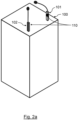
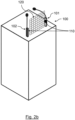
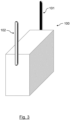
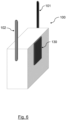
- the interface provision means is or comprises a physical framing having a shape that at least partially frames the spatial input area, optionally wherein the physical framing comprises an essentially vertical left tower and an essentially vertical right tower, the left and the right tower opposing each other such that the spatial input area is located between the left tower and the right tower, wherein at least one depth sensing device may be integrated in the left tower and/or at least one depth sensing device may be integrated in the right tower.
- the term tower may be understood as a vertically elongated structure.
- the spatial input area may inherently be made at least partially recognizable for the user person.
- the physical framing can be shaped as a window frame, with only air between the frame parts. Such a physical framing can be called, for example, "airframe".
- airframe airframe
- one or more side parts of such framing shaped as a window frame may be omitted in order prevent the user person from bumping into unnecessary side parts and negatively affecting or limiting the user person's freedom to move when performing user input.
- the embodiment of the physical framing comprising an essentially vertical left tower and an essentially vertical right tower is, according to various testing, found particularly convenient to use in terms of freedom to move while providing user input, at the same time providing enough indication for a user person in order to recognize where the spatial input area is located and how the spatial input area is oriented in space.
- the orientation of the spatial input area may be adjustable by the user person.
- the interface provision means and/or at least one of the at least one depth camera(s) may provide a control option to the user person for adjusting the spatial orientation of the spatial input area.
- the control option may be realized by providing a physical button or touch button or by providing predefined gestures which the user person may perform in order to change the spatial orientation of the spatial input area.
- the position and/or orientation of the interface provision means is automatically adjusted depending on the spatial orientation of the spatial input area.
- the spatial orientation of the spatial input area preferably being a virtual plane in space
- adjusting the position and/or orientation of the interface provision means, in particular of the physical framing is performed under consideration of the spatial orientation of the spatial input area.
- the adjustment of the position and/or orientation of the interface provision means, in particular of the physical framing may be possible manually by the user person and/or automatically.
- the interface provision means, in particular the physical framing may therefore include adjustment means, e.g., a tilting joint and/or a hinge.
- the interface provision means comprises a projector, preferably a laser projector and/or a hologram projector, the projector emitting light at least partially being indicative of the location, e.g., position and orientation, of the spatial input area.
- the spatial orientation of the spatial input area may be adjustable.
- the projector may be configured to accordingly adjust the position and/or orientation of the emitted light that is indicative of the location, e.g., position and orientation, of the spatial input area.
- the interface provision means comprises an augmented reality device, preferably a wearable augmented reality device such as an augmented reality glasses, the augmented reality device providing an indication to the user person at least partially being indicative of the location, e.g., position and orientation, of the spatial input area.
- the spatial orientation of the spatial input area may be adjustable.
- the augmented reality device may be configured to accordingly adjust the indication that is indicative of the location, e.g., position and orientation, of the spatial input area.
- the interface provision means preferably including the at least one depth sensing device, is operable in a sleep-mode and in an active-mode, wherein in the sleep-mode, the interface provision means is at least partially deactivated in order to save energy and switches into the active-mode in response to a wakeup user action, optionally wherein the interface provision means automatically switches from the active-mode into the sleep-mode after a predetermined time period of inactivity and/or in response to a sleep user action.
- the interface provision means comprises an assisting display, the assisting display displaying, a visual control aid being visually perceptible by the user person, wherein the visual control aid provides the user person with an indication of captured user input, optionally wherein the visual control aid is a representation of the user person's hand that the user person uses for providing user input.
- the assisting display may be an additional display, further to the first display means, which assists the user person during a presentation which can be seen by an audience on the second display means.
- the assisting display may preferably be the electronic display of a mobile device which is used as an assisting device. Said mobile device may be placed into a holding structure of the interface provision means, e.g., if the interface provision means is part of or mounted on a table, a lectern, a speaker's desk or the like.
- the holding structure may be configured to facilitate a predefined positioning of the mobile device with respect to the interface provision means and/or with respect to the first and/or second display means.
- the visual control aid may be displayed on said assisting display, in particular on said electronic display of a mobile device.
- the visual control aid may include a visual indication of the approximate position of the input object and/or the approximate direction in which the input object points.
- Said visual indication of the approximate position and/or pointing direction of the input object may be implemented in various forms.
- the visual indication may be a dot shown on the assisting display, wherein the dot moves on the assisting display to indicate the position of the input object and/or wherein the dot changes its shape to indicate the direction in which the input object points.
- the change in shape may, e.g., include a small arrow or triangle in the middle of the dot or on one side of the dot which corresponds to the direction in which the input object points.
- the visual control aid may include a visually perceptible virtual representation, preferably illustration, of the input object that the user person uses for providing user input, optionally wherein the input object is a user person's hand and the virtual representation having the shape of a hand.
- the input object may be rendered and displayed by the assisting display corresponding to the real input object.
- the shape of the hand may be rendered and displayed by the assisting display.
- the virtual representation of the input object may preferably be a 3D-illustration. This is particularly easy to understand also for unexperienced user persons and therefore provides an intuitive user experience.
- the scene displayed by the first display means may for example be a stream of the scene displayed by the assisting display.
- the scene displayed on the assisting display and the first scene displayed on the first display means may be the same.
- the above-mentioned visual indication and/or virtual representation of the input object and/or the virtual representation of the spatial input area may overlay the scene displayed on the assisting display.
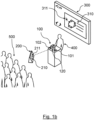
- a second display means 300 displaying a second scene 310 which may at least partially correspond to the first scene 210 displayed by the first display means 200.
- the second display means 200 i.e., the second scene 210, is visually perceptible by at least one participant person 500, e.g., an audience of a plurality of persons.
- the user person 400 may, due to the user person's orientation facing the first display means 200, not see the second display means 300. In other words: the user person 400 may stand with the user person's back to the second display means 300 and may therefore see in front the first display means 200 and preferably also the at least one participant person 500.
- a hardware apparatus such as a processor, a microprocessor, a programmable computer or an electronic circuit.
- a hardware apparatus such as a processor, a microprocessor, a programmable computer or an electronic circuit.
- embodiments of the invention can be implemented in hardware or in software.
- the implementation can be performed using a non-transitory storage medium such as a digital storage medium, for example a floppy disc, a DVD, a Blu-Ray, a CD, a ROM, a PROM, and EPROM, an EEPROM or a FLASH memory, having electronically readable control signals stored thereon, which cooperate (or are capable of cooperating) with a programmable computer system such that the respective method is performed. Therefore, the digital storage medium may be computer readable.
- embodiments of the invention can be implemented as a computer program (product) with a program code, the program code being operative for performing one of the methods when the computer program product runs on a computer.
- the program code may, for example, be stored on a machine-readable carrier.
- Other embodiments comprise the computer program for performing one of the methods described herein, stored on a machine-readable carrier.
- an embodiment of the present invention is, therefore, a computer program having a program code for performing one of the methods described herein, when the computer program runs on a computer.
- a programmable logic device for example, a field programmable gate array
- a field programmable gate array may cooperate with a microprocessor in order to perform one of the methods described herein.
- the methods are preferably performed by any hardware apparatus.
Landscapes
- Engineering & Computer Science (AREA)
- General Engineering & Computer Science (AREA)
- Theoretical Computer Science (AREA)
- Human Computer Interaction (AREA)
- Physics & Mathematics (AREA)
- General Physics & Mathematics (AREA)
- Position Input By Displaying (AREA)
Priority Applications (9)
| Application Number | Priority Date | Filing Date | Title |
|---|---|---|---|
| EP23151420.9A EP4400955A1 (fr) | 2023-01-12 | 2023-01-12 | Procédé de commande d'interface utilisateur sans contact pour présentations |
| EP23153429.8A EP4400959A1 (fr) | 2023-01-12 | 2023-01-26 | Procédé de fonctionnement d'interface utilisateur sans contact basé sur un dispositif électronique |
| EP23153426.4A EP4400956A1 (fr) | 2023-01-12 | 2023-01-26 | Procédé de fourniture d'interface utilisateur sans contact basé sur un boîtier de dispositif électronique |
| PCT/EP2024/050252 WO2024149691A1 (fr) | 2023-01-12 | 2024-01-08 | Procédé de commande d'interface utilisateur sans contact pour présentations |
| EP24701777.5A EP4649374A1 (fr) | 2023-01-12 | 2024-01-08 | Procédé de commande d'interface utilisateur sans contact pour présentations |
| EP24702225.4A EP4649378A1 (fr) | 2023-01-12 | 2024-01-08 | Procédé de fonctionnement d'interface utilisateur sans contact basé sur un dispositif électronique |
| PCT/EP2024/050257 WO2024149695A1 (fr) | 2023-01-12 | 2024-01-08 | Procédé de fonctionnement d'interface utilisateur sans contact basé sur un dispositif électronique |
| EP24701779.1A EP4649384A1 (fr) | 2023-01-12 | 2024-01-08 | Procédé de fourniture d'interface utilisateur sans contact basé sur un boîtier de dispositif électronique |
| PCT/EP2024/050254 WO2024149693A1 (fr) | 2023-01-12 | 2024-01-08 | Procédé de fourniture d'interface utilisateur sans contact basé sur un boîtier de dispositif électronique |
Applications Claiming Priority (1)
| Application Number | Priority Date | Filing Date | Title |
|---|---|---|---|
| EP23151420.9A EP4400955A1 (fr) | 2023-01-12 | 2023-01-12 | Procédé de commande d'interface utilisateur sans contact pour présentations |
Publications (1)
| Publication Number | Publication Date |
|---|---|
| EP4400955A1 true EP4400955A1 (fr) | 2024-07-17 |
Family
ID=84943836
Family Applications (2)
| Application Number | Title | Priority Date | Filing Date |
|---|---|---|---|
| EP23151420.9A Withdrawn EP4400955A1 (fr) | 2023-01-12 | 2023-01-12 | Procédé de commande d'interface utilisateur sans contact pour présentations |
| EP24701777.5A Pending EP4649374A1 (fr) | 2023-01-12 | 2024-01-08 | Procédé de commande d'interface utilisateur sans contact pour présentations |
Family Applications After (1)
| Application Number | Title | Priority Date | Filing Date |
|---|---|---|---|
| EP24701777.5A Pending EP4649374A1 (fr) | 2023-01-12 | 2024-01-08 | Procédé de commande d'interface utilisateur sans contact pour présentations |
Country Status (2)
| Country | Link |
|---|---|
| EP (2) | EP4400955A1 (fr) |
| WO (1) | WO2024149691A1 (fr) |
Citations (6)
| Publication number | Priority date | Publication date | Assignee | Title |
|---|---|---|---|---|
| US20070211023A1 (en) * | 2006-03-13 | 2007-09-13 | Navisense. Llc | Virtual user interface method and system thereof |
| US20120081391A1 (en) * | 2010-10-05 | 2012-04-05 | Kar-Han Tan | Methods and systems for enhancing presentations |
| US20140104168A1 (en) * | 2012-10-12 | 2014-04-17 | Microsoft Corporation | Touchless input |
| WO2016130860A2 (fr) * | 2015-02-13 | 2016-08-18 | Leap Motion, Inc. | Systèmes et procédés de création d'une expérience de capture réaliste dans des environnements de réalité virtuelle/réalité augmentée |
| US20180107441A1 (en) * | 2016-10-16 | 2018-04-19 | Dell Products, L.P. | Controlling Multiple Shared Displays in an Electronic Collaboration Setting |
| US20180364853A1 (en) * | 2017-06-15 | 2018-12-20 | Microsoft Technology Licensing, Llc | Hover-based user-interactions with virtual objects within immersive environments |
Family Cites Families (1)
| Publication number | Priority date | Publication date | Assignee | Title |
|---|---|---|---|---|
| JP4318056B1 (ja) * | 2008-06-03 | 2009-08-19 | 島根県 | 画像認識装置および操作判定方法 |
-
2023
- 2023-01-12 EP EP23151420.9A patent/EP4400955A1/fr not_active Withdrawn
-
2024
- 2024-01-08 WO PCT/EP2024/050252 patent/WO2024149691A1/fr not_active Ceased
- 2024-01-08 EP EP24701777.5A patent/EP4649374A1/fr active Pending
Patent Citations (6)
| Publication number | Priority date | Publication date | Assignee | Title |
|---|---|---|---|---|
| US20070211023A1 (en) * | 2006-03-13 | 2007-09-13 | Navisense. Llc | Virtual user interface method and system thereof |
| US20120081391A1 (en) * | 2010-10-05 | 2012-04-05 | Kar-Han Tan | Methods and systems for enhancing presentations |
| US20140104168A1 (en) * | 2012-10-12 | 2014-04-17 | Microsoft Corporation | Touchless input |
| WO2016130860A2 (fr) * | 2015-02-13 | 2016-08-18 | Leap Motion, Inc. | Systèmes et procédés de création d'une expérience de capture réaliste dans des environnements de réalité virtuelle/réalité augmentée |
| US20180107441A1 (en) * | 2016-10-16 | 2018-04-19 | Dell Products, L.P. | Controlling Multiple Shared Displays in an Electronic Collaboration Setting |
| US20180364853A1 (en) * | 2017-06-15 | 2018-12-20 | Microsoft Technology Licensing, Llc | Hover-based user-interactions with virtual objects within immersive environments |
Also Published As
| Publication number | Publication date |
|---|---|
| EP4649374A1 (fr) | 2025-11-19 |
| WO2024149691A1 (fr) | 2024-07-18 |
Similar Documents
| Publication | Publication Date | Title |
|---|---|---|
| US11470377B2 (en) | Display apparatus and remote operation control apparatus | |
| CN101874234B (zh) | 用户接口装置、用户接口方法、以及记录媒体 | |
| US10936077B2 (en) | User-interactive gesture and motion detection apparatus, method and system, for tracking one or more users in a presentation | |
| US9152226B2 (en) | Input method designed for augmented reality goggles | |
| CN103268153B (zh) | 演示环境下基于计算机视觉的人机交互系统及交互方法 | |
| US20130154913A1 (en) | Systems and methods for a gaze and gesture interface | |
| US20150215351A1 (en) | Control of enhanced communication between remote participants using augmented and virtual reality | |
| US20130135199A1 (en) | System and method for user interaction with projected content | |
| CN120803316A (zh) | 用于与三维环境中的窗口控件交互的设备、方法和图形用户界面 | |
| JPWO2014208168A1 (ja) | 情報処理装置、制御方法、プログラム、および記憶媒体 | |
| JP2017004457A (ja) | 仮想現実表示システム、仮想現実表示方法及びコンピュータプログラム | |
| JP2018005663A (ja) | 情報処理装置、表示システム、プログラム | |
| JP2022160533A (ja) | 表示装置 | |
| JP2017182109A (ja) | 表示システム、情報処理装置、プロジェクター及び情報処理方法 | |
| EP4400955A1 (fr) | Procédé de commande d'interface utilisateur sans contact pour présentations | |
| EP4400942A1 (fr) | Procédé de commande d'interface utilisateur sans contact et système, programme informatique et support lisible par ordinateur correspondants | |
| EP4400944A1 (fr) | Procédé de commande d'interface utilisateur sans contact basé sur un dispositif mobile et système, programme informatique et support lisible par ordinateur correspondants | |
| CN118349138A (zh) | 人机交互方法、装置、设备和介质 | |
| EP4649377A1 (fr) | Procédé de commande d'interface utilisateur sans contact basé sur un dispositif portatif | |
| US20240402984A1 (en) | Devices, methods, and graphical user interfaces for managing audio sources | |
| Spassova | Interactive ubiquitous displays based on steerable projection | |
| WO2024254060A1 (fr) | Dispositifs, procédés et interfaces utilisateur graphiques pour gérer des sources audio | |
| TW202610307A (zh) | 區域適應性視訊產生技術 | |
| JP2015187813A (ja) | プレゼンテーション管理装置およびプレゼンテーション管理プログラム | |
| JP2009140314A (ja) | 表示装置 |
Legal Events
| Date | Code | Title | Description |
|---|---|---|---|
| PUAI | Public reference made under article 153(3) epc to a published international application that has entered the european phase |
Free format text: ORIGINAL CODE: 0009012 |
|
| STAA | Information on the status of an ep patent application or granted ep patent |
Free format text: STATUS: THE APPLICATION HAS BEEN PUBLISHED |
|
| AK | Designated contracting states |
Kind code of ref document: A1 Designated state(s): AL AT BE BG CH CY CZ DE DK EE ES FI FR GB GR HR HU IE IS IT LI LT LU LV MC ME MK MT NL NO PL PT RO RS SE SI SK SM TR |
|
| STAA | Information on the status of an ep patent application or granted ep patent |
Free format text: STATUS: THE APPLICATION IS DEEMED TO BE WITHDRAWN |
|
| 18D | Application deemed to be withdrawn |
Effective date: 20250118 |