EP4415372B1 - Systeme und verfahren zur episodenverfolgung in einer interaktiven medienumgebung - Google Patents
Systeme und verfahren zur episodenverfolgung in einer interaktiven medienumgebung Download PDFInfo
- Publication number
- EP4415372B1 EP4415372B1 EP24185538.6A EP24185538A EP4415372B1 EP 4415372 B1 EP4415372 B1 EP 4415372B1 EP 24185538 A EP24185538 A EP 24185538A EP 4415372 B1 EP4415372 B1 EP 4415372B1
- Authority
- EP
- European Patent Office
- Prior art keywords
- user
- media
- series
- content
- progress
- Prior art date
- Legal status (The legal status is an assumption and is not a legal conclusion. Google has not performed a legal analysis and makes no representation as to the accuracy of the status listed.)
- Active
Links
Images










Classifications
-
- H—ELECTRICITY
- H04—ELECTRIC COMMUNICATION TECHNIQUE
- H04N—PICTORIAL COMMUNICATION, e.g. TELEVISION
- H04N7/00—Television systems
- H04N7/16—Analogue secrecy systems; Analogue subscription systems
-
- H—ELECTRICITY
- H04—ELECTRIC COMMUNICATION TECHNIQUE
- H04N—PICTORIAL COMMUNICATION, e.g. TELEVISION
- H04N21/00—Selective content distribution, e.g. interactive television or video on demand [VOD]
- H04N21/20—Servers specifically adapted for the distribution of content, e.g. VOD servers; Operations thereof
- H04N21/25—Management operations performed by the server for facilitating the content distribution or administrating data related to end-users or client devices, e.g. end-user or client device authentication, learning user preferences for recommending movies
- H04N21/251—Learning process for intelligent management, e.g. learning user preferences for recommending movies
- H04N21/252—Processing of multiple end-users' preferences to derive collaborative data
-
- H—ELECTRICITY
- H04—ELECTRIC COMMUNICATION TECHNIQUE
- H04N—PICTORIAL COMMUNICATION, e.g. TELEVISION
- H04N21/00—Selective content distribution, e.g. interactive television or video on demand [VOD]
- H04N21/40—Client devices specifically adapted for the reception of or interaction with content, e.g. set-top-box [STB]; Operations thereof
- H04N21/41—Structure of client; Structure of client peripherals
- H04N21/422—Input-only peripherals, i.e. input devices connected to specially adapted client devices, e.g. global positioning system [GPS]
- H04N21/42204—User interfaces specially adapted for controlling a client device through a remote control device; Remote control devices therefor
- H04N21/42206—User interfaces specially adapted for controlling a client device through a remote control device; Remote control devices therefor characterized by hardware details
-
- H—ELECTRICITY
- H04—ELECTRIC COMMUNICATION TECHNIQUE
- H04N—PICTORIAL COMMUNICATION, e.g. TELEVISION
- H04N21/00—Selective content distribution, e.g. interactive television or video on demand [VOD]
- H04N21/40—Client devices specifically adapted for the reception of or interaction with content, e.g. set-top-box [STB]; Operations thereof
- H04N21/45—Management operations performed by the client for facilitating the reception of or the interaction with the content or administrating data related to the end-user or to the client device itself, e.g. learning user preferences for recommending movies, resolving scheduling conflicts
- H04N21/458—Scheduling content for creating a personalised stream, e.g. by combining a locally stored advertisement with an incoming stream; Updating operations, e.g. for OS modules ; time-related management operations
-
- H—ELECTRICITY
- H04—ELECTRIC COMMUNICATION TECHNIQUE
- H04N—PICTORIAL COMMUNICATION, e.g. TELEVISION
- H04N21/00—Selective content distribution, e.g. interactive television or video on demand [VOD]
- H04N21/40—Client devices specifically adapted for the reception of or interaction with content, e.g. set-top-box [STB]; Operations thereof
- H04N21/45—Management operations performed by the client for facilitating the reception of or the interaction with the content or administrating data related to the end-user or to the client device itself, e.g. learning user preferences for recommending movies, resolving scheduling conflicts
- H04N21/466—Learning process for intelligent management, e.g. learning user preferences for recommending movies
-
- H—ELECTRICITY
- H04—ELECTRIC COMMUNICATION TECHNIQUE
- H04N—PICTORIAL COMMUNICATION, e.g. TELEVISION
- H04N21/00—Selective content distribution, e.g. interactive television or video on demand [VOD]
- H04N21/40—Client devices specifically adapted for the reception of or interaction with content, e.g. set-top-box [STB]; Operations thereof
- H04N21/45—Management operations performed by the client for facilitating the reception of or the interaction with the content or administrating data related to the end-user or to the client device itself, e.g. learning user preferences for recommending movies, resolving scheduling conflicts
- H04N21/466—Learning process for intelligent management, e.g. learning user preferences for recommending movies
- H04N21/4667—Processing of monitored end-user data, e.g. trend analysis based on the log file of viewer selections
-
- H—ELECTRICITY
- H04—ELECTRIC COMMUNICATION TECHNIQUE
- H04N—PICTORIAL COMMUNICATION, e.g. TELEVISION
- H04N21/00—Selective content distribution, e.g. interactive television or video on demand [VOD]
- H04N21/40—Client devices specifically adapted for the reception of or interaction with content, e.g. set-top-box [STB]; Operations thereof
- H04N21/47—End-user applications
- H04N21/475—End-user interface for inputting end-user data, e.g. personal identification number [PIN], preference data
- H04N21/4751—End-user interface for inputting end-user data, e.g. personal identification number [PIN], preference data for defining user accounts, e.g. accounts for children
-
- H—ELECTRICITY
- H04—ELECTRIC COMMUNICATION TECHNIQUE
- H04N—PICTORIAL COMMUNICATION, e.g. TELEVISION
- H04N21/00—Selective content distribution, e.g. interactive television or video on demand [VOD]
- H04N21/40—Client devices specifically adapted for the reception of or interaction with content, e.g. set-top-box [STB]; Operations thereof
- H04N21/47—End-user applications
- H04N21/482—End-user interface for programme selection
- H04N21/4826—End-user interface for programme selection using recommendation lists, e.g. of programmes or channels sorted out according to their score
-
- H—ELECTRICITY
- H04—ELECTRIC COMMUNICATION TECHNIQUE
- H04N—PICTORIAL COMMUNICATION, e.g. TELEVISION
- H04N21/00—Selective content distribution, e.g. interactive television or video on demand [VOD]
- H04N21/40—Client devices specifically adapted for the reception of or interaction with content, e.g. set-top-box [STB]; Operations thereof
- H04N21/45—Management operations performed by the client for facilitating the reception of or the interaction with the content or administrating data related to the end-user or to the client device itself, e.g. learning user preferences for recommending movies, resolving scheduling conflicts
- H04N21/4508—Management of client data or end-user data
- H04N21/4532—Management of client data or end-user data involving end-user characteristics, e.g. viewer profile, preferences
-
- H—ELECTRICITY
- H04—ELECTRIC COMMUNICATION TECHNIQUE
- H04N—PICTORIAL COMMUNICATION, e.g. TELEVISION
- H04N21/00—Selective content distribution, e.g. interactive television or video on demand [VOD]
- H04N21/40—Client devices specifically adapted for the reception of or interaction with content, e.g. set-top-box [STB]; Operations thereof
- H04N21/45—Management operations performed by the client for facilitating the reception of or the interaction with the content or administrating data related to the end-user or to the client device itself, e.g. learning user preferences for recommending movies, resolving scheduling conflicts
- H04N21/462—Content or additional data management e.g. creating a master electronic programme guide from data received from the Internet and a Head-end or controlling the complexity of a video stream by scaling the resolution or bit-rate based on the client capabilities
- H04N21/4622—Retrieving content or additional data from different sources, e.g. from a broadcast channel and the Internet
-
- H—ELECTRICITY
- H04—ELECTRIC COMMUNICATION TECHNIQUE
- H04N—PICTORIAL COMMUNICATION, e.g. TELEVISION
- H04N21/00—Selective content distribution, e.g. interactive television or video on demand [VOD]
- H04N21/40—Client devices specifically adapted for the reception of or interaction with content, e.g. set-top-box [STB]; Operations thereof
- H04N21/47—End-user applications
- H04N21/488—Data services, e.g. news ticker
- H04N21/4884—Data services, e.g. news ticker for displaying subtitles
Definitions
- This invention relates to interactive media environments, and more particularly, to interactive media environments that monitor a user's viewing progress.
- VOD video-on-demand
- a user may be presented with selected media content on-request and at virtually any time specified by the user.
- VOD services are especially beneficial for users who are unable to view media content when the content is broadcast or otherwise made available to the user equipment.
- a user that subscribes to a VOD service may request the missed content to be delivered or presented at a later time when the user is ready to view or receive the content.
- DVR digital video recording
- a user may program an interactive media application to automatically record a show (or series of shows) onto a storage medium or recording device.
- DVR services like VOD services, allow a user to be presented with media content at times other than the times when the media content was originally broadcast or made available to the user equipment.
- Known interactive media environments through the use of DVR, VOD, and other similar services, allow a user to become disconnected with the rigid broadcast schedule of media content. Users may then watch the media content at the user's own pace.
- Some of this media content may be episodic content.
- Episodic content typically is self-contained within each episode and does not include a common storyline with other episodes of the media content.
- episodes of the series "Seinfeld" are typically episodic. Viewers may watch one episode without watching all of the previous episodes in the series to understand the story.
- other media content may be serial in nature.
- Serial programming is any programming containing a temporal component, such as a recommended order of viewing. Serial programming may share themes and/or plot sequences with other episodes in the series.
- Known interactive media environments do not track and report a user's progress through a series of related programming, such as a broadcast television series or a set of movie sequels.
- Known interactive media environments also do not filter other media content (e.g., web, news, and advertising content) that may be presented on the user equipment so that this other content is consistent with the user's media viewing progress. For example, a user, who is watching a particular episode of a certain television series, may not wish to see spoilers or other irrelevant media content related to unwatched shows in a series of related programs.
- the interactive media monitoring application monitors a user's viewing progress of user-selected series of programs or media.
- the interactive media monitoring application may create and maintain a user media profile that tracks a user's viewing progress as the user advances through a series of related programming or a collection of media content.
- the interactive media monitoring application may also access a set of replacement media content for substitution with media content about to be presented on the user equipment. If the media monitoring application determines that content about to be presented on the user equipment is inconsistent with the user's media profile, the media monitoring application may remove or replace the inconsistent media content.
- Interactive media guidance applications may take various forms depending on the media for which they provide guidance.
- One typical type of media guidance application is an interactive television program guide.
- Interactive television program guides are well-known guidance applications that, among other things, allow users to navigate among and locate television programming viewing choices and, in some systems, digital music.
- the television programming (and music programming) may be provided via traditional broadcast. cable, satellite, the Internet, or other delivery schemes.
- the programming may be provided on a subscription basis (sometimes referred to as premium programming), as pay-per-view programs, or on-demand such as in video-on-demand (VOD) systems.
- VOD video-on-demand
- Non-television-centric platforms i.e., platforms that distribute media with equipment not part of the user's broadcast; cable or satellite television-delivery network
- video clips which may include television programs
- full motion videos which may include television programs
- images music files
- media guidance is also necessary on modern non-television-centric platforms
- media guidance applications may be provided as on-line applications (i.e., provided on a web-site), or as stand-alone applications or clients on hand-held computers, personal digital assistants (PDAs) or cellular telephones.
- PDAs personal digital assistants
- user equipment may store data that is not necessarily used to generate the interactive television displays (e.g., storing advertisements associated with a particular television broadcaster that may or may not be displayed depending on, for example, the outcome of negotiations with the television broadcaster). Any other suitable approach or combination of approaches may be used to generate and display interactive overlays for the user.
- User equipment such as user television equipment 110, user computer equipment 112, and user equipment located on home network 113 may access the on-line interactive media guidance application and server 130 using similar arrangements.
- User television equipment 110 may access the on-line interactive media guidance application and server 130 using communications path 136 or using path 116, distribution facility 104, and path 134.
- User computer equipment 112 may access the on-line interactive media guidance application and server 130 using communications path 138 or using path 118, distribution facility 104, and path 134.
- User equipment located on home network 113 may access the on-line media guidance application and server 130 using communications path 139 or using path 119, distribution facility 104, and path 134.
- Paths 136, 138, and 139 may be any suitable paths such as wired paths, cable paths, fiber-optic paths, wireless paths, satellite paths, or a combination of such paths.
- An interactive media monitoring application implemented at least partially on user equipment 108, user television equipment 110, user computer equipment 112, distribution facility 104, or another device of media system 100 may use program schedule data and other interactive media application data to monitor a user's viewing progress of media content on the user equipment.
- the user's viewing progress may be tracked and recorded in user media profiles, which may be stored locally on the user equipment or on a network device (e.g., server 130 and/or server 140) within media system 100.
- the media monitoring application may also filter media content and other information (e.g., web or Internet data) that is inconsistent with the user's viewing progress. For example, a spoiler advertisement relating to an unwatched program may be replaced with an advertisement relating to an already watched program.
- an interactive application such as a home shopping service may be supported by a service provider such as service provider 142 that has sales representatives, order fulfillment facilities, account maintenance facilities, and other equipment for supporting interactive home shopping features.
- a home shopping application that is implemented using the user equipment may be used to access the service provider to provide such features to the user.
- the user equipment may access service provider 142 via distribution facility 104 and communications path 144 or via communications network 126 and communications path 146.
- Communications paths such as paths 144 and 146 may be any suitable paths such as wired paths, cable paths, fiber-optic paths, satellite paths, or a combination of such paths.
- a home banking application may be supported using personnel at facilities such as service provider 142.
- An interactive home banking application that is implemented using the user equipment may access the home banking service via distribution facility 104 and communications path 144 or via communications network 126 and communications path 146.
- Interactive television program guide applications home banking applications, home shopping applications, network-based video recorder and personal video recorder applications, video-on-demand applications, gaming applications, communications applications, and navigational applications are only a few illustrative examples of the types of interactive media guidance and other applications that may be supported by system 100.
- Other suitable interactive applications that may be supported include news services, web browsing and other Internet services, and interactive wagering services (e.g., for wagering on horse races, sporting events, and the like).
- Interactive television overlays that are displayed by these applications may also be customized in accordance with the present invention.
- FIGS. 2-6 show illustrative arrangements for user equipment.
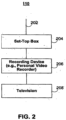
- An illustrative set-top box-based arrangement for user equipment 110 is shown in FIG. 2 .
- User television equipment 110 may be stand-alone or a part of home network 113 ( FIG. 1 ).
- Input/output 202 may be connected to communications paths such as paths 116 and 136 ( FIG. 1 ). Input/output functions may be provided by one or more wires or communications paths, but are shown as a single path in FIG. 2 to avoid overcomplicating the drawing.
- Television programming, program guide data, and any other suitable interactive media guidance application data or other data may be received using input/output 202. Commands and requests and other data generated as a result of user interactions with the interactive media guidance application may also be transmitted over input/output 202.
- Set-top box 204 may be configured to output media, such as television programs, in a preferred format. Because television programs may be received in a variety of formats, set-top box 204 may contain scaler circuitry for upconverting and downconverting television programs into the preferred output format used by set-top box 204. For example, set-top box 204 may be configured to output television programs in 720p. In this example, the scaler circuitry may upconvert standard-definition television programs having 480 lines of vertical resolution to 720p format and downconvert certain high-definition television programs having 1080 lines of vertical resolution to 720p format.
- Set-top box 204 may also have communications circuitry such as a cable modem, an integrated services digital network (ISDN) modem, a digital subscriber line (DSL) modem, a telephone modem, or a wireless modem for communications with other equipment. Such communications may involve the Internet or any other suitable communications networks or paths. If desired, the components of set-top box 204 may be integrated into other user equipment (e.g., a television or videocassette recorder).
- ISDN integrated services digital network
- DSL digital subscriber line
- Recording device 302 may contain at least one analog tuner for tuning to a desired analog television channel e.g., to display video for a given television channel to a user, to receive program guide data and other data) and multiple other tuners may also be provided. Recording device 302 may also contain digital decoding circuitry for receiving digital television programming, music programming, program guide data, and other data on one or more digital channels Recording device 302 may also contain circuitry for receiving high-definition television channels. If desired, recording device 302 may contain circuitry for handling analog, digital, and high-definition channels. Recording device 302 also contains a processor (e.g., a microcontroller or microprocessor or the like) that is used to execute software applications.
- a processor e.g., a microcontroller or microprocessor or the like
- Recording device 302 may have IR communications circuitry or other suitable communications circuitry for communicating with a remote control. Recording device 302 may also have dedicated buttons and a front-panel display. The front-panel display may, for example, be used to display the current channel to which the recording device is tuned.
- Recording device 302 may also have communications circuitry such as a cable modem, an ISDN modem, a DSL modem, a telephone modem, or a wireless modem for communications with other equipment. Such communications may involve the Internet or other suitable communications networks or paths.
- recording device 302 may include a satellite receiver or other equipment that has wireless communications circuitry for receiving satellite signals.
- Recording device 302 of FIG. 3 or recording device 206 of FIG. 2 may record new video while previously recorded video is being played back on television 304 or 208. This allows users to press a pause button during normal television viewing. When the pause button is pressed, the current television program is stored on the hard disk of digital video recorder 302. When the user presses play, the recorded video may be played back. This arrangement allows the user to seamlessly pause and resume television viewing. Recording devices 302 and 206 may also be used to allow a user to watch a previously-recorded program while simultaneously recording a new program.
- the set-top box arrangement of FIG. 2 and the personal video recorder with a built-in set-top box arrangement of FIG. 3 are merely illustrative. Other arrangements may be used if desired,
- user television equipment may be based on a WebTV box, a personal computer television (PC/TV), or any other suitable television equipment arrangement.
- PC/TV personal computer television
- the functions of components such as set-top box 204, recording device 302, a WebTV box, or PC/TV or the like may be integrated into a television or personal computer cr other suitable device.
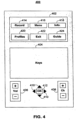
- FIG. 4 An illustrative remote control 400 for operating user television equipment 110 ( FIG. 1 ) or suitable user computer equipment 112 is shown in FIG. 4 .
- Remote control 400 is only illustrative and any other suitable user input interface may be used to operate user equipment (e.g., a mouse, trackball, keypad, keyboard, touch screen, voice recognition system, etc.).
- Remote control 400 may have function keys 402 and other keys 404 such as keypad keys, power on/off keys, pause, stop, fast-forward and reverse keys.
- Volume up and down keys 406 may be used for adjusting the volume of the audio portion of a video.
- Channel up and down keys 408 may be used to change television channels and to access content on virtual channels.
- Cursor keys 410 may be used to navigate on-screen menus.
- cursor keys 410 may be used to position an on-screen cursor, indicator, or highlight (sometimes all generically referred to herein as a highlight or highlight region) to indicate interest in a particular option or other item on a display screen that is displayed by the interactive television application.
- an on-screen cursor, indicator, or highlight sometimes all generically referred to herein as a highlight or highlight region
- OK key 412 (sometimes called a select or enter key) may be used to select on-screen options that the user has highlighted.
- Keys 402 may include RECORD key 414 for initiatinc recordings.
- MENU button 416 may be used to direct an interactive media guidance application to display a menu on the user's display screen (e.g., on television 208 or 304 or on a suitable monitor or computer display).
- INFO button 418 may be used to direct an interactive media guidance application to display an information display screen. For example, when a user presses INFO key 418 while video for a given television channel is displayed for the user, an interactive television program guide may display a FLIP/BROWSE overlay including program schedule information for the current program on the given television channel on top of the video.
- the user pressing INFO button 418 may cause an interactive television program guide to provide additional program information associated with that program listing (e.g., a program description, actor information, schedule information, etc.).
- PROFILES button 420 may be used to quickly access the current user's media profile or viewing progress display screen 1200 of FIG. 12 (described below). In some embodiments, PROFILES button 420 may be used to access a list of all media profiles stored on the user equipment. In other embodiments, PROFILES button 420 may access the interactive media monitoring application setup, log-in, or configuration display screens.
- EXIT button 422 may be used to exit the interactive media guidance application or to exit a portion of the interactive media guidance application (e.g., to cause an interactive television program guide to remove a FLIP, BROWSE, or other interactive television overlay from the display screen).
- GUIDE button 424 may be used to invoke an interactive television program guide (e.g., a program guide menu screen, program listings screen, or other program guide screen).
- a music button may be used to access music with the interactive media guidance application.
- An edit button may be used to edit stored content (e.g., to remove commercials, remove portions of a video, etc.).
- Alphanumeric buttons may be used to enter alphanumeric characters.
- a last or back button may be used to browse backward in the interactive media guidance application (e.g., to return to a previous channel, web page, or other display screen).
- Video recorder function buttons such as a play button, pause button, stop button, rewind button, fast-forward button, ard record button, may be used to control video recorder functions (local or network-based) in system 100 ( FIG. 1 ).
- a help key may be used to invoke help functions such as context-sensitive on-screen help functions.
- media guidance application data e.g., television program guide data
- video-on-demand content e.g., video recordings played back from a network-based video recorder
- other data may be received from paths 118 and 138 ( FIG. 1 ) using input/output 508.
- User commands and other information generated as a result of user interactions with the interactive media guidance application and system 100 ( FIG. 1 ) may also be transmitted over input/output 508.
- Video recordings may be made in response to user commands that are entered at user equipment 108 or user equipment located on home network 113 ( FIG. 1 ).
- the interactive media guidance application may be used to record video locally on the user equipment in response to the user commands.
- the interactive media guidance application may be used to record video or to make virtual recordings (described below) on network equipment such as server 130, server 140, or equipment at service provider 142 in response to the user commands.
- the user commands may be provided to the network equipment over the communications paths shown in FIG. 1 .
- the personal video recorder arrangement and the network-based video recorder arrangement can support functions such as fast-forward, rewind, pause, play, and record.
- a user may control the control circuitry 602 using user input interface 614.
- User input interface 614 may be any suitable user interface, such as a mouse, trackball, keypad, keyboard, touch screen, touch pad, voice recognition interface, or a remote control.
- some media content contains a temporal component, such as a recommended order of viewing.
- a television program series, a set of movie sequels, and a sporting event series are typically intended to be watched serially, i.e., one episode, show, or game after another.
- certain fact patterns, characters, and themes may be out of place in the series timeline.
- Some episodes in the series may be encapsulated single episodes that may be watched out of order, while other episodes may rely on plot details and other information from one or more previous episodes.
- some episodes may be arching episodes that contain plot information relevant to the entire series. For example, the first episode in a program series may introduce key characters and over-arching themes. A user should watch these arching episodes before watching any other episodes in the series that rely on, or make reference to, the arching episodes.
- the user may inadvertently watch other media content that contains spoilers or other undesirable or irrelevant content about programs the user has not yet seen, but have already been broadcast or otherwise made available to the user equipment.
- Spoilers may include any information that can reveal (and thereby "spoil") a plot point in a movie, program, show, etc that the user has not yet seen.
- the interactive media monitoring application may create and maintain user media profiles that track the user's progress through user-selected series of programming, episode by episode, show by show, or game by game. When the user has completed viewing an episode in the series, the interactive media monitoring application may update the appropriate entry in the user's media profile to reflect the completion of the episode.
- a user is associated with one media profile containing all the user-selected media content to be monitored. In other embodiments, a user is associated with a separate media profile for each series of related programs to be monitored.
- media profiles are updated even when the user is accessing user equipment other then the user's primary user equipment (e.g., the user equipment residing at the user's home or office). Users may also access their media profile at public user equipment, such as user equipment kiosks, or at another location, such as a friend's user equipment.
- a user may record Game 2 of the World Series and not have time to watch the game. If the World Series is added to the user's media profile, the user may access his or her media profile from any suitable device with network access.
- the interactive media monitoring application may then filter or replace any content presented on the user device related to Game 2 of the World Series. For example, the score of the game may be removed or replaced from Internet page headlines that are accessed from the user's office computer or PDA. After the user watches the game, the interactive media monitoring application may update the user's profile to reflect the user's new viewing progress.
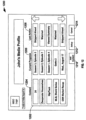
- FIGS. 7A and 7B show illustrative user profile record 700 and media profile record 710 in accordance with one embodiment of the invention.
- User profile record 700 includes user column 702 and profile column 704.
- User column 702 may include the usernames (or other unique identifier) of all or some of the users accessing the local user equipment.
- Profile column 704 may contain pointers to the media profile or profiles associated with the user in user column 702.
- users may be associated with a single profile for all media content.
- users may be associated separate media profiles for each series to be monitored.
- users may be associated with a local media profile and a roaming media profile. A user's roaming media profile may be available by any user equipment in the media system.
- the interactive media monitorinc application may read user profile record 700 after accessing the user equipment, the media system, or the monitoring application.
- the interactive media monitoring application may then follow the pointers contained in profile column 704 to access the profiles associated with the current user.
- Media profiles may be stored locally at the user equipment or at any convenient location within media system 100 ( FIG. 1 ).
- last action column 718 may contain the user's last monitored action, if appropriate.
- last action column 718 may include a macro corresponding to the user's most recent action in the series. Macros may include, for example, "SK" if the user skipped the last episode, "WA” if the user watched the last episode, "SC” if the user scheduled the last episode for viewing at a later day or time, and "BP” if the user delayed his or her viewing schedule by one or more episodes. Other macros may be included in last action column 718 as appropriate. Last monitoring actions are discussed in more detail below in regard to viewing progress display 1200 ( FIG. 12 ).
- Records 700 and 710 are exemplary. Other records containing more or less information may also be used, as desired. Records 700 and 710 may be stored in any convenient data structure and on any suitable storage or memory device. The storage format of data in records 700 and 710 may also be modified, if desired. Records 700 and 710 may be manipulated and maintained by the interactive media monitoring application, other applications resident on the user equipment, distribution facility 104 ( FIG. 1 ), or any other device in the media system.
- FIGS. 8A and 8B show illustrative media profile flags 800 and 810 in accordance with one embodiment of the invention.
- the interactive media monitoring application may remove or replace any media content that is determined to be inconsistent with the user's current viewing progress.
- Content substitutions may be based, in part, on metadata associated with the substitute content and/or the content to be substituted.
- Metadata may be used to describe programming and may include any information that may be associated with a program and/or that may describe a program, its content, or services related to a program. Further features of an illustrative system for delivering metadata-linked content is described in Moore et al. U.S. Patent Application Publication No. 20010047298 .
- the interactive media monitoring application may analyte content metadata in the form of profile flags associated with certain media content accessible by the user equipment. For example, advertisements, news segments, and web content may be associated with one or more media profile flags. These media profile flags may indicate that the media content is related to, or associated with, one or more program series identified in the flags. These flags may be stored in any suitable format. In the example of FIGS. 8A and 8B , media profile flags are defined using a mark-up language, such as XML. However, any suitable data structure may be used to store media profile flags or any other metadata associated with media content.
- Media profile flag 800 may be associated with advertisement 802 or any other content accessible by the user equipment.
- Advertisement 802 may include broadcast media content, recorded media content, or media content stored on data source 120 ( FIG. 1 ) or substitute data/content source 902 ( FIG. 9 ) described below.
- Media profile flag 800 is associated with tag 804, which may indicate the program or programs that relate to advertisement 802. In the example of FIG. 8A , tag 804 indicates that advertisement 802 relates to season 2, episode 4 of the broadcast series "Nip/Tuck.” Tag 804 may indicate that advertisement 802 is related to one or more programs by associating more than one profile flag with tag 804.
- tag 804 may indicate that advertisement 802 is also related to season 2, episode 1 of the broadcast series "Nip/Tuck" by including another profile flag in tag 804.
- Some programming such as programming with a strong temporal component, may be associated with numerous profile flags.
- an advertisement relating to season 2, episode 4 of the series "24" may be associated with profile flags for all the previous episodes in the season and all the episodes in the previous season. There is no limit to the number of profile flags that may be associated with media content.
- Tag 804 may also indicate the length of advertisement 802, the relevance level to the program identified by the profile flag, and any other suitable information.
- Media profile flag 810 of FIG. 8B may be associated with substitute content 812.
- the interactive media monitoring application may analyze media profile 810 to determine its candidacy for substitution with advertisement 802 ( FIG. 8A ).
- tag 814 may indicate that content 812 relates to season 2, episode 1 of the broadcast series "Nip/Tuck.”
- Tag 814 may also indicate the length of substitute content 812, the relevance level to the program identified by the profile flag, and any other related information.
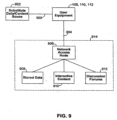
- FIG. 9 shows illustrative network resources 914 and substitute data/content source 902 accessible by user equipment 108, 110, and 112 in accordance with one embodiment of the invention.
- Communications paths 903 and 904 may be any suitable paths, including one or more of communications paths 114, 116, 118, 128, 136, and 138 of FIG. 1 .
- Network access node 906 may comprise any network access point, modem, or communications circuitry. Through network access node 906, the user equipment may connect to a variety of interactive forums. These interactive forums may include real-time forums (e.g., chat, instant message, or other similar forums).
- Network access node 906 may connect the user equipment with stored data 908, interactive content 910 (e.g., interactive games), and discussion forums 912.
- Discussion forums 912 may include web logs (blogs), chat rooms, newsgroups, electronic bulletin boards, or any other electronic forum capable of exchanging messages and/or content between a plurality of network users.
- Interactive content 910 and discussion forums 912 may access stored data 908, which may contain, for example, stored messages or postings, forum membership lists, user preferences, etc. These forums may be accessible through the public Internet or accessible only through a private or secured network.
- FIGS. 10-17 show illustrative interactive media mor.itoring application display screens.
- the display screens may be displayed to the user as part of an interactive media application accessed over a suitable communications link or the screens may be displayed locally on the user equipment currently being accessed by the user.
- FIGS. 10-17 are shown and described herein in the context of illustrative interactive media monitoring application display screens. Any other suitable pages or display screens may be used. Display screens of the interactive media monitoring application as shown in FIGS. 10-17 use commonly--used application selection objects such as hyperlinks, buttons, lists, dropdown boxes, and checkboxes.
- FIG. 10 shows illustrative log-in (or authentication) display screen 1000 that the interactive media monitoring application may display on the user equipment.
- users may always be required to log-in using log-in screen 1000.
- users may be required to log-in only if the interactive media monitoring application is in multi-user mode. If the interactive media monitoring application is setup for single-user mode, log-in screen 1000 may be bypassed (or authentication credentials of the user may be automatically supplied).
- the user may access screen 1000 by any suitable means including, for example, pressing PROFILES key 420 of remote control 400 ( FIG.
- the interactive media monitoring application may transmit the appropriate username and password to the user (e.g., by electronic mail, regular mail, text message, and/or telephone).
- Log-in screen 1000 includes an option (e.g., button 1036) for creating a new user account, as indicated by description 1031.
- the interactive media monitoring application may prompt the user to create a new username and password, which may be transmitted to the appropriate device of system 100 (e.g., distribution facility 104 and/or server 130).
- FIG. 11 shows illustrative user welcome summary display screen 1100 in accordance with one embodiment of the invention.
- a user upon logging into the interactive media monitoring application, a user may be presented with summary screen 1100.
- a user may also access summary screen 1100 via an interactive program guide or another interactive media application.
- Summary screen 1100 may list the programs or other media content that the user has missed since the user's last log-in to the interactive media monitoring application.
- the programs displayed in content column 1102 may correspond to programs the interactive media application is monitoring for the current user (i.e., programs, series, or other media content the user has included in the user's media profile to be monitored).
- the programs to be monitored are included in program column 712 of media profile record 710. In the example of FIG.
- content column 1102 contains three broadcast series and one broadcast sporting event.
- Source column 1104 lists the channel or source of the media content in content column 1102.
- the user may select one or more of actions 1106, 1108, and 1110 for each program listed in content column 1102 by highlighting the appropriate selection and selecting accept button 1112. For example, the user may schedule viewing of a missed episode for a later date and time by selecting schedule selection 1106. The scheduled program may then be automatically accessed and presented on the user equipment at the scheduled date and time. To skip the episode and advance the user's media profile as if the episode had been watched, the user may select skip selection 1108. A user may then be given options similar to actions 1106, 1108, and 1110 relating to subsequent media content related to the media content in content column 1102.
- the user's media profile may advance to the next episode in the series.
- the user may select summary selection 1110.
- the user may be presented with a text-only content summary, a text and graphics content summary, or a content summary containing text, graphics, and video.
- Several options may be presented to a user for watching a program or series of programs on a time-shifted basis depending on such factors as, for example, the type of program (e.g., whether the program is more of a serial program or more of an episodic program), how far the user's viewing progress is behind, etc.
- Exemplary options may include: (1) watch this program now; (2) watch this program before the next episode in the series (or at the next regularly schedule time for this program); (3) show the user a summary (video/highlights, text, or a combination of the two) of this episode (e.g., via tvguide.com, or TV Guide Spct) so that the user can keep up with the series even though the user does not wish to watch this entire episode; or (4) skip this episode.
- Other suitable viewing options may also be presented.
- the content summary may be at least partially derived from one or more data sources, such as tvguide.com and/or TV Guide Spot.
- TV Guide Spot which is available online and via an interactive channel accessible by the user equipment, features original entertainment programming designed to help viewers decide what to watch.
- TV Guide Spot also provides showcase segments on upcoming programming and events, "catch-up" segments that update viewers on plot developments of popular shows, and many other interactive features.
- closed captioning data is analyzed and used to create content summaries, After being presented with the content summary, the user may watch the full program, schedule the program for presentation on the user equipment at a later date and time, or skip the program and advance the user's media profile.
- setup button 1114 To configure settings for the interactive media monitoring application, the user may select setup button 1114. Upon selecting setup button 1114, the user may be linked to settings screen 1300 ( FIG. 13 ) described below. To setup an episode viewing reminder, such as the reminder of FIG. 14 (described below), the user may select reminders button 1116. To exit welcome summary screen 1100 without making any changes, the user may select cancel button 1118. To accept the selections made in summary screen 1100, the user may select accept button 1112.
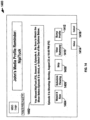
- FIG. 12 shows illustrative user media viewing progress screen 1200 in accordance with one embodiment of the invention.
- progress screen 1200 may be accessed via PROFILES button 420 of remote control 400 of FIG. 4 .
- progress screen 1200 is accessed via a link from another interactive media application, such as an interactive program guide.
- Media viewing progress screen 1200 displays a user's current viewing progress of user-selected media content included in the user's media profile.
- the programs included in media profile record 710 FIG. 7B
- Media content included in media content summary region 1202 may include any content capable cf being displayed by, presented to, or recorded by, the user equipment 110 of FIG. 1 .
- content included in media content summary region 1202 has a pre-defined viewing order, as with a traditional broadcast series and sporting event series, so that the interactive media monitoring application may track a user's progress through the series of related programs.
- Media content summary region 1202 may include content column 1204, progress column 1206, and last action column 1208.
- the name or title of the monitored media content may be displayed in content column 1204.
- the user's current viewing progress may be listed in progress column 1206.
- the season and episode number are tracked. In other embodiments, only the episode number is tracked. For example, in the illustrative display screen of FIG. 12 , the current user has watched through season 3, episode 3 of the series "24" on the FOX ® network. In some embodiments, this indicates that the user has watched episodes 1 through 3 of season 3 only. In other embodiments, this viewing progress indicates that the user has watched episodes 1 through 3 of season 3 and all the episodes in any previous season or seasons (e.g., seasons 1 and 2).
- the interactive media monitoring application may use information stored in the user's media profile to remove or replace any media content that is inconsistent with the user's current viewing progress. For example, an advertisement promoting season 3, episode 7 of the series "24" may be replaced with an advertisement promoting season 3, episode 4, which may be the user's next unwatched episode as indicated by the user's media profile.
- the user may change the current viewing progress in the user's media profile by selecting any progress indicator in progress column 1206. For example, a user may wish to advance or reset his or her viewing progress so that Game 3 of the MLB, World Series is reflected as watched. The user may wish to change the user's viewing progress if the user watched an episode in the series at a location not monitored by the interactive media monitoring application.
- the user may highlight the appropriate indicator in progress column 1206 and press an appropriate command (e.g., the left or right arrows on remote control 400 of FIG. 4 ) to change the progress indictor associated with the series.
- last action column 1208 the user's last viewing action associated with each entry in media content summary region 1202 is displayed in last action column 1208.
- actions in last action column 1208 may include "Skipped Ahead,” “Watched,” “Viewed Summary,” “In Progress,” “Scheduled,” or any other supported media action.
- last action column 1208 may also display the user's most recent viewing status. For example, if the user attempted to view the program, but stopped the program before the program completed, the "Interrupted" status may be displayed in last action column 1208 along with the time or position within the program where the was interrupted or stopped viewing the program. A link to start the program where the user left off may also be displayed in last action column 1208.
- the interactive media monitoring application may then automatically add certain content to the user's media profile. For example, the interactive media monitoring application may add a broadcast series to a user's media profile after more than one episode within the series has been watched by the user. As another example, when a user schedules a series recording via an interactive program guide or other interactive media application, the interactive media monitoring application may automatically add the program series to the user's media profile. Other criteria for automatically adding a program series to a user's media profile may also be used.
- Some content may be ineligible for inclusion in the user's media profile.
- the interactive media monitoring application may be unable to process broadcast programming without a temporal or series component (such as some feature movies and most websites).
- the user may be unable to select this content in a media listing presented to the user.
- the "Add to Media Profile" option is not associated with media content without a temporal component.
- FIG. 13 shows an illustrative setup screen for customizing the media monitoring application in accordance with one embodiment of the invention.
- the settings and categories of settings described in connection with FIG. 13 are merely for illustration and are not meant to limit the settings that may be provided in the present invention.
- the settings in global settings screen 1300 may be divided into profile settings and filter settings.
- Profile settings may include the profile type, user mode, reminder frequency, summary type, and any other profile setting.
- the user may select to use local, roaming, or no media profiles via profile type choice 1304. If a roaming profile is selected, the user's media profile is made available to other user equipment within the user's media system.
- the user may select "None" in action choice 1314.
- save button 1316 To save the settings as displayed in global settings screen 1300, the user may select save button 1316.
- cancel button 1318 To discard global settings screen 1300 without saving, the user may select cancel button 1318.
- a user who is searching for webpages using an external search engine, may be presented with custom search results.
- the custom search results may be tailored to the user's current progress in one or more programs being monitored by the interactive media monitoring application. For example, search results that link to content containing spoilers or other undesirable content relating to unwatched episodes may be removed from the user's search results display page.
- a user visiting an external discussion forum may only be presented with postings relating to media content that the user has already watched.
- the discussion forum may access data stored in the user's media profile to determine the user's current progress in one or more programs being monitored by the interactive media monitoring application and present content to the user accordingly.
- the user may be given the opportunity to choose whether to be presented with content relating to unwatched episodes in the user's media profile.
- media content may be accessed and displayed in preview panels 1604 or 1606 based on the user's viewing progress in that series. For example, if a user selects the program listing for "Nip/Tuck" from listing data area 1602, an advertisement for the user's next unwatched episode of "Nip/Tuck" may be presented to the user in preview panels 1604 or 1606.
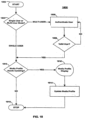
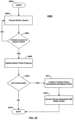
- the interactive media monitoring application may determine if filters are enabled. This setting may correspond to filter choice 1312 of FIG. 13 . If filters are enabled, the interactive media monitoring application may associate substitute, content or data source 902 ( FIG. 9 ) with the user's viewing environment. The interactive media monitoring application may compare profile flags associated with media content to be displayed on the user equipment with the user's media profile at step 1914. For example, media flags 800 and 810 Of FIGS. 8A and 8B may be compared with media profile record 71C of FIG. 7B . The interactive media monitoring application may then remove or replace media content associated with profile flags that are inconsistent with the user's media profile at step 1916.
Landscapes
- Engineering & Computer Science (AREA)
- Signal Processing (AREA)
- Multimedia (AREA)
- Databases & Information Systems (AREA)
- Human Computer Interaction (AREA)
- Child & Adolescent Psychology (AREA)
- Health & Medical Sciences (AREA)
- Software Systems (AREA)
- General Health & Medical Sciences (AREA)
- Computing Systems (AREA)
- Two-Way Televisions, Distribution Of Moving Picture Or The Like (AREA)
- Television Signal Processing For Recording (AREA)
- Signal Processing For Digital Recording And Reproducing (AREA)
- Indexing, Searching, Synchronizing, And The Amount Of Synchronization Travel Of Record Carriers (AREA)
- Inorganic Insulating Materials (AREA)
Claims (14)
- Verfahren zum Überwachen eines Betrachtungsfortschritts eines Benutzers einer Serie von verwandten Programmen auf einem Benutzergerät eines Mediensystems, wobei ein Roaming-Medienprofil an einer Stelle in dem Mediensystem gespeichert ist und durch ein beliebiges Benutzergerät in dem Mediensystem nach Authentifizierung verfügbar ist,
wobei das Roaming-Medienprofil den aktuellen Betrachtungsfortschritt des Benutzers durch eine Serie von verwandten Programmen umfasst, wobei das Roaming-Medienprofil Folgendes umfasst:einen Medienfortschrittsindikator, der eine Episodennummer einer Episode in der Serie verwandter Programme enthält, wobei die Episodennummer den aktuellen Betrachtungsfortschritt des Benutzers durch die Serie von verwandten Programmen angibt;einen Positionsindikator, der der verstrichenen Betrachtungszeit des Benutzers innerhalb der Episode zugeordnet ist; undeinen Indikator für eine letzte Aktion, der der letzten überwachten Aktion des Benutzers für die Serie zugeordnet ist, wobei der Indikator für eine letzte Aktion eines von Folgenden angibt: unterbrochene Episode, übersprungene Episode, angesehene Episode;wobei das Verfahren Folgendes umfasst:Bestimmen des Betrachtungsfortschritts des Benutzers durch die Serie;Aktualisieren des aktuellen Betrachtungsfortschritts des Benutzers in dem Roaming-Medienprofil, wobei das Aktualisieren des aktuellen Betrachtungsfortschritts des Benutzers in dem Roaming-Medienprofil Aktualisieren des Medienfortschrittsindikators, des Positionsindikators und des Indikators für eine letzte Aktion umfasst. - Verfahren nach Anspruch 1, ferner umfassend Ersetzen von Medieninhalt, der dem Benutzer darzustellen ist, der mit dem aktuellen Betrachtungsfortschritt des Benutzers in der Serie nicht übereinstimmt, durch Medieninhalt, der mit dem aktuellen Betrachtungsfortschritt des Benutzers übereinstimmt.
- Verfahren nach Anspruch 1, ferner umfassend Verbinden des Benutzers mit einer netzbasierten Gemeinschaft, die dem aktuellen Betrachtungsfortschritt des Benutzers in der Serie zugeordnet ist.
- Verfahren nach Anspruch 1, wobei ein Datensatz des Roaming-Medienprofils lokal auf dem Benutzergerät oder auf einer Netzwerkspeichervorrichtung gespeichert ist.
- Verfahren nach Anspruch 1, ferner umfassend Generieren einer Zusammenfassung des Programms innerhalb der Serie zur Anzeige für den Benutzer.
- Verfahren nach Anspruch 1, ferner umfassend Erstellen eines zweiten Medienprofils, das den aktuellen Betrachtungsfortschritt eines zweiten Benutzers in einer Serie von verwandten Programmen umfasst.
- Verfahren nach Anspruch 1, ferner umfassend Bestimmen, ob der aktuelle Betrachtungsfortschritt des Benutzers durch die Serie mit dem Fortschritt der Serie, die übertragen oder auf andere Weise dem Benutzergerät zur Verfügung gestellt wird, übereinstimmt; und, wenn der aktuelle Betrachtungsfortschritt des Benutzers der Serie mit dem Fortschritt übereinstimmt, Aktualisieren des Medienfortschrittsindikators und Anzeigen des Datums und/oder der Zeit, zu der die nächste Episode der Serie übertragen oder auf andere Weise dem Benutzergerät zur Verfügung gestellt wird.
- System zum Überwachen eines Betrachtungsfortschritts eines Benutzers einer Serie von verwandten Programmen auf einem Benutzergerät eines Mediensystems, wobei ein Roaming-Medienprofil an einer Stelle in dem Mediensystem gespeichert ist und durch ein beliebiges Benutzergerät in dem Mediensystem nach Authentifizierung verfügbar ist,
wobei das Roaming-Medienprofil den aktuellen Betrachtungsfortschritt des Benutzers durch eine Serie von verwandten Programmen umfasst, wobei das Roaming-Medienprofil Folgendes umfasst:einen Medienfortschrittsindikator, der eine Episodennummer einer Episode in der Serie verwandter Programme enthält, wobei die Episodennummer den aktuellen Betrachtungsfortschritt des Benutzers durch die Serie von verwandten Programmen angibt;einen Positionsindikator, der der verstrichenen Betrachtungszeit des Benutzers innerhalb der Episode zugeordnet ist; undeinen Indikator für eine letzte Aktion, der der letzten überwachten Aktion des Benutzers für die Serie zugeordnet ist, wobei der Indikator für eine letzte Aktion eines von Folgenden angibt: unterbrochene Episode, übersprungene Episode, angesehene Episode;wobei das System Folgendes umfasst:
Steuerschaltung zum Überwachen des Betrachtungsfortschritts eines Benutzers, wobei die Steuerschaltung zu Folgendem konfiguriert ist:Bestimmen des Betrachtungsfortschritts des Benutzers durch die Serie;Aktualisieren des aktuellen Betrachtungsfortschritts des Benutzers in dem Roaming-Medienprofil, wobei das Aktualisieren des aktuellen Betrachtungsfortschritts des Benutzers in dem Roaming-Medienprofil Aktualisieren des Medienfortschrittsindikators, des Positionsindikators und des Indikators für eine letzte Aktion umfasst. - System nach Anspruch 8, wobei die Steuerschaltung ferner dazu konfiguriert ist, Medieninhalt, der dem Benutzer darzustellen ist, der mit dem aktuellen Betrachtungsfortschritt des Benutzers in der Serie nicht übereinstimmt, durch Medieninhalt, der mit dem aktuellen Betrachtungsfortschritt des Benutzers übereinstimmt, zu ersetzen.
- System nach Anspruch 8, wobei die Steuerschaltung ferner dazu konfiguriert ist, den Benutzer mit einer netzbasierten Gemeinschaft, die dem aktuellen Betrachtungsfortschritt des Benutzers in der Serie zugeordnet ist, zu verbinden.
- System nach Anspruch 8, umfassend einen Speicher zum Speichern mindestens eines Roaming-Medienprofils, wobei sich der Speicher lokal auf dem Benutzergerät oder in einem Netzwerk befindet, sodass auf den Datensatz des Medienprofils durch eine Vielzahl von Benutzergeräten zugegriffen werden kann.
- System nach Anspruch 8, wobei die Steuerschaltung ferner dazu konfiguriert ist, eine Zusammenfassung des Programms innerhalb der Serie zur Anzeige für den Benutzer zu generieren.
- System nach Anspruch 8, wobei die Steuerschaltung ferner dazu konfiguriert ist, ein zweites Medienprofil zu erstellen, das den aktuellen Betrachtungsfortschritt eines zweiten Benutzers in einer Serie von verwandten Programmen umfasst.
- System nach Anspruch 8, wobei die Steuerschaltung ferner zu Folgendem konfiguriert ist:
Bestimmen, ob der aktuelle Betrachtungsfortschritt des Benutzers durch die Serie mit dem Fortschritt der Serie, die durch Übertragung oder auf andere Weise dem Benutzergerät zur Verfügung gestellt wird, übereinstimmt; und, wenn der aktuelle Betrachtungsfortschritt des Benutzers der Serie mit dem Fortschritt übereinstimmt, Aktualisieren des Medienfortschrittsindikators und Anzeigen des Datums und/oder der Zeit, zu der die nächste Episode der Serie übertragen oder auf andere Weise dem Benutzergerät zur Verfügung gestellt wird.
Applications Claiming Priority (9)
| Application Number | Priority Date | Filing Date | Title |
|---|---|---|---|
| US11/323,464 US9015736B2 (en) | 2005-12-29 | 2005-12-29 | Systems and methods for episode tracking in an interactive media environment |
| US11/324,156 US20070157237A1 (en) | 2005-12-29 | 2005-12-29 | Systems and methods for episode tracking in an interactive media environment |
| EP06839252A EP1969844B1 (de) | 2005-12-29 | 2006-12-08 | Systeme und verfahren zur episodenverfolgung in einer interaktiven medienumgebung |
| EP09013672.2A EP2169952B1 (de) | 2005-12-29 | 2006-12-08 | Systeme und Verfahren zur Episodenverfolgung in einer interaktiven Medienumgebung |
| PCT/US2006/047012 WO2007078623A2 (en) | 2005-12-29 | 2006-12-08 | Systems and methods for episode tracking in an interactive media environment |
| EP14177889.4A EP2802142A1 (de) | 2005-12-29 | 2006-12-08 | Systeme und Verfahren zur Episodenverfolgung in einer interaktiven Medienumgebung |
| EP20183325.8A EP3739876B1 (de) | 2005-12-29 | 2006-12-08 | Systeme und verfahren zur episodenverfolgung in einer interaktiven medienumgebung |
| EP16186673.6A EP3169061B1 (de) | 2005-12-29 | 2006-12-08 | Systeme und verfahren zur episodenverfolgung in einer interaktiven medienumgebung |
| EP16207344.9A EP3206393A1 (de) | 2005-12-29 | 2006-12-08 | Systeme und verfahren zur episodenverfolgung in einer interaktiven medienumgebung |
Related Parent Applications (7)
| Application Number | Title | Priority Date | Filing Date |
|---|---|---|---|
| EP16186673.6A Division EP3169061B1 (de) | 2005-12-29 | 2006-12-08 | Systeme und verfahren zur episodenverfolgung in einer interaktiven medienumgebung |
| EP20183325.8A Division EP3739876B1 (de) | 2005-12-29 | 2006-12-08 | Systeme und verfahren zur episodenverfolgung in einer interaktiven medienumgebung |
| EP20183325.8A Division-Into EP3739876B1 (de) | 2005-12-29 | 2006-12-08 | Systeme und verfahren zur episodenverfolgung in einer interaktiven medienumgebung |
| EP06839252A Division EP1969844B1 (de) | 2005-12-29 | 2006-12-08 | Systeme und verfahren zur episodenverfolgung in einer interaktiven medienumgebung |
| EP09013672.2A Division EP2169952B1 (de) | 2005-12-29 | 2006-12-08 | Systeme und Verfahren zur Episodenverfolgung in einer interaktiven Medienumgebung |
| EP14177889.4A Division EP2802142A1 (de) | 2005-12-29 | 2006-12-08 | Systeme und Verfahren zur Episodenverfolgung in einer interaktiven Medienumgebung |
| EP16207344.9A Division EP3206393A1 (de) | 2005-12-29 | 2006-12-08 | Systeme und verfahren zur episodenverfolgung in einer interaktiven medienumgebung |
Publications (3)
| Publication Number | Publication Date |
|---|---|
| EP4415372A2 EP4415372A2 (de) | 2024-08-14 |
| EP4415372A3 EP4415372A3 (de) | 2024-11-13 |
| EP4415372B1 true EP4415372B1 (de) | 2025-07-09 |
Family
ID=37946388
Family Applications (11)
| Application Number | Title | Priority Date | Filing Date |
|---|---|---|---|
| EP17210591.8A Active EP3346697B1 (de) | 2005-12-29 | 2006-12-08 | Systeme und verfahren zur episodenverfolgung in einer interaktiven medienumgebung |
| EP16186676.9A Active EP3169062B1 (de) | 2005-12-29 | 2006-12-08 | Systeme und verfahren zur episodenverfolgung in einer interaktiven medienumgebung |
| EP24185538.6A Active EP4415372B1 (de) | 2005-12-29 | 2006-12-08 | Systeme und verfahren zur episodenverfolgung in einer interaktiven medienumgebung |
| EP17210592.6A Active EP3346698B1 (de) | 2005-12-29 | 2006-12-08 | Systeme und verfahren zur episodenverfolgung in einer interaktiven medienumgebung |
| EP16207344.9A Ceased EP3206393A1 (de) | 2005-12-29 | 2006-12-08 | Systeme und verfahren zur episodenverfolgung in einer interaktiven medienumgebung |
| EP16186673.6A Revoked EP3169061B1 (de) | 2005-12-29 | 2006-12-08 | Systeme und verfahren zur episodenverfolgung in einer interaktiven medienumgebung |
| EP14177889.4A Ceased EP2802142A1 (de) | 2005-12-29 | 2006-12-08 | Systeme und Verfahren zur Episodenverfolgung in einer interaktiven Medienumgebung |
| EP20183327.4A Ceased EP3754972A1 (de) | 2005-12-29 | 2006-12-08 | Systeme und verfahren zur episodenverfolgung in einer interaktiven medienumgebung |
| EP20183325.8A Active EP3739876B1 (de) | 2005-12-29 | 2006-12-08 | Systeme und verfahren zur episodenverfolgung in einer interaktiven medienumgebung |
| EP09013672.2A Revoked EP2169952B1 (de) | 2005-12-29 | 2006-12-08 | Systeme und Verfahren zur Episodenverfolgung in einer interaktiven Medienumgebung |
| EP06839252A Active EP1969844B1 (de) | 2005-12-29 | 2006-12-08 | Systeme und verfahren zur episodenverfolgung in einer interaktiven medienumgebung |
Family Applications Before (2)
| Application Number | Title | Priority Date | Filing Date |
|---|---|---|---|
| EP17210591.8A Active EP3346697B1 (de) | 2005-12-29 | 2006-12-08 | Systeme und verfahren zur episodenverfolgung in einer interaktiven medienumgebung |
| EP16186676.9A Active EP3169062B1 (de) | 2005-12-29 | 2006-12-08 | Systeme und verfahren zur episodenverfolgung in einer interaktiven medienumgebung |
Family Applications After (8)
| Application Number | Title | Priority Date | Filing Date |
|---|---|---|---|
| EP17210592.6A Active EP3346698B1 (de) | 2005-12-29 | 2006-12-08 | Systeme und verfahren zur episodenverfolgung in einer interaktiven medienumgebung |
| EP16207344.9A Ceased EP3206393A1 (de) | 2005-12-29 | 2006-12-08 | Systeme und verfahren zur episodenverfolgung in einer interaktiven medienumgebung |
| EP16186673.6A Revoked EP3169061B1 (de) | 2005-12-29 | 2006-12-08 | Systeme und verfahren zur episodenverfolgung in einer interaktiven medienumgebung |
| EP14177889.4A Ceased EP2802142A1 (de) | 2005-12-29 | 2006-12-08 | Systeme und Verfahren zur Episodenverfolgung in einer interaktiven Medienumgebung |
| EP20183327.4A Ceased EP3754972A1 (de) | 2005-12-29 | 2006-12-08 | Systeme und verfahren zur episodenverfolgung in einer interaktiven medienumgebung |
| EP20183325.8A Active EP3739876B1 (de) | 2005-12-29 | 2006-12-08 | Systeme und verfahren zur episodenverfolgung in einer interaktiven medienumgebung |
| EP09013672.2A Revoked EP2169952B1 (de) | 2005-12-29 | 2006-12-08 | Systeme und Verfahren zur Episodenverfolgung in einer interaktiven Medienumgebung |
| EP06839252A Active EP1969844B1 (de) | 2005-12-29 | 2006-12-08 | Systeme und verfahren zur episodenverfolgung in einer interaktiven medienumgebung |
Country Status (12)
| Country | Link |
|---|---|
| EP (11) | EP3346697B1 (de) |
| JP (10) | JP5306822B2 (de) |
| CN (2) | CN102883191B (de) |
| AT (1) | ATE448642T1 (de) |
| CA (3) | CA3023324C (de) |
| DE (1) | DE602006010439D1 (de) |
| DK (6) | DK3346698T3 (de) |
| ES (4) | ES3037721T3 (de) |
| FI (4) | FI3346698T3 (de) |
| PL (1) | PL3739876T3 (de) |
| PT (2) | PT3169062T (de) |
| WO (1) | WO2007078623A2 (de) |
Families Citing this family (56)
| Publication number | Priority date | Publication date | Assignee | Title |
|---|---|---|---|---|
| US9015736B2 (en) | 2005-12-29 | 2015-04-21 | Rovi Guides, Inc. | Systems and methods for episode tracking in an interactive media environment |
| US8275764B2 (en) | 2007-08-24 | 2012-09-25 | Google Inc. | Recommending media programs based on media program popularity |
| US8107977B2 (en) * | 2007-09-07 | 2012-01-31 | United Video Properties, Inc. | Cross-platform messaging |
| WO2010035406A1 (ja) * | 2008-09-29 | 2010-04-01 | パナソニック株式会社 | 番組受信装置、番組送受信システム、番組受信方法、プログラム、及び記録媒体 |
| US20110066944A1 (en) | 2009-09-14 | 2011-03-17 | Barton James M | Multifunction Multimedia Device |
| CN102075670B (zh) * | 2009-11-24 | 2015-05-27 | 新奥特(北京)视频技术有限公司 | 一种播出机的日志记录方法和装置 |
| WO2011102827A1 (en) * | 2010-02-19 | 2011-08-25 | Thomson Licensing | Smart catch-up for media content viewing |
| KR101310943B1 (ko) * | 2011-09-26 | 2013-09-23 | (주)엔써즈 | 방송 콘텐츠와 연관된 콘텐츠 연관 정보를 제공하는 시스템 및 방법 |
| US9591339B1 (en) | 2012-11-27 | 2017-03-07 | Apple Inc. | Agnostic media delivery system |
| US9774917B1 (en) | 2012-12-10 | 2017-09-26 | Apple Inc. | Channel bar user interface |
| US10200761B1 (en) | 2012-12-13 | 2019-02-05 | Apple Inc. | TV side bar user interface |
| US9532111B1 (en) | 2012-12-18 | 2016-12-27 | Apple Inc. | Devices and method for providing remote control hints on a display |
| US10521188B1 (en) | 2012-12-31 | 2019-12-31 | Apple Inc. | Multi-user TV user interface |
| KR102120771B1 (ko) * | 2013-02-13 | 2020-06-09 | 삼성전자주식회사 | 디스플레이장치, 서버 및 그 제어방법 |
| US12149779B2 (en) | 2013-03-15 | 2024-11-19 | Apple Inc. | Advertisement user interface |
| US10080060B2 (en) | 2013-09-10 | 2018-09-18 | Opentv, Inc. | Systems and methods of displaying content |
| US20150074728A1 (en) * | 2013-09-10 | 2015-03-12 | Opentv, Inc. | Systems and methods of displaying content |
| KR102773445B1 (ko) | 2014-06-24 | 2025-02-27 | 애플 인크. | 입력 디바이스 및 사용자 인터페이스 상호작용 |
| AU2015280256A1 (en) * | 2014-06-24 | 2016-10-13 | Apple Inc. | Column interface for navigating in a user interface |
| US10375443B2 (en) * | 2015-07-31 | 2019-08-06 | Rovi Guides, Inc. | Method for enhancing a user viewing experience when consuming a sequence of media |
| US10360280B2 (en) | 2015-12-01 | 2019-07-23 | International Business Machines Coporation | Self-building smart encyclopedia |
| CN105516816A (zh) * | 2015-12-04 | 2016-04-20 | Tcl集团股份有限公司 | 一种电视节目的推送方法及系统 |
| US10063408B2 (en) | 2015-12-22 | 2018-08-28 | Rovi Guides, Inc. | System and methods for alerting a user consuming media to the progress of others consuming media |
| US10104445B2 (en) * | 2016-04-01 | 2018-10-16 | Rovi Guides, Inc. | Systems and methods for providing a playlist of user-relevant content for playback in place of advertisement content |
| DK201670582A1 (en) | 2016-06-12 | 2018-01-02 | Apple Inc | Identifying applications on which content is available |
| DK201670581A1 (en) | 2016-06-12 | 2018-01-08 | Apple Inc | Device-level authorization for viewing content |
| FR3053557B1 (fr) * | 2016-07-01 | 2018-07-06 | Sagemcom Broadband Sas | Procede de stockage d'un contenu multimedia, procede de lecture associe et procede de gestion d'un espace de stockage contenant un tel contenu |
| US11966560B2 (en) | 2016-10-26 | 2024-04-23 | Apple Inc. | User interfaces for browsing content from multiple content applications on an electronic device |
| WO2018128728A1 (en) | 2017-01-03 | 2018-07-12 | Rovi Guides, Inc. | Systems and methods for predicting viewing behavior |
| EP3596934A1 (de) * | 2017-09-13 | 2020-01-22 | Rovi Guides, Inc. | Verfahren und systeme zur bereitstellung einer funktion zur aufzeichnung von relevanten staffeln einer serie |
| JP2019080136A (ja) * | 2017-10-23 | 2019-05-23 | 東芝映像ソリューション株式会社 | 電子装置、プログラム、録画リスト表示方法 |
| US12307082B2 (en) | 2018-02-21 | 2025-05-20 | Apple Inc. | Scrollable set of content items with locking feature |
| AU2019100574B4 (en) | 2018-06-03 | 2020-02-20 | Apple Inc. | Setup procedures for an electronic device |
| JP2020068437A (ja) * | 2018-10-23 | 2020-04-30 | 株式会社アメニディ | アクセス管理装置、及びプログラム |
| US11896909B2 (en) | 2018-12-14 | 2024-02-13 | Sony Interactive Entertainment LLC | Experience-based peer recommendations |
| US10881962B2 (en) * | 2018-12-14 | 2021-01-05 | Sony Interactive Entertainment LLC | Media-activity binding and content blocking |
| US11683565B2 (en) | 2019-03-24 | 2023-06-20 | Apple Inc. | User interfaces for interacting with channels that provide content that plays in a media browsing application |
| US11467726B2 (en) | 2019-03-24 | 2022-10-11 | Apple Inc. | User interfaces for viewing and accessing content on an electronic device |
| CN113711169A (zh) | 2019-03-24 | 2021-11-26 | 苹果公司 | 包括内容项的可选表示的用户界面 |
| US11962836B2 (en) | 2019-03-24 | 2024-04-16 | Apple Inc. | User interfaces for a media browsing application |
| WO2020243645A1 (en) | 2019-05-31 | 2020-12-03 | Apple Inc. | User interfaces for a podcast browsing and playback application |
| US11863837B2 (en) | 2019-05-31 | 2024-01-02 | Apple Inc. | Notification of augmented reality content on an electronic device |
| US11843838B2 (en) | 2020-03-24 | 2023-12-12 | Apple Inc. | User interfaces for accessing episodes of a content series |
| US11420130B2 (en) | 2020-05-28 | 2022-08-23 | Sony Interactive Entertainment Inc. | Media-object binding for dynamic generation and displaying of play data associated with media |
| US11602687B2 (en) | 2020-05-28 | 2023-03-14 | Sony Interactive Entertainment Inc. | Media-object binding for predicting performance in a media |
| KR102223533B1 (ko) * | 2020-06-02 | 2021-03-05 | 삼성전자 주식회사 | 디스플레이장치, 서버 및 그 제어방법 |
| US11899895B2 (en) | 2020-06-21 | 2024-02-13 | Apple Inc. | User interfaces for setting up an electronic device |
| EP4240505A4 (de) | 2020-11-09 | 2024-09-11 | Sony Interactive Entertainment Inc. | Wiederabspielbare aktivitäten für interaktive inhaltstitel |
| US20220174345A1 (en) * | 2020-12-01 | 2022-06-02 | Rovi Guides, Inc. | Systems and methods for storing content items based on consumption history |
| US11720229B2 (en) | 2020-12-07 | 2023-08-08 | Apple Inc. | User interfaces for browsing and presenting content |
| US11934640B2 (en) | 2021-01-29 | 2024-03-19 | Apple Inc. | User interfaces for record labels |
| CN115079900B (zh) * | 2021-03-12 | 2024-06-18 | 北京字节跳动网络技术有限公司 | 交互方法、装置、电子设备及计算机可读存储介质 |
| CN113556611B (zh) * | 2021-07-20 | 2022-08-16 | 上海哔哩哔哩科技有限公司 | 视频观看方法及装置 |
| CN115708358B (zh) | 2021-08-18 | 2025-05-16 | 北京字跳网络技术有限公司 | 一种视频处理方法、装置、设备及存储介质 |
| JP7823971B2 (ja) * | 2022-02-14 | 2026-03-04 | 日本放送協会 | 再生制御システムおよび再生制御プログラム |
| JP7719044B2 (ja) * | 2022-10-20 | 2025-08-05 | Tvs Regza株式会社 | 番組情報配信システムおよびテレビ受信機 |
Family Cites Families (34)
| Publication number | Priority date | Publication date | Assignee | Title |
|---|---|---|---|---|
| JP3466071B2 (ja) * | 1997-12-05 | 2003-11-10 | 松下電器産業株式会社 | 放送受信装置 |
| US6614987B1 (en) * | 1998-06-12 | 2003-09-02 | Metabyte, Inc. | Television program recording with user preference determination |
| CN1867068A (zh) | 1998-07-14 | 2006-11-22 | 联合视频制品公司 | 交互式电视节目导视系统及其方法 |
| US6898762B2 (en) * | 1998-08-21 | 2005-05-24 | United Video Properties, Inc. | Client-server electronic program guide |
| JP3267249B2 (ja) * | 1998-10-30 | 2002-03-18 | 日本電気株式会社 | 番組録画再生装置および番組録画再生方法 |
| CN100476796C (zh) | 2000-03-31 | 2009-04-08 | 联合视频制品公司 | 元数据链接广告的系统和方法 |
| US6859838B1 (en) * | 2000-05-04 | 2005-02-22 | On24, Inc. | Media player with programmable playlists |
| KR20020031187A (ko) * | 2000-07-13 | 2002-04-26 | 요트.게.아. 롤페즈 | 이미 시청된 것으로 식별된 쇼들을 가진 추천된 쇼들의epg 디스플레이 |
| JP2002112186A (ja) * | 2000-09-28 | 2002-04-12 | Toshiba Corp | 電子番組ガイド受信装置 |
| WO2002042959A2 (en) * | 2000-11-22 | 2002-05-30 | Koninklijke Philips Electronics N.V. | Television program recommender with interval-based profiles for determining time-varying conditional probabilities |
| US20030061610A1 (en) * | 2001-03-27 | 2003-03-27 | Errico James H. | Audiovisual management system |
| US6947935B1 (en) * | 2001-04-04 | 2005-09-20 | Microsoft Corporation | Training, inference and user interface for guiding the caching of media content on local stores |
| JP2005109529A (ja) * | 2001-10-23 | 2005-04-21 | Sharp Corp | 番組記録再生装置 |
| JP2003216531A (ja) * | 2002-01-25 | 2003-07-31 | Ntt Communications Kk | コンテンツ配信方法、コンテンツ配信システム及びコンテンツ視聴確認装置 |
| JP2003319308A (ja) * | 2002-02-21 | 2003-11-07 | Matsushita Electric Ind Co Ltd | 録画再生装置及び録画再生プログラム |
| US20030190150A1 (en) * | 2002-02-21 | 2003-10-09 | Masahiro Kawasaki | Record/playback device and related computer program |
| US20030167471A1 (en) * | 2002-03-04 | 2003-09-04 | Cliff Roth | System and method for selection of video products that are deliverable on demand |
| US7073189B2 (en) * | 2002-05-03 | 2006-07-04 | Time Warner Interactive Video Group, Inc. | Program guide and reservation system for network based digital information and entertainment storage and delivery system |
| JP4162459B2 (ja) * | 2002-09-26 | 2008-10-08 | 株式会社東芝 | マルチメディア情報再生装置およびマルチメディア情報再生方法およびプログラム |
| CN1501711A (zh) * | 2002-11-18 | 2004-06-02 | 北京中视联数字系统有限公司 | 一种在数字电视系统中实现电视节目预定的方法 |
| JP3886892B2 (ja) * | 2002-12-12 | 2007-02-28 | 株式会社東芝 | 動画像蓄積装置 |
| US7870593B2 (en) * | 2002-12-05 | 2011-01-11 | Att Knowledge Ventures, L.P. | DSL video service with storage |
| EP1582038A4 (de) * | 2003-01-07 | 2008-11-12 | Home Box Office Inc | Integrierte media-betrachtungsumgebung |
| JP2004343520A (ja) * | 2003-05-16 | 2004-12-02 | Sharp Corp | コンテンツ録画再生管理装置、コンテンツ録画再生管理方法、コンテンツ録画再生管理プログラム、コンテンツ録画再生管理プログラムを格納したコンピュータ読み取り可能な記録媒体 |
| US20050050578A1 (en) * | 2003-08-29 | 2005-03-03 | Sony Corporation And Sony Electronics Inc. | Preference based program deletion in a PVR |
| US20050055715A1 (en) * | 2003-09-05 | 2005-03-10 | Echostar Technologies Corporation | Method and apparatus for updating television recording timers |
| JP2005109532A (ja) * | 2003-09-26 | 2005-04-21 | Sanyo Electric Co Ltd | 番組受信装置、番組配信装置、番組配信システム、番組受信方法、番組配信方法、および番組受信プログラム |
| US20050097621A1 (en) * | 2003-11-03 | 2005-05-05 | Wallace Michael W. | Method and apparatus for synopsizing program content during presentation |
| JP2005159579A (ja) * | 2003-11-21 | 2005-06-16 | Matsushita Electric Ind Co Ltd | 未視聴番組提供テレビ |
| JP2005302117A (ja) * | 2004-04-09 | 2005-10-27 | Sony Corp | 記録再生装置、記録再生方法、プログラムおよび記録媒体 |
| US8418202B2 (en) * | 2004-04-14 | 2013-04-09 | Comcast Cable Holdings, Llc | Method and system for providing on-demand viewing |
| JP2005341399A (ja) * | 2004-05-28 | 2005-12-08 | Toshiba Corp | 記録再生装置と記録再生方法 |
| JP4446163B2 (ja) * | 2004-06-03 | 2010-04-07 | ソニー株式会社 | 記録再生装置、視聴推薦方法及びコンピュータ・プログラム |
| US7716714B2 (en) * | 2004-12-01 | 2010-05-11 | At&T Intellectual Property I, L.P. | System and method for recording television content at a set top box |
-
2006
- 2006-12-08 FI FIEP17210592.6T patent/FI3346698T3/fi active
- 2006-12-08 DK DK17210592.6T patent/DK3346698T3/da active
- 2006-12-08 DE DE602006010439T patent/DE602006010439D1/de active Active
- 2006-12-08 DK DK17210591.8T patent/DK3346697T3/da active
- 2006-12-08 ES ES24185538T patent/ES3037721T3/es active Active
- 2006-12-08 EP EP17210591.8A patent/EP3346697B1/de active Active
- 2006-12-08 DK DK06839252.1T patent/DK1969844T3/da active
- 2006-12-08 EP EP16186676.9A patent/EP3169062B1/de active Active
- 2006-12-08 EP EP24185538.6A patent/EP4415372B1/de active Active
- 2006-12-08 PT PT161866769T patent/PT3169062T/pt unknown
- 2006-12-08 ES ES09013672.2T patent/ES2519473T3/es active Active
- 2006-12-08 EP EP17210592.6A patent/EP3346698B1/de active Active
- 2006-12-08 PT PT201833258T patent/PT3739876T/pt unknown
- 2006-12-08 FI FIEP20183325.8T patent/FI3739876T3/fi active
- 2006-12-08 CN CN201210349081.7A patent/CN102883191B/zh active Active
- 2006-12-08 DK DK16186676.9T patent/DK3169062T3/da active
- 2006-12-08 EP EP16207344.9A patent/EP3206393A1/de not_active Ceased
- 2006-12-08 FI FIEP24185538.6T patent/FI4415372T3/fi active
- 2006-12-08 CA CA3023324A patent/CA3023324C/en active Active
- 2006-12-08 EP EP16186673.6A patent/EP3169061B1/de not_active Revoked
- 2006-12-08 JP JP2008548539A patent/JP5306822B2/ja active Active
- 2006-12-08 DK DK24185538.6T patent/DK4415372T3/da active
- 2006-12-08 PL PL20183325.8T patent/PL3739876T3/pl unknown
- 2006-12-08 EP EP14177889.4A patent/EP2802142A1/de not_active Ceased
- 2006-12-08 ES ES06839252T patent/ES2340721T3/es active Active
- 2006-12-08 EP EP20183327.4A patent/EP3754972A1/de not_active Ceased
- 2006-12-08 CA CA2635201A patent/CA2635201C/en active Active
- 2006-12-08 EP EP20183325.8A patent/EP3739876B1/de active Active
- 2006-12-08 DK DK20183325.8T patent/DK3739876T3/da active
- 2006-12-08 ES ES16186676T patent/ES2749688T3/es active Active
- 2006-12-08 EP EP09013672.2A patent/EP2169952B1/de not_active Revoked
- 2006-12-08 EP EP06839252A patent/EP1969844B1/de active Active
- 2006-12-08 FI FIEP17210591.8T patent/FI3346697T3/fi active
- 2006-12-08 CA CA2967187A patent/CA2967187C/en active Active
- 2006-12-08 WO PCT/US2006/047012 patent/WO2007078623A2/en not_active Ceased
- 2006-12-08 CN CN2011100220436A patent/CN102098537B/zh active Active
- 2006-12-08 AT AT06839252T patent/ATE448642T1/de active
-
2009
- 2009-12-08 JP JP2009278988A patent/JP5417142B2/ja active Active
-
2012
- 2012-07-09 JP JP2012153700A patent/JP2012239191A/ja not_active Withdrawn
-
2014
- 2014-03-06 JP JP2014043567A patent/JP2014140210A/ja not_active Withdrawn
- 2014-03-06 JP JP2014043566A patent/JP5886889B2/ja active Active
-
2016
- 2016-07-29 JP JP2016149584A patent/JP2016197913A/ja active Pending
-
2018
- 2018-07-27 JP JP2018141157A patent/JP2018164317A/ja not_active Withdrawn
-
2020
- 2020-08-13 JP JP2020136612A patent/JP2020191676A/ja active Pending
-
2022
- 2022-08-15 JP JP2022129333A patent/JP2022159421A/ja not_active Withdrawn
- 2022-08-15 JP JP2022129332A patent/JP7447197B2/ja active Active
Also Published As
Similar Documents
| Publication | Publication Date | Title |
|---|---|---|
| US12382131B2 (en) | Systems and methods for episode tracking in an interactive media environment | |
| JP7447197B2 (ja) | 対話型メディア環境におけるエピソード追跡のためのシステムおよび方法 | |
| US20070157237A1 (en) | Systems and methods for episode tracking in an interactive media environment |
Legal Events
| Date | Code | Title | Description |
|---|---|---|---|
| PUAI | Public reference made under article 153(3) epc to a published international application that has entered the european phase |
Free format text: ORIGINAL CODE: 0009012 |
|
| STAA | Information on the status of an ep patent application or granted ep patent |
Free format text: STATUS: REQUEST FOR EXAMINATION WAS MADE |
|
| 17P | Request for examination filed |
Effective date: 20240628 |
|
| AC | Divisional application: reference to earlier application |
Ref document number: 1969844 Country of ref document: EP Kind code of ref document: P Ref document number: 2169952 Country of ref document: EP Kind code of ref document: P Ref document number: 2802142 Country of ref document: EP Kind code of ref document: P Ref document number: 3169061 Country of ref document: EP Kind code of ref document: P Ref document number: 3206393 Country of ref document: EP Kind code of ref document: P Ref document number: 3739876 Country of ref document: EP Kind code of ref document: P |
|
| AK | Designated contracting states |
Kind code of ref document: A2 Designated state(s): AT BE BG CH CY CZ DE DK EE ES FI FR GB GR HU IE IS IT LI LT LU LV MC NL PL PT RO SE SI SK TR |
|
| RAP3 | Party data changed (applicant data changed or rights of an application transferred) |
Owner name: ADEIA GUIDES INC. |
|
| REG | Reference to a national code |
Ref country code: DE Ref legal event code: R079 Ref document number: 602006060673 Country of ref document: DE Free format text: PREVIOUS MAIN CLASS: H04N0021482000 Ipc: H04N0007160000 Ref country code: DE Ref legal event code: R079 Free format text: PREVIOUS MAIN CLASS: H04N0021482000 Ipc: H04N0007160000 |
|
| PUAL | Search report despatched |
Free format text: ORIGINAL CODE: 0009013 |
|
| STAA | Information on the status of an ep patent application or granted ep patent |
Free format text: STATUS: EXAMINATION IS IN PROGRESS |
|
| AK | Designated contracting states |
Kind code of ref document: A3 Designated state(s): AT BE BG CH CY CZ DE DK EE ES FI FR GB GR HU IE IS IT LI LT LU LV MC NL PL PT RO SE SI SK TR |
|
| RIC1 | Information provided on ipc code assigned before grant |
Ipc: H04N 21/482 20110101ALI20241007BHEP Ipc: H04N 21/466 20110101ALI20241007BHEP Ipc: H04N 5/445 20110101ALI20241007BHEP Ipc: H04N 7/16 20110101AFI20241007BHEP |
|
| 17Q | First examination report despatched |
Effective date: 20241023 |
|
| GRAP | Despatch of communication of intention to grant a patent |
Free format text: ORIGINAL CODE: EPIDOSNIGR1 |
|
| STAA | Information on the status of an ep patent application or granted ep patent |
Free format text: STATUS: GRANT OF PATENT IS INTENDED |
|
| INTG | Intention to grant announced |
Effective date: 20250407 |
|
| GRAS | Grant fee paid |
Free format text: ORIGINAL CODE: EPIDOSNIGR3 |
|
| GRAA | (expected) grant |
Free format text: ORIGINAL CODE: 0009210 |
|
| STAA | Information on the status of an ep patent application or granted ep patent |
Free format text: STATUS: THE PATENT HAS BEEN GRANTED |
|
| AC | Divisional application: reference to earlier application |
Ref document number: 1969844 Country of ref document: EP Kind code of ref document: P Ref document number: 2169952 Country of ref document: EP Kind code of ref document: P Ref document number: 2802142 Country of ref document: EP Kind code of ref document: P Ref document number: 3169061 Country of ref document: EP Kind code of ref document: P Ref document number: 3206393 Country of ref document: EP Kind code of ref document: P Ref document number: 3739876 Country of ref document: EP Kind code of ref document: P |
|
| AK | Designated contracting states |
Kind code of ref document: B1 Designated state(s): AT BE BG CH CY CZ DE DK EE ES FI FR GB GR HU IE IS IT LI LT LU LV MC NL PL PT RO SE SI SK TR |
|
| P01 | Opt-out of the competence of the unified patent court (upc) registered |
Free format text: CASE NUMBER: APP_25736/2025 Effective date: 20250529 |
|
| REG | Reference to a national code |
Ref country code: GB Ref legal event code: FG4D |
|
| REG | Reference to a national code |
Ref country code: CH Ref legal event code: EP |
|
| REG | Reference to a national code |
Ref country code: IE Ref legal event code: FG4D |
|
| REG | Reference to a national code |
Ref country code: DE Ref legal event code: R096 Ref document number: 602006060673 Country of ref document: DE |
|
| REG | Reference to a national code |
Ref country code: NL Ref legal event code: FP |
|
| REG | Reference to a national code |
Ref country code: FI Ref legal event code: FGE |
|
| REG | Reference to a national code |
Ref country code: DK Ref legal event code: T3 Effective date: 20250808 |
|
| REG | Reference to a national code |
Ref country code: SE Ref legal event code: TRGR |
|
| REG | Reference to a national code |
Ref country code: ES Ref legal event code: FG2A Ref document number: 3037721 Country of ref document: ES Kind code of ref document: T3 Effective date: 20251006 |
|
| PGFP | Annual fee paid to national office [announced via postgrant information from national office to epo] |
Ref country code: NL Payment date: 20251023 Year of fee payment: 20 |
|
| PG25 | Lapsed in a contracting state [announced via postgrant information from national office to epo] |
Ref country code: PT Free format text: LAPSE BECAUSE OF FAILURE TO SUBMIT A TRANSLATION OF THE DESCRIPTION OR TO PAY THE FEE WITHIN THE PRESCRIBED TIME-LIMIT Effective date: 20251110 |
|
| REG | Reference to a national code |
Ref country code: AT Ref legal event code: MK05 Ref document number: 1812963 Country of ref document: AT Kind code of ref document: T Effective date: 20250709 |
|
| REG | Reference to a national code |
Ref country code: CH Ref legal event code: U11 Free format text: ST27 STATUS EVENT CODE: U-0-0-U10-U11 (AS PROVIDED BY THE NATIONAL OFFICE) Effective date: 20260101 |
|
| PG25 | Lapsed in a contracting state [announced via postgrant information from national office to epo] |
Ref country code: IS Free format text: LAPSE BECAUSE OF FAILURE TO SUBMIT A TRANSLATION OF THE DESCRIPTION OR TO PAY THE FEE WITHIN THE PRESCRIBED TIME-LIMIT Effective date: 20251109 |
|
| PGFP | Annual fee paid to national office [announced via postgrant information from national office to epo] |
Ref country code: DE Payment date: 20251020 Year of fee payment: 20 |
|
| PGFP | Annual fee paid to national office [announced via postgrant information from national office to epo] |
Ref country code: GB Payment date: 20251104 Year of fee payment: 20 |
|
| REG | Reference to a national code |
Ref country code: LT Ref legal event code: MG9D |
|
| PG25 | Lapsed in a contracting state [announced via postgrant information from national office to epo] |
Ref country code: AT Free format text: LAPSE BECAUSE OF FAILURE TO SUBMIT A TRANSLATION OF THE DESCRIPTION OR TO PAY THE FEE WITHIN THE PRESCRIBED TIME-LIMIT Effective date: 20250709 |
|
| PGFP | Annual fee paid to national office [announced via postgrant information from national office to epo] |
Ref country code: FI Payment date: 20251022 Year of fee payment: 20 Ref country code: DK Payment date: 20251023 Year of fee payment: 20 Ref country code: IT Payment date: 20251031 Year of fee payment: 20 |
|
| PGFP | Annual fee paid to national office [announced via postgrant information from national office to epo] |
Ref country code: FR Payment date: 20251022 Year of fee payment: 20 |
|
| PG25 | Lapsed in a contracting state [announced via postgrant information from national office to epo] |
Ref country code: GR Free format text: LAPSE BECAUSE OF FAILURE TO SUBMIT A TRANSLATION OF THE DESCRIPTION OR TO PAY THE FEE WITHIN THE PRESCRIBED TIME-LIMIT Effective date: 20251010 |
|
| PGFP | Annual fee paid to national office [announced via postgrant information from national office to epo] |
Ref country code: SE Payment date: 20251023 Year of fee payment: 20 |
|
| PGFP | Annual fee paid to national office [announced via postgrant information from national office to epo] |
Ref country code: IE Payment date: 20251013 Year of fee payment: 20 |
|
| PG25 | Lapsed in a contracting state [announced via postgrant information from national office to epo] |
Ref country code: LV Free format text: LAPSE BECAUSE OF FAILURE TO SUBMIT A TRANSLATION OF THE DESCRIPTION OR TO PAY THE FEE WITHIN THE PRESCRIBED TIME-LIMIT Effective date: 20250709 |
|
| PG25 | Lapsed in a contracting state [announced via postgrant information from national office to epo] |
Ref country code: BG Free format text: LAPSE BECAUSE OF FAILURE TO SUBMIT A TRANSLATION OF THE DESCRIPTION OR TO PAY THE FEE WITHIN THE PRESCRIBED TIME-LIMIT Effective date: 20250709 Ref country code: PL Free format text: LAPSE BECAUSE OF FAILURE TO SUBMIT A TRANSLATION OF THE DESCRIPTION OR TO PAY THE FEE WITHIN THE PRESCRIBED TIME-LIMIT Effective date: 20250709 |
|
| PG25 | Lapsed in a contracting state [announced via postgrant information from national office to epo] |
Ref country code: RO Free format text: LAPSE BECAUSE OF FAILURE TO SUBMIT A TRANSLATION OF THE DESCRIPTION OR TO PAY THE FEE WITHIN THE PRESCRIBED TIME-LIMIT Effective date: 20250709 |
|
| PGFP | Annual fee paid to national office [announced via postgrant information from national office to epo] |
Ref country code: ES Payment date: 20260119 Year of fee payment: 20 |
|
| PG25 | Lapsed in a contracting state [announced via postgrant information from national office to epo] |
Ref country code: CZ Free format text: LAPSE BECAUSE OF FAILURE TO SUBMIT A TRANSLATION OF THE DESCRIPTION OR TO PAY THE FEE WITHIN THE PRESCRIBED TIME-LIMIT Effective date: 20250709 |
|
| PGFP | Annual fee paid to national office [announced via postgrant information from national office to epo] |
Ref country code: CH Payment date: 20260101 Year of fee payment: 20 |
|
| PG25 | Lapsed in a contracting state [announced via postgrant information from national office to epo] |
Ref country code: SK Free format text: LAPSE BECAUSE OF FAILURE TO SUBMIT A TRANSLATION OF THE DESCRIPTION OR TO PAY THE FEE WITHIN THE PRESCRIBED TIME-LIMIT Effective date: 20250709 Ref country code: EE Free format text: LAPSE BECAUSE OF FAILURE TO SUBMIT A TRANSLATION OF THE DESCRIPTION OR TO PAY THE FEE WITHIN THE PRESCRIBED TIME-LIMIT Effective date: 20250709 |
|
| PLBE | No opposition filed within time limit |
Free format text: ORIGINAL CODE: 0009261 |
|
| STAA | Information on the status of an ep patent application or granted ep patent |
Free format text: STATUS: NO OPPOSITION FILED WITHIN TIME LIMIT |