EP4446155A2 - Double affichage pour véhicule - Google Patents
Double affichage pour véhicule Download PDFInfo
- Publication number
- EP4446155A2 EP4446155A2 EP24155251.2A EP24155251A EP4446155A2 EP 4446155 A2 EP4446155 A2 EP 4446155A2 EP 24155251 A EP24155251 A EP 24155251A EP 4446155 A2 EP4446155 A2 EP 4446155A2
- Authority
- EP
- European Patent Office
- Prior art keywords
- display
- window
- driver
- center
- fingers
- Prior art date
- Legal status (The legal status is an assumption and is not a legal conclusion. Google has not performed a legal analysis and makes no representation as to the accuracy of the status listed.)
- Pending
Links
- 230000009977 dual effect Effects 0.000 title claims abstract description 60
- 238000003780 insertion Methods 0.000 claims description 27
- 230000037431 insertion Effects 0.000 claims description 27
- 239000013589 supplement Substances 0.000 description 70
- 238000010586 diagram Methods 0.000 description 55
- 230000000694 effects Effects 0.000 description 40
- 230000007423 decrease Effects 0.000 description 5
- 238000000034 method Methods 0.000 description 5
- 230000036651 mood Effects 0.000 description 4
- 230000002349 favourable effect Effects 0.000 description 3
- 230000000007 visual effect Effects 0.000 description 3
- 239000012141 concentrate Substances 0.000 description 1
- 238000012217 deletion Methods 0.000 description 1
- 230000037430 deletion Effects 0.000 description 1
- 238000012986 modification Methods 0.000 description 1
- 230000004048 modification Effects 0.000 description 1
- 238000003825 pressing Methods 0.000 description 1
- 238000012545 processing Methods 0.000 description 1
- 238000004904 shortening Methods 0.000 description 1
Images







Classifications
-
- B—PERFORMING OPERATIONS; TRANSPORTING
- B60—VEHICLES IN GENERAL
- B60K—ARRANGEMENT OR MOUNTING OF PROPULSION UNITS OR OF TRANSMISSIONS IN VEHICLES; ARRANGEMENT OR MOUNTING OF PLURAL DIVERSE PRIME-MOVERS IN VEHICLES; AUXILIARY DRIVES FOR VEHICLES; INSTRUMENTATION OR DASHBOARDS FOR VEHICLES; ARRANGEMENTS IN CONNECTION WITH COOLING, AIR INTAKE, GAS EXHAUST OR FUEL SUPPLY OF PROPULSION UNITS IN VEHICLES
- B60K35/00—Instruments specially adapted for vehicles; Arrangement of instruments in or on vehicles
- B60K35/10—Input arrangements, i.e. from user to vehicle, associated with vehicle functions or specially adapted therefor
-
- B—PERFORMING OPERATIONS; TRANSPORTING
- B60—VEHICLES IN GENERAL
- B60K—ARRANGEMENT OR MOUNTING OF PROPULSION UNITS OR OF TRANSMISSIONS IN VEHICLES; ARRANGEMENT OR MOUNTING OF PLURAL DIVERSE PRIME-MOVERS IN VEHICLES; AUXILIARY DRIVES FOR VEHICLES; INSTRUMENTATION OR DASHBOARDS FOR VEHICLES; ARRANGEMENTS IN CONNECTION WITH COOLING, AIR INTAKE, GAS EXHAUST OR FUEL SUPPLY OF PROPULSION UNITS IN VEHICLES
- B60K35/00—Instruments specially adapted for vehicles; Arrangement of instruments in or on vehicles
- B60K35/20—Output arrangements, i.e. from vehicle to user, associated with vehicle functions or specially adapted therefor
- B60K35/21—Output arrangements, i.e. from vehicle to user, associated with vehicle functions or specially adapted therefor using visual output, e.g. blinking lights or matrix displays
- B60K35/22—Display screens
-
- B—PERFORMING OPERATIONS; TRANSPORTING
- B60—VEHICLES IN GENERAL
- B60K—ARRANGEMENT OR MOUNTING OF PROPULSION UNITS OR OF TRANSMISSIONS IN VEHICLES; ARRANGEMENT OR MOUNTING OF PLURAL DIVERSE PRIME-MOVERS IN VEHICLES; AUXILIARY DRIVES FOR VEHICLES; INSTRUMENTATION OR DASHBOARDS FOR VEHICLES; ARRANGEMENTS IN CONNECTION WITH COOLING, AIR INTAKE, GAS EXHAUST OR FUEL SUPPLY OF PROPULSION UNITS IN VEHICLES
- B60K2360/00—Indexing scheme associated with groups B60K35/00 or B60K37/00 relating to details of instruments or dashboards
- B60K2360/143—Touch sensitive instrument input devices
- B60K2360/1438—Touch screens
-
- B—PERFORMING OPERATIONS; TRANSPORTING
- B60—VEHICLES IN GENERAL
- B60K—ARRANGEMENT OR MOUNTING OF PROPULSION UNITS OR OF TRANSMISSIONS IN VEHICLES; ARRANGEMENT OR MOUNTING OF PLURAL DIVERSE PRIME-MOVERS IN VEHICLES; AUXILIARY DRIVES FOR VEHICLES; INSTRUMENTATION OR DASHBOARDS FOR VEHICLES; ARRANGEMENTS IN CONNECTION WITH COOLING, AIR INTAKE, GAS EXHAUST OR FUEL SUPPLY OF PROPULSION UNITS IN VEHICLES
- B60K2360/00—Indexing scheme associated with groups B60K35/00 or B60K37/00 relating to details of instruments or dashboards
- B60K2360/146—Instrument input by gesture
- B60K2360/1468—Touch gesture
-
- B—PERFORMING OPERATIONS; TRANSPORTING
- B60—VEHICLES IN GENERAL
- B60K—ARRANGEMENT OR MOUNTING OF PROPULSION UNITS OR OF TRANSMISSIONS IN VEHICLES; ARRANGEMENT OR MOUNTING OF PLURAL DIVERSE PRIME-MOVERS IN VEHICLES; AUXILIARY DRIVES FOR VEHICLES; INSTRUMENTATION OR DASHBOARDS FOR VEHICLES; ARRANGEMENTS IN CONNECTION WITH COOLING, AIR INTAKE, GAS EXHAUST OR FUEL SUPPLY OF PROPULSION UNITS IN VEHICLES
- B60K2360/00—Indexing scheme associated with groups B60K35/00 or B60K37/00 relating to details of instruments or dashboards
- B60K2360/146—Instrument input by gesture
- B60K2360/1468—Touch gesture
- B60K2360/1472—Multi-touch gesture
-
- B—PERFORMING OPERATIONS; TRANSPORTING
- B60—VEHICLES IN GENERAL
- B60K—ARRANGEMENT OR MOUNTING OF PROPULSION UNITS OR OF TRANSMISSIONS IN VEHICLES; ARRANGEMENT OR MOUNTING OF PLURAL DIVERSE PRIME-MOVERS IN VEHICLES; AUXILIARY DRIVES FOR VEHICLES; INSTRUMENTATION OR DASHBOARDS FOR VEHICLES; ARRANGEMENTS IN CONNECTION WITH COOLING, AIR INTAKE, GAS EXHAUST OR FUEL SUPPLY OF PROPULSION UNITS IN VEHICLES
- B60K2360/00—Indexing scheme associated with groups B60K35/00 or B60K37/00 relating to details of instruments or dashboards
- B60K2360/18—Information management
- B60K2360/182—Distributing information between displays
Definitions
- the present invention relates to a dual display for a vehicle.
- Patent Literature 1 describes an image processing apparatus that has a blank region inserted to a home screen on the basis of an input from a user.
- an object of the present invention is to provide such a dual display for a vehicle.
- a display for a vehicle includes: a center display of a touch-panel type including n window display regions; and a driver display that is provided at an interval from the center display in a left-right direction.
- the driver display includes m window display regions and an instrument display region. Windows displayed in the window display regions of the center display are each movable to the driver display through a flick operation on the center display with x fingers.
- the number of windows in the center display is n and the number of windows in the driver display is m throughout the flick operation.
- the driver display is of a touch-panel type. A flick operation on the driver display with y fingers different from x fingers in number causes a blank window to be inserted to the driver display.
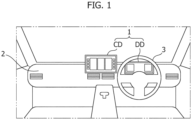
- a dual display 1 for a vehicle includes a center display CD and a driver display DD that are provided on a dashboard 2.
- the center display CD is positioned substantially in the middle of the dashboard 2 in the vehicle width direction and the driver display DD is positioned ahead of a steering wheel 3.
- the center display CD is a touch-panel type display.
- the driver display DD is a touch-panel type display or a display that is not a touch-panel type display.
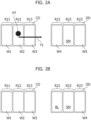
- the screen display section of the center display CD is divided into three rectangular regions arranged in the left-right direction.
- the screen display section includes a left-side region R11, a middle region R12, and a right-side region R13.
- the dimension of each region in the longitudinal direction is substantially equal to the dimension of the screen display section of the center display CD in the longitudinal direction and the dimension of each region in the transverse direction is about a third of the dimension of the screen display section of the center display CD in the transverse direction.
- the screen display section of the driver display DD is also divided into three rectangular regions arranged in the left-right direction.
- the screen display section includes a left-side region R21, a middle region R22, and a right-side region R23.
- a first window W1 for a first function of a vehicle is displayed in the left-side region
- a second window W2 for a second function of the vehicle is displayed in the middle region
- a third window W3 for a third function of the vehicle is displayed in the right-side region.
- a fourth window W4 for a fourth function of the vehicle is displayed in the left-side region
- a speedometer SM is displayed in the middle region
- a fifth window W5 for a fifth function of the vehicle is displayed in the right-side region.
- the first function to the fifth function are respectively a media function, a telephone function, a car navigation function, an information check function for checking information such as traveled distance, and a help function.
- the screen display of the center display CD is unchanged.
- the left-side region of the driver display DD changes from the fourth window W4 to a blank window (empty window) BL.
- the speedometer SM is still displayed at the same position.
- the right-side region of the driver display DD changes from the fifth window W5 to the fourth window W4.
- the displayed fifth window W5 in Figure 2A is no longer displayed.
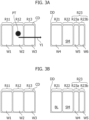
- the screen display of the center display CD illustrated in Figure 3A is the same as the screen display illustrated in Figure 2A .
- the display of the driver display DD illustrated in Figure 3A is the same as that of Figure 2A in that the fourth window W4 and the speedometer SM are respectively displayed in the left-side region and the middle region.
- the right-side region R23 illustrated in Figure 2A is divided into two rectangular regions in Figure 3A . In other words, the two rectangular regions are a region R23a and a region R23b that is adjacent to the right side of the region R23a.
- each of the regions R23a and R23b in the longitudinal direction is substantially equal to the dimension of the screen display section of the driver display DD in the longitudinal direction and the dimension of each of the regions R23a and R23b in the transverse direction is about a sixth of the dimension of the screen display section of the driver display DD in the transverse direction.
- the fifth window W5 is displayed in the region R23a and a sixth window is displayed in the region R23b.
- the pointer PT having a black circle shape is displayed at the contacted portion while the fingers are in contact.
- a flick operation is performed in the right direction indicated by the arrow Y1 with the two fingers in contact with the center display CD, that is, with the pointer PT displayed, the screen display switches to the screen display illustrated in Figure 3B .
- the screen display of the center display CD is unchanged.
- the left-side region R21 of the driver display DD changes from the fourth window W4 to the blank window BL.
- the speedometer SM is still displayed at the same position.
- the region R23a changes from the fifth window W5 to the fourth window W4.
- the region R23b changes from the sixth window W6 to the fifth window W5.
- the displayed sixth window W6 in Figure 3A is no longer displayed.
- the screen display of the center display CD is unchanged.
- the display of the left-side region and the middle region of the driver display DD is also unchanged.
- the region R23a changes from the fourth window W4 to the blank window BL.
- the region R23b changes from the fifth window W5 to the fourth window.
- the displayed fifth window W5 in Figure 3C is no longer displayed.
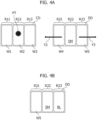
- Figure 4A illustrates the same screen display as that of Figure 2A , but the driver display DD in Figure 4A is a touch-panel type display.
- the driver display DD in Figure 4A is a touch-panel type display.
- the pointer PT having a black circle shape is displayed at a portion on the center display CD corresponding to the contacted portion while the fingers are in contact.
- a flick operation is performed in the left direction indicated by an arrow Y2 with the two fingers in contact with the driver display DD, that is, with the pointer PT displayed
- the screen display of the driver display DD illustrated in Figure 4A switches to the screen display illustrated in Figure 4B .
- the screen display of the center display CD is unchanged.
- a blank window is added to the driver display DD from the right side and the other windows except for the speedometer move as if the windows were pushed out toward the left side.
- the screen display of the center display CD is unchanged.
- a blank window is added to the driver display DD from the left side and the other windows except for the speedometer move as if the windows were pushed out toward the right side.
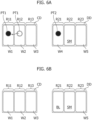
- Figure 5A illustrates the same screen display as that of Figure 2A .
- the pointer PT having a black circle shape is displayed at the contacted portion while the fingers are in contact.
- a flick operation is performed in the up direction or the down direction with the two fingers in contact with the center display CD, that is, with the pointer PT displayed, the screen display of the driver display DD illustrated in Figure 5A switches to the screen display illustrated in Figure 5B .
- the screen display of the center display CD is unchanged.
- the display of the speedometer is unchanged, but the left-side region and the right-side region change to blank windows.
- Figure 6A illustrates substantially the same screen display as that of Figure 2A .
- a pointer PT1 having a black circle shape is displayed at the contacted portion while the fingers are in contact.
- the pointer PT1 moves onto the first window in the center display CD.
- a pointer PT2 is displayed on the fourth window W4 in the driver display DD.
- the layout of the center display CD is unchanged.
- the display of the speedometer and the fifth window in the driver display DD is also unchanged.
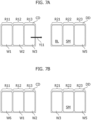
- the center display CD in Figure 7A is the same as the center display CD illustrated in Figure 2A except for the pointer PT.
- the driver display DD in Figure 7A the blank window BL is displayed in the left-side region, the speedometer SM is displayed in the middle region, and the fifth window W5 is displayed in the right-side region.
- the first window displayed in the left-side region moves to the middle region and the second window displayed in the middle region moves to the right-side region.
- the sixth window W6 is displayed in the left-side region of the center display CD.
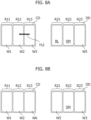
- the screen display in Figure 8A is the same as the screen display illustrated in Figure 7A .
- the display of the first window and the second window is unchanged.
- the display of the speedometer is also unchanged.
- This flick causes the blank window to disappear from the driver display DD.
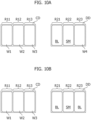
- Figures 9A and 9B illustrate substantially the same screen displays as those of Figures 2A and 2B .
- six tabs are, however, arranged and displayed in the up-down direction on the left side of the first window W1 of the center display CD.
- the tab displayed at the top is denoted by reference numeral TB1.
- These tabs are tabs corresponding to functions that are not displayed as windows in the center display CD.
- the tab TB1 corresponds to the fifth function (fifth window).
- Figure 9B assumes that a flick operation is performed on the third window in the center display CD in the right direction as indicated by an arrow Y21 with one finger.
- the third window moves to the left-side region of the driver display DD and the blank window displayed in the left-side region disappears, as illustrated in Figure 9C .
- the display of the speedometer and the fourth window is unchanged.
- the first window moves from the left-side region to the middle region and the second window moves from the middle region to the right-side region.
- the fifth window corresponding to the tab TB1 is displayed in the left-side region of the center display CD.
- Figures 3C and 3D will be referred to again.
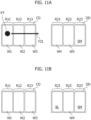
- FIG 11A will be referred to.
- the display of the center display CD is similar to the display illustrated in Figure 2A .
- the fourth window is displayed in the left-side region
- the fifth window is displayed in the middle region
- the speedometer is displayed in the right-side region.
- the left-side region changes from the fourth window to the blank window and the fourth window moves to the middle region.
- the fifth window is no longer displayed.
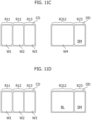
- the screen display illustrated in Figure 11A changes to the screen display illustrated in Figure 11B
- the screen display may automatically change to the screen display illustrated in Figure 11C .
- the left-side region R21 and the middle region R22 illustrated in Figure 11B are merged to form a merged region R212 and the fourth window W4 is displayed in this merged region.
- the region of the fourth window is expanded.
- the screen display illustrated in Figure 11A changes to the screen display illustrated in Figure 11B
- the screen display may automatically change to the screen display illustrated in Figure 11D .
- the left-side region R21 and the middle region R22 illustrated in Figure 11B are merged to form the merged region R212 and the blank window BL is displayed in this merged region.
- the region of the blank window is expanded.
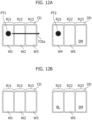
- FIG. 12A will be referred to.
- the screen display in Figure 12A is similar to the screen display in Figure 11A .
- the left-side region changes from the fourth window to the blank window.
- the display of the middle region and the right-side region of the driver display DD is unchanged.
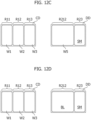
- the screen display illustrated in Figure 12A changes to the screen display illustrated in Figure 12B
- the screen display may automatically change to the screen display illustrated in Figure 12C .
- the left-side region R21 and the middle region R22 illustrated in Figure 12B are merged to form the merged region R212 and the fifth window W5 is displayed in this merged region.
- the region of the fifth window is expanded.
- the screen display illustrated in Figure 12A changes to the screen display illustrated in Figure 12B
- the screen display may automatically change to the screen display illustrated in Figure 12D .
- the left-side region R21 and the middle region R22 illustrated in Figure 12B are merged to form the merged region R212 and the blank window BL is displayed in this merged region.
- the region of the blank window is expanded.
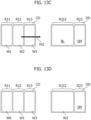
- Figure 13A illustrates the same screen display as that of Figure 12C .
- the merged region R212 of the driver display DD changes to the regions R21 and R22 that have not yet been merged as illustrated in Figure 13B .
- the fifth window displayed in the merged region R212 then decreases in size and is displayed in the region R22.
- the second window to be flicked is displayed in the region R21.
- the region R212 is divided into the regions R21 and R22.
- the first window R1 is displayed in the middle region and the sixth window is displayed in the left-side region.
- Figure 13C illustrates the same screen display as that of Figure 12D .
- the merged region R212 of the driver display DD changes from the blank window to the second window as illustrated in Figure 13D .
- the first window R1 is displayed in the middle region and the sixth window is displayed in the left-side region.
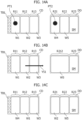
- FIG 14A will be referred to.
- the display of the center display CD is similar to the display illustrated in Figure 9A and the display of the driver display DD is similar to the display illustrated in Figure 11A .
- the screen display changes to the screen display in Figure 14B .
- the merged region R212 is formed and the fifth window is displayed in the merged region R212.
- the tab TB 1 of the center display CD in Figure 14B corresponds to the fourth window (the fourth window displayed at the position on the driver display corresponding to the first window to be flicked on the center display) that has disappeared from the driver display DD.
- the screen display changes to the screen display in Figure 14C .
- the merged region R212 changes to the regions that have not yet been merged
- the fifth window decreases in size and is displayed in the region R22
- the second window to be flicked is displayed in the region R21.
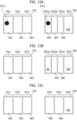
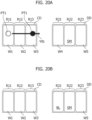
- the screen display in Figure 15A changes to the screen display in Figure 15B
- the screen display may automatically change to the screen display in Figure 15C .
- the three regions R21a, 21b, and 21c change to the two regions R21 and R22 in the driver display DD.
- the fifth window and the sixth window are respectively displayed in the regions R21 and R22.
- the blank window disappears from the driver display DD.
- the fifth window in the driver display DD changes to the blank window.
- the second window to be flicked disappears, the first window moves to the middle region, and the sixth window is displayed in the left-side region.
- the second window to be flicked disappears, the first window moves to the middle region, and the sixth window is displayed in the left-side region.
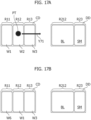
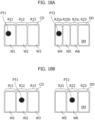
- Figure 18A illustrates the same screen display as that of Figure 15A .
- the screen display changes to the screen display in Figure 18B .
- the three regions R21a, 21b, and 21c change to the two regions R21 and R22 in the driver display DD.
- the fifth window and the sixth window are respectively displayed in the regions R21 and R22.
- the fourth window of which the position corresponds to that of the flicked region, disappears from the driver display DD.
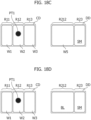
- the screen display changes to the screen display in Figure 18C .
- the two regions R21 and R22 change to the merged region R212 in the driver display DD.
- the fifth window is displayed in this merged region.
- the sixth window of which the position corresponds to that of the flicked second window W2, disappears from the driver display DD.
- the screen display changes to the screen display in Figure 18D .
- the fifth window in the merged region R212 changes to the blank window in the driver display DD.
- the display of the speedometer SM is unchanged.
- the display for a vehicle includes the center display and the driver display.
- the center display and the driver display are both capable of displaying a plurality of windows.
- the center display is a touch-panel type display.
- This touch-panel type display is a concept that also includes a touchless-panel type display.
- a flick operation on the center display causes a flicked window to move to the driver display.
- a flick operation from the center display causes a window in the center display to be inserted to the region of the driver display on the center display side and causes the window in the driver display on the opposite side to be deleted in a chain-reaction manner (as if pushed out).
- a flick operation toward the driver display with two fingers causes a blank screen to be inserted to the screen of the driver display on the center display side.
- a flick operation with two fingers in the direction opposite to the driver display causes a blank screen to be inserted to the opposite side of the driver display on the center display side.
- a blank is inserted to the outside and a blank is inserted to the inside by repeating the same operation twice.
- Sliding a finger on the center display causes the black hole on the driver display to move, and performing a flick operation with the black hole placed on a screen of the driver display causes the screen to be replaced with the blank screen.
- a flick operation on the center display and a flick operation on a tab included in the center display make replacement with a blank portion possible.
- a flick in the opposite direction means pushing out a screen.
- the enlarged screen returns to the original size when a flick operation from the center display newly causes the screens to move.
- the center display selects a function, the selection equips the driver display with a tab, and the tab is flicked as with a screen on the driver display to display a screen on the driver display.
- Display is performed on the screen of a function that is not displayed on the center display.
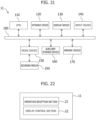
- FIG. 21 illustrates a computer hardware configuration example of the dual display 1 for a vehicle.
- the dual display 1 for a vehicle includes a CPU (processor) 110, an interface device 120, a display device 130, an input device 140, a drive device 150, an auxiliary storage device 160, and a memory device 170, which are connected to each other by a bus 180.
- a CPU processor
- FIG. 21 illustrates a computer hardware configuration example of the dual display 1 for a vehicle.
- the dual display 1 for a vehicle includes a CPU (processor) 110, an interface device 120, a display device 130, an input device 140, a drive device 150, an auxiliary storage device 160, and a memory device 170, which are connected to each other by a bus 180.
- a bus 180 bus 180.
- a program that implements a function of the dual display 1 for a vehicle is provided by a recording medium 190 such as a CD-ROM.
- a recording medium 190 such as a CD-ROM.
- the program is installed in the auxiliary storage device 160 from the recording medium 190 through the drive device 150.
- the program does not necessarily have to be installed by using the recording medium 190, and it is also possible to install the program through a network.
- the auxiliary storage device 160 stores the installed program and stores a necessary file, data, and the like.
- the memory device 170 reads out the program from the auxiliary storage device 160 and stores the program.
- the CPU 110 implements a function of a display 11 for a vehicle in accordance with the program stored in the memory device 170.
- the interface device 120 is used as an interface for connection to another computer through a network.
- the display device 130 displays a GUI (graphical user interface) or the like by the program. An example of this GUI has been described before.
- the input device 140 is a touch panel or the like.
- Figure 22 illustrates a configuration example of a software function of the dual display 1 for a vehicle.
- the dual display 1 for a vehicle includes an operation reception section 21 and a display control section 22.
- the operation reception section 21 receives an operation (such as a slide operation) of a user.
- the display control section 22 controls the display of a screen in accordance with the operation received by the operation reception section 21.
- Shortening the operation time of a user and inconveniencing the user less decrease unnecessary inputs to the display for a vehicle and make it possible to decrease the calculation load on the display for a vehicle.
- a dual display for a vehicle including:
- the driver display includes an instrument. It is possible to move a screen of the center display to the driver display in a case in which, for example, something is displayed on a screen to make the background difficult to see, much information is unnecessary for a screen, or it is desirable to change the mood of a person. It is therefore possible to replace the window moved from the center display with a blank window in a case in which it is sufficient if a screen of the driver display is temporarily displayed.
- the m and n may be the same or be different.
- center display may be of a touch-panel type or a touchless-panel type.
- the dual display for a vehicle in which a flick operation on the center display in the left-right direction with y fingers different from x fingers in number causes a blank window to be inserted to a closest window display region in the driver display to the center display.
- a direction (left-right direction) referred to as toward the driver display makes it possible to insert a blank window in accordance with the desire of the user.
- a blank window is inserted with regularity, allowing the user to blank a window as intended.
- a blank window is inserted on the closest side to the center display, making it easy to imagine the association with an operation on the center display and allowing the association to be easier to understand.
- a plurality of windows is basically displayed on the driver display when a flick toward the driver display is performed because it is favorable to display something.
- a function window is moved to a blank window, the blank window is not then moved in a chain-reaction manner (shift movement), and it is replaced with the window moved to the center display. This makes it possible to display the function window.
- a user who prefers the chain-reaction movement (shift movement) of a window is able to move a window in accordance with the preference through a flick operation in the opposite direction.
- the dual display for a vehicle in which the flick operation on the center display in an up-down direction with y fingers causes blank windows to be inserted to all regions of the driver display other than the instrument display region.
- a dual display for a vehicle including:
- the driver display includes an instrument. It is possible to move a screen of the center display to the driver display in a case in which, for example, something is displayed on a screen to make the background difficult to see, much information is unnecessary for a screen, or it is desirable to change mood of a person. It is therefore possible to replace the window coming from the center display with a blank window in a case in which it is sufficient if the display of a screen of the driver display is temporarily used.
- n and n may be the same or different.
- a function screen of the center display moved toward the driver display does not have to be a screen that looks completely the same. Such an image is sufficient that has a function of the function screen of the center display.
- a screen of the center display and a screen of the driver display have different sizes or different aspect ratios in some cases.
- the respective windows do not therefore completely correspond to each other as long as the respective windows correspond to each other with regularity.
- the plurality of corresponding windows may be selected on the driver display. In that case, the plurality of windows or one prioritized "corresponding window selected on the driver display" is replaced with a blank window.
- An operation on the center display causes a pointer to be displayed on the driver display in conjunction with the operation. This makes it possible to easily select a function window to be desired to be deleted on the driver display and visually recognize and delete the function window.
- a plurality of screens is basically displayed on the driver display when a flick toward the driver display is performed because it is favorable to display something.
- a function window is moved to a blank window, the blank window is not then moved in a chain-reaction manner (shift movement), but is replaced with the window displayed and flicked on the center display. This makes it possible to display the function window.
- a user who prefers the chain-reaction movement (shift movement) of a screen is able to move a window in accordance with the preference through a flick operation in the opposite direction.
- the dual display for a vehicle including a plurality of tab buttons on the center display in a left-right direction or an up-down direction, the plurality of tab buttons each being replaceable with a function window in the center display by drag and drop, in which
- a dual display for a vehicle including:
- the driver display is of a touch-panel type, it is possible to insert a blank screen to the driver display through an easy operation.
- a window in which a flick operation with y fingers is performed disappears and changes to a blank window. This causes an operation of a user and the visual recognition of window replacement to match and makes it possible to perform an operation that is easy to understand.
- the dual display for a vehicle in which the instrument display region of the driver display is fixed at time of movement of the window and at time of insertion of the blank window through a flick operation with the x or y fingers.
- the dual display for a vehicle in which a flick operation on the driver display in an up-down direction with y fingers causes blank windows to be inserted to all regions of the driver display other than the instrument display region.
- the dual display for a vehicle in which a touch on the driver display with y fingers causes a pointer to be displayed on the center display.
- the display of the pointer makes it possible to quickly recognize visually that an operation with y fingers is the insertion of a blank window.
- the dual display for a vehicle in which a flick operation on the center display with the y fingers causes a blank window to be inserted to the driver display and causes another window to be subjected to shift movement.
- a dual display for a vehicle including:
- the dual display for a vehicle in which the one of the windows is the function window and the other window is the blank window.
- the function window is enlarged and displayed on the driver display instead of the blank window to make it possible to prevent the blank window from being left instead of the function window against the intention of an occupant.
- the function window is hidden.
- the center display may be operated in a hurry during driving to display the function window on the driver display again. This prevents concentration on driving.
- the forms make it possible to prevent such concentration interruption.
- the enlargement and display of the function screen increase the visual recognizability during driving.
- a flick operation with x fingers moving a function screen desired to be enlarged from the center display to the driver display.
- a flick operation with y fingers enlarging and displaying the moved function window on the driver display by inserting a blank screen to the driver display.
- a blank is inserted to a selected screen to delete a window and allow the remaining windows to increase in size. In short, it is possible to easily select a function of desiring to increase the screen in size.
- the dual display for a vehicle in which when a flick operation on the center display with the predetermined number of fingers causes the window to be inserted to the driver display,
- the dual display for a vehicle including a plurality of tab buttons on the center display in a left-right direction or an up-down direction, the plurality of tab buttons being each replaceable with a function screen of the center display by drag and drop, in which the function window that is no longer displayed on the driver display is
- the dual display for a vehicle in which, along with movement of a function window from the center display through a flick operation with the x fingers, a function window corresponding to the tab button at a leftmost or uppermost position is displayed on the center display as the function window in a case in which the tab buttons are arranged in one line and a function window corresponding to the tab button at a leftmost and uppermost position is displayed on the center display as the function window in a case in which the tab buttons are arranged in two or more lines.
- a window that is hidden from the driver display, changes to a tab, and is highly likely to be displayed again is automatically displayed on the center display again at the time of the movement of a window in the center display. It is therefore possible to easily confirm a window that is relatively highly likely to be used on the center display. In addition, it is also possible to easily display the window from the center display to the driver display. This is excellent in convenience.
- the regions are equally enlarged instead of the enlargement of any one of the regions alone. It is thus unnecessary for the user to consider or remember what is enlarged if which one to be deleted when the user desires to enlarge the regions. This offers favorable work efficiency. It is to be noted that the size of the instrument display region is unchanged.
- the dual display for a vehicle in which the enlargement is not executed under a predetermined condition.
- the predetermined condition includes pressing a switch or a button in advance in accordance with the will of the driver, issuing through sound recognition a notification indicating that enlargement and display or the like is not to be performed, recognizing by a camera or the like the situation in which there is a large number of nearby cars, or the like.
- a dual display for a vehicle including:
- the driver display is designed to create excitement and a user also pursues excitement in many cases.
- the driver display is configured to include a plurality of function windows. Furthermore, the driver display is configured to prepare for a case in which the user does not need the plurality of function screens and allows a function window to be replaced with a blank window.
- the driver display may offer less excitement. There is room for improvement to meet the expectations for more excitement.
- the insertion of a blank screen and the hiding of a function screen have a plurality of regularities in accordance with the number of fingers with which a flick operation is performed on the center display. This makes it possible to insert a blank window to the driver display with regularity, but also a higher degree of freedom in accordance with the moods of a person in various and flexible manners, for example, as follows:
- the first regularity allows a blank screen to be inserted to a position desired by the user.
- the second regularity allows a blank image to be inserted to a position on the driver display that is not the position at which a flick operation is performed on the center display.
- a complicated operation of inserting a blank window is expectable and it is also possible to use different regularities in accordance with a person's mood. It is possible to perform a blank window operation that will not be boring and offer excitement over a long period of time.
- driver display with a function screen and a blank window in accordance with the preference of the user and offer excitement.
- the dual display for a vehicle in which the second regularity causes a blank window to be inserted to a window display region in contact with an outer periphery of the driver display.
- a blank screen is not inserted completely at random.
- the insertion of a blank screen has certain regularities. This makes it possible to insert blank screens with the plurality of regularities on the basis of certain predictions.
- the insertion falls within the range of the user's prediction. This makes no operation trouble. On the contrary, this allows the user to feel excited.
- the first regularity that the positions of the blank windows on the center display and the driver display correspond to each other allows the positions of the blank windows to be displayed as pointers to facilitate understanding.
- the second regularity that the positions of the blank windows on the center display and the driver display do not correspond to each other allows no pointer to be displayed on the driver display.
- the first regularity that the positions of the blank screens on the center display and the driver display correspond to each other allows the positions of the blank screens to be displayed as images to facilitate understanding.
- the second regularity that the positions of the blank screens on the center display and the driver display do not correspond to each other does not allow the images on the driver display to move.
- the pointer on the driver display moves in accordance with an operation on the center display and the driver display is indirectly operated, thereby allowing an operator to feel excited.
- the predetermined number of fingers are y fingers or z fingers. Different operations are performed with x fingers, y fingers, and z fingers in three respective methods. It is thus sufficient if the touching fingers are simply taken off and the number of operating fingers is changed in a case in which it is desirable to change the operation method during the operation. It is possible to easily correct an incorrect operation.
Landscapes
- Engineering & Computer Science (AREA)
- Chemical & Material Sciences (AREA)
- Combustion & Propulsion (AREA)
- Transportation (AREA)
- Mechanical Engineering (AREA)
- User Interface Of Digital Computer (AREA)
- Instrument Panels (AREA)
- Digital Computer Display Output (AREA)
- Controls And Circuits For Display Device (AREA)
- Fittings On The Vehicle Exterior For Carrying Loads, And Devices For Holding Or Mounting Articles (AREA)
Applications Claiming Priority (1)
| Application Number | Priority Date | Filing Date | Title |
|---|---|---|---|
| JP2023026497A JP2024119522A (ja) | 2023-02-22 | 2023-02-22 | 自動車用デュアルディスプレイ |
Publications (2)
| Publication Number | Publication Date |
|---|---|
| EP4446155A2 true EP4446155A2 (fr) | 2024-10-16 |
| EP4446155A3 EP4446155A3 (fr) | 2024-10-30 |
Family
ID=89834138
Family Applications (1)
| Application Number | Title | Priority Date | Filing Date |
|---|---|---|---|
| EP24155251.2A Pending EP4446155A3 (fr) | 2023-02-22 | 2024-02-01 | Double affichage pour véhicule |
Country Status (2)
| Country | Link |
|---|---|
| EP (1) | EP4446155A3 (fr) |
| JP (1) | JP2024119522A (fr) |
Citations (1)
| Publication number | Priority date | Publication date | Assignee | Title |
|---|---|---|---|---|
| JP2013066031A (ja) | 2011-09-16 | 2013-04-11 | Ricoh Co Ltd | 画像処理装置、画像処理方法およびプログラム |
Family Cites Families (3)
| Publication number | Priority date | Publication date | Assignee | Title |
|---|---|---|---|---|
| DE102008021186B4 (de) * | 2008-04-28 | 2024-10-31 | Volkswagen Ag | Verfahren und Vorrichtung zum Anzeigen von Informationen in einem Fahrzeug |
| CN203995712U (zh) * | 2011-02-17 | 2014-12-10 | 大众汽车有限公司 | 用于显示车辆设备的工作状态的装置 |
| KR101977092B1 (ko) * | 2017-12-11 | 2019-08-28 | 엘지전자 주식회사 | 차량에 구비된 차량 제어 장치 및 차량의 제어방법 |
-
2023
- 2023-02-22 JP JP2023026497A patent/JP2024119522A/ja active Pending
-
2024
- 2024-02-01 EP EP24155251.2A patent/EP4446155A3/fr active Pending
Patent Citations (1)
| Publication number | Priority date | Publication date | Assignee | Title |
|---|---|---|---|---|
| JP2013066031A (ja) | 2011-09-16 | 2013-04-11 | Ricoh Co Ltd | 画像処理装置、画像処理方法およびプログラム |
Also Published As
| Publication number | Publication date |
|---|---|
| JP2024119522A (ja) | 2024-09-03 |
| EP4446155A3 (fr) | 2024-10-30 |
Similar Documents
| Publication | Publication Date | Title |
|---|---|---|
| US11584232B2 (en) | Flexible and variability-accommodating instrument cluster display | |
| US8910086B2 (en) | Method for controlling a graphical user interface and operating device for a graphical user interface | |
| KR101609024B1 (ko) | 사용자 인터페이스를 제공하는 방법 및 장치 | |
| JP6326637B2 (ja) | 表示制御装置および表示制御プログラム | |
| JP7112345B2 (ja) | 表示装置 | |
| CN105144064A (zh) | 用于选择列表的对象的方法和装置 | |
| TWI502431B (zh) | 車用觸控顯示裝置及應用於其上之顯示方法 | |
| EP4446155A2 (fr) | Double affichage pour véhicule | |
| EP4420915A2 (fr) | Double affichage pour véhicule | |
| EP4420914A2 (fr) | Double affichage pour véhicule | |
| EP4446154A2 (fr) | Double affichage pour véhicule | |
| EP4450315A1 (fr) | Double affichage pour véhicule | |
| JP2013161230A (ja) | 入力装置 | |
| EP2884380A1 (fr) | Système d'aide au fonctionnement, procédé d'aide au fonctionnement, et programme d'ordinateur | |
| JP4609242B2 (ja) | 操作制御装置 | |
| JP2018132937A (ja) | 入力装置、入力方法及び入力プログラム | |
| US10168858B2 (en) | Method for displaying information in a vehicle, and a device for controlling the display | |
| JP7777280B2 (ja) | 自動車用ディスプレイ | |
| JP6540603B2 (ja) | 表示装置及び表示方法 | |
| JP7795720B2 (ja) | 自動車用ディスプレイ | |
| US9207839B2 (en) | Device and method for displaying a multitude of planar objects | |
| JP7561606B2 (ja) | 情報処理装置及び表示制御方法 | |
| JP7702525B2 (ja) | 情報表示装置、情報表示方法及びプログラム | |
| JP7777279B2 (ja) | 自動車用ディスプレイ | |
| JP7788073B2 (ja) | 自動車用ディスプレイ |
Legal Events
| Date | Code | Title | Description |
|---|---|---|---|
| PUAI | Public reference made under article 153(3) epc to a published international application that has entered the european phase |
Free format text: ORIGINAL CODE: 0009012 |
|
| STAA | Information on the status of an ep patent application or granted ep patent |
Free format text: STATUS: REQUEST FOR EXAMINATION WAS MADE |
|
| PUAL | Search report despatched |
Free format text: ORIGINAL CODE: 0009013 |
|
| 17P | Request for examination filed |
Effective date: 20240201 |
|
| AK | Designated contracting states |
Kind code of ref document: A2 Designated state(s): AL AT BE BG CH CY CZ DE DK EE ES FI FR GB GR HR HU IE IS IT LI LT LU LV MC ME MK MT NL NO PL PT RO RS SE SI SK SM TR |
|
| AK | Designated contracting states |
Kind code of ref document: A3 Designated state(s): AL AT BE BG CH CY CZ DE DK EE ES FI FR GB GR HR HU IE IS IT LI LT LU LV MC ME MK MT NL NO PL PT RO RS SE SI SK SM TR |
|
| RIC1 | Information provided on ipc code assigned before grant |
Ipc: B60K 35/22 20240101ALI20240923BHEP Ipc: B60K 35/10 20240101AFI20240923BHEP |