EP4451686A1 - Videoüberlagerungen, verteilungsmanagementsysteme und computerimplementierte verfahren zur überlagerung eines videos mit produktdaten - Google Patents
Videoüberlagerungen, verteilungsmanagementsysteme und computerimplementierte verfahren zur überlagerung eines videos mit produktdaten Download PDFInfo
- Publication number
- EP4451686A1 EP4451686A1 EP23168272.5A EP23168272A EP4451686A1 EP 4451686 A1 EP4451686 A1 EP 4451686A1 EP 23168272 A EP23168272 A EP 23168272A EP 4451686 A1 EP4451686 A1 EP 4451686A1
- Authority
- EP
- European Patent Office
- Prior art keywords
- video
- product
- remarkable
- overlay
- processor
- Prior art date
- Legal status (The legal status is an assumption and is not a legal conclusion. Google has not performed a legal analysis and makes no representation as to the accuracy of the status listed.)
- Withdrawn
Links
Images


Classifications
-
- H—ELECTRICITY
- H04—ELECTRIC COMMUNICATION TECHNIQUE
- H04N—PICTORIAL COMMUNICATION, e.g. TELEVISION
- H04N21/00—Selective content distribution, e.g. interactive television or video on demand [VOD]
- H04N21/80—Generation or processing of content or additional data by content creator independently of the distribution process; Content per se
- H04N21/81—Monomedia components thereof
- H04N21/812—Monomedia components thereof involving advertisement data
-
- H—ELECTRICITY
- H04—ELECTRIC COMMUNICATION TECHNIQUE
- H04N—PICTORIAL COMMUNICATION, e.g. TELEVISION
- H04N21/00—Selective content distribution, e.g. interactive television or video on demand [VOD]
- H04N21/40—Client devices specifically adapted for the reception of or interaction with content, e.g. set-top-box [STB]; Operations thereof
- H04N21/43—Processing of content or additional data, e.g. demultiplexing additional data from a digital video stream; Elementary client operations, e.g. monitoring of home network or synchronising decoder's clock; Client middleware
- H04N21/4302—Content synchronisation processes, e.g. decoder synchronisation
- H04N21/4307—Synchronising the rendering of multiple content streams or additional data on devices, e.g. synchronisation of audio on a mobile phone with the video output on the TV screen
- H04N21/43074—Synchronising the rendering of multiple content streams or additional data on devices, e.g. synchronisation of audio on a mobile phone with the video output on the TV screen of additional data with content streams on the same device, e.g. of EPG data or interactive icon with a TV programme
-
- H—ELECTRICITY
- H04—ELECTRIC COMMUNICATION TECHNIQUE
- H04N—PICTORIAL COMMUNICATION, e.g. TELEVISION
- H04N21/00—Selective content distribution, e.g. interactive television or video on demand [VOD]
- H04N21/40—Client devices specifically adapted for the reception of or interaction with content, e.g. set-top-box [STB]; Operations thereof
- H04N21/43—Processing of content or additional data, e.g. demultiplexing additional data from a digital video stream; Elementary client operations, e.g. monitoring of home network or synchronising decoder's clock; Client middleware
- H04N21/431—Generation of visual interfaces for content selection or interaction; Content or additional data rendering
- H04N21/4312—Generation of visual interfaces for content selection or interaction; Content or additional data rendering involving specific graphical features, e.g. screen layout, special fonts or colors, blinking icons, highlights or animations
- H04N21/4314—Generation of visual interfaces for content selection or interaction; Content or additional data rendering involving specific graphical features, e.g. screen layout, special fonts or colors, blinking icons, highlights or animations for fitting data in a restricted space on the screen, e.g. EPG data in a rectangular grid
-
- H—ELECTRICITY
- H04—ELECTRIC COMMUNICATION TECHNIQUE
- H04N—PICTORIAL COMMUNICATION, e.g. TELEVISION
- H04N21/00—Selective content distribution, e.g. interactive television or video on demand [VOD]
- H04N21/40—Client devices specifically adapted for the reception of or interaction with content, e.g. set-top-box [STB]; Operations thereof
- H04N21/47—End-user applications
- H04N21/472—End-user interface for requesting content, additional data or services; End-user interface for interacting with content, e.g. for content reservation or setting reminders, for requesting event notification, for manipulating displayed content
- H04N21/4722—End-user interface for requesting content, additional data or services; End-user interface for interacting with content, e.g. for content reservation or setting reminders, for requesting event notification, for manipulating displayed content for requesting additional data associated with the content
- H04N21/4725—End-user interface for requesting content, additional data or services; End-user interface for interacting with content, e.g. for content reservation or setting reminders, for requesting event notification, for manipulating displayed content for requesting additional data associated with the content using interactive regions of the image, e.g. hot spots
-
- H—ELECTRICITY
- H04—ELECTRIC COMMUNICATION TECHNIQUE
- H04N—PICTORIAL COMMUNICATION, e.g. TELEVISION
- H04N21/00—Selective content distribution, e.g. interactive television or video on demand [VOD]
- H04N21/40—Client devices specifically adapted for the reception of or interaction with content, e.g. set-top-box [STB]; Operations thereof
- H04N21/47—End-user applications
- H04N21/478—Supplemental services, e.g. displaying phone caller identification, shopping application
- H04N21/47815—Electronic shopping
-
- H—ELECTRICITY
- H04—ELECTRIC COMMUNICATION TECHNIQUE
- H04N—PICTORIAL COMMUNICATION, e.g. TELEVISION
- H04N21/00—Selective content distribution, e.g. interactive television or video on demand [VOD]
- H04N21/80—Generation or processing of content or additional data by content creator independently of the distribution process; Content per se
- H04N21/85—Assembly of content; Generation of multimedia applications
- H04N21/858—Linking data to content, e.g. by linking an URL to a video object, by creating a hotspot
- H04N21/8583—Linking data to content, e.g. by linking an URL to a video object, by creating a hotspot by creating hot-spots
Definitions
- the subject application relates to the generation of overlays or superimposed images.
- it relates to video overlayers, distribution management systems and computer-implemented methods of overlaying a video with product data.
- Another issue with searching for products seen in videos is that viewers may not be able to find the product at all. This can be due to a variety of factors, including the fact that the product may be out of stock, unavailable in the viewer's location, or discontinued. In some cases, the product may not even be a real product, but rather a prop or set decoration used in the video.
- the subject application provides a video overlayer, a distribution management system and a computer-implemented method of overlaying a video with product data, as described in the accompanying claims.
- the inventors have found that the use of an interactive video overlay makes it easy and convenient for viewers to purchase products seen in videos.
- the inventors propose to draw the viewer's attention to certain products in a video and to allow the viewer to interact to buy the product directly in the video.
- the proposed solution saves time as it eliminates the need to search for products viewed in videos.
- the proposed solution allows for the sense of immediacy that comes with online shopping by providing fast and efficient service to viewers.
- the proposed solution provides an all-in-one interface where searching and making a purchase of products viewed in videos is done from within the video, thereby eliminating the need for viewers to switch between multiple applications or interfaces.
- a first aspect of the subject application relates to a video overlayer 100.
- video overlayer refers to a device that overlays a video with content.
- the video overlayer 100 comprises at least one first processor 110.
- the video overlayer 100 may comprise more than one first processor 110.
- the video overlayer 100 is designed for overlaying a video 200, at a viewer device 300, via a video player 400, with product data.
- product data refers to any information related to a product that is available for purchase, and that may incentivize a viewer to make a purchase or lead a viewer to a purchase.
- a "product data" can include various information such as the name of the product, the description of the product, the price of the product, the specification of the product, the reviews of the product, a URL to the product, and the availability of the product.
- the video 200 comprises a plurality of video frames which are associated with timing information.
- the video 200 is made up of a sequence of individual video frames which are typically displayed at a constant frame rate to create the illusion of motion. Also, each video frame in the sequence captures a single still image, and when viewed in sequence, they create the appearance of continuous motion. Further, the number of frames per second (fps) in the video 200 can vary depending on the specific context, where 24 fps, 25 fps, 30 fps or 60 fps are common frame rates.
- the video 200 is a video stream delivered over a network (e.g., the internet), for instance, via a cable provider, via a satellite TV provider or through an over-the-top (OTT) service.
- a network e.g., the internet
- OTT over-the-top
- the video 200 is an offline video, for instance, downloaded and/or stored on a physical media (e.g., such as an HDD, a DVD or Blu-ray disc).
- a physical media e.g., such as an HDD, a DVD or Blu-ray disc.
- each video frame is associated with complementary data.
- the complementary data comprises the timing information.
- the timing information is a timecode.
- timing information may be contemplated, without requiring any substantial modification of the subject application.
- At least one video frame of the video 200 comprises at least one visually identifiable object of interest.
- the video 200 may comprise more than one remarkable video frame and that a remarkable video frame may comprise more than one visually identifiable object of interest.
- visually identifiable object of interest refers to an object that can be recognized or distinguished, within a video frame, based on its appearance or visual characteristics (e.g., color, shape, size, texture, and other visual cues that can help differentiate the object from its surroundings).
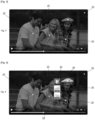
- Figure 2 illustrates a plurality of visually identifiable objects of interest 10, in particular clothes such as tops (i.e., a white t-shirt, a pale-yellow blouse, and a multicolor zippered top) and headwear (i.e., a yellow beret).
- clothes such as tops (i.e., a white t-shirt, a pale-yellow blouse, and a multicolor zippered top) and headwear (i.e., a yellow beret).
- various techniques e.g., object detection, recognition, and segmentation
- the type of visually identifiable object of interest 10 that can be identified in the video 200 is selected from among a plurality of predetermined type of objects (e.g., people-related objects such as top clothes, bottom clothes, bags, footwear, headwear; vehicles; electronics; appliances; sports equipment; musical instruments; kitchenware; art and decor; office supplies).
- predetermined type of objects e.g., people-related objects such as top clothes, bottom clothes, bags, footwear, headwear; vehicles; electronics; appliances; sports equipment; musical instruments; kitchenware; art and decor; office supplies.
- the first processor 110 may be configured for overlaying the video 200 with an interactive menu having a plurality of user-selectable options.
- each user selectable option is configured for allowing a predetermined viewer interaction.
- the predetermined viewer interaction is selected from among, a hover, a click, a swipe, a drag and drop, a voice, a gesture, a keyboard input or any suitable combination thereof.
- the viewer interaction is considered only after a period of time of interaction (e.g., hovering for two seconds).
- the interactive menu may be configured according to the plurality of predetermined objects, such that each user selectable option is associated with at least one predetermined object.
- each user selectable option may be associated with more than one predetermined object.
- the viewer may select desired or undesired user selectable options associated with the predetermined objects that should be identified.
- the location of the visually identifiable object of interest 10, in the video frame is previously known or determined.
- each remarkable video frame is associated with complementary data.
- the complementary data comprises the location of the visually identifiable objects of interest 10 which are present on the remarkable video frame.
- the first processor 110 when the location of the visually identifiable object of interest 10, in the video frame, is determined, the first processor 110 is configured for automatically detecting, within at least one video frame of the video 200, at least one visually identifiable object of interest 10 using an image recognition software configured for identifying an image area and attributing it to a product.
- the first processor 110 may automatically detect more than one visually identifiable object of interest 10 within all or part of the video frames of the video 200.
- the viewer device 300 has at least one display.
- the viewer device 300 may have more than one display.
- viewer device refers to a device (also known as “client device” or “end-user device”) that is used for accessing and viewing a video.
- the viewer device may be a computer, a smartphone, a tablet or a smart TV.
- the video player 400 is configured for displaying the video 200 on the display of the viewer device 300.
- the video player 400 has a play function and a pause function.
- the play function is configured for playing a video.
- the pausing function being configured for pausing the playing of a video.
- the video player 400 may have other functions such as a rewind function, a fast-forward function, a playback speed control function, and playback quality settings function.
- the video player 400 is an application (e.g., a web application, a streaming application).
- an application e.g., a web application, a streaming application.
- the video player 400 is a built-in functionality of the viewer device 300.
- the first processor 110 is configured for accessing a product database 500.
- the product database 500 is configured for allowing the retrieval of the product data that is associated with a product image.
- the product database 500 associates at least one product image with product data.
- the product database 500 may associate more than one product image with product data.
- the product data is provided by one or more retailers.
- the product data is provided by one or more product manufacturers.
- the product database 500 is located locally with respect to the viewer device 300.
- the product database 500 is located remotely with respect to the viewer device 300.
- the product database 500 is located at the video overlayer 100.
- the product database 500 is located at a remote server.
- the product database 500 is continuously updated to reflect the most recent product data.
- product data is added to the database 500 as soon as it is provided by the providers (e.g., the retailers and the product manufacturers) and existing product data is updated to reflect any changes or corrections made to it.
- providers e.g., the retailers and the product manufacturers
- the proposed solution ensures that viewers have access to the most current and accurate product data available, allowing them to make informed decisions about whether to purchase a product or not.
- the first processor 110 is configured for providing a human perceptible video overlay.
- human perceptible video overlay refers to a visual element that is added on top of a video or video frame, and that can be seen by a human viewer.
- the human perceptible video overlay is configured for being synchronized in time with the video 200 based on the timing information, such that all or part of its content is configured for overlaying the video 200 at a particular point in time of the video 200.
- the human perceptible video overlay comprises, for at least one remarkable video frame, at least one first overlay container and at least one second overlay container.
- the human perceptible video overlay may comprise, for more than one remarkable video frame, more than one first overlay container and more than one second overlay container.
- the first overlay container associated with a remarkable video frame is configured for overlaying the remarkable video frame with a first interactive content.
- the first interactive content is configured for allowing a predetermined viewer interaction.
- the location of the points defining a border of the first interactive content is previously known or determined.
- each remarkable video frame is associated with complementary data.
- the complementary data comprises the location of the points defining a border of the first interactive content is which are present on the remarkable video frame.
- the first processor 110 when the location of the points defining a border of the first interactive content is determined, the first processor 110 is configured for automatically detecting, within at least one video frame of the video 200, the border of at least one first interactive content using an image segmentation software configured for segmentation an image area and attributing it to a product.
- the first processor 110 may automatically detect more than one border of a visually identifiable object of interest 10 within all or part of the video frames of the video 200.
- the first interactive content comprises at least one interactive symbol configured for overlaying all or part of the visually identifiable object of interest 10.
- the first interactive content may comprise more than one interactive symbol.
- the shape of the first interactive content is selected from among, a rectangular shape, an octagonal shape, a circular shape or any suitable combination thereof.
- Figure 3 illustrates the first example of the first embodiment of the first interactive content 20, where the first interactive content 20 has as a circular shape and a white color.
- the first interactive content 20 is positioned centrally with respect to the border of the visually identifiable object of interest 10.
- the first interactive content 20 comprises a first interactive bounding box surrounding the visually identifiable object of interest 10 and configured for overlaying the visually identifiable object of interest 10.
- the first interactive content 20 comprises a second interactive bounding box configured for comprising a list of visually identifiable objects of interest 10 that are present on the remarkable video frame.
- the second overlay container is associated with the first overlay container.
- the second overlay container is configured for overlaying the remarkable video frame with a second interactive content.
- the second interactive content has at least one user selectable option.
- the second interactive content may comprise more than one user selectable option.
- the second interactive content comprises a user selectable option including at least one of "view”, “follow”, “add to wish list”, “product image”, “apply coupon code” and “add to shopping cart”.
- Figure 4 illustrates the first example of the second interactive content, with a "view” user-selectable option 30, an “add to shopping cart” user-selectable option 40 and "product image” user-selectable option 50.
- the second interactive content may be a web page or an interactive menu.
- Figure 5 illustrates the second example of the second interactive content, where an interactive menu is shown (on the left side) after user interaction with the a "product image" user-selectable option 50.
- each user selectable option is configured for allowing a predetermined viewer interaction.
- the second interactive content is configured according to the product data of at least one product associated with the visually identifiable object of interest 10, such that each user selectable option is associated with the product data of at least one product associated with the visually identifiable object of interest 10.
- the second interactive content may be configured according to the product data of more than one product associated with the visually identifiable object of interest 10.
- the shape of second interactive content is selected from among, a rectangular shape, an octagonal shape, a circular shape or any suitable combination thereof.
- the second interactive content is positioned adjacent to the first interactive content 20.
- the first processor 110 is configured for executing the play function of the video player 400.
- the first processor 110 is configured for displaying the corresponding first overlay container.
- the first processor 110 in response to a predetermined viewer interaction with the first interactive content 20 or the pause function, is configured for pausing the playing of the video 200.
- the first processor 110 is configured as follows.
- the first processor 110 is configured for obtaining, based on the current remarkable video frame and the associated first overlay container, an image crop that includes the visually identifiable object of interest 10.
- the first processor 110 is configured for recognizing or identifying, from the product database 500, based on the image crop, at least one product image that substantially matches the visually identifiable object of interest 10.
- the first processor 110 may be configured for recognizing or identifying more than one product image that substantially matches the visually identifiable object of interest 10.
- the first processor 110 is configured for retrieving, from the product database 500, the product data that is associated with the recognized product.
- the first processor 110 is configured for displaying the second overlay container according to the retrieved product data.
- a first embodiment of the first aspect of the subject application occurs before the first processor 110 displays the first overlay container.
- the first processor 110 is configured for selecting, based on image information associated with each remarkable video frame, a single remarkable video frame from among a plurality of consecutive remarkable video frames.
- the first processor 110 uses known keyframe extraction techniques (e.g., content-based keyframe selection such as object detection) to select the single remarkable video frame as a key frame of the plurality of consecutive remarkable video frames, the key frame being a representative video frame of the plurality of consecutive remarkable video frames.
- keyframe extraction techniques e.g., content-based keyframe selection such as object detection
- each remarkable video frame is associated with complementary data.
- the complementary data comprises the image information.
- a second embodiment of the first aspect of the subject application occurs before the first processor 110 recognizes or identifies the product image that substantially matches the visually identifiable object of interest 10.
- the first processor 110 is configured for delineating, in the image crop, the visually identifiable object of interest 10 from a background region.
- the first processor 110 is configured for subtracting the background region from the image crop so as to leave only a polygon bounding the visually identifiable object of interest 10 region.
- the second embodiment of the first aspect of the subject application is particularly useful for the matching of the crop image and product images of the product database 500, because those images may not have been taken in the same context.
- the images may have been captured from different angles or under different lighting conditions.
- the background of the product images in the product database 500 is previously removed before being stored.
- the first processor 110 is configured to remove the background of the product images similarly to the crop image.
- a third embodiment of the first aspect of the subject application is a particular implementation of how to match the product image with the visually identifiable object of interest 10.
- the first processor 110 is configured for generating a first embedding vector for the image crop using an embedding generation technique.
- the first processor 110 is configured for generating at least one second embedding vector for at least one product image using the embedding generation technique.
- the first processor 110 may generate more than one second embedding vector for more than one product image.
- the first processor 110 is configured for comparing the first embedding vector with all or part of the second embedding vectors, thereby generating a similarity measure for each comparison.
- the first processor 110 is configured for selecting the product images associated with a similarity measure that is beyond a predetermined similarity measure.
- the matching can be significantly simplified and accelerated.
- the matching can be performed on the much smaller and more informative embedding vectors, which can be precomputed or calculated on-the-fly.
- This approach can improve the accuracy and robustness of image matching algorithms, especially when dealing with large datasets, complex scenes, or dynamic environments.
- a fourth embodiment of the first aspect of the subject application occurs when the first processor 110 resumes the playing of the video 200.
- the first processor 110 in response to a predetermined viewer interaction with the video player 400 and/or the human perceptible video overlay, the first processor 110 is configured for resuming the playing of the video 200, at a point where the playing of the video 200 was paused, the predetermined viewer interaction is indicative that the viewer interaction is complete.
- the first processor 110 resumes the playing of the video 200 in response to either only a predetermined viewer interaction with the video player 400, only a predetermined viewer interaction with the human perceptible video overlay or from both a predetermined viewer interaction with the video player 400 and a predetermined viewer interaction with the human perceptible video overlay.
- the completion of the viewer interaction is indicative of a purchase of a product associated with the visually identifiable object of interest 10.
- Figure 6 illustrates the first variant of the fourth embodiment of the first aspect of the subject, with the human perceptible video overlay displaying a confirmation 60 of a purchase of a product associated with the visually identifiable object of interest 10.
- the completion of the viewer interaction is indicative of a purchase of a desire to shop for a product associated with the visually identifiable object of interest 10.
- the video overlayer 100 comprises at least one memory 120.
- the video overlayer 100 may comprise more than one memory 120.
- the first processor 110 is further configured as follows.
- the first processor 110 is configured for saving, as an entry in a wish list, an information representing the desire to shop for the product associated with the visually identifiable object of interest 10.
- the first processor 110 is configured for storing, in the memory 120, the wish list.
- the first processor 110 is configured for modifying the human perceptible video overlay to further comprise at least one third overlay container.
- the human perceptible video overlay may comprise more than one third overlay container.
- the third container is configured for overlaying the remarkable video frame with a third interactive content having at least one user selectable option.
- the third interactive content may have more than one user selectable option.
- the third interactive content comprises a user selectable option including at least one of "view wish list”, “remove from wish list”, “add to shopping cart”, “update shopping cart”, “checkout” and “apply coupon code”.
- the third interactive content may be a web page or an interactive menu.
- each user selectable option is configured for allowing a predetermined viewer interaction.
- the third interactive content is configured according to all or part of a wish list, such that each user selectable option is associated with at least one entry of the wish list.
- each user selectable option may be associated with more than one entry of the wish list.
- the first processor 110 is configured for displaying the third overlay container according to all or part of the wish list.
- the first processor 110 displays the third overlay container in response to either only a predetermined viewer interaction with the video player 400, only a predetermined viewer interaction with the human perceptible video overlay or from both a predetermined viewer interaction with the video player 400 and a predetermined viewer interaction with the human perceptible video overlay.
- a second aspect of the subject application relates to a distribution management system of a media asset management system (MAM).
- MAM media asset management system
- a MAM is a software-based system that is designed to help organizations (e.g., OTTs, television networks, film studios, advertising agencies, government organizations, educational institutions, corporate marketing departments) manage their digital media assets (e.g., videos, audios, images, and other related files).
- help organizations e.g., OTTs, television networks, film studios, advertising agencies, government organizations, educational institutions, corporate marketing departments
- digital media assets e.g., videos, audios, images, and other related files.
- the distribution management system is designed to help those organizations distribute their digital media assets.
- the distribution management system is configured for distributing at least one video 200 to the viewer device 300.
- the distribution management system may be configured for distributing more than one video 200 to the viewer device 300.
- the distribution management system comprises the video overlayer 100, the video player 400 and the product database 500.
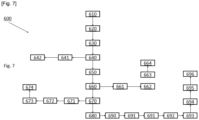
- a third aspect of the subject application relates to a computer-implemented method 600 of overlaying the video 200 with product data.
- the computer-implemented method 600 comprises the step of providing 610 the viewer device 300, the video player 400, the product database 500, as already described above.
- the step of providing further comprises providing a second processor 700 that is similar or identical to the first processor 110.
- the computer-implemented method 600 comprises the step of obtaining 620 the video 200, as already described above.
- the computer-implemented method 600 comprises the step of providing 630 the human perceptible video overlay, as already described above.
- the computer-implemented method 600 comprises the step of executing 640 the play function of the video player 400, as already described above.
- the computer-implemented method 600 comprises the step of displaying 650 the corresponding first overlay container, as already described above.
- the computer-implemented method 600 comprises the step of pausing 660 the playing of the video 200, as already described above.
- the computer-implemented method 600 comprises the following steps.
- the computer-implemented method 600 comprises the step of obtaining 670, based on the current remarkable video frame and the associated first overlay container, an image crop that includes the visually identifiable object of interest 10, as already described above.
- the computer-implemented method 600 comprises the step of providing 661 an image crop database associating at least one image crop with a first overlay container associated with a remarkable video frame, as already described above.
- the computer-implemented method 600 comprises the step of obtaining 662 the image crop from the image crop database, as already described above.
- the computer-implemented method 600 comprises the step of recognizing or identifying 680, from the product database 500, based on the image crop, at least one product image that substantially matches the visually identifiable object of interest 10, as already described above.
- the computer-implemented method 600 comprises the step of retrieving 690, from the product database 500, the product data that is associated with the recognized product, as already described above.
- the computer-implemented method 600 comprises the step of displaying 691 the second overlay container according to the retrieved product data, as already described above.
- a first embodiment of the third aspect of the subject application occurs before the step of displaying 650 the first overlay container, and provides the advantageous effect already explained above.
- the computer-implemented method 600 comprises the step of selecting 641, based on image information associated with each remarkable video frame, only one remarkable video frame from among a plurality of consecutive remarkable video frames.
- the second processor 700 uses know keyframe extraction techniques (e.g., content-based keyframe selection such as object detection) to select the single remarkable video frame as a key frame of the plurality of consecutive remarkable video frames, the key frame being a representative video frame of the plurality of consecutive remarkable video frames.
- keyframe extraction techniques e.g., content-based keyframe selection such as object detection
- each remarkable video frame is associated with complementary data.
- the complementary data comprises the image information.
- a second embodiment of the third aspect of the subject application occurs before the step of recognizing or identifying 680, and provides the advantageous effect already explained above.
- the computer-implemented method 600 comprises the step of delineating 663, in the image crop, the visually identifiable object of interest 10 from a background region.
- the computer-implemented method 600 comprises the step of subtracting 664 the background region from the image crop so as to leave only a polygon bounding the visually identifiable object of interest 10 region.
- the background of the product images in the product database 500 is previously removed before being stored.
- the first processor 110 is configured to remove the background of the product images similarly to the crop image.
- a third embodiment of the third aspect of the subject application occurs during the step of recognizing or identifying 680, and provides the advantageous effect already explained above.
- the computer-implemented method 600 comprises the step of generating 671 a first embedding vector for the image crop using an embedding generation technique.
- the computer-implemented method 600 comprises the step of generating 672 at least one second embedding vector for at least one product image using the embedding generation technique.
- the second processor 700 may generate more than one second embedding vector for more than one product image.
- the computer-implemented method 600 comprises the step of comparing 673 the first embedding vector with all or part of the second embedding vectors, thereby generating a similarity measure for each comparison.
- the computer-implemented method 600 comprises the step of selecting 674 the product images associated with a similarity measure that is beyond a predetermined similarity measure.
- a fourth embodiment of the third aspect of the subject application occurs when resuming the playing of the video 200, and provides the advantageous effect already explained above.
- the computer-implemented method 600 comprises the step of resuming 692 the playing of the video 200, at a point where the playing of the video 200 was paused, the predetermined viewer interaction being indicative that the viewer interaction is complete.
- the step of resuming 692 the playing of the video 200 can be, in response to either only a predetermined viewer interaction with the video player 400, only a predetermined viewer interaction with the human perceptible video overlay or from both a predetermined viewer interaction with the video player 400 and a predetermined viewer interaction with the human perceptible video overlay.
- the completion of the viewer interaction is indicative of a purchase of a product associated with the visually identifiable object of interest 10.
- the completion of the viewer interaction is indicative of a purchase of a desire to shop for a product associated with the visually identifiable object of interest 10.
- the computer-implemented method 600 comprises the step of providing 693 at least one memory 120.
- step of providing 693 may comprise providing more than one memory 120.
- the computer-implemented method 600 comprises the following steps.
- the computer-implemented method 600 comprises the step of saving 694, as an entry in a wish list, an information representing the desire to shop for the product associated with the visually identifiable object of interest 10.
- the computer-implemented method 600 comprises the step of storing 695, in the memory 120, the wish list.
- the computer-implemented method 600 comprises the step of modifying 696 the human perceptible video overlay to further comprise at least one third overlay container.
- the human perceptible video overlay may comprise more than one third overlay container.
- the third container is configured for overlaying the remarkable video frame with a third interactive content having at least one user selectable option.
- the third interactive content may have more than one user selectable option.
- the third interactive content comprises a user selectable option including at least one of "view wish list”, “remove from wish list”, “add to shopping cart”, “update shopping cart”, “checkout” and “apply coupon code”.
- the third interactive content may be a web page or an interactive menu.
- each user selectable option is configured for allowing a predetermined viewer interaction.
- the third interactive content is configured according to all or part of a wish list, such that each user selectable option is associated with at least one entry of the wish list.
- each user selectable option may be associated with more than one entry of the wish list.
- the computer-implemented method 600 comprises the step of displaying 697 the third overlay container according to all or part of the wish list.
- the step of displaying 697 the third overlay container can be in response to either only a predetermined viewer interaction with the video player 400, only a predetermined viewer interaction with the human perceptible video overlay or from both a predetermined viewer interaction with the video player 400 and a predetermined viewer interaction with the human perceptible video overlay.
- a fourth aspect of the subject application also relates to a computer-readable medium having stored thereon computer instructions which when executed, by a processor, perform the computer-implemented method 600 as already described above.
- the skilled person could easily adapt the teachings of the subject application when the viewer device 300 has more than one display.
- first overlay container and second overlay container may be displayed, respectively displayed on different display.
- the first interactive content 20 may be displayed on a first display of the viewer device 300, and the second interactive content and/or the third interactive content may be displayed on a first display of the viewer device 300.
Landscapes
- Engineering & Computer Science (AREA)
- Multimedia (AREA)
- Signal Processing (AREA)
- Databases & Information Systems (AREA)
- Human Computer Interaction (AREA)
- Business, Economics & Management (AREA)
- Marketing (AREA)
- Two-Way Televisions, Distribution Of Moving Picture Or The Like (AREA)
Priority Applications (5)
| Application Number | Priority Date | Filing Date | Title |
|---|---|---|---|
| EP23168272.5A EP4451686A1 (de) | 2023-04-17 | 2023-04-17 | Videoüberlagerungen, verteilungsmanagementsysteme und computerimplementierte verfahren zur überlagerung eines videos mit produktdaten |
| US19/473,978 US20260122308A1 (en) | 2023-04-17 | 2024-04-17 | Video overlayers, distribution management systems and computer-implemented methods of overlaying a video with product data |
| EP24728132.2A EP4627799B1 (de) | 2023-04-17 | 2024-04-17 | Videoüberlagerungen, verteilungsmanagementsysteme und computerimplementierte verfahren zur überlagerung eines videos mit produktdaten |
| ES24728132T ES3063418T3 (en) | 2023-04-17 | 2024-04-17 | Video overlayers, distribution management systems and computer-implemented methods of overlaying a video with product data |
| PCT/EP2024/060459 WO2024218172A1 (en) | 2023-04-17 | 2024-04-17 | Video overlayers, distribution management systems and computer-implemented methods of overlaying a video with product data |
Applications Claiming Priority (1)
| Application Number | Priority Date | Filing Date | Title |
|---|---|---|---|
| EP23168272.5A EP4451686A1 (de) | 2023-04-17 | 2023-04-17 | Videoüberlagerungen, verteilungsmanagementsysteme und computerimplementierte verfahren zur überlagerung eines videos mit produktdaten |
Publications (1)
| Publication Number | Publication Date |
|---|---|
| EP4451686A1 true EP4451686A1 (de) | 2024-10-23 |
Family
ID=86051830
Family Applications (2)
| Application Number | Title | Priority Date | Filing Date |
|---|---|---|---|
| EP23168272.5A Withdrawn EP4451686A1 (de) | 2023-04-17 | 2023-04-17 | Videoüberlagerungen, verteilungsmanagementsysteme und computerimplementierte verfahren zur überlagerung eines videos mit produktdaten |
| EP24728132.2A Active EP4627799B1 (de) | 2023-04-17 | 2024-04-17 | Videoüberlagerungen, verteilungsmanagementsysteme und computerimplementierte verfahren zur überlagerung eines videos mit produktdaten |
Family Applications After (1)
| Application Number | Title | Priority Date | Filing Date |
|---|---|---|---|
| EP24728132.2A Active EP4627799B1 (de) | 2023-04-17 | 2024-04-17 | Videoüberlagerungen, verteilungsmanagementsysteme und computerimplementierte verfahren zur überlagerung eines videos mit produktdaten |
Country Status (4)
| Country | Link |
|---|---|
| US (1) | US20260122308A1 (de) |
| EP (2) | EP4451686A1 (de) |
| ES (1) | ES3063418T3 (de) |
| WO (1) | WO2024218172A1 (de) |
Citations (3)
| Publication number | Priority date | Publication date | Assignee | Title |
|---|---|---|---|---|
| US20180091859A1 (en) * | 2009-12-03 | 2018-03-29 | Armin E. Moehrle | Automated process for segmenting and classifying video objects and auctioning rights to interactive sharable video objects |
| US20220078529A1 (en) * | 2018-01-31 | 2022-03-10 | WowYow, Inc. | Methods and apparatus for secondary content analysis and provision within a network |
| US20220141534A1 (en) * | 2018-12-14 | 2022-05-05 | Grabit Interactive Media, Inc. | Connected interactive content data creation, organization, distribution and analysis |
-
2023
- 2023-04-17 EP EP23168272.5A patent/EP4451686A1/de not_active Withdrawn
-
2024
- 2024-04-17 EP EP24728132.2A patent/EP4627799B1/de active Active
- 2024-04-17 ES ES24728132T patent/ES3063418T3/es active Active
- 2024-04-17 WO PCT/EP2024/060459 patent/WO2024218172A1/en not_active Ceased
- 2024-04-17 US US19/473,978 patent/US20260122308A1/en active Pending
Patent Citations (3)
| Publication number | Priority date | Publication date | Assignee | Title |
|---|---|---|---|---|
| US20180091859A1 (en) * | 2009-12-03 | 2018-03-29 | Armin E. Moehrle | Automated process for segmenting and classifying video objects and auctioning rights to interactive sharable video objects |
| US20220078529A1 (en) * | 2018-01-31 | 2022-03-10 | WowYow, Inc. | Methods and apparatus for secondary content analysis and provision within a network |
| US20220141534A1 (en) * | 2018-12-14 | 2022-05-05 | Grabit Interactive Media, Inc. | Connected interactive content data creation, organization, distribution and analysis |
Also Published As
| Publication number | Publication date |
|---|---|
| US20260122308A1 (en) | 2026-04-30 |
| ES3063418T3 (en) | 2026-04-16 |
| EP4627799B1 (de) | 2026-01-28 |
| WO2024218172A1 (en) | 2024-10-24 |
| EP4627799A1 (de) | 2025-10-08 |
| EP4627799C0 (de) | 2026-01-28 |
Similar Documents
| Publication | Publication Date | Title |
|---|---|---|
| US12387256B2 (en) | Machine-based object recognition of video content | |
| US10643264B2 (en) | Method and computer readable medium for presentation of content items synchronized with media display | |
| US9532110B2 (en) | User commentary systems and methods | |
| US9113193B1 (en) | Video content item timeline | |
| KR102114701B1 (ko) | 미디어 데이터에 있는 아이템을 인식하고 이와 관련된 정보를 전달하기 위한 시스템 및 방법 | |
| US7933809B2 (en) | Method, medium, and system for automatically embedding information concerning items appearing in video using RFID tags | |
| WO2018036456A1 (zh) | 追踪识别视频图像中的商品并展示商品信息的方法和装置 | |
| US10726443B2 (en) | Deep product placement | |
| JP2006209658A (ja) | 表示出力装置、表示出力方法およびコンピュータプログラム | |
| Dakss et al. | Hyperlinked video | |
| KR102553332B1 (ko) | 라이브 방송 플랫폼에서 콘텐츠 편집 방법 및 장치 | |
| EP4627799B1 (de) | Videoüberlagerungen, verteilungsmanagementsysteme und computerimplementierte verfahren zur überlagerung eines videos mit produktdaten | |
| US12598345B2 (en) | Displaying on-screen information | |
| KR102398668B1 (ko) | 영상 객체 인식 기반 객체 정보 제공 장치 | |
| JP2006209657A (ja) | オーサリング装置、オーサリング方法およびコンピュータプログラム | |
| KR101772066B1 (ko) | 다중 사용자의 영상 콘텐츠 내 상품 좌표 추적 데이터에 대한 실시간 통합 데이터 매핑 장치 및 방법 | |
| AU2017204365A1 (en) | User commentary systems and methods | |
| KR20260062094A (ko) | 텔레비전 세트에서 이용 가능한 시청각 콘텐츠로부터 원격 리소스 및 서비스에 접근하기 위한 방법 및 시스템 | |
| CN119729043A (zh) | 商品推荐方法、设备及计算机存储介质 |
Legal Events
| Date | Code | Title | Description |
|---|---|---|---|
| PUAI | Public reference made under article 153(3) epc to a published international application that has entered the european phase |
Free format text: ORIGINAL CODE: 0009012 |
|
| STAA | Information on the status of an ep patent application or granted ep patent |
Free format text: STATUS: THE APPLICATION HAS BEEN PUBLISHED |
|
| AK | Designated contracting states |
Kind code of ref document: A1 Designated state(s): AL AT BE BG CH CY CZ DE DK EE ES FI FR GB GR HR HU IE IS IT LI LT LU LV MC ME MK MT NL NO PL PT RO RS SE SI SK SM TR |
|
| STAA | Information on the status of an ep patent application or granted ep patent |
Free format text: STATUS: THE APPLICATION IS DEEMED TO BE WITHDRAWN |
|
| 18D | Application deemed to be withdrawn |
Effective date: 20250424 |