EP4468131A1 - Procédé et appareil d'affichage de fenêtre intégrée, dispositif électronique et support de stockage lisible - Google Patents
Procédé et appareil d'affichage de fenêtre intégrée, dispositif électronique et support de stockage lisible Download PDFInfo
- Publication number
- EP4468131A1 EP4468131A1 EP23870010.8A EP23870010A EP4468131A1 EP 4468131 A1 EP4468131 A1 EP 4468131A1 EP 23870010 A EP23870010 A EP 23870010A EP 4468131 A1 EP4468131 A1 EP 4468131A1
- Authority
- EP
- European Patent Office
- Prior art keywords
- window
- embedded
- embedded window
- application
- operation instruction
- Prior art date
- Legal status (The legal status is an assumption and is not a legal conclusion. Google has not performed a legal analysis and makes no representation as to the accuracy of the status listed.)
- Granted
Links
Images







Classifications
-
- G—PHYSICS
- G06—COMPUTING OR CALCULATING; COUNTING
- G06F—ELECTRIC DIGITAL DATA PROCESSING
- G06F3/00—Input arrangements for transferring data to be processed into a form capable of being handled by the computer; Output arrangements for transferring data from processing unit to output unit, e.g. interface arrangements
- G06F3/01—Input arrangements or combined input and output arrangements for interaction between user and computer
- G06F3/048—Interaction techniques based on graphical user interfaces [GUI]
- G06F3/0484—Interaction techniques based on graphical user interfaces [GUI] for the control of specific functions or operations, e.g. selecting or manipulating an object, an image or a displayed text element, setting a parameter value or selecting a range
-
- G—PHYSICS
- G06—COMPUTING OR CALCULATING; COUNTING
- G06F—ELECTRIC DIGITAL DATA PROCESSING
- G06F3/00—Input arrangements for transferring data to be processed into a form capable of being handled by the computer; Output arrangements for transferring data from processing unit to output unit, e.g. interface arrangements
- G06F3/01—Input arrangements or combined input and output arrangements for interaction between user and computer
- G06F3/048—Interaction techniques based on graphical user interfaces [GUI]
- G06F3/0481—Interaction techniques based on graphical user interfaces [GUI] based on specific properties of the displayed interaction object or a metaphor-based environment, e.g. interaction with desktop elements like windows or icons, or assisted by a cursor's changing behaviour or appearance
-
- G—PHYSICS
- G06—COMPUTING OR CALCULATING; COUNTING
- G06F—ELECTRIC DIGITAL DATA PROCESSING
- G06F3/00—Input arrangements for transferring data to be processed into a form capable of being handled by the computer; Output arrangements for transferring data from processing unit to output unit, e.g. interface arrangements
- G06F3/01—Input arrangements or combined input and output arrangements for interaction between user and computer
- G06F3/048—Interaction techniques based on graphical user interfaces [GUI]
-
- G—PHYSICS
- G06—COMPUTING OR CALCULATING; COUNTING
- G06F—ELECTRIC DIGITAL DATA PROCESSING
- G06F3/00—Input arrangements for transferring data to be processed into a form capable of being handled by the computer; Output arrangements for transferring data from processing unit to output unit, e.g. interface arrangements
- G06F3/01—Input arrangements or combined input and output arrangements for interaction between user and computer
- G06F3/048—Interaction techniques based on graphical user interfaces [GUI]
- G06F3/0487—Interaction techniques based on graphical user interfaces [GUI] using specific features provided by the input device, e.g. functions controlled by the rotation of a mouse with dual sensing arrangements, or of the nature of the input device, e.g. tap gestures based on pressure sensed by a digitiser
- G06F3/0488—Interaction techniques based on graphical user interfaces [GUI] using specific features provided by the input device, e.g. functions controlled by the rotation of a mouse with dual sensing arrangements, or of the nature of the input device, e.g. tap gestures based on pressure sensed by a digitiser using a touch-screen or digitiser, e.g. input of commands through traced gestures
-
- G—PHYSICS
- G06—COMPUTING OR CALCULATING; COUNTING
- G06F—ELECTRIC DIGITAL DATA PROCESSING
- G06F9/00—Arrangements for program control, e.g. control units
- G06F9/06—Arrangements for program control, e.g. control units using stored programs, i.e. using an internal store of processing equipment to receive or retain programs
- G06F9/44—Arrangements for executing specific programs
- G06F9/445—Program loading or initiating
-
- G—PHYSICS
- G06—COMPUTING OR CALCULATING; COUNTING
- G06F—ELECTRIC DIGITAL DATA PROCESSING
- G06F9/00—Arrangements for program control, e.g. control units
- G06F9/06—Arrangements for program control, e.g. control units using stored programs, i.e. using an internal store of processing equipment to receive or retain programs
- G06F9/44—Arrangements for executing specific programs
- G06F9/451—Execution arrangements for user interfaces
Definitions
- This application relates to the field of electronic device technologies, and in particular, to an embedded window display method and apparatus, an electronic device, and a readable storage medium.
- This application provides an embedded window display method and apparatus, an electronic device, and a readable storage medium, to avoid complex operations of a user in opening an application, and improve convenience of use.
- this application provides an embedded window display method, including:
- the embedded window display method when the preset operation instruction is detected, the embedded window is started in the currently displayed parent window based on the preset operation instruction; the embedded window application corresponding to the preset operation instruction is displayed in the embedded window, where the embedded window and the parent window are at the same layer or the adjacent layers, and the application displayed in the embedded window is associated with the parent window; and when the operation instruction of the embedded window application is received, the interaction operation is performed based on the operation instruction of the embedded window application. Therefore, the corresponding application is opened through the embedded window, a one-key operation is achieved, the operation is more convenient, and this application can be used for any application without requiring special adaptation.
- the starting an embedded window in a currently displayed parent window based on the preset operation instruction includes:
- the drawing a parent window based on the preset operation instruction includes:
- the starting an embedded window in a currently displayed parent window based on the preset operation instruction includes:
- the method further includes: when completing creation of the stack mode of the embedded window, handing over stack control to a host process corresponding to the parent window.
- the displaying an embedded window application corresponding to the preset operation instruction in the embedded window includes:
- the method further includes:
- the performing, when receiving an operation instruction of the embedded window application, an interaction operation based on the operation instruction of the embedded window application includes: performing interface switching based on the operation instruction of the embedded window application when receiving the operation instruction of the embedded window application.
- the method further includes: obtaining an exit instruction, and returning to a target interface based on the exit instruction.
- the obtaining an exit instruction, and returning to a target interface based on the exit instruction includes: removing an embedded task stack based on the exit instruction, and returning to the target interface.
- this application provides an embedded window display apparatus, including:
- this application provides an electronic device, including: one or more processors; a memory; and one or more computer programs, where the one or more computer programs are stored in the memory, the one or more computer programs include instructions, and the instructions, when executed by the electronic device, cause the electronic device to perform the embedded window display method according to any one of the foregoing first aspect or the possible implementations of the first aspect.
- this application provides a computer-readable storage medium, having a computer program stored therein, where the computer program, when executed by a processor, causes the processor to perform the embedded window display method according to any one of the foregoing first aspect or the possible implementations of the first aspect.
- this application provides a chip, including a processor and a data interface, where the processor reads, through the data interface, instructions stored in a memory, to perform the embedded window display method according to any one of the foregoing first aspect or the possible implementations of the first aspect.
- the chip may further include the memory, having the instructions stored therein, where the processor is configured to execute the instructions stored in the memory, and when the instructions are executed, the processor is configured to perform the embedded window display method according to any one of the foregoing first aspect or the possible implementations of the first aspect.
- the word such as “exemplary” or “for example” is used to represent giving an example, an illustration, or a description. Any embodiment or design scheme described as an “exemplary” or “for example” in the embodiments of this application should not be explained as being more preferred or having more advantages than another embodiment or design scheme. Exactly, use of the word such as “exemplary” or “for example” is intended to present a related concept in a specific manner.
- a user may be provided with a direct operation in any scene by tapping on the back of a mobile phone for two or three times to turn on a custom shortcut function on the mobile phone as shown in FIG. 1A , or tapping on the back of the mobile phone for two or three times to turn on the custom shortcut function on the mobile phone as shown in FIG. 1B .
- interaction with the user cannot be achieved, and immersive experience of the user is interrupted.
- this application provides an embedded window display method.
- the method includes: when detecting a preset operation instruction, starting an embedded window in a currently displayed parent window based on the preset operation instruction; displaying an embedded window application corresponding to the preset operation instructions in the embedded window, where the embedded window and the parent window are at a same layer or adjacent layers, and an application displayed in the embedded window is associated with the parent window; and performing, when receiving an operation instruction of the embedded window application, an interaction operation based on the operation instruction of the embedded window application. Therefore, the corresponding application is opened through the embedded window, a one-key operation is achieved, the operation is more convenient, and this application can be used for any application without requiring special adaptation.
- the provided embedded window display method may be applied to an electronic device such as a mobile phone, a tablet computer, a desktop computer, a laptop computer, a notebook computer, an ultra-mobile personal computer (ultra-mobile personal computer, UMPC), a handheld computer, a netbook, a personal digital assistant (Personal Digital Assistant, PDA), a wearable electronic device, or a smartwatch.
- an electronic device such as a mobile phone, a tablet computer, a desktop computer, a laptop computer, a notebook computer, an ultra-mobile personal computer (ultra-mobile personal computer, UMPC), a handheld computer, a netbook, a personal digital assistant (Personal Digital Assistant, PDA), a wearable electronic device, or a smartwatch.
- PDA Personal Digital Assistant
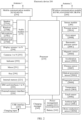
- FIG. 2 is a schematic compositional diagram of an electronic device according to an embodiment of this application.
- the electronic device 200 may include a processor 210, an external memory interface 220, an internal memory 221, a universal serial bus (universal serial bus, USB) interface 230, a charging management module 240, a power management module 241, a battery 242, an antenna 1, an antenna 2, a mobile communication module 250, a wireless communication module 260, an audio module 270, a speaker 270A, a telephone receiver 270B, a microphone 270C, a headset jack 270D, a sensor module 280, a button 290, a motor 291, an indicator 292, a camera 293, a display screen 294, a subscriber identity module (subscriber identification module, SIM) card interface 295, and the like.
- SIM subscriber identity module
- the sensor module 280 may include a pressure sensor 280A, a gyro sensor 280B, a barometric pressure sensor 280C, a magnetic sensor 280D, an acceleration sensor 280E, a distance sensor 280F, an optical proximity sensor 280G, a fingerprint sensor 280H, a temperature sensor 280J, a touch sensor 280K, an ambient light sensor 280L, a bone conduction sensor 280M, and the like.
- the schematic structure in this embodiment constitutes no specific limitation on the electronic device 200.
- the electronic device 200 may include more or fewer components than those shown in the figures, or some components may be combined, or some components may be split, or components are arranged in different manners.
- the components shown in the figure may be implemented by hardware, software, or a combination of software and hardware.
- the processor 210 may include one or more processing units.
- the processor 210 may include an application processor (application processor, AP), a modem processor, a graphics processing unit (graphics processing unit, GPU), an image signal processor (image signal processor, ISP), a controller, a video codec, a digital signal processor (digital signal processor, DSP), a baseband processor, and/or a neural-network processing unit (neural-network processing unit, NPU).
- application processor application processor, AP
- modem processor graphics processing unit
- ISP image signal processor
- controller a video codec
- DSP digital signal processor
- baseband processor baseband processor
- neural-network processing unit neural-network processing unit
- Different processing units may be independent components, or may be integrated into one or more processors.
- the controller may be a nerve center and a command center of the electronic device 200.
- the controller may generate an operation control signal based on instruction operation code and a sequence signal, to complete control of fetching and executing instructions.
- a memory may be further arranged in the processor 210, to store instructions and data.
- the memory in the processor 210 is a cache memory.
- the memory may store instructions or data recently used or cyclically used by the processor 210. If the processor 210 needs to use the instruction or the data again, the processor 210 may directly invoke the instruction or the data from the memory, which avoids repeated access and reduces a waiting time of the processor 210, thereby improving system efficiency.
- the processor 210 may include one or more interfaces.
- the interface may include an inter-integrated circuit (inter-integrated circuit, I2C) interface, an inter-integrated circuit sound (inter-integrated circuit sound, I2S) interface, a pulse code modulation (pulse code modulation, PCM) interface, a universal asynchronous receiver/transmitter (universal asynchronous receiver/transmitter, UART) interface, a mobile industry processor interface (mobile industry processor interface, MIPI), a general-purpose input/output (general-purpose input/output, GPIO) interface, a subscriber identity module (subscriber identity module, SIM) interface, and/or a universal serial bus (universal serial bus, USB) interface.
- I2C inter-integrated circuit
- I2S inter-integrated circuit sound
- PCM pulse code modulation
- PCM pulse code modulation
- UART universal asynchronous receiver/transmitter
- MIPI mobile industry processor interface
- GPIO general-purpose input/output
- SIM subscriber
- a schematic interface connection relationship between the modules in this embodiment of this application is merely an example for description, and constitutes no limitation on the structure of the electronic device 200.
- the electronic device 200 may alternatively use an interface connection manner different from that in the foregoing embodiment, or use a combination of a plurality of interface connection manners.
- a wireless communication function of the electronic device 200 may be implemented by using the antenna 1, the antenna 2, the mobile communication module 250, the wireless communication module 260, the modem processor, the baseband processor, and the like.
- the wireless communication module 260 may provide a solution for wireless communication including a wireless local area network (wireless local area networks, WLAN) (such as a wireless fidelity (wireless fidelity, Wi-Fi) network), Bluetooth (Bluetooth, BT), a global navigation satellite system (global navigation satellite system, GNSS), frequency modulation (frequency modulation, FM), a near field communication (near field communication, NFC) technology, an infrared (infrared, IR) technology, and the like to be applied to the electronic device 200.
- the wireless communication module 260 may be one or more components into which at least one communication processing module is integrated.
- the wireless communication module 260 receives an electromagnetic wave through the antenna 2, performs frequency modulation and filtering processing on the electromagnetic wave signal, and sends a processed signal to the processor 210.
- the wireless communication module 260 may further receive a to-be-sent signal from the processor 210, perform frequency modulation and amplification on the to-be-sent signal, and convert the to-be-sent signal into an electromagnetic wave for radiation through the antenna 2.
- the antenna 1 and the mobile communication module 250 of the electronic device 200 are coupled, and the antenna 2 and the wireless communication module 260 of the electronic device 200 are coupled, so that the electronic device 200 can communicate with a network and another device by using a wireless communication technology.
- the wireless communication technology may include a global system for mobile communications (global system for mobile communications, GSM), a general packet radio service (general packet radio service, GPRS), code division multiple access (code division multiple access, CDMA), wideband code division multiple access (wideband code division multiple access, WCDMA), time-division code division multiple access (time-division code division multiple access, TD-SCDMA), long term evolution (long term evolution, LTE), BT, GNSS, WLAN, NFC, FM, and/or IR technologies.
- GSM global system for mobile communications
- GPRS general packet radio service
- code division multiple access code division multiple access
- CDMA wideband code division multiple access
- WCDMA wideband code division multiple access
- time-division code division multiple access time-division code division multiple access
- LTE long term evolution
- BT GNSS
- WLAN NFC
- FM FM
- IR technologies long term evolution
- the GNSS may include a global positioning system (global positioning system, GPS), a global navigation satellite system (global navigation satellite system, GLONASS), a beidou navigation satellite system (beidou navigation satellite system, BDS), a quasi-zenith satellite system (quasi-zenith satellite system, QZSS), and/or a satellite based augmentation system (satellite based augmentation systems, SBAS).
- GPS global positioning system
- GLONASS global navigation satellite system
- BDS Bertdou navigation satellite system
- BDS quasi-zenith satellite system
- QZSS quasi-zenith satellite system
- SBAS satellite based augmentation system
- the electronic device 200 implements a display function by using the GPU, the display screen 294, the application processor, and the like.
- the GPU is a microprocessor for image processing, and is connected to the display screen 294 and the application processor.
- the GPU is configured to perform mathematical and geometric calculation, and is configured to render a graphic.
- the processor 210 may include one or more GPUs, and execute program instructions to generate or change display information.
- a series of graphical user interfaces may be displayed on the display screen 294 of the electronic device 200, and the GUIs are main screens of the electronic device 200.
- GUI graphical user interface
- dimensions of the display screen 294 of the electronic device 200 are fixed, and only a limited quantity of controls can be displayed in the display screen 294 of the electronic device 200.
- a control is a GUI element, is a software component included in an application, and controls all data processed by the application and an interaction operation related with the data. The user may interact with the control through direct manipulation (direct manipulation), to read or edit related information of the application.
- control may include visual interface elements such as an icon, a button, a menu, a tab, a text box, a dialog box, a status bar, a navigation bar, and a Widget.
- display screen 291 may display a virtual key (for one-key arrangement, start arrangement, or scene arrangement).
- the electronic device 200 may implement a photographing function by using the ISP, the camera 293, the video codec, the GPU, the display screen 294, the application processor, and the like.
- the electronic device 200 may implement an audio function, for example, music playing or recording, by using the audio module 270, the speaker 270A, the phone receiver 270B, the microphone 270C, the headset jack 270D, the application processor, and the like.
- an audio function for example, music playing or recording
- an operating system such as a Hongmeng system, an iOS operating system, an Android open source operating system, or a Windows operating system, runs on the foregoing components.
- An application may be installed and run on the operating system.
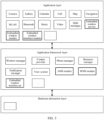
- FIG. 3 is a block diagram of a software structure of an electronic device according to an embodiment of this application.
- a software architecture of the electronic device includes at least three layers: an application layer, an application framework layer, and a hardware abstraction layer respectively from top to bottom.
- the application layer may include a series of application packages.
- the application packages may include applications such as camera, gallery, calendar, call, map, navigation, WLAN, Bluetooth, music, video, and SMS messages.
- the application layer further includes an embedded window service, an embedded window module, and an embedded window interface module.
- the embedded window service is a newly added module of a SystemUI module
- the embedded window module is a newly added module of a WM-Shell Lib module.
- the embedded window module is configured to implement main functions of embedded window display and interaction, including start/exit control, window display control, state synchronization, and event transfer.
- the embedded window interface module is configured to implement embedded window capability interface encapsulation, provided for a host process for invocation.
- the application framework layer provides an application programming interface (application programming interface, API) and a programming framework for the applications at the application layer.
- the application framework layer includes some predefined functions.
- the application framework layer may include a window manager, a content provider, a view system, a phone manager, a resource manager, a notification manager, and the like.
- the window manager is configured to manage a window program.
- the window manager may obtain a size of the display screen, determine whether there is a status bar, lock the screen, take screenshots, and the like.
- the application framework layer further includes an adjusted AMS module, an adjusted WMS module, and a newly added embedded window interface set.
- the adjusted AMS module is configured to implement embedded Activity starting and lifecycle management.
- the adjusted WMS module is configured to implement embedded Task management, intra-Task Activity jump control, focus and visibility management of an embedded window scene, config update, and compatibility management.
- the embedded window interface set is provided for a system application for use.
- the content provider is configured to store and obtain data and make the data accessible to an application.
- the data may include a video, an image, an audio, calls that are made and received, a browsing history and a bookmark, an address book, and the like.
- the view system includes visual controls such as a control for displaying text and a control for display an image.
- the view system may be configured to construct an application.
- a display interface may include one or more views.
- a display interface including a short message service notification icon may include a view for displaying text and a view for displaying an image.
- the phone manager is configured to provide a communication function of the electronic device, for example, call state management (including getting through, hang-up, and the like).
- the resource manager provides various resources such as a localized character string, an icon, an image, a layout file, and a video file for an application.
- the notification manager enables an application to display notification information on a status bar that may be configured to convey a message of a notification type, where the message may disappear automatically after a short stay without user interaction.
- the notification manager is configured to provide a notification of download completion, a message prompt, and the like.
- the notification manager may alternatively be a notification that appears on a top status bar of the system in a form of a graph or a scroll bar text, for example, a notification of an application running on the background, or may be a notification that appears on the screen in a form of a dialog window. For example, text information is prompted on the status bar, a prompt tone is made, the electronic device vibrates, or an indicator light flashes.
- the hardware abstract layer is an interface layer between an operating system kernel of the electronic device 200 and a hardware circuit, with a purpose of abstracting hardware.
- the electronic device 200 having the structures in FIG. 2 and FIG. 3 is used as an example with reference to the accompanying drawings and application scenarios to specifically describe the embedded window display method according to the embodiments of this application.
- FIG. 4 is a schematic flowchart of an embedded window display method according to an embodiment of this application.
- the embedded window display method may include the following steps.
- Step S10 When detecting a preset operation instruction, start an embedded window in a currently displayed parent window based on the preset operation instruction.
- efficient shortcut task window display is implemented by providing a capability of displaying an embedded window to an application window to support a shortcut task card.
- the user can open the application in the embedded window through a preset operation during use, an invoke mode shortcut service is directly used, and a window system provides an embedded window display and interactive capability, supporting the shortcut task card Launcher, and helping the user to efficiently use the shortcut task.
- the preset operation instruction may be a back tap operation on the electronic device, or a shortcut gesture operation, or an operation in another form. This is not limited in this embodiment. In this embodiment, a description is made below by using the back tap operation on the electronic device as an example.
- a quantity of back taps may be set, tapping for more than once within a preset time is an effective tap event, and another quantity of taps may be further set. This is not limited in this embodiment, and may be flexibly adjusted based on a requirement. Tapping twice being a back tap effective event is used as an example for description. To avoid misoperation, tapping twice is used as the back tap effective event, thereby improving accuracy of starting the embedded window.
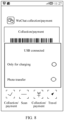
- FIG. 5 is a schematic scene diagram of embedded window starting, where 1 represents a main interface, and a shortcut task card is started by back-tapping twice.
- the embedded window displays a WeChat collection/payment application
- FIG. 6 is a schematic diagram of a display interface of an embedded window, where 10 represents an embedded window of a loaded application, and 20 represents a parent window.
- a started application may be started based on a preset application, and there may be one preset started application.
- the preset application is started in the embedded window after back-tapping twice.
- the WeChat collection/payment application is started in the embedded window, thereby implementing shortcut application starting.
- priorities of the applications may be set, and when an embedded window display application is started, an application with a highest priority is displayed first, and then other applications may be sequentially operated based on a switching operation, thereby improving effectiveness of the shortcut application starting.
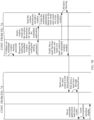
- FIG. 7A and FIG. 7B are a module interaction diagram of embedded window starting.
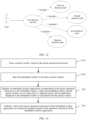
- a host process service When a starting operation of a target application is detected, a host process service is triggered, a host process sends a request for establishing a connection with an embedded window service to the embedded window service, the embedded window service sends a request for obtaining an embedded window cross-process communication instance to an embedded window module, the embedded window module returns the embedded window cross-process communication instance to the embedded window service, and the embedded window service returns the embedded window cross-process communication instance to the host process, to implement direct communication of the host process with the embedded window module, where the host process may be a process corresponding to the parent window.
- the host process After the host process establishes a communication connection with the embedded window module, the host process first performs initialization, and completes drawing of the parent window.
- a specific drawing process is that the host process sends and adds a parent window request to a WMS, where the parent window request includes placeholder map information, and sends a window size of the parent window to a Graphics drawing module for window drawing.
- the host process further sends layer information to a SurfaceFlinger for layer composition of the parent window. After the layer composition is completed, the parent window is displayed, and then the host process sends a request for starting the embedded window to the embedded window module.
- the request further includes a starting parameter, and the starting parameter includes a target window, window dimensions, a stack mode, a touch mode, and a Back mode, where the target window represents a window of a corresponding started application, the window dimensions represent dimensions of the embedded window, the stack mode includes an application processing manner in the embedded window, including a new stack, an unstack mode, and a multiplexed main stack mode, the touch mode represents whether a control configured with a touch interaction operation is needed in the embedded window, and the Back mode represents an application return processing manner in the embedded window.
- the target window represents a window of a corresponding started application
- the window dimensions represent dimensions of the embedded window
- the stack mode includes an application processing manner in the embedded window, including a new stack, an unstack mode, and a multiplexed main stack mode
- the touch mode represents whether a control configured with a touch interaction operation is needed in the embedded window
- the Back mode represents an application return processing manner in the embedded window.
- the embedded window module configures a target window of the embedded window, a window mode, window dimensions, a mark bit of the embedded window, and a stack mode based on the received starting parameter, where the window mode represents a display mode of the embedded window, including a display mode such as multi-window, picture-in-picture, or a floating window, and the mark bit of the embedded window represents identification information of the embedded window.
- the embedded window module sends the target window, the window mode, the window dimensions, the mark bit of the embedded window, and the stack mode to an AMS module.
- the AMS module sends the window mode and the window dimensions to an embedded application based on the target window for window pull-up, and then sends the mark bit of the embedded window and the stack mode to a WMS module.
- the embedded application sends the window dimensions to the WMS module for window addition, the WMS module performs window drawing based on the window dimensions and the window size, and a drawing process of the embedded window by the WMS module includes:
- the embedded application sends the window size to the Graphics drawing module, the Graphics drawing module notifies the WMS module after drawing is completed, the WMS module notifies the embedded window module of creation after the drawing is completed, stack control is handed over to the embedded window module, the embedded window module hands over the stack control to the host process, and the host process performs the layer composition to implement display of the window.
- That the host process performs the layer composition specifically includes: The host process pulls down a stack layer through SurfaceView and sends a configuration request for setting an embedded application stack layer visible to a SurfaceFlinger module, and the SurfaceFlinger module performs the layer composition, and notifies an interactive module for interface display after the composition is completed, thereby completing the embedded window starting.
- an effect of the embedded window may also be started in a floating window form, then an upper layer is covered with a system card wallet window, and an application interface at a lower layer is shown after the card wallet window is "hollowed out". In this manner, there is no need to add an additional window capability, and a card display effect is achieved with less effort, but there are problems in three aspects.
- control of the embedded window is handed over to the host process through the embedded window module after window drawing is completed through the embedded window, and the Back mode of the embedded window is determined by the parent window, to ensure normal use of the embedded window.
- the Back mode of the embedded window may be configured based on a requirement, it is determined to return to a designated main interface or application based on the Back mode. For example, when the embedded window is displayed as the WeChat collection/payment application, the user performs a return operation. In the new stack and the unstack mode, a Back event is triggered in a scenario that an embedded Task root Activity is displayed in the foreground, the Back event is consumed in an Android native flow, and service logic is: destroying the Activity. Eventually, the embedded window is destroyed and the parent window thereof is undestroyed, causing a display error.
- the Back event is triggered in the scenario that the embedded Task root Activity is displayed in the foreground, the Back event is consumed in the Android native flow, and the business logic is: destroying the Activity, and displaying another Activity under the Activity. Eventually, an embedded window that is not pulled up by the user is displayed in an embedded window display area.
- the user when it is determined to return to the designated main interface through the Back mode, the user performs the return operation to return to the main interface when the embedded window is displayed as the WeChat collection/payment application, thereby avoiding causing the display error or displaying the embedded window that is not pulled up by the user in the embedded window display area.
- the user when it is determined to return to a designated upper-layer application through the Back mode, the user performs the return operation to return to an upper-layer application interface when the embedded window is displayed as the WeChat collection/payment application, thereby avoiding causing the display error or displaying the embedded window that is not pulled up by the user in the embedded window display area.
- the Back mode may also be flexibly configured based on a requirement, thereby improving flexibility of interface operation display.
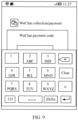
- FIG. 9 is a schematic diagram of an input interface covering an embedded window.
- a problem of hierarchical association may be resolved, and an embedded window interaction operation is supported.
- the system provides a plurality of embedded Task stack operation modes, including a stand-alone Task, a multiplexed master Task, and main Task unstack, and an appropriate operation mode is selected based on compatibility of the embedded application.
- a synchronization event notification is added, and necessary adjustment is made to an embedded application window by a shortcut service card Launcher. Specifically, a preset synchronization event is obtained, and a display position of the embedded window is adjusted based on the preset synchronization event.
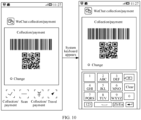
- FIG. 10 is a schematic diagram of an adjusted embedded window.
- the preset synchronization event may be starting another system application. For example, in a case that an input interface operation needs to be performed when the WeChat collection/payment application is displayed in the embedded window, the embedded window may be moved up, to avoid a case of the input interface covering the embedded window, thereby improving effectiveness of use of the embedded window.
- the window mode of the embedded window is determined by the host process, to ensure normal use of the embedded window.
- a starting state of an application lock authentication interface can only be consistent with a starting interface.
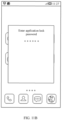
- an application lock interface is loaded in a floating window, picture-in-picture pip, or a bubble, an interface form thereof is naturally the floating window, the picture-in-picture, or the bubble, as shown in an application lock interface in a picture-in-picture mode in FIG.
- FIG. 11A and FIG. 11B are schematic scene diagrams of application lock interface display in the prior art.
- a preset display mode of the application lock interface is obtained based on the starting operation.
- the application lock interface is displayed based on the preset display mode of the application lock interface, so that the application lock interface may be displayed based on the preset display mode of the application lock interface, namely, the window mode, there is no need of determining based on a form of the starting interface, and flexibility of starting of the application lock authentication interface is improved.
- the application lock interface is set for full-screen display, to ensure normal display of the application lock interface.
- the embedded window module obtains the preset display mode of the application lock interface, namely, the window mode, designates the display mode based on a configuration, and starts the embedded window through the AMS module in the display mode.
- the AMS module then sends the display mode and the window dimensions to the embedded application for pulling up an embedded application window, thereby avoiding determining based on the form of the starting interface, but displaying the application lock interface through the preset display mode of the application lock interface, improving the flexibility of the starting of the application lock authentication interface.
- a foreground focus is generally on the embedded window.
- the to-be-processed event is transmitted to a window corresponding to the foreground focus for processing.
- a Back event is triggered in a scenario that an embedded Task root Activity is displayed in the foreground, the Back event is consumed in an Android native flow, and service logic is: destroying the Activity.
- the embedded window is destroyed and the parent window thereof is undestroyed, causing a display error.
- the Back event is triggered in the scenario that the embedded Task root Activity is displayed in the foreground, the Back event is consumed in the Android native flow, and the business logic is: destroying the Activity, and displaying another Activity under the Activity.
- the to-be-processed event is handed over to the host process corresponding to the parent window for processing, and interaction between the embedded window and the parent window thereof is implemented.
- a foreground focus window is the embedded window or not is first determined.
- the foregoing problem does not occur if the foreground focus window is not the embedded window, and the foregoing problem occurs if the foreground focus window is the embedded window, thereby improving efficiency of system processing.
- a NativeInputManager module sends the to-be-processed event to a PhoneWindowManager module when obtaining the to-be-processed event, the PhoneWindowManager module sends an instruction for determining whether the foreground focus window is the embedded window to a WindowState module, and the WindowState module determines whether a global variable mActivityRecord is empty.
- a determining result is returned to the PhoneWindowManager module, and the PhoneWindowManager module returns the determining result to the NativeInputManager module.
- the global variable mActivityRecord is not empty, whether the foreground focus window is the embedded window is determined.
- the host process is called back and notified to an ActivityTaskManageInternal module, and the ActivityTaskManageInternal module then notifies an HnEmbeddedView module, thereby notifying the host process for processing.
- a determining result is returned to the PhoneWindowManager module, and the PhoneWindowManager module returns the determining result to the NativeInputManager module.
- the NativeInputManager module sends the determined to-be-processed event to an InputDispatcher module, and the InputDispatcher module determines whether the to-be-processed event includes the foreground processing tag.
- the to-be-processed event is dispatched to a foreground focus window application for processing. If it is determined that the to-be-processed event does not include the foreground processing tag, the to-be-processed event is discarded.
- Step S20 Display an application corresponding to the preset operation instruction and an interaction component in the embedded window, where the embedded window and the parent window are at a same layer or adjacent layers, and an application displayed in the embedded window is associated with the parent window.
- the interaction component when the application corresponding to the preset operation instruction is displayed in the embedded window, the interaction component may be further displayed. Still, a change component shown in FIG. 6 may be operated, and during specific implementation, when the embedded window is configured, the interaction component in the embedded window may be determined by setting the touch mode, thereby implementing the user operation, and improving the user interaction experience.
- Step S30 Perform, when receiving an operation instruction of the embedded window application, an interaction operation based on the operation instruction of the embedded window application.
- FIG. 12 is a schematic diagram of functions of a shortcut card.
- the user may implement functions such as calling out the shortcut card, switching the shortcut card, exiting the shortcut card, and operating the shortcut card, thereby expanding the function of the shortcut card and enhancing use of the shortcut card.
- an Android Bubble feature embeds the application interface into a Bubble window.
- Another application requires special adaptation.
- an embedded application in this embodiment does not require special adaptation.
- a host process of an Android Bubble embedded window can only be SystemUI, while any application in this embodiment can be used as a host process.
- the embedded window when the preset operation instruction is detected, the embedded window is started in the currently displayed parent window based on the preset operation instruction; the embedded window application corresponding to the preset operation instruction is displayed in the embedded window, where the embedded window and the parent window are at the same layer or the adjacent layers, and the application displayed in the embedded window is associated with the parent window; and when the operation instruction of the embedded window application is received, the interaction operation is performed based on the operation instruction of the embedded window application. Therefore, the corresponding application is opened through the embedded window, a one-key operation is achieved, the operation is more convenient, and this application can be used for any application without requiring special adaptation.
- FIG. 13 is a flowchart of an embedded window display method according to another embodiment of this application. As shown in FIG. 13 , the embedded window display method is based on the first embodiment, and step S10 includes the following steps.
- Step S101 Draw a parent window based on the preset operation instruction.
- a window size of a to-be-drawn parent window and placeholder information of an embedded window in the to-be-drawn parent window are obtained; and window drawing and layer composition are performed based on the window size of the to-be-drawn parent window and the placeholder information of the embedded window, to obtain the drawn parent window.
- Loading of the placeholder information in the parent window is shown in FIG. 14 , where 30 represents a placeholder area at the embedded window.
- the placeholder information of the embedded window in the to-be-drawn parent window is included, the parent window is drawn based on the placeholder information of the embedded window in the to-be-drawn parent window, and the display area of the embedded window is reserved based on the placeholder information of the embedded window, to facilitate the loading of the embedded window application.
- the starting an embedded window in a currently displayed parent window based on the preset operation instruction includes: obtaining a target window, a window mode, window dimensions of the embedded window, a mark bit of the embedded window, a stack mode of the embedded window, and a touch mode of the embedded window; and drawing the embedded window based on the target window, the window mode, the window dimensions of the embedded window, the mark bit of the embedded window, the stack mode of the embedded window, and the touch mode of the embedded window, to obtain the embedded window.
- FIG. 7A and FIG. 7B are a module interaction diagram of embedded window starting.
- the embedded window is configured by using the starting parameter, and the drawing of the embedded window is completed.
- the starting parameter includes the target window, the window mode, the window dimensions of the embedded window, the mark bit of the embedded window, the stack mode of the embedded window, the touch mode of the embedded window, the Back mode, and the like.
- the method further includes: when completing creation of the stack mode of the embedded window, handing over stack control to a host process corresponding to the parent window.
- the stack mode of the embedded window in this embodiment may be adjusted based on an actual requirement. Because the embedded window is started in this embodiment, after the embedded window is started, and when the foreground focus is on the embedded window, generally, when an operation event is obtained, the operation event is processed by the embedded window corresponding to the foreground focus. However, in a case that the embedded window goes wrong, for example, an error occurs in an application, the operation event cannot be processed, while in this embodiment, the stack control is handed over to the host process corresponding to the parent window without being processed through the embedded window. By handing over the stack control to the host process corresponding to the parent window, when the operation event is obtained, event processing is performed on the operation event through the host process corresponding to the parent window, to ensure a normal response to the event.
- Step S102 Start the embedded window in the drawn parent window.
- a window size of an application corresponding to the preset operation instruction and configured window dimensions of the embedded window are obtained; and a display area of the application corresponding to the preset operation instruction is determined based on the window size and the configured window dimensions of the embedded window; and the application corresponding to the preset operation instruction is displayed based on the display area.
- the window dimensions have been configured for the embedded window module, but the configured window dimensions of the embedded window module may be inconsistent with the window size of the pulled-up embedded application.
- moderate adjustment may be performed based on the window size and the configured window dimensions of the embedded window.
- FIG. 15 is a flowchart of an embedded window display method according to another embodiment of this application. As shown in FIG. 15 , the embedded window display method is based on the first embodiment, and step S30 includes the following steps.
- Step S301 Perform interface switching based on the operation instruction of the embedded window application when receiving the operation instruction of the embedded window application.
- an interaction component is arranged on the embedded window application.
- An interaction operation may be performed through the change component.
- the operation instruction of the embedded window application may alternatively be a left slide operation or a right slide operation, or an operation in another form.
- switching of the embedded window application may be implemented. For example, WeChat collection/payment of the embedded window application is switched to an Alipay payment application.
- An embedded window application switching scene is shown in FIG. 16 .
- the interaction component may also be arranged in the embedded window, and application switching is performed through the interaction component, thereby performing interface switching.
- the interaction component may be a switching button, or may be a switching manner in another form. This is not limited in this embodiment.
- the interaction component may also be arranged on a shortcut task card.
- the shortcut task card is a Launcher started through a preset operation.
- the shortcut task card includes the embedded window and the interaction component, and application switching is performed through the interaction component arranged on the shortcut task card.
- An embedded window application switching scene of another embodiment is shown in FIG. 17 .
- the interaction component such as collection/payment in the shortcut task card, the WeChat collection/payment application in the embedded window application may be switched to the Alipay payment application, thereby improving flexibility of embedded window display.
- the method further includes: obtaining an exit instruction, and returning to a target interface based on the exit instruction. This is specifically: removing an embedded task stack based on the exit instruction, and returning to the target interface.
- the interaction component arranged on the embedded window application may also be a close control.
- the exit instruction may be obtained by tapping the close control, and the exit instruction may be further executed through a sliding operation.
- the target interface may be a main interface, or may be an upper-layer application interface running in the system. This is not limited in this embodiment.
- a Back mode may be set when the embedded window is configured, the embedded window may be return to the designated target interface through the Back mode when exited. For example, if the Back mode is configured as the main interface, the embedded window is exited when an exit event is monitored by the embedded window.
- FIG. 18 is a module interaction diagram of embedded window exiting.
- a host process service is triggered to be closed.
- the host process sends a request for closing the embedded window to the embedded window module
- the embedded window module sends a request for removing an embedded Task to the AMS module
- the AMS module sends a request for closing the embedded application to the embedded application
- the AMS module further sends a request for destroying the embedded Task to the WMS module
- the WMS module destroys the embedded Task and notifies the embedded window module that the embedded Task has been destroyed
- the embedded window module notifies the host process that the embedded Task has been destroyed.
- An interface of the embedded window displayed at the interaction module disappears, and the embedded window returns to the designated target interface.
- FIG. 19 is a schematic scene diagram of embedded window exiting.
- an exit function of the embedded window is implemented at the embedded window, and the embedded task stack is removed based on the exit instruction, the embedded window returns to the target interface, thereby returning to the designated target interface and improving accuracy of interface display.
- FIG. 20 is a schematic structural diagram of an embedded window display apparatus according to this application.
- the embedded window display apparatus 900 provided in this application includes:
- a starting module 901 configured to: when a preset operation instruction is detected, start an embedded window in a currently displayed parent window based on the preset operation instruction;
- a display module 902 configured to display an embedded window application corresponding to the preset operation instruction in the embedded window, where the embedded window and the parent window are at a same layer or adjacent layers, and an application displayed in the embedded window is associated with the parent window;
- an operation module 903 configured to perform, when an operation instruction of the embedded window application is received, an interaction operation based on the operation instruction of the embedded window application.
- the embedded window display method in this embodiment, when the preset operation instruction is detected, the embedded window is started in the currently displayed parent window based on the preset operation instruction; the embedded window application corresponding to the preset operation instruction is displayed in the embedded window, where the embedded window and the parent window are at the same layer or the adj acent layers, and the application displayed in the embedded window is associated with the parent window; and when the operation instruction of the embedded window application is received, the interaction operation is performed based on the operation instruction of the embedded window application. Therefore, the corresponding application is opened through the embedded window, a one-key operation is achieved, the operation is more convenient, and this application can be used for any application without requiring special adaptation.
- the starting module 901 is further configured to: the starting an embedded window in a currently displayed parent window based on the preset operation instruction includes:
- the starting module 901 is further configured to obtain a window size of a to-be-drawn parent window and placeholder information of an embedded window in the to-be-drawn parent window; and perform window drawing and layer composition based on the window size of the to-be-drawn parent window and the placeholder information of the embedded window, to obtain the drawn parent window.
- the starting module 901 is further configured to obtain a target window, a window mode, window dimensions of the embedded window, a mark bit of the embedded window, a stack mode of the embedded window, and a touch mode of the embedded window; and perform drawing of the embedded window based on the target window, the window mode, the window dimensions of the embedded window, the mark bit of the embedded window, the stack mode of the embedded window, and the touch mode of the embedded window, to obtain the embedded window.
- the starting module 901 is further configured to: when creation of the stack mode of the embedded window is completed, hand over stack control to a host process corresponding to the parent window.
- the display module 902 is further configured to: during drawing of the embedded window, obtain a window size of an application corresponding to the preset operation instruction and configured window dimensions of the embedded window; determine a display area of the application corresponding to the preset operation instruction based on the window size and the configured window dimensions of the embedded window; and display the application corresponding to the preset operation instruction based on the display area.
- the display module 902 is further configured to obtain a preset synchronization event; and adjust a display position of the embedded window based on the preset synchronization event.
- the operation module 903 is further configured to perform interface switching based on the operation instruction of the embedded window application when the operation instruction of the embedded window application is received.
- the operation module 903 is further configured to obtain an exit instruction, and return to a target interface based on the exit instruction.
- the operation module 903 is further configured to remove an embedded task stack based on the exit instruction, and return to the target interface.
- module may be implemented through the form of software and/or hardware, which is not specifically limited.
- the "module” may be a software program, a hardware circuit, or a combination of the two, to implement the foregoing functions.
- the hardware circuit may include an application specific integrated circuit (application specific integrated circuit, ASIC), an electronic circuit, a processor (for example, a shared processor, a dedicated processor, or a packet processor) configured to execute one or more software or firmware programs, a memory, a combined logical circuit, and/or another suitable component that supports the described functions.
- ASIC application specific integrated circuit
- processor for example, a shared processor, a dedicated processor, or a packet processor
- This application further provides an electronic device, including: one or more processors; a memory; and one or more computer programs, where the one or more computer programs are stored in the memory, the one or more computer programs include instructions, and the instructions, when executed by the electronic device, cause the electronic device to perform the embedded window display method according to any one of the foregoing first aspect or the possible implementations of the first aspect.
- This application further provides a computer-readable storage medium, having a computer program stored therein, the computer program, when executed by a processor, causing the processor to perform the embedded window display method according to any one of the foregoing first aspect or the possible implementations of the first aspect.
- This application further provides a chip, including a processor and a data interface, where the processor reads, through the data interface, instructions stored in the memory, to perform the embedded window display method according to any one of the foregoing first aspect or the possible implementations of the first aspect.
- the chip may further include the memory, having the instructions stored therein, where the processor is configured to execute the instructions stored in the memory, and when the instructions are executed, the processor is configured to perform the embedded window display method according to any one of the foregoing first aspect or the possible implementations of the first aspect.
- the memory may be a read-only memory (read-only memory, ROM), another type of static storage device that can store static information and instructions, a random access memory (random access memory, RAM), or another type of dynamic storage device that can store information and instructions, or may be an electrically erasable programmable read-only memory (electrically erasable programmable read-only memory, EEPROM) or a compact disc read-only memory (compact disc read-only memory, CD-ROM) or another compact disc storage, optical disc storage (comprising compressed optical discs, laser discs, optical discs, digital versatile optical discs, and Blu-ray discs), magnetic disk storage media, or another magnetic storage device, or may be any another medium that can be used to carry or store desired program code in the form of an instruction or a data structure and that can be accessed by a computer.
- ROM read-only memory
- RAM random access memory
- EEPROM electrically erasable programmable read-only memory
- compact disc read-only memory compact disc read-only memory
- a and/or B may represent the following cases: Only A exists, both A and B exist, and only B exists. A and B may be singular or plural.
- the character “/” generally indicates an "or” relationship between the associated objects.
- "At least one of the followings” and similar expressions refer to any combination of these terms, including any combination of a singular or plural term. For example, at least one of a, b, or c may represent a, b, c, "a-b", “a-c", “b-c”, or "a-b-c", where a, b, and c may be singular or plural.
- the functions when any function is implemented in the form of a software functional unit and sold or used as an independent product, the functions may be stored in a computer-readable storage medium.
- the computer software product is stored in a storage medium, and comprises several instructions for instructing a computer device (which may be a personal computer, a server, a network device, or the like) to perform all or some of the steps of the methods described in the embodiments of this application.
- the foregoing storage medium includes: any medium that can store program code, such as a USB flash drive, a removable hard disk, a read-only memory (read-only memory, ROM), a random access memory (random access memory, RAM), a magnetic disk, or an optical disc.
- program code such as a USB flash drive, a removable hard disk, a read-only memory (read-only memory, ROM), a random access memory (random access memory, RAM), a magnetic disk, or an optical disc.
Landscapes
- Engineering & Computer Science (AREA)
- Theoretical Computer Science (AREA)
- General Engineering & Computer Science (AREA)
- Physics & Mathematics (AREA)
- General Physics & Mathematics (AREA)
- Human Computer Interaction (AREA)
- Software Systems (AREA)
- User Interface Of Digital Computer (AREA)
Applications Claiming Priority (2)
| Application Number | Priority Date | Filing Date | Title |
|---|---|---|---|
| CN202211203385.2A CN117827044A (zh) | 2022-09-29 | 2022-09-29 | 嵌入式窗口显示方法、装置、电子设备及可读存储介质 |
| PCT/CN2023/112680 WO2024066764A1 (fr) | 2022-09-29 | 2023-08-11 | Procédé et appareil d'affichage de fenêtre intégrée, dispositif électronique et support de stockage lisible |
Publications (3)
| Publication Number | Publication Date |
|---|---|
| EP4468131A1 true EP4468131A1 (fr) | 2024-11-27 |
| EP4468131A4 EP4468131A4 (fr) | 2025-06-25 |
| EP4468131B1 EP4468131B1 (fr) | 2026-07-08 |
Family
ID=90475968
Family Applications (1)
| Application Number | Title | Priority Date | Filing Date |
|---|---|---|---|
| EP23870010.8A Active EP4468131B1 (fr) | 2022-09-29 | 2023-08-11 | Procédé et appareil d'affichage de fenêtre intégrée, dispositif électronique et support de stockage lisible |
Country Status (4)
| Country | Link |
|---|---|
| US (1) | US20250208743A1 (fr) |
| EP (1) | EP4468131B1 (fr) |
| CN (2) | CN117827044A (fr) |
| WO (1) | WO2024066764A1 (fr) |
Families Citing this family (2)
| Publication number | Priority date | Publication date | Assignee | Title |
|---|---|---|---|---|
| CN121166239A (zh) * | 2024-06-12 | 2025-12-19 | 荣耀终端股份有限公司 | 应用启动方法和装置 |
| CN122018739B (zh) * | 2026-04-09 | 2026-06-26 | 北京麟卓信息科技有限公司 | 一种容器化鸿蒙应用的多窗口交互优化方法 |
Family Cites Families (7)
| Publication number | Priority date | Publication date | Assignee | Title |
|---|---|---|---|---|
| US6683629B1 (en) * | 2000-08-03 | 2004-01-27 | Neoplanet, Inc. | Method in a computer system for embedding a child window in a parent window |
| CN104142758B (zh) * | 2014-08-13 | 2017-07-04 | 福建星网视易信息系统有限公司 | 一种嵌入式窗口管理方法及装置 |
| CN109086095A (zh) * | 2018-06-20 | 2018-12-25 | 宇龙计算机通信科技(深圳)有限公司 | 应用程序快速开启方法、装置、终端及存储介质 |
| CN109947342A (zh) * | 2019-03-12 | 2019-06-28 | 惠州Tcl移动通信有限公司 | 移动终端、应用启动方法及存储介质 |
| CN110058777B (zh) * | 2019-03-13 | 2022-03-29 | 华为技术有限公司 | 快捷功能启动的方法及电子设备 |
| CN114363462B (zh) * | 2020-09-30 | 2023-01-06 | 华为技术有限公司 | 一种界面显示方法、电子设备及计算机可读介质 |
| CN113835569A (zh) * | 2021-09-14 | 2021-12-24 | 青岛海信移动通信技术股份有限公司 | 终端设备、应用内部功能的快捷启动方法和存储介质 |
-
2022
- 2022-09-29 CN CN202211203385.2A patent/CN117827044A/zh active Pending
-
2023
- 2023-08-11 WO PCT/CN2023/112680 patent/WO2024066764A1/fr not_active Ceased
- 2023-08-11 EP EP23870010.8A patent/EP4468131B1/fr active Active
- 2023-08-11 CN CN202380066748.9A patent/CN119895368A/zh active Pending
- 2023-08-11 US US18/845,580 patent/US20250208743A1/en active Pending
Also Published As
| Publication number | Publication date |
|---|---|
| EP4468131B1 (fr) | 2026-07-08 |
| CN117827044A (zh) | 2024-04-05 |
| EP4468131A4 (fr) | 2025-06-25 |
| WO2024066764A1 (fr) | 2024-04-04 |
| US20250208743A1 (en) | 2025-06-26 |
| CN119895368A (zh) | 2025-04-25 |
Similar Documents
| Publication | Publication Date | Title |
|---|---|---|
| US11449220B2 (en) | Electronic device including touch sensitive display and method for managing the display | |
| US20250013348A1 (en) | Multi-Window Interface with Historical Task Bar | |
| EP3726356A1 (fr) | Appareil et procédé d'affichage d'interface utilisateur, dispositif, et support de stockage | |
| CN114047867B (zh) | 一种悬浮窗显示方法及电子设备 | |
| US20100299597A1 (en) | Display management method and system of mobile terminal | |
| US20180121027A1 (en) | Screen controlling method and electronic device thereof | |
| EP4280058B1 (fr) | Procédé d'affichage d'informations et dispositif électronique | |
| US20250208743A1 (en) | Embedded window display method and apparatus, electronic device, and readable storage medium | |
| WO2026086759A1 (fr) | Procédé d'affichage d'interface interactive, dispositif électronique et support de stockage | |
| CN117827476B (zh) | 事件处理方法、装置、电子设备及可读存储介质 | |
| WO2025044459A1 (fr) | Procédé d'affichage de fenêtre et dispositif électronique | |
| CN113760164A (zh) | 显示设备及其控制操作的响应方法 | |
| CN117827334B (zh) | 应用锁的启动方法、装置、电子设备及可读存储介质 | |
| CN117785346B (zh) | 界面显示方法和电子设备 | |
| CN112860302A (zh) | 应用程序控制方法、装置、电子设备和可读存储介质 | |
| EP4543019A1 (fr) | Procédé de d'enregistrement d'écran et dispositif électronique | |
| CN121050811A (zh) | 消息通知方法、用户界面及相关装置 | |
| CN121680980A (zh) | 显示方法、电子设备、计算机程序产品及可读存储介质 | |
| CN120768981A (zh) | 应用启动方法、电子设备及存储介质 |
Legal Events
| Date | Code | Title | Description |
|---|---|---|---|
| STAA | Information on the status of an ep patent application or granted ep patent |
Free format text: STATUS: THE INTERNATIONAL PUBLICATION HAS BEEN MADE |
|
| PUAI | Public reference made under article 153(3) epc to a published international application that has entered the european phase |
Free format text: ORIGINAL CODE: 0009012 |
|
| STAA | Information on the status of an ep patent application or granted ep patent |
Free format text: STATUS: REQUEST FOR EXAMINATION WAS MADE |
|
| 17P | Request for examination filed |
Effective date: 20240821 |
|
| AK | Designated contracting states |
Kind code of ref document: A1 Designated state(s): AL AT BE BG CH CY CZ DE DK EE ES FI FR GB GR HR HU IE IS IT LI LT LU LV MC ME MK MT NL NO PL PT RO RS SE SI SK SM TR |
|
| A4 | Supplementary search report drawn up and despatched |
Effective date: 20250526 |
|
| RIC1 | Information provided on ipc code assigned before grant |
Ipc: G06F 3/0488 20220101ALI20250520BHEP Ipc: G06F 9/445 20180101ALI20250520BHEP Ipc: G06F 3/048 20130101AFI20250520BHEP |
|
| STAA | Information on the status of an ep patent application or granted ep patent |
Free format text: STATUS: EXAMINATION IS IN PROGRESS |
|
| 17Q | First examination report despatched |
Effective date: 20251001 |
|
| DAV | Request for validation of the european patent (deleted) | ||
| DAX | Request for extension of the european patent (deleted) | ||
| GRAP | Despatch of communication of intention to grant a patent |
Free format text: ORIGINAL CODE: EPIDOSNIGR1 |
|
| STAA | Information on the status of an ep patent application or granted ep patent |
Free format text: STATUS: GRANT OF PATENT IS INTENDED |
|
| INTG | Intention to grant announced |
Effective date: 20260203 |
|
| GRAS | Grant fee paid |
Free format text: ORIGINAL CODE: EPIDOSNIGR3 |
|
| GRAA | (expected) grant |
Free format text: ORIGINAL CODE: 0009210 |
|
| STAA | Information on the status of an ep patent application or granted ep patent |
Free format text: STATUS: THE PATENT HAS BEEN GRANTED |
|
| AK | Designated contracting states |
Kind code of ref document: B1 Designated state(s): AL AT BE BG CH CY CZ DE DK EE ES FI FR GB GR HR HU IE IS IT LI LT LU LV MC ME MK MT NL NO PL PT RO RS SE SI SK SM TR |
|
| REG | Reference to a national code |
Ref country code: CH Ref legal event code: F10 Free format text: ST27 STATUS EVENT CODE: U-0-0-F10-F00 (AS PROVIDED BY THE NATIONAL OFFICE) Effective date: 20260708 Ref country code: GB Ref legal event code: FG4D |
|
| REG | Reference to a national code |
Ref country code: IE Ref legal event code: FG4D |
|
| REG | Reference to a national code |
Ref country code: DE Ref legal event code: R096 Ref document number: 602023019760 Country of ref document: DE |